transmission MERCEDES-BENZ C-CLASS CABRIOLET 2018 Owners Manual
[x] Cancel search | Manufacturer: MERCEDES-BENZ, Model Year: 2018, Model line: C-CLASS CABRIOLET, Model: MERCEDES-BENZ C-CLASS CABRIOLET 2018Pages: 589, PDF Size: 10.55 MB
Page 6 of 589
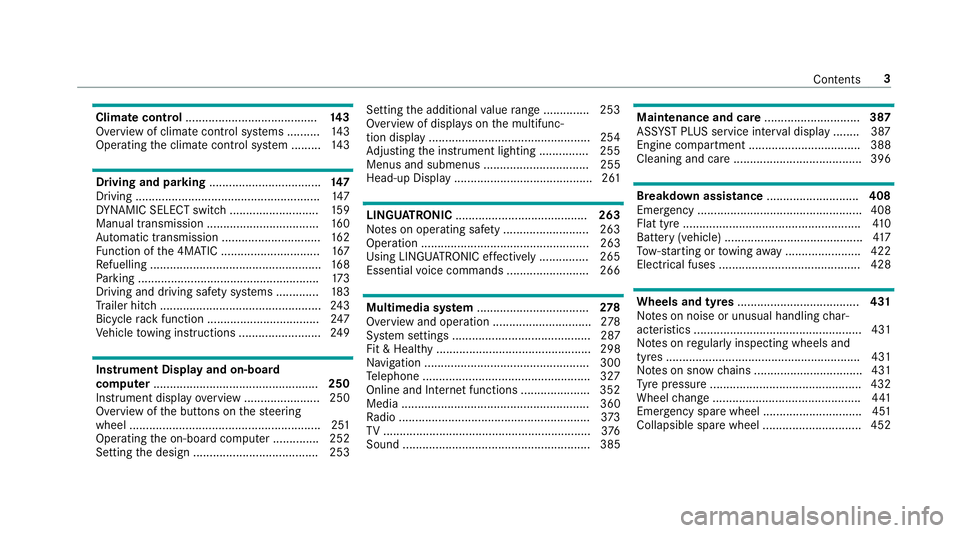
Climate control
........................................ 14 3
Overview of climate contro l systems ..........1 43
Operating the climate control sy stem ......... 14 3 Driving and pa
rking .................................. 147
Driving ........................................................ 147
DY NA MIC SELECT switch ........................... 15 9
Manual transmission ..................................1 60
Au tomatic transmission .............................. 16 2
Fu nction of the 4MATIC .............................. 167
Re fuelling .................................................... 16 8
Pa rking ...................................................... .173
Driving and driving sa fety sy stems .............1 83
Tr ailer hit ch................................................. 24 3
Bicycle rack function .................................. 247
Ve hicle towing instructions ........................ .249 Instrument Display and on-board
comp uter.................................................. 250
Instrument display overview ...................... .250
Overview of the buttons on thesteering
wheel ..........................................................2 51
Operating the on-board computer .............. 252
Setting the design ...................................... 253 Setting
the additional value range .............. 253
Overview of displ ays on the multifunc‐
tion display .................................................2 54
Ad justing the instrument lighting ............... 255
Menus and submenus ................................ 255
Head-up Display .......................................... 261 LINGU
ATRO NIC ........................................ 263
No tes on operating saf ety .......................... 263
Ope ration ................................................... 263
Using LINGU ATRO NIC ef fectively ............... 265
Essential voice commands ........................ .266 Multimedia sy
stem .................................. 278
Overview and operation .............................. 278
Sy stem settings .......................................... 287
Fit & Healt hy............................................... 298
Na vigation .................................................. 300
Te lephone .................................................. .327
Online and Internet functions ..................... 352
Media ......................................................... 360
Ra dio .......................................................... 373
TV ............................................................... 376
Sound ......................................................... 385 Main
tenance and care ............................. 387
ASS YST PLUS service inter val display ........ 387
Engine compartment .................................. 388
Cleaning and care ...................................... .396 Breakdown assi
stance ............................ 408
Emergency ................................................. .408
Flat tyre ...................................................... 41 0
Battery (vehicle) .......................................... 417
To w- starting or towing away ....................... 422
Electrical fuses ........................................... 428 Wheels and tyres
..................................... 431
No tes on noise or unusual handling char‐
acteristics .................................................. .431
No tes on regular lyinspecting wheels and
tyres .......................................................... .431
No tes on snow chains ................................ .431
Ty re pressure .............................................. 432
Wheel change ............................................ .441
Emergency spare wheel .............................. 451
Collapsible spare wheel .............................. 452 Contents
3
Page 33 of 589

Depending on
the selected equipment, you can
import data into theve hicle's comfort and info‐
ta inment functions yourself.
This includes, forex ample:
R multimedia data such as music, films or pho‐
to sfo r playback in an integrated multimedia
sy stem
R address book data for use in connection with
an integrated hands-free sy stem or an inte‐
grated navigation sy stem
R entered navigation destinations
R data about the use of Internet services
This data can be sa ved locally in theve hicle or it
is located on a device which you ha veconnected
to theve hicle (e.g. smartphone, USB flash drive
or MP3 pla yer). If this data is stored in theve hi‐
cle, you can dele teit at any time. This data is
sent tothird parties only at your requ est, partic‐
ular lywhen you use online services in accord‐
ance with the settings that you ha veselected.
Yo u can store or change con venience settings/
individualisations in theve hicle at any time. Depending on
the equipment, this includes, for
ex ample:
R settings forth e seat and steering wheel posi‐
tions
R suspension and climate control settings
R customisations such as interior lighting
If yo ur vehicle is accordingly equipped, you can
connect your smartphone or ano ther mobile end
device totheve hicle. You can cont rolth is by
means of the control elements integrated in the
ve hicle. Images and audio from the smartphone
can be output via the multimedia sy stem. Cer‐
ta in information is simultaneously transfer redto
yo ur smartphone.
Depending on the type of integration, this can
include:
R general vehicle data
R position data
This allo wsyouto use selected apps on your
smartphone, such as navigation or music play‐
bac k.There is no fur ther interaction between the
smartphone and theve hicle; in particular, vehi‐
cle data is not directly accessible. Which type of fur
ther data processing occurs is de term ined by
th e pr ovider of the specific app used. Which set‐
tings you can make, if an y,depends on the spe‐
cific app and the operating sy stem of your
smartphone. Online services
Wire
less network connection
If yo ur vehicle has a wireless network connec‐
tion, it enables data tobe exc hanged between
yo ur vehicle and additional sy stems. The wire‐
less network connection is enabled via theve hi‐
cle's transmission and reception unit or via con‐
nected mobile end devices (e.g. sma rtphones).
Online functions can be used via the wireless
network connection. This includes online serv‐
ices and applications/apps pr ovided bythe man‐
ufacturer or other pr oviders.
Manu factu rer's se rvices
Re garding online services of the manufacturer,
th e individual functions are described bythe
manufacturer in a suita ble place (e.g. Owner's
Manual, website of the manufacturer) along with
th ere leva nt da taprotection information. Per‐ 30
General no tes
Page 55 of 589

Obser
vewhen stopping or parking 000A
WARNING Risk of accident and inju ry
due tochildren left unat tended in the
ve hicle
If yo u lea vechildren unat tended in theve hi‐
cle, they may be able toset theve hicle in
motion, forex ample by:
R releasing the parking brake.
R shifting the automatic transmission out of
park position 005Dor shifting manual trans‐
mission into idle position. R
starting the engine.
In addition, they may operate vehicle equip‐
ment and become trapped. 0007
Never lea vechildren and animals unat‐
te nded in theve hicle. 0007
When leaving theve hicle, alw aysta ke
th eke y with you and lock theve hicle.
This also applies tothe digital vehicle
ke y if the "Digital Vehicle Key" function
is activated via Mercedes me connect. 000A
WARNING Risk offata l injury due to
ex posure toextreme heat or cold in the
ve hicle
If people –particularly children – are exposed
to extreme temp eratures over an extended
pe riod of time, there is a risk of serious or
ev en fata l injury! 0007
Never lea veanyone – pa rticularly chil‐
dren – unat tended in theve hicle. 0007
Never lea veanimals in theve hicle unat‐
te nded. Overvi
ewofrecommended child restra int sy stems Fu
rther information on the cor rect child restra int sy stem can be obtained at a qualified specialist workshop. Mercedes-Benz recommends that you use
a Mercedes-Benz Service Centre forth is purpose. 52
Occupant saf ety
Page 77 of 589

Key
Overview of
key functions 000A
WARNING Risk of accident and inju ry
due tochildren left unat tended in the
ve hicle
If ch ildren are left unat tended in theve hicle,
th ey could:
R open doo rs,th ereby endangering other
persons or road users.
R get out of theve hicle and be hit by
oncoming traf fic.
R ope rate ve hicle equipment and become
trapped, forex ample.
In addition, children could also set theve hi‐
cle in motion, forex ample, by:
R releasing the parking brake.
R shifting the automatic transmission out of
park position 005Dor shifting manual trans‐
mission into idle position.
R starting the engine. 0007
Never lea vechildren and animals unat‐
te nded in theve hicle. 0007
When leaving theve hicle, alw aysta ke
th eke y with you and lock theve hicle.
This also applies tothe Digital Vehicle
Ke y if the "Digital Vehicle Key" function
is activated via Mercedes me connect. 0007
Keep theve hicle key out of reach of
ch ildren. This also applies tothe Digital
Ve hicle Key if the "Digital Vehicle Key"
function is activated via Mercedes me
connect. 000E
NO
TEDama getotheke y caused by
magnetic fields 0007
Keep theke yaw ay from strong mag‐
netic fields. 1
Locks
2 Battery check lamp
3 Unloc ks
4 Opening the boot lid
0009 The key may vary from the one shown in the
diagram, depending on theve hicle equip‐
ment.
The key loc ksand unlo cksth efo llowing compo‐
nents:
R the doors
R the boot lid
R the fuel filler flap 74
Opening and closing
Page 89 of 589
0007
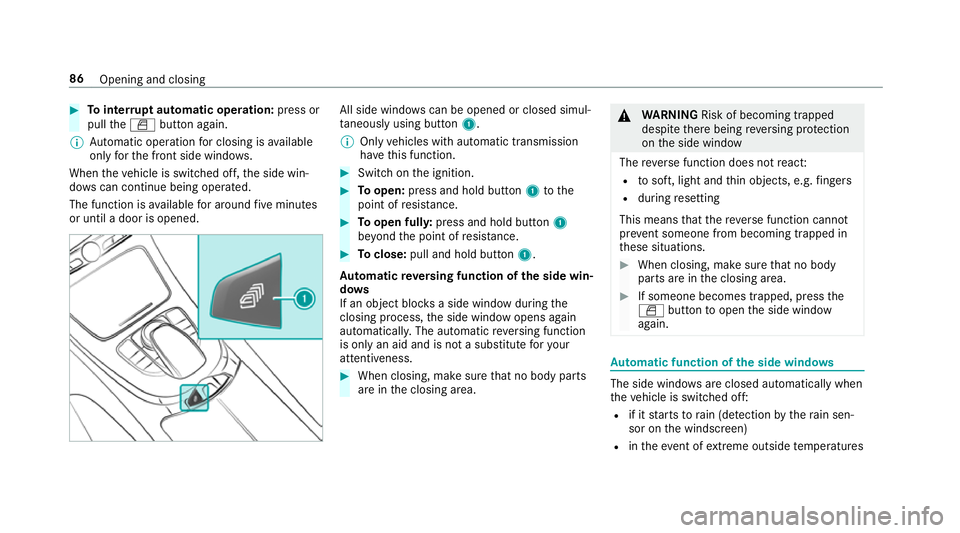
Tointer rupt automatic operation: press or
pull the0062 button again.
0009 Automatic operation for closing is available
on lyforth e front side windo ws.
When theve hicle is switched off, the side win‐
do ws can continue being ope rated.
The function is available for around five minutes
or until a door is opened. All side windo
wscan be opened or closed simul‐
ta neously using button 1.
0009 Only vehicles with automatic transmission
ha ve this function. 0007
Swit chon the ignition. 0007
Toopen: press and hold button 1tothe
point of resis tance. 0007
Toopen ful ly:press and hold button 1
be yond the point of resis tance. 0007
Toclose: pull and hold button 1.
Au tomatic reve rsing function of the side win‐
do ws
If an object bloc ksa side wind owduring the
closing process, the side window opens again
automaticall y.The automatic reve rsing function
is only an aid and is not a substitute foryo ur
attentiveness. 0007
When closing, make sure that no body parts
are in the closing area. 000A
WARNING Risk of becoming trapped
despi tethere being reve rsing pr otection
on the side window
The reve rse function does not react:
R tosoft, light and thin objects, e.g. fingers
R during resetting
This means that there ve rse function cann ot
pr eve nt someone from becoming trapped in
th ese situations. 0007
When closing, make sure that no body
parts are in the closing area. 0007
If someone becomes trapped, press the
0062 button toopen the side window
again. Au
tomatic function of the side windo ws The side windo
wsare closed automatically when
th eve hicle is switched off:
R if it starts torain (de tection bythera in sen‐
sor on the windscreen)
R intheeve nt of extreme outside temp eratures 86
Opening and closing
Page 123 of 589

Cup holders
Fi
tting the cup holder in or removing it from
the centre console (au tomatic transmission) 000A
WARNING ‑ Risk of accident or inju ry
when using the cup holder while the
ve hicle is in motion
The cup holder cannot hold a container
secure while theve hicle is in motion.
If yo u use a cup holder while theve hicle is in
motion, the conta iner may be flung around
and liquids could be spilled. The vehicle
occupants may come into contact with the
liquid and if it is hot, they could be scalded.
Yo u could be distracted from traf fic condi‐
tions and you may lose cont rol of theve hicle. 0007
Only use the cup holder when theve hi‐
cle is stationar y. 0007
Only use the cup holder for containers
of theright size. 0007
Alw ays close the conta iner, particularly
if th e liquid is hot. 0007
Toremo ve:slide catch 2forw ards and pull
out cup holder 1. 0007
Tofit: inse rtcup holder 1and slide ba ck
catch 2.
0009 The cup holder rubber mat can be remo ved
fo r cleaning, e.g. using clean, luk ewarm
wate r. Fi
tting the cup holder in or removing it from
the centre console (manual transmission) 000A
WARNING ‑ Risk of accident or inju ry
when using the cup holder while the
ve hicle is in motion
The cup holder cannot hold a container
secure while theve hicle is in motion.
If yo u use a cup holder while theve hicle is in
motion, the conta iner may be flung around
and liquids could be spilled. The vehicle
occupants may come into contact with the
liquid and if it is hot, they could be scalded.
Yo u could be distracted from traf fic condi‐
tions and you may lose cont rol of theve hicle. 0007
Only use the cup holder when theve hi‐
cle is stationar y. 0007
Only use the cup holder for containers
of theright size. 0007
Alw ays close the conta iner, particularly
if th e liquid is hot. 12 0
Seats and stowing
Page 143 of 589

The electrolyte is harmful and causes ir
rita‐
tion. It mu stnot come into contact wi thyour
skin, eyes,respiratory organs or clo thing or
be swallo wed. 0007
Ifyo u come into contact with electro‐
ly te , obser vethefo llowing:
R Rinse the electrolyte from your skin
and seek medical attention immedi‐
atel y.
R If electrolyte comes into contact
with your eyes, rinse them thor‐
oughly with clean water and seek
medical attention immediately.
R Ifth e electrolyte is swallo wed,
immediately rinse your mouth out
th oroughly. Do not induce vomiting.
Seek medical attention immediately.
R Immedia tely ch ange out of clo thing
which has come into con tact wi th
electrolyte.
R If an allergic reaction occurs, seek
medical attention immediatel y. The inside
rearview mir ror and the outside mir‐
ro r on the driver's side automatically go into
anti-dazzle mode if light from a headlamp hits
th e sensor on the inside rearview mir ror.
Sy stem limitations
The sy stem does not go into anti-dazzle mode in
th efo llowing situations:
R the engine is switched off
R reve rsege ar is engaged
R the interior lighting is switched on Fu
nction of the front-passenger outside mir‐
ro r parking position The pa
rking position makes parking easier.
The front-passenger outside mir ror tilts down‐
wa rds and sho ws there ar wheel on the front-
passenger side in thefo llowing situations:
R the parking position is stored
(0013 page141)
R the passenger mir ror is selected
R reve rsege ar is engaged The front-passenger outside mir
ror mo ves back
to its original position in thefo llowing situations:
R you shift the transmission toano ther trans‐
mission position
R at speeds greater than 15 km/h
R you press the button forth e outside mir ror
on the driver's side 14 0
Light and sight
Page 150 of 589

Driving
Note
s on Mercedes-AMG vehicles Obser
vethe no tes on thefo llowing topics in the
Supplement, as you may otherwise failto recog‐
nise dangers:
R Rear axle locking dif fere ntial
R AMG Performance exhaust sy stem
R AMG ceramic high-per form ance composite
brake sy stem
R RACE START
R AMG RIDE CONTROL Switching
the po wer supp lyor ignition on
without starting the engine 000A
WARNING Risk of accident and inju ry
due tochildren left unat tended in the
ve hicle
If ch ildren are left unat tended in theve hicle,
th ey could:
R open doo rs,th ereby endangering other
persons or road users.
R get out of theve hicle and be hit by
oncoming traf fic.
R ope rate ve hicle equipment and become
trapped, forex ample.
In addition, children could also set theve hi‐
cle in motion, forex ample, by:
R releasing the parking brake.
R shifting the automatic transmission out of
park position 005Dor shifting manual trans‐
mission into idle position.
R starting the engine. 0007
Never lea vechildren and animals unat‐
te nded in theve hicle. 0007
When leaving theve hicle, alw aysta ke
th eke y with you and lock theve hicle.
This also applies tothe Digital Vehicle
Ke y if the "Digital Vehicle Key" function
is activated via Mercedes me connect. 0007
Keep theve hicle key out of reach of
ch ildren. This also applies tothe Digital
Ve hicle Key if the "Digital Vehicle Key"
function is activated via Mercedes me
connect. Re
quirements:
R theke y is in theve hicle and is recognised.
R or: a Digi talVe hicle Key is located in the
mar ked space (0013 page149).
R the brake pedal is not depressed. Driving and parking
147
Page 151 of 589

0007
Toswitch on the po wer supp ly:press but‐
to n1 once.
yo u can activate the windscreen wiper, for
ex ample.
The po wer supp lyis switched off again if thefo l‐
lowing conditions are me t:
R you open the driver's door
R you press but ton1 twice. 0007
Toswitch on the ignition: press button 1
twice.
The indicator lamps in the instrument clus ter
light up.
The ignition is switched off again if one of the
fo llowing conditions is me t:
R vehicles with automatic transmission:you
do not start theve hicle within 15minutes
and the transmission is in position 005Dorthe
electric parking brake is applied.
R vehicles with manual transmission: you do
not start theve hicle within 15minutes and
th e electric parking brake is applied.
R you press but ton1 once. St
arting theve hicle St
arting theve hicle with thest art/s top but‐
ton
Requ irements:
R theke y is in theve hicle and is recognised. R
or: a Digi talVe hicle Key is located in the
mar ked space and is recognised
(0013 page 149). 0007
Vehicles with manual transmission:
depress the clutch pedal. 0007
Vehicles with automatic transmission:
shift the transmission toposition 005Dor005C. 0007
depress the brake pedal and press button 1
once. 0007
Ifth eve hicle does not star t:switch off non-
essential consumers and press button 1
once.
If th eve hicle still does not start, one of thefo l‐
lowing display messages appears in the multi‐
function display: 0007
Place the key in the marked space See Own-
er's Manual :st art theve hicle in emer gency
operation mode (0013 page 150).
or 0007
Key not detected Place smartphone in charg-
ing bracket: place the mobile phone in the
mar ked space (0013 page125). 14 8
Driving and pa rking
Page 153 of 589

0007
Dep ress the brake pedal and start theve hicle
using thest art/ stop button.
Any fur ther starts with th e DigitalVehicle
Key
The key is not needed for any fur ther starts. 0007
Place the mobile phone or Digital Vehicle Key
st icke r in the mar ked space 1. 0007
Depress the brake pedal and start theve hicle
using thest art/ stop button.
The "Digital Vehicle Key" service can be deacti‐
va ted in Mercedes me connect at http://
www.mercedes.me. The function is then deacti‐
va ted in the mobile phone via an online connec‐
tion. If connection tothe Internet is not possible,
e.g. af terth e mobile phone or the Digital Vehicle
Ke yst icke r has been stolen, theke y function can
be deacti vated at a Mercedes-Benz service
centre.
St arting theve hicle in emer gency operation
mode
If th eve hicle does not start and thePlace the
key in the marked space See Owner's Manual
message appears in the multifunction displa y,yo
u can start theve hicle in emer gency operation
mode. 0007
Makesure that mar ked space 2is em pty. 0007
Remo vekey1 from theke yring. 0007
Place key1 in mar ked space 2onthe
symbol 3.
The vehicle will start af ter a short time. If
yo ure mo vekey1 from mar ked space 2
th e engine continues running. For fur ther
engine starts ho wever,ke y1 must be loca‐
te d in mar ked space 2on symbol 3during
th e entire journe y. 0007
Have theke y1 checked at a qualified spe‐
cialist workshop.
If th eve hicle does not star t: 0007
place key1 in mar ked space 2and lea ve
it th ere. 0007
Vehicles with manual transmission:
depress the clutch pedal. 0007
Depress the brake pedal and start theve hicle
using thest art/ stop button.
0009 You can also swit chon the po wer supp lyor
th e ignition with thest art/ stop button. St
arting theve hicle via Remo teOnline serv‐
ices Cooling or heating
theve hicle interior before
commencing your journey
0009 This function is not available in all countries. 15 0
Driving and pa rking