brake light MERCEDES-BENZ C-CLASS CABRIOLET 2021 User Guide
[x] Cancel search | Manufacturer: MERCEDES-BENZ, Model Year: 2021, Model line: C-CLASS CABRIOLET, Model: MERCEDES-BENZ C-CLASS CABRIOLET 2021Pages: 545, PDF Size: 9.48 MB
Page 147 of 545

Non-combus
ted fuel may get into the cata‐
lytic con verter. #
Only depress the accelera tor pedal
slightl y. #
Have the cause rectified immediately at
a qu alified specialist workshop. *
NO
TEReduced battery life due tofre‐
qu ent short-dis tance trips The
12V battery may not be suf ficiently
ch arge d when theve hicle is used only for
short-dis tance trips. This reduces the life of
th e batter y. #
Drive longer di stances regular lyto
ch arge the batter y. Note
s on driving with a roof load, trailer or
fully laden vehicle
When driving with a loaded roof luggage rack or
trailer as well as with a fully laden or fully occu‐
pied vehicle, theve hicle's driving and steering
ch aracteristics change. Yo
u should bear thefo llowing in mind:
R Do not exceed the permissible roof load and
to wing capacity. Also obser vethete ch nical
da ta inthe printed Owner's Manual.
R Evenly distribute thero of load, and place
heavy objects at the bottom. Also comply
with the no tes on loading theve hicle
(/ page 110).
R Drive attenti vely, and avoid suddenly pulling
aw ay, braking and steering as well as rapid
cornering.
Note s on driving on salt-treated roads
The braking ef fect is limited on salt-trea ted
ro ads.
Therefore, obse rveth efo llowing no tes:
R due tosalt build-up on the brake disks and
brakepads, the braking dis tance can increase
conside rably or result in braking only on one
side
R maintain a much greater safe dis tance tothe
ve hicle in front To
remo vesalt build-up:
R brake occasionally while paying attention to
th e tra ffic conditions
R carefully depress the brake pedal at the end
of the journey and when starting the next
journey
Note s on aquaplaning
Aq uaplaning can take place once a cer tain
amount of water has accumulated on thero ad
sur face.
Obser vethefo llowing no tes during heavy precip‐
itation or in conditions in which aquaplaning may
occur:
R reduce speed
R avoid tyre ruts
R avoid sudden steering mo vements
R brake careful ly
% Also obser vethe no tes on regular lych ecking
wheels and tyres (/ page 395).14 4
Driving and pa rking
Page 151 of 545

of
theve hicle will turn green. The remaining seg‐
ments will initially stay white. If youta ke your
fo ot off the accelerator pedal in good time, the
re maining segments on the display will succes‐
sively turn green until theeve nt shown is
re ached. The driv etra in will be set for maximum
fuel econom y.Re cuperation will charge the bat‐
te ry.Re cuperation will be adap tedto the selec‐
te d drive prog ram.
The event will be shown for a short time af ter it
has been passed. If there is no response tothe
Foot off the accelerator prompt,th e segments
will remain white.
If th eeve nt in volves a vehicle in front, all seg‐
ments will immediately turn green once there is
a re sponse totheFoot off the accelerator
prom pt.
Fo r active ECO Assist in drive program ;,
symbol 3will appear on the multifunction dis‐
play and on the head-up display beside transmis‐
sion position h. Symbol3will also appear
when the assis tant displ ayis not selec ted. If
th e sy stem does not inter vene du ring the
eve nt ahead, no thing will be displa yed. The sys‐
te m will be passive.
ECO Assist is active only in drive programs ;
and A.
Sy stem limits
ECO Assist can function even more precisely if
th ero ute is adhered towhen route guidance is
active. The basic function is also available with‐
out active route guidance. Notall information
and traf fic situations can be fore seen. The qual‐
ity depends on the map data.
ECO Assist is only an aid. The driver is responsi‐
ble forke eping a safe dis tance from theve hicle
in front, forve hicle speed and for braking in
good time. The driver must be ready tobrake at
all times ir respective of whe ther the sy stem
inter venes.
The sy stem may be impaired or may not function
in thefo llowing situations:
R If visibility is poor, e.g. due toinsuf ficient illu‐
mination of thero ad, high lyvariable shade
conditions, rain, sno w,fog or heavy spr ay.R
Ifth ere is glare, e.g. from oncoming traf fic,
di re ct sunlight or reflections.
R Ifth ere is dirt on the windscreen in the area
of the multifunction camera or the camera is
mis ted up, damaged or obscured.
R Ifro ad signs are hard todetect, e.g. due to
dirt, snow or insuf ficient lighting, or because
th ey are obscured.
R Ifth e information on the navigation sy stem's
digital map is incor rect or out of da te.
R If signs are ambiguous, e.g. road signs in
ro adwor ksor in adjacent lanes. DY
NA MIC SELECT switch Fu
nction of theDY NA MIC SELECT switch *
NO
TEMercedes-AMG vehicles #
Obser vethe no tes in the Supplement.
Yo u could otherwise failto recognise
dangers. %
Depending on the engine and equipment,
th eve hicle has dif fere nt drive programs. 14 8
Driving and pa rking
Page 157 of 545

#
Ifth ege arshift recommendation 1appea rs
next tothe transmission position displa y,
shift tothere commended gear. Using kickd
own #
Maximum acceleration: depressthe accel‐
erator pedal be yond the pressure point.
To protect against engine overrev ,th e automatic
transmission shifts up tothe next gear when
maximum engine speed has been reached. Glide mode function
*
NO
TEMercedes-AMG vehicles #
Obser vethe no tes in the Supplement.
Yo u could otherwise failto recognise
dangers. Wi
th an anticipatory driving style, Glide mode
helps youto reduce fuel consum ption.
Glide mode is characterised bythefo llowing:
R The combustion engine is disconnected from
th e driv etra in and continues torun in neutral.
R The transmission position displ ayh is
shown in green.
R Vehicles with 48 V on-board electrical
sy stem (EQ-Boost technology): The com‐
bustion engine can be switched off. All of the
ve hicle functions remain active.
Glide mode is activated if thefo llowing condi‐
tions are me t:
R Drive prog ram ; is selected.
R The speed is within a suita blerange. R
The road's course is suitable, e.g. no steep
uphill or downhill inclines or tight bends.
R There is no trailer hitched up tothe trailer
hitch, and no bicycle rack Fitted.
R You do not depress the accelera tor or brake
pedal (e xcept for light brake applications).
% Glide mode can also be activated if you ha ve
selected the "Eco" setting forth e drive in the
drive prog ram =.
Glide mode is deactivated again if one of the
conditions is no longer met.
Glide mode can also be pr evented bythefo llow‐
ing parame ters:
R Incline
R Downhill gradient
R Temp erature
R Height
R Speed
R Operating status of the engine
R Traf fic situation 15 4
Driving and pa rking
Page 164 of 545

Ad
Blue ®
re fill canis ter4 can be remo ved
when it has been only partially em ptied. #
Unscr ew and close disposable hose 3and
Ad Blue ®
re fill canis ter4 inreve rse order. #
Replace AdBlue ®
filler cap 2and turn it
clockwise until it audibly engages. #
Close fuel filler flap 1. #
Swit chon the ignition for at least 60 sec‐
onds.
% Ifth e engine could not be star ted due tothe
Ad Blue ®
tan k being empty, it can take up to
60 seconds forth eto p up tobe de tected. #
Start theve hicle.
% Avoid storing AdBlue ®
re fill con tainers per‐
manently in theve hicle. Pa
rking Pa
rking theve hicle &
WARNING Risk of accident and inju ry
caused byan insuf ficiently secu redve hi‐
cle rolling away
If th eve hicle is not securely par ked suf fi‐
ciently, it can rollaw ay in an uncont rolled
wa yev en at a slight downhill gradient. #
On uphill or downhill gradients, turn the
front wheels so that theve hicle rolls
to wa rdsth eke rb if it starts moving. #
apply the parking brake. #
Switch the transmission toposition j. &
WARNING Risk offire caused byhot
ex haust sy stem parts
Flammable materials such as lea ves, grass or
twigs may ignite. #
Park theve hicle so that no flammable
material can come into con tact wi thhot
ve hicle components. #
In particular, do not park on dry grass‐
land or har vested grain fields. &
WARNING Risk of accident and inju ry
due toleaving children unat tended in the
ve hicle
If ch ildren are left unat tended in theve hicle,
th ey could, in pa rticular:
R open doors, thereby endangering other
persons or road users.
R get out and be stru ck byoncoming traf‐
fi c.
R ope rate ve hicle equipment and become
trapped, forex ample.
In addition, thech ildren could also set the
ve hicle in motion by,fo rex ample:
R releasing the parking brake.
R changing the transmission position.
R starting theve hicle. #
Never lea vechildren unat tended in the
ve hicle. Driving and parking
161
Page 167 of 545

R
The vehicle as well as persons and objects
are located outside thera nge of mo vement
of the door. #
Press the programming button on the door
drive unit.
Initiate the next step within appr oximately
30 seconds. #
Press pr eviously prog rammed button 1,2
or 3 repeatedly until the door closes.
When the door closes, programming is com‐
ple ted.
% Please also read the operating instructions
fo rth e door drive.
Tr oubleshooting when prog ramming the
re mo tecont rol #
Check if the transmit ter frequency of remo te
control 5is suppo rted. #
Replace the batteries in remo tecontrol 5. #
Hold remo tecontrol 5atvarious angles
from a dis tance of 1 cm to8 cm front of the
inside rearview mir ror.Yo u should test eve ry
position for at least 25 seconds before trying
ano ther position. #
Hold remo tecontrol 5atthe same angles
at various dis tances in front of the inside rear
view mir ror.Yo u should test eve ryposition
fo r at least 25 seconds before trying ano ther
position. #
Onremo tecontrols that transmit on lyfor a
limi ted period, press button 6onremo te
control 5again before transmission ends. #
Align the aerial line of the door opener unit
with there mo tecontrol.
% Support and additional information on pro‐
gramming:
R Onthe HomeLink ®
Hotline on (0) 08000
466 354 65 or +49 (0) 6838 907-2 77
R Onthe Internet at https://
www.homelin k.com
Opening or closing the garage door
Requ irements:
R The cor responding button is programmed to
operate the door. #
Press and hold buttons 1,2or3 until
th e door opens or closes. #
If indicator lamp 4flashes yellow af ter
appr oximately 20 seconds: press and hold
th e pr eviously pressed button again until the
door opens or closes.
Clearing thega rage door opener memo ry #
Press and hold buttons 1and 3.
Indicator lamp 4lights up yello w. #
If indicator lamp 4flashes green: release
buttons 1and 3.
The entire memo ryhas been dele ted. Electric parking brake
Fu
nction of the electric pa rking brake (app ly‐
ing automatically) &
WARNING Risk of accident and inju ry
due toleaving children unat tended in the
ve hicle
If ch ildren are left unat tended in theve hicle,
th ey could, in pa rticular:
R open doors, thereby endangering other
persons or road users. 16 4
Driving and pa rking
Page 168 of 545

R
get out and be stru ck byoncoming traf‐
fi c.
R ope rate vehicle equipment and become
trapped, forex ample.
In addition, thech ildren could also set the
ve hicle in motion by,fo rex ample:
R releasing the parking brake.
R changing the transmission position.
R starting theve hicle. #
Never lea vechildren unat tended in the
ve hicle. #
When leaving theve hicle, alw aysta ke
th eke y with you and lock theve hicle. #
Keep theve hicle key out of there ach of
ch ildren. The electric pa
rking brake is applied if the
tr ansmission is in position j
jand one of the
fo llowing conditions is fulfilled:
R The engine is switched off. R
The seat belt tongue is not inser ted in the
seat belt buckle of the driver's seat and the
driver's door is opened.
% Toprev ent application: pull the handle of the
electric parking brake (/ page166).
In thefo llowing situations, the electric pa rk‐
ing brake is also applied:
R The HOLD function is keeping theve hicle sta‐
tionar y.
R Active Parking Assist is keeping theve hicle
st ationar y.
R Active Dis tance Assi stDISTRONIC is bringing
th eve hicle toast andstill.
R In addition, one of thefo llowing condi‐
tions mu stbe fulfilled:
- The engine is switched off.
- The seat belt tongue is not inser ted in the
seat belt buckle of the driver's seat and
th e driver's door is opened.
- There is a sy stem malfunction.
- The po wer supp lyis insuf ficient. -
The vehicle is stationary for a lengt hy
period.
When the electric parking brake is applied, the
re d! indicator lamp lights up in the instru‐
ment clus ter.
% The electric parking brake is not automati‐
cally applied if the engine is switched off by
th e ECO start/ stop function.
Fu nction of the electric pa rking brake
(releasing automatically)
The electric parking brake is released when
th efo llowing conditions are fulfilled:
R The driver's door is closed.
R The engine is running.
R The transmission is in position hork and
yo u depress the accelera tor pedal or you
shift from transmission position jtoh or
k when on le velground.
R Ifth e transmission is in position k,the boot
lid must be closed.
R The seat belt tongue is inser ted into the seat
belt buckle of the driver's seat. Driving and parking
16 5
Page 169 of 545
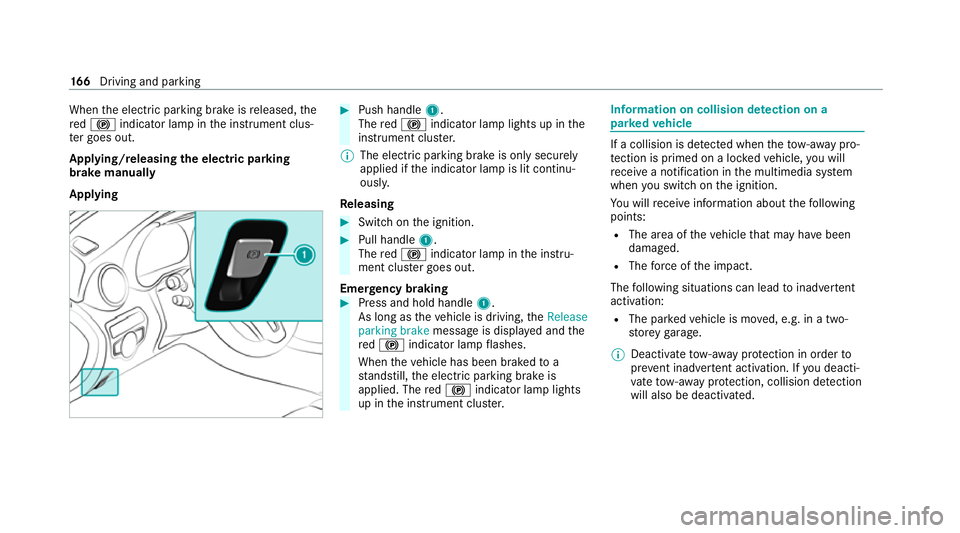
When
the electric parking brake is released, the
re d! indicator lamp in the instrument clus‐
te r goes out.
Applying/releasing the electric pa rking
brake manually
Applying #
Push handle 1.
The red! indicator lamp lights up in the
instrument clus ter.
% The electric parking brake is only securely
applied if the indicator lamp is lit continu‐
ously.
Re leasing #
Swit chon the ignition. #
Pull handle 1.
The red! indicator lamp in the instru‐
ment clus ter goes out.
Emer gency braking #
Press and hold handle 1.
As long as theve hicle is driving, theRelease
parking brake message is displa yed and the
re d! indicator lamp flashes.
When theve hicle has been braked to a
st andstill, the electric parking brake is
applied. The red! indicator lamp lights
up in the instrument clus ter. Information on collision de
tection on a
pa rked vehicle If a collision is de
tected when theto w- aw ay pro‐
te ction is primed on a loc kedve hicle, you will
re cei vea notification in the multimedia sy stem
when you swit chon the ignition.
Yo u will recei veinformation about thefo llowing
points:
R The area of theve hicle that may ha vebeen
damaged.
R The forc e of the impact.
The following situations can lead toinadver tent
acti vation:
R The pa rked vehicle is mo ved, e.g. in a two-
st or ey garage.
% Deactivate tow- aw ay protection in order to
pr eve nt inadver tent acti vation. If you deacti‐
va te tow- aw ay protection, collision de tection
will also be deactivated. 16 6
Driving and pa rking
Page 172 of 545

Pa
rticular ly,ke ep the areas around the sensors
and cameras free of dirt, ice or slush
(/ page 368). The sensors and cameras must
not be co vered and the de tection ranges around
th em must be kept free. Do not attach additional
licence pla tebrac kets, ad vertisements, sticke rs,
fo ils or foils toprotect against stone chippings in
th e de tection range of the sensors and cameras.
Make sure that there are no overhanging loads
pr otru ding into the de tection range.
If th ere is damage toa bumper or thera diator
grille, or af ter an impact, ha vethe function of
th e sensors checked at a qualified specialist
wo rkshop. Ha vedamage or stone chipping in the
area of the cameras on the front and rear win‐
do ws repaired at a qualified specialist workshop. Overview of driving sy
stems and driving
saf ety sy stems R
ABS (Anti-lo ckBra king System)
(/ page 170)
R BAS (Bra keAssist System) (/ page170) R
ESP ®
(Electronic Stability Program)
(/ page 170)
R ESP ®
Crosswind Assi st (/ page 171)
R ESP ®
trailer stabilisation (/ page172)
R EBD ( Electronic Brakeforc eDistribution)
(/ page 172)
R STEER CONTROL (/ page 172)
R HOLD fu nction (/ page 173)
R Hill Start Assist (/ page174)
R Adaptive Brake Lights (/ page174)
R ATTENTION ASSIST (/ page174)
R Cruise control (/ page176)
R Limi ter (/ page177)
R Traf fic Sign Assi st (/ page 193)
R DYNA MIC BODY CONTROL (/ page 201)
R AIRMATIC (/ page 201)
Driving Assist ance package
The following functions are part of the Driving
Assis tance Package. Cer tain functions are only
av ailable in some countries. Some functions are also
available without the Driving Assis tance
Pa ckage, albeit with restricted functionality.
R Active Dis tance Assi stDISTRONIC
(/ page 179)
R Active Speed Limit Assi st(countr y-depend‐
ent) (/ page183)
R Route-based speed adap tation (countr y-
dependent) (/ page184)
R Active Brake Assi st (/ page 189)
R Active Steering Assist (count ry-dependent)
(/ page 186)
R Active Emergency Stop Assist (countr y-
dependent) (/ page188)
R Blind Spot Assist and Active Blind Spot Assi st
with exitwa rning (/ page195)
R Active Lane Keeping Assist (/ page198)
Pa rking Package
R Reversing camera (/ page 203)
R 360° Camera (/ page 206)
R Parking Assist PARKTRONIC ( /page 210)
R Active Parking Assist (/ page213) Driving and pa
rking 16 9
Page 173 of 545

Fu
nctions of ABS (Anti-lock Braking Sy stem) ABS
regulates the brake pressure in critical driv‐
ing situations:
R During braking, e.g. at maximum full-s top
braking or insuf ficient tyre traction, the
wheels are pr evented from lo cking.
R Vehicle steerability while braking is ensured.
If ABS inter venes when braking, you will feel a
pulsing in the brake pedal. The pulsating brake
pedal can be an indication of hazardous road
conditions and can ser veas a reminder totake
ex tra care while driving.
Sy stem limits
R ABS is active from speeds of appr ox.
5 km/h.
R ABS may be impai red or may not function if a
malfunction has occur red and theye l‐
low ! ABSwarning lamp lights up contin‐
uously in the instrument clus ter af terthe
engine is star ted. Fu
nction of BAS &
WARNING Risk of an accident caused by
a malfunction in BAS (Brake Assi stSys‐
te m)
If BA S is malfunctioning, the braking dis tance
in an emergency braking situation is
increased. #
Dep ress the brake pedal with full force
in emer gency braking situations. ABS
pr eve nts the wheels from locking. The Brake Assist Sy
stem (BAS) supports your
eme rgency braking situation with additional
brake forc e.
If yo u depress the brake pedal quickl y,BA S is
acti vated:
R BAS au tomatical lyboosts the brake pres‐
sure.
R BAS can sho rten the braking dis tance.
R ABS pr events the wheels from locking.
The brakes will function as usual once you
re lease the brake pedal. BAS is deactivated. Fu
nction of ESP ®
(Electronic Stability Pro‐
gr am) &
WARNING Risk of skidding if ESP ®
is
deactivated
If yo u deactivate ESP ®
, ESP ®
cannot car ry
out vehicle stabilisation. #
ESP ®
should on lybe deactivated in the
fo llowing situations. *
NO
TEMercedes-AMG vehicles #
Obser vethe no tes in the Supplement.
Yo u could otherwise failto recognise
dangers. ESP
®
can moni tor and impr ovedriving stability
and traction in thefo llowing situations, within
ph ysical limits:
R When pulling away on wet or slippe rycar ria‐
ge wa ys.
R When braking. 17 0
Driving and pa rking
Page 174 of 545

If
th eve hicle deviates from the direction desired
by the driver, ESP ®
can stabilise theve hicle by
inter vening in thefo llowing ways:
R One or more wheels are braked.
R The engine output is adap ted according to
th e situation.
When ESP ®
is deactivated, theå warning
lamp lights up continuously:
R Driving stability will no lon ger be impr oved.
R The drive wheels could spin.
R ETS/4ETS traction control is still active.
% When ESP ®
is deactivated, you are still assis‐
te dby ESP ®
when braking.
When the÷ warning lamp flashes, one or
se veral wheels has reached its grip limit:
R Adapt your driving style to suit the cur rent
ro ad and weather conditions.
R Do not deactivate ESP ®
.
R Only depress the accelerator pedal as far as
is necessary when pulling away. Deactivate ESP
®
in thefo llowing situations to
impr ovetraction:
R When using snow chains.
R In deep sn ow.
R On sand or gr avel.
% Spinning the wheels results in a cutting
action, which enhances traction.
If th e÷ ESP®
wa rning lamp lights up continu‐
ousl y,ESP ®
is not available due toa malfunction.
Obse rveth efo llowing information:
R Warning and indicator lamps (/ page 485)
R Display messages (/ page 430)
ETS/4ETS (Electronic Traction Sy stem)
ETS/4E TStraction control is pa rtof ESP ®
and
makes it possible topull away and accelerate on
a slippe rycar riag ew ay.
ETS/4ETS can impr ovetheve hicle's traction by
inter vening in thefo llowing ways:
R The drive wheels are braked individually if
they spin. R
More drive torque is transferred tothe wheel
or wheels with traction.
Influence of drive prog rams on ESP ®
The drive prog rams enable ESP ®
to adapt todif‐
fe re nt we ather and road conditions as well as
th e driver's prefer red driving style. Depending on
th e selected drive program, the appropriate
ESP ®
mode will be activated. You can select the
drive programs using theDY NA MIC SELECT
switch (/ page149). Fu
nction of ESP ®
Crosswind Assist ESP
®
Crosswind Assist de tects sudden gu sts of
side wind and helps the driver tokeep theve hi‐
cle in the lane:
R ESP ®
Crosswind Assist is active at vehicle
speeds between appr ox.75 km/h and
200 km/h when driving stra ight ahead or
cornering slight ly.
R The vehicle is stabilised bymeans of individ‐
ual brake application on one side. Driving and parking
171