display MERCEDES-BENZ C-CLASS COUPE 2011 Owner's Manual
[x] Cancel search | Manufacturer: MERCEDES-BENZ, Model Year: 2011, Model line: C-CLASS COUPE, Model: MERCEDES-BENZ C-CLASS COUPE 2011Pages: 373, PDF Size: 8.17 MB
Page 26 of 373
Leaving parked up
.........................159
Locking (in an emergency) ...............85
Locking (key )................................... 78
Lowering ........................................ 324
Pulling away ................................... 139
Raising ........................................... 322
Registration ..................................... 26
Towing away .................................. 330
Tow-starting ................................... 330
Transporting .................................. 332
Unlocking (in an emergency) ...........85
Unlocking (key )................................ 78
Vehicle battery
see Battery (vehicle)
Vehicle data
see Technical data
Vehicle dimensions
see Technical data
Vehicle emergency locking ................85
Vehicle identification number see VIN
Vehicle identification plate ..............352
Vehicle tool kit .................................. 315
Vehicle weights see Technical data
Vents
see Air vents
Video (DVD) ........................................ 218
Video DVD (12-button multifunc-
tion steering wheel) ..........................218
VIN ...................................................... 352W
Warning and indicator lamps ABS ................................................ 275
Brakes ........................................... 275
Distance warning signa l................. 282
ESP ®
.............................................. 277
ESP ®
OFF ....................................... 277
LIM (cruise control) ........................ 162
LIM (DISTRONIC PLUS) ..................166
LIM (variable SPEEDTRONIC) .........174
PASSENGER AIRBAG OFF ................57
Reserve fuel ................................... 280
Seat bel t........................................ 273SRS ................................................ 279
Tyr ep ressure monitor ...................282
Warning triangle ................................ 314
Washer fluid Display message (4-button multi-
function steering wheel) ................267
see Windscreen washer system
Weight
see Technical data
Wheel bol ttightening torque ...........324
Wheel chock ...................................... 321
Wheels Changing/replacing .......................344
Changing awheel .......................... 321
Checking ........................................ 336
Cleaning ......................................... 307
Fitting awheel ............................... 323
Important safety notes ..................336
Removing awheel .......................... 323
Storing ........................................... 344
Tightening torque ........................... 324
Whee lsize/tyre size ...................... 345
Windowbag
Display message (12-button mul-
tifunctio nsteering wheel) ..............244
Display message (4-button multi-
function steering wheel) ................237
Operation ........................................ .49
Windows
Cleaning ......................................... 308
see Side windows
Windscreen
Demisting ...................................... 126
Windscreen washe rfluid
Display message (12-button mul-
tifunction steering wheel) ..............269
Windscreen washe rsystem ............. 304
Windscreen wipers Problem (malfunction) ...................120
Replacing the wiper blades ............119
Switching on/off ........................... 118
Winter operation
Important safety notes ..................337
Slippery road surfaces ...................162
Snow chains .................................. 338 Index
23
Page 35 of 373
Instrumen
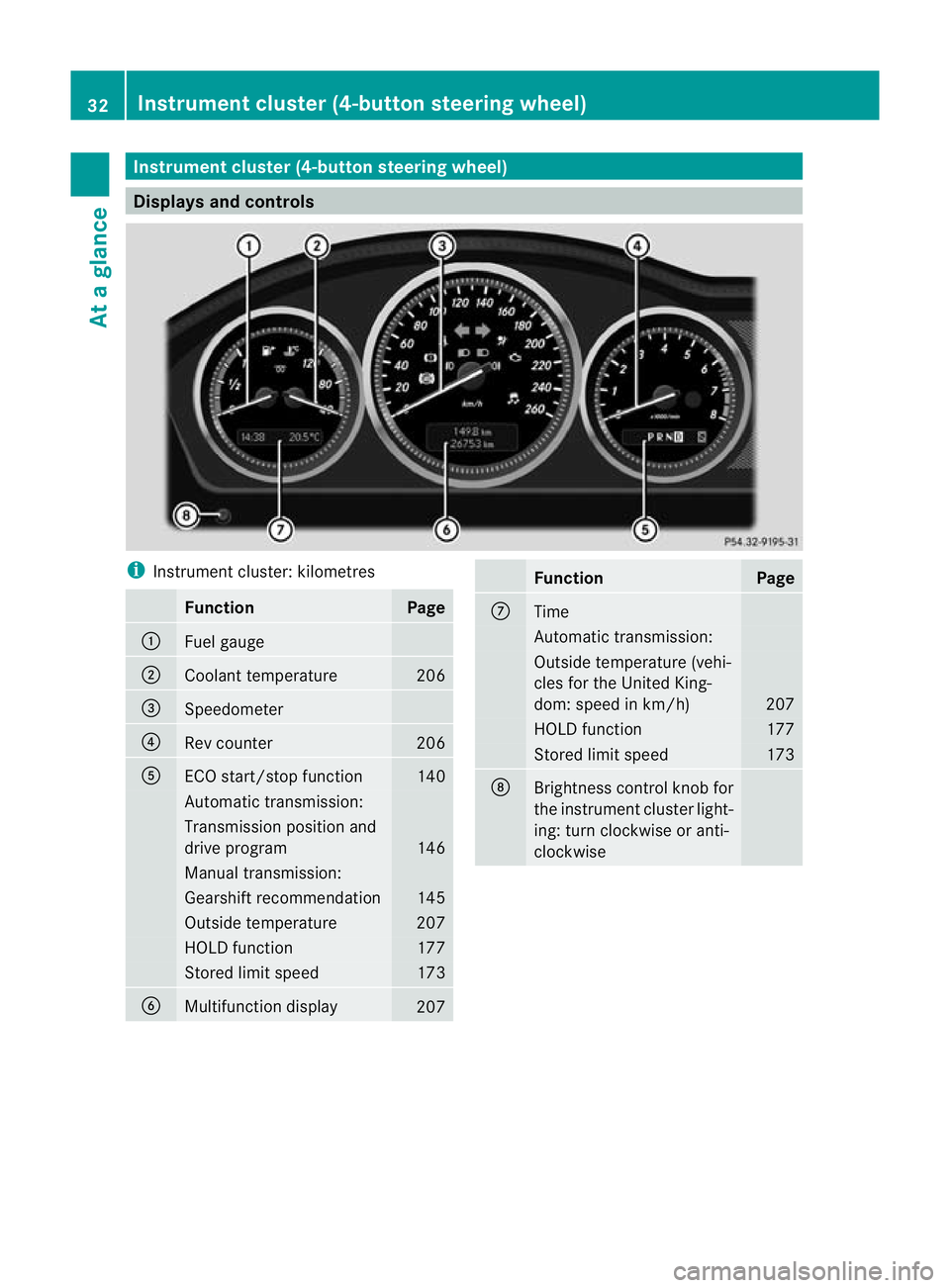
tcluster (4-button steering wheel) Displays and controls
i
Instrument cluster: kilometres Function Page
:
Fuel gauge
;
Coolant temperature 206
=
Speedometer
?
Rev counter 206
A
ECO start/stop function 140
Automatic transmission:
Transmission position and
drive program
146
Manual transmission:
Gearshif
trecommendation 145
Outside temperature 207
HOLD function 177
Stored limit speed 173
B
Multifunction display
207 Function Page
C
Time
Automatic transmission:
Outside temperature (vehi-
cles for the United King-
dom: speed in km/h) 207
HOLD function 177
Stored limit speed 173
D
Brightness control knob for
the instrument cluster light-
ing: turn clockwise or anti-
clockwise 32
Instrument cluster (4-button steering wheel)At a glance
Page 36 of 373
i
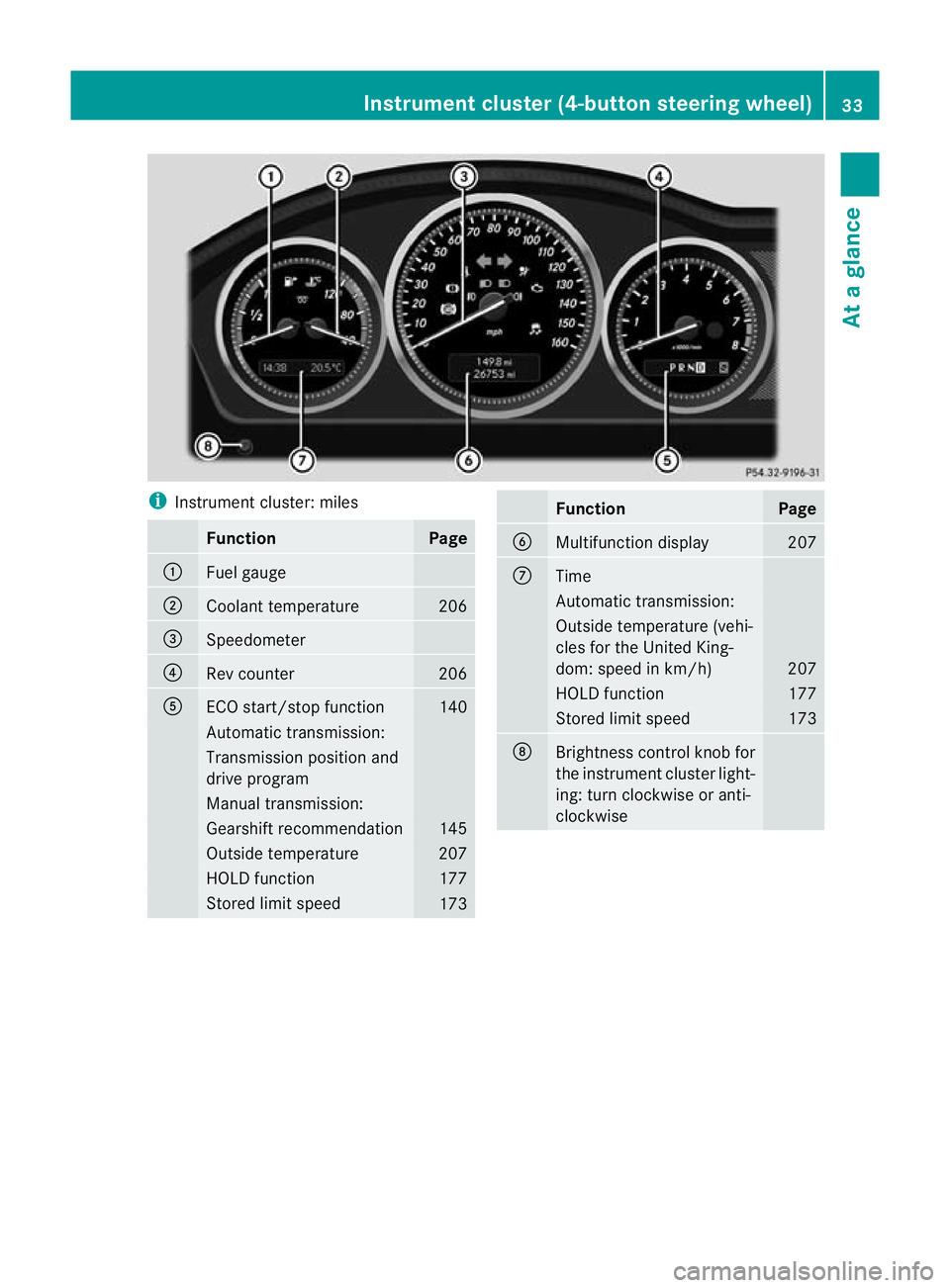
Instrument cluster: miles Function Page
:
Fuel gauge
;
Coolant temperature 206
=
Speedometer
?
Rev counter 206
A
ECO start/stop function 140
Automatic transmission:
Transmission positio
nand
drive program Manual transmission:
Gearshift recommendation 145
Outside temperature 207
HOLD function 177
Stored limit speed
173 Function Page
B
Multifunctio
ndisplay 207
C
Time
Automatic transmission:
Outside temperature (vehi-
cles for the United King-
dom: speed in km/h)
207
HOLD function 177
Stored limit speed 173
D
Brightness control knob for
the instrumen
tcluster light-
ing: turn clockwise or anti-
clockwise Instrument cluster (4-button steering wheel)
33At a glance
Page 38 of 373
Instrumen
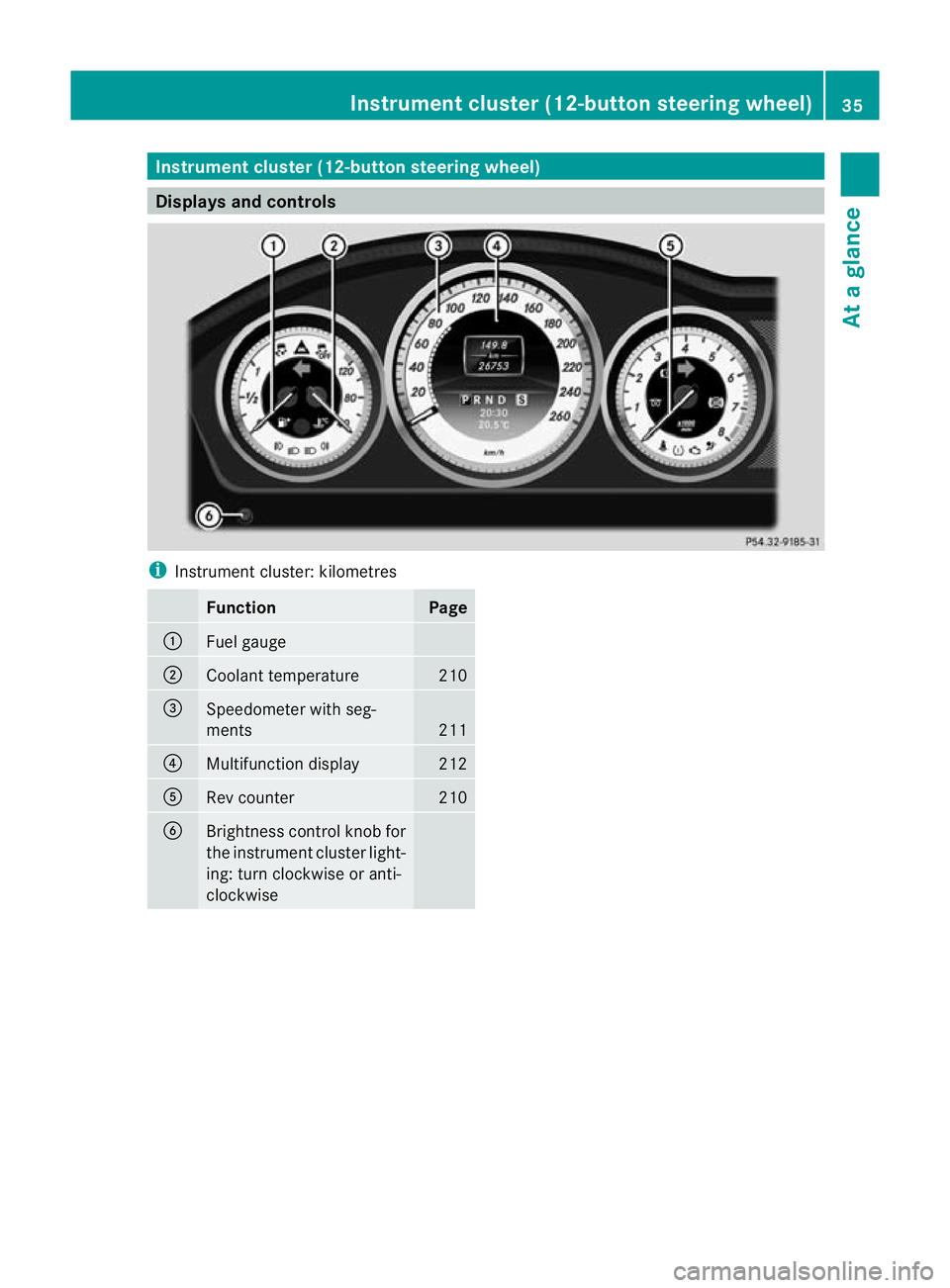
tcluster (12-button steering wheel) Displays and controls
i
Instrument cluster: kilometres Function Page
:
Fuel gauge
;
Coolant temperature 210
=
Speedometer with seg-
ments
211
?
Multifunction display 212
A
Rev counter 210
B
Brightness control knob for
the instrumen
tcluster light-
ing: turn clockwise or anti-
clockwise Instrument cluster (12-button steering wheel)
35At a glance
Page 39 of 373
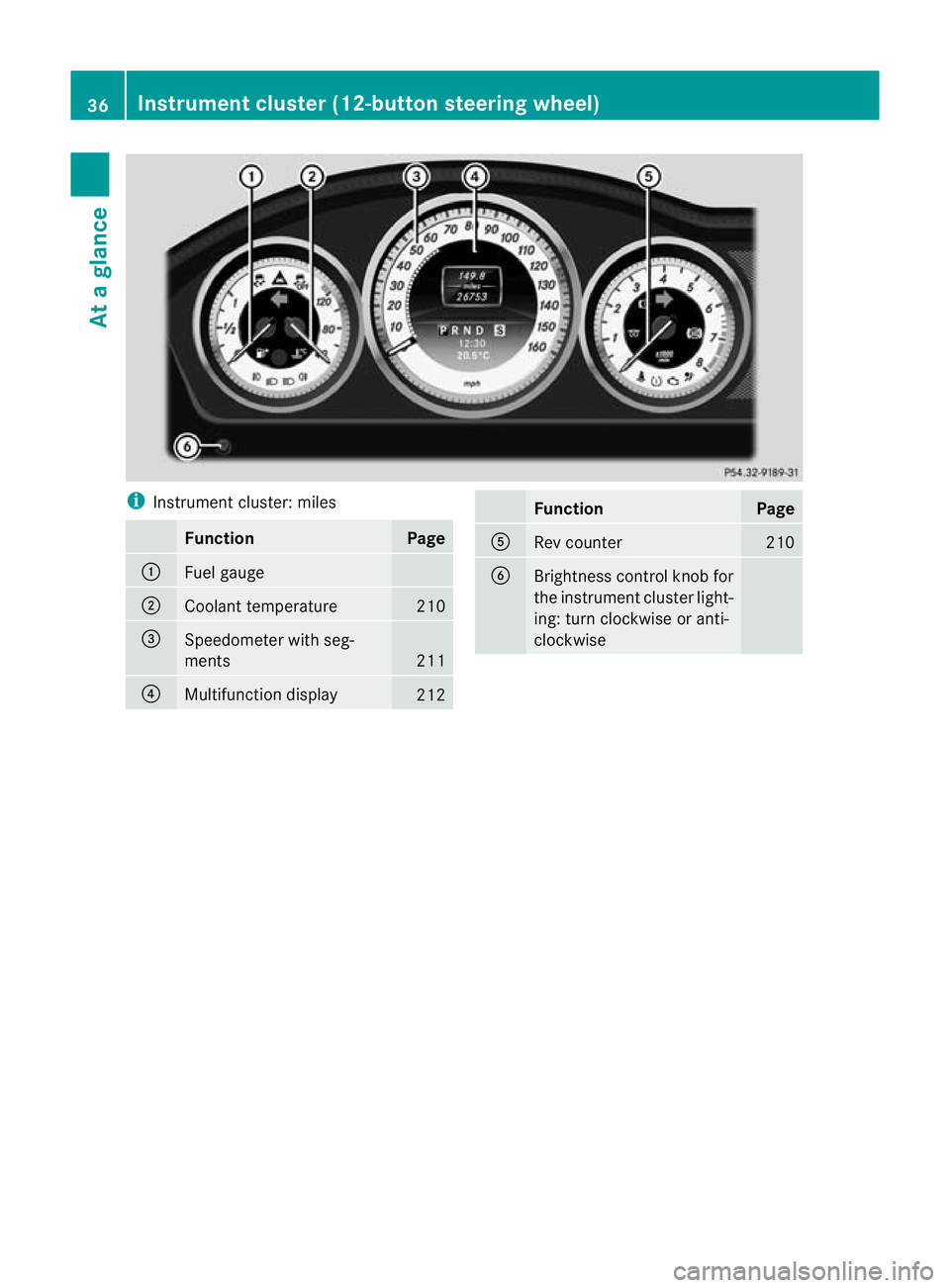
i
Instrument cluster: miles Function Page
:
Fuel gauge
;
Coolant temperature 210
=
Speedometer with seg-
ments
211
?
Multifunction display
212 Function Page
A
Rev counter 210
B
Brightness control knob for
the instrument cluster light-
ing: turn clockwise or anti-
clockwise36
Instrument cluster (12-button steering wheel)At a glance
Page 41 of 373
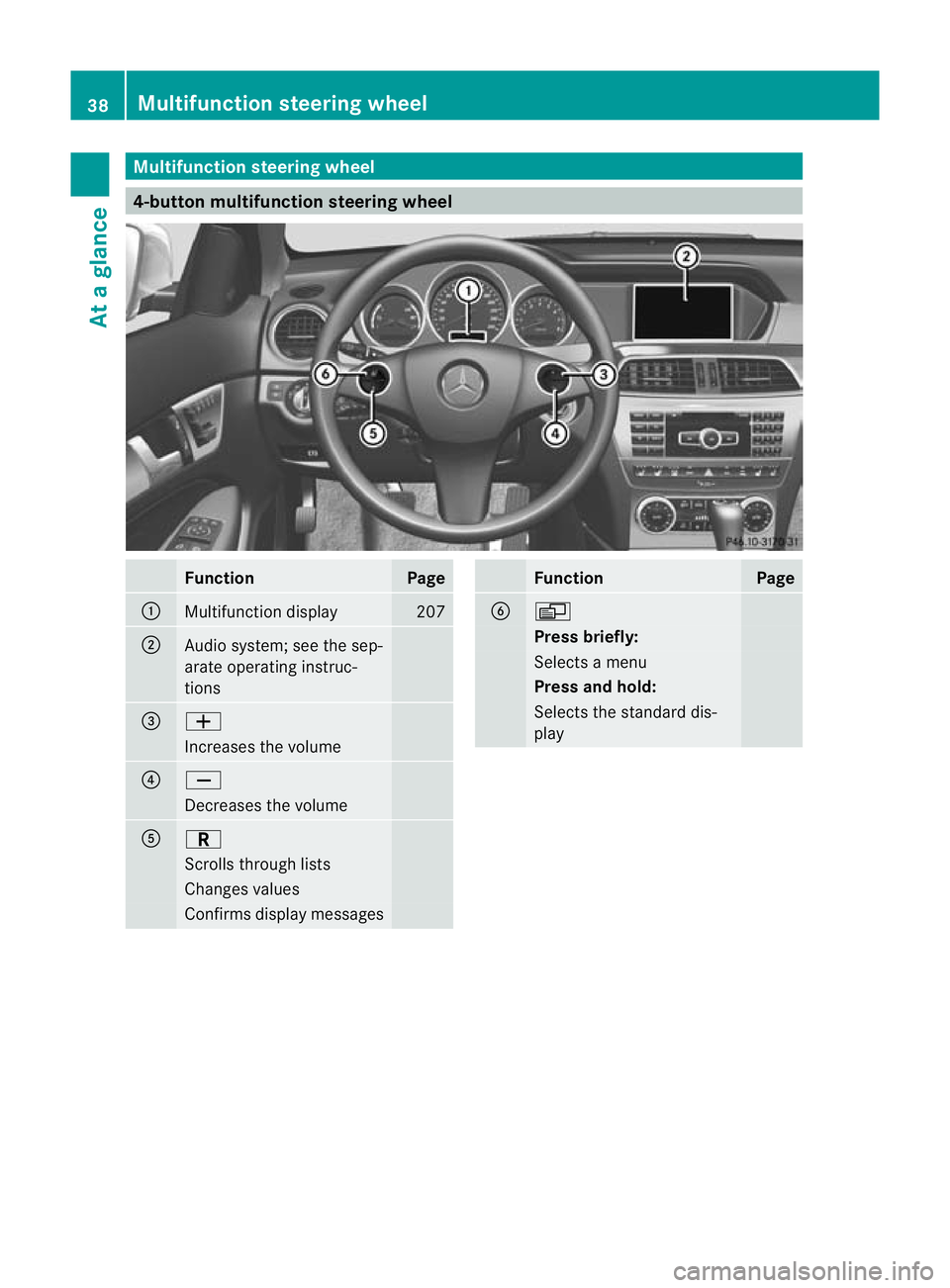
Multifunction steering wheel
4-button multifunction steering wheel
Function Page
:
Multifunction display 207
;
Audio system; see the sep-
arate operating instruc-
tions
=
W
Increases the volume
?
X
Decreases the volume
A
C
Scrolls through lists
Changes values
Confirms display messages Function Page
B
V
Press briefly:
Selects a menu
Press and hold:
Selects the standard dis-
play38
Multifunction steering wheelAt a glance
Page 42 of 373
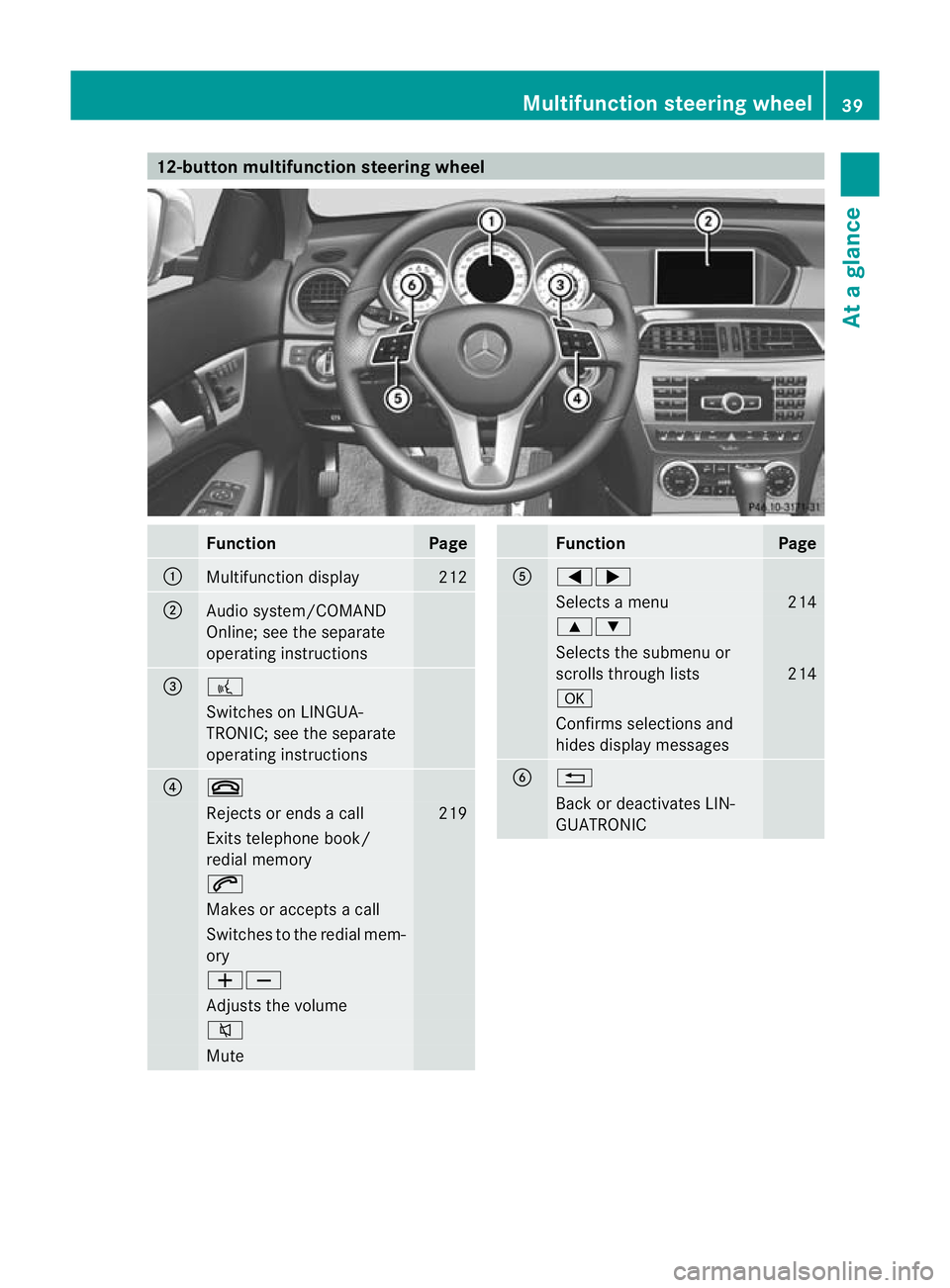
12-button multifunction steering wheel
Function Page
:
Multifunction display 212
;
Audio system/COMAND
Online; see the separate
operating instructions
=
?
Switches on LINGUA-
TRONIC; see the separate
operating instructions
?
~
Rejects or ends a call 219
Exits telephone book/
redial memory
6
Makes or accepts a call
Switches to the redial mem-
ory
WX
Adjusts the volume
8
Mute Function Page
A
=;
Selects a menu 214
9:
Selects the submenu or
scrolls through lists
214
a
Confirms selections and
hides display messages
B
%
Back or deactivates LIN-
GUATRONICMultifunction steering wheel
39At a glance
Page 57 of 373
Belt warning for driver and front
passenger The
7 seatbelt warning lamp in the instru-
ment cluster is a reminder for all occupants
to fasten their seat belts. It may light up con-
tinuously or flash. In addition, there may be a
warning tone.
The 7 seat belt warning lamp goes out and
the warning tone ceases when the driver and
the fron tpassenger have fastened their seat
belt.
For certain countries only: regardless of
whether the driver or th efront passenger
have fastened their seat belts, the 7seat
beltw arning lamp lights up for six seconds
after the engine is started. It then goes out if
the driver and the fron tpassenger have fas-
tened their seat belts.
i For more information on the 7seat
belt warning lamp, see "Warning and indi-
cator lamps in the instrumen tcluster, seat
belt" (Y page 273).
Rear seat belt status indicator The rear-compartmen
tseat belt status indi-
cator tells you if the rear passengers have
their seat belts fastened.
The rear-compartment seat belt status indi-
cator indicates the rear seat on which the belt
is fastened. The üsymbol in the display
indicates a fastened seat belt. If a seat belt is
not fastened or if a seat is not occupied, the
ý symbol is displayed.
The rear-compartment seat belt status indi-
cator appears in the multifunction display for
around 30 seconds if:
R you drive off and reach a speed of approx-
imately 10 km/h.
R the rear passengers fasten or unfasten
their seat belts while the vehicle is in
motion.
R someone gets in or out of the vehicle and
the vehicle drives off again. You can also cancel the rear seat belt status
indicator immediately (Y
page 232).
i The status indicator for the rear-compart-
ment seat belts is only available for certain
countries.
Belt tensioners, belt force limiters The seat belts are fitted with belt tensioners.
The belt tensioners tighten the seat belts in
an accident, pulling them close against the
body.
Belt tensioners do not correct incorrect seat
positions or incorrectly fastened seat belts.
Belt tensioners do not pull vehicle occupants
back towards the backrest.
If the seat belt is also fitted with a belt force
limiter and this is triggered, the force exerted
by the seat belt on the vehicle occupan
tis
reduced.
The belt force limiters on the front seats are
synchronised with the front airbags. They
take on a part of the deceleration force,
resulting in the force exerted on the occupant
being distributed over a greater area.
The beltt ensioners can only be activated
when:
R the ignition is switched on.
R the restraint systems are operational; see
"SRS warning lamp" (Y page 45).
R the belt tongue is engaged in the buckle on
each of the three-poin tseat belts in the
front.
The belt tensioners on the seats in the rear
compartment are triggered independently of
the lock status of the seat belts.
The belt tensioners are triggered depending
on the type and severity of an accident:
R if, in the event of a head-on or rear-end col-
lision, the vehicle decelerates or acceler-
ates rapidly in a longitudinal direction dur-
ing the initial stages of the impact
R if, in the event of a side impact, on the side
opposite the impact the vehicle deceler- 54
Occupant safetySafety
Page 72 of 373
X
To deactivate:( Ypage 221).
The å ESP®
OFF warning lamp in the
instrument cluster lights up. G
WARNING
ESP ®
is deactivated if the åwarning lamp
in the instrument cluster lights up continu-
ously when the engine is running.
If the ÷ warning lamp and åwarning
lamp are li tcontinuously, ESP ®
is not availa-
ble due to a malfunction.
There is an increased risk of your vehicle skid-
ding in certain situations.
You should always adapt your driving style to
suit the prevailing road and weather condi-
tions.
X To activate:(Y page 221).
The å ESP®
OFF warning lamp in the
instrument cluster goes out.
Deactivating/activating ESP ®
(AMG
vehicles) Activating/deactivating SPORT handling
mode
ESP ®
is activated automatically when the
engine is started.
It may be best to activate SPORT handling
mode in the following situations:
R when using snow chains
R in deep snow
R on sand or gravel
Otherwise, you should only use SPORT han-
dling mode on designated race circuits. G
WARNING
Deactivate SPORT handling mode and acti-
vate ESP ®
as soon as the situations described
above no longer apply.O therwise, SPORT
handling mode will only be able to stabilise
the vehicle to a limited degree if the vehicle
starts to skid or a whee lstarts to spin. When SPORT handling mode is activated:
R
ESP ®
only improves driving stability to a
limited degree.
R the engine's torque is restricted to a limited
degree and the drive wheels can spin. The
spinning of the wheels results in a cutting
action, which provides better grip.
R traction control is still activated.
R ESP ®
still provides support when you brake
firmly.
If SPORT handling mode is activated and one
or more wheels start to spin, the ÷ESP®
warning lamp in the instrument cluster
flashes. ESP ®
only stabilises the vehicle to a
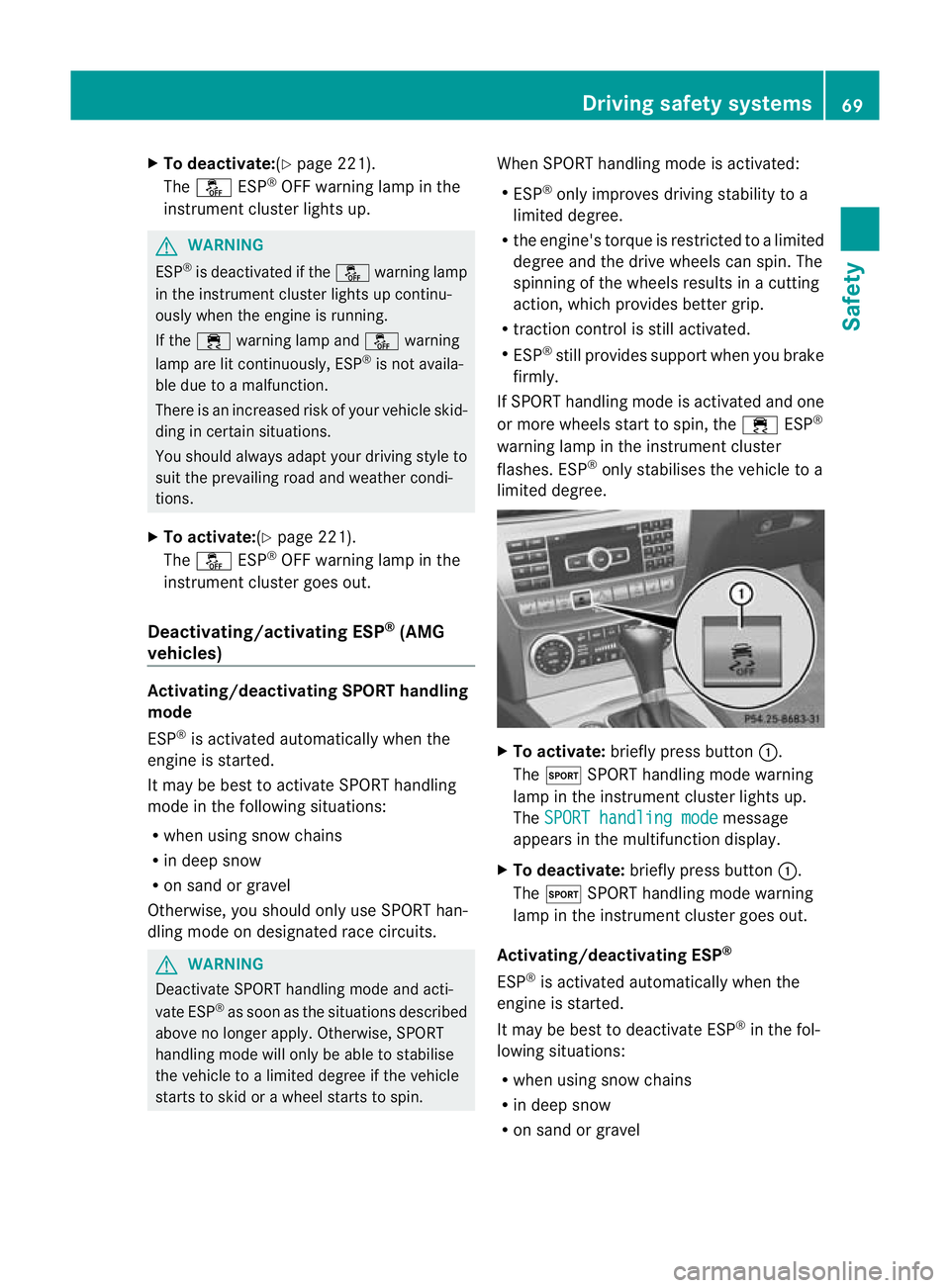
limited degree. X
To activate: briefly press button :.
The M SPORT handling mode warning
lamp in the instrument cluste rlights up.
The SPORT handling mode message
appears in the multifunction display.
X To deactivate: briefly press button :.
The M SPORT handling mode warning
lamp in the instrumen tcluster goes out.
Activating/deactivating ESP ®
ESP ®
is activated automatically when the
engine is started.
It may be best to deactivate ESP ®
in the fol-
lowing situations:
R when using snow chains
R in deep snow
R on sand or gravel Driving safety systems
69Safety Z
Page 73 of 373
G
WARNING
Activate ESP ®
as soon as the situations
described above no longer apply.E SP®
will
otherwise not be able to stabilise the vehicle
if the vehicle starts to skid or a wheel starts
to spin.
If you deactivate ESP ®
:
R ESP ®
no longer improves driving stability.
R the engine's torque is no longer limited and
the drive wheels are able to spin. The spin-
ning of the wheels results in a cutting
action, which provides bette rgrip.
R traction control is still activated.
R PRE-SAFE ®
is no longer available and is
also not activated if you brake firmly with
the assistance of ESP ®
.
R PRE-SAFE ®
Brake is no longer available and
is also not activated if you brake firmly with
the assistance of ESP ®
.
R ESP ®
still provides support when you brake
firmly.
If ESP ®
is deactivated and one or more wheels
start to spin, the ÷ESP®
warning lamp in
the instrument cluster does not flash. In such
situations, ESP ®
will not stabilise the vehicle. X
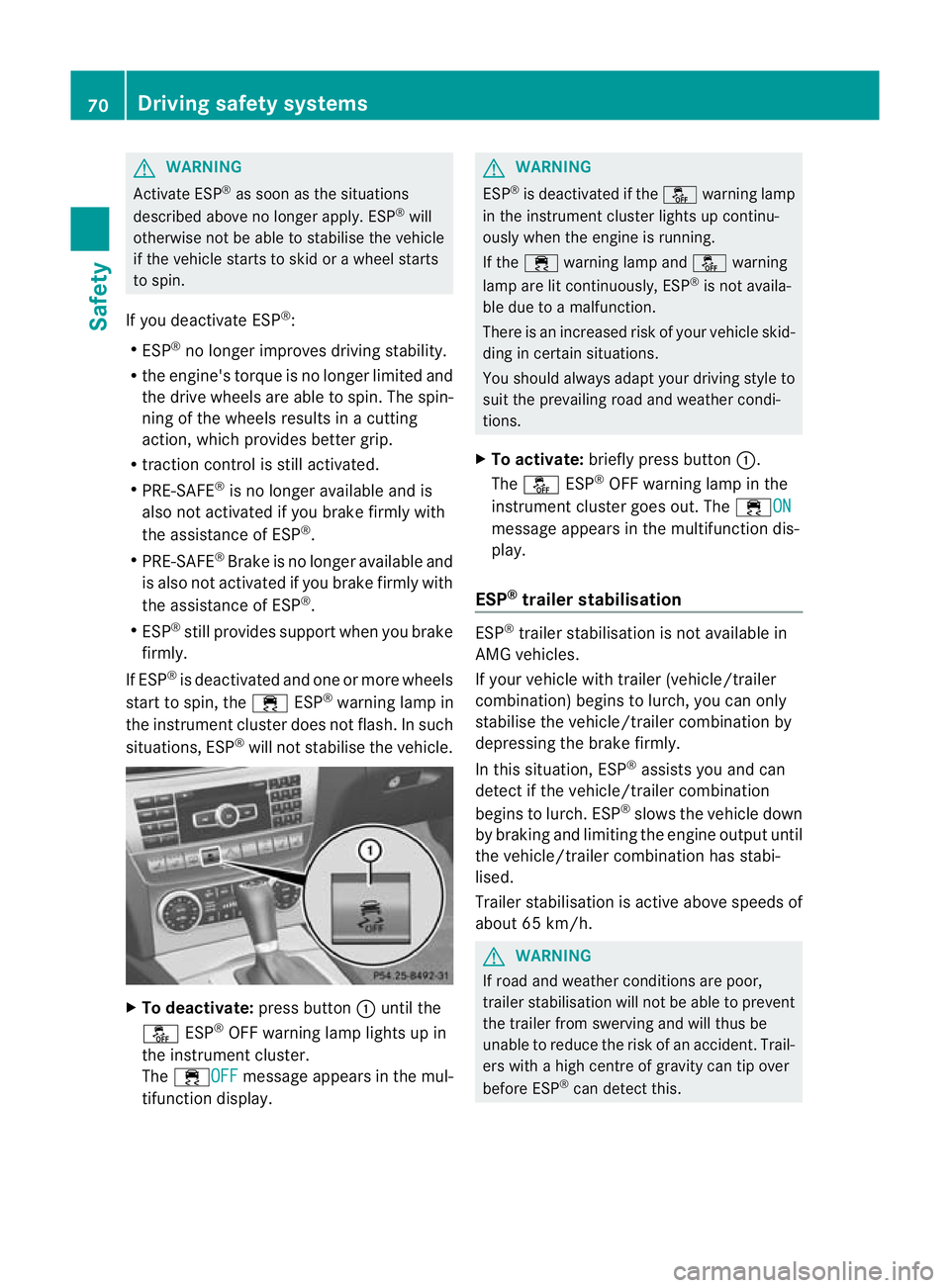
To deactivate: press button:until the
å ESP®
OFF warning lamp lights up in
the instrument cluster.
The ÷OFF message appears in the mul-
tifunction display. G
WARNING
ESP ®
is deactivated if the åwarning lamp
in the instrument cluster lights up continu-
ously when the engine is running.
If the ÷ warning lamp and åwarning
lamp are lit continuously, ESP ®
is not availa-
ble due to a malfunction.
There is an increased risk of yourv ehicle skid-
ding in certain situations.
You should always adapt your driving style to
suit the prevailing road and weather condi-
tions.
X To activate: briefly press button :.
The å ESP®
OFF warning lamp in the
instrument cluster goes out. The ÷ON message appears in the multifunction dis-
play.
ESP ®
trailer stabilisation ESP
®
trailer stabilisation is not available in
AMG vehicles.
If your vehicle with trailer (vehicle/trailer
combination) begins to lurch, you can only
stabilise the vehicle/trailer combination by
depressing the brake firmly.
In this situation, ESP ®
assists you and can
detec tifthe vehicle/trailer combination
begins to lurch. ESP ®
slows the vehicle down
by braking and limiting the engine output until
the vehicle/trailer combination has stabi-
lised.
Trailer stabilisation is active above speeds of
about 65 km/h. G
WARNING
If road and weather conditions are poor,
trailer stabilisation will not be able to prevent
the trailer from swerving and will thus be
unable to reduce the risk of an accident. Trail-
ers with a high centre of gravity can tip over
before ESP ®
can detect this. 70
Driving safety systemsSafety