bonnet MERCEDES-BENZ C-CLASS COUPE 2011 Owners Manual
[x] Cancel search | Manufacturer: MERCEDES-BENZ, Model Year: 2011, Model line: C-CLASS COUPE, Model: MERCEDES-BENZ C-CLASS COUPE 2011Pages: 373, PDF Size: 8.17 MB
Page 9 of 373
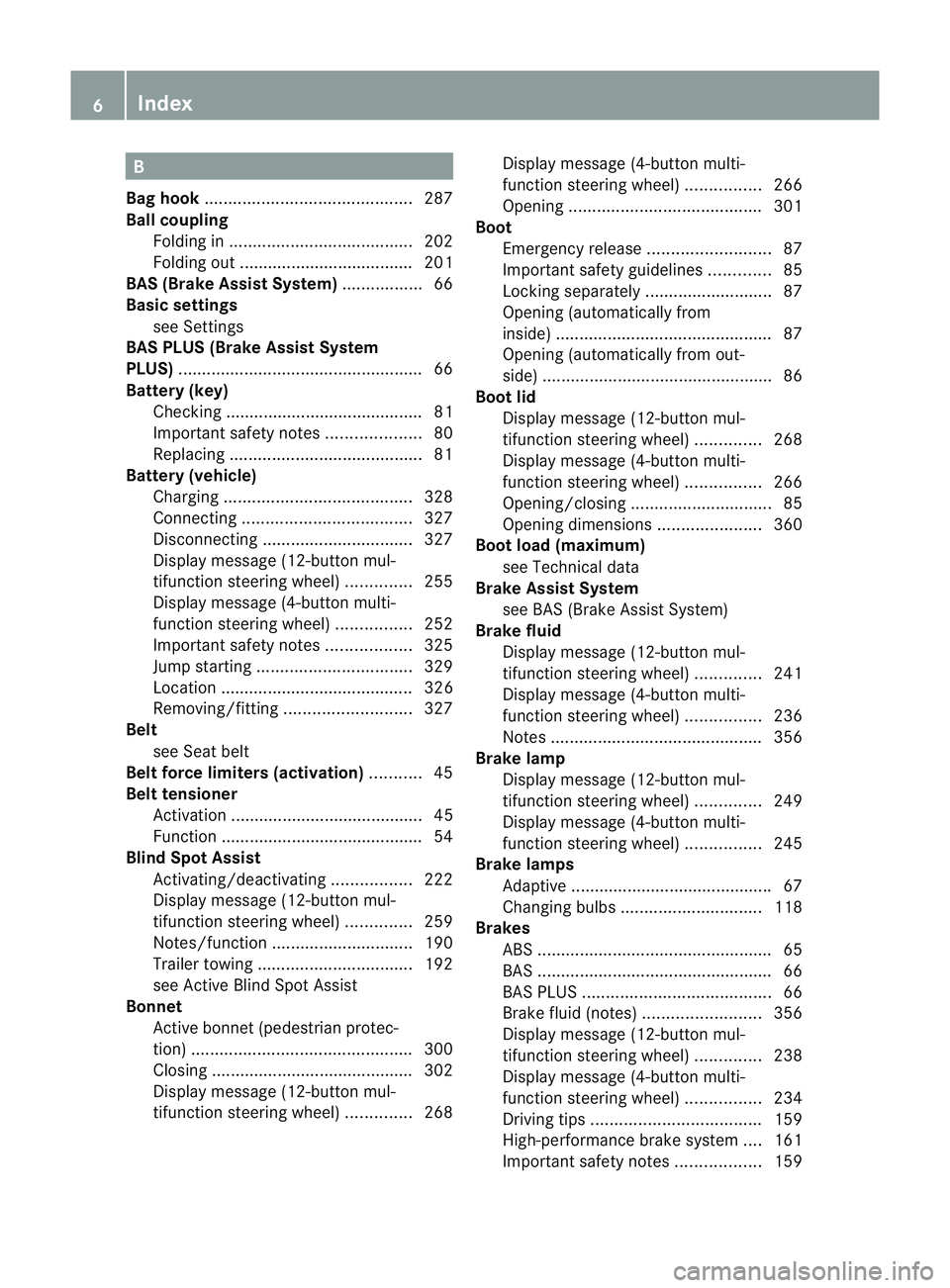
B
Bag hook ............................................ 287
Ball coupling Folding in ....................................... 202
Folding out ..................................... 201
BAS (Brake Assist System) .................66
Basic settings see Settings
BAS PLUS (Brake Assist System
PLUS) .................................................... 66
Battery (key) Checking .......................................... 81
Important safety notes ....................80
Replacing ......................................... 81
Battery (vehicle)
Charging ........................................ 328
Connecting .................................... 327
Disconnecting ................................ 327
Display message (12-button mul-
tifunctio nsteering wheel) ..............255
Display message (4-button multi-
function steering wheel) ................252
Important safety notes ..................325
Jump starting ................................. 329
Location ......................................... 326
Removing/fitting ........................... 327
Belt
see Seat belt
Belt force limiters (activation) ...........45
Belt tensioner Activation ......................................... 45
Function .......................................... .54
Blind Spo tAssist
Activating/deactivating .................222
Display message (12-button mul-
tifunctio nsteering wheel) ..............259
Notes/function .............................. 190
Trailer towing ................................. 192
see Active Blind Spot Assist
Bonnet
Active bonnet (pedestrian protec-
tion) ............................................... 300
Closing .......................................... .302
Display message (12-button mul-
tifunctio nsteering wheel) ..............268Display message (4-button multi-
function steering wheel)
................266
Opening ......................................... 301
Boot
Emergency release ..........................87
Important safety guidelines .............85
Locking separatel y........................... 87
Opening (automatically from
inside) .............................................. 87
Opening (automatically from out-
side) ................................................ .86
Boo tlid
Display message (12-button mul-
tifunction steering wheel) ..............268
Display message (4-button multi-
function steering wheel) ................266
Opening/closing .............................. 85
Opening dimensions ......................360
Boot load (maximum)
see Technical data
Brake Assist System
see BAS (Brake Assist System)
Brake fluid
Display message (12-button mul-
tifunctio nsteering wheel) ..............241
Display message (4-button multi-
function steering wheel) ................236
Notes ............................................. 356
Brake lamp
Display message (12-button mul-
tifunctio nsteering wheel) ..............249
Display message (4-button multi-
function steering wheel) ................245
Brake lamps
Adaptive .......................................... .67
Changin gbulbs .............................. 118
Brakes
ABS .................................................. 65
BAS .................................................. 66
BAS PLUS ........................................ 66
Brake fluid (notes) .........................356
Display message (12-button mul-
tifunctio nsteering wheel) ..............238
Display message (4-button multi-
function steering wheel) ................234
Driving tips .................................... 159
High-performance brake system ....161
Important safety notes ..................1596
Index
Page 33 of 373
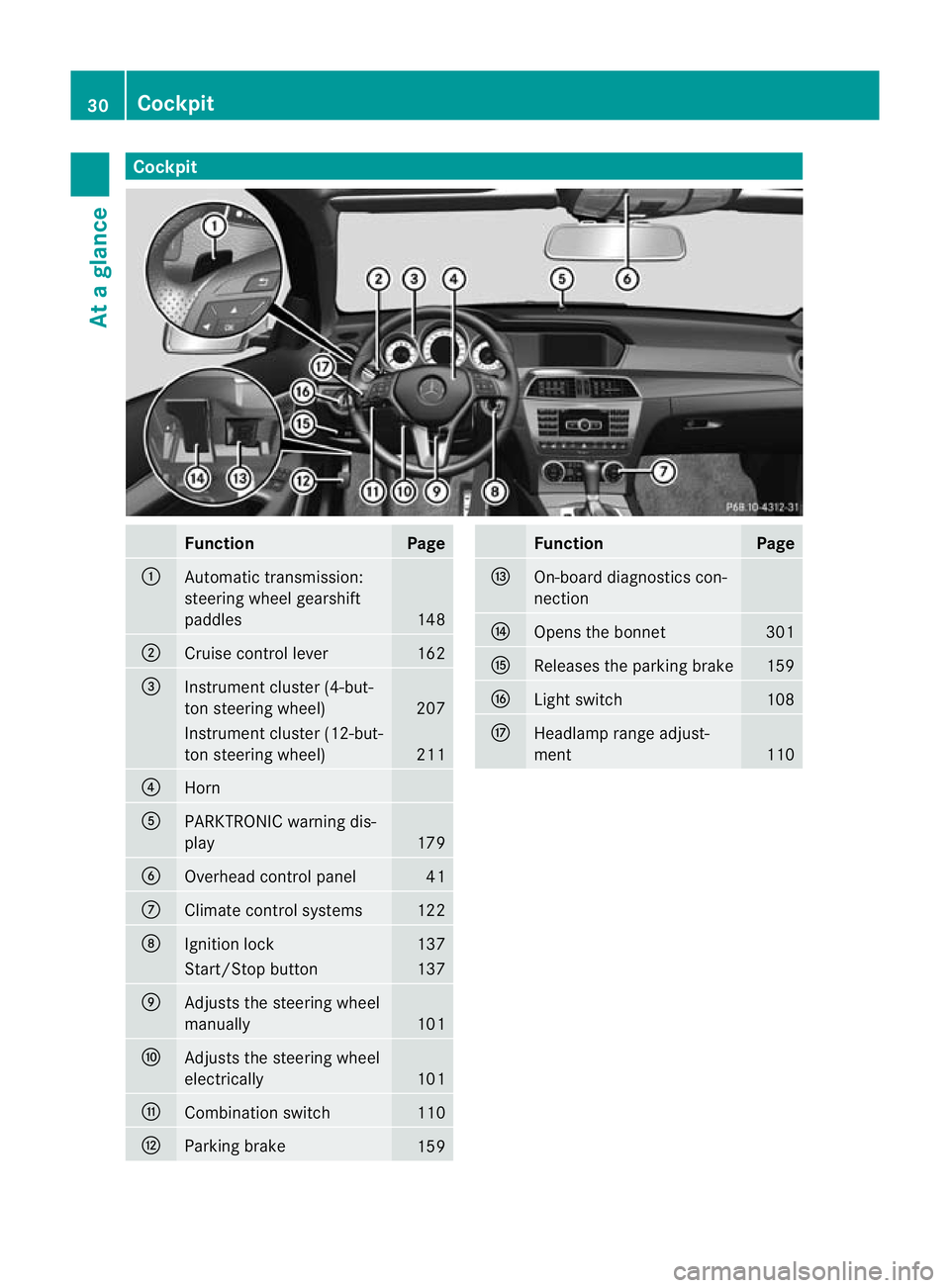
Cockpit
Function Page
:
Automatic transmission:
steering wheel gearshift
paddles
148
;
Cruise control lever 162
=
Instrument cluster (4-but-
to
ns teering wheel) 207
Instrument cluster (12-but-
ton steering wheel)
211
?
Horn
A
PARKTRONIC warning dis-
play
179
B
Overhead control panel 41
C
Climate control systems 122
D
Ignitio
nlock 137
Start/Stop button 137
E
Adjusts the steering wheel
manually
101
F
Adjusts the steering wheel
electrically
101
G
Combination switch 110
H
Parking brake
159 Function Page
I
On-board diagnostics con-
nection
J
Opens the bonnet 301
K
Releases the parking brake 159
L
Light switch 108
M
Headlamp range adjust-
ment
11030
CockpitAt a glance
Page 34 of 373
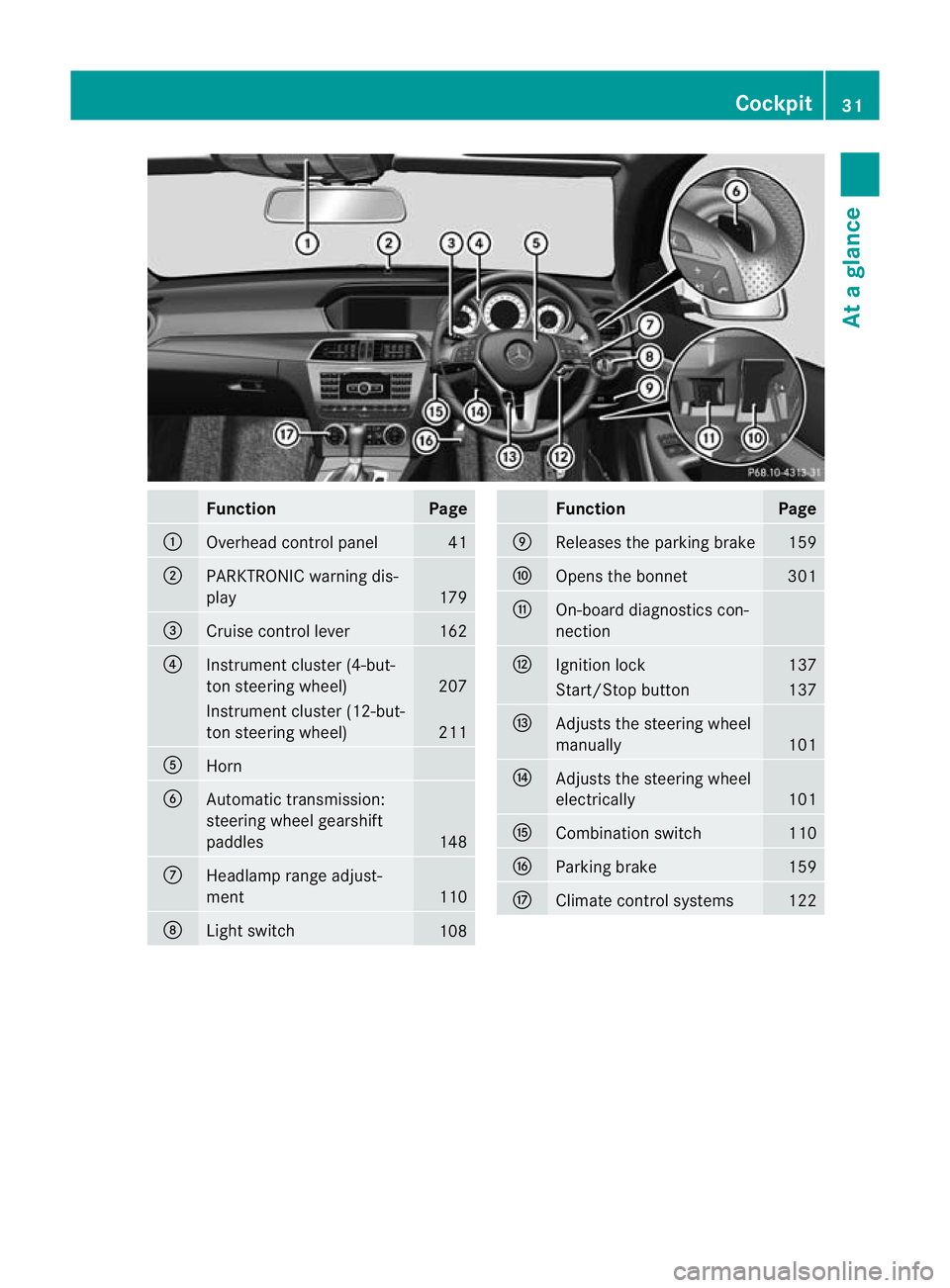
Function Page
:
Overhead control panel 41
;
PARKTRONIC warning dis-
play
179
=
Cruise control lever 162
?
Instrument cluster (4-but-
to
ns teering wheel) 207
Instrument cluster (12-but-
ton steering wheel)
211
A
Horn
B
Automatic transmission:
steering wheel gearshift
paddles
148
C
Headlamp range adjust-
ment
110
D
Ligh
tswitch 108 Function Page
E
Releases the parking brake 159
F
Opens the bonnet 301
G
On-board diagnostics con-
nection
H
Ignitio
nlock 137
Start/Stop button 137
I
Adjusts the steering wheel
manually
101
J
Adjusts the steering wheel
electrically
101
K
Combination switch 110
L
Parking brake 159
M
Climate control systems 122Cockpit
31At a glance
Page 49 of 373
of a collision. In the first deployment stage,
the front airbag is filled with enough propel-
lant gas to reduce the risk of injuries. The
front airbag is fully deployed if a second
deployment threshold is exceeded within a
few milliseconds.
The belt tensioner and airbag triggering
thresholds are variable and are adapted to the
rate of deceleration or acceleration of the
vehicle. This process is pre-emptive in nature.
The triggering process must take place in
good time at the start of the collision.
i Airbags are not deployed in all types of
accidents. Also, not all airbags are
deployed together in an accident .The dif-
ferent airbag systems work independently
of each other.
How the airbag system works is deter-
mined by the severity of the collision detec-
ted, especially the vehicle deceleration or
acceleration, and the apparent type of acci-
dent:
R head-on collision
R side impact
R rear impact
The rate of vehicle deceleration or accelera-
tion and the direction of the force are essen-
tially determined by:
R the distribution of forces during the colli-
sion
R the collision angle
R the deformation characteristics of the vehi-
cle
R the characteristics of the object with which
the vehicle has collided
Factors which can only be seen and measured
after a collision has occurred do not play a
decisive role in the deployment of an airbag,
nor do they provide an indication of airbag
deployment.
The vehicle may be deformed significantly,
e.g. the bonnet or the wing, without an airbag
being deployed. This is the case if only parts
which are relatively easily deformed are affec- ted and the rate of deceleration is not high.
Conversely, airbags may be deployed even
though the vehicle suffers only minor defor-
mation. This is the case if, for example, very
rigid vehicle parts such as longitudinal body
members are hit, and sufficient deceleration
occurs as a result.
Airbags
Important safety notes Airbag deployment slows down and restricts
the movement of the vehicle occupant.
If the airbags are deployed, you will hear a
bang and a small amount of powder may also
be released. Only in rare cases will the bang
affect your hearing. The powder that is
released generally does not constitute a
health hazard. The 6SRS warning lamp
lights up.
The airbag installation locations are identified
by the AIRBAG symbol. G
WARNING
Airbags provide additional protection; they
are not, however, a substitute for seat belts.
Observe the following notes to reduce the risk
of serious or even fatal injury caused by airbag
deployment:
R all vehicle occupants –inparticular, preg-
nant women – must wear their seat belt
correctly at all times and lean back against
the backrest, which should be positioned
as close to the vertical as possible. The
head restraint must support the back of the
head at about eye level.
R always secure childre nless than 1.50mt all
and unde r12years of age in suitable child
restraint systems.
R all vehicle occupants must select a seat
position that is as far away from the airbag
as possible. The driver's seat position must
allow the vehicle to be driven safely. The
driver's chest should be as far away from 46
Occupant safetySafety
Page 76 of 373
Vehicles with COMAND and navigation sys-
tem: the radar sensor system is switched off
automatically in the vicinity of radio telescope
facilities (Y page 363).
Vehicles without COMAND and a navigation
system and vehicles for Australia:t he radar
sensor system and on-board computer must
be switched off in the vicinity of radio tele-
scope facilities (Y page 226).
For PRE-SAFE ®
Brake to assist you when driv-
ing, the radar sensor system must be
switched on (Y page 226) and be opera-
tional.
Following damage to the front end of the vehi-
cle, have the configuration and operation of
the radar sensors checked at a qualified spe-
cialist workshop. This also applies to colli-
sions at slow speeds where there is no visible
damage to the front of the vehicle. Anti-theft systems
Immobiliser
The immobiliser prevents your vehicle from
being started without the correct key.
X To activate with the key: remove the key
from the ignition lock.
X To activate with KEYLESS-GO: switch the
ignition off and open the driver's door.
X To deactivate: switch on the ignition.
i The immobiliser is always deactivated
when you start the engine. ATA (Anti-Theft Alarm system)
Av isual and audible alarm is triggered if the
alarm system is primed and you open:
R a door
R the vehicle with the emergency key ele-
ment
R the boot lid
R the bonnet The alarm is not switched off, even if you
close the open door that has triggered it, for
example.
X
To prime: lock the vehicle with the key or
KEYLESS-GO.
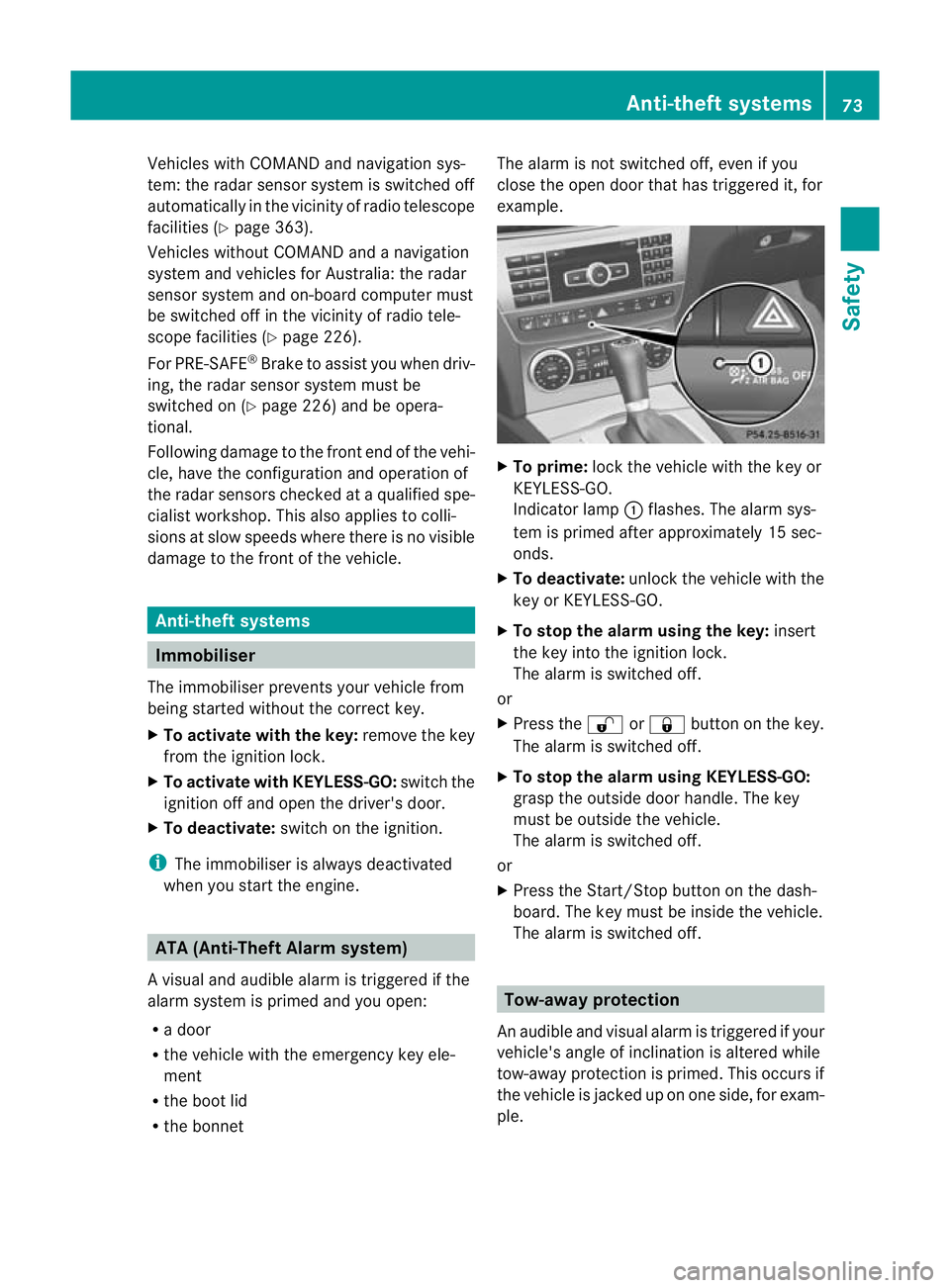
Indicator lamp :flashes .The alarm sys-
tem is primed after approximately 15 sec-
onds.
X To deactivate: unlock the vehicle with the
key or KEYLESS-GO.
X To stop the alarm using the key: insert
the key into the ignition lock.
The alarm is switched off.
or
X Press the %or& button on the key.
The alarm is switched off.
X To stop the alarm using KEYLESS-GO:
grasp the outside door handle. The key
must be outside the vehicle.
The alarm is switched off.
or
X Press the Start/Stop button on the dash-
board. The key must be inside the vehicle.
The alarm is switched off. Tow-away protection
An audible and visual alarm is triggered if your
vehicle's angle of inclination is altered while
tow-away protection is primed. This occurs if
the vehicle is jacked up on one side, for exam-
ple. Anti-theft systems
73Safety Z
Page 119 of 373
Bi-xeno
nheadlamps
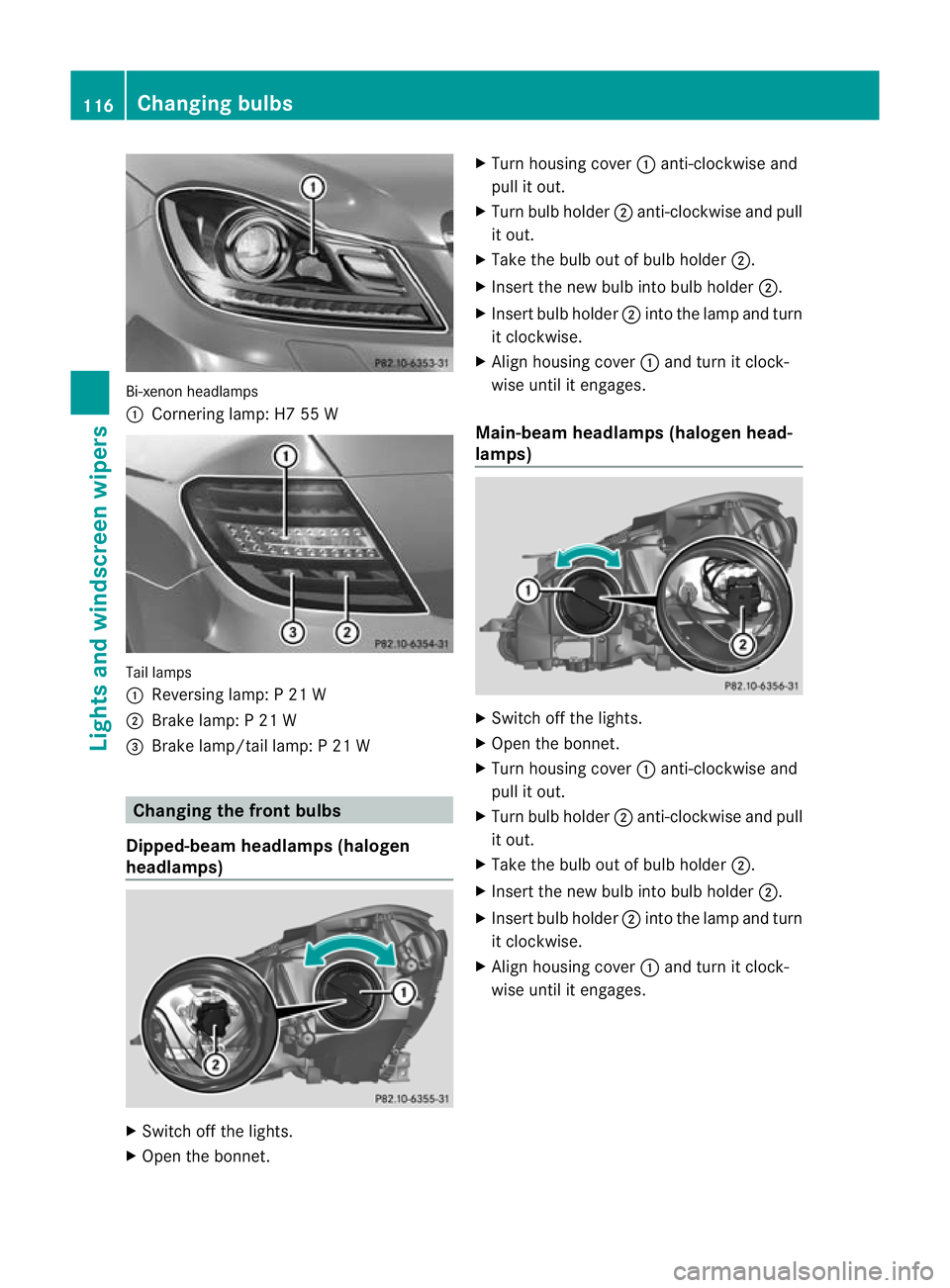
: Cornering lamp: H7 55 W Tail lamps
:
Reversing lamp: P 21 W
; Brake lamp: P 21 W
= Brake lamp/tail lamp: P 21 W Changing the front bulbs
Dipped-beam headlamps (halogen
headlamps) X
Switch off the lights.
X Open the bonnet. X
Turn housing cover :anti-clockwise and
pull it out.
X Turn bulb holder ;anti-clockwise and pull
it out.
X Take the bulb out of bulb holder ;.
X Inser tthe new bulb into bulb holder ;.
X Insert bulb holder ;into the lamp and turn
it clockwise.
X Align housing cover :and turn it clock-
wise until it engages.
Main-beam headlamps (halogen head-
lamps) X
Switch off the lights.
X Open the bonnet.
X Turn housing cover :anti-clockwise and
pull it out.
X Turn bulb holder ;anti-clockwise and pull
it out.
X Take the bulb out of bulb holder ;.
X Insert the new bulb into bulb holder ;.
X Insert bulb holder ;into the lamp and turn
it clockwise.
X Align housing cover :and turn it clock-
wise until it engages. 116
Changing bulbsLights and windscreen wipers
Page 120 of 373
Side lamps/parking lamps(
halogen
headlamps) X
Switch off the lights.
X Open the bonnet.
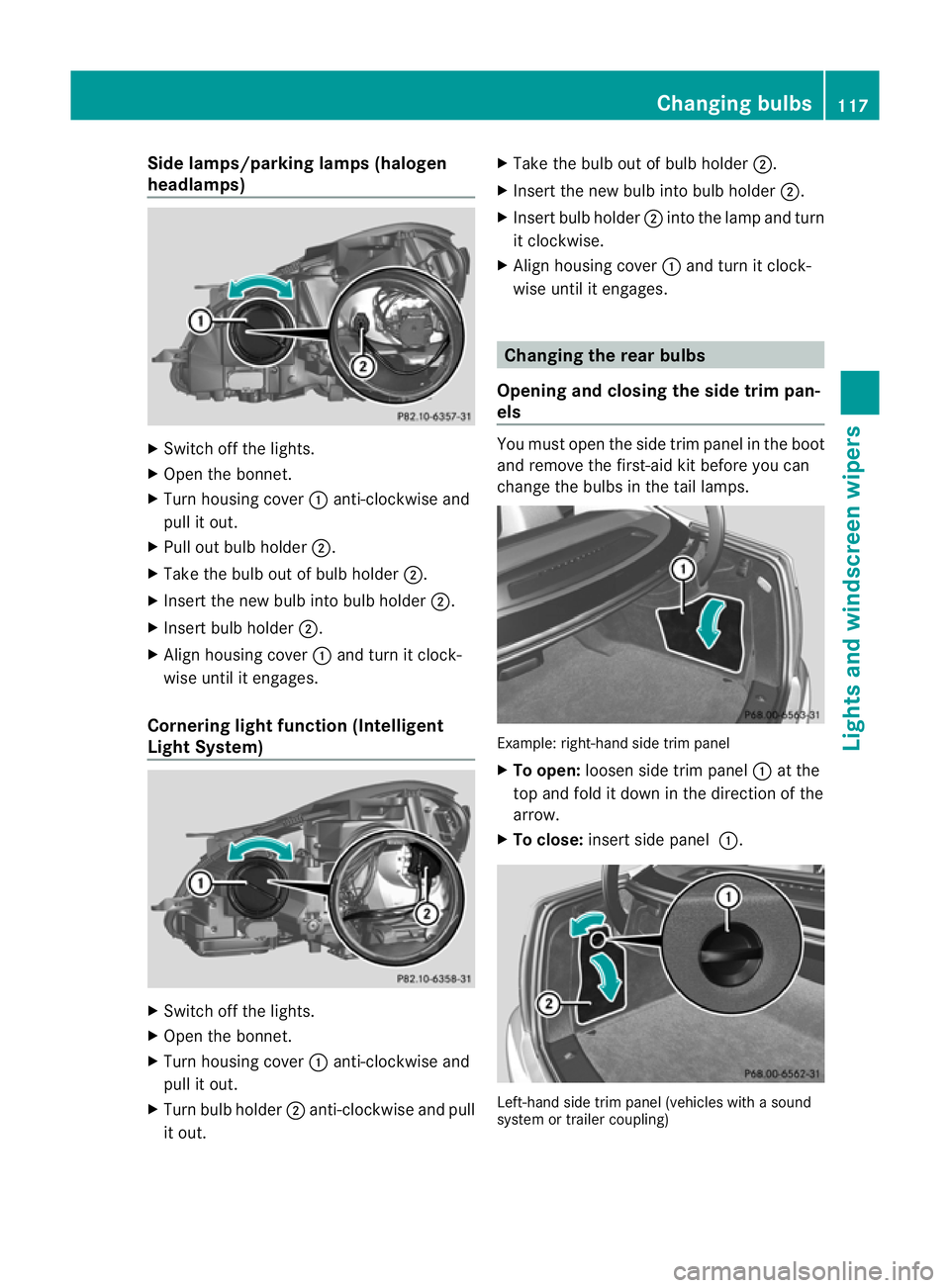
X Turn housing cover :anti-clockwise and
pull it out.
X Pull out bulb holder ;.
X Take the bulb out of bulb holder ;.
X Insert the new bulb into bulb holder ;.
X Insert bulb holder ;.
X Align housing cover :and turn it clock-
wise until it engages.
Cornering light function (Intelligent
Light System) X
Switch off the lights.
X Open the bonnet.
X Turn housing cover :anti-clockwise and
pull it out.
X Turn bulb holder ;anti-clockwise and pull
it out. X
Take the bulb out of bulb holder ;.
X Insert the new bulb into bulb holder ;.
X Insert bulb holder ;into the lamp and turn
it clockwise.
X Align housing cover :and turn it clock-
wise until it engages. Changing the rear bulbs
Opening and closing the side trim pan-
els You must open the side trim panel in the boot
and remove the first-ai
dkit before you can
change the bulbs in the tail lamps. Example: right-hand side trim panel
X
To open: loosen side trim panel :at the
top and fold it down in the direction of the
arrow.
X To close: insert side panel :. Left-hand side trim panel (vehicles with a sound
system or trailer coupling) Changing bulbs
117Lights and windscreen wipers Z
Page 122 of 373
Combination switch
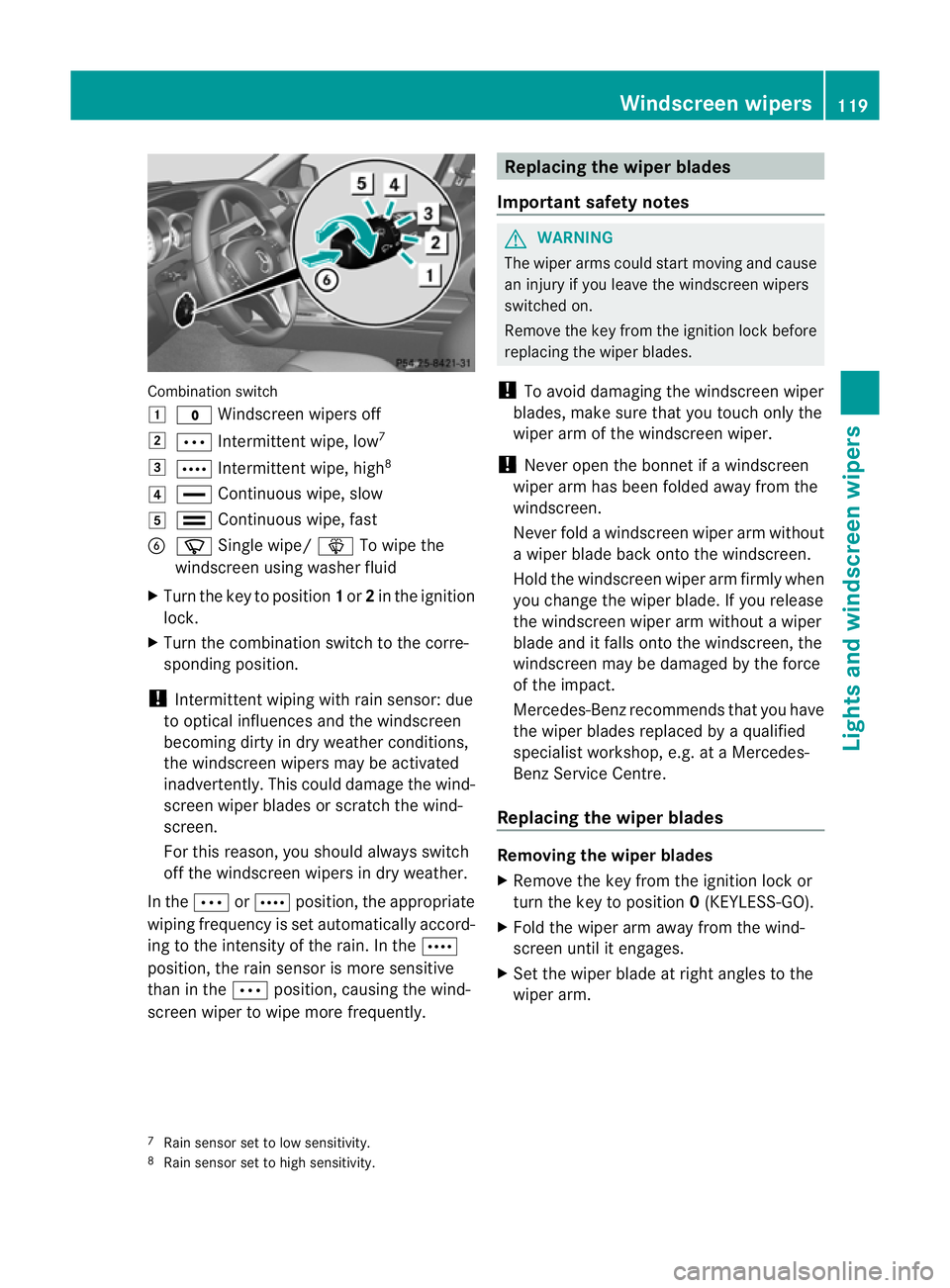
1
$ Windscreen wipers off
2 Ä Intermittent wipe, low 7
3 Å Intermittent wipe, high 8
4 ° Continuous wipe, slow
5 ¯ Continuous wipe, fast
B í Single wipe/ îTo wipe the
windscreen using washer fluid
X Turn the key to position 1or 2in the ignition
lock.
X Turn the combination switch to the corre-
sponding position.
! Intermittent wiping with rain sensor: due
to optical influences and the windscreen
becoming dirty in dry weather conditions,
the windscreen wipers may be activated
inadvertently. This could damage the wind-
screen wiper blades or scratch the wind-
screen.
For this reason, you shoul dalways switch
off the windscreen wipers in dry weather.
In the ÄorÅ position, the appropriate
wiping frequency is set automatically accord-
ing to the intensity of the rain. In the Å
position, the rain sensor is more sensitive
than in the Äposition, causing the wind-
screen wiper to wipe more frequently. Replacing the wiper blades
Important safety notes G
WARNING
The wiper arms could star tmoving and cause
an injury if you leave the windscreen wipers
switched on.
Remove the key from the ignition lock before
replacing the wiper blades.
! To avoid damaging the windscreen wiper
blades, make sure that you touch only the
wiper arm of the windscreen wiper.
! Never open the bonnet if a windscreen
wiper arm has been folded away from the
windscreen.
Never fold a windscreen wiper arm without
a wiper blade back onto the windscreen.
Hold the windscreen wiper arm firmly when
you change the wiper blade. If you release
the windscreen wiper arm without a wiper
blade and it falls onto the windscreen, the
windscreen may be damaged by the force
of the impact.
Mercedes-Benz recommends that you have
the wiper blades replaced by aqualified
specialist workshop, e.g. at a Mercedes-
Benz Service Centre.
Replacing the wiper blades Removing the wiper blades
X
Remove the key from the ignition lock or
tur nthe key to position 0(KEYLESS-GO).
X Fold the wiper arm away from the wind-
screen until it engages.
X Set the wiper blade at right angles to the
wiper arm.
7 Rain sensor set to low sensitivity.
8 Rain sensor set to high sensitivity. Windscreen wipers
119Lights and windscreen wipers Z
Page 144 of 373
matically. All of the vehicle's systems remain
active. If you open the door, unfasten your
seat belt or remove your foot from the brake
pedal, the engine will automatically start. The
vehicle may begi nmoving. You could suffer
serious or even fatal injury or cause an acci-
dent resulting in injury or death.
Never leave the vehicle while the ECO symbol
in the multifunction display is shown in green
or yellow .Always secure the vehicle against
rolling away before leaving it.
! Always switch the ignition off and take the
key with you when leaving the vehicle.
Automatic engine switch-off The engine is only switched off if:
R
the outside temperature is within the range
that is suitable for the system.
R the engine is at normal operating temper-
ature.
R the set temperature for the vehicle interior
has been reached.
R the battery is sufficiently charged.
R the system detects that the windscreen is
not misted up when the air-conditioning
system is switched on.
R the bonnet is closed.
R the vehicle is not being steered.
R the driver's door is closed and the seat belt
is fastened.
i The engine can be switched off automat-
ically a maximum of four times (initial stop
and three repeats) in succession .The ECO
symbol is shown in yellow in the multifunc-
tion display after the engine has been star-
ted automatically for the fourth time. The
engine can only be switched off automati-
cally again when the ECO symbol is shown
in green in the multifunction display.
i During an automatic engine switch-off, air
conditioning is reduced. If full air condition-
ing is required, the ECO start/stop function can be switched off with the ECO button
(Y
page 142).
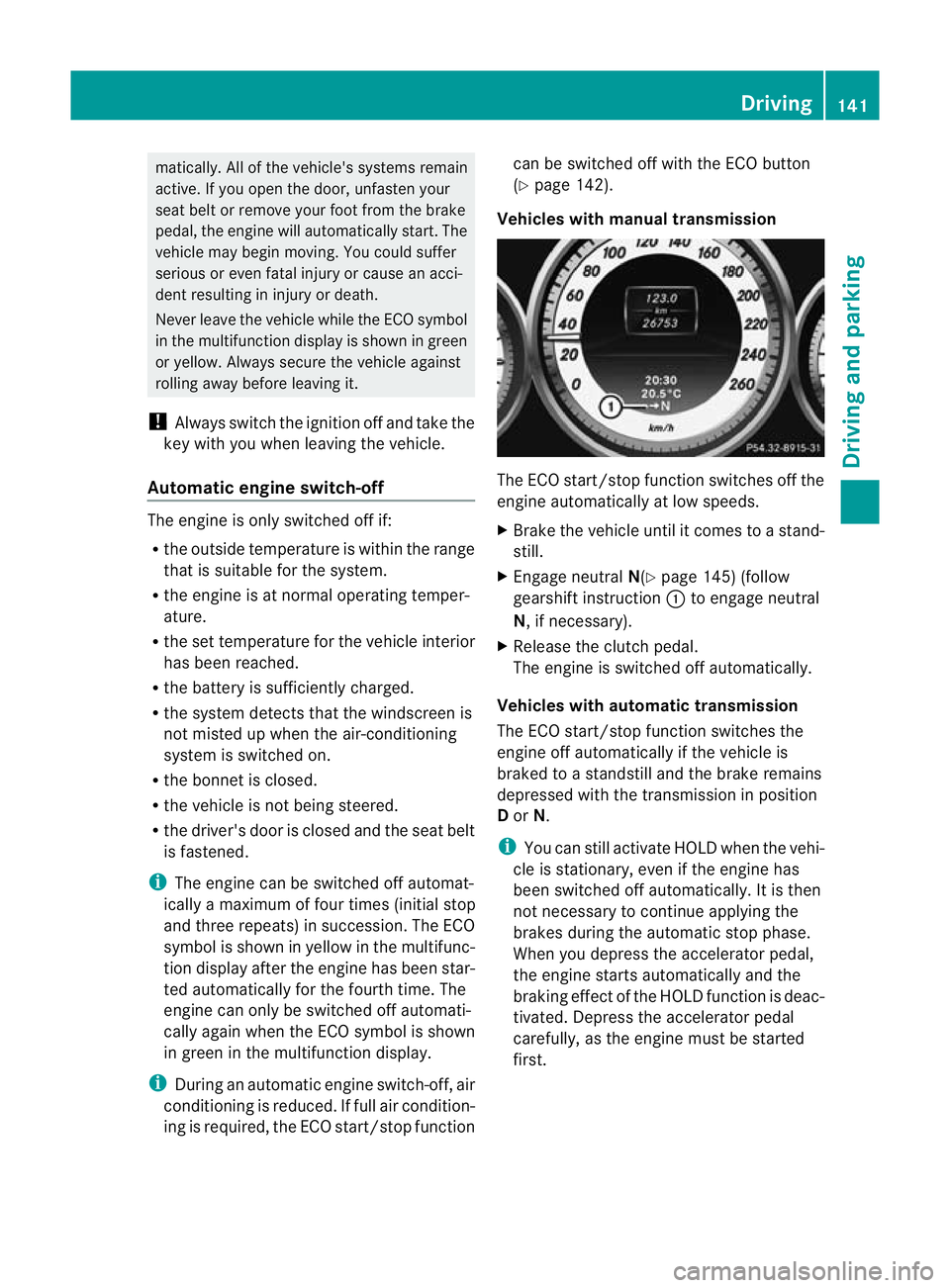
Vehicles with manual transmission The ECO start/stop function switches off the
engine automatically at low speeds.
X
Brake the vehicle until it comes to a stand-
still.
X Engage neutral N(Ypage 145) (follow
gearshift instruction :to engage neutral
N, if necessary).
X Release the clutch pedal.
The engine is switched off automatically.
Vehicles with automatic transmission
The ECO start/stop function switches the
engine off automatically if the vehicle is
braked to a standstill and the brake remains
depressed with the transmission in position
D or N.
i You can still activate HOLD when the vehi-
cle is stationary, even if the engine has
been switched off automatically .Itis then
not necessary to continue applying the
brakes during the automatic stop phase.
When you depress the accelerator pedal,
the engine starts automatically and the
braking effect of the HOLD function is deac-
tivated. Depress the accelerator pedal
carefully, as the engine must be started
first. Driving
141Driving and parking Z
Page 170 of 373
To activate the DISTRONIC PLUS, the follow-
ing conditions must be fulfilled:
R for vehicles not equipped with a navigation
system, the Becker ®
MAP PILOT must be
connected. See the separate Audio 20
operating instructions.
R the engine must be running. It may take up
to two minutes of driving before DIS-
TRONIC PLUS is ready for use.
R the parking brake is not applied.
R ESP ®
is activated.
R the transmission is in position D.
R the bonnet is closed.
R the driver's door must be closed when you
shift from Pto Dor your seat belt must be
fastened.
R the frontp assenger door is closed.
R the vehicle is no tskidding.
Activating while driving
When driving at speeds below 30 km/h, you
can only activate DISTRONIC PLU Sifthe vehi-
cle in front has been detected and is shown
in the multifunction display. If the vehicle in
front is not shown in the multifunction display
and is no longer being detected, for example
because it has changed lanes, DISTRONIC
PLUS is deactivated and atone sounds.
X Briefly pull the cruise control lever towards
you ?or press it up :or down Ato the
pressure point.
DISTRONIC PLUS is selected.
X Keep the cruise control lever pressed
up : or down Auntil the desired speed
is set.
X Remove your foot from the accelerator
pedal.
Your vehicle adapts its speed to that of the
vehicle in front, but only up to the desired
stored speed.
i If you do not fully release the accelerator
pedal, the DISTRONIC PLUS suspended message appears in the multifunction dis-
play. The set distance to a slower-moving vehicle in front will then not be maintained.
You will be driving at the speed you deter-
mine by the position of the accelerator
pedal.
Activating when driving towards asta-
tionary vehicle
If the vehicle in front of you is stationary, you
can only activate DISTRONIC PLU Sonce your
vehicle is stationary as well.
X Briefly pull the cruise control lever towards
you ?or press it up :or down Ato the
pressure point.
DISTRONIC PLU Sis selected.
i DISTRONIC PLUS can only be activated at
under 30 km/h if a vehicle in front has been
detected. Therefore, the DISTRONIC PLUS
distance display in the instrument cluster
should be activated (Y page 221).
X Keep the cruise control lever pressed
up : or down Auntil the desired speed
is set.
i You can use the cruise control lever to set
the stored speed and the control on the
cruise control lever to set the specified
minimum distance (Y page 170).
Pulling away
X If the vehicle in front pulls away: remove
your foot from the brake pedal.
X Briefly pull the cruise control lever towards
you ?.
or
X Accelerate briefly.
Your vehicle pulls away and adapts its
speed to that of the vehicle in front.
Driving
If there is no vehicle in front, DISTRONIC
PLUS operates in the same way as cruise
control.
If a slower-moving vehicle is detected in front,
DISTRONIC PLUS causes your vehicle to
brake and maintain a preset distance to the
vehicle in front. Driving systems
167Driving and parking Z