oil MERCEDES-BENZ C-CLASS COUPE 2011 Owners Manual
[x] Cancel search | Manufacturer: MERCEDES-BENZ, Model Year: 2011, Model line: C-CLASS COUPE, Model: MERCEDES-BENZ C-CLASS COUPE 2011Pages: 373, PDF Size: 8.17 MB
Page 7 of 373
1, 2, 3 ...
12-button multifunction steering
wheel Operating the on-board computer .211
Overview .......................................... 39
12 Vsocket
see Sockets
4-button multifunction steering
wheel
Overview .......................................... 38
4-button multifunction steering
wheel
Operating the on-board computer .207 A
ABS (Anti-lock Braking System) Display message (12-button mul-
tifunctio nsteering wheel) ..............238
Display message (4-button multi-
function steering wheel) ................234
Function/notes ................................ 65
Important safety notes ....................65
Warning lamp ................................. 275
Activating/deactivating air-recir-
culation mode .................................... 127
Activating/deactivating cooling
with air dehumidification .................124
Active Blin dSpot Assist
Display message (12-button mul-
tifunction steering wheel) ..............259
Function/notes ............................. 194
Switching on/off (on-board com-
puter, 12-button multifunction
steering wheel) .............................. 222
Towing atrailer .............................. 197
Active Driving Assistance package .194
Active Lane Keeping Assist Display message (12-button mul-
tifunctio nsteering wheel) ..............258
Function/informatio n.................... 197
Switching on/off (on-board com-
puter, 12-button multifunction
steering wheel) .............................. 222
Towing atrailer .............................. 199
Active light function .........................111Active Service Syste
mPLUS
see ASSYS TPLUS service interval
display
ADAPTIVE BRAKE .................................71
Adaptive brake lamps .........................67
Adaptive Highbeam Assist Function/notes ............................. 112
Adaptive Main-beam Assist
Display message (12-button mul-
tifunctio nsteering wheel) ..............251
Adaptive Main-Beam Assist
Switching on/off (on-board com-
puter) ............................................. 225
Additional speedometer ...................223
Additives (engine oil) ........................356
Adjusting the headlamp range .........110
Airbags Activation ......................................... 45
Front airbag (driver, front
passenger )....................................... 48
Important safety guidelines .............46
Kneebag .......................................... .48
Pelvis airbag .................................... 49
Sidebag ............................................ 48
Windowba g...................................... 49
Air-conditioning system
see Climate control
Airf ilter
Display message (12-button mul-
tifunction steering wheel) ..............255
Display message (4-button multi-
function steering wheel) ................253
Air pressure
see Tyre pressure
Airv ents
Glove compartmen t....................... 133
Important safety notes ..................132
Rea r............................................... 133
Setting ........................................... 132
Setting the centre air vents ...........133
Setting the side air vents ...............133
Alarm system
see ATA (Anti-Theft Alarm system)
Alertness Assistant
see ATTENTION ASSIST
AMGMenu (on-board computer) ....... 229
Anti-glare film .................................... 2974
Index
Page 14 of 373
ECO start/stop function
Deactivating/activatin g................. 142
General information .......................140
Electrical fuses
see Fuses
Electronic Brake force Distribution
see EBD (Electronic Brake force
Distribution)
Electronic Stability Program
see ESP ®
(Electroni cStability Program)
Electronic Traction System
see ETS (Electronic Traction System)
Emergenc ykey
Unlocking the driver's door ..............85
Emergency key element
Function/notes ................................ 80
Locking vehicle ................................ 85
Emergency release
Driver's door .................................... 85
Emergency spare wheel
Notes/data .................................... 346
Storage location ............................ 316
Emergency unlocking
Boot ................................................. 87
Vehicle ............................................. 85
Engine
ECO start/stop function ................140
Emergency starting ........................333
Engine number ............................... 353
Running irregularl y......................... 143
Starting problems ..........................143
Starting the engine with the key ....139
Starting with KEYLESS GO .............139
Stopping ........................................ 158
Warning lamp (engine diagnos-
tics) ............................................... 280
Engine electronics
Notes ............................................. 351
Problem (fault) ............................... 143
Engine oil
Additives ........................................ 356
Checking the oil level ..................... 302
Display message (12-button mul-
tifunctio nsteering wheel) ..............255
Display message (4-button multi-
function steering wheel) ................253
Filling capacity ............................... 355Notes about oil grades ................... 355
Notes on oil level/consumption
....302
Temperature (12-button multi-
function steering wheel) ................229
Topping up ..................................... 303
Viscosity ........................................ 356
Environmental protection
Note ................................................ .25
Returning an end-of-life vehicle .......25
ESP ®
(Electronic Stability Pro-
gram) AMG menu (on-board computer) ...229
Deactivating/activating (AMG
vehicles) .......................................... 69
Deactivating/activating (except
AMG vehicles) ................................ 221
Deactivating/activating (notes;
except AMG vehicles) ......................68
Display message (12-button mul-
tifunctio nsteering wheel) ..............238
Display message (4-button multi-
function steering wheel) ................234
ETS .................................................. 68
Function/notes ................................ 67
Important safety guidelines .............67
Trailer stabilisatio n.......................... 70
Warning lamp ................................. 277
ETS (Electronic Traction System) ....... 68
Exhaus ttail pipe (cleaning instruc-
tions) .................................................. 309
Exterior lighting see Lights
Exterior mirrors
Adjusting ....................................... 103
Anti-dazzle mode (automatic) ........104
Folding in/ou t(automatically) .......104
Folding in/ou t(electrically) ...........103
Folding in (12-button multifunc-
tion steering wheel) .......................228
Out of position (troubleshooting) ...104
Parking position ............................. 104
Resetting ....................................... 104
Storing settings (memory func-
tion) ............................................... 105 Index
11
Page 19 of 373

Multifunction steering wheel (4
buttons)
see 4-button multifunction steer-
ing wheel N
Navigation Menu (on-board computer) ............216
On-board computer (12-button
multifunctio nsteering wheel) ........216
see separate operating instructions
NECK-PRO head restraints
Operation ........................................ .50
Resetting after being triggered ........51
Notes on running in anew vehicle ..136 O
Occupant safety Childre ninthe vehicle ..................... 55
Important safety notes ....................44
Odometer
4-button multifunction steering
wheel ............................................. 209
see Total distance recorder
see Trip meter
Oil
see Engine oil
On-board computer
RACETIMER ................................... 229
On-board computer (12-button
multifunction steering wheel)
AMG menu ..................................... 229
Assist menu ................................... 220
Audi omenu ................................... 217
Convenience submenu ..................228
DISTRONI CPLUS ........................... 171
Important safety notes ..................206
Instrument cluster submenu ..........223
Lights submenu ............................. 224
Menu overview .............................. 214
Navigation menu ............................ 216
Operating ...................................... .211
Operating the vide oDVD ............... 218
Range ............................................ 215
Service menu ................................. 222
Standard display submenu ............215 Telephone menu
............................ 219
Trip menu ...................................... 215
On-board computer (12-button
multifunction steering wheel)
Displaying service messages .........305
Display messages ..........................232
Heating submenu ........................... 227
Message memory .......................... 233
Vehicle submenu ........................... 225
On-board computer (12-button
multifunction steering wheel)Set-
tings menu ......................................... 223
On-board computer (12-button
multifunction steering wheel) sub-
menu
Factory setting ............................... 228
On-board computer (4-button mul-
tifunction steering wheel)
Important safety notes ..................206
Menu overview .............................. 209
Switching daytime driving lights
on/off ............................................ 210
On-board computer (4-button mul-
tifunction steering wheel)
Displaying service messages .........305
Display messages ..........................232
Individual vehicle settings ..............207
Message memory .......................... 232
Operating ...................................... .207
Range ............................................ 210
Standard displa y............................ 209
Trip computer ................................ 210
Opening and closing the side trim
panels ................................................. 117
Operating system see On-board computer
Outside temperature
Display (12-button multifunction
steering wheel) .............................. 211
Display (4-button multifunction
steering wheel) .............................. 207
Overhead control panel ......................41 P
Pain tcode .......................................... 352
Paintwork (cleaning instructions) ...307 16
Index
Page 22 of 373
Seat
Seat backrest display message
(12-button multifunction steering
wheel) ............................................ 268
Seat backrest display message (4-
button multifunction steering
wheel) ............................................ 266
Seat belt
Activating/deactivating seat-belt
adjustment (12-button multifunc-
tion steering wheel) .......................228
Adjusting the driver's and front-
passenger sea tbelt ......................... 53
Belt force limiter .............................. 54
Belt tensioner .................................. 54
Cleaning ......................................... 311
Display message (12-button mul-
tifunctio nsteering wheel) ..............242
Display message (4-button multi-
function steering wheel) ................236
Fastening ......................................... 53
Important safety guidelines .............51
Rea rseat belt status indicator .........54
Releasing ......................................... 53
Warning lamp (function) ................... 54
Seat belts
Warning lamp ................................. 273
Seats
Adjusting (electrically). ....................98
Adjusting (manually and electri-
cally) ................................................ 98
Adjusting the 4-way lumba rsup-
por t.................................................. 99
Adjusting the head restraint ............98
Cleaning the cover .........................311
Correct driver's seat position ........... 96
Folding the backrests forward/
back ................................................ .99
Important safety notes ....................97
Seat heating problem ....................100
Seat ventilation problem ................101
Storing settings (memory func-
tion) ............................................... 105
Switching sea theating on/off .......100
Switching the sea tventilation on/
off .................................................. 100
Sensors (cleaning instructions) .......309 Service
see ASSYST PLUS service interval
display
Service menu (12-button multi-
function steering wheel) ..................222
Service products Brake fluid ..................................... 356
Coolant (engine) ............................ 356
Engine oil ....................................... 355
Fuel ................................................ 354
Important safety notes ..................353
Settings
Factory (12-button multifunction
steering wheel) .............................. 228
On-board computer (12-button
multifunctio nsteering wheel) ........223
Setting the air distribution ...............125
Setting the airflow ............................125
SETUP (on-board computer) .............229
Shifting to neutral (manual trans-
mission) ............................................. 145
Sidebag ................................................ 48
Side marker lamp Display message (12-button mul-
tifunctio nsteering wheel) ..............250
Display message (4-button multi-
function steering wheel) ................246
Side windows
Convenience closing ........................89
Convenience opening ......................88
Important safety notes ....................88
Opening/closing .............................. 88
Problem (malfunction) .....................90
resetting .......................................... 90
Sliding sunroof
see Panorama sliding sunroof
Snow chains ...................................... 338
Socket Centre console .............................. 292
Points to observe before use .........291
Rea rcompartmen t......................... 292
Spare wheel
Storage location ............................ 316
see Emergency spare wheel
Specialist workshop ............................ 26
Speed, controlling see Cruise control Index
19
Page 24 of 373
T
Tail lamp Display message (12-button mul-
tifunctio nsteering wheel) ..............249
Display message (4-button multi-
function steering wheel) ................245
Tank
see Fuel tank
Tank content
Displaying the range (12-button
multifunctio nsteering wheel) ........215
Displaying the range (4-button
multifunctio nsteering wheel) ........210
Fuel gauge (12-button multifunc-
tion steering wheel) .........................35
Fuel gauge (4-button multifunc-
tion steering wheel) .........................32
Technical data
C 220 CDI BlueEFFICIENCY ...........359
C 250 CDI BlueEFFICIENCY ...........360
C63A MG...................................... 359
Notes ............................................. 350
Trailer loads ................................... 362
Tyres/wheels ................................. 345
Technical Data
C180 BlueEFFICIENCY ..................357
C2 50 BlueEFFICIENCY ..................358
C3 50 BlueEFFICIENCY ..................358
Telephone
Accepting acall............................. 219
Display message (12-button mul-
tifunctio nsteering wheel) ..............269
Menu (on-board computer) ............219
Number from the phone book ....... .219
Redialling ....................................... 220
Rejecting/ending acall................. 219
Telephone compartment ................285
Temperature
Coolant (12-button multifunction
steering wheel; AMG) ..................... 229
Coolant (12-button multifunction
steering wheel) .............................. 210
Coolant (4-button multifunction
steering wheel) .............................. 206
Engine oil (12-button multifunc-
tion steering wheel) .......................229Outside temperature (12-button
multifunctio
nsteering wheel) ........211
Outside temperature (4-button
multifunctio nsteering wheel) ........207
Setting (climate control) ................125
TEMPOMAT
Function/notes ............................. 162
Through-loading feature ...................286
Timing (RACETIMER) .........................229
TIREFIT kit .......................................... 317
Top Tether ............................................ 59
Total distance recorder Displaying (12-button multifunc-
tion steering wheel) .......................215
Displaying (4-button multifunc-
tion steering wheel) .......................209
Tow-away protection ..........................73
Towing Important safety notes ..................330
With the rear axle raised ................332
Towing atrailer
Activ eBlind Spot Assist .................197
Active Lane Keeping Assist ............199
Axle load, permissible ....................363
Bulb failure indicator for LED
lamps ............................................. 203
Lights display message (12-but-
ton multifunction steering wheel) ..248
Lights display message (4-button
multifunctio nsteering wheel) ........244
Trailer tow hitch display message
(4-button multifunction steering
wheel) ............................................ 266
Towing away
Fitting the towing eye. ...................331
Removing the towing eye. ..............332
With both axles on the ground .......332
Tow-starting
Emergency engine starting ............333
Fitting the towing eye. ...................331
Important safety notes ..................330
Removing the towing eye. ..............332
Trailer coupling
see Towing atrailer
Trailer towing
7-pin connector ............................. 204
Blind Spot Assist ............................ 192
Cleaning the trailer tow hitch ......... 309 Index
21
Page 139 of 373
Useful information
i This Owner's Manual describes all models
and all standard and optional equipment
available to your vehicle at the time of pub-
lication of the Owner's Manual. Country-
specific deviations are possible. Please
note that your vehicle may not be equipped
with all features described. This also
applies to safety-relevan tsystems and
functions.
i Please read the information on qualified
specialist workshops (Y page 26).Running-in notes
Important safety notes
G
WARNING
New brake pads/linings only have optimal
braking performance after several hundred
kilometres .Until then, compensate for this by
applying greate rforce to the brake pedal. This
also applies when brake pads/linings or
brake discs have been changed. The first 1,500 km
The more you look after the engine when it is
new, the more satisfied you will be with its
performance in the future.
R Therefore, drive at varying speeds and
engine speeds for the first 1,500 km.
R Avoid heavy loads on the engine during this
period, e.g. driving at full throttle.
R Change gear in good time, at the latest
when the rev counter needle is 2
/ 3 of the
way to the red area in the rev counter dis-
play.
R Do not manually shift to a lower gear to
brake the vehicle. Vehicles with automatic transmission:
R
If possible, do not depress the accelerator
pedal past the point of resistance (kick-
down).
R Only select shift ranges 3,2or 1when driv-
ing slowly, e.g. in mountainous terrain.
After 1,500 km, you may gradually bring the
vehicle up to full road and engine speeds.
Additional running-in notes for AMG vehicles:
R do not drive at speeds above 140 km/hf or
the first 1,500 km.
R only allow the engine to reach a maximum
engine speed of 4,500 rpm briefly.
i You should also observe these notes on
running in if the engine or parts of the drive
train on your vehicle have been replaced. AMG vehicles with rear axle locking
differential
Your vehicle is fitted with a self-locking dif-
ferential on the rear axle. Change the oil after
a running-in period of 3,000 km to improve
protection of the rear axle differential. This oil
change extends the service life of the differ-
ential. Have the oil change carried out at a
qualified specialist workshop. Mercedes-
Benz recommends that you use a Mercedes-
Benz Service Centre for this purpose. Driving
Important safety notes
G
WARNING
Do not place any objects in the driver's foot-
well. If you use a floormat or carpet in the
driver's footwell, make sure that it is correctly
secured and that there is sufficient clearance
for the pedals.
Do not place several floormats on top of one
another.
Loose objects or the floormats could other-
wise get caught between the pedals if you 136
DrivingDriving and parking
Page 140 of 373
accelerate or brake suddenly. You will then
no tb e able to brake, declutch or accelerate
as intended. This could lead to accidents and
injury. G
WARNING
Do not change down for additional engine
braking on a slippery road surface. This could
cause the drive wheels to lose their grip and
the vehicle could skid. This could cause you
to lose control of your vehicle and cause an
accident.
! Warm up the engine quickly. Do not use
the engine's full performance until it has
reached operating temperature.
Only set the automatic transmission to the
respective drive positions when the vehicle
is stationary.
Where possible, avoid spinning the drive
wheels when pulling away on slippery
roads. Otherwise, you could damage the
drive train.
! AMG vehicles: at low engine oil tempera-
tures (below +20 †), the maximum engine
speed is restricted in order to protec tthe
engine. To protect the engine and maintain
smooth engine operation, avoid driving at
full throttle when the engine is cold. Key positions
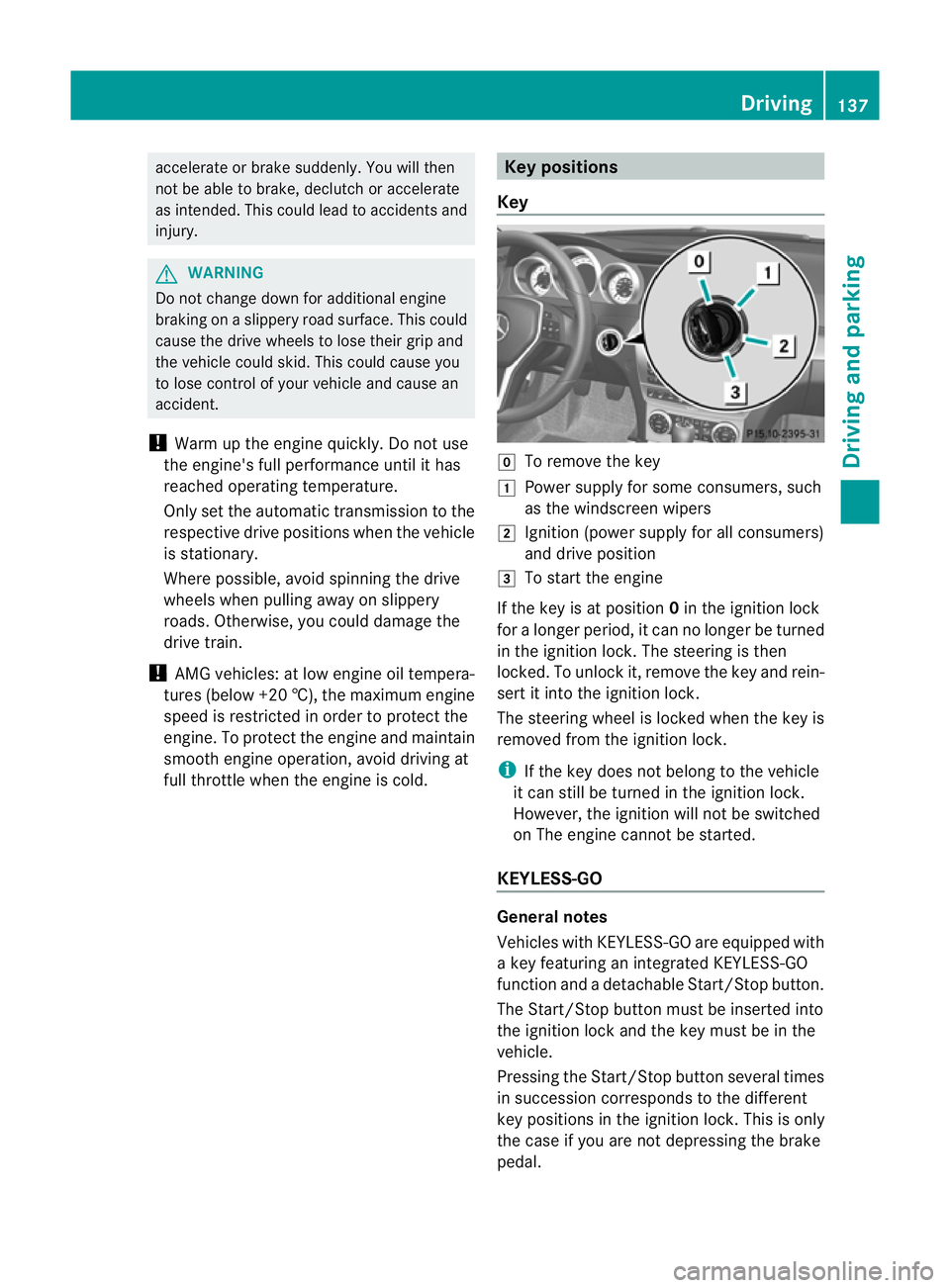
Key g
To remove the key
1 Power supply for some consumers, such
as the windscreen wipers
2 Ignition (power supply for all consumers)
and drive position
3 To start the engine
If the key is at position 0in the ignition lock
for a longer period, it can no longer be turned
in the ignition lock. The steering is then
locked. To unlock it, remove the key and rein-
sert it into the ignition lock.
The steering wheel is locked when the key is
removed from the ignition lock.
i If the key does not belong to the vehicle
it can still be turned in the ignition lock.
However, the ignition will not be switched
on The engine cannot be started.
KEYLESS-GO General notes
Vehicles with KEYLESS-GO are equipped with
a key featuring an integrated KEYLESS-GO
function and a detachable Start/Stop button.
The Start/Stop button must be inserted into
the ignition lock and the key must be in the
vehicle.
Pressing the Start/Stop button several times
in succession corresponds to the different
key positions in the ignition lock. This is only
the case if you are not depressing the brake
pedal. Driving
137Driving and parking Z
Page 155 of 373
Problems with the transmission
Problem Possible causes/consequences and
M Solutions
The transmission has
problems shifting gear. The transmission is losing oil.
X
Have the transmission checked at a qualified specialist work-
shop, e.g. a Mercedes-Benz Service Centre, immediately. The acceleration ability
is deteriorating.
The transmission no
longer changes gear. The transmission is in emergency mode.
It is only possible to shift into
secondgear and reverse gear.
X Stop the vehicle.
X Shift the transmission to position P.
X Switch off the engine.
X Wait at least 10 seconds before restarting the engine.
X Shift the transmission to position Dor R.
If D is selected, the transmission shifts into secondgear; ifRis
selected, the transmission shifts into reverse gear.
X Have the transmission checked at a qualified specialist work-
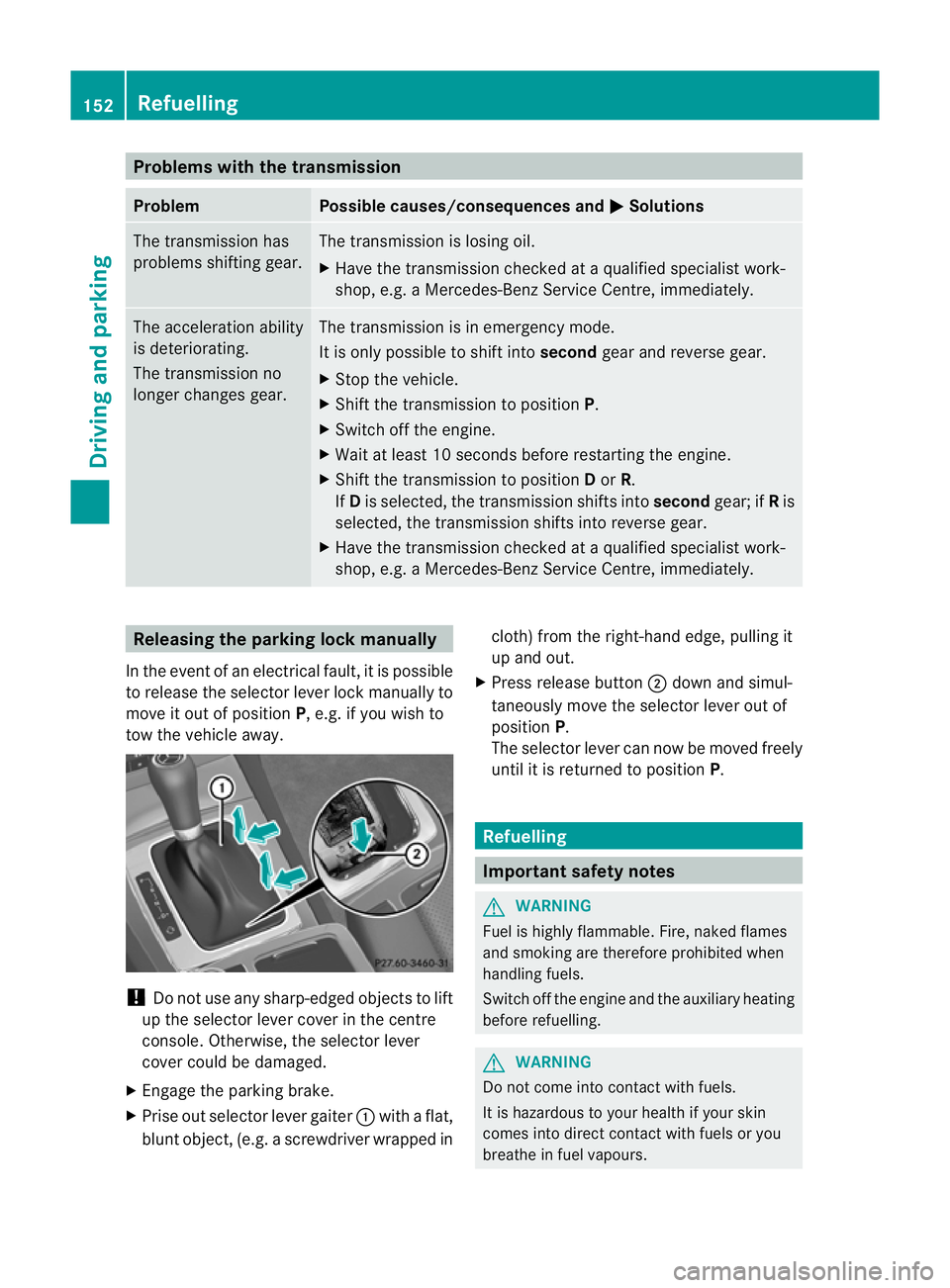
shop, e.g. a Mercedes-Benz Service Centre, immediately. Releasing the parking lock manually
In the event of an electrical fault, it is possible
to release the selector lever lock manually to
move it out of position P, e.g. if you wish to
tow the vehicle away. !
Do not use any sharp-edged objects to lift
up the selector lever cover in the centre
console. Otherwise, the selector lever
cover could be damaged.
X Engage the parking brake.
X Prise out selector lever gaiter :with a flat,
blunt object, (e.g. ascrewdriver wrapped in cloth) from the right-hand edge, pulling it
up and out.
X Press release button ;dow nand simul-
taneously move the selecto rlever out of
position P.
The selector lever can now be moved freely
until it is returned to position P. Refuelling
Important safety notes
G
WARNING
Fuel is highly flammable. Fire, naked flames
and smoking are therefore prohibited when
handling fuels.
Switch off the engine and the auxiliary heating
before refuelling. G
WARNING
Do not come into contact with fuels.
It is hazardous to your health if your skin
comes into direct contact with fuels or you
breathe in fuel vapours. 152
RefuellingDriving and parking
Page 157 of 373
If no fuel other than regular petrol with
91 RON/82.5 MON or a lowerg
rade is per-
manently available, you should have the
vehicle adapted to run on this fuel in a
qualified specialist workshop. Mercedes-
Benz recommends that you use a
Mercedes-Benz Service Centre for this pur-
pose.
C 350 BlueEFFICIENCY !
Only refuel using unleaded, sulphur-free
premium-grade petrol with at least
95 RON/85 MON, which conforms to Euro-
pean standard EN 228 or an equivalent
specification.
You can otherwise impair engine outpu tor
damage the emission control system.
i In some countries, the available petrol
may not be sufficiently low in sulphur. This
fuel can temporarily produce unpleasant
odours, especially on short journeys. As
soon as sulphur-free fuel (sulphur content
<10p pm) is used for refuelling, the odours
are reduced. Diesel (EN 590)
Fuel grade !
When refuelling, only use diesel fuel that
conform stothe European standard EN 590
or is of equivalent quality. You can other-
wise impair engine output or damage the
engine.
! Vehicles with diesel particle filters: in
countries outside the EU, only use low sul-
phur Euro diesel with a sulphurc ontent of
under 50 ppm. Otherwise, the emission
control system could be damaged.
! Vehicles without adiesel particle fil-
ter: in countries where only diesel fuels
with a higher sulphur conten tare available,
the vehicle's oil change intervals are
shorter. More information about intervals for changing the oil can be obtained from
any Mercedes-Benz Service Centre.
! Only use fuel that complies with the EN
590 European standard .Fuel that does not
comply with EN 590 can lead to increased
wear, engine damage and damag eto the
exhaust system.
Do not use the following:
R marine diesel
R heating oil
R bio-diesel
R vegetable oil
R petrol
R paraffin
R kerosene
Do not mix these fuels with diesel fuels and
do not use any special additives. Other-
wise, this can lead to damage to the engine.
This excludes flow improver; see "Low out-
side temperatures".
! Use a filter when adding fuel from a fuel
can. Otherwise, the fuel lines and/or the
diesel injection system could be blocked by
particles from the fuel can.
For further information on "Fuel", see
(Y page 354).
Low outside temperatures Diesel fuel with improved cold flow qualities
is available during the winter months. In
Europe, various climate-dependent low-tem-
perature classes are defined in EN 590. Refu-
elling with diesel fuel which complies with the
climatic specifications of standard EN 590
can help to prevent operating problems. At
exceptionally low temperatures, it is possible
that the flow properties of the fuel may be
inadequate. This also applies to fuel that has
not been adapted to suit the climatic condi-
tions, e.g. diesel fuel from warmer regions.
i Further information about country-spe-
cific fuel properties can be obtained from
oil companies, e.g. at filling stations. 154
RefuellingDriving and parking
Page 162 of 373
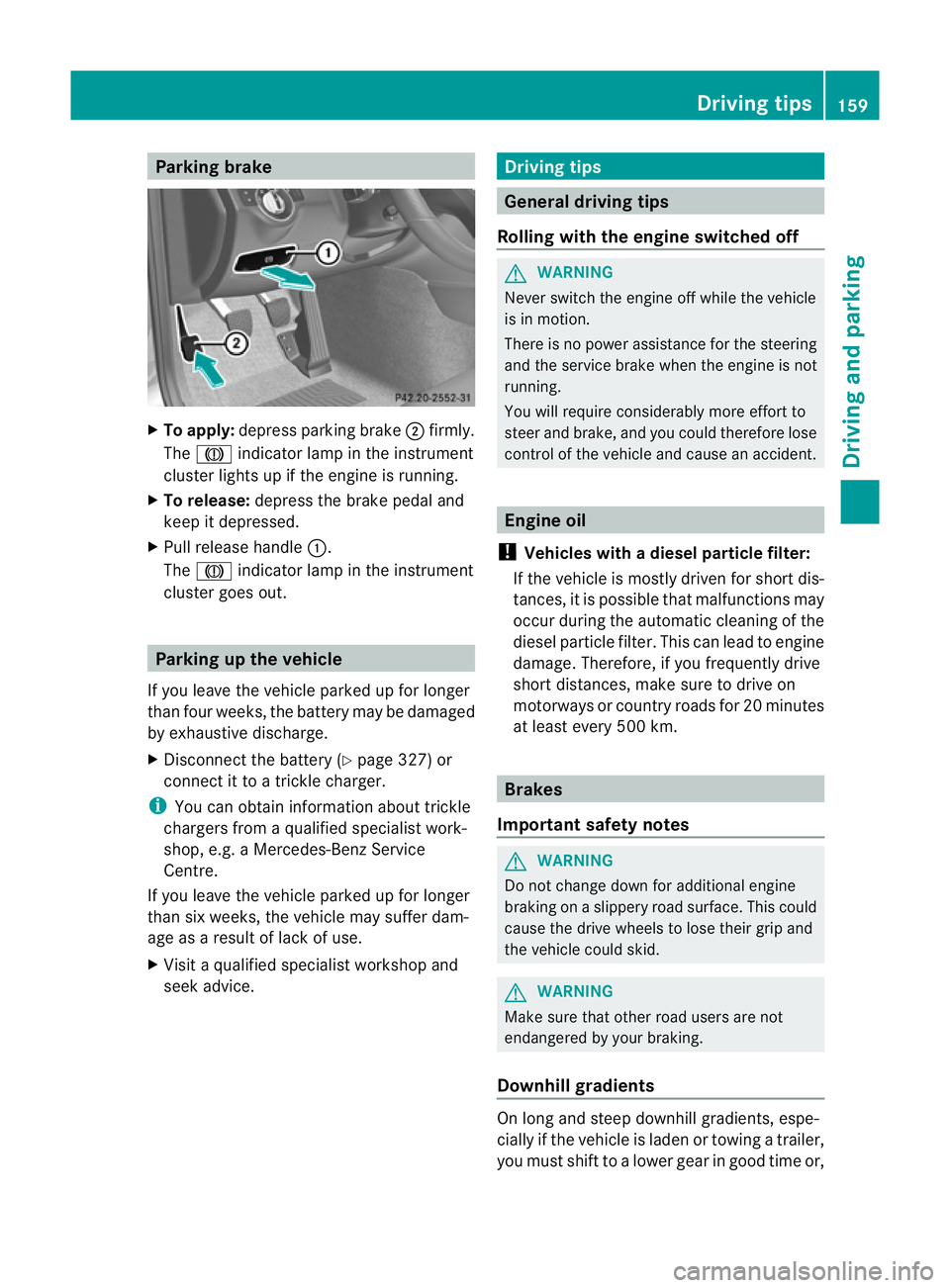
Parking brake
X
To apply: depress parking brake ;firmly.
The J indicator lamp in the instrument
cluster lights up if the engine is running.
X To release: depress the brake pedal and
keep it depressed.
X Pull release handle :.
The J indicator lamp in the instrument
cluster goes out. Parking up the vehicle
If you leave the vehicle parked up for longer
than four weeks, the battery may be damaged
by exhaustive discharge.
X Disconnect the battery (Y page 327) or
connect it to a trickle charger.
i You can obtain information about trickle
chargers from a qualified specialist work-
shop, e.g. a Mercedes-Benz Service
Centre.
If you leave the vehicle parked up for longer
than six weeks, the vehicle may suffer dam-
age as a result of lack of use.
X Visit a qualified specialist workshop and
seek advice. Driving tips
General driving tips
Rolling with the engine switched off G
WARNING
Never switch the engine off while the vehicle
is in motion.
There is no power assistance for the steering
and the service brake when the engine is not
running.
You will require considerably more effort to
steer and brake, and you could therefore lose
control of the vehicle and cause an accident. Engine oil
! Vehicles with adiesel particle filter:
If the vehicle is mostly driven for short dis-
tances, it is possible that malfunctions may
occur during the automatic cleaning of the
diesel particle filter. This can lead to engine
damage. Therefore, if you frequently drive
short distances, make sure to drive on
motorways or country roads for 20 minutes
at least every 500 km. Brakes
Important safety notes G
WARNING
Do not change down for additional engine
braking on a slippery road surface. This could
cause the drive wheels to lose their grip and
the vehicle could skid. G
WARNING
Make sure that other road users are not
endangered by your braking.
Downhill gradients On long and steep downhill gradients, espe-
cially if the vehicle is laden or towing a trailer,
you must shift to a lower gear in good time or, Driving tips
159Driving and parking Z