reset MERCEDES-BENZ C-CLASS COUPE 2011 Owners Manual
[x] Cancel search | Manufacturer: MERCEDES-BENZ, Model Year: 2011, Model line: C-CLASS COUPE, Model: MERCEDES-BENZ C-CLASS COUPE 2011Pages: 373, PDF Size: 8.17 MB
Page 14 of 373
ECO start/stop function
Deactivating/activatin g................. 142
General information .......................140
Electrical fuses
see Fuses
Electronic Brake force Distribution
see EBD (Electronic Brake force
Distribution)
Electronic Stability Program
see ESP ®
(Electroni cStability Program)
Electronic Traction System
see ETS (Electronic Traction System)
Emergenc ykey
Unlocking the driver's door ..............85
Emergency key element
Function/notes ................................ 80
Locking vehicle ................................ 85
Emergency release
Driver's door .................................... 85
Emergency spare wheel
Notes/data .................................... 346
Storage location ............................ 316
Emergency unlocking
Boot ................................................. 87
Vehicle ............................................. 85
Engine
ECO start/stop function ................140
Emergency starting ........................333
Engine number ............................... 353
Running irregularl y......................... 143
Starting problems ..........................143
Starting the engine with the key ....139
Starting with KEYLESS GO .............139
Stopping ........................................ 158
Warning lamp (engine diagnos-
tics) ............................................... 280
Engine electronics
Notes ............................................. 351
Problem (fault) ............................... 143
Engine oil
Additives ........................................ 356
Checking the oil level ..................... 302
Display message (12-button mul-
tifunctio nsteering wheel) ..............255
Display message (4-button multi-
function steering wheel) ................253
Filling capacity ............................... 355Notes about oil grades ................... 355
Notes on oil level/consumption
....302
Temperature (12-button multi-
function steering wheel) ................229
Topping up ..................................... 303
Viscosity ........................................ 356
Environmental protection
Note ................................................ .25
Returning an end-of-life vehicle .......25
ESP ®
(Electronic Stability Pro-
gram) AMG menu (on-board computer) ...229
Deactivating/activating (AMG
vehicles) .......................................... 69
Deactivating/activating (except
AMG vehicles) ................................ 221
Deactivating/activating (notes;
except AMG vehicles) ......................68
Display message (12-button mul-
tifunctio nsteering wheel) ..............238
Display message (4-button multi-
function steering wheel) ................234
ETS .................................................. 68
Function/notes ................................ 67
Important safety guidelines .............67
Trailer stabilisatio n.......................... 70
Warning lamp ................................. 277
ETS (Electronic Traction System) ....... 68
Exhaus ttail pipe (cleaning instruc-
tions) .................................................. 309
Exterior lighting see Lights
Exterior mirrors
Adjusting ....................................... 103
Anti-dazzle mode (automatic) ........104
Folding in/ou t(automatically) .......104
Folding in/ou t(electrically) ...........103
Folding in (12-button multifunc-
tion steering wheel) .......................228
Out of position (troubleshooting) ...104
Parking position ............................. 104
Resetting ....................................... 104
Storing settings (memory func-
tion) ............................................... 105 Index
11
Page 19 of 373

Multifunction steering wheel (4
buttons)
see 4-button multifunction steer-
ing wheel N
Navigation Menu (on-board computer) ............216
On-board computer (12-button
multifunctio nsteering wheel) ........216
see separate operating instructions
NECK-PRO head restraints
Operation ........................................ .50
Resetting after being triggered ........51
Notes on running in anew vehicle ..136 O
Occupant safety Childre ninthe vehicle ..................... 55
Important safety notes ....................44
Odometer
4-button multifunction steering
wheel ............................................. 209
see Total distance recorder
see Trip meter
Oil
see Engine oil
On-board computer
RACETIMER ................................... 229
On-board computer (12-button
multifunction steering wheel)
AMG menu ..................................... 229
Assist menu ................................... 220
Audi omenu ................................... 217
Convenience submenu ..................228
DISTRONI CPLUS ........................... 171
Important safety notes ..................206
Instrument cluster submenu ..........223
Lights submenu ............................. 224
Menu overview .............................. 214
Navigation menu ............................ 216
Operating ...................................... .211
Operating the vide oDVD ............... 218
Range ............................................ 215
Service menu ................................. 222
Standard display submenu ............215 Telephone menu
............................ 219
Trip menu ...................................... 215
On-board computer (12-button
multifunction steering wheel)
Displaying service messages .........305
Display messages ..........................232
Heating submenu ........................... 227
Message memory .......................... 233
Vehicle submenu ........................... 225
On-board computer (12-button
multifunction steering wheel)Set-
tings menu ......................................... 223
On-board computer (12-button
multifunction steering wheel) sub-
menu
Factory setting ............................... 228
On-board computer (4-button mul-
tifunction steering wheel)
Important safety notes ..................206
Menu overview .............................. 209
Switching daytime driving lights
on/off ............................................ 210
On-board computer (4-button mul-
tifunction steering wheel)
Displaying service messages .........305
Display messages ..........................232
Individual vehicle settings ..............207
Message memory .......................... 232
Operating ...................................... .207
Range ............................................ 210
Standard displa y............................ 209
Trip computer ................................ 210
Opening and closing the side trim
panels ................................................. 117
Operating system see On-board computer
Outside temperature
Display (12-button multifunction
steering wheel) .............................. 211
Display (4-button multifunction
steering wheel) .............................. 207
Overhead control panel ......................41 P
Pain tcode .......................................... 352
Paintwork (cleaning instructions) ...307 16
Index
Page 20 of 373
Panoramas
liding sunroof
Important safety information ...........90
Opening/closing .............................. 91
Opening/closing the roller sun-
blind ................................................. 92
Problem (malfunction) .....................92
Rain closing feature .........................91
Resetting ......................................... 92
Park Assist
Parking Guidance ........................... 183
Parking
Important safety notes ..................158
Parking brake ................................ 159
Position of exterior mirror, front-
passenger side ............................... 104
Reversing camera ..........................186
see Parking
see PARKTRONIC
Parking aid
see Exterior mirrors
see PARKTRONIC
Parking brake
Display message (12-button mul-
tifunctio nsteering wheel) ..............240
Display message (4-button multi-
function steering wheel) ................235
Notes/function .............................. 159
see Parking brake
Parking Guidance
Display message (12-button mul-
tifunctio nsteering wheel) ..............259
Important safety notes ..................183
Trailer towing ................................. 186
Parking lamp
Display message (12-button mul-
tifunctio nsteering wheel) ..............250
Display message (4-button multi-
function steering wheel) ................246
Parking lamps
Changing bulbs .............................. 117
Switching on/off ........................... 108
Parking lamps (changing bulbs) ......117
PARKTRONIC Deactivating/activating .................182
Driving system ............................... 179
Function/notes ............................. 179
Problem (fault) ............................... 183
Sensor range ................................. 180Trailer towing
................................. 182
Warning displa y............................. 181
PASSENGE RAIRBAG OFF warning
lamp ...................................................... 57
Petrol .................................................. 153
Plastic trim (cleaning instructions) .310
Power windows see Side windows
PRE-SAFE ®
(preventative occupant
protection) Display message (12-button mul-
tifunctio nsteering wheel) ..............241
Display message (4-button multi-
function steering wheel) ................236
PRE-SAFE ®
(preventive occupant
safety system) Operation ........................................ .50
PRE-SAFE ®
Brake (vehicles with
DISTRONIC PLUS) Function/notes ................................ 71
PRE-SAFE ®
Brake (vehicles with
DISTRONIC PLUS) Display message (12-button mul-
tifunction steering wheel) ..............242
Switching on/off ........................... 221
Warning lamp ................................. 282
Preventive occupant safety sys-
tem
see PRE-SAFE ®
(preventive occu-
pant safety system)
Program selector button ..................147
Pulling away Automatic transmission .................140
Manual transmission ..................... .139 Q
Qualifie dspecialis tworkshop ...........26 R
RACE START (AMG vehicles) .............178
RACETIMER (on-board computer) ....229
Radar sensor system Activating/deactivating .................226
Country overview ........................... 363
Display message (12-button mul-
tifunctio nsteering wheel) ..............257 Index
17
Page 22 of 373
Seat
Seat backrest display message
(12-button multifunction steering
wheel) ............................................ 268
Seat backrest display message (4-
button multifunction steering
wheel) ............................................ 266
Seat belt
Activating/deactivating seat-belt
adjustment (12-button multifunc-
tion steering wheel) .......................228
Adjusting the driver's and front-
passenger sea tbelt ......................... 53
Belt force limiter .............................. 54
Belt tensioner .................................. 54
Cleaning ......................................... 311
Display message (12-button mul-
tifunctio nsteering wheel) ..............242
Display message (4-button multi-
function steering wheel) ................236
Fastening ......................................... 53
Important safety guidelines .............51
Rea rseat belt status indicator .........54
Releasing ......................................... 53
Warning lamp (function) ................... 54
Seat belts
Warning lamp ................................. 273
Seats
Adjusting (electrically). ....................98
Adjusting (manually and electri-
cally) ................................................ 98
Adjusting the 4-way lumba rsup-
por t.................................................. 99
Adjusting the head restraint ............98
Cleaning the cover .........................311
Correct driver's seat position ........... 96
Folding the backrests forward/
back ................................................ .99
Important safety notes ....................97
Seat heating problem ....................100
Seat ventilation problem ................101
Storing settings (memory func-
tion) ............................................... 105
Switching sea theating on/off .......100
Switching the sea tventilation on/
off .................................................. 100
Sensors (cleaning instructions) .......309 Service
see ASSYST PLUS service interval
display
Service menu (12-button multi-
function steering wheel) ..................222
Service products Brake fluid ..................................... 356
Coolant (engine) ............................ 356
Engine oil ....................................... 355
Fuel ................................................ 354
Important safety notes ..................353
Settings
Factory (12-button multifunction
steering wheel) .............................. 228
On-board computer (12-button
multifunctio nsteering wheel) ........223
Setting the air distribution ...............125
Setting the airflow ............................125
SETUP (on-board computer) .............229
Shifting to neutral (manual trans-
mission) ............................................. 145
Sidebag ................................................ 48
Side marker lamp Display message (12-button mul-
tifunctio nsteering wheel) ..............250
Display message (4-button multi-
function steering wheel) ................246
Side windows
Convenience closing ........................89
Convenience opening ......................88
Important safety notes ....................88
Opening/closing .............................. 88
Problem (malfunction) .....................90
resetting .......................................... 90
Sliding sunroof
see Panorama sliding sunroof
Snow chains ...................................... 338
Socket Centre console .............................. 292
Points to observe before use .........291
Rea rcompartmen t......................... 292
Spare wheel
Storage location ............................ 316
see Emergency spare wheel
Specialist workshop ............................ 26
Speed, controlling see Cruise control Index
19
Page 25 of 373
Couplin
gupatrailer...................... 202
Decoupling atrailer ....................... 202
Driving tips .................................... 199
ESP ®
................................................ 70
Folding in the ball coupling ............202
Folding out the ball coupling ..........201
Important safety notes ..................199
Mounting dimensions ....................361
Parking Guidance ........................... 186
Parktroni c...................................... 182
Power supply ................................. 203
Shift range ..................................... 147
Trailer loads ................................... 362
Transmission
see Automatic transmission
see Manual transmission
Transporting the vehicle ..................332
Trim pieces (cleaning instructions) .311
Trip computer On-board computer (12-button
multifunctio nsteering wheel) ........215
On-board computer (4-button
multifunctio nsteering wheel) ........210
Trip meter
Displaying/resetting (4-button
multifunctio nsteering wheel) ........209
Displaying (12-button multifunc-
tion steering wheel) .......................215
Resetting (12-button multifunc-
tion steering wheel) .......................216
Trip odometer
see Trip meter
Turn signal
Display message (12-button mul-
tifunctio nsteering wheel) ..............248
Display message (4-button multi-
function steering wheel) ................245
Turn signals
Switching on/off ........................... 110
Two-way radio
Frequencies ................................... 351
Installatio n..................................... 351
Transmission output (maximum) .... 351
Type identification plate
see Vehicle identification plate Tyre pressure
Calling up (on-board computer) .....342
Display message (12-button mul-
tifunctio nsteering wheel) ..............263
Display message (4-button multi-
function steering wheel) ................262
Not reached (TIREFIT) ....................319
Pressure loss warning ....................340
Reached (TIREFIT) ..........................320
Recommended ............................... 339
Tyre pressure monitor
Function/notes ............................. 342
Restarting ...................................... 343
Warning lamp ................................. 282
Tyres
Checking ........................................ 336
Direction of rotatio n...................... 344
Display message (12-button mul-
tifunctio nsteering wheel) ..............263
Display message (4-button multi-
function steering wheel) ................262
Grip ................................................ 161
Important safety notes ..................336
Replacing ....................................... 344
Service life ..................................... 337
Storing ........................................... 344
Tyr esize (data) .............................. 345
Tyr etread ...................................... 337
see Flat tyre U
Unladen weight see Technical data
Unlocking
Emergency unlocking .......................85
From inside the vehicle (central
unlocking button) ............................. 84 V
Vanity mirror (in sun visor) ..............290
Vehicle Correct use ...................................... 27
Data acquisition ............................... 27
Electronics ..................................... 351
Equipment ....................................... 25
Implied warranty .............................. 27
Individua lsettings .......................... 22322
Index
Page 54 of 373
G
WARNING
Only use head restraint covers which have
been tested and approved by Mercedes-Benz
for yourv ehicle model.
The use of non-approved head restraint cov-
ers may prevent NECK-PRO head restraints
from triggering properly. Consequently, the
NECK-PRO head restraints cannot provide the
intended level of protection.
Consult a Mercedes-Benz Service Centre
regarding availability.
If the NECK-PRO head restraints have been
triggered in an accident, reset the NECK-PRO
head restraints on the driver’s and front-
passenger seat (Y page 51). Otherwise, the
additional protection will not be available in
the event of another rear-end collision. You
can recognise when NECK-PRO head
restraints have been triggered by the fact that
they have moved forwards and can no longer
be adjusted. Resetting triggered NECK-PRO head
restraints
Following a rear-end collision, Mercedes-
Benz recommends that you have NECK-PRO
head restraints checked at a qualified spe-
cialist workshop, e.g. a Mercedes-Benz
Service Centre.
i Resetting the NECK-PRO head restraints
requires a lot of strength. If you have diffi-
culty resetting the NECK-PRO head
restraints, have this work carried out at a
qualified specialist workshop, e.g. a
Mercedes-Benz Service Centre. X
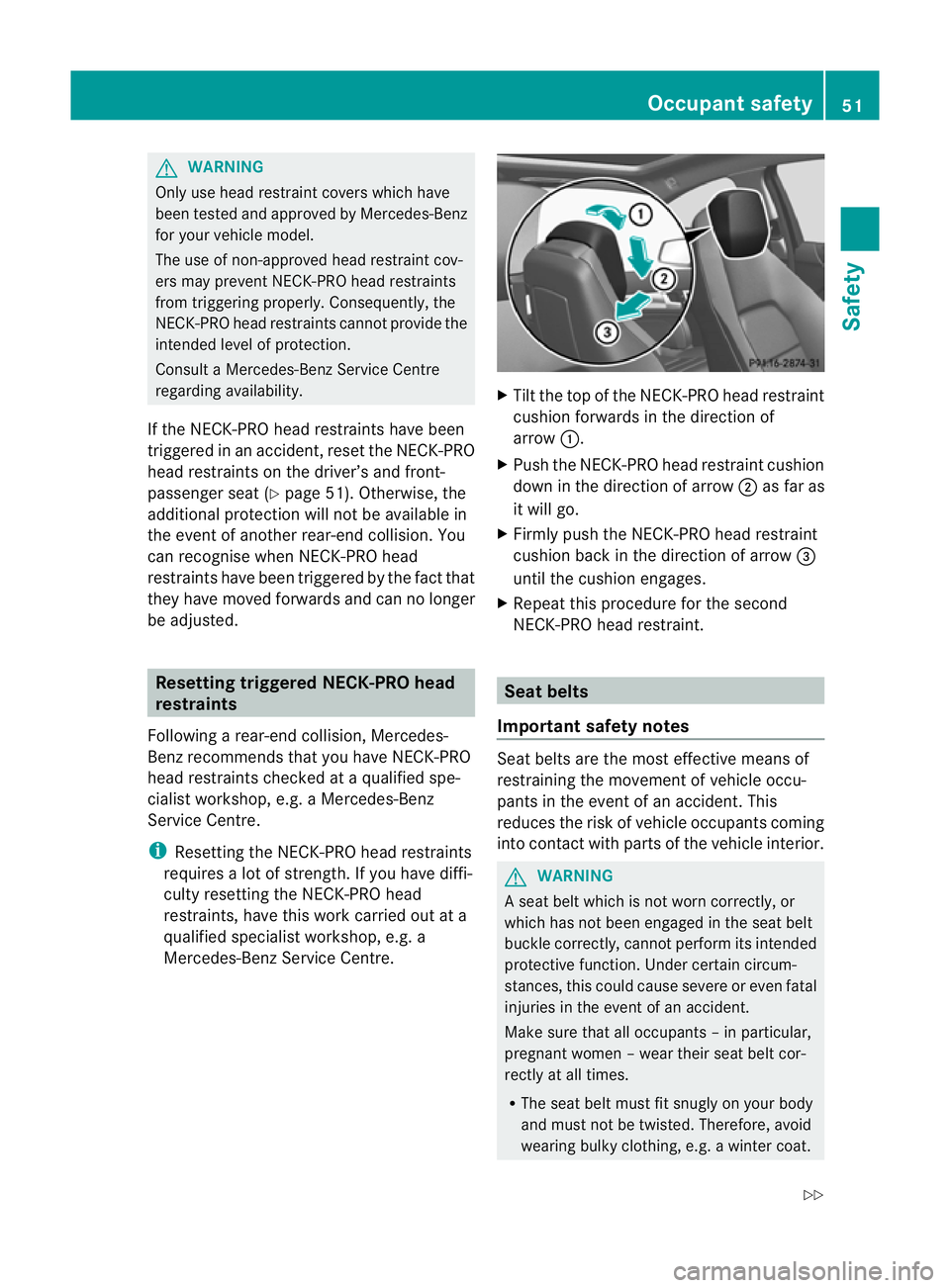
Tilt the top of the NECK-PRO head restraint
cushion forwards in the direction of
arrow :.
X Push the NECK-PRO head restraint cushion
down in the direction of arrow ;as far as
it will go.
X Firmly push the NECK-PRO head restraint
cushion back in the direction of arrow =
until the cushion engages.
X Repeat this procedure for the second
NECK-PRO head restraint. Seat belts
Important safety notes Seat belts are the most effective means of
restraining the movement of vehicle occu-
pants in the event of an accident. This
reduces the risk of vehicle occupants coming
into contact with parts of the vehicle interior. G
WARNING
A seat belt which is not worn correctly, or
which has not been engaged in the seat belt
buckle correctly, cannot perform its intended
protective function. Under certain circum-
stances, this could cause severe or even fatal
injuries in the event of an accident.
Make sure that all occupants –inparticular,
pregnant women – wear their seat belt cor-
rectly at all times.
R The seat belt must fit snugly on your body
and must no tbe twisted. Therefore, avoid
wearing bulky clothing, e.g. a winter coat. Occupant safety
51Safety
Z
Page 93 of 373
X
Touch recessed sensor surface :on the
door handle until the side windows and the
panorama sliding sunroof are fully closed.
i Make sure you only touch recessed sen-
sor surface :.
X Make sure that all the side windows and the
panorama sliding sunroof are closed.
On vehicles with a panorama sliding sunroof:
X Touch recessed sensor surface :on the
door handle again until the roller sunblind
of the panorama sliding sunroof closes.
X To interrupt convenience closing:
release recessed sensor surface :on the
door handle. Resetting the side windows
You must reset each side window if a side
window can no longer be closed fully.
X Close all the doors.
X Turn the key to position 1or 2in the ignition
lock.
X Pull the corresponding switch on the door
control panel until the side window is com-
pletely closed. (Y page 88).
X Hold the switch for an additional second.
If the side window opens again slightly:
X Immediately pull the corresponding switch
on the door control panel until the side win-
dow is completely closed (Y page 88).
X Hold the switch for an additional second.
X If the corresponding side window remains
closed after the button has been released,
the side window has been reset correctly.
If this is not the case, repeat the steps
above again. Problems with the side windows
Problem: aside window cannot be closed
because it is blocked by objects, e.g.
leaves in the window guide.
X Remove the objects.
X Close the side window.
Problem :aside window cannot be closed
and you cannot see the cause. G
WARNING
Closing the side windows with increased force
or without the anti-entrapment feature could
lead to serious or even fatal injury. Make sure
that nobody can become trapped when clos-
ing the side windows.
If a side window is obstructed during closing
and reopens again slightly:
X Immediately afte rthe window blocks, pull
the corresponding switch again until the
side window has closed.
The side window is closed with increased
force.
If a side window is obstructed again during
closing and reopens again slightly:
X Immediately after the window blocks, pull
the corresponding switch again until the
side window has closed.
The side window is closed without the anti-
entrapment feature. Sliding sunroof
Important safety notes
In the following section, the term "sliding sun-
roof" refers to the panorama sliding sunroof. G
WARNING
Make sure that nobody can become trapped
when opening and closing the sliding sunroof.
If there is a risk of entrapment, release the
switch immediately. During automatic opera-
tion, push the switch briefly in any direction
to stop the sliding sunroof. 90
Sliding sunroofOpening and closing
Page 95 of 373
The panorama sliding sunroof does not close
if:
R
it is raised at the rear.
R it is blocked.
R no rain is falling on the area of the wind-
screen being monitored by the rain sensor
(e.g. because the vehicle is under a bridge
or in a carport). Operating the roller sunblind for the
panorama sliding sunroof
General notes The roller sunblind shields the vehicle interior
from sunlight. The roller sunblind can only be
opened and closed when the panorama slid-
ing sunroof is closed.
G
WARNING
Make sure that nobody can become trapped
as you open or close the roller sunblind.
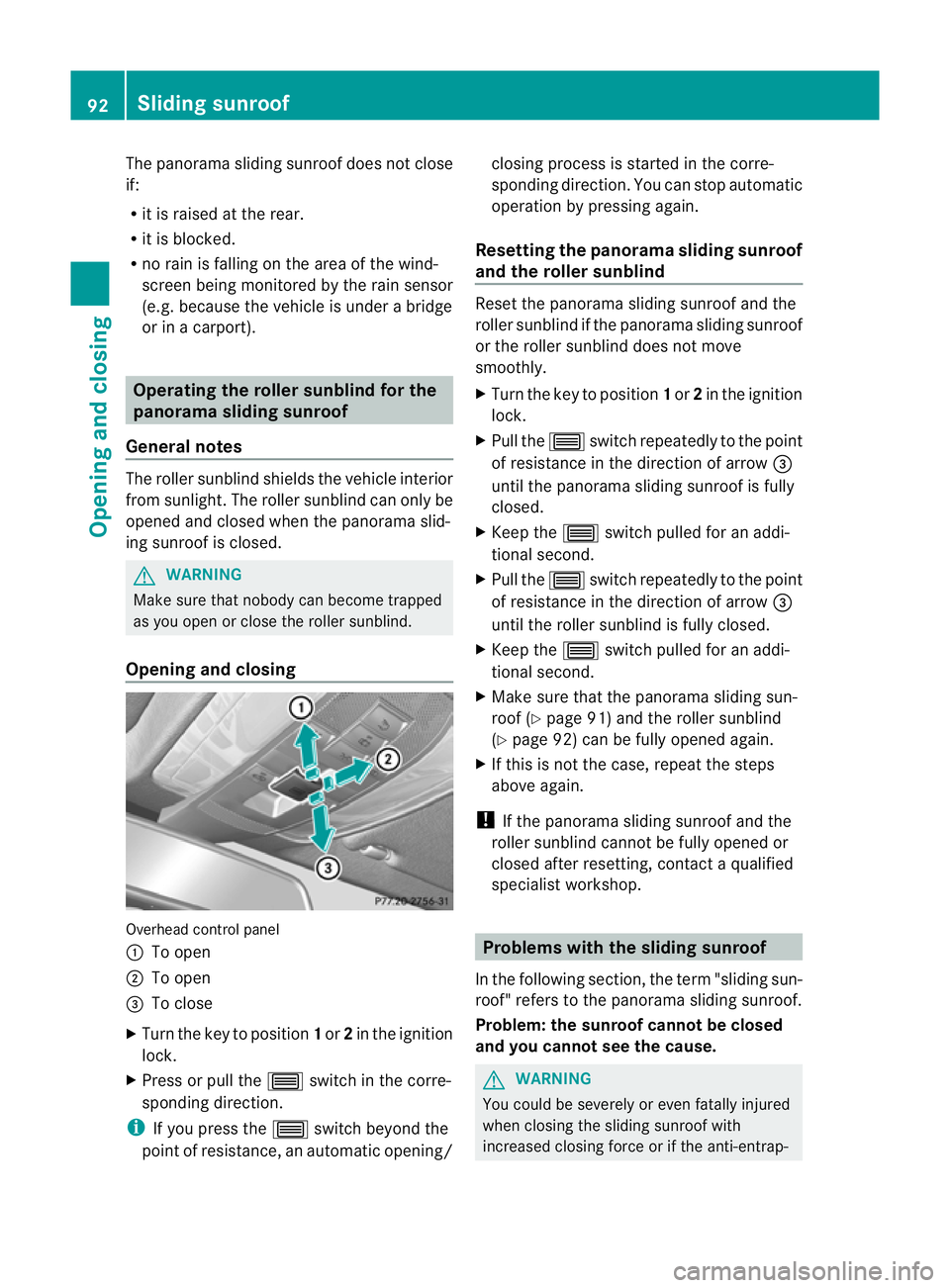
Opening and closing Overhead control panel
:
To open
; To open
= To close
X Turn the key to position 1or 2in the ignition
lock.
X Press or pull the 3switch in the corre-
sponding direction.
i If you press the 3switch beyond the
point of resistance, an automatic opening/ closing process is started in the corre-
sponding direction
.You can stop automatic
operation by pressing again.
Resetting the panorama sliding sunroof
and the roller sunblind Reset the panorama sliding sunroof and the
roller sunblind if the panorama sliding sunroof
or the roller sunblind does not move
smoothly.
X
Turn the key to position 1or 2in the ignition
lock.
X Pull the 3switch repeatedly to the point
of resistance in the direction of arrow =
until the panorama sliding sunroof is fully
closed.
X Keep the 3switch pulled for an addi-
tional second.
X Pull the 3switch repeatedly to the point
of resistance in the direction of arrow =
until the roller sunblind is fully closed.
X Keep the 3switch pulled for an addi-
tional second.
X Make sure that the panorama sliding sun-
roof (Y page 91) and the roller sunblind
(Y page 92) can be fully opened again.
X If this is not the case, repeat the steps
above again.
! If the panorama sliding sunroof and the
roller sunblind cannot be fully opened or
closed after resetting, contact a qualified
specialist workshop. Problems with the sliding sunroof
In the following section ,the term "sliding sun-
roof" refers to the panorama sliding sunroof.
Problem: the sunroof cannot be closed
and you cannot see the cause. G
WARNING
You could be severely or even fatally injured
when closing the sliding sunroof with
increased closing force or if the anti-entrap- 92
Sliding sunroofOpening and closing
Page 107 of 373
i
Make sure that the exterior mirrors are
always folded out fully while the vehicle is
in motion, as they may otherwise vibrate.
Setting the exterior mirrors If the battery has been disconnected or com-
pletely discharged, the exterior mirrors must
be reset. The exterior mirrors will otherwise
not fold in when you select the "Fold in mir-
rors when locking" function in the on-board
computer (Y page 228).
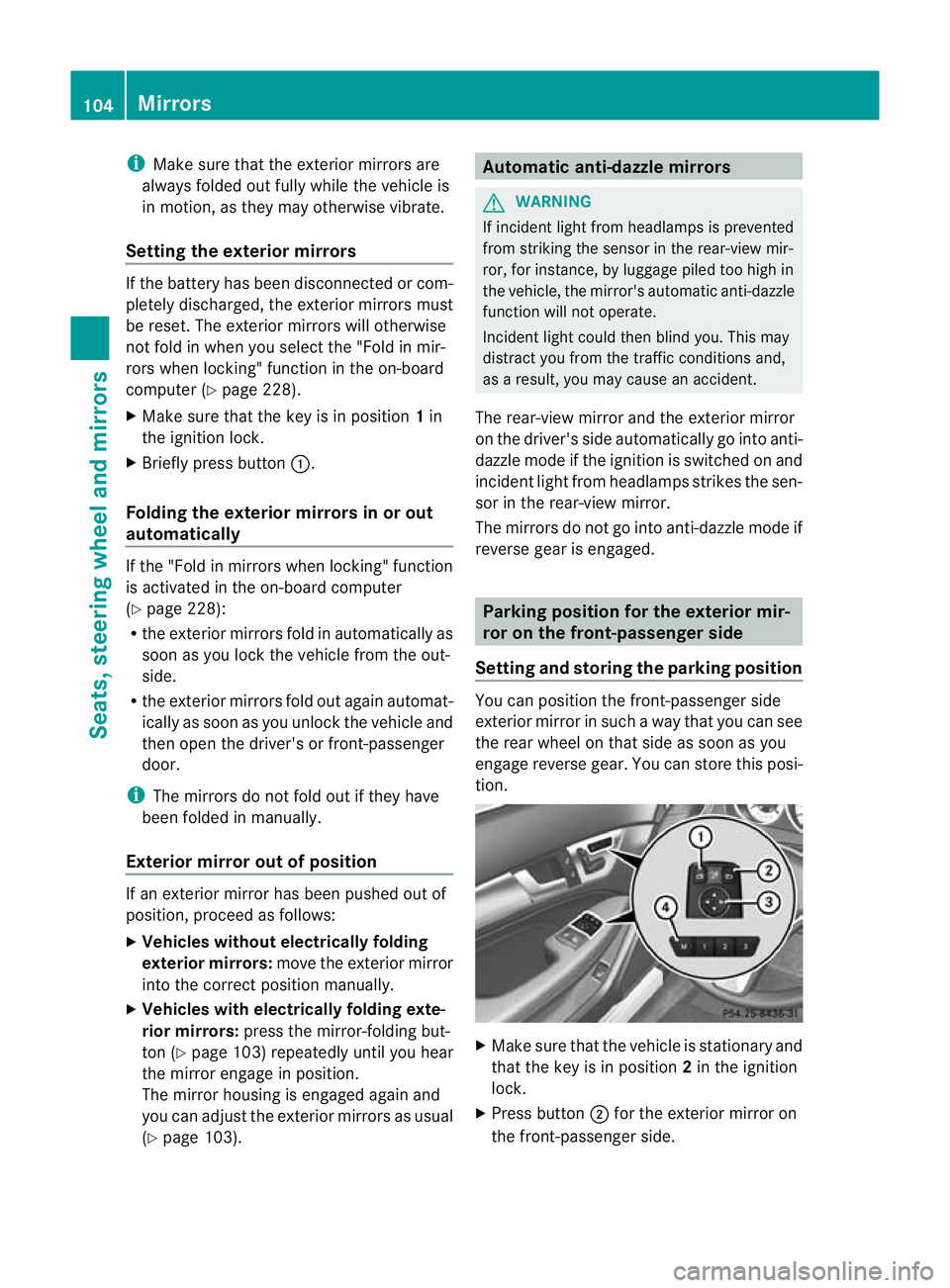
X Make sure that the key is in position 1in
the ignition lock.
X Briefly press button :.
Folding the exterior mirrors in or out
automatically If the "Fold in mirrors when locking" function
is activated in the on-board computer
(Y
page 228):
R the exterior mirrors fold in automatically as
soon as you lock the vehicle from the out-
side.
R the exterior mirrors fold out again automat-
ically as soon as you unlock the vehicle and
then open the driver's or front-passenger
door.
i The mirrors do not fold out if they have
been folded in manually.
Exterior mirror out of position If an exterior mirror has been pushed out of
position, proceed as follows:
X Vehicles without electrically folding
exterior mirrors: move the exterior mirror
into the correct position manually.
X Vehicles with electrically folding exte-
rior mirrors: press the mirror-folding but-
ton (Y page 103) repeatedly until you hear
the mirror engage in position.
The mirror housing is engaged again and
you can adjust the exterior mirrors as usual
(Y page 103). Automatic anti-dazzle mirrors
G
WARNING
If incident light from headlamps is prevented
from striking the sensor in the rear-view mir-
ror, for instance, by luggage piled too high in
the vehicle, the mirror's automatic anti-dazzle
function will not operate.
Incident light could then blind you. This may
distract you from the traffic conditions and,
as a result, you may cause an accident.
The rear-view mirror and the exterior mirror
on the driver's side automatically go into anti-
dazzle mode if the ignition is switched on and
incident light from headlamps strikes the sen-
sor in the rear-view mirror.
The mirrors do not go into anti-dazzle mode if
reverse gear is engaged. Parking position for the exterior mir-
ror on the front-passenger side
Setting and storing the parking position You can position the front-passenger side
exterior mirror in such a way that you can see
the rear wheel on that side as soon as you
engage reverse gear. You can store this posi-
tion.
X
Make sure that the vehicle is stationary and
that the key is in position 2in the ignition
lock.
X Press button ;for the exterior mirror on
the front-passenger side. 104
MirrorsSeats, steering wheel and mirrors
Page 108 of 373
X
Engage reverse gear.
The exterior mirror on the front-passenger
side moves to the prese tparking position.
X Use adjustment button =to adjust the
exterior mirror to a positio nthat allows you
to see the rear wheel and the kerb.
The parking position is stored.
i If you shift the transmission to another
position, the exterior mirror on the front-
passenger side returns to the driving posi-
tion.
i You can also store the parking position
using memory button M?.
X Make sure that the key is in position
2in the ignition lock.
X With the exterior mirror on the front-
passenger side activated, use adjust-
ment button =to adjust the exterior
mirror to a position which allows you
to see the rear wheel and the kerb.
X Press memory button M? and one of
the arrows on adjustment button =
within three seconds.
The parking position is stored if the
exterior mirror does not move.
If the mirror moves out of position, repeat
the steps.
Calling up astore dparking position set-
ting X
Tur nthe key to position 2in the ignition
lock.
X Adjust the exterior mirror on the front-
passenger side with the corresponding but-
ton (Y page 103).
X Engage reverse gear.
The exterior mirror on the front-passenger
side moves to the stored parking position. The exterior mirror on the front-passenger
side moves back to its original position:
R
as soon as you exceed a speed of
15 km/h
R about ten seconds after you have disen-
gaged reverse gear
R if you press button :for the exterior mir-
ror on the driver's side Memory functions
Storing settings
With the memory function, you can store up
to three different settings, e.g. for three dif-
ferent people.
The following settings are stored as a single
memory preset:
R position of the seat, backrest and head
restraint
R driver's side: steering wheel position
R driver's side: position of the exterior mir-
rors on the driver's and front-passenger
sides G
WARNING
The memory function can still be used when
the key has been removed. For this reason,
children should never be left unsupervised in
the vehicle. They could otherwise become
trapped when adjusting the seat or the steer-
ing wheel. G
WARNING
Only use the memory function on the driver's
side when the vehicle is stationary. Other-
wise, you could be distracted from the traffic
conditions by the steering wheel and seat
moving of their own accord, and as a result
cause an accident. Memory functions
105Seats, steering wheel and mirrors Z