key battery MERCEDES-BENZ C-Class COUPE 2012 CL204 Owner's Manual
[x] Cancel search | Manufacturer: MERCEDES-BENZ, Model Year: 2012, Model line: C-Class COUPE, Model: MERCEDES-BENZ C-Class COUPE 2012 CL204Pages: 336, PDF Size: 12.67 MB
Page 7 of 336
Automatic transmissionAutomatic drive program ...............134
Changing gear ............................... 132
Display message ............................ 224
Driving tips .................................... 132
Emergency running mode ..............137
Kickdown ....................................... 132
Manual drive program ....................135
Problem (malfunction) ...................137
Program selector button ................132
Pulling away ................................... 127
Releasing the parking lock
manually ........................................ 137
Selector lever ................................ 130
Shift ranges ................................... 134
Starting the engine ........................127
Steering wheel paddle shifters ......133
Transmission position display ........131
Transmission positions ..................131
Automatic transmission
emergency mode ............................... 137
B
Back support see Lumbar support
Backup lamp
Changing bulbs .............................. 110
Display message ............................ 212
Bag hook ............................................ 245
BAS (Brake Assist System) ................. 57
Basic settings see Settings
BAS PLUS (Brake Assist System
PLUS) .................................................... 58
Battery (SmartKey) Checking .......................................... 72
Important safety notes ....................72
Replacing ......................................... 72
Battery (vehicle)
Charging ........................................ 286
Display message ............................ 215
Important safety notes ..................284
Jump starting ................................. 287
Belt
see Seat belts
Blind Spot Assist
Activating/deactivating .................193
Notes/function .............................. 170
see Active Blind Spot Assist
Brake Assist System
see BAS (Brake Assist System)
Brake fluid
Display message ............................ 205
Notes ............................................. 331
Brake fluid level ................................ 268
Brake lamps Changing bulbs .............................. 110
Display message ............................ 211
Brakes
ABS .................................................. 57
BAS .................................................. 57
BAS PLUS ........................................ 58
Brake fluid (notes) .........................331
Display message ............................ 202
Driving tips .................................... 143
High-performance brake system ....145
Important safety notes ..................143
Maintenance .................................. 144
Parking brake ................................ 141
Warning lamp ................................. 229
Breakdown
see Flat tire
see Towing away/tow-starting
Bulbs
see Changing bulbs
C
California Important notice for retail
customers and lessees ....................21
Calling up a malfunction
see Display messages
Capacities
see Technical data
Car
see Vehicle
Care
Carpets .......................................... 275
Car wash ........................................ 270
Display ........................................... 274
Exterior lights ................................ 273
Gear or selector lever ....................274
Index5
Page 17 of 336
Adjusting the 4-way lumbar
support ............................................ 91
Adjusting the head restraint ............91
Cleaning the cover .........................274
Correct driver's seat position ........... 88
Folding the backrests forward/
back ................................................. 91
Important safety notes ....................89
Seat backrest display message .....225
Seat backrest display message
(12-button multifunction steering
wheel) ............................................ 225
Seat heating problem ......................92
Seat ventilation problem ..................93
Storing settings (memory
function) .......................................... 97
Switching seat heating on/off .........92
Switching seat ventilation on/off ....92
Sensors (cleaning instructions) ....... 273
Service see ASSYST PLUS service interval
display
Service interval display
Displaying service messages .........269
Hiding service messages ...............269
Notes ............................................. 269
Service messages ..........................268
Service menu (on-board computer) . 194
Service products Brake fluid ..................................... 331
Capacities ...................................... 328
Coolant (engine) ............................ 331
Engine oil ....................................... 330
Fuel ................................................ 328
Important safety notes ..................326
Refrigerant (air-conditioning
system) .......................................... 330
Washer fluid ................................... 332
Settings
Factory (on-board computer) .........198
On-board computer .......................194
Setting the air distribution ............... 118
Setting the airflow ............................ 118
SETUP (on-board computer) ............. 198
Side impact air bag ............................. 40
Side marker lamp (display
message) ............................................ 212Side windows
Convenience closing feature ............82
Convenience opening feature ..........82
Important safety information ...........81
Opening/closing .............................. 81
Problem (malfunction) .....................83
Resetting ......................................... 83
Sliding sunroof
see Panorama roof with power
tilt/sliding panel
SmartKey
Changing the battery .......................72
Changing the programming .............71
Checking the battery .......................72
Convenience closing feature ............82
Convenience opening feature ..........82
Display message ............................ 226
Door central locking/unlocking .......68
Important safety notes ....................68
Loss ................................................. 74
Mechanical key ................................ 71
Positions (ignition lock) .................125
Problem (malfunction) .....................74
Starting the engine ........................127
Snow chains ...................................... 297
Sockets Points to observe before use .........249
Rear compartment .........................249
Spare wheel
Notes/data .................................... 321
Storage location ............................ 279
see Emergency spare wheel
Specialist workshop ............................ 23
Speed, controlling see Cruise control
Speedometer
Digital ............................................ 187
In the Instrument cluster .................29
Segments ...................................... 183
Selecting the unit of
measurement ................................ 194
see Instrument cluster
SPORT handling mode
Activating/deactivating (AMG
vehicles) .......................................... 60
Warning lamp ................................. 232Index15
Page 20 of 336
Transmissionsee Automatic transmission
Transporting the vehicle .................. 290
Trim pieces (cleaning instructions) . 274
Trip computer (on-board
computer) .......................................... 187
Trip meter see Trip odometer
Trip odometer
Calling up ....................................... 187
Resetting (on-board computer) ......188
Trunk
Emergency release ..........................80
Important safety guidelines .............78
Locking separately ...........................80
Opening (automatically from
inside) .............................................. 79
Opening (automatically from
outside) ............................................ 79
Trunk lid
Display message ............................ 224
Opening/closing .............................. 78
Turn signals
Display message ............................ 210
Switching on/off ........................... 103
Type identification plate
see Vehicle identification plate
U
Unlocking Emergency unlocking .......................77
From inside the vehicle (central
unlocking button) ............................. 76
V
Vanity mirror (in sun visor) .............. 247
Vehicle Correct use ...................................... 23
Data acquisition ............................... 24
Display message ............................ 224
Equipment ....................................... 20
Individual settings ..........................194
Limited Warranty ............................. 24
Loading .......................................... 306
Locking (in an emergency) ...............77
Locking (SmartKey) .......................... 69
Lowering ........................................ 283
Maintenance .................................... 21
Parking for a long period ................ 141
Pulling away ................................... 127
Raising ........................................... 281
Reporting problems .........................23
Towing away .................................. 288
Transporting .................................. 290
Unlocking (in an emergency) ...........77
Unlocking (SmartKey) ......................69
Vehicle data ................................... 332
Vehicle battery
see Battery (vehicle)
Vehicle data ....................................... 332
see Technical data
Vehicle dimensions ........................... 332
Vehicle emergency locking ................ 77
Vehicle identification number see VIN
Vehicle identification plate .............. 325
Vehicle tool kit .................................. 278
Video (DVD) ........................................ 190
VIN ...................................................... 325
W
Warning and indicator lamps ABS ................................................ 230
Brakes ........................................... 229
Check Engine ................................. 234
Coolant .......................................... 235
Cruise control ................................ 147
Distance warning ........................... 237
DISTRONIC PLUS ........................... 237
ESP ®
.............................................. 231
ESP ®
OFF ....................................... 232
Fuel tank ........................................ 234
LIM (DISTRONIC PLUS) ..................151
Overview .......................................... 30
PASSENGER AIR BAG OFF
indicator lamp .................................. 42
Reserve fuel ................................... 234
Seat belt ........................................ 227
SPORT handling mode ...................232
SRS ................................................ 233
Tire pressure monitor ....................238
Warranty ............................................ 325
18Index
Page 58 of 336
XMake sure that Top Tether belt A is not
twisted.XInstall the LATCH-type (ISOFIX) child
restraint system with Top Tether. Comply
with the manufacturer's installation
instructions when doing so. Make sure that
Top Tether belt A is tight.
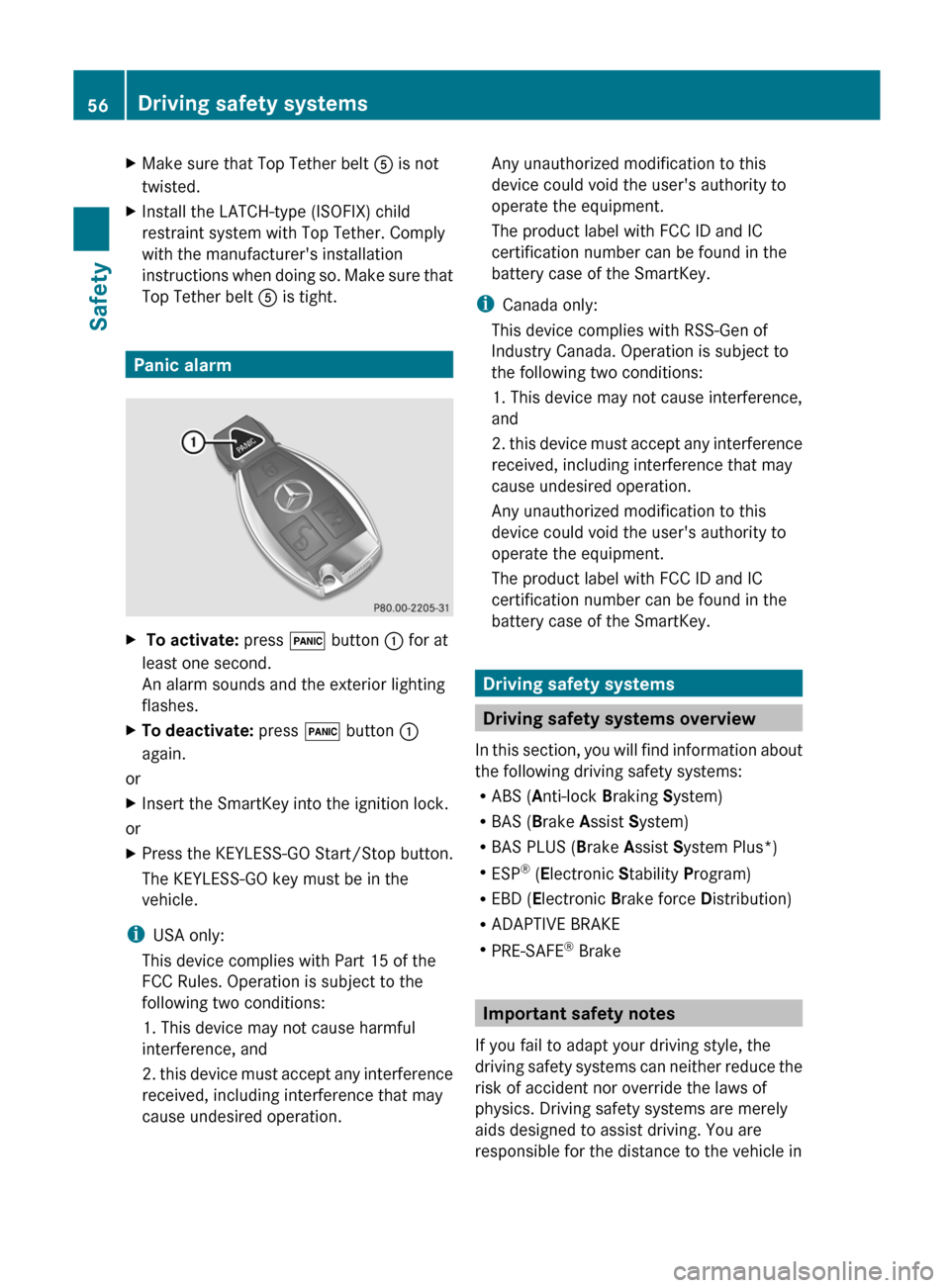
Panic alarm
X To activate: press ! button : for at
least one second.
An alarm sounds and the exterior lighting
flashes.XTo deactivate: press ! button :
again.
or
XInsert the SmartKey into the ignition lock.
or
XPress the KEYLESS-GO Start/Stop button.
The KEYLESS-GO key must be in the
vehicle.
i USA only:
This device complies with Part 15 of the
FCC Rules. Operation is subject to the
following two conditions:
1. This device may not cause harmful
interference, and
2. this device must accept any interference
received, including interference that may
cause undesired operation.
Any unauthorized modification to this
device could void the user's authority to
operate the equipment.
The product label with FCC ID and IC
certification number can be found in the
battery case of the SmartKey.
i Canada only:
This device complies with RSS-Gen of
Industry Canada. Operation is subject to
the following two conditions:
1. This device may not cause interference,
and
2. this device must accept any interference
received, including interference that may
cause undesired operation.
Any unauthorized modification to this
device could void the user's authority to
operate the equipment.
The product label with FCC ID and IC
certification number can be found in the
battery case of the SmartKey.
Driving safety systems
Driving safety systems overview
In this section, you will find information about
the following driving safety systems:
R ABS ( Anti-lock Braking System)
R BAS ( Brake Assist System)
R BAS PLUS ( Brake Assist System Plus*)
R ESP ®
(E lectronic Stability Program)
R EBD ( Electronic Brake force Distribution)
R ADAPTIVE BRAKE
R PRE-SAFE ®
Brake
Important safety notes
If you fail to adapt your driving style, the
driving safety systems can neither reduce the
risk of accident nor override the laws of
physics. Driving safety systems are merely
aids designed to assist driving. You are
responsible for the distance to the vehicle in
56Driving safety systemsSafety
Page 66 of 336
In these cases, PRE-SAFE(R) Brake may:
R give an unnecessary warning and then
brake the vehicle
R neither give a warning nor intervene
There is a risk of an accident. Always pay
particular attention to the traffic situation and
be ready to brake, especially if PRE-SAFE(R)
Brake warns you. Terminate the intervention
in a non-critical driving situation.
In particular, the detection of obstacles can
be impaired if there is:
R dirt on the sensors or anything else
covering the sensors
R snow or heavy rain
R interference by other radar sources
R the possibility of strong radar reflections,
for example in parking garages
R a narrow vehicle traveling in front, e.g. a
motorbike
R a vehicle traveling in front on a different lineGWARNING
PRE-SAFE ®
Brake does not react:
R to people or animals
R to oncoming vehicles
R to crossing traffic
R in curves
As a result, PRE-SAFE ®
Brake cannot
intervene in critical situations. There is a risk
of an accident. Always pay careful attention
to the traffic situation and be ready to brake.
In order to maintain the appropriate distance
to the vehicle in front and thus prevent a
collision, you must apply the brakes yourself.
XTo activate/deactivate: activate or
deactivate PRE-SAFE ®
Brake in the on-
board computer ( Y page 193).
The Ä symbol appears in the
multifunction display as long as the HOLD
function is not activated ( Y page 159).
On vehicles with Parking Guidance, the
Ä symbol is displayed whentransmission position P is selected or if you
drive faster than 22 mph (35 km/h).
For PRE-SAFE ®
Brake to assist you when
driving, the radar sensor system must be
switched on ( Y page 196) and operational.
Following damage to the front end of the
vehicle, have the configuration and operation
of the radar sensors checked at a qualified
specialist workshop. This also applies to
collisions at low speeds where there is no
visible damage to the front of the vehicle.
Theft deterrent locking systems
Immobilizer
The immobilizer prevents your vehicle from
being started without the correct SmartKey.
When leaving the vehicle, always take the
SmartKey with you and lock the vehicle. The
engine can be started by anyone with a valid
SmartKey that is left inside the vehicle.
XTo activate with the SmartKey: remove
the SmartKey from the ignition lock.XTo activate with KEYLESS-GO: switch the
ignition off and open the driver's door.XTo deactivate: switch on the ignition.
i
The immobilizer is always deactivated
when you start the engine.
In the event that the engine cannot be
started when the starter battery is fully
charged, the immobilizer may be faulty.
Contact an authorized Mercedes-Benz
Center or call 1-800-FOR-MERCedes (in
USA) or 1-800-387-0100 (in Canada).
ATA (Anti-Theft Alarm system)
A visual and audible alarm is triggered if the
alarm system is armed and you open:
R a door
R the vehicle with the mechanical key
R the trunk lid
R the hood
64Theft deterrent locking systemsSafety
Page 70 of 336
Useful information
i This Operator's Manual describes all
models and all standard and optional
equipment of your vehicle available at the
time of publication of the Operator's
Manual. Country-specific differences are
possible. Please note that your vehicle may
not be equipped with all features
described. This also applies to safety-
related systems and functions.
i Please read the information on qualified
specialist workshops ( Y page 23).
SmartKey
Important safety notes
GWARNING
When leaving the vehicle, always remove the
SmartKey from the ignition lock. Always take
the SmartKey with you and lock the vehicle.
Do not leave children unsupervised in the
vehicle, even if they are secured in a child
restraint system, and do not give them access
to an unlocked vehicle. A child's unsupervised
access to a vehicle could result in an accident
and/or serious personal injury. They could:
R injure themselves on vehicle parts
R be seriously or fatally injured by extreme
heat or cold
R injure themselves or have an accident with
vehicle equipment that may still be in
operation even after the SmartKey has
been removed from the ignition, such as the
seat adjustment, steering wheel
adjustment or memory function.
If children open a door, they could cause
severe or even fatal injury to other persons; if
they get out of the vehicle, they could injure
themselves when doing so or be seriously or
even fatally injured by any passing traffic.
Do not expose the child restraint system to
direct sunlight. The child restraint system's
metal parts, for example, could become very
hot, and a child could be burned on these
parts.GWARNING
If a key ring is too heavy or too large, the
weight acting on the SmartKey could cause it
to turn in the ignition lock or catch on the
steering wheel. This could cause the engine
to be switched off suddenly. You could lose
control of the vehicle and cause an accident.
Do not attach any heavy or large key rings to
the SmartKey that is inserted in the ignition.
General notes
If you cannot lock or unlock the vehicle with
the SmartKey, either the battery in the
SmartKey is discharged, the SmartKey is
faulty or the starter battery is discharged.
XCheck the battery in the SmartKey and
replace it if necessary ( Y page 72).XUnlock the driver's door using the
mechanical key ( Y page 77).XLock the vehicle using the mechanical key
( Y page 77).XHave the starter battery and the battery
contacts checked at a qualified specialist
workshop.
If the SmartKey is faulty, contact Roadside
Assistance or a qualified specialist workshop.
SmartKey functions
General notes
i USA only:
This device complies with Part 15 of the
FCC Rules. Operation is subject to the
following two conditions:
1. This device may not cause harmful
interference, and
2. this device must accept any interference
received, including interference that may
cause undesired operation.
68SmartKeyOpening/closing
Page 71 of 336
Any unauthorized modification to this
device could void the user’s authority to
operate the equipment.
The Product label with FCC ID and IC
certification number can be found in the
battery case of the SmartKey.
i Canada only:
This device complies with RSS-210 of
Industry Canada. Operation is subject to
the following two conditions:
1. This device may not cause interference,
and
2. this device must accept any interference
received, including interference that may
cause undesired operation of the device.
Any unauthorized modification to this
device could void the user’s authority to
operate the equipment.
The Product label with FCC ID and IC
certification number can be found in the
battery case of the SmartKey.
Locking and unlocking centrally
The SmartKey centrally locks/unlocks:
R the doors
R the trunk lid
R the fuel filler flap
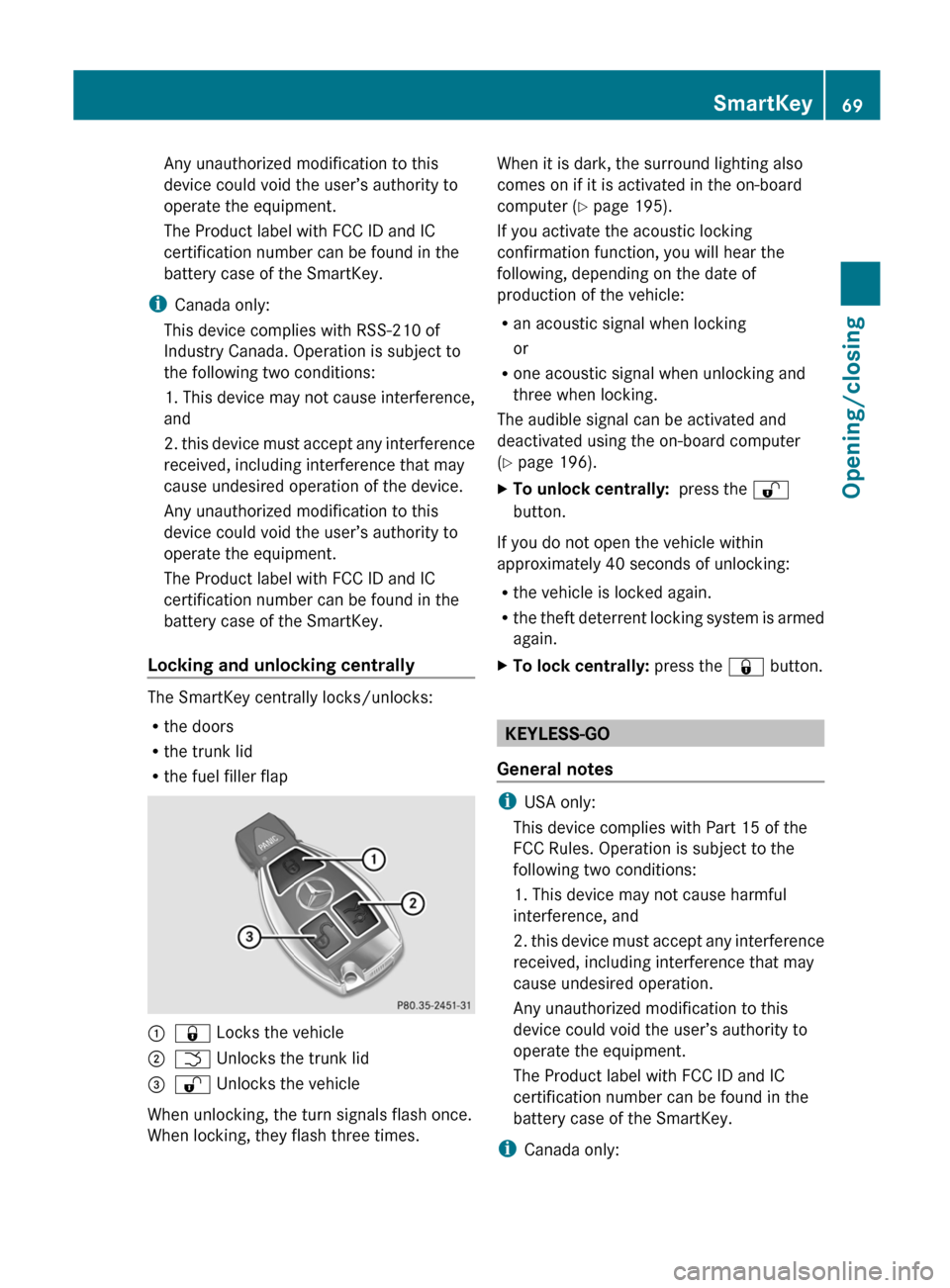
:& Locks the vehicle;F Unlocks the trunk lid=% Unlocks the vehicle
When unlocking, the turn signals flash once.
When locking, they flash three times.
When it is dark, the surround lighting also
comes on if it is activated in the on-board
computer ( Y page 195).
If you activate the acoustic locking
confirmation function, you will hear the
following, depending on the date of
production of the vehicle:
R an acoustic signal when locking
or
R one acoustic signal when unlocking and
three when locking.
The audible signal can be activated and
deactivated using the on-board computer
( Y page 196).XTo unlock centrally: press the %
button.
If you do not open the vehicle within
approximately 40 seconds of unlocking:
R the vehicle is locked again.
R the theft deterrent locking system is armed
again.
XTo lock centrally: press the & button.
KEYLESS-GO
General notes
i USA only:
This device complies with Part 15 of the
FCC Rules. Operation is subject to the
following two conditions:
1. This device may not cause harmful
interference, and
2. this device must accept any interference
received, including interference that may
cause undesired operation.
Any unauthorized modification to this
device could void the user’s authority to
operate the equipment.
The Product label with FCC ID and IC
certification number can be found in the
battery case of the SmartKey.
i Canada only:
SmartKey69Opening/closingZ
Page 72 of 336
This device complies with RSS-210 of
Industry Canada. Operation is subject to
the following two conditions:
1. This device may not cause harmful
interference, and
2. this device must accept any interference
received, including interference that may
cause undesired operation.
Any unauthorized modification to this
device could void the user’s authority to
operate the equipment.
The Product label with FCC ID and IC
certification number can be found in the
battery case of the SmartKey.
Important notes on the use of KEYLESS-
GO
R The KEYLESS-GO key can be used like a
conventional key.
R You can combine KEYLESS-GO functions
with those of a conventional key, e.g.
unlock with KEYLESS-GO and lock with the
& button.
R Always carry your KEYLESS-GO key on your
person.
R Do not keep the KEYLESS-GO key together
with:
- electronic devices, e.g. a mobile phone
or another key
- metallic objects, e.g. coins or metal foil.
This can affect the functionality of
KEYLESS-GO.
R When locking and unlocking using
KEYLESS-GO, the distance between the
SmartKey and the corresponding door
handle must not exceed 3 ft (1 m).
R If the KEYLESS-GO key is removed from the
vehicle, it is possible that the system may
not recognize the SmartKey. The vehicle
can then not be locked or started using
KEYLESS-GO.
R If the KEYLESS-GO key has been removed
from the vehicle, e.g. if a passenger leaves
the vehicle with a KEYLESS-GO key:
- if the start/stop button is pressed or if
an attempt is made to lock the vehicle
with the locking button on the outer door
handle, the Key Not Detected message
appears in the multifunction display
- when the engine is running, the red Key
Not Detected message appears in the
multifunction display as you pull away.
Find the KEYLESS-GO key and change its
position in the vehicle. Carry the
KEYLESS-GO key in your shirt pocket, for
example.
R If you have started the engine with the
Start/Stop button, you can switch it off
again by:
- pressing the Start/Stop button again
- inserting the KEYLESS-GO key into the
ignition lock if the vehicle is stationary
and the automatic transmission is in park
position P.
R You could unlock the vehicle by mistake if
the distance between the KEYLESS-GO key
and the vehicle is less than 3 ft (1 m) and:
- an exterior door handle is hit by a water
jet
or
- you clean an exterior door handle.
R Bear in mind that the engine can be started
by any of the vehicle occupants if there is
a KEYLESS-GO key in the vehicle.70SmartKeyOpening/closing
Page 73 of 336
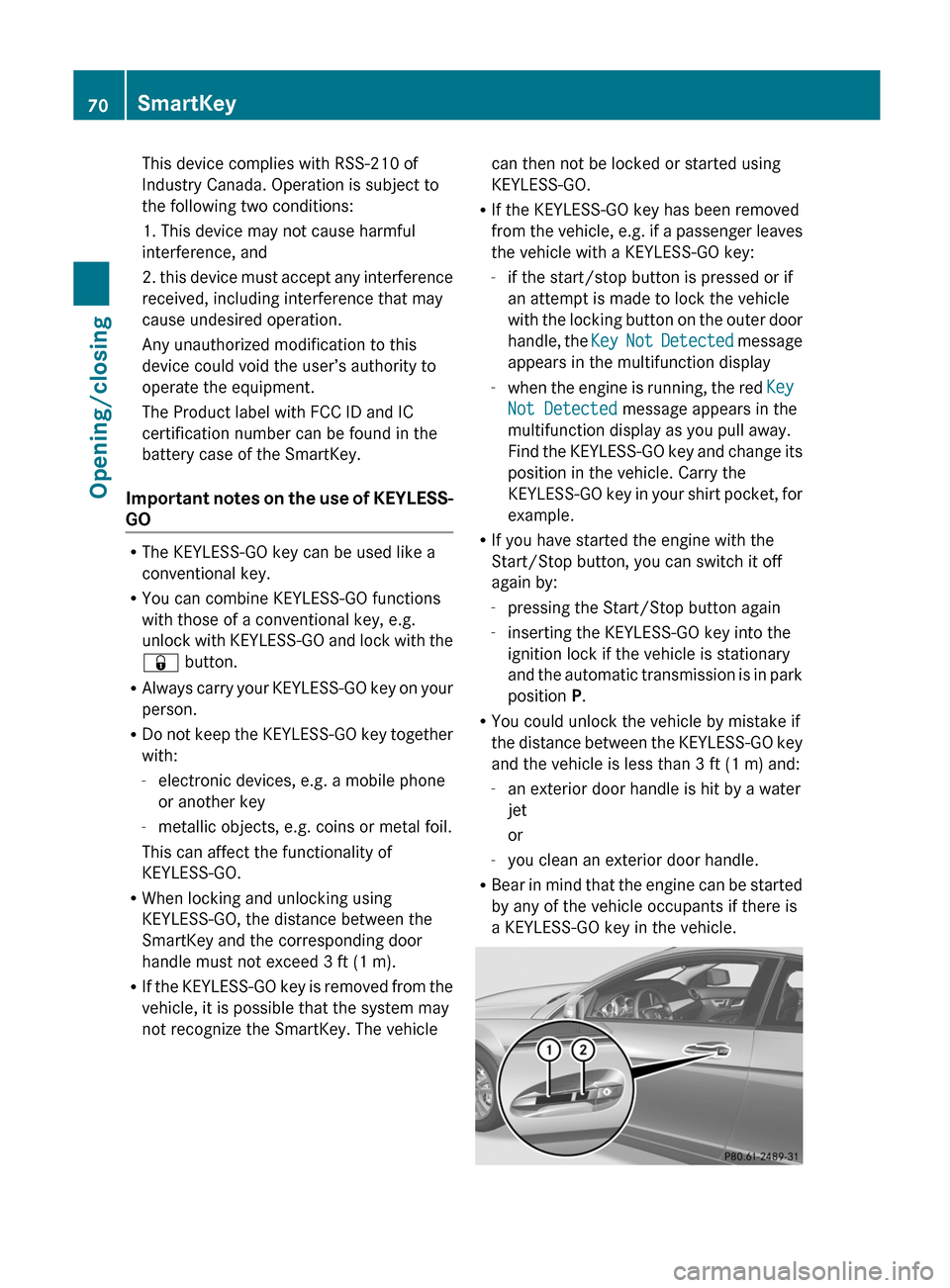
X To unlock the vehicle: touch the inner
surface of the door handle.XTo lock the vehicle: touch sensor
surface :.XConvenience closing feature: touch
recessed sensor surface ; for an
extended period ( Y page 83).
If you pull on the handle of the trunk lid, only
the trunk of the vehicle is unlocked.
Changing the settings of the locking
system
You can change the setting of the locking
system in such a way that only the driver's
door and the fuel filler flap are unlocked. This
is useful if you frequently travel on your own.
XTo change the setting: press and hold
down the % and & buttons
simultaneously for approximately six
seconds until the battery check lamp
( Y page 72) flashes twice.
i
If the setting of the locking system is
changed within the signal range of the
vehicle, pressing the & or % button
locks or unlocks the vehicle.
The SmartKey now functions as follows:
XTo unlock the driver's door: press the
% button once.XTo unlock centrally: press the %
button twice.XTo lock centrally: press the & button.
The KEYLESS-GO function is changed as
follows:
XTo unlock the driver's door: touch the
inner surface of the door handle on the
driver's door.XTo unlock centrally: touch the inner
surface of the front-passenger door handle.XTo lock centrally: touch the outer sensor
surface on one of the door handles.Restoring the factory settingsXPress the % and & buttons
simultaneously for approximately six
seconds until the battery check lamp
flashes twice.
Mechanical key
General notes
If the vehicle can no longer be locked or
unlocked with the SmartKey, use the
mechanical key.
If you use the mechanical key to unlock and
open the driver's door or the trunk lid, the
anti-theft alarm system will be triggered
( Y page 64).
There are several ways to turn off the alarm:
XTo turn the alarm off with the
SmartKey: press the % or & button
on the SmartKey.
or
XInsert the SmartKey into the ignition lock.
or
XTo deactivate the alarm with KEYLESS-
GO: press the Start/Stop button in the
ignition lock. The SmartKey must be in the
vehicle.
or
XLock or unlock the vehicle using KEYLESS-
GO. The SmartKey must be outside the
vehicle.
If you unlock the vehicle using the mechanical
key, the fuel filler flap will not be unlocked
automatically.
XTo unlock the fuel filler flap: insert the
SmartKey in the ignition lock.SmartKey71Opening/closingZ
Page 74 of 336

Removing the mechanical keyXPush release catch : in the direction of
the arrow and at the same time, remove
mechanical key ; from the SmartKey.
SmartKey battery
Important safety notes
Have the batteries changed at a qualified
specialist workshop.
GWARNING
Batteries contain toxic substances.
Swallowing batteries can lead to serious
health issues or death.
Keep batteries out of the reach of children.
Seek medical attention immediately if a
battery is swallowed.
GWARNING
The SmartKey batteries contain perchlorate
material, which may require special handling
and regard for the environment. Observe
government disposal guidelines. California
residents, see www.dtsc.ca.gov/
HazardousWaste/Perchlorate/
index.cfm .
Checking the batteryXPress the & or % button.
The battery is working properly if battery
check lamp : lights up briefly
If battery check lamp : does not light up
briefly during the test, the battery is
discharged.
XChanging the battery ( Y page 72)
i
You can obtain the battery at a qualified
specialist workshop.
i If the SmartKey battery is checked within
the signal reception range of the vehicle,
pressing the & or % button locks or
unlocks the vehicle.
Changing the battery
You require a CR 2025 3 V cell battery.
XTake the mechanical key out of the
SmartKey ( Y page 71).XPress mechanical key ; into the opening
in the SmartKey in the direction of the72SmartKeyOpening/closing