turn signal MERCEDES-BENZ C-Class COUPE 2012 CL204 Owner's Manual
[x] Cancel search | Manufacturer: MERCEDES-BENZ, Model Year: 2012, Model line: C-Class COUPE, Model: MERCEDES-BENZ C-Class COUPE 2012 CL204Pages: 336, PDF Size: 12.67 MB
Page 12 of 336
Specifications ................................ 329
Tank content/reserve fuel .............328
Fuel filler flap
Opening/closing ............................ 138
Fuel level
Calling up the range (on-board
computer) ...................................... 187
Fuel tank
Capacity ........................................ 328
Problem (malfunction) ...................140
Fuse allocation chart (vehicle tool
kit) ...................................................... 278
Fuses Allocation chart ............................. 291
Before changing ............................. 291
Fuse box in the engine
compartment ................................. 291
Fuse box in the trunk .....................292
Important safety notes ..................291
G
Garage door opener Clearing the memory .....................260
Notes ............................................. 256
Opening/closing the garage door ..259
Programming (button in the rear-
view mirror) ................................... 257
Gasoline ............................................. 138
Gear indicator (on-board
computer) .......................................... 198
Gear or selector lever (cleaning
guidelines) ......................................... 274
Genuine Mercedes-Benz parts ......... 324
Glove box ........................................... 243
H
Handbrake see Parking brake
Hazard warning lamps ...................... 103
Headlamp cleaning system Notes ............................................. 332
Headlamps
Adding fluid to cleaning system .....267
Cleaning system (function) ............103
Fogging up ..................................... 105
see Automatic headlamp mode
Head restraints
Adjusting ......................................... 91
Adjusting (electrically) .....................91
see NECK-PRO head restraints
Heating
see Climate control
High-beam headlamps
Changing bulbs .............................. 108
Display message ............................ 211
Switching Adaptive Highbeam
Assist on/off ................................. 104
Switching on/off ........................... 103
Hill start assist .................................. 128
HOLD function Display message ............................ 216
Function/notes ............................. 159
Hood
Closing ........................................... 265
Display message ............................ 225
Opening ......................................... 264
Hydroplaning ..................................... 145
I
Ignition lock see Key positions
Immobilizer .......................................... 64
Indicator lamps see Warning and indicator lamps
Indicators
see Turn signals
Instrument cluster
Overview .......................................... 29
Settings ......................................... 194
Warning and indicator lamps ...........30
Instrument cluster lighting ................ 29
Instrument lighting see Instrument cluster lighting
Interior lighting ................................. 106
Automatic control ..........................106
Delayed switch-off (on-board
computer) ...................................... 196
Emergency lighting ........................106
Manual control ............................... 106
Overview ........................................ 106
Reading lamp ................................. 106
10Index
Page 13 of 336
J
Jack Storage location ............................ 278
Using ............................................. 281
Jump starting (engine) ...................... 287
K
Key see SmartKey
KEYLESS-GO
Convenience closing feature ............83
Display message ............................ 226
Locking ............................................ 69
Start/Stop button .......................... 125
Starting the engine ........................127
Unlocking ......................................... 69
Key positions
KEYLESS-GO .................................. 125
SmartKey ....................................... 125
Kickdown
Driving tips .................................... 132
Manual drive program ....................136
Knee bag .............................................. 40
L
Lamps see Warning and indicator lamps
Lane-change assistant
see Blind Spot Assist
Lane detection (automatic)
see Lane Keeping Assist
Lane Keeping Assist
Activating/deactivating .................193
Display message ............................ 217
Function/information ....................172
Lane Tracking package ..................... 170
Lap time (RACETIMER) ...................... 198
LATCH-type (ISOFIX) child seat
anchors ................................................ 54
Lighting see Lights
Lights
Activating/deactivating the
interior lighting delayed switch-off . 196
Automatic headlamp mode ............102
Cornering light function .................104
Display message ............................ 210
Driving abroad ............................... 100
Fog lamps ...................................... 102
Hazard warning lamps ...................103
High beam flasher .......................... 103
High-beam headlamps ...................103
Light switch ................................... 100
Low-beam headlamps ....................101
Parking lamps ................................ 100
Rear fog lamp ................................ 102
Switching Adaptive Highbeam
Assist on/off ................................. 195
Switching the daytime running
lamps on/off (on-board
computer) ...................................... 195
Switching the daytime running
lamps on/off (switch) ....................101
Switching the exterior lighting
delayed switch-off on/off (on-
board computer) ............................ 195
Switching the surround lighting
on/off (on-board computer) ..........195
Turn signals ................................... 103
see Changing bulbs
see Interior lighting
Light sensor (display message) ....... 213
LIM indicator lamp Cruise control ................................ 147
DISTRONIC PLUS ........................... 151
Loading guidelines ............................ 242
Locking see Central locking
Locking (doors)
Automatic ........................................ 76
Emergency locking ........................... 77
From inside (central locking
button) ............................................. 76
Locking centrally
see Central locking
Locking verification signal (on-
board computer) ............................... 196
Low-beam headlamps Changing bulbs .............................. 108
Display message ............................ 210
Setting for driving abroad
(symmetrical) ................................. 100
Switching on/off ........................... 101Index11
Page 20 of 336
Transmissionsee Automatic transmission
Transporting the vehicle .................. 290
Trim pieces (cleaning instructions) . 274
Trip computer (on-board
computer) .......................................... 187
Trip meter see Trip odometer
Trip odometer
Calling up ....................................... 187
Resetting (on-board computer) ......188
Trunk
Emergency release ..........................80
Important safety guidelines .............78
Locking separately ...........................80
Opening (automatically from
inside) .............................................. 79
Opening (automatically from
outside) ............................................ 79
Trunk lid
Display message ............................ 224
Opening/closing .............................. 78
Turn signals
Display message ............................ 210
Switching on/off ........................... 103
Type identification plate
see Vehicle identification plate
U
Unlocking Emergency unlocking .......................77
From inside the vehicle (central
unlocking button) ............................. 76
V
Vanity mirror (in sun visor) .............. 247
Vehicle Correct use ...................................... 23
Data acquisition ............................... 24
Display message ............................ 224
Equipment ....................................... 20
Individual settings ..........................194
Limited Warranty ............................. 24
Loading .......................................... 306
Locking (in an emergency) ...............77
Locking (SmartKey) .......................... 69
Lowering ........................................ 283
Maintenance .................................... 21
Parking for a long period ................ 141
Pulling away ................................... 127
Raising ........................................... 281
Reporting problems .........................23
Towing away .................................. 288
Transporting .................................. 290
Unlocking (in an emergency) ...........77
Unlocking (SmartKey) ......................69
Vehicle data ................................... 332
Vehicle battery
see Battery (vehicle)
Vehicle data ....................................... 332
see Technical data
Vehicle dimensions ........................... 332
Vehicle emergency locking ................ 77
Vehicle identification number see VIN
Vehicle identification plate .............. 325
Vehicle tool kit .................................. 278
Video (DVD) ........................................ 190
VIN ...................................................... 325
W
Warning and indicator lamps ABS ................................................ 230
Brakes ........................................... 229
Check Engine ................................. 234
Coolant .......................................... 235
Cruise control ................................ 147
Distance warning ........................... 237
DISTRONIC PLUS ........................... 237
ESP ®
.............................................. 231
ESP ®
OFF ....................................... 232
Fuel tank ........................................ 234
LIM (DISTRONIC PLUS) ..................151
Overview .......................................... 30
PASSENGER AIR BAG OFF
indicator lamp .................................. 42
Reserve fuel ................................... 234
Seat belt ........................................ 227
SPORT handling mode ...................232
SRS ................................................ 233
Tire pressure monitor ....................238
Warranty ............................................ 325
18Index
Page 32 of 336
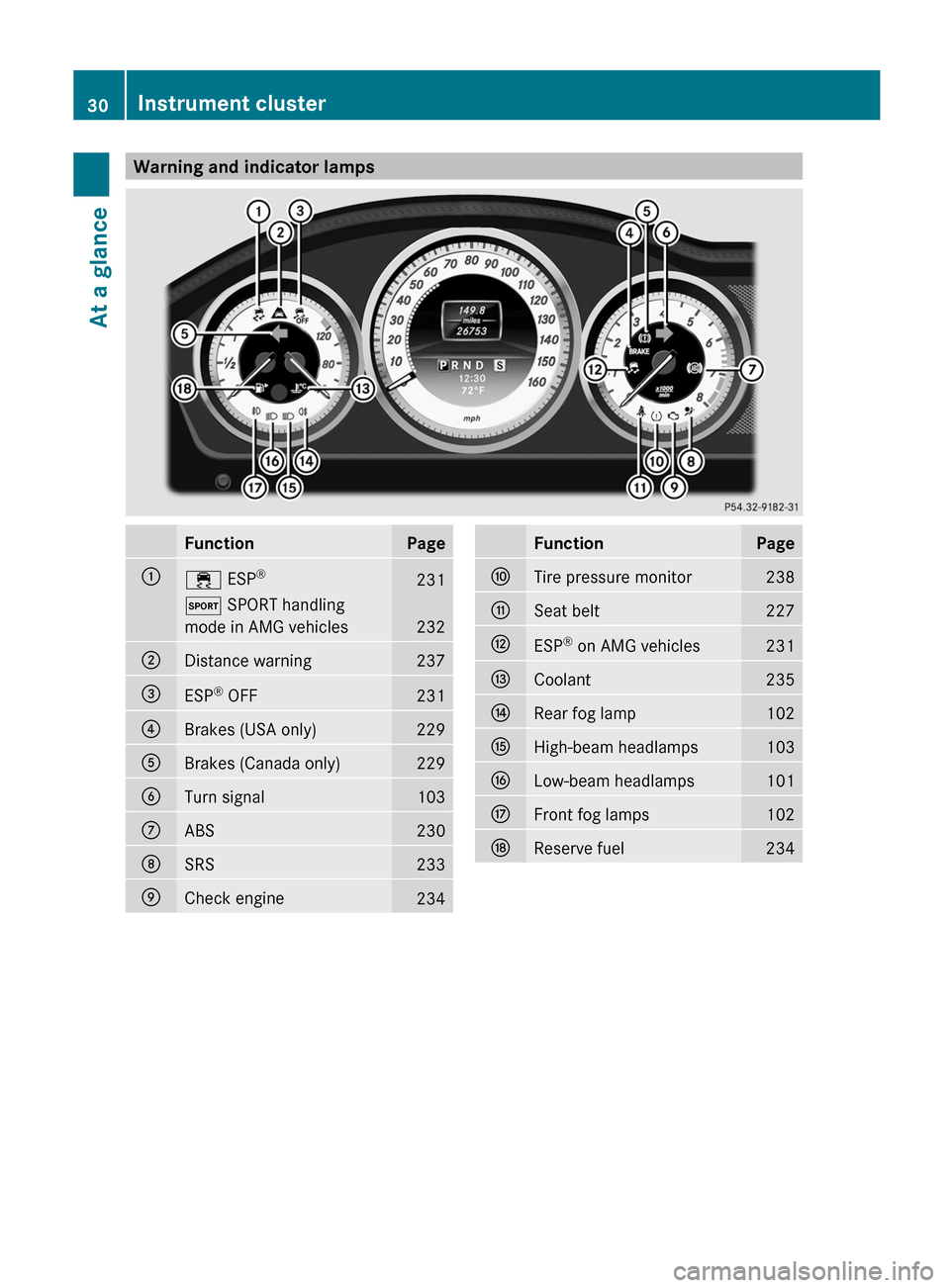
Warning and indicator lampsFunctionPage:÷ ESP®231M
SPORT handling
mode in AMG vehicles
232
;Distance warning237=ESP ®
OFF231?Brakes (USA only)229ABrakes (Canada only)229BTurn signal103CABS230DSRS233ECheck engine234FunctionPageFTire pressure monitor238GSeat belt227HESP ®
on AMG vehicles231ICoolant235JRear fog lamp102KHigh-beam headlamps103LLow-beam headlamps101MFront fog lamps102NReserve fuel23430Instrument clusterAt a glance
Page 71 of 336
Any unauthorized modification to this
device could void the user’s authority to
operate the equipment.
The Product label with FCC ID and IC
certification number can be found in the
battery case of the SmartKey.
i Canada only:
This device complies with RSS-210 of
Industry Canada. Operation is subject to
the following two conditions:
1. This device may not cause interference,
and
2. this device must accept any interference
received, including interference that may
cause undesired operation of the device.
Any unauthorized modification to this
device could void the user’s authority to
operate the equipment.
The Product label with FCC ID and IC
certification number can be found in the
battery case of the SmartKey.
Locking and unlocking centrally
The SmartKey centrally locks/unlocks:
R the doors
R the trunk lid
R the fuel filler flap
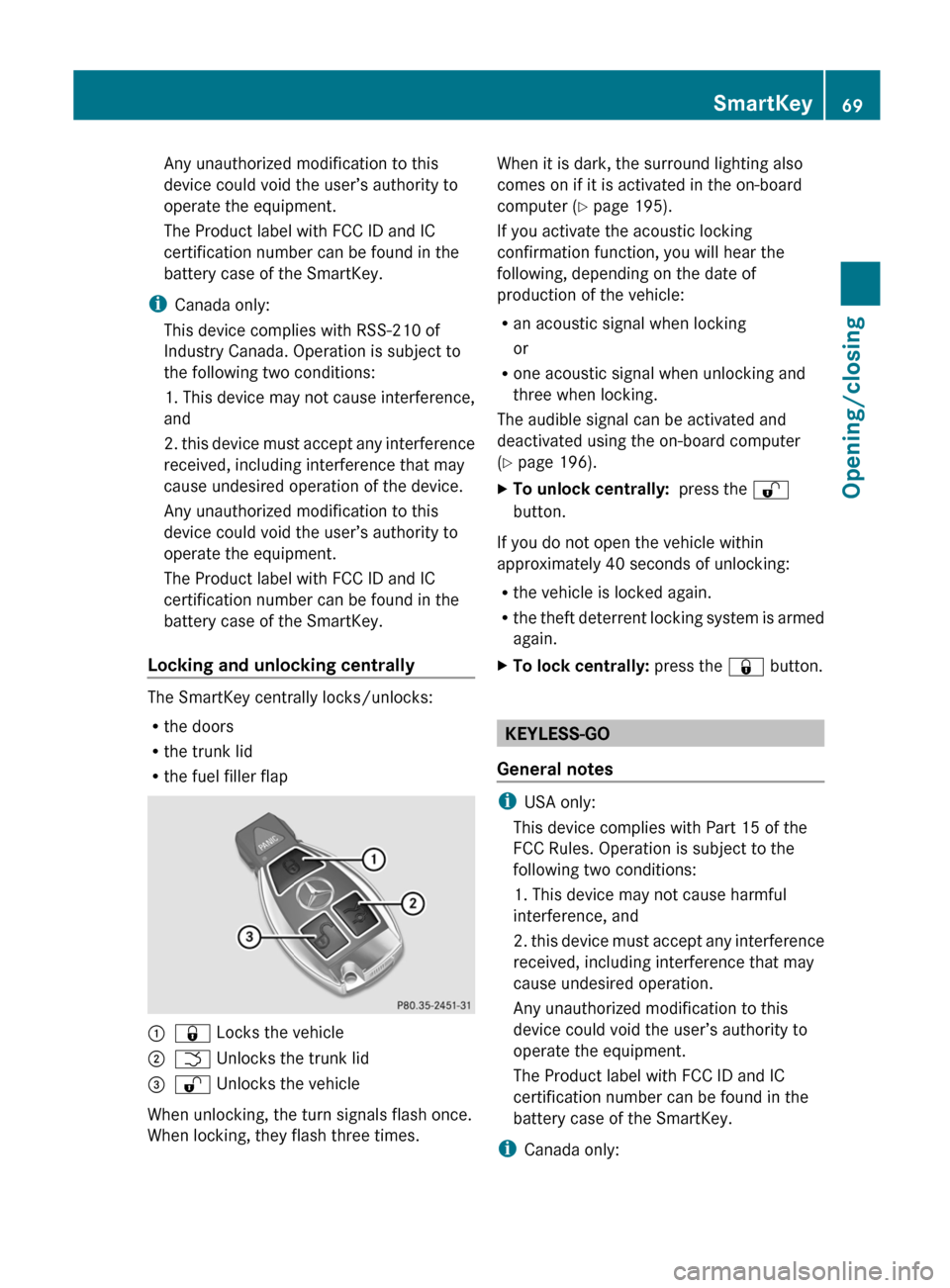
:& Locks the vehicle;F Unlocks the trunk lid=% Unlocks the vehicle
When unlocking, the turn signals flash once.
When locking, they flash three times.
When it is dark, the surround lighting also
comes on if it is activated in the on-board
computer ( Y page 195).
If you activate the acoustic locking
confirmation function, you will hear the
following, depending on the date of
production of the vehicle:
R an acoustic signal when locking
or
R one acoustic signal when unlocking and
three when locking.
The audible signal can be activated and
deactivated using the on-board computer
( Y page 196).XTo unlock centrally: press the %
button.
If you do not open the vehicle within
approximately 40 seconds of unlocking:
R the vehicle is locked again.
R the theft deterrent locking system is armed
again.
XTo lock centrally: press the & button.
KEYLESS-GO
General notes
i USA only:
This device complies with Part 15 of the
FCC Rules. Operation is subject to the
following two conditions:
1. This device may not cause harmful
interference, and
2. this device must accept any interference
received, including interference that may
cause undesired operation.
Any unauthorized modification to this
device could void the user’s authority to
operate the equipment.
The Product label with FCC ID and IC
certification number can be found in the
battery case of the SmartKey.
i Canada only:
SmartKey69Opening/closingZ
Page 73 of 336
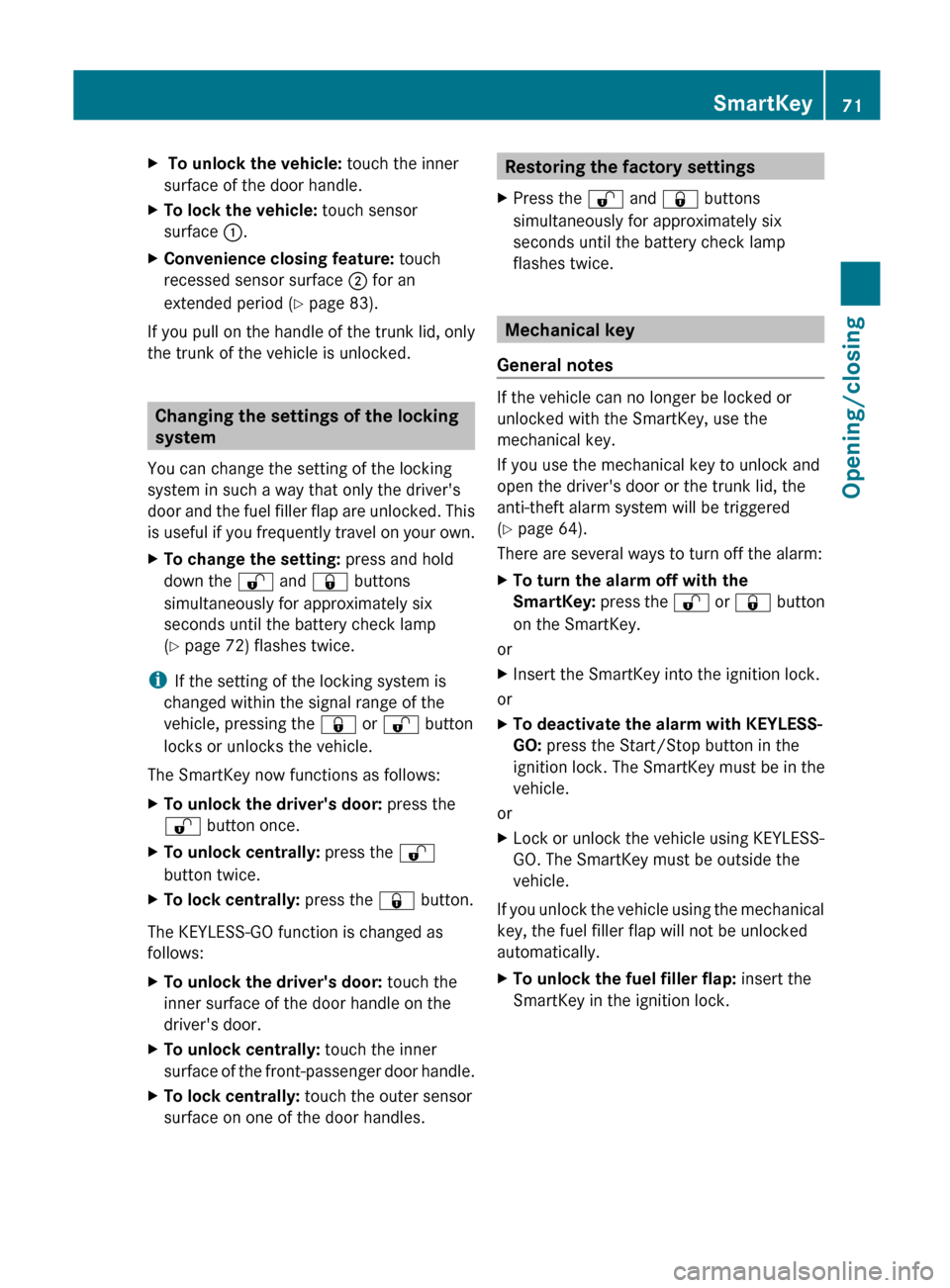
X To unlock the vehicle: touch the inner
surface of the door handle.XTo lock the vehicle: touch sensor
surface :.XConvenience closing feature: touch
recessed sensor surface ; for an
extended period ( Y page 83).
If you pull on the handle of the trunk lid, only
the trunk of the vehicle is unlocked.
Changing the settings of the locking
system
You can change the setting of the locking
system in such a way that only the driver's
door and the fuel filler flap are unlocked. This
is useful if you frequently travel on your own.
XTo change the setting: press and hold
down the % and & buttons
simultaneously for approximately six
seconds until the battery check lamp
( Y page 72) flashes twice.
i
If the setting of the locking system is
changed within the signal range of the
vehicle, pressing the & or % button
locks or unlocks the vehicle.
The SmartKey now functions as follows:
XTo unlock the driver's door: press the
% button once.XTo unlock centrally: press the %
button twice.XTo lock centrally: press the & button.
The KEYLESS-GO function is changed as
follows:
XTo unlock the driver's door: touch the
inner surface of the door handle on the
driver's door.XTo unlock centrally: touch the inner
surface of the front-passenger door handle.XTo lock centrally: touch the outer sensor
surface on one of the door handles.Restoring the factory settingsXPress the % and & buttons
simultaneously for approximately six
seconds until the battery check lamp
flashes twice.
Mechanical key
General notes
If the vehicle can no longer be locked or
unlocked with the SmartKey, use the
mechanical key.
If you use the mechanical key to unlock and
open the driver's door or the trunk lid, the
anti-theft alarm system will be triggered
( Y page 64).
There are several ways to turn off the alarm:
XTo turn the alarm off with the
SmartKey: press the % or & button
on the SmartKey.
or
XInsert the SmartKey into the ignition lock.
or
XTo deactivate the alarm with KEYLESS-
GO: press the Start/Stop button in the
ignition lock. The SmartKey must be in the
vehicle.
or
XLock or unlock the vehicle using KEYLESS-
GO. The SmartKey must be outside the
vehicle.
If you unlock the vehicle using the mechanical
key, the fuel filler flap will not be unlocked
automatically.
XTo unlock the fuel filler flap: insert the
SmartKey in the ignition lock.SmartKey71Opening/closingZ
Page 103 of 336
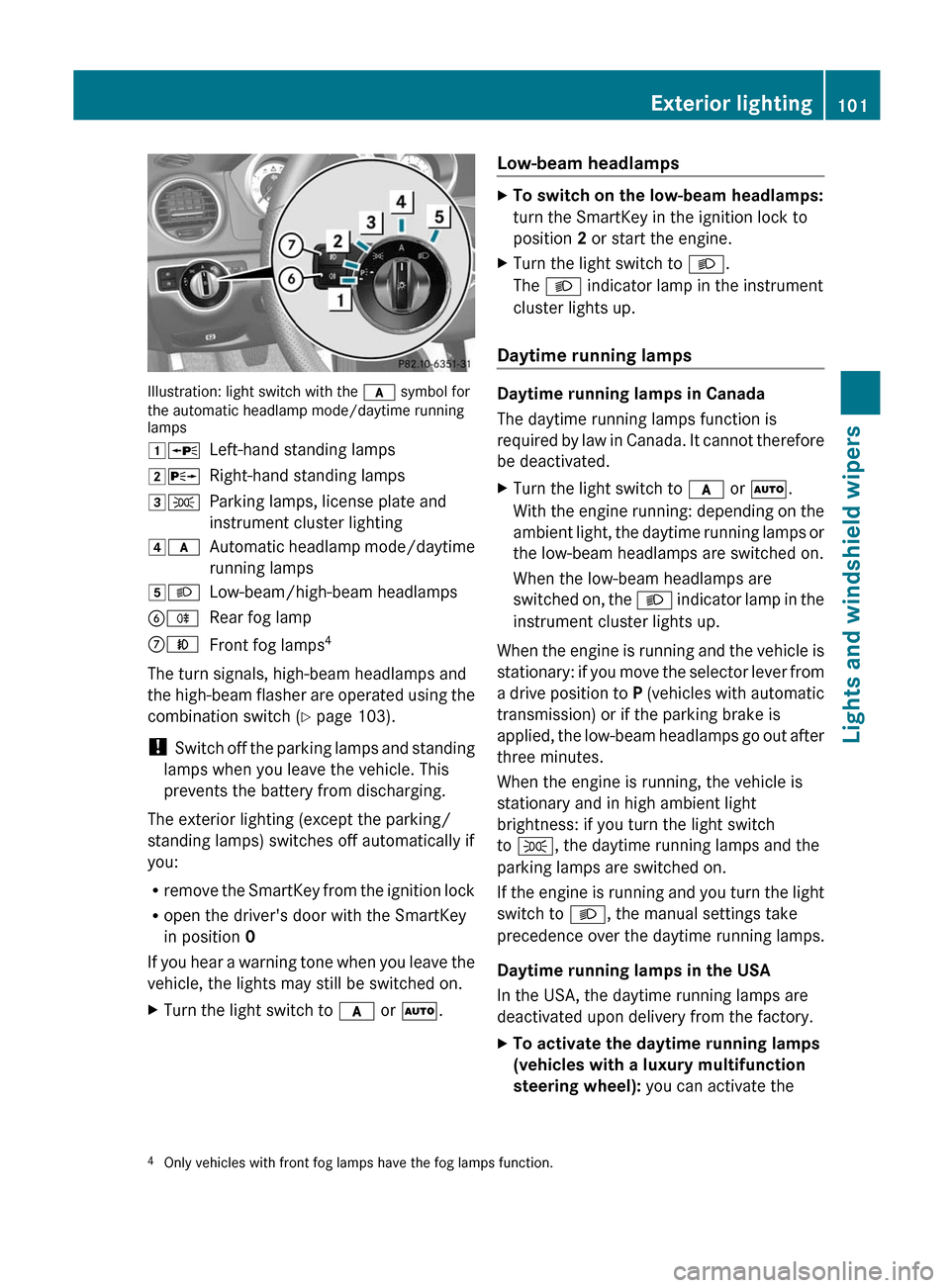
Illustration: light switch with the c symbol for
the automatic headlamp mode/daytime running
lamps
1 WLeft-hand standing lamps2XRight-hand standing lamps3TParking lamps, license plate and
instrument cluster lighting4 cAutomatic headlamp mode/daytime
running lamps5 LLow-beam/high-beam headlampsBRRear fog lampCNFront fog lamps 4
The turn signals, high-beam headlamps and
the high-beam flasher are operated using the
combination switch ( Y page 103).
! Switch off the parking lamps and standing
lamps when you leave the vehicle. This
prevents the battery from discharging.
The exterior lighting (except the parking/
standing lamps) switches off automatically if
you:
R remove the SmartKey from the ignition lock
R open the driver's door with the SmartKey
in position 0
If you hear a warning tone when you leave the
vehicle, the lights may still be switched on.
XTurn the light switch to c or à .Low-beam headlampsXTo switch on the low-beam headlamps:
turn the SmartKey in the ignition lock to
position 2 or start the engine.XTurn the light switch to L.
The L indicator lamp in the instrument
cluster lights up.
Daytime running lamps
Daytime running lamps in Canada
The daytime running lamps function is
required by law in Canada. It cannot therefore
be deactivated.
XTurn the light switch to c or à .
With the engine running: depending on the
ambient light, the daytime running lamps or
the low-beam headlamps are switched on.
When the low-beam headlamps are
switched on, the L indicator lamp in the
instrument cluster lights up.
When the engine is running and the vehicle is
stationary: if you move the selector lever from
a drive position to P (vehicles with automatic
transmission) or if the parking brake is
applied, the low-beam headlamps go out after
three minutes.
When the engine is running, the vehicle is
stationary and in high ambient light
brightness: if you turn the light switch
to T , the daytime running lamps and the
parking lamps are switched on.
If the engine is running and you turn the light
switch to L, the manual settings take
precedence over the daytime running lamps.
Daytime running lamps in the USA
In the USA, the daytime running lamps are
deactivated upon delivery from the factory.
XTo activate the daytime running lamps
(vehicles with a luxury multifunction
steering wheel): you can activate the4
Only vehicles with front fog lamps have the fog lamps function.Exterior lighting101Lights and windshield wipers
Page 105 of 336
XPress the R button.
The yellow R indicator lamp in the
instrument cluster lights up.XTo switch off the rear fog lamp: press the
R button.
The yellow R indicator lamp in the
instrument cluster goes out.
Headlamp cleaning system
The headlamps are cleaned automatically if
the "Wipe with washer fluid" function is
operated ten times while the lights are on and
the engine is running ( Y page 110).
Combination switch
Turn signals
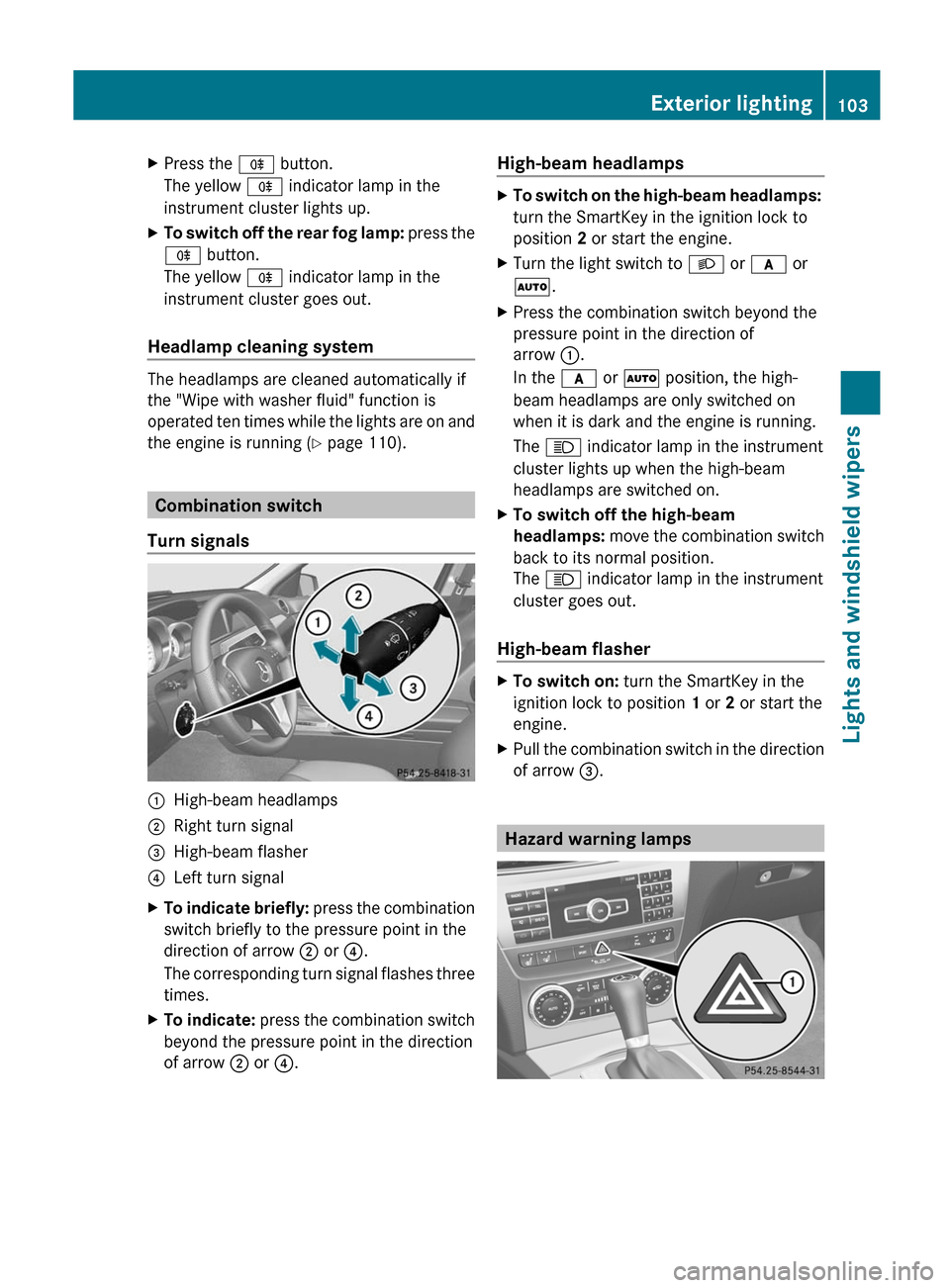
:High-beam headlamps;Right turn signal=High-beam flasher?Left turn signalXTo indicate briefly: press the combination
switch briefly to the pressure point in the
direction of arrow ; or ?.
The corresponding turn signal flashes three
times.XTo indicate: press the combination switch
beyond the pressure point in the direction
of arrow ; or ?.High-beam headlampsXTo switch on the high-beam headlamps:
turn the SmartKey in the ignition lock to
position 2 or start the engine.XTurn the light switch to L or c or
à .XPress the combination switch beyond the
pressure point in the direction of
arrow :.
In the c or à position, the high-
beam headlamps are only switched on
when it is dark and the engine is running.
The K indicator lamp in the instrument
cluster lights up when the high-beam
headlamps are switched on.XTo switch off the high-beam
headlamps: move the combination switch
back to its normal position.
The K indicator lamp in the instrument
cluster goes out.
High-beam flasher
XTo switch on: turn the SmartKey in the
ignition lock to position 1 or 2 or start the
engine.XPull the combination switch in the direction
of arrow =.
Hazard warning lamps
Exterior lighting103Lights and windshield wipersZ
Page 106 of 336
The hazard warning lamps automatically
switch on if:
R an air bag is deployed.
R the vehicle is slowed down severely from a
speed of over 45 mph (70 km/h) and
comes to a halt.XTo switch on the hazard warning lamps:
press button :.
All turn signals flash. If you now switch on
a turn signal using the combination switch,
only the turn signal lamp on the
corresponding side of the vehicle will flash.XTo switch off the hazard warning
lamps: press button :.
The hazard warning lamps are deactivated
automatically if the vehicle returns to a speed
of over 6 mph (10 km/h) after a full
application of the brakes.
i The hazard warning lamps still operate if
the ignition is switched off.
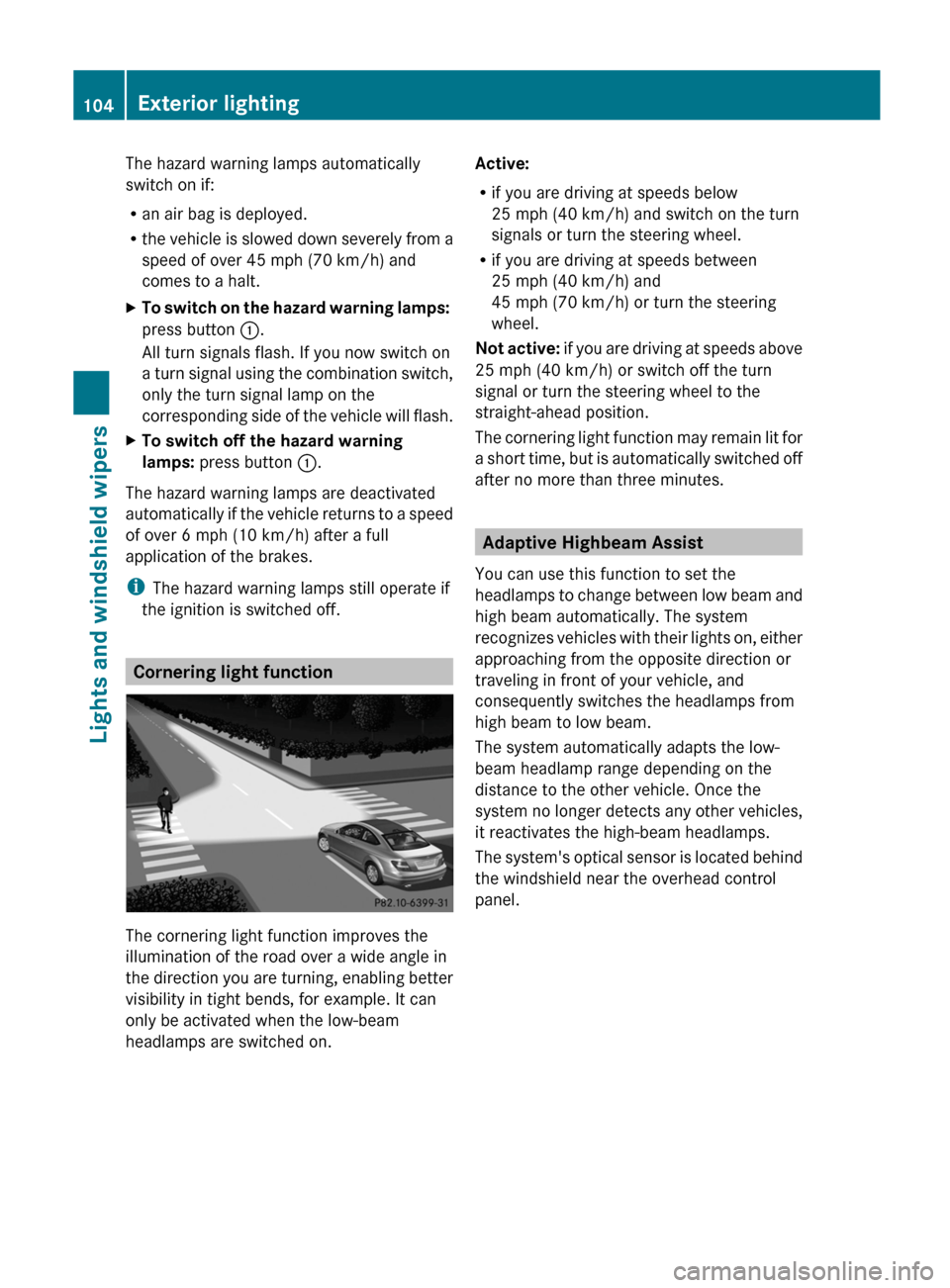
Cornering light function
The cornering light function improves the
illumination of the road over a wide angle in
the direction you are turning, enabling better
visibility in tight bends, for example. It can
only be activated when the low-beam
headlamps are switched on.
Active:
R if you are driving at speeds below
25 mph (40 km/h) and switch on the turn
signals or turn the steering wheel.
R if you are driving at speeds between
25 mph (40 km/h) and
45 mph (70 km/h) or turn the steering
wheel.
Not active: if you are driving at speeds above
25 mph (40 km/h) or switch off the turn
signal or turn the steering wheel to the
straight-ahead position.
The cornering light function may remain lit for
a short time, but is automatically switched off
after no more than three minutes.
Adaptive Highbeam Assist
You can use this function to set the
headlamps to change between low beam and
high beam automatically. The system
recognizes vehicles with their lights on, either
approaching from the opposite direction or
traveling in front of your vehicle, and
consequently switches the headlamps from
high beam to low beam.
The system automatically adapts the low-
beam headlamp range depending on the
distance to the other vehicle. Once the
system no longer detects any other vehicles,
it reactivates the high-beam headlamps.
The system's optical sensor is located behind
the windshield near the overhead control
panel.
104Exterior lightingLights and windshield wipers
Page 154 of 336
you determine by the position of the
accelerator pedal.
Activating when driving towards a
stationary vehicle
If the vehicle in front of you is stationary, you
can only activate DISTRONIC PLUS once your
vehicle is stationary as well.XBriefly pull the cruise control lever towards
you ?, or briefly press up : or down ;.
DISTRONIC PLUS is selected.
i DISTRONIC PLUS can only be activated at
under 20 mph (30 km/h) if a vehicle in front
has been detected. Therefore, the
DISTRONIC PLUS distance display in the
instrument cluster should be activated
( Y page 192).
XKeep the cruise control lever pressed
up : or down ; until the desired speed
is set.
i You can use the cruise control lever to set
the stored speed and the control on the
cruise control lever to set the specified
minimum distance ( Y page 155).
Pulling away
XIf the vehicle in front pulls away: remove
your foot from the brake pedal.XBriefly pull the cruise control lever towards
you ?.
or
XAccelerate briefly.
Your vehicle pulls away and adapts its
speed to that of the vehicle in front.
Driving
If there is no vehicle in front, DISTRONIC
PLUS operates in the same way as cruise
control.
If a slower-moving vehicle is detected in front,
DISTRONIC causes your vehicle to brake. This
maintains the preset distance to the vehicle
in front.
If DISTRONIC PLUS detects a faster-moving
vehicle in front, it increases the driving speed
of your vehicle, but only up to the desired
speed you have stored.GWARNING
If you depress the brake, DISTRONIC PLUS is
deactivated unless your vehicle is stationary.
DISTRONIC PLUS then no longer brakes your
vehicle. In such cases, control the distance
from vehicles travelling in front with the brake
alone. You could otherwise cause an accident
and thereby injure yourself and others. The
driver remains fully responsible for the
vehicle's distance from other vehicles, the
speed being driven and for braking in good
time.
Changing lanes
If you wish to change to the passing lane (in
left-hand-drive vehicles, the passing lane is
the left-hand lane), DISTRONIC PLUS
supports you if:
R you are driving faster than 40 mph
(60 km/h).
R DISTRONIC PLUS is maintaining the
distance to a vehicle in front.
R you switch on the appropriate turn signals.
R DISTRONIC PLUS does not detect a danger
of collision.
If these conditions are met, your vehicle is
accelerated. Acceleration will be interrupted
if changing lanes takes too long or if the
distance between your vehicle and the
vehicle in front becomes too small.
GWARNING
DISTRONIC PLUS and Active Blind Spot Assist
are only aids designed to assist driving.
They do not relieve you of the responsibility
of paying attention. The driver remains fully
responsible for the vehicle's distance from
other vehicles, the vehicle's speed and for
braking in good time. Always pay attention to
traffic conditions and your surroundings.
Otherwise, you may fail to recognize dangers
in time, cause an accident and injure yourself
and others.
152Driving systemsDriving and parking