sensor MERCEDES-BENZ C-Class COUPE 2014 CL204 Owner's Guide
[x] Cancel search | Manufacturer: MERCEDES-BENZ, Model Year: 2014, Model line: C-Class COUPE, Model: MERCEDES-BENZ C-Class COUPE 2014 CL204Pages: 342, PDF Size: 4.55 MB
Page 180 of 342
Due to the nature of the system:
R
warnings may be issued in error when
driving close to crash barriers or similar
solid lane borders.
R the warning is canceled when driving for an
extended period next to long vehicles, such
as trucks.
The two rada rsensors for Blind Spot Assist
are integrated into the sides of the rear
bumper. Make sure that the bumper is free of
dirt, ice or slush in the vicinity of the sensors.
The sensors must not be covered, for
example by cycle racks or overhanging loads.
Following a severe impact or in the event of
damage to the bumpers, have the function of
the sensors checked at a qualified specialist
workshop. Blind Spot Assist may otherwise
not work properly.
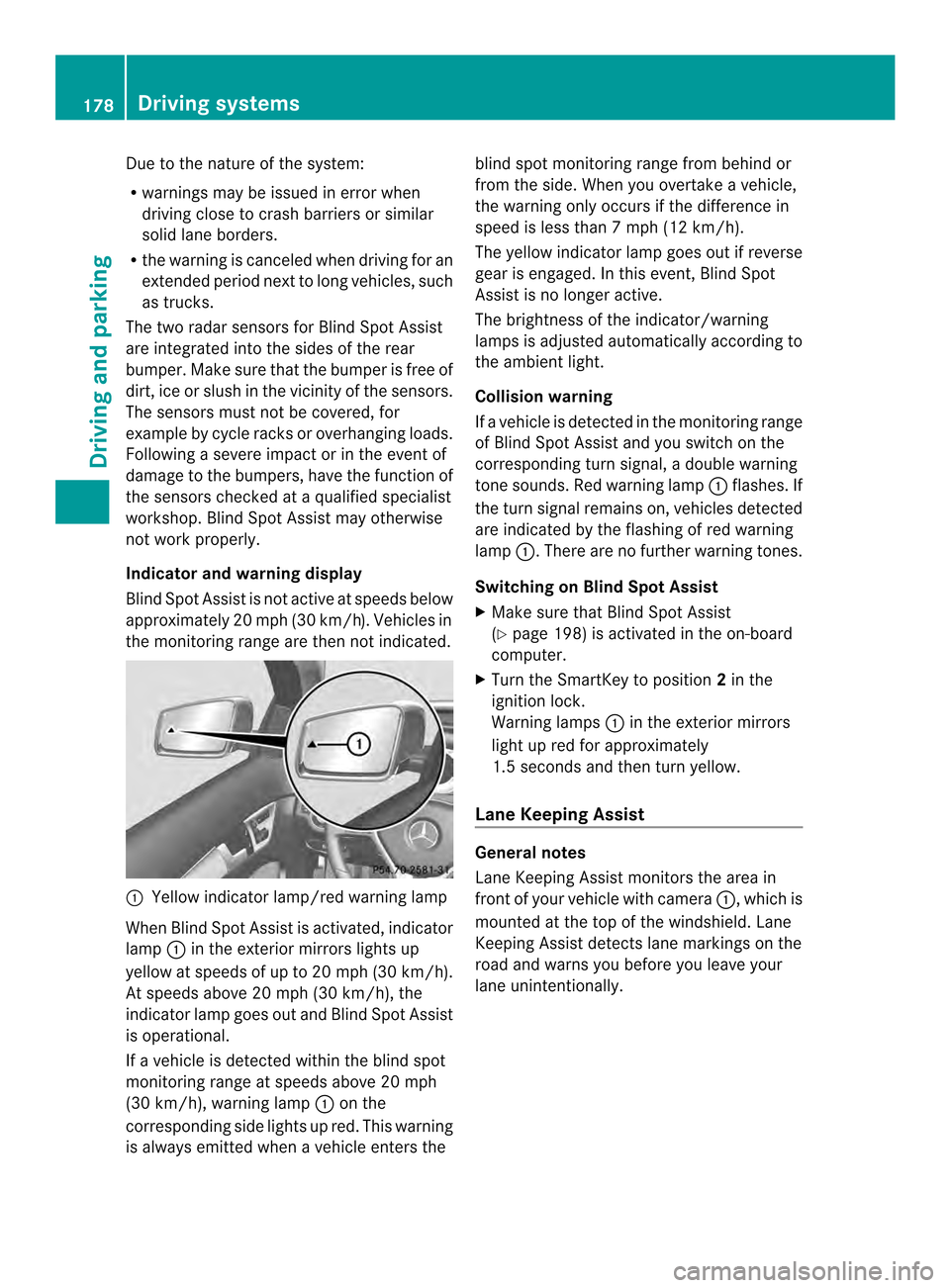
Indicator and warning display
Blind Spot Assist is not active at speeds below
approximately 20 mph (30 km/h) .Vehicles in
the monitoring range are then not indicated. 0002
Yellow indicator lamp/red warning lamp
When Blind Spot Assist is activated, indicator
lamp 0002in the exterior mirrors lights up
yellow at speeds of up to 20 mph (30k m/h).
At speeds above 20 mph (30 km/h), the
indicator lamp goes out and Blind Spot Assist
is operational.
If a vehicle is detected withi nthe blind spot
monitoring range at speeds above 20 mph
(30 km/h), warning lamp 0002on the
corresponding side lights up red. This warning
is always emitted when a vehicle enters the blind spot monitoring range from behind or
from the side. When you overtake a vehicle,
the warning only occurs if the difference in
speed is less than
7mph (12 km/h).
The yellow indicator lamp goes out if reverse
gear is engaged. In this event, Blind Spot
Assist is no longer active.
The brightness of the indicator/warning
lamps is adjusted automatically according to
the ambient light.
Collision warning
If a vehicle is detected in the monitoring range
of Blind Spot Assist and you switch on the
corresponding turn signal, a double warning
tone sounds. Red warning lamp 0002flashes. If
the turn signal remains on, vehicles detected
are indicated by the flashing of red warning
lamp 0002.There are no further warning tones.
Switching on Blind Spot Assist
X Make sure that Blind Spot Assist
(Y page 198) is activated in the on-board
computer.
X Turn the SmartKey to position 2in the
ignition lock.
Warning lamps 0002in the exterior mirrors
light up red for approximately
1.5 seconds and then turn yellow.
Lane Keeping Assist General notes
Lane Keeping Assist monitors the area in
front of your vehicle with camera
0002, which is
mounted at the top of the windshield. Lane
Keeping Assist detects lane markings on the
road and warns you before you leave your
lane unintentionally. 178
Driving systemsDriving and parking
Page 182 of 342
Standard
If
Standard is selected, no warning vibration
occurs if:
R you switch on the turn signals. In this event,
the warnings are suppressed for a certain
period of time.
R a driving safety system intervenes, such as
ABS, BAS or ESP ®
.
Adaptive
When Adaptive is selected, no warning
vibration occurs if:
R you switch on the turn signals. In this event,
the warnings are suppressed for a certain
period of time.
R a driving safety system intervenes, e.g.
ABS, BAS or ESP ®
.
R you accelerate hard, e.g. kickdown.
R you brake hard.
R you steer actively, e.g. swerve to avoid an
obstacle or change lanes quickly.
R you cut the corner on a sharp bend.
In order that you are warned only when
necessary and in good time if you cross the
lane marking, the system recognizes certain
conditions and warns you accordingly.
The warning vibration occurs earlier if:
R you approach the outer lane marking on a
bend.
R the road has very wide lanes, e.g. a
highway.
R the system recognizes solid lane markings.
The warning vibration occurs later if:
R the road has narrow lanes.
R you cut the corner on a bend. Active Driving Assistance package
General notes The Active Driving Assistance package
consists of DISTRONIC PLUS (Y
page 157),
Active Blind Spot Assist (Y page 180) and
Active Lane Keeping Assist (Y page 183).Active Blind Spot Assist General notes
Active Blind Spot Assist uses a radar sensor
system to monitor the side areas of your
vehicle which are behind the driver. Awarning
display in the exterior mirrors draws your
attentio nto vehicles detected in the
monitored area. If you then switch on the
corresponding turn signal to change lane, you
will also receive an optical and audible
warning. If a risk of lateral collision is
detected, corrective braking may help you
avoid a collision. To support the course-
correcting brake application, Active Blind
Spot Assist uses the forward-facing radar
sensor system. The free space is then
evaluated in the direction of travel and to the
side before a course-correcting brake
application is initiated.
Active Blind Spot Assist supports you from a
speed of approximately 20 mph (30 km/h).
For Active Blind Spot Assist to assist you
when driving, the radar sensor system must
be operational.
Important safety notes
Active Blind Spot Assist is only an aid. It does
not detect all traffic situations and road users
and is no substitute for attentive driving.
Always ensure that there is sufficient
distance to the side for other road users and
obstacles. G
WARNING
Active Blind Spot Assist does not react to:
R vehicles overtaken too closely on the side,
placing them in the blind spot area
R vehicles which approach with a large speed
differential and overtake your vehicle
As a result, Active Blind Spot Assist may
neither give warnings nor intervene in such
situations. There is a risk of an accident.
Always observe the traffic conditions
carefully, and maintain a safe lateral distance.
i USA only: 180
Driving systemsDriving and parking
Page 183 of 342
This device has been approved by the FCC
as a "Vehicular RadarS ystem". The radar
sensor is intended fo ruse in an automotive
radar system only. Removing, tampering
with, or altering the device will void any
warranties, and is not permitted by the
FCC. Do not tamper with, alter, or use in
any non-approved way.
Any unauthorized modification to this
device could void the user’s authority to
operate the equipment.
i Canada only: This device complies with
RSS-210 of Industry Canada. Operation is
subject to the following two conditions:
1. This device may not cause harmful
interference, and
2. this device must accept any interference
received, including interference that may
cause undesired operation of the device.
Removal, tampering, or altering of the
device will void any warranties, and is not
permitted. Do not tamper with, alter, or use
in any non-approved way.
Any unauthorized modification to this
device could void the user's authority to
operate the equipment.
Monitoring range of the sensors G
WARNING
Active Blind Spot Assist does not detect all
traffic situations and road users. There is a
risk of an accident.
Always make sure that there is sufficient
distance on the side for other traffic or
obstacles.
In particular, the detection of obstacles can
be impaired if:
R dirt on the sensors or anything else
covering the sensors
R poor visibility, e.g. due to rain, snow or
spray
Vehicles in the monitoring range are then not
indicated. Active Blind Spot Assist may not detect
narrow vehicles, such as motorcycles or
bicycles, or may only detect them too late.
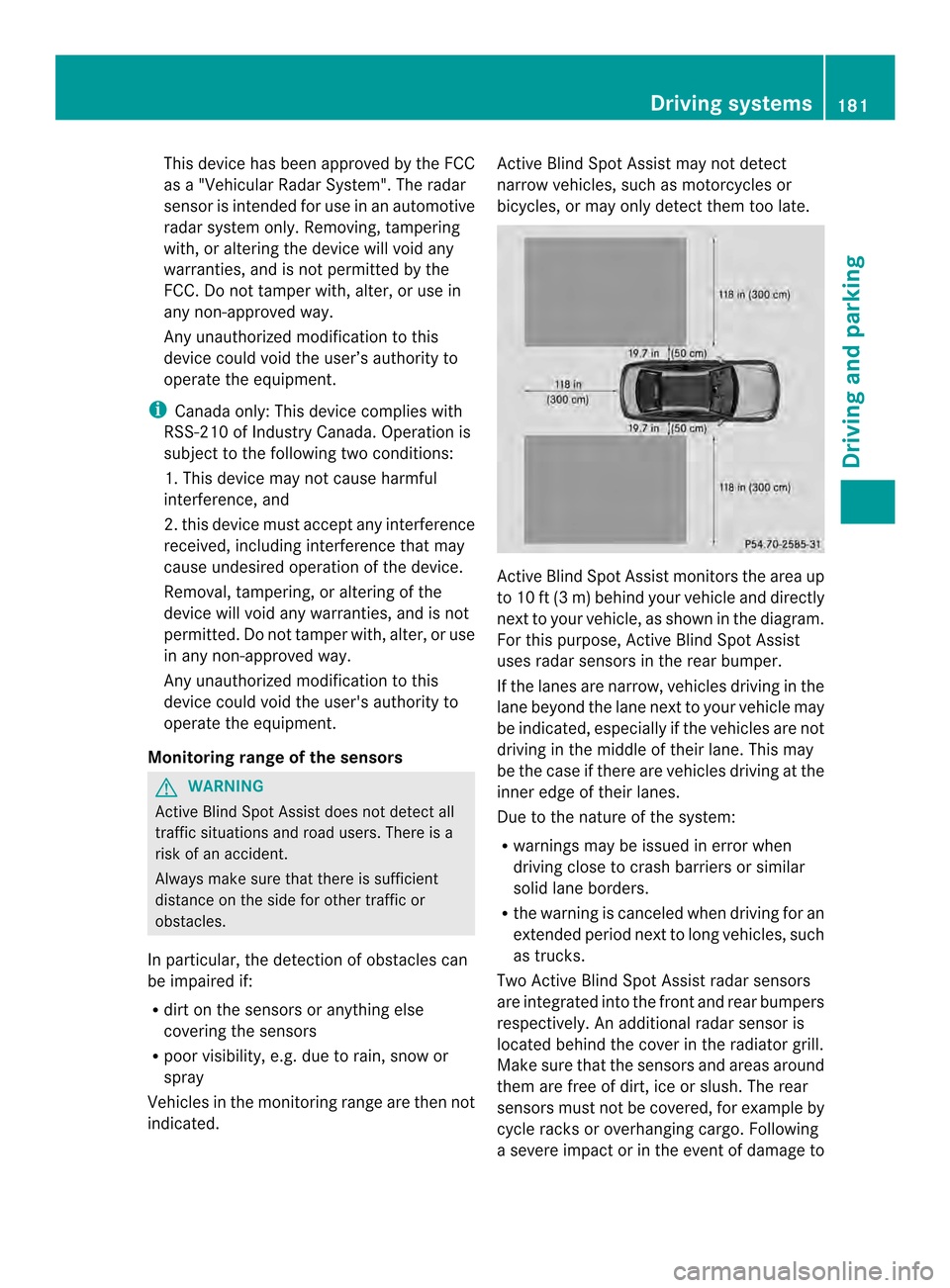
Active Blind Spot Assist monitors the area up
to 10 ft (3 m) behind your vehicle and directly
next to your vehicle, as shown in the diagram.
For this purpose, Active Blind Spot Assist
uses radar sensors in the rear bumper.
If the lanes are narrow, vehicles driving in the
lane beyond the lane next to your vehicle may
be indicated, especially if the vehicles are not
driving in the middle of their lane. This may
be the case if there are vehicles driving at the
inner edge of their lanes.
Due to the nature of the system:
R
warnings may be issued in error when
driving close to crash barriers or similar
solid lane borders.
R the warning is canceled when driving for an
extended period next to long vehicles, such
as trucks.
Two Active Blind Spot Assist radar sensors
are integrated into the front and rear bumpers
respectively. An additional radar sensor is
located behind the cover in the radiator grill.
Make sure that the sensors and areas around
them are free of dirt, ice or slush. The rear
sensors must not be covered, for example by
cycle racks or overhanging cargo. Following
a severe impact or in the event of damage to Driving systems
181Driving and parking Z
Page 184 of 342
the bumpers, have the functio
nofthe sensors
checked at a qualified specialist workshop.
Blind Spot Assist may otherwise not work
properly.
Indicator and warning display
Active Blind Spot Assist is not active at
speeds below approximately 20 mph
(30 km/h). Vehicles in the monitoring range
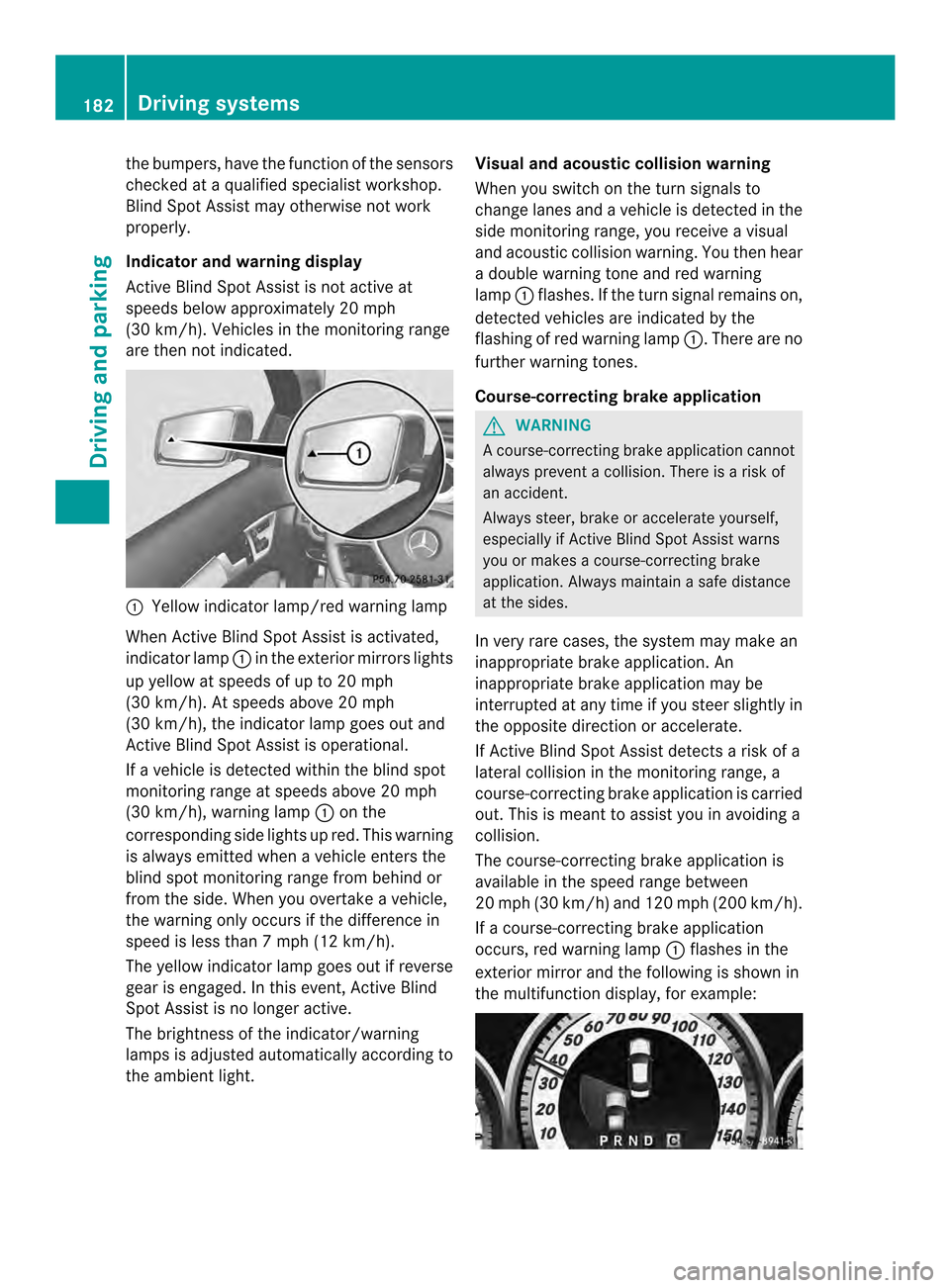
are then not indicated. 0002
Yellow indicator lamp/red warning lamp
When Active Blind Spot Assist is activated,
indicator lamp 0002in the exterior mirrors lights
up yellow at speeds of up to 20 mph
(30 km/h). At speeds above 20 mph
(30 km/h), the indicator lamp goes out and
Active Blind Spot Assist is operational.
If a vehicle is detected within the blind spot
monitoring range at speeds above 20 mph
(30 km/h), warning lamp 0002on the
corresponding side lights up red. This warning
is always emitted when a vehicle enters the
blind spot monitoring range from behind or
from the side. When you overtake a vehicle,
the warning only occurs if the difference in
speed is less than 7mph (12 km/h).
The yellow indicator lamp goes out if reverse
gear is engaged. In this event, Active Blind
Spot Assist is no longer active.
The brightness of the indicator/warning
lamps is adjusted automatically according to
the ambient light. Visual and acoustic collision warning
When you switch on the turn signals to
change lanes and a vehicle is detected in the
side monitoring range, you receive a visual
and acoustic collision warning .You then hear
a double warning tone and red warning
lamp 0002flashes. If the turn signal remains on,
detected vehicles are indicated by the
flashing of red warning lamp 0002.There are no
further warning tones.
Course-correcting brake application G
WARNING
Ac ourse-correcting brake application cannot
always prevent a collision. There is a risk of
an accident.
Always steer, brake or accelerate yourself,
especially if Active Blind Spot Assist warns
you or makes a course-correcting brake
application. Always maintain a safe distance
at the sides.
In very rare cases, the system may make an
inappropriate brake application. An
inappropriate brake application may be
interrupted at any time if you steer slightly in
the opposite direction or accelerate.
If Active Blind Spot Assist detects a risk of a
lateral collision in the monitoring range, a
course-correcting brake application is carried
out. This is meant to assist you in avoiding a
collision.
The course-correcting brake application is
available in the speed range between
20 mph (30 km/h) and 120 mph (200 km/h).
If a course-correcting brake application
occurs, red warning lamp 0002flashes in the
exterior mirror and the following is shown in
the multifunction display, for example: 182
Driving systemsDriving and parking
Page 190 of 342
Useful information
i This Operator's Manual describes all
models and all standard and optional
equipment of your vehicle available at the
time of publication of the Operator's
Manual. Country-specific differences are
possible. Please note that your vehicle may
not be equipped with all features
described. This also applies to safety-
related systems and functions.
i Read the information on qualified
specialist workshops: (Y page 24).Important safety notes
G
WARNING
If you operate information systems and
communication equipment integrated in the
vehicle while driving, you will be distracted
from traffic conditions. You could also lose
control of the vehicle. There is a risk of an
accident.
Only operate the equipment when the traffic
situatio npermits .Ifyou are not sure that this
is possible, park the vehicle paying attention
to traffic conditions and operate the
equipment when the vehicle is stationary. G
WARNING
If the instrument cluster has failed or
malfunctioned, you may not recognize
function restrictions in systems relevant to
safety. The operating safety of your vehicle
may be impaired. There is a risk of an
accident.
Drive on carefully. Have the vehicle checked
at a qualified specialist workshop
immediately.
You must observe the legal requirements for
the country in which you are currently driving
when operating the on-board computer.
The on-board computer only shows messages
or warnings from certain systems in the multifunction display
.You should therefore
make sure your vehicle is operating safely at
all times. Otherwise, a vehicle that is not
operating safely may cause an accident.
For an overview, see the instrument panel
illustration (Y page 29). Displays and operation
Instrument cluster lighting
The lighting in the instrument cluster, in the
displays and the controls in the vehicle
interior can be adjusted using the brightness
control knob.
The brightness control knob is located on the
bottom left of the instrument cluster
(Y page 29).
X Turn the brightness control knob clockwise
or counter-clockwise.
If the light switch is set to 0003,0014or
000B, the brightness is dependent upon
the brightness of the ambient light.
i The light sensor in the instrument cluster
automatically controls the brightness of
the multifunction display.
In daylight, the displays in the instrument
cluster are not illuminated. Coolant temperature display
G
WARNING
Opening the hood when the engine is
overheated or when there is a fire in the
engine compartment could expose you to hot
gases or other service products. There is a
risk of injury.
Let an overheated engine cool down before
opening the hood. If there is a fire in the
engine compartment, keep the hood closed
and contact the fire department.
The coolant temperature gauge is in the
instrument cluster on the left-hand side. 188
Displays and operationOn-board computer and displays
Page 200 of 342
ESP
®
is deactivated if the 0015warning lamp
in the instrument cluste rlights up
continuously when the engine is running.
If the 000D warning lamp and the 0015
warning lamp are lit continuously, ESP ®
is not
available due to a malfunction.
Observe the information on warning lamps
(Y page 236).
Observe the information on display messages
(Y page 207).
Activating/deactivating PRE-SAFE ®
Brake PRE-SAFE
®
Brake is only available in vehicles
with DISTRONIC PLUS.
X Press the 0002or0005 button on the
steering wheel to selec tthe DriveAssist menu.
X Press the 0003or0004 button to select
PRE-SAFE Brake .
X Press the 000Bbutton.
The current selection is displayed.
X To activate/deactivate: press the000B
button again.
When PRE-SAFE ®
Brake is deactivated, the
assistance graphic shows the 0001symbol
in the multifunction display.
If the PRE-SAFE Brake: Sensors Deactivated message appears, the radar
sensor system is deactivated.
X Switch on the radar sensor system
(Y page 202).
For more information on PRE-SAFE ®
Brake,
see (Y page 67).
Activating/deactivating ATTENTION
ASSIST X
Press the 0002or0005 button on the
steering wheel to select the DriveAssistmenu.
X Press the 0003or0004 button to select
Attention Assist .X
Press the 000Bbutton.
The current selection is displayed.
X To activate/deactivate: press the000B
button again.
When ATTENTION ASSIST is deactivated,
the 0002 symbol appears in the
multifunction display in the assistance
graphics display.
For further information about ATTENTION
ASSIST, see (Y page 176).
Activating/deactivating Blind Spot
Assist X
Press the 0002or0005 button on the
steering wheel to select the DriveAssist menu.
X Press the 0003or0004 button to select
Blind Spot Assist .
X Press the 000Bbutton.
The current selection is displayed.
X To activate/deactivate: press the000B
button again.
If the Blind Spot Assist Sensors Deactivated or
Act. Blind Spot Asst. Sensors Deactivated message appears,
the radar sensor system is deactivated.
X Switch on the radar sensor system
(Y page 202).
For further information about Blind Spot
Assist, see (Y page 177).
For further information about Active Blind
Spot Assist, see (Y page 180).
Activating/deactivating Lane Keeping
Assist X
Press the 0002or0005 button on the
steering wheel to select the DriveAssist menu.
X Press the 0003or0004 button to select
Lane Keep. Asst. X
Press the 000Bbutton.
The current selection is displayed.
X Press 000Bto confirm. 198
Menus and submenusOn-board computer and displays
Page 204 of 342
Activating/deactivating the rada
rsensor
system
X Press the 0002or0005 button on the
steering wheel to selec tthe Sett. menu.
X Press the 0004or0003 button to select the
Vehicle submenu.
X Press 000Bto confirm.
X Press the 0003or0004 button to select
Radar Sensor (See Oper. Manual): .
You will see the selected setting: Enabledor
Disabled .
X Press the 000Bbutton to save the setting.
The following systems are switched off when
the radar sensor system is deactivated:
R DISTRONIC PLUS (Y page 157)
R BAS PLUS (Y page 63)
R PRE-SAFE ®
Brake (Y page 67)
R Blind Spot Assist (Y page 177)
R Active Blind Spot Assist (Y page 180)
Convenience Activating/deactivating the EASY-
ENTRY/EXIT feature
G
WARNING
When the EASY-ENTRY/EXIT feature adjusts
the steering wheel, you and other vehicle
occupants –particularly childre n–could
become trapped. There is a risk of injury.
While the EASY-ENTRY/EXIT feature is
making adjustments, make sure that no one
has any body parts in the sweep of the
steering wheel.
If somebody becomes trapped:
R press one of the memory function position
buttons, or
R move the switch for steering wheel
adjustmen tinthe opposite direction to that
in which the steering wheel is moving.
The adjustment process is stopped. X
Press the 0002or0005 button on the
steering wheel to select the Sett. menu.
X Press the 0004or0003 button to select the
Convenience submenu.
X Press 000Bto confirm.
X Press the 0004or0003 button to select the
Easy Entry/Exit function.
If the Easy Entry/Exit function is
activated, the vehicle steering wheel is
displayed in orange in the multifunction
display.
X Press the 000Bbutton to save the setting.
Further information on the EASY-ENTRY/EXIT
feature (Y page 99).
Switching the belt adjustment on/off
X Press the 0002or0005 button on the
steering wheel to select the Sett. menu.
X Press the 0004or0003 button to select the
Convenience submenu.
X Press 000Bto confirm.
X Press the 0004or0003 button to select the
Belt Adjustment function.
When the Belt Adjustment function is
activated, the vehicle seat belt is displayed
in orange in the multifunction display.
X Press the 000Bbutton to save the setting.
For further information on belt adjustment,
see (Y page 54).
Switching the fold-in mirrors with the
locking feature on/off
This function is only available on vehicles with
the memory function (Y page 103).
This function is only available in Canada.
When you activate the Auto. Mirror Folding function, the exterior mirrors are
folded in when the vehicle is locked. If you
unlock the vehicle and then open a door, the
exterior mirrors fold out again.
X Press the 0002or0005 button on the
steering wheel to select the Sett menu.
X Press the 0004or0003 button to select the
Convenience submenu.202
Menus and submenusOn-board computer and displays
Page 212 of 342
Display messages Possible causes/consequences and
0001 Solutions
PRE-SAFE
Functions
Currently Limited
See Operator's
Manual PRE-SAFE
®
Brake is temporarily inoperative. Possible causes are:
R function is impaired due to heavy rain or snow.
R the sensors in the radiato rgrill and the bumper are dirty.
R the rada rsensor system is temporarily inoperative, e.g. due to
electromagnetic radiation emitted by nearby TV or radio
stations or other sources of electromagnetic radiation.
R AMG vehicles: ESP ®
is deactivated.
R the system is outside the operating temperature range.
R the on-board voltage is too low.
When the causes stated above no longer apply, the display
message disappears.
PRE-SAFE ®
Brake is operational again.
If the display message does not disappear:
X Pull over and stop the vehicle safely as soon as possible, paying
attention to road and traffic conditions.
X Secure the vehicle against rolling away (Y page 148).
X Clean the sensors in the radiator grill and the bumper
(Y page 277).
X Restart the engine.
X AMG vehicles: reactivate ESP ®
(Y page 66). PRE-SAFE
Functions Limited
See Operator's
Manual PRE-SAFE
®
Brake is inoperative due to a malfunction. BAS PLUS
or the distance warning signal may also have failed.
X Visit a qualified specialist workshop. 001E
SRS Malfunction
Service Required There is a malfunction in the SRS (Supplemental Restraint
System). The
001Ewarning lamp also lights up in the instrument
cluster.
G WARNING
The air bags or Emergency Tensioning Devices may either be
triggered unintentionally or, in the event of an accident, may not
be triggered.
There is an increased risk of injury.
X Visit a qualified specialist workshop.
For further information about SRS, see (Y page 39).210
Display messagesOn-board computer and displays
Page 218 of 342
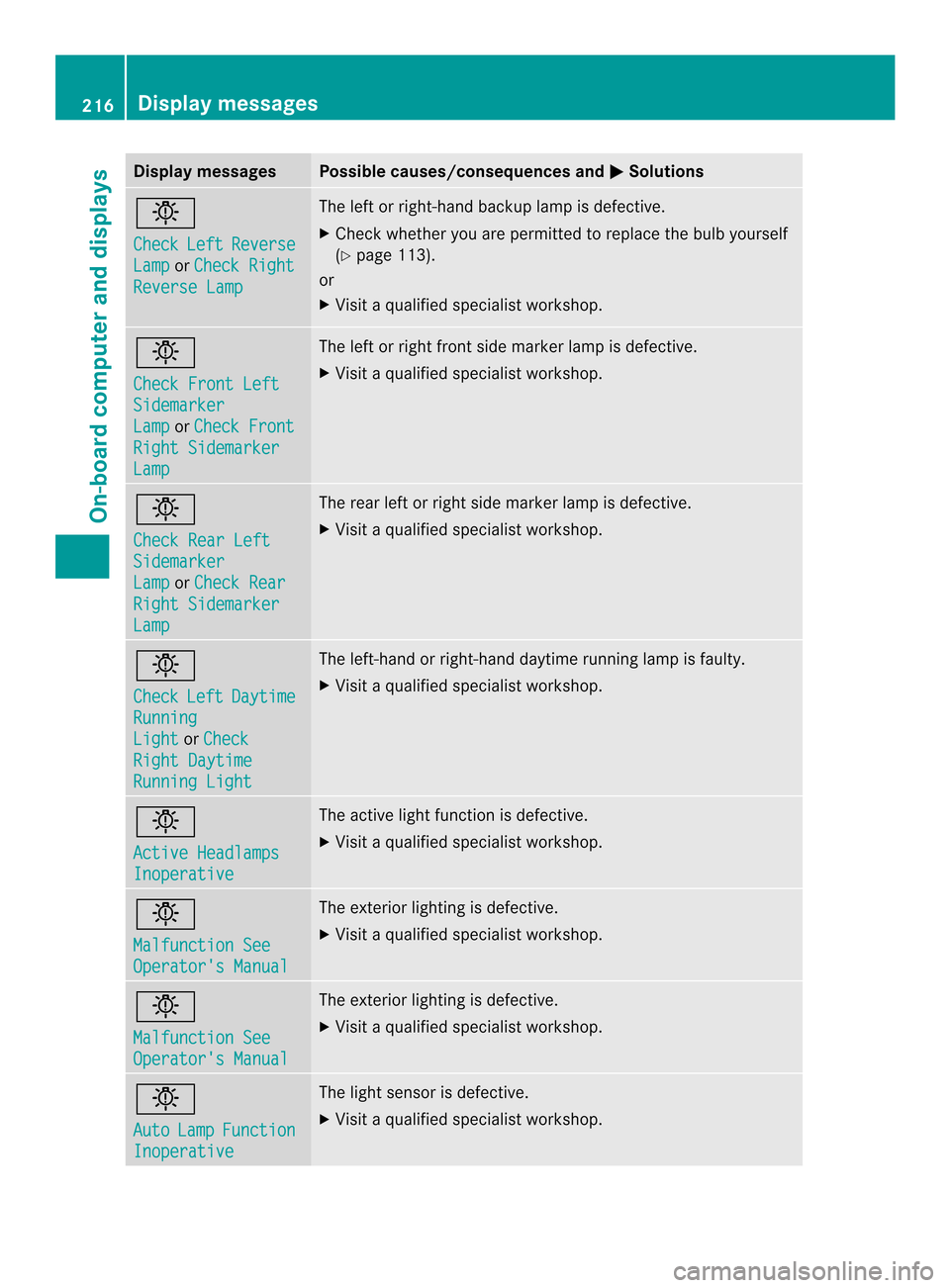
Display messages Possible causes/consequences and
0001 Solutions
0002
Check
Left Reverse
Lamp or
Check Right Reverse Lamp The lef
torright-hand backup lamp is defective.
X Check whether you are permitted to replace the bulb yourself
(Y page 113).
or
X Visit a qualified specialist workshop. 0002
Check Front Left
Sidemarker
Lamp or
Check Front Right Sidemarker
Lamp The left or right front side marker lamp is defective.
X
Visit a qualified specialist workshop. 0002
Check Rear Left
Sidemarker
Lamp or
Check Rear Right Sidemarker
Lamp The rear left or right side marker lamp is defective.
X
Visit a qualified specialist workshop. 0002
Check
Left Daytime
Running
Light or
Check Right Daytime
Running Light The left-hand or right-hand daytime running lamp is faulty.
X
Visit a qualified specialist workshop. 0002
Active Headlamps
Inoperative The active light function is defective.
X
Visit a qualified specialist workshop. 0002
Malfunction See
Operator's Manual The exterior lighting is defective.
X
Visit a qualified specialist workshop. 0002
Malfunction See
Operator's Manual The exterior lighting is defective.
X
Visit a qualified specialist workshop. 0002
Auto
Lamp Function
Inoperative The light sensor is defective.
X
Visit a qualified specialist workshop. 216
Display messagesOn-board computer and displays
Page 223 of 342
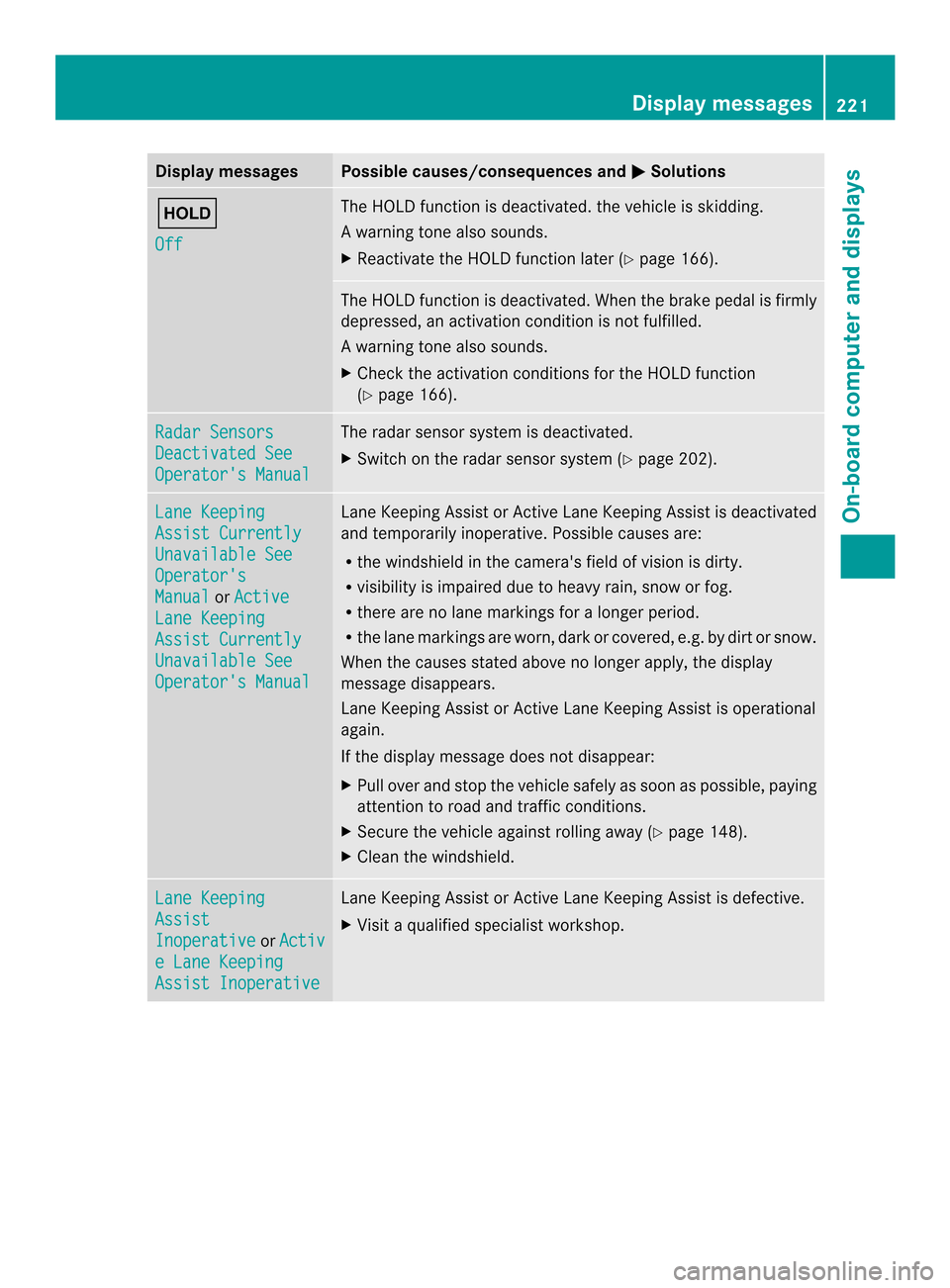
Display messages Possible causes/consequences and
0001 Solutions
0001
Off The HOLD function is deactivated. the vehicle is skidding.
Aw
arning tone also sounds.
X Reactivate the HOLD function later (Y page 166). The HOLD function is deactivated. When the brak
epedal is firmly
depressed, an activation condition is not fulfilled.
Aw arning tone also sounds.
X Check the activation conditions for the HOLD function
(Y page 166). Radar Sensors
Deactivated See
Operator's Manual The radar sensor system is deactivated.
X
Switch on the radar sensor system (Y page 202).Lane Keeping
Assist Currently
Unavailable See
Operator's
Manual or
Active Lane Keeping
Assist Currently
Unavailable See
Operator's Manual Lane Keeping Assist or Active Lane Keeping Assist is deactivated
and temporarily inoperative. Possible causes are:
R
the windshield in the camera's field of vision is dirty.
R visibility is impaired due to heavy rain, snow or fog.
R there are no lane markings for a longer period.
R the lane markings are worn, dark or covered, e.g .by dir tors now.
Whe nthe causes stated above no longer apply, the display
message disappears.
Lane Keeping Assist or Active Lane Keeping Assist is operational
again.
If the display message does not disappear:
X Pull over and stop the vehicle safely as soon as possible, paying
attention to road and traffic conditions.
X Secure the vehicle against rolling away (Y page 148).
X Cleant he windshield. Lane Keeping
Assist
Inoperative or
Activ e Lane Keeping
Assist Inoperative Lane Keeping Assist or Active Lane Keeping Assist is defective.
X
Visit a qualified specialist workshop. Display messages
221On-board computer and displays Z