engine MERCEDES-BENZ C-Class COUPE 2017 CL205 Owners Manual
[x] Cancel search | Manufacturer: MERCEDES-BENZ, Model Year: 2017, Model line: C-Class COUPE, Model: MERCEDES-BENZ C-Class COUPE 2017 CL205Pages: 354, PDF Size: 8.66 MB
Page 191 of 354
iIf you select the%symbo linthe display
and confirm with the controller, the split-
screen view appears.
Exitin g360° camera display mode
The 360° camera display is stopped:
Rwhen you select transmission position P,or
Rwhen you are driving at moderate speeds
The view which was active before the 360° cam- era was displaye dappears in the multimedia
system display. You can also stop the 360°
camera display split-screen view by selecting
the % symbo linthe display and then con-
firming with the COMAND controller.
ATTENTION ASSIST
General notes
ATTENTION ASSISTh elps you during long,
monotonous journeys, such as on highways .Itis
active in the 37 mph (60 km/h) to 125 mph
(200 km/h) range. If ATTENTION ASSIST
detects typica lindicators of fatigu eorincreas-
ing lapses in concentration on the part of the
driver, it suggests taking abreak.
Important safety notes
ATTENTION ASSISTiso nly an aid to the driver. It
might not always recognize fatigu eorincreasing
inattentiveness in time or fail to recognize them
at all .The system is not asubstitute for awell-
rested and attentive driver.
The functionality of ATTENTION ASSISTi s
restricted and warnings may be delayed or not
occur at all:
Rif the length of the journey is less than approx-
imatel y30m inutes
Rif the road condition is poor, e.g. if the surface
is uneven or if there are potholes
Rif there is astrong side wind
Rif you have adopted asporty driving style with
high cornering speedsorh igh rates of accel-
eration
Rif you are predominantly driving slower than
37 mph (60 km/h) or faster than 125 mph
(200 km/h)
Rif you are driving with the active Steer Assist
of DISTRONIC PLUS
Rif the time has been set incorrectly
Rin active driving situations, such as when you
change lanes or change you rspeed
The ATTENTION ASSISTt iredness assessment
is deleted and restarted when continuing the
journey, if:
Ryou switch off the engine
Ryou take off you rseat belt and open the driv-
er's door, e.g. for achange of drivers or to
take abreak
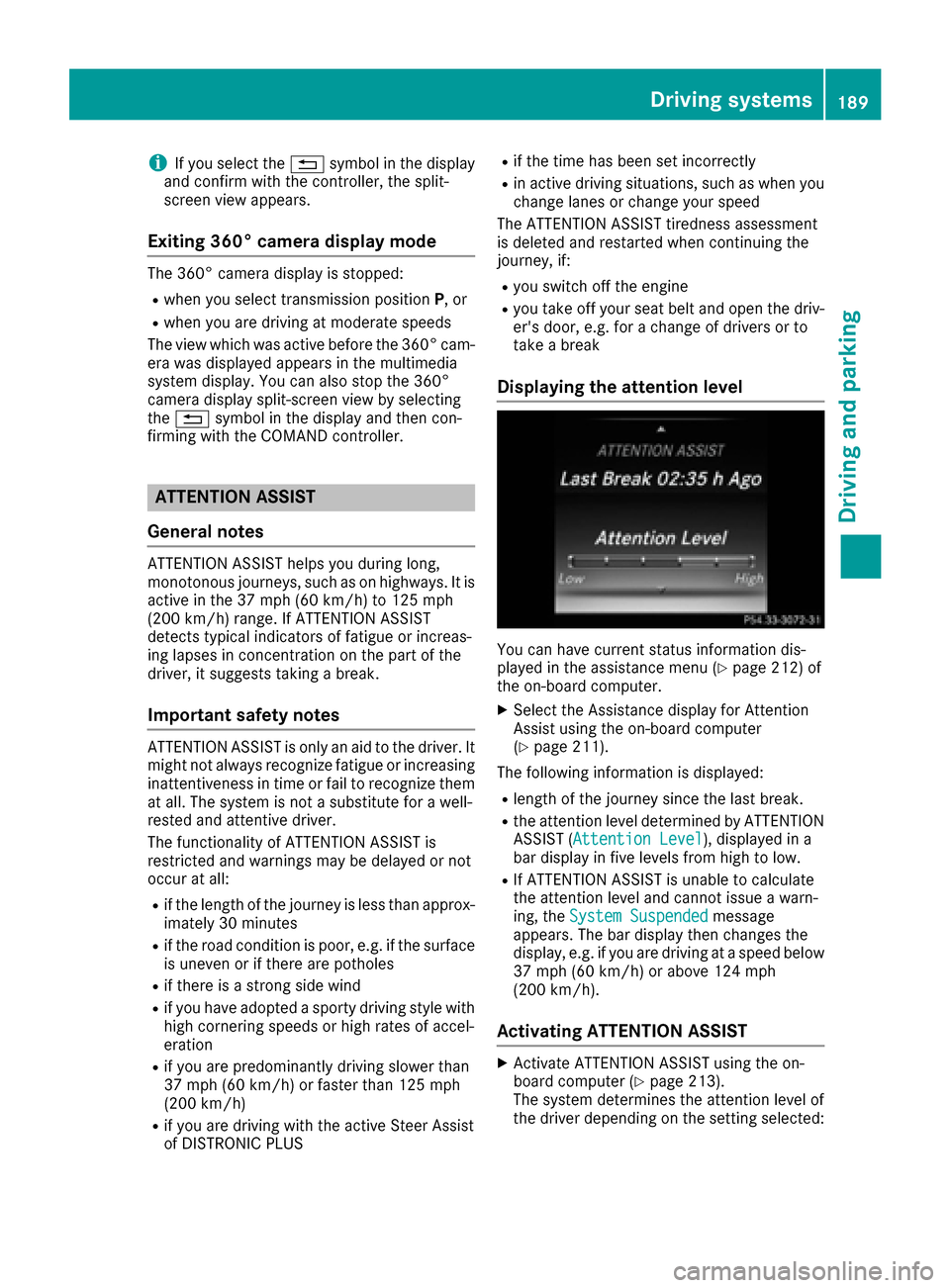
Displaying the attention level
You can have current status information dis-
played in the assistance menu (Ypage 212) of
the on-board computer.
XSelect the Assistance display for Attention
Assist using the on-board computer
(
Ypage 211).
The following information is displayed:
Rlength of the journey since the last break.
Rthe attention level determined by ATTENTION ASSIST( Attention Level), displaye dina
bar display in five levelsf rom high to low.
RIf ATTENTION ASSISTisu nabletoc alculate
the attention level and cannot issueaw arn-
ing, the System Suspended
message
appears. The bar display then changes the
display, e.g. if you are driving at aspeed below
37 mph (60 km/h) or above 124 mph
(200 km/h).
Activating ATTENTION ASSIST
XActivate ATTENTION ASSISTu sing the on-
board computer (Ypage 213).
The system determines the attention level of
the driver depending on the setting selected:
Driving systems189
Driving and parking
Z
Page 192 of 354
SelectionStandard:the sensitivity with which
the system determine sthe attention level is set
to normal.
Selection Sensitive
:the sensitivity is set
higher .The attention level detected by Attention
Assist is adapted accordingly and the driver is
warned earlier.
Whe nATTENTION ASSIST is deactivated, the
é symbo lapp ears in the multifunction dis-
play in the assistance graphi cdisplay.
Whe nATTENTION ASSIST hasb eend eactivated,
it is automaticall yreactivated afte rthe engine
hasb eens topped .The sensitivity selected cor-
respond stothe last selectio nactivate d(stand-
ard/sensitive).
Warning in the multifunctiond isplay
If fatigueorincreasing lapse sinconcentration
are detected, awarning appears in the multi-
function display: ATTENTIONASSIST
Take aBreak!.
In addition to the message shown in the multi-
function display ,you will then hea rawarning
tone.
XIf necessary, take abreak.
XConfirm the message by pressing the a
button on the steering wheel.
On long journeys, take regular breaks in good
time to allo wyourselftor est properly .Ifyoudo
not take abreak and ATTENTION ASSIST still
detects increasing lapse sinconcentration, you
will be warned agai nafter1 5m inutes at the
earliest. Thi swillo nly happe nifATTEN-
TION ASSIST stil ldetects typica lindicators of
fatigueori ncreasing lapse sinconcentration.
Vehicles with COMAND: ifaw arning is issued
in the multifunction display ,aservice station
search is performedinC OMAND. You can select
as ervice station and navigation to this service
station will then begin. Thi sfunction can be acti-
vate dand deactivated in COMAND (se ethe sep-
arate operating instructions).
Traffic Sig nAssis t
General notes
Traffic Sig nAssist display sthe maximum speed
permitte dtothe driver in the instrument cluster.
The data and general traffic regulations storedi nthe navigation system are used to determine the
current speed limit.
Traffic Sig
nAssist is amap-based system, and
for this reason, traffic signs pu tupt emporarily
(e.g. nearr oadworks) are not detected.
If at raffic sig nthat is relevant to your vehicl eis
passed, the display of the speed limits is upda-
ted.
Traffic signs with arestriction indicated by an
additiona lsign( e.g. in we tconditions )are also
shown.
The traffic signs are only displayed with the
restrictions if:
Rthe regulation mus tbeo bserve dwitht he
restriction, or
RTraffic Sig nAssist is unabl etodetermine
whethe rthe restriction applies
If Traffic Sig nAssist is unabl etodetermine a
maximum permitte dspeed from any of the avail-
able sources ,nospeed limit is displayed in the
instrument cluster either.
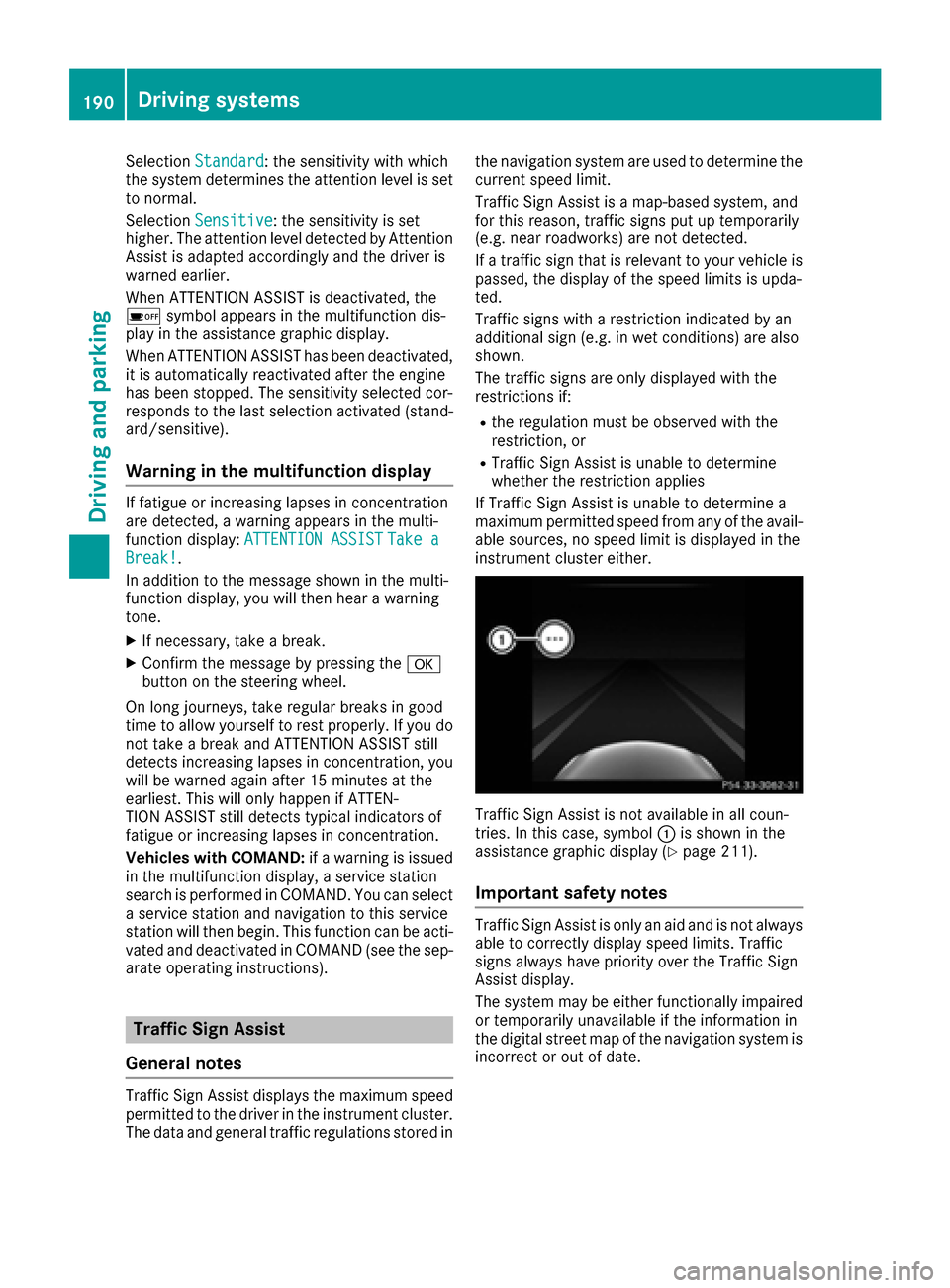
Traffic Sig nAssist is not available in al lcoun-
tries. In this case, symbol :is shown in the
assistance graphi cdisplay (
Ypage 211).
Important safety notes
Traffic Sig nAssist is only an ai dand is not always
able to correctly display speed limits .Traffic
signs always have priority ove rthe Traffic Sign
Assist display.
The system may be either functionall yimpaired
or temporaril yunavailabl eifthe information in
the digital stree tmap of the navigation system is
incorrect or outofd ate.
190Drivingsystems
Driving and parking
Page 195 of 354

Switching on Blind Spot Assist
XMake sure that Blind Spot Assist
(Ypage 213) is activated in the on-board
computer.
XTurn the SmartKey to position 2in the ignition
lock.
Warning lamps :in the exterior mirrors light
up red until the engine is started.
Display in the assistance graphic
When Blind Spot Assist is activated, gray radar
waves propagating backwards appear next to
the vehicle in the assistance display in the mul-
tifunction display.A boveaspeed of 20 mph
(30 km/h), the color of the radar waves in the
assistance display changes to green :.Blind
Spot Assist is then ready for use.
Lane Keeping Assist
General notes
Lane Keeping Assist monitor sthe area in front of
your vehicle by means of multifunction cam-
era :which is attached behind the top of the
windshield. Active Lane Keeping Assist detects
lane markings on the road and can warn you
before you leave your lane unintentionally. This function is available in the range between
40 mph and 120 mph (60 km/h and 200 km/h).
Aw
arning may be given if afront wheel passes
over alane marking. It will warn you by means of
intermittent vibration in the steering wheel for
up to 1.5 seconds.
Important safety notes
GWARNING
Lane Keeping Assist may not always clearly
recognizel ane markings.
In this case, Lane Keeping Assist may:
Rgive an unnecessary warning
Rnot give awarning
There is arisk of an accident.
Always pay particular attention to the traffic
situation and stay in lane, in particular if
warned by Lane Keeping Assist.
GWARNING
The Lane Keeping Assist warning does not
return the vehicle to the original lane. There is
ar isk of an accident.
You should always steer, brake or accelerate
yourself, in particular if warned by Lane Keep-
ing Assist.
If you fail to adapt your driving style, Lane Keep-
ing Assist can neither reduce the risk of an acci-
dent nor override the laws of physics. Lane
Keeping Assist cannot take into account the
road, traffic and weather conditions. Lane Keep- ing Assist is merely an aid. You are responsible
for the distance to the vehicle in front,f or vehi-
cle speed, for braking in good time and for stay-
ing in your lane.
The Lane Keeping Assist does not keep the vehi-
cle in the lane.
The system may be impaired or may not function
if:
Rthere is poor visibility, e.g. due to insufficient
illumination of the road, or due to snow, rain,
fog or spray
Rthere is glare, e.g. from oncomingt raffic, the
sun or reflection s(e.g. when the road surface
is wet)
Rthe windshield is dirty, fogged up, damaged or
covered, for instancebyas ticker, in the vicin-
ity of the camera
Driving systems193
Driving and parking
Z
Page 203 of 354
Tachometer
!
Do not drive in the overrevving range ,asthis
could damage the engine.
The red band in the tachometer indicates the
engine's overrevving range.
The fuel supply is interrupte dtoprotect the
engine when the red band is reached.
Outside temperature display
Yo us houl dpayspecial attentio ntoroadc ondi-
tions when temperatures ar earound freezing
point.
Bea rinm indt hatt he outside temperatur edis-
play indicates the temperatur emeasured and
does not record the roa dtemperature.
The outside temperatur edisplay is in the multi-
functio ndisplay (
Ypage 202).
Changes in the outside temperatur earedis-
played after ashort delay.
Coolant temperature display
GWARNING
Opening the hoo dwhent he engine is over-
heate dorw hent here is afireint he engine
compartment could expose yo utohot gases
or othe rservic eproducts. There is arisko f
injury.
Let an overheate dengine coo ldow nb efore
opening the hood. If there is afireint he
engine compartment, kee pthe hoo dclosed
and contact the fir edepart ment.
!Adisplay message is shown if the coolant
temperatur eistoo high.
If the coolant temperatur eisover2 48 ‡
(12 0† ),do not continue driving. The engine
will otherwis ebedamaged .
The coolant temperatur edisplay is in the lower
sectio nofthe tachometer (
Ypage 34).
Under normal operating conditions and with the
specifie dcoolant level ,the coolant temperature
mayr iseto2 48‡(120† ).
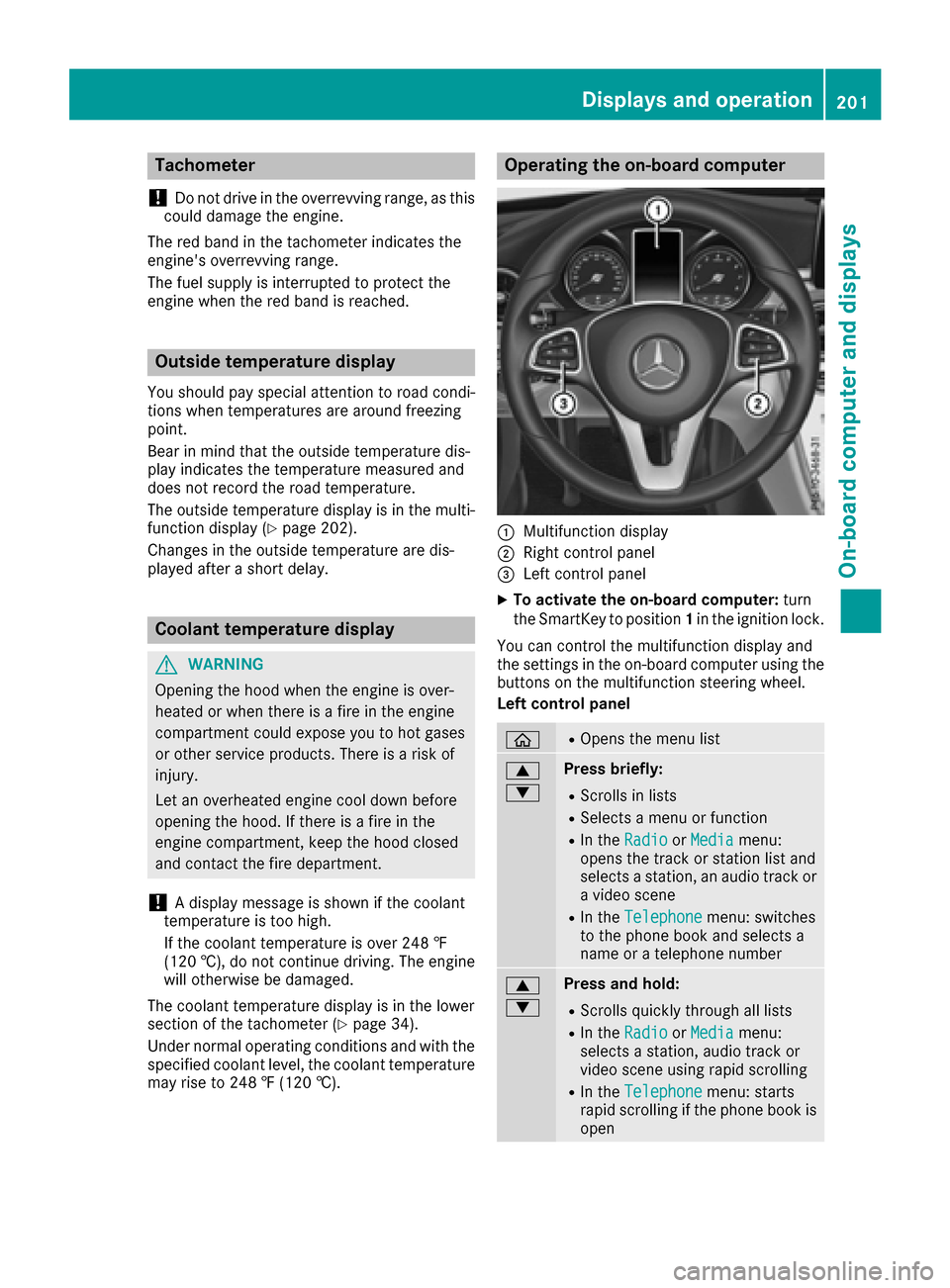
Operatin gthe on-board computer
:Multifunctio ndisplay
;Right contro lpan el
=Lef tcontro lpan el
XTo activate the on-board computer: turn
the SmartKeytop osition1in the ignition lock.
Yo uc an contro lthe multifunctio ndisplay and
the settings in the on-board compute rusing the
buttons on the multifunctio nsteerin gwheel .
Left contro lpanel
òROpens the menu list
9
:Press briefly:
RScrolls in lists
RSelects amenu or function
RIn the RadioorMediamenu:
opens the track or statio nlista nd
selects astation, an audi otrack or
av ideo scene
RIn the Telephonemenu:switches
to the phone book and selects a
nam eorat elephon enumber
9
:Press and hold:
RScrolls quickl ythroug halllists
RIn the RadioorMediamenu:
selects astation, audi otrack or
video scene using rapi dscrolling
RIn the Telephonemenu:starts
rapi dscrolling if the phone book is
open
Displays an doperation201
On-boa rd computera nd displays
Z
Page 206 of 354
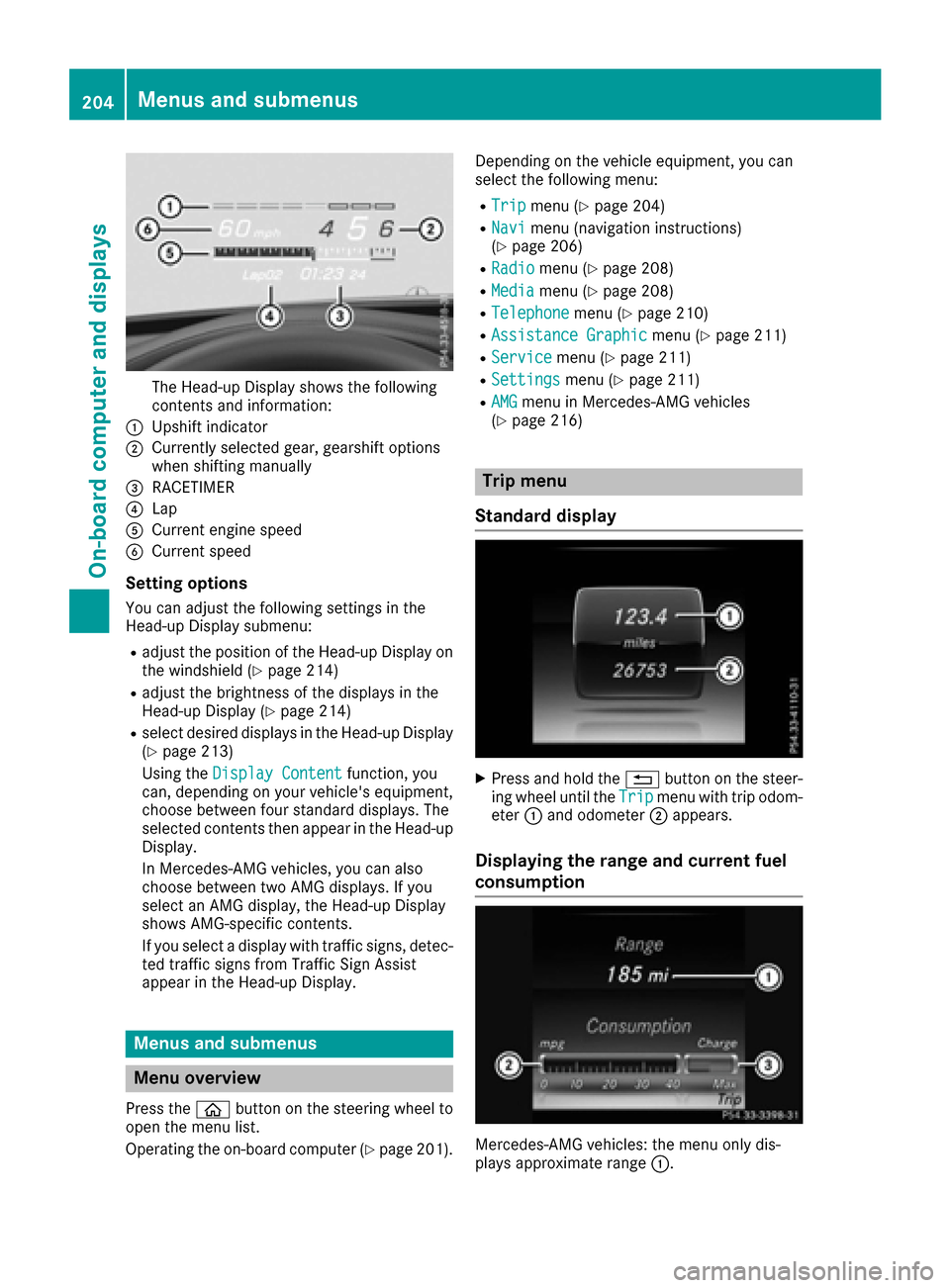
The Head-up Display shows the following
contents and information:
:Upshift indicator
;Currently selected gear, gearshift options
when shiftingmanually
=RACETIMER
?Lap
ACurrent engine speed
BCurrent speed
Setting options
You can adjust the following settings in the
Head-up Display submenu:
Radjust the position of the Head-up Display on
the windshield (Ypage 214)
Radjust the brightness of the displaysint he
Head-up Display (Ypage 214)
Rselect desired displaysint he Head-up Display
(Ypage 213)
Using the Display Content
function, you
can, depending on your vehicle's equipment,
choose between four standard displays. The
selected contents then appear in the Head-up
Display.
In Mercedes-AMG vehicles, you can also
choose between two AMG displays. If you
select an AMG display,t he Head-up Display
shows AMG-specific contents.
If you select adisplay with traffic signs, detec-
ted traffic signs from Traffic Sign Assist
appear in the Head-up Display.
Menus and submenus
Menu overview
Press the òbutton on the steerin gwheel to
open the menu list.
Operating the on-board computer (
Ypage 201). Dependin
gonthe vehicle equipment, you can
select the following menu:
RTripmenu (Ypage 204)
RNavimenu (navigation instructions)
(Ypage 206)
RRadiomenu (Ypage 208)
RMediamenu (Ypage 208)
RTelephonemenu (Ypage 210)
RAssistance Graphicmenu (Ypage 211)
RServicemenu (Ypage 211)
RSettingsmenu (Ypage 211)
RAMGmenu in Mercedes-AMG vehicles
(Ypage 216)
Trip menu
Standard display
XPress and hold the %button on the steer-
ing wheel until the Tripmenu with trip odom-
eter :and odometer ;appears.
Displaying the range and current fuel
consumption
Mercedes-AMG vehicles: the menu only dis-
plays approximate range :.
204Menus and submenus
On-board computer and displays
Page 207 of 354

XPress theòbutton on the steerin gwheel
to open the menu list.
XPress the :or9 button on the steering
wheel to select the Tripmenu.
XPress9or: to select the display with
approximate range :and currentf uel con-
sumption ;.
Approximate range :that can be covered is
calculated accordingtoy our currentdriving
style and the amount of fuel in the tank .If
there is only asmall amount of fuel left in the
fuel tank ,avehicle being refueled C
appears instead of approximate range :.
Recuperation display =shows you if energy
has been recuperated from the kinetic energy in overrun mode and saved in the battery.
Recuperation display =depends on the
engine installed and is therefore not available
in all vehicles.
ECO display
The ECO display is not availableinM ercedes-
AMG vehicles.
XPress òon the steerin gwheel to open the
menu list.
XPress the :or9 button on the steering
wheel to select the Tripmenu.
XConfirm by pressing aon the steering
wheel.
XPress the :or9 button to select ECO
display.
If the ignition remains switched off for longer
than four hours, the ECO display will be auto-
matically reset.
For more information on the ECO display, see
(
Ypage 156).
Trip computer "From Start" or "From
Reset"
:Distance
;Drivin gtime
=Average speed
?Average fuel consumption
XPress the òbutton on the steerin gwheel
to open the menu list.
XPress :or9 on the steerin gwheel to
select the Tripmenu.
XConfirm by pressing aon the steering
wheel.
XPress :or9 to select From Startor
From Reset.
The values in the From
Startsubmenu are cal-
culated from the start of ajourney, while the
values in the From Reset
submenu are calcu-
lated from the last time the submenu was reset
(
Ypage 206).
In the following cases the trip computer is auto- matically reset From Start
:
Rthe ignition has been switched off for more
than four hours.
R999 hours have been exceeded.
R9,999 miles have been exceeded.
When 9,999 hours or 99,999m iles have been
exceeded, the trip computer is automatically
reset From Reset
.
Digital speedometer
XPress òon the steerin gwheel to open the
menu list.
XPress :or9 on the steerin gwheel to
select the Tripmenu.
Menus and submenus205
On-board computer and displays
Z
Page 214 of 354

RChangingassistance settings (Ypage 212)
RChangingh ead-updisplay settings
(Ypage 213)
RChangingt helight settings (Ypage 214)
RChangingt heinstrumen tcluste rsettings
(Ypage 215)
RRestorin gthe factory settings (Ypage 215)
Assistance submenu
Deactivating/activatin gESP®
Observ ethe "Imp ortant safety notes" sectio nin
th ed escript ion of ESP®(Ypage 67).
GWARNING
If you deactivate ESP
®,E SP®no longer sta-
biliz es th evehicle .Thereisani ncreased risk
of skiddin gand an acc ident.
Only deactivate ESP
®inthes ituations descri-
bed inthef ollowing.
It may bebest to deactivate ESP
®inthef ollow-
ing situations:
Rwhen usings nowc hains
Rindeep snow
Ron sandorg ravel
Deactivating/activatin gESP®inMercedes-
AM Gvehicle s(Ypage 68).
For further informatio nabout ESP®,see
(Ypage 67).
XSt art th eengine.
XPress the òbuttonont hesteering wheel
to open th emenulist.
XPress :or9 on thesteering wheel to
select the Settingsmenu.
XConfirmbyp ressing aon thesteering
wheel.
XPress :or9 to select the DriveAs‐sistsubmenu.
XPressato confirm.
XSelect ESPwith: or9.
XPress ato confirm.
The curren tselection appears.
XTo activate/deactivate: press theabut-
to na gain.
If the å warning lamp inthei nstrument
cluste rlightsupw hen thevehicle is readyto
driv e, ESP
®isdeactivate d. If
the ÷ andå warning lamps light up
continuously, ESP
®is no tavailab ledue to amal-
function.
Observ ethe informatio nonwarning lamps
(
Ypage 249).
Observ ethe informatio nondisplay messages
(
Ypage 220).
Activating/deactivatin gCOLLISION PRE-
VENTIO NASSIST PLUS
XPress the òbuttonont hesteering wheel
to open th emenulist.
XPress the :or9 buttononthesteering
wheel to select the Settingsmenu.
XConfirmbyp ressing aon thesteering
wheel.
XUse : or9 to select the DriveAssistsubmenu.
XPressato confirm.
XPress 9or: to select CollisionPrevention.
XPressato confirm.
The curren tselection appears.
XTo activate/deactivate: press theabut-
to na gain.
When COLLISION PREVENTION AS SIST PLUS
is deactivate d,the æ symbol appearsi n
th em ultifunction display in the Assistance
Graphicmenu.
For further informatio nabout COLLISION PRE-
VENTION AS SIST PLUS, see (
Ypage 64).
Activating/deactivatin gPRE-SAFE®
Brake
PRE‑ SAFE®Brake isonly availab lefor vehicles
wit hthe Drivin gAssistanc epackage.
XPress the òbuttonont hesteering wheel
to open th emenulist.
XPress the :or9 buttononthesteering
wheel to select the Settingsmenu.
XConfirmbyp ressing aon thesteering
wheel.
XUse : or9 to select the DriveAssistsubmenu.
XPressato confirm.
XPress :or9 to select PRE-SAFEBrake.
212Menusand submenus
On-boardc omputer and displays
Page 218 of 354
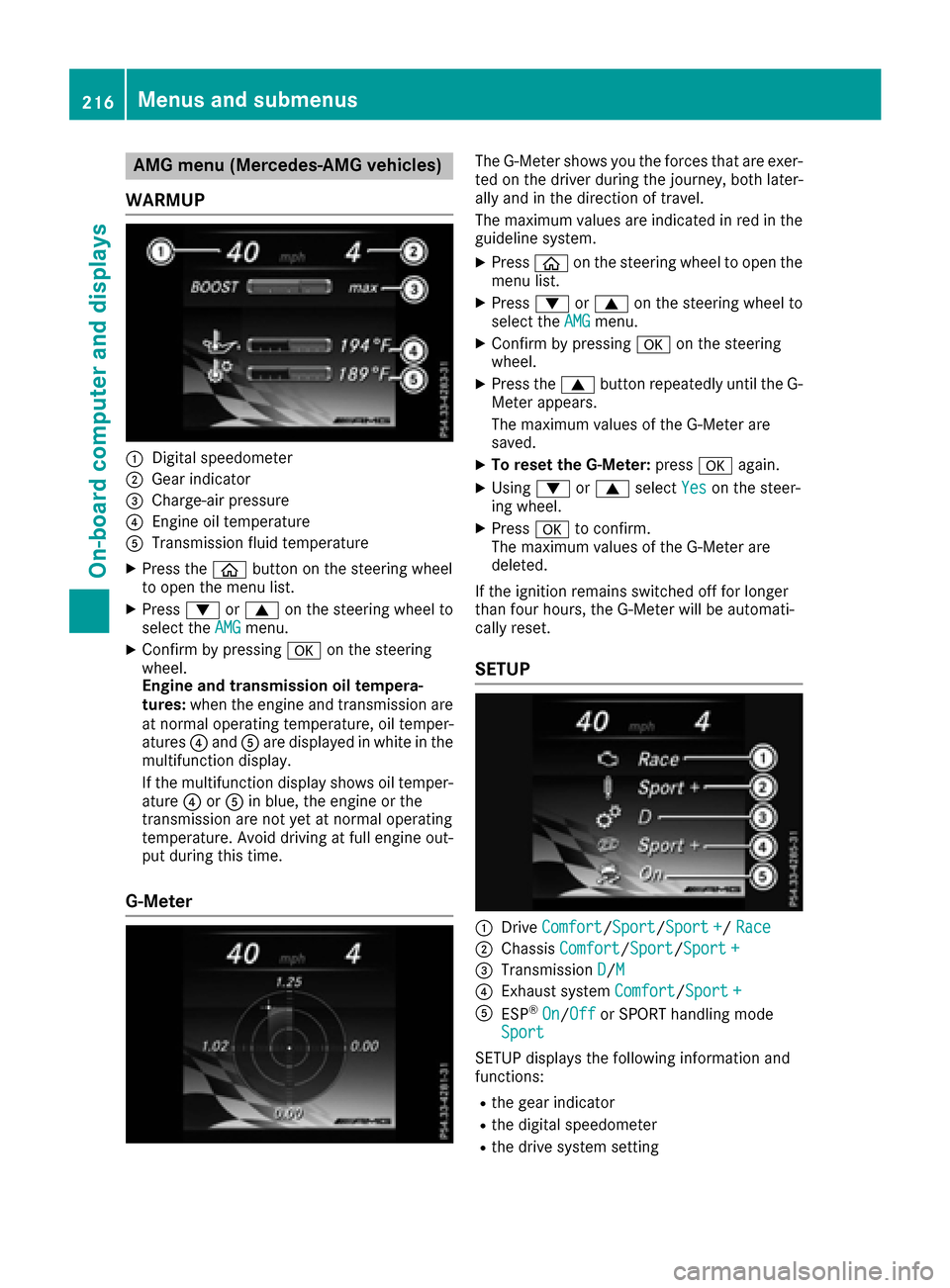
AMG menu(Mercedes-AM Gvehicles)
WAR MUP
:Digital speedometer
;Gear indicator
=Charge-air pressur e
?Engineoil temperature
ATransmission fluid temperature
XPress th eò buttonont hesteering whee l
to open th emenulist .
XPress :or9 on thesteering whee lto
select th eAMGmenu.
XConfir mbyp ressing aon thesteering
wheel.
Engin eand transmission oil tempera-
tures :when th eenginea nd transmission are
at normal operating temperature, oil temper-
atures ?and Aare displayed in whit einthe
multifunction display.
If th emultifunction display shows oil temper-
atur e? orA in blue, th eengineort he
transmission are no tyet at normal operating
temperature. Avoid drivin gatfull engin eout-
put during this time.
G- Meter
The G-Meter shows you th eforce stha tare exer-
te dont hedriver during th ejou rney, bot hlater-
ally and in th edirection of travel .
The maximum value sare indicated in red in th e
guidelin esystem.
XPress òon thesteering whee ltoo pen th e
men ulist .
XPress :or9 on thesteering whee lto
select th eAMGmenu.
XConfir mbyp ressing aon thesteering
wheel.
XPress th e9 buttonrepeatedly until th eG-
Meter appears.
The maximum value softheG-Meter are
saved.
XTo reset th eG-Meter: press aagain.
XUsing :or9 select Yeson thesteer -
ing wheel.
XPress ato confirm .
The maximum value softheG-Meter are
deleted.
If th eignition remain sswitched off for longer
than four hours, th eG-Meter will be automati-
call yreset .
SETUP
:Drive Comfor t/Sport/Sport +/Rac e
;Chassis Comfort/Sport/Sport +
=Transmission D/M
?Exhaust system Comfort/Sport +
AESP®On/Offor SPORT handlin gmode
Sport
SETUP displays th efollowin ginformation and
functions:
Rth eg ear indicator
Rthed igital speedometer
Rthed rive system setting
216Menusa nd submenus
On-boardc omputer andd isplays
Page 219 of 354
Rthe suspensionmode
Rthe transmission position
Rthe exhaust fla pposit ion
Rthe ESP®(Electronic Stability Program) status
XUse ò on the steering whee ltocallupt he
list of menus.
XPress :or9 on the steering whee lto
select the AMGmenu.
XConfirm by pressing aon the steering
wheel.
XPress the 9button repeatedly unti lSETUP
is displayed.
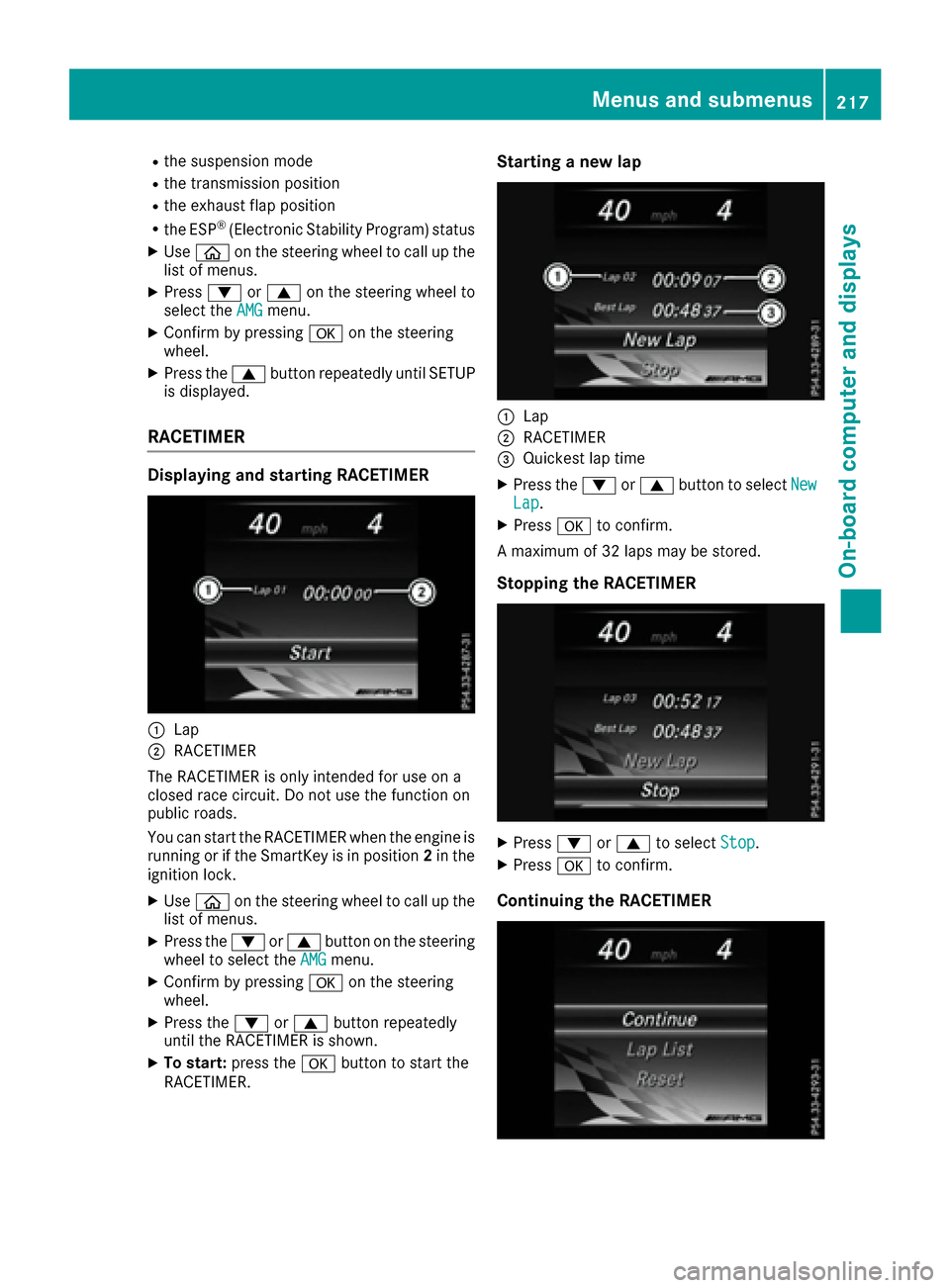
RACETIMER
Displaying and starting RACETIMER
:Lap
;RACETIMER
The RACETIMER is onl yintende dfor us eona
closedr acec ircuit. Do not us ethe functio non
public roads.
Yo uc an start the RACETIMER when the engine is
running or if the SmartKeyisinp osition2in the
ignition lock.
XUse ò on the steering whee ltocallupt he
list of menus.
XPress the :or9 button on the steering
whee ltoselect theAMGmenu.
XConfirm by pressing aon the steering
wheel.
XPress the :or9 button repeatedly
unti lthe RACETIMER is shown.
XTo start: press the abutton to start the
RACETIMER.
Starting anew lap
:Lap
;RACETIMER
=Quickest la ptime
XPress the :or9 button to select NewLap.
XPressato confirm.
Am aximum of 32 laps maybes tored.
Stoppingthe RACETIMER
XPress :or9 to select Stop.
XPressato confirm.
Continuing the RACETIMER
Menus and submenus217
On-board computer and displays
Z
Page 226 of 354
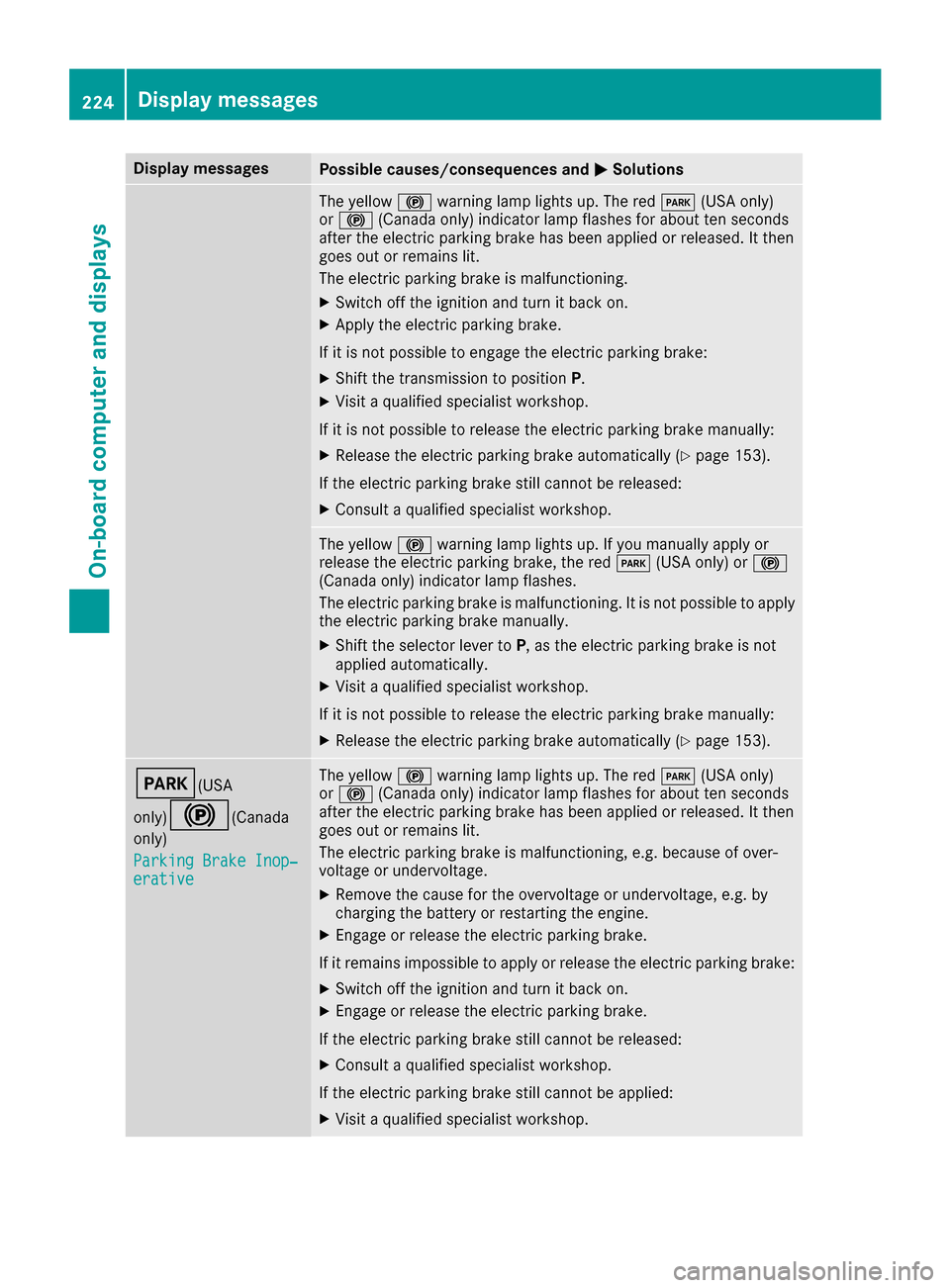
Display messagesPossible causes/consequences andMSolutions
The yellow!warning lamp lights up. The red F(USAonly)
or ! (Canada only) indicator lamp flashes for about te nseconds
after th eelectric parking brak ehas been applie dorreleased. It then
goe sout or remain slit.
The electric parking brak eismalfunctioning .
XSwitchoff th eignition and tur nitbacko n.
XApply th eelectric parking brake.
If it is no tpossibl etoengage th eelectric parking brake:
XShift th etransmission to position P.
XVisitaqualified specialist workshop .
If it is no tpossibl etorelease th eelectric parking brak emanually:
XReleas ethe electric parking brak eautomatically (Ypage 153).
If th eelectric parking brak estill canno tbereleased:
XConsult aqualified specialist workshop .
The yellow!warning lamp lights up. If you manually apply or
release th eelectric parking brake, th ered F (USAonly) or !
(Canada only) indicator lamp flashes .
The electric parking brak eismalfunctioning .Itisnotpossibl etoapply
th ee lectric parking brak emanually.
XShift th eselector lever to P,astheelectric parking brak eisnot
applie dautomatically.
XVisit aqualified specialist workshop .
If it is no tpossibl etorelease th eelectric parking brak emanually:
XReleas ethe electric parking brak eautomatically (Ypage 153).
F(USA
only)
!(C anada
only)
Parkin gBrake Inop‐
erativ e
The yellow !warning lamp lights up. The red F(USAonly)
or ! (Canada only) indicator lamp flashes for about te nseconds
after th eelectric parking brak ehas been applie dorreleased. It then
goe sout or remain slit.
The electric parking brak eismalfunctioning ,e.g.b ecause of over-
voltag eorundervoltage.
XRemove th ecaus efor th eovervoltage or undervoltage, e.g. by
charging th ebattery or restarting th eengine.
XEngage or release th eelectric parking brake.
If it remain simpossible to apply or release th eelectric parking brake:
XSwitc hoff th eignition and tur nitbacko n.
XEngage or release th eelectric parking brake.
If th eelectric parking brak estill canno tbereleased:
XConsult aqualified specialist workshop .
If th eelectric parking brak estill canno tbeapplied:
XVisitaqualified specialist workshop .
224Display messages
On-boardcomputer andd isplays