key MERCEDES-BENZ C-Class COUPE 2017 CL205 Owner's Manual
[x] Cancel search | Manufacturer: MERCEDES-BENZ, Model Year: 2017, Model line: C-Class COUPE, Model: MERCEDES-BENZ C-Class COUPE 2017 CL205Pages: 354, PDF Size: 8.66 MB
Page 325 of 354
same time cannot be detected by the tire pres-
sure loss warning system.
The tire pressure monitor is not able to warn you
ofas udden loss of pressure, e.g. if the tire is
penetrated by aforeign object. In the event of a
sudden loss of pressure, bring the vehicle to a
halt by braking carefully .Avoid abrupt steering
movements.
The function of the tire pressure loss warning
system is limited or delayed if:
Rsnow chains are mounted on your vehicle's
tires.
Rroad conditions are wintry.
Ryou are driving on sand or gravel.
Ryou adopt avery sporty driving style (corner-
ing at high speeds or driving with high rates of acceleration).
Ryou are driving with aheavy load (in the vehi-
cle or on the roof).
R
Restarting the tire pressure loss warn-
ing system
Restart the tire pressure loss warning system if you have:
Rchanged the tire pressure
Rchanged the wheels or tires
Rmounted new wheels or tires
XBefore restarting, make sure that the tire
pressures are set properly on all four tires for
the respective operating conditions.
The recommended tire pressure can be found
on the Tire and Loading Information placard
on the B-pillar. Additionally, atire pressure
table is attached to the fuel filler flap. The tire
pressure loss warning system can only give
reliable warnings if you have set the correct
tire pressure. If an incorrect tire pressure is
set, these incorrect values will be monitored.
XAlso observe the notes in the section on tire
pressures (Ypage 319).
XMake sure that the SmartKey is in position 2
in the ignition lock (Ypage 131).
XPress òon the steering wheel to call up
the menu list.
XPress 9or: on the steering wheel to
select the Servicemenu.
XConfirm by pressing aon the steering
wheel.
XPress 9or: to select Tire Pres‐sure.
XPressato confirm.
The Run Flat Indicator ActivePress'OK' to Restartmessage is shown in the
multifunction display.
If you wish to confirm the restart:
XPress the abutton.
The Tire Pressure Now OK?message is
shown in the multifunction display.
XSelect Yeswith9 or:.
XPress ato confirm.
The Run Flat Indicator Restartedmes-
sage is shown in the multifunction display.
After ateach-in period, the tire pressure loss
warning system will monitor the set tire pres-
sures of all four tires.
If you wish to cancel the restart:
XPress the %button.
or
XIf the Tire Pressure Now OK?message
appears, press 9or: to select Can‐
cel.
XPressato confirm.
The tire pressure values stored at the last
restart will continue to be monitored.
Tire pressure monitor
General notes
If at ire pressure monitor is installed, the vehi-
cle's wheels have sensors that monitor the tire
pressures in all four tires. The tire pressure mon-
itor warns you if the pressure drops in one or
more of the tires. The tire pressure monitor only
functions if the corresponding sensors are
installed in all wheels.
Information on tire pressures is displayed in the
multifunction display. After afew minutes of
driving, the current tire pressure of each tire is
shown in the Service
menu of the multifunction
display; see illustration (example).
Tire pressure323
Wheels and tires
Z
Page 327 of 354
The tire pressure monitor hasayellow warning
lamp in the instrument cluster for indicating
pressure loss or amalfunction. Whether the
warning lamp flashes or lights up indicates
whether atire pressure is too low or the tire
pressure monitor is malfunctioning:
Rif the warning lamp is lit continuously, the tire
pressure on one or more tires is significantly
too low. The tire pressure monitor is not mal- functioning.
Rif the warning lamp flashes for around a
minute and then remains lit constantly, the
tire pressure monitor is malfunctioning.
In addition to the warning lamp, amessage
appears in the multifunction display.O bserve
the information on display messages
(
Ypage 241).
It may take up to ten minutes for amalfunction
of the tire pressure monitor to be indicated. A
malfunction will be indicated by the tire pres-
sure warning lamp flashing for approximately
one minute and then remaining lit. When the
malfunction has been rectified, the tire pressure
warning lamp goes out after afew minutes of
driving.
The tire pressure values indicated by the on-
board computer may differ from those meas-
ured at agas station with apressure gauge. The
tire pressures shown by the on-board computer
refer to those measured at sea level. At high
altitudes, the tire pressure values indicated by a
pressure gauge are higher than those shown by the on-board computer. In this case, do not
reduce the tire pressures.
The operation of the tire pressure monitor can
be affected by interferenc efrom radio transmit-
ting equipment (e.g. radio headphones, two-way
radios) that may be being operated in or near the vehicle.
Checking the tire pressur eelectroni-
cally
XMake sure that the SmartKey is in position 2
in the ignition lock (Ypage 131).
XPress òon the steerin gwheel to call up
the menu list.
XPress 9or: on the steerin gwheel to
select the Servicemenu.
XConfirm by pressing aon the steering
wheel.
XPress 9or: to select Tire Pres‐sure.
XPressato confirm.
The multifunction display shows the current
tire pressure of each wheel.
If the vehicle was parked for longer than
20 minutes, the following message appears:
Tire
pressurewillbedisplayedafterdriving afew minutes.
After ateach-in process, the tire pressure mon-
itor automatically detect snew wheels or new
sensors. As long as aclear allocation of the tire
pressure value to the individual wheels is not
possible, the Tire
PressureMonitorActivemessage is shown instead of the tire pressure
display.The tire pressures are already being
monitored.
Tire pressur emonitor warning mes-
sages
If the tire pressure monitor detect sapressure
loss in one or more tires, awarning message is
shown in the multifunction display.T he yellow
tire pressure warning lamp then lights up.
RIf the Please Correct Tire Pressuremessage appears in the multifunction display,
the tire pressure in at least one tire is too low.
The tire pressure must be corrected when the opportunit yarises.
RIf the Check Tiresmessage appears in the
multifunction display,t he tire pressure in one
or more tires has dropped significantly. The
tires must be checked.
RIf the WarningTireMalfunctionmessage
appears in the multifunction display,t he tire
pressure in one or more tires has dropped
suddenly. The tires must be checked.
Be sure to observe the instructions and safety
notes in the display messages in the "Tires" sec- tion (
Ypage 241).
If the wheel positions on the vehicle are rotated, the tire pressures may be displayed for the
wrong positions for ashort time. This is rectified
after afew minutes of driving, and the tire pres-
sures are displayed for the correctp ositions.
Restarting the tire pressuremonitor
When you restart the tire pressure monitor, all
existin gwarning messages are deleted and the
warning lamps go out. The monitor uses the cur-
rently set tire pressures as the reference values
Tirep ressure325
Wheels and tires
Z
Page 328 of 354
for monitoring. In most cases,the tire pressure
monitor wil lautomatically detect the new refer-
ence values after you have changed the tire
pressure. However, you can als odefine refer-
ence values manually as described here. The tire
pressure monitor then monitors the new tire
pressure values.
XSet the tire pressure to the valu erecommen-
ded for the corresponding driving situation on
the Tire and Loading Informatio nplacard on
the driver's side B-pillar (
Ypag e319).
You can find more tire pressure values for
various operating conditions in the tire pres-
sure tabl einsidet he fuel filler flap
(
Ypag e319).
XMake sure that the tire pressure is correct on
all four wheels.
XMake sure that the SmartKey is in position 2
in the ignition lock (Ypag e131).
XPress òon the steering whee ltocall up
the menu list.
XPress 9or: on the steering whee lto
select the Servicemenu.
XConfirm by pressing aon the steering
wheel.
XPress 9or: to select Tire Pres‐sure.
XPressato confirm.
The multifunction display showst he current
tire pressure of each whee lortheTire
pressurew ill be displayed afterdrivingafew minutesmessage.
XPress the :button.
The UseCurrentPressuresasNewRef‐erence Valuesmessage is shownint he
multifunction display.
If you wis htoconfirm the restart:
XPress the abutton.
The TirePress.MonitorRestartedmes-
sage is shownint he multifunction display.
After driving for afew minutes ,the system
checks whethe rthe current tire pressures are
withi nthe specified range. The new tire pres-
sure sare then accepted as reference values
and monitored.
If you wis htocancel the restart:
XPress the %button.
The tire pressure values stored at the last
restart wil lcontinue to be monitored.
Loading the vehicle
Instruction labels for tires and loads
GWARNING
Overloade dtires can overheat, causing a
blowout. Overloade dtires can als oimpair the
steering and driving characteristics and lead
to brake failure. There is arisk of accident.
Observet he loadrating of the tires. The load
rating must be at least hal fofthe GAWR of
you rvehicle. Never overload the tires by
exceeding the maximu mload.
Two instruction labels on you rvehicles how the
maximu mpossible load.
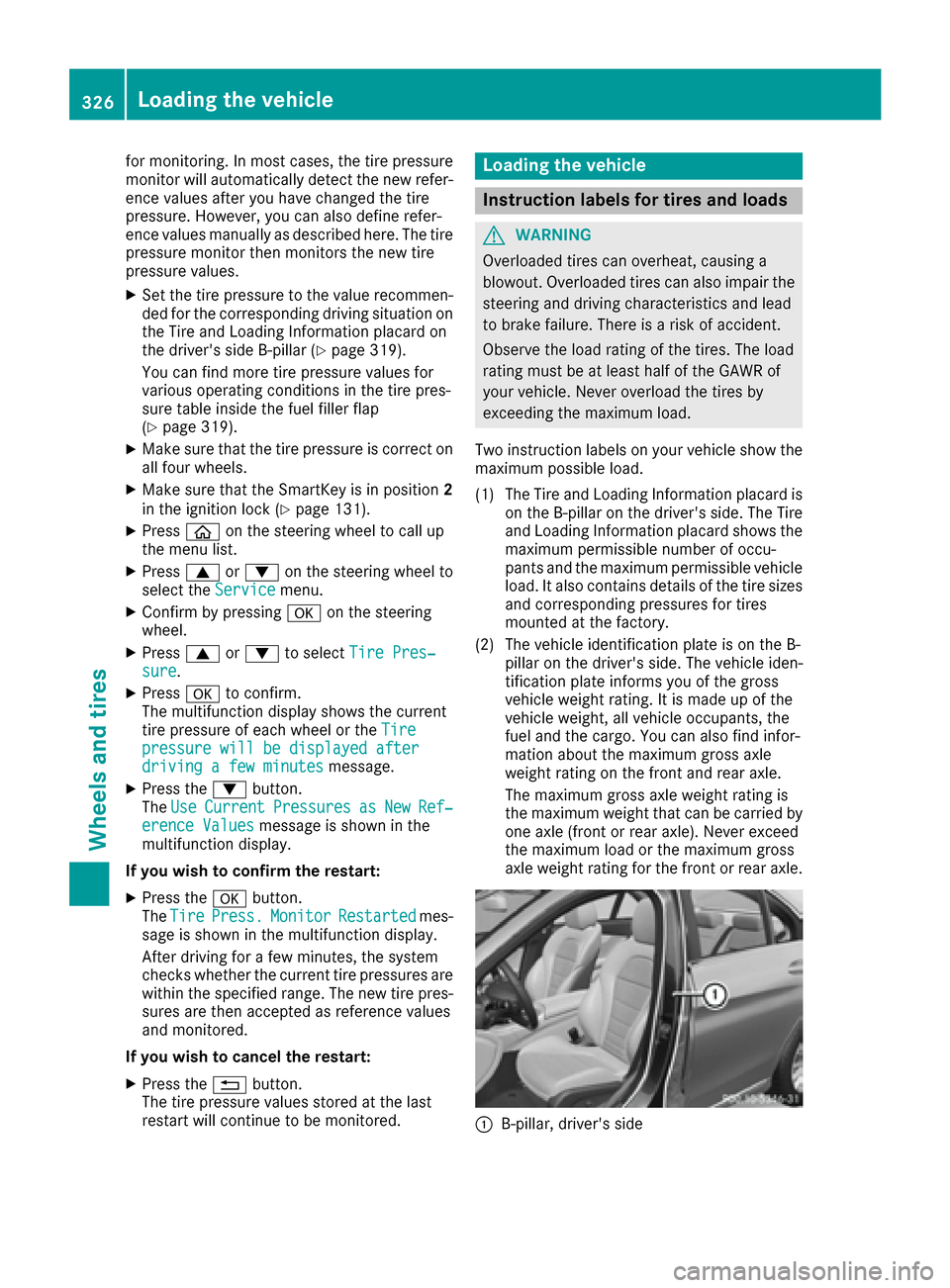
(1) The Tire and Loading Informatio nplacard is
on the B-pillar on the driver's side .The Tire
and Loading Informatio nplacard showst he
maximu mpermissible numbe rofoccu-
pants and the maximu mpermissible vehicle
load. It als ocontains details of the tire sizes
and corresponding pressures for tires
mounted at the factory.
(2) The vehicl eidentificatio nplate is on the B-
pillar on the driver's side .The vehicl eiden-
tification plate informs you of the gross
vehicl eweight rating. It is made up of the
vehicl eweight, all vehicl eoccupants, the
fuel and the cargo. You can als ofind infor-
mation about the maximu mgross axle
weight rating on the front and rear axle.
The maximu mgross axle weight rating is
the maximu mweight that can be carrie dby
one axle (front or rear axle). Never exceed
the maximu mloadort he maximu mgross
axle weight rating for the front or rear axle.
:B-pillar, driver's side
326Loading the vehicle
Wheels and tires
Page 338 of 354
Tire-mounting tools should not be used near
the valve. This could damage the electronic
components.
Only have tires changed ataqualified spe-
cialist workshop.
Always observe the instructions and safety
notes in the "Mounting awheel" section
(
Ypage 336).
The wear pattern sonthe front and rear tires
differ, depending on the operating conditions.
Rotate the wheels before aclear wear pattern
has formed on the tires. Frontt ires typically
wear more on the shoulders and the rear tires in the center.
On vehicles that have the same size front and
rear wheels, you can rotatet he wheels accord-
ing to the intervals in the tire manufacturer's
warranty book in your vehicle documents. If no
warranty book is available, the tires should be
rotated every 3,000 to 6,000 miles (5,000 to
10,000k m).Earlier may be necessary, depend-
ing on the degree of tire wear. Do not change the
direction of wheel rotation.
Clean the contact surfaces of the wheel and the
brake disc thoroughly every time awheel is rota-
ted. Check the tire pressure and, if necessary,
restart the tire pressure loss warning system
(
Ypage 323) or the tire pressure monitor
(Ypage 325).
Direction of rotation
Tires with aspecified direction of rotation have
additional benefits ,e.g. if there is arisk of hydro-
planing. These advantages can only be gained if
the tires are installed corresponding to the
direction of rotation.
An arrow on the sidewall of the tire indicates its
correctd irection of rotation.
Storing wheels
Storewheels that are not being used in acool,
dry and preferably dark place. Protectt he tires
from oil, grease, gasoline and diesel.
Mounting awheel
Preparing the vehicle
XStop the vehicle on solid, non-slippery and
level ground.
XApply the electric parking brake manually.
XBring the front wheels into the straight-ahead position.
XShift the transmission to position P.
XMake sure that the vehicle level is set to "Nor-
mal" on vehicles with AIRMATIC(Ypage 172).
XSwitch off the engine.
XVehicles without KEYLESS-GO: remove the
SmartKey from the ignition lock.
XVehicles with KEYLESS-GO start-function
or KEYLESS-GO: open the driver's door.
The on-board electronics now have status 0.
This is the same as the SmartKey having been
removed.
XVehicles with KEYLESS-GO start-function
or KEYLESS-GO: remove the Start/Stop but-
ton from the ignition lock (
Ypage 131).
XMake sure that the engine cannot be started
via your smartphon e(Ypage 134).
XIf included in the vehicle equipment, remove
the tire-change tool kit from the vehicle.
XSafeguard the vehicle against rolling away.
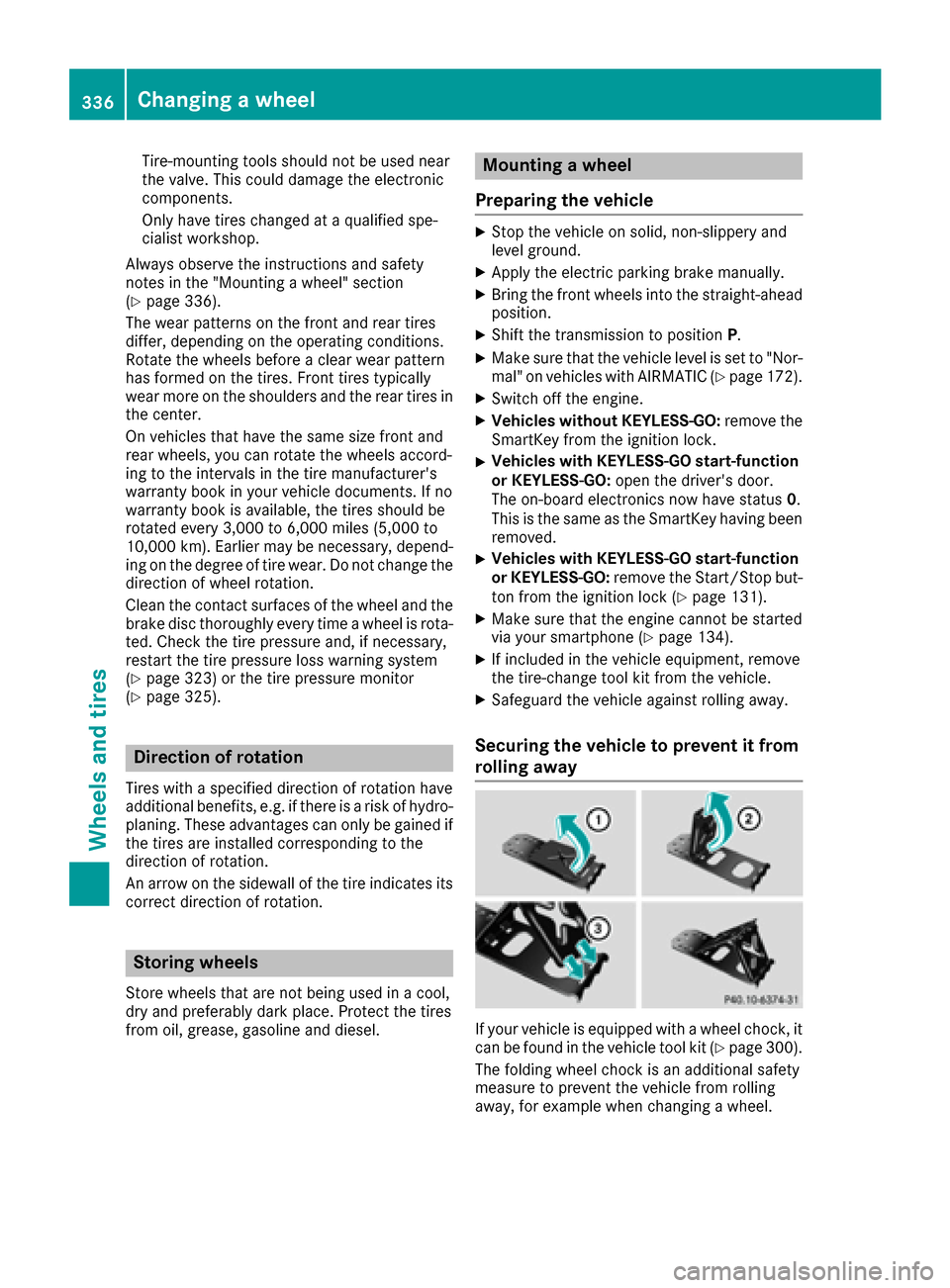
Securing the vehicle to prevent it from
rolling away
If your vehicle is equipped with awheel chock,i t
can be found in the vehicle tool kit (Ypage 300).
The folding wheel chock is an additional safety
measure to prevent the vehicle from rolling
away,f or example when changing awheel.
336Changing awheel
Wheels and tires