brake MERCEDES-BENZ C-Class COUPE 2017 CL205 Owner's Guide
[x] Cancel search | Manufacturer: MERCEDES-BENZ, Model Year: 2017, Model line: C-Class COUPE, Model: MERCEDES-BENZ C-Class COUPE 2017 CL205Pages: 354, PDF Size: 8.66 MB
Page 76 of 354
SmartKey
Important safety notes
GWARNING
If children are left unsupervised in the vehicle,
they could:
Ropen the doors, thus endangering other
people or road users.
Rget out and disrupt traffic.
Roperate the vehicle's equipment.
Additionally, children could set the vehicle in
motion if, for example, they:
Rrelease the parking brake.
Rshifting the automatic transmission out of
park position P
RStart the engine.
There is arisk of an accident and injury.
When leaving the vehicle, always take the
SmartKey with you and lock the vehicle. Never
leave children or animals unattended in the
vehicle. Always keep the SmartKey out of
reach of children.
GWARNING
If you attach heavy or large object stothe
SmartKey, the SmartKey could be uninten-
tionally turned in the ignition lock. This could
cause the engine to be switched off. There is a risk of an accident.
Do not attach any heavy or large object stothe
SmartKey. Remove any bulky key rings before
insertingt he SmartKey into the ignition lock.
!Keep the SmartKey away from stron gmag-
netic fields. Otherwise, the remote control
function could be affected.
Strong magnetic fields can occur in the vicin-
ity of powerful electrical installations.
Do not keep the SmartKey:
Rwith electronic devices, e.g. amobile phone
or another SmartKey.
Rwith metallic objects, e.g. coins or metal foil.
Rinside metallic objects, e.g. ametal case.
This can affect the functionality of the Smart- Key. Vehicles with KEYLESS-GO startf
unction:do
not keep the SmartKey on the parcel shelf or in
the trunk.O therwise, the SmartKey may not be
detected, e.g. when startin gthe engine using
the Start/Stop button.
Ac heck which periodically establishes aradio
connection between the vehicle and the Smart-
Key determines whether avalid SmartKey is in
the vehicle. This occurs, for example:
Rwhen startin gthe engine
Rwhile driving
Rwhen the external door handles are touched
Rduring convenience closing
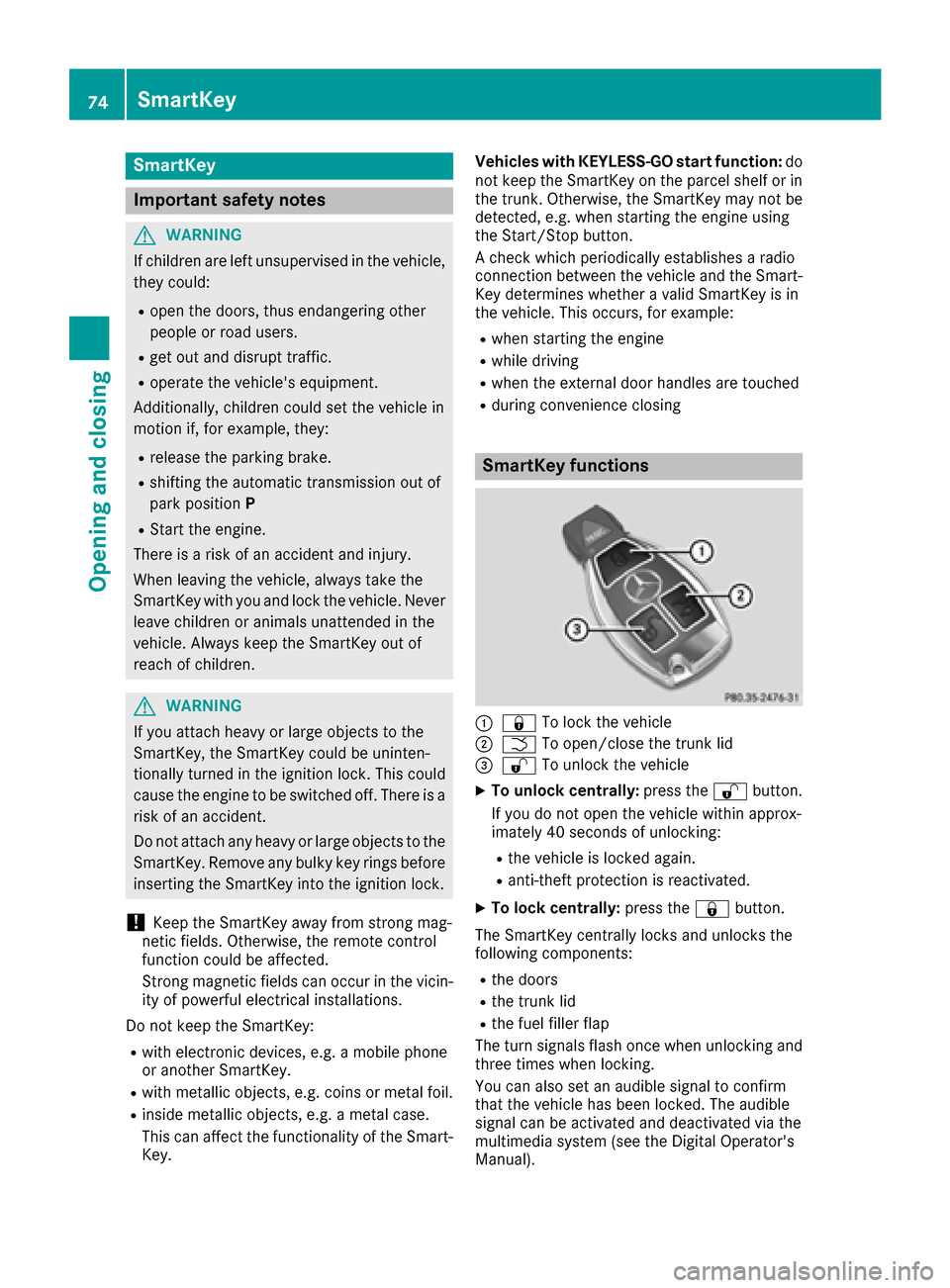
SmartKey functions
:& To lock the vehicle
;FTo open/close the trunk lid
=%To unlock the vehicle
XTo unlock centrally: press the%button.
If you do not open the vehicle within approx-
imately 40 seconds of unlocking:
Rthe vehicle is locked again.
Ranti-theft protection is reactivated.
XTo lock centrally: press the&button.
The SmartKey centrally locks and unlocks the
following components:
Rthe doors
Rthe trunk lid
Rthe fuel filler flap
The turn signals flash once when unlocking and
three times when locking.
You can also set an audible signal to confirm
that the vehicle has been locked. The audible
signal can be activated and deactivated via the
multimedia system (see the Digital Operator's
Manual).
74SmartKey
Opening and closing
Page 82 of 354
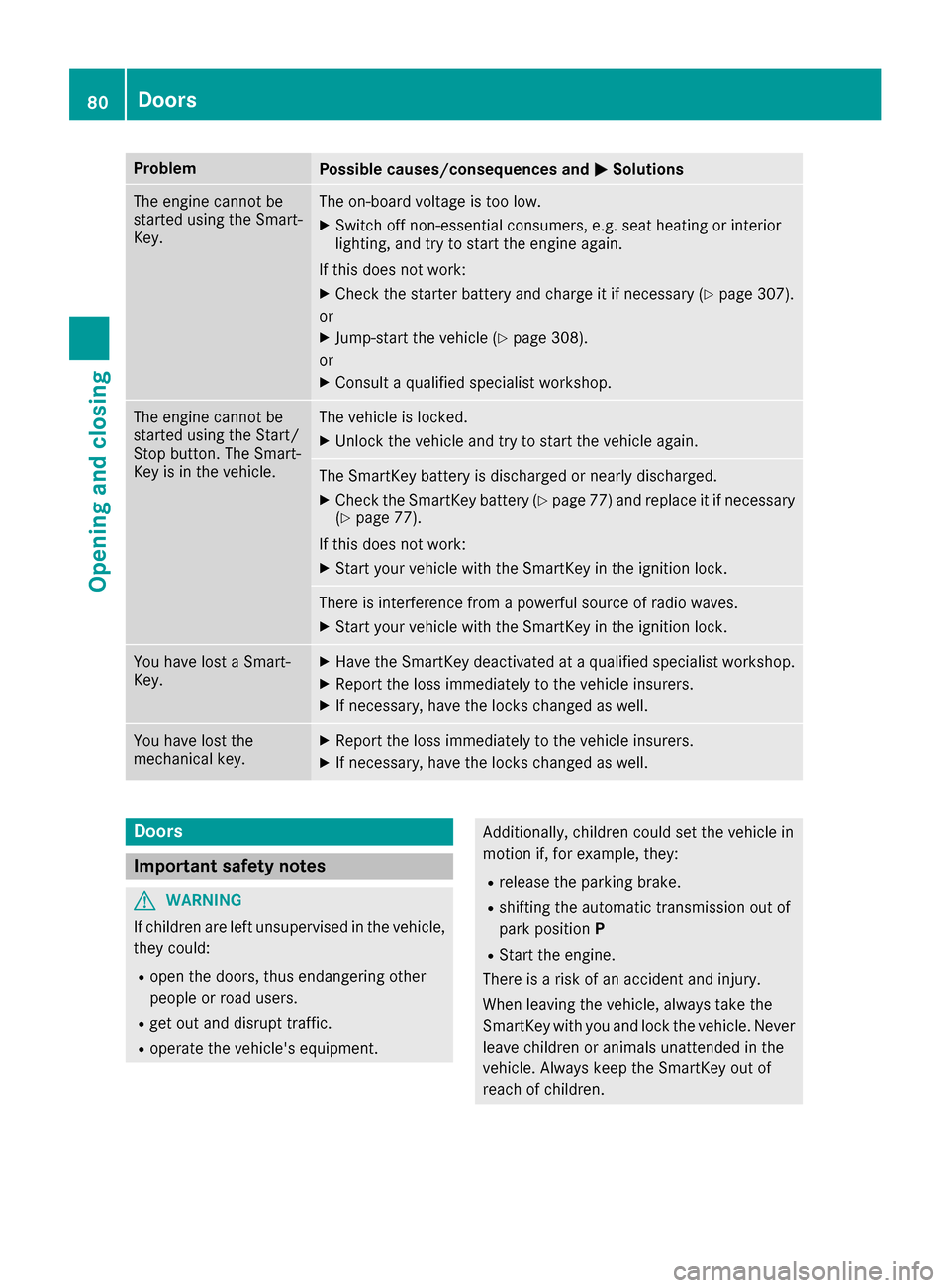
ProblemPossible causes/consequences andMSolutions
The engine cannot be
started using the Smart-
Key.The on-board voltage is too low.
XSwitch off non-essential consumers, e.g. seat heating or interior
lighting, and try to start the engine again.
If this does not work:
XCheck the starter battery and charge it if necessary (Ypage 307).
or
XJump-start the vehicle (Ypage 308).
or
XConsult aqualified specialist workshop.
The engine cannot be
started using the Start/
Stop button. The Smart-
Key is in the vehicle.The vehicle is locked.
XUnlock the vehicle and try to start the vehicle again.
The SmartKey battery is discharged or nearly discharged.
XCheck the SmartKey battery (Ypage 77) and replace it if necessary
(Ypage 77).
If this does not work:
XStart your vehicle with the SmartKey in the ignition lock.
There is interference from apowerful source of radio waves.
XStart your vehicle with the SmartKey in the ignition lock.
You have lost aSmart-
Key.XHave the SmartKey deactivated at aqualified specialist workshop.
XReport the loss immediately to the vehicle insurers.
XIf necessary, have the locks changed as well.
You have lost the
mechanical key.XReport the loss immediately to the vehicle insurers.
XIf necessary, have the locks changed as well.
Doors
Important safety notes
GWARNING
If children are left unsupervised in the vehicle,
they could:
Ropen the doors, thus endangering other
people or road users.
Rget out and disrupt traffic.
Roperate the vehicle's equipment.
Additionally, children could set the vehicle in
motion if, for example, they:
Rrelease the parking brake.
Rshifting the automatic transmission out of
park position P
RStart the engine.
There is arisk of an accident and injury.
When leaving the vehicle, always take the
SmartKey with you and lock the vehicle. Never
leave children or animals unattended in the
vehicle. Always keep the SmartKey out of
reach of children.
80Doors
Opening and closing
Page 132 of 354
Notesonb reaking-in anew vehicle
Important safety notes
Thes ensors ystemofs omedriving and driving
safety systems adjusts automaticall ywhile a
certai ndistance is being driven after the vehicle
ha sb eend elivere dorafter repairs. Full system
effectiveness is not reache duntilthe end of this
teach-i nprocedure.
New and replaced brake pads and discs only
reach their optimum braking effect after several hundred kilometers of driving. Compensate for
thi sb yapplyin ggreate rforce to the brake pedal.
The first 1000 miles (150 0km)
Them orey ou look after the engine when it is
new ,the mor esatisfied yo uwillbew ithi ts per-
formance in the future.
RYo us houl dtherefore drive at varying vehicle
and engine speeds for the first 1000 miles
(1500 km).
RAvoi dheavy loads, e.g .driving at full throttle,
during thi speriod.
RWhen changing gear smanually, change up in
good time, befor ethe tachomete rneedl erea-
ches Ôof the wa ytothe red area of the tach-
ometer.
RDo not manuall yshift to alower gear to brake
the vehicle.
RTry to avoi ddepressing the accelerator pedal
beyond the point of resistanc e(kickdown).
RAllv eh icle s(exce pt Mercedes-AMG vehi-
cles): ideally, for the first 1,000 miles
(1,500 km), drive in drive program E.
Additiona lbreaking-i nnote sfor Mercedes-AMG
vehicles:
RDo not drive fastert han8 5m ph (14 0km/h)
for the first 1,000 mile s(1,500 km).
ROnl yallow the engine to reach amaximum
engine spee dof4,500 rpm briefly.
RChang egearing oodt ime.
RIdeally ,for the first 1,000 mile s(1,500 km),
drive in program C.
After 1000 mile s(1500 km), you can increase
th ee ngi
n espeed gradually and accelerate th e
vehicl etofull speed.
You should also observ ethese note sonbreak-
in ginift heengin eorp artsoft hedrive train on
your vehicl ehaveb een replaced. Always observ
ethe maximum permissibl e
speed.
Self-lockin greara xled ifferential
(Mercedes-AMG vehicles)
Your vehicl eisequipped wit haself-locking dif -
ferential on th erear axle.
Change th eoil to improv eprotection of th erear
axl ed ifferential:
Rafter abreaking-i nperiod of 1,850 mile s
(3,00 0km)
Revery 31,00 0miles( 50,00 0km) or 3years
These oil changes prolon gthe servic elife of th e
differential. Hav ethe oil chang ecarrie dout at a
qualified specialist workshop .
Driving
Important safety notes
GWARNIN G
Objects in th edriver's footwell can restrict th e
pedal travel or obstruct adepressed pedal .
The operating and roa dsafet yoft hevehicl eis
jeopardized. There is ariskofana ccident.
Mak esuret hata ll objects in th evehicl eare
stowed correctly, and that they canno tenter
th ed river's footwell. Install th efloormats
securel yand as specified in order to ensur e
sufficien tclearance for th epedals. Do no tuse
loos efloormats and do no tplac efloormats on
to pofo neanother.
GWARNIN G
Unsuitable footwear can hinder correc tusage
of th epedals, e.g. :
Rshoes withthick sole s
Rshoes wit hhigh heels
Rslipper s
There is ariskofana ccident.
Wear suitable footwear to ensur ecorrect
usage of th epedals.
130Driving
Driving and parking
Page 133 of 354
GWARNING
If you switch off the ignitio nwhile driving,
safety-relevant functions are only available
with limitations, or not at all .This coul daffect,
for example, the power steering and the brake
boosting effect. You wil lrequire considerably
more effort to steer and brake. There is arisk
of an accident.
Do not switch off the ignitio nwhile driving.
GWARNING
If the parking brake has not been fully
released when driving, the parking brake can:
Roverheat and caus eafire
Rlose its hold function.
There is arisk of fire and an accident. Release
the parking brake full ybefore driving off.
!Do not war mupthe engine with the vehicle
stationary. Drive off immediately. Avoid high
engine speeds and driving at full throttle until
the engine has reache dits operating temper-
ature.
Only shift the automatic transmission to the
desired drive position when the vehicleiss ta-
tionary.
Where possible,a voids pinning the drive
wheels when pulling awa yonslippery roads.
You coul dotherwise damage the drive train.
!Mercedes-AMG vehicles: at low engine oil
temperatures below 68 ‡(+20 †), the max-
imum engine speedisr estricted in order to
protect the engine. To protect the engine and
maintai nsmooth engine operation, avoi ddriv-
ing at full throttle when the engine is cold.
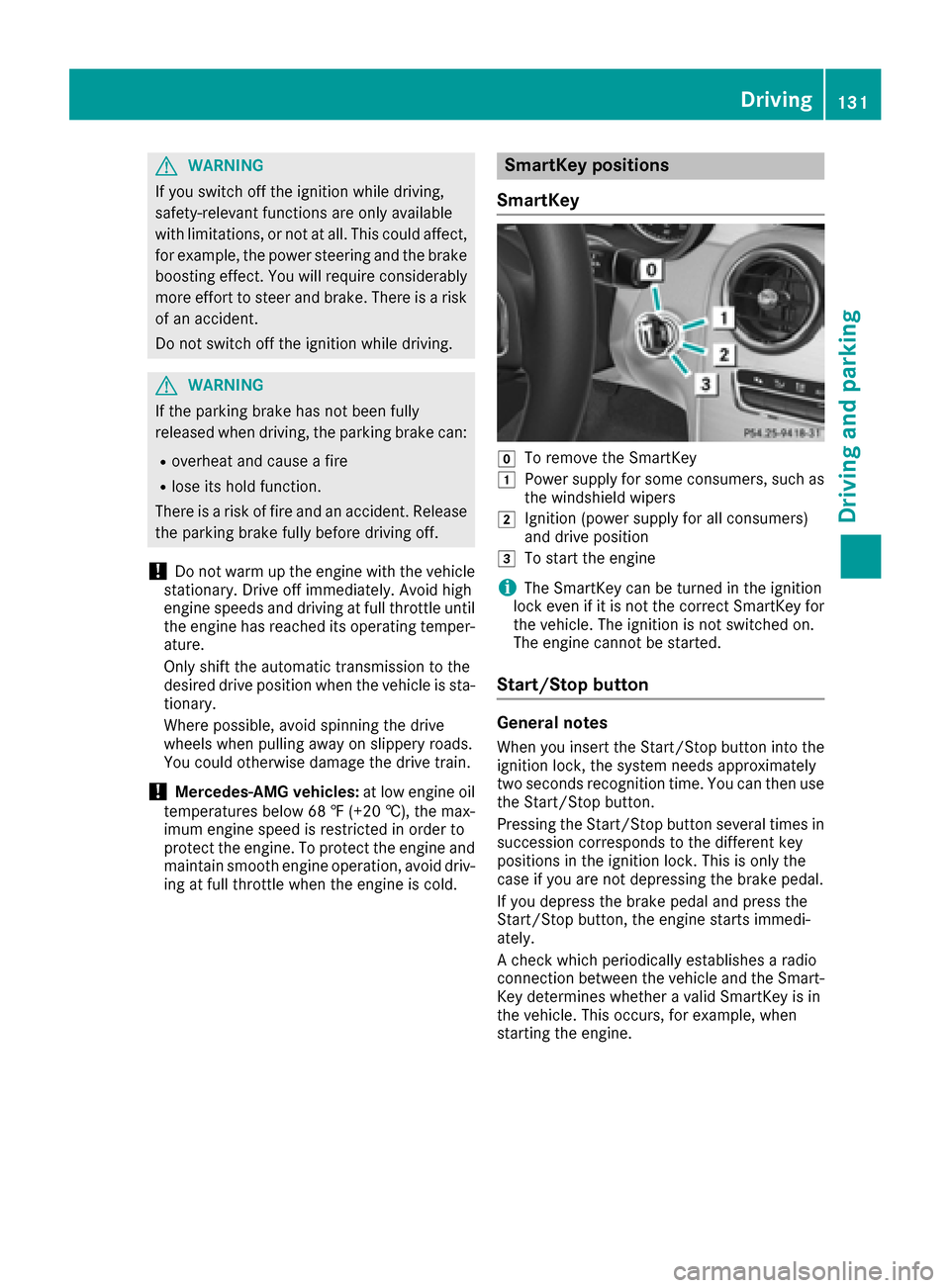
SmartKey positions
SmartKey
gTo remove the SmartKey
1Powe rsupply for some consumers ,such as
the windshiel dwipers
2Ignition (power supply for all consumers)
and drive position
3To start the engine
iThe SmartKey can be turned in the ignition
lock even if it is not the correct SmartKey for
the vehicle. The ignitio nisnot switched on.
The engine cannot be started.
Start/Stop button
General notes
When you insert the Start/Stop button into the
ignitio nlock, the system needs approximately
two seconds recognitio ntime. You can then use
the Start/Stop button.
Pressing the Start/Stop button severalt imes in
succession corresponds to the different key
positions in the ignitio nlock. This is only the
case if you are not depressing the brake pedal.
If you depress the brake pedala nd press the
Start/Stop button, the engine starts immedi-
ately.
Ac heck which periodically establishe saradio
connection between the vehiclea nd the Smart-
Key determines whethe ravalidS martKey is in
the vehicle. This occurs, for example, when
starting the engine.
Driving131
Driving and parking
Z
Page 135 of 354
Starting the engine
Important safety notes
GWARNING
If children are left unsupervised in the vehicle,
they could:
Ropen the doors, thus endangering other
people or road users.
Rget out and disrupt traffic.
Roperate the vehicle's equipment.
Additionally, children could set the vehicle in
motion if, for example, they:
Rrelease the parking brake.
Rshifting the automatic transmission out of
park position P
RStart the engine.
There is arisk of an accident and injury.
When leaving the vehicle, always take the
SmartKey with you and lock the vehicle. Never
leave children or animals unattended in the
vehicle. Always keep the SmartKey out of
reach of children.
GWARNING
Combustion engines emit poisonous exhaust
gases such as carbon monoxide. Inhaling
these exhaust gases leads to poisoning. There
is ar isk of fatal injury. Therefore never leave
the engine running in enclosed spaces with-
out sufficient ventilation.
GWARNING
Flammable materials introduced through
environmental influence or by animals can
ignite if in contact with the exhaust system or
parts of the engine that heat up. There is arisk
of fire.
Carry out regular checkstom ake sure that
there are no flammable foreign materials in
the engine compartmentorint he exhaust
system.
General notes
The catalytic converter is preheated for up to
30 seconds after acold start. The sound of the
engine may change during this time.
Automatic transmission
XShift the transmission to position P
(Ypage 141).
The transmission position display in the mul-
tifunction display shows P(
Ypage 142).
iYou can start the engine in transmission
position Pand N.
Starting procedurew ith the SmartKey
To start the engine using the SmartKey instead
of the Start/Stop button, pull the Start/Stop
button out of the ignition lock.
XTurn the SmartKey to position 3in the ignition
lock and release it as soon as the engine is
running (
Ypage 131).
If the engine will not start:
XRemove the SmartKey from the ignition lock.
XReinsert the SmartKey into the ignition lock
after ashort waiting period.
XTurn the SmartKey to position 2in the ignition
lock (Ypage 131).
The indicator lamps in the instrumentc luster
light up (
Ypage 246).
XTurn the SmartKey to position 3in the ignition
lock (Ypage 131) and release it as soon as the
engine is running.
Starting procedurew ith the Start/Stop
button
The Start/Stop button is only available on vehi-
cles with KEYLESS-GO or the KEYLESS-GO start
function.
The Start/Stop button can be used to start the
vehicle manually without insertingt he SmartKey
into the ignition lock. The Start/Stop button
must be inserted in the ignition lock and the
SmartKey must be in the vehicle. This mode for
startin gthe engine operates independently of
the ECO start/stop automatic engine start func-
tion.
You can start the engine if avalid SmartKey is in
the vehicle. Switch off the engine and always
take the SmartKey with you when leaving the
Driving133
Driving and parking
Z
Page 136 of 354
vehicle, even if you only leave it forashort time.
Pay attention to the important safety notes.
XDepress the brake pedala nd keep it
depressed.
XPress the Start/Stop button once
(Ypag e131).
The engine starts.
Starting procedure via smartphone
Observe the important safety notes on starting
the engine (Ypag e133).
You can als ostart you rengine via you rsmart-
phone from outside the vehicle. In this case, the
previousl yselected climate control setting is
activated .Inthis way you can cool or heat the
interior of the vehicl ebefore starting the jour-
ney.
Only start the engine via you rsmartphone if it is
safe to start and run the engine where you rvehi-
cle is parked.
Observe the lega lstipulations in the area where
you rvehicl eisp arked .Engine start via smart-
phone may be limited to certain countries or
regions.
You can execute amaximu moftwo consecutive
starting attempts via you rsmartphone. If you
insert the SmartKey into the ignitio nlock, you
can carry out two more starting attempts.
Once you have started the engine, you can
switch the engine off via you rsmartphone at any
time.
You can only start the engine via you rsmart-
phone if:
Rthe SmartKey is in the ignitio nlock
Rpark position Pis selected
Rthe accelerator pedalisn ot depressed
Rthe anti-theft alarm system is not activated
Rthe panic alarm is not activated
Rthe hazard warning lampsare switched off
Rthe hood is closed.
Rthe doors are closed and locked
Rthe windows and sliding sunroof are closed
Also make sure that:
Rthe fuel tank is sufficiently filled
Rthe starter battery is sufficiently charged
GWARNING
Limbs could be crushed or trappe difthe
engine is started unintentionally during ser-
vice or maintenance work. There is arisk of
injury.
Always secure the engine against uninten-
tional starting before carrying out mainte-
nance or repair work.
Make sure that the engine cannot be started via
you rsmartphone before carrying out mainte-
nance or repairs. You can prevent an engine
start via you rsmartphone, for example, if you:
Rswitch on the hazard warning lamps
Rdo not lock the doors
Ropen the hood
Pulling away
General notes
GWARNING
If the engine speedisa bove the idling speed
and you engage transmission position Dor R,
the vehicl ecould pul lawa ysuddenly.T here is
ar isk of an accident.
When engaging transmission position Dor R,
alway sfirmly depress the brake pedala nd do
not simultaneously accelerate.
Depress the accelerator carefully when pulling
away.
The vehicl elocks centrally once you have pulled
away. The locking knobs in the doors drop down.
You can open the doors from the insid eatany
time.
You can als odeactivate the automatic locking
feature, see the Digital Operator's Manual.
It is only possible to shift the transmission from
position Pto the desired position if you depress
the brake pedal. Only then is the parking lock
released. If you do not depress the brake pedal,
the DIRECT SELECT lever can still be moved but the parking lock remains engaged.
iUpshifts take place at highere ngine speeds
after acold start. This help sthe catalytic con-
verter to reach its operating temperature
more quickly.
Information on the automatic release of the
electric parking brake (
Ypag e154).
134Driving
Driving and parking
Page 137 of 354
Hill start assist
Hill start assist helpsyou when pulling awa yfor-
wards or in reverse on an uphill gradient. It holds
the vehiclef oras hort time after you have
removed you rfoot from the brake pedal. This
gives you enoug htime to move you rfoot from
the brake pedaltot he accelerator pedala nd to
depress it before the vehicleb egins to roll.
GWARNING
After ashort time, hil lstart assist wil lnolon-
ger brake you rvehicl eand it coul droll away.
There is arisk of an accident and injury.
Therefore, quickly move you rfoot from the
brake pedaltot he accelerator pedal. Never
leave the vehiclew hen it is held by hillstart
assist.
Hill start assist is not active if:
Ryou are pulling awa yonalevelroad or on a
downhill gradient.
Rthe transmission is in position N.
Rthe electric parking brake is applied.
RESP®is malfunctioning.
ECOstart/stop function
Introduction
The ECO start/stop function switches the
engine off automatically if the vehicleiss topped
under certain conditions.
The engine starts automatically when the driver
wants to pul lawa ya gain. The ECO start/stop
function thereby help syou to reduce the fuel
consumption and emissions of you rvehicle.
Important safety notes
GWARNING
If the engine is switched off automatically and
you exit the vehicle, the engine is restarted
automatically .The vehiclem ay beginmoving.
There is arisk of accident and injury.
If you wis htoexit the vehicle, alway sturn off
the ignitio nand secure the vehiclea gainst
rolling away.
General notes
:ECO start/stop display
The ECO start/stop function is activated when-
ever you start the engine using the SmartKey or the Start/Stop button.
If the engine has been switched off automati-
call ybyt he ECO start/stop function, the è
ECO symbol is shownint he multifunction dis-
play.
Mercedes-AMG vehicles: the ECO start/stop
function is only available in drive program C.
Automatic engine switch-off
If the vehicleisb raked toastandstil lin D or N,
the ECO start/stop function switches off the
engine automatically.
The ECO start/stop function is operational
when:
Rthe indicator lamp in the ECO button is lit
green.
Rthe outside temperature is withi nthe range
that is suitable for the system.
Rthe engine is at normal operating tempera-
ture.
Rthe set temperature for the vehiclei nterior
has been reached.
Rthe battery is sufficiently charged.
Rthe system detects that the windshiel disnot
fogged up when the air-conditioning system is switched on.
Rthe hood is closed.
Rthe driver's door is closed and the driver's
seat beltisf astened.
All of the vehicle's systems remai nactive when
the engine is stoppeda utomatically.
The HOLD function can als obeactivated if the
engine has been switched off automatically .Itis
then not necessary to continue applying the
brakes during the automatic stop phase. When
you depress the accelerator pedal, the engine
starts automatically and the braking effect of
the HOLD function is deactivated.
Driving135
Driving and parking
Z
Page 142 of 354
Rthe availability of the ECO start/stopfun ction
Rthe driver assistance systems
Rthe availability of gliding mode
Furtheri nformation for automatic drive program
characteristics (
Ypage 144).
Additionally, in drive program Iyo uc an config-
ur et he respectiv evehicl echaracteristics using
the multimedia system. Yo ucan fin dinforma-
tio na bout thisint he Digita lOperator' sManual.
Each tim eyou start the engine with the Smart-
Key or the Start/Stop button, drive program Cis
activated .For furthe rinformation abou tstarting
the engine ,see (
Ypage 133).
Selecting the driv eprogram
XPress DYNAMIC SELECTs witch :forwards
or backwards unti lthe desired drive program
is selected.
The status ico nofthe selected drive program
is shown in the multifunctio ndisplay .
In addition, the current drive progra msettings
ar ed isplayed brieflyinthe multimedia system
display.
Yo uc an also change gear yourself using the
steering whee lpaddl eshifters. For furthe rinfor-
matio nont he manua ldrive program
(
Ypage 146).
Additional settings
:Positio nofthe exhaust fla p(Ypage 137)
;ECO start/sto pfunctio n(Ypage 135)
=ESP®(Ypage 67)
?Suspension (Ypage 172)
APermanent activatio nofmanualgears hifting
(Ypage 146)
When yo upress buttons :-A the corre-
sponding setting is selected .The DYNAMIC
SELECT switc hsetting is overwritten.
These setting swilla lsobem aintaine difyou
change with the DYNAMIC SELECTs witch in
drive program RACE(S-MODEL), S+,Sor C.
If yo uswitch to drive program I,a llstored char-
acteristics will be accepted .This is als othe case
if yo uhavep reviously presse dbuttons :-A.
Automati ctransmission
Important safety notes
GWARNING
If the engine spee disabove the idling speed
and yo uengag etransmission position Dor R,
the vehicl ecould pull away suddenly. There is
ar iskofana ccident.
When engaging transmission position Dor R,
always firmlyd epress the brake peda land do
not simultaneously accelerate.
GWARNING
The automatic transmission switches to neu-
tralp ositionNwhen yo uswitch off the engine.
The vehicl emayrollaway. There is ariskofa n
accident.
140Automati ctransmission
Driving an dparking
Page 143 of 354

After switching off the engine,alway sswitch
to parking position P.Prevent the parked vehi-
cle from rolling away by applying the parking
brake.
DIREC TSELECT lever
Overvie woftransmission positions
jPark positio nwithp arking lock
kReverse gear
iNeutral
hDrive
The DIRECT SELECTl ever is on the right of the
steering column.
The DIRECT SELECTl ever always returns to its
original position. The current transmission posi-
tion P,R, Nor Dappear sinthe transmission
positio ndisplay in the multifunctio ndisplay
(
Ypage 142).
Engagin gpark position P
!If the engine speed is too high or the vehicle
is moving, do not shift the automatic trans-
mission directl yfrom Dto R,f rom Rto Dor
directl ytoP.T he automatic transmission
could otherwise be damaged.
XPush the DIRECT SELECTl ever in the direction
of arrow P.
Engagingpark position Pautomatically
Park position Pis automaticall yengaged if:
Ryous witch off the engine using the SmartKey
and remove the SmartKey
Ryo us witch off the engine using the SmartKey
or using the Start/Stop button and open the
driver's door or front-passenger door
Rthe driver's door is opene dwhenthe vehicl eis
stationar yordriving at ver ylow speed and the
transmission is in position Dor R
Unde rcertain conditions, the automatic trans-
mission shifts automaticall ytotransmission
position Pif the HOLD functio norDISTRONIC
PLU Sisa ctivated.O bservethe informatio non
the HOLD functio n(
Ypage 170)and on
DISTRONICP LUS(Ypage 165).
Engagin grevers egearR
!Onlys hift the automatic transmission to R
when the vehicl eisstationary.
XIf the transmission is in position Dor N:p ush
the DIRECT SELECTl ever up past the first
point of resistance.
XIf the transmission is in position P:depress
the brake peda land push the DIRECT SELECT
lever up past the first point of resistance.
The ECO start/sto pfunctio nisn ot available
when revers egearise ngaged .Further informa-
tio nont he ECO start/sto pfunction
(
Ypage 135).
Shiftin gtoneutral N
GWARNING
If children ar eleftu nsupervised in the vehicle,
they could:
Ropen the doors ,thuse ndangering other
people or roa dusers.
Rget outa nd disrupt traffic.
Roperate the vehicle's equipment.
Additionally, children could set the vehicl ein
motion if, for example, they:
Rrelease the parking brake.
Rshifting the automatic transmission outo f
park position P
RStartthe engine.
Automatict ransmission141
Driving andparking
Z
Page 144 of 354
There isarisk of an accident and injury.
When leaving the vehicle, alwayst ake the
SmartKey with you and lock the vehicle. Never
leave children or animals unattended in the
vehicle. Always keep the SmartKey out of
reach of children.
XIf the transmission is in position Dor R:p ush
the DIRECT SELECT lever up or down to the
first point of resistance.
XIf the transmission is in position P:depress
the brake pedal and push the DIRECT SELECT
lever up or down to the first point of resist-
ance.
If you switch the engine off with the transmis-
sion in position Ror D,t he automatic transmis-
sion shifts to Nautomatically.
With the SmartKey: if you then open the driv-
er's door or the front-passenger door or remove
the SmartKey from the ignition, the automatic
transmission shifts to Pautomatically.
With the Start/Stop button: if you then open
the driver's door or the front-passenger door,
the automatic transmission shifts to Pautomat-
ically.
If you want the automatic transmission to
remain in neutral N,e .g. when having the vehicle
cleaned in an automatic car wash with atowing
system:
XVehicles with the Start-Stop button:
remove the Start-Stop button from the igni-
tion lock.
XInsert the SmartKey into the ignition lock.
XAll vehicles: switch the ignition on.
XDepress the brake pedal and keep it
depressed.
XShift to neutral N.
XRelease the brake pedal.
XRelease the electric parking brake.
XSwitch off the ignition and leave the SmartKey
in the ignition lock.
Engaging drive position D
XIf the transmission is in position Ror N:p ush
the DIRECT SELECT lever down past the first
point of resistance.
XIf the transmission is in position P:depress
the brake pedal and push the DIRECT SELECT lever down past the first point of resistance.
Transmission position and drive pro-
gram display
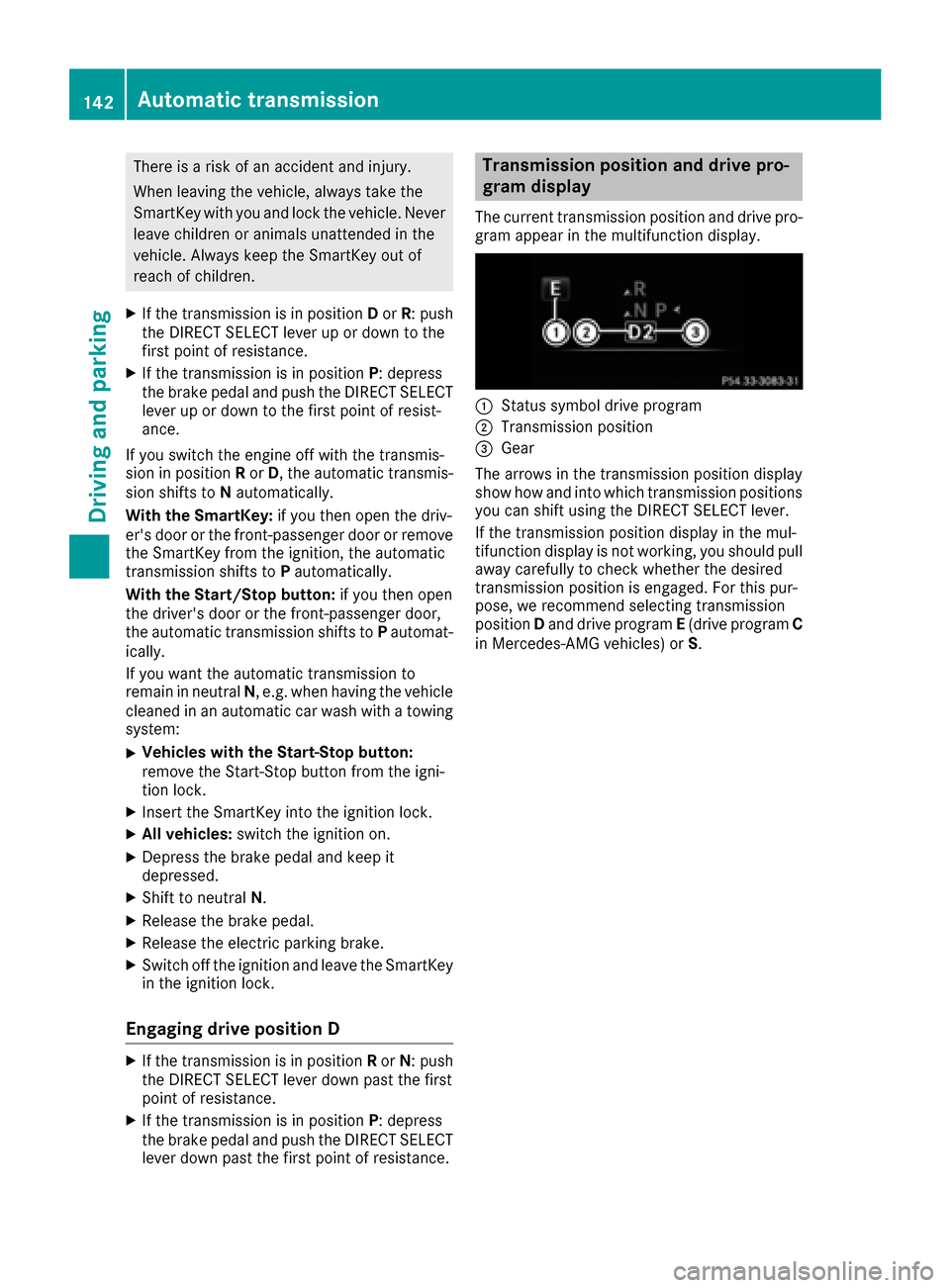
The current transmission position and drive pro-
gram appear in the multifunction display.
:Status symbol drive program
;Transmission position
=Gear
The arrows in the transmission position display
show how and into which transmission positions
you can shift using the DIRECT SELECT lever.
If the transmission position display in the mul-
tifunction display is not working, you should pull
away carefully to check whether the desired
transmission position is engaged. For this pur-
pose, we recommend selectin gtransmission
position Dand drive program E(drive program C
in Mercedes-AMG vehicles) or S.
142Automatic transmission
Driving and parking