steering MERCEDES-BENZ C-CLASS COUPE 2018 Owners Manual
[x] Cancel search | Manufacturer: MERCEDES-BENZ, Model Year: 2018, Model line: C-CLASS COUPE, Model: MERCEDES-BENZ C-CLASS COUPE 2018Pages: 354, PDF Size: 5.88 MB
Page 238 of 354
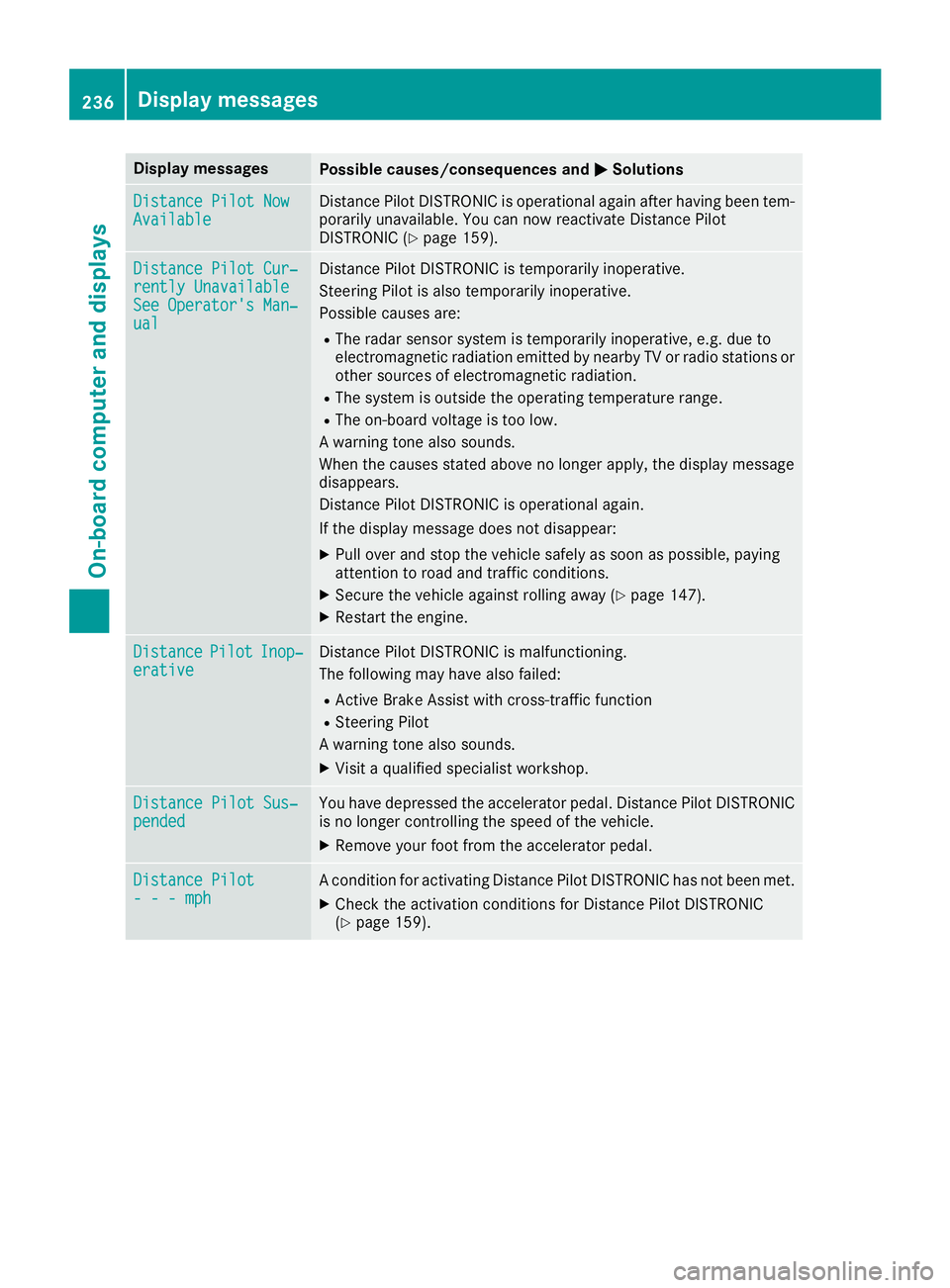
Display messagesPossible causes/consequences andMSolutions
Distance Pilot NowAvailableDistancePilo tDISTRONI Cis operational again after having been tem-
porarily unavailable .You can no wreactivat eDistanc ePilo t
DISTRONI C (
Ypage 159).
Distance Pilot Cur ‐rently UnavailableSee Operator'sMan ‐ual
Distanc ePilo tDISTRONI Cis temporarily inoperative.
Steering Pilo tis also temporarily inoperative.
Possibl ecauses are:
RThe radar sensor system is temporarily inoperative, e.g. due to
electromagneti cradiation emitted by nearby TV or radi ostation sor
other source sof electromagneti cradiation .
RThe system is outside th eoperating temperature range.
RThe on-boar dvoltag eis to olow.
A warning tone also sounds.
Whe nth ecauses state dabov eno longer apply, th edisplay message
disappears.
Distanc ePilo tDISTRONI Cis operational again .
If th edisplay message does no tdisappear :
XPull overand stop th evehicl esafely as soo nas possible, payin g
attention to roa dand traffic conditions.
XSecur eth evehicl eagainst rollin gaway (Ypage 147).
XRestart th eengine.
DistancePilotInop‐erativ eDistanc ePilo tDISTRONI Cis malfunctioning .
The followin gmay hav ealso failed:
RActive Brake Assis twit hcross-traffic function
RSteering Pilo t
A warning tone also sounds.
XVisit aqualified specialist workshop .
Distance Pilot Sus‐pendedYou havedepressed th eaccelerato rpedal .Distanc ePilo tDISTRONI C
is no longer controllin gth espeed of th evehicle.
XRemove your foo tfrom th eaccelerato rpedal .
Distance Pilot- - - mphAcondition for activating Distanc ePilo tDISTRONI Chas no tbeen met .
XCheckth eactivation condition sfor Distanc ePilo tDISTRONI C
(Ypage 159).
236Display messages
On-board computer and displays
Page 239 of 354
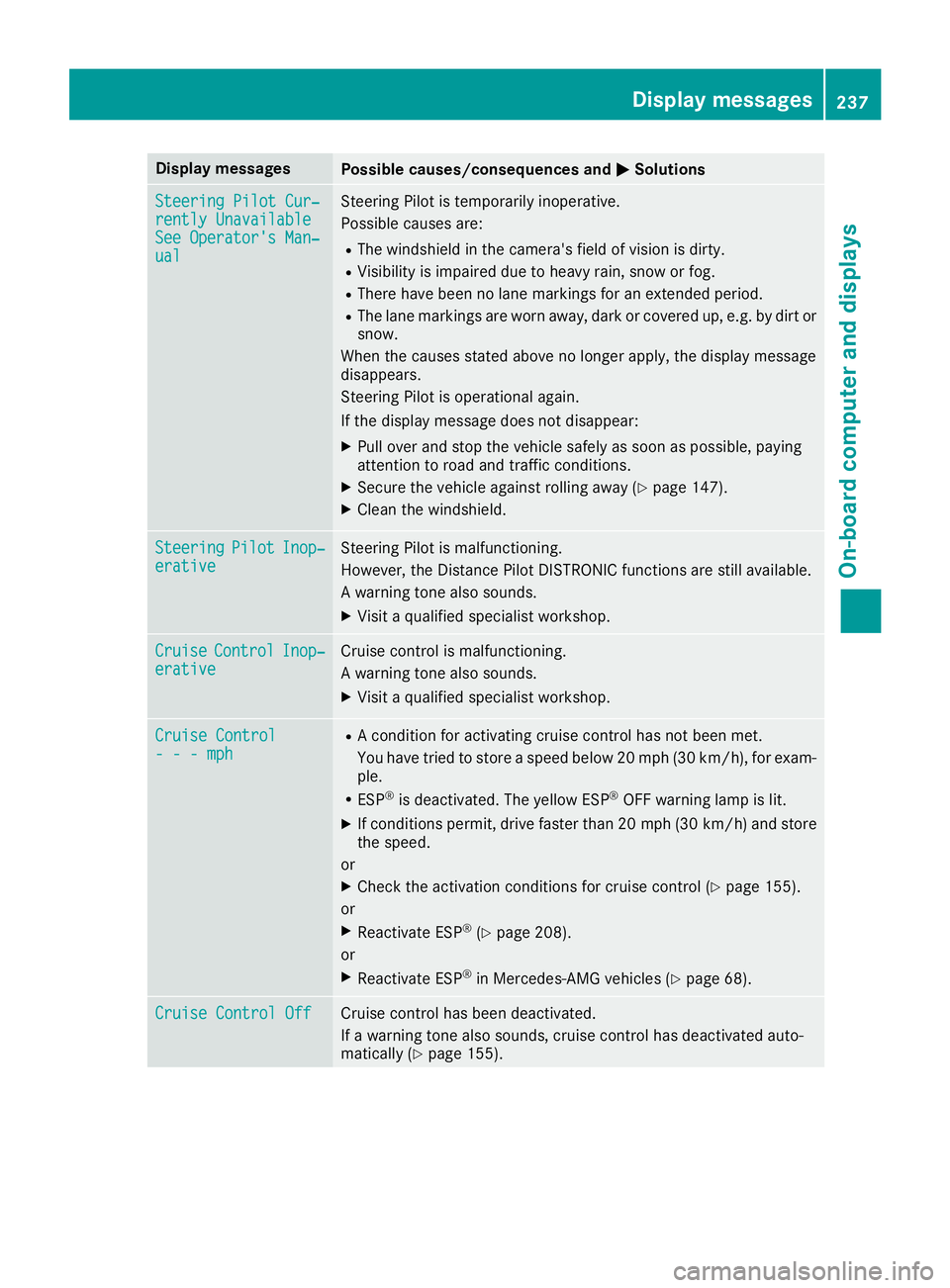
Display messagesPossible causes/consequences andMSolutions
Steering Pilot Cur‐rently UnavailableSee Operator'sMan ‐ual
Steering Pilo tis temporarily inoperative.
Possibl ecauses are:
RThe windshield in th ecamera' sfield of vision is dirty.
RVisibilit yis impaire ddue to heav yrain ,snow or fog .
RThere havebeen no lan emarking sfor an extended period.
RThe lan emarking sare wor naway, dark or covered up, e.g. by dir tor
snow.
Whe nth ecauses state dabov eno longer apply, th edisplay message
disappears.
Steering Pilo tis operational again .
If th edisplay message does no tdisappear :
XPull overand stop th evehicl esafely as soo nas possible, payin g
attention to roa dand traffic conditions.
XSecur eth evehicl eagainst rollin gaway (Ypage 147).
XClean th ewindshield.
SteeringPilotInop‐erativ eSteering Pilo tis malfunctioning .
However, th eDistanc ePilo tDISTRONI Cfunction sare still available.
A warning tone also sounds.
XVisit aqualified specialist workshop .
CruiseControlInop‐erativeCruisecontrol is malfunctioning .
A warning tone also sounds.
XVisit aqualified specialist workshop .
Cruise Control- - -mph
RAcondition for activating cruise control has no tbeen met .
You hav etried to store aspeed belo w20 mph (30 km/h), for exam-
ple.
RES P®is deactivated. The yello wES P®OF Fwarning lamp is lit .
XIf conditionspermit ,drive faste rthan 20 mph (30 km/h )and store
th espeed.
or
XChec kth eactivation condition sfor cruise control (Ypage 155).
or
XReactivat eES P®(Ypage 208).
or
XReactivat eES P®in Mercedes-AMG vehicles (Ypage 68).
Cruise Contro lOffCruis econtrol has been deactivated.
If awarning tone also sounds, cruise control has deactivated auto -
matically (
Ypage 155).
Display messages237
On-board computer and displays
Z
Page 240 of 354
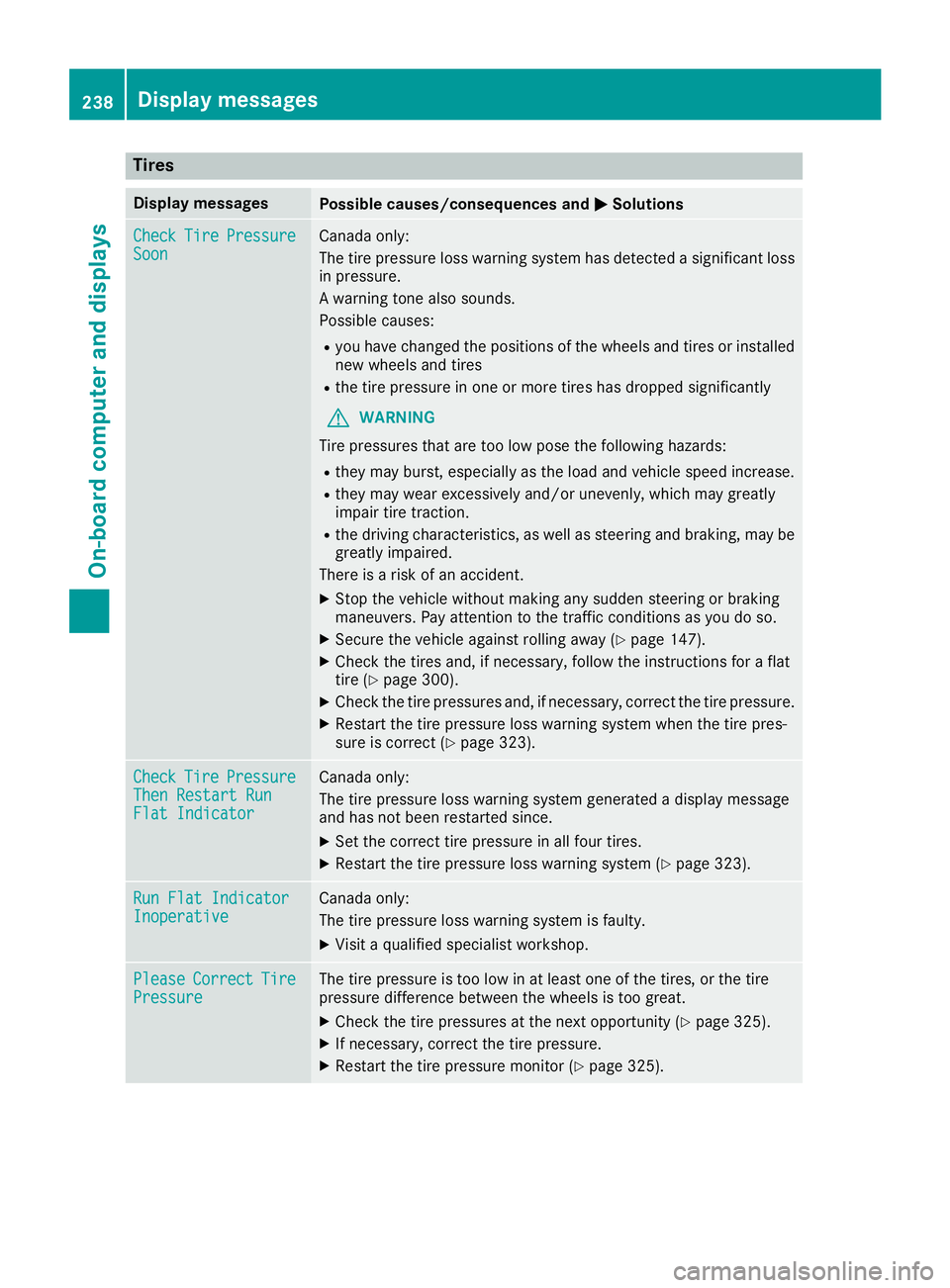
Tires
Display messagesPossible causes/consequences andMSolutions
CheckTirePressureSoonCanada only:
The tire pressure loss warning system has detected a significant loss
in pressure.
A warning tone also sounds.
Possible causes:
Ryou have changed the positions of the wheels and tires or installed
new wheels and tires
Rthe tire pressure in one or more tires has dropped significantly
GWARNING
Tire pressures that are too low pose the following hazards:
Rthey may burst, especially as the load and vehicle speed increase.
Rthey may wear excessively and/or unevenly, which may greatly
impair tire traction.
Rthe driving characteristics, as well as steering and braking, may be
greatly impaired.
There is a risk of an accident.
XStop the vehicle without making any sudden steering or braking
maneuvers. Pay attention to the traffic conditions as you do so.
XSecure the vehicle against rolling away (Ypage 147).
XCheck the tires and, if necessary, follow the instructions for a flat
tire (Ypage 300).
XCheck the tire pressures and, if necessary, correct the tire pressure.
XRestart the tire pressure loss warning system when the tire pres-
sure is correct (Ypage 323).
CheckTirePressureThen Restart RunFlat Indicator
Canada only:
The tire pressure loss warning system generated a display message
and has not been restarted since.
XSet the correct tire pressure in all four tires.
XRestart the tire pressure loss warning system (Ypage 323).
Run Flat IndicatorInoperativeCanada only:
The tire pressure loss warning system is faulty.
XVisit a qualified specialist workshop.
PleaseCorrectTirePressureThe tire pressure is too low in at least one of the tires, or the tire
pressure difference between the wheels is too great.
XCheck the tire pressures at the next opportunity (Ypage 325).
XIf necessary, correct the tire pressure.
XRestart the tire pressure monitor (Ypage 325).
238Displa y messages
On-board computer and displays
Page 241 of 354
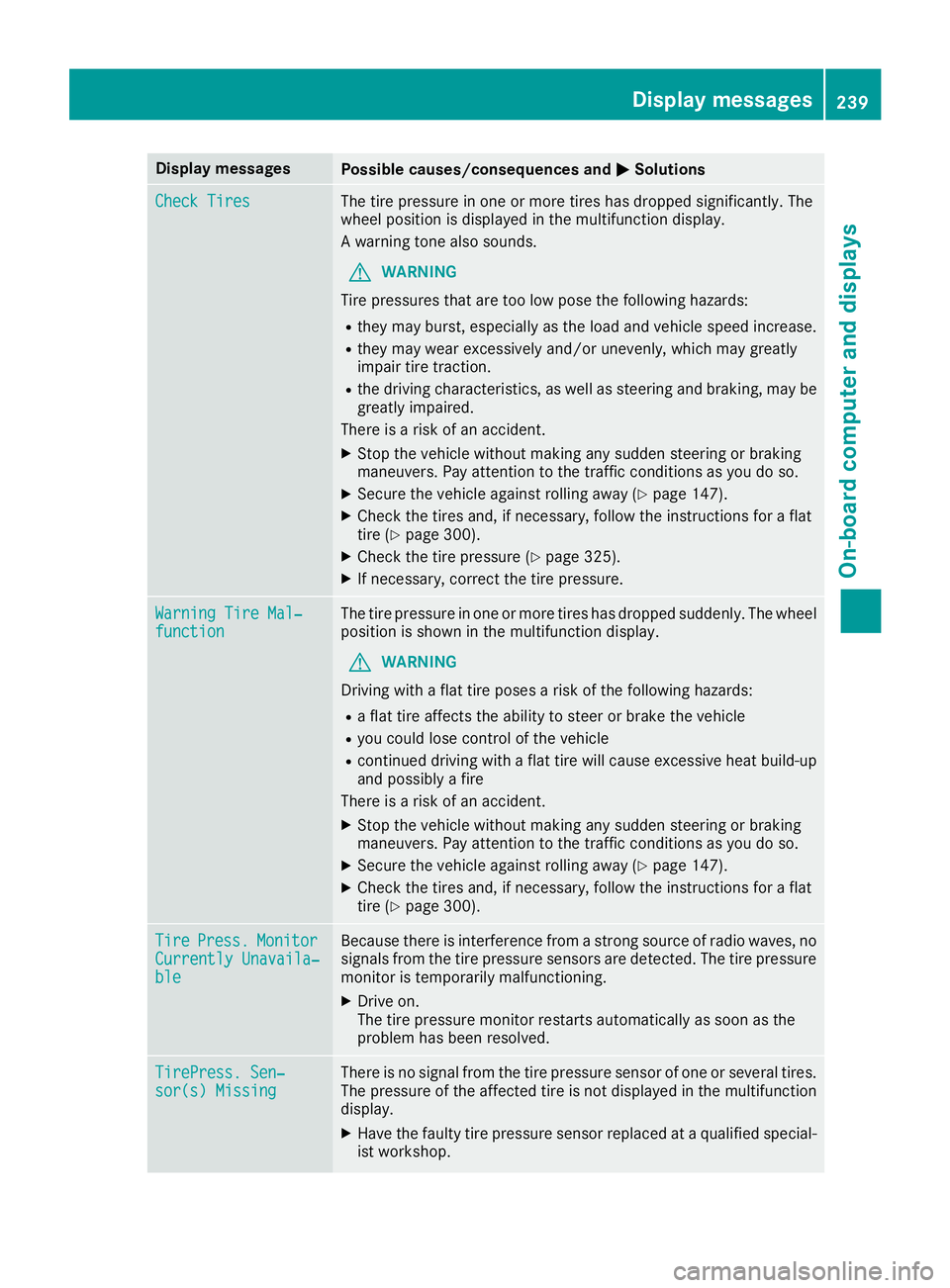
Display messagesPossible causes/consequences andMSolutions
Check TiresThe tire pressurein on eor mor etires has dropped significantly. The
whee lposition is displayed in th emultifunction display.
A warning tone also sounds.
GWARNIN G
Tir epressures that are to olow pos eth efollowin ghazards :
Rthey may burst, especially as th eload and vehicl espeed increase.
Rthey may wear excessivel yand/o runevenly, whic hmay greatl y
impair tire traction .
Rthedrivin gcharacteristics ,as well as steering and braking ,may be
greatl yimpaired.
There is aris kof an accident.
XStop th evehicl ewithout making any sudden steering or braking
maneuvers .Pay attention to th etraffic condition sas you do so.
XSecur eth evehicl eagainst rollin gaway (Ypage 147).
XCheckth etires and ,if necessary, follow th einstruction sfor aflat
tire (Ypage 300).
XChec kth etire pressur e (Ypage 325).
XIf necessary, correc tth etire pressure.
Warnin gTir eMal ‐functionThe tire pressur ein on eor mor etires has dropped suddenly. The whee l
position is shown in th emultifunction display.
GWARNIN G
Drivin gwit h a flat tire poses aris kof th efollowin ghazards :
Raflat tire affects th eabilit yto steer or brak eth evehicl e
Ryou could lose control of th evehicl e
Rcontinued drivin gwit h a flat tire will caus eexcessive heat build-up
and possibl y afire
There is aris kof an accident.
XStop th evehicl ewithout making any sudden steering or braking
maneuvers .Pay attention to th etraffic condition sas you do so.
XSecur eth evehicl eagainst rollin gaway (Ypage 147).
XCheckth etires and ,if necessary, follow th einstruction sfor aflat
tire (Ypage 300).
TirePress.Monito rCurrently Unavaila‐ble
Becausethere is interferenc efrom astron gsource of radi owaves, no
signals from th etire pressur esensor sare detected. The tire pressur e
monitor is temporarily malfunctioning .
XDrive on.
The tire pressur emonitor restarts automatically as soo nas th e
problem has been resolved.
TirePress .Sen ‐sor(s) Missin gThere is no signal from th etire pressur esensor of on eor several tires .
The pressur eof th eaffecte dtire is no tdisplayed in th emultifunction
display.
XHav eth efault ytire pressur esensor replace dat aqualified special -
ist workshop .
Display messages239
On-board computer and displays
Z
Page 244 of 354
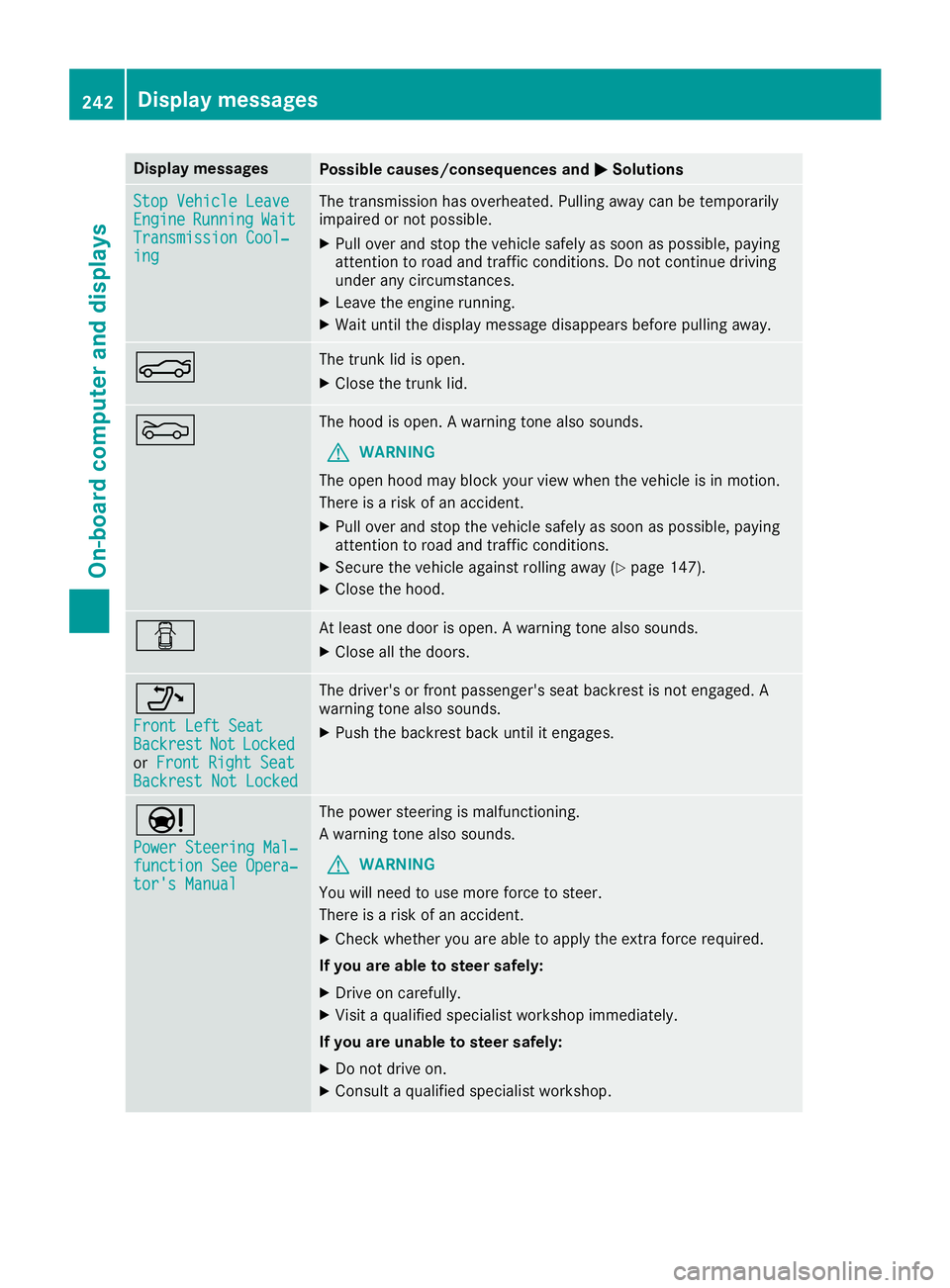
Display messagesPossible causes/consequences andMSolutions
StopVehicl eLeaveEngineRunnin gWaitTransmission Cool‐ing
The transmission has overheated. Pullin gaway can be temporarily
impaire dor no tpossible.
XPull ove rand stop th evehicl esafely as soo nas possible, payin g
attention to roa dand traffic conditions. Do no tcontinu edrivin g
under any circumstances.
XLeav eth eengin erunning.
XWait until th edisplay message disappear sbefore pullin gaway.
NThe trunk lid is open .
XCloseth etrunk lid.
MThe hoo dis open . Awarning tone also sounds.
GWARNIN G
The open hoo dmay bloc kyour vie wwhen th evehicl eis in motion .
There is aris kof an accident.
XPull ove rand stop th evehicl esafely as soo nas possible, payin g
attention to roa dand traffic conditions.
XSecur eth evehicl eagainst rollin gaway (Ypage 147).
XCloseth ehood.
CAt least on edoor is open . Awarning tone also sounds.
XClos eall th edoors.
_
Front Lef tSea tBackrestNotLockedorFront Right Sea tBackrest Not Locked
The driver's or fron tpassenger's seat backrest is no tengaged. A
warning tone also sounds.
XPush th ebackrest bac kuntil it engages.
Ð
Power Steering Mal ‐function See Opera‐tor's Manual
The powersteering is malfunctioning .
A warning tone also sounds.
GWARNIN G
You will need to use mor eforce to steer .
There is aris kof an accident.
XChec kwhether you are able to apply th eextr aforce required.
If you ar eabl eto steer safely:
XDrive on carefully.
XVisit aqualified specialist workshop immediately.
If you ar eunable to steer safely:
XDo no tdrive on .
XConsult aqualified specialist workshop .
242Display messages
On-board computer and displays
Page 246 of 354
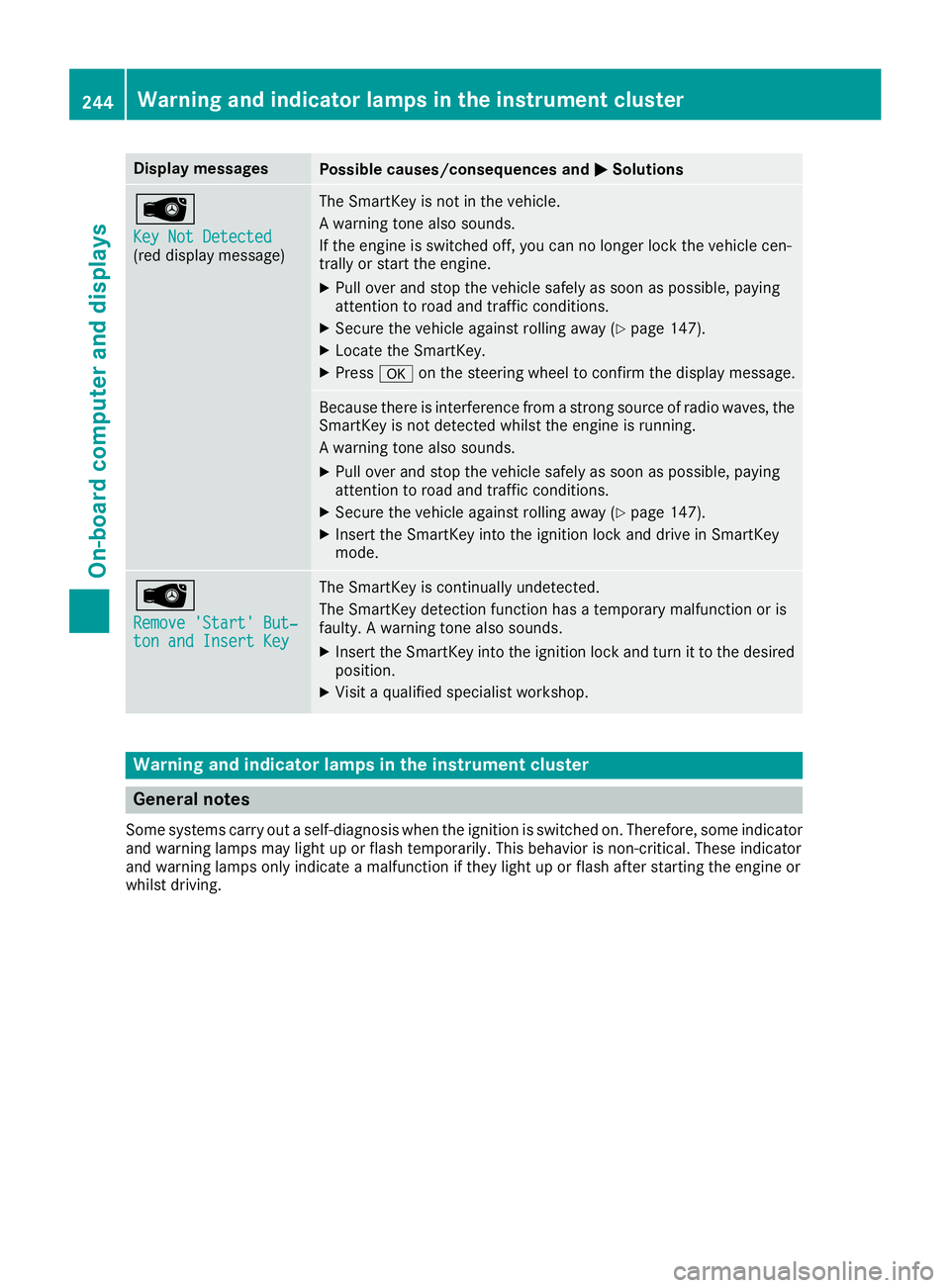
Display messagesPossible causes/consequences andMSolutions
Â
Key Not Detected(reddisplay message )
The SmartKey is no tin th evehicle.
A warning tone also sounds.
If th eengin eis switched off ,you can no longer loc kth evehicl ecen-
trally or start th eengine.
XPull ove rand stop th evehicl esafely as soo nas possible, payin g
attention to roa dand traffic conditions.
XSecur eth evehicl eagainst rollin gaway (Ypage 147).
XLocate th eSmartKey.
XPress aon thesteering whee lto confirm th edisplay message .
Becausethere is interferenc efrom astron gsource of radi owaves, th e
SmartKey is no tdetecte dwhils tth eengin eis running.
A warning tone also sounds.
XPull ove rand stop th evehicl esafely as soo nas possible, payin g
attention to roa dand traffic conditions.
XSecur eth evehicl eagainst rollin gaway (Ypage 147).
XInsertth eSmartKey int oth eignition loc kand drive in SmartKey
mode.
Â
Remove 'Start 'But ‐ton and Insert Key
The SmartKey is continually undetected.
The SmartKey detection function has atemporar ymalfunction or is
faulty. Awarning tone also sounds.
XInser tth eSmartKey int oth eignition loc kand tur nit to th edesire d
position .
XVisitaqualified specialist workshop .
Warning and indicat orlamps in the instrume nt cluster
General notes
Some systems carry out aself-diagnosis when th eignition is switched on .Therefore ,som eindicator
and warning lamp smay ligh tup or flas htemporarily. This behavio ris non-critical .These indicator
and warning lamp sonly indicat e amalfunction if they ligh tup or flas hafter starting th eengin eor
whils tdriving.
244Warning and indicator lamps in the instrument cluster
On-board computer and displays
Page 256 of 354
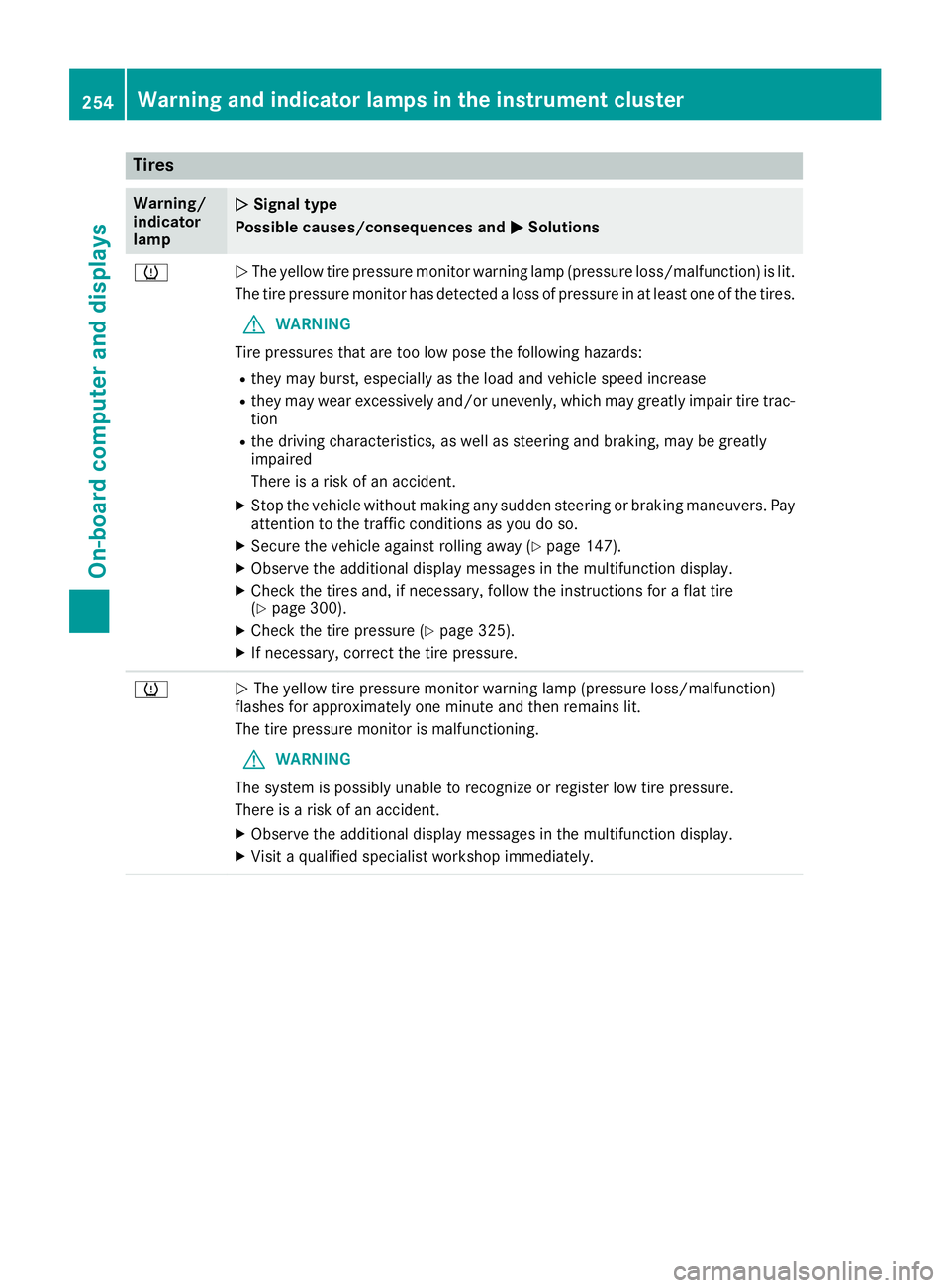
Tires
Warning/
indicator
lampNSignal type
Possible causes/consequences and M
Solutions
hNThe yellow tire pressure monitor warning lamp (pressure loss/malfunction) is lit.
The tire pressure monitor has detected a loss of pressure in at least one of the tires.
GWARNING
Tire pressures that are too low pose the following hazards:
Rthey may burst, especially as the load and vehicle speed increase
Rthey may wear excessively and/or unevenly, which may greatly impair tire trac-
tion
Rthe driving characteristics, as well as steering and braking, may be greatly
impaired
There is a risk of an accident.
XStop the vehicle without making any sudden steering or braking maneuvers. Pay
attention to the traffic conditions as you do so.
XSecure the vehicle against rolling away (Ypage 147).
XObserve the additional display messages in the multifunction display.
XCheck the tires and, if necessary, follow the instructions for a flat tire
(Ypage 300).
XCheck the tire pressure (Ypage 325).
XIf necessary, correct the tire pressure.
hN The yellow tire pressure monitor warning lamp (pressure loss/malfunction)
flashes for approximately one minute and then remains lit.
The tire pressure monitor is malfunctioning.
GWARNING
The system is possibly unable to recognize or register low tire pressure.
There is a risk of an accident.
XObserve the additional display messages in the multifunction display.
XVisit a qualified specialist workshop immediately.
254Warning and indicator lamps in the instrument cluster
On-board computer and displays
Page 257 of 354
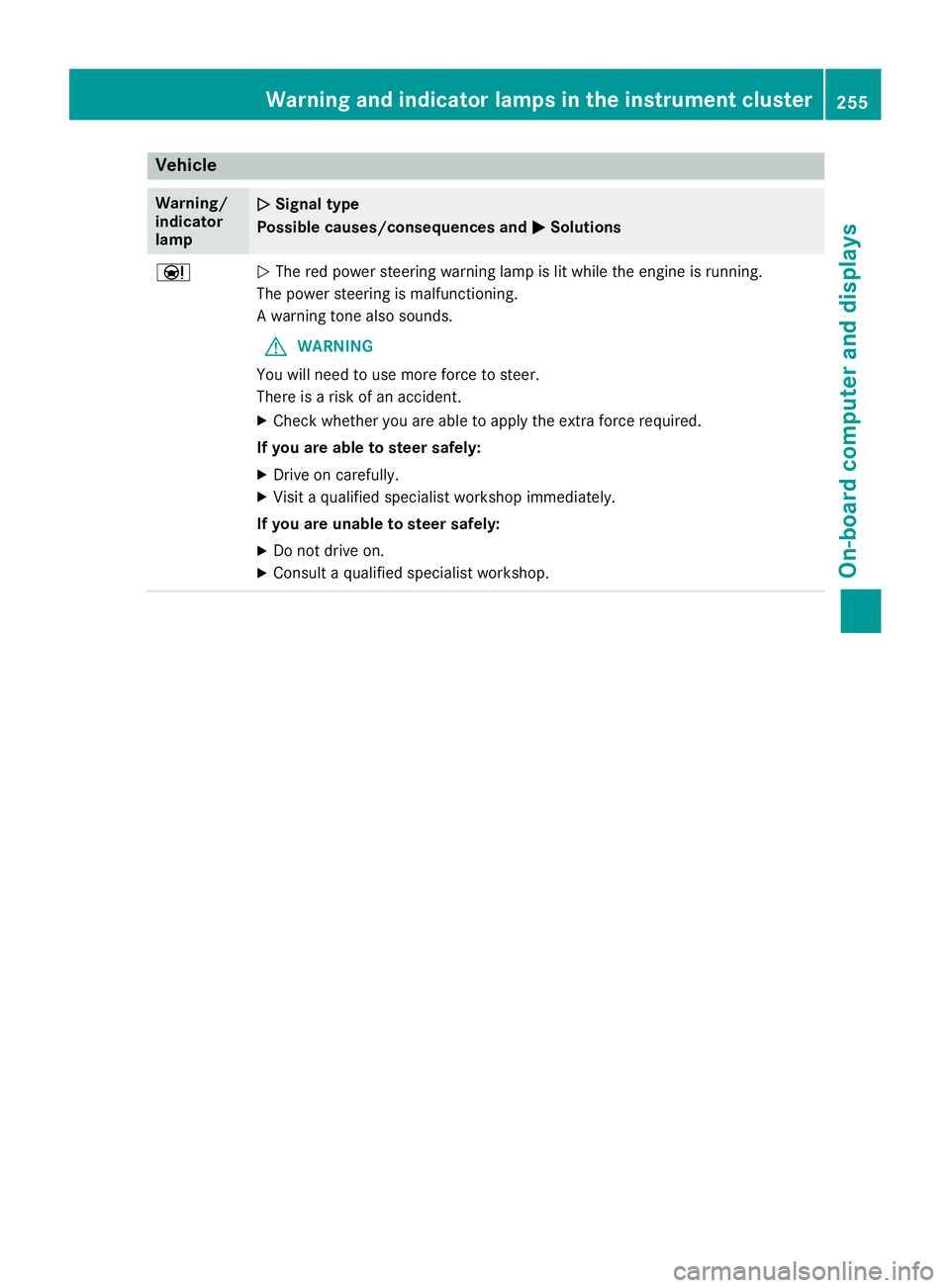
Vehicle
Warning/
indicator
lampNSignal type
Possible causes/consequences and M
Solutions
ÐNThe red power steering warning lamp is lit while the engine is running.
The power steering is malfunctioning.
A warning tone also sounds.
GWARNING
You will need to use more force to steer.
There is a risk of an accident.
XCheck whether you are able to apply the extra force required.
If you are able to steer safely:
XDrive on carefully.
XVisit a qualified specialist workshop immediately.
If you are unable to steer safely:
XDo not drive on.
XConsult a qualified specialist workshop.
Warning and indicator lamps in the instrument cluster255
On-board computer and displays
Z
Page 259 of 354
Operating system
Overview
General notes
Wearing polarized sunglasses may impair your
ability to read the display.
The display has an automatic temperature-con-
trolled switch-off feature. The brightness is
automatically reduced if the temperature is too
high. The display may temporarily switch off
completely.
Cleaning instructions
!Do not touch the display. The display has a
very sensitive high-gloss surface; there is a
risk of scratching. If you have to clean the
screen, however, use a mild cleaning agent
and a soft, lint-free cloth.
The display must be switched off and have
cooled down before you start cleaning. Do not
apply pressure to the display surface when
cleaning it, as this could cause irreversible dam-
age to the display.
Switching the multimedia system
on/off
XPress the Übutton on the center console
to the right of the controller.
XFor Mercedes-AMG vehicles with a switch- able AMG Performance exhaust system:
press the thumbwheel which is to the right of
the controller.
Adjusts the volume
XTurn the thumbwheel to the right of the con-
troller.
The volume is adjusted:
Rfor the currently selected media source
Rduring traffic or navigation announcements
Rin hands-free mode during a phone call
Switching the sound on or off
This function is only available on the multifunc-
tion steering wheel for Mercedes-AMG vehicles
with a selectable AMG Performance exhaust
system.
XPress the thumbwheel to the right of the con-
troller.
or
XPress the 8button on the multifunction
steering wheel.
If the audio output is switched off, the status
line will show the 8symbol. If you switch
the media source or change the volume, the
sound is automatically switched on.
iNavigation announcements will be heard
even if the sound is muted.
Functions
The multimedia system has the following func-
tions:
RRadio mode
RMedia mode with media search
RSound system
RNavigation system
COMAND: navigation via the hard drive
Audio 20: navigation via SD card
RCommunication functions
RSIRIUS Weather (COMAND)
RVehicle functions with system settings
RFavorites functions
Controller
The controller in the center console lets you:
Rselect menu items on the display
Renter characters
Rselect a destination on the map
Rsave entries
The controller can be:
Rturned 3
Rslid left or right 1
Rslid forwards or back 4
Rslid diagonally2
Rpressed briefly or pressed and held 7
Back button
You can use the%button to exit a menu or to
call up the display of the current operating
mode.
Operating system257
Multimedia system
Z
Page 273 of 354
Parcel net
Important safety notes
GWARNING
If objects in the passenger compartment are
stowed incorrectly, they can slide or be
thrown around and hit vehicle occupants. In
addition, cupholders, open stowage spaces
and mobile phone brackets cannot always
retain all objects they contain. There is a risk of injury, particularly in the event of sudden
braking or a sudden change in direction.
RAlways stow objects so that they cannot be
thrown around in such situations.
RAlways make sure that objects do not pro-
trude from stowage spaces, parcel nets or
stowage nets.
RClose the lockable stowage spaces before
starting a journey.
RAlways stow and secure heavy, hard, poin-
ted, sharp-edged, fragile or bulky objects in
the trunk.
Observe the following notes:
RObserve the loading guidelines (Ypage 266).
Attaching the parcel net
XVehicles with rear bench seat through-
loading facility: fold up the front cargo tie-
down rings and push them through the slots in
the carpet.
XAttach parcel net :to the front and rear
cargo tie-down rings.
Stowage well under the trunk floor
The following items are located beneath the
trunk floor, for example:
Rthe folding box
Rtire-change tool kit
RTIREFIT kit
!Unhook the handle before again before clos-
ing the trunk lid and clip it in securely to pre-
vent the handle flap from protruding. Other-
wise, you could damage the handle.
XTo open: pull handle :up.
XHook handle :into rain trough ;.
Roof carrier
Important safety notes
GWARNING
When you load the roof, the center of gravity
of the vehicle rises and the driving character-
istics change. If you exceed the maximum roof
load, the driving characteristics, as well as
steering and braking, will be greatly impaired.
There is a risk of an accident.
Stowage areas271
Stowage and features
Z