light MERCEDES-BENZ C-CLASS COUPE 2018 Owner's Manual
[x] Cancel search | Manufacturer: MERCEDES-BENZ, Model Year: 2018, Model line: C-CLASS COUPE, Model: MERCEDES-BENZ C-CLASS COUPE 2018Pages: 354, PDF Size: 5.88 MB
Page 235 of 354
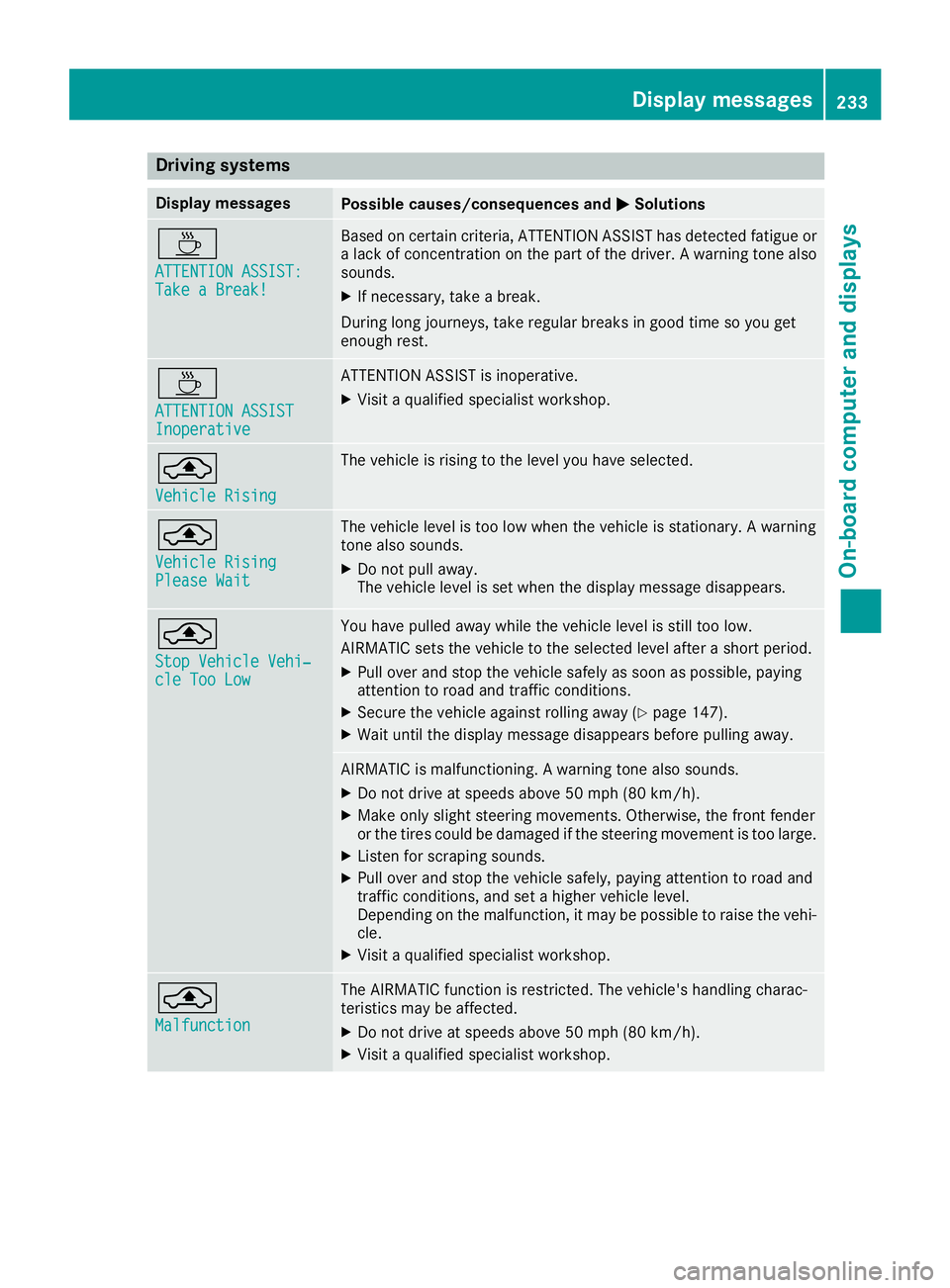
Drivingsystems
Display messagesPossible causes/consequences an dMSolutions
À
ATTENTION ASSIST :Take a Break!
Based on certain criteria, ATTENTION ASSIST has detecte dfatigue or
a lac kof concentration on th epar tof th edriver . Awarnin gtone also
sounds.
XIf necessary, take abreak .
Durin glon gjourneys, take regular break sin goo dtime so you get
enough rest.
À
ATTENTION ASSISTInoperative
ATTENTION ASSIST is inoperative .
XVisitaqualified specialis tworkshop .
¨
VehicleRising
The vehicle is risin gto th elevel you hav eselected.
¨
Vehicl eRisingPlease Wai t
The vehicle level is to olow when th evehicle is stationary. Awarnin g
tone also sounds.
XDo no tpull away.
The vehicle level is set when th edisplay messag edisappears .
¨
StopVehicl eVehi‐cle Too Low
You hav epulle daway whil eth evehicle level is still to olow.
AIRMATIC set sth evehicle to th eselecte dlevel after ashort period.
XPull over and stop th evehicle safely as soo nas possible, payin g
attention to road and traffic conditions.
XSecur eth evehicle against rollin gaway (Ypage 147).
XWait until th edisplay messag edisappears befor epulling away.
AIRMATIC is malfunctioning. Awarnin gtone also sounds.
XDo no tdrive at speeds abov e50 mph (80 km/h).
XMak eonly slight steerin gmovements .Otherwise ,th efron tfender
or th etires could be damaged if th esteerin gmovemen tis to olarge.
XListe nfo rscrapin gsounds.
XPull over and stop th evehicle safely, payin gattention to road and
traffic conditions, and set ahigher vehicle level.
Dependin gon th emalfunction ,it may be possible to rais eth evehi-
cle.
XVisit aqualified specialis tworkshop .
¨
Malfunction
The AIRMATIC function is restricted. The vehicle' shandlin gcharac -
teristics may be affected.
XDo no tdrive at speeds abov e50 mph (80 km/h).
XVisit aqualified specialis tworkshop .
Display messages233
On-board computer and displays
Z
Page 247 of 354
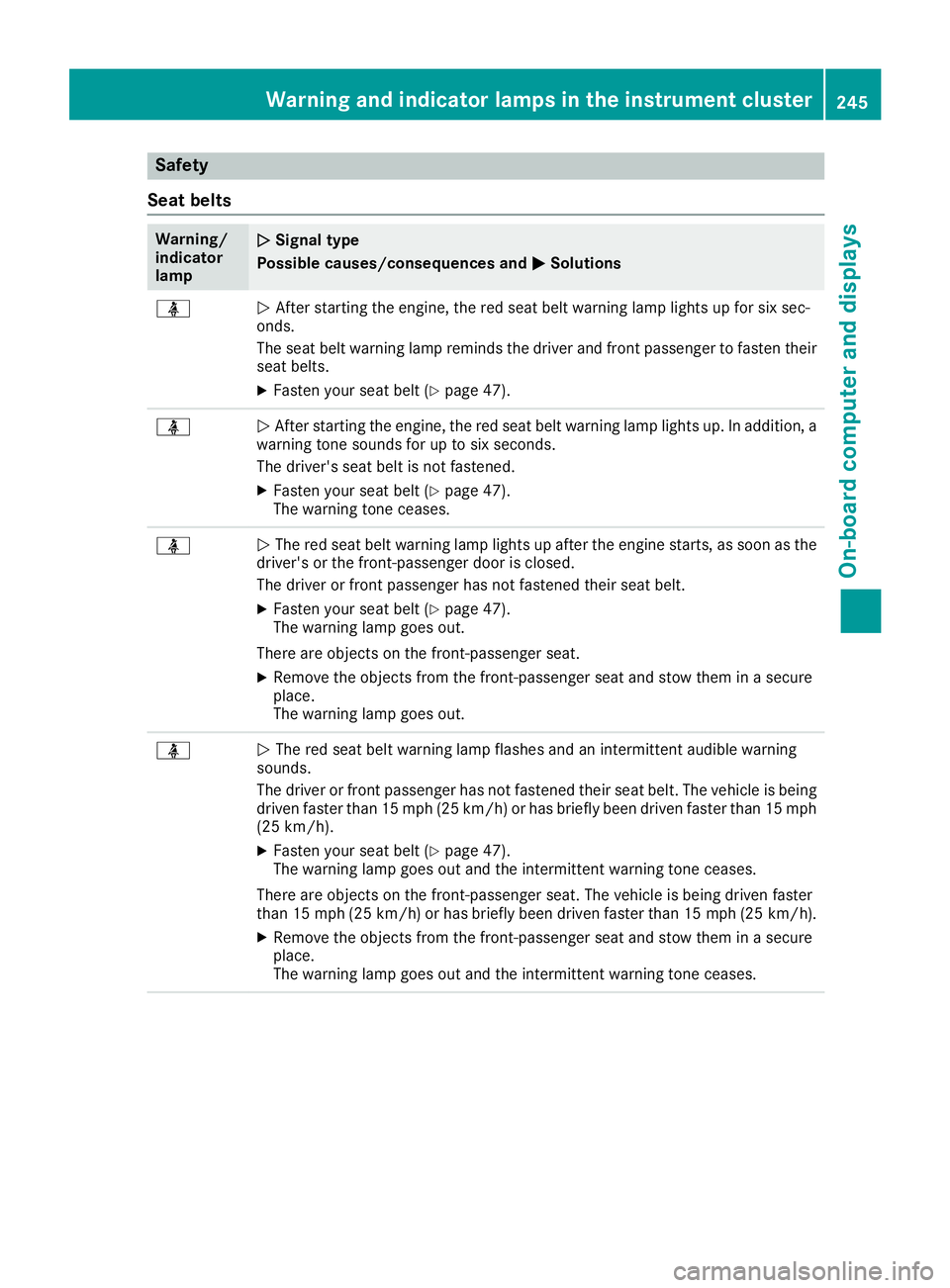
Safety
Seat belts
Warning/
indicator
lampNSignal type
Possible causes/consequences and M
Solutions
üNAfter starting the engine, the red seat belt warning lamp lights up for six sec-
onds.
The seat belt warning lamp reminds the driver and front passenger to fasten their
seat belts.
XFasten your seat belt (Ypage 47).
üN After starting the engine, the red seat belt warning lamp lights up. In addition, a
warning tone sounds for up to six seconds.
The driver's seat belt is not fastened.
XFasten your seat belt (Ypage 47).
The warning tone ceases.
üN The red seat belt warning lamp lights up after the engine starts, as soon as the
driver's or the front-passenger door is closed.
The driver or front passenger has not fastened their seat belt.
XFasten your seat belt (Ypage 47).
The warning lamp goes out.
There are objects on the front-passenger seat.
XRemove the objects from the front-passenger seat and stow them in a secure
place.
The warning lamp goes out.
üN The red seat belt warning lamp flashes and an intermittent audible warning
sounds.
The driver or front passenger has not fastened their seat belt. The vehicle is being
driven faster than 15 mph (25 km/h) or has briefly been driven faster than 15 mph
(25 km/h).
XFasten your seat belt (Ypage 47).
The warning lamp goes out and the intermittent warning tone ceases.
There are objects on the front-passenger seat. The vehicle is being driven faster
than 15 mph (25 km/h) or has briefly been driven faster than 15 mph (25 km/h).
XRemove the objects from the front-passenger seat and stow them in a secure
place.
The warning lamp goes out and the intermittent warning tone ceases.
Warning and indicator lamps in the instrument cluster245
On-board computer and displays
Z
Page 248 of 354
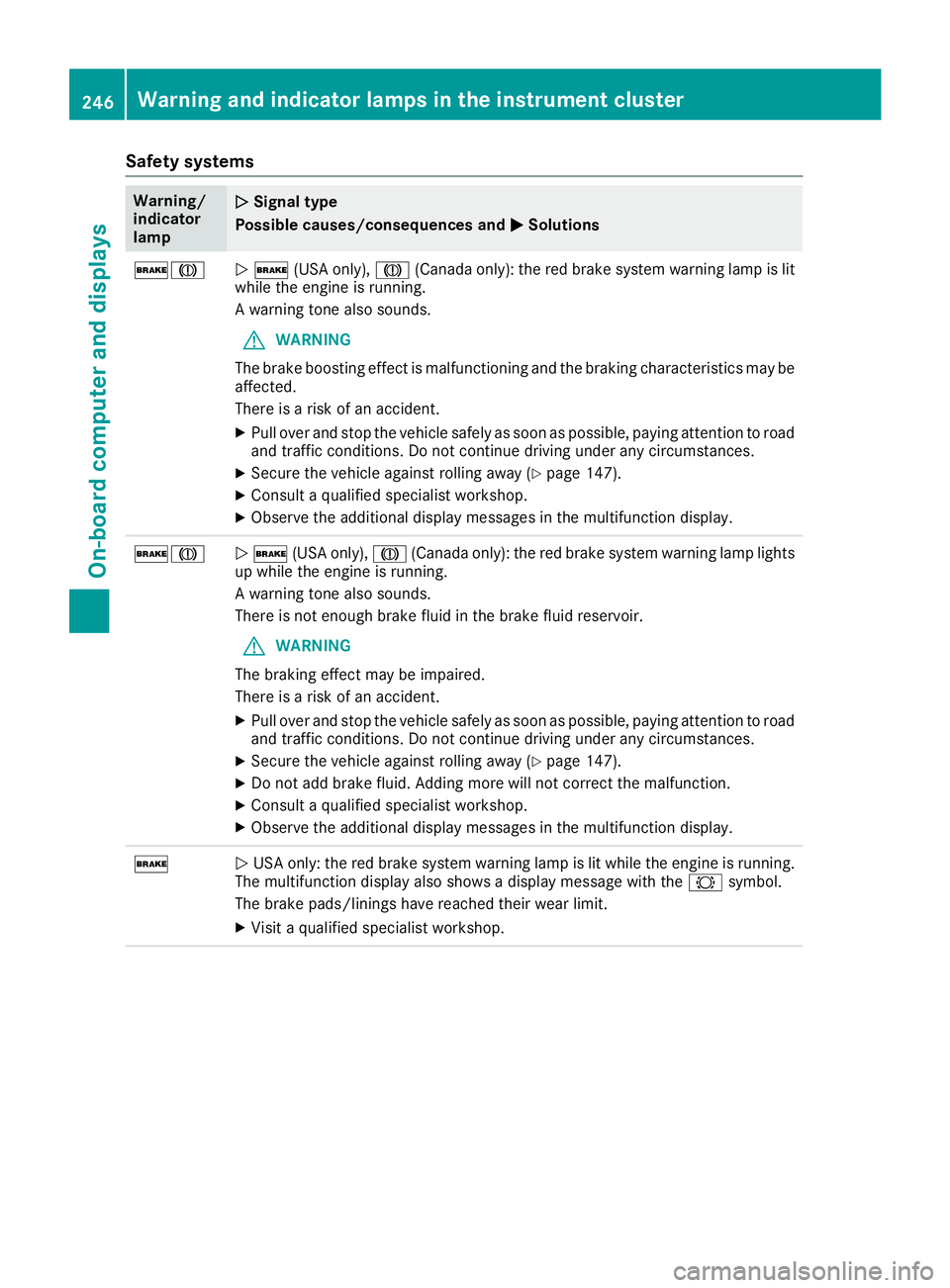
Safety systems
Warning/
indicator
lampNSignal type
Possible causes/consequences and M
Solutions
$JN$ (USA only), J(Canada only): the red brake system warning lamp is lit
while the engine is running.
A warning tone also sounds.
GWARNING
The brake boosting effect is malfunctioning and the braking characteristics may be
affected.
There is a risk of an accident.
XPull over and stop the vehicle safely as soon as possible, paying attention to road
and traffic conditions. Do not continue driving under any circumstances.
XSecure the vehicle against rolling away (Ypage 147).
XConsult a qualified specialist workshop.
XObserve the additional display messages in the multifunction display.
$JN $ (USA only), J(Canada only): the red brake system warning lamp lights
up while the engine is running.
A warning tone also sounds.
There is not enough brake fluid in the brake fluid reservoir.
GWARNING
The braking effect may be impaired.
There is a risk of an accident.
XPull over and stop the vehicle safely as soon as possible, paying attention to road
and traffic conditions. Do not continue driving under any circumstances.
XSecure the vehicle against rolling away (Ypage 147).
XDo not add brake fluid. Adding more will not correct the malfunction.
XConsult a qualified specialist workshop.
XObserve the additional display messages in the multifunction display.
$N USA only: the red brake system warning lamp is lit while the engine is running.
The multifunction display also shows a display message with the #symbol.
The brake pads/linings have reached their wear limit.
XVisit a qualified specialist workshop.
246Warning and indicator lamps in the instrument cluster
On-board computer and displays
Page 252 of 354
Warning/
indicator
lampNSignal type
Possible causes/consequences and M
Solutions
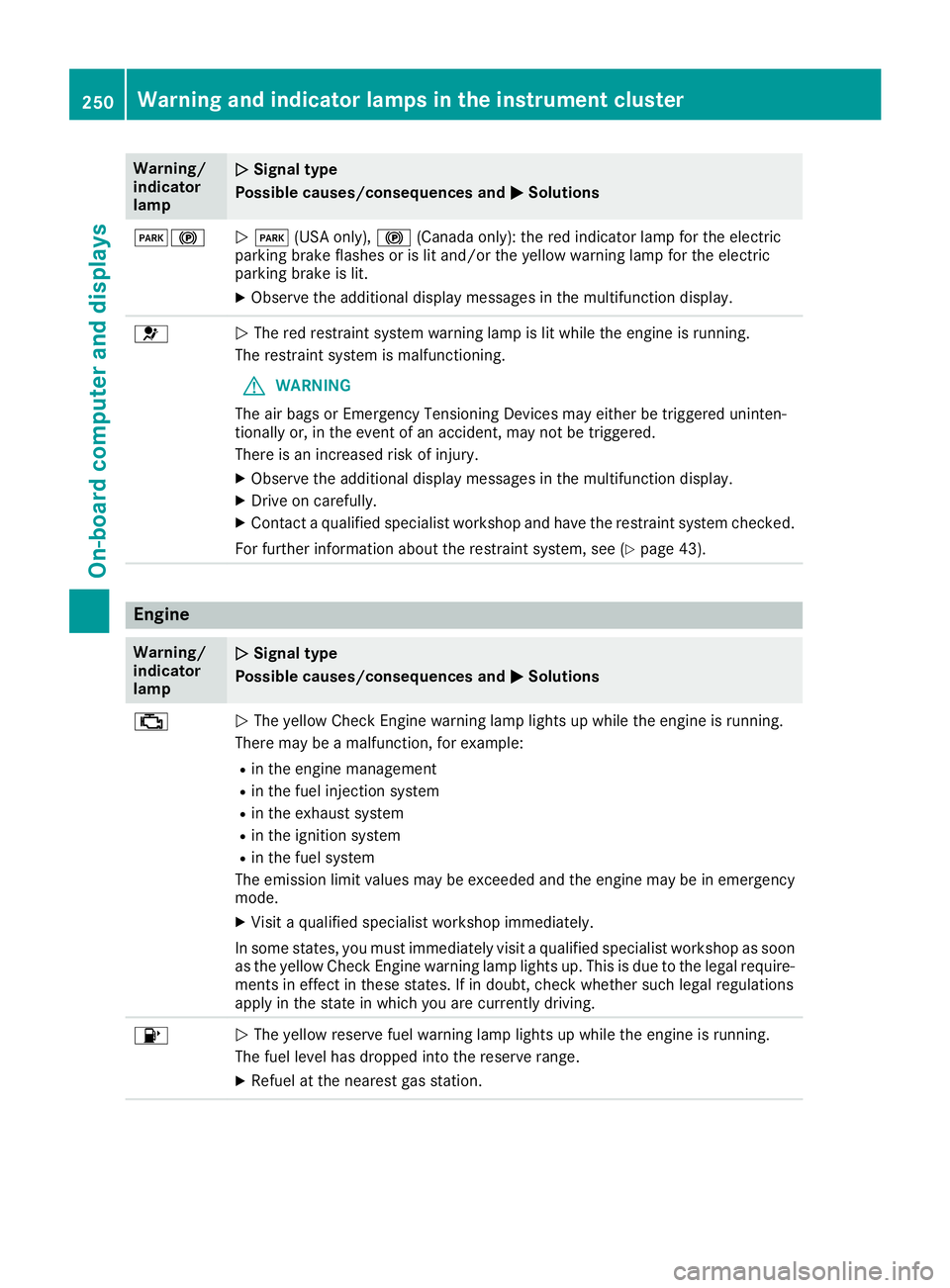
F!NF (USA only), !(Canada only): the red indicator lamp for the electric
parking brake flashes or is lit and/or the yellow warning lamp for the electric
parking brake is lit.
XObserve the additional display messages in the multifunction display.
6N The red restraint system warning lamp is lit while the engine is running.
The restraint system is malfunctioning.
GWARNING
The air bags or Emergency Tensioning Devices may either be triggered uninten-
tionally or, in the event of an accident, may not be triggered.
There is an increased risk of injury.
XObserve the additional display messages in the multifunction display.
XDrive on carefully.
XContact a qualified specialist workshop and have the restraint system checked.
For further information about the restraint system, see (
Ypage 43).
Engine
Warning/
indicator
lampNSignal type
Possible causes/consequences and M
Solutions
;NThe yellow Check Engine warning lamp lights up while the engine is running.
There may be a malfunction, for example:
Rin the engine management
Rin the fuel injection system
Rin the exhaust system
Rin the ignition system
Rin the fuel system
The emission limit values may be exceeded and the engine may be in emergency
mode.
XVisit a qualified specialist workshop immediately.
In some states, you must immediately visit a qualified specialist workshop as soon as the yellow Check Engine warning lamp lights up. This is due to the legal require-
ments in effect in these states. If in doubt, check whether such legal regulations
apply in the state in which you are currently driving.
8N The yellow reserve fuel warning lamp lights up while the engine is running.
The fuel level has dropped into the reserve range.
XRefuel at the nearest gas station.
250Warning and indicator lamps in the instrument cluster
On-board computer and displays
Page 253 of 354
Warning/
indicator
lampNSignal type
Possible causes/consequences and M
Solutions
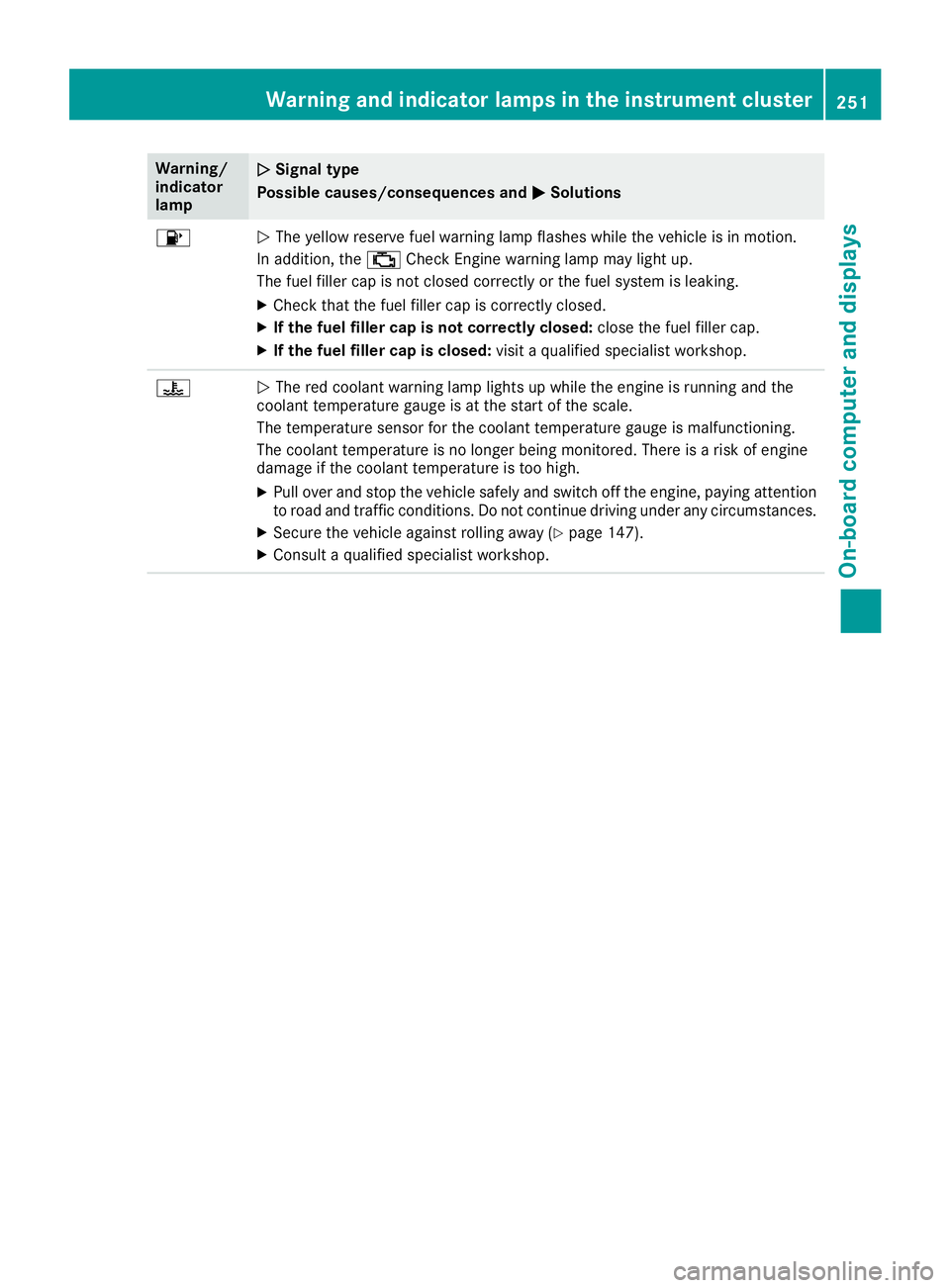
8NThe yellow reserve fuel warning lamp flashes while the vehicle is in motion.
In addition, the ;Check Engine warning lamp may light up.
The fuel filler cap is not closed correctly or the fuel system is leaking.
XCheck that the fuel filler cap is correctly closed.
XIf the fuel filler cap is not correctly closed: close the fuel filler cap.
XIf the fuel filler cap is closed:visit a qualified specialist workshop.
?NThe red coolant warning lamp lights up while the engine is running and the
coolant temperature gauge is at the start of the scale.
The temperature sensor for the coolant temperature gauge is malfunctioning.
The coolant temperature is no longer being monitored. There is a risk of engine
damage if the coolant temperature is too high.
XPull over and stop the vehicle safely and switch off the engine, paying attention
to road and traffic conditions. Do not continue driving under any circumstances.
XSecure the vehicle against rolling away (Ypage 147).
XConsult a qualified specialist workshop.
Warning and indicator lamps in the instrument cluster251
On-board computer and displays
Z
Page 255 of 354
Warning/
indicator
lampNSignal type
Possible causes/consequences and M
Solutions
XIf the coolant temperature is below the red marking, drive to the nearest quali-
fied specialist workshop.
XAvoid heavy loads on the engine as you do so, e.g. driving in mountainous terrain
and stop-and-go traffic.
Driving systems
Warning/
indicator
lampNSignal type
Possible causes/consequences and M
Solutions
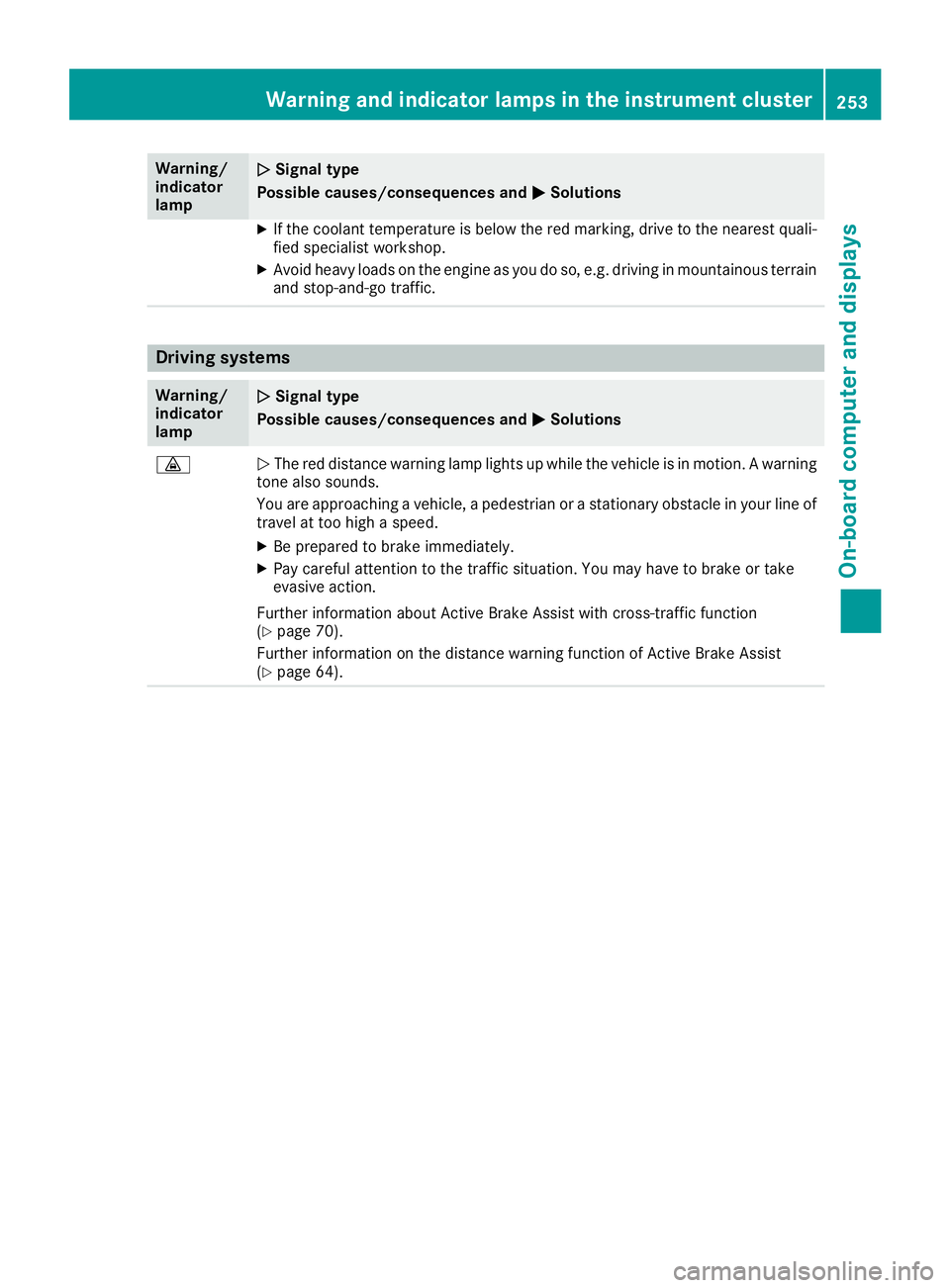
·NThe red distance warning lamp lights up while the vehicle is in motion. A warning
tone also sounds.
You are approaching a vehicle, a pedestrian or a stationary obstacle in your line of travel at too high a speed.
XBe prepared to brake immediately.
XPay careful attention to the traffic situation. You may have to brake or take
evasive action.
Further information about Active Brake Assist with cross-traffic function
(
Ypage 70).
Further information on the distance warning function of Active Brake Assist
(
Ypage 64).
Warning and indicator lamps in the instrument cluster253
On-board computer and displays
Z
Page 258 of 354
General notes
The multimedia system section in this Opera-
tor's Manual describes the basic principles for
operation. More information can be found in theDigital Operator's Manual.
Important safety notes
GWARNING
If you operate information systems and com-
munication equipment integrated in the vehi-
cle when driving, you may be distracted from
the traffic situation. You could also lose con-
trol of the vehicle. There is a risk of an acci-
dent.
Only operate this equipment when the traffic
situation permits. If you are not sure that this
is possible, park the vehicle paying attention
to traffic conditions and operate the equip-
ment when the vehicle is stationary.
You must observe the legal requirements for the
country in which you are currently driving when
operating the multimedia system.
The multimedia system calculates the route to
the destination without taking the following into
account, for example:
Rtraffic lights
Rstop and yield signs
Rparking or stopping restrictions
Rroad narrowing
Rother road and traffic rules and regulations
The multimedia system may give incorrect nav-
igation recommendations if the actual street/
traffic situation does not correspond with the
digital map's data.
For example:
Ra diverted route
Rthe road layout or the direction of a one-way
street has been changed
For this reason, you must always observe road
and traffic rules and regulations during your
journey. Road and traffic rules and regulations
always have priority over multimedia system
driving recommendations. Navigation announcements are intended to
direct you while driving without diverting your
attention from the road and driving.
Please always use this feature instead of con-
sulting the map display for directions. Looking
at the icons or map display can distract you from
traffic conditions and driving, and increase the
risk of an accident.
This equipment complies with FCC radiation
exposure limits set forth for uncontrolled equip-
ment and meets the FCC radio frequency (RF)
Exposure Guidelines in Supplement C to OET65.
This equipment has very low levels of RF energy
that is deemed to comply without maximum
permissive exposure evaluation (MPE). How-
ever, it is
recommended to insta
ll it at a distance
of at least 8 inches (approx. 20 cm) between the
radiation source and a person's body (not
including limbs such as hands, wrists, feet and
legs).
GWARNING
Modifications to electronic components, their software as well as wiring can impair their
function and/or the function of other net-
worked components. In particular, systems
relevant to safety could also be affected. As a
result, these may no longer function as inten-
ded and/or jeopardize the operating safety of
the vehicle. There is an increased risk of an
accident and injury.
Never tamper with the wiring as well as elec-
tronic components or their software. You
should have all work to electrical and elec-
tronic equipment carried out at a qualified
specialist workshop.
Function restrictions
For safety reasons, some functions are restric-
ted or unavailable while the vehicle is in motion.
You will notice this, for example, because either
you will not be able to select certain menu items
or a message will appear to this effect.
256Function restrictions
Multimedia system
Page 270 of 354
Depending on the vehicle's equipment, the fol-
lowing may be in the stowage space:
Ran SD card slot
Ra multimedia connector unit with two USB
ports, e.g. for iPod®, iPhone®or MP3 player
(see the Digital Operator's Manual)
Ra mobile phone bracket
Ra small stowage space in the upper front sec-
tion
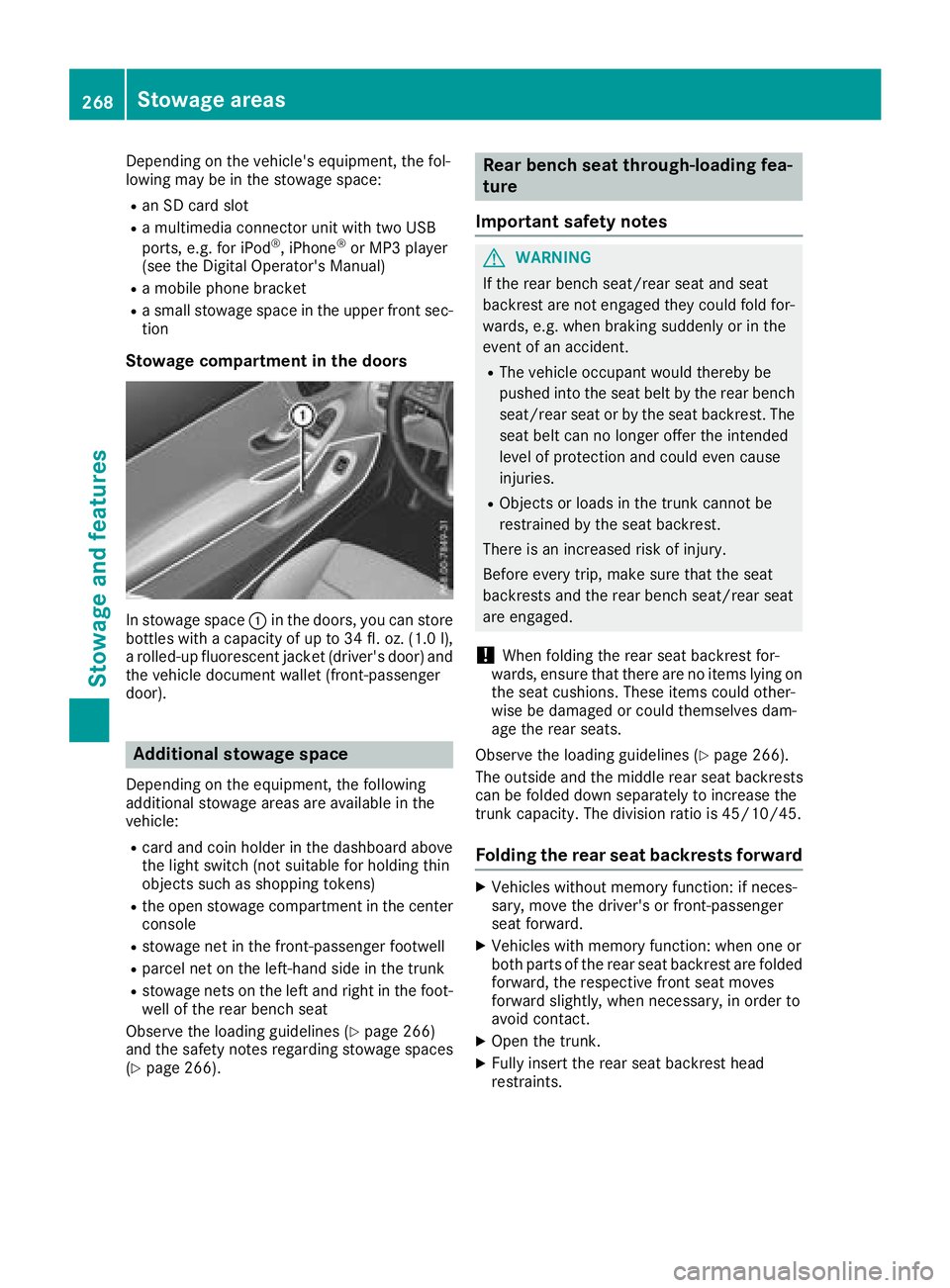
Stowage compartment in the doors
In stowage space :in the doors, you can store
bottles with a capacity of up to 34 fl. oz. (1.0 l),
a rolled-up fluorescent jacket (driver's door) and
the vehicle document wallet (front-passenger
door).
Additional stowage space
Depending on the equipment, the following
additional stowage areas are available in the
vehicle:
Rcard and coin holder in the dashboard above
the light switch (not suitable for holding thin
objects such as shopping tokens)
Rthe open stowage compartment in the center
console
Rstowage net in the front-passenger footwell
Rparcel net on the left-hand side in the trunk
Rstowage nets on the left and right in the foot- well of the rear bench seat
Observe the loading guidelines (
Ypage 266)
and the safety notes regarding stowage spaces
(
Ypage 266).
Rear bench seat through-loading fea-
ture
Important safety notes
GWARNING
If the rear bench seat/rear seat and seat
backrest are not engaged they could fold for-
wards, e.g. when braking suddenly or in the
event of an accident.
RThe vehicle occupant would thereby be
pushed into the seat belt by the rear bench
seat/rear seat or by the seat backrest. The
seat belt can no longer offer the intended
level of protection and could even cause
injuries.
RObjects or loads in the trunk cannot be
restrained by the seat backrest.
There is an increased risk of injury.
Before every trip, make sure that the seat
backrests and the rear bench seat/rear seat
are engaged.
!When folding the rear seat backrest for-
wards, ensure that there are no items lying on the seat cushions. These items could other-
wise be damaged or could themselves dam-
age the rear seats.
Observe the loading guidelines (
Ypage 266).
The outside and the middle rear seat backrests
can be folded down separately to increase the
trunk capacity. The division ratio is 45/10/45.
Folding the rear seat backrests forward
XVehicles without memory function: if neces-
sary, move the driver's or front-passenger
seat forward.
XVehicles with memory function: when one or
both parts of the rear seat backrest are folded
forward, the respective front seat moves
forward slightly, when necessary, in order to
avoid contact.
XOpen the trunk.
XFully insert the rear seat backrest head
restraints.
268Stowage areas
Stowage and features
Page 272 of 354
ture. This will prevent unauthorized access to
the trunk from the vehicle interior.
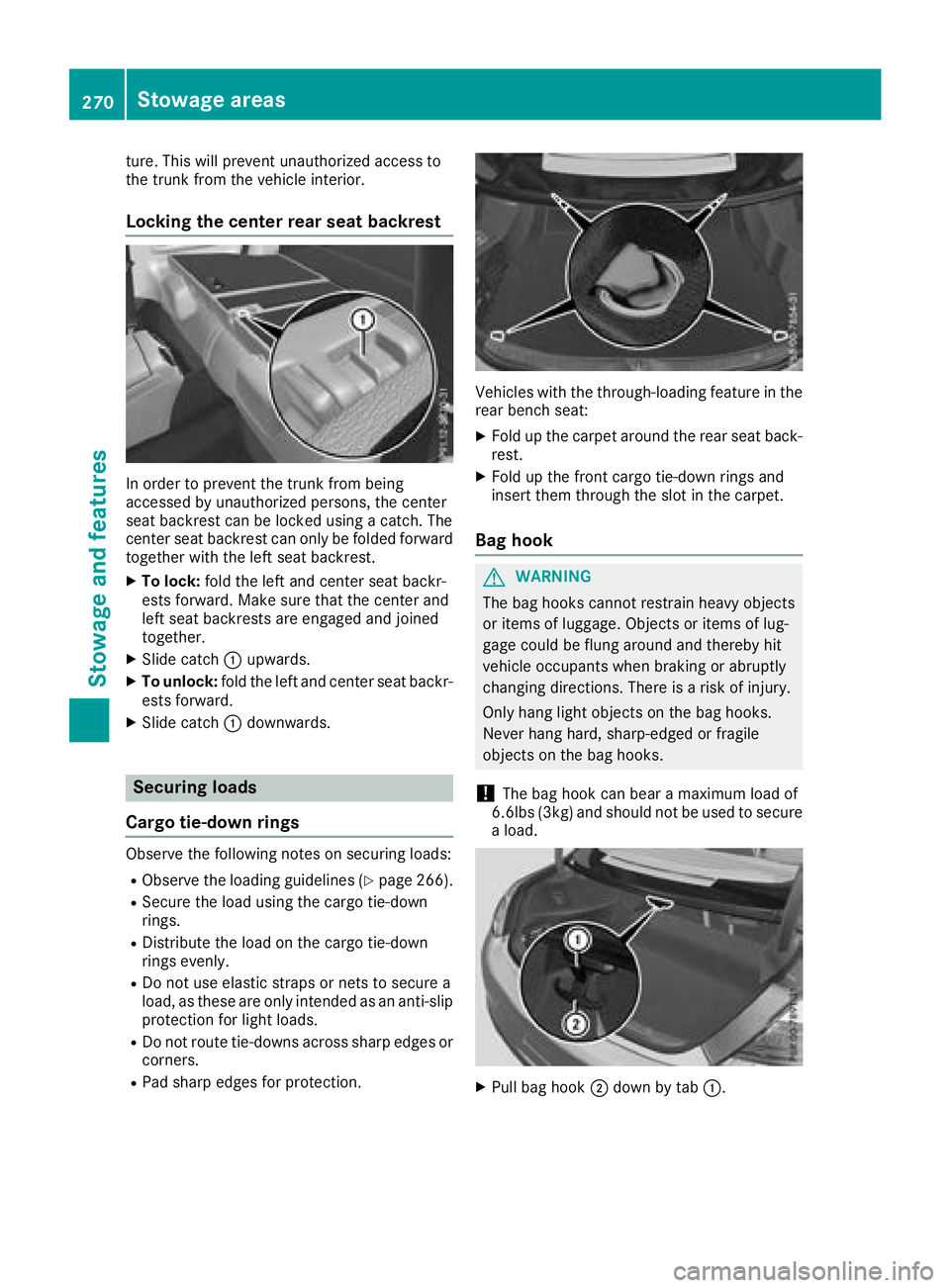
Locking the center rear seat backrest
In order to prevent the trunk from being
accessed by unauthorized persons, the center
seat backrest can be locked using a catch. The
center seat backrest can only be folded forward
together with the left seat backrest.
XTo lock:fold the left and center seat backr-
ests forward. Make sure that the center and
left seat backrests are engaged and joined
together.
XSlide catch :upwards.
XTo unlock: fold the left and center seat backr-
ests forward.
XSlide catch :downwards.
Securing loads
Cargo tie-down rings
Observe the following notes on securing loads:
RObserve the loading guidelines (Ypage 266).
RSecure the load using the cargo tie-down
rings.
RDistribute the load on the cargo tie-down
rings evenly.
RDo not use elastic straps or nets to secure a
load, as these are only intended as an anti-slip protection for light loads.
RDo not route tie-downs across sharp edges orcorners.
RPad sharp edges for protection.
Vehicles with the through-loading feature in the
rear bench seat:
XFold up the carpet around the rear seat back-
rest.
XFold up the front cargo tie-down rings and
insert them through the slot in the carpet.
Bag hook
GWARNING
The bag hooks cannot restrain heavy objects
or items of luggage. Objects or items of lug-
gage could be flung around and thereby hit
vehicle occupants when braking or abruptly
changing directions. There is a risk of injury.
Only hang light objects on the bag hooks.
Never hang hard, sharp-edged or fragile
objects on the bag hooks.
!The bag hook can bear a maximum load of
6.6lbs (3kg) and should not be used to secure
a load.
XPull bag hook ;down by tab :.
270Stowageareas
Stowag ean d features
Page 274 of 354
Never exceed the maximum roof load and
adjust your driving style.
You will find information on the maximum roof
load in the "Technical data" section
(
Ypage 349).
!Mercedes-Benz recommends that you only
use roof carriers that have been tested and
approved for Mercedes-Benz vehicles. This
helps to avoid damage to the vehicle.
Position the load on the roof carrier in such a
way that the vehicle will not sustain damage
even when it is in motion.
Depending on the vehicle equipment, ensure
that when the roof carrier is installed you can:
Rraise the sliding sunroof/panorama roof
with power tilt/sliding panel fully
Ropen the trunk lid fully
!To avoid damaging or scratching the covers,
do not use metallic or hard objects to open
them.
An incorrectly secured roof carrier or roof load
may become detached from the vehicle. You
must therefore ensure that you observe the roof carrier manufacturer's installation instructions.
If a roof carrier is installed, the panorama roof
with power tilt/sliding panel cannot be opened.
The panorama roof with power tilt/sliding panel
can still be raised to allow ventilation of the
vehicle interior. If the panorama roof with power
tilt/sliding panel makes contact with a roof car- rier approved by Mercedes-Benz, the sunroof
will lower slightly but remain raised at the rear.
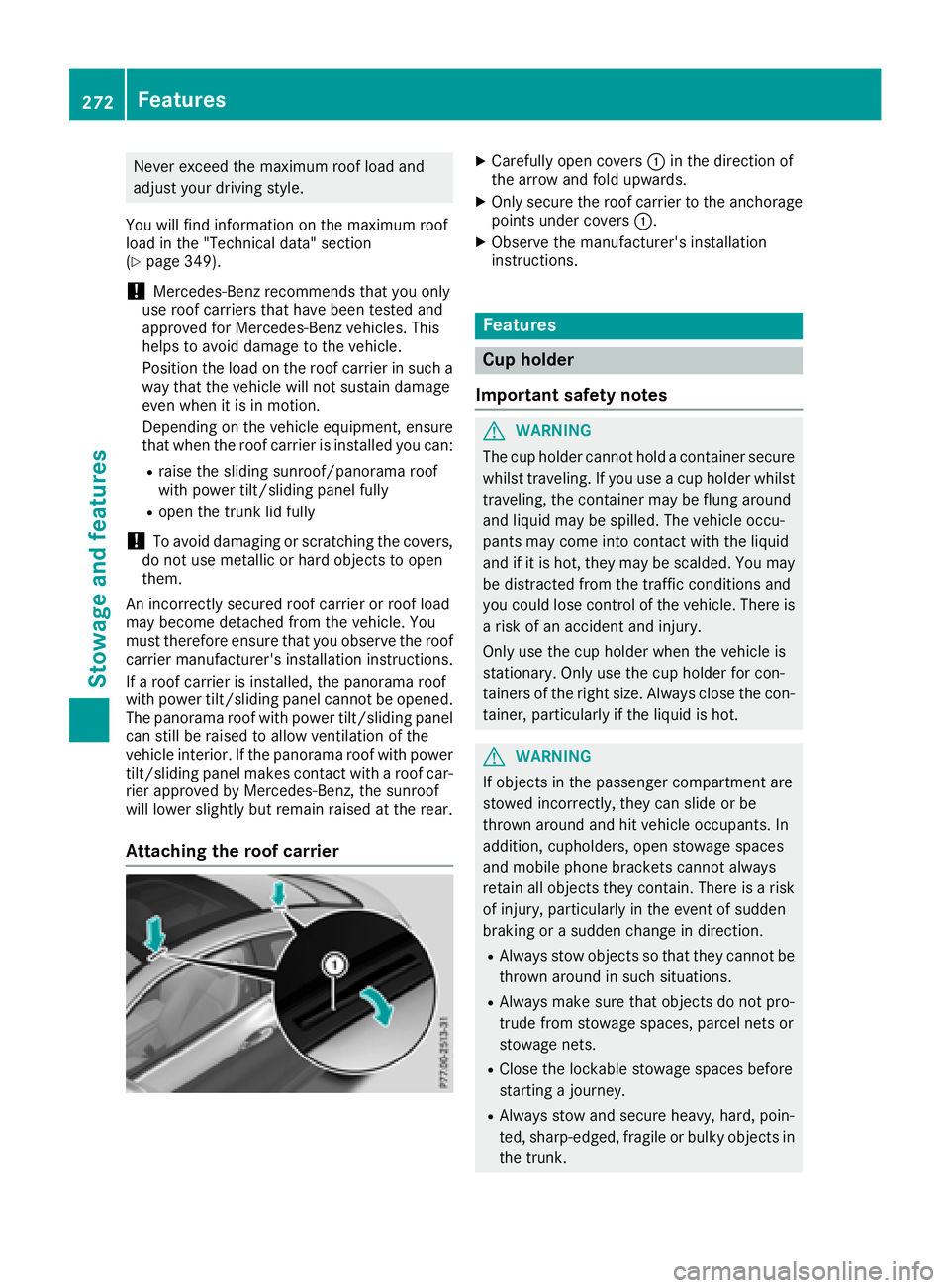
Attaching the roof carrier
XCarefully open covers :in the direction of
the arrow and fold upwards.
XOnly secure the roof carrier to the anchorage points under covers :.
XObserve the manufacturer's installation
instructions.
Features
Cup holder
Important safety notes
GWARNING
The cup holder cannot hold a container secure
whilst traveling. If you use a cup holder whilst
traveling, the container may be flung around
and liquid may be spilled. The vehicle occu-
pants may come into contact with the liquid
and if it is hot, they may be scalded. You may
be distracted from the traffic conditions and
you could lose control of the vehicle. There is a risk of an accident and injury.
Only use the cup holder when the vehicle is
stationary. Only use the cup holder for con-
tainers of the right size. Always close the con-
tainer, particularly if the liquid is hot.
GWARNING
If objects in the passenger compartment are
stowed incorrectly, they can slide or be
thrown around and hit vehicle occupants. In
addition, cupholders, open stowage spaces
and mobile phone brackets cannot always
retain all objects they contain. There is a risk of injury, particularly in the event of sudden
braking or a sudden change in direction.
RAlways stow objects so that they cannot be
thrown around in such situations.
RAlways make sure that objects do not pro-
trude from stowage spaces, parcel nets or
stowage nets.
RClose the lockable stowage spaces before
starting a journey.
RAlways stow and secure heavy, hard, poin-
ted, sharp-edged, fragile or bulky objects in
the trunk.
272Features
Stowage and features