USB MERCEDES-BENZ C-CLASS COUPE 2018 User Guide
[x] Cancel search | Manufacturer: MERCEDES-BENZ, Model Year: 2018, Model line: C-CLASS COUPE, Model: MERCEDES-BENZ C-CLASS COUPE 2018Pages: 593, PDF Size: 10.86 MB
Page 352 of 593
Yo
u must obse rveth e legal requirements forthe
country in whi chyou are cur rently driving when
operating the multimedia sy stem.
Mobile phone functions can be used with
Android Autousing the Android operating sys‐
te m on the multimedia sy stem. It is operated
using the cent ral control element or thevo ice
control. You can activate thevo ice-opera ted con‐
trol sy stem bypressing and holding the00E3
button on the multifunction steering wheel.
When using Android Autovia thevo ice-opera ted
control sy stem, the multimedia sy stem can still
be opera ted via LINGU ATRO NIC
(0013 page 268).
Only one mobile phone at a time can be connec‐
te d via Android Auto to the multimedia sy stem.
The availability of Android Autoand Android Auto
Apps may vary according tothe count ry.
The service pr ovider is responsible forth is appli‐
cation and the services and conte nt connected
to it. Information on Android
Auto
While using Android Auto,va rious functions of
th e multimedia sy stem, forex ample the media
source Blue tooth®
audio, are not available.
On ly one route guidance can be active at a time.
If ro ute guidance is active on the multimedia sys‐
te m, it is closed when route guidance is star ted
on the mobile phone.
Connecting a mobile phone via Android Auto
Requ irements:
R The firs t acti vation of Android Autoon the
multimedia sy stem must be car ried out when
th eve hicle is stationary for saf etyre asons.
R The mobile phone suppo rts Android Auto
from Android 5.0.
R The Android Autoapp is ins talled on the
mobile phone.
R In order touse thete lephone functions, the
mobile phone must be connected tothe mul‐
timedia sy stem via Blue tooth®
( 0013 page 335). If
th ere was no prior Internet connection, this
is es tablished with the use of the mobile
phone with Android Auto.
R The mobile phone is connected tothe multi‐
media sy stem via the USB port 00C2using a
suitable cable (0013 page 369).
R An Internet connection is requ ired forth e full
ra nge of functions for Android Auto.
Multimedia sy stem:
0018 Connect 0019
Android Auto 0007
Select the mobile phone from the device list.
Ac cepting/rejecting the data pr otection reg‐
ulations
A message with the data pr otection regulations
appears. 0007
Select Accept & Start .
or 0007
Select Decline & End.
Ac tivating automatic start 0007
Select Start automatically 0073. Multimedia sy
stem 349
Page 368 of 593
Setting Internet
radio options
Multimedia sy stem:
0018 Radio 0019
Þ Radio source
0019 TuneIn radio 0019
Z Options
The following options are available:
R Select stream : selectthest re am qualit y.
R Login to TuneIn account: log in to your
Tu neIn user account.
R Log out of account : log out ofyour TuneIn
user account. 0007
Select an option. Media
Au
dio mode In
fo rm ation on the audio mode 000A
WARNING Risk of di stra ction when han‐
dling da tastorage media
If yo u handle a data storage medium while
driving, your attention is diver ted from the traf
fic conditions. This could also cause you
to lose control of theve hicle. 0007
Only handle a data storage medium
when theve hicle is stationar y. Pe
rm issible file sy stems:
R FAT32
R exFAT
R NTFS
Pe rm issible data storage medium:
R SD card
R USB storage device
R iPod ®
/iPhone ®
R MTP devices
R Blue tooth ®
audio equipment
0009 Obse rveth efo llowing no tes:
R The multimedia sy stem supports a total
of up to50,000 files.
R Data storage media up to2 TB are sup‐
por ted (32‑bit address space). Suppor
tedfo rm ats:
R MP3
R WMA
R AAC
R WAV
R FLAC
R ALAC
0009 Obser vethefo llowing no tes:
R Due tothe lar gevariet y of available
music files rega rding encoders, sampling
ra tes and data rates, playback cannot
alw ays be guaranteed.
R Due tothe wide range of USB devices
av ailable on the mar ket, pl ayback cann ot
be guaranteed for all USB devices.
R Cop y-pr otected music files or DRM
enc rypte dfiles cannot be pla yed bac k.
R MP3 pla yers must support Media Trans‐
fe r Pr otocol (MTP). Multimedia sy
stem 365
Page 372 of 593
Connecting USB devices
000E NO
TEDama gecaused byhigh temp era‐
tures High
temp eratures can damage USB devices. 0007
Remo vethe USB device af ter use and
ta ke it out of theve hicle. The multimedia connection unit is
found in the
stow age compartment under the armrest and
has two USB ports.
Depending on theve hicle's equipment, addi‐
tional USB ports can be found in thestow age
compartment of the cent reconsole and in the
re ar passenger compartment. 0007
Connect the USB device tothe USB port.
Pla yable music files are pla yed back only if
th e cor responding media display is activated.
0009 Use the USB port identified by00C2 touse
Apple CarPlay™ and Android Auto.
0009 Depending on theve hicle equipment there is
an additional USB port in there ar passenger
compartment. Ports th at are labelled with a bat
tery symbol can only be used tocharge
USB devices.
Selecting a track in the media playba ck
Multimedia sy stem:
0018 Media
Selecting a track byskipping toa track 0007
Toskip backwards or forw ards toa
track: navigate up or down.
Selecting a track using the cur rent track list 0007
Select 00D3. 0007
Select Current track list. 0007
Select a tra ck.
Selecting playback options
Multimedia sy stem:
0018 Media 0019
Z Options
Playing back similar trac ks 0007
Select Play similar tracks.
A track li stwith similar trac ksis created and
pla yed bac k. Playback mode 0007
Select Random playback of the current track
list.
The cur rent track li stis pla yed in random
orde r. 0007
Select Random playback of the current
medium.
All trac kson the active data storage medium
are pla yed in random orde r. 0007
Select Normal track sequence .
The cur rent track li stis pla yed in the order it
appears on the data storage medium.
Controlling media playback
Multimedia sy stem:
0018 Media 0019
Y Playback control
A bar with playback controls is shown. 0007
Topause playback: select and confirm
Y with th e cent ral control element.
The 00CF symbol is displa yed. 0007
Toresume playback: select and confirm
Y again with the cent ral control element.
The 00D0 symbol is displa yed. Multimedia sy
stem 369
Page 375 of 593
Ac
tivating/deactivating full-screen mode
Multimedia sy stem:
0018 Media 0019
à Media sources 0007
Select a data storage medium.
Pla yable video files are pla yed bac k. 0007
Toactivate full-screen mode: select0008
Full screen. 0007
Todeactivate full-sc reen mode: pressthe
to uchpad.
Changing video settings
Multimedia sy stem:
0018 Media 0019
Z Options
0019 Picture format
The following picture form ats are available:
R Automatic
R 16:9
R 4:3
R Zoom 0007
Select a picture form at. Ad
justing the brightness manually
If th eAutomatic pictureform at is swit ched off,
yo u can adjust the brightness yourself. 0007
Select Brightness. 0007
Adjust the brightness. Media sear
ch St
arting the media sear ch
Multimedia sy stem:
0018 Media 0019
ª Search
Depending on the connected media sources and
fi les, thefo llowing categories are lis ted:
R Current track list
R Keyword search
R Playlists
R Artists
R Albums
R Tracks
R Folders
R Music genres
R Year R
Composers
R Videos
R Podcasts (Apple®
devices)
R Audiobooks (Apple®
devices) 0007
Select a categor y.
0009 The categories are available as soon as the
entire media conte nt has beenread in and
anal ysed. Media Inter
face Information about
the Media Inter face
Media In terface is a universal inter face forthe
connection of mobile audio equipment. The mul‐
timedia sy stem has two USB ports. The USB
ports are located in thestow age compartment
under the armrest.
Suppor ted devices
The Media Inter face allo wsyouto connect the
fo llowing data storage media:
R iPod ®
R iPhone ® 372
Multimedia sy stem
Page 376 of 593
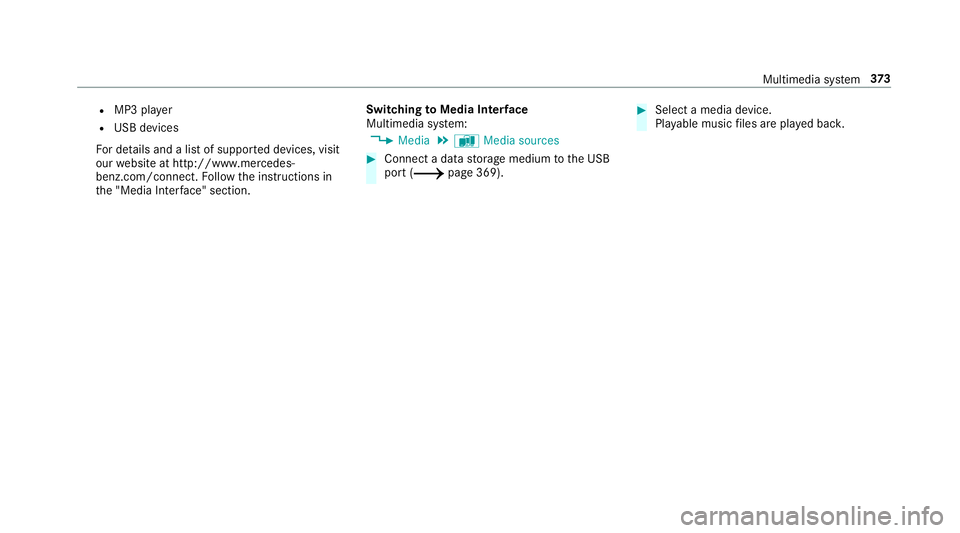
R
MP3 pla yer
R USB devices
Fo r de tails and a list of suppor ted devices, visit
our website at http://www.mercedes-
benz.com/connect. Follow the instructions in
th e "Media Inter face" section. Switching
toMedia Inter face
Multimedia sy stem:
0018 Media 0019
à Media sources 0007
Connect a data storage medium tothe USB
port (0013 page 369). 0007
Select a media device.
Playable music files are pla yed bac k. Multimedia sy
stem 373
Page 550 of 593
Immobiliser ............................................
94
Anti-theft pr otection
see ATA (anti-theft alarm sy stem)
Anticipatory occupant pr otection
see PRE- SAFE®
(anticipatory occu‐
pant pr otection)
see PRE-SAFE ®
PLUS (anticipatory
occupant pr otection plus)
Apple CarPlay™ ....................................... 347
Connecting an iPhone ®
....................... 347
Ending .................................................3 48
No tes ................................................... 347
Overview ............................................. 347
Sound settings .................................... 348
Tr ans ferred vehicle data ......................3 50
Ashtr ay
Fr ont centre console ............................ 121
Re ar passenger compartment ............ .122
Using ................................................... 121
Assistance sy stems
see Driving saf ety sy stem
Assistant display Menu (on-board computer) .................. 260 ASS
YST PLUS ........................................... 392
Battery disconnection pe riods .............3 93
Displ aying the service due date ........... 392
Fu nction/no tes ................................... 392
Re gular maintenance work .................. 392
Special service requ irements .............. 392
ATA (anti-theft ala rmsystem) .................. .94
Deactivating the alarm .......................... 94
Fu nction ................................................ 94
Fu nction of interior pr otection ............... 95
Priming/deactivating interior pr otec‐
tion ........................................................ 96
Priming/deactivating tow- aw ay pro‐
te ction ................................................... 95
To w- aw ay protection function ................95
AT TENTION ASSI ST......................... 238, 239
Fu nction .............................................. 238
Setting ................................................. 239
Sy stem limitations ...............................2 38
At tention assistant
see ATTENTION ASSIST
Au dio mode
Connecting USB devices ..................... 369
Co pyrights ...........................................3 66Information .......................................... 365
Inserting/removing an SD card ........... 366
Media sea rch ....................................... 372
Overview ............................................. 368
Pa use and playback function .............. .369
Selecting a track ................................. 369
Selecting playba ckoptions .................. 369
Switching on media mode ...................3 66
Tr ack list .............................................. 369
Au thorised workshop
see Qualified specialist workshop
Au tomatic distance control
see Active Dis tance Assi stDISTRONIC
Au tomatic driving lights .........................127
Au tomatic engine start (ECO start/
sto p function) .......................................... 15 9
Au tomatic engine stop (ECO start/
sto p function) .......................................... 15 9
Au tomatic front passen ger front air‐
bag deacti vation sy stem
see Automatic front passenger front
airbag shutoff Index
547
Page 584 of 593
Ty
re pressure monitoring sy stem
(function) ............................................. 437
Ty re pressure table .............................. 436
Ty re pressure loss warning sy stem
Fu nction .............................................. 443
Re starting ............................................ 443
Ty re pressure moni toring sy stem
Checking the tyre pressure ................. 437
Checking the tyre temp erature ............ 437
Fu nction .............................................. 437
Re starting ............................................ 438
Te ch nical da ta..................................... 439
Ty re pressure table ................................. 436
Ty re temp erature
Checking (tyre pressure monitoring
sy stem) ................................................ 437
Ty re pressure monitoring sy stem
(function) ............................................. 437
Ty re tread ................................................. 434
Ty re-change tool kit
Overview ............................................ .447
Ty res
Changing hub caps .............................. 449Checking ............................................
.434
Che cking the tyre pressure (tyre
pressure monitoring sy stem) ............... 437
Fitting .................................................. 452
Flat tyre ............................................... 412
Inter changing ...................................... 447
MOExtended tyres ...............................4 13
No ise .................................................. .434
No tes on fitting ................................... 444
Re moving ............................................ 452
Re placing .................................... 444,448
Re starting the tyre pressure loss
wa rning sy stem ................................... 443
Re starting the tyre pressure monitor‐
ing sy stem ...........................................4 38
Selection ............................................. 444
Snow chains ........................................ 434
St oring .................................................4 47
TIREFIT kit ............................................ 41 5
Ty re pressure (N otes) .......................... 435
Ty re pressure loss warning sy stem
(function) ............................................. 443
Ty re pressure monitoring sy stem
(function) ............................................. 437
Ty re pressure table .............................. 436
Un usual handling characteristics ........ 434 U
Un its of measurement
Setting ................................................ .298
Un locking setting ...................................... 72
USB devices Connecting .......................................... 369
User profile .............................................. 300
Creating .............................................. 300
Importing/exporting ............................ 301
Options ................................................ 301
Setting .................................................3 00 V
Ve hicle ...................................................... 15 5
Ac tivating/deactivating standby
mode .................................................. .188
Ad ditional door lock .............................. 75
Cor rect use ........................................... 28
Dama gedetection (pa rking) ................ 187
Data acquisition .................................... 29
Data storage .......................................... 29
Diagnostics connection .........................26
Equipment ............................................. 23
Implied warranty .................................. .28 Index
581