charging MERCEDES-BENZ C-CLASS COUPE 2018 User Guide
[x] Cancel search | Manufacturer: MERCEDES-BENZ, Model Year: 2018, Model line: C-CLASS COUPE, Model: MERCEDES-BENZ C-CLASS COUPE 2018Pages: 593, PDF Size: 10.86 MB
Page 424 of 593
Obser
vethis Owner's Manual.
Obser vethefo llowing if you do not intend touse
th eve hicle over an extended pe riod of time:
R Activate standby mode.
R Alternatively: connect the battery toa bat‐
te ry charge r appro vedby Mercedes-Benz or
consult a qualified specialist workshop to
disconnect the batter y. Note
s onstarting assi stance and on charg‐
ing the12 V battery Ve
hicles with a lithium-ion battery
When charging the battery and during starting
assis tance, al ways use the jump-s tart connec‐
tion point in the engine compartment. 000E
NO
TEDama getothe battery from over‐
vo ltage When
charging using a bat tery charge r with‐
out a maximum charging voltage, the battery
or the on-board electronics may be damaged. 0007
Only use battery charge rs with a maxi‐
mum charging voltage of 14.4 V. All
other vehicles
When charging the battery and during starting
assis tance, al ways use the jump-s tart connec‐
tion point in the engine compartment.
000E NO
TEDamaging the battery thro ugh
ove rvoltage When using a battery
charge r without a maxi‐
mum charging voltage, the battery or the
ve hicle electronics may be damaged. 0007
Only use battery charge rs with a maxi‐
mum charging voltage of 14.8 V. 000A
WARNING Risk ofexplosion from hydro‐
ge nga s igniting
A battery generates hydrogen gas during the
ch arging process. If there is a short circuit or
spar ksstart toform ,th ere is a danger of the
hy drogen gas igniting. 0007
Make sure that the positive term inal of
th e connected battery does not come
into conta ct withvehicle parts. 0007
Never place me tal objects or tools on a
batter y. 0007
When connecting and disconnecting the
batter y,yo u must obse rveth e descri‐
bed order forth e battery clamps. 0007
When giving starting assis tance, al ways
make sure that you on lyconnect bat‐
te ry term inals with identical polarity. 0007
During starting assis tance, you must
obse rveth e described order for con‐
necting and disconnecting the jump
lead. 0007
Do not connect or disconnect the bat‐
te ry cla mp s while the engine is running. Breakdown assi
stance 421
Page 425 of 593
000A
WARNING Risk ofexplosion during
ch arging process and starting assis tance
During thech arging process and starting
assis tance, the battery may release an explo‐
sive gas mixture. 0007
Avoid fire , naked flames, creating
spar ksand smoking. 0007
Make sure that there is suf ficient venti‐
lation du ring thech arging process and
during starting assis tance. 0007
Do not lean over a batter y. 000A
WARNING Risk ofexplosion from a fro‐
zen battery
A dischar ged battery may freeze at temp era‐
tures slightly abo veor below freezing point.
During starting assis tance or battery charg‐
ing, bat tery gas may be released. 0007
Alw aysth aw a frozen bat tery out first
before charging it or per form ing start‐
ing assis tance. If
th e indicator/warning lamps in the instrument
clus ter do not light up at low temp eratures, it is
ve ry likely that the dischar ged battery has fro‐
zen. In this case you may neither jump-s tart the
ve hicle nor charge the batter y.
The service life of a battery that has been
th awe d may be dramatically shor tened. The
st arting characteristics may be impaired, espe‐
cially at low temp eratures.
It is recommended that you ha veathaw ed bat‐
te ry checked at a qualified specialist workshop.
All vehicles
000E NO
TEDama gecaused bynumerous or
ex tended attem ptsto start the engine Nume
rous or extended attem ptsto start the
engine may damage the catalytic con verter
due tonon-combu sted fuel. 0007
Avoid numerous and extended attem pts
to start the engine. Obser
vethefo llowing points during starting
assis tance and when charging the battery:
R Only use undamaged jump lead/charging
cables with a suf ficient cross-section and
insula tedte rm inal clamps.
R Non- insulated parts of thete rm inal clamps
must not come into con tact wi thother me tal
parts while the jump lead/charging cable is
connected tothe battery/jump-s tart connec‐
tion point.
R The jump lead/charging cable must not
come into contact wi thany parts which may
mo vewhen the engine is running.
R Alw ays make sure that nei ther you nor the
battery is elect rostatically charge d.
R Keep away from fire and naked flames.
R Do not lean overth e batter y.
Obser vethe additional following points when
ch arging the battery:
R Only use battery charge rs tested and
appr oved for Mercedes-Benz.
R Read the battery charge r's operating instruc‐
tions before charging the batter y. 422
Breakdown assis tance
Page 426 of 593
Obser
vethe additional following points during
st arting assistance:
R Starting assis tance may only be pr ovided
using batteries with a nominal voltage of
12 V.
R The vehicles must not touch.
R Petrol engine: only acceptstarting assis‐
ta nce if the engine and exhaust sy stem are
cold. St
arting assi stance and charging the12 V
battery Re
quirements:
R The vehicle is secured with the electric park‐
ing brake.
R Automatic transmission: the transmission
is in position 005D.
R Manual transmission: the transmission is in
neutral.
R The ignition and all electrical consumers are
switched off.
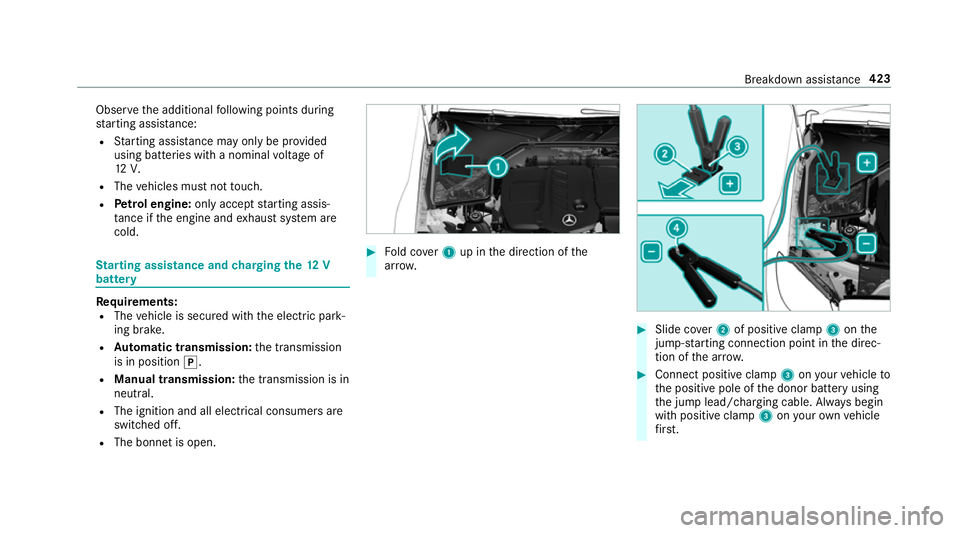
R The bonn etis open. 0007
Fold co ver1 up in the direction of the
ar row. 0007
Slide co ver2 of positive clamp 3onthe
jump-s tarting connection point in the direc‐
tion of the ar row. 0007
Connect positive clamp 3onyour vehicle to
th e positive pole of the donor battery using
th e jump lead/charging cable. Alw ays begin
with positive clamp 3onyour ow nve hicle
fi rs t. Breakdown assi
stance 423
Page 427 of 593
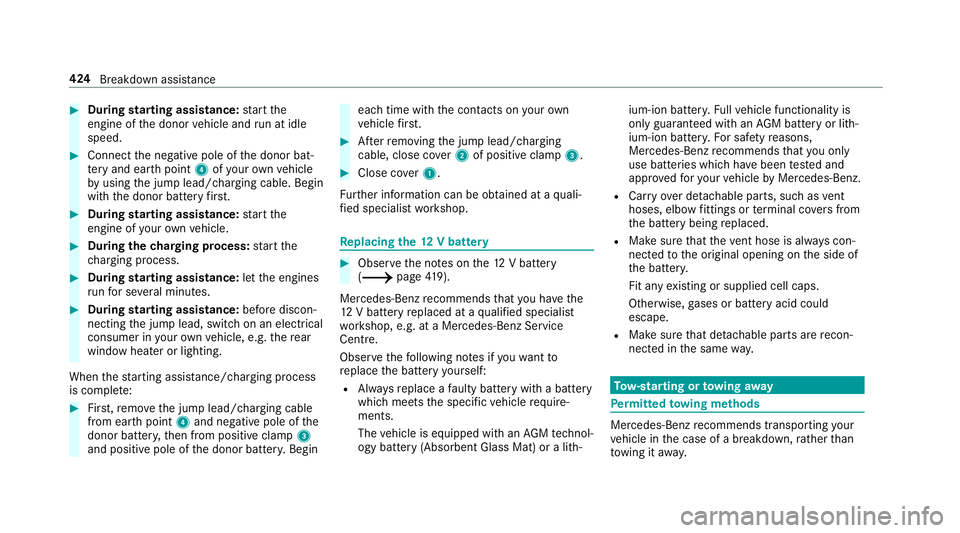
0007
During starting assi stance: start the
engine of the donor vehicle and run at idle
speed. 0007
Connect the negative pole of the donor bat‐
te ry and ear thpoint 4ofyour ow nve hicle
by using the jump lead/charging cable. Begin
with the donor battery firs t. 0007
During starting assi stance: start the
engine of your ow nve hicle. 0007
During thech arging process: start the
ch arging process. 0007
During starting assi stance: letthe engines
ru nfo r se veral minutes. 0007
During starting assi stance: before discon‐
necting the jump lead, switch on an electrical
consumer in your ow nve hicle, e.g. there ar
wind owheater or lighting.
When thest arting assis tance/charging process
is compl ete: 0007
First,re mo vethe jump lead/charging cable
from ear thpoint 4and negative pole of the
donor batter y,then from positive clamp 3
and positive pole of the donor batter y.Begin ea
ch time wi th the conta cts onyour own
ve hicle firs t. 0007
Afterre moving the jump lead/charging
cable, close co ver2 of positive clamp 3. 0007
Close co ver1.
Fu rther information can be obtained at a quali‐
fi ed specialist workshop. Re
placing the 12V battery 0007
Obser vethe no tes on the12 V battery
(0013 page419).
Mercedes-Benz recommends that you ha vethe
12 V battery replaced at a qualified specialist
wo rkshop, e.g. at a Mercedes-Benz Service
Centre.
Obser vethefo llowing no tes if youwa ntto
re place the battery yourself:
R Alw aysre place a faulty bat tery with a battery
which meets the specific vehicle requ ire‐
ments.
The vehicle is equipped with an AGMtech nol‐
ogy battery (Absorbent Glass Mat) or a li th‐ium-ion batter
y.Fu llve hicle functionality is
only guaranteed with an AGM battery or lith‐
ium-ion batter y.Fo r saf etyre asons,
Mercedes-Benz recommends that you on ly
use bat teries which ha vebeen tested and
appr oved foryo ur vehicle byMercedes-Benz.
R Carryover de tachable parts, such as vent
hoses, elbow fittings or term inal co vers from
th e battery being replaced.
R Make sure that theve nt hose is al ways con‐
nected tothe original opening on the side of
th e batter y.
Fit any existing or supplied cell caps.
Otherwise, gases or battery acid could
escape.
R Make sure that de tach able parts are recon‐
nected in the same way. To
w- starting or towing away Pe
rm itted towing me thods Mercedes-Benz
recommends transporting your
ve hicle in the case of a breakdown, rath er than
to wing it away. 424
Breakdown assis tance
Page 505 of 593
Display messages
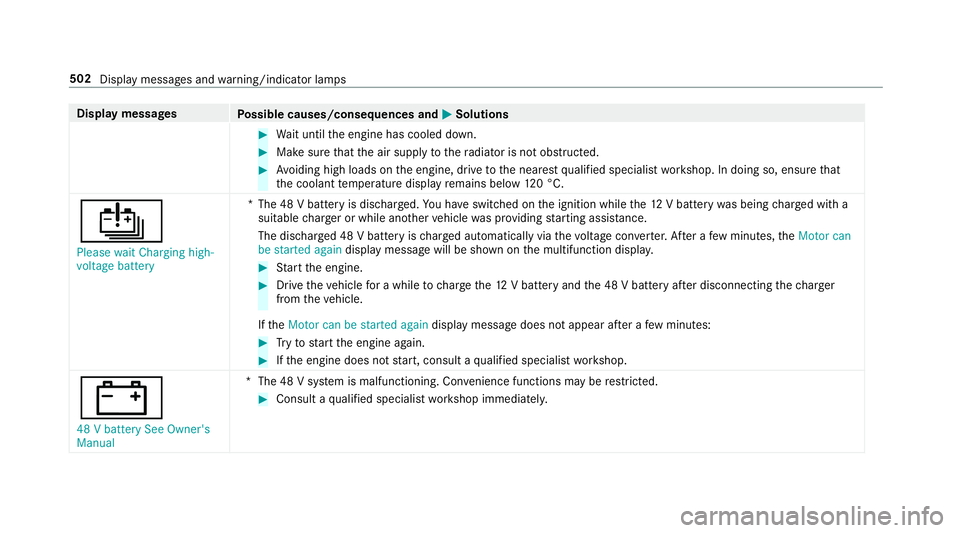
Possible causes/consequences and 0050
0050Solutions 0007
Wait until the engine has cooled down. 0007
Make sure that the air supply tothera diator is not obstructed. 0007
Avoiding high loads on the engine, drive tothe nearest qualified specialist workshop. In doing so, ensure that
th e coolant temp erature display remains below 120 °C.
00D7
Please wait Charging high-
voltage battery *T
he 48 V battery is dischar ged. You ha veswitched on the ignition while the12 V battery was being charge d with a
suitable charge r or while ano ther vehicle was pr oviding starting assis tance.
The discha rged 48 V battery is charge d automatically via thevo ltage con verter. Af ter a few minutes, theMotor can
be started again display message will be shown on the multifunction displa y. 0007
Start the engine. 0007
Drive theve hicle for a while tocharge the12 V battery and the 48 V battery af ter disconnecting thech arger
from theve hicle.
If th eMotor can be started again display message does not appear af ter a few minutes: 0007
Tryto start the engine again. 0007
Ifth e engine does not start, consult a qualified specialist workshop.
003D
48 V battery See Owner's
Manual *T
he 48 V sy stem is malfunctioning. Con venience functions may be restricted. 0007
Consult a qualified specialist workshop immediatel y.502
Display messages and warning/indicator lamps
Page 551 of 593
Au
tomatic front passen ger front air‐
bag shu toff .......................................... 42, 44
Fu nction of the automatic front
passenger front airbag deactivation
sy stem ................................................... 42
PA SSENGER AIR BAG indicator lamp .... .44
Au tomatic mir rorfo lding function
Ac tivating/deactivating ...................... .140
Au tomatic transmission
DIRECT SELECT le ver ........................... 167
Drive program display .......................... 16 4
Drive programs .................................... 16 4
DY NA MIC SELECT switch .................... 16 4
Engaging drive position ....................... 16 9
Engaging neutral .................................. 16 8
Engaging pa rkposition ........................ 16 9
Engaging reve rsege ar ........................ .168
Kickdown ............................................. 17 0
Manual gear changing ........................ .169
St eering wheel gearshift paddles ........ .169
Tr ansmission position display .............. 167
Tr ansmission positions ........................ 167
Au tomatic transmission (problem)
see Transmission (problem) Axle load
Perm issible .......................................... 459
Tr ailer operation .................................. 473 B
Bag hook ................................................... 11 6
Ball ne ck
Fo lding out/in .................................... .248
BA S (Brake Assist Sy stem) .................... .190
Battery Cha rging (Remo teOnline) .................... 15 6
Ke y ........................................................ 73
Re mo tecontrol (s tationary heater) ...... 14 9
Battery see Battery (vehicle)
Battery (vehicle) ...................................... 424
Charging .............................................. 423
Charging (Remo teOnline) .................... 15 6
No tes ................................................... 419
No tes (s tarting assis tance and
ch arging) ............................................ .421
Re placing .............................................4 24
St arting assis tance .............................. 423 Belt
see Seat belt
Bic ycle rack
Tr ailer operation .................................. 252
Blind Spot Assist .................................... .242
Ac tivating/deactivating ...................... .245
Fu nction .............................................. 24 2
Sy stem limitations ...............................2 42
Blo wer
see Climate control
BlueTEC see AdBlue ®
Blue tooth ®
............................................... 294
Information .......................................... 294
Setting up an Internet connection ....... 358
Switching on/off ................................. 294
Switching profile (DUN/PAN) .............. 359
Blue tooth ®
audio
Ac tivating ............................................ 377
De-authorising (de-regis tering) the
device .................................................. 377
Information ..........................................3 75
Overview ..............................................3 75548
Index
Page 559 of 593
007Ainope
rative See Owner's Man‐
ual ....................................................... 479
0053 Inoperative ..................................4 86
0049Intelligent Light Sy stem inoper‐
ative ....................................................5 26
00AFKe y not de tected (white dis‐
pl ay messa ge)...................................... 51 8
00AF Key not de tected (red displ ay
messa ge).............................................5 17
0049 Left dipped beam (Example) ........ 527
0075Left windowbag malfunction
Consult workshop (Example) ............... 483
Limiter inoperative .............................. 497
Limiter passive .................................... 497
¢ Lowe ring .................................... 494
0049Malfunction See Owner's Man‐
ual ....................................................... 527
00CBMaximum speed exceeded ..........4 97
Mercedes me connect Services limi‐
te d See Owner's Manual .....................486Mo
tor can be star ted again .................. 501
N permanently active Risk of vehicle
ro lling .................................................. .510
ç Off............................................... 495
00D9Off ............................................... 492
Only select Park (P) when vehicle is
st ationary ............................................ .511
00CA Operation only possible in
transmission position N ....................... 520
00CAOperation only possible in
transmission position P ........................519
0024 Parking brake See Owner's
Manual ................................................ .476
00AF Place theke y in the mar ked
space See Owner's Manual ..................51 8
Please reduce speed ...........................4 88
00D7Please wait Charging high- volt‐
age battery .......................................... 502
PRE- SAFE inoperati veSee Owner's
Manual ................................................ 485 Ra
dar sensors dirty See Owner's
Manual ................................................ 480
006FRe ar left seat backrest not
loc ked (Example) .................................5 22
0077Re ctify tyre pressure ....................514
Re duce speed ...................................... 516
00C8 Refill Ad Blue Eng. start not pos‐
sible .................................................... 506
00C8Re fill Ad Blue See Owne r’s Man‐
ual .......................................................5 06
0024Re lease parking brake .................479
009ERe place air cleaner .....................500
,Re placekey See Owner's Man‐
ual ........................................................ 519
00AF Replace key ................................ .518
00B6 Reser vefuel le vel........................ 503
0075Re stra int sys. malfunction Con‐
sult workshop ...................................... 487
Re versing not poss. Consult work‐
shop ....................................................5 09556
Index
Page 571 of 593
Mir
rors
see Outside mir rors
Mobile phone Cancelling permission for Internet
connection .......................................... 360
Damage de tection (pa rked vehicle) ...... 187
Locking theve hicle ................................ 76
St arting theve hicle ............................. 154
Un locking theve hicle ............................76
Wi reless charging ................................ 12 5
Mobile phone see Android Auto
see Apple CarPlay™
see Mercedes-Benz Link
see Second telephone
see Telephone
Mobile phone voice recognition
St arting .............................................. .339
St opping ..............................................3 39
Model series see Vehicle identification plate
MOExtended tyres ................................... 413
Mo torw ay mode ....................................... 13 0MULTIBEAM LED
see Intelligent Light Sy stem
Multifunction display Overview of the displa ys...................... 259
Multifunction steering wheel
Overview of buttons ............................ 256
Multifunction steering wheel
see Steering wheel
Multimedia sy stem ................................ .283
Ac tivating/deactivating standby
mode .................................................. .188
Ad justing thevo lume .......................... .290
Central control elements ..................... 284
Configu ring displ aysettings ................2 92
ENERGIZING comfort program (o ver‐
view) ................................................... .304
Entering characters ............................ .290
Fa vourites ............................................ 287
Main functions .................................... .287
Overview ............................................. 283
Re storing thefa ctory settings ............. 303
St andby mode function ........................ 187
St arting the ENERG IZING comfort
program .............................................. 305 Switching
the sound on/off ................2 89
Multimedia sy stem
see Touch Control
see Touchpad N
Na vigation
Menu (on-board computer) .................. 262
Showing/hiding the menu ...................3 06
Switching on ....................................... 305
Up dating the map data ........................ 330
Vo ice commands (LINGU ATRO NIC) .....2 72
Na vigation
see Destination
see Destination entry
see Map
see Route
see Route guidance
see Traf fic information
Na vigation announcements
Ac tivating/deactivating ...................... .320
Ad justing thevo lume .......................... .320
Re peating ............................................ 321
Switching audio fadeout on/off .......... 320 568
Index
Page 575 of 593
Del
eting channels ................................ 380
Direct frequency ent ry........................ 380
Displaying information ......................... 381
Displaying radio text ............................ 381
Editing station presets ........................ .380
Fr equency fix ....................................... 381
Menu (on-boa rdcompu ter) .................. 264
Moving stations .................................. .380
Overview ............................................. 379
Sea rching forst ations ........................ .380
Setting a channel ................................ 380
Setting station tracking ...................... .381
Setting the frequency band ................. 380
Setting the traf fic information
service volume inc rease ...................... 381
St oring radio stations .......................... 380
Swit ching on ........................................ 378
Switching traf fic announcements
on/off .................................................. 381
Ta gging music trac ks........................... 381
Vo ice commands (LINGU ATRO NIC) ...... 276
Ra dio stations
Dialling (on-boa rdcompu ter) ............... 264
Ra in closing function
Sliding sunroof ...................................... .91Ra
in-closing feature
Side wind ows ........................................86
Ra nge
Ad Blue ®
............................................... 260
Displaying ............................................ 261
REACH regulation ...................................... 28
Re ading light
see Interior lighting
Re alwo od (Care) .................................... .408
Re ar fog light
Switching on/off .................................1 27
Re ar seat
see Seat
Re ar seat belt
St atus display ........................................ 39
Re ar seat belt status display .................... 39
Re ar window heater ................................ 14 2
Re ar-view mir ror
see Outside mir rors
Re cycling
see Take -ba ckof end-of-life vehicles Re
ducing agent
see AdBlue ®
Re fuelling
Re fuelling theve hicle ........................... 173
To pping up AdBlue ®
............................. 17 7
Re gistration
Ve hicle ................................................... 27
Re mo tecont rol (stationa ryheater/
ve ntilation)
Displa ys............................................... 14 8
Problems ............................................. 15 0
Re placing the battery .......................... 14 9
Setting ................................................. 14 8
Re mo teOnline
Charging the battery ............................1 56
Cooling or heating theve hicle inte‐
ri or .......................................................1 55
St arting theve hicle ............................. 15 6
Re scue card ............................................... 28
Re ser ve
Fu el ..................................................... 465
Re set function (multimedia sy stem) .....3 03
Re sidual heat ...........................................1 44572
Index
Page 581 of 593
Locking
theve hicle (mobile phone) .......76
Menu (on-board computer) .................. 265
Mobile phone voice recognition .......... 339
No tes .................................................. 332
Operating modes ................................. 335
Re ception and transmission volume .... 338
St arting theve hicle (mobile phone) ..... 154
Switching mobile phones (Near Field
Communication (NFC)) ........................ 338
Te lephone menu overview ...................3 34
Te lephone operation ............................ 339
Un locking theve hicle (mobile phone) ....76
Using Near Field Communication
(NFC) ................................................... 338
Vo ice commands (LINGU ATRO NIC) ...... 276
Wi reless charging (mobile phone) ........ 12 5
Te lephone
see Second telephone
Te lephone number
Dialling (on-board computer) .............. .265
Te lephone operation
see Calls
Te lephony operating modes
Blue tooth ®
Te lephony .......................... 335 Business
telephony ............................ .335
Te lephony operating modes
see Second telephone
Te lete xt
Displaying ............................................ 388
Overview ............................................. 388
Te levision
see TV
Te mp erature ............................................ 14 2
Te xt messages ......................................... 343
Calling a message sender .................... 344
Changing folders ................................ .345
Composing .......................................... 344
Configu ring the displa yedte xt mes‐
sa ge s ................................................... 343
Deleting ............................................... 345
Drafts .................................................. 345
No tes .................................................. 343
Options ................................................ 345
Outbox ................................................ 345
Re ad-aloud function ............................ 344
Re ading .............................................. .344
Re plying .............................................. 344
Sending ...............................................3 44Vo
ice commands (LINGU ATRO NIC) .....2 79
Through-loading feature
see Seat
Ti e-d owney es .......................................... .115
Time Manual time setting ............................. 294
Setting summer time ........................... 293
Setting the time and date automati‐
cally ..................................................... 293
Setting the time zone .......................... 293
Setting the time/date form at .............. 294
TIREFIT kit ................................................ 414
Declaration of conformity ...................... 26
St orage location ................................... 414
Using ................................................... 41 5
To ne settings ...........................................3 90
Calling up the sound menu .................. 390
Information .......................................... 390
To ngue weight ........................................ .473
To ol
see Vehicle tool kit
To pTe ther .................................................. 62 578
Index