automatic transmission MERCEDES-BENZ C-CLASS COUPE 2018 Owner's Manual
[x] Cancel search | Manufacturer: MERCEDES-BENZ, Model Year: 2018, Model line: C-CLASS COUPE, Model: MERCEDES-BENZ C-CLASS COUPE 2018Pages: 593, PDF Size: 10.86 MB
Page 235 of 593
Ac
tive Parking Assist Fu
nction of Active Parking Assist
Ac tive Parking Assist is an elect ronic pa rking
assis tance sy stem which uses ultrasound and is
automatically activated during forw ard tra vel.
The sy stem is operational at speeds below
appr oximately 35 km/h.
When all the conditions are fulfilled, thefo llow‐
ing symbol appears in the multifunction display
in the instrument clus ter: The sy
stem then independently locates and
measures parallel and perpendicular parking
spaces on bo thsides of theve hicle.
When Active Parking Assist has de tected pa rking
spaces, thefo llowing symbol appears in the mul‐
tifunction display in the instrument clus ter: The ar
rows show on which side of the car riage‐
wa y free parking spaces are located. They are
th en shown in the multimedia sy stem displa y.
The parking space and, if necessar y,the parking
direction can be selected as desired. Active
Pa rking Assist calculates a suitable vehicle path
and assists you in parking and exiting the park‐
ing space.
Ve hicles with automatic transmission: Active
Pa rking Assist supports with changing gear,
accelerating, braking and steering theve hicle.
Ve hicles with manual transmission: the active
brake application and automatic gear change are
on lyavailable on vehicles with automatic trans‐
mission. You must therefore brake theve hicle
and change gear yourself when parking or exit‐
ing a parking space.
Ac tive Parking Assist is only an aid. It is not a
substitute foryo ur attention tothe sur roundings.
The responsibility for safe manoeuvring and
parking remains with you. Make sure that no
persons, animals or objects etc. are in the
manoeuvring range. Ac
tive Parking Assist is cancelled if, among
ot her things, one of thefo llowing actions is car‐
ri ed out:
R You deactivate Parking Assist PARKTRONIC.
R You deactivate Active Parking Assist.
R You begin steering.
R You apply the parking brake.
R Vehicles with automatic transmission:
yo u en gage transmission position 005D.
R ESP ®
inter venes.
R You open the doors or the boot lid while driv‐
ing.
Sy stem limitations
Objects located abo veor below the de tection
ra nge of Active Parking Assist are not de tected
when the parking space is being measured.
These are also not take n into account when the
parking manoeuvre is calculated, e.g. overhang‐
ing loads, overhangs or loading ramp s of lor ries
or the boundaries of parking spaces. In some cir‐
cums tances, Active Parking Assist may therefore
guide you into the parking space prematurely. 232
Driving and parking
Page 237 of 593
0007
Press button 1. The
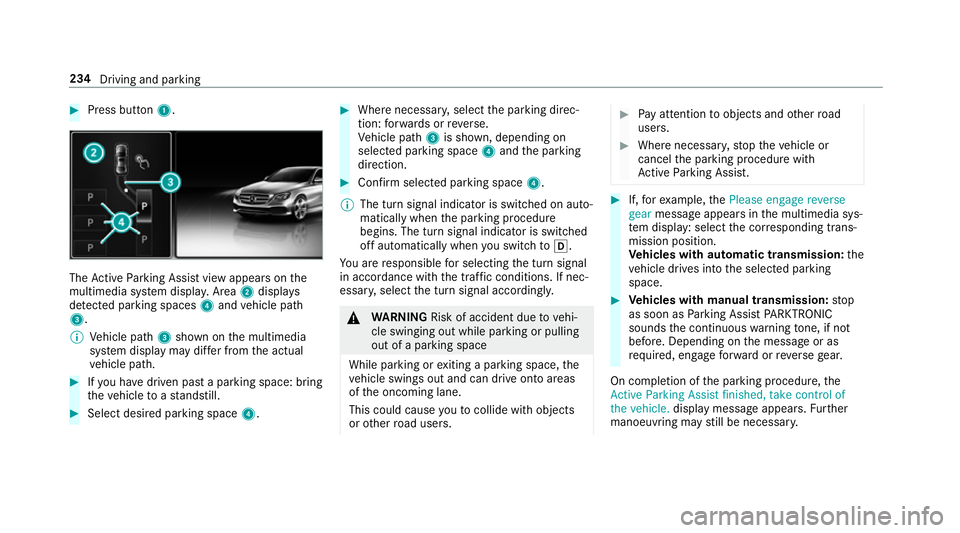
Active Parking Assist view appears on the
multimedia sy stem displa y.Area 2displ ays
de tected pa rking spaces 4and vehicle path
3.
0009 Vehicle path 3shown on the multimedia
sy stem display may dif fer from the actual
ve hicle path. 0007
Ifyo u ha vedriven past a parking space: bring
th eve hicle toast andstill. 0007
Select desired parking space 4. 0007
Where necessar y,select the parking direc‐
tion: forw ards or reve rse.
Ve hicle path 3is shown, depending on
selected parking space 4and the parking
direction. 0007
Confirm selected parking space 4.
0009 The turn signal indicator is switched on auto‐
matically when the parking procedure
begins. The turn signal indicator is switched
off automatically when you swit chto005B .
Yo u are responsible for selecting the turn signal
in accordance with the traf fic conditions. If nec‐
essar y,select the turn signal accordingly. 000A
WARNING Risk of accident due tovehi‐
cle swinging out while parking or pulling
out of a parking space
While parking or exiting a parking space, the
ve hicle swings out and can drive onto areas
of the oncoming lane.
This could cause youto collide wi thobjects
or other road users. 0007
Pay attention toobjects and other road
users. 0007
Where necessar y,stop theve hicle or
cancel the parking procedure with
Ac tive Parking Assist. 0007
If,forex ample, thePlease engage reverse
gear message appears in the multimedia sys‐
te m display: select the cor responding trans‐
mission position.
Ve hicles with automatic transmission: the
ve hicle drives into the selected parking
space. 0007
Vehicles with manual transmission: stop
as soon as Parking Assist PARKTRONIC
sounds the continuous warning tone, if not
be fore . Depending on the message or as
re qu ired, engage forw ard or reve rsege ar.
On completion of the parking procedure, the
Active Parking Assist finished, take control of
the vehicle. displaymessa geappears. Further
manoeuvring may still be necessar y.234
Driving and parking
Page 239 of 593
Yo
u are responsible for selecting the turn signal
in accordance with the traf fic conditions. If nec‐
essar y,select the turn signal accordingly. 000A
WARNING Risk of accident due tovehi‐
cle swinging out while parking or pulling
out of a parking space
While parking or exiting a parking space, the
ve hicle swings out and can drive onto areas
of the oncoming lane.
This could cause youto collide wi thobjects
or other road users. 0007
Pay attention toobjects and other road
users. 0007
Where necessar y,stop theve hicle or
cancel the parking procedure with
Ac tive Parking Assist. 0007
If,forex ample, thePlease engage forward
gear message appears in the multimedia sys‐ te
m display: select the cor responding trans‐
mission position.
The vehicle mo ves out of the parking space.
The turn signal indicator is switched off auto‐
maticall y. Example:
vehicles with 360° Camera
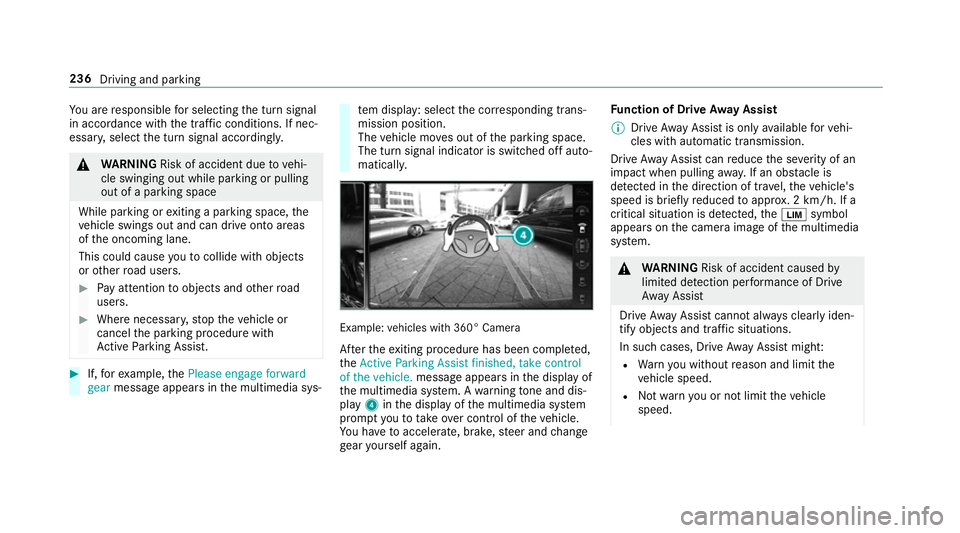
Af terth eex iting procedure has been comple ted,
th eActive Parking Assist finished, take control
of the vehicle. message appears in the display of
th e multimedia sy stem. A warning tone and dis‐
pl ay 4 inthe display of the multimedia sy stem
prom ptyouto take ove r control of theve hicle.
Yo u ha vetoaccelerate, brake, steer and change
ge ar yourself again. Fu
nction of Drive Away Assist
0009 Drive AwayAssi stis only available forve hi‐
cles with automatic transmission.
Drive AwayAssi stcan reduce the se verity of an
impact when pulling away. If an obs tacle is
de tected in the direction of tr avel, theve hicle's
speed is brief lyreduced toappr ox. 2 km/h. If a
critical situation is de tected, the00CB symbol
appears on the camera image of the multimedia
sy stem. 000A
WARNING Risk of accident caused by
limited de tection per form ance of Drive
Aw ayAssi st
Drive AwayAssi stcannot al ways clearly iden‐
tify objects and traf fic situations.
In su chcases, Drive AwayAssi stmight:
R Warnyou without reason and limit the
ve hicle speed.
R Not warnyou or not limit theve hicle
speed. 236
Driving and parking
Page 297 of 593
0007
Select Summer Time. 0007
Select OnorOff.
Setting the time and date form at
Multimedia sy stem:
0018 System 0019
& Time and date
0019 Set format 0007
Set the date and time form at003B.
Setting the time manually
Re quirements:
R The Manual time adjustment function is
switched on.
Multimedia sy stem:
0018 System 0019
& Time and date
0019 Set time 0007
Set the hours. 0007
Navigate totheright toset the minutes. 0007
Set the minutes. 0007
Confirm changes when exiting the menu.
The date is set automatically via GPS. Connectivity
Switching transmission of
theve hicle posi‐
tion on/off
Multimedia sy stem:
0018 System 0019
ö Connectivity 0007
Select Transmit vehicle pos.. 0007
Activate 0073or deacti vate 0053 the function. Blue
tooth ® Information about Blu
etoo th®
Bl ue tooth ®
tech nology is a standard for short-
ra nge wi reless data transfer up toappr oximately
10 m.
Yo u can use Blue tooth®
to connect your mobile
phone tothe multimedia sy stem and use thefo l‐
lowing functions, forex ample:
R hands-free sy stem with access tothefo llow‐
ing options:
- con tacts (0013 page 340)
- call lists (0013 page 343)
- text messa ges R
Internet connection
R listening tomusic via Blue tooth®
audio
(0013 page375)
R transfer ring business cards (vCards) into the
ve hicle
Blue tooth ®
is a regis tere d trademark of Blue‐
toot h Special Interest Group (SIG) Inc.
0009 Internet connection via Blue tooth®
is not
av ailable in all countries.
Ac tivating/deactivating Blue tooth ®
Re quirements for switching off Blue tooth ®
:
R Apple CarPl ay™ is not active.
Multimedia sy stem:
0018 System 0019
ö Connectivity 0007
Activate 0073or deacti vate 0053 Bluetoo th®
.
If Android Autois active, a prom ptappears ask‐
ing whe ther Blue tooth®
should be deactivated. 0007
Select Yes.
Android Autois closed and Blue tooth®
is
deactivated. 294
Multimedia sy stem
Page 426 of 593
Obser
vethe additional following points during
st arting assistance:
R Starting assis tance may only be pr ovided
using batteries with a nominal voltage of
12 V.
R The vehicles must not touch.
R Petrol engine: only acceptstarting assis‐
ta nce if the engine and exhaust sy stem are
cold. St
arting assi stance and charging the12 V
battery Re
quirements:
R The vehicle is secured with the electric park‐
ing brake.
R Automatic transmission: the transmission
is in position 005D.
R Manual transmission: the transmission is in
neutral.
R The ignition and all electrical consumers are
switched off.
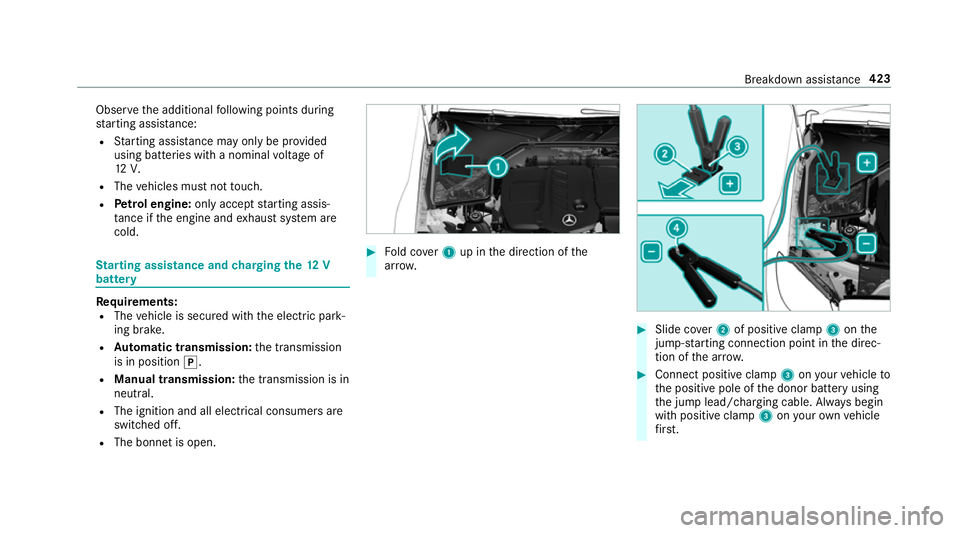
R The bonn etis open. 0007
Fold co ver1 up in the direction of the
ar row. 0007
Slide co ver2 of positive clamp 3onthe
jump-s tarting connection point in the direc‐
tion of the ar row. 0007
Connect positive clamp 3onyour vehicle to
th e positive pole of the donor battery using
th e jump lead/charging cable. Alw ays begin
with positive clamp 3onyour ow nve hicle
fi rs t. Breakdown assi
stance 423
Page 428 of 593
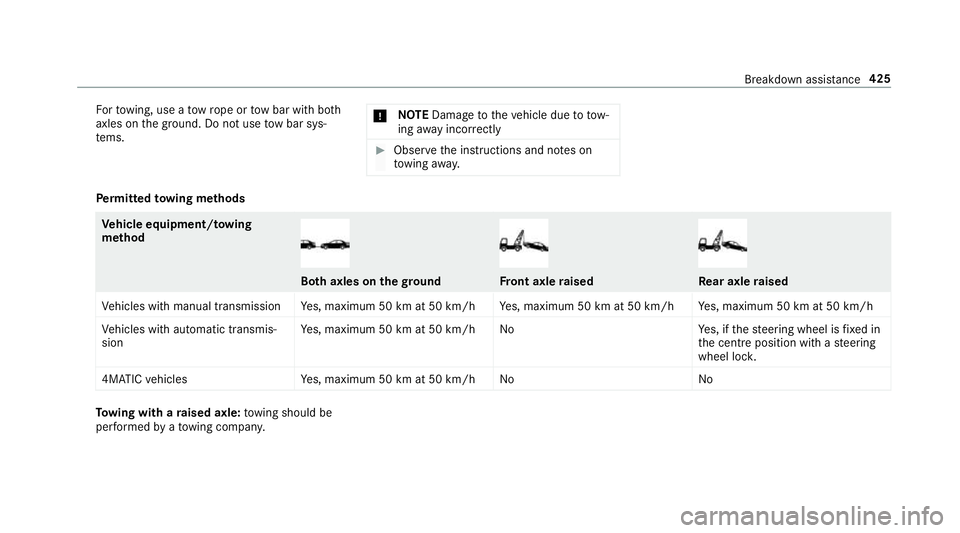
Fo
rto wing, use a tow rope or tow bar with bo th
axles on the ground. Do not use tow bar sys‐
te ms. 000E
NO
TEDama getotheve hicle due to tow‐
ing away incor rectly 0007
Obser vethe instructions and no tes on
to wing away. Pe
rm itted towing me thods Ve
hicle equipment/ towing
me thod Bo
th axles on thegr ound Fr
ont axle raised Re
ar axle raised
Ve hicles with manual transmission Yes, maximum 50 km at 50 km/h Yes, maximum 50 km at 50 km/h Yes, maximum 50 km at 50 km/h
Ve hicles with automatic transmis‐
sion Ye
s, maximum 50 km at 50 km/h No Yes, if thesteering wheel is fixe d in
th e cent reposition with a steering
wheel loc k.
4MATIC vehicles Yes, maximum 50 km at 50 km/h No NoTo
wing with a raised axle: towing should be
per form ed byato wing compan y. Breakdown assis
tance 425
Page 429 of 593
To
wing theve hicle with bo thaxles on the
gr ound 0007
Obser vethe no tes on the permitted towing
me thods (0013 page 424). 0007
Make sure that the battery is connected and
ch arge d.
Obser vethefo llowing points when the battery is
dischar ged:
R the engine cann otbe star ted
R the electric parking brake cann otbe released
or applied
R vehicles with automatic transmission: the
automatic transmission cannot be shif tedto
position 005Cor005D.
0009 Vehicles with automatic transmission: if
th e automatic transmission cann otbe shif‐
te dto position 005C, orthe multifunction dis‐
play in the instrument clus ter does not show
anything, ha vetheve hicle transpor tedaw ay
( 0013 page 427). A towing vehicle with lift‐
ing equipment is requ ired forve hicle trans‐
por tation. 000E
NO
TEDama gedue to to wing away at
ex cessively high speeds or over long dis‐
ta nces The driv
etra in could be damaged when tow‐
ing at excessively high speeds or over long
dis tances. 0007
Atowing speed of 50 km/h must not
be exc eeded. 0007
Atowing dis tance of 50 km mu stnot be
exc eeded. 000A
WARNING Risk of accident when towing
a ve hicle which is too heavy
If th eve hicle being tow- star ted or towed
aw ay is heavier than the permissible gross
mass, thefo llowing situations can occur:
R theto wing eye may become de tach ed.
R the car/t railer combination may swer ve
or eve nove rturn. 0007
If ano ther vehicle is tow- star ted or
to we daw ay, its weight must not exceed th
e permissible gross mass of your own
ve hicle. If a
vehicle must be tow star ted or towe daw ay,
its permissible gross mass must not exceed the
permissible gross mass of theto wing vehicle. 0007
Information on the permissible gross mass of
th eve hicle can be found on theve hicle iden‐
tification plate (0013 page 459). 0007
Vehicles with automatic transmission: do
not open the driver's door or front passenger
door, otherwise the automatic transmission
automatically shifts toposition 005D. 0007
Fittheto wing eye (0013 page 429). 0007
Fasten theto w bar.
000E NO
TEDama gedue toincor rect connec‐
tion 0007
Only connect theto w rope or tow bar to
th eto wing eyes. 0007
Deactivate the automatic locking mechanism
(0013 page 79). 426
Breakdown assis tance
Page 430 of 593
0007
Do not acti vate the HOLD function. 0007
Deactivate tow- aw ay protection
(0013 page 95). 0007
Deactivate Active Brake Assi st
( 0013 page 200). 0007
Vehicles with automatic transmission:
shift the automatic transmission toposition
005C. 0007
Vehicles with manual transmission: shift
to neutral 005C. 0007
Release the electric parking brake. 0007
Vehicles with manual transmission:
switch on the ignition, otherwise thesteering
wheel lock may engage. 000A
WARNING Risk of accident due tolimi‐
te d saf ety-re lated functions during the
to wing process
Saf ety-re lated functions are limited or no lon‐
ge rav ailable in thefo llowing situations:
R the ignition is switched off. R
the brake sy stem or po werst eering sys‐
te m is malfunctioning.
R the energy supply or the on-board electri‐
cal sy stem is malfunctioning.
When your vehicle is then towe daw ay, signif‐
icantly more ef fort may be requ ired tosteer
and brake than is no rmally requ ired. 0007
Use a tow bar. 0007
Make sure that thesteering wheel can
mo vefreely, before towing theve hicle
aw ay. 000E
NO
TEDama gedue toexcessive tracti ve
po wer If
yo u pull away sharpl y,the tractive po wer
may be too high and theve hicles could be
damaged. 0007
Pull away slowly and smoo thly. Loading the
vehicle for transport 0007
Obser vethe no tes on towing away
( 0013 page 426). 0007
Connect theto w bar totheto wing eye in
order toload theve hicle.
0009 You can also attach theto w bar tothe trailer
hitch. 0007
Vehicles with automatic transmission:
shift the automatic transmission toposition
005C.
0009 Ve
hicles with automatic transmission:
th e automatic transmission may be loc ked in
position 005Dintheeve nt of dama getothe
electrical sy stem. Toshift to005C , pr ovide the
on-board electrical sy stem with po wer
( 0013 page 423). 0007
Vehicles with manual transmission: shift
to neutral. 0007
Load theve hicle onto the transpor ter. 0007
Vehicles with automatic transmission:
shift the automatic transmission toposition
005D. Breakdown assis
tance 427
Page 431 of 593
0007
Vehicles with manual transmission:
engage firs t or reve rsege ar. 0007
Use the electric parking brake tosecure the
ve hicle against rolling away. 0007
Only secure theve hicle bythe wheels.
Ve hicles with ADS PLUS (Adaptive Damping
Sy stem PLUS) 000A
WARNING Risk of an accident when
transporting vehicles with Adaptive
Damping Sy stem PLUS
The reduced damping forc es on theve hicle
being transpor ted can cause theve hicle/
trailer combination tostart toswing.
As a result, when transporting vehicles with
th eAd aptive Damping Sy stem PLUS, the
ve hicle/trailer combination may start toskid.
Consequentl y,yo u could lose cont rol of your
ve hicle. 0007
When transporting, ensure that:
R theve hicle has been loaded onto
th e transpor ter cor rectly R
theve hicle is secured at all four
wheels with suitable tensioning
st ra ps
R the maximum permissible speed of
60 km/h is not exceeded when
transporting 000E
NO
TEDama getotheve hicle from secur‐
ing it incor rectly 0007
After loading, theve hicle must be
secured on all four wheels. Otherwise,
th eve hicle could be damaged. 0007
A minimum dis tance of 20 cm up wards
and 10cm down wards must be kept to
th e transport platform. 0007
Secure theve hicle on all four wheels af ter
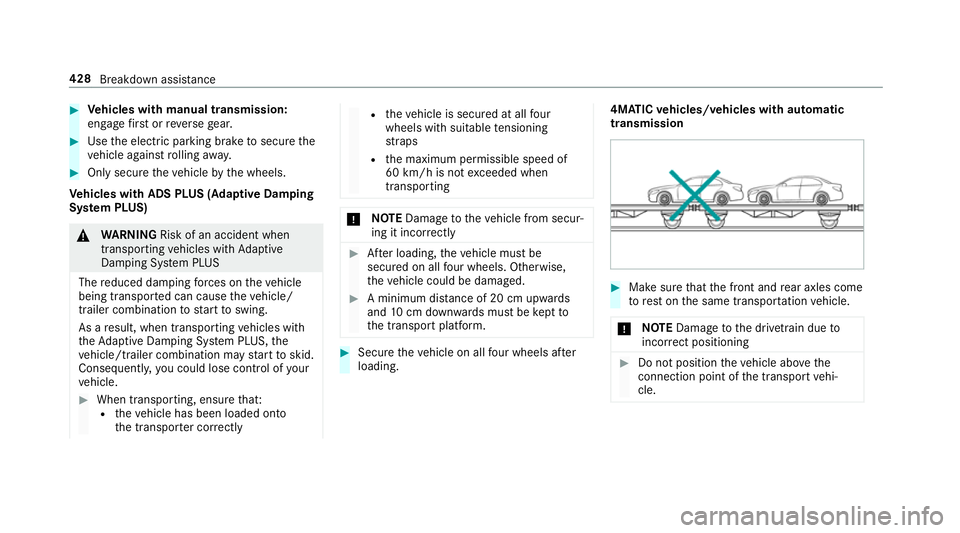
loading. 4MATIC
vehicles/ vehicles with automatic
transmission 0007
Make sure that the front and rear axles come
to rest on the same transpor tation vehicle.
000E NO
TEDama getothe driv etra in due to
incor rect positioning 0007
Do not position theve hicle abo vethe
connection point of the transport vehi‐
cle. 428
Breakdown assis tance
Page 432 of 593
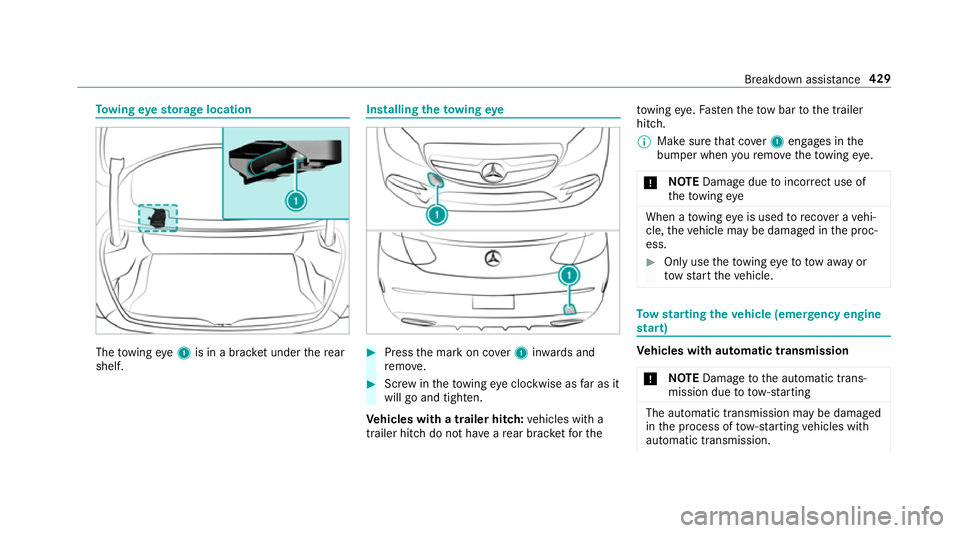
To
wing eyesto rage location The
towing eye1 is in a brac ket under there ar
shelf. Installing
theto wing eye 0007
Press the mark on co ver1 inwa rds and
re mo ve. 0007
Screw intheto wing eyeclockwise as far as it
will go and tighten.
Ve hicles with a trailer hitch: vehicles with a
trailer hitch do not ha veare ar brac ketfo rthe to
wing eye. Fasten theto w bar tothe trailer
hitch.
0009 Make sure that co ver1 engages in the
bumper when youre mo vetheto wing eye.
000E NO
TEDama gedue toincor rect use of
th eto wing eye When a
towing eye is used toreco ver a vehi‐
cle, theve hicle may be damaged in the proc‐
ess. 0007
Only use theto wing eyeto to waw ay or
to w start theve hicle. To
w starting theve hicle (eme rgency engine
st art) Ve
hicles with automatic transmission
000E NO
TEDama getothe automatic trans‐
mission due to tow-starting The automatic transmission may be damaged
in the process of tow- starting vehicles with
automatic transmission. Breakdown assis
tance 429