steering MERCEDES-BENZ C-CLASS COUPE 2018 Service Manual
[x] Cancel search | Manufacturer: MERCEDES-BENZ, Model Year: 2018, Model line: C-CLASS COUPE, Model: MERCEDES-BENZ C-CLASS COUPE 2018Pages: 593, PDF Size: 10.86 MB
Page 232 of 593
If
th e dis tance tothe object lessens, the colour
of wa rning display 2changes:
R From appr ox.1. 0 m: yellow
R From appr ox. 0.6 m: oran ge
R From appr ox. 0.3 m:red
When Parking Assist PARKTRONIC is operational
and no object is de tected, the segments of the
wa rning display are shown in grey.
0009 Ifth e entire sy stem fails, the segments of
th ewa rning display are shown in red and the
é symbol appears inthe multifunction
display in the instrument clus ter.
If th e sy stem fails at there ar, the display of
th e segments changes as follo ws:
R The rear segments are shown in red
when reve rsing.
R The rear segments are hidden when driv‐
ing forw ards.
If Pa rking Assist PARKTRONIC is deacti vated,
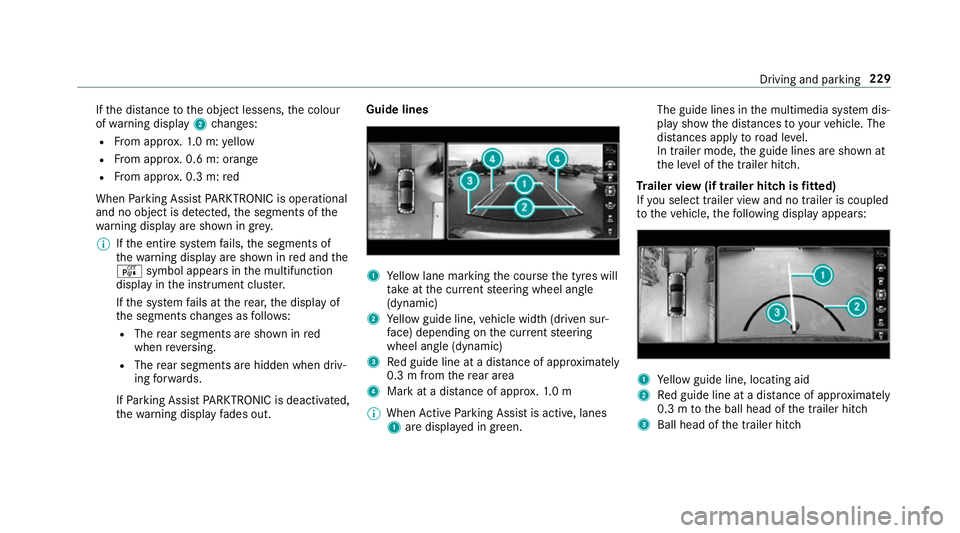
th ewa rning display fades out. Guide lines
1
Yellow lane marking the course the tyres will
ta ke atthe cur rent steering wheel angle
(dynamic)
2 Yellow guide line, vehicle width (driven sur‐
fa ce) depending on the cur rent steering
wheel angle (dynamic)
3 Red guide line at a dis tance of appr oximately
0.3 m from there ar area
4 Mark at a distance of appr ox.1. 0 m
0009 When Active Parking Assist is active, lanes
1 are displa yed in green. The guide lines in
the multimedia sy stem dis‐
play show the dis tances toyour vehicle. The
dis tances apply toroad le vel.
In trailer mode, the guide lines are shown at
th e le vel of the trailer hitch.
Tr ailer view (if trailer hitch is fitted)
If yo u select trailer view and no trailer is coupled
to theve hicle, thefo llowing display appears: 1
Yellow guide line, locating aid
2 Red guide line at a dis tance of appr oximately
0.3 m tothe ball head of the trailer hitch
3 Ball head of the trailer hitch Driving and parking
229
Page 235 of 593
Ac
tive Parking Assist Fu
nction of Active Parking Assist
Ac tive Parking Assist is an elect ronic pa rking
assis tance sy stem which uses ultrasound and is
automatically activated during forw ard tra vel.
The sy stem is operational at speeds below
appr oximately 35 km/h.
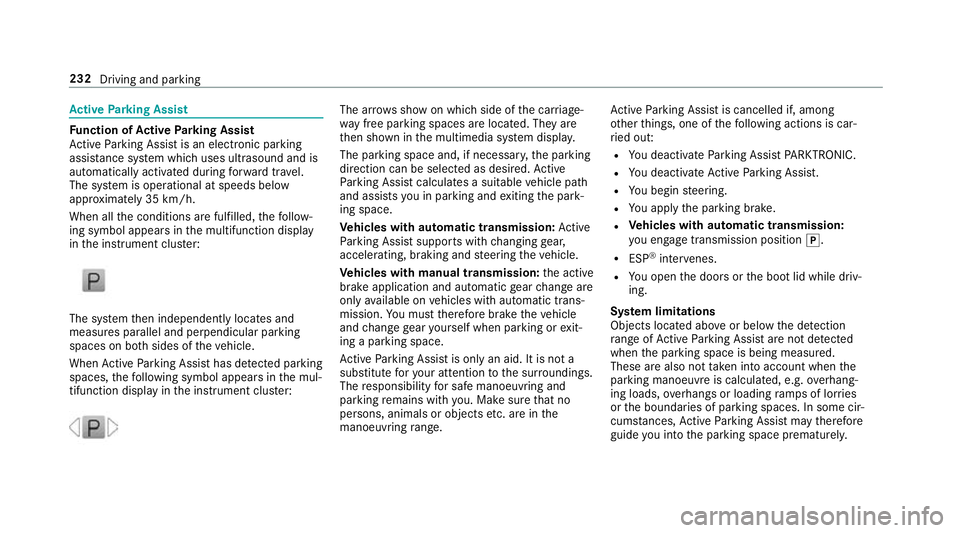
When all the conditions are fulfilled, thefo llow‐
ing symbol appears in the multifunction display
in the instrument clus ter: The sy
stem then independently locates and
measures parallel and perpendicular parking
spaces on bo thsides of theve hicle.
When Active Parking Assist has de tected pa rking
spaces, thefo llowing symbol appears in the mul‐
tifunction display in the instrument clus ter: The ar
rows show on which side of the car riage‐
wa y free parking spaces are located. They are
th en shown in the multimedia sy stem displa y.
The parking space and, if necessar y,the parking
direction can be selected as desired. Active
Pa rking Assist calculates a suitable vehicle path
and assists you in parking and exiting the park‐
ing space.
Ve hicles with automatic transmission: Active
Pa rking Assist supports with changing gear,
accelerating, braking and steering theve hicle.
Ve hicles with manual transmission: the active
brake application and automatic gear change are
on lyavailable on vehicles with automatic trans‐
mission. You must therefore brake theve hicle
and change gear yourself when parking or exit‐
ing a parking space.
Ac tive Parking Assist is only an aid. It is not a
substitute foryo ur attention tothe sur roundings.
The responsibility for safe manoeuvring and
parking remains with you. Make sure that no
persons, animals or objects etc. are in the
manoeuvring range. Ac
tive Parking Assist is cancelled if, among
ot her things, one of thefo llowing actions is car‐
ri ed out:
R You deactivate Parking Assist PARKTRONIC.
R You deactivate Active Parking Assist.
R You begin steering.
R You apply the parking brake.
R Vehicles with automatic transmission:
yo u en gage transmission position 005D.
R ESP ®
inter venes.
R You open the doors or the boot lid while driv‐
ing.
Sy stem limitations
Objects located abo veor below the de tection
ra nge of Active Parking Assist are not de tected
when the parking space is being measured.
These are also not take n into account when the
parking manoeuvre is calculated, e.g. overhang‐
ing loads, overhangs or loading ramp s of lor ries
or the boundaries of parking spaces. In some cir‐
cums tances, Active Parking Assist may therefore
guide you into the parking space prematurely. 232
Driving and parking
Page 248 of 593
Ac
tivating/deactivating Blind Spot Assi stor
Ac tive Blind Spot Assi st
Multimedia sy stem:
0018 Vehicle 0019
k Assistance
0019 Blind Spot Assist 0007
Activate 0073or deacti vate 0053 the function. Ac
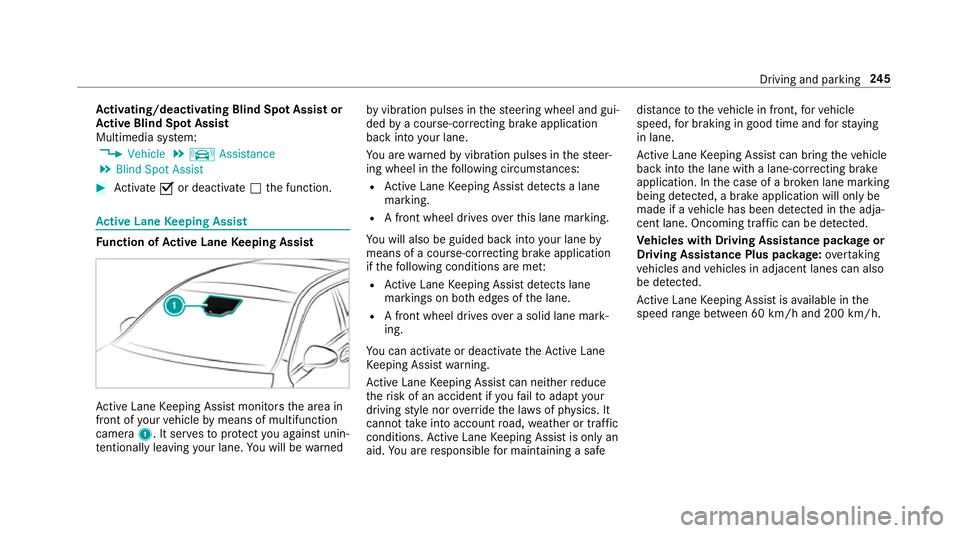
tive Lane Keeping Assist Fu
nction of Active Lane Keeping Assist Ac
tive Lane Keeping Assist monitors the area in
front of your vehicle bymeans of multifunction
camera 1. It ser vesto protect you against unin‐
te ntional lyleaving your lane. You will be warned by
vibration pulses in thesteering wheel and gui‐
ded bya course-cor recting brake application
ba ck into your lane.
Yo u are warned byvibration pulses in thesteer‐
ing wheel in thefo llowing circums tances:
R Active Lane Keeping Assist de tects a lane
marking.
R A front wheel drives overth is lane marking.
Yo u will also be guided back into your lane by
means of a course-cor recting brake application
if th efo llowing conditions are me t:
R Active Lane Keeping Assist de tects lane
markings on bo thedges of the lane.
R A front wheel drives over a solid lane mark‐
ing.
Yo u can activate or deactivate theAc tive Lane
Ke eping Assist warning.
Ac tive Lane Keeping Assist can neither reduce
th erisk of an accident if youfa ilto adapt your
driving style nor override the la wsof ph ysics. It
cannot take into account road, weather or traf fic
conditions. Active Lane Keeping Assist is only an
aid. You are responsible for maintaining a safe dis
tance totheve hicle in front, forve hicle
speed, for braking in good time and forst ay ing
in lane.
Ac tive Lane Keeping Assist can bring theve hicle
back into the lane with a lane-cor recting brake
application. In the case of a broken lane marking
being de tected, a brake application will only be
made if a vehicle has been de tected in the adja‐
cent lane. Oncoming tra ffic can be de tected.
Ve hicles with Driving Assistance pac kage or
Driving Assistance Plus pa ckage: overtaking
ve hicles and vehicles in adjacent lanes can also
be de tected.
Ac tive Lane Keeping Assist is available in the
speed range between 60 km/h and 200 km/h. Driving and pa
rking 245
Page 262 of 593
The
following display con tent can be selected in
th eClassic andSport designs:
R Rev counter
R Navigation
R ECO display
R Consu mption
R G-m eter
The following con tent can be selected in thePro-
gressive design:
R Date
R Navigation
R ECO display
R Consu mption
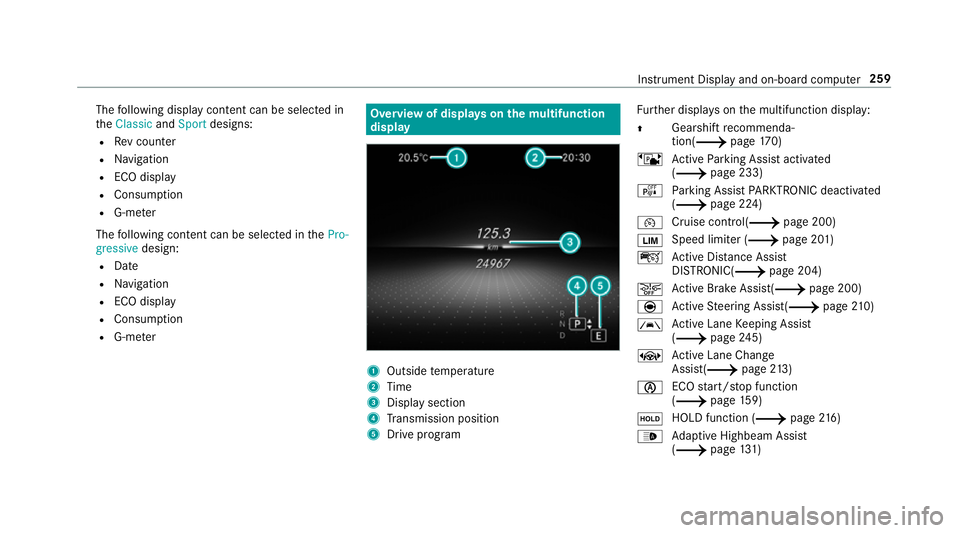
R G-m eter Overview of displa
yson the multifunction
display 1
Outside temp erature
2 Time
3 Display section
4 Transmission position
5 Drive prog ram Fu
rther displa yson the multifunction display:
0097 Gearshift
recommenda‐
tion(0013 page 170)
ë Active Parking Assist activated
(0013 page 233)
é Parking Assist PARKTRONIC deacti vated
( 0013 page 224)
00B2 Cruise control(0013
page 200)
00CB Speed limiter (0013
page 201)
ç Active Dis tance Assi st
DISTRONIC( 0013page 204)
00D4 Ac
tive Brake Assi st(0013 page 200)
è Active Steering Assis t(0013 page210)
00B0 Ac
tive Lane Keeping Assist
(0013 page245)
± Active Lane Change
Assi st(0013 page213)
00D6 ECO
start/ stop function
(0013 page159)
00D9 HOLD fu
nction (0013 page 216)
00CE Ad
aptive Highbeam Assist
(0013 page131) In
stru ment Display and on-board computer 259
Page 269 of 593
0007
Swipe up wards or down wards on the left-
hand Touch Control and select 0061(Accept)
or 0076 (Reject). 0007
Press the left-hand Touch Control.
Yo u may accept/ reject the call using button
0061 or0076 onthesteering wheel. Ad
justing the head-up display settings on
the on-board co mputer On-board computer:
0018 HUD
The following head-up display settings can be
adjus ted:
R Position
R Brightness
R Display content 0007
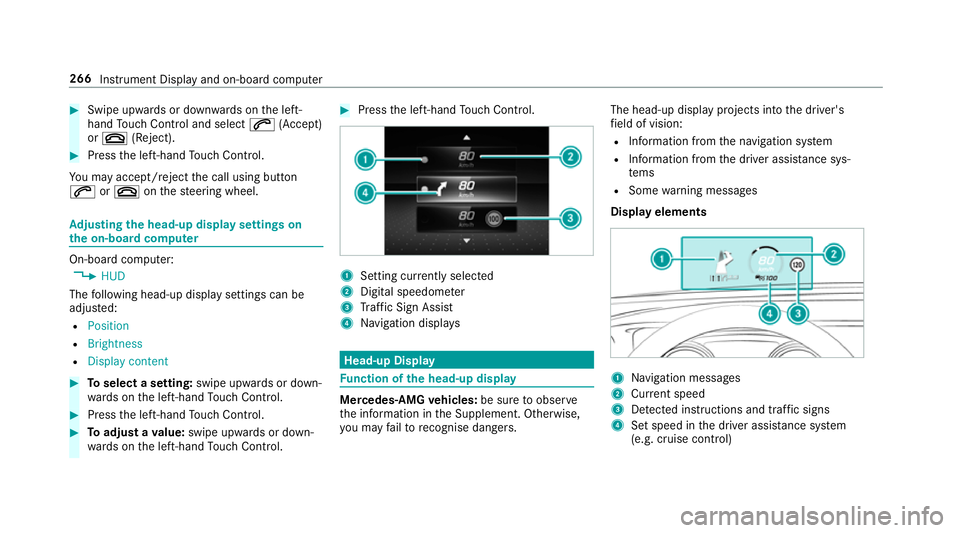
Toselect a setting: swipe upwards or down‐
wa rds on the left-hand Touch Control. 0007
Press the left-hand Touch Control. 0007
Toadjust a value: swipe upwards or down‐
wa rds on the left-hand Touch Control. 0007
Press the left-hand Touch Control. 1
Setting cur rently selected
2 Digital speedome ter
3 Traf fic Sign Assi st
4 Navigation displa ys Head-up Display
Fu
nction of the head-up display Mercedes-AMG
vehicles: be sure toobser ve
th e information in the Supplement. Otherwise,
yo u may failto recognise dangers. The head-up displ
ayprojects into the driver's
fi eld of vision:
R Information from the navigation sy stem
R Information from the driver assis tance sys‐
te ms
R Some warning messages
Display elements 1
Navigation messa ges
2 Current speed
3 Detected instructions and traf fic signs
4 Set speed in the driver assis tance sy stem
(e.g. cruise control) 266
Instrument Display and on-board computer
Page 271 of 593
Note
s on operating saf ety000A
WARNING Risk of di stra ction from infor‐
mation sy stems and communications
equipment
If yo u operate information and communica‐
tion equipment integ rated in theve hicle
when driving, you will be distracted from the
traf fic situation. This could also cause youto
lose control of theve hicle. 0007
Only operate this equipment when the
traf fic situation permits. 0007
Ifyo u cannot be sure of this, stop the
ve hicle whilst paying attention toroad
and traf fic conditions and ope rate the
equipment with theve hicle stationar y. 000A
WARNING Risk of di stra ction from oper‐
ating mobile communication equipment
while theve hicle is in motion
If yo u operate mobile communication equip‐
ment when driving, you will be distracted from
the tra ffic situation. This could also
cause youto lose control of theve hicle. 0007
Only operate this equipment when the
ve hicle is stationar y. Fo
ryo ur ow n sa fety, al ways obser vethefo llow‐
ing points when operating mobile communica‐
tions equipment and especially your voice con‐
trol sy stem:
R Obser vethe legal requ irements forth e coun‐
try in which you are driving.
R While driving, on ly operate mobile communi‐
cations equipment and your voice control
sy stem when the tra ffic conditions permit it.
Yo u may otherwise be distracted from the
traf fic conditions and cause an accident,
inju ring yourself and others.
R Ifyo u use thevo ice control sy stem in an
emer gency your voice can change and your
te lephone call, e.g. an emer gency call, can
th ereby be unnecessarily dela yed.
R Familiarise yourself with thevo ice control
sy stem functions before starting the journe y. Operation
Overview of operation of LINGU
ATRO NIC on
the multifunction steering wheel LINGU
ATRO NIC is operational appr oximately
th irty seconds af terth e ignition is switched on. 268
LINGU ATRO NIC
Page 272 of 593
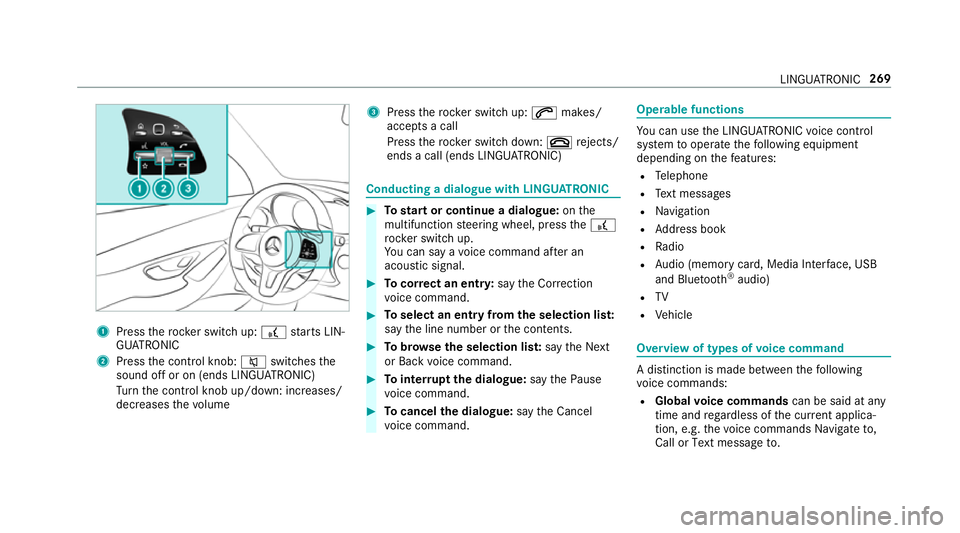
1
Press therock er switch up: £starts LIN‐
GU ATRO NIC
2 Press the control knob: 0063switches the
sound off or on (ends LINGU ATRO NIC)
Tu rn the control knob up/down: increases/
decreases thevo lume 3
Press therock er switch up: 0061makes/
accepts a call
Press therock er switch down: 0076rejects/
ends a call (ends LINGU ATRO NIC) Conducting a dialogue with LINGU
ATRO NIC 0007
Tostart or continue a dialogue: onthe
multifunction steering wheel, press the£
rock er switch up.
Yo u can say a voice command af ter an
acou stic signal. 0007
Tocor rect an ent ry:say theCorrection
vo ice command. 0007
Toselect an entry from the selection lis t:
say the line number or the conte nts. 0007
Tobrows eth e selection lis t:say theNext
or Back voice command. 0007
Tointer rupt the dialogue: saythePause
vo ice command. 0007
Tocancel the dialogue: saytheCancel
vo ice command. Operable functions
Yo
u can use the LINGU ATRO NIC voice control
sy stem tooperate thefo llowing equipment
depending on thefe atures:
R Telephone
R Text messa ges
R Navigation
R Address book
R Radio
R Audio (memory card, Media Inter face, USB
and Blu etoo th®
audio)
R TV
R Vehicle Overview of types of
voice command A distinction is made between
thefo llowing
vo ice commands:
R Global voice commands can be said at any
time and rega rdless of the cur rent applica‐
tion, e.g. thevo ice commands Navigate to,
Call orText message to. LINGU
ATRO NIC 269
Page 292 of 593
0007
Movethefa vo urite tothe desired position.
If a favo urite has already been added at this
position, it will be overwritten.
Deleting favo urites 0007
Press the© button.
The main functions are displa yed. 0007
Navigate down wards once. 0007
Select a favo urite. 0007
Navigate down wards once.
The Favourites menu appears. 0007
Todel ete: select Delete. 0007
Select Yes. 0007
Toresto reall favo urites: selectReset all.
A prom ptappears. 0007
Select Yes.
The favo urites are reset tothefa ctory set‐
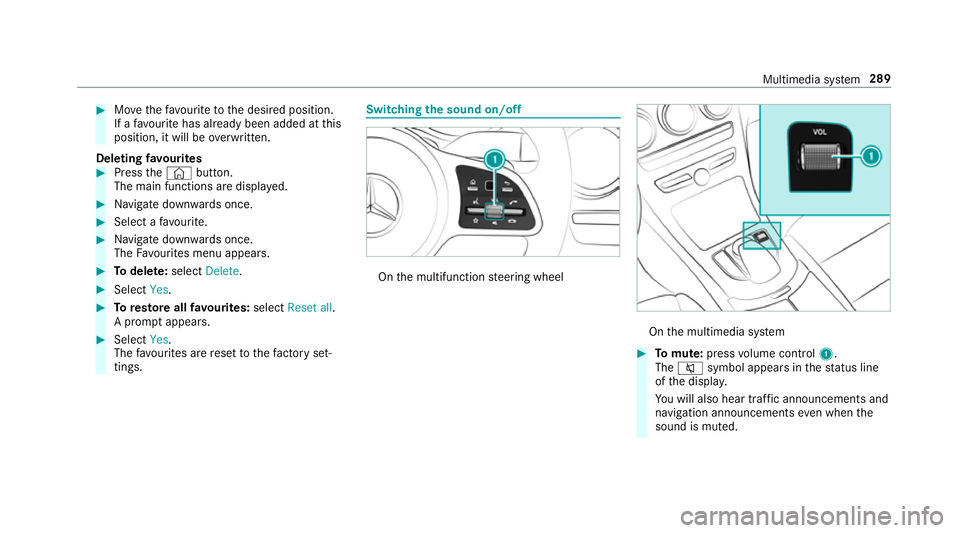
tings. Switching the sound on/o
ff On
the multifunction steering wheel On
the multimedia sy stem 0007
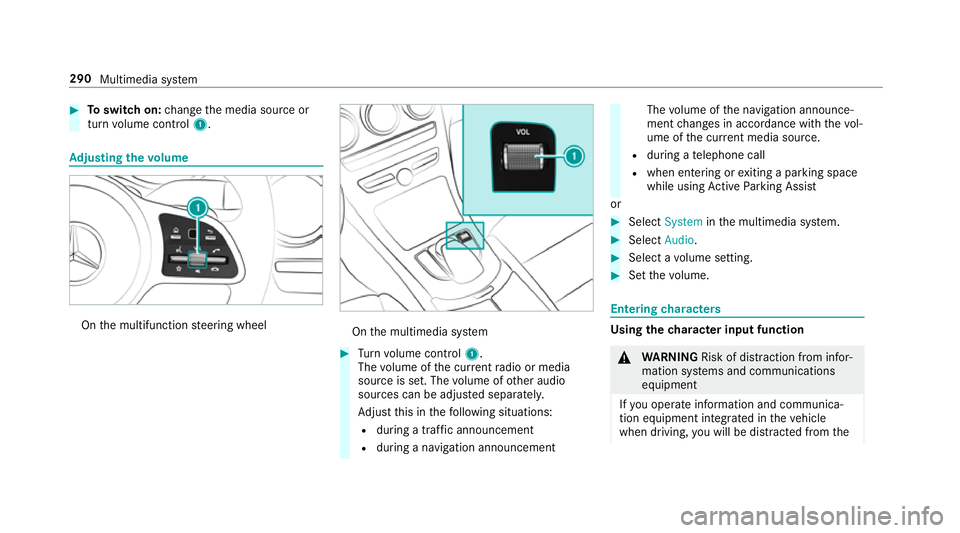
Tomute: pressvolume control 1.
The 0063 symbol appears in thest atus line
of the displa y.
Yo u will also hear traf fic announcements and
navigation announcements even when the
sound is muted. Multimedia sy
stem 289
Page 293 of 593
0007
Toswitch on: change the media source or
turn volume control 1. Ad
justing the volume On
the multifunction steering wheel On
the multimedia sy stem 0007
Turn volume control 1.
The volume of the cur rent radio or media
source is set. The volume of other audio
sources can be adjus ted separatel y.
Ad just this in thefo llowing situations:
R during a traf fic announcement
R during a navigation announcement The
volume of the navigation announce‐
ment changes in accordance with thevo l‐
ume of the cur rent media sou rce.
R during a telephone call
R when entering or exiting a parking space
while using Active Parking Assist
or 0007
Select System inthe multimedia sy stem. 0007
Select Audio. 0007
Select a volume setting. 0007
Set thevo lume. Entering
characters Using
thech aracter input function 000A
WARNING Risk of di stra ction from infor‐
mation sy stems and communications
equipment
If yo u operate information and communica‐
tion equipment integ rated in theve hicle
when driving, you will be distracted from the290
Multimedia sy stem
Page 307 of 593
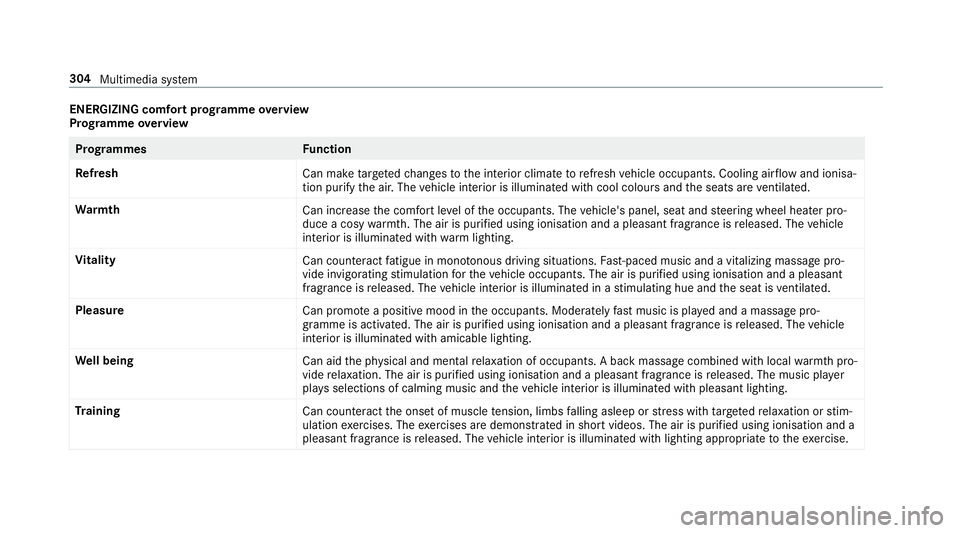
ENERGIZING comfort prog
ramme overview
Prog ramme overview Prog
rammes Function
Re fresh
Can maketargeted changes tothe interior climate torefresh vehicle occupants. Cooling air flow and ionisa‐
tion purify the air. The vehicle interior is illuminated with cool colours and the seats are ventilated.
Wa rmth
Can increase the comfort le vel of the occupants. The vehicle's panel, seat and steering wheel heater pro‐
duce a cosy warmth. The air is pu rified using ionisation and a pleasant fragrance is released. The vehicle
interior is illuminated with warm lighting.
Vi tality
Can countera ct fatigue in mono tonous driving situations. Fast-paced music and a vitalizing massa gepro‐
vide invigorating stimulation forth eve hicle occupants. The air is purified using ionisation and a pleasant
fragrance is released. The vehicle interior is illuminated in a stimulating hue and the seat is ventilated.
Pleasure Can promotea positive mood in the occupants. Moderately fastmusic is pla yed and a massage pro‐
gramme is activated. The air is purified using ionisation and a pleasant fragrance is released. The vehicle
interior is illuminated with amicable lighting.
We ll being
Can aidthe ph ysical and men talre laxation of occupants. A back massage combined with local warmthpro‐
vide relaxation. The air is purified using ionisation and a pleasant fragrance is released. The music pla yer
pla ysselections of calming music and theve hicle interior is illuminated with pleasant lighting.
Tr aining
Can counteractthe onset of muscle tension, limbs falling asleep or stre ss with targeted relaxation or stim‐
ulation exercises. The exercises are demon stra ted in short videos. The air is purified using ionisation and a
pleasant fragrance is released. The vehicle interior is illuminated with lighting appropriate totheex ercise. 304
Multimedia sy stem