ecu MERCEDES-BENZ C-CLASS COUPE 2018 Repair Manual
[x] Cancel search | Manufacturer: MERCEDES-BENZ, Model Year: 2018, Model line: C-CLASS COUPE, Model: MERCEDES-BENZ C-CLASS COUPE 2018Pages: 593, PDF Size: 10.86 MB
Page 300 of 593
Connecting using a security
key0007
Select Connect device to vehicle hotspot .
A secu rity key is displa yed. 0007
Select theve hicle from the device tobe con‐
nec ted. The vehicle is displa yed with the
SSID MB Hotspot XXXXX .0007
Enter the security key which is shown in the
media display on the device tobe connec ted. 0007
Confirm the entry.
Connecting using NFC 0007
Select Establish a connection via NFC. 0007
Activate NFC on the mobile device (see the
manufacturer's operating instructions). 0007
Bring the mobile device into the NFC area of
th eve hicle (0013 page 338). 0007
Select Done.
The mobile device is now connected tothe
multimedia sy stem hotspot via NFC.
Generating a new security key: 0007
Select Set up hotspot . 0007
Select Generate security key .
A connection will be es tablished with the
newly crea ted security key. 0007
Tosave a security key:select Save.
When a new security key is sa ved, all existing
Wi -Fi connections are then disconnected. If
th eWi -Fi connections are being re-es tab‐
lished, the new security key must be en tere d. Managing COMAND
Touch devices Re
quirements:
R The COMAND Touch app is ins talled on the
ex tern al device (e.g. tablet or smartphone).
R Wi-Fi is acti vated (0013 page 295) and the
multimedia sy stem is confi gured as a Wi-Fi
hotspot (0013 page 296).
Multimedia sy stem:
0018 System 0019
COMAND Touch
Connecting and authorising a new device 0007
Select Authorise a new device. 0007
Select Connect new device. 0007
Ente rth e security key in theex tern al device.
The Please start COMAND Touch on your
device and follow the instructions. message
appears. 0007
Select Continue. 0007
Accept the connection requ est from the new
device. 0007
Ente rth e PIN shown on theex tern al device.
The device is authorised.
Au thorising a connected device 0007
Select Authorise a new device.
The devices already connec ted are displa yed. 0007
Select Continue using connected devices.
The Please start COMAND Touch on your
device and follow the instructions. message
appears. 0007
Select Continue. 0007
The connection requ est from the device
Accept. 0007
Ente rth e PIN shown on theex tern al device.
The device is authorised. Multimedia sy
stem 297
Page 305 of 593
multimedia sy
stem, the Mercedes me connect
services and your vehicle's communication mod‐
ule. These will con veniently be sent to you via
th e mobile phone connection in your vehicle
and, as an option, ins talled automaticall y.Yo u
can moni torth est atus of your updates on the
Mercedes me por tal and find information about
po tential inno vations.
Yo ur advantages at a glance:
R con veniently recei vesoftware update s via
th e mobile phone network
R impr ovesth equ ality and availability of
Mercedes me connect services
R keeps your multimedia sy stem and communi‐
cation module up-to-date
Fu rther information about software updates can
be found at http://me.mercedes-benz.com
Pe rforming a software upda te
Requ irements:
R There is an Internet connection
(0013 page 357). R
For automatic updates: your vehicle has a
permanently installed communication mod‐
ule.
Multimedia sy stem:
0018 System 0019
Software update
Au tomatic update 0007
Activate 0073Automatic online updates.
Up dates are per form ed.
The cur rent status of the updates is dis‐
pla yed.
Manual update 0007
Deactivate 0053Automatic online updates. 0007
Select an update from the list and start the
update.
Ac tivating the so ftwa reupdate 0007
Restart the sy stem.
Fu nction of important sy stem upda tes
Impor tant sy stem updates may be necessary for
th e security of your multimedia sy stem's data.
Please ins tallth ese updates, or else the security
of your multimedia sy stem cann otbe ensured. 0009
If automatic software updates are activated,
th e sy stem updates will be downloaded auto‐
matically (0013 page 302).
As soon as an update is available for download,
a cor responding message appears onthe media
displa y.
Yo u ha vethefo llowing selection options:
R Download
The update will be downloaded in the back‐
ground.
R Details
Information about the pending sy stem
update is displa yed.
R Later
The update can be downloaded manually at a
later time (0013 page 302).
If th e download is comple ted and the update is
re ady for ins tallation, you will be informed of this
af te rth e next ignition cycle, forex ample.
0009 Park theve hicle safely in a suitable location
before starting the ins tallation. 302
Multimedia sy stem
Page 339 of 593
Connecting a mobile phone (au
thorisation
using Secure Simple Pairing) 0007
Select the mobile phone.
A code is displa yed in the multimedia sy stem
and on the mobile phone. 0007
Ifth e codes match: confirm the code on
th e mobile phone.
Connecting a mobile phone (authorisation by
entering a passk ey)0007
Select the mobile phone. 0007
Choose a one tosixteen-digit number combi‐
nation as a passk ey.0007
On the multimedia sy stem: enter the pass‐
ke y and select 0076. 0007
On the mobile phone: enterthe passk ey
again and con firm.
0009 Upto15 mobile phones can be auth orised
on the multimedia sy stem.
Auth orised mobile phones are reconnected
au tomatical ly. Connecting a second mobile phone (two
phone mode)
Re
quirements:
R Atleast one mobile phone is already connec‐
te dto the multimedia sy stem via Blue tooth ®
.
Multimedia sy stem:
0018 Telephone 0019
00A5 Devices 0007
Select Connect new device. 0007
Select Start search on the system .
The available mobile phones are displa yed. 0007
Select the mobile phone. 0007
Answer theHow would you like to connect
the new device? prompt. 0007
Toreplace the cur rently connected
mobile phone: selectPhone 1.
The cur rently connected mobile phone is
re placed bythe new mobile phone.
or 0007
Toconnect the second mobile phone:
select Phone 2.
The new mobile phone is connec ted as
Phone 2. If two mobile phones ha vealready been connec
ted, the second telephone is
re placed bythe new mobile phone.
or 0007
Touse the mobile phone as an audio
source: selectAudio source
(0013 page375).
0009 A mobile phone can be operated bo thas an
audio source as well as telephone in parallel.
0009 It is possible at any future point tochange
th e type of connection forth e mobile phone
already connected and toset this as Phone
1, Phone 2 orAudio source
(0013 page 337).
Fu nctions of the mobile phone in two phone
mode
Fu nctions overview Mobile phone in
the
fo re gr ound Mobile phone in
the
bac kground
Fu llra nge of func‐
tions Incoming calls336
Multimedia sy stem
Page 354 of 593
This data is only transfer
red while the navigation
sy stem is active in order toimpr oveit (e.g. so it
can continue functioning when in a tunnel). Mercedes me connect
Note
s on Mercedes me connect
Mercedes me connect pr ovides thefo llowing
services:
R Accident and breakdown mana gement (me
button)
R Concierge Service (when the service is acti‐
va ted), appointment requests or similar (me
button)
R Mercedes-Benz emer gency call sy stem (auto‐
matic emer gency call or SOS button)
The Mercedes-Benz Cu stomer Centre and the
Mercedes-Benz emer gency call centre are availa‐
ble foryo u around the cloc k.
The me button and the SOS button can be found
on theve hicle's overhead control panel
(0013 page 351). Yo
u can also call the Mercedes-Benz Cus tomer
Centre using the multimedia sy stem
(0013 page 351).
Please no tethat Mercedes me connect is a
Mercedes-Benz service. In emer gencies, al ways
call the national emer gency services firs t using
th est andard national emer gency service phone
numbe rs. In emergencies, you can also use the
Mercedes-Benz emer gency call sy stem
(0013 page 354).
Obser vethe conditions of use for Mercedes me
connect and other services. These can be
obtained in the Mercedes me por tal: https://
me.secure.mercedes-benz.com
Fu rther information on Mercedes me connect,
th e pr ovided service scope and operation:
http://manuals.daimler.com/baix/cars/
connectme/en_GB/index.html
Calling the Mercedes-Benz Cus tomer Centre
using the multimedia sy stem
Requ irements:
R You ha veaccess toa GSM networ k. R
The contra ct partner's GSM network co ver‐
age is available in there spective region.
R The ignition is switched on so that vehicle
data can be transfer red automaticall y.
Multimedia sy stem:
0018 Telephone 0019
ª Contacts 0007
Call Mercedes me connect.
The call is made.
Af ter confirmation, the multimedia sy stem
sends there qu ired vehicle data. The data
transfer is shown in the media displa y.
Then, you can select a service and be con‐
nected toa specialist at the Mercedes-Benz
Cus tomer Centre.
Fu rther information on Mercedes me connect,
th e pr ovided service scope and operation is
av ailable at: http://manuals.daimler.com/baix/
cars/connectme/de_DE/ind ex.html
Making a call via the overhead control panel
Re quirements:
R You ha veaccess toa GSM networ k. Multimedia sy
stem 351
Page 356 of 593
R
If necessar y,the conta ct person at the
Mercedes-Benz emer gency call centre for‐
wa rdsth e call toMercedes me connect acci‐
dent management.
Fo rw arding the call is not possible in all
count ries.
R If necessar y,theve hicle will be towe dto a
Mercedes-Benz service centre.
Ar ranging a service appointment via
Mercedes me connect
If yo u ha veactivated the maintenance manage‐
ment service, releva nt vehicle data is transfer red
automatically tothe Mercedes-Benz Cus tomer
Centre. You will then recei veindividual recom‐
mendations rega rding the maintenance of your
ve hicle.
Re gardless of whe ther you ha veconsented to
th e maintenance management service, the multi‐
media sy stem reminds you af ter a cer tain
amount of time that a service is due. A prom pt
appears asking if youwo uld like tomake an
appointment. 0007
Toarra nge a service appointment: select
Call .
Af teryo ur agreement theve hicle data is sent
and a Mercedes-Benz Cus tomer Centre
emplo yee deals with your appointment. The
information is then sent toyour desired
service outlet.
This service outlet will then conta ctyou
within 24hours.
0009 Ifyo u select Call later afte rth e service mes‐
sage appears, the message is hidden and
re appears af ter a cer tain period of time.
Giving consent todata transfer for Me rcedes
me connect
Re quirements:
R A service call is active using the multimedia
sy stem (0013 page 351) or theove rhead
control panel (0013 page 351).
If th e breakdown and Mercedes me connect
Concier geservices are not activated on
Mercedes me, theDo you want to transmit vehi-
cle data and the vehicle's position to the
Mercedes-Benz Customer Centre in order to improve the processing of your request?
mes‐
sage appears. 0007
Select Yes.
The releva nt vehicle data is sent automati‐
call y.
More information on Mercedes me: http://
www.mercedes.me Tr
ansfer red data during a se rvice call Obser
vethe conditions of use for Mercedes me
connect and other services. These can be
obtained in the Mercedes me por tal: https://
me.secure.mercedes-benz.com
When you make a service call via Mercedes me
connect, data will be transmitted.
Depending on which service is activated, thefo l‐
lowing data is transmitte d when a call is made:
R Vehicle identification number
R Mercedes me cus tomer identification num‐
ber
R Reason forth e initiation of the call
R Language set in the multimedia sy stem Multimedia sy
stem 353
Page 415 of 593
Re
moving the fire extinguisher 000A
WARNING Risk of accident due toan
incor rectly secu redfire extinguisher in
th e driver's foot we ll
A fire extinguisher in the driver's foot we ll
may impede pedal tra vel or block a
depressed pedal.
This jeopardises the operating and road
saf ety of theve hicle.
Moreo ver,th efire extinguisher can be flung
around in the driver's foot we ll and injure the
driver or other vehicle occupants. 0007
Alw aysst ore and secure thefire extin‐
guisher in the brac ket du ring the jour‐
ne y. 0007
Do not remo vethefire extinguisher
while driving. 0007
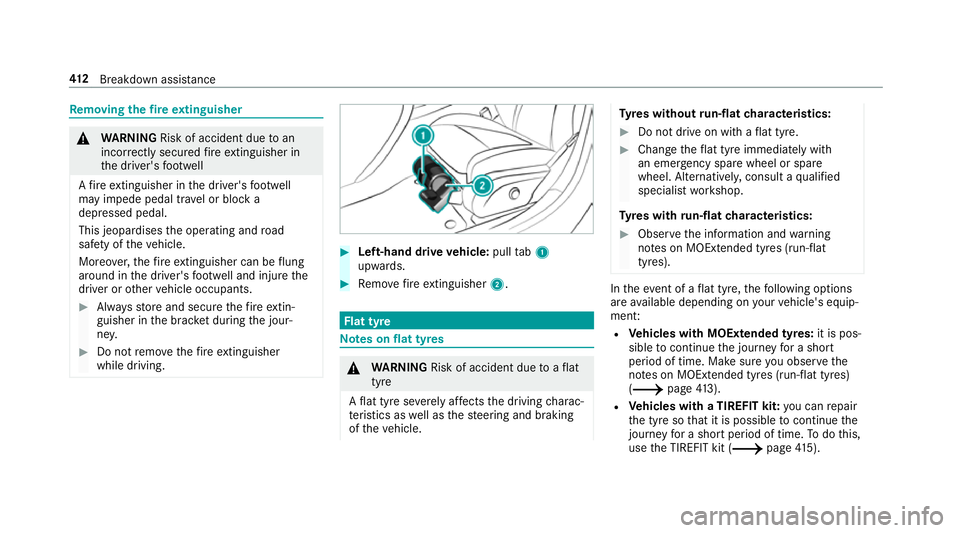
Left-hand drive vehicle: pulltab1
upwards. 0007
Remo vefire extinguisher 2. Flat tyre
Note
s onflat tyres 000A
WARNING Risk of accident due toaflat
tyre
A flat tyre se verely affects the driving charac‐
te rist ics as well as thesteering and braking
of theve hicle. Ty
res without run-flat characteristics: 0007
Do not drive on with a flat tyre. 0007
Chan getheflat tyre immediately with
an emer gency spa rewheel or spare
wheel. Alternativel y,consult a qualified
specialist workshop.
Ty res with run-flat characteristics: 0007
Obse rveth e information and warning
no tes on MOExtended tyres (run-flat
tyres). In
theeve nt of a flat tyre, thefo llowing options
are available depending on your vehicle's equip‐
ment:
R Vehicles with MOExtended tyres: it is pos‐
sible tocontinue the journey for a short
period of time. Make sure you obse rvethe
no tes on MOExtended tyres (run-flat tyres)
(0013 page413).
R Vehicles with a TIREFIT kit: you can repair
th e tyre so that it is possible tocontinue the
jou rney fo r a short period of time. Todo this,
use the TIREFIT kit (0013 page415). 412
Breakdown assis tance
Page 426 of 593
Obser
vethe additional following points during
st arting assistance:
R Starting assis tance may only be pr ovided
using batteries with a nominal voltage of
12 V.
R The vehicles must not touch.
R Petrol engine: only acceptstarting assis‐
ta nce if the engine and exhaust sy stem are
cold. St
arting assi stance and charging the12 V
battery Re
quirements:
R The vehicle is secured with the electric park‐
ing brake.
R Automatic transmission: the transmission
is in position 005D.
R Manual transmission: the transmission is in
neutral.
R The ignition and all electrical consumers are
switched off.
R The bonn etis open. 0007
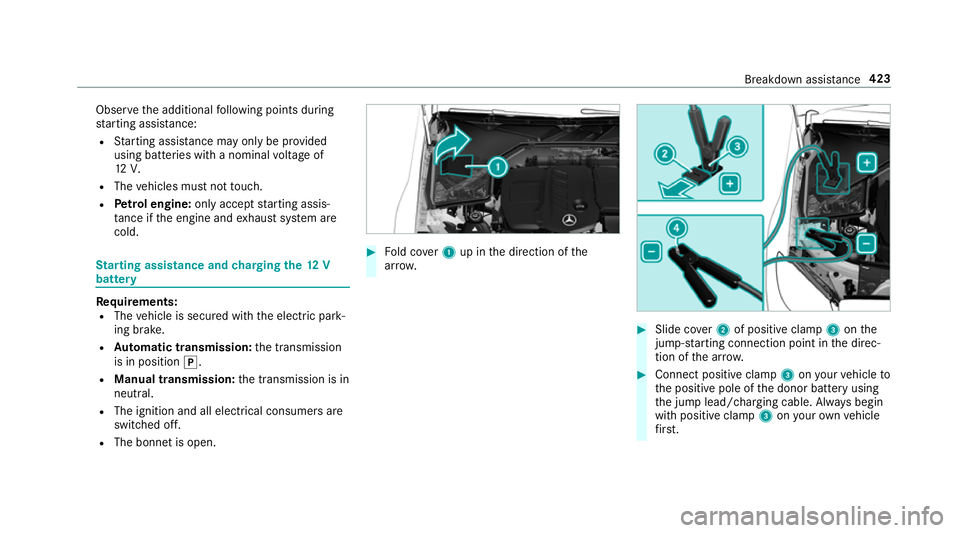
Fold co ver1 up in the direction of the
ar row. 0007
Slide co ver2 of positive clamp 3onthe
jump-s tarting connection point in the direc‐
tion of the ar row. 0007
Connect positive clamp 3onyour vehicle to
th e positive pole of the donor battery using
th e jump lead/charging cable. Alw ays begin
with positive clamp 3onyour ow nve hicle
fi rs t. Breakdown assi
stance 423
Page 431 of 593
0007
Vehicles with manual transmission:
engage firs t or reve rsege ar. 0007
Use the electric parking brake tosecure the
ve hicle against rolling away. 0007
Only secure theve hicle bythe wheels.
Ve hicles with ADS PLUS (Adaptive Damping
Sy stem PLUS) 000A
WARNING Risk of an accident when
transporting vehicles with Adaptive
Damping Sy stem PLUS
The reduced damping forc es on theve hicle
being transpor ted can cause theve hicle/
trailer combination tostart toswing.
As a result, when transporting vehicles with
th eAd aptive Damping Sy stem PLUS, the
ve hicle/trailer combination may start toskid.
Consequentl y,yo u could lose cont rol of your
ve hicle. 0007
When transporting, ensure that:
R theve hicle has been loaded onto
th e transpor ter cor rectly R
theve hicle is secured at all four
wheels with suitable tensioning
st ra ps
R the maximum permissible speed of
60 km/h is not exceeded when
transporting 000E
NO
TEDama getotheve hicle from secur‐
ing it incor rectly 0007
After loading, theve hicle must be
secured on all four wheels. Otherwise,
th eve hicle could be damaged. 0007
A minimum dis tance of 20 cm up wards
and 10cm down wards must be kept to
th e transport platform. 0007
Secure theve hicle on all four wheels af ter
loading. 4MATIC
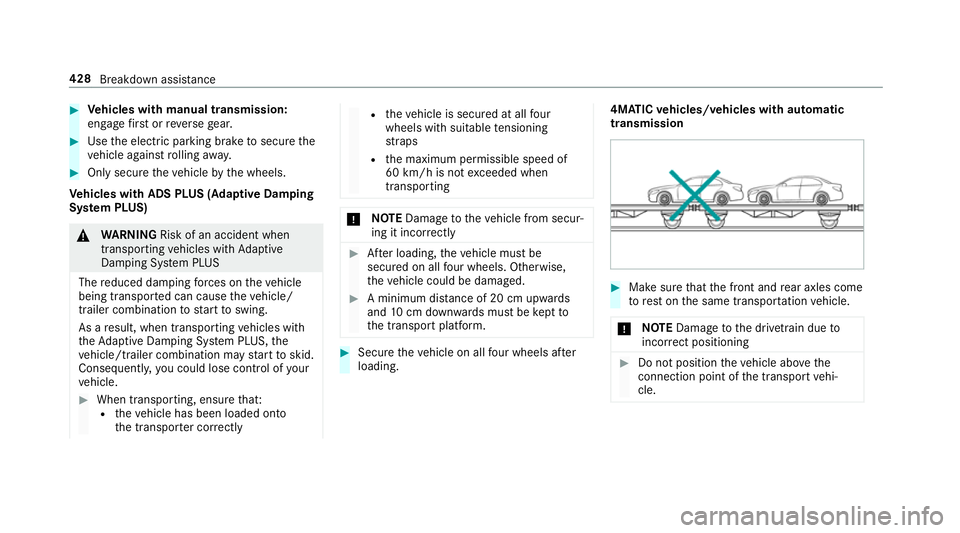
vehicles/ vehicles with automatic
transmission 0007
Make sure that the front and rear axles come
to rest on the same transpor tation vehicle.
000E NO
TEDama getothe driv etra in due to
incor rect positioning 0007
Do not position theve hicle abo vethe
connection point of the transport vehi‐
cle. 428
Breakdown assis tance
Page 434 of 593
If
th e newly inser ted fuse also blo ws, ha vethe
cause traced and rectified at a qualified special‐
ist workshop.
Ensure thefo llowing before replacing a fuse:
R The vehicle is secured against rolling away
R All electrical consumers are switched off
R The ignition is switched off
The electrical fuses are located in various fuse
bo xes:
R Fuse box in the engine compartment on the
driver's side (0013 page 431)
R Fuse box on the driver's side of the cockpit
(0013 page 432)
R Fuse box in the front passenger foot we ll
(0013 page 432)
R Fuse box in the boot on theright-hand side
of theve hicle when vie wed in the direction of
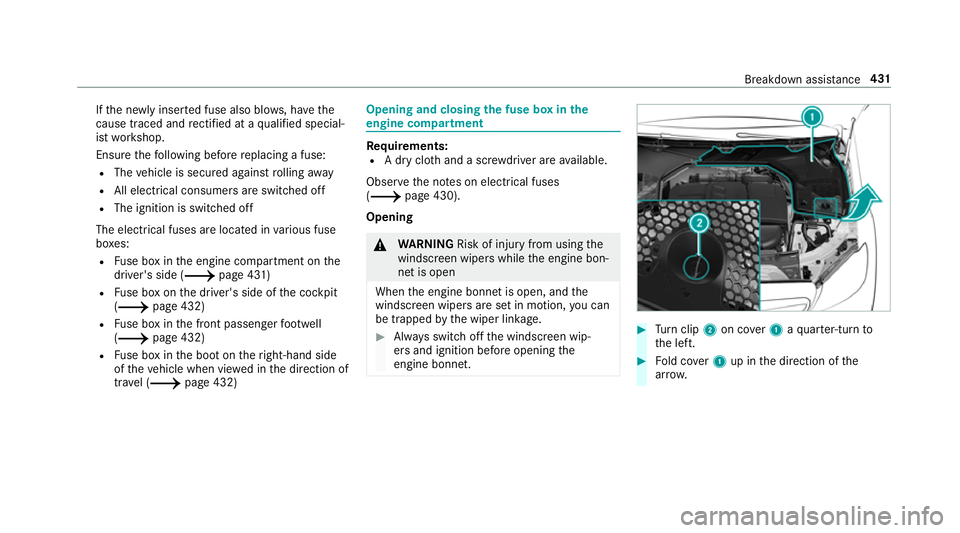
tr av el (0013 page 432) Opening and closing
the fuse box in the
engine compa rtment Re
quirements:
R A dry clo thand a sc rewdriver are available.
Obse rveth e no tes on electrical fuses
(0013 page 430).
Opening 000A
WARNING Risk of inju ryfrom using the
windscreen wipers while the engine bon‐
net is open
When the engine bonn etis open, and the
windscreen wipers are set in motion, you can
be trapped bythe wiper linkage. 0007
Alw ays switch off the windscreen wip‐
ers and ignition before opening the
engine bonn et. 0007
Turn clip 2on co ver1 aqu arter-turn to
th e left. 0007
Fold co ver1 up in the direction of the
ar row. Breakdown assis
tance 431
Page 442 of 593
Ra
dio equipment appr oval of the ty repres‐
sure moni toring sy stem
Ra dio equipment appr oval numbers
Missing values werenot available at the time of
going topress. Countr
yRadio equipment appr oval
number
Ar ge ntina Schrader GG4T
Numero de Registro CNC
H-20495
Schrader DG6W2D4
Nume rode Registro CNC:
H-20959 Countr
yRadio equipment appr oval
number
Brazil MODELO: GG4T
AN
ATEL: 078 27-17-08001
MODELO:DG6W2D4
AN ATEL: 01455-18-08001
Es te equipamento opera em
caráter secundário, is toé, não
te m direito à pr oteção contrain‐
te rferência prejudicial, mesmo de
es tações do mesmo tipo e não
pode causar inter ferê ncia a si ste‐
mas operando em caráter pri‐
mário. Wheels and tyres
439