ECU MERCEDES-BENZ C-CLASS COUPE 2018 Manual PDF
[x] Cancel search | Manufacturer: MERCEDES-BENZ, Model Year: 2018, Model line: C-CLASS COUPE, Model: MERCEDES-BENZ C-CLASS COUPE 2018Pages: 593, PDF Size: 10.86 MB
Page 458 of 593
Ve
hicles with a tyre pressure monitoring
sy stem: For a few minutes af ter an emer‐
ge ncy spa rewheel is fitted, the sy stem may
st ill display the tyre pressure of there mo ved
wheel.
Be sure toalso obse rveth efo llowing fur ther
re lated subjects:
R Notes on tyre pressure (0013 page 435)
R Tyre pressure table (0013 page 436) Re
moving the eme rgency spa rewheel The eme
rgency spare wheel is secured in the
emer gency spa rewheel bag in the boot. 0007
Obser vethe information on mounting tyres
(0013 page444). 0007
Open the boot. 0007
Detach thefast ening stra ps. 0007
Unhook there taining spring hooks of thefa s‐
te ning stra ps from the brac kets. 0007
Remo vethe emer gency spa rewheel bag with
th e emer gency spa rewheel. 0007
Open the emer gency spa rewheel bag and
re mo vethe emer gency spa rewheel. Collapsible spa
rewheel Inflating
the collapsible emer gency spare
wheel 000E
NO
TEDama getothe collapsible spare
wheel when lo wering theve hicle Lo
we ring theve hicle without pr eviously
inflating the collapsible spare wheel can
damage its rim. 0007
Inflate the collapsible spare wheel using
th e tyre inflation compressor before
lo we ring theve hicle. 000E
NO
TEOverheating due tothe tyre infla‐
tion compressor running too long 0007
Do not runth e tyre inflation compres‐
sor for longer than eight minutes with‐
out inter ruption. Re
quirements:
R Obser vethe manufacturer's saf ety no tes on
th e tyre inflation compressor label and on
th e tyre sealant bottle.
R Mount the collapsible emer gency spa re
wheel as desc ribed (0013 page 452).
The collapsible emer gency spa rewheel must
be moun ted before it is inflated.
R Remo vethe tyre inflation compressor from
th estow age space under the boot floor
(0013 page414). Wheels and tyres
455
Page 487 of 593
Display messages
Possible causes/consequences and 0050
0050Solutions 0007
Consult a qualified specialist workshop immediatel y.
Front-passenger airbag
enabled See Owner's Man-
ual *T
he front passenger airbag is enabled while theve hicle is in motion:
R even when a child, a small adult or an object weighing less than the sy stem weight thre shold is located on the
front passenger seat
R even when the front passenger seat is not occupied
The sy stem may de tect objects or forc es that are adding tothewe ight applied tothe seat. 000A
WARNING Risk of inju ryor fata l injury when using a child restra int sy stem while the front passenger airbag
is enabled
If yo u secure a child in a child restra int sy stem on the front passenger seat and the front passenger airbag is
enabled, the front passenger airbag can deploy in theev ent of an accident.
The child could be stru ck bythe airbag. 0007
Ensure, bo thbefore and during the journe y,that thest atus of the front passenger airbag is cor rect.
NEVER use a rear wa rdfacing child restra int on a seat pr otected byan ACTIVE FRONT AIRB AGin front of it;
DE ATH or SERIOUS INJU RYtotheCH ILD can occur. 0007
Pull over and stop theve hicle safely as soon as possible, paying attention toroad and traf fic conditions. 0007
Check thest atus of the automatic front passenger airbag shutoff (0013 page44). 0007
If necessar y,consult a qualified specialist workshop immediatel y.484
Display messages and warning/indicator lamps
Page 523 of 593
Display messages
Possible causes/consequences and 0050
0050Solutions
Operation only possible in
transmission position P
00CA
Operation only possible in
transmission position N *
Ve hicles with manual transmission: you attem ptedto swivel the ball neck and the transmission is not in neutral
005C. 0007
Shift the transmission toneutral 005C.
00CA Check trailer hitch lock
(whi tedisplay message) *T
he trailer tow hit chis not operational when you are driving with a trailer. 0007
Stop theve hicle immediately, paying attention toroad and traf fic conditions, and switch off the engine. 0007
Uncouple the trailer and secure it against rolling away. 0007
Initiate a new swivelling procedure (0013 page248). 0007
Ifth e ball neck is extended, press and hold the button on the boot lid until the ball neck engages beneath the
bumper. 0007
When the display message disappears, couple up the trailer and drive on. 000A
WARNING Risk of an accident if the ball neck is not loc ked
If th e ball neck is not in the loc ked position, the trailer may come loose. 0007
Pull over and stop theve hicle safely as soon as possible, paying attention toroad and traf fic conditions.
Do not continue driving under any circums tances. 520
Display messa ges and warning/indicator lamps
Page 524 of 593
Display messages
Possible causes/consequences and 0050
0050Solutions 0007
Uncouple the trailer and secure it against rolling away. 0007
Initiate a new swivelling procedure and do not re-couple the trailer until the display message disappears. If
th e display message does not disappear, the trailer tow hit chis defective and the ball neck is not loc ked. 0007
Do not couple up the trailer. Drive on without the trailer. No tethere duced ground clearance due tothe
unlo cked ball nec k. 0007
Consult a qualified specialist workshop.
The trailer tow hit chis not operational when theve hicle is at a standstill. 0007
Uncouple the coupled trailer and secure it against rolling away. 0007
Initiate a new swivelling procedure (0013 page248). 0007
Ifth e ball neck is retracted: press and hold the button on the boot lid until the ball neck engages vertically in
th e loc ked position and then engages beneath the bumper. 0007
Ifth e ball neck is extended: press and hold the button on the boot lid until the ball neck engages beneath the
bumper.
If th e display message does not disappear, the trailer tow hit chis defective and the ball coupling is not loc ked. 0007
Do not couple up the trailer. Drive on without the trailer. No tethere duced ground clearance due tothe
unlo cked ball nec k. 0007
Consult a qualified specialist workshop. Display messages and
warning/indicator lamps 521
Page 545 of 593
Ve
hicle Wa
rning/indicator lamp
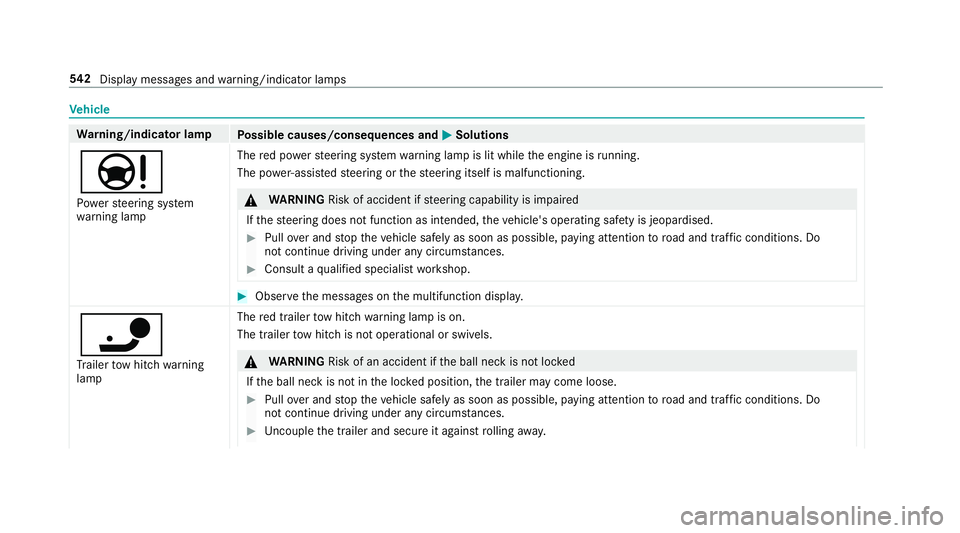
Possible causes/consequences and 0050
0050Solutions
00CC Po we rst eering sy stem
wa rning lamp The
red po werst eering sy stem warning lamp is lit while the engine is running.
The po wer-assis tedsteering or thesteering itself is malfunctioning. 000A
WARNING Risk of accident if steering capability is impaired
If th esteering does not function as intended, theve hicle's operating saf ety is jeopardised. 0007
Pull over and stop theve hicle safely as soon as possible, paying attention toroad and traf fic conditions. Do
not continue driving under any circums tances. 0007
Consult a qualified specialist workshop. 0007
Obser vethe messages on the multifunction displa y.
00CA
Tr ailer tow hit chwarning
lamp The
red trailer tow hit chwarning lamp is on.
The trailer tow hit chis not operational or swivels. 000A
WARNING Risk of an accident if the ball neck is not loc ked
If th e ball neck is not in the loc ked position, the trailer may come loose. 0007
Pull over and stop theve hicle safely as soon as possible, paying attention toroad and traf fic conditions. Do
not continue driving under any circums tances. 0007
Uncouple the trailer and secure it against rolling away. 542
Displaymessa ges and warning/indicator lamps
Page 553 of 593
Making ................................................ 339
Vi ath eove rhead control panel
(Mercedes me connect) ....................... 351
Camera see 360° Camera
see Reversing camera
Car key
see Key
Car wash
see Care
Car wash (care) ........................................4 01
Care .......................................................... 408
Air-water duct ...................................... 400
Car wash ............................................. 401
Carpet .................................................4 08
Decorative foil .................................... .404
Displ ay................................................ 408
Exterior lighting ................................... 406
High-pressure cleaner ......................... 401
Matt finish ........................................... 403
Pa int wo rk ............................................ 403
Plastic trim .......................................... 408
Re alwo od/trim elements ...................4 08
Re versing camera ................................ 406 Ro
of lining ...........................................4 08
Seat belt .............................................. 408
Seat co ver ........................................... 408
Sensors ............................................... 406
Ta ilpipes .............................................. 406
Tr ailer hit ch......................................... 406
Wa shing byhand ................................. 402
Wheels/rims ....................................... 406
Wi ndo ws .............................................. 406
Wi per blades .......................................4 06
Carpet (Care) .......................................... .408
Changing gears ........................................ 16 9
Manually ..............................................1 69
Changing hub caps ................................. 449
Changing the lights
Driving abroad (symm etrical dipped
beam) .................................................. 12 6
Cha rging
Bat tery (vehicle) .................................. 423
Chassis Damping characteristics ...................... 218
DY NA MIC BODY CONTROL .................. 218Child saf
ety lock
Ac tivating/deactivating (multimedia
sy stem) ............................................... 298
Child seat Appr oval categories .............................. .55
At tach ing (no tes) ................................... 54
Basic instructions .................................. 48
Fr ont passenger seat (no tes) ................. 68
Fr ont passenger seat (without auto‐
matic airbag shutoff) ............................. 67
ISOFIX/i-Size (fitting) ............................ 60
No tes on risks and dangers ...................49
Re commended child restra int sys‐
te ms ...................................................... 52
Seats suita blefor belt-secu redch ild
re stra int sy stems ................................... 64
Seats suitable for i‑Size child
re stra int sy stems ................................... 59
Seats suitable for ISOFIX child
re stra int sy stems ................................... 57
Secu ring on the front passenger seat ....69
Secu ring on there ar seat ...................... 66
To pTe ther ..............................................62
Child ren
Av oiding dangers in theve hicle .............49 550
Index
Page 565 of 593
H
Handbrake see Electric parking brake
Handling characteristics (unusual) ....... 434
HANDS-FREE ACCESS ................................ 83
Haza rdwa rning lights ............................ .129
HD prog rammes
see CI+ module
Head restra int
Fr ont (adjusting mechanically) .............1 01
Re ar (adjusting) .................................. .102
Re ar (fitting/removing) ........................ 103
Head-up display ....................................... 266
Ad justing display elements (on-board
compu ter) ............................................ 266
Ad justing the brightness (on-board
computer) ............................................ 266
Fu nction .............................................. 266
Menu (on-board compu ter) .................. 266
Setting the position (on-board com‐
puter) .................................................. 266
Switching on/off ................................. 267
Headla mpflasher ................................... .128 Heating
see Clima tecontrol
High beam Adaptive Highbeam Assist .................. .131
Switching on/off ................................. 12 8
High-pressure cleaner (care) .................. 401
Hill Start Assist ........................................ 216
HOLD function ......................................... 216
Fu nction/no tes .................................... 216
Switching on/off .................................. 217
Hooking the luggage net .........................116
Hotspot Setting up (Wi-Fi) ................................. 296 I
i-Size child seat securing sy stem
Fitting .................................................... 60
Seats suitable for attaching ................... 59
Identification plate Engine ................................................. 459
Ve hicle ................................................ 459
Ignition Switching on (S tart/S top button) ........ 15 2Ignition
key
see Key
Immobiliser ................................................ 94
Implied warranty
Ve hicle .................................................. 28
In Car Of fice
Calling up ............................................ 345
Fe atures .............................................. 345
Marking a to-do entry as compl eted ....3 46
Noting an incoming call ....................... 346
Selecting functions .............................. 345
Switching auto maticstart on/off ........ 345
Indicator lamps see Warning/indicator lamps
Individual drive prog ram
Con figuring .......................................... 16 5
Selecting ............................................. 16 4
Inspection see AS SYST PLUS
Instrument clus ter
see Instrument display
Instrument display ..................................2 55
Ad justing the lighting .......................... 260 562
Index
Page 567 of 593
ISOFIX
child seat securing sy stem
Fitting .................................................... 60
Seats suitable for attaching ................... 57J
Jack Declaration of conformity ......................25
St orage location ..................................4 47
Jump-start connection ............................423
Gene ral no tes ...................................... 421 K
Ke y.............................................................. 71
Ac oustic locking verification signal ........ 72
Battery ................................................... 73
Emergency key ...................................... 73
Energy consumption .............................. 72
Fe atures ................................................ 71
Ke yring attachment .............................. 73
Overview ................................................ 71
Pa nic alarm ............................................ 72
Problem .................................................74
Un locking setting .................................. .72Ke
y functions
Deactivating .......................................... 72
KEYLESS-GO Locking theve hicle ................................ 77
Problem .................................................78
Un locking setting .................................. .72
Un locking theve hicle ............................77
Kickd own.................................................1 70
Using ................................................... 17 0
Knee airbag ................................................ 39 L
Lamp see In terior lighting
Lamps (instrument display) see Warning/indicator lamps
Lane de tection (au tomatic)
see Active Lane Keeping Assist
Lane Keeping Assist
see Active Lane Keeping Assist
Language .................................................2 98
No tes .................................................. 298
Setting .................................................2 98LED light
see Intelligent Light Sy stem
Le vel control sy stem
see AIRMATIC
Light switch Overview ............................................ .126
Lighting see Interior lighting
see Lights
Lights ........................................................ 12 6
Ac tive headla mps ................................ 12 9
Ad aptive Highbeam Assist .................. .131
Ad justing the instrument lighting ........ 260
Ad versewe ather light .......................... 131
Au tomatic driving lights ....................... 127
City lighting .......................................... 131
Combination swit ch............................. 12 8
Corne ring light ..................................... 13 0
Driving ab road (symm etrical dipped
beam) .................................................. 12 6
Fo g light (extended range) ................... 13 0
Haza rdwa rning lights .......................... 12 9
Headla mpflasher ................................ 12 8
High beam ........................................... 12 8564
Index
Page 568 of 593
Intellige
nt Light Sy stem ....................... 12 9
Light switch .........................................1 26
Low beam ............................................ 12 6
Mo torw ay mode ................................... 13 0
Pa rking lights ...................................... .126
Re ar fog light ....................................... 12 6
Re sponsibility for lighting sy stems .......1 26
Setting the dipped beam ..................... 13 4
Setting theex terior lighting switch-
off delay time ...................................... 13 4
Setting the sur round lighting .............. .134
St anding lights .................................... .126
Tu rn signal lights ................................. 12 8
Limiter ...................................................... 201
Ac tivating ............................................ 202
Buttons ................................................ 202
Calling up a speed ............................... 202
Deactivating ........................................ 202
Fu nction .............................................. 201
Pa ssive mode ...................................... 201
Pe rm anent setting .............................. .204
Re quirements: .................................... .202
Selecting ............................................. 202
Setting a speed ................................... 202
St oring a speed ................................... 202 Sy
stem limitations ...............................2 01
Limiting speed see Limiter
LINGU ATRO NIC ........................................ 268
Application specific voice commands
............................................................ .269
Au dible help functions .........................2 70
Global voice commands ...................... 269
Impr oving speech quality .................... .270
Language setting ................................. 270
Media pla yervo ice commands ............ 277
Message voice commands .................. 279
Multifunction steering wheel (operat‐
ing) ...................................................... 268
Na vigation voice commands ................ 272
Operable functions .............................. 269
Operating saf ety .................................. 268
Ra dio voice commands ........................ 276
Switch voice commands ...................... 271
Te lephone voice controls .................... .276
Te xt messa gevoice commands .......... .279
TV voice commands ............................ .276
Ty pes of voice commands .................. .269
Ve hicle voice commands .................... .280
Vo ice prom pting .................................. 269 Live
Traf fic Information
Displaying subsc ript ion information .... 324
Displaying the tra ffic map .................. .324
Displ aying traf fic incidents .................. 325
Extending a subscription ..................... 324
Issuing hazard alerts ........................... 326
Re gis tering on Mercedes me ............... 324
Loading ..................................................... 11 5
Bag hook .............................................. 11 6
No tes ................................................... 111
Ro ofrack ............................................. 11 8
St ow age space under the boot floor ....1 17
Ti e-down eyes ...................................... 11 5
Loading guidelines ...................................111
Loads Securing .............................................. .111
Locator lighting see Sur round lighting
Locking/unlocking Activating/deactivating the auto‐
matic locking feature ............................ .79
Ad ditional door lock .............................. 75
Digital Vehicle Keyst icke r ...................... 76
Emergency key ...................................... 79 Index
565
Page 569 of 593
KEYLESS-GO ..........................................
77
Mobile phone ......................................... 76
Smartphone ........................................... 76
Un locking/opening the doors from
th e inside ............................................... 76
Low beam (symm etrical dipped beam) ................. 12 6
Switching on/off ................................. 12 6
Lu bricant additives
see Additives
Lu ggage
Lu ggage net ......................................... 11 6
Secu ring ............................................... 111
Lu mbar support
see Lumbar support (4-w ay)
Lu mbar support (4-w ay).......................... 101M
Maintenance see ASS YST PLUS
Malfunction Restra int sy stem ................................... 33 Manual transmission
Operating thege arshift le ver ............... 16 5
Map .......................................... .324, 326, 327
Av oiding an area ..................................3 29
Av oiding an area (o verview) ................ .329
Changing an area ................................ 329
Deleting an area .................................. 330
Displ aying Qibla .................................. .331
Displ aying the compass ....................... 331
Displaying the map version ................ .329
Displ aying the next intersecting
st re et ................................................... 328
Displaying the satellite map ................3 32
Displ aying the tra ffic map .................. .324
Displ aying weather information .......... .332
Map data ............................................. 330
Moving ................................................ 327
Overview ............................................. 326
Selecting POI symbols ......................... 328
Selecting text information ................... 328
Selecting the map orientation .............3 28
Setting the map scale .......................... 327
Setting the map scale automatically ....3 31
Up dating .............................................3 30Map and comp
ass
Overview ............................................. 326
Massage prog rammes
Re setting the settings .......................... 104
Massage prog rams
Selecting the front seats ..................... 103
Massage settings Resetting ............................................. 104
Matt finish (cleaning instructions) ........ 403
Maximum gross vehicle weight ............ .459
Maximum speed see Limi ter
Mecca ...................................................... .331
Media Menu (on-boa rdcompu ter) .................. 264
Sear ching ............................................ 372
Media display Notes .................................................. 283
Media Inter face
Ac tivating ............................................ 373
Information .......................................... 372
Overview ..............................................3 74566
Index