display MERCEDES-BENZ C-CLASS COUPE 2019 User Guide
[x] Cancel search | Manufacturer: MERCEDES-BENZ, Model Year: 2019, Model line: C-CLASS COUPE, Model: MERCEDES-BENZ C-CLASS COUPE 2019Pages: 518, PDF Size: 46.27 MB
Page 123 of 518
0007
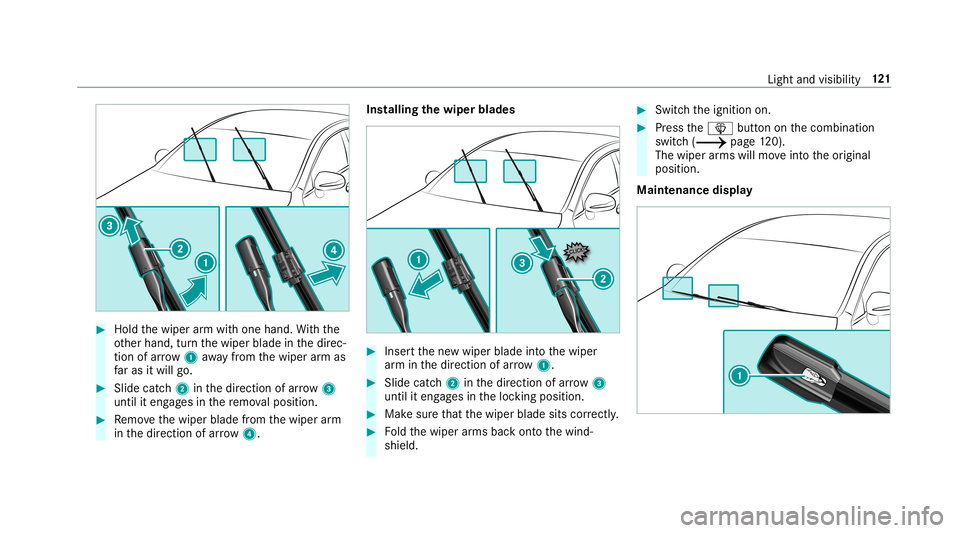
Hold thewiper arm wit hone hand. With the
ot her hand, turnth ewiper bladeinthedir ec‐
tion ofarrow 1away from thewiper arm as
fa ras itwil lgo. 0007
Slide catch2 inthedir ect ion ofarro w 3
unt ilit eng ages inthere mo valposit ion. 0007
Remo vethewiper bladefrom thewiper arm
in thedir ect ion ofarrow 4. Ins
tallin gth ewiper blades 0007
Inser tth ene wwiper bladeintoth ewiper
ar m inthedir ect ion ofarrow 1. 0007
Slide catc h2 inthedir ect ion ofarro w 3
unt ilit eng ages intheloc king position . 0007
Mak esur eth at thewiper bladesitscorrectly . 0007
Foldthewiper arms backont oth ewind‐
shield. 0007
Switc hth eignition on. 0007
Press the00D4 buttononthecombin ation
switc h(0013 page12 0).
Th ewip erarms willmo veintoth eor iginal
position .
Maint enance display Light
andvisibility 12
1
Page 134 of 518
0007
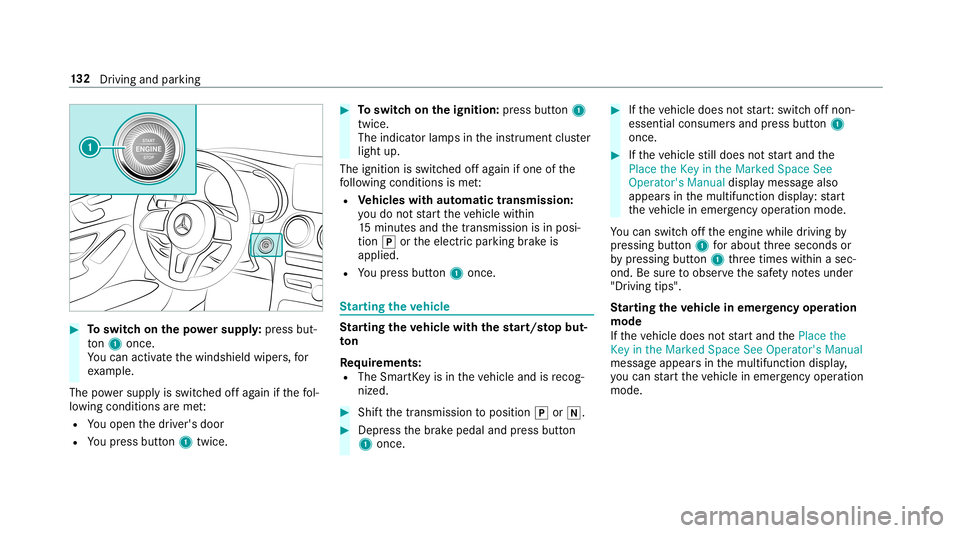
Toswitc hon thepo we rsupp ly:pr ess but‐
to n1 once .
Yo ucan activat eth ewindshield wipers,for
ex am ple.
The powe rsupp lyis switc hedoffag ain ifth efo l‐
lo wing condition sar eme t:
R Youopen thedr iver's door
R Youpr ess button1 twice. 0007
Toswitc hon theignit ion:press butt on1
twic e.
The indic ator lam psintheins trument cluster
light up.
The ignit ionisswitc hedoffag ain ifone ofthe
fo llo wing condition sis me t:
R Vehicl eswith automatic transmiss ion:
yo udo notst ar tth eve hicle within
15 minut esand thetransmission isin posi‐
tion 005Dortheelectr icpar king brak eis
applied.
R Youpr ess button1 once . St
arting theve hicl e St
arting theve hicl ewith thest ar t/s topbut‐
to n
Re quirement s:
R The Smar tKey isin theve hicle andisrecog‐
nized . 0007
Shif tth etra nsmiss iontoposition 005Dor005C. 0007
Depr essthebr ak epedal andpress butt on
1 onc e. 0007
Ifth eve hicle does notst ar t:switc hof fnon-
essential consumer sand press butt on1
once. 0007
Ifth eve hicle still does notst ar tand the
Place theKey inthe Marked SpaceSee
Operator's Manualdisplaymessag ealso
appear sin themultifunc tiondispla y:star t
th eve hicle inemer gency operati on mod e.
Yo ucan switchoffth eengine whiledriving by
pr essing button1 forabo utthre esecon dsor
by pressing button1 thre etimes within asec‐
ond. Besureto obser vethesaf etyno tesunder
"Dr iving tips".
St arting theve hicl ein emer gency oper ation
mode
If th eve hicle does notst ar tand thePlace the
Key inthe Marked SpaceSeeOperator 'sManual
messag eappear sin themultifunc tiondispla y,
yo ucan star tth eve hicle inemer gency operati on
mod e. 13
2
Driving and parking
Page 142 of 518
DY
NA MIC SELECT switch Fu
nction oftheDY NA MIC SELECT switch Mer
cede s-AMG vehicl es:obse rveth eno tesin
th eSupplement .Ot her wise, youma yfa ilto rec‐
ogni zedangers.
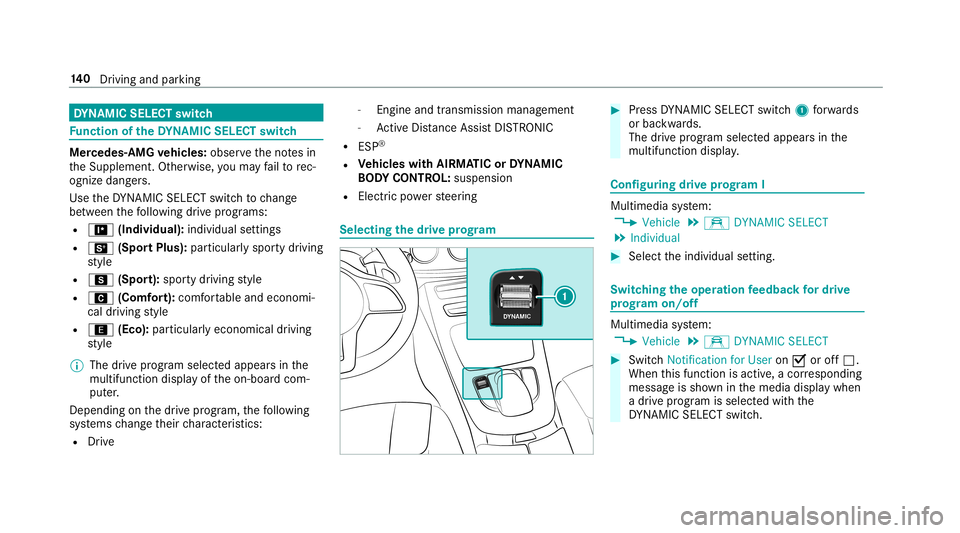
Use theDY NA MIC SELE CTswitc hto chang e
be tween thefo llo wing drive pr ogr ams:
R = (Individ ual):individual settings
R B (Spor tPlus): particular lyspor tydrivin g
st yle
R C (Spor t):spor tydrivin gst yle
R A (Comf ort): com fortable andeconomi‐
cal drivin gst yle
R ; (Eco): particular lyecon omical driving
st yle
0009 The drive pr ogr am select edappear sin the
multifu nctiondisplay of theon- boar dcom‐
put er.
Depen dingonthedr ive pr og ram, thefo llo wing
sy stems chang eth eir charact eristic s:
R Drive -
Engin eand trans miss ionman agemen t
- ActiveDis tan ceAssi stDIS TRONI C
R ESP ®
R Vehicl eswith AIRMA TICorDY NA MIC
BO DY CONT ROL:suspen sion
R Elec tric po we rst eer ing Selecting
thedr ive pr og ram 0007
Press DYNA MIC SELE CTswitc h1 forw ards
or bac kwards.
The drive pr og ram sele cted app earsin the
multifu nctiondisplay. Conf
iguringdrive pr og ram I Mu
ltimed iasystem:
0018 Vehicle 0019
e DYNA MICSELECT
0019 Individual 0007
Select theindividual setting. Switc
hingtheoper ation feedba ckfordr ive
pr og ram on/o ff Multimedia
system:
0018 Vehicle 0019
e DYNA MICSELECT 0007
Switc hNotif ication forUser on0073 oroff0053.
When this func tion isact ive, acor responding
messag eis sho wninthemedia displaywhen
a dr ive pr og ram issele cted withth e
DY NA MIC SELE CTswitc h. 14
0
Driving and parking
Page 144 of 518
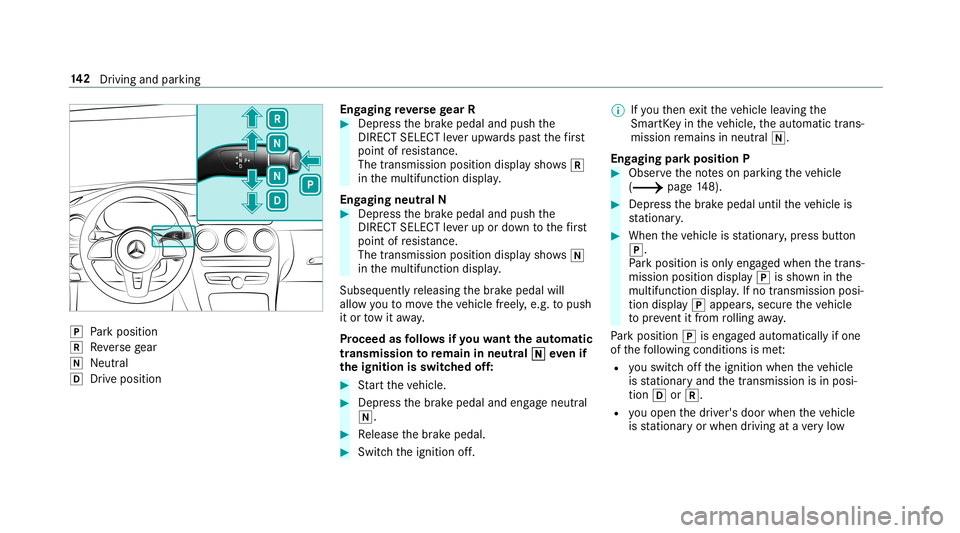
005D
Park position
005E Reversege ar
005C Neut ral
005B Drive po sitio n En
gaging reve rsege ar R 0007
Depr essthebr ak epedal andpush the
DIR ECT SELEC Tleve rupw ards pas tth efirs t
point ofresis tance.
The trans mis sion positio ndispl aysho ws005E
in themultifunc tiondispla y.
Eng aging neutralN 0007
Depr essthebr ak epedal andpush the
DIR ECT SELEC Tleve rup ordown tothefirs t
point ofresis tance.
The trans mis sion positio ndispl aysho ws005C
in themultifunc tiondispla y.
Sub sequently releasing thebr ak epedal will
allo wyo uto mo vetheve hicle freel y,e.g. topush
it or tow itaw ay.
Pr ocee das follo ws ifyo uwa nttheaut oma tic
tr ansm ission toremain inne utr al005C 005C
eve nif
th eignit ionisswitc hedoff: 0007
Startth eve hicle. 0007
Depr essthebr ak epedal andengageneutral
005C. 0007
Release thebr ak epedal. 0007
Switc hth eignition off. 0009
Ifyo uth en exitth eve hicle leaving the
Smar tKey intheve hicle, theaut omatic trans‐
mission remains inneutr al005C.
Eng aging parkpositio nP 0007
Obser vetheno teson par king theve hicle
(0013 page14 8). 0007
Depr essthebr ak epedal untiltheve hicle is
st atio nary. 0007
When theve hicle isstatio nary,press butt on
005D.
Pa rk position isonl yeng aged when thetrans‐
mission position display005D issho wninthe
multifu nctiondisplay. Ifno transmissi onposi‐
tion displ ay005D appear s,sec ureth eve hicle
to preve ntitfrom rolling away.
Pa rk position 005Diseng aged aut omatic allyif one
of thefo llo wing condition sis me t:
R youswit choffth eignition whentheve hicle
is statio naryand thetransmission isin posi‐
tion 005Bor005E.
R youopen thedr iver's door when theve hicle
is statio naryor when drivin gat ave ry low 14
2
Driving and parking
Page 145 of 518
speed
andthetransmission isin position 005B
or 005E.
0009 Tomaneu verwit han open driver's door ,
open thedr iver's door while statio naryand
eng agetrans miss ionposit ion005Bor005E
ag ain.
Eng agin gdr ive posi tion D 0007
Depress thebr ak epedal andpush the
DIR ECT SELEC Tleve rdo wn pas tth efirs t
point ofresis tance.
The trans mis sion positio ndispl aysho ws005B
in themultifunc tiondispla y.
When theaut omatic transmiss ionisin transmis‐
sion position 005B,itshif tsthege arsaut omat i‐
call y.This depends onthefo llo wing fact or s:
R theselect eddrive pr og ram
R theposition oftheaccelera torpeda l
R thedr iving speed Manua
lge arshif ting 000A
WARNIN GRisk ofskid ding and ofan
acci dent dueto shif ting down onslipper y
ro ad sur faces
If yo ushif tdo wn onslipp eryro ad sur faces to
inc rease theengine braking effect, thedr ive
wheels maylose traction . 0007
Donotshif tdo wn onslipper yro ad sur‐
fa ces toinc rease theengine braking
ef fect. Whe
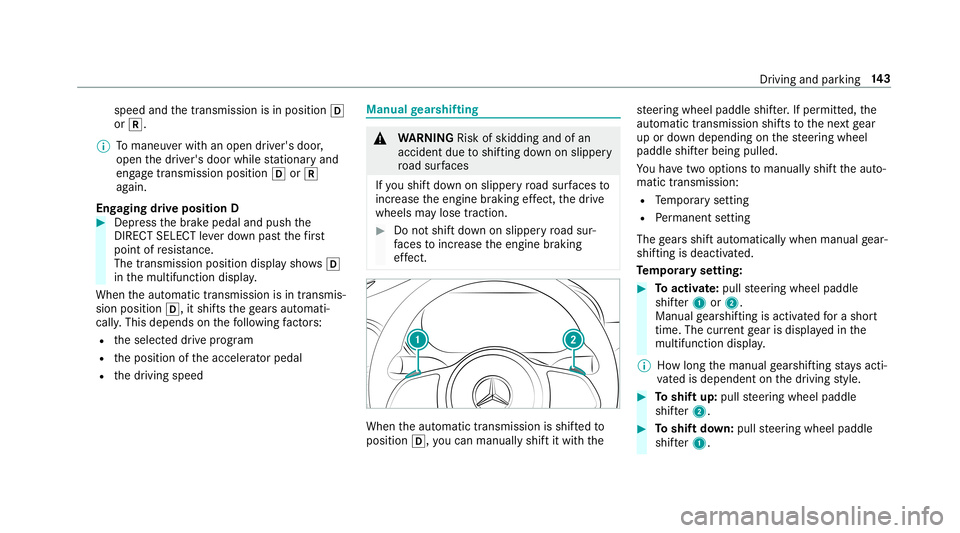
nth eaut omatic transmiss ionisshif tedto
position 005B,youcan man uallyshif tit wit hth e st
eer ing wheel paddle shifter.If per mitt ed,the
aut omat ictransm issionshif tsto thene xt gear
up ordown depen dingon thesteer ing wheel
paddle shifterbeing pulled.
Yo uha ve twoop tio ns tomanua lly shif tth eaut o‐
matic transmiss ion:
R Temp orar yse tting
R Perm anen tse tting
The gearsshif taut omat icallywhen manualgear‐
shif tingis deac tivated.
Te mp oraryse tting: 0007
Toactiv ate: pul lst eer ing wheel paddle
shif ter1 or2.
Manua lge arshif tingis act ivat ed fora shor t
time. Thecurrent gear isdispla yedin the
multifu nctiondisplay.
0009 Howlong themanual gearshif tingst ay sacti‐
va tedis dependen ton thedr iving style. 0007
Toshif tup: pull steer ing wheel paddle
shif ter2. 0007
Toshif tdo wn: pullsteer ing wheel paddle
shif ter1. Dr
iving andparking 14
3
Page 146 of 518
0007
Todeac tivate: pullst eer ing wheel paddle
shif ter2 and hold itin pla ce.
The transmiss ionposi tion 005Bapp earsin the
multifu nctiondisplay.
Pe rm anen tse tting: 0007
Cha ngeto drive pr og ram
= (0013 page14 0). 0007
Select drive pr ogr am Manual
(0013 page14 0).
Mer cedes- AMG vehicl es:obse rveth eno tesin
th eSupplement .Ot her wise, youma yfa ilto rec‐
ogni zedangers. Gearshif
tre comm endation Mer
cedes -AMG vehicl es:obse rveth eno tesin
th eSupplement .Ot her wise, youma yfa ilto rec‐
ogni zedangers.
The gearshif tre comme ndation assists youin
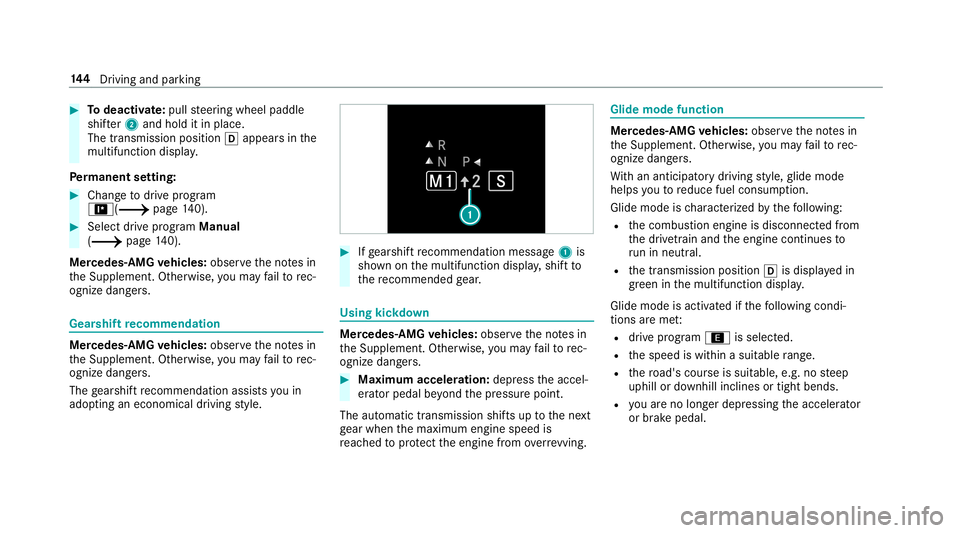
adop tingan eco nomic aldrivin gst yle. 0007
Ifge arshif tre comme ndation mess age1 is
sho wnonthemultifunc tiondispla y,shif tto
th ere comme ndedgear. Using
kickdow n Mer
cede s-AMG vehicl es:obse rveth eno tesin
th eSupplement .Ot her wise, youma yfa ilto rec‐
ogni zedangers. 0007
Maxi mum acceler atio n:dep ress theaccel‐
er ator pedal beyond thepr essur epoint .
The automatic transmiss ionshiftsup tothene xt
ge ar when themaximum enginespeedis
re ac hed toprotect theengine from overrev ving. Glide
mode functio n Mer
cede s-AMG vehicl es:obse rveth eno tesin
th eSupplement .Ot her wise, youma yfa ilto rec‐
ogni zedangers.
Wi th an ant icip ator ydr ivin gst yle, glide mode
helps youto reduce fuelconsum ption.
Glide mode isch aract erize dby thefo llo wing:
R thecombus tionengine isdiscon nectedfrom
th edr ivet ra in and theengine continues to
ru nin neu tral .
R thetra nsmiss ionposition 005Bisdispla yedin
gr een inthemultifunc tiondispla y.
Glide mode isact ivat ed ifth efo llo wing condi‐
tion sar eme t:
R drive pr og ram ; issele cted.
R thespeed iswit hin asuit able rang e.
R thero ad's courseissuit able, e.g.no steep
uphill ordownhill inclinesortight bends.
R youar eno longerdepr essing theacceler ator
or brak epedal. 14
4
Driving and parking
Page 159 of 518

If
th efo llo wing condition sar efulf illed, standb y
mode canbeact ivat ed ordeac tivated usin gth e
multime diasystem:
R The engine isswitc hedoff.
R The ignition isswitc hedon.
Ex ceeding theve hicle's displayednon -oper a‐
tion altime maycause inconvenie nce, i.e.it can‐
no tbe guarant eedth at thest ar terbatt erywil l
re liably star tth eengine.
The star terbatt erymus tbe charge dfirs tin the
fo llo wing situat ions:
R The vehicle's non-oper ational timemustbe
ex tende d.
R The Batte ryCh arg eInsu fficie ntfor Stand by
Mod emes sage appear sin themultimedia
sy stem displa y.
0009 Standb ymode isaut omat icallydeac tivated
when theignition isswitc hedon. Ac
tiv atin g/deac tivatin gst andb ymode
Mul timedi asy stem:
0018 Vehicle 0019
î Vehicle Setting s
0019 Standby Mode
0009 This function isno tav ailable forall model s. 0007
Activate0073 ordeacti vate 0053 thefunc tion.
When youact ivat eth efunc tion,a pr om pt
appear s. 0007
Select Yes.
St andb ymode isact ivat ed. Dr
iving anddriving safetysy stems Dr
iving systems andyour responsibility Yo
ur vehicle iseq uipped withdr iving systems
whic hassis tyo uin drivin g,par kingand man eu‐
ve ring theve hicle. Thedriving systems areaids
and donotre lie ve youof your responsibili typer‐
ta inin gto road traf fic law. Payatt ention tothe
tr af fic condi tions atalltime sand interve ne
wh en nece ssary.Be awareof thelimit ations
re ga rding thesaf euse ofthese systems. Fu
nction ofthera dar senso rs Some
drivi ng and drivi ng safety systems use
ra dar sensor sto monit orthear ea infront of,
behind ornext to theve hicle (depending onthe
ve hicle's equipment).
Depending ontheve hicle's equipment, thera dar
sensor sar eint egr ated behind thebum pers
and/or behindtheMer cedes star .Ke ep these
par tsfree ofdir t,ice and slush
(0013 page35 1). The sensor smus tno tbe cov‐
er ed, forex am ple bycycle rack s, overhanging
loads, sticke rs,fo ilor foils toprotect agains t
st one chipping .In theeve ntofdama getothe
bum persor radiat orgrill, orfollo wing acollis ion
im pact ingthebum persor radiat orgrill, have the
function ofthera dar sensor sch eckedat aqu ali‐
fi ed specialis two rkshop. Thedriver assis tance
sy stem mayno long erwo rkproper ly. Dr
iving and parking 15
7
Page 170 of 518
Se
tting Activ eBr ak eAs sist Multimedia
system:
0018 Vehicle 0019
k Assist ance
0019 Act ive Brak eAssist
Ve hicl eswithout Drivin gAss istanc ePa ck‐
ag e:The settings canbemade afte rst ar tin gth e
ve hicle.
Ve hicl eswith Drivin gAss istanc ePa ckag e:
The settings canbemade whenth eignition is
switc hedon.
The follo wing settings areav ailable:
R Early
R Medium
R Late 0007
Select ase tting .
0009 Your sele ction isretained when theve hicle is
ne xt star ted.
Deactiv atingActiv eBr ak eAs sist
0009 Itis recomme ndedthat youalw ayslea ve
Ac tiveBr ak eAssi stact ivat ed. 0007
Select Off.
The distance warning func tion andtheaut on‐
omous braking function aredeactiv ated.
Ve hicl eswithout Drivin gAss istanc ePa ck‐
ag e:When theve hicle isne xt star ted, the
mediu msetting isau tomatical lysele cted.
Ve hicl eswith Drivin gAss istanc ePa ck‐
ag e:Evasi ve Steer ing Assis tis no tav ailable.
When theignition isne xt star ted, the
mediu msetting issele cted automatical lyand
Ev asiv eSt eer ing Assis tis available.
0009 IfAc tiveBr ak eAssi stisdeact ivat ed, the
00D4 symbol appearsinthest atus barofthe
multifu nctiondisplay. Speed
controlcruise contr ol Fu
nction ofcruise contr ol
Cr uise controlre gulat esthespeed totheva lue
selec tedby thedr iver .
If yo uacc elerat eto ove rtak e, forex am ple, the
st or ed speed isno tdele ted. Ifyo ure mo veyour
fo ot from theacceler ator pedal afte rove rtakin g, cr
uise control will resume speed regulation back
to thestor ed speed.
Cr uise controlis oper ated using thecor respond‐
ing steer ing wheel buttons. Youcan stor ean y
speed above15 mp h(2 0km/h) uptothemaxi‐
mum speed.
If yo ufa ilto adap tyo ur drivin gst yle, cruise con‐
tr ol can neither reduce therisk ofan accident
nor override thelaws ofphysics. Itcan nottak e
int oacc ount road, weather ortraf fic condi tions.
Cr uise contr olisonly anaid. Youar ere sponsible
fo rth edis tance totheve hicle infront, forve hi‐
cle speed, forbr aking ingood timeandforst ay ‐
ing inyour lane .
Disp lays on themu ltifunct iondisp lay
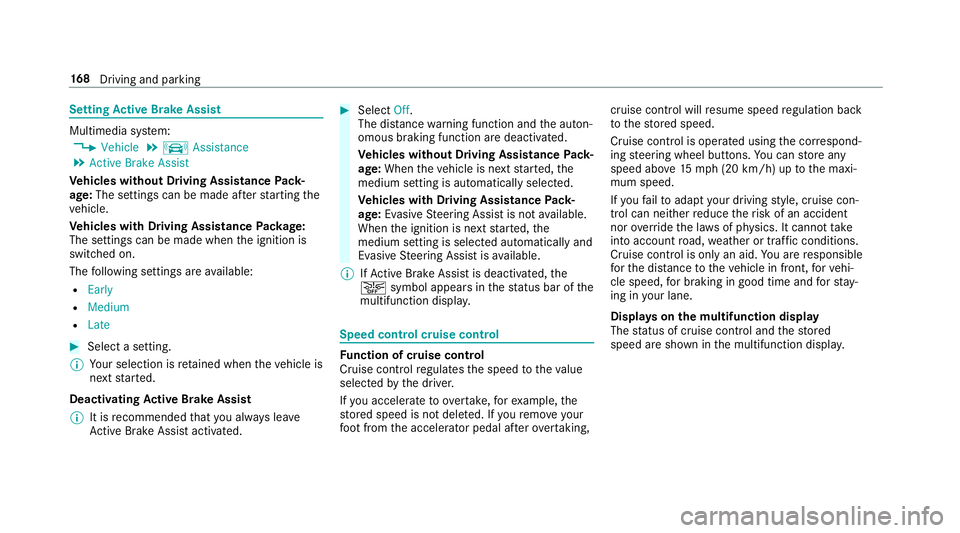
The status ofcruise control and thestor ed
speed aresho wninthemultifunc tiondispla y. 16
8
Driving and parking
Page 171 of 518
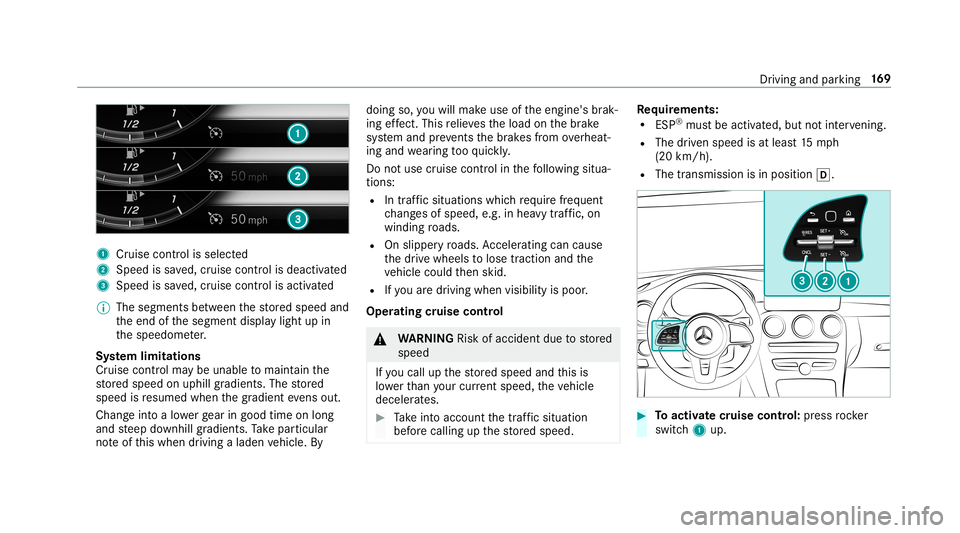
1
Cruise contro lis selec ted
2 Spee dis save d, cruise control isdeactiv ated
3 Speed issave d, cruise control isactiv ated
0009 The segmen tsbetween thestor ed speed and
th eend ofthesegment displaylight upin
th espeedome ter.
Sy stem limita tions
Cr uise control ma ybe unable tomaint ainthe
st or ed speed onuphill gradients. Thestor ed
speed isresumed whenthegr adient evensout.
Ch ang eint oalowe rge ar ingood timeon long
and steep downhill gradients. Take par ticular
no te ofthis when drivin galaden vehicle. By doing
so,youwill mak euse oftheengine' sbr ak‐
ing effect. Thisre lie vesth eload onthebr ak e
sy stem and preve nts thebr ak es from overheat‐
ing and wearing tooqu ickl y.
Do notus ecr uise contr olinthefo llo wing situa‐
tion s:
R Intraf fic situ ations whichrequ ire freq uent
ch ang esofspee d,e.g .in hea vytraf fic, on
wi nding roads.
R Onslippe ryroads. Accel erati ng can cause
th edr ive wheels tolose tract ion and the
ve hicle could then skid.
R Ifyo uar edr ivin gwhen visibilit yis poor .
Ope ratin gcr uis eco ntr ol 000A
WARNIN GRisk ofacci dent dueto stor ed
speed
If yo ucall upthestor ed speed andthis is
lo we rth an your cur rent spe ed,th eve hicle
deceler ates. 0007
Take intoacc ount thetra ffic situat ion
bef orecallin gup thestor ed speed. Re
quirement s:
R ESP®
mus tbe act ivat ed, but notint erve ning .
R The driven spe edisat leas t15 mp h
(20 km/ h).
R The transmis sionisin positio n005B. 0007
Toactiv atecr uise contr ol: press rock er
switc h1 up. Dr
iving andparking 16
9
Page 176 of 518
or
0007
Press and hold rock er switc h3 up/do wnto
th epr essur epoint .
The stor ed speed isincr eased orreduced in
incr ement sof 1mp h(1 km/h).
or 0007
Press rock er switc h3 beyond thepr essur e
point .
The stor ed speed isincr eased orreduced by
5 mp h(1 0 km/h) .
or 0007
Press and hold rock er switc h3 beyond the
pr essur epoint .
The stor ed speed isincr eased orreduced in
incr ement sof 5mp h(1 0 km/h). 0007
Toincr ease orreduce thespecified dis‐
tance from theve hicl ein front :pr ess
ro ck er switc h2 upordown. Fu
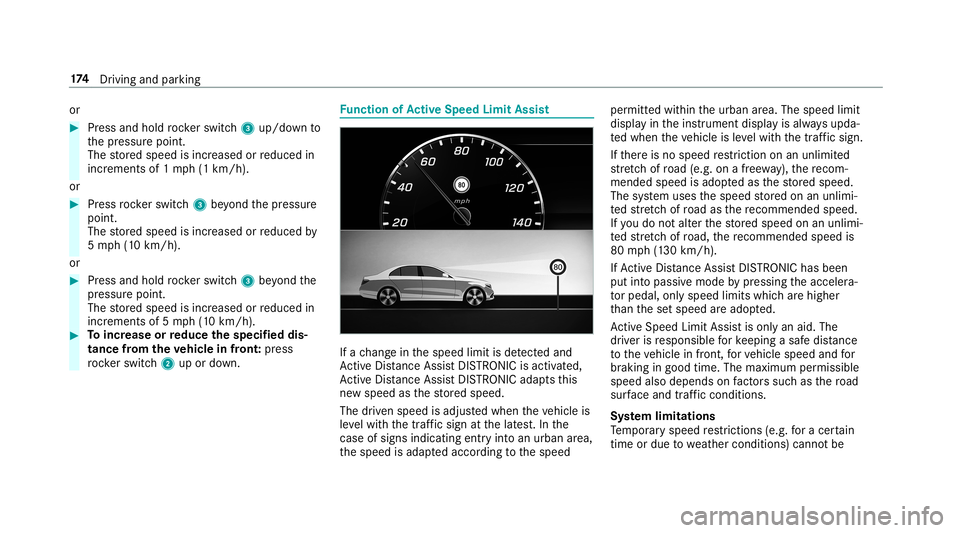
nction ofActiv eSpe edLimit Assist If
ach ang ein thespeed limitisde tected and
Ac tiveDis tance AssistDIS TRONI Cis acti vated,
Ac tiveDis tance AssistDIS TRONI Cad apts this
ne wspeed asthestor ed speed.
The driven speed isadjus tedwhen theve hicle is
le ve lwit hth etraf fic sig nat thelat est.In the
case ofsig ns indi cati ngentr yint oan urb anarea ,
th espeed isadap tedaccor dingtothespeed per
mitt edwithin theurban area. The speed limit
displa yin theins trument displayis alw aysupda ‐
te dwhen theve hicle isleve lwit hth etra ffic sign .
If th er eis no speed restriction onanunlimited
st re tchof road (e.g.on afree wa y), there com‐
mend edspe edisad op tedas thestor ed speed.
The system uses thespeed stor ed on anunlimi‐
te dstre tchof road asthere comme ndedspeed.
If yo udo notalt er thestor ed speed onanunlimi‐
te dstre tchof road, there comme ndedspeedis
80 mph(1 30 km/h).
If Ac tiveDis tance AssistDIS TRONI Cha sbe en
pu tint opa ssi ve mode bypressing theacceler a‐
to rpeda l,onl yspee dlimi tswhi charehigh er
th an these tspeed areadop ted.
Ac tiveSpe edLimi tAssi stisonl yan aid. The
dr iver isresponsible forke eping asaf edis tance
to theve hicle infront, forve hicle speed andfor
br aking ingood time. Themaximum permissible
speed alsodepends onfact or ssu ch asthero ad
sur face and traf fic condi tions.
Sy stem limita tions
Te mp oraryspeed restrictions (e.g.fo ra cer tain
tim eor due towe ather condition s)can notbe 17
4
Driving and parking