ignition MERCEDES-BENZ C-CLASS COUPE 2020 Owner's Guide
[x] Cancel search | Manufacturer: MERCEDES-BENZ, Model Year: 2020, Model line: C-CLASS COUPE, Model: MERCEDES-BENZ C-CLASS COUPE 2020Pages: 538, PDF Size: 46.39 MB
Page 159 of 538
enclos
edspace without sufficie ntventi‐
la tio n. &
WARNIN GRisk ofinju rywhen opening
or clos ingadoor withth ega rage door
opener
When youoper ateor program thedoor with
th eint egr ated garage door opener ,people in
th era ng eof mo vement ofthedoor may
become trapped orstru ck bythedoor . #
When usingtheint egr ated garage door
opener ,alw aysmak esur eth at nobody
is wit hin thera ng eof mo vement ofthe
door . Onl
yoper ateth efo llo wing doorsusing the
ga rage door opener :
R Door swit hasaf etyst op and reve rsing fea‐
tur e.
R Doorswhic hcon form tothecur rent U.S.
sa fety standar ds.
Re quirement s: R
The vehicle hasbeen parkedoutside the
ga rage oroutside thera ng eof mo vement of
th edoor .
R The engine isswitc hedoff.
R The ignition isswitc hedon.
% The garage door opener function isalw ays
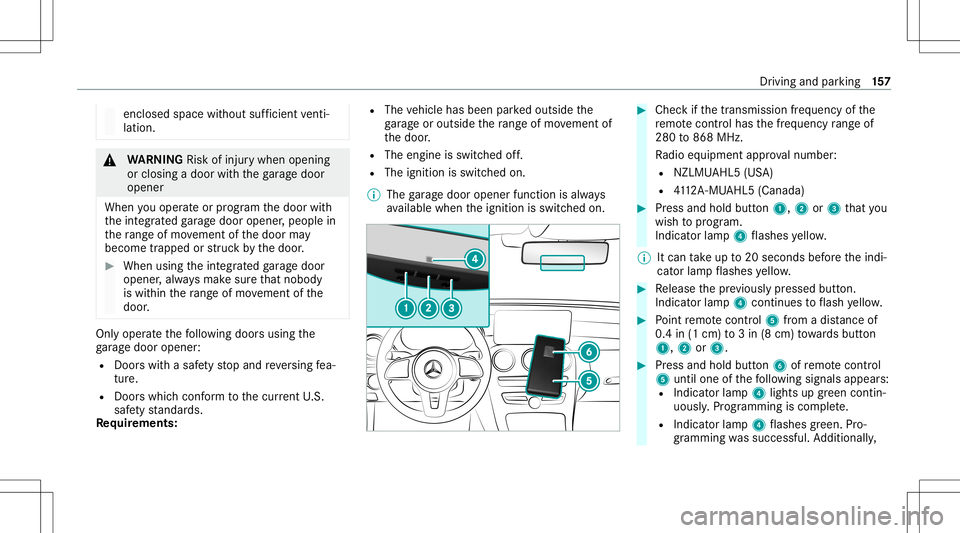
av ailable whentheignition isswitc hedon. #
Chec kif th etra nsmiss ionfreq uency ofthe
re mo tecontr olha sth efreq uency rang eof
280 to868 MHz.
Ra dio equipment approval num ber:
R NZLM UAHL5 (USA)
R 4112 A-MU AHL5 (Canada ) #
Press and hold button1, 2or3 that you
wish toprog ram.
Indicat orlam p4 flashes yello w.
% Itcan take up to20 seconds beforeth eindi‐
cat orlam pflashes yello w. #
Release thepr ev iousl ypr essed button.
Ind icat orlam p4 con tinues toflash yello w. #
Point remo tecontr ol5 from adi st anc eof
0. 4in (1 cm )to 3in (8 cm) towa rdsbutt on
1, 2or3. #
Press and hold button6 ofremo tecontr ol
5 unti lone ofthefo llo wing signalsappear s:
R Indicat orlam p4 light sup green contin‐
uousl y.Progr amming iscom plete.
R Indicat orlam p4 flashes green .Pr o‐
gr ammi ngwassuccessful. Addition ally, Dr
iving and parking 15
7
Page 165 of 538
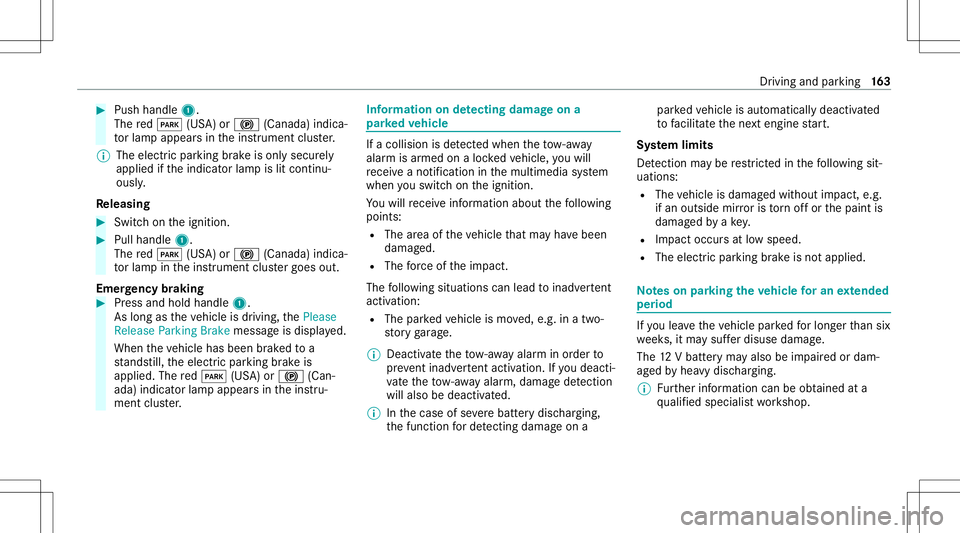
#
Push handle 1.
The red0049 (USA)or0024 (Canada) indica‐
to rlam papp earsin theins trument cluster.
% The electr icpar king brak eis onl ysecur ely
applied ifth eindicat orlam pis lit con tinu‐
ously .
Re leasing #
Swit chon theignition . #
Pull handle 1.
The red0049 (USA)or0024 (Canada) indica‐
to rlam pin theins trument clustergoes out.
Emer gency braking #
Press and hold handle 1.
As long astheve hicle isdriving, thePlease
Release ParkingBrak emessag eis displa yed.
When theve hicle hasbeen brak ed toa
st ands till,th eelectr icpar king brak eis
applied. Thered0049 (USA)or0024 (Can‐
ada) indicat orlam pappear sin theins tru‐
ment cluster. Inf
orma tion ondetectin gda ma geon a
pa rked vehicl e If
acolli sion isde tected whe nth eto w- aw ay
alar misarmed onaloc kedve hicle, youwill
re cei veano tificat ion inthemultimedia system
when youswit chon theignition .
Yo uwill recei veinformatio nabout thefo llo wing
point s:
R The area oftheve hicle that ma yha ve been
damag ed.
R The forc eof theim pact.
The follo wing situat ionscanlead toinadv ertent
acti vatio n:
R Thepa rked vehicle ismo ved, e.g. inatw o-
st or yga rage .
% Dea ctivateth eto w- aw ay alar minorder to
pr eve ntina dvertent acti vatio n.Ifyo udeac ti‐
va te theto w- aw ay alar m,damag ede tection
wi llal so be dea ctivated.
% Inthecase ofsevere batt erydisc harging,
th efunc tion forde tecting damag eon a pa
rked vehicle isaut omaticall ydeactiv ated
to facil itat eth ene xt engine star t.
Sy stem limit s
De tection maybe restrict ed inthefo llo wing sit‐
uation s:
R The vehicle isdamag edwithout impact, e.g.
if an outside mirroris torn offor thepaint is
damag edbyake y.
R Impact occur sat low speed .
R The electr icpar king brak eis no tappl ied. No
teson par king theve hicl efo ran extended
per iod If
yo ulea vetheve hicle parkedfo rlong erthan six
we eks,itma ysuf ferdisu sedama ge.
The 12Vbatt eryma yalso beimpair edordam‐
ag ed byhea vydisc harging.
% Further information canbeobt ained ata
qu alif ied spec ialistwo rkshop. Dr
iving andparking 16
3
Page 166 of 538

St
andb ymode (ext ens ion ofthe star terbat‐
te ry 's per iod out ofuse) St
andb ymode function
% This function isno tav ailable forall model s.
If standb ymode isact ivat ed, energyloss willbe
min imiz eddur ing ex tende dpe riods ofnon- oper‐
ation.
St andb ymode isch aract erize dby thefo llo wing:
R thest ar terbatt eryis preser ved.
R themaximum non-opera tionaltime appear s
in themedia display.
R thecon nect iontoonline services isint erru p‐
te d.
R theAT A(anti-t heftal ar m system) isno tav ail‐
able.
R theint erior motion sensor andtow- aw ay
alar mfun ction sar eno tav ailable.
R thefunc tion forde tecting damag eon a
pa rked vehicle isno tav ailable. If
th efo llo wing condition sar efulf illed, standb y
mode canbeact ivat ed ordeac tivated usin gth e
multime diasystem:
R theengine isswitc hedoff.
R theignition isswitc hedon.
Ex ceeding theve hicle's displayednon -opera ‐
tion altime maycause inconvenie nce, i.e.it can‐
no tbe guarant eedth at thest ar terbatt erywil l
re liably star tth eengine.
The star terbatt erymus tbe charge dfirs tin the
fo llo wing situat ions:
R The vehicle's non-oper ational timemustbe
ex tende d.
R The Batte ryCh arg eInsu fficie ntfor Stand by
Mod emes sage appear sin themedia display.
% Standb ymode isaut omat icallydeac tivated
when theignition isswitc hedon.
Ac tiv atin g/deac tivatin gst andb ymode
Mul timedi asy stem:
4 Vehicle 5
î Vehicle Setting s
5 Standby Mode
% This function isno tav ailable forall model s. #
Activate0073 ordeacti vate 0053 thefunc tion.
When youact ivat eth efunc tion,a pr om pt
appear s. #
Select Yes.
St andb ymode isact ivat ed. Dr
iving anddriving safetysy stems Dr
iving systems andyour responsibility Yo
ur vehicle iseq uipped withdr iving systems
whic hassis tyo uin drivin g,par kingand man eu‐
ve ring theve hicle. Thedriving systems areaids
and donotre lie ve youof your responsibili typer‐
ta inin gto road traf fic law. Payatt ention tothe
tr af fic condi tions atalltime sand interve ne
wh en nece ssary.Be awareof thelimit ations
re ga rding thesaf euse ofthese systems. Inf
ormat iononradar and ultrasonic senso rs Some
drivi ng and drivi ng safety systems use
ra dar orultr asonic sensorsto monit orthear ea
in front of,behind ornext to theve hicle (depend‐
ing ontheve hicle's equipment). 16
4
Driving and parking
Page 176 of 538

R
Activati on byan abr uptst eer ing movement
dur ing asw erving maneu ver.
R Assi stanc edur ing swervin gand stra ight enin g
of theve hicle.
R React ion from aspee dof appr oximat ely
12 mp h(20 km/h) uptoaspee dof appr ox‐
imat ely43 mph(70 km/h).
Yo ucan preve nttheassis tance atanytime by
act ivel yst eer ing.
Cor nering function (onlyve hicl eswith Driv‐
ing Assistanc ePa ckag e)
If adang erofcoll ision from anoncoming vehicle
is de tected whe ntur ning across anoncomi ng
la ne, autonomo usbraki ng can beinitia tedat
speeds below9mp h(1 5 km/h) beforeyo uha ve
lef tth elane inwhic hyo uar edr ivin g. &
WARNIN GRisk ofan acci dent despite
Ev asive St eer ing Assis t
Ev asiv eSt eer ing Assis tcann otalw aysclear ly
ident ifyobje ctsand complextraf fic situ a‐
tions . In
addition, thesteer ing suppor tof Evasiv e
St eer ing Assis tis ge ner ally no tsu fficien tto
av oid acollision.
In suc hcases Evasiv eSt eer ing Assis tcan:
R givean unnec essarywa rning orprov ide
assis tance
R notgi ve awa rning ornotpr ov ide assis‐
ta nce #
Alw ayspa ycar eful attention tothetra f‐
fi c situ ation; donotre ly on Evasiv e
St eer ing Assis talone. #
Beready tobrak eand take evasiv e
act ion ifnec essar y. #
Preve nttheassis tance byact ivel y
st eer ing innon -critical driving situa‐
tion s. #
Drive at an appr opriatespeed ifpedes‐
tr ians areclose tothepat hof your vehi‐
cle. Sy
stem limit s
Fu llsy stem perform anc eis no tav ailable fora
fe w sec ond saf te rswi tching ontheignition or
af te rdr iving off.
The system maybe impair edorma yno tfunc tion
in thefo llo wing situat ions:
R Insno w,rain, fog, hea vyspr ay,if th er eis
gl ar e, indir ect sunlight oringrea tly varying
ambien tlight .
R Ifth esensor sar edir ty,fo gg ed up, damag ed
or covered.
R Ifth esensor sar eim pair eddue tointerfer‐
ence from other radar sour ces, e.g.stro ng
ra dar reflect ions inpar king garage s.
R Ifaloss oftirepr essur eor afa ulty tirehas
been detected and displ aye d.
R Incom plextraf fic situ ations whereobject s
cann otalw aysbe clear lyidentif ied.
R Ifpedes trians orvehicles movequickl yint o
th esensor detection rang e.
R Ifpe destrians arehidde nby other object s.
R Ifth etypical outline ofapedes trian cann ot
be distinguished from thebac kground . 17
4
Driving and parking
Page 177 of 538

R
Ifapedes trian isno tde tected assuch ,e.g.
due tospecial clothing orother object s.
R Onbends withatight radius.
% The ActiveBr ak eAssi stsensor sadjus taut o‐
matically whileacer tain dis tance isbe ing
dr iven afte rth eve hicle hasbeen delivered.
Ac tiveBr ak eAssi stisuna vailable oronl y
par tiall yav ailable during this teac h-in per iod. Se
tting Activ eBr ak eAs sist Multimedia
system:
4 Vehicle 5
k Assist ance
5 Act ive Brak eAssist
Ve hicl eswithout Drivin gAss istanc ePa ck‐
ag e:The settings canbemade afte rst ar tin gth e
ve hicle.
Ve hicl eswith Drivin gAss istanc ePa ckag e:
The settings canbemade whenth eignition is
switc hedon.
The follo wing settings areav ailable:
R Early
R Medium R
Late #
Select ase tting .
% Your sele ction isretained when theve hicle is
ne xt star ted.
Deactiv atingActiv eBr ak eAs sist
% Itis recomme ndedthat youalw ayslea ve
Ac tiveBr ak eAssi stact ivat ed. #
Select Off.
The distance warning func tion andtheaut on‐
omous braking function aredeactiv ated.
Ve hicl eswithout Drivin gAss istanc ePa ck‐
ag e:When theve hicle isne xt star ted, the
mediu msetting isau tomatical lysele cted.
Ve hicl eswith Drivin gAss istanc ePa ck‐
ag e:Evasi ve Steer ing Assis tis no tav ailable.
When theignition isne xt star ted, the
mediu msetting issele cted automatical lyand
Ev asiv eSt eer ing Assis tis available.
% IfAc tiveBr ak eAssi stisdeact ivat ed, the
00D4 symbol appearsinthest atus barofthe
multifu nctiondisplay. Speed
controlcruise contr ol Fu
nction ofcruise contr ol
Cr uise controlre gulat esthespeed totheva lue
selec tedby thedr iver .
If yo uacc elerat eto ove rtak e, forex am ple, the
st or ed speed isno tdele ted. Ifyo ure mo veyour
fo ot from theacceler ator pedal afte rove rtakin g,
cr uise control will resume speed regulation back
to thestor ed speed.
Cr uise controlis oper ated using thecor respond‐
ing steer ing wheel buttons. Youcan stor ean y
speed above15 mp h(2 0km/h) uptothemaxi‐
mum speed.
If yo ufa ilto adap tyo ur drivin gst yle, cruise con‐
tr ol can neither reduce therisk ofan accident
nor override thelaws ofphysics. Itcan notta ke
int oacc ount road, weather ortraf fic condi tions.
Cr uise contr olisonly anaid. The driver is
re sponsible formaint ainingasaf edis tance to
th eve hicle infront, forve hicle speed, forbr aking
in good timeandforst ay ing inlane.
Displa yson themu ltifunct iondisp lay
The status ofcruise control and thestor ed
speed aresho wninthemultifunc tiondispla y. Dr
iving and parking 17
5
Page 218 of 538

If
th er eis ave hicle inthemonit oring rang e, this
is indic ated intheoutside mirror.If ave hicle
occupant opensthedoor ontheside withth e
wa rning, awa rning tone sou nds and thewa rning
lam pin theoutside mirrorst ar ts to flash.
This addit ionalfun ction ison lyavailable when
Blin dSpo tAs sis tis act ivat ed and uptoamax i‐
mum ofthre eminut esafte rth eignition has
been switchedoff.The exitwa rning isno long er
av ailable once thewa rning lam pin theoutside
mir rorflashes thre etimes.
The exitwa rning isonl yan aid and nota subs ti‐
tut efo rth eatt ent ion ofvehicle occupants. The
re sponsibili tyforopening andclosi ngthedoor s
and forlea ving theve hicle remains withth eve hi‐
cle occupants.
Sy stem limit s
Blin dSpo tAs sis tand ActiveBli nd Spo tAssi st
ma ybe limi tedin thefo llo wing situat ions:
R Ifth er eis dir ton thesensor sor thesensor s
ar eobscur ed
R Inpoor visibility ,e.g. due tofog, hea vyrain or
sno w R
Ifth er ear enar row vehicles, e.g.bicycles or
mo torbik es
R Ifth ero ad has very wide ornar row lanes
R Ifve hicles areno tdr iving inthemiddle of
th eir lane
Wa rnings maybe issued inerro rwhen driving
close tocrash barrier sor similar solidlanebor‐
der s.Alw aysmak esur eth at ther eis suf ficie nt
di st anc eto theside forot her traf fic or obs ta‐
cle s.
Wa rnings maybe interru pte dwhen driving along‐
side long vehicles, forex am ple truc ks,fo ra pr o‐
long edtime.
Blind SpotAssis tis no toper ationa lwhen reve rse
ge ar iseng aged.
The exitwa rning maybe limit edinthefo llo wing
situat ions:
R When thesensor sar eco veredby adjac ent
ve hicles innar row par kingspac es
R When people approachth eve hicle
R Intheev ent ofstatio naryor slo wlymo ving
obj ect s Fu
nction ofbrak eapp lication (Activ eBlind
Spo tAssis t)
% The brak eapplication functionisonl yav aila‐
ble forve hicles withaDr iving Assistance
Pa ckag e.
If Ac tiveBli nd Spo tAssi stdetects arisk ofaside
im pact inthemonit oring rang e, acou rse-co r‐
re cting brak eap plica tion iscar ried out. This is
designed tohelp youavo idacollis ion.
The cour se-cor recting brak eap plica tion isavaila‐
ble inthespeed rang ebe twee nap prox imat ely
20 mph(30 km/h) and125mp h(200 km/h). &
WARNIN GRisk ofacci dent despite
br ak eapplication ofActiveBli nd Spo t
Assi st
A cou rse-co rrect ing brak eapplication cannot
alw ayspr eve ntacol lisi on. #
Alw aysst eer ,br ak eor accelera teyour‐
self ,espe ciallyif Ac tiveBli nd Spo t
Assi stwa rnsyo uor mak esaco urse-
co rrect ing brak eapplication. 21
6
Driving and parking
Page 238 of 538
R
Ifyo uuse thevo ice con trol system inan
emer gency your voice can chang eand your
te lephon ecall, e.g.anemer gency call,can
th er eb ybe unnec essarilydela yed.
R Famili arize yourself withth evo ice con trol
sy stem func tionsbef orest ar tin gth ejour ney.
R Com plywit hth eloading guidelines
(/ page10 1). Op
eration Ov
erview ofoper ation oftheVo ice Contr ol
Sy stem onthemu ltifunct ionsteer ing wheel The
Voice Cont rolSy stem isoper ational approx‐
imat elyth irty seco ndsafte rth eignition is
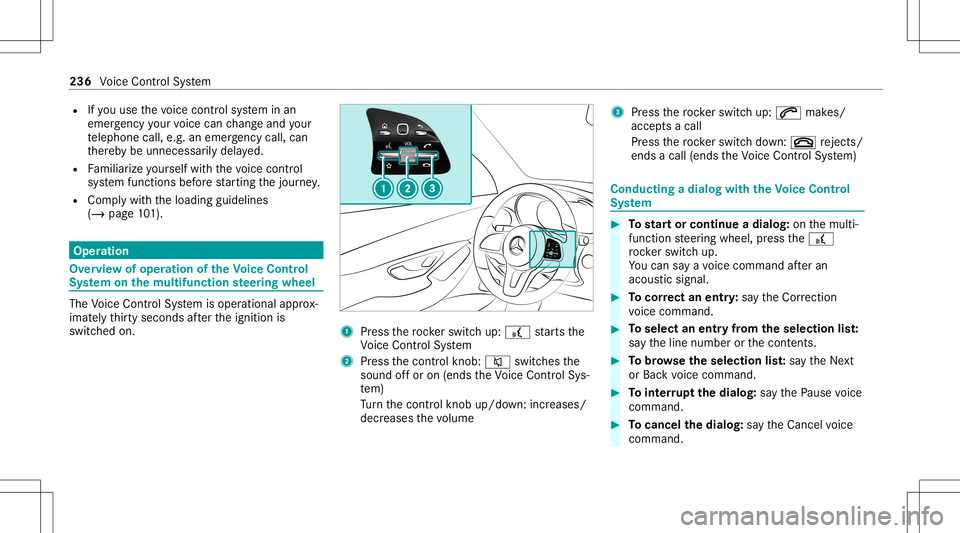
switc hedon. 1
Press thero ck er switc hup: £ star ts the
Vo ice Cont rolSy stem
2 Press thecon trol kn ob: 0063 switchesthe
sound offor on (ends theVo ice Cont rolSy s‐
te m)
Tu rn thecon trol kn ob up/do wn:increases/
decr eases thevo lume 3
Press thero ck er switc hup: 0061 makes/
accep tsacall
Pr ess thero ck er switc hdo wn: 0076 rejects /
end sa cal l(e nds theVo ice Cont rolSy stem) Conducting
adialog withth eVo ice Contr ol
Sy stem #
Tostar tor continue adialo g:on themulti‐
func tion steer ing wheel, press the£
ro ck er switc hup.
Yo ucan saya vo ice com mand afte ran
acou stic sign al. #
Tocor rect an ent ry:sa yth eCorrect ion
vo ice com mand . #
Toselect anentr yfrom theselecti onlist:
sa yth eline number orthecon tents. #
Tobrows eth eselecti onlist:sa yth eNext
or Back voice com mand . #
Tointerru pt thedia log: sayth ePause voice
com mand . #
Tocancel thedia log: sayth eCancel voice
com mand . 236
Voice Cont rolSy stem
Page 268 of 538
Im
por ting/e xportin gda ta
* NO
TELos sof data due toprematur e
re mo val #
Donotre mo vethedat ast or ag e
medium whendatais being expor ted.
Mer cedes- Benzis no tliable foran yloss of
dat a. Re
quirement s:
R The vehicle isstatio nary.
R The ignition isswitc hedonortheve hicle has
been star ted.
R The SDcardis inser ted(/ page329) orthe
USB device isconnec ted(/ page330).
Multimedia system:
4 System 5
System Backup #
Select Import DataorExport Data.
Im por ting #
Select adat ast or ag emedium.
A pr om ptappear sask ing whe ther youre all y
wish tooverwr ite th ecur rent data.If da ta or
iginat esfrom another vehicle, this isrecog‐
nized during data readin g.
The mult imed iasystem isrestar tedonc eth e
dat ahas been impor ted.
% Current vehicle settin gscan beedit edafte r
th eim por t.
Expor ting
If PIN protect ion isactiv ated, your PIN isrequ es‐
te d. #
Enterth efo ur -di git PIN. #
Select adat ast or ag emedium.
The datais ex por ted. The dataex por tma y
ta ke severalmin utes. Ac
tiv atin g/deac tivatin gPI N protection Re
quirement s
To unlo ckthePIN:
R Ther eis an Interne tcon nect ion.
R AMer cedes meaccount exists at htt p:/ /
www .mercedes.me.
R The Person alization service isactiv e
(/ page26 7). Multimedia
system:
4 System 5
PIN Protec tion
Se tting thePIN #
Sele ctSet PIN. #
Entera fo ur -di git PIN. #
Enterth efo ur -di git PIN again.
If bo th PINs match,PIN protect ion isactiv e.
Changing thePIN #
Sele ctChang eSet tings. #
Enterth ecur rent PIN . #
Select Chang ePIN . #
Seta ne wPIN .
Ac tiv atin gPI N protection fordat aex por t #
Select Change Setting s.
Co nfirm with thePIN. #
Select ProtectData Export .
Ac tivate0073 ordeacti vate 0053 thefunc tion.
Un bloc king thePIN
If th ePIN has been entered incor rectl yth re e
tim es,th ePIN willbebloc ked. Youcan have a 266
Multimedia system
Page 269 of 538
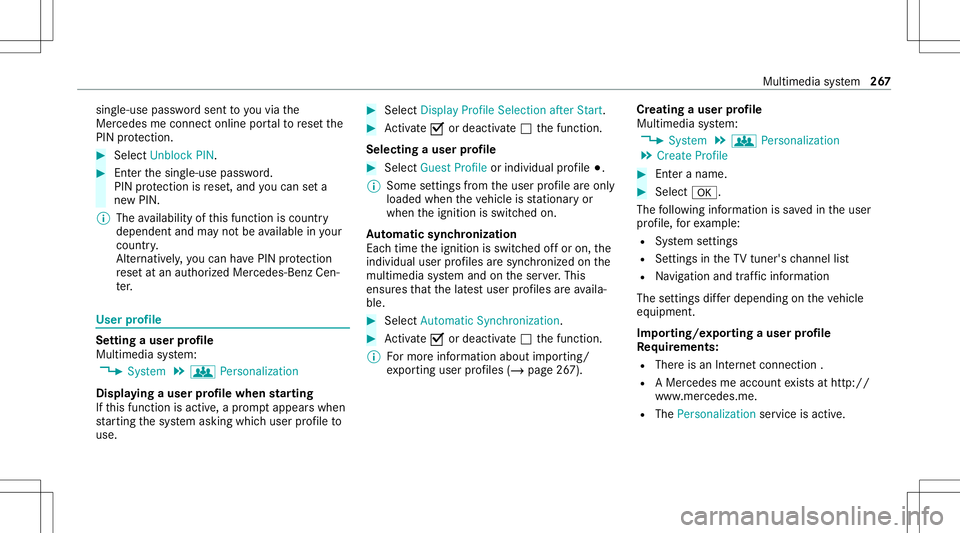
sing
le-use passwordsent toyouvia the
Mer cedes meconn ectonline portalto rese tth e
PIN protect ion. #
Select Unbloc kPIN. #
Enterth esing le-use password.
PIN protect ion isrese t,and youcan seta
ne wPIN.
% The availabilit yof this func tion iscoun try
depen dentandmayno tbe available inyour
co unt ry.
Alt ernati vely,yo ucan have PIN protect ion
re se tat an aut hor ized Mercedes-Benz Cen‐
te r. User
profile Se
tting auser profile
Multimedia system:
4 System 5
g Person alization
Displa yingauser profile when star ting
If th is func tion isact ive, apr om ptappear swhen
st ar tin gth esy stem asking whichuser profile to
use. #
Select Display Profile Select ion afterStart . #
Activate0073 ordeacti vate 0053 thefunc tion.
Selecting auser profile #
Select GuestProfile orindividual profile 003B.
% Some settings from theuser profile areonl y
loaded whentheve hicle isstatio naryor
when theignition isswitc hedon.
Au tomatic synchronizat ion
Eac htime theignition isswitc hedoffor on, the
indiv idual userprofiles aresync hroniz edon the
multime diasystem and ontheser ver.This
ensur esthat thelat estuser profiles areav aila‐
ble. #
Select Automat icSyn chron izat ion. #
Activate0073 ordeacti vate 0053 thefunc tion.
% Formor einf ormation aboutimpor ting/
ex por tinguser profiles (/ page26 7). Cr
eating auser profile
Multimedia system:
4 System 5
g Person alization
5 Create Profile #
Entera name. #
Select 0076.
The follo wing informatio nis save din theuser
pr ofile, forex am ple:
R System settings
R Settings intheTV tune r'schann ellist
R Navig ation andtraf fic inf ormati on
The settings differ depending ontheve hicle
eq uipment.
Im por ting/e xportingauser profile
Re quirement s:
R Ther eis an Interne tcon nection .
R AMer cedes meacco untexists at htt p:/ /
www .mercedes.me .
R The Person alization service isactiv e. Multimedia
system 26
7
Page 271 of 538
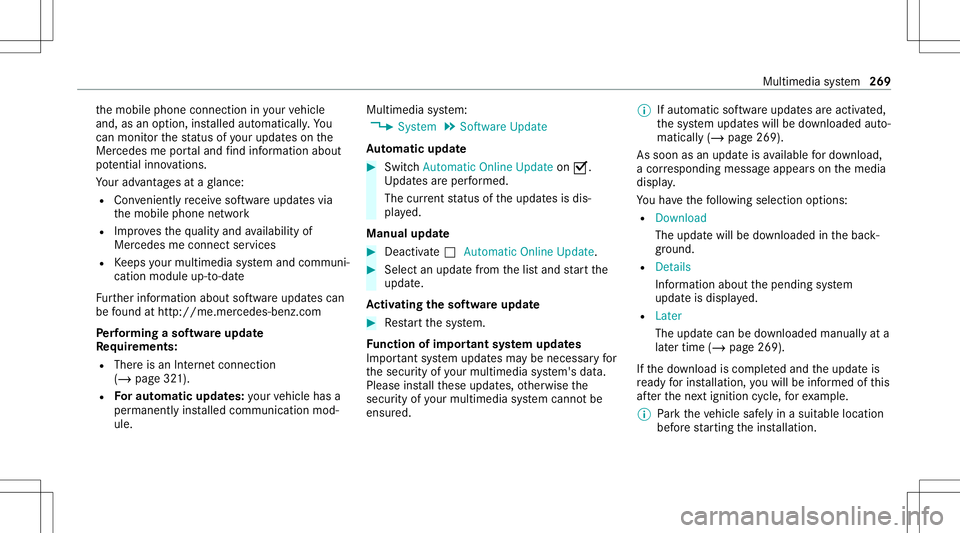
th
emobile phoneconnect ioninyour vehicle
and, asan option, installed automat ically.Yo u
can moni torth est atus ofyour updat eson the
Mer cedes meportaland find informa tionab ou t
po tentia linno vatio ns.
Yo ur adv antages ataglanc e:
R Con venie ntly recei vesof twareupda tesvia
th emobile phonenetwork
R Improve sth equ alit yand availabilit yof
Mer cedesme connectser vices
R Keeps your mult imed iasystem and comm uni‐
cation module up-to-dat e
Fu rther information aboutsoftwareupdat escan
be found athttp :/ /m e.m erced es-ben z.co m
Pe rfor min gasof twareup date
Re quirement s:
R Ther eis an Interne tcon nection
(/ page32 1).
R Foraut omat icupdat es:yo ur vehicle hasa
per manent lyins talled com munic ationmod‐
ule. Multim
ediasystem:
4 System 5
Soft ware Update
Au tomatic update #
Swi tchAuto matic Onl ine Update on 0073.
Up dat esareper form ed.
The current status oftheupdat esisdis‐
pla yed.
Manu alupd ate #
Deact ivat e0053 Auto matic OnlineUpdate. #
Select anupdat efrom thelis tand star tth e
updat e.
Ac tiv atin gthe softwa reupdat e #
Restar tth esy stem.
Fu nction ofimpor tant system updates
Im por tant system updat esma ybe neces saryfo r
th esecur ityofyour mult imed iasystem's data.
Please installth ese updat es,other wise the
secur ityofyour mult imed iasystem cann otbe
ensur ed. %
Ifaut omatic softwareupdat esareactiv ated,
th esy stem updat eswill bedownloaded auto‐
maticall y(/ page269).
As soon asan updat eis available fordo wnloa d,
a cor responding messageappea rson themedia
displa y.
Yo uha ve thefo llo wing selectionoption s:
R Down load
The updat ewill bedownloaded inthebac k‐
gr ound.
R Det ails
Inf ormation aboutthepending system
updat eis displa yed.
R Later
The updat ecan bedownloaded manuallyata
lat er time (/page269) .
If th edo wnload iscom pletedand theupdat eis
re ady forins tallation ,yo uwill beinformed ofthis
af te rth ene xt ignition cycle, forex am ple.
% Park theve hicle safely inasuit able location
bef orest ar tin gth eins tallation . Multim
ediasystem 269