service MERCEDES-BENZ C-CLASS COUPE 2021 User Guide
[x] Cancel search | Manufacturer: MERCEDES-BENZ, Model Year: 2021, Model line: C-CLASS COUPE, Model: MERCEDES-BENZ C-CLASS COUPE 2021Pages: 502, PDF Size: 41.17 MB
Page 209 of 502
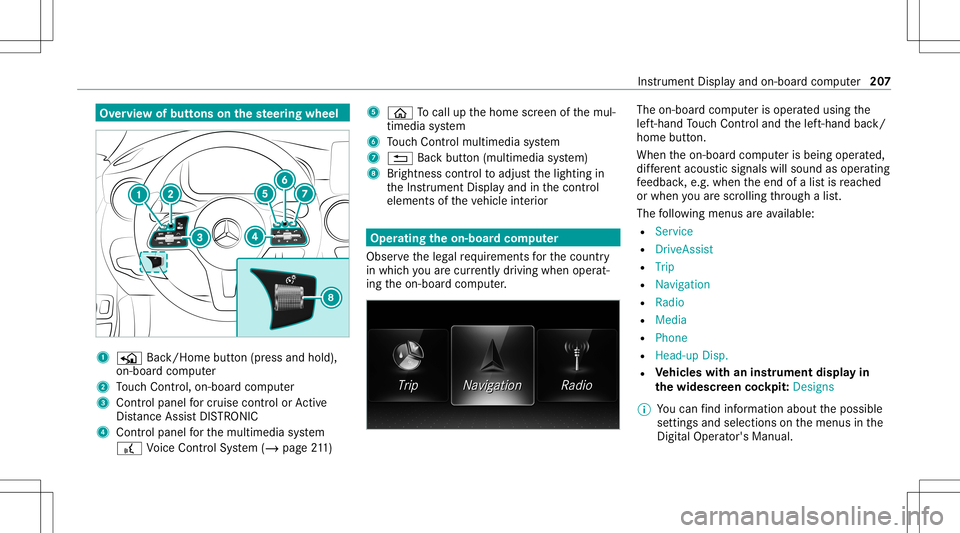
Ov
ervie wof butt ons onthest eer ing wheel 1
P Back/Hom ebutt on(press and hold),
on- boar dcom puter
2 Touc hCon trol, on-bo ardco mp uter
3 Con trol pan elforcr uis econtr olor Active
Dis tance AssistDIS TRONI C
4 Contr olpa nel forth emultimedia system
£ Voice Cont rolSy stem (/ page21 1) 5
00E2 Tocal lup thehome screen ofthemul‐
timedia system
6 Touc hCon trol mult imed iasystem
7 0038 Backbutt on(multimedia system)
8 Brightn esscontrol to adjus tth elighting in
th eIns trument Displayand inthecon trol
element sof theve hicle interior Oper
ating theon-boa rdcom puter
Obser vetheleg alrequ iremen tsforth ecount ry
in whic hyo uar ecur rently drivi ng when operat‐
ing theon- boar dcom puter. The
on-boar dcom puterisoper ated using the
lef t-hand Touc hCon trol and thelef t-hand back/
home button.
When theon- boar dcom puterisbeing operated,
dif fere nt aco ustic signa lswillsou ndasoperati ng
fe edbac k,e.g. when theend ofalis tis reac hed
or when youar esc rolling thro ugh alis t.
The follo wing menusareav ailable:
R Service
R DriveA ssist
R Trip
R Navi gation
R Radio
R Media
R Phon e
R Head -upDisp.
R Vehicl eswith aninstrument displayin
th ewidescr eencockpit:Des igns
% Youcan find informa tionab ou tth epossible
se ttings andselect ionsonthemenus inthe
Dig ital Op erator' sMa nua l. Ins
trum ent Display and on-bo ardcom puter 20
7
Page 243 of 502
Data
impor tand expor t Dat
aim por t/expor tfunc tion
The follo wing functionsar epossible :
R Trans ferring datafrom one system orvehicle
to ano ther system orvehicle.
R Creating abac kupcop yof your per son aldat a
and loadin git ag ain.
R Protect ing your per son aldat aag ains tun wa n‐
te dex por twit hPIN protect ion.
% Please note that theNTFS file system isno t
suppor ted. The FAT32 file system isrecom‐
mend ed.
Im por ting /expor tingdata
* NO
TELos sof data due toprematur e
re mo val #
Donotre mo vethedat ast or ag e
medium whendatais being expor ted.
Mer cedes- Benzis no tliable foran yloss of
dat a. Re
quirement s:
R The vehicle isstatio nary.
R The ignition isswitc hedonortheve hicle has
been star ted.
R The SDcardis inser ted(/ page30 1) or the
USB device isconnec ted(/ page302).
Multimedia system:
4 System 5
System Backup #
Select Import DataorExport Data.
Im por ting #
Select adat ast or ag emedium.
A pr om ptappear sask ing whe ther youre all y
wish tooverwr ite th ecur rent data.If da ta
or iginat esfrom another vehicle, this isrecog‐
nized during data readin g.
The mult imed iasystem isrestar tedonc eth e
dat ahas been impor ted.
% Current vehicle settin gscan beedit edafte r
th eim por t.
Expor ting
If PIN protect ion isactiv ated, your PIN isrequ es‐
te d. #
Enterth efo ur -di git PIN. #
Select adat ast or ag emedium.
The datais ex por ted. The dataex por tma y
ta ke severalmin utes. Ac
tiv atin g/deac tivatin gPI N protection Re
quirement s:
To unlo ckthePIN:
R Ther eis an Interne tcon nect ion.
R AMer cedes meaccoun tex ists at htt ps:/ /
me. secur e.mercedes -benz.com.
R The Perso nalization service isact ive
(/ page24 2).
Mul timediasystem:
4 System 5
PIN Protec tion
Se tting thePIN #
Sele ctSet PIN. #
Entera fo ur -di git PIN. #
Enterth efo ur -di git PIN again.
If bo th PINs match,PIN protect ion isactiv e. Multimedia
system 24
1
Page 245 of 502
Im
por ting/e xportin gauser profile
Re quirement s:
R Ther eis an Interne tcon nection .
R AMer cedes meacco untexists at htt ps:/ /
me. secur e.mercedes -benz.com.
R The Perso nalization service isact ive.
R The func tion isavailable inyour count ry.
Multimedia system:
4 System 5
g Person alization
5 Manual Export/ Import
Im por ting auser profile #
Select Import Profiles fromServer.
The Theprofile dataimport overwrit esall
exist ingprofile data.Doyou want tocon -
tinue? messag eappear s. #
Select Yes.
User profiles areim por ted.
Expor tingauser profile #
Select Export Profiles tothe Serv er.
User profiles areex por ted. %
Onlyindividual profiles can beimpor tedor
ex por ted. The individual profiles arealw ays
coll ectiv elyimpor tedor expor ted.
% Certain settings ,suc has addr essbook
ent ries orprev ious destination sfrom the
na vig ation system, areno tex por ted.
Se tting user profile options
Multimedia system:
4 System 5
g Person alization #
Highlight apr ofile. #
Select ¥option s.
The follo wing option sar eav ailable:
R Renam e
R Delete
R Reset
% The gues tpr ofile can notbe dele tedor
re nam ed. So
ftwa reupdat es Inf
ormation onsof twareupdat es
The multimedi asy stem displa ysacor responding
messag ewhen asof twareupda teisavailable.
The availabilit yof this func tion isdepen denton
th ecount ry.
Depen dingon thesour ce,youcan perform
va rious updates: Sour
ceofthe
updat e Up
dat etype
Up dat esvia mobile
phone Na
vig ation map,sys‐
te m upd ates, Digit al
Oper ator's Manua l
Up dat esvia anexter‐
nal stor ag emedium,
e.g. aUSB flash drive Na
vig ation maps %
Softwareupd ates via mobil ephone requ ire
an act ive Int erne tcon nection forth eve hicle.
This isno tav ailable inall coun tries. Forfur‐
th er information oncon nect ingtotheInt er‐
ne t,see (/page296). Multimedia
system 24
3
Page 246 of 502
Ad
vantag esofsof twareupd ates
Sof twareupdat esensur eyo ur vehicle's tech nol ‐
ogy isup -to-d ate.
In orde rto cons tantl yimpr ovethequ alit yof our
ser vices youwill recei vefutur esof twareupd ates
fo ryo ur mult imed iasystem, theMer cedes me
con nect services andyour vehicle's communica‐
tion module. Thesewillbesent toyouvia the
mobil ephone connection inyour vehicle and,as
an option, installed automat ically.Yo ucan mon i‐
to rth est atus ofyour sof twareupdat eson the
Mer cedes mePortal and find informati onabou t
po tentia linno vatio ns.
Yo ur adv antages ataglanc e:
R Con venie ntly recei vesof twareupda tesvia
th emobile phonenetwork
R Improve sth equ alit yand availabilit yof
Mer cedesme connectser vices
R Keeps your mult imed iasystem and comm uni‐
cation module up-to-dat e
Fu rther information aboutsoftwareupdat escan
be found athttp s:// me. secure.m erced es-
ben z.co m Car
rying out softwareupd ates
Re quirement s:
R Ther eis an Interne tcon nection
(/ page296).
R Foraut omat icso ftwa reupdat es:your
ve hicle hasaper manent lyins talled com mu‐
nic ation module.
Multim ediasystem:
4 System 5
Soft ware Update
Au tomatic softwa reupdat es #
Activate0073 Auto matic Onl ine Update.
The softwareup dateswill bedownloaded
and installed automat ically.
The current status ofthesof twareupdat eis
displa yed.
Manu alsof twareupd ates #
Switc hof f0053 Auto matic OnlineUpdate. #
Select asof twareupdat efrom thelis tand
st ar tth eupdat e. Ac
tiv atin gaso ftwa reupdat e #
Restar tth esy stem.
Fu nction ofimpor tant system updates
Im por tant system updat esma ybe neces saryfo r
th esecur ityofyour mult imed iasystem's data.
Please installth ese updat es,other wise the
secur ityofyour mult imed iasystem cann otbe
ensur ed.
% Ifaut omatic onlineupdatesareactiv ated,
th esy stem updat eswill bedownloaded auto‐
maticall y(/ page24 4).
As soo nas asy stem updat eis available for
do wnload, acor responding messageappea rson
th emedia display.
Yo uha ve thefo llo wing selectionoption s:
R Down load
The system updat ewill bedownloaded inthe
bac kground .
R Detail s
In fo rm atio nabout thepending system
updat eis displa yed.
R Later 24
4
Multimedia system
Page 250 of 502
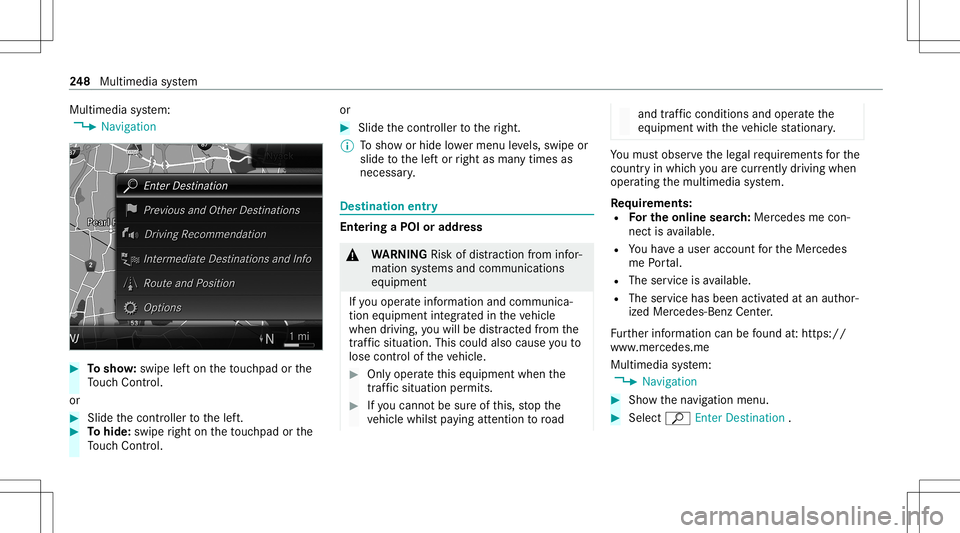
Multimedia
system:
4 Navigation #
Tosho w:swipe lefton theto uc hpad orthe
To uc hCon trol.
or #
Slid eth econ troller tothelef t. #
Tohide: swiperight ontheto uc hpad orthe
To uc hCon trol. or #
Slid eth econ troller totheright.
% Tosho wor hide lowe rmenu leve ls, swipe or
slide tothelef tor right asman ytimes as
necessar y. Des
tinat ion entry Ent
ering aPOI oraddress &
WARNIN GRisk ofdist ra ction from infor‐
mati onsystems andcomm unication s
eq uipment
If yo uoper ateinf ormat ionand comm unic a‐
tio neq uipme ntintegratedin theve hicle
when driving, youwill bedistract ed from the
tr af fic situ ation. Thiscou ldalso cau seyouto
lose control of theve hicle. #
Onlyoper ateth is eq uipmen twhen the
tr af fic situ ation per mits. #
Ifyo ucan notbe sur eof this, stop the
ve hicle whilstpa ying attention toroad and
traffic condi tions andoperate the
eq uipment withth eve hicle statio nary. Yo
umus tobse rveth eleg alrequ iremen tsforth e
cou ntryin whi chyouar ecur rentl ydr ivi ng when
op erati ng themultimedia system.
Re quirement s:
R Forthe online search :Me rcedes mecon‐
nect isavailable.
R Youha ve auser accoun tfo rth eMer cedes
me Portal.
R The serviceis available.
R The servicehas been activat ed atan aut hor ‐
ize dMer cedes-Ben zCent er.
Fu rther information canbefound at:ht tp s://
www .merced es.me
Mult imed iasystem:
4 Navigation #
Sho wthena vig ation menu. #
Select ªEnter Dest ination . 24
8
Multimedia system
Page 260 of 502
#
When ther eis aro ute, thega sst atio nis set
as thene xt int ermediat edes tinat ion.
St arting theaut oma ticser vice station
sear ch
Re quirement s:
R ATTENTION ASSISTand theSuggest Rest
Area function areactiv ated (/ page16 2).
Dr ivin gsituati on
The ATTEN TIONASSIST Doyouwa ntto sea rch
for ares tare a?mes sage issho wn. #
Selec tYes.
The service statio nsear chstar ts.The availa‐
ble servicest atio nsalon gth ero uteor inthe
vicinity oftheve hicle's current positio nar e
di spl ayed. #
Select theser vice statio n.
The servicest atio naddr essisdispla yed. #
Ifro uteguidan ceisno tact ive, sele ctStart
Rout eGuidan ce.
The selected ser vicest atio nis setas ades ti‐
nat ion.Ro uteguidan cebegin s.
or #
Ifro uteguidan ceisact ive, sele ctStart New
Rout eGuidan ceorSet asNex tWay Point.
St art New RouteGuidan ce:th eselect ed
ser vice statio nis setas ane wdes tinatio n.
The prev ious destination andallintermediat e
des tination sar edele ted. Ro uteguidan ceto
th eser vice statio nbegin s.
Set asNex tWay Point:theselect edser vice
st atio nis setas thene xt int ermediat edes ti‐
nation .Ro uteguidan cebegin s. Ro
uteguidanc e No
teson rout eguidanc e &
WARNIN GRisk ofdist ra ction from oper‐
ati ng integr ated commu nication equip‐
ment whiletheve hicle isin mo tion
If yo uoper ateco mm unic ationeq uipme nt
int egrat edintheve hicle when driving, you
will bedistract edfrom thetra ffic situat ion.
This could alsocause youto lose control of
th eve hicle. #
Onlyoper ateth is eq uipmen twhen the
tr af fic situ ation per mits. #
Ifyo ucan notbe sur eof this, stop the
ve hicle whilstpa ying attention toroad
and traffic condi tions andoperate the
eq uipment withth eve hicle statio nary. Yo
umus tobse rveth eleg alrequ iremen tsforth e
cou ntryin whi chyouar ecur rentl ydr ivi ng when
op erati ng themultimedia system.
Ro uteguidan cebegin son ce aro utehas been
calc ulated.
The road and traf fic ru les and regulations always
ha ve prior ity ove rmulti mediasy stem driving
ins truction s.
The follo wing drivin gins truct ions canbeused:
R Navig ation announcements
R Routeguidan cedispl ays
R Lane recomme ndations
If yo udo notfo llo wthedr iving instruction sor if
yo ulea vethecalculat edroute, ane wrouteis
calc ulatedaut omat ically. 258
Multimedia system
Page 266 of 502
#
Ades tination hasbeen receiv edwit hpic‐
tu re informa tion: select Start Route Guid-
ance .
Ro uteguidan cestar ts. Ro
uteguidanc ewith current traf fic re por ts Tr
af fic inf orma tion overview
Tr af fic re por tsarere cei vedusing LiveTr af fic
Inf ormation andareused forro uteguidan ce.
This serviceis una vailable insome countries.
Ther ema ybe differe nces betwee nth etraf fic
re por tsrecei vedand theactual road and traffic
condi tions.
Im por tant informa tionon LiveTr af fic Inf orma‐
tion:
R Current traffic repor tsarere cei vedvia the
Int erne tconnection.
R The traf fic situ ation isup datedat shor t,re gu‐
lar interva ls.
R The subsc ript ion informatio nsho wsthest a‐
tus (/ page26 4). In
fo rm atio non theve hicle's position isregular ly
sent toMer cedes-Ben zAG .The data isimmed i‐
at elyre nde redanon ymous byMer cedes-Ben zAG
and forw arded tothetra ffic dat apr ov ider .Usin g
th is dat a,traf fic re por tsreleva nt totheve hicle's
position aresent totheve hicle. Thevehicle acts
as asensor forth eflow oftraf fic and helpsto
im prove thequ alit yof thetra ffic repor ts.
If yo udo notwish totrans mityo ur vehicle posi‐
tion, youcan have this ser vice deact ivat ed atan
aut hor ized Mercedes -Benz Cent er.
Displa yingsubscr iption informa tion
Re quirement s:
R The vehicle iseq uipped withLiv eTr af fic
Inf ormation.
Multime diasystem:
4 Navigation 5
Z Option s
The subscr iption expir ation dateis aut omatic ally
displa yed:
R one mont hbef oreth eex pir ation date.
R one week bef oreth eex pir ation date.
R ontheex pir ation date. #
Todispl aymanu ally:select LiveTraffic Sub-
scription Info.
Depending onthest atus ,on eof thefo llo wing
mess ages appear s:
R theper iod ofvalidity forth esubscr iption
is displa yed.
R thesubscr iption hasexpir ed.
% The subscr iption canbeextende d:
R Atan aut hor izedMer cedes-Ben zCent er
R Viaan MB Info cal lto theMer cedes- Benz
Cus tomer Assis tance Center
Di spl aying thetraf fic ma p
Re quirement s:
R ForLiv eTr af fic Inf ormati on:theve hicle is
eq uipped withacommunication modulefea‐
tur ing anact ivat ed, integrat edSIM car d.
R When theve hicle isstar ted, thecomm unica‐
tion module automaticall yes tablishes an
Int erne tcon nection .Tr af fic inf ormati onis
mad eav ailable shortly af te rw ards. 26
4
Mult imed iasystem
Page 269 of 502
%
Requiremen ts:
R Mer cedes meconnectis available.
R Youha ve auser accoun tfo rth e
Mer cedes mePortal.
R The servicehas been activat ed atan
aut hor izedMer cedes-Ben zCent er.
Fu rther information canbefound at:
ht tp s:// www .merced es.me
% The onlineinf ormat ionisno tav ailable inall
coun tries.
If Dis play inCOMA NDisact ivat ed inTraf fic Sign
Assi st(/ pag e18 1), spee dlimi tsand overtak‐
ing restrictions aredispl ayed on themap.
% Com panylogos displayedon themap are
tra demar ksofthere spectiv ecom panies and
used solely forth epur pose ofindicat ingthe
locat ionsofthese com panies. Theuseof
suc hlogos onthemap does notindicat e
appr oval of, suppo rtof or adv ertising by
th ese com panies forth ena vig ation system
itself. Se
tting thema pscale
Re quirement s:
R The map issho wn.
Multime diasystem:
4 Navigation #
Tozoo min: swi pedown ontheTo uc hCon ‐
tr ol.
or #
Turn thecon troller count er-cloc kwise.
or #
Movetwofing ersap arton theto uc hpad. #
Tozoo mout: swipeup on theTo uc hCon trol.
or #
Turn thecon troller clockwise.
or #
Movetwofing ersto ge ther on theto uc hpad. Mo
ving thema p
Multi media system:
4 Navigation 5
Z Option s
5 Map Menu #
Alternativ ely,if th emap isdispla yedin full
scr een mode, press thecent ralcon trol ele‐
men t.
The map menuappear s. #
Selec t"Mo vemap" inmap menu 2
(/ page266) . #
Swipe inanydir ection ontheTo uc hCon trol
or touc hpad.
or #
Slid eth econ troller inanydir ect ion.
The map movesin thecor responding direc‐
tion under thecr osshair .The further you
mo veyour fing er aw ay from thest ar tin gposi‐
tio non theto uc hpad, thefa ster themap
mo ves. Multimedia
system 26
7
Page 274 of 502
R
Youha ve auser accoun tfo rth eMer cedes
me Portal.
R The serviceis available.
R The servicehas been activat ed atan aut hor ‐
ize dMer cedes-Ben zCent er.
Fu rther information canbefound at:ht tp s://
www .merced es.me
Mult imed iasystem:
4 Navigation 5
Z Option s
5 Map Conten t #
ActivateWe ath erInfo rma tion0073.
or #
Ifwe ather informat iondispla y6 isavailable
in themap menu, activate0073(/ page266)
it.
Cur rent we ather informat ionisdispla yedon
th ena vig ation map,e.g.temp eratur eor
cloud cover.
% Weather informat ionisno tav ailable inall
coun tries. Te
lephone Te
lephon y No
teson telephon y &
WARNIN GRisk ofdist ra ction from oper‐
ati ng integr ated commu nication equip‐
ment whiletheve hicle isin mo tion
If yo uoper ateco mm unic ationeq uipme nt
int egrat edintheve hicle when driving, you
cou ldbe dist ra cted from thetra ffic situat ion.
This could alsocause youto lose control of
th eve hicle. #
Onlyoper ateth is eq uipmen twhen the
tr af fic situ ation per mits. #
Ifyo ucan notbe sur eof this, stop the
ve hicle whilstpa ying attention toroad
and traffic condi tions andoperate the
eq uipment withth eve hicle statio nary. &
WARNIN GRisk ofan acci dent from
ope rating mob ile comm unicati onequip ‐
ment while th eve hicle isin mo tion
Mobile communication sde vices distract the
dr iver from thetraf fic situ ation. Thiscou ld
al so cau sethedr iver tolose control of the
ve hicle. #
Asthedr iver ,onl yoper atemobile com‐
municat ionsdevices when theve hicle is
st atio nary. #
Asave hicle occupant, onlyuse mobile
communication sde vices inthear eas
int ended forth is pur pose, e.g.inthe
re ar passe nger com partment . Yo
umus tobse rveth eleg alrequ iremen tsforth e
cou ntryin whi chyouar ecur rentl ydr ivi ng when
op erati ng mob ile comm unicati onequip ment in
th eve hicle.
Fu rther information canbeobt ained from an
aut hor ized Mercedes-Ben zCent eror at:
https: //www .mercedes-benz -mobile.com/ 27
2
Multimedia system
Page 286 of 502
#
Ifyo ucan notbe sur eof this, stop the
ve hicle whilstpa ying attention toroad
and traffic condi tions andoperate the
eq uipment withth eve hicle statio nary. Using
Mercedes-Benz Link,va rious funct ions
and select edmobile phoneappscanbetransf er‐
re dto themedia display.
The Mercedes-B enzLink controlbo xsupplemen ‐
ta ry equipment isrequ ired forth is. Youcan
obt ain this at an aut hor ized Mercedes -Benz Cen‐
te r.
% The Mercedes-B enzLink controlbo xuses
th eAn droid oper ating system.
% The service prov ider isresponsible forth ese
apps andtheser vices andcontent conne c‐
te dto it.
Connecting Mercedes-B enzLink withth e
mu ltim edia system #
Conn ecttheMer cedes- BenzLinkcontrol bo x
wit hth eç USBportof themultimedia
con nect ionunit using asuit able connect ing
cable. %
Asuit able connect ingcable isavailable sep‐
ar atelyat an aut hor izedMer cedes-Ben zCen‐
te r.
Using Mercedes-Benz Link
Re quirement s:
R The Mercedes- BenzLink control bo xis con ‐
nec tedwit hth emultimedia system using the
ç USBport.
Multimedi asy stem:
4 Connec t5
Mercedes- BenzLink #
Select MBLink.
The mobile phonefunctionsand apps are
av ailable andshownonthemedia display.
Yo ucan find mor einf orma tionin theMer cedes-
Benz Linkcontrol bo xoper ating instruction s.
Ending Mercedes-Benz Link
Multimedia system:
4 Connec t5
Mercedes- BenzLink #
Select Disconnect.
The connect ionisended. The
mobile phonecontinues tobe supplied
wit helect ricity .
or #
Disco nnect thecon nect ingcable between
th eMer cedes- BenzLinkcontrol bo xand the
multime diasystem.
% Mer cedes- Benzrecomme ndsdisconnecti ng
th econ nect ingcable onlywhen theve hicle
is statio nary. App
leCar Play® Ov
ervie wof App leCar Play® &
WARNIN GRisk ofdist ra ction from infor‐
mati onsystems andcomm unication s
eq uipment
If yo uoper ateinf ormat ionand comm unic a‐
tio neq uipme ntintegratedin theve hicle
when driving, youwill bedistract edfrom the
tr af fic situ ation. Thiscou ldalso cau seyouto
lose control of theve hicle. 28
4
Multimedia system