phone MERCEDES-BENZ C-CLASS ESTATE 2007 User Guide
[x] Cancel search | Manufacturer: MERCEDES-BENZ, Model Year: 2007, Model line: C-CLASS ESTATE, Model: MERCEDES-BENZ C-CLASS ESTATE 2007Pages: 377, PDF Size: 6.19 MB
Page 142 of 377
On-board computer (vehicles with the luxury multi-function steering wheel*, 12 buttons)
139
Rejecting or ending a call X
Press t.
You can also reject or end a call if you have
not selected the Telmenu.
Dialling a number from the phone book For information on entering new phone num-
bers in the phone book, see the respectiv e
Operating Instructions for the mobile phone,
the audio equipment* or COMAND APS*.
If your mobile phone is able to receive calls,
you can search for and dial a number from the
phone book in the audio equipment* or
COMAND APS* at any time.
X Copy the phone book of your mobile phon e
to the audio equipment* or COMAND
APS*; see the separate Operating Instruc -
tions for the audio equipment* or COMAND
APS* .
X Press %,$ or# to call up the
phone book.
X Press %or$ to select the name yo u
are searching for .
To scroll rapidly, press and hold the %
or the $button for longer than 1 sec- ond. After four seconds, the rapid scroll
speeds up.
The rapid scroll stops when you release the
button or reach the end of the list.
X If only one telephone number is stored
for a name: presssor# to start
dialling.
The Connecting call.. .message and
the telephone number dialled appear in the
multi-function display. The name also
appears, provided it is stored in the phon e
book. The dialled number is stored in the
NOS. DIALLE Dlist .
If a call is connected, the phone book entry
appears in the multi-function display.
or
X If there is more than one number for a
particular name: presssor# to
display the numbers.
X Press %or$ to select the numbe r
you want to dial.
X Press sor# to start dialling.
The Connecting call.. .message and
the telephone number dialled appear in the
multi-function display. The name also
appears, provided it is stored in the phon ebook. The dialled number is stored in the
NOS. DIALLE Dlist .
If a call is connected, the phone book entry
appears in the multi-function display.
or
X If you do not want to make a call: press the
t button.
Redialling The on-board computer stores the most
recently dialled names and numbers from the
mobile phone.
X Press the sbutton to go to the most
recently dialled number or name in the
redial menu.
X Press %or$ to select the numbe r
or name you are looking for.
X Press sor# to start dialling. Controls
* optional
204_AKB; 2; 3, en-G
B
mkalafa , 2007-06-26T23:11:51+02:00 - Seite 139
Page 198 of 377
Features
195
Stowage compartment/telephon
e
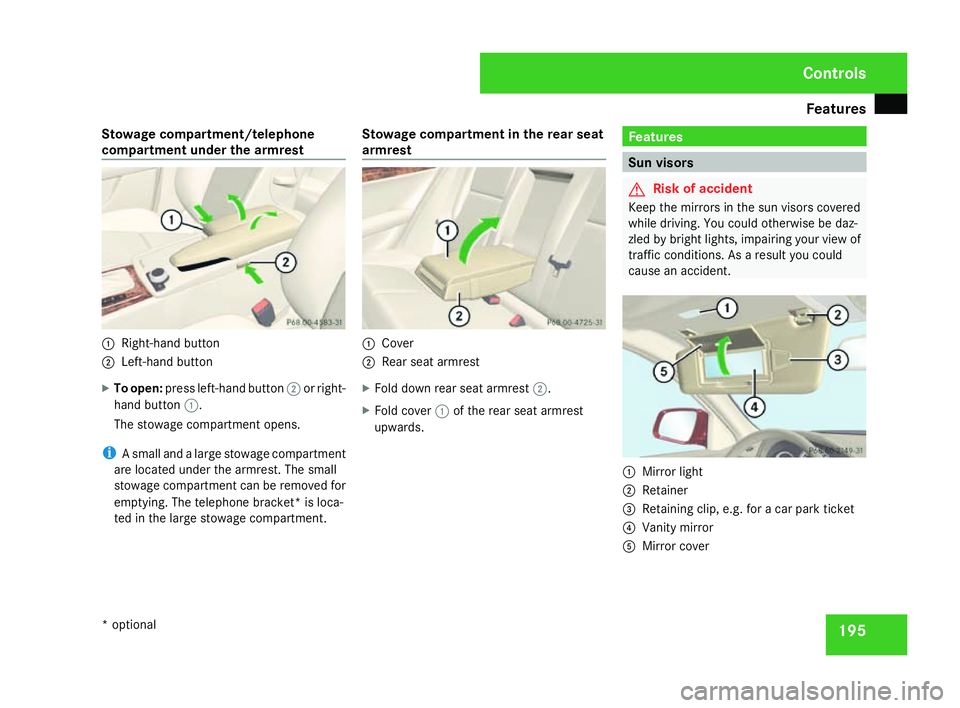
compartment under the armrest 1
Right-hand butto n
2 Left-hand button
X To open: press left-hand button 2or right-
hand button 1.
The stowage compartment opens.
i A small and a large stowage compartment
are located under the armrest. The small
stowage compartment can be removed for
emptying. The telephone bracket* is loca-
ted in the large stowage compartment. Stowage compartment in the rear seat
armres t 1
Cove r
2 Rear seat armres t
X Fold down rear seat armrest 2.
X Fold cover 1of the rear seat armrest
upwards. Features
Sun visors
G
Risk of accident
Keep the mirrors in the sun visors covered
while driving. You could otherwise be daz-
zled by bright lights, impairing your view of
traffic conditions. As a result you could
cause an accident. 1
Mirror light
2 Retainer
3 Retaining clip, e.g. for a car park ticket
4 Vanity mirror
5 Mirror cover Controls
* optional
204_AKB; 2; 3, en-GB
mkalafa,
2007-06-26T23:11:51+02:00 - Seite 195
Page 202 of 377
Features
199
Power socket in the luggage compart
-
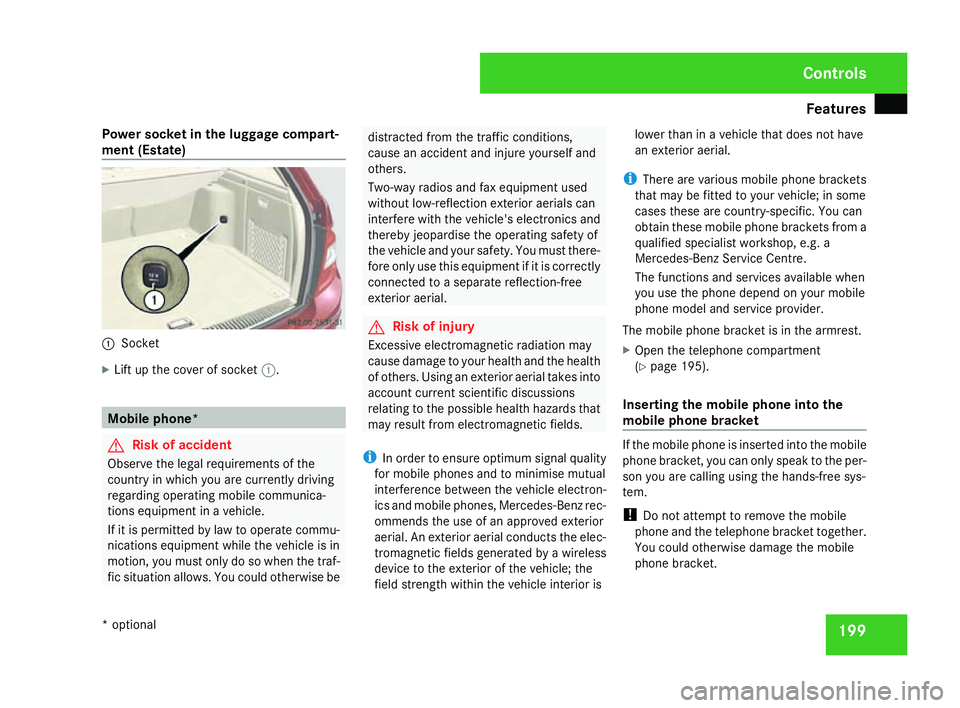
ment (Estate ) 1
Socket
X Lift up the cover of socket 1. Mobile phone
* G
Risk of accident
Observe the legal requirements of the
country in which you are currently driving
regarding operating mobile communica -
tions equipment in a vehicle.
If it is permitted by law to operate commu -
nications equipment while the vehicle is in
motion, you must only do so when the traf -
fic situation allows. You could otherwise be distracted from the traffic conditions,
cause an accident and injure yourself and
others.
Two-way radios and fax equipment use
d
without low-reflection exterior aerials can
interfere with the vehicle's electronics and
thereby jeopardise the operating safety of
the vehicle and your safety. You must there-
fore only use this equipment if it is correctly
connected to a separate reflection-free
exterior aerial. G
Risk of injury
Excessive electromagnetic radiation may
cause damage to your health and the health
of others. Using an exterior aerial takes into
account current scientific discussions
relating to the possible health hazards that
may result from electromagnetic fields.
i In order to ensure optimum signal quality
for mobile phones and to minimise mutual
interference between the vehicle electron -
ics and mobile phones, Mercedes-Benz rec -
ommends the use of an approved exterior
aerial. An exterior aerial conducts the elec-
tromagnetic fields generated by a wireless
device to the exterior of the vehicle; the
field strength within the vehicle interior is lower than in a vehicle that does not have
an exterior aerial.
i There are various mobile phone bracket s
that may be fitted to your vehicle; in some
cases these are country-specific. You can
obtain these mobile phone brackets from a
qualified specialist workshop, e.g. a
Mercedes-Benz Service Centre.
The functions and services available when
you use the phone depend on your mobile
phone model and service provider.
The mobile phone bracket is in the armrest.
X Open the telephone compartment
(Y page 195).
Inserting the mobile phone into the
mobile phone bracket If the mobile phone is inserted into the mobile
phone bracket, you can only speak to the per-
son you are calling using the hands-free sys-
tem.
!
Do not attempt to remove the mobile
phone and the telephone bracket together.
You could otherwise damage the mobile
phone bracket. Controls
* optional
204_AKB; 2; 3, en-GB
mkalafa,
2007-06-26T23:11:51+02:00 - Seite 199
Page 203 of 377
Features
200
X
Remove the cover of the aerial plug from
the back of the mobile phone and stow it in
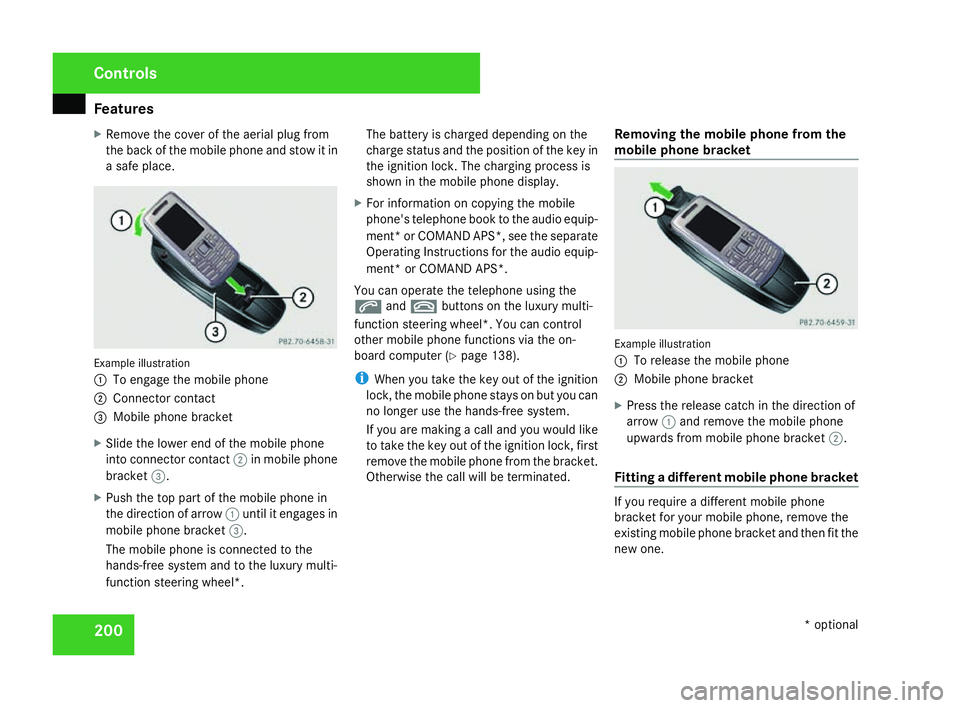
a safe place. Example illustration
1
To engage the mobile phone
2 Connector contact
3 Mobile phone bracket
X Slide the lower end of the mobile phone
into connector contact 2in mobile phon e
bracket 3.
X Push the top part of the mobile phone in
the direction of arrow 1until it engages in
mobile phone bracket 3.
The mobile phone is connected to the
hands-free system and to the luxury multi-
function steering wheel*. The battery is charged depending on the
charge status and the position of the key in
the ignition lock. The charging process is
shown in the mobile phone display
.
X For information on copying the mobil e
phone's telephone book to the audio equip-
ment *or COMAND APS*, see the separate
Operating Instructions for the audio equip-
ment* or COMAND APS* .
You can operate the telephone using the
s andt buttons on the luxury multi-
function steering wheel*. You can contro l
other mobile phone functions via the on-
board computer (Y page 138).
i When you take the key out of the ignition
lock, the mobile phone stays on but you can
no longer use the hands-free system.
If you are making a call and you would like
to take the key out of the ignition lock, first
remove the mobile phone from the bracket .
Otherwise the call will be terminated. Removing the mobile phone from the
mobile phone bracket Example illustration
1
To release the mobile phone
2 Mobile phone bracket
X Press the release catch in the direction of
arrow 1and remove the mobile phon e
upwards from mobile phone bracket 2.
Fitting a different mobile phone bracket If you require a different mobile phon
e
bracket for your mobile phone, remove the
existing mobile phone bracket and then fit the
new one. Controls
* optional
204_AKB; 2; 3, en-GB
mkalafa,
2007-06-26T23:11:51+02:00 - Seite 200
Page 204 of 377
Features
201
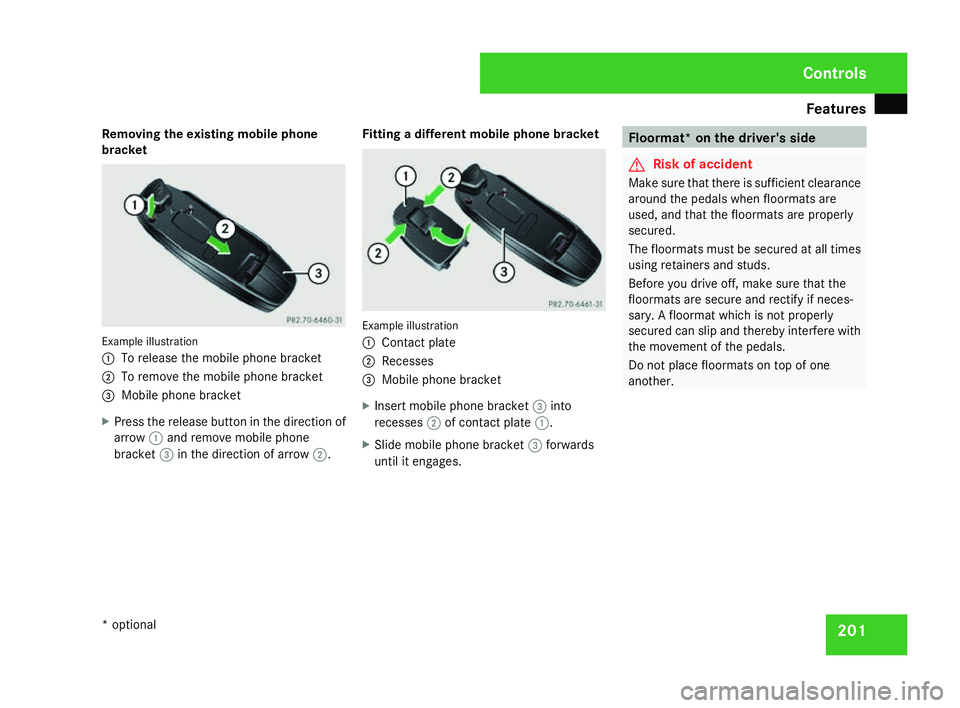
Removing the existing mobile phone
bracket Example illustration
1
To release the mobile phone bracket
2 To remove the mobile phone bracket
3 Mobile phone bracket
X Press the release button in the direction of
arrow 1and remove mobile phon e
bracket 3in the direction of arrow 2. Fitting a different mobile phone bracket Example illustration
1
Contact plat e
2 Recesses
3 Mobile phone bracket
X Insert mobile phone bracket 3into
recesses 2of contact plate 1.
X Slide mobile phone bracket 3forwards
until it engages. Floormat* on the driver's side
G
Risk of accident
Make sure that there is sufficient clearance
around the pedals when floormats are
used, and that the floormats are properly
secured .
The floormats must be secured at all times
using retainers and studs.
Before you drive off, make sure that the
floormats are secure and rectify if neces-
sary. A floormat which is not properly
secured can slip and thereby interfere with
the movement of the pedals.
Do not place floormats on top of one
another . Cont
rols
* optional
204_AKB; 2; 3, en-GB
mkalafa,
2007-06-26T23:11:51+02:00 - Seite 201
Page 231 of 377
Car
e 228
High-pressure cleaners G
Risk of accident
Do not use high-pressure cleaners with cir-
cular-jet nozzles (dirt grinders) to clean
your vehicle or - especially - the tyres. Yo u
could otherwise damage the tyres and
cause an accident.
! Observe the instructions issued by the
equipment manufacturer concerning the
distance to be maintained between the
nozzle of the high-pressure cleaner and the
vehicle (at least 30 cm).
Move the high-pressure cleaner nozzle
around when cleaning your vehicle .
Do not aim directly at any of the following:
R Tyres
R Door joint
R Electrical components
R Batter y
R Connectors
R Bulbs
R Seals
Damaged seals or electrical components
can lead to failures or leaks .Cleaning the wiper blades and the out
-
side of the windscreen G
Risk of injury
Turn the key to position 0in the ignition
lock before cleaning the windscreen or the
wiper blades. There is otherwise a risk of
the windscreen wipers being set in motion
and causing injury.
! Only fold the windscreen wipers away
from the windscreen when vertical, other-
wise you will damage the bonnet.
X Fold the wiper arms away from the wind-
screen until you feel them engage.
X Clean the windscreen and the wiper blades .
X Fold the windscreen wipers back agai n
before the ignition is switched on.
! Do not clean the wiper blades too often,
as otherwise the coating may come off.
This could cause wiper noise.
Cleaning the windows !
Do not use dry cloths, abrasive products,
solvents or cleaning agents containing sol-
vents to clean the inside of the windows. Clean the insides of the windows with
a
damp cloth or commercially-available glass
cleaner. Avoid touching the inside of the
rear windscreen and the side windows with
hard objects, e.g. ice scrapers or rings. You
could otherwise cause damage to the win-
dows, rear window heating or aerial on the
rear window.
i Anti-glare film retrofitted to the insides of
the windows could interfere with radio or
mobile phone reception, especially if it is
conductive or metal-coated film. Informa -
tion about anti-glare film can be obtained
from any Mercedes-Benz Service Centre.
Cleaning the headlamps X
Clean the headlamp lenses with a wet
sponge.
! Only use washer fluid which is suitable
for plastic lenses. Unsuitable washer fluid
could damage the plastic lenses of th e
headlamps.
Therefore, do not use the following:
R Dry cloths
R Abrasive cleaning agents Operatio
n
204_AKB; 2; 3, en-GB
mkalafa,
2007-06-26T23:11:51+02:00 - Seite 228
Page 281 of 377
Troubleshooting
27
8 Problem Possible cause/consequence Suggested solutions
Vehicles with automatic child
seat recognition on the front-
passenger seat*:
The
5/ indicator lamp on
the centre console is lit. G
Risk of injury
There is no child seat fitted to the
front-passenger seat. The auto-
matic child seat recognition on
the front-passenger seat is faulty . X
Remove electronic equipment from the front-passenger seat, e.g. :
R Notebooks
R Mobile phones
R Cards with transponders, e.g. ski passes or access passes
If the 5/ indicator lamp remains lit :
X Visit a qualified specialist workshop. Practical advice
* optional
204_AKB; 2; 3, en-GB
mkalafa,
2007-06-26T23:11:51+02:00 - Seite 278
Page 341 of 377
Vehicle electronic
s338 R
they do not have an exterior aerial
R the exterior aerial is not a low-reflection
aerial
R the exterior aerial has been fitted incor-
rectly G
Risk of injury
Excessive electromagnetic radiation may
also cause damage to your health and the
health of others. Using an exterior aeria l
takes into account current scientific dis-
cussions relating to the possible health haz-
ards that may result from electromagnetic
fields .
For this reason, only have the exterior aeria l
fitted at a qualified specialist worksho p
which has the necessary specialist knowl-
edge and tools to carry out the work
required. Mercedes-Benz recommend s
that you use a Mercedes-Benz Service
Centre for this purpose. In particular, work
relevant to safety or on safety-related sys-
tems must be carried out at a qualifie d
specialist workshop.
i To ensure optimum reception quality for
mobile phones and two-way radios in the
vehicle, and to minimise mutual influences between the vehicle electronics and mobile
phones/two-way radios, Mercedes-Benz
recommends the use of approved exterior
aerials. An attached exterior aerial has the
effect that the electromagnetic fields trans-
mitted by a wireless device are conducted
to the exterior of the vehicle; the field
strength within the vehicle interior is lower
than in a vehicle that does not have an
exterior aerial. Frequency range Maximum trans-
mission outpu
t
(watts) Short wave (< 50
MHz
) 100
4 m waveband 20
2 m waveband 50
70 cm waveband 35
25 cm waveband 10
!
If electrical or electronic equipment
which does not fulfil these conditions is
retrofitted, the vehicle's general operating
permit may be invalidated (EU Directive 95/54/EC – the Automotive EMC Direc-
tive)
. Techni
cal data
204_AKB; 2; 3, en-GB
mkalafa
, 2007-06-26T23:11:51+02:00 - Seite 338