engine MERCEDES-BENZ C-CLASS ESTATE 2014 Owners Manual
[x] Cancel search | Manufacturer: MERCEDES-BENZ, Model Year: 2014, Model line: C-CLASS ESTATE, Model: MERCEDES-BENZ C-CLASS ESTATE 2014Pages: 489, PDF Size: 15.08 MB
Page 267 of 489
the case if there are vehicles at the edge of
their lane nearest your vehicle.
Due to the nature of the system:
R warnings may be issued in error when driv-
ing close to crash barriers or similar solid
lane borders
R warnings may be interrupted when driving
alongside long vehicles, for example lor-
ries, for a prolonged time
The two radar sensors for Blind Spot Assist
are integrated into the sides of the rear
bumper. Make sure that the bumper is free of dirt, ice or slush in the vicinity of the sensors.
The sensors must not be covered, for exam-
ple by cycle racks or overhanging loads. Fol-
lowing a severe impact or in the event of dam- age to the bumpers, have the function of the
sensors checked at a qualified specialist
workshop. Blind Spot Assist may otherwise
not work properly.
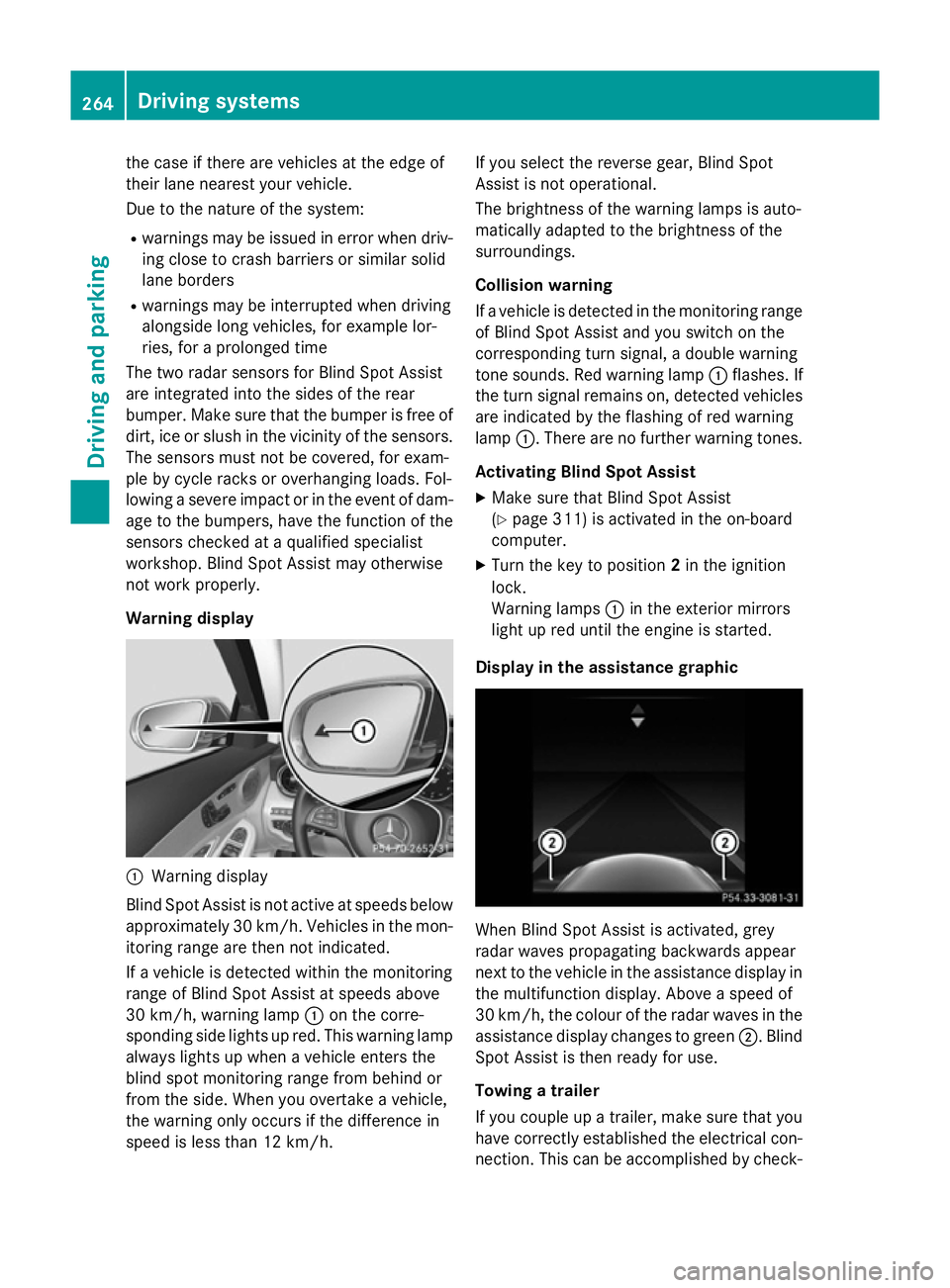
Warning display :
Warning display
Blind Spot Assist is not active at speeds below approximately 30 km/h. Vehicles in the mon-itoring range are then not indicated.
If a vehicle is detected within the monitoring
range of Blind Spot Assist at speeds above
30 km/h, warning lamp :on the corre-
sponding side lights up red. This warning lamp
always lights up when a vehicle enters the
blind spot monitoring range from behind or
from the side. When you overtake a vehicle,
the warning only occurs if the difference in
speed is less than 12 km/h. If you select the reverse gear, Blind Spot
Assist is not operational.
The brightness of the warning lamps is auto-
matically adapted to the brightness of the
surroundings.
Collision warning
If a vehicle is detected in the monitoring range
of Blind Spot Assist and you switch on the
corresponding turn signal, a double warning
tone sounds. Red warning lamp :flashes. If
the turn signal remains on, detected vehicles
are indicated by the flashing of red warning
lamp :. There are no further warning tones.
Activating Blind Spot Assist X Make sure that Blind Spot Assist
(Y page 311) is activated in the on-board
computer.
X Turn the key to position 2in the ignition
lock.
Warning lamps :in the exterior mirrors
light up red until the engine is started.
Display in the assistance graphic When Blind Spot Assist is activated, grey
radar waves propagating backwards appear
next to the vehicle in the assistance display in
the multifunction display. Above a speed of
30 km/h, the colour of the radar waves in the
assistance display changes to green ;. Blind
Spot Assist is then ready for use.
Towing a trailer
If you couple up a trailer, make sure that you
have correctly established the electrical con- nection. This can be accomplished by check- 264
Driving systemsDriving an
d parking
Page 275 of 489
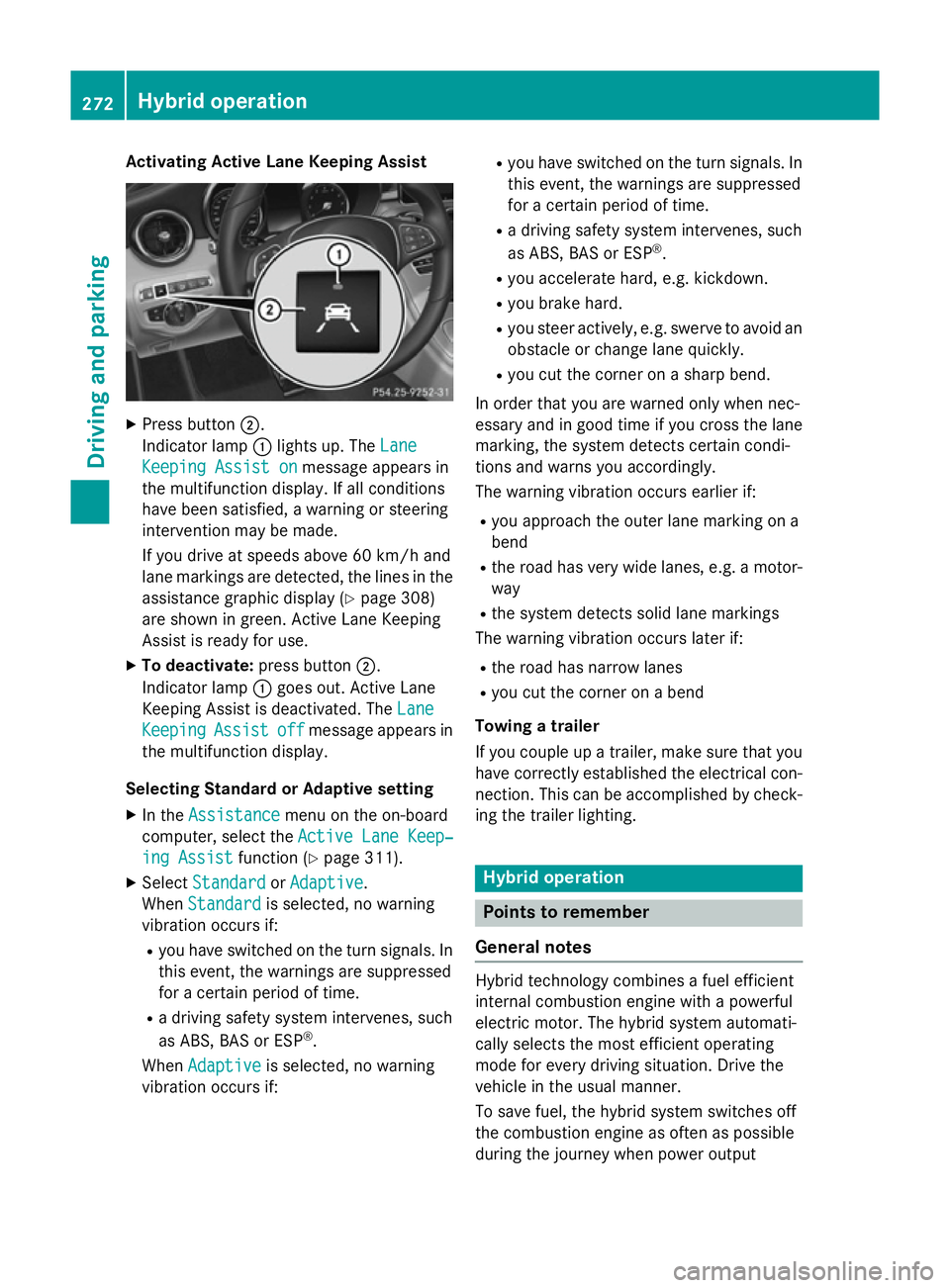
Activating Active Lane Keeping Assist
X
Press button ;.
Indicator lamp :lights up. The Lane
Lane
Keeping Assist on
Keeping Assist on message appears in
the multifunction display. If all conditions
have been satisfied, a warning or steering
intervention may be made.
If you drive at speeds above 60 km/h and
lane markings are detected, the lines in the assistance graphic display (Y page 308)
are shown in green. Active Lane Keeping
Assist is ready for use.
X To deactivate: press button;.
Indicator lamp :goes out. Active Lane
Keeping Assist is deactivated. The Lane Lane
Keeping
Keeping Assist
Assistoff
offmessage appears in
the multifunction display.
Selecting Standard or Adaptive setting X In the Assistance
Assistance menu on the on-board
computer, select the Active Lane Keep‐
Active Lane Keep‐
ing Assist
ing Assist function (Ypage 311).
X Select Standard
Standard orAdaptive
Adaptive.
When Standard
Standard is selected, no warning
vibration occurs if:
R you have switched on the turn signals. In
this event, the warnings are suppressed
for a certain period of time.
R a driving safety system intervenes, such
as ABS, BAS or ESP ®
.
When Adaptive
Adaptive is selected, no warning
vibration occurs if: R
you have switched on the turn signals. In
this event, the warnings are suppressed
for a certain period of time.
R a driving safety system intervenes, such
as ABS, BAS or ESP ®
.
R you accelerate hard, e.g. kickdown.
R you brake hard.
R you steer actively, e.g. swerve to avoid an
obstacle or change lane quickly.
R you cut the corner on a sharp bend.
In order that you are warned only when nec-
essary and in good time if you cross the lane marking, the system detects certain condi-
tions and warns you accordingly.
The warning vibration occurs earlier if:
R you approach the outer lane marking on a
bend
R the road has very wide lanes, e.g. a motor-
way
R the system detects solid lane markings
The warning vibration occurs later if:
R the road has narrow lanes
R you cut the corner on a bend
Towing a trailer
If you couple up a trailer, make sure that you have correctly established the electrical con- nection. This can be accomplished by check-
ing the trailer lighting. Hybrid operation
Points to remember
General notes Hybrid technology combines a fuel efficient
internal combustion engine with a powerful
electric motor. The hybrid system automati-
cally selects the most efficient operating
mode for every driving situation. Drive the
vehicle in the usual manner.
To save fuel, the hybrid system switches off
the combustion engine as often as possible
during the journey when power output 272
Hybrid operationDriving and pa
rking
Page 276 of 489
requirements are low. When power output
requirements are low, the electric motor pow-
ers the vehicle. When power output require-
ments are high, the combustion engine is
switched on, even during a journey. When the vehicle is stationary, the combustion engine
is usually switched off. Consequently, there is usually no engine idling as with combustion
engine vehicles.
For pulling away and accelerating, the electric
motor supports the internal combustion
engine using the power stored in the high-
voltage battery. In addition, the power is used
for partially electric driving, operation of the
electric coolant compressor and to support
the 12 V on-board electrical system. In this
way the hybrid drive helps to reduce your
vehicle's fuel consumption.
Observe the driving tips on hybrid operation
(Y page 281).
RBS (Recuperative Brake System) If you release the accelerator pedal when the
vehicle is in motion, overrun recuperation is
initiated. The electric motor is operated as a
generator when in overrun mode and when
you brake. Hybrid technology converts the
kinetic energy of the vehicle into electricity
and stores it in the high-voltage battery. Important safety notes
All of the vehicle's systems remain active, if: R the vehicle is stationary,
R the combustion engine is switched off and
R the READY-indicator in the instrument clus-
ter is lit.
If you remove your foot from the brake pedal
while in transmission position D or R, the
vehicle could pull away automatically.
Observe the notes on the READY display of
the ECO start/stop function (Y page 282).
Vehicles with an electric motor generate sig-
nificantly less noise than vehicles with inter-
nal combustion engines. As a result, in certain situations your vehicle may not be heard by
other road users. This is the case, for exam-
ple, when you are parking and your vehicle is not seen by other road users.
This requires you to adopt a particularly antic-
ipatory driving style, as it is necessary to allow
for the possibility that other road users may
behave unpredictably. Hybrid operation
273Driving and parking Z
Page 278 of 489
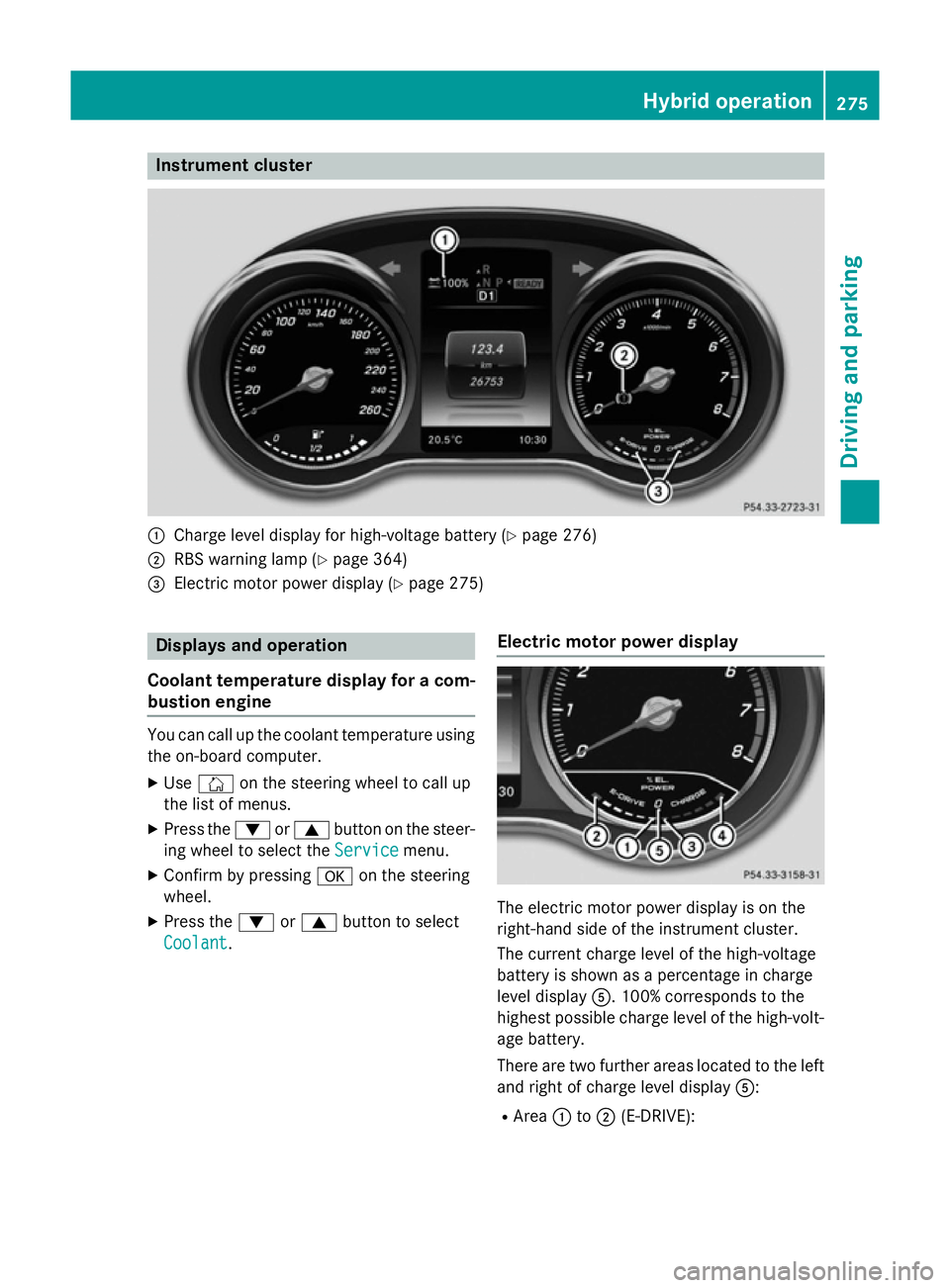
Instrument cluster
:
Charge level display for high-voltage battery (Y page 276)
; RBS warning lamp (Y page 364)
= Electric motor power display (Y page 275)Displays and operation
Coolant temperature display for a com- bustion engine You can call up the coolant temperature using
the on-board computer.
X Use Ñ on the steering wheel to call up
the list of menus.
X Press the :or9 button on the steer-
ing wheel to select the Service
Service menu.
X Confirm by pressing aon the steering
wheel.
X Press the :or9 button to select
Coolant
Coolant. Electric motor power display The electric motor power display is on the
right-hand side of the instrument cluster.
The current charge level of the high-voltage
battery is shown as a percentage in charge
level display
A. 100% corresponds to the
highest possible charge level of the high-volt- age battery.
There are two further areas located to the left
and right of charge level display A:
R Area :to; (E-DRIVE): Hybrid operation
275Driving and parking Z
Page 279 of 489
This shows the electric output from the
electric motor, e.g. when driving using the
electric motor or in boost mode.
When the motor is switched on, the display is at :. When driving solely on electricity,
the display fills up from :to; depending
on the power output demanded as a result
of pressing the accelerator pedal.
If the display has reached limit ;, addi-
tional power output can only be provided by
the combustion engine. The combustion
engine starts. If the display is approaching
limit ;and you remove your foot from the
accelerator pedal, the display empties
again. The combustion engine is not
switched on. At low speeds, you can
thereby control the electric drive usage so
that you only drive in electric mode.
R Area =to? (CHARGE):
This shows the recuperated energy which is
stored in the high-voltage battery as elec-
trical energy.
When the display reaches limit ?, the max-
imum recuperative braking power has been exhausted. The conventional brakes are
activated.
Operating the on-board computer You can display the current operating condi-
tion of the hybrid system in the multifunction
display and the COMAND display
(Y page 276).
You can display the current operating condi-
tion of the hybrid system in the multifunction display and the Audio 20/COMAND Online
display (Y page 276).
In the Audio 20/COMAND Online display, you
can also call up a graphic display of the fuel
consumption and generated electricity
(Y page 279). Menus and submenus
Selecting messages in the Audio 20/
COMAND Online display X
Press the Øbutton on the controller.
The vehicle menu appears.
X To select Energy
Energy flow flow: turn and press the
controller.
The energy flow is displayed.
X To select Consumption Consumption: turn and press the
controller.
Fuel consumption and the electric energy
generated are displayed.
X To exit the display: press the %button
on the controller.
Selecting the energy flow display in the multifunction display X
Use Ñ on the steering wheel to call up
the list of menus.
X Press the :or9 button on the steer-
ing wheel to select the Trip Tripmenu.
X Confirm by pressing aon the steering
wheel.
X Use : or9 to select Energy flow
Energy flow .
The energy flow is displayed.
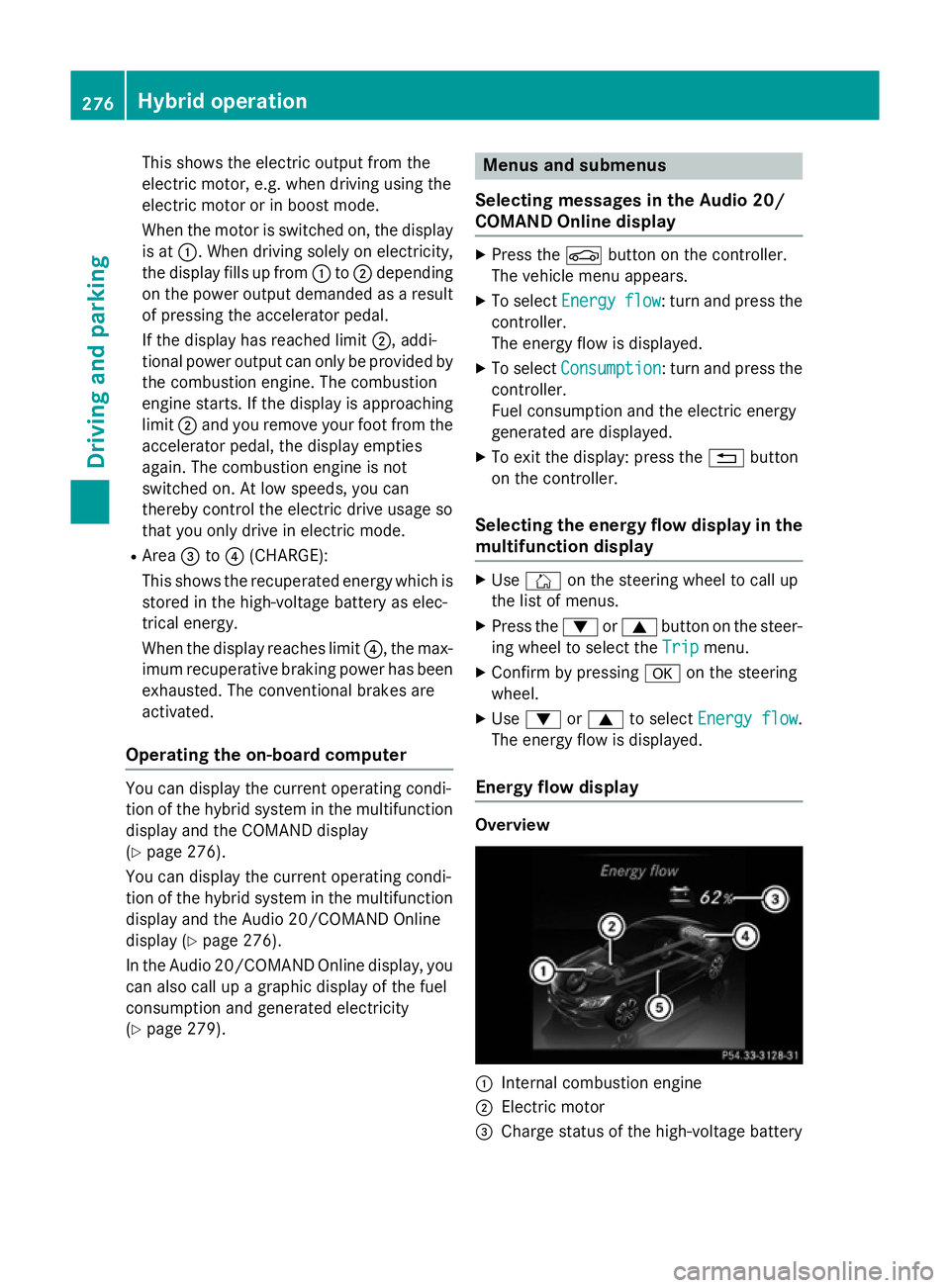
Energy flow display Overview
:
Internal combustion engine
; Electric motor
= Charge status of the high-voltage battery 276
Hybrid operationDriving and parking
Page 280 of 489
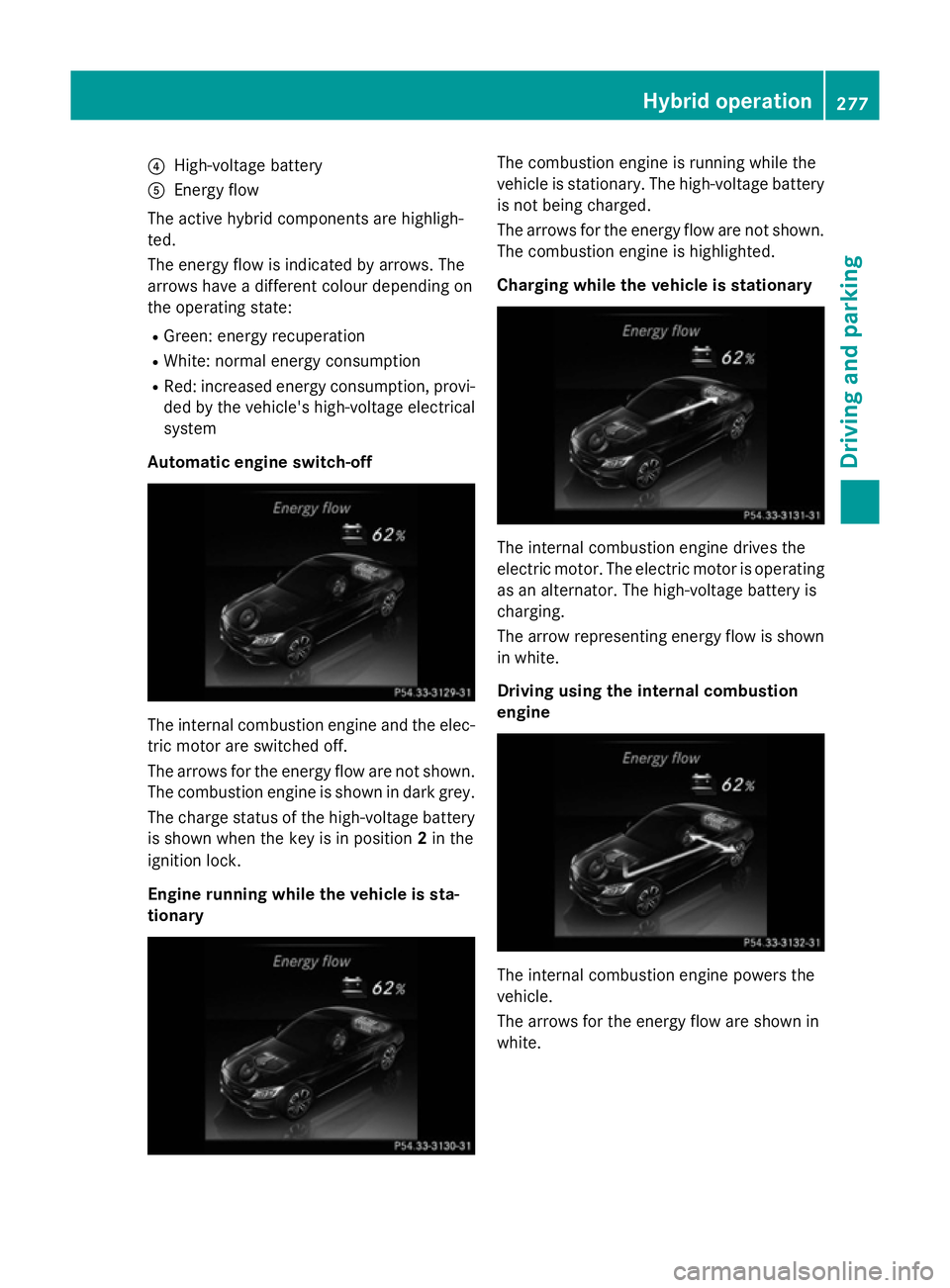
?
High-voltage battery
A Energy flow
The active hybrid components are highligh-
ted.
The energy flow is indicated by arrows. The
arrows have a different colour depending on
the operating state:
R Green: energy recuperation
R White: normal energy consumption
R Red: increased energy consumption, provi-
ded by the vehicle's high-voltage electrical
system
Automatic engine switch-off The internal combustion engine and the elec-
tric motor are switched off.
The arrows for the energy flow are not shown.
The combustion engine is shown in dark grey.
The charge status of the high-voltage battery is shown when the key is in position 2in the
ignition lock.
Engine running while the vehicle is sta-
tionary The combustion engine is running while the
vehicle is stationary. The high-voltage battery
is not being charged.
The arrows for the energy flow are not shown. The combustion engine is highlighted.
Charging while the vehicle is stationary The internal combustion engine drives the
electric motor. The electric motor is operating
as an alternator. The high-voltage battery is
charging.
The arrow representing energy flow is shown in white.
Driving using the internal combustion
engine The internal combustion engine powers the
vehicle.
The arrows for the energy flow are shown in
white. Hybrid operation
277Driving and parking Z
Page 281 of 489
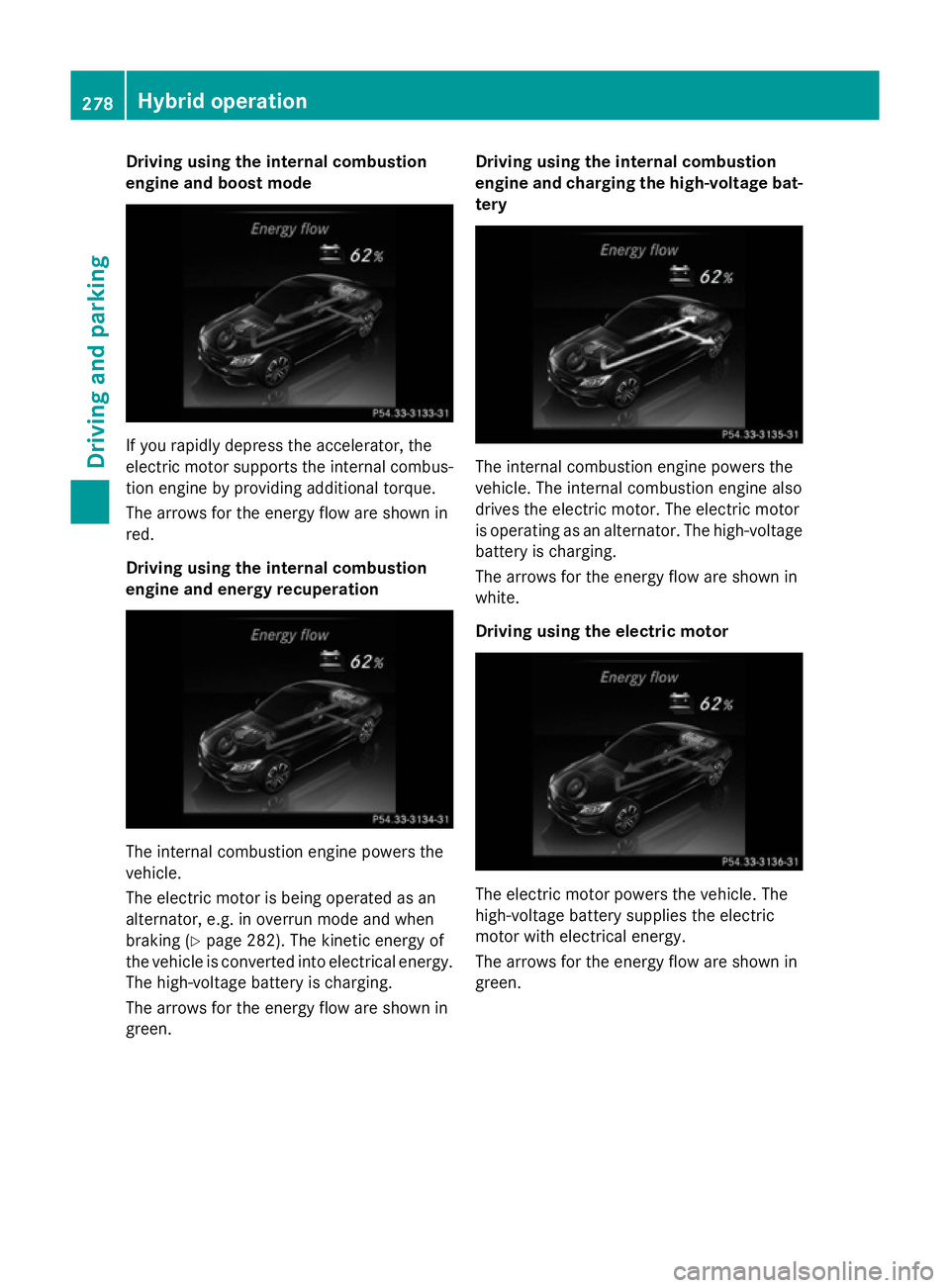
Driving using the internal combustion
engine and boost mode If you rapidly depress the accelerator, the
electric motor supports the internal combus-
tion engine by providing additional torque.
The arrows for the energy flow are shown in
red.
Driving using the internal combustion
engine and energy recuperation The internal combustion engine powers the
vehicle.
The electric motor is being operated as an
alternator, e.g. in overrun mode and when
braking (Y page 282). The kinetic energy of
the vehicle is converted into electrical energy. The high-voltage battery is charging.
The arrows for the energy flow are shown in
green. Driving using the internal combustion
engine and charging the high-voltage bat-
tery The internal combustion engine powers the
vehicle. The internal combustion engine also
drives the electric motor. The electric motor
is operating as an alternator. The high-voltage battery is charging.
The arrows for the energy flow are shown in
white.
Driving using the electric motor The electric motor powers the vehicle. The
high-voltage battery supplies the electric
motor with electrical energy.
The arrows for the energy flow are shown in
green.278
Hybrid operationDriving and pa
rking
Page 282 of 489
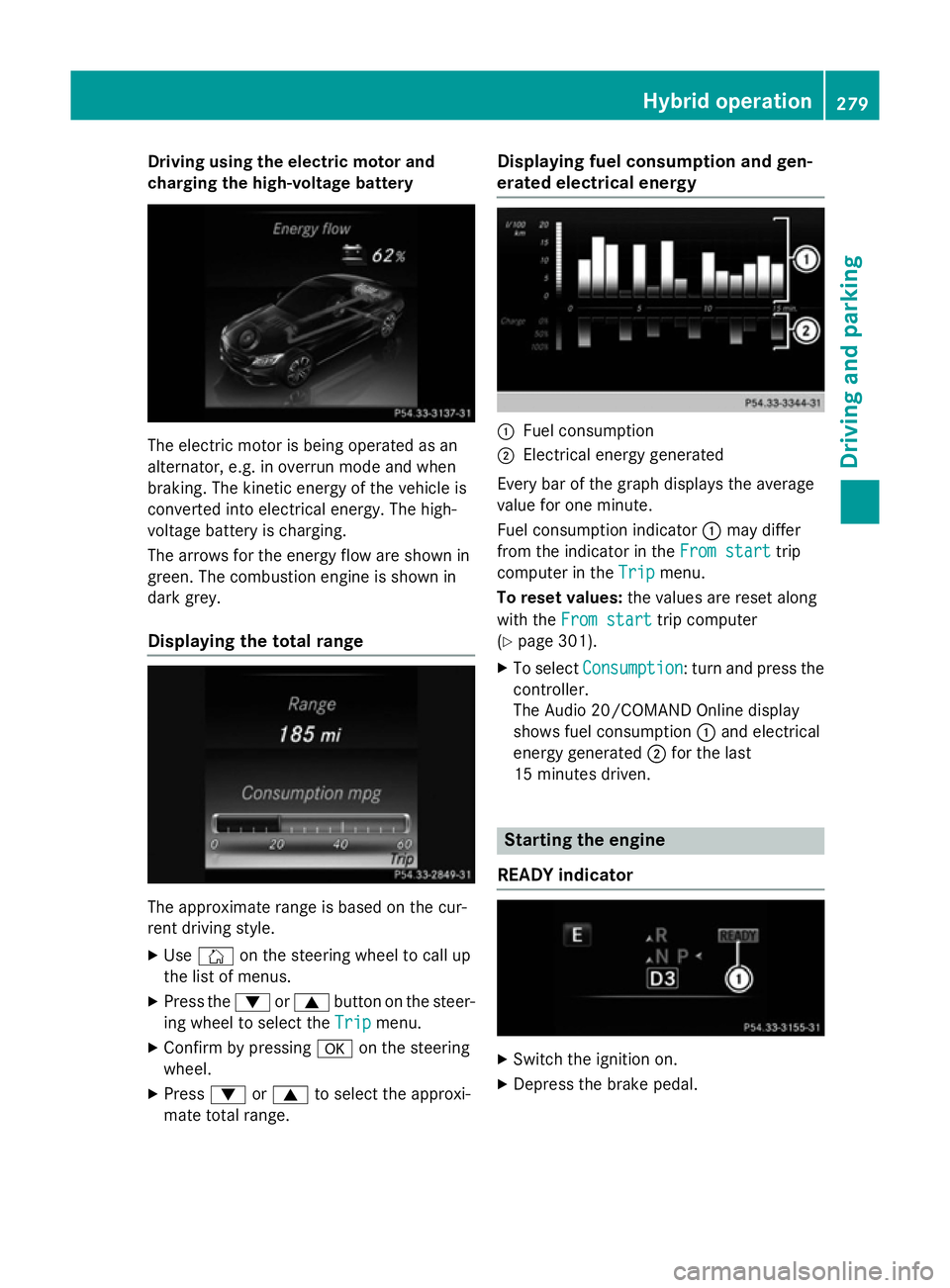
Driving using the electric motor and
charging the high-voltage battery The electric motor is being operated as an
alternator, e.g. in overrun mode and when
braking. The kinetic energy of the vehicle is
converted into electrical energy. The high-
voltage battery is charging.
The arrows for the energy flow are shown in
green. The combustion engine is shown in
dark grey.
Displaying the total range The approximate range is based on the cur-
rent driving style.
X Use Ñ on the steering wheel to call up
the list of menus.
X Press the :or9 button on the steer-
ing wheel to select the Trip
Trip menu.
X Confirm by pressing aon the steering
wheel.
X Press :or9 to select the approxi-
mate total range. Displaying fuel consumption and gen-
erated electrical energy :
Fuel consumption
; Electrical energy generated
Every bar of the graph displays the average
value for one minute.
Fuel consumption indicator :may differ
from the indicator in the From start From starttrip
computer in the Trip
Tripmenu.
To reset values: the values are reset along
with the From start
From start trip computer
(Y page 301).
X To select Consumption
Consumption: turn and press the
controller.
The Audio 20/COMAND Online display
shows fuel consumption :and electrical
energy generated ;for the last
15 minutes driven. Starting the engine
READY indicator X
Switch the ignition on.
X Depress the brake pedal. Hybrid operation
279Driving and parking Z
Page 283 of 489
X
Observe the notes on starting the engine
(Y page 187).
X Turn the key to position 3in the ignition
lock (Y page 188) or press the Start/Stop
button once (Y page 188).
The vehicle is operational when READY indi-
cator :lights up.
Noiseless start The vehicle starts in electric mode without the
internal combustion engine. The internal
combustion engine starts only after the
power demanded by the driver exceeds the
available power that the electric motor can
currently provide.
Noiseless start operation is dependent on the
outside temperature and the operating tem-
perature of the internal combustion engine.
The vehicle is operational when READY indi-
cator :lights up. Pulling away
X Depress the brake pedal and keep it
depressed.
X Shift the transmission to position Dor R.
X Release the brake pedal.
Further information on pulling away
(Y page 189). Driving
AGILITY SELECT switch Drive programs
Use the AGILITY SELECT switch to change the
drive program. Depending on the drive pro-
gram selected, the following vehicle charac-
teristics will change:
R the drive (engine and transmission man-
agement)
R the suspension
R the steering R
the availability of the ECO start/stop func-
tion (Y page 282)
R the climate control settings
- THERMATIC (1-zone) (Y page 153)
- THERMATIC (2-zone) (Y page 157)
- THERMOTRONIC (3-zone) (Y page 160)
R the rear window heating operation period
(Y page 167)
R the performance of the seat heating
(Y page 123)
If the ignition is switched off for less than four
hours, the previously selected drive program
is activated when the engine is next started. If the ignition is switched off for more than four
hours, drive program Cis activated when the
engine is next started. X
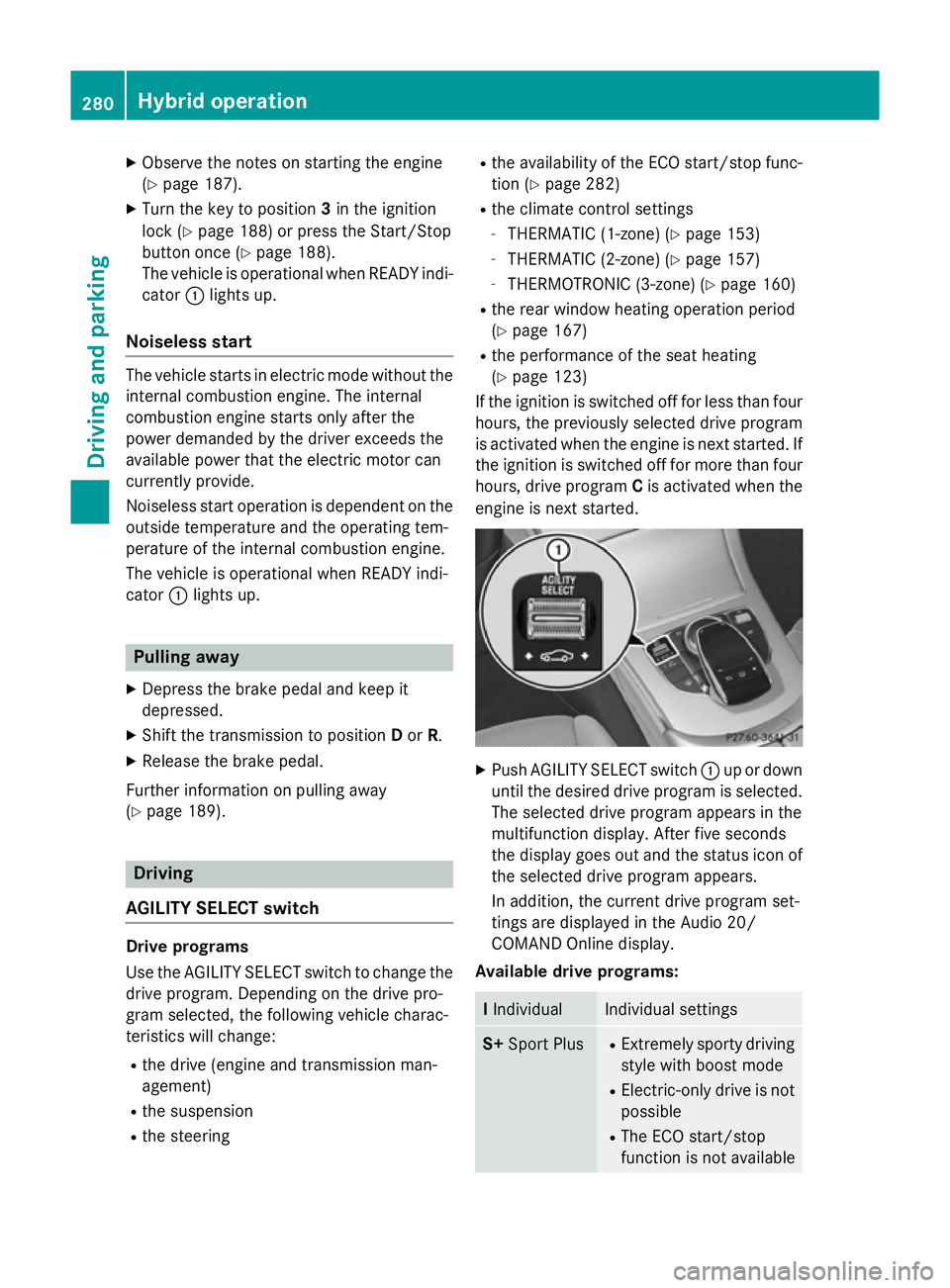
Push AGILITY SELECT switch :up or down
until the desired drive program is selected. The selected drive program appears in the
multifunction display. After five seconds
the display goes out and the status icon of
the selected drive program appears.
In addition, the current drive program set-
tings are displayed in the Audio 20/
COMAND Online display.
Available drive programs: I
Individual Individual settings
S+
Sport Plus R
Extremely sporty driving
style with boost mode
R Electric-only drive is not
possible
R The ECO start/stop
function is not available 280
Hybrid operationDriving and parking
Page 284 of 489
S
Sport R
Sporty driving style with
boost mode
R Electric-only drive is not
possible
R The ECO start/stop
function is not available C
Comfort R
Comfortable, economi-
cal driving style
R Electric-only drive is
possible
R The ECO start/stop
function is available E
Eco R
Particularly economical
driving style
R Electric operation mode
is used as often as pos-
sible
R The ECO start/stop
function is available Additional information for drive programs
(Y page 201).
Using the steering wheel gearshift paddles,
you can temporarily change gear yourself.
Further information on the manual drive pro-
gram (Y page 281).
Manual gearshifting
Using the steering wheel gearshift paddles,
you can temporarily change gear yourself.
The transmission must be in position D. Elec-
tric-only operation is not possible when man-
ually changing gear.
Activating when driving with the electric
motor:
X Pull the left-hand steering wheel gearshift
paddle (Y page 202).
The combustion engine is switched on.
Manual gearshifting is activated tempora-
rily. The selected gear and Mappear in the
multifunction display.
Pulling on the right-hand steering wheel
gearshift paddle when manual gear chang- ing is not active switches to overrun mode
(Y page 283).
Activating when driving with the combustion
engine:
X Pull the left-hand steering wheel gearshift
paddle (Y page 202).
Manual gearshifting is activated tempora-
rily. The selected gear and Mappear in the
multifunction display.
The ECO start/stop function is not available
when manually changing gear.
Further information on the manual drive pro-
gram (Y page 202).
Driving tips General driving tips
Drive carefully and maintain a suitable dis-
tance to the vehicle in front. Avoid frequent
and sudden acceleration as well as abrupt
braking.
During partial electric drive, pulling away and
acceleration, the electric motor supports the
internal combustion engine.
During overrun in transmission position Dand
braking, the electric motor operates as an
alternator.
To reduce fuel consumption, use:
R recuperative braking (Y page 273)
R overrun mode (Y page 283) or extended
overrun mode (Y page 283)
For further information on the ECO start/stop
function, see (Y page 282).
Additional driving tips (Y page 215).
Stationary vehicle
If the vehicle is stopped, the combustion
engine is, for the most part, switched off.
Automatic climate control continues to func-
tion. The electro-mechanically assisted steer-
ing gear allows use of the power steering
without loss of comfort. Hybrid operation
281Driving and parking Z