start stop button MERCEDES-BENZ C-CLASS ESTATE 2014 Service Manual
[x] Cancel search | Manufacturer: MERCEDES-BENZ, Model Year: 2014, Model line: C-CLASS ESTATE, Model: MERCEDES-BENZ C-CLASS ESTATE 2014Pages: 489, PDF Size: 15.08 MB
Page 283 of 489
X
Observe the notes on starting the engine
(Y page 187).
X Turn the key to position 3in the ignition
lock (Y page 188) or press the Start/Stop
button once (Y page 188).
The vehicle is operational when READY indi-
cator :lights up.
Noiseless start The vehicle starts in electric mode without the
internal combustion engine. The internal
combustion engine starts only after the
power demanded by the driver exceeds the
available power that the electric motor can
currently provide.
Noiseless start operation is dependent on the
outside temperature and the operating tem-
perature of the internal combustion engine.
The vehicle is operational when READY indi-
cator :lights up. Pulling away
X Depress the brake pedal and keep it
depressed.
X Shift the transmission to position Dor R.
X Release the brake pedal.
Further information on pulling away
(Y page 189). Driving
AGILITY SELECT switch Drive programs
Use the AGILITY SELECT switch to change the
drive program. Depending on the drive pro-
gram selected, the following vehicle charac-
teristics will change:
R the drive (engine and transmission man-
agement)
R the suspension
R the steering R
the availability of the ECO start/stop func-
tion (Y page 282)
R the climate control settings
- THERMATIC (1-zone) (Y page 153)
- THERMATIC (2-zone) (Y page 157)
- THERMOTRONIC (3-zone) (Y page 160)
R the rear window heating operation period
(Y page 167)
R the performance of the seat heating
(Y page 123)
If the ignition is switched off for less than four
hours, the previously selected drive program
is activated when the engine is next started. If the ignition is switched off for more than four
hours, drive program Cis activated when the
engine is next started. X
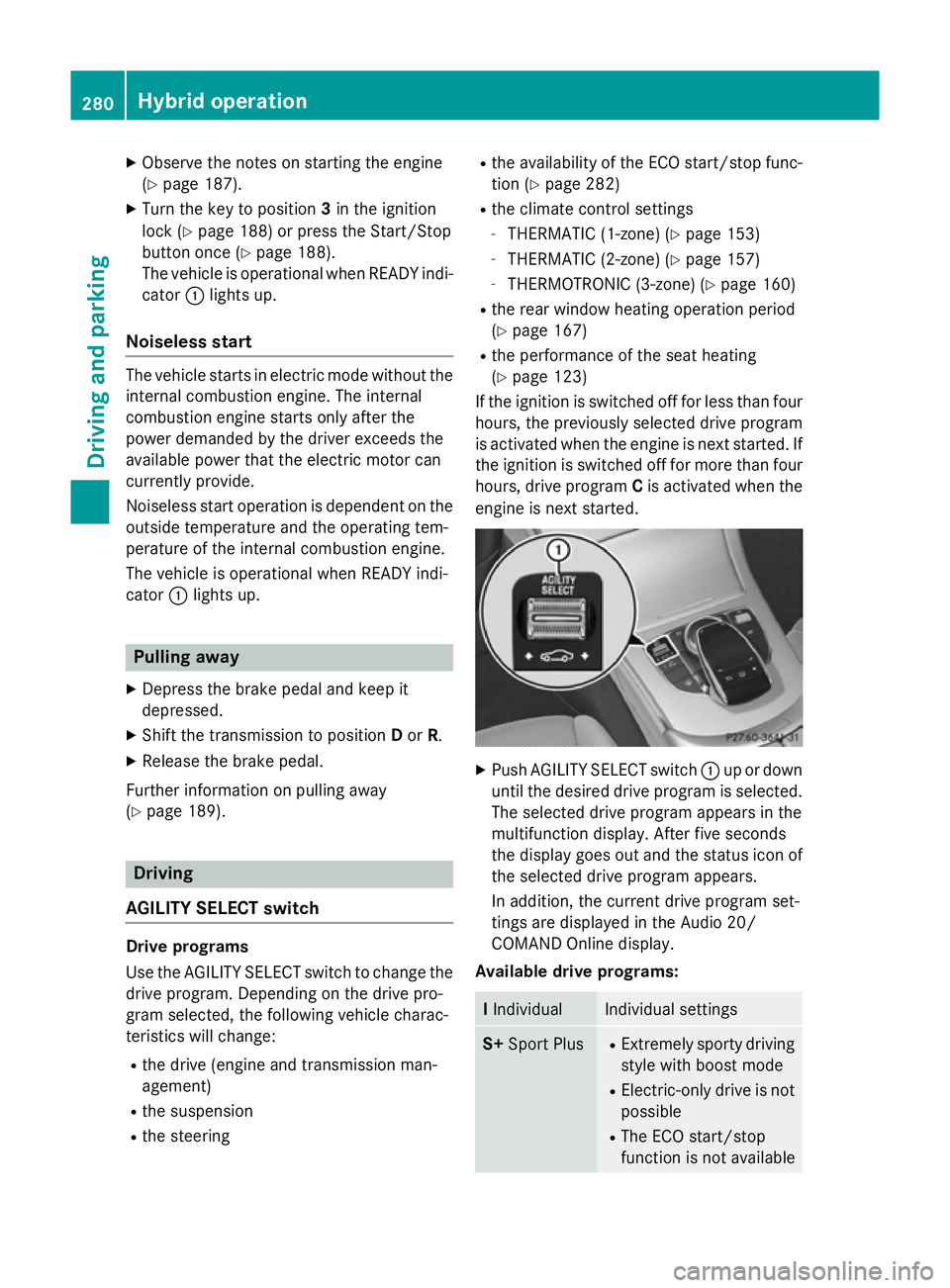
Push AGILITY SELECT switch :up or down
until the desired drive program is selected. The selected drive program appears in the
multifunction display. After five seconds
the display goes out and the status icon of
the selected drive program appears.
In addition, the current drive program set-
tings are displayed in the Audio 20/
COMAND Online display.
Available drive programs: I
Individual Individual settings
S+
Sport Plus R
Extremely sporty driving
style with boost mode
R Electric-only drive is not
possible
R The ECO start/stop
function is not available 280
Hybrid operationDriving and parking
Page 300 of 489
Multifunction display
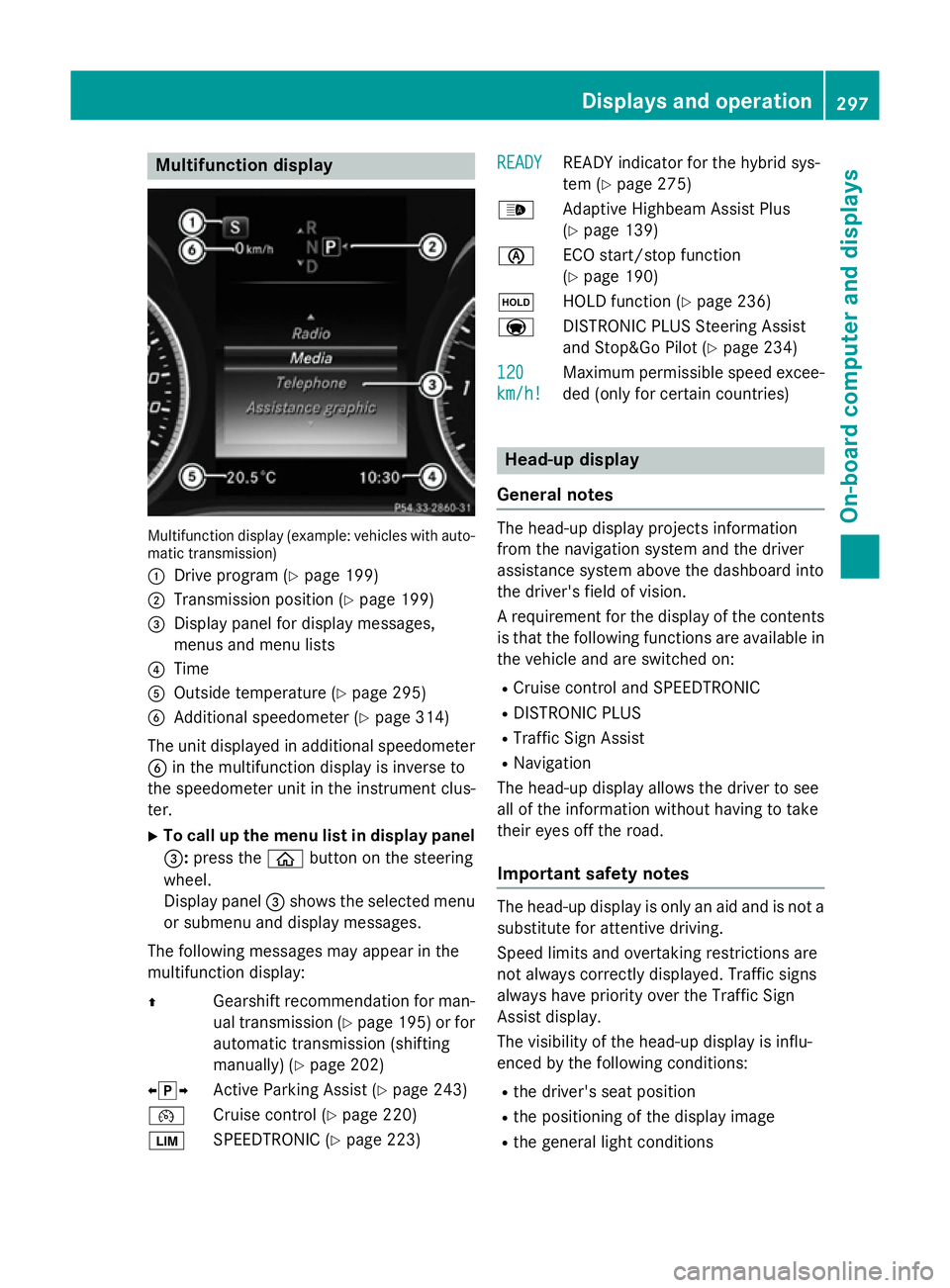
Multifunction display (example: vehicles with auto-
matic transmission)
: Drive program (Y page 199)
; Transmission position (Y page 199)
= Display panel for display messages,
menus and menu lists
? Time
A Outside temperature (Y page 295)
B Additional speedometer (Y page 314)
The unit displayed in additional speedometer
B in the multifunction display is inverse to
the speedometer unit in the instrument clus-
ter.
X To call up the menu list in display panel
=: press the òbutton on the steering
wheel.
Display panel =shows the selected menu
or submenu and display messages.
The following messages may appear in the
multifunction display:
Z Gearshift recommendation for man-
ual transmission (Y page 195) or for
automatic transmission (shifting
manually) (Y page 202)
XjY Active Parking Assist (Y page 243)
¯ Cruise control (Y page 220)
È SPEEDTRONIC (Y page 223) READY
READY READY indicator for the hybrid sys-
tem (Y
page 275)
_ Adaptive Highbeam Assist Plus
(Ypage 139)
è ECO start/stop function
(Ypage 190)
ë HOLD function (Y page 236)
a DISTRONIC PLUS Steering Assist
and Stop&Go Pilot (Y page 234)
120
120
km/h! km/h! Maximum permissible speed excee-
ded (only for certain countries) Head-up display
General notes The head-up display projects information
from the navigation system and the driver
assistance system above the dashboard into
the driver's field of vision.
A requirement for the display of the contents
is that the following functions are available in the vehicle and are switched on:
R Cruise control and SPEEDTRONIC
R DISTRONIC PLUS
R Traffic Sign Assist
R Navigation
The head-up display allows the driver to see
all of the information without having to take
their eyes off the road.
Important safety notes The head-up display is only an aid and is not a
substitute for attentive driving.
Speed limits and overtaking restrictions are
not always correctly displayed. Traffic signs
always have priority over the Traffic Sign
Assist display.
The visibility of the head-up display is influ-
enced by the following conditions:
R the driver's seat position
R the positioning of the display image
R the general light conditions Displays and operation
297On-board computer and displays Z
Page 310 of 489
X
Insert the mobile phone into the bracket
(Y page 390).
or
X Establish a Bluetooth ®
connection to Audio
20 or COMAND Online, see the separate
operating instructions.
X Use ò on the steering wheel to call up
the list of menus.
X Press :or9 on the steering wheel
to select the Telephone
Telephone menu.
X Confirm by pressing aon the steering
wheel.
You will see one of the following display mes-
sages in the multifunction display:
R Telephone ready
Telephone ready or the name of the net-
work provider: the mobile phone has found a network and is ready to receive.
R Telephone No service
Telephone No service: there is no net-
work available or the mobile phone is
searching for a network.
i You can obtain further information about
suitable mobile phones and connecting
mobile phones via Bluetooth ®
:
R from any Mercedes-Benz Service Centre
R on the Internet at http://
www.mercedes-benz.com/connect
Accepting a call X
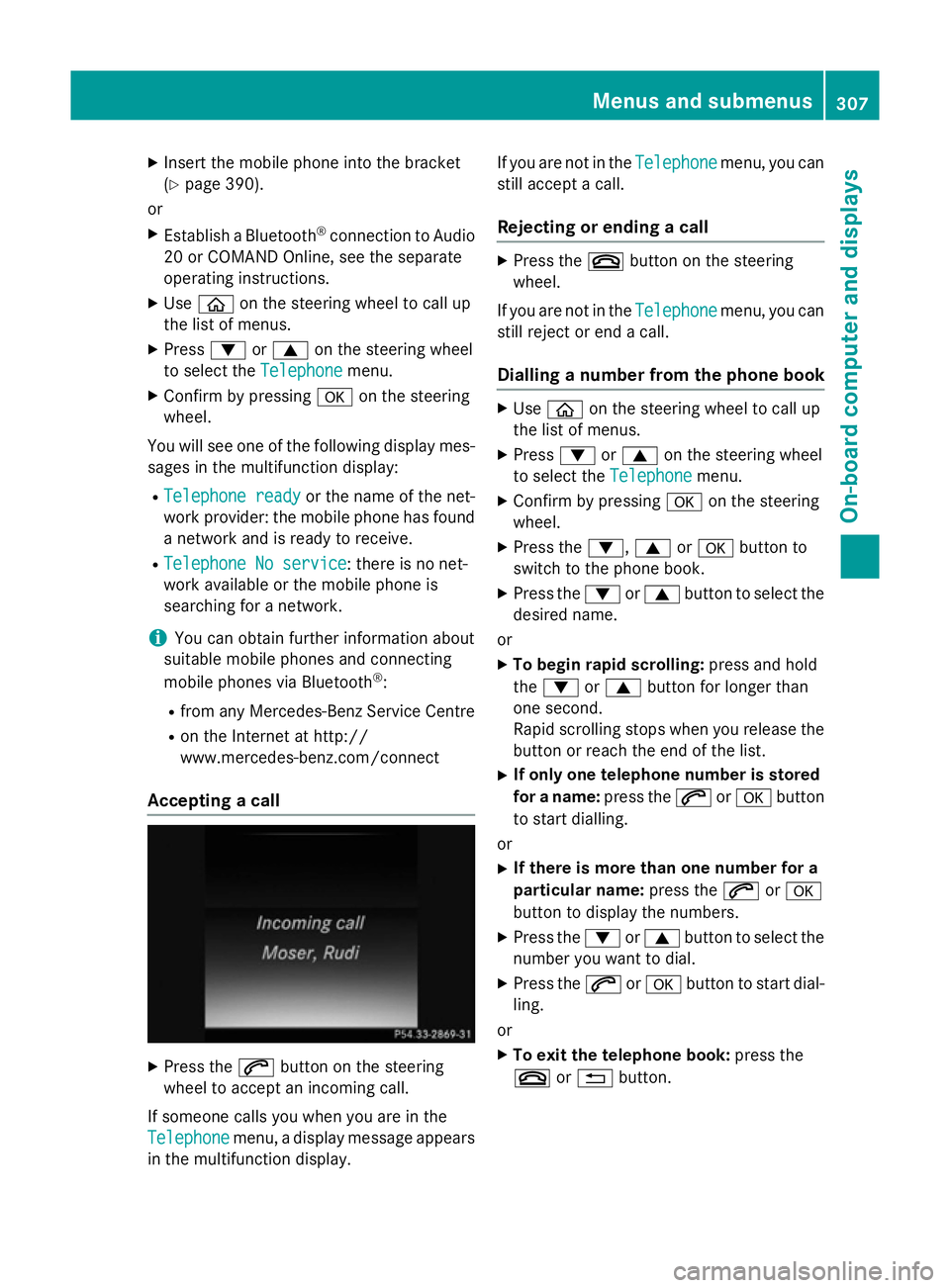
Press the 6button on the steering
wheel to accept an incoming call.
If someone calls you when you are in the
Telephone
Telephone menu, a display message appears
in the multifunction display. If you are not in the
Telephone
Telephone menu, you can
still accept a call.
Rejecting or ending a call X
Press the ~button on the steering
wheel.
If you are not in the Telephone Telephonemenu, you can
still reject or end a call.
Dialling a number from the phone book X
Use ò on the steering wheel to call up
the list of menus.
X Press :or9 on the steering wheel
to select the Telephone
Telephonemenu.
X Confirm by pressing aon the steering
wheel.
X Press the :,9ora button to
switch to the phone book.
X Press the :or9 button to select the
desired name.
or X To begin rapid scrolling: press and hold
the : or9 button for longer than
one second.
Rapid scrolling stops when you release the button or reach the end of the list.
X If only one telephone number is stored
for a name: press the6ora button
to start dialling.
or X If there is more than one number for a
particular name: press the6ora
button to display the numbers.
X Press the :or9 button to select the
number you want to dial.
X Press the 6ora button to start dial-
ling.
or X To exit the telephone book: press the
~ or% button. Menus and submenus
307On-board computer and displays Z
Page 356 of 489
Display messages
Possible causes/consequences and
M
MSolutions Because there is interference from a strong source of radio waves,
the key is not detected whilst the engine is running.
A warning tone also sounds.
X Pull over and stop the vehicle safely as soon as possible, paying
attention to road and traffic conditions.
X Safeguard the vehicle against rolling away (Y page 211).
X Insert the key into the ignition lock and bring into key mode. Â
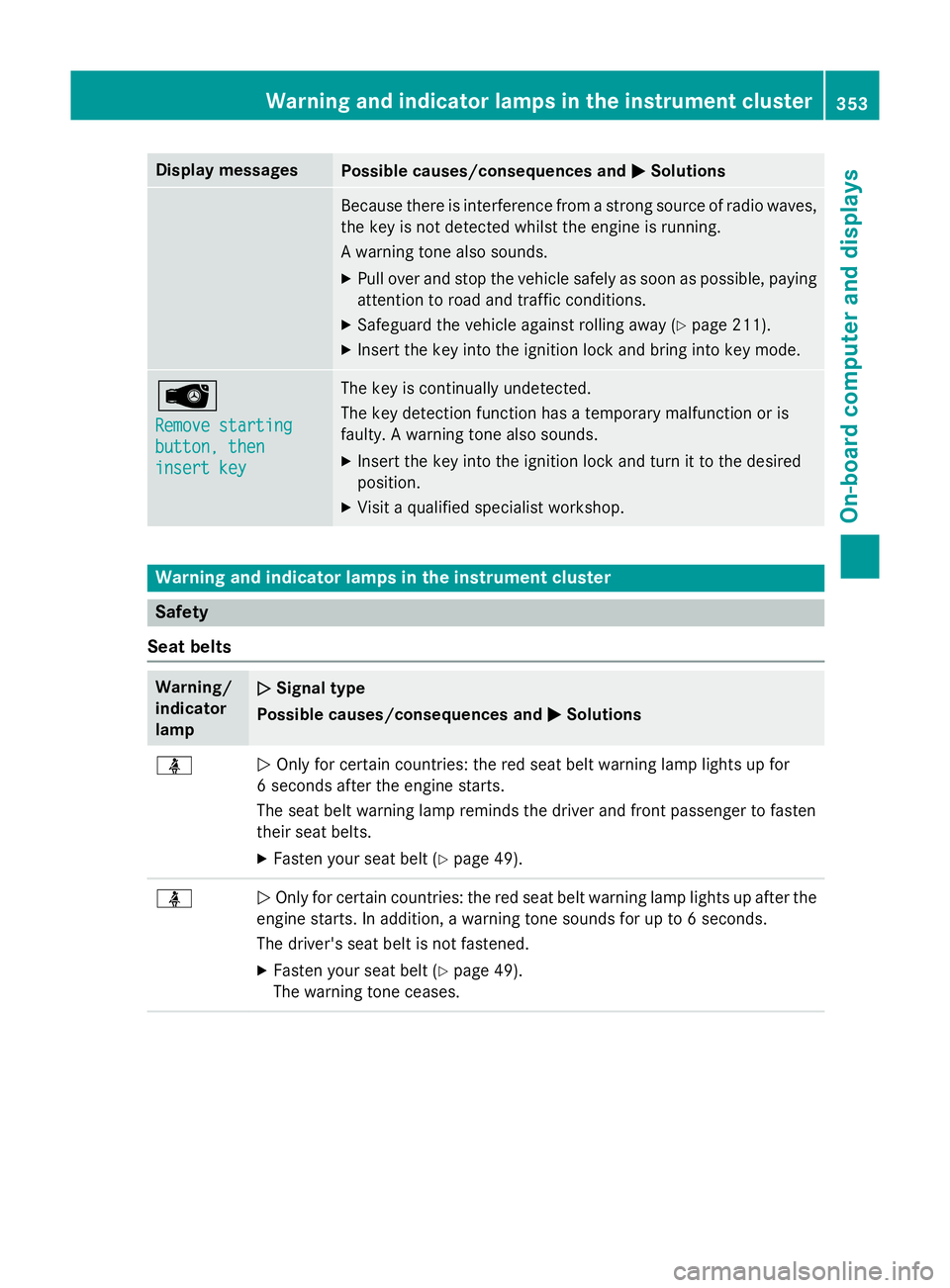
Remove starting Remove starting
button, then button, then
insert key insert key The key is continually undetected.
The key detection function has a temporary malfunction or is
faulty. A warning tone also sounds.
X Insert the key into the ignition lock and turn it to the desired
position.
X Visit a qualified specialist workshop. Warning and indicator lamps in the instrument cluster
Safety
Seat belts Warning/
indicator
lamp
N N
Signal type
Possible causes/consequences and M
MSolutions ü
N
Only for certain countries: the red seat belt warning lamp lights up for
6 seconds after the engine starts.
The seat belt warning lamp reminds the driver and front passenger to fasten
their seat belts.
X Fasten your seat belt (Y page 49).ü
N
Only for certain countries: the red seat belt warning lamp lights up after the
engine starts. In addition, a warning tone sounds for up to 6 seconds.
The driver's seat belt is not fastened.
X Fasten your seat belt (Y page 49).
The warning tone ceases. Wa
rning and indi cator lamps in the instrument cluster
353On-board computer and displays Z
Page 401 of 489
Allow the engine to cool before opening the
cap. Wear gloves and protective eyewear
when opening. Slowly turn the cap half a turn to allow pressure to escape. X
Park the vehicle on a level surface.
Only check the coolant level if the vehicle is
on a level surface and the engine has
cooled down.
X Turn the key to position 2in the ignition
lock (Y page 185).
or
X On vehicles with KEYLESS-GO, press the
Start/Stop button twice (Y page 185).
X Check the coolant temperature display in
the instrument cluster.
The coolant temperature must be below
70 †.
X Turn the key to position 0(Y page 185) in
the ignition lock.
or
X On vehicles with KEYLESS-GO, pull the
Start/Stop button from the ignition lock
(Y page 185).
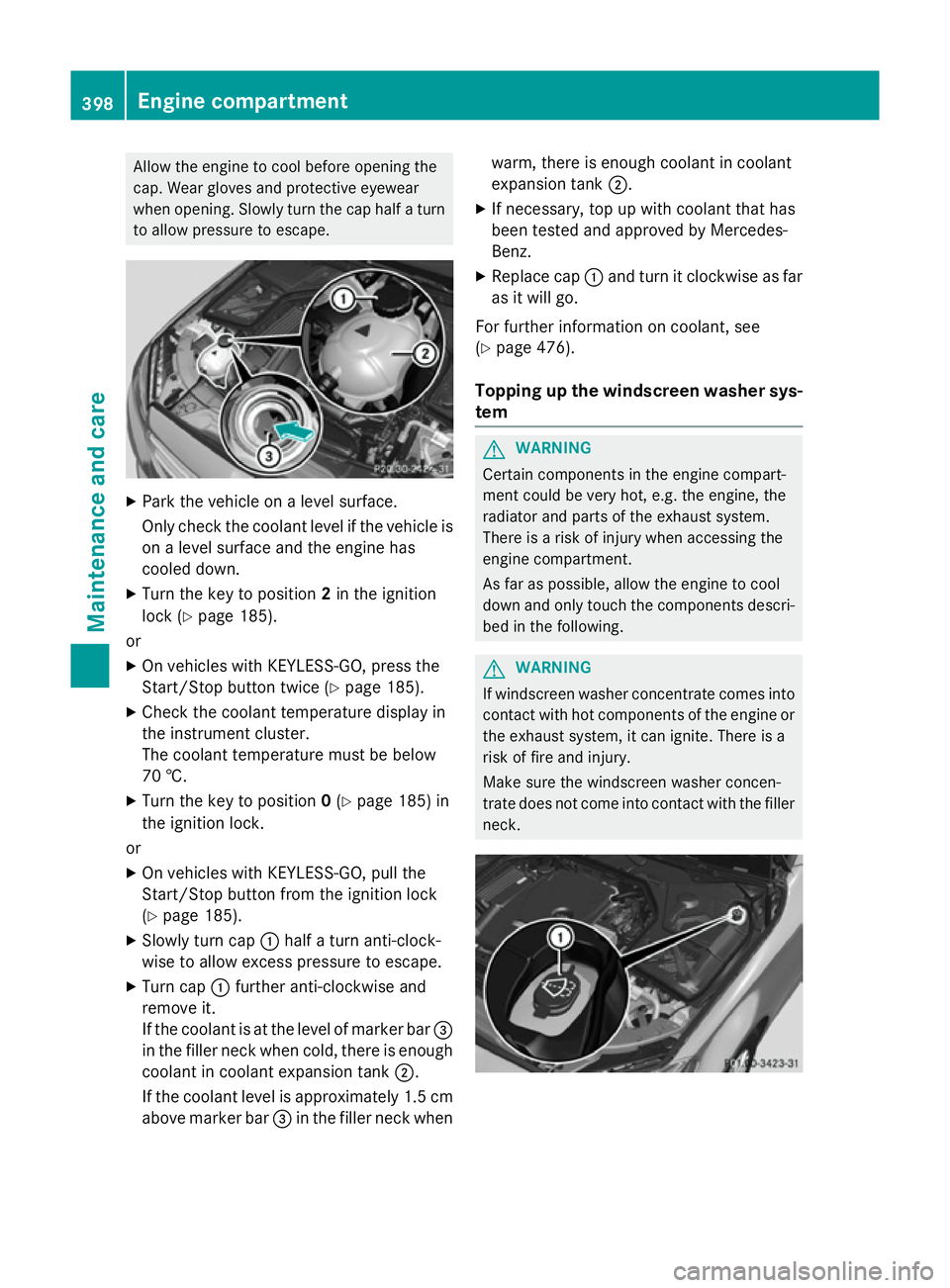
X Slowly turn cap :half a turn anti-clock-
wise to allow excess pressure to escape.
X Turn cap :further anti-clockwise and
remove it.
If the coolant is at the level of marker bar =
in the filler neck when cold, there is enough coolant in coolant expansion tank ;.
If the coolant level is approximately 1.5 cm above marker bar =in the filler neck when warm, there is enough coolant in coolant
expansion tank
;.
X If necessary, top up with coolant that has
been tested and approved by Mercedes-
Benz.
X Replace cap :and turn it clockwise as far
as it will go.
For further information on coolant, see
(Y page 476).
Topping up the windscreen washer sys-
tem G
WARNING
Certain components in the engine compart-
ment could be very hot, e.g. the engine, the
radiator and parts of the exhaust system.
There is a risk of injury when accessing the
engine compartment.
As far as possible, allow the engine to cool
down and only touch the components descri- bed in the following. G
WARNING
If windscreen washer concentrate comes into contact with hot components of the engine or
the exhaust system, it can ignite. There is a
risk of fire and injury.
Make sure the windscreen washer concen-
trate does not come into contact with the filler neck. 398
Engine compartmentMaintenance and care
Page 404 of 489
After washing the vehicle, brake carefully
while paying attention to the traffic conditions in order to restore full braking efficiency.
! If DISTRONIC PLUS or the HOLD function
is activated, the vehicle brakes automati-
cally in certain situations. To prevent dam-
age to the vehicle, deactivate DISTRONIC
PLUS and the HOLD function in the follow-
ing or other similar situations:
R when towing the vehicle
R in the car wash
! Make sure:
R the side windows and sliding sunroof are
closed completely.
R the blower for the ventilation/heating is
switched off (OFF button is depressed).
R the windscreen wiper switch is at posi-
tion 0
R the 360° camera or reversing camera is
switched off.
The vehicle could otherwise be damaged.
! If the key is within the rear detection
range of KEYLESS-GO, the following situa-
tions, for example, could lead to the boot lid
opening unintentionally:
R using a car wash
R using a high-pressure cleaner
Make sure that the key is at least 3 m away
from the vehicle.
! Make sure that the automatic transmis-
sion is in neutral position Nwhen washing
your vehicle in a tow-through car wash. The
vehicle may otherwise be damaged.
R Operating with the key:
Do not remove the key from the ignition
lock. Do not open the driver's door when
the engine is switched off or at very low
speeds. Otherwise, when in transmission position Dor Rthe automatic transmis-
sion will automatically switch to park
position Pand block the wheels.
R Operating with the Start/Stop button: Do not open the driver's door when the
engine is switched off or at very low
speeds. Otherwise, when in transmission
position Dor Rthe automatic transmis-
sion will automatically switch to park
position Pand block the wheels.
Observe the following to make sure that the
automatic transmission stays in position N
neutral:
Operating with the key:
X Make sure the ignition is switched on.
X Make sure that the vehicle is stationary.
X Depress and hold the brake pedal.
X Select neutral N.
X Release the brake pedal.
X Release the electric parking brake, if nec-
essary.
X Switch off the ignition and leave the key in
the ignition lock.
Operating with the Start/Stop button:
X Make sure the ignition is switched on.
X Make sure that the vehicle is stationary.
X Depress and hold the brake pedal.
X Select park position P.
X Release the brake pedal.
X Remove Start/Stop button from ignition
lock (Y page 185).
X Insert the key into the ignition lock.
X Switch on the ignition.
X Depress and hold the brake pedal.
X Select neutral N.
X Release the brake pedal.
X Release the electric parking brake, if nec-
essary.
X Switch off the ignition and leave the key in
the ignition lock.
You can wash the vehicle in an automatic car
wash from the very start.
Wash off excess dirt before cleaning the vehi-
cle in an automatic car wash.
After using an automatic car wash, wipe off
wax from the windscreen and the wiper Care
401Maintenance and care Z
Page 415 of 489
The tyre-change tool kit is kept in a tray in the
stowage well under the luggage compartment
floor.
X Open the tailgate.
X Swing the luggage compartment floor
upwards (Y page 380) and open the left-
hand stowage compartment.
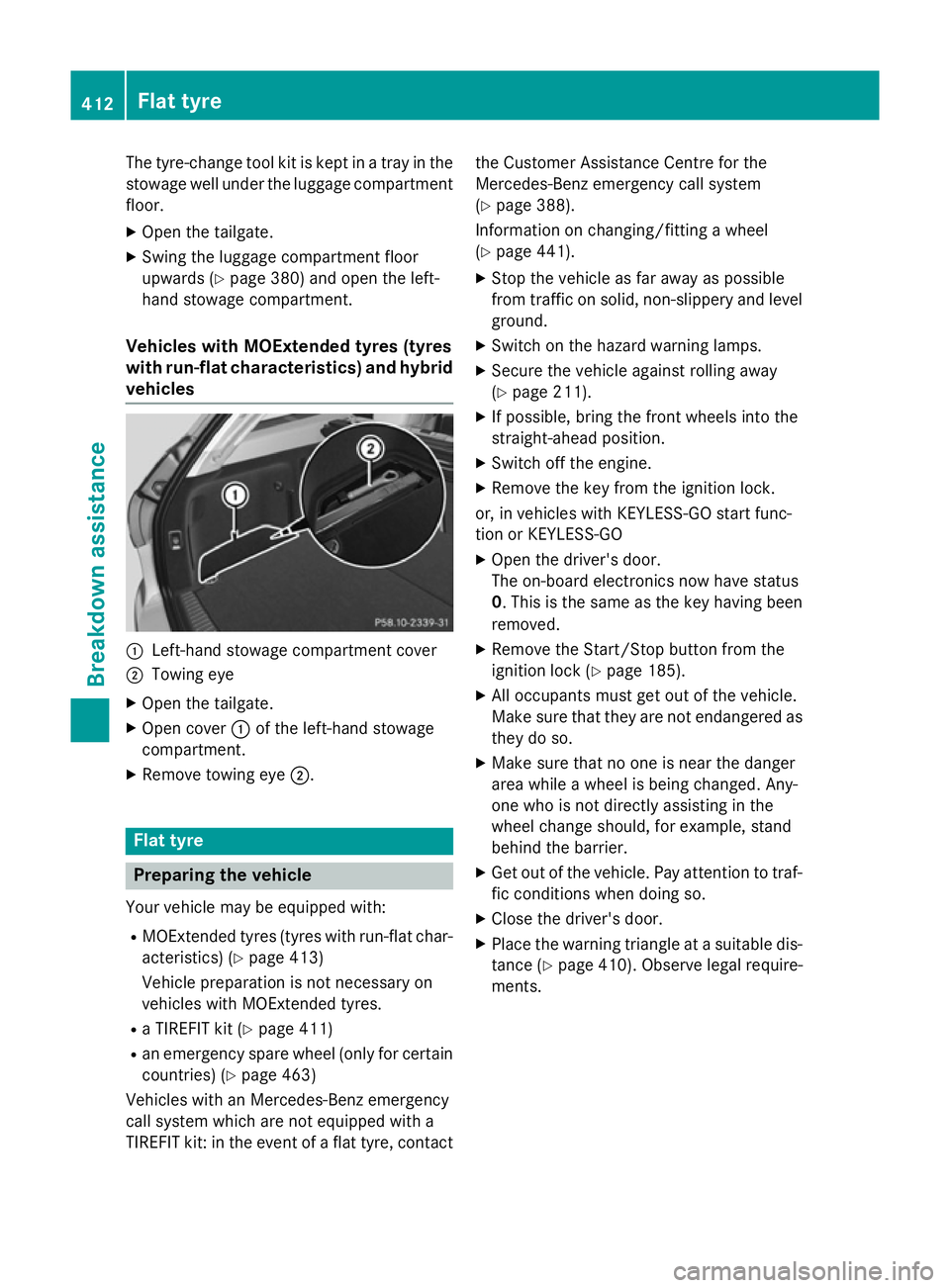
Vehicles with MOExtended tyres (tyres
with run-flat characteristics) and hybrid vehicles :
Left-hand stowage compartment cover
; Towing eye
X Open the tailgate.
X Open cover :of the left-hand stowage
compartment.
X Remove towing eye ;.Flat tyre
Preparing the vehicle
Your vehicle may be equipped with: R MOExtended tyres (tyres with run-flat char-
acteristics) (Y page 413)
Vehicle preparation is not necessary on
vehicles with MOExtended tyres.
R a TIREFIT kit (Y page 411)
R an emergency spare wheel (only for certain
countries) (Y page 463)
Vehicles with an Mercedes-Benz emergency
call system which are not equipped with a
TIREFIT kit: in the event of a flat tyre, contact the Customer Assistance Centre for the
Mercedes-Benz emergency call system
(Y
page 388).
Information on changing/fitting a wheel
(Y page 441).
X Stop the vehicle as far away as possible
from traffic on solid, non-slippery and level
ground.
X Switch on the hazard warning lamps.
X Secure the vehicle against rolling away
(Y page 211).
X If possible, bring the front wheels into the
straight-ahead position.
X Switch off the engine.
X Remove the key from the ignition lock.
or, in vehicles with KEYLESS-GO start func-
tion or KEYLESS ‑GO
X Open the driver's door.
The on-board electronics now have status
0. This is the same as the key having been
removed.
X Remove the Start/Stop button from the
ignition lock (Y page 185).
X All occupants must get out of the vehicle.
Make sure that they are not endangered as
they do so.
X Make sure that no one is near the danger
area while a wheel is being changed. Any-
one who is not directly assisting in the
wheel change should, for example, stand
behind the barrier.
X Get out of the vehicle. Pay attention to traf-
fic conditions when doing so.
X Close the driver's door.
X Place the warning triangle at a suitable dis-
tance (Y page 410). Observe legal require-
ments. 412
Flat tyreBreakdown assistance
Page 446 of 489
X
Vehicles with KEYLESS-GO start-func-
tion or KEYLESS-GO: remove the Start/
Stop button from the ignition lock
(Y page 185).
X If included in the vehicle equipment,
remove the tyre-change tool kit from the
vehicle.
X Secure the vehicle to prevent it from rolling
away.
i Apart from some country-specific var-
iants, vehicles are not equipped with tyre-
changing tools. Some tools for changing a
wheel are specific to the vehicle. For more information on which tools are required to
perform a wheel change on your vehicle,
consult a qualified specialist workshop.
Necessary wheel-changing tools may
include, for example:
R jack
R wheel chock
R wheel wrench
R centring pin
Safeguarding the vehicle against rolling
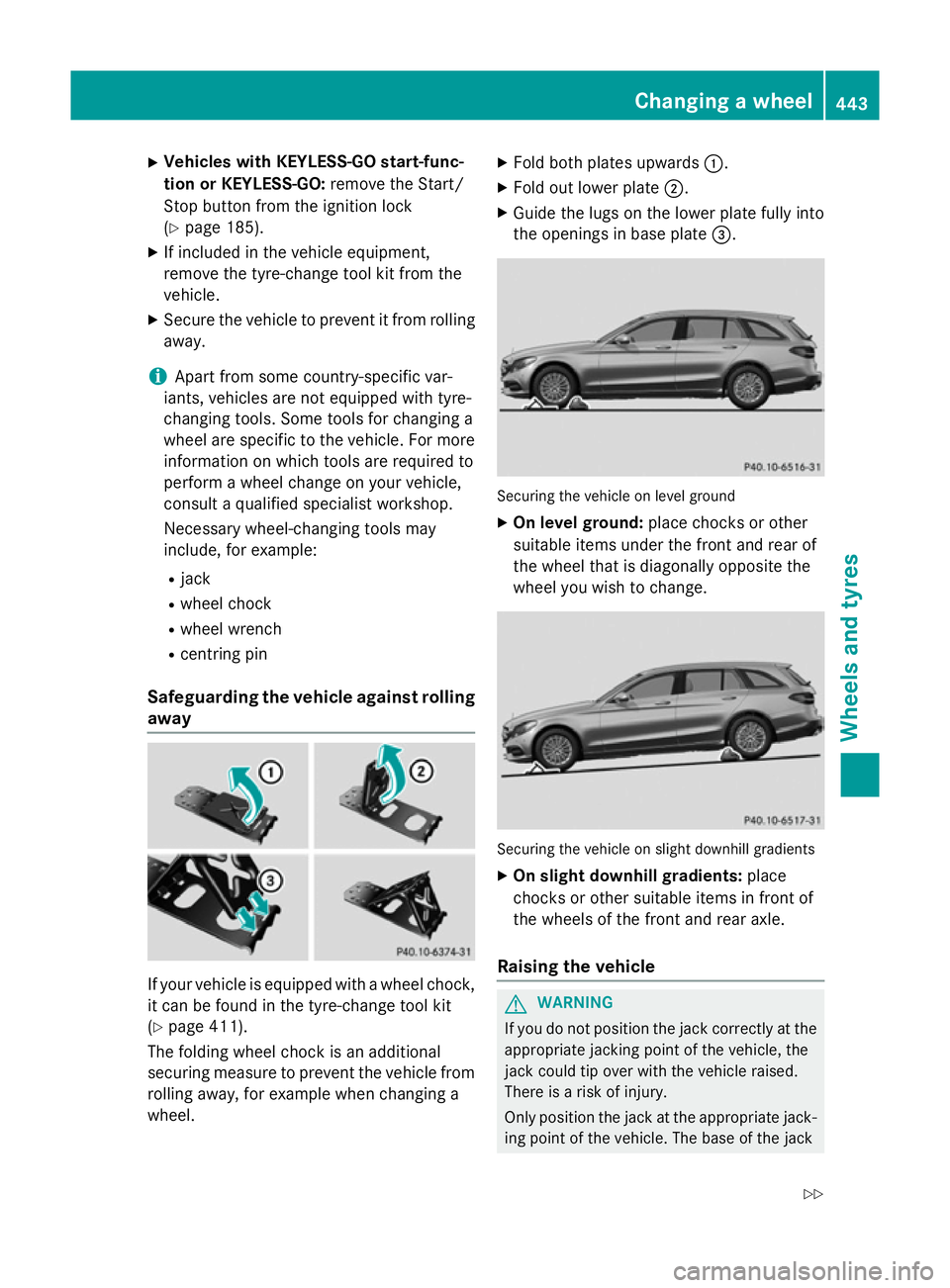
away If your vehicle is equipped with a wheel chock,
it can be found in the tyre-change tool kit
(Y page 411).
The folding wheel chock is an additional
securing measure to prevent the vehicle from
rolling away, for example when changing a
wheel. X
Fold both plates upwards :.
X Fold out lower plate ;.
X Guide the lugs on the lower plate fully into
the openings in base plate =. Securing the vehicle on level ground
X On level ground: place chocks or other
suitable items under the front and rear of
the wheel that is diagonally opposite the
wheel you wish to change. Securing the vehicle on slight downhill gradients
X On slight downhill gradients: place
chocks or other suitable items in front of
the wheels of the front and rear axle.
Raising the vehicle G
WARNING
If you do not position the jack correctly at the appropriate jacking point of the vehicle, the
jack could tip over with the vehicle raised.
There is a risk of injury.
Only position the jack at the appropriate jack-
ing point of the vehicle. The base of the jack Changing a wheel
443Wheels and tyres
Z
Page 467 of 489
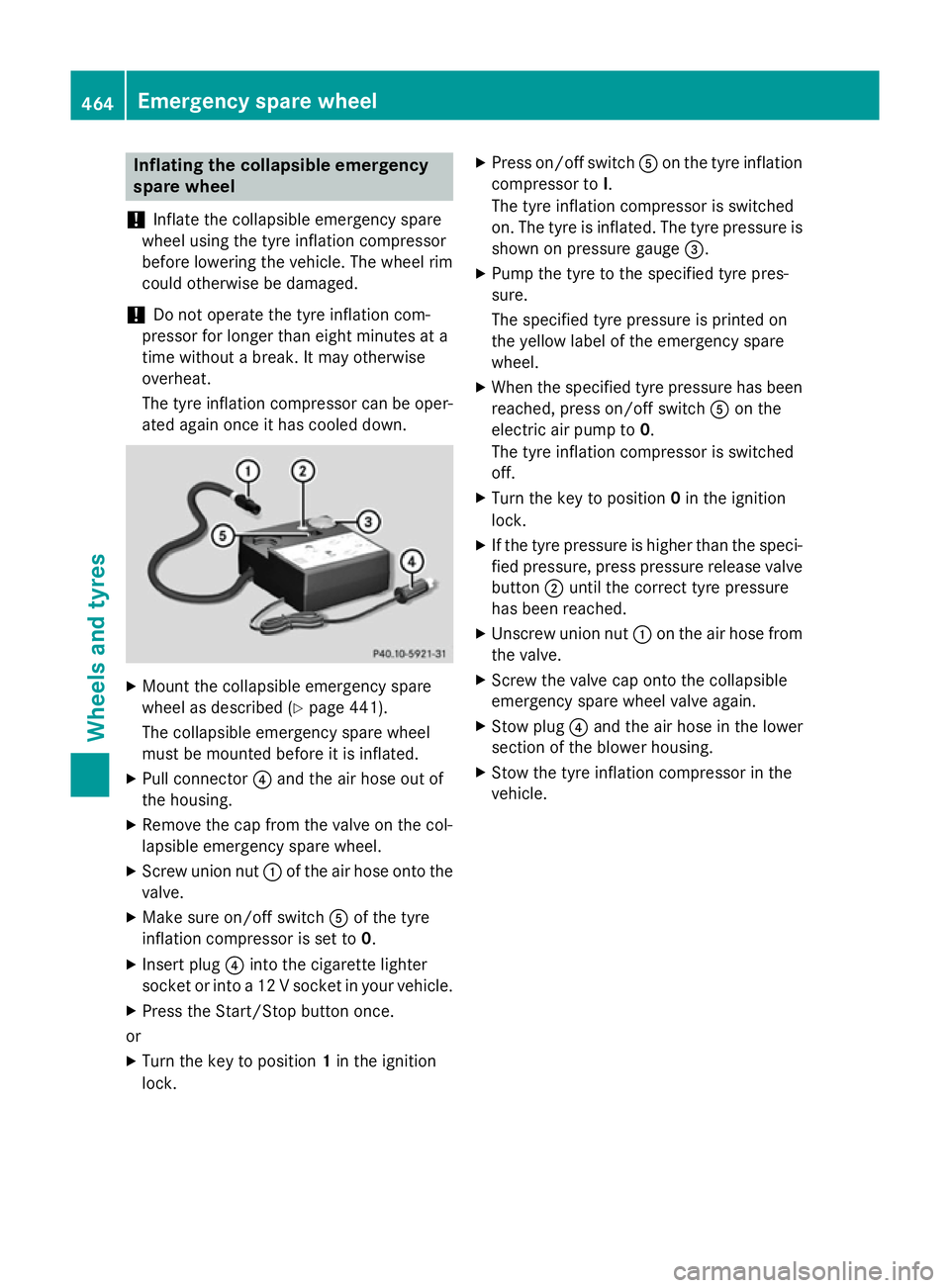
Inflating the collapsible emergency
spare wheel
! Inflate the collapsible emergency spare
wheel using the tyre inflation compressor
before lowering the vehicle. The wheel rim
could otherwise be damaged.
! Do not operate the tyre inflation com-
pressor for longer than eight minutes at a
time without a break. It may otherwise
overheat.
The tyre inflation compressor can be oper-
ated again once it has cooled down. X
Mount the collapsible emergency spare
wheel as described (Y page 441).
The collapsible emergency spare wheel
must be mounted before it is inflated.
X Pull connector ?and the air hose out of
the housing.
X Remove the cap from the valve on the col-
lapsible emergency spare wheel.
X Screw union nut :of the air hose onto the
valve.
X Make sure on/off switch Aof the tyre
inflation compressor is set to 0.
X Insert plug ?into the cigarette lighter
socket or into a 12 V socket in your vehicle.
X Press the Start/Stop button once.
or X Turn the key to position 1in the ignition
lock. X
Press on/off switch Aon the tyre inflation
compressor to I.
The tyre inflation compressor is switched
on. The tyre is inflated. The tyre pressure is shown on pressure gauge =.
X Pump the tyre to the specified tyre pres-
sure.
The specified tyre pressure is printed on
the yellow label of the emergency spare
wheel.
X When the specified tyre pressure has been
reached, press on/off switch Aon the
electric air pump to 0.
The tyre inflation compressor is switched
off.
X Turn the key to position 0in the ignition
lock.
X If the tyre pressure is higher than the speci-
fied pressure, press pressure release valve
button ;until the correct tyre pressure
has been reached.
X Unscrew union nut :on the air hose from
the valve.
X Screw the valve cap onto the collapsible
emergency spare wheel valve again.
X Stow plug ?and the air hose in the lower
section of the blower housing.
X Stow the tyre inflation compressor in the
vehicle. 464
Emergency spare wheelWheels and ty
res