boot MERCEDES-BENZ C-CLASS ESTATE 2014 Owners Manual
[x] Cancel search | Manufacturer: MERCEDES-BENZ, Model Year: 2014, Model line: C-CLASS ESTATE, Model: MERCEDES-BENZ C-CLASS ESTATE 2014Pages: 489, PDF Size: 15.08 MB
Page 9 of 489
Transmission position display
(DIRECT SELECT lever) ...................1
99
Transmission positions .................. 199
Automatic transmission emer-
gency running mode ......................... 204
Auxiliary heating/ventilation
Important safety notes .................. 176
Problem (display message) ............ 181
Remote control .............................. 177
Setting the departure time ............. 179
Switching on/off (on the centre
console) ......................................... 177
Axle load, permissible (trailer tow-
ing) ...................................................... 482 B
Bag hook ............................................ 376
Ball coupling
Folding in ....................................... 289
Folding out ..................................... 288
BAS (Brake Assist System) ................. 76
BAS PLUS with Cross-Traffic Assist (Brake Assist PLUS with Cross-
Traffic Assist)
Function/notes ................................ 77
Important safety notes .................... 77
Battery (high-voltage)
see High-voltage battery
Battery (key)
Checking .......................................... 94
Important safety notes .................... 93
Replacing ......................................... 94
Battery (vehicle)
Charging ........................................ 420
Display message ............................ 336
Important safety notes .................. 416
Jump starting ................................. 422
Belt
see Seat belts
Belt tensioner
Activation ......................................... 60
Blind Spot Assist
Activating/deactivating (on-
board computer) ............................ 311
Display message ............................ 341
Notes/function .............................. 263
Trailer towing ................................. 264 see Active Blind Spot Assist
BlueTEC (AdBlue®) ............................ 474
BlueTEC®
Topping up AdBlue® ..................... .208
Bonnet
Active bonnet (pedestrian protec-
tion) ............................................... 394
Closing .......................................... .396
Display message ............................ 349
Important safety notes .................. 394
Opening ......................................... 395
Boot load (maximum) ........................ 478
Brake
EBD ................................................. .84
Brake Assist
see BAS (Brake Assist System)
Brake fluid
Display message ............................ 324
Note s............................................. 476
Brake force distribution, elec-
tronic
see EBD (electronic brake force
distribution)
Brake lamps
Adaptive ........................................... 81
Display message ............................ 332
Brake pedal
Pedal resistance/pedal travel .......... 44
Brakes
ABS .................................................. 76
Adaptive Brake Assist ...................... 80
BAS .................................................. 76
BAS PLUS with Cross-Traffic
Assist ............................................... 77
Brake fluid (notes) ......................... 476
Display message ............................ 317
Driving tip s.................................... 217
Hill start assist ............................... 189
HOLD function ............................... 236
Important safety notes .................. 217
Parking brake ................................ 213
RBS (Recuperative Brake Sys-
tem) ................................................. 44
RBS warning lamp .......................... 364
Warning lamp ................................. 355
Breakdown
see Flat tyre
see Towing away 6
Index
Page 25 of 489
Tyre pressure
Calling up (on-board computer) ..... 437
Display message ............................ 345
Important safety notes .................. 437
Not reached (TIREFIT) .................... 415
Reached (TIREFIT) .......................... 415
Recommended ............................... 436
Tyre pressure loss warning
General notes ................................ 440
Important safety notes .................. 440
Restarting ...................................... 441
Tyre pressure monitor
Checking the tyre pressure elec-
tronically ........................................ 438
Function/note s............................. 437
General notes ................................ 437
Important safety notes .................. 438
Radio type approval for the tyre
pressure monitor ........................... 440
Restarting ...................................... 439
Warning lamp ................................. 366
Warning message .......................... 439
Tyres
Changing a whee l.......................... 441
Checking ........................................ 433
Direction of rotation ...................... 442
Display message ............................ 345
Important safety notes .................. 432
MOExtended tyre s......................... 434
Replacing ....................................... 442
Service life ..................................... 433
Storing ........................................... 442
Summer tyres in winter ................. 434
Tyre size (data ).............................. 448
Tyre tread ...................................... 433
Wheel and tyre combinations ........ 449
see Flat tyre U
Unlocking Emergency unlocking ....................... 99
From inside the vehicle (central
unlocking button) ............................. 97 V
Vanity mirror (in sun visor) .............. 383Vehicle
Correct use ...................................... 28
Data acquisition ............................... 28
Display message ............................ 347
Electronics ..................................... 468
Equipment ....................................... 25
Implied warranty .............................. 28
Individual settings .......................... 309
Leaving parked up ......................... 215
Locking (in an emergency) ............. 100
Locking (key) ................................... 91
Lowering ........................................ 447
Operating safety .............................. 25
Pulling away ................................... 188
Raising ........................................... 443
Registration ..................................... 28
Securing from rolling away ............ 443
Towing away .................................. 424
Transporting .................................. 427
Unlocking (in an emergency) ........... 99
Unlocking (key) ................................ 91
Vehicle data ................................... 478
Vehicle data
Boot load (maximum) ..................... 478
Roof load (maximum) ..................... 478
Vehicle dimensions ........................... 478
Vehicle emergency locking .............. 100
Vehicle identification number
see VIN
Vehicle identification plate .............. 470
Vehicle level
AIRMATIC ...................................... 238
Display message ............................ 339
Vehicle maintenance
see ASSYST PLUS
Vehicle tool kit .................................. 411
Video
Operating the DVD ......................... 305
VIN ...................................................... 470 W
Warning and indicator lamps ABS ................................................ 357
Brakes ........................................... 355
Distance warning signal ................. 365
ESP® ............................................. 359
ESP® OFF ...................................... 360 22
Index
Page 104 of 489
X
Insert the emergency key element into the
lock of the driver's door as far as it will go.
X Turn the emergency key element clockwise
as far as it will go to position 1.
The locking knob drops down and the driv- er's door is locked.
On right-hand-drive vehicles, turn the emer-
gency key element anti-clockwise.
X Turn the emergency key element back and
remove it.
X Insert the emergency key element into the
key (Y page 93).
X Make sure that the doors and the tailgate
are locked.
X Carefully press the protective cap onto the
lock cylinder until it engages and is seated firmly. Do not pull the door handle when
doing so.
All vehicles:
If you lock the vehicle as described above, the
fuel filler flap is not locked. The anti-theft
alarm system is not primed. Luggage compartment
Important safety notes
G
WARNING
Combustion engines emit poisonous exhaust
gases such as carbon monoxide. If the tailgate is open when the engine is running, particu-
larly if the vehicle is moving, exhaust fumes
could enter the passenger compartment.
There is a risk of poisoning.
Turn off the engine before opening the tail-
gate. Never drive with the tailgate open. G
WARNING
If objects, luggage or loads are not secured or not secured sufficiently, they could slip, tip
over or be flung around and thereby hit vehicle
occupants. There is a risk of injury, especially when braking or abruptly changing directions.
Always store objects so that they cannot be
flung around. Secure objects, luggage or loads against slipping or tipping before the
journey.
! The tailgate swings upwards and to the
rear when opened. Therefore, make sure
that there is sufficient clearance above and behind the tailgate.
The opening dimensions on the tailgate can
be found in the "Vehicle data" section
(Y page 478).
i You can limit the opening angle of the
tailgate (Y page 105).
Do not leave the key in the luggage compart- ment. You could otherwise lock yourself out.
Stow luggage or loads preferably in the lug-
gage compartment. Observe the loading
guidelines (Y page 370). Tailgate obstruction detection with
reversing function
Vehicles with remote tailgate closing fea-
ture: the tailgate is equipped with automatic
obstacle recognition with a reversing feature. If a solid object blocks or restricts the tailgate when automatically opening, this procedure
is stopped. If a solid object blocks or restrictsthe tailgate when automatically closing, the
boot lid automatically opens again slightly.
The automatic obstacle recognition with
reversing function is only an aid. It is not a
substitute for your attentiveness when open-
ing and closing the tailgate. G
WARNING
The reversing function does not react:
R to soft, light and thin objects, e.g. small fin-
gers
R over the last 8 mm of the closing path
This means that the reversing feature cannot
prevent someone being trapped in these sit-
uations. There is a risk of injury.
When closing make sure that no parts of the
body are in the closing area. Luggage compartment
101Opening and closing
Z
Page 139 of 489
X
Press the Rbutton.
The yellow Rindicator lamp in the
instrument cluster lights up.
X To switch off the rear foglamp: press the
R button.
The yellow Rindicator lamp in the
instrument cluster goes out.
Side lamps ! If the battery has been excessively dis-
charged, the side lamps or parking lamps
are automatically switched off to enable
the next engine start. Always park your
vehicle safely and sufficiently lit according
to legal standards. Avoid the continuous
use of the Tside lamps for several
hours. If possible, switch on the Xright
or the Wleft parking lamp.
X To switch on: turn the light switch to T.
The green Tindicator lamp in the instru-
ment cluster lights up.
Parking lamps
Switching on the parking lamps ensures that
the corresponding side of the vehicle is illu-
minated.
X To switch on the parking lamps: the key
is not in the ignition lock or it is in posi-
tion 0.
X Turn the light switch to W(left-hand side
of the vehicle) or X(right-hand side of
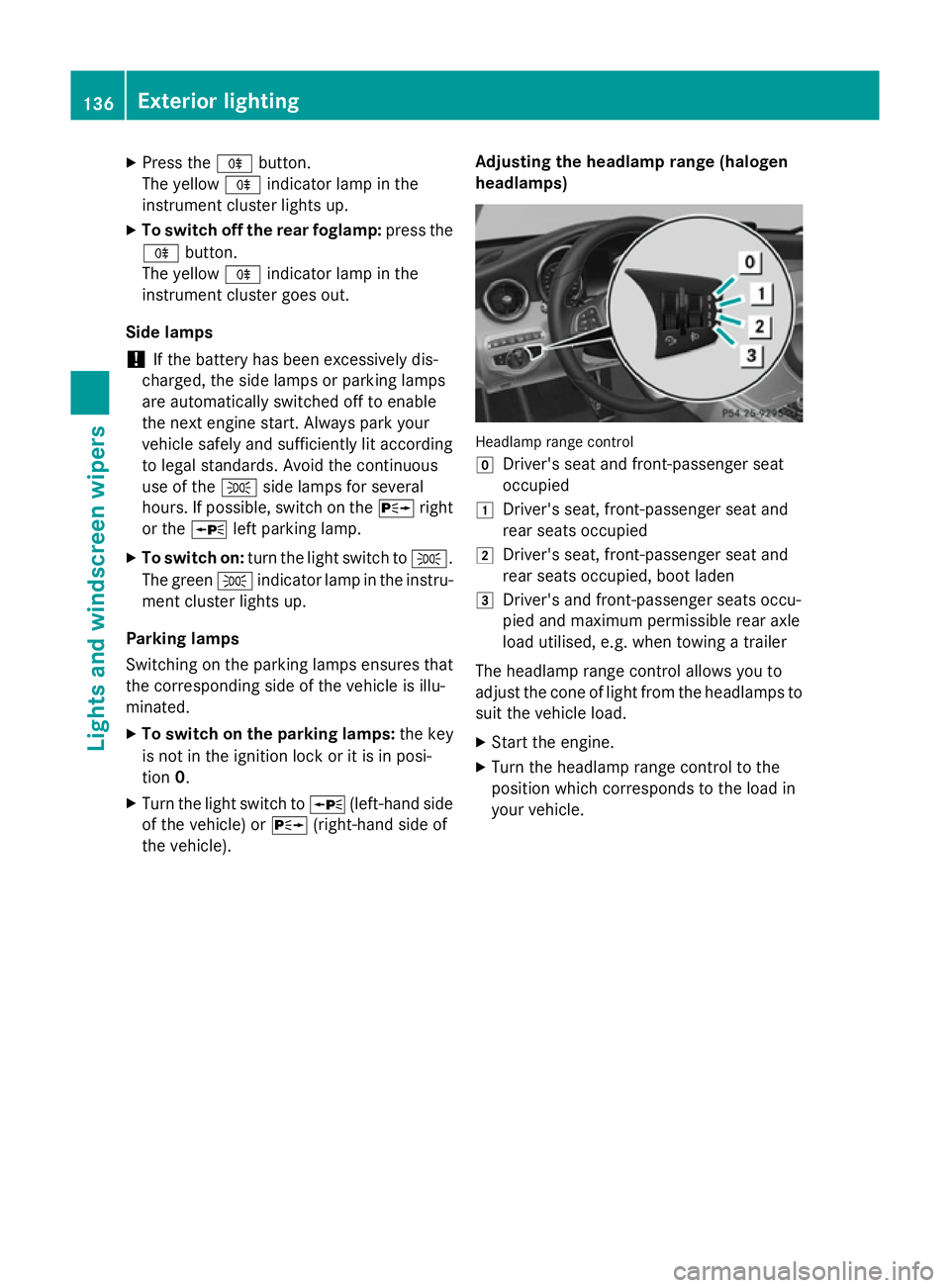
the vehicle). Adjusting the headlamp range (halogen
headlamps) Headlamp range control
g
Driver's seat and front-passenger seat
occupied
1 Driver's seat, front-passenger seat and
rear seats occupied
2 Driver's seat, front-passenger seat and
rear seats occupied, boot laden
3 Driver's and front-passenger seats occu-
pied and maximum permissible rear axle
load utilised, e.g. when towing a trailer
The headlamp range control allows you to
adjust the cone of light from the headlamps to suit the vehicle load.
X Start the engine.
X Turn the headlamp range control to the
position which corresponds to the load in
your vehicle. 136
Exterior lightingLights and windscreen wipers
Page 217 of 489
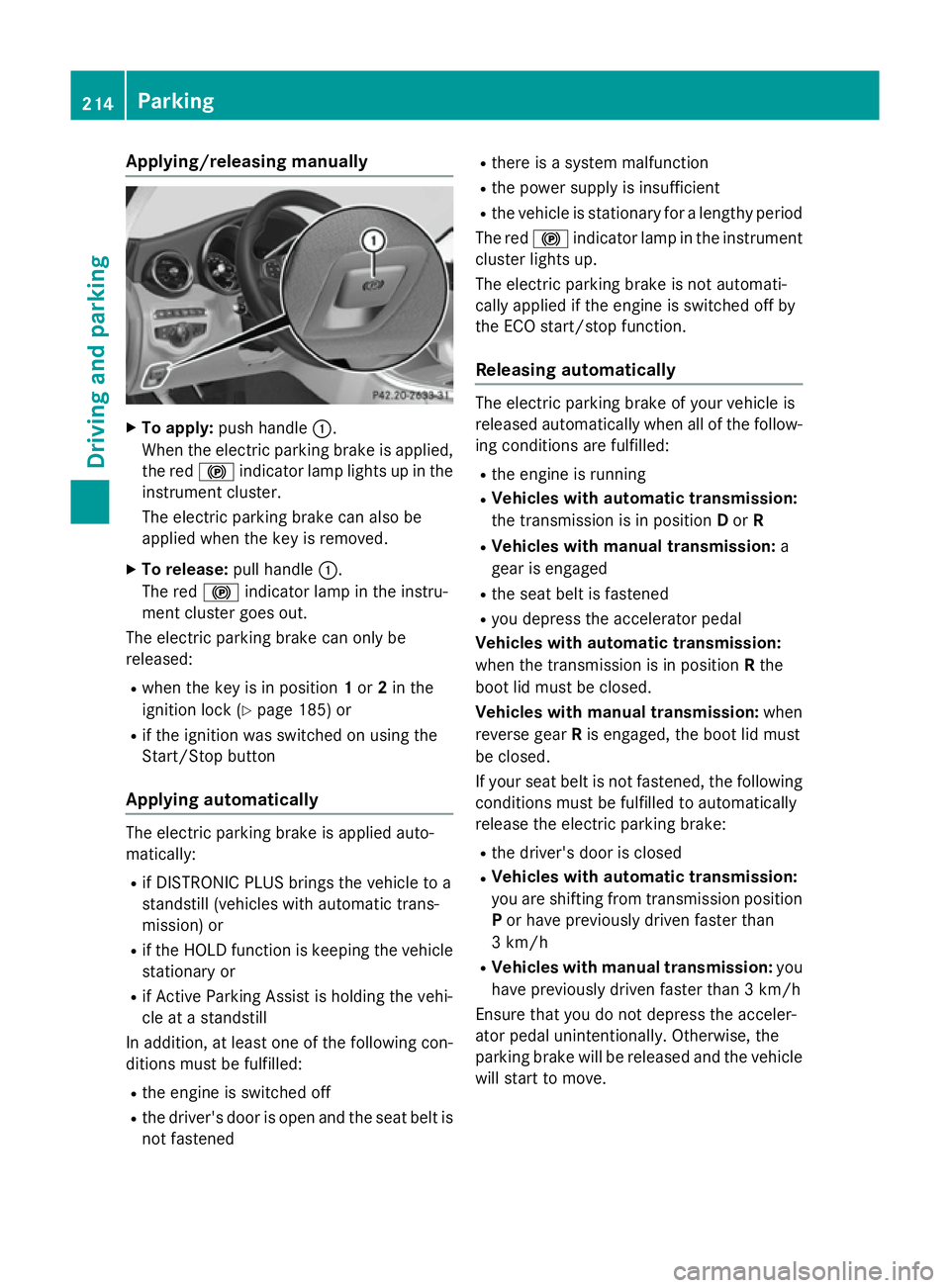
Applying/releasing manually
X
To apply: push handle :.
When the electric parking brake is applied, the red !indicator lamp lights up in the
instrument cluster.
The electric parking brake can also be
applied when the key is removed.
X To release: pull handle:.
The red !indicator lamp in the instru-
ment cluster goes out.
The electric parking brake can only be
released:
R when the key is in position 1or 2in the
ignition lock (Y page 185) or
R if the ignition was switched on using the
Start/Stop button
Applying automatically The electric parking brake is applied auto-
matically:
R if DISTRONIC PLUS brings the vehicle to a
standstill (vehicles with automatic trans-
mission) or
R if the HOLD function is keeping the vehicle
stationary or
R if Active Parking Assist is holding the vehi-
cle at a standstill
In addition, at least one of the following con-
ditions must be fulfilled:
R the engine is switched off
R the driver's door is open and the seat belt is
not fastened R
there is a system malfunction
R the power supply is insufficient
R the vehicle is stationary for a lengthy period
The red !indicator lamp in the instrument
cluster lights up.
The electric parking brake is not automati-
cally applied if the engine is switched off by
the ECO start/stop function.
Releasing automatically The electric parking brake of your vehicle is
released automatically when all of the follow-
ing conditions are fulfilled:
R the engine is running
R Vehicles with automatic transmission:
the transmission is in position Dor R
R Vehicles with manual transmission: a
gear is engaged
R the seat belt is fastened
R you depress the accelerator pedal
Vehicles with automatic transmission:
when the transmission is in position Rthe
boot lid must be closed.
Vehicles with manual transmission: when
reverse gear Ris engaged, the boot lid must
be closed.
If your seat belt is not fastened, the following conditions must be fulfilled to automatically
release the electric parking brake:
R the driver's door is closed
R Vehicles with automatic transmission:
you are shifting from transmission position
P or have previously driven faster than
3 km/h
R Vehicles with manual transmission: you
have previously driven faster than 3 km/h
Ensure that you do not depress the acceler-
ator pedal unintentionally. Otherwise, the
parking brake will be released and the vehicle will start to move. 214
ParkingDriving and pa
rking
Page 257 of 489
R
top view and enlarged front view
R top view and trailer view (vehicles with
trailer tow hitch)
R top view and images from the rear-facing
side cameras (rear wheel view)
R top view and images from the forward-
facing side cameras (front wheel view)
When the function is active and you shift the
transmission from Dor Rto N, the guide lines
in the COMAND/Audio 20 display are hidden.
When you change between transmission
positions Dand R, you see the previously
selected front or rear view.
Important safety notes The 360° camera is only an aid and may show
a distorted view of obstacles, show them
incorrectly or not at all. The 360° camera is
not a substitute for attentive driving.
The responsibility for safe manoeuvring and
parking remains with you. Make sure that
there are no persons, animals or objects in
range while manoeuvring and parking.
You are always responsible for safety and
must always pay attention to your surround-
ings when parking and manoeuvring. This
applies to the areas behind, in front of and
beside the vehicle. You could otherwise
endanger yourself and others.
The 360° camera will not function or will
function only in a limited manner:
R if the doors are open
R if the exterior mirrors are folded in
R if the boot lid is open
R in heavy rain, snow or fog
R at night or in very dark places
R if the cameras are exposed to very bright
light
R if the area is lit by fluorescent bulbs or LED
lighting (the display may flicker)
R if the camera lenses mist up, e.g. when
driving into a heated garage in winter, caus- ing a rapid change in temperature R
if the camera lenses are dirty or covered
R if the vehicle components in which the
cameras are fitted are damaged. In this
event, have the camera position and setting
checked at a qualified specialist workshop.
Do not use the 360° camera in this case. You could otherwise injure others or damage
objects when parking the vehicle.
Guide lines are always shown at road level.
In trailer mode, the guide lines are shown at
the level of the trailer tow hitch.
The camera in the rear area is protected by
means of a flap. This flap opens when the
360° camera is activated. Observe the notes on cleaning (Y page 405). For technical rea-
sons, the flap may remain open briefly after
the 360° camera has been deactivated.
Activation conditions The 360° camera image can be displayed if:
R COMAND Online/Audio 20 is switched on,
see the Digital Owner's Manual
R the 360° camera 360° camera function is switched on
i If the 360° camera is activated at speeds
above 30 km/h, a warning message
appears.
The warning message disappears if:
R the vehicle's speed falls below 30 km/h.
The 360° camera is then activated.
R the message is confirmed with the %
button. 254
Driving systemsDriving an
d parking
Page 258 of 489
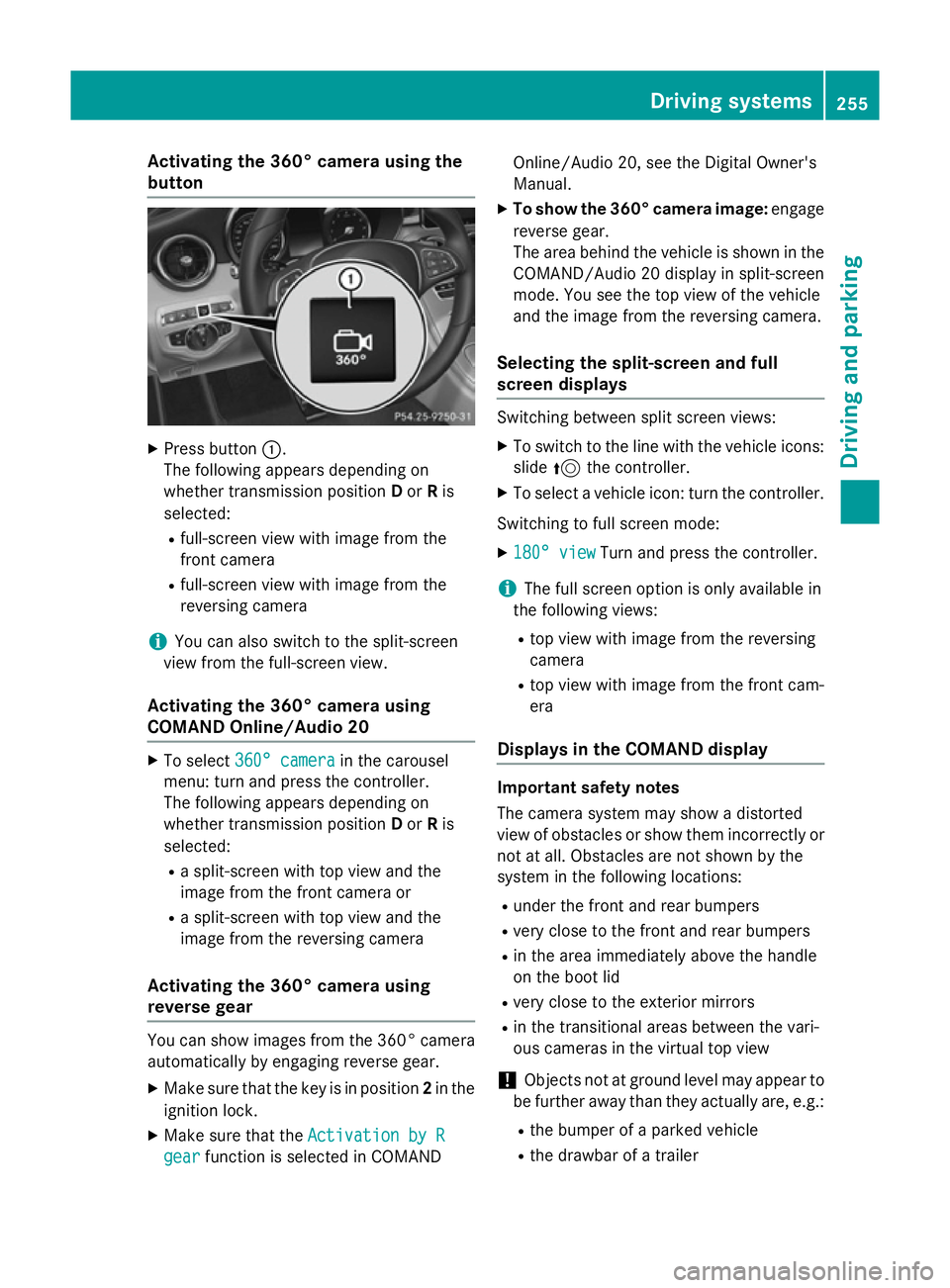
Activating the 360° camera using the
button X
Press button :.
The following appears depending on
whether transmission position Dor Ris
selected:
R full-screen view with image from the
front camera
R full-screen view with image from the
reversing camera
i You can also switch to the split-screen
view from the full-screen view.
Activating the 360° camera using
COMAND Online/Audio 20 X
To select 360° camera 360° camera in the carousel
menu: turn and press the controller.
The following appears depending on
whether transmission position Dor Ris
selected:
R a split-screen with top view and the
image from the front camera or
R a split-screen with top view and the
image from the reversing camera
Activating the 360° camera using
reverse gear You can show images from the 360° camera
automatically by engaging reverse gear.
X Make sure that the key is in position 2in the
ignition lock.
X Make sure that the Activation by R Activation by R
gear
gear function is selected in COMAND Online/Audio 20, see the Digital Owner's
Manual.
X To show the 360° camera image: engage
reverse gear.
The area behind the vehicle is shown in the COMAND/Audio 20 display in split-screen
mode. You see the top view of the vehicle
and the image from the reversing camera.
Selecting the split-screen and full
screen displays Switching between split screen views:
X To switch to the line with the vehicle icons:
slide 5the controller.
X To select a vehicle icon: turn the controller.
Switching to full screen mode:
X 180° view
180° view Turn and press the controller.
i The full screen option is only available in
the following views:
R top view with image from the reversing
camera
R top view with image from the front cam-
era
Displays in the COMAND display Important safety notes
The camera system may show a distorted
view of obstacles or show them incorrectly or
not at all. Obstacles are not shown by the
system in the following locations:
R under the front and rear bumpers
R very close to the front and rear bumpers
R in the area immediately above the handle
on the boot lid
R very close to the exterior mirrors
R in the transitional areas between the vari-
ous cameras in the virtual top view
! Objects not at ground level may appear to
be further away than they actually are, e.g.:
R the bumper of a parked vehicle
R the drawbar of a trailer Driving systems
255Driving and parking Z
Page 376 of 489
Ski/snowboard bag
Important safety notes G
WARNING
The skibag in conjunction with the lashing
straps cannot restrain any objects other than skis.
Vehicle occupants could be struck in the
event of sudden braking or an accident, for
instance, if you:
R transport other heavy or sharp-edged
objects in the skibag
R do not secure the skibag with the lashing
straps
There is a risk of accident and injury.
Store only skis in the skibag. Always secure
the skibag with the lashing straps so that it
cannot move around.
A maximum of four pairs of skis or two snow- boards can be transported in the ski/snow-
board bag.
Securing the ski/snowboard bag in the
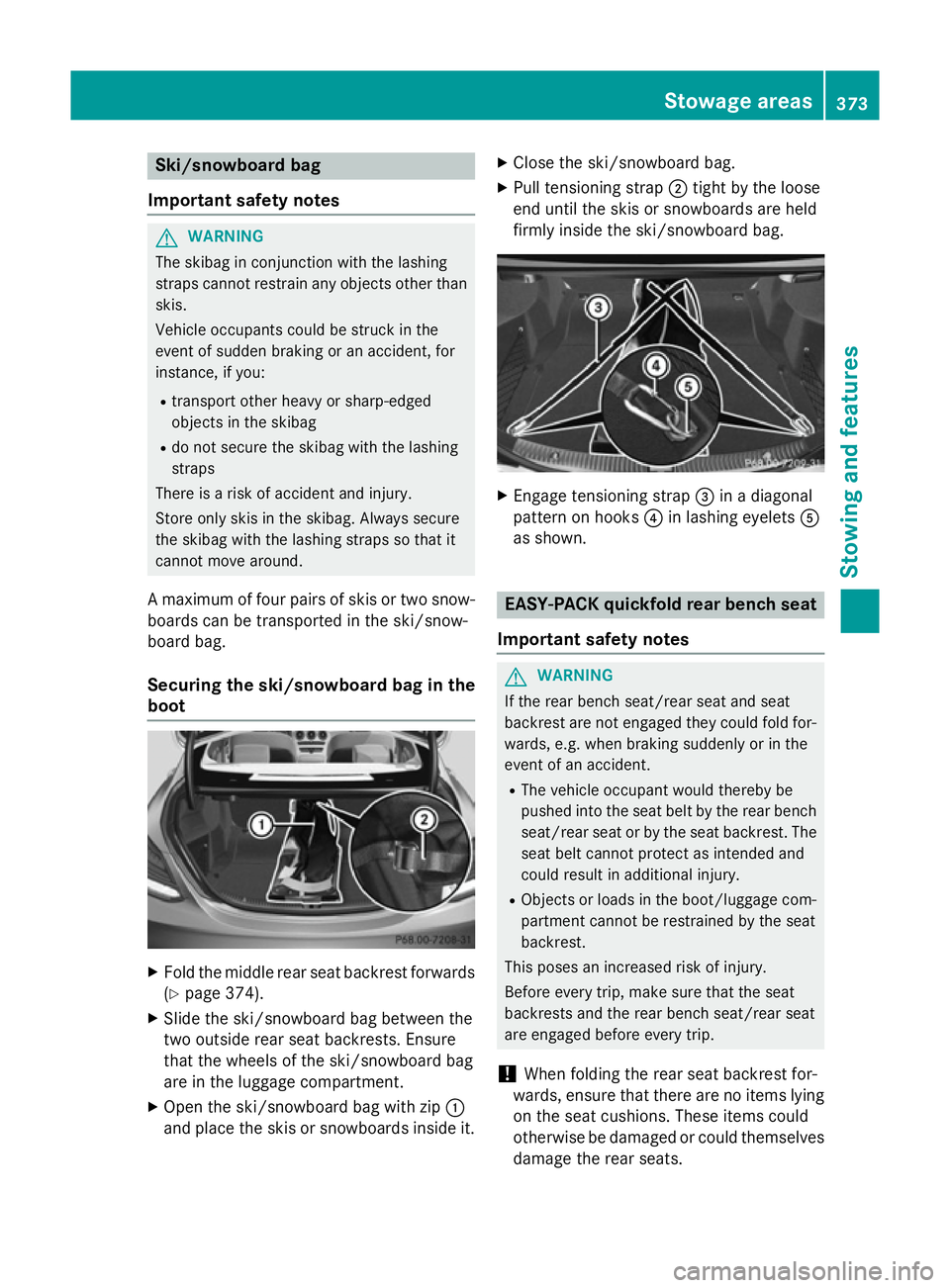
boot X
Fold the middle rear seat backrest forwards
(Y page 374).
X Slide the ski/snowboard bag between the
two outside rear seat backrests. Ensure
that the wheels of the ski/snowboard bag
are in the luggage compartment.
X Open the ski/snowboard bag with zip :
and place the skis or snowboards inside it. X
Close the ski/snowboard bag.
X Pull tensioning strap ;tight by the loose
end until the skis or snowboards are held
firmly inside the ski/snowboard bag. X
Engage tensioning strap =in a diagonal
pattern on hooks ?in lashing eyelets A
as shown. EASY-PACK quickfold rear bench seat
Important safety notes G
WARNING
If the rear bench seat/rear seat and seat
backrest are not engaged they could fold for- wards, e.g. when braking suddenly or in the
event of an accident.
R The vehicle occupant would thereby be
pushed into the seat belt by the rear bench
seat/rear seat or by the seat backrest. The
seat belt cannot protect as intended and
could result in additional injury.
R Objects or loads in the boot/luggage com-
partment cannot be restrained by the seat
backrest.
This poses an increased risk of injury.
Before every trip, make sure that the seat
backrests and the rear bench seat/rear seat
are engaged before every trip.
! When folding the rear seat backrest for-
wards, ensure that there are no items lying
on the seat cushions. These items could
otherwise be damaged or could themselves damage the rear seats. Stowage areas
373Stowing and features Z
Page 383 of 489
X
Insert telescopic rod ?into mounting ele-
ments =.
X Turn both mounting elements =to&
until you feel them engage. Stowage well underneath the luggage
compartment floor G
WARNING
If you drive when the luggage compartment
floor is open, objects could be flung around,
thus striking vehicle occupants. There is a risk of injury, especially when braking or abruptly
changing directions.
Always close the luggage compartment floor
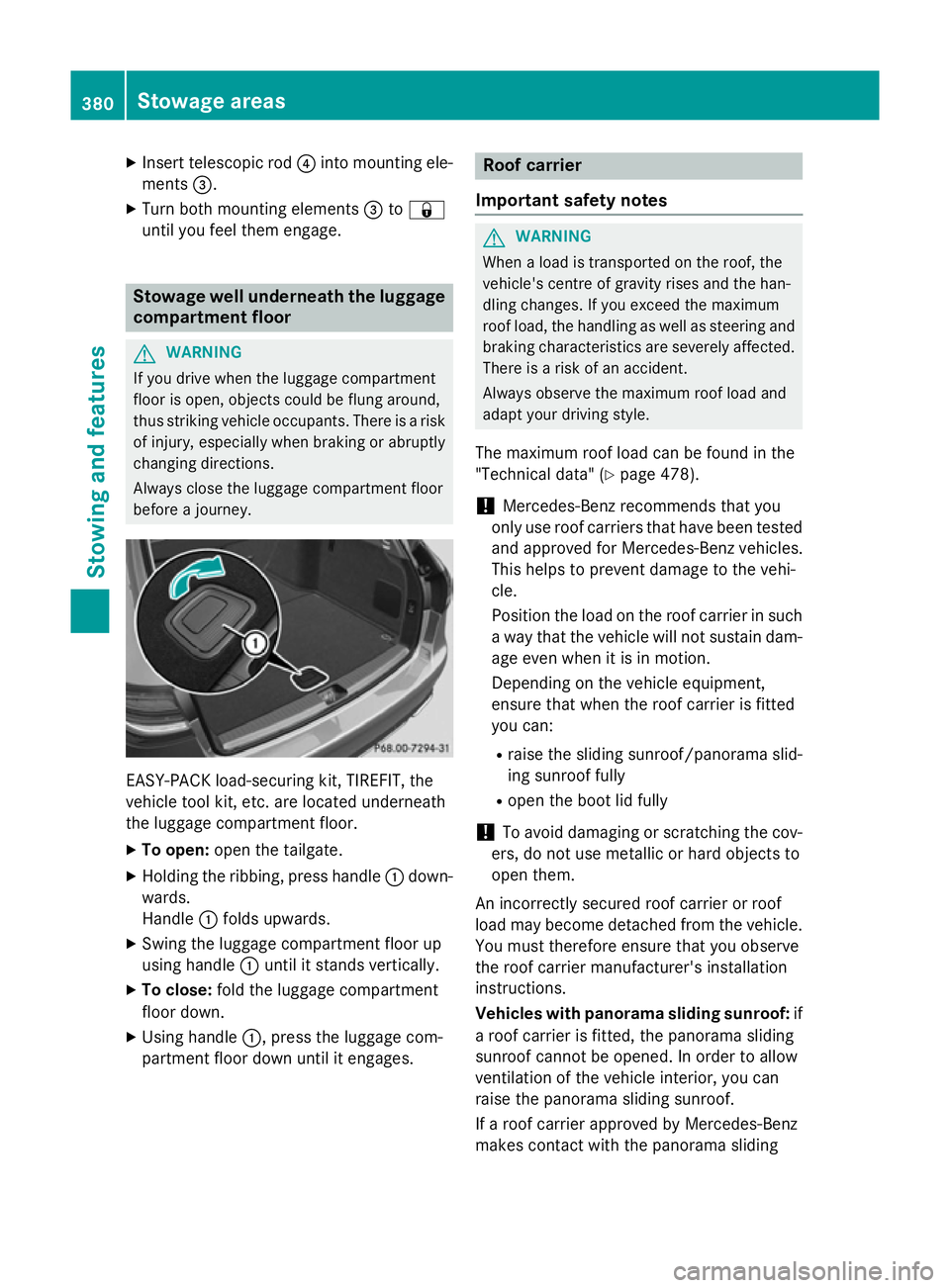
before a journey. EASY-PACK load-securing kit, TIREFIT, the
vehicle tool kit, etc. are located underneath
the luggage compartment floor.
X To open: open the tailgate.
X Holding the ribbing, press handle :down-
wards.
Handle :folds upwards.
X Swing the luggage compartment floor up
using handle :until it stands vertically.
X To close: fold the luggage compartment
floor down.
X Using handle :, press the luggage com-
partment floor down until it engages. Roof carrier
Important safety notes G
WARNING
When a load is transported on the roof, the
vehicle's centre of gravity rises and the han-
dling changes. If you exceed the maximum
roof load, the handling as well as steering and braking characteristics are severely affected.
There is a risk of an accident.
Always observe the maximum roof load and
adapt your driving style.
The maximum roof load can be found in the
"Technical data" (Y page 478).
! Mercedes-Benz recommends that you
only use roof carriers that have been tested
and approved for Mercedes-Benz vehicles.
This helps to prevent damage to the vehi-
cle.
Position the load on the roof carrier in such
a way that the vehicle will not sustain dam-
age even when it is in motion.
Depending on the vehicle equipment,
ensure that when the roof carrier is fitted
you can:
R raise the sliding sunroof/panorama slid-
ing sunroof fully
R open the boot lid fully
! To avoid damaging or scratching the cov-
ers, do not use metallic or hard objects to
open them.
An incorrectly secured roof carrier or roof
load may become detached from the vehicle.
You must therefore ensure that you observe
the roof carrier manufacturer's installation
instructions.
Vehicles with panorama sliding sunroof: if
a roof carrier is fitted, the panorama sliding
sunroof cannot be opened. In order to allow
ventilation of the vehicle interior, you can
raise the panorama sliding sunroof.
If a roof carrier approved by Mercedes-Benz
makes contact with the panorama sliding 380
Stowage areasStowing and features
Page 404 of 489
After washing the vehicle, brake carefully
while paying attention to the traffic conditions in order to restore full braking efficiency.
! If DISTRONIC PLUS or the HOLD function
is activated, the vehicle brakes automati-
cally in certain situations. To prevent dam-
age to the vehicle, deactivate DISTRONIC
PLUS and the HOLD function in the follow-
ing or other similar situations:
R when towing the vehicle
R in the car wash
! Make sure:
R the side windows and sliding sunroof are
closed completely.
R the blower for the ventilation/heating is
switched off (OFF button is depressed).
R the windscreen wiper switch is at posi-
tion 0
R the 360° camera or reversing camera is
switched off.
The vehicle could otherwise be damaged.
! If the key is within the rear detection
range of KEYLESS-GO, the following situa-
tions, for example, could lead to the boot lid
opening unintentionally:
R using a car wash
R using a high-pressure cleaner
Make sure that the key is at least 3 m away
from the vehicle.
! Make sure that the automatic transmis-
sion is in neutral position Nwhen washing
your vehicle in a tow-through car wash. The
vehicle may otherwise be damaged.
R Operating with the key:
Do not remove the key from the ignition
lock. Do not open the driver's door when
the engine is switched off or at very low
speeds. Otherwise, when in transmission position Dor Rthe automatic transmis-
sion will automatically switch to park
position Pand block the wheels.
R Operating with the Start/Stop button: Do not open the driver's door when the
engine is switched off or at very low
speeds. Otherwise, when in transmission
position Dor Rthe automatic transmis-
sion will automatically switch to park
position Pand block the wheels.
Observe the following to make sure that the
automatic transmission stays in position N
neutral:
Operating with the key:
X Make sure the ignition is switched on.
X Make sure that the vehicle is stationary.
X Depress and hold the brake pedal.
X Select neutral N.
X Release the brake pedal.
X Release the electric parking brake, if nec-
essary.
X Switch off the ignition and leave the key in
the ignition lock.
Operating with the Start/Stop button:
X Make sure the ignition is switched on.
X Make sure that the vehicle is stationary.
X Depress and hold the brake pedal.
X Select park position P.
X Release the brake pedal.
X Remove Start/Stop button from ignition
lock (Y page 185).
X Insert the key into the ignition lock.
X Switch on the ignition.
X Depress and hold the brake pedal.
X Select neutral N.
X Release the brake pedal.
X Release the electric parking brake, if nec-
essary.
X Switch off the ignition and leave the key in
the ignition lock.
You can wash the vehicle in an automatic car
wash from the very start.
Wash off excess dirt before cleaning the vehi-
cle in an automatic car wash.
After using an automatic car wash, wipe off
wax from the windscreen and the wiper Care
401Maintenance and care Z