brake light MERCEDES-BENZ C-CLASS ESTATE 2014 Owners Manual
[x] Cancel search | Manufacturer: MERCEDES-BENZ, Model Year: 2014, Model line: C-CLASS ESTATE, Model: MERCEDES-BENZ C-CLASS ESTATE 2014Pages: 489, PDF Size: 15.08 MB
Page 7 of 489
1, 2, 3 ...
4ETS see ETS/4ETS (Electronic Trac-
tion System)
4MATIC (permanent four-wheel
drive) .................................................. 239
4MATIC off-road system ...................239
12 V socket
see Sockets
230 V power socket .......................... 386
360° camera
Cleaning ......................................... 405
Function/notes ............................ .253 A
ABS (Anti-lock Braking System) Display message ............................ 317
Function/notes ................................ 76
Important safety notes .................... 76
Warning lamp ................................. 357
Accident
Automatic measures after an acci-
dent ................................................. 63
Activating/deactivating air-recir-
culation mode ................................... .168
Activating/deactivating cooling
with air dehumidification ................. 161
Active Blind Spot Assist
Activating/deactivating (on-
board computer) ............................ 311
Display message ............................ 341
Function/notes ............................ .266
Towing a trailer .............................. 269
Active Lane Keeping Assist
Activating/deactivating (on-
board computer) ............................ 311
Display message ............................ 340
Function/notes ............................ .269
Towing a trailer .............................. 272
Active light function ......................... 138
Active Light System
Display message ............................ 333
Active Parking Assist
Detecting parking spaces .............. 244
Display message ............................ 341
Exiting a parking space .................. 247 Function/notes ............................
.243
Important safety notes .................. 243
Parking .......................................... 245
Towing a trailer .............................. 243
ADAPTIVE BRAKE ................................. 84
Adaptive Brake Assist
Function/notes ................................ 80
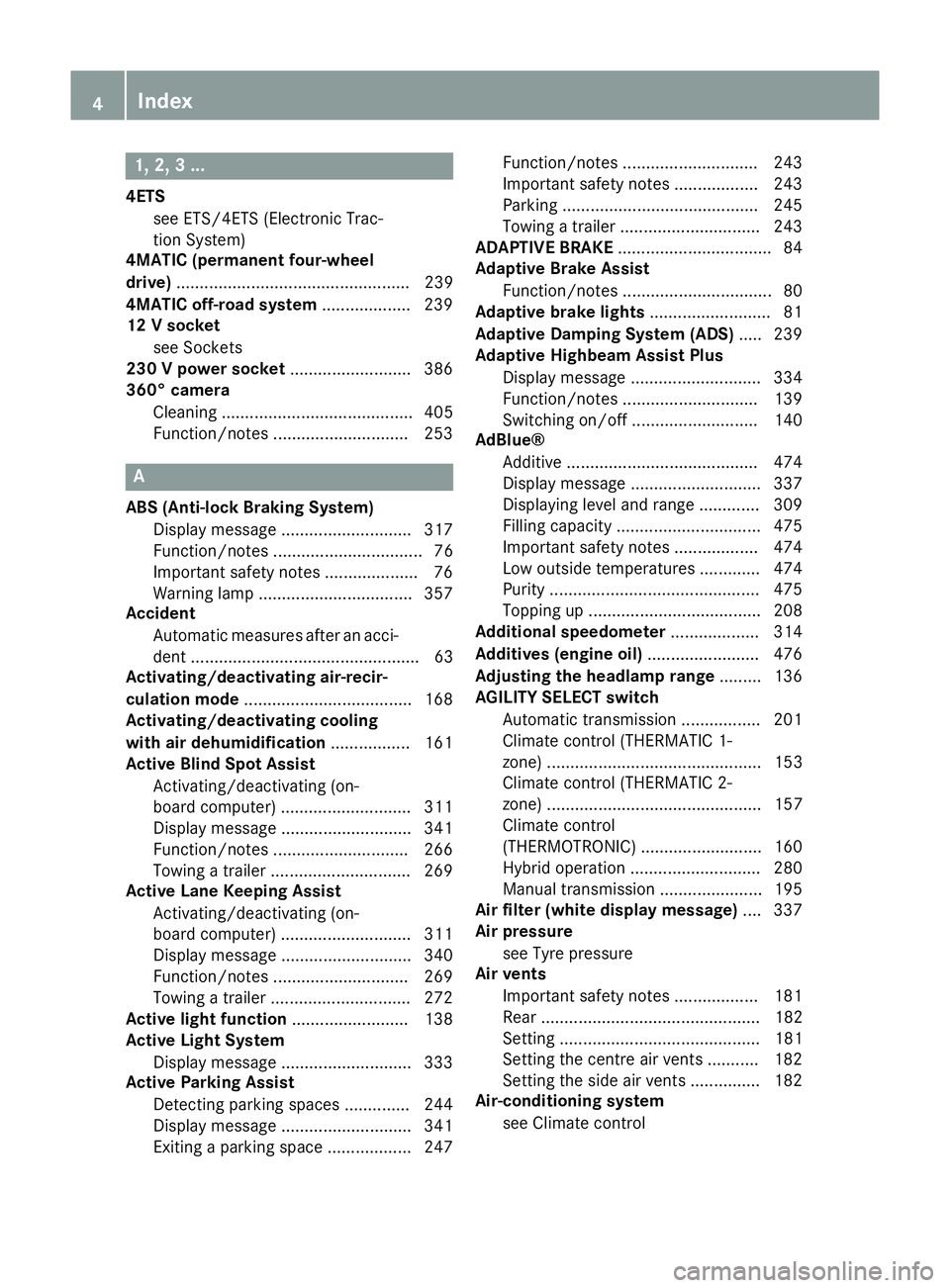
Adaptive brake lights .......................... 81
Adaptive Damping System (ADS) ..... 239
Adaptive Highbeam Assist Plus
Display message ............................ 334
Function/notes ............................ .139
Switching on/off ........................... 140
AdBlue®
Additive ......................................... 474
Display message ............................ 337
Displaying level and range ............. 309
Filling capacity ............................... 475
Important safety notes .................. 474
Low outside temperatures ............. 474
Purity ............................................. 475
Topping up ..................................... 208
Additional speedometer ................... 314
Additives (engine oil) ........................ 476
Adjusting the headlamp range ......... 136
AGILITY SELECT switch
Automatic transmission ................. 201
Climate control (THERMATIC 1-
zone) .............................................. 153
Climate control (THERMATIC 2-
zone) .............................................. 157
Climate control
(THERMOTRONIC ).......................... 160
Hybrid operation ............................ 280
Manual transmission ...................... 195
Air filter (white display message) .... 337
Air pressure
see Tyre pressure
Air vents
Important safety notes .................. 181
Rear ............................................... 182
Setting ........................................... 181
Setting the centre air vents ........... 182
Setting the side air vents ............... 182
Air-conditioning system
see Climate control 4
Index
Page 12 of 489
Daytime driving lights
Display message ............................ 333
Function/notes ............................ .135
Dealership
see Qualified specialist workshop
Declarations of conformity ................. 27
Diagnostics connection ......................27
Diesel .................................................. 473
Digital speedometer .........................301
Dipped-beam headlamps
Changing bulbs .............................. 143
Display message ............................ 331
Setting for driving abroad (sym-
metrical) ........................................ 134
Setting for driving on the right/
left ................................................. 313
Switching on/off ........................... 135
DIRECT SELECT lever
Automatic transmission ................. 197
Display
Charge status of the high-voltage
battery .......................................... .276
see Display message
see Warning and indicator lamps
Display message
Driving systems ............................ .339
Display messages
ASSYST PLUS ................................ 399
Calling up (on-board computer) ..... 316
Engine ............................................ 335
General information ....................... 316
Hiding (on-board computer) ........... 316
Hybrid system ................................ 338
Introduction ................................... 316
Key ................................................ 352
Lights ............................................. 331
Safety systems .............................. 317
Tyres .............................................. 345
Vehicle .......................................... .347
Distance warning function
Function/notes ................................ 79
Distance warning signal (warning
lamp) ................................................. .365
DISTRONIC PLUS
Activating ....................................... 228
Activation conditions ..................... 228
Cruise control lever ....................... 227 Deactivating ................................... 232
Display message ............................ 342
Displays in the multifunction dis-
play ................................................ 232
Driving tips ...................................
.233
Function/notes ............................ .226
Important safety notes .................. 226
Selecting ........................................ 227
Setting the specified minimum
distance ......................................... 231
Door
Automatic locking (switch) .............. .98
Central locking/unlocking (key) ...... 91
Control panel .................................. .40
Display message ............................ 349
Emergency locking ........................ 100
Emergency unlocking ....................... 99
Important safety note s.................... 96
Opening (from the inside) ................ 97
Drive program
Display (DIRECT SELECT lever) ...... 199
Manual transmission ...................... 196
Drive programs
Automatic transmission ................. 201
Driver's door
see Door
Driving abroad
Mercedes-Benz Service ................. 400
Symmetrical dipped beam ............. 134
Driving Assistance package ............. 266
Driving on flooded roads .................. 219
Driving safety system
BAS PLUS with Cross-Traffic
Assist ............................................... 77
COLLISION PREVENTION ASSIST
PLUS ................................................ 78
EBD (electronic brake force distri-bution) ............................................. 84
STEER CONTROL ............................. 86
Driving safety systems
ABS (Anti-lock Braking System) ....... 76
ADAPTIVE BRAK E............................. 84
Adaptive Brake Assist ...................... 80
Adaptive brake lights ....................... 81
BAS (Brake Assist System) .............. 76
Distance warning function ............... 79
ESP® (Electronic Stability Pro-
gram) ............................................... 81 Index
9
Page 16 of 489
Headlamp
Cleaning system (notes) ............... .477
Headlamp flasher .............................. 137
Headlamps
Misting up ...................................... 140
see Automatic headlamp mode
Heating
see Climate control
High-pressure cleaners .................... 402
High-voltage battery
Charge leve l................................... 276
Charging ........................................ 420
Charging (on-board computer) ....... 277
General notes .................................. 43
Vehicle fire ....................................... 43
Hill start assist .................................. 189
HOLD function
Activating ....................................... 237
Deactivating ................................... 237
Display message ............................ 342
Function/note s............................. 236
Horn ...................................................... 32
Hybrid drive
Displaying the total range .............. 279
Generated electrical energy ........... 279
Hybrid operation
AGILITY SELECT switch .................. 280
Automatic engine start (ECO
Start/Stop function) ...................... 283
Automatic engine switch-off (ECO
start/stop function) ....................... 283
Driving tips .................................... 281
ECO start/stop function ................ 282
Energy flow display ........................ 276
Extended overrun mod e................. 283
Fuel consumption .......................... 279
General notes ................................ 272
Important safety notes .................. 273
Manual gearshifting ....................... 281
Noiseless start ............................... 280
Operating (on-board computer) ..... 276
Overrun mode ................................ 283
Overview (instrument cluster) ........ 275
Power display (electric motor) ....... 275
Problems ....................................... 285
Pulling away ................................... 280
RBS (Recuperative Brake Sys-
tem) ............................................... 273 Resetting values (Audio 20) ........... 279
Resetting values (COMAND
Online) ........................................... 279
Starting the engine ........................ 279
Hybrid system
Automatic deactivation .................... 42
Danger of electric shock .................. 42
Display message ............................ 338
High-voltage battery ........................ 43
Important safety notes .................... 42
Manual deactivation ......................... 43
Opening the bonnet ......................... 44
Overview ........................................ 274
Problems (malfunctions) ................ 285
READY indicator ............................. 279
Warning lamp ................................. 364
Hybrid vehicle
Climate control (THERMATIC) ........ 157
Climate control
(THERMOTRONIC) .......................... 160
Hybrid vehicles
Important safety notes .................... 42 I
Ignition lock see Key positions
Immobiliser .......................................... 86
Indicator and warning lamp
Restraint system ............................ 361
Indicator and warning lamps
COLLISION PREVENTION ASSIST
PLUS .............................................. 365
Coolant .......................................... 362
Engine diagnostics ......................... 362
Indicator lamps
Display message ............................ 332
see Warning and indicator lamps
Indicators
see Turn signals
Insect protection on the radiator .... 396
Instrument cluster
Overview .......................................... 34
Power display ................................ 275
Warning and indicator lamps ........... 35
Instrument cluster lighting .............. 294
Intelligent Light System
Activating/deactivating ................. 313 Index
13
Page 19 of 489
Notes/placing in the bracket .........3
90
Transmission output (maximum) .... 468
Modifying the programming (key) ..... 92
MOExtended tyres .............................413
Motorway mode ................................ 138
MP3
Operating ....................................... 305
Multifunction display
Function/notes ............................ .297
Permanent display ......................... 314
Multifunction steering wheel
Operating the on-board computer .. 295
Overview .......................................... 36 N
Navigation Menu (on-board computer) ............ 302
Notes on running in a new vehicle .. 184O
Occupant safety Automatic measures after an acci-
dent ................................................. 63
Children in the vehicle ..................... 63
Important safety notes .................... 45
Pets in the vehicle ........................... 75
PRE-SAFE® (anticipatory occu-
pant protection) ............................... 62
Seat belts ........................................ 47
Odometer .......................................... .300
Oil
see Engine oil
On-board computer
Assistance graphic menu .............. .308
Assistance menu ........................... 309
Display messages .......................... 316
Displaying a service message ....... .399
DISTRONIC PLUS ........................... 232
Factory settings ............................ .315
Head-up displa y............................. 297
Important safety notes .................. 294
Instrument cluster menu ............... 314
Light menu ..................................... 313
Media menu ................................... 304
Menu overview .............................. 299
Message memory .......................... 316 Navigation menu ............................ 302
Operating the TV ............................ 306
Operating video DVD ..................... 305
Operation ....................................... 295
Radio menu ................................... 304
Service menu ................................. 308
Settings menu ............................... 309
Standard display ............................ 300
Telephone menu ............................ 306
Trip menu ...................................... 300
Vehicle menu ................................. 315
Opening and closing the side trim
panels ................................................. 144
Operating instructions
Vehicle equipment ........................... 25
Operating mode
Overrun mode ................................ 282
Stationary vehicle .......................... 281
Operating safety
Declaration of conformity ................ 27
Important safety note ...................... 25
Operating system
see On-board computer
Outside temperature display ........... 295
Overhead control panel ...................... 39
Override feature
Rear side window s........................... 75
Overrun mode .................................... 283
Overrun mode, extended .................. 283
Owner's Manual
Overview .......................................... 25 P
Paint code .......................................... 470
Paintwork (cleaning instructions) ... 402
Panic alarm .......................................... 44
Panorama sliding sunroof
Important safety information ......... 110
Opening/closing ............................ 112
Problem (malfunction) ................... 115
Rain closing feature ....................... 113
Resetting ....................................... 114
Parking
Hybrid vehicles .............................. 284
Important safety notes .................. 211
Parking brake ................................ 213 16
Index
Page 31 of 489
R
work on electronic components
R work on the hybrid system
Mercedes-Benz recommends that you use a
Mercedes-Benz Service Centre. Vehicle registration
Mercedes-Benz may ask its Service Centres
to carry out technical inspections on certain
vehicles. The quality or safety of the vehicle is
improved as a result of the inspection.
Mercedes-Benz can only inform you about
vehicle checks if it has your registration data.
It is possible that your vehicle has not yet
been registered in your name in the following
cases:
R if your vehicle was not purchased at an
authorised specialist dealer.
R if your vehicle has not yet been examined at
a Mercedes-Benz Service Centre.
It is advisable to register your vehicle with a
Mercedes-Benz Service Centre.
Inform Mercedes-Benz as soon as possible
about any change in address or vehicle own-
ership. You can do this at a Mercedes-Benz
Service Centre, for example. Correct use
If you remove any warning stickers, you or
others could fail to recognise certain dangers. Leave warning stickers in position.
Observe the following information when driv-ing your vehicle:
R the safety notes in this manual
R the technical data in this manual
R traffic rules and regulations
R laws and safety standards pertaining to
motor vehicles Implied warranty
! Follow the instructions in this manual
about the proper operation of your vehicle as well as about possible vehicle damage.
Damage to your vehicle that arises from
culpable contraventions against these
instructions are not covered either by
Mercedes-Benz implied warranty or by the
New or Used-Vehicle Warranty.
Data stored in the vehicle
A wide range of electronic components in
your vehicle contain data memories.
These data memories temporarily or perma-
nently store technical information about:
R the vehicle's operating state
R events
R faults
In general, this technical information docu-
ments the state of a component, a module, a
system or the surroundings.
These include, for example:
R operating conditions of system compo-
nents, e.g. fluid levels
R the vehicle's status messages and those of
its individual components, e.g. number of
wheel revolutions/speed, deceleration in
movement, lateral acceleration, accelera-
tor pedal position
R malfunctions and defects in important sys-
tem components, e.g. lights, brakes
R vehicle reactions and operating conditions
in special driving situations, e.g. airbag
deployment, intervention of stability con-
trol systems
R ambient conditions, e.g. outside tempera-
ture
This data is of an exclusively technical nature and can be used to:
R assist in detecting and rectifying faults and
defects
R analyse vehicle functions, e.g. after an acci-
dent
R optimise vehicle functions 28
Introduction
Page 35 of 489
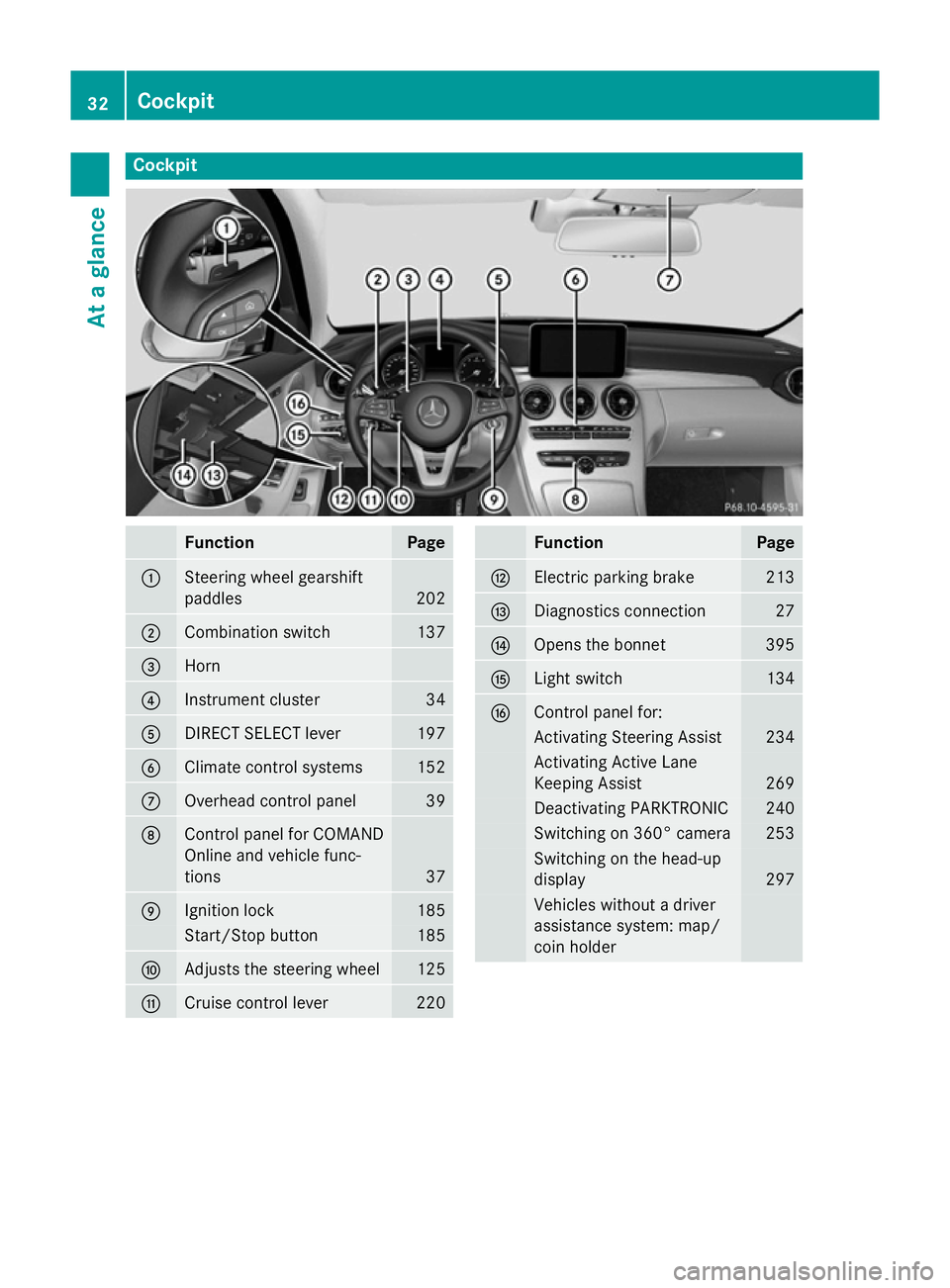
Cockpit
Function Page
:
Steering wheel gearshift
paddles
202
;
Combination switch 137
=
Horn
?
Instrument cluster 34
A
DIRECT SELECT lever 197
B
Climate control systems 152
C
Overhead control panel 39
D
Control panel for COMAND
Online and vehicle func-
tions
37
E
Ignition lock 185
Start/Stop button 185
F
Adjusts the steering wheel 125
G
Cruise control lever 220 Function Page
H
Electric parking brake 213
I
Diagnostics connection 27
J
Opens the bonnet 395
K
Light switch 134
L
Control panel for:
Activating Steering Assist 234
Activating Active Lane
Keeping Assist 269
Deactivating PARKTRONIC 240
Switching on 360° camera 253
Switching on the head-up
display
297
Vehicles without a driver
assistance system: map/
coin holder32
CockpitAt a glance
Page 36 of 489
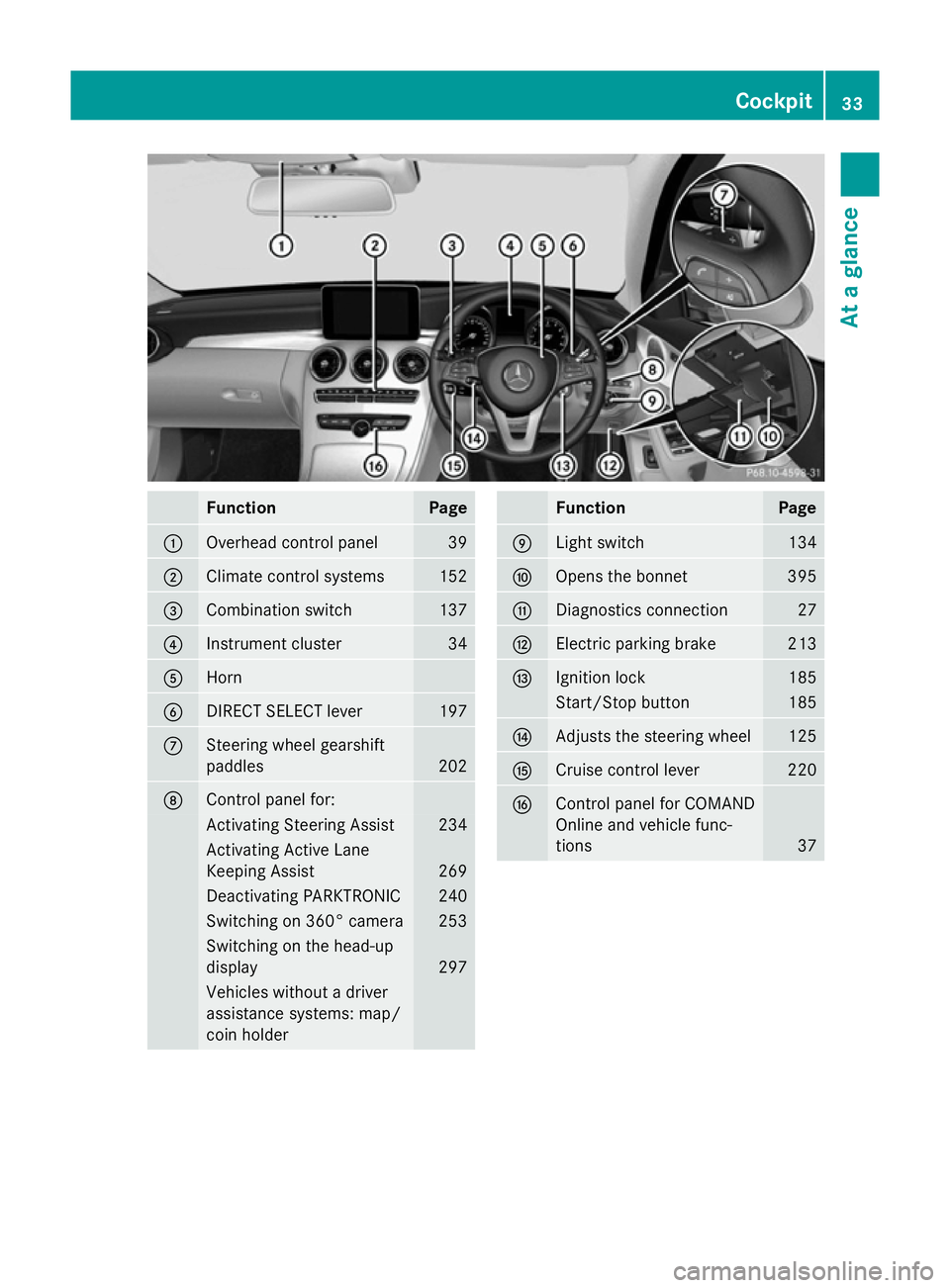
Function Page
:
Overhead control panel 39
;
Climate control systems 152
=
Combination switch 137
?
Instrument cluster 34
A
Horn
B
DIRECT SELECT lever 197
C
Steering wheel gearshift
paddles
202
D
Control panel for:
Activating Steering Assist 234
Activating Active Lane
Keeping Assist
269
Deactivating PARKTRONIC 240
Switching on 360° camera 253
Switching on the head-up
display
297
Vehicles without a driver
assistance systems: map/
coin holder Function Page
E
Light switch 134
F
Opens the bonnet 395
G
Diagnostics connection 27
H
Electric parking brake 213
I
Ignition lock 185
Start/Stop button 185
J
Adjusts the steering wheel 125
K
Cruise control lever 220
L
Control panel for COMAND
Online and vehicle func-
tions
37Cockpit
33At a glance
Page 38 of 489
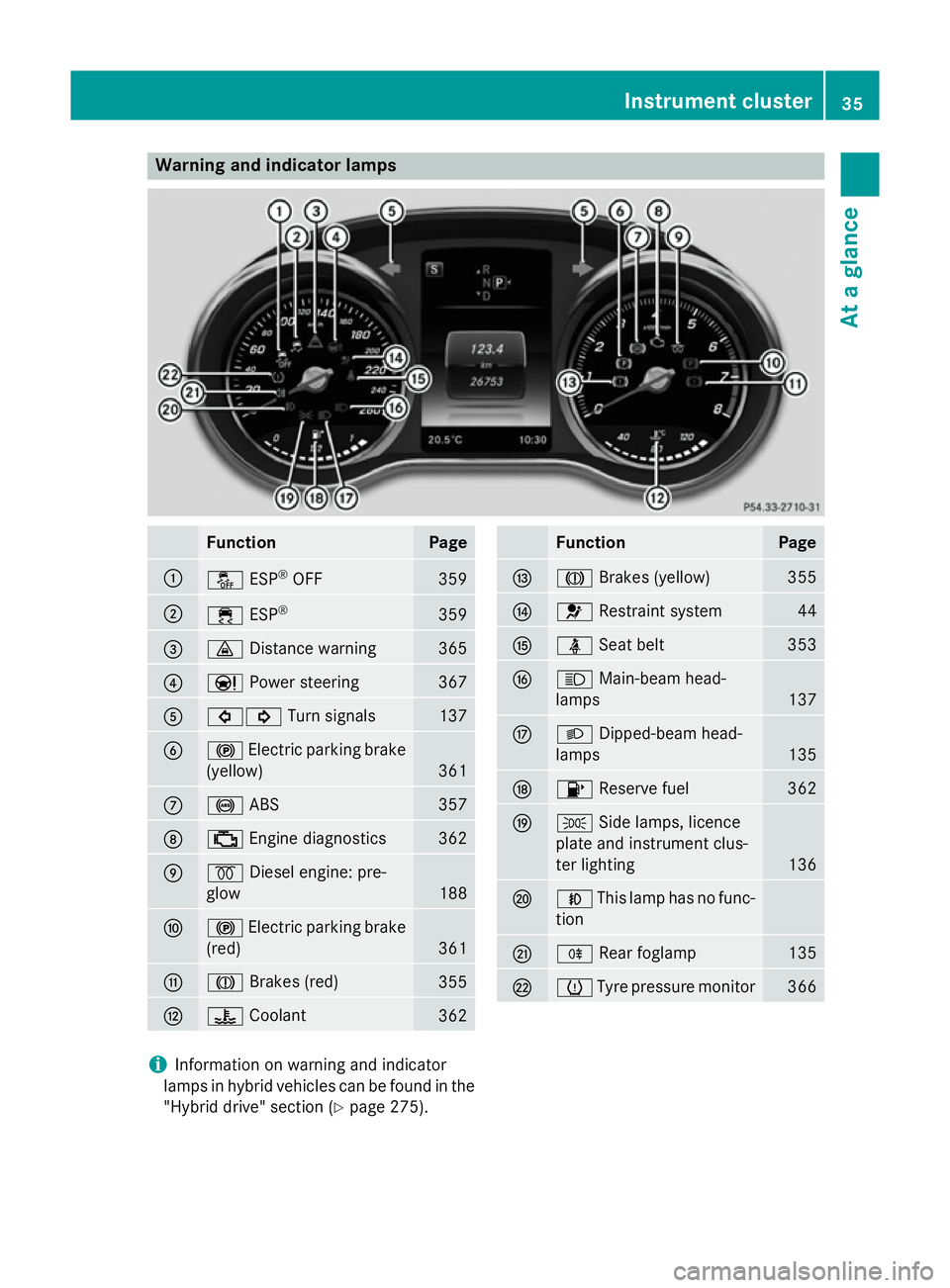
Warning and indicator lamps
Function Page
:
å
ESP®
OFF 359
;
÷
ESP® 359
=
·
Distance warning 365
?
Ð
Power steering 367
A
#!
Turn signals 137
B
!
Electric parking brake
(yellow) 361
C
!
ABS 357
D
;
Engine diagnostics 362
E
%
Diesel engine: pre-
glow 188
F
!
Electric parking brake
(red) 361
G
J
Brakes (red) 355
H
?
Coolant 362 Function Page
I
J
Brakes (yellow) 355
J
6
Restraint system 44
K
ü
Seat belt 353
L
K
Main-beam head-
lamps 137
M
L
Dipped-beam head-
lamps 135
N
8
Reserve fuel 362
O
T
Side lamps, licence
plate and instrument clus-
ter lighting 136
P
N
This lamp has no func-
tion Q
R
Rear foglamp 135
R
h
Tyre pressure monitor 366
i
Information on warning and indicator
lamps in hybrid vehicles can be found in the
"Hybrid drive" section (Y page 275). Instrument cluster
35At a glance
Page 46 of 489
Have the restraint system checked and
repaired immediately at a qualified specialist
workshop. After an accident, immediately
switch the ignition off and remove the key
from the ignition lock.
If components of the restraint system are
activated during an accident, the hybrid sys-
tem is automatically deactivated.
The hybrid system is not activated when the
vehicle is started if:
R a short circuit is detected in the hybrid sys-
tem.
R a hybrid system electrical connection is
disconnected.
This ensures that you do not come into con-
tact with high voltage.
Manual deactivation of the hybrid sys-
tem The hybrid system can be deactivated man-
ually using the high voltage switch-off device.
! To prevent damage to the hybrid system
please observe the following instructions:
R only deactivate the hybrid system man-
ually in the following situations.
R work on the hybrid system may only be
carried out at a qualified specialist work-
shop, even when it has been deactivated
manually.
R if the 6 restraint system warning lamp
in the instrument cluster lights up after an
accident.
R if the vehicle is badly damaged, e.g. after an
accident, and the restraint system compo-
nents were not activated.
R if the vehicle is badly damaged and has to
be towed or transported.
X If possible, move the vehicle out of the
danger zone: shift the automatic transmis-
sion into position N.
X Release the electric parking brake.
X Roll the vehicle to a safe place and park it
safely. Get assistance from others if necessary.
The vehicle is locked automatically when the
ignition is switched on and the wheels are
turning. There is therefore a risk of being
locked out if the vehicle is being pushed or
tested on a dynamometer.
X Switch the ignition off.
X Shift the automatic transmission to park
position P.
Apply the electric parking brake
(Y page 213).
Secure the vehicle to prevent it from rolling
away (Y page 443).
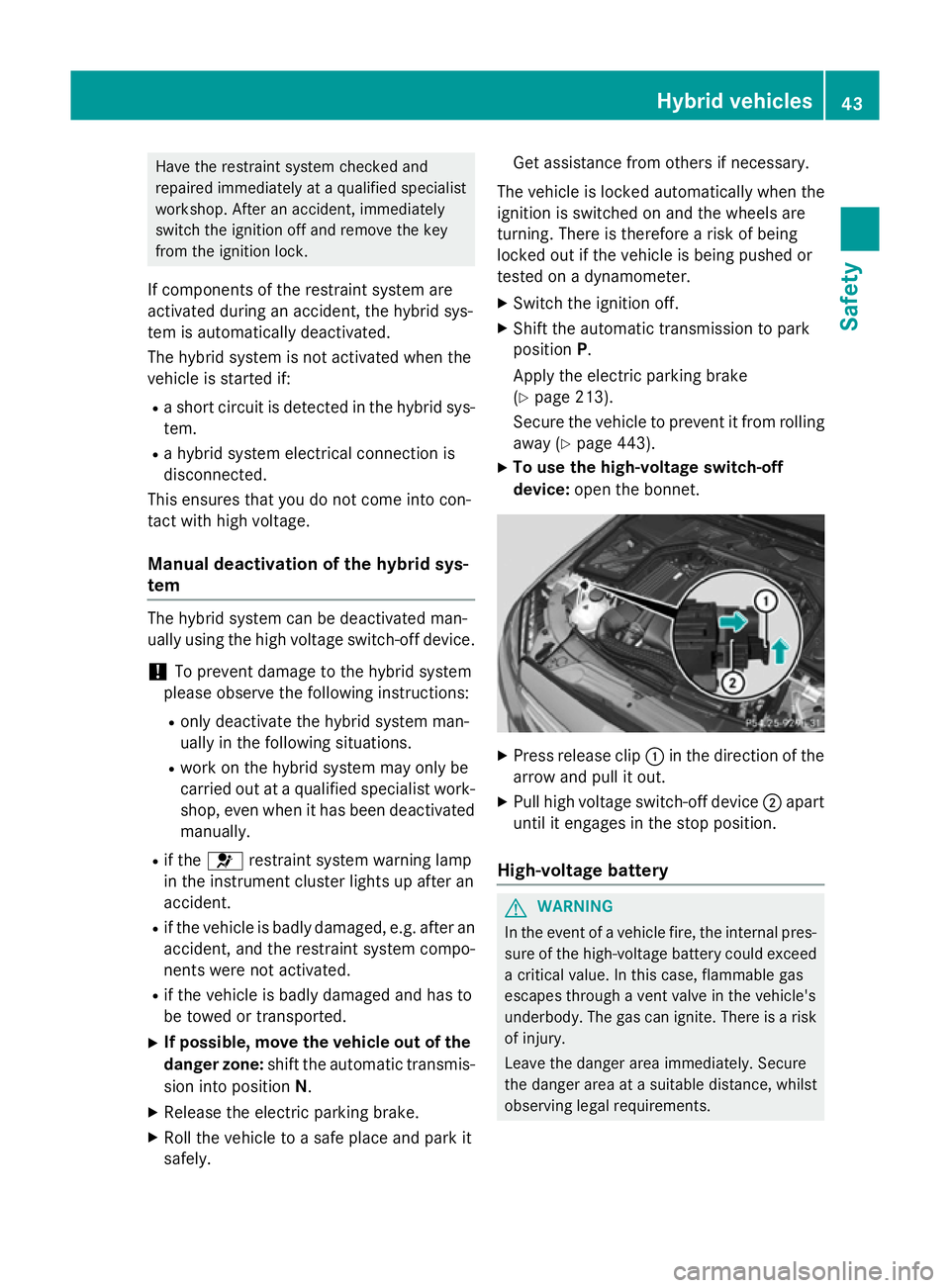
X To use the high-voltage switch-off
device: open the bonnet. X
Press release clip :in the direction of the
arrow and pull it out.
X Pull high voltage switch-off device ;apart
until it engages in the stop position.
High-voltage battery G
WARNING
In the event of a vehicle fire, the internal pres- sure of the high-voltage battery could exceeda critical value. In this case, flammable gas
escapes through a vent valve in the vehicle's
underbody. The gas can ignite. There is a risk
of injury.
Leave the danger area immediately. Secure
the danger area at a suitable distance, whilst
observing legal requirements. Hybrid vehicles
43Safety Z
Page 47 of 489
G
WARNING
If the housing of the high-voltage battery has
been damaged, electrolyte and gases may
leak out. These are poisonous and caustic.
There is a risk of injury.
Avoid contact with the skin, eyes or clothing. Immediately rinse electrolyte splashes off
with water and seek medical attention
straight away.
! Exhaustive discharge caused by the vehi-
cle standing idle for lengthy periods can
damage the high-voltage battery.
If the vehicle is idle for lengthy periods, run
it for a few minutes once every six weeks to
charge up the high-voltage battery.
During the charging process, switch off all
electrical consumers, e.g. the automatic
climate control or the seat heating.
Information on charging the high-voltage bat-
tery (Y page 420).
Engine compartment Before opening the bonnet:
X Apply the electric parking brake.
X Shift the automatic transmission to park
position P.
X Switch the ignition off.
X Remove the key from the ignition lock.
or, in vehicles with KEYLESS-GO start-func-
tion or KEYLESS ‑GO
X Remove the Start/Stop button from the
ignition lock.
X Observe the warning notes on the risk of
electric shock (Y page 42).
X Observe the warning notes about the bon-
net (Y page 395). RBS driving safety system (Recupera-
tive Brake System)
RBS supports you when braking with an elec-
tronically-controlled brake boost mode and enables the recovery of kinetic energy (recu-
peration).
For further information on the RBS system
(Y page 273). Panic alarm
X
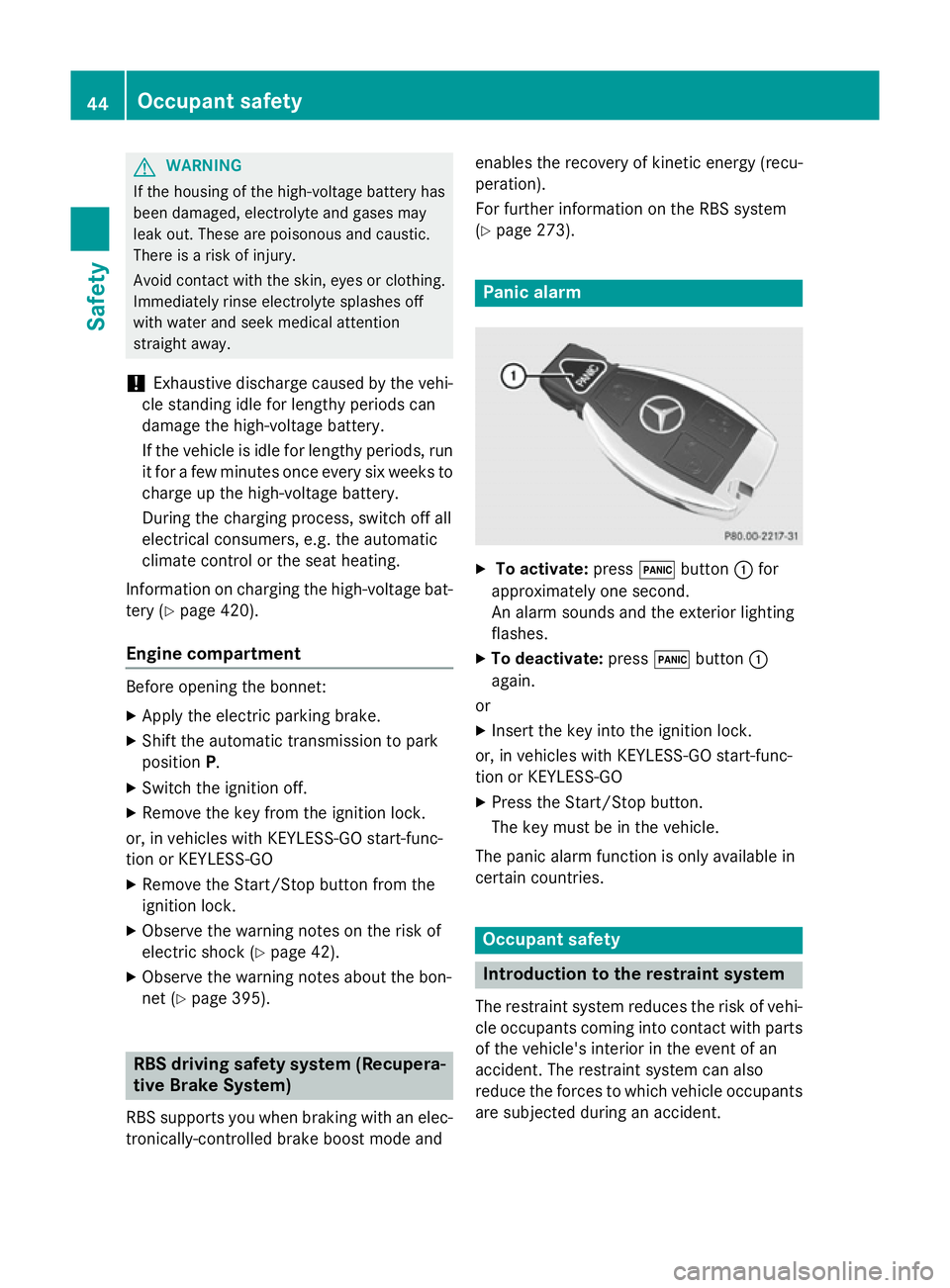
To activate: press!button :for
approximately one second.
An alarm sounds and the exterior lighting
flashes.
X To deactivate: press!button :
again.
or
X Insert the key into the ignition lock.
or, in vehicles with KEYLESS-GO start-func-
tion or KEYLESS ‑GO
X Press the Start/Stop button.
The key must be in the vehicle.
The panic alarm function is only available in
certain countries. Occupant safety
Introduction to the restraint system
The restraint system reduces the risk of vehi- cle occupants coming into contact with parts
of the vehicle's interior in the event of an
accident. The restraint system can also
reduce the forces to which vehicle occupants
are subjected during an accident. 44
Occupant safetySafety