instrument panel MERCEDES-BENZ C-CLASS ESTATE 2014 Owners Manual
[x] Cancel search | Manufacturer: MERCEDES-BENZ, Model Year: 2014, Model line: C-CLASS ESTATE, Model: MERCEDES-BENZ C-CLASS ESTATE 2014Pages: 489, PDF Size: 15.08 MB
Page 10 of 489
Brightness control (instrument
cluster lighting)
................................... 32
Buttons on the steering column ...... 295C
Calling up a fault see Display messages
Camera
see 360° camera
Car
see Vehicle
Car key
see Key
Car wash (care) ................................. 400
Care
360° camera ................................. 405
AIRPANEL ...................................... 404
Automatic car wash ....................... 400
Carpets .......................................... 408
Display ........................................... 406
Exhaust pipe .................................. 406
Exterior lighting ............................. 404
Gear or selector lever .................... 407
High-pressure cleaner .................... 402
Interior ........................................... 406
Matt paintwork .............................. 403
Note s............................................. 400
Paint .............................................. 402
Plastic trim .................................... 407
Reversing camera .......................... 405
Roof lining ...................................... 408
Seat belt ........................................ 408
Seat cove r..................................... 407
Sensors ......................................... 405
Steering wheel ............................... 407
Trim pieces .................................... 407
Washing by hand ........................... 402
Wheels ........................................... 403
Windows ........................................ 403
Wiper blades .................................. 404
Wooden trim .................................. 407
CD player/CD changer(on-board
computer) .......................................... 305
Central locking
Locking/unlocking (key) .................. 91
Centre console
Lower section .................................. 38 Upper section .................................. 37
Changing bulbs
Dipped-beam headlamp s............... 143
Main-beam headlamp s................... 143
Reversing lamps ............................ 144
Turn signals (front) ......................... 144
Turn signals (rear) .......................... 144
Charge status of high-voltage bat-
tery ..................................................... 276
Child seat
Forward-facing restraint system ...... 68
ISOFIX .............................................. 65
On the front-passenger sea t............ 66
Rearward-facing restraint system .... 67
Recommendations ........................... 72
Suitable positions ............................ 68
Top Tether ....................................... 65
Child-proof locks
Important safety notes .................... 74
Rear doors ....................................... 75
Children
In the vehicl e................................... 63
Restraint systems ............................ 64
Cigarette lighter ................................ 384
Cleaning
Mirror turn signal ........................... 404
Trailer tow hitch ............................. 406
Climate control
Auxiliary heating/ventilation .......... 176
Controlling automaticall y............... 162
Convenience opening/closing
(air-recirculation mode) ................. 168
Cooling with air dehumidification .. 161
Demisting the windows .................. 166
Demisting the windscreen ............. 166
ECO start/stop function ................ 160
ECO start/stop function
(THERMATIC 1-zone) ............. 153, 154
ECO start/stop function
(THERMATIC 2-zone) ............. 156, 157
Hybrid vehicle (THERMOTRONIC ).. 160
Hybrid vehicles (THERMATIC) ........ 156
Important safety notes .................. 152
Indicator lamp ................................ 162
Information about using
THERMATIC automatic climate
control (1 ‑zone) ............................. 153 Index
7
Page 19 of 489
Notes/placing in the bracket .........3
90
Transmission output (maximum) .... 468
Modifying the programming (key) ..... 92
MOExtended tyres .............................413
Motorway mode ................................ 138
MP3
Operating ....................................... 305
Multifunction display
Function/notes ............................ .297
Permanent display ......................... 314
Multifunction steering wheel
Operating the on-board computer .. 295
Overview .......................................... 36 N
Navigation Menu (on-board computer) ............ 302
Notes on running in a new vehicle .. 184O
Occupant safety Automatic measures after an acci-
dent ................................................. 63
Children in the vehicle ..................... 63
Important safety notes .................... 45
Pets in the vehicle ........................... 75
PRE-SAFE® (anticipatory occu-
pant protection) ............................... 62
Seat belts ........................................ 47
Odometer .......................................... .300
Oil
see Engine oil
On-board computer
Assistance graphic menu .............. .308
Assistance menu ........................... 309
Display messages .......................... 316
Displaying a service message ....... .399
DISTRONIC PLUS ........................... 232
Factory settings ............................ .315
Head-up displa y............................. 297
Important safety notes .................. 294
Instrument cluster menu ............... 314
Light menu ..................................... 313
Media menu ................................... 304
Menu overview .............................. 299
Message memory .......................... 316 Navigation menu ............................ 302
Operating the TV ............................ 306
Operating video DVD ..................... 305
Operation ....................................... 295
Radio menu ................................... 304
Service menu ................................. 308
Settings menu ............................... 309
Standard display ............................ 300
Telephone menu ............................ 306
Trip menu ...................................... 300
Vehicle menu ................................. 315
Opening and closing the side trim
panels ................................................. 144
Operating instructions
Vehicle equipment ........................... 25
Operating mode
Overrun mode ................................ 282
Stationary vehicle .......................... 281
Operating safety
Declaration of conformity ................ 27
Important safety note ...................... 25
Operating system
see On-board computer
Outside temperature display ........... 295
Overhead control panel ...................... 39
Override feature
Rear side window s........................... 75
Overrun mode .................................... 283
Overrun mode, extended .................. 283
Owner's Manual
Overview .......................................... 25 P
Paint code .......................................... 470
Paintwork (cleaning instructions) ... 402
Panic alarm .......................................... 44
Panorama sliding sunroof
Important safety information ......... 110
Opening/closing ............................ 112
Problem (malfunction) ................... 115
Rain closing feature ....................... 113
Resetting ....................................... 114
Parking
Hybrid vehicles .............................. 284
Important safety notes .................. 211
Parking brake ................................ 213 16
Index
Page 34 of 489
Cockpit
................................................. 32
Instrument cluster ..............................34
Multifunction steering wheel .............36
Centre console .................................... 37
Overhead control panel ......................39
Door control panel .............................. 40 31At a glance
Page 35 of 489
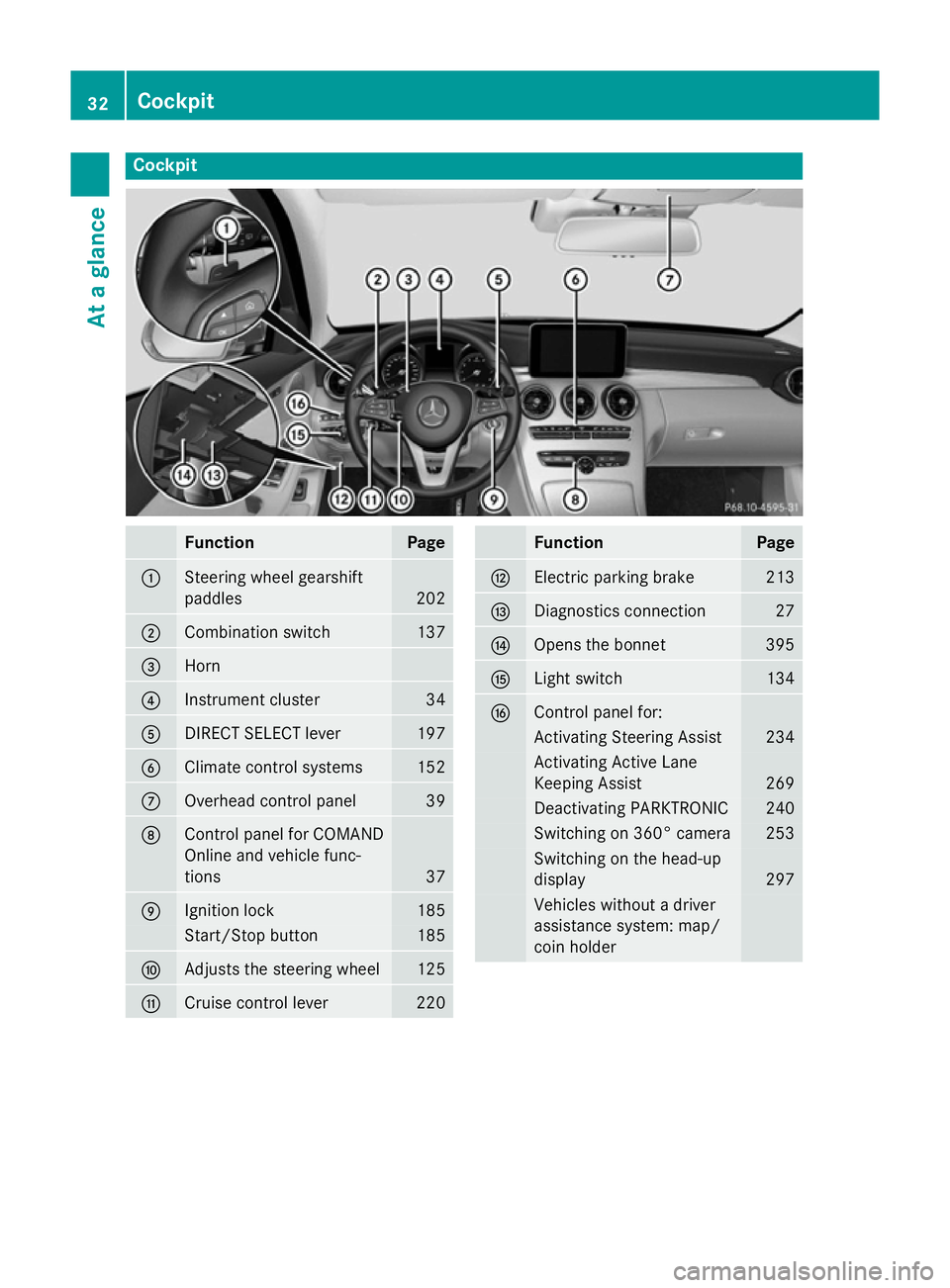
Cockpit
Function Page
:
Steering wheel gearshift
paddles
202
;
Combination switch 137
=
Horn
?
Instrument cluster 34
A
DIRECT SELECT lever 197
B
Climate control systems 152
C
Overhead control panel 39
D
Control panel for COMAND
Online and vehicle func-
tions
37
E
Ignition lock 185
Start/Stop button 185
F
Adjusts the steering wheel 125
G
Cruise control lever 220 Function Page
H
Electric parking brake 213
I
Diagnostics connection 27
J
Opens the bonnet 395
K
Light switch 134
L
Control panel for:
Activating Steering Assist 234
Activating Active Lane
Keeping Assist 269
Deactivating PARKTRONIC 240
Switching on 360° camera 253
Switching on the head-up
display
297
Vehicles without a driver
assistance system: map/
coin holder32
CockpitAt a glance
Page 36 of 489
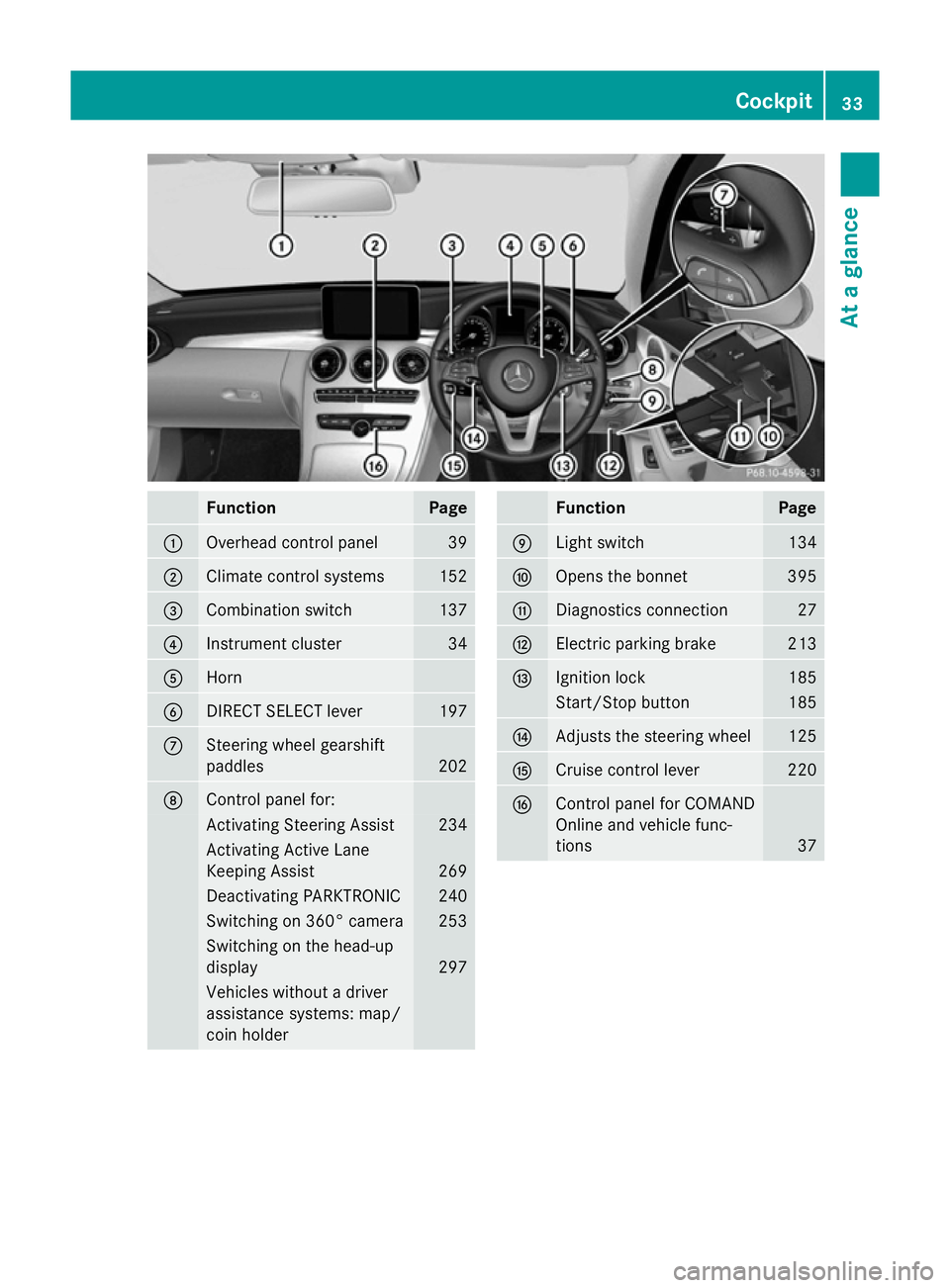
Function Page
:
Overhead control panel 39
;
Climate control systems 152
=
Combination switch 137
?
Instrument cluster 34
A
Horn
B
DIRECT SELECT lever 197
C
Steering wheel gearshift
paddles
202
D
Control panel for:
Activating Steering Assist 234
Activating Active Lane
Keeping Assist
269
Deactivating PARKTRONIC 240
Switching on 360° camera 253
Switching on the head-up
display
297
Vehicles without a driver
assistance systems: map/
coin holder Function Page
E
Light switch 134
F
Opens the bonnet 395
G
Diagnostics connection 27
H
Electric parking brake 213
I
Ignition lock 185
Start/Stop button 185
J
Adjusts the steering wheel 125
K
Cruise control lever 220
L
Control panel for COMAND
Online and vehicle func-
tions
37Cockpit
33At a glance
Page 53 of 489
the door trim panel and the seat belt. Dam-
aged seat belts can no longer fulfil their
protective function and must be replaced.
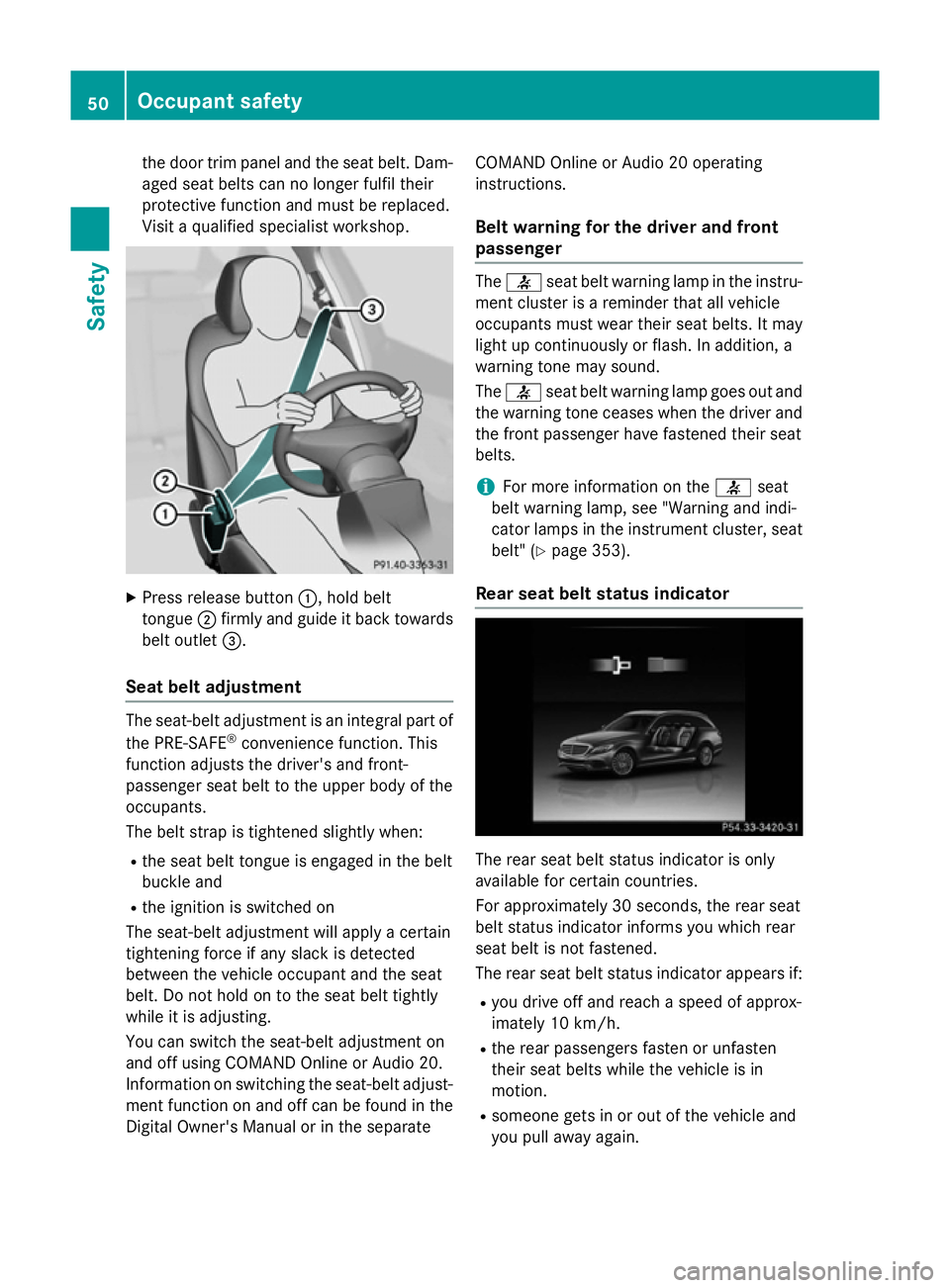
Visit a qualified specialist workshop. X
Press release button :, hold belt
tongue ;firmly and guide it back towards
belt outlet =.
Seat belt adjustment The seat-belt adjustment is an integral part of
the PRE-SAFE ®
convenience function. This
function adjusts the driver's and front-
passenger seat belt to the upper body of the
occupants.
The belt strap is tightened slightly when:
R the seat belt tongue is engaged in the belt
buckle and
R the ignition is switched on
The seat-belt adjustment will apply a certain
tightening force if any slack is detected
between the vehicle occupant and the seat
belt. Do not hold on to the seat belt tightly
while it is adjusting.
You can switch the seat-belt adjustment on
and off using COMAND Online or Audio 20.
Information on switching the seat-belt adjust-
ment function on and off can be found in the
Digital Owner's Manual or in the separate COMAND Online or Audio 20 operating
instructions.
Belt warning for the driver and front
passenger The
7 seat belt warning lamp in the instru-
ment cluster is a reminder that all vehicle
occupants must wear their seat belts. It may
light up continuously or flash. In addition, a
warning tone may sound.
The 7 seat belt warning lamp goes out and
the warning tone ceases when the driver and
the front passenger have fastened their seat
belts.
i For more information on the
7seat
belt warning lamp, see "Warning and indi-
cator lamps in the instrument cluster, seat
belt" (Y page 353).
Rear seat belt status indicator The rear seat belt status indicator is only
available for certain countries.
For approximately 30 second s,the rear seat
belt status indicator informs you which rear
seat belt is not fastened.
The rear seat belt status indicator appears if:
R you drive off and reach a speed of approx-
imately 10 km/h.
R the rear passengers fasten or unfasten
their seat belts while the vehicle is in
motion.
R someone gets in or out of the vehicle and
you pull away again. 50
Occupant safetySafety
Page 143 of 489
Adaptive Highbeam Assist Plus cannot take
into account road, weather or traffic condi-
tions. Adaptive Highbeam Assist Plus is only
an aid. You are responsible for adjusting the
vehicle's lighting to the prevailing light, visi-
bility and traffic conditions.
In particular, the detection of obstacles can
be restricted if there is:
R poor visibility, e.g. due to fog, heavy rain or
snow
R dirt on the sensors or if the sensors are
obscured
Switching Adaptive Highbeam Assist
PLUS on/off X
To switch on: turn the light switch to Ã.
X Press the combination switch beyond the
pressure point in the direction of arrow :.
The _ indicator lamp in the multifunc-
tion display lights up when it is dark and the light sensor activates the dipped-beam
headlamps.
If you are driving at speeds above 25 km/h:
The headlamp range is set automatically
depending on the distance between the
vehicle and other road users.
If you are driving at speeds above approx-
imately 30 km/h and no other road users
are recognised:
The main-beam headlamps are switched on
automatically. The Kindicator lamp in
the instrument cluster also lights up.
If you are driving at speeds above 45 km/h and other road users are recognised:
Partial main-beam is selected automati-
cally. The Kindicator lamp in the instru-
ment cluster also lights up.
If you are driving at speeds below approx-
imately 40 km/h:
The partial main-beam headlamps are
switched off automatically. If no other road users are recognised, the main-beam head-
lamps are switched on. If you are driving at speeds below approx-
imately 25 km/h or the roads are ade-
quately illuminated:
The main-beam headlamps are switched off
automatically. The Kindicator lamp in
the instrument cluster goes out. The _
indicator lamp in the multifunction display
remains lit.
X To switch off: move the combination
switch back to its normal position or move the light switch to another position.
The _ indicator lamp in the multifunc-
tion display goes out. Headlamps misted up on the inside
Certain climatic and physical conditions may
cause moisture to form in the headlamp. This
moisture does not affect the functionality of
the headlamp. Interior lighting
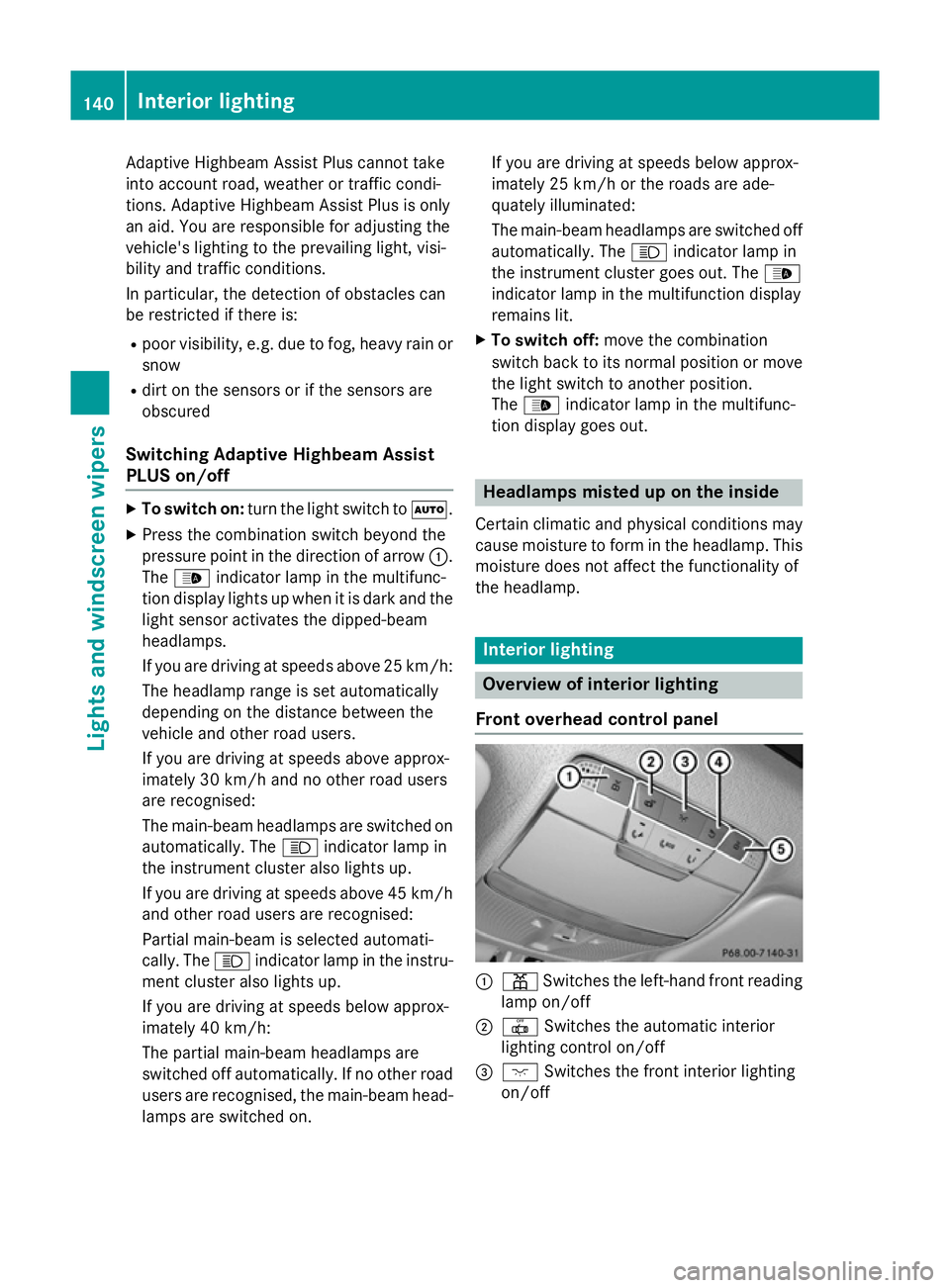
Overview of interior lighting
Front overhead control panel :
p Switches the left-hand front reading
lamp on/off
; | Switches the automatic interior
lighting control on/off
= c Switches the front interior lighting
on/off 140
Interior lightingLights and
windscreen wipers
Page 298 of 489
The segments light up from the stored
speed to the maximum speed.
R Variable SPEEDTRONIC activated
(Y page 223):
The segments light up from the start of the
scale to the selected limit speed.
R DISTRONIC PLUS activated (Y page 226):
One or two segments in the set speed
range light up.
R DISTRONIC PLUS detects a vehicle in front
that is driving at a slower speed than the
stored speed:
The segments between the speed of the
vehicle in front and the stored speed light
up. Rev counter
! Do not drive in the overrevving range.
Doing so will damage the engine.
The red band in the rev counter indicates the engine's overrevving range.
The fuel supply is interrupted to protect the
engine when the red band is reached. Outside temperature display
You should pay special attention to road con- ditions when temperatures are around the
freezing point.
Bear in mind that the outside temperature
display indicates the temperature measured
and does not record the road temperature.
The outside temperature display is in the mul-
tifunction display (Y page 297).
Changes in the outside temperature are dis-
played after a short delay. Coolant temperature gauge
G
WARNING
If you open the bonnet while the engine is
overheating or while there is a fire in the
engine compartment, you could come into contact with hot gases or other leaking ser-
vice products. There is a danger of injury.
Allow an overheating engine to cool down
before opening the bonnet. If there is a fire in
the engine compartment, leave the bonnet
closed and notify the fire brigade.
The analogue coolant temperature gauge is in
the instrument cluster on the right-hand side (Y page 34).
In the on-board computer in the Service Service
menu there is a digital coolant temperature
gauge (Y page 309).
Under normal operating conditions and with
the specified coolant level, the coolant tem-
perature may rise to 120 †.
At high outside temperatures and when driv-
ing uphill, the coolant temperature may rise
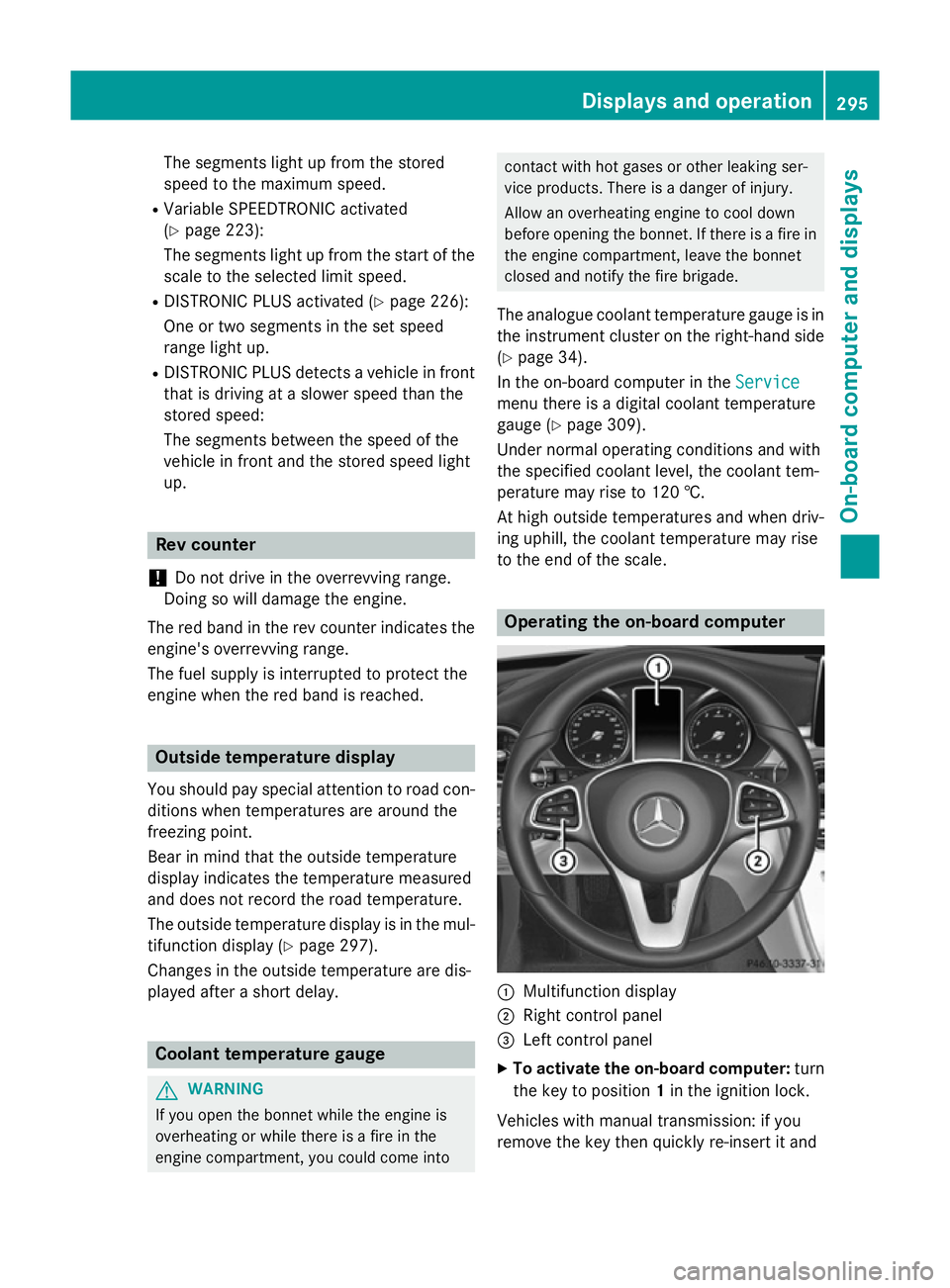
to the end of the scale. Operating the on-board computer
:
Multifunction display
; Right control panel
= Left control panel
X To activate the on-board computer: turn
the key to position 1in the ignition lock.
Vehicles with manual transmission: if you
remove the key then quickly re-insert it and Displays and operation
295On-board computer and displays Z
Page 299 of 489
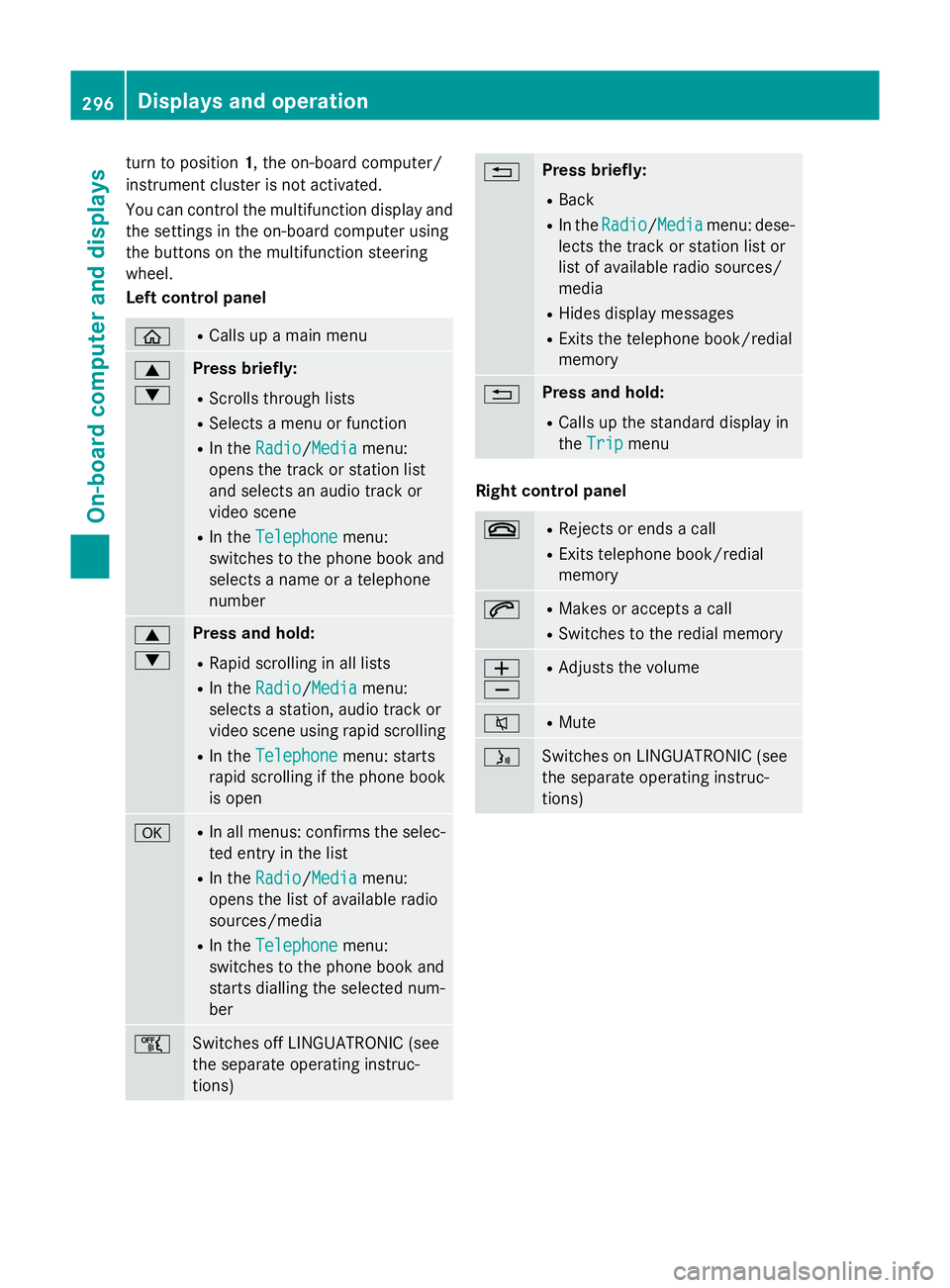
turn to position
1, the on-board computer/
instrument cluster is not activated.
You can control the multifunction display and
the settings in the on-board computer using
the buttons on the multifunction steering
wheel.
Left control panel ò R
Calls up a main menu 9
: Press briefly:
R Scrolls through lists
R Selects a menu or function
R In the Radio Radio/ Media
Mediamenu:
opens the track or station list
and selects an audio track or
video scene
R In the Telephone Telephone menu:
switches to the phone book and
selects a name or a telephone
number 9
: Press and hold:
R Rapid scrolling in all lists
R In the Radio Radio/ Media
Mediamenu:
selects a station, audio track or
video scene using rapid scrolling
R In the Telephone
Telephone menu: starts
rapid scrolling if the phone book is open a R
In all menus: confirms the selec-
ted entry in the list
R In the Radio
Radio/ Media
Media menu:
opens the list of available radio
sources/media
R In the Telephone
Telephone menu:
switches to the phone book and
starts dialling the selected num-
ber ñ
Switches off LINGUATRONIC (see
the separate operating instruc-
tions) % Press briefly:
R Back
R In the Radio Radio/ Media
Mediamenu: dese-
lects the track or station list or
list of available radio sources/
media
R Hides display messages
R Exits the telephone book/redial
memory % Press and hold:
R Calls up the standard display in
the Trip Trip menu Right control panel
~ R
Rejects or ends a call
R Exits telephone book/redial
memory 6 R
Makes or accepts a call
R Switches to the redial memory W
X R
Adjusts the volume 8 R
Mute ó
Switches on LINGUATRONIC (see
the separate operating instruc-
tions)296
Displays and operationOn-boa
rdcompu ter and displays
Page 300 of 489
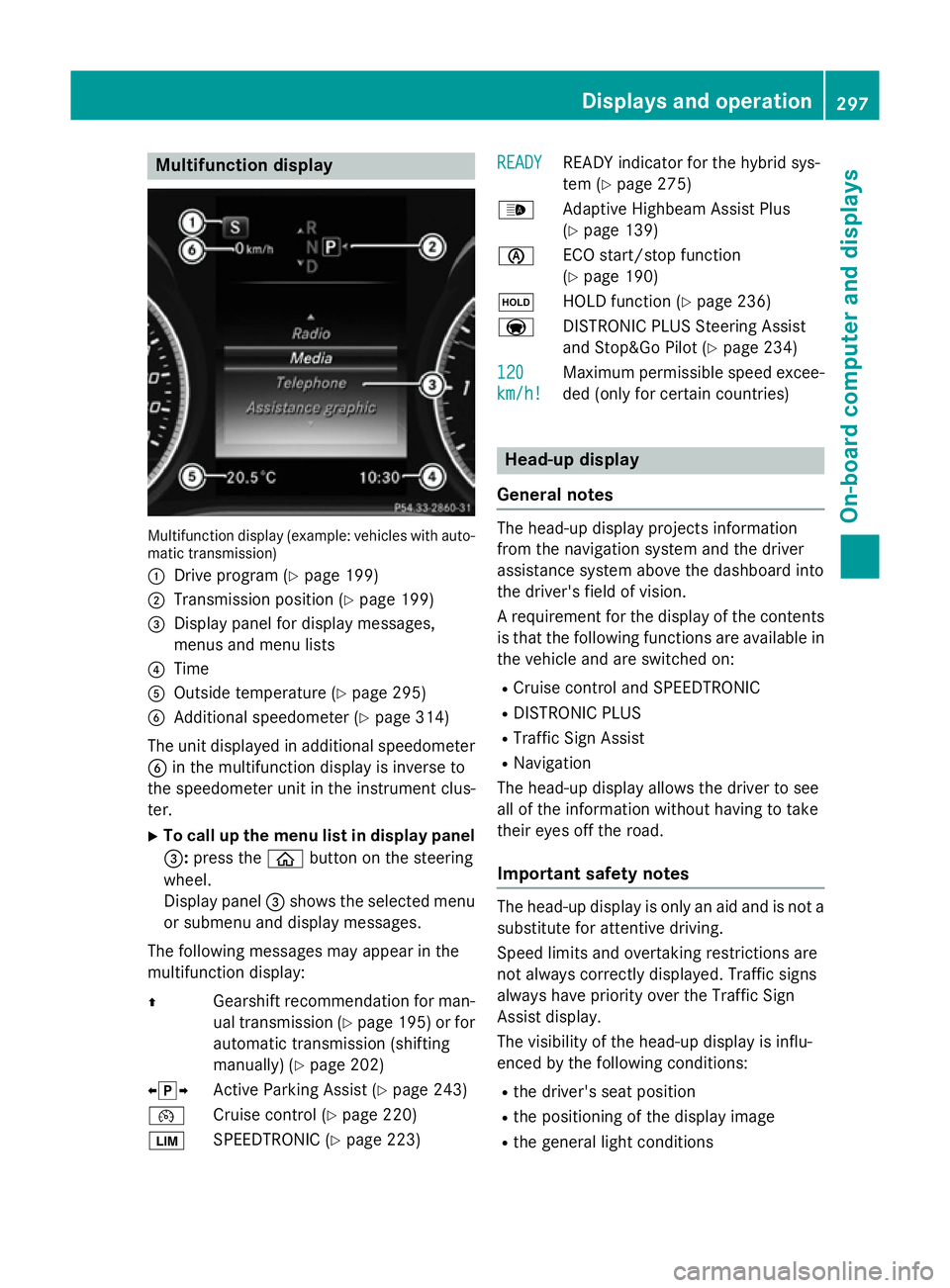
Multifunction display
Multifunction display (example: vehicles with auto-
matic transmission)
: Drive program (Y page 199)
; Transmission position (Y page 199)
= Display panel for display messages,
menus and menu lists
? Time
A Outside temperature (Y page 295)
B Additional speedometer (Y page 314)
The unit displayed in additional speedometer
B in the multifunction display is inverse to
the speedometer unit in the instrument clus-
ter.
X To call up the menu list in display panel
=: press the òbutton on the steering
wheel.
Display panel =shows the selected menu
or submenu and display messages.
The following messages may appear in the
multifunction display:
Z Gearshift recommendation for man-
ual transmission (Y page 195) or for
automatic transmission (shifting
manually) (Y page 202)
XjY Active Parking Assist (Y page 243)
¯ Cruise control (Y page 220)
È SPEEDTRONIC (Y page 223) READY
READY READY indicator for the hybrid sys-
tem (Y
page 275)
_ Adaptive Highbeam Assist Plus
(Ypage 139)
è ECO start/stop function
(Ypage 190)
ë HOLD function (Y page 236)
a DISTRONIC PLUS Steering Assist
and Stop&Go Pilot (Y page 234)
120
120
km/h! km/h! Maximum permissible speed excee-
ded (only for certain countries) Head-up display
General notes The head-up display projects information
from the navigation system and the driver
assistance system above the dashboard into
the driver's field of vision.
A requirement for the display of the contents
is that the following functions are available in the vehicle and are switched on:
R Cruise control and SPEEDTRONIC
R DISTRONIC PLUS
R Traffic Sign Assist
R Navigation
The head-up display allows the driver to see
all of the information without having to take
their eyes off the road.
Important safety notes The head-up display is only an aid and is not a
substitute for attentive driving.
Speed limits and overtaking restrictions are
not always correctly displayed. Traffic signs
always have priority over the Traffic Sign
Assist display.
The visibility of the head-up display is influ-
enced by the following conditions:
R the driver's seat position
R the positioning of the display image
R the general light conditions Displays and operation
297On-board computer and displays Z