low beam MERCEDES-BENZ C-CLASS ESTATE 2014 Owners Manual
[x] Cancel search | Manufacturer: MERCEDES-BENZ, Model Year: 2014, Model line: C-CLASS ESTATE, Model: MERCEDES-BENZ C-CLASS ESTATE 2014Pages: 489, PDF Size: 15.08 MB
Page 7 of 489
1, 2, 3 ...
4ETS see ETS/4ETS (Electronic Trac-
tion System)
4MATIC (permanent four-wheel
drive) .................................................. 239
4MATIC off-road system ...................239
12 V socket
see Sockets
230 V power socket .......................... 386
360° camera
Cleaning ......................................... 405
Function/notes ............................ .253 A
ABS (Anti-lock Braking System) Display message ............................ 317
Function/notes ................................ 76
Important safety notes .................... 76
Warning lamp ................................. 357
Accident
Automatic measures after an acci-
dent ................................................. 63
Activating/deactivating air-recir-
culation mode ................................... .168
Activating/deactivating cooling
with air dehumidification ................. 161
Active Blind Spot Assist
Activating/deactivating (on-
board computer) ............................ 311
Display message ............................ 341
Function/notes ............................ .266
Towing a trailer .............................. 269
Active Lane Keeping Assist
Activating/deactivating (on-
board computer) ............................ 311
Display message ............................ 340
Function/notes ............................ .269
Towing a trailer .............................. 272
Active light function ......................... 138
Active Light System
Display message ............................ 333
Active Parking Assist
Detecting parking spaces .............. 244
Display message ............................ 341
Exiting a parking space .................. 247 Function/notes ............................
.243
Important safety notes .................. 243
Parking .......................................... 245
Towing a trailer .............................. 243
ADAPTIVE BRAKE ................................. 84
Adaptive Brake Assist
Function/notes ................................ 80
Adaptive brake lights .......................... 81
Adaptive Damping System (ADS) ..... 239
Adaptive Highbeam Assist Plus
Display message ............................ 334
Function/notes ............................ .139
Switching on/off ........................... 140
AdBlue®
Additive ......................................... 474
Display message ............................ 337
Displaying level and range ............. 309
Filling capacity ............................... 475
Important safety notes .................. 474
Low outside temperatures ............. 474
Purity ............................................. 475
Topping up ..................................... 208
Additional speedometer ................... 314
Additives (engine oil) ........................ 476
Adjusting the headlamp range ......... 136
AGILITY SELECT switch
Automatic transmission ................. 201
Climate control (THERMATIC 1-
zone) .............................................. 153
Climate control (THERMATIC 2-
zone) .............................................. 157
Climate control
(THERMOTRONIC ).......................... 160
Hybrid operation ............................ 280
Manual transmission ...................... 195
Air filter (white display message) .... 337
Air pressure
see Tyre pressure
Air vents
Important safety notes .................. 181
Rear ............................................... 182
Setting ........................................... 181
Setting the centre air vents ........... 182
Setting the side air vents ............... 182
Air-conditioning system
see Climate control 4
Index
Page 10 of 489
Brightness control (instrument
cluster lighting)
................................... 32
Buttons on the steering column ...... 295C
Calling up a fault see Display messages
Camera
see 360° camera
Car
see Vehicle
Car key
see Key
Car wash (care) ................................. 400
Care
360° camera ................................. 405
AIRPANEL ...................................... 404
Automatic car wash ....................... 400
Carpets .......................................... 408
Display ........................................... 406
Exhaust pipe .................................. 406
Exterior lighting ............................. 404
Gear or selector lever .................... 407
High-pressure cleaner .................... 402
Interior ........................................... 406
Matt paintwork .............................. 403
Note s............................................. 400
Paint .............................................. 402
Plastic trim .................................... 407
Reversing camera .......................... 405
Roof lining ...................................... 408
Seat belt ........................................ 408
Seat cove r..................................... 407
Sensors ......................................... 405
Steering wheel ............................... 407
Trim pieces .................................... 407
Washing by hand ........................... 402
Wheels ........................................... 403
Windows ........................................ 403
Wiper blades .................................. 404
Wooden trim .................................. 407
CD player/CD changer(on-board
computer) .......................................... 305
Central locking
Locking/unlocking (key) .................. 91
Centre console
Lower section .................................. 38 Upper section .................................. 37
Changing bulbs
Dipped-beam headlamp s............... 143
Main-beam headlamp s................... 143
Reversing lamps ............................ 144
Turn signals (front) ......................... 144
Turn signals (rear) .......................... 144
Charge status of high-voltage bat-
tery ..................................................... 276
Child seat
Forward-facing restraint system ...... 68
ISOFIX .............................................. 65
On the front-passenger sea t............ 66
Rearward-facing restraint system .... 67
Recommendations ........................... 72
Suitable positions ............................ 68
Top Tether ....................................... 65
Child-proof locks
Important safety notes .................... 74
Rear doors ....................................... 75
Children
In the vehicl e................................... 63
Restraint systems ............................ 64
Cigarette lighter ................................ 384
Cleaning
Mirror turn signal ........................... 404
Trailer tow hitch ............................. 406
Climate control
Auxiliary heating/ventilation .......... 176
Controlling automaticall y............... 162
Convenience opening/closing
(air-recirculation mode) ................. 168
Cooling with air dehumidification .. 161
Demisting the windows .................. 166
Demisting the windscreen ............. 166
ECO start/stop function ................ 160
ECO start/stop function
(THERMATIC 1-zone) ............. 153, 154
ECO start/stop function
(THERMATIC 2-zone) ............. 156, 157
Hybrid vehicle (THERMOTRONIC ).. 160
Hybrid vehicles (THERMATIC) ........ 156
Important safety notes .................. 152
Indicator lamp ................................ 162
Information about using
THERMATIC automatic climate
control (1 ‑zone) ............................. 153 Index
7
Page 38 of 489
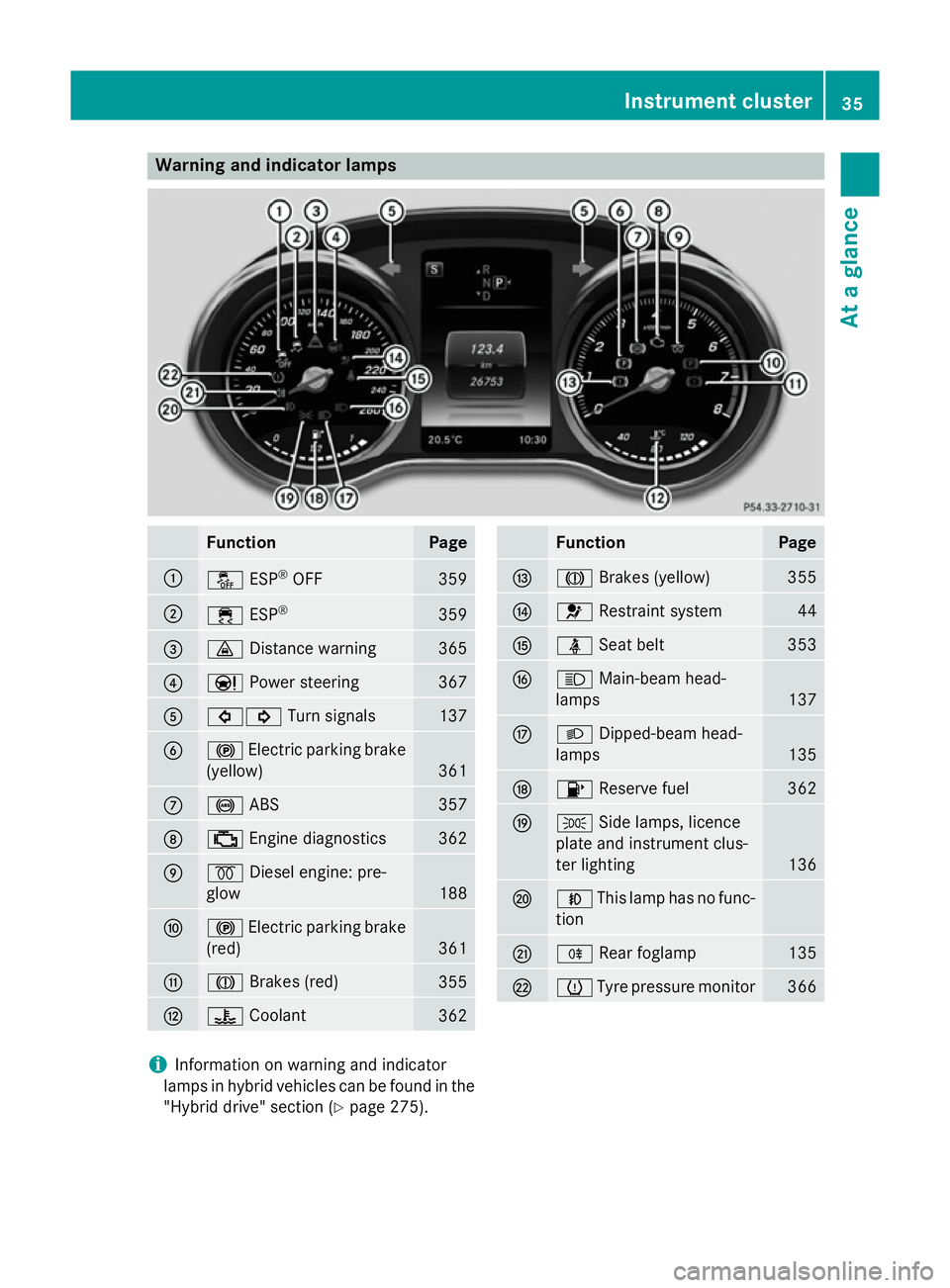
Warning and indicator lamps
Function Page
:
å
ESP®
OFF 359
;
÷
ESP® 359
=
·
Distance warning 365
?
Ð
Power steering 367
A
#!
Turn signals 137
B
!
Electric parking brake
(yellow) 361
C
!
ABS 357
D
;
Engine diagnostics 362
E
%
Diesel engine: pre-
glow 188
F
!
Electric parking brake
(red) 361
G
J
Brakes (red) 355
H
?
Coolant 362 Function Page
I
J
Brakes (yellow) 355
J
6
Restraint system 44
K
ü
Seat belt 353
L
K
Main-beam head-
lamps 137
M
L
Dipped-beam head-
lamps 135
N
8
Reserve fuel 362
O
T
Side lamps, licence
plate and instrument clus-
ter lighting 136
P
N
This lamp has no func-
tion Q
R
Rear foglamp 135
R
h
Tyre pressure monitor 366
i
Information on warning and indicator
lamps in hybrid vehicles can be found in the
"Hybrid drive" section (Y page 275). Instrument cluster
35At a glance
Page 138 of 489
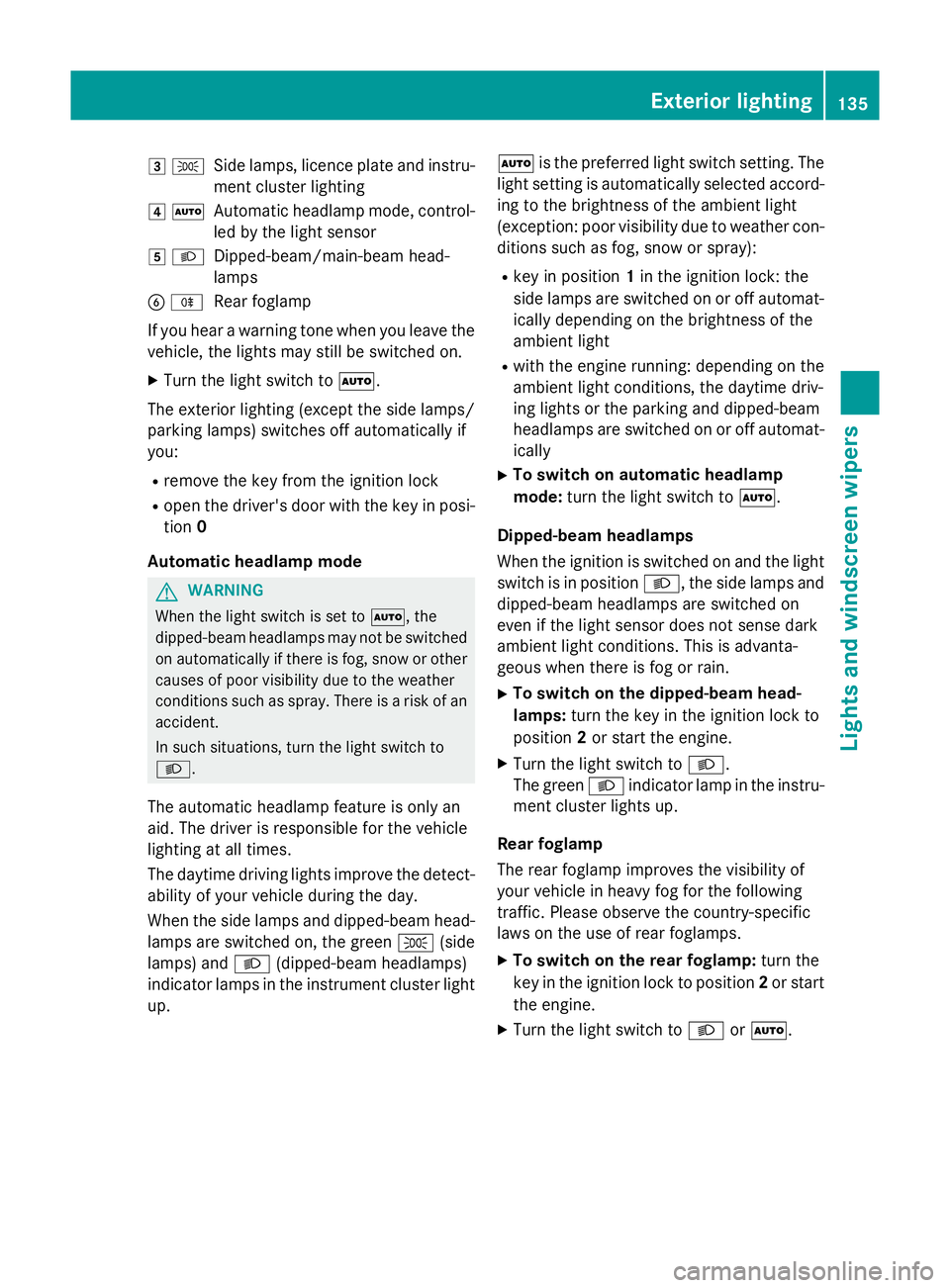
3
T
Side lamps, licence plate and instru-
ment cluster lighting
4 Ã
Automatic headlamp mode, control-
led by the light sensor
5 L
Dipped-beam/main-beam head-
lamps
B R
Rear foglamp
If you hear a warning tone when you leave the
vehicle, the lights may still be switched on.
X Turn the light switch to Ã.
The exterior lighting (except the side lamps/
parking lamps) switches off automatically if
you:
R remove the key from the ignition lock
R open the driver's door with the key in posi-
tion 0
Automatic headlamp mode G
WARNING
When the light switch is set to Ã, the
dipped-beam headlamps may not be switched on automatically if there is fog, snow or othercauses of poor visibility due to the weather
conditions such as spray. There is a risk of an
accident.
In such situations, turn the light switch to
L.
The automatic headlamp feature is only an
aid. The driver is responsible for the vehicle
lighting at all times.
The daytime driving lights improve the detect- ability of your vehicle during the day.
When the side lamps and dipped-beam head-lamps are switched on, the green T(side
lamps) and L(dipped-beam headlamps)
indicator lamps in the instrument cluster light
up. Ã
is the preferred light switch setting. The
light setting is automatically selected accord- ing to the brightness of the ambient light
(exception: poor visibility due to weather con-
ditions such as fog, snow or spray):
R key in position 1in the ignition lock: the
side lamps are switched on or off automat- ically depending on the brightness of the
ambient light
R with the engine running: depending on the
ambient light conditions, the daytime driv-
ing lights or the parking and dipped-beam
headlamps are switched on or off automat-
ically
X To switch on automatic headlamp
mode: turn the light switch to Ã.
Dipped-beam headlamps
When the ignition is switched on and the light switch is in position L, the side lamps and
dipped-beam headlamps are switched on
even if the light sensor does not sense dark
ambient light conditions. This is advanta-
geous when there is fog or rain.
X To switch on the dipped-beam head-
lamps: turn the key in the ignition lock to
position 2or start the engine.
X Turn the light switch to L.
The green Lindicator lamp in the instru-
ment cluster lights up.
Rear foglamp
The rear foglamp improves the visibility of
your vehicle in heavy fog for the following
traffic. Please observe the country-specific
laws on the use of rear foglamps.
X To switch on the rear foglamp: turn the
key in the ignition lock to position 2or start
the engine.
X Turn the light switch to LorÃ. Exterior lighting
135Lights and windscreen wipers Z
Page 141 of 489
Intelligent Light System
General notes The Intelligent Light System is a system that
adjusts the headlamps automatically to suit
the prevailing driving and weather conditions. It offers advanced functions for improved illu-
mination of the road surface, e.g. depending
on the vehicle speed or weather conditions.
The system includes the active light function,
cornering light function, motorway mode and extended range foglamps. The system is only
active when it is dark.
You can activate or deactivate the "Intelligent Light System" function using the on-board
computer (Y page 313).
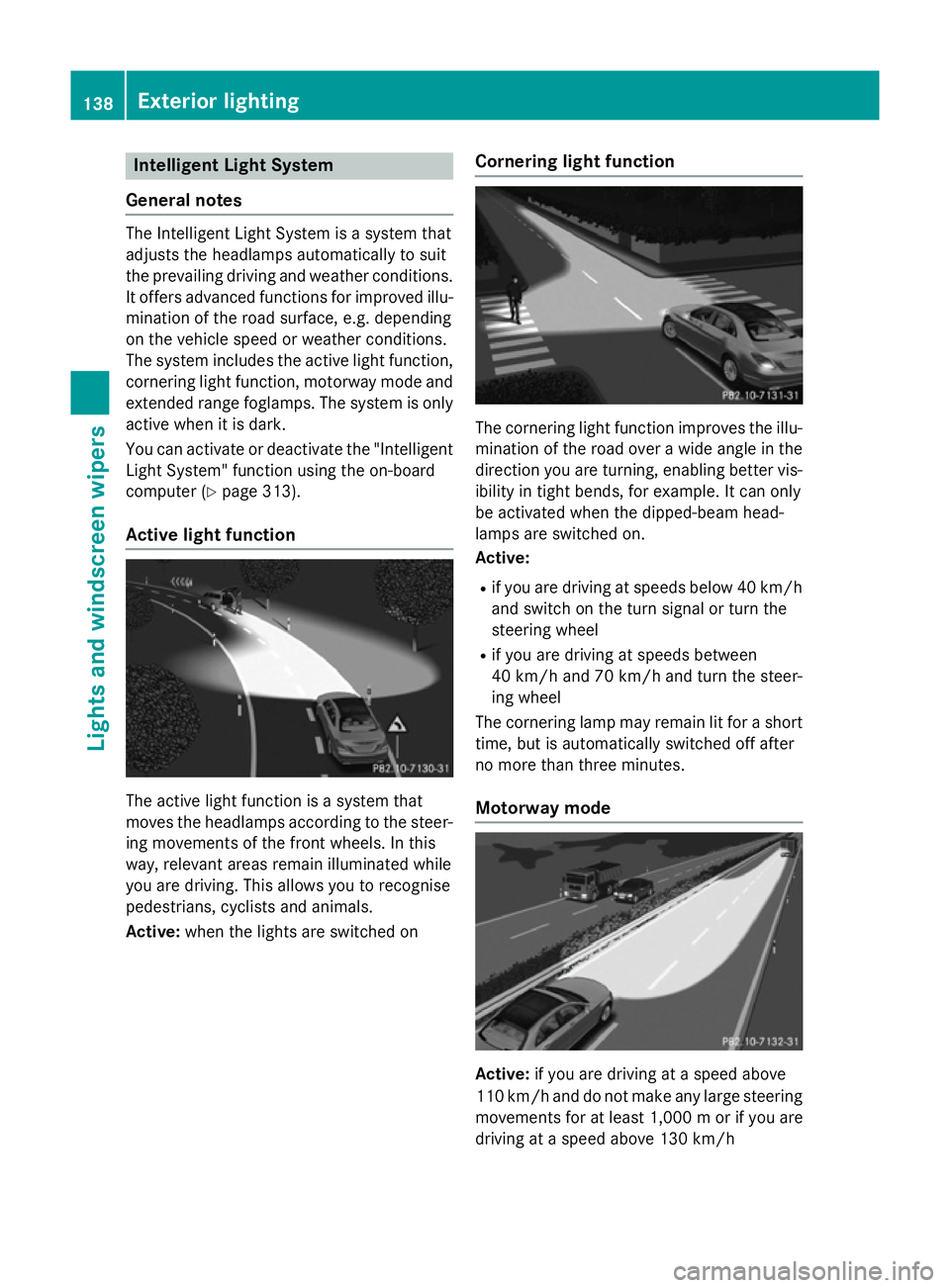
Active light function The active light function is a system that
moves the headlamps according to the steer-
ing movements of the front wheels. In this
way, relevant areas remain illuminated while
you are driving. This allows you to recognise
pedestrians, cyclists and animals.
Active: when the lights are switched on Cornering light function The cornering light function improves the illu-
mination of the road over a wide angle in the direction you are turning, enabling better vis-
ibility in tight bends, for example. It can only
be activated when the dipped-beam head-
lamps are switched on.
Active:
R if you are driving at speeds below 40 km/h
and switch on the turn signal or turn the
steering wheel
R if you are driving at speeds between
40 km/h and 70 km/h and turn the steer-
ing wheel
The cornering lamp may remain lit for a short
time, but is automatically switched off after
no more than three minutes.
Motorway mode Active:
if you are driving at a speed above
110 km/h and do not make any large steering
movements for at least 1,000 mor if you are
driving at a speed above 130 km/h 138
Exterior lightingLights and windscreen wipers
Page 142 of 489
Not active:
if you are driving at speeds below
80 km/h following activation
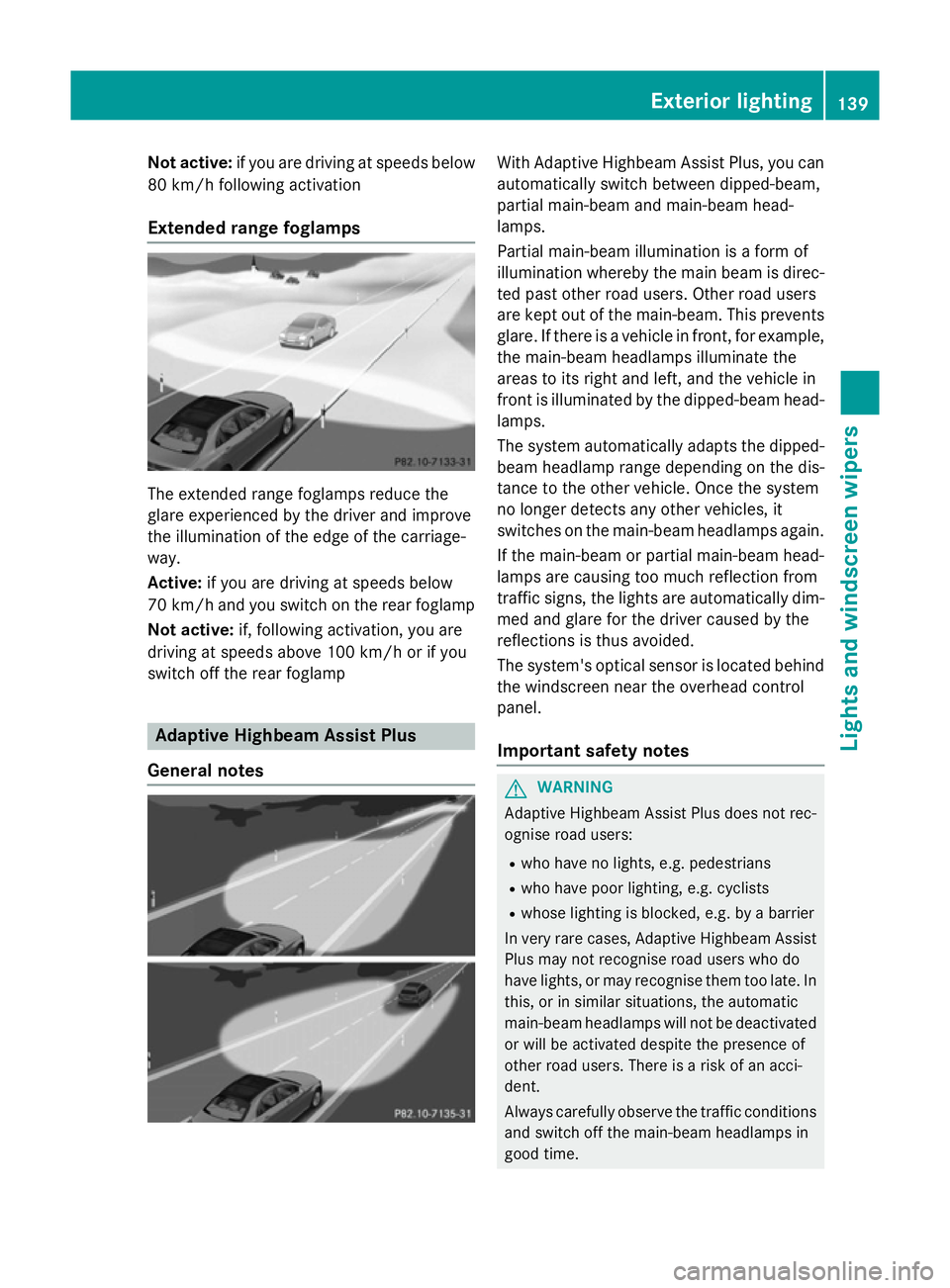
Extended range foglamps The extended range foglamps reduce the
glare experienced by the driver and improve
the illumination of the edge of the carriage-
way.
Active: if you are driving at speeds below
70 km/h and you switch on the rear foglamp
Not active: if, following activation, you are
driving at speeds above 100 km/h or if you
switch off the rear foglamp Adaptive Highbeam Assist Plus
General notes With Adaptive Highbeam Assist Plus, you can
automatically switch between dipped-beam,
partial main-beam and main-beam head-
lamps.
Partial main-beam illumination is a form of
illumination whereby the main beam is direc-
ted past other road users. Other road users
are kept out of the main-beam. This prevents
glare. If there is a vehicle in front, for example, the main-beam headlamps illuminate the
areas to its right and left, and the vehicle in
front is illuminated by the dipped-beam head-
lamps.
The system automatically adapts the dipped-
beam headlamp range depending on the dis-
tance to the other vehicle. Once the system
no longer detects any other vehicles, it
switches on the main-beam headlamps again.
If the main-beam or partial main-beam head-
lamps are causing too much reflection from
traffic signs, the lights are automatically dim- med and glare for the driver caused by the
reflections is thus avoided.
The system's optical sensor is located behind
the windscreen near the overhead control
panel.
Important safety notes G
WARNING
Adaptive Highbeam Assist Plus does not rec-
ognise road users:
R who have no lights, e.g. pedestrians
R who have poor lighting, e.g. cyclists
R whose lighting is blocked, e.g. by a barrier
In very rare cases, Adaptive Highbeam Assist
Plus may not recognise road users who do
have lights, or may recognise them too late. In this, or in similar situations, the automatic
main-beam headlamps will not be deactivated
or will be activated despite the presence of
other road users. There is a risk of an acci-
dent.
Always carefully observe the traffic conditions and switch off the main-beam headlamps in
good time. Exterior lighting
139Lights andwindscreen wipers Z
Page 143 of 489
Adaptive Highbeam Assist Plus cannot take
into account road, weather or traffic condi-
tions. Adaptive Highbeam Assist Plus is only
an aid. You are responsible for adjusting the
vehicle's lighting to the prevailing light, visi-
bility and traffic conditions.
In particular, the detection of obstacles can
be restricted if there is:
R poor visibility, e.g. due to fog, heavy rain or
snow
R dirt on the sensors or if the sensors are
obscured
Switching Adaptive Highbeam Assist
PLUS on/off X
To switch on: turn the light switch to Ã.
X Press the combination switch beyond the
pressure point in the direction of arrow :.
The _ indicator lamp in the multifunc-
tion display lights up when it is dark and the light sensor activates the dipped-beam
headlamps.
If you are driving at speeds above 25 km/h:
The headlamp range is set automatically
depending on the distance between the
vehicle and other road users.
If you are driving at speeds above approx-
imately 30 km/h and no other road users
are recognised:
The main-beam headlamps are switched on
automatically. The Kindicator lamp in
the instrument cluster also lights up.
If you are driving at speeds above 45 km/h and other road users are recognised:
Partial main-beam is selected automati-
cally. The Kindicator lamp in the instru-
ment cluster also lights up.
If you are driving at speeds below approx-
imately 40 km/h:
The partial main-beam headlamps are
switched off automatically. If no other road users are recognised, the main-beam head-
lamps are switched on. If you are driving at speeds below approx-
imately 25 km/h or the roads are ade-
quately illuminated:
The main-beam headlamps are switched off
automatically. The Kindicator lamp in
the instrument cluster goes out. The _
indicator lamp in the multifunction display
remains lit.
X To switch off: move the combination
switch back to its normal position or move the light switch to another position.
The _ indicator lamp in the multifunc-
tion display goes out. Headlamps misted up on the inside
Certain climatic and physical conditions may
cause moisture to form in the headlamp. This
moisture does not affect the functionality of
the headlamp. Interior lighting
Overview of interior lighting
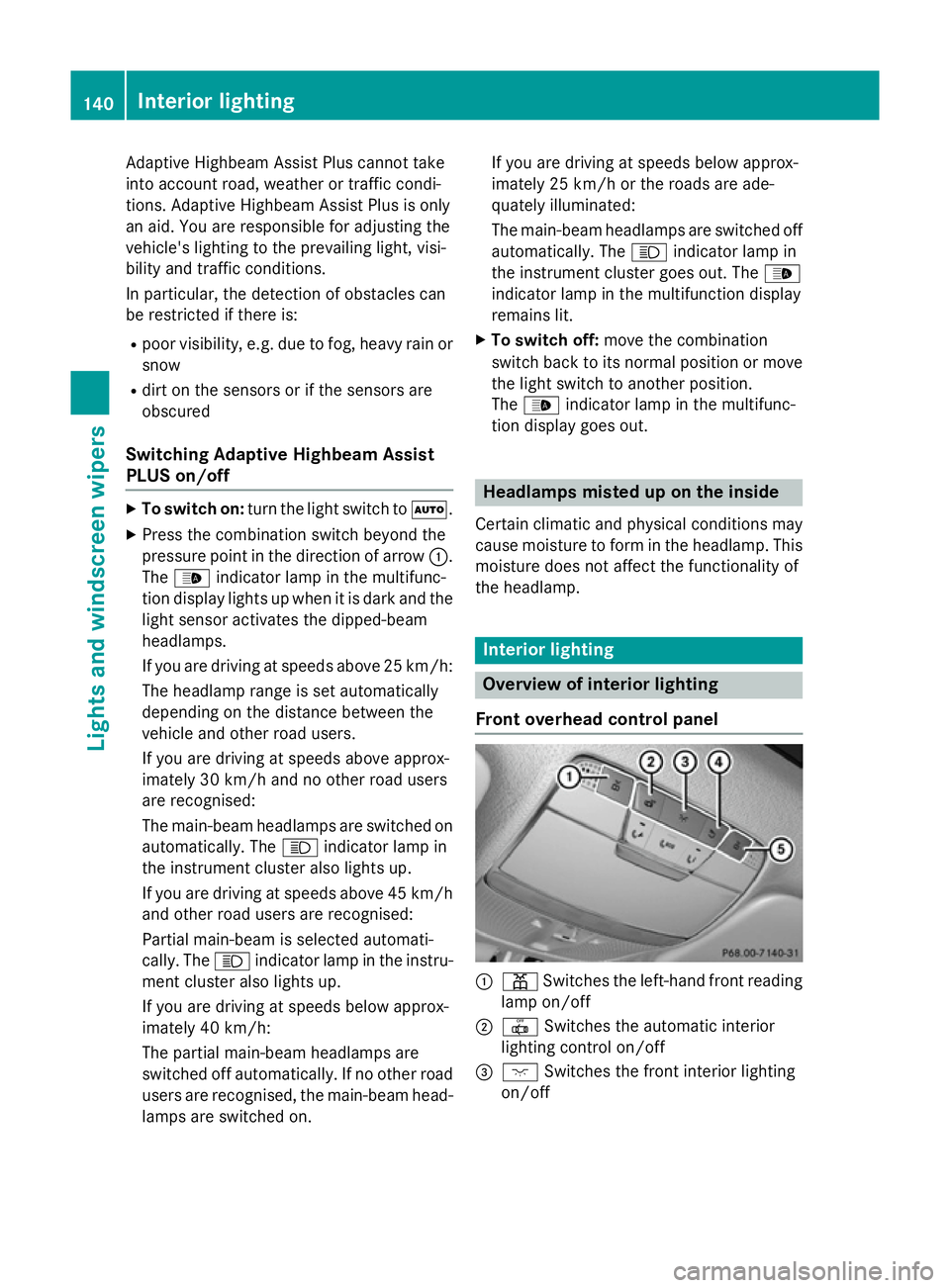
Front overhead control panel :
p Switches the left-hand front reading
lamp on/off
; | Switches the automatic interior
lighting control on/off
= c Switches the front interior lighting
on/off 140
Interior lightingLights and
windscreen wipers
Page 145 of 489
R
you drop it
R you scratch it
Only operate bulbs in enclosed lamps
designed for that purpose. Only fit spare
bulbs of the same type and the specified volt- age.
Marks on the glass tube reduce the service
life of the bulbs. Do not touch the glass tube
with your bare hands. If necessary, clean the
glass tube when cold with alcohol or spirit and
rub it off with a lint-free cloth.
Protect bulbs from moisture during opera-
tion. Do not allow bulbs to come into contact
with liquids.
Replace only the bulbs listed (Y page 142).
Have the bulbs that you cannot replace your-
self replaced at a qualified specialist work-
shop.
If you require assistance replacing bulbs, con-
sult a qualified specialist workshop.
If the new bulb still does not light up, consult a qualified specialist workshop.
Bulbs and lamps are an important aspect of
vehicle safety. You must therefore make sure
that these function correctly at all times.
Have the headlamp setting checked regularly.
Vehicles with LED headlamps: the front
light clusters of your vehicle are equipped
with LED light bulbs. Do not replace the bulbs
yourself. Contact a qualified specialist work-
shop which has the necessary specialist
knowledge and tools to carry out the work
required. Overview of bulb types
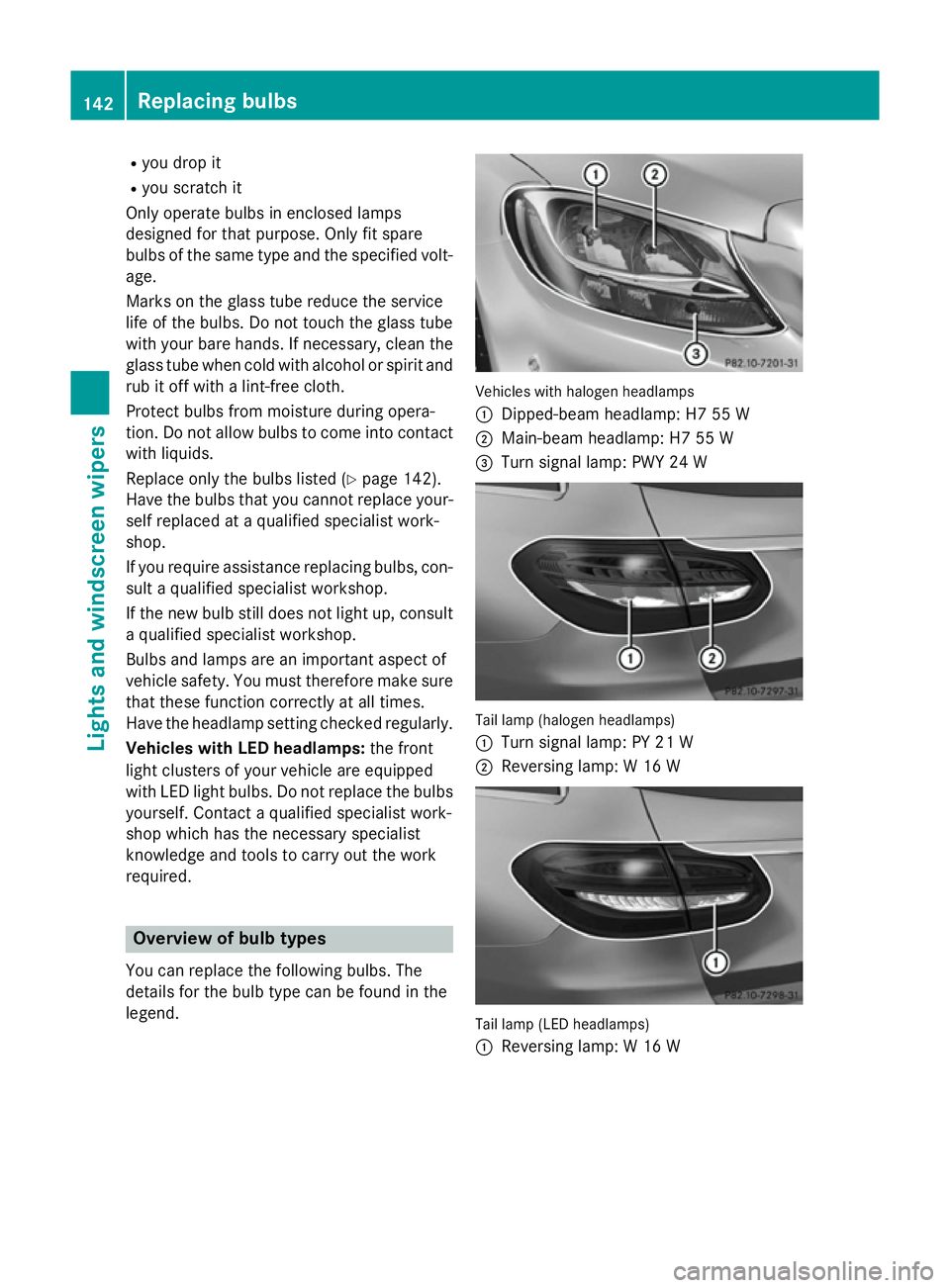
You can replace the following bulbs. The
details for the bulb type can be found in the
legend. Vehicles with halogen headlamps
:
Dipped-beam headlamp: H7 55 W
; Main-beam headlamp: H7 55 W
= Turn signal lamp: PWY 24 W Tail lamp (halogen headlamps)
:
Turn signal lamp: PY 21 W
; Reversing lamp: W 16 W Tail lamp (LED headlamps)
:
Reversing lamp: W 16 W 142
Replacing bulbsLigh
ts and windscreen wipers
Page 146 of 489
Replacing front bulbs (vehicles with
halogen headlamps)
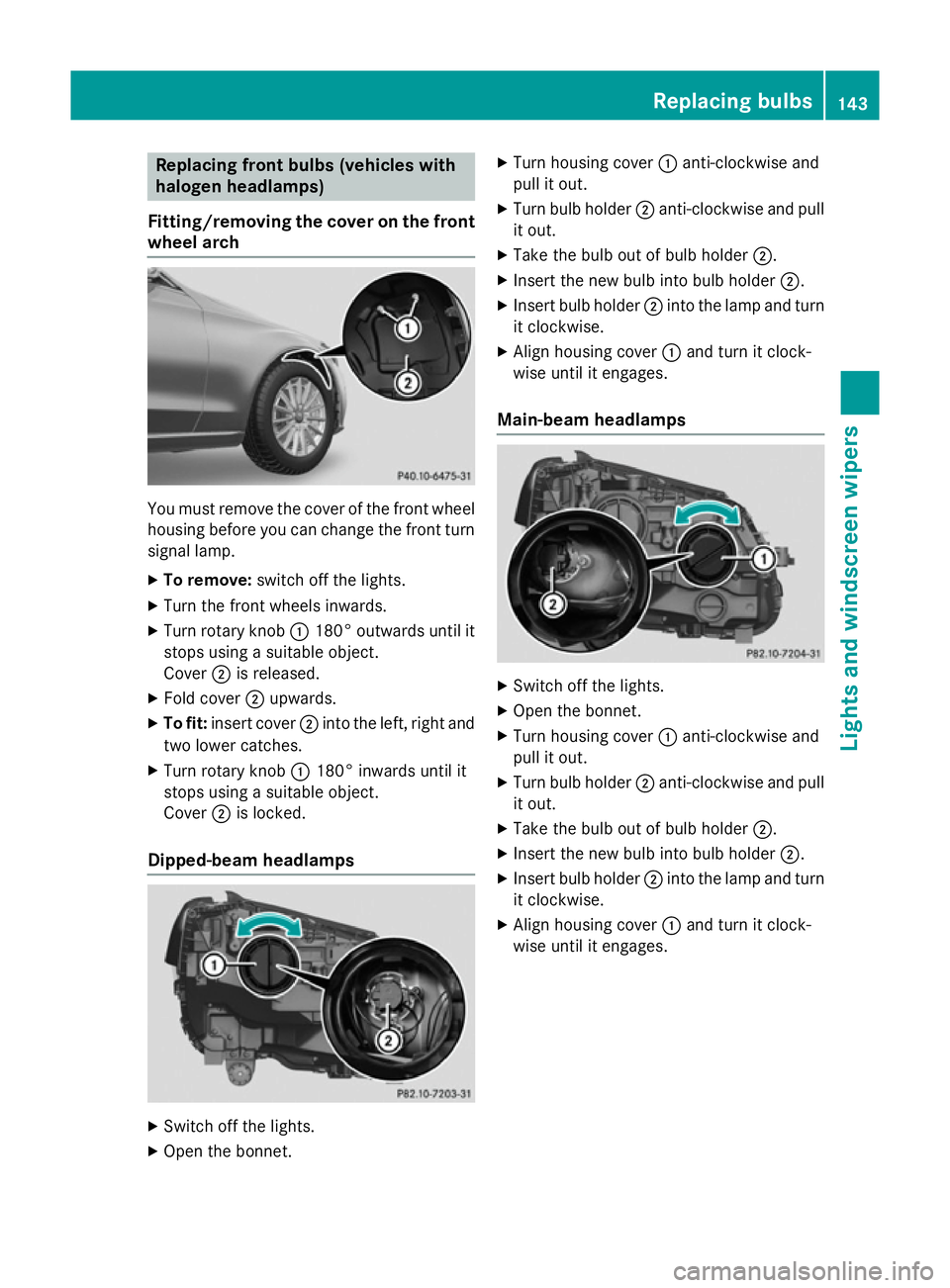
Fitting/removing the cover on the front wheel arch You must remove the cover of the front wheel
housing before you can change the front turn signal lamp.
X To remove: switch off the lights.
X Turn the front wheels inwards.
X Turn rotary knob :180° outwards until it
stops using a suitable object.
Cover ;is released.
X Fold cover ;upwards.
X To fit: insert cover ;into the left, right and
two lower catches.
X Turn rotary knob :180° inwards until it
stops using a suitable object.
Cover ;is locked.
Dipped-beam headlamps X
Switch off the lights.
X Open the bonnet. X
Turn housing cover :anti-clockwise and
pull it out.
X Turn bulb holder ;anti-clockwise and pull
it out.
X Take the bulb out of bulb holder ;.
X Insert the new bulb into bulb holder ;.
X Insert bulb holder ;into the lamp and turn
it clockwise.
X Align housing cover :and turn it clock-
wise until it engages.
Main-beam headlamps X
Switch off the lights.
X Open the bonnet.
X Turn housing cover :anti-clockwise and
pull it out.
X Turn bulb holder ;anti-clockwise and pull
it out.
X Take the bulb out of bulb holder ;.
X Insert the new bulb into bulb holder ;.
X Insert bulb holder ;into the lamp and turn
it clockwise.
X Align housing cover :and turn it clock-
wise until it engages. Replacing bulbs
143Lights and windscreen wipers Z
Page 300 of 489
Multifunction display
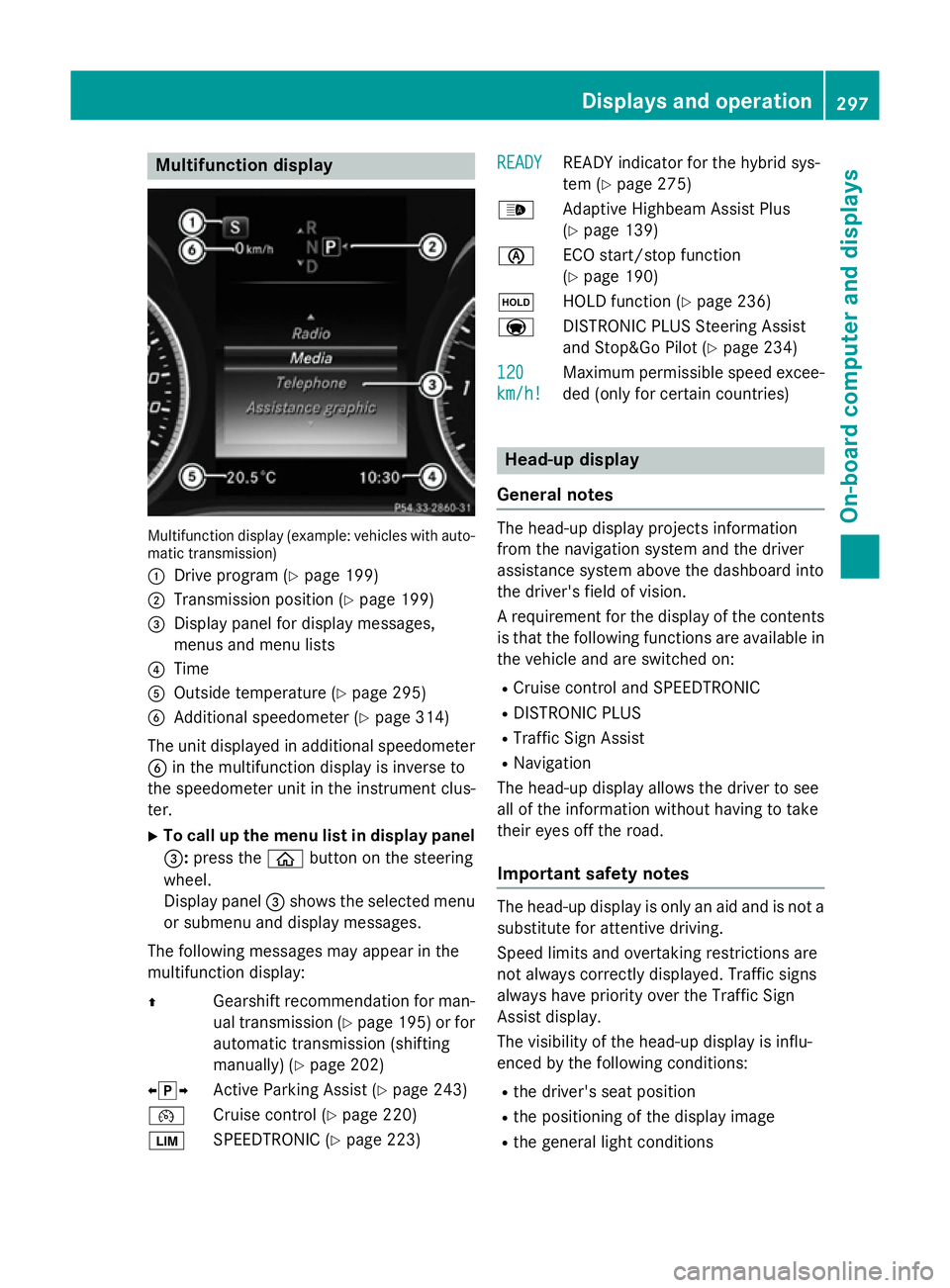
Multifunction display (example: vehicles with auto-
matic transmission)
: Drive program (Y page 199)
; Transmission position (Y page 199)
= Display panel for display messages,
menus and menu lists
? Time
A Outside temperature (Y page 295)
B Additional speedometer (Y page 314)
The unit displayed in additional speedometer
B in the multifunction display is inverse to
the speedometer unit in the instrument clus-
ter.
X To call up the menu list in display panel
=: press the òbutton on the steering
wheel.
Display panel =shows the selected menu
or submenu and display messages.
The following messages may appear in the
multifunction display:
Z Gearshift recommendation for man-
ual transmission (Y page 195) or for
automatic transmission (shifting
manually) (Y page 202)
XjY Active Parking Assist (Y page 243)
¯ Cruise control (Y page 220)
È SPEEDTRONIC (Y page 223) READY
READY READY indicator for the hybrid sys-
tem (Y
page 275)
_ Adaptive Highbeam Assist Plus
(Ypage 139)
è ECO start/stop function
(Ypage 190)
ë HOLD function (Y page 236)
a DISTRONIC PLUS Steering Assist
and Stop&Go Pilot (Y page 234)
120
120
km/h! km/h! Maximum permissible speed excee-
ded (only for certain countries) Head-up display
General notes The head-up display projects information
from the navigation system and the driver
assistance system above the dashboard into
the driver's field of vision.
A requirement for the display of the contents
is that the following functions are available in the vehicle and are switched on:
R Cruise control and SPEEDTRONIC
R DISTRONIC PLUS
R Traffic Sign Assist
R Navigation
The head-up display allows the driver to see
all of the information without having to take
their eyes off the road.
Important safety notes The head-up display is only an aid and is not a
substitute for attentive driving.
Speed limits and overtaking restrictions are
not always correctly displayed. Traffic signs
always have priority over the Traffic Sign
Assist display.
The visibility of the head-up display is influ-
enced by the following conditions:
R the driver's seat position
R the positioning of the display image
R the general light conditions Displays and operation
297On-board computer and displays Z