remote control MERCEDES-BENZ C-CLASS ESTATE 2014 Owners Manual
[x] Cancel search | Manufacturer: MERCEDES-BENZ, Model Year: 2014, Model line: C-CLASS ESTATE, Model: MERCEDES-BENZ C-CLASS ESTATE 2014Pages: 489, PDF Size: 15.08 MB
Page 9 of 489
Transmission position display
(DIRECT SELECT lever) ...................1
99
Transmission positions .................. 199
Automatic transmission emer-
gency running mode ......................... 204
Auxiliary heating/ventilation
Important safety notes .................. 176
Problem (display message) ............ 181
Remote control .............................. 177
Setting the departure time ............. 179
Switching on/off (on the centre
console) ......................................... 177
Axle load, permissible (trailer tow-
ing) ...................................................... 482 B
Bag hook ............................................ 376
Ball coupling
Folding in ....................................... 289
Folding out ..................................... 288
BAS (Brake Assist System) ................. 76
BAS PLUS with Cross-Traffic Assist (Brake Assist PLUS with Cross-
Traffic Assist)
Function/notes ................................ 77
Important safety notes .................... 77
Battery (high-voltage)
see High-voltage battery
Battery (key)
Checking .......................................... 94
Important safety notes .................... 93
Replacing ......................................... 94
Battery (vehicle)
Charging ........................................ 420
Display message ............................ 336
Important safety notes .................. 416
Jump starting ................................. 422
Belt
see Seat belts
Belt tensioner
Activation ......................................... 60
Blind Spot Assist
Activating/deactivating (on-
board computer) ............................ 311
Display message ............................ 341
Notes/function .............................. 263
Trailer towing ................................. 264 see Active Blind Spot Assist
BlueTEC (AdBlue®) ............................ 474
BlueTEC®
Topping up AdBlue® ..................... .208
Bonnet
Active bonnet (pedestrian protec-
tion) ............................................... 394
Closing .......................................... .396
Display message ............................ 349
Important safety notes .................. 394
Opening ......................................... 395
Boot load (maximum) ........................ 478
Brake
EBD ................................................. .84
Brake Assist
see BAS (Brake Assist System)
Brake fluid
Display message ............................ 324
Note s............................................. 476
Brake force distribution, elec-
tronic
see EBD (electronic brake force
distribution)
Brake lamps
Adaptive ........................................... 81
Display message ............................ 332
Brake pedal
Pedal resistance/pedal travel .......... 44
Brakes
ABS .................................................. 76
Adaptive Brake Assist ...................... 80
BAS .................................................. 76
BAS PLUS with Cross-Traffic
Assist ............................................... 77
Brake fluid (notes) ......................... 476
Display message ............................ 317
Driving tip s.................................... 217
Hill start assist ............................... 189
HOLD function ............................... 236
Important safety notes .................. 217
Parking brake ................................ 213
RBS (Recuperative Brake Sys-
tem) ................................................. 44
RBS warning lamp .......................... 364
Warning lamp ................................. 355
Breakdown
see Flat tyre
see Towing away 6
Index
Page 11 of 489
Information about using
THERMATIC automatic climate
control (2
‑zone) .............................1 56
Information on using
THERMOTRONIC automatic cli-
mate control .................................. 160
Ionisation ....................................... 172
Overview of systems ..................... .152
Perfume atomizer .......................... 170
Pre-entry climate control via key ... 172
Problem with the rear window
heating .......................................... 168
Problems with cooling with air
dehumidification ............................ 162
Rear control panel ......................... 158
Remote activation of heating/
ventilation systems ........................ 174
Setting the air distribution ............. 164
Setting the air vents ..................... .181
Setting the airflow ......................... 165
Setting the climate mode .............. .163
Setting the temperature ................ 163
Switching air-recirculation mode
on/off ............................................ 168
Switching on/off ........................... 160
Switching residual heat on/off ...... 169
Switching the rear window heat-
ing on/off ...................................... 167
Switching the synchronisation
function on and off ........................ 165
THERMATIC automatic climate
control (1-zone) ............................ .153
THERMATIC automatic climate
control (2-zone) ............................ .155
THERMOTRONIC (3-zone) auto-
matic climate control ..................... 158
Coat hooks ......................................... 379
Cockpit
Overview .......................................... 32
Collapsible emergency spare
wheel
see Emergency spare wheel
COLLISION PREVENTION ASSIST
PLUS
Activating/deactivating ................. 310
Display message ............................ 324
Operation/notes .............................. 78 COMAND display
Cleaning ......................................... 406
Combination switch .......................... 137
Combined luggage cover and net .... 377
Consumption statistics (on-board
computer) .......................................... 301
Convenience closing feature ............ 108
Convenience opening feature .......... 108
Convenience opening/closing (air-
recirculation mode) ........................... 168
Coolant (engine)
Checking the level ......................... 397
Display message ............................ 335
Important safety notes .................. 476
Temperature display in the instru-
ment cluster .................................. 295
Temperature display in the on-
board computer ............................ .309
Warning lamp ................................. 362
Cooling
see Climate control
Copyright ............................................. 29
Cornering light function
Display message ............................ 331
Function/notes ............................ .138
Crash-responsive emergency light-
ing ....................................................... 141
Crosswind Assist ................................. 83
Cruise control
Cruise control lever ....................... 220
Deactivating ................................... 222
Display message ............................ 344
Driving system ............................... 220
Important safety notes .................. 220
LIM indicator lamp ......................... 220
Selecting ........................................ 221
Setting a speed .............................. 222
Storing and maintaining current
speed ............................................. 221
Cup holder
Centre console .............................. 381
Important safety notes .................. 381
Rear compartment ......................... 382 D
Data see Technical data 8
Index
Page 21 of 489
Setting the airflow ......................... 165
Setting the temperature ................ 163
Rear foglamp
Display message ............................ 333
Switching on/of f........................... 135
Rear lamps
see Lights
Rear window heating
Problem (fault) ............................... 168
Switching on/of f........................... 167
Rear window wiper
Replacing the wiper blad e.............. 149
Switching on/of f........................... 147
Rear-compartment seat belt sta-
tus indicator ........................................ 50
Rear-view mirror
Anti-dazzle mode (automatic) ........ 129
Dipping (manual) ........................... 127
Recuperation display ........................ 300
Refuelling
Fuel gaug e....................................... 34
Important safety notes .................. 204
Refuelling process ......................... 205
see Fuel
Remote control
Auxiliary heating/ventilation .......... 177
Changing the batteries (auxiliary
heating) ......................................... 179
Replacing bulbs
Important safety notes .................. 141
Overview of bulb types .................. 142
Removing/replacing the cover
(front wheel arch) .......................... 143
Replacing the battery (auxiliary
heating remote control) .................... 179
Reserve (fuel tank)
see Fuel
Reserve fuel
Display message ............................ 337
Warning lamp ................................. 362
Residual heat (climate control) ........ 169
Restraint system
Display message ............................ 327
Introduction ..................................... 44
Warning lamp ................................. 361
Warning lamp (function) ................... 45
Rev counter ........................................ 295 Reverse gear
Engaging (manual transmission) .... 195
Reversing camera
Cleaning instructions ..................... 405
Function/note s............................. 248
Switching on/of f........................... 249
Reversing feature
Panorama sliding sunroo f.............. 111
Roller sunblind s............................. 113
Side windows ................................. 107
Sliding sunroof ............................... 111
Tailgate .......................................... 101
Reversing lamp
Changing bulb s.............................. 144
Reversing lamp (display message) .. 333
Roller sunblind
Panorama sliding sunroo f.............. 113
Roller sunblinds (panorama sliding
sunroof)
Operating ....................................... 114
Roof carrier ........................................ 380
Roof lining and carpets (cleaning
instructions) ...................................... 408
Roof load (maximum) ........................ 478 S
Safety Automatic front-passenger front
airbag deactivation system .............. 54
Child restraint systems .................... 64
Children in the vehicle ..................... 63
see Operating safety
Safety net
Attaching ....................................... 378
Important safety information ......... 378
Safety notes
Hybrid vehicles ................................ 42
Safety system
see Driving safety systems
Seat
Folding the backrest (rear com-
partment) forwards/back .............. 374
Seat belt
Centre rear-compartment sea t........ 49
Correct usage .................................. 48 18
Index
Page 93 of 489
Useful information
i This Owner's Manual describes all mod-
els, series and optional equipment for your
vehicle that were available at the time of
going to press. National variations are pos- sible. Note that your vehicle may not be
equipped with all of the functions descri-
bed. This is also the case for systems and
functions relevant to safety.
i Read the information on qualified special-
ist workshops: (Y page 27). Key
Important safety notes
United Kingdom only: G
WARNING
When the double locks are activated, the
doors can no longer be opened from the
inside. People in the vehicle can no longer get out, e.g. in hazardous situations. There is a
risk of injury.
Therefore, do not leave any people unsuper-
vised in the vehicle, particularly children, eld-
erly people or people in need of special assis-
tance. Do not activate the double lock when
people are in the vehicle.
If the vehicle has been locked from the out-
side, the double-lock function is activated as
standard. It is then not possible to open the
doors from inside the vehicle. You can deac-
tivate the double lock function by deactivat-
ing the interior motion sensor . The doors can
then be opened from the inside after the vehi- cle has been locked from the outside. The
anti-theft alarm system is triggered if the door
is opened from the inside. Switch off the
alarm (Y page 87).
All countries: G
WARNING
If you leave children unattended in the vehi-
cle, they may be able to set the vehicle in
motion if, for example, they:
R release the parking brake
R shift the automatic transmission out of park
position Por shift manual transmission into
neutral
R start the engine
In addition, they may operate vehicle equip-
ment and become trapped. There is a risk of
an accident and injury.
When leaving the vehicle, always take the key with you and lock the vehicle. Never leave
children unattended in the vehicle. G
WARNING
If you attach heavy or large objects to the key, the key could be unintentionally turned in the
ignition lock. This could cause the engine to
be switched off. There is a risk of an accident.
Do not attach any heavy or large objects to the
key. Remove any bulky keyrings before insert-
ing the key into the ignition lock.
! Keep the key away from strong magnetic
fields. Otherwise, the remote control func-
tion could be affected.
Strong magnetic fields can occur in the
vicinity of powerful electrical installations.
Do not keep the key: R with electronic devices, e.g. a mobile
phone or another key
R with metallic objects, e.g. coins or metal
film
R inside metallic objects, e.g. a metal case
This can affect the key's functionality.
Vehicles with KEYLESS-GO start function: do not keep the key in the luggage compart-
ment. Otherwise, the key may not be detec-
ted, e.g. when starting the engine using the
Start/Stop button. 90
KeyOpening and closing
Page 94 of 489
A check which periodically establishes a radio
connection between the vehicle and the key
determines whether a valid key is in the vehi- cle. This occurs, for example:
R when starting the engine
R whilst driving
R when the external door handles are
touched
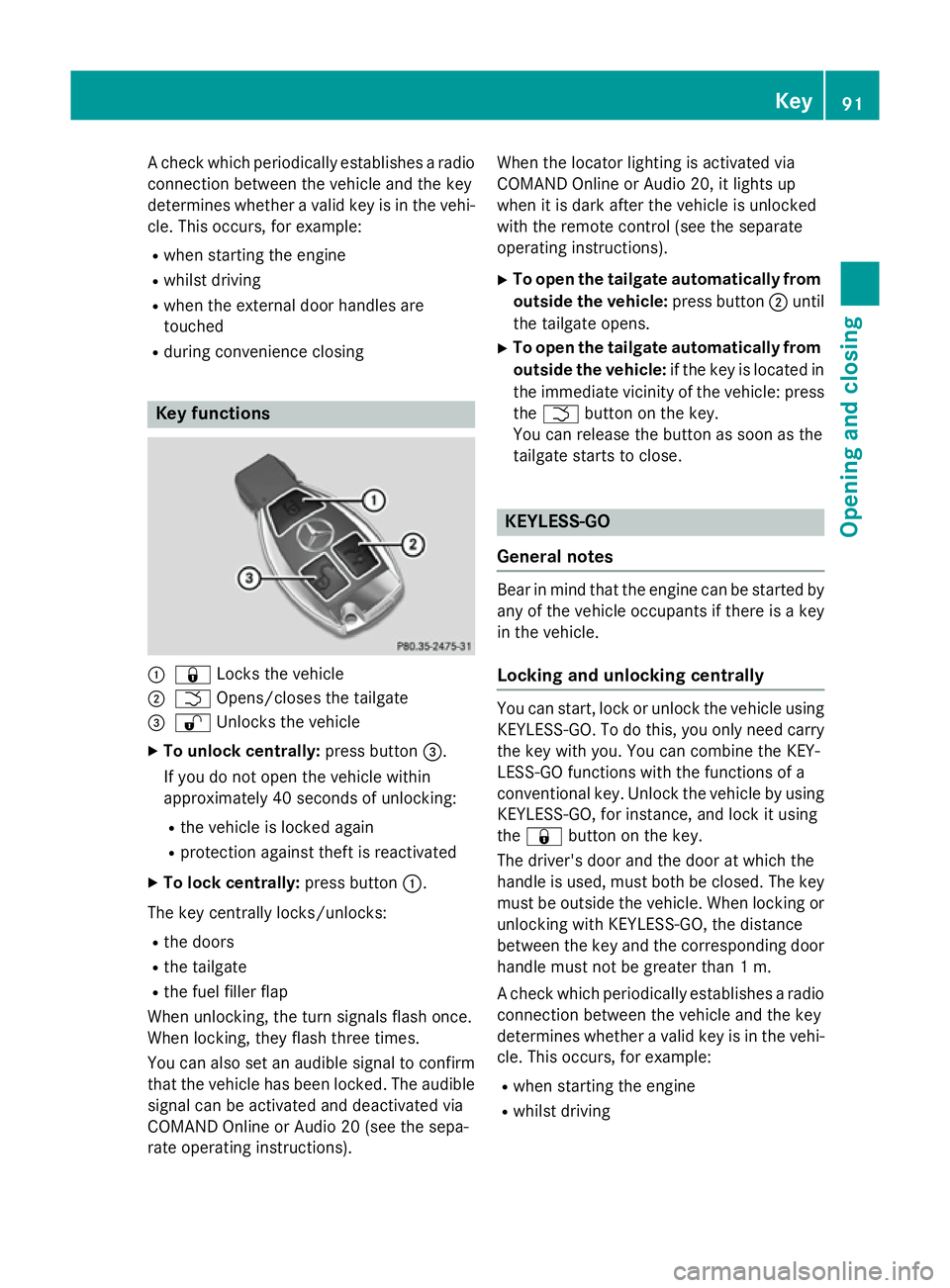
R during convenience closing Key functions
:
& Locks the vehicle
; F Opens/closes the tailgate
= % Unlocks the vehicle
X To unlock centrally: press button=.
If you do not open the vehicle within
approximately 40 second s of unlocking:
R the vehicle is locked again
R protection against theft is reactivated
X To lock centrally: press button:.
The key centrally locks/unlocks:
R the doors
R the tailgate
R the fuel filler flap
When unlocking, the turn signals flash once.
When locking, they flash three times.
You can also set an audible signal to confirm that the vehicle has been locked. The audible
signal can be activated and deactivated via
COMAND Online or Audio 20 (see the sepa-
rate operating instructions). When the locator lighting is activated via
COMAND Online or Audio 20, it lights up
when it is dark after the vehicle is unlocked
with the remote control (see the separate
operating instructions).
X To open the tailgate automatically from
outside the vehicle: press button;until
the tailgate opens.
X To open the tailgate automatically from
outside the vehicle: if the key is located in
the immediate vicinity of the vehicle: press the F button on the key.
You can release the button as soon as the
tailgate starts to close. KEYLESS-GO
General notes Bear in mind that the engine can be started by
any of the vehicle occupants if there is a key
in the vehicle.
Locking and unlocking centrally You can start, lock or unlock the vehicle using
KEYLESS-GO. To do this, you only need carry
the key with you. You can combine the KEY-
LESS-GO functions with the functions of a
conventional key. Unlock the vehicle by using KEYLESS-GO, for instance, and lock it using
the & button on the key.
The driver's door and the door at which the
handle is used, must both be closed. The key
must be outside the vehicle. When locking or unlocking with KEYLESS-GO, the distance
between the key and the corresponding door
handle must not be greater than 1 m.
A check which periodically establishes a radio
connection between the vehicle and the key
determines whether a valid key is in the vehi- cle. This occurs, for example:
R when starting the engine
R whilst driving Key
91Opening and closing Z
Page 98 of 489
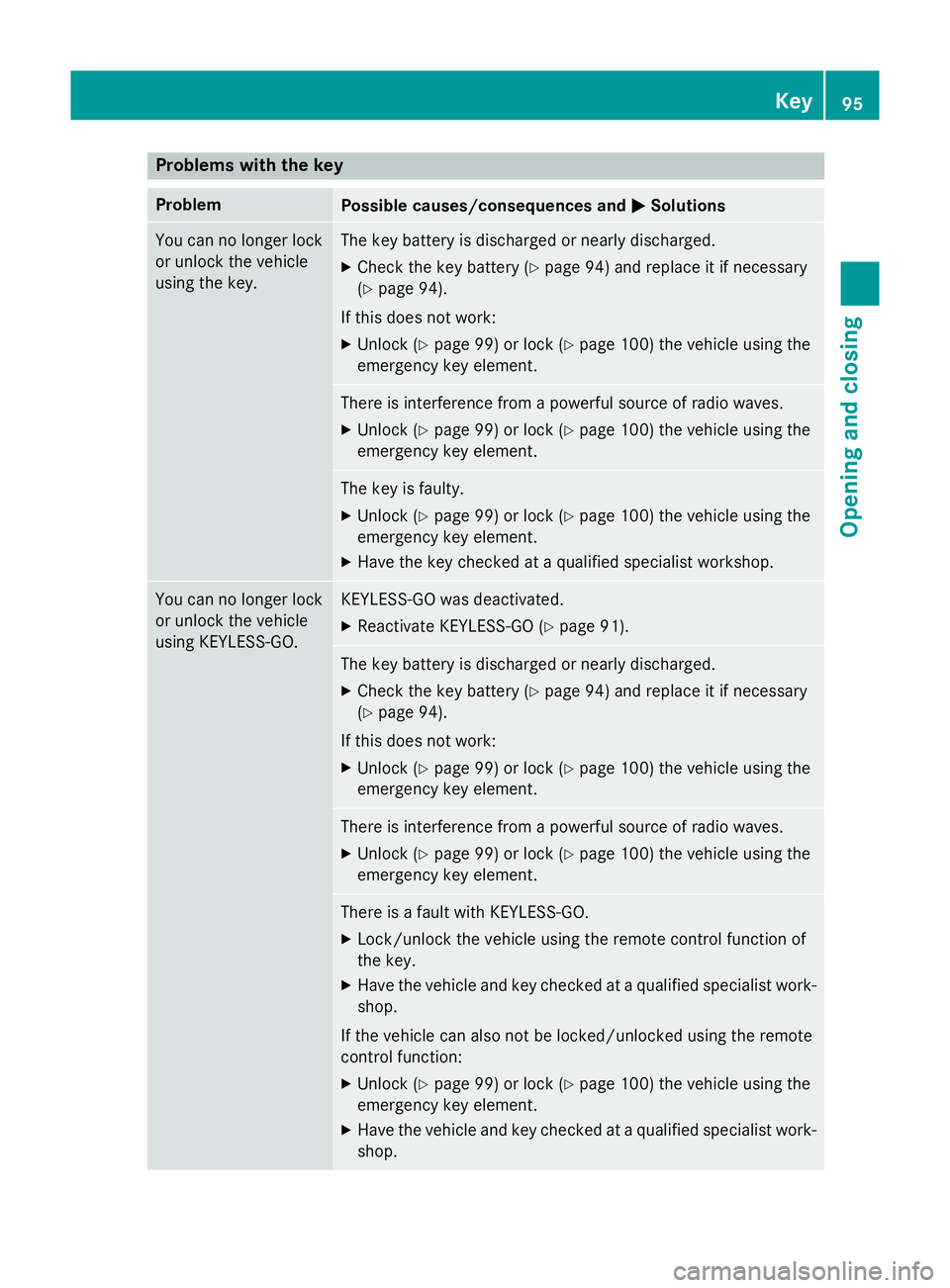
Problems with the key
Problem
Possible causes/consequences and
M
MSolutions You can no longer lock
or unlock the vehicle
using the key. The key battery is discharged or nearly discharged.
X Check the key battery (Y page 94) and replace it if necessary
(Y page 94).
If this does not work: X Unlock (Y page 99) or lock (Y page 100) the vehicle using the
emergency key element. There is interference from a powerful source of radio waves.
X Unlock (Y page 99) or lock (Y page 100) the vehicle using the
emergency key element. The key is faulty.
X Unlock (Y page 99) or lock (Y page 100) the vehicle using the
emergency key element.
X Have the key checked at a qualified specialist workshop. You can no longer lock
or unlock the vehicle
using KEYLESS-GO. KEYLESS-GO was deactivated.
X Reactivate KEYLESS-GO (Y page 91). The key battery is discharged or nearly discharged.
X Check the key battery (Y page 94) and replace it if necessary
(Y page 94).
If this does not work: X Unlock (Y page 99) or lock (Y page 100) the vehicle using the
emergency key element. There is interference from a powerful source of radio waves.
X Unlock (Y page 99) or lock (Y page 100) the vehicle using the
emergency key element. There is a fault with KEYLESS-GO.
X Lock/unlock the vehicle using the remote control function of
the key.
X Have the vehicle and key checked at a qualified specialist work-
shop.
If the vehicle can also not be locked/unlocked using the remote
control function:
X Unlock (Y page 99) or lock (Y page 100) the vehicle using the
emergency key element.
X Have the vehicle and key checked at a qualified specialist work-
shop. Key
95Opening and closing Z
Page 109 of 489
(Y
page 102) in the tailgate or pull the han-
dle on the outside of the tailgate again.
X To store the position: press and hold the
closing button in the tailgate until you hear a short tone.
The opening angle limiter is activated. The
tailgate then stops in the stored position
when opened.
Switching off X
Press and hold the closing button
(Y page 102) in the tailgate until you hear
two short tones.
X Press and hold the closing button
(Y page 102) in the tailgate until you hear
two short tones. Emergency release
General notes !
The tailgate swings upwards and to the
rear when opened. Therefore, make sure
that there is sufficient clearance above and behind the tailgate.
The opening dimensions of the tailgate can be
found in the "Vehicle data" section
(Y page 478).
Use the emergency key element if the tailgate can no longer be unlocked:
R using the key
R using HANDS-FREE ACCESS
R using the remote operating switch in the
door control panel Opening X
Remove luggage compartment cover
(Y page 376).
X Fold the rear seat backrest forwards
(Y page 374).
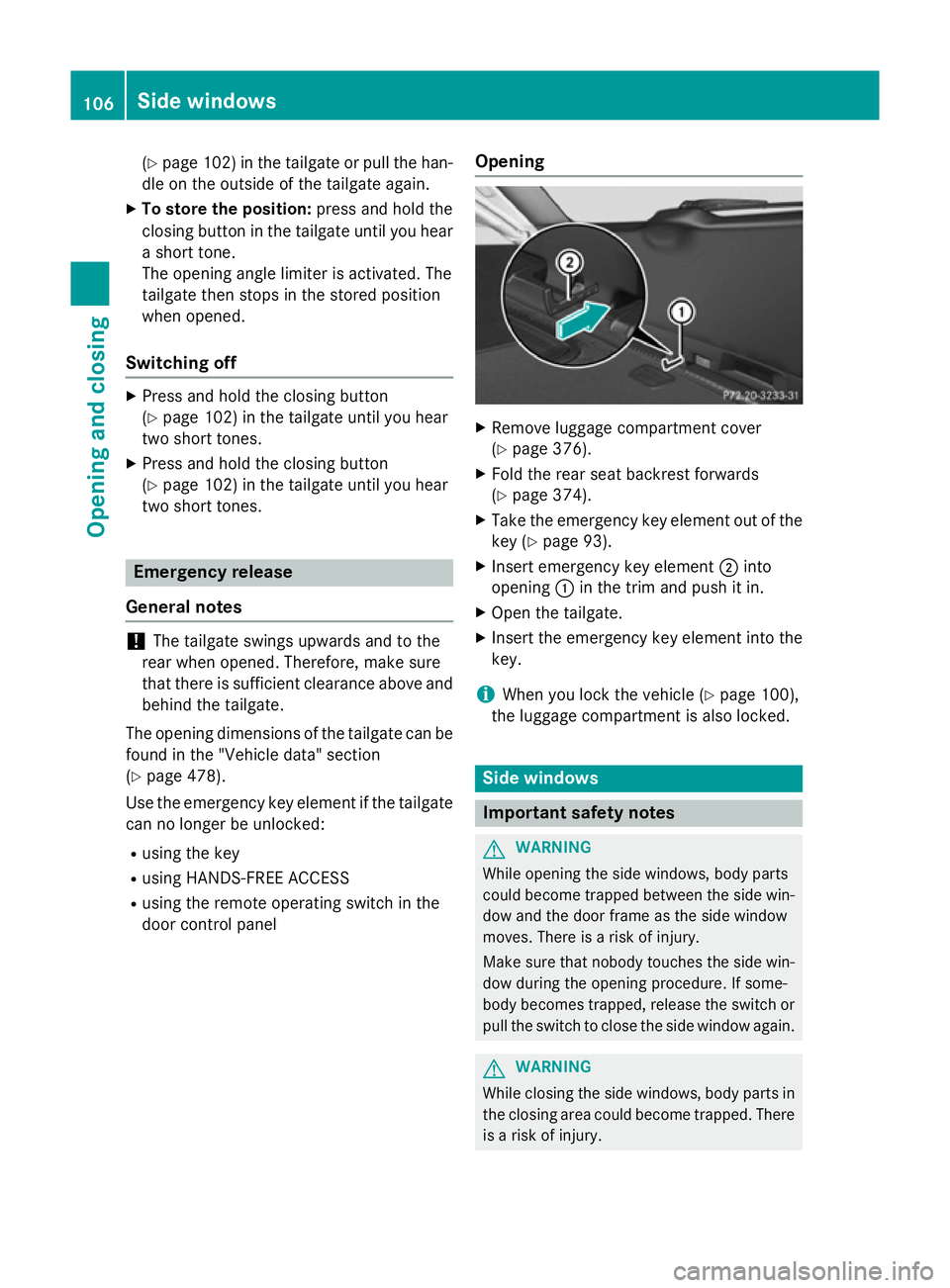
X Take the emergency key element out of the
key (Y page 93).
X Insert emergency key element ;into
opening :in the trim and push it in.
X Open the tailgate.
X Insert the emergency key element into the
key.
i When you lock the vehicle (Y
page 100),
the luggage compartment is also locked. Side windows
Important safety notes
G
WARNING
While opening the side windows, body parts
could become trapped between the side win- dow and the door frame as the side window
moves. There is a risk of injury.
Make sure that nobody touches the side win-
dow during the opening procedure. If some-
body becomes trapped, release the switch or pull the switch to close the side window again. G
WARNING
While closing the side windows, body parts in the closing area could become trapped. There is a risk of injury. 106
Side windowsOpening and closing
Page 177 of 489
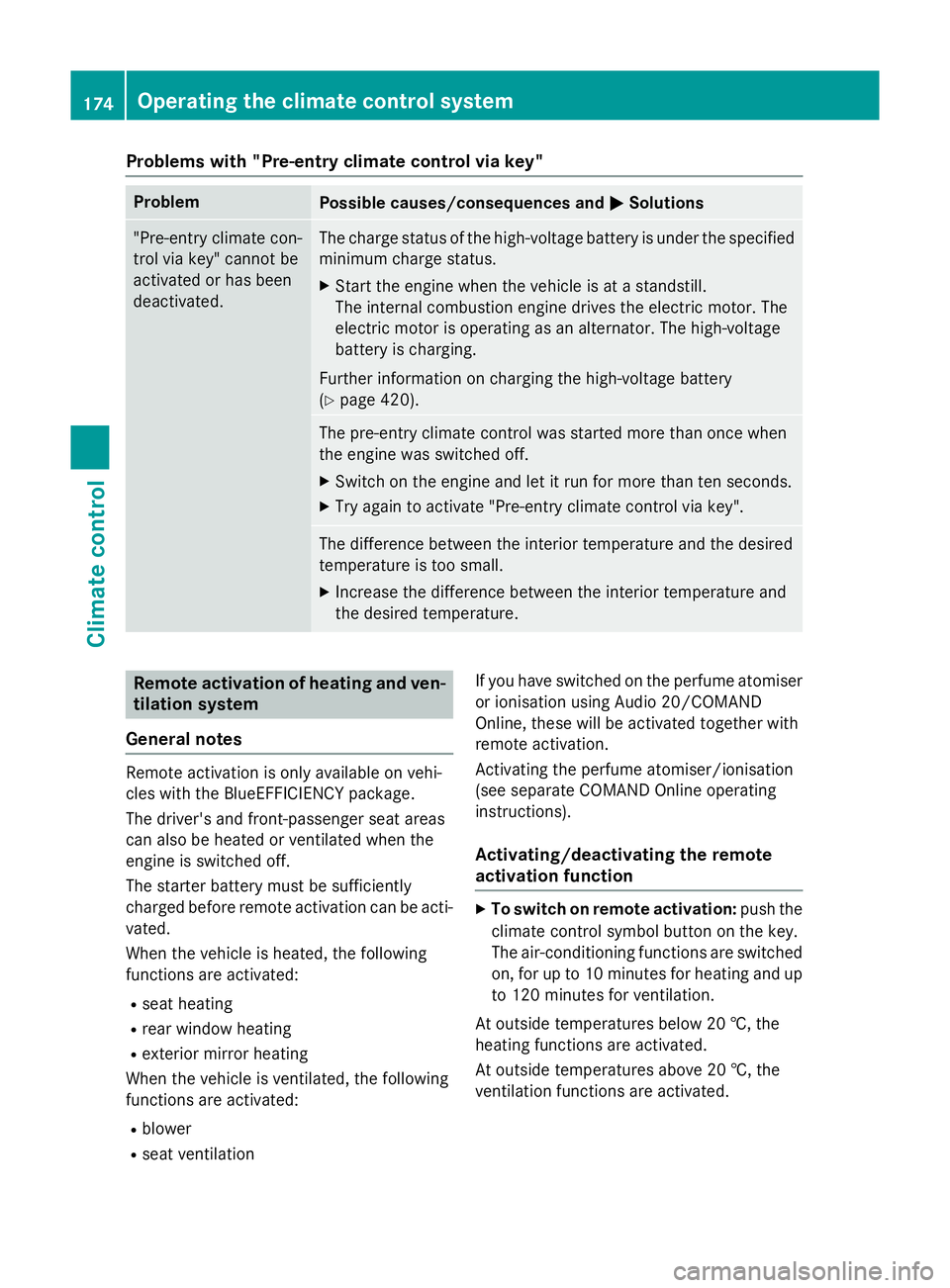
Problems with "Pre-entry climate control via key"
Problem
Possible causes/consequences and
M
MSolutions "Pre-entry climate con-
trol via key" cannot be
activated or has been
deactivated. The charge status of the high-voltage battery is under the specified
minimum charge status.
X Start the engine when the vehicle is at a standstill.
The internal combustion engine drives the electric motor. The
electric motor is operating as an alternator. The high-voltage
battery is charging.
Further information on charging the high-voltage battery
(Y page 420). The pre-entry climate control was started more than once when
the engine was switched off.
X Switch on the engine and let it run for more than ten seconds.
X Try again to activate "Pre-entry climate control via key". The difference between the interior temperature and the desired
temperature is too small.
X Increase the difference between the interior temperature and
the desired temperature. Remote activation of heating and ven-
tilation system
General notes Remote activation is only available on vehi-
cles with the BlueEFFICIENCY package.
The driver's and front-passenger seat areas
can also be heated or ventilated when the
engine is switched off.
The starter battery must be sufficiently
charged before remote activation can be acti-
vated.
When the vehicle is heated, the following
functions are activated:
R seat heating
R rear window heating
R exterior mirror heating
When the vehicle is ventilated, the following
functions are activated:
R blower
R seat ventilation If you have switched on the perfume atomiser
or ionisation using Audio 20/COMAND
Online, these will be activated together with
remote activation.
Activating the perfume atomiser/ionisation
(see separate COMAND Online operating
instructions).
Activating/deactivating the remote
activation function X
To switch on remote activation: push the
climate control symbol button on the key.
The air-conditioning functions are switched on, for up to 10 minutes for heating and up
to 120 minutes for ventilation.
At outside temperatures below 20 †, the
heating functions are activated.
At outside temperatures above 20 †, the
ventilation functions are activated. 174
Operating the climate control systemClimate control
Page 179 of 489
Problems with remote activation
Problem
Possible causes/consequences and
M
MSolutions Remote activation can-
not be switched on or
has switched itself off. Remote activation was started more than three times when the
engine was switched off.
X Switch on the engine and let it run for more than ten seconds.
X Try again to switch remote activation on. The starter battery is not sufficiently charged.
X Charge the starter battery.
X Try again to switch remote activation on. Auxiliary heating
Important safety notes G
DANGER
If the exhaust pipe is blocked or sufficient
ventilation is not possible, toxic exhaust
fumes can enter the vehicle, especially car-
bon monoxide. This is the case, e.g. in
enclosed spaces, or if the vehicle is stuck in
snow. There is a risk of fatal injuries.
You should switch off the auxiliary heating in
enclosed spaces which do not have an extrac- tion system, e.g. a garage. If the vehicle is
stuck in snow and you must leave the auxiliary
heating running, keep the exhaust pipe and
the area around the vehicle clear of snow. To guarantee a sufficient supply of fresh air, open
a window on the side of the vehicle away from the wind. G
WARNING
When the auxiliary heating is switched on,
parts of the vehicle can become very hot.
Flammable materials such as leaves, grass or twigs may ignite if they come into contact
with:
R hot parts of the exhaust system
R the exhaust gas itself
There is a risk of fire. When the auxiliary heating is switched on,
make sure that:
R no flammable materials come into contact
with hot vehicle components
R the exhaust gas can escape from the
exhaust pipe unhindered
R the exhaust gas does not come into contact
with flammable materials.
The auxiliary heating is fitted under the front
wing on the right-hand side of the vehicle. The emissions outlet is found behind the front
wheel on the right hand side of the vehicle.
! Operating the auxiliary heating/ventila-
tion draws on the vehicle battery. After you
have heated or ventilated the vehicle a
maximum of two times, drive for a longer
distance.
Switch the auxiliary heating on regularly once a month for about ten minutes.
The auxiliary heating heats the air in the vehi-
cle interior to the set temperature. This
occurs without using the heat of the running
engine. The auxiliary heating is operated
directly using the vehicle's fuel. For this rea-
son, the tank content must be at least at
reserve fuel level to ensure that the auxiliary
heating functions.
The auxiliary heating/ventilation automati-
cally adjusts to changes in temperature and
weather conditions. For this reason, the aux- 176
Operating the climate control systemClimate control
Page 180 of 489
iliary heating could switch from ventilation
mode to heating mode or from heating mode to ventilation mode.
The auxiliary heating switches off when the
engine is switched off. The auxiliary ventila-
tion is not active if the engine is running.
The auxiliary heating/ventilation switches off
automatically after 30 minutes. This time limit can be altered. To do this, visit a qualified
specialist workshop.
You cannot use the auxiliary ventilation to
cool the vehicle interior to a temperature
lower than the outside temperature.
Before switching on X
Turn the key to position 2in the ignition
lock (Y page 185).
X Set the desired temperature using the
w rocker switch on the front control
unit.
or X Set the desired temperature using
Audio 20/COMAND Online; see the sepa-
rate operating instructions.
If you do not alter the temperature before
switching on the auxiliary heating, the last
temperature setting will be adopted.
Auxiliary heating or ventilation can also be
switched on if the manually set climate con-
trol is activated. Optimum comfort can be
attained when the system is set to automatic
mode. Set the temperature to 22 †.
You can activate or deactivate the auxiliary
heating/ventilation:
R using the rocker switch on the centre con-
sole (Y page 177)
R using the remote control (Y page 177)
The on-board computer can be used to spec- ify up to three departure times, one of which
may be preselected:
R using the remote control (Y page 177)
R using Audio 20/COMAND Online; see the
separate operating instructions Switching the auxiliary heating/venti-
lation on/off using the centre console
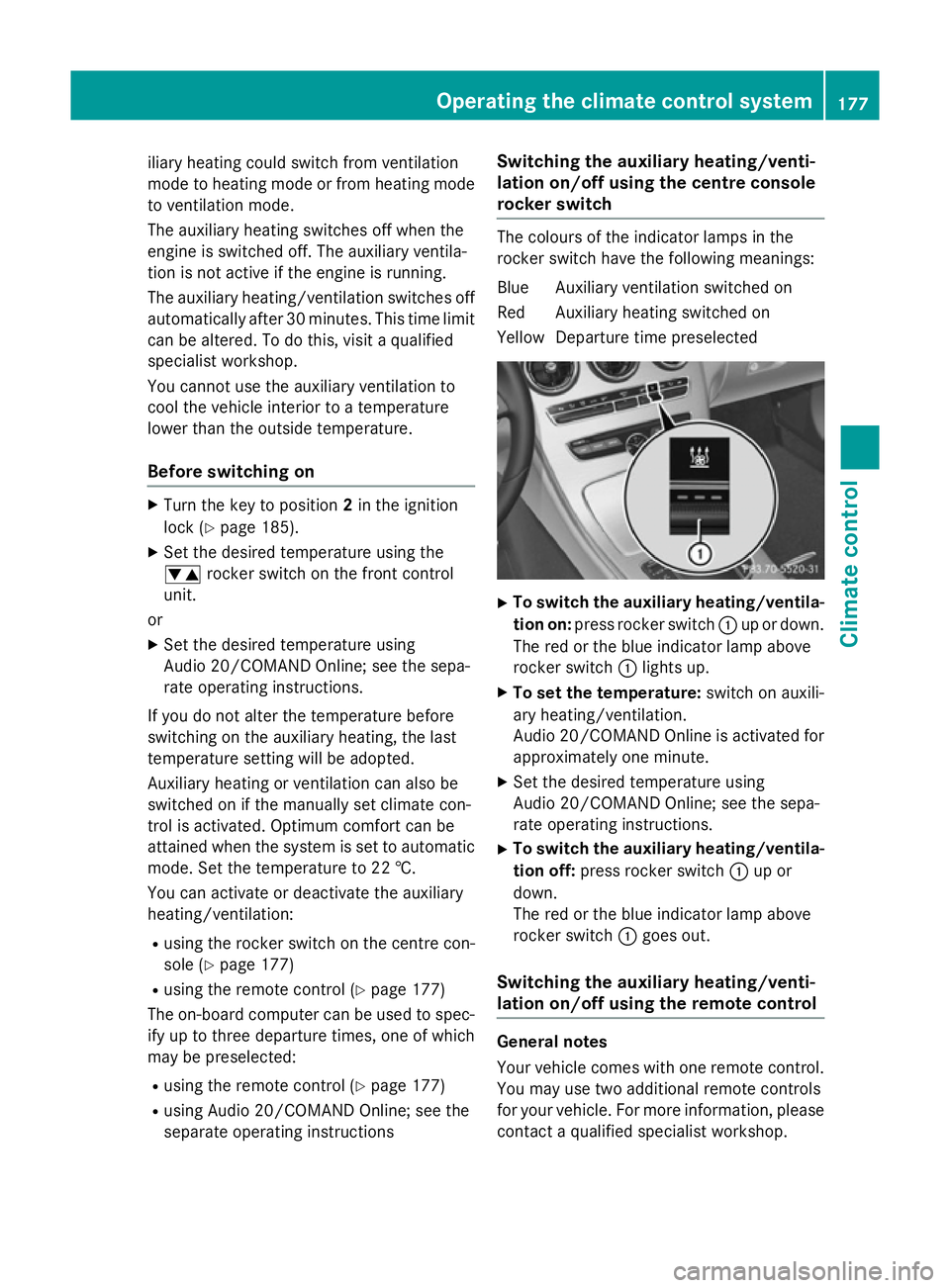
rocker switch The colours of the indicator lamps in the
rocker switch have the following meanings:
Blue Auxiliary ventilation switched on
Red Auxiliary heating switched on
Yellow Departure time preselected X
To switch the auxiliary heating/ventila-
tion on: press rocker switch :up or down.
The red or the blue indicator lamp above
rocker switch :lights up.
X To set the temperature: switch on auxili-
ary heating/ventilation.
Audio 20/COMAND Online is activated for approximately one minute.
X Set the desired temperature using
Audio 20/COMAND Online; see the sepa-
rate operating instructions.
X To switch the auxiliary heating/ventila-
tion off: press rocker switch :up or
down.
The red or the blue indicator lamp above
rocker switch :goes out.
Switching the auxiliary heating/venti-
lation on/off using the remote control General notes
Your vehicle comes with one remote control.
You may use two additional remote controls
for your vehicle. For more information, pleasecontact a qualified specialist workshop. Operating the climate control system
177Climate control Z