tyre pressure MERCEDES-BENZ C-CLASS ESTATE 2014 Owners Manual
[x] Cancel search | Manufacturer: MERCEDES-BENZ, Model Year: 2014, Model line: C-CLASS ESTATE, Model: MERCEDES-BENZ C-CLASS ESTATE 2014Pages: 489, PDF Size: 15.08 MB
Page 7 of 489
1, 2, 3 ...
4ETS see ETS/4ETS (Electronic Trac-
tion System)
4MATIC (permanent four-wheel
drive) .................................................. 239
4MATIC off-road system ...................239
12 V socket
see Sockets
230 V power socket .......................... 386
360° camera
Cleaning ......................................... 405
Function/notes ............................ .253 A
ABS (Anti-lock Braking System) Display message ............................ 317
Function/notes ................................ 76
Important safety notes .................... 76
Warning lamp ................................. 357
Accident
Automatic measures after an acci-
dent ................................................. 63
Activating/deactivating air-recir-
culation mode ................................... .168
Activating/deactivating cooling
with air dehumidification ................. 161
Active Blind Spot Assist
Activating/deactivating (on-
board computer) ............................ 311
Display message ............................ 341
Function/notes ............................ .266
Towing a trailer .............................. 269
Active Lane Keeping Assist
Activating/deactivating (on-
board computer) ............................ 311
Display message ............................ 340
Function/notes ............................ .269
Towing a trailer .............................. 272
Active light function ......................... 138
Active Light System
Display message ............................ 333
Active Parking Assist
Detecting parking spaces .............. 244
Display message ............................ 341
Exiting a parking space .................. 247 Function/notes ............................
.243
Important safety notes .................. 243
Parking .......................................... 245
Towing a trailer .............................. 243
ADAPTIVE BRAKE ................................. 84
Adaptive Brake Assist
Function/notes ................................ 80
Adaptive brake lights .......................... 81
Adaptive Damping System (ADS) ..... 239
Adaptive Highbeam Assist Plus
Display message ............................ 334
Function/notes ............................ .139
Switching on/off ........................... 140
AdBlue®
Additive ......................................... 474
Display message ............................ 337
Displaying level and range ............. 309
Filling capacity ............................... 475
Important safety notes .................. 474
Low outside temperatures ............. 474
Purity ............................................. 475
Topping up ..................................... 208
Additional speedometer ................... 314
Additives (engine oil) ........................ 476
Adjusting the headlamp range ......... 136
AGILITY SELECT switch
Automatic transmission ................. 201
Climate control (THERMATIC 1-
zone) .............................................. 153
Climate control (THERMATIC 2-
zone) .............................................. 157
Climate control
(THERMOTRONIC ).......................... 160
Hybrid operation ............................ 280
Manual transmission ...................... 195
Air filter (white display message) .... 337
Air pressure
see Tyre pressure
Air vents
Important safety notes .................. 181
Rear ............................................... 182
Setting ........................................... 181
Setting the centre air vents ........... 182
Setting the side air vents ............... 182
Air-conditioning system
see Climate control 4
Index
Page 25 of 489
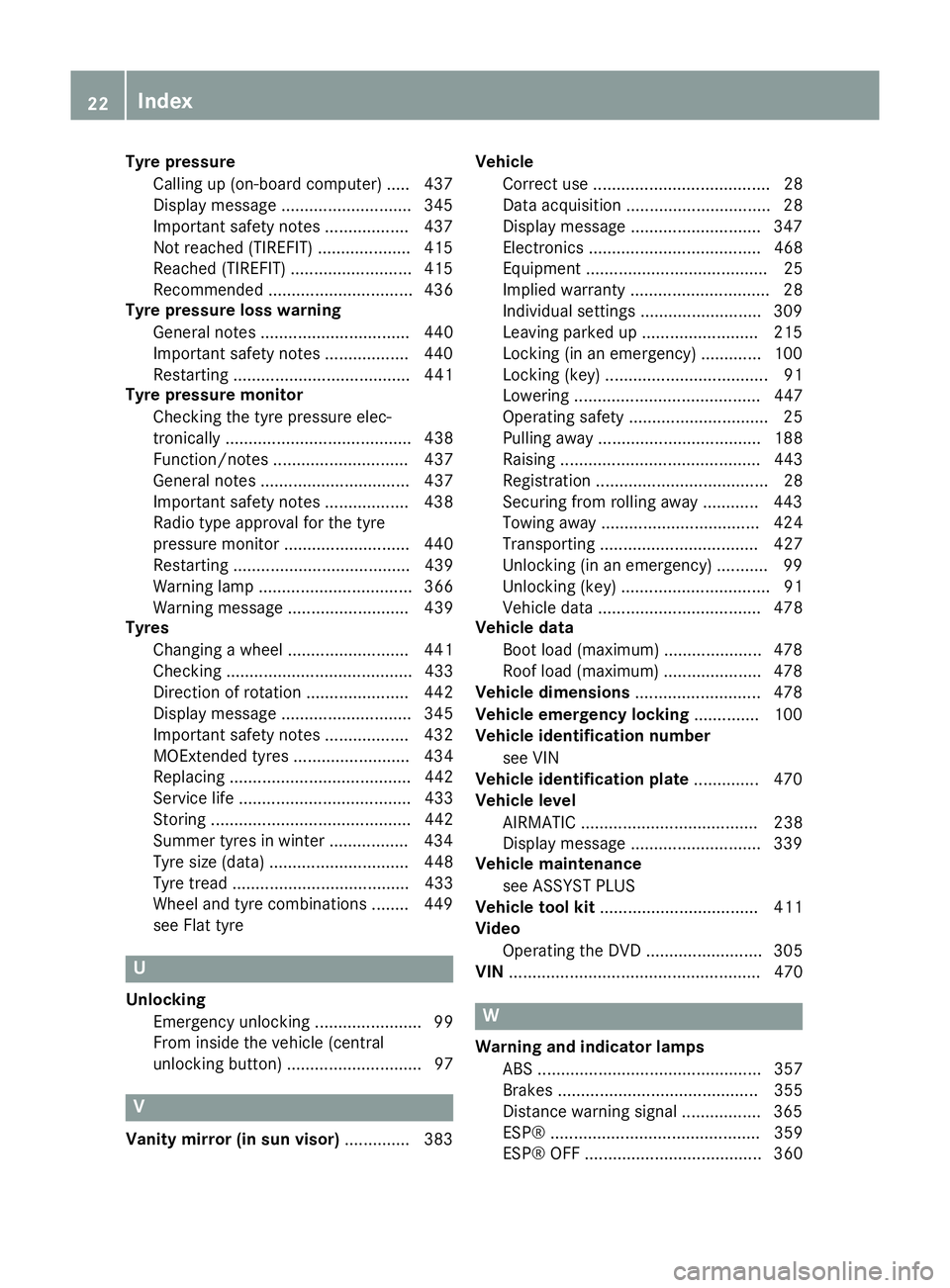
Tyre pressure
Calling up (on-board computer) ..... 437
Display message ............................ 345
Important safety notes .................. 437
Not reached (TIREFIT) .................... 415
Reached (TIREFIT) .......................... 415
Recommended ............................... 436
Tyre pressure loss warning
General notes ................................ 440
Important safety notes .................. 440
Restarting ...................................... 441
Tyre pressure monitor
Checking the tyre pressure elec-
tronically ........................................ 438
Function/note s............................. 437
General notes ................................ 437
Important safety notes .................. 438
Radio type approval for the tyre
pressure monitor ........................... 440
Restarting ...................................... 439
Warning lamp ................................. 366
Warning message .......................... 439
Tyres
Changing a whee l.......................... 441
Checking ........................................ 433
Direction of rotation ...................... 442
Display message ............................ 345
Important safety notes .................. 432
MOExtended tyre s......................... 434
Replacing ....................................... 442
Service life ..................................... 433
Storing ........................................... 442
Summer tyres in winter ................. 434
Tyre size (data ).............................. 448
Tyre tread ...................................... 433
Wheel and tyre combinations ........ 449
see Flat tyre U
Unlocking Emergency unlocking ....................... 99
From inside the vehicle (central
unlocking button) ............................. 97 V
Vanity mirror (in sun visor) .............. 383Vehicle
Correct use ...................................... 28
Data acquisition ............................... 28
Display message ............................ 347
Electronics ..................................... 468
Equipment ....................................... 25
Implied warranty .............................. 28
Individual settings .......................... 309
Leaving parked up ......................... 215
Locking (in an emergency) ............. 100
Locking (key) ................................... 91
Lowering ........................................ 447
Operating safety .............................. 25
Pulling away ................................... 188
Raising ........................................... 443
Registration ..................................... 28
Securing from rolling away ............ 443
Towing away .................................. 424
Transporting .................................. 427
Unlocking (in an emergency) ........... 99
Unlocking (key) ................................ 91
Vehicle data ................................... 478
Vehicle data
Boot load (maximum) ..................... 478
Roof load (maximum) ..................... 478
Vehicle dimensions ........................... 478
Vehicle emergency locking .............. 100
Vehicle identification number
see VIN
Vehicle identification plate .............. 470
Vehicle level
AIRMATIC ...................................... 238
Display message ............................ 339
Vehicle maintenance
see ASSYST PLUS
Vehicle tool kit .................................. 411
Video
Operating the DVD ......................... 305
VIN ...................................................... 470 W
Warning and indicator lamps ABS ................................................ 357
Brakes ........................................... 355
Distance warning signal ................. 365
ESP® ............................................. 359
ESP® OFF ...................................... 360 22
Index
Page 26 of 489
Hybrid system ................................ 364
LIM (cruise control) ........................ 220
LIM (DISTRONIC PLUS) .................. 227
LIM (variable SPEEDTRONIC) ......... 223
Overview .......................................... 35
Parking brake ................................ 361
PASSENGER AIR BAG ...................... 46
RBS (Recuperative Brake Sys-
tem) ............................................... 364
Reserve fuel ................................... 362
Seat belt ........................................ 353
SRS ................................................ 285
Steering ......................................... 367
Tyre pressure monitor ................... 366
Warning triangle ................................ 410
Warnings
Stickers ........................................... 42
Washer fluid
Display messag e............................ 351
Wheel and tyre combinations
see Tyres
Wheel bolt tightening torque ........... 447
Wheel chock ...................................... 443
Wheels
Changing a whee l.......................... 441
Changing/replacing ....................... 442
Checking ........................................ 433
Cleaning ......................................... 403
Emergency spare wheel ................. 463
Fitting a new wheel ........................ 446
Fitting a wheel ............................... 442
Important safety notes .................. 432
Removing a whee l.......................... 446
Storing ........................................... 442
Tightening torque ........................... 447
Wheel size/tyre size ...................... 448
Windowbag
Display message ............................ 328
Operation ......................................... 53
Windows
Cleaning ......................................... 403
see Side windows
Windscreen
Demisting ...................................... 166
Windscreen washer fluid
see Windscreen washer system
Windscreen washer system
Notes ............................................. 477 Topping up ..................................... 398
Windscreen wipers
Problem (malfunction) ................... 150
Rear window wipe r........................ 147
Replacing the wiper blades ............ 147
Switching on/of f........................... 146
Winter operation
Important safety notes .................. 434
Radiator cover ............................... 396
Slippery road surfaces ................... 219
Snow chains .................................. 435
Summer tyres ................................ 434
Winter tyres
Limiting the speed (on-board com-
puter) ............................................. 315
M+S tyres ...................................... 434
Wiper blades
Cleaning ......................................... 404
Important safety notes .................. 147
Replacing ....................................... 147
Replacing (on the rear window )..... 149
Replacing (windscreen) .................. 147
Wooden trim (cleaning instruc-
tions) .................................................. 407
Workshop
see Qualified specialist workshop Index
23
Page 27 of 489
Protection of the environment
General notes
H
Environmental note
Daimler's declared policy is one of compre-
hensive environmental protection.
Our objectives are to use the natural resour-
ces which form the basis of our existence on
this planet sparingly and in a manner which
takes the requirements of both nature and
humanity into consideration.
You too can help to protect the environment
by operating your vehicle in an environmen-
tally-responsible manner.
Fuel consumption and the rate of engine,
transmission, brake and tyre wear depend on
the following factors:
R operating conditions of your vehicle
R your personal driving style
You can influence both factors. Therefore,
please bear the following in mind:
Operating conditions:
R avoid short trips, as these increase fuel
consumption.
R observe the correct tyre pressure.
R do not carry any unnecessary weight in the
vehicle.
R remove the roof rack once you no longer
need it.
R a regularly serviced vehicle will contribute
to environmental protection. You should
therefore adhere to the service intervals.
R all maintenance work should be carried out
at a qualified specialist workshop.
Personal driving style:
R do not depress the accelerator pedal when
starting the engine.
R do not warm up the engine when the vehicle
is stationary.
R drive carefully and maintain a safe distance
from the vehicle in front.
R avoid frequent, sudden acceleration and
braking. R
change gear in good time and use each gear
only up to Ôof its maximum engine speed.
R switch off the engine in stationary traffic.
R monitor the vehicle's fuel consumption. H
Environmental note
Have defective high-voltage batteries dis-
posed of in an environmentally responsible
manner. Consult a qualified specialist work-
shop which has the necessary specialist
knowledge and tools to carry out the work
required. Mercedes-Benz recommends that
you use a Mercedes-Benz Service Centre for
this purpose. Returning an end-of-life vehicle
EU countries only:
Mercedes-Benz will take back your old vehicle to dispose of it in an environmentally-respon-sible manner in accordance with the Euro-
pean Union (EU) End of Life Vehicles Direc-
tive.
There is a network of return points and dis-
assembly plants available. You can return
your vehicle to these plants free of charge.
This makes a valuable contribution to the
recycling process and the conservation of
resources.
For further information on recycling old vehi- cles, recovery and the terms of the policy,
visit the Mercedes-Benz homepage. Genuine Mercedes-Benz parts
H
Environmental note
Daimler AG also supplies reconditioned
assemblies and parts which are of the same
quality as new parts. For these, the same war-
ranty applies as for new parts. 24
Introduction
Page 38 of 489
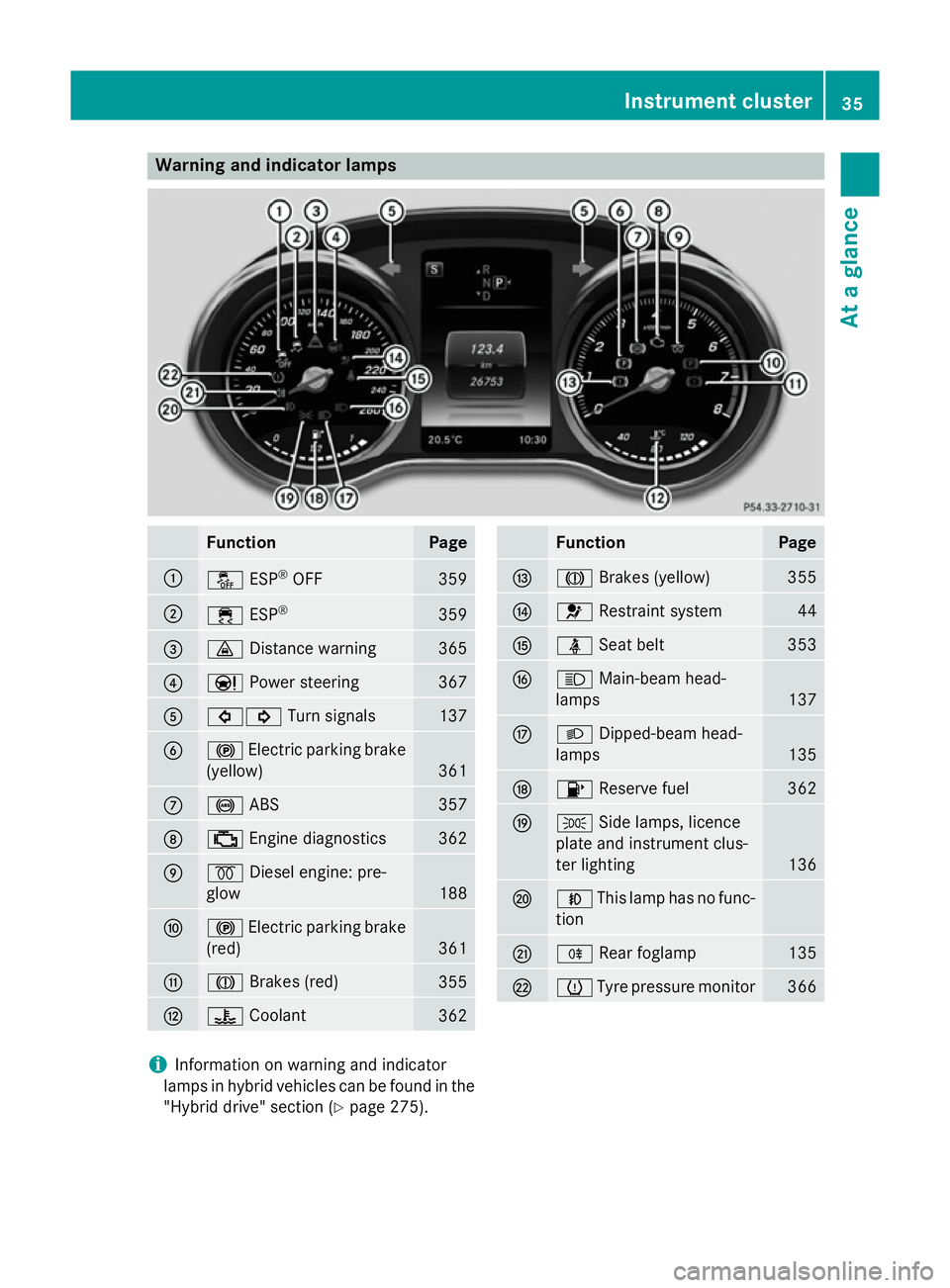
Warning and indicator lamps
Function Page
:
å
ESP®
OFF 359
;
÷
ESP® 359
=
·
Distance warning 365
?
Ð
Power steering 367
A
#!
Turn signals 137
B
!
Electric parking brake
(yellow) 361
C
!
ABS 357
D
;
Engine diagnostics 362
E
%
Diesel engine: pre-
glow 188
F
!
Electric parking brake
(red) 361
G
J
Brakes (red) 355
H
?
Coolant 362 Function Page
I
J
Brakes (yellow) 355
J
6
Restraint system 44
K
ü
Seat belt 353
L
K
Main-beam head-
lamps 137
M
L
Dipped-beam head-
lamps 135
N
8
Reserve fuel 362
O
T
Side lamps, licence
plate and instrument clus-
ter lighting 136
P
N
This lamp has no func-
tion Q
R
Rear foglamp 135
R
h
Tyre pressure monitor 366
i
Information on warning and indicator
lamps in hybrid vehicles can be found in the
"Hybrid drive" section (Y page 275). Instrument cluster
35At a glance
Page 79 of 489
Important safety notes
If you fail to adapt your driving style or if you
are inattentive, the driving safety systems can
neither reduce the risk of an accident nor
override the laws of physics. Driving safety
systems are merely aids designed to assist
driving. You are responsible for the distance
to the vehicle in front, for vehicle speed and
for braking in good time. Always adapt your
driving style to suit the prevailing road,
weather and traffic conditions and maintain a
safe distance from the vehicle in front. Drive
carefully.
The driving safety systems described only
work as effectively as possible when there is
adequate contact between the tyres and the
road surface. Please pay special attention to
the notes on tyres, recommended minimum
tyre tread depths etc. (Y page 432).
In wintry driving conditions, always use winter
tyres (M+S tyres) and, if necessary, snow
chains. Only in this way will the driving safety
systems described in this section work as
effectively as possible. ABS (Anti-lock Braking System)
General notes ABS regulates brake pressure in such a way
that the wheels do not lock when you brake.
This allows you to continue steering the vehi- cle when braking.
The ! ABS warning lamp in the instrument
cluster lights up when the ignition is switched on. It goes out when the engine is running.
Important safety notes i
Observe the "Important safety notes" sec-
tion (Y page 76). G
WARNING
If ABS is faulty, the wheels could lock when
braking. The steerability and braking charac-
teristics may be severely impaired. Addition-
ally, further driving safety systems are deac- tivated. There is an increased danger of skid-
ding and accidents.
Drive on carefully. Have ABS checked imme-
diately at a qualified specialist workshop.
If ABS is malfunctioning, other systems,
including driving safety systems, will also
become inoperative. Observe the information on the ABS warning lamp (Y page 357) and
display messages which may be shown in the
instrument cluster (Y page 317).
ABS works from a speed of about
8 km/hupwards, regardless of road-surface
conditions. ABS works on slippery surfaces,
even when you only brake gently.
Braking X
If ABS intervenes: continue to depress the
brake pedal with force until the braking sit-
uation is over.
X To make a full brake application:
depress the brake pedal with full force.
If ABS intervenes when braking, you will feel a pulsing in the brake pedal.
The pulsating brake pedal can be an indica-
tion of hazardous road conditions, and func-
tions as a reminder to take extra care while
driving. BAS (Brake Assist)
General notes BAS operates in emergency braking situa-
tions. If you depress the brake pedal quickly,
BAS automatically boosts the braking force,
thus shortening the stopping distance.
Important safety notes i
Observe the "Important safety notes" sec-
tion (Y page 76). 76
Driving safety systemsSafety
Page 209 of 489
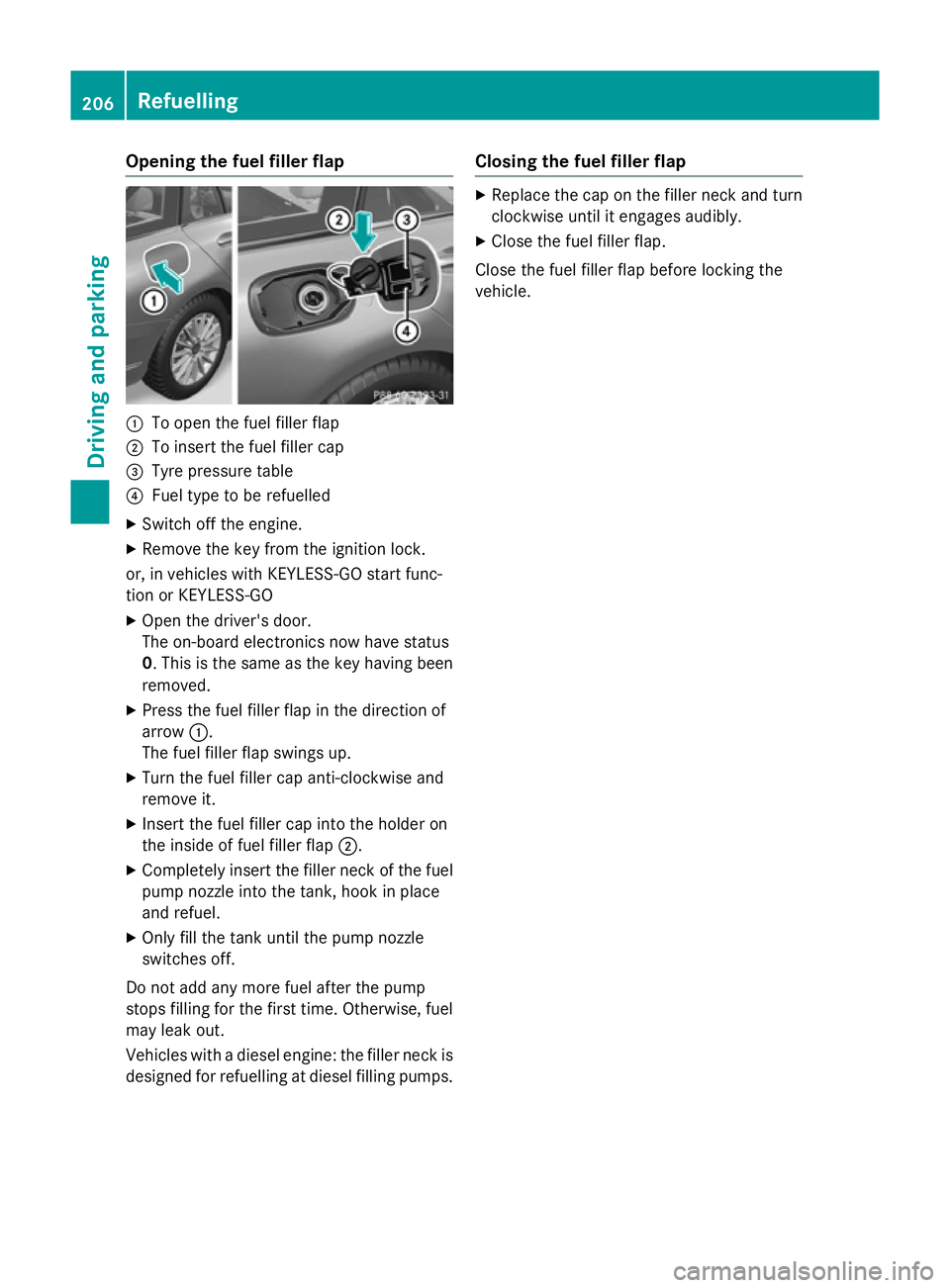
Opening the fuel filler flap
:
To open the fuel filler flap
; To insert the fuel filler cap
= Tyre pressure table
? Fuel type to be refuelled
X Switch off the engine.
X Remove the key from the ignition lock.
or, in vehicles with KEYLESS-GO start func-
tion or KEYLESS ‑GO
X Open the driver's door.
The on-board electronics now have status
0. This is the same as the key having been
removed.
X Press the fuel filler flap in the direction of
arrow :.
The fuel filler flap swings up.
X Turn the fuel filler cap anti-clockwise and
remove it.
X Insert the fuel filler cap into the holder on
the inside of fuel filler flap ;.
X Completely insert the filler neck of the fuel
pump nozzle into the tank, hook in place
and refuel.
X Only fill the tank until the pump nozzle
switches off.
Do not add any more fuel after the pump
stops filling for the first time. Otherwise, fuel
may leak out.
Vehicles with a diesel engine: the filler neck is designed for refuelling at diesel filling pumps. Closing the fuel filler flap X
Replace the cap on the filler neck and turn
clockwise until it engages audibly.
X Close the fuel filler flap.
Close the fuel filler flap before locking the
vehicle. 206
RefuellingDriving and parking
Page 218 of 489
Emergency braking
The vehicle can also be braked during an
emergency by using the electric parking
brake.
X While driving, press handle :of the elec-
tric parking brake (Y page 213).
The vehicle is braked as long as you keep
handle :of the electric parking brake
depressed. The longer the electric parking
brake handle :is depressed, the greater the
braking force.
During braking:
R a warning tone sounds
R the Release parking brake
Release parking brake message
appears
R the red !indicator lamp in the instru-
ment cluster flashes
When the vehicle has been braked to a stand- still, the electric parking brake is applied. Parking up the vehicle
If you leave the vehicle parked up for longer
than four weeks, the battery may be damaged by exhaustive discharging and further dam-
aged in the event of this occurring again.
X Disconnect the battery or connect it to a
trickle charger.
i You can obtain information about trickle
chargers from a qualified specialist work-
shop.
If you leave the vehicle parked up for longer
than six weeks, it may suffer from lack of use.
X Visit a qualified specialist workshop and
seek advice.
Hybrid vehicles: observe the important
safety notes on the high-voltage battery
(Y page 273). Driving tips
General driving tips
Important safety notes G
WARNING
If you switch off the ignition while driving,
safety-relevant functions are only available
with limitations, or not at all. This could affect, for example, the power steering and the brake
boosting effect. You will require considerably
more effort to steer and brake. There is a risk of an accident.
Do not switch off the ignition while driving.
Drive sensibly – save fuel Observe the following tips to save fuel:
X The tyres should always be inflated to the
recommended tyre pressure.
X Remove unnecessary loads.
X Remove roof racks when they are not nee-
ded.
X Warm up the engine at low engine speeds.
X Avoid frequent acceleration or braking.
X Have all maintenance work carried out as
indicated by the service intervals in the
Service Booklet or by the service interval
display.
Fuel consumption also increases when driv-
ing in cold weather, in stop-start traffic, on
short journeys and in hilly terrain. ECO display
The ECO display shows you how economical
your driving style is. The ECO display assists
you in achieving the most economical driving
style for the selected settings and prevailing
conditions. Consumption can be significantly influenced by your driving style. Driving tips
215Driving and parking Z
Page 220 of 489
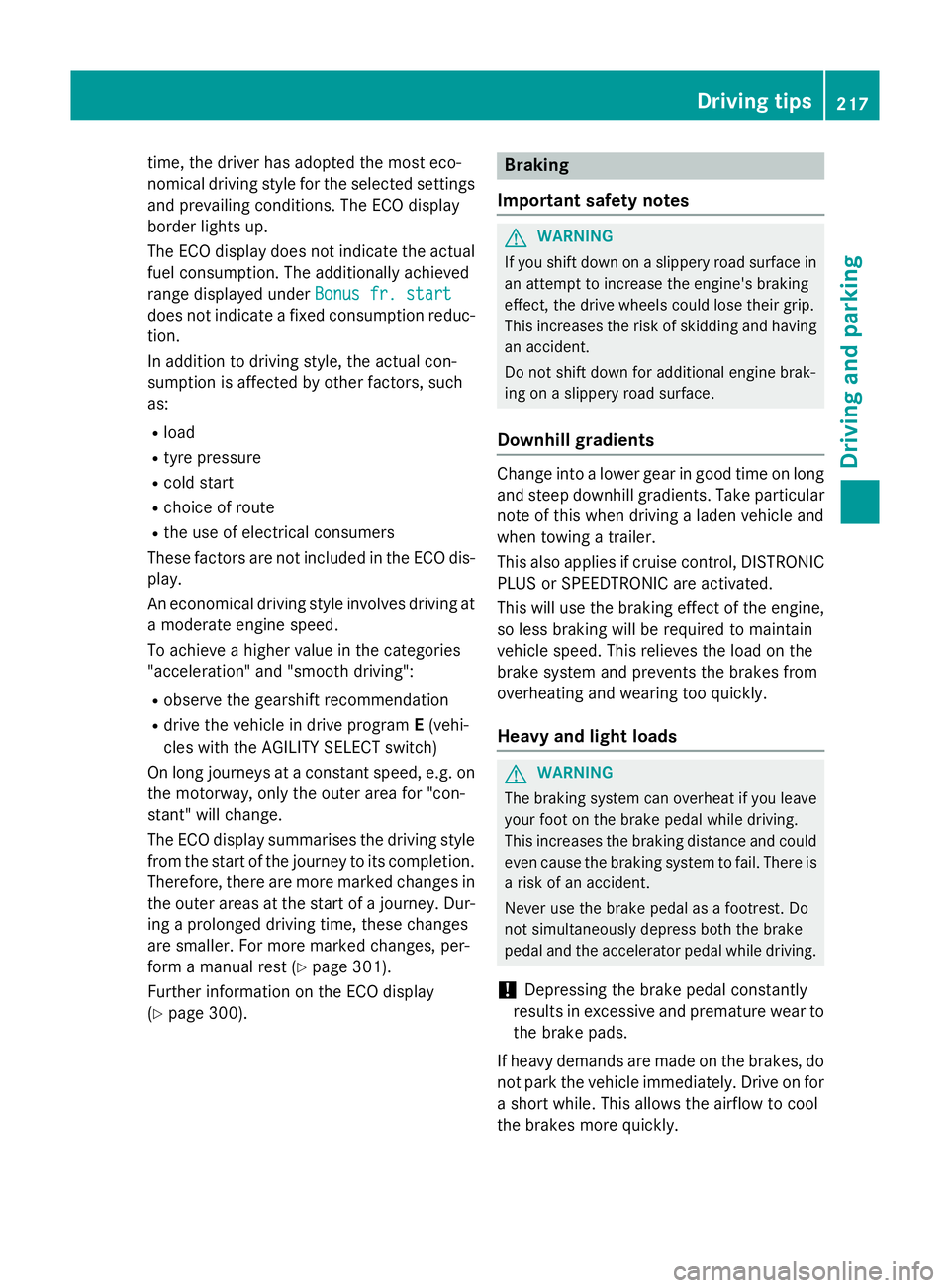
time, the driver has adopted the most eco-
nomical driving style for the selected settings
and prevailing conditions. The ECO display
border lights up.
The ECO display does not indicate the actual fuel consumption. The additionally achieved
range displayed under Bonus fr. start Bonus fr. start
does not indicate a fixed consumption reduc-
tion.
In addition to driving style, the actual con-
sumption is affected by other factors, such
as:
R load
R tyre pressure
R cold start
R choice of route
R the use of electrical consumers
These factors are not included in the ECO dis-
play.
An economical driving style involves driving at a moderate engine speed.
To achieve a higher value in the categories
"acceleration" and "smooth driving":
R observe the gearshift recommendation
R drive the vehicle in drive program E(vehi-
cles with the AGILITY SELECT switch)
On long journeys at a constant speed, e.g. on the motorway, only the outer area for "con-
stant" will change.
The ECO display summarises the driving style
from the start of the journey to its completion. Therefore, there are more marked changes in
the outer areas at the start of a journey. Dur- ing a prolonged driving time, these changes
are smaller. For more marked changes, per-
form a manual rest (Y page 301).
Further information on the ECO display
(Y page 300). Braking
Important safety notes G
WARNING
If you shift down on a slippery road surface in an attempt to increase the engine's braking
effect, the drive wheels could lose their grip.
This increases the risk of skidding and having
an accident.
Do not shift down for additional engine brak-
ing on a slippery road surface.
Downhill gradients Change into a lower gear in good time on long
and steep downhill gradients. Take particular note of this when driving a laden vehicle and
when towing a trailer.
This also applies if cruise control, DISTRONIC
PLUS or SPEEDTRONIC are activated.
This will use the braking effect of the engine,
so less braking will be required to maintain
vehicle speed. This relieves the load on the
brake system and prevents the brakes from
overheating and wearing too quickly.
Heavy and light loads G
WARNING
The braking system can overheat if you leave your foot on the brake pedal while driving.
This increases the braking distance and could
even cause the braking system to fail. There is
a risk of an accident.
Never use the brake pedal as a footrest. Do
not simultaneously depress both the brake
pedal and the accelerator pedal while driving.
! Depressing the brake pedal constantly
results in excessive and premature wear to
the brake pads.
If heavy demands are made on the brakes, do not park the vehicle immediately. Drive on for
a short while. This allows the airflow to cool
the brakes more quickly. Driving
tips
217Driving an d parking Z
Page 228 of 489
Setting a speed
X
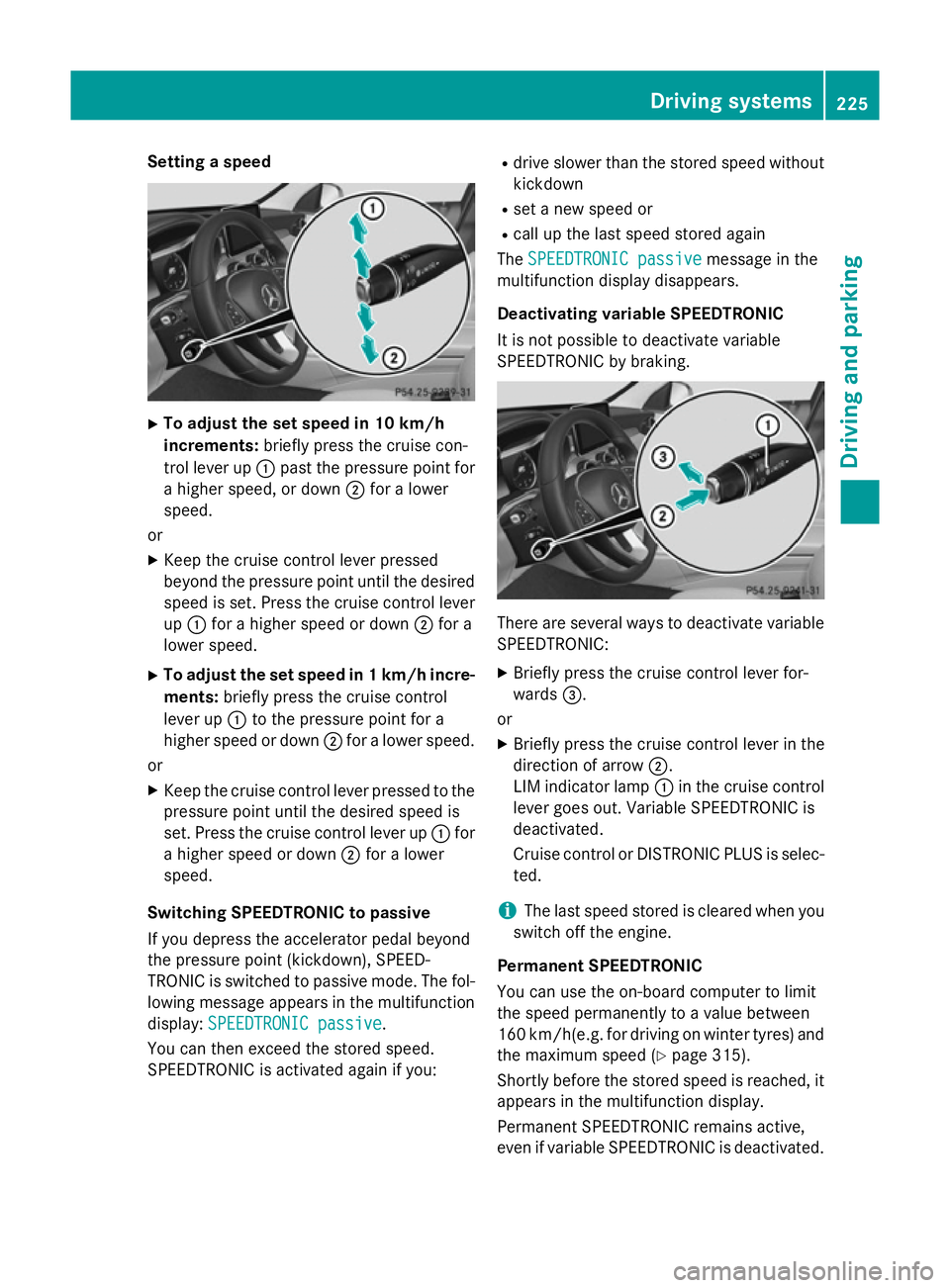
To adjust the set speed in 10 km/h
increments: briefly press the cruise con-
trol lever up :past the pressure point for
a higher speed, or down ;for a lower
speed.
or
X Keep the cruise control lever pressed
beyond the pressure point until the desired
speed is set. Press the cruise control lever
up : for a higher speed or down ;for a
lower speed.
X To adjust the set speed in 1 km/h incre-
ments: briefly press the cruise control
lever up :to the pressure point for a
higher speed or down ;for a lower speed.
or
X Keep the cruise control lever pressed to the
pressure point until the desired speed is
set. Press the cruise control lever up :for
a higher speed or down ;for a lower
speed.
Switching SPEEDTRONIC to passive
If you depress the accelerator pedal beyond
the pressure point (kickdown), SPEED-
TRONIC is switched to passive mode. The fol-
lowing message appears in the multifunction
display: SPEEDTRONIC passive
SPEEDTRONIC passive.
You can then exceed the stored speed.
SPEEDTRONIC is activated again if you: R
drive slower than the stored speed without
kickdown
R set a new speed or
R call up the last speed stored again
The SPEEDTRONIC passive SPEEDTRONIC passive message in the
multifunction display disappears.
Deactivating variable SPEEDTRONIC
It is not possible to deactivate variable
SPEEDTRONIC by braking. There are several ways to deactivate variable
SPEEDTRONIC:
X Briefly press the cruise control lever for-
wards =.
or X Briefly press the cruise control lever in the
direction of arrow ;.
LIM indicator lamp :in the cruise control
lever goes out. Variable SPEEDTRONIC is
deactivated.
Cruise control or DISTRONIC PLUS is selec-
ted.
i The last speed stored is cleared when you
switch off the engine.
Permanent SPEEDTRONIC
You can use the on-board computer to limit
the speed permanently to a value between
160 km/h(e.g. for driving on winter tyres) and the maximum speed (Y page 315).
Shortly before the stored speed is reached, it
appears in the multifunction display.
Permanent SPEEDTRONIC remains active,
even if variable SPEEDTRONIC is deactivated. Driving systems
225Driving and parking Z