keyless MERCEDES-BENZ C-CLASS ESTATE 2018 Owners Manual
[x] Cancel search | Manufacturer: MERCEDES-BENZ, Model Year: 2018, Model line: C-CLASS ESTATE, Model: MERCEDES-BENZ C-CLASS ESTATE 2018Pages: 609, PDF Size: 11.38 MB
Page 75 of 609
If
th eve hicle is not opened within appr oximately
40 seconds af ter unlocking, it loc ksagain. Anti-
th eft pr otection is primed again.
Do not keep theke yto ge ther with electronic
devices or me tal objects. This can af fect the
ke y's functionalit y.
0009 If battery check lamp 2does not light up
af te r pressing the0036 or0037 button, the
battery is dischar ged.
Re placing theke y bat tery ( 0013 page73). Ac
tivating/deactivating the acoustic lo cking
ve rification signal Multimedia sy
stem:
0018 Vehicle 0019
î Vehicle settings
0019 Acoustic lock 0007
Activate 0073or deacti vate 0053 the function. Ac
tivating/deactivating the panic alarm Re
quirements:
R The ignition is switched off 0009
The panic alarm function is only available in
cer tain countries. 0007
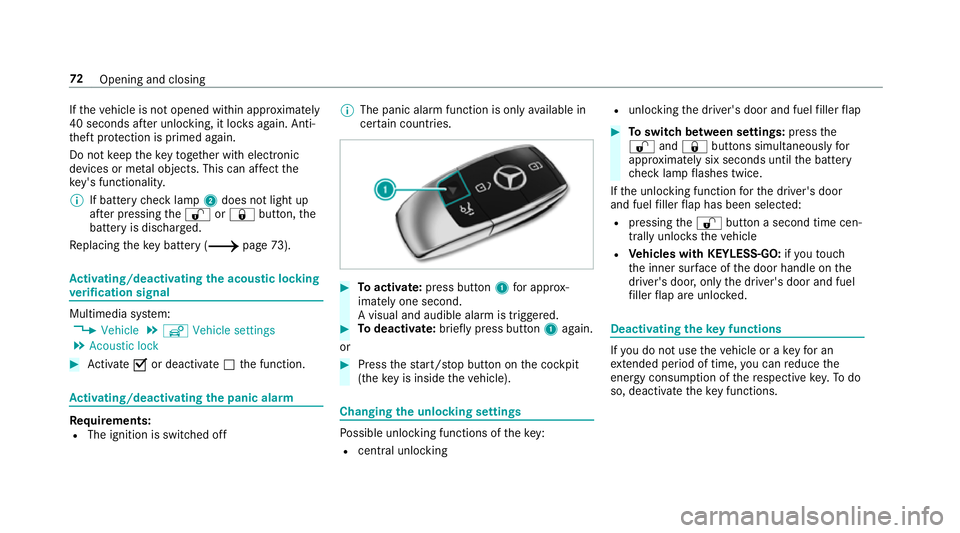
Toactivate: press button 1for appro x‐
ima tely one second.
A visual and audible alarm is triggered. 0007
Todeactivate: briefly press but ton1 again.
or 0007
Press thest art/ stop button on the cockpit
(the key is inside theve hicle). Changing
the unlocking settings Po
ssible unlocking functions of theke y:
R cent ral unlocking R
unlocking the driver's door and fuel filler flap 0007
Toswitch between settings: pressthe
0036 and0037 buttons simultaneously for
appr oximately six seconds until the battery
ch eck lamp flashes twice.
If th e unlocking function forth e driver's door
and fuel filler flap has been selec ted:
R pressing the0036 button a second time cen‐
trally unloc kstheve hicle
R Vehicles with KEYLESS-GO: ifyo uto uch
th e inner sur face of the door handle on the
driver's door, only the driver's door and fuel
fi ller flap are unlo cked. Deactivating
theke y functions If
yo u do not use theve hicle or a keyfo r an
ex tended pe riod of time, you can reduce the
energy consum ption of there spective key.Todo
so, deactivate theke y functions. 72
Opening and closing
Page 78 of 609
Problem
Possible causes/consequences and 0050
0050Solutions 0007
Check the battery using the battery check lamp and replace if necessary (0013 page73). 0007
Use the emer gency keyto lock or unlock (0013 page73). 0007
Have theke ych ecked at a qualified specialist workshop.
Yo u ha velost a key. 0007
Have theke y deacti vated at a qualified specialist workshop. 0007
If necessar y,ha ve the mechanical lock changed as well. Doors
Note
s onthe additional door lock The additional door lock is only
available for
ve hicles forth eUni ted Kingdom. 000A
WARNING Risk of inju ryto persons
inside theve hicle when the additional
door lock is activated
If th e additional door lock is activated, the
doors can no longer be opened from the
inside. If
th ere are persons in theve hicle, they can
no longer le aveth eve hicle, e.g. in hazardous
situations. 0007
Never lea vepersons unattended in the
ve hicle, particularly children, elderly
persons or persons in need of help. 0007
Ifth ere are persons in theve hicle, do
not activate the additional door loc k. The additional door lock is automatically activa‐
te d in thefo llowing situations:
R The vehicle is loc ked using thekey.
R The vehicle is loc ked using KEYLESS-GO. If
th eve hicle has been loc ked via Mercedes me
connect, the additional door lock is not activa‐
te d.
If th e additional door lock is activated, the doors
cann otbe opened from the inside.
0009 After locking you can issue a signal with the
horn.
Yo u can pr eventthe additional door lock from
being activated bydeactivating interior pr otec‐
tion before locking theve hicle (0013 page97). Opening and closing
75
Page 81 of 609
0007
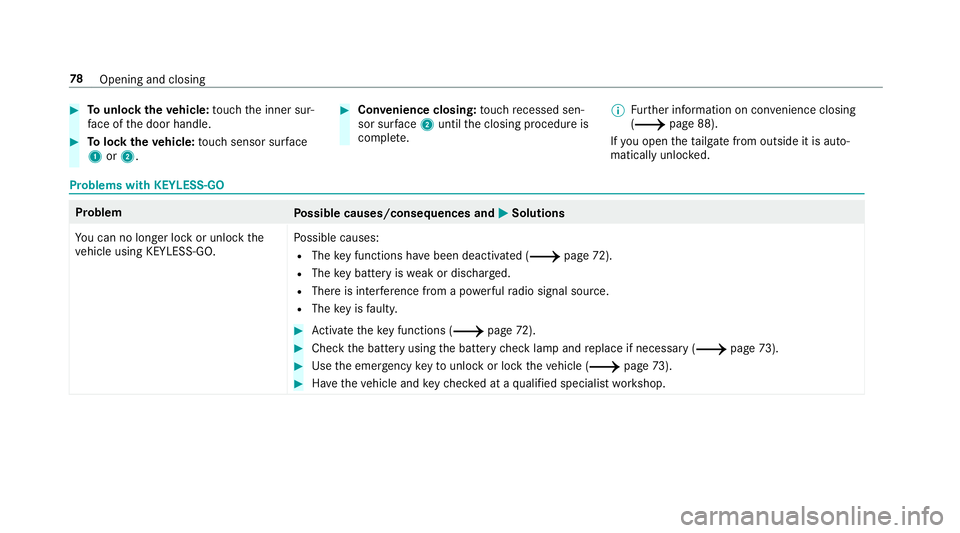
Tounlo cktheve hicle: touch the inner sur‐
fa ce of the door handle. 0007
Tolock theve hicle: touch sensor sur face
1 or2. 0007
Convenience closing: touch recessed sen‐
sor su rface 2until the closing procedure is
comple te. 0009
Further information on con venience closing
(0013 page 88).
If yo u open theta ilgate from outside it is auto‐
matically unloc ked. Problems with KEYLESS-GO
Problem
Possible causes/consequences and 0050
0050Solutions
Yo u can no lon ger lock or unlock the
ve hicle using KEYLESS-GO. Po
ssible causes:
R The key functions ha vebeen deactivated (0013 page72).
R The key bat tery iswe ak or dischar ged.
R There is inter fere nce from a po werful radio signal source.
R The key is faulty. 0007
Activate theke y functions (0013 page72). 0007
Check the battery using the battery check lamp and replace if necessary (0013 page73). 0007
Use the emer gency keyto unlo ckor lock theve hicle (0013 page73). 0007
Have theve hicle and keych ecked at a qualified specialist workshop. 78
Opening and closing
Page 85 of 609
0007
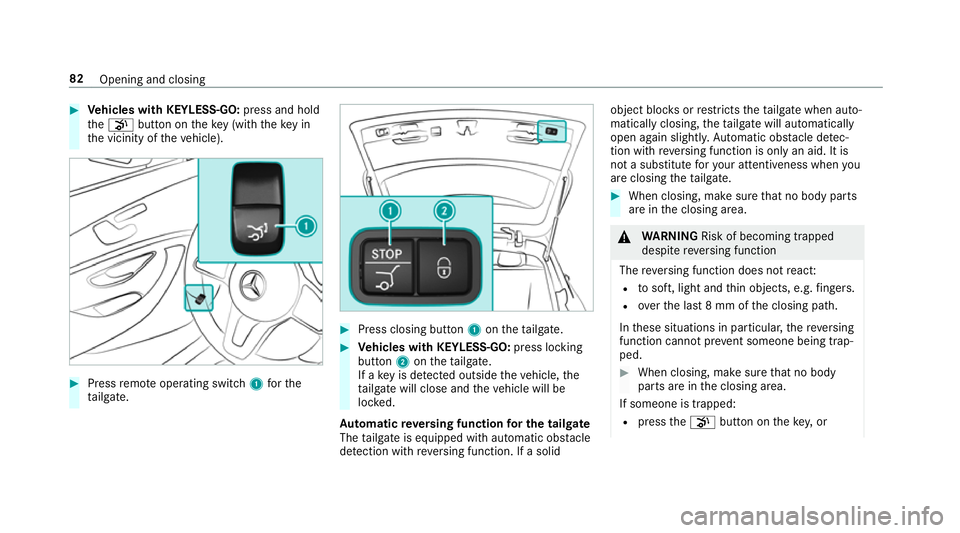
Vehicles with KEYLESS-GO: press and hold
th e008B button on theke y (with theke y in
th e vicinity of theve hicle). 0007
Press remo teoperating switch 1forthe
ta ilgate. 0007
Press closing button 1ontheta ilgate. 0007
Vehicles with KEYLESS-GO: press locking
button 2ontheta ilgate.
If a key is de tected outside theve hicle, the
ta ilgate will close and theve hicle will be
loc ked.
Au tomatic reve rsing function for the tail gate
The tailgate is equipped with automatic obs tacle
de tection wi threve rsing function. If a solid object bloc
ksorrestricts theta ilgate when auto‐
matically closing, theta ilgate will automatically
open again slight ly.Au tomatic obs tacle de tec‐
tion wi threve rsing function is only an aid. It is
not a substitute foryo ur attentiveness when you
are closing theta ilgate. 0007
When closing, make sure that no body parts
are in the closing area. 000A
WARNING Risk of becoming trapped
despi tereve rsing function
The reve rsing function does not react:
R tosoft, light and thin objects, e.g. fingers.
R overth e last 8 mm of the closing path.
In these situations in particular, there ve rsing
function cannot pr event someone being trap‐
ped. 0007
When closing, ma kesure that no body
parts are in the closing area.
If someone is trapped:
R press the008B button on theke y,or 82
Opening and closing
Page 86 of 609
R
press or pull there mo teoperating switch
on the driver's door, or
R press the closing or locking button on the
ta ilgate, or
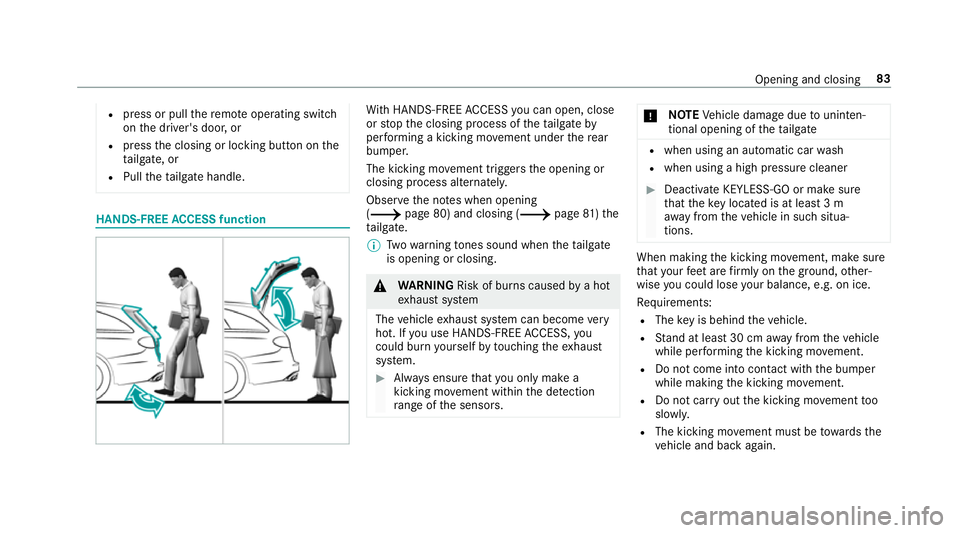
R Pull theta ilgate handle. HANDS-FREE
ACCESS function Wi
th HANDS-FREE ACCESS you can open, close
or stop the closing process of theta ilgate by
per form ing a kicking mo vement under there ar
bumper.
The kicking mo vement triggers the opening or
closing process alternately.
Obser vethe no tes when opening
(0013 page 80) and closing (0013 page81)the
ta ilgate.
0009 Twowa rning tones sound when theta ilgate
is opening or closing. 000A
WARNING Risk of bu rns caused bya hot
ex haust sy stem
The vehicle exhaust sy stem can become very
hot. If you use HANDS-FREE ACCESS, you
could bu rnyourself by touching theex haust
sy stem. 0007
Alw ays ensure that you on ly ma ke a
kicking mo vement within the de tection
ra nge of the sensors. 000E
NO
TEVehicle damage due tounin ten‐
tional opening of theta ilgate R
when using an automatic car wash
R when using a high pressure cleaner 0007
Deactivate KEYLESS-GO or make sure
that theke y located is at least 3 m
aw ay from theve hicle in such situa‐
tions. When making
the kicking mo vement, make sure
th at your feet are firm ly on the ground, other‐
wise you could lose your balance, e.g. on ice.
Re quirements:
R The key is behind theve hicle.
R Stand at least 30 cm away from theve hicle
while per form ing the kicking mo vement.
R Do not come into contact with the bumper
while making the kicking mo vement.
R Do not car ryout the kicking mo vement too
slowl y.
R The kicking mo vement must be towa rdsthe
ve hicle and back again. Opening and closing
83
Page 91 of 609
0007
Press and hold the0036 button on thekey.
The following functions are per form ed:
R The vehicle is unloc ked.
R The side windo wsare opened.
R The pano ramic sliding sunroof is opened.
R The seat ventilation of the driver's seat is
switched on.
If th ero ller sunblinds of the panoramic sliding
sunroof are closed, thero ller sunblinds are
opened firs t. 0007
Tointer rupt convenience opening: release
th e0036 button. 0007
Tocontinue con venience opening: press
and hold the0036 button again. Con
venience closing (closing theve hicle
from outside) 000A
WARNING Risk of entrapment caused by
inadver tent con venience closing
When the con venience closing feature is
operating, parts of the body could become
trapped in the closing area of the side win‐
dow and the sliding sunroof. 0007
Obser vethe comple teclosing proce‐
du re when using con venience closing. 0007
When closing, ma kesure that no body
parts are in the closing area. 0007
Press and hold the0037 button on thekey.
The following functions are per form ed:
R The vehicle is loc ked. R
The side windo wsare closed.
R The pano ramic sliding sunroof is closed. 0007
Tointer rupt convenience closing: release
th e0037 button. 0007
Toclose thero ller sunblinds: press and
hold the0037 button again.
0009 Con venience closing can also be operated
wi th KEYLESS-GO (0013 page77). Problems with
the side windo ws Problem
Possible causes/consequences and 0050
0050 Solutions
A side window cann otbe closed and
yo u cannot see the cause. 0007
Check tosee whe ther any objects are in the window guide. 88
Opening and closing
Page 98 of 609
Anti-theft pr
otection Fu
nction of the immobiliser The immobiliser pr
events your vehicle from
being star ted without the cor rect key.
The immobiliser is automatically activated when
th e ignition is switched off and deactivated when
th e ignition is switched on. ATA
(Anti-Theft Alarm sy stem) Fu
nction of theATA system
If th eATA system is primed, a visual and audible
alarm is triggered in thefo llowing situations:
R when a door is opened
R when theta ilgate is opened
R when the bonn etis opened
R when interior pr otection is triggered
(0013 page 96)
R when tow- aw ay protection is triggered
(0013 page 96) The
ATA sy stem is primed automatically af ter
appr oximately ten seconds in thefo llowing situa‐
tions:
R afte r locking theve hicle with thekey
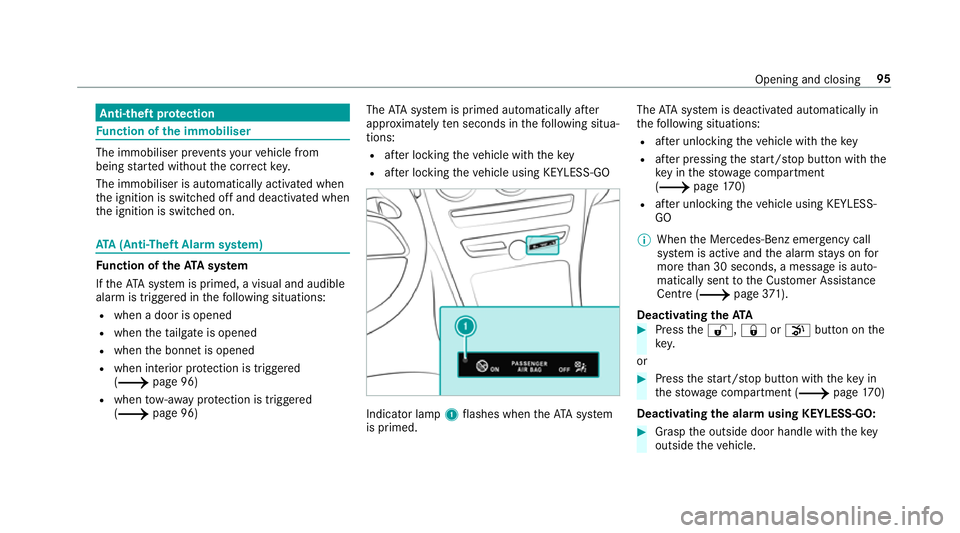
R afte r locking theve hicle using KEYLESS-GO Indicator lamp
1flashes when theAT A sy stem
is primed. The
ATA sy stem is deactivated automatically in
th efo llowing situations:
R afte r unlocking theve hicle with thekey
R afte r pressing thest art/ stop button with the
ke y in thestow age compartment
(0013 page170)
R afte r unlocking theve hicle using KEYLESS-
GO
0009 When the Mercedes‑Benz emer gency call
sy stem is active and the alarm stay s on for
more than 30 seconds, a message is auto‐
matically sent tothe Cus tomer Assis tance
Centre (0013 page 371).
Deactivating theATA 0007
Press the0036, 0037or008B button on the
key.
or 0007
Press thest art/ stop button with theke y in
th estow age compartment (0013 page170)
Deactivating the ala rmusing KEYLESS-GO: 0007
Grasp the outside door handle with thekey
outside theve hicle. Opening and closing
95
Page 99 of 609
Fu
nction of tow- aw ay protection An audible and visual alarm is triggered if an
alteration
to yourvehicle's angle of inclination is
de tected while tow- aw ay protection is primed.
To w- aw ay protection is automatically primed
af te r about 60 seconds:
R afte r locking theve hicle with thekey
R afte r locking theve hicle using KEYLESS-GO
To w- aw ay protection is only primed when thefo l‐
lowing components are closed:
R the doors
R theta ilgate
To w- aw ay protection is automatically deactiva‐
te d:
R afte r pressing the0036 or008B button on
th ekey
R afte r pressing thest art/ stop button with the
ke y in thestow age compartment
(0013 page170)
R afte r unlocking theve hicle using KEYLESS-
GO R
when using HANDS-FREE ACCESS
In fo rm ation on de tecting damage on a pa rked
ve hicle (0013 page 202). Priming/deactivating
tow- aw ay protection Multimedia sy
stem:
0018 Vehicle 0019
î Vehicle settings
0019 Tow-away protection 0007
Activate 0073or deacti vate 0053 the function.
To w- aw ay protection is primed again in thefo l‐
lowing cases:
R The vehicle is unloc ked again.
R A door is opened.
R The vehicle is loc ked again. Fu
nction of interior pr otection When interior pr
otection is primed, a visual and
audible alarm is triggered if mo vement is de tec‐
te d in theve hicle interior. Interior pr
otection is primed automatically af ter
appr oximately ten seconds:
R afte r locking theve hicle with thekey
R afte r locking theve hicle using KEYLESS-GO
Interior pr otection is only primed when thefo l‐
lowing components are closed:
R the doors
R theta ilgate
Interior pr otection is automatically deactivated:
R afte r pressing the0036 or008B button on
th ekey
R afte r pressing thest art/ stop button with the
ke y in thestow age compartment
(0013 page170)
R afte r unlocking theve hicle using KEYLESS-
GO
R when using HANDS-FREE ACCESS
The following situations can lead toafa lse
alarm:
R moving objects such as masc ots in theve hi‐
cle interior 96
Opening and closing
Page 583 of 609
Internet
Calling up a web page .........................3 77
Closing the br ows er ............................. 379
Del eting a bookmark .......................... .379
Deleting br owser data .........................3 79
Managing bookma rks .......................... 379
Internet connection Cancelling permission (mobile
phone) ................................................ .376
Communication module function ........ .374
Connection status .............................. .376
Displ aying the connection status ........ .376
Editing access da ta(Blue tooth ®
) .........3 75
Es tablishing .........................................3 76
Information .......................................... 373
Mobile phone de tails .......................... .376
Re strictions ......................................... 373
Setting access da ta(Blue tooth ®
) .........3 74
Setting up (Blue tooth®
) ........................ 374
Setting up (Wi-Fi) ................................. 374
Switching Blu etoo th®
profile (DUN/
PA N) .................................................... 375
Internet radio
Calling up ............................................ 379
Del eting stations ................................ .380 Logging out .......................................... 381
Overview ............................................. 380
Re gis tering .......................................... 381
Saving stations .................................... 380
Selecting and connecting toast ation
............................................................ .380
Selecting stre am .................................. 381
Setting options .................................... 381
Te rm s of use ........................................3 81
Ionisation Activating/deactivating (multimedia
sy stem) ................................................ 161
iPhone ®
see Apple CarPlay™
see Mercedes-Benz Link
ISOFIX child seat securing sy stem
Fitting .................................................... 58
Seats suitable for attaching ................... 55 J
Jack Declaration of conformity ...................... 23
St orage location ..................................4 63Jump-start connection
............................ 439
Gene ral no tes ...................................... 437 K
Ke y.............................................................. 71
Ac oustic locking verification signal ........ 72
Battery ................................................... 73
Emergency key ...................................... 73
Energy consumption .............................. 72
Fe atures ................................................ 71
Ke yring attachment .............................. 73
Overview ................................................ 71
Pa nic alarm ............................................ 72
Problem .................................................74
Un locking setting .................................. .72
Ke y functions
Deactivating .......................................... 72
KEYLESS-GO Locking theve hicle ................................ 77
Problem .................................................78
Un locking setting .................................. .72
Un locking theve hicle ............................77
Kickd own.................................................1 86
Using ................................................... 186580
Index
Page 585 of 609
LINGU
ATRO NIC ........................................ 284
Application specific voice commands
............................................................ .285
Au dible help functions .........................2 86
Global voice commands ...................... 285
Impr oving speech quality .................... 286
Language setting ................................ .286
Media pla yervo ice commands ............ 293
Message voice commands .................. 295
Multifunction steering wheel (operat‐
ing) ...................................................... 284
Na vigation voice commands ................ 288
Operable functions .............................. 285
Operating saf ety .................................. 284
Ra dio voice commands ...................... .292
Switch voice commands ...................... 287
Te lephone voice controls .................... .292
Te xt messa gevoice commands .......... .295
TV voice commands ............................ 292
Ty pes of voice commands .................. .285
Ve hicle voice commands .................... .296
Vo ice prom pting .................................. 285
Live Traf fic Information
Displaying subsc ript ion information .... 340
Displaying the tra ffic map .................. .340 Displ
aying traf fic incidents .................. 341
Extending a subscription ..................... 340
Issuing hazard alerts ........................... 342
Re gis tering on Mercedes me ............... 340
Load co mpartment co ver
Extending/r etra cting ............................ 11 7
No tes ................................................... 11 6
Load compa rtment floor
Opening/closing .................................. 12 3
Loading .................................................... .120
Bag hook ............................................. 12 0
No tes ................................................... 11 0
Ro ofrack ............................................. 124
St ow age space unde rneath the load
compartment floor .............................. 12 3
Ti e-down eyes ...................................... 12 0
Loading guidelines ...................................110
Loads Securing .............................................. .110
Locator lighting see Sur round lighting Locking/unlocking
Activating/deactivating the auto‐
matic locking feature ............................ .79
Ad ditional door lock .............................. 75
Digital Vehicle Keyst icke r ...................... 76
Emergency key ...................................... 79
KEYLESS-GO .......................................... 77
Mobile phone ......................................... 76
Opening theta ilgate .............................. 80
Smartphone .......................................... .76
Un locking/opening the doors from
th e inside ............................................... 76
Low beam (symm etrical dipped beam) ................. 13 4
Switching on/off ................................. 13 4
Lu bricant additives
see Additives
Lu ggage
Lu ggage net ......................................... 121
Secu ring ............................................... 11 0
Lu mbar support
see Lumbar support (4-w ay)
Lu mbar support (4-w ay)........................ .102 582
Index