brake MERCEDES-BENZ C-CLASS ESTATE 2020 Workshop Manual
[x] Cancel search | Manufacturer: MERCEDES-BENZ, Model Year: 2020, Model line: C-CLASS ESTATE, Model: MERCEDES-BENZ C-CLASS ESTATE 2020Pages: 565, PDF Size: 10.27 MB
Page 227 of 565
If
yo u deactivate theAc tive Lane Keeping Assist
wa rning and the lane markings cann otbe clear ly
de tected, it is possible that no lane cor recting
brake application take s place (/ page 225).
The sy stem may be impaired or may not function
particular lyin thefo llowing situations:
R Ifth ere is poor visibility, e.g. due toinsuf fi‐
cient illumination of thero ad, if there are
highly variable shade conditions or in rain,
sno w,fog or heavy spr ay.
R Ifth ere is glare, e.g. from oncoming traf fic,
th e sun or reflections.
R Ifth e windscreen in the area of the multi‐
function camera is dirty, or if the camera is
mis ted up, damaged or co vered.
R Ifth ere are no lane markings, or se veral
unclear lane markings are present for one
lane, e.g. around roadwor ks.
R Ifth e lane markings are worn, dark or cov‐
ered.
R Ifth e dis tance from theve hicle in front is too
short and thus the lane markings cann otbe
de tected. R
Ifth e lane markings change quickl y,e.g.
lanes branch off, cross one ano ther or
mer ge.
R Ifth e car riag ewa y is very nar row and wind‐
ing.
R Vehicles with Driving Assistance Pack‐
age: ifth era dar sensors in there ar bumper
are dirty or co vered in snow and an obs tacle
is de tected in your lane, no lane-cor recting
brake application take s place.
Ac tivating/deactivating Active Lane Keeping
Assist &
WARNING Risk of accident despite
Ac tive Lane Keeping Assist warning
A lane-cor recting brake application cannot
al wa ys bring theve hicle back into the origi‐
nal lane. #
Alw aysst eer, brake or accelera teyour‐
self, especially if Active Lane Keeping
Assist warnsyo u or makes a lane-cor‐
re cting brake application. &
WARNING Risk of accident despite inter‐
ve ntion of Active Lane Keeping Assist
Ac tive Lane Keeping Assist does not de tect
traf fic conditions or road users. The sy stem
may make an inappropriate brake applica‐
tion.
The brake application can be inter rupte d at
any time, forex ample, bysteering slightly in
th e opposite direction. #
Alw ays make sure that there is suf fi‐
cient dist ancetothe side forot her traf‐
fi c or obs tacles. &
WARNING Risk of accident despite Lane
Ke eping Assist
Lane Keeping Assist cannot always clearly
de tect lane markings.
In such cases, Lane Keeping Assist can:
R give an unnecessary warning
R not give a warning #
Alw ays pay particular attention tothe
traf fic situation and keep within the 224
Driving and parking
Page 236 of 565
%
The contra stof the display may be impaired
by abrupt, direct sunlight or by other light
sources, e.g. when driving out of a garage . In
th is case, pay particular attention.
% Have the display repaired or replaced if, for
ex ample, pixel er rors considerably restrict its
use.
See the no tes on cleaning the 360° Camera
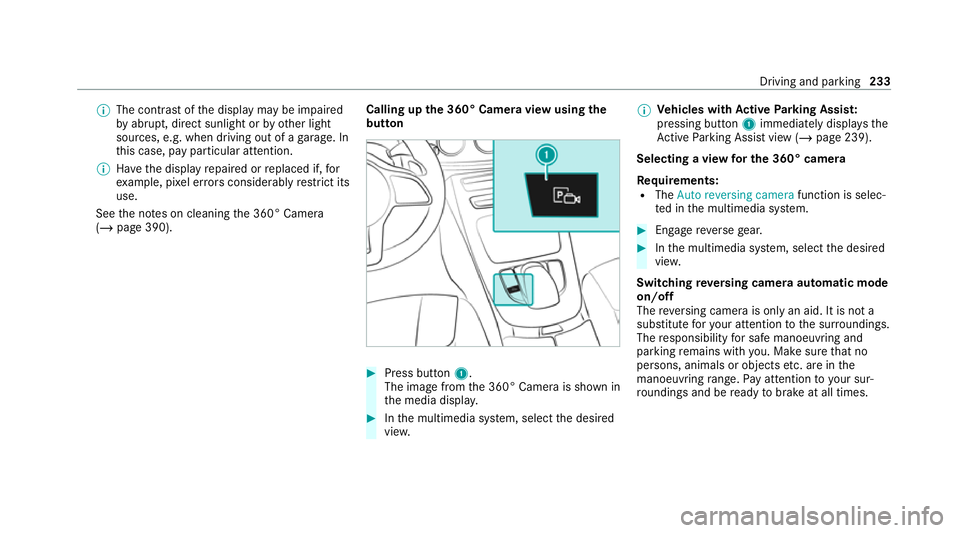
(/ page 390). Calling up
the 360° Camera view using the
button #
Press button 1.
The image from the 360° Camera is shown in
th e media displa y. #
Inthe multimedia sy stem, select the desired
vie w. %
Ve
hicles with Active Parking Assis t:
pressing button 1immediately displa ys the
Ac tive Parking Assist view (/ page 239).
Selecting a view for the 360° camera
Re quirements:
R The Auto reversing camera function is selec‐
te d in the multimedia sy stem. #
Enga gereve rsege ar. #
Inthe multimedia sy stem, select the desired
vie w.
Switching reve rsing camera automatic mode
on/off
The reve rsing camera is only an aid. It is not a
substitute foryo ur attention tothe sur roundings.
The responsibility for safe manoeuvring and
parking remains with you. Make sure that no
persons, animals or objects etc. are in the
manoeuvring range. Pay attention to your sur‐
ro undings and be ready tobrake at all times. Driving and parking
233
Page 241 of 565
Specifying
thest arting point for the warning
to nes
Yo u can specify whe ther thePa rking Assist
PA RKTRONIC warning tones should commence
when theve hicle is fur ther aw ay from an obs ta‐
cle. #
Select Warn early. #
Activate Oor deacti vate ª the function.
Ac tivating/deactivating audio fadeout
Yo u can specify whe ther thevo lume of a media
source in the multimedia sy stem is tobe
re duced when Parking Assist PARKTRONIC gives
an audible warning. #
Select Audio fadeout during warning tones .#
Activate Oor deacti vate ª the function. Ac
tive Parking Assist Fu
nction of Active Parking Assist
% The availability of this function is dependent
on the count ry.
Ac tive Parking Assist is an electro nic parking
assis tance sy stem, which uses ultrasound with th
e assis tance of there ve rsing camera and 360°
Camera. When you are driving forw ards up to
appr oximately 35 km/h, the sy stem automati‐
cally measures parking spaces on bo thsides of
th eve hicle.
As soon as all requ irements are met for sear ch‐
ing for parking spaces, theÇ display appears
in the multifunction displa y.
When Active Parking Assist has de tected park ing
spaces, theÈ display appears in the multi‐
function displa y.The ar rowsshow on which side
of thero ad de tected park ing spaces are located.
They are then shown in the media displa y.
The parking space can be selected as desired.
Depending on the location of the parking space,
th e parking direction (rear wards or forw ards)
can also be selec ted as desired.
When Active Parking Assist is activated, the turn
signal indicators are activated based on the cal‐
culated path of your vehicle.
When you are en tering or exiting a parking
space, the procedure is assis tedby acceleration,
braking, steering and gear changes. Ac
tive Parking Assist is only an aid. It is not a
substitute foryo ur attention tothe sur roundings.
The responsibility for safe manoeuvring and
parking remains with you. Make sure that no
persons, animals or objects etc. are in the
manoeuvring range.
Ac tive Parking Assist will be cancelled in thefo l‐
lowing situations:
R Parking Assist PARKTRONIC is deacti vated.
R You begin steering.
R You apply the parking brake.
R You en gage transmission position j.
R ESP ®
inter venes.
R You open the doors or theta ilgate while driv‐
ing.
Sy stem limits
If th eex terior lighting is malfunctioning, Active
Pa rking Assist is not available.
Objects located abo veor below the de tection
ra nge of the sensors, e.g. overhanging loads,
ov erhangs or loading ramp s of goods vehicles, or
th e borders of parking spaces, are not de tected
du ring measu rement of the parking space. These 238
Driving and parking
Page 245 of 565
&
WARNING Risk of accident due tovehi‐
cle swinging out while parking or pulling
out of a parking space
While parking or exiting a parking space, the
ve hicle swings out and can drive onto areas
of the oncoming lane.
This could cause youto collide wi thobjects
or other road users. #
Pay attention toobjects and other road
users. #
Where necessar y,stop theve hicle or
cancel the parking procedure with
Ac tive Parking Assist. #
If,forex ample, thePlease engage forward
gear message appears in the media display:
select the cor responding transmission posi‐
tion.
The vehicle mo ves out of the parking space.
The turn signal indicator is switched off auto‐
maticall y.
Af terth e parking space has been exited, a warn‐
ing tone and theØ Active Parking Assist fin- ished, take control of the vehicle.
message
prom ptyouto tak e control of theve hicle.
The vehicle is not automatically braked and can
ro llaw ay.Yo u ha vetoaccelerate, brake, steer
and change gear yourself again. Manoeuv
ring assistant Fu
nction of Drive Away Assist
Drive AwayAssi stcan reduce the se verity of an
impact when pulling away. If an obs tacle is
de tected in the direction of tr avel, theve hicle's
speed is brief lyreduced toappr ox. 2 km/h. If a
critical situation is de tected, theÈ symbol
appears in the media displa y.
% You can cancel an inter vention byDrive
Aw ayAssi stat any time bydeactivating
Pa rking Assist PARKTRONIC (/ page 237). &
WARNING Risk of accident caused by
limited de tection per form ance of Drive
Aw ayAssi st
Drive AwayAssi stcannot al ways clearly iden‐
tify objects and traf fic situations. #
Alw ays pay careful attention tothe traf‐
fi c situation; do not rely on Drive Away
Assi stalone. #
Be prepared tobrake or swer veas nec‐
essar y,prov ided the tra ffic situation
permits and that it is safe totake eva‐
sive action. Drive
AwayAssi stis only an aid. It is not a sub‐
st itute foryo ur attention tothe sur roundings.
The responsibility for safe manoeuvring and
parking remains with you. Make sure that no
persons, animals or objects etc. are in the
manoeuvring range.
A risk of a collision may arise in thefo llowing sit‐
uations, forex ample:
R Ifth e accelera tor and brake pedals are inter‐
ch anged.
R If an incor rect transmission position is
engaged.
Drive AwayAssi stis active under thefo llowing
conditions:
R IfPa rking Assist PARKTRONIC is activated. 242
Driving and pa rking
Page 246 of 565
R
Ifyo u shift the transmission position tok or
h when theve hicle is stationar y.
R Ifth e de tected obs tacle is less than appr ox.
1. 0 m away.
R Ifth e manoeuvring assis tance function is
acti vated in the multimedia sy stem.
Sy stem limits
The per form ance of Drive AwayAssi stis limited
on inclines.
When driving with a trailer, Drive AwayAssi stis
not available.
% Also obse rveth e sy stem limits of Parking
Assist PARKTRONIC (/ page 234).
Fu nction of Cross Traf fic Alert
% Cross Traf fic Alert is only available forve hi‐
cles with Blind Spot Assist or Active Blind
Spot Assi st.
Cross Traf fic Alert can warndrivers of any cross‐
ing tra ffic when reve rsing and manoeuvring out
of a parking space. The radar sensors in the
bumper also monitor the area adjacent tothe
ve hicle. If a critical situation is de tected, the L
symbol appears inthe media display and
th eve hicle can be braked automatically.
If th era dar sensors are obstructed byvehicles
or other objects, de tection is not possible.
Cross Traf fic Alert is acti veunder thefo llowing
conditions:
R ifth eve hicle is reve rsing at a walking pace.
R manoeuvring assis tance is acti vated
( / page 243).
% Also obser vethe instructions on Blind Spot
Assist and Active Blind Spot Assi st
( / page 219).
Sy stem limits
Cross Traf fic Alert is not available on inclines.
Cross Traf fic Alert is not available when driving
with a trailer. Ac
tivating or deactivating manoeuv ring
assistant
Multimedia sy stem:
4 Vehicle 5
k Assistance
5 Camera & Park. Assist
5 Manoeuvring assist. #
Activate Oor deacti vate ª the function.
% Manoeuvring assis tance mu stbe active for
th e function of Drive AwayAssi st
( / page 242) and Cross Traf fic Alert
(/ page 243). Tr
ailer hitch Note
s on trailer operation *
NO
TEMercedes-AMG vehicles #
Obser vethe no tes in the Supplement.
Yo u could otherwise failto recognise
dangers. Driving and park
ing243
Page 250 of 565
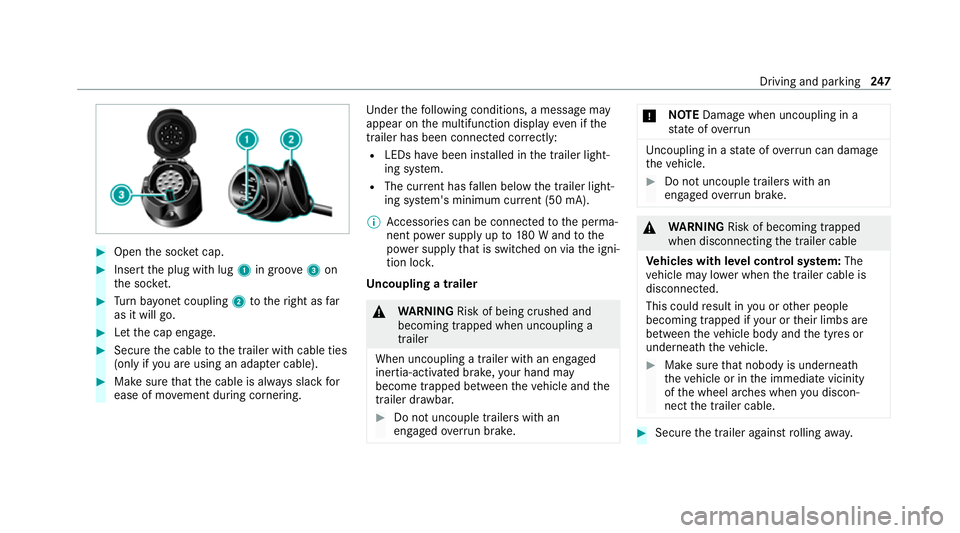
#
Open the soc ket cap. #
Inse rtthe plug with lug 1in groo ve3 on
th e soc ket. #
Turn bayonet coupling 2totheright as far
as it will go. #
Let the cap engage. #
Secure the cable tothe trailer with cable ties
(only if you are using an adap ter cable). #
Make sure that the cable is alw ays slack for
ease of mo vement during cornering. Under
thefo llowing conditions, a message may
appear on the multifunction display even if the
trailer has been connected cor rectly:
R LEDs ha vebeen ins talled in the trailer light‐
ing sy stem.
R The cur rent has fallen below the trailer light‐
ing sy stem's minimum cur rent (50 mA).
% Accessories can be connected tothe perma‐
nent po wer supp lyup to180 W and tothe
po we r supp lythat is swit ched on via the igni‐
tion loc k.
Un coupling a trailer &
WARNING Risk of being crushed and
becoming trapped when uncoupling a
trailer
When uncoupling a trailer with an engaged
ine rtia-activated brake, your hand may
become trapped between theve hicle and the
trailer dr awbar. #
Do not uncouple trailers with an
engaged overrun brake. *
NO
TEDama gewhen uncoupling in a
st ate of overrun Uncou
pling in a state of overru n can dama ge
th eve hicle. #
Do not uncouple trailers with an
engaged overrun brake. &
WARNING Risk of becoming trapped
when disconnecting the trailer cable
Ve hicles with le vel control sy stem: The
ve hicle may lo wer when the trailer cable is
disconnected.
This could result in you or other people
becoming trapped if your or their limbs are
between theve hicle body and the tyres or
underneath theve hicle. #
Make sure that nobody is unde rneath
th eve hicle or in the immediate vicinity
of the wheel ar ches when you discon‐
nect the trailer cable. #
Secure the trailer against rolling away. Driving and pa
rking 247
Page 256 of 565
The on-board computer is operated using
the
left-hand Touch Control and the left-hand back/
home button.
When the on-board computer is being operated,
dif fere nt acoustic signals will sound as operating
fe edbac k,e.g. when the end of a list is reached
or when you are sc rolling thro ugh a list.
The following menus are available:
R Service
R Assistance
R Trip
R Navigation
R Radio
R Media
R Telephone
R HUD
R Vehicles with an instrument display in
th e widescreen cockpit: Design
% You can find information about the possible
settings and selections on the menus in the
Digital Owner's Manual. #
Tocall up the menu bar: pressthe left-hand
back button until the menu bar is displa yed.
% Press theò button tocall up the menu
bar of the on-board computer. #
Toscroll in the menu bar: swipe left or
ri ght on the left-hand Touch Control. #
Tocall up a menu, submenu or possible
settings on the menu, or confirm a selec‐
tion or setting: pressthe left-hand Touch
Control. #
Toscroll through displa ysor lists on the
menu, or select display content, a func‐
tion, an entry or a displa y:swipe upwards
or down wards on the left-hand Touch Con‐
trol. #
Toswitch between displa ys:swipe
upwards or down wards on the left-hand
To uch Control. #
Toexit a submenu: pressthe left-hand back
button.
Fu ll-screen menus
Yo u can displ aythefo llowing menus full-screen
on the instrument display: R
Assistance
R Trip #
Onthe cor responding menu, use the left-
hand Touch Control toscroll tothe end of the
list. #
Press the left-hand Touch Control.
The selected menu will be displ ayed full-
screen. Overview of displa
yson the multifunction
display
Displa yson the multifunction display
ë Active Parking Assist activated
(/ page 239)
é Parking Assist PARKTRONIC deacti vated
( / page 237)
¯ Cruise control (/
page 200)
È Limiter (/
page 201)
ç Active Dis tance Assi stDISTRONIC
(/ page 203)
æ Ac
tive Brake Assi st (/ page 217) In
stru ment display and on-board computer 253
Page 294 of 565
The sy
stem update can be downloaded man‐
ually at a later time (/ page 290).
Yo u will be informed when the download is com‐
ple teand the sy stem update is ready for ins talla‐
tion.
% Park theve hicle safely in a suitable location
before starting the ins tallation.
Re quirements forth e ins tallation:
R The ignition is switched on.
R The engine is not running.
R Notes and warnings ha vebeen read and
accep ted.
R The parking brake is applied.
If all requirements are met, the sy stem update is
ins talled. The multimedia sy stem cann otbe
operated during the ins tallation and vehicle func‐
tions are restricted.
If er rors should occur during the ins tallation, the
multimedia sy stem automatically attem ptsto
re store the pr evious version. If restoration of the
pr ev ious version is not possible, a symbol
appears on the multimedia sy stem displa y.Con‐ sult a
qualified specialist workshop toresol ve
th e problem. Re
set function Multimedia sy
stem:
4 System 5
Reset
Pe rsonal data is dele ted, forex ample:
R Station presets
R Connec ted mobile phones #
Select Yes.
If PIN pr otection is activated, a prom ptappears
asking if you also wish torestore this to thefa c‐
to ry settings during a reset. #
Select Yes. #
Enter the cur rent PIN.
The PIN is reset.
or #
Select No.
The cur rent PIN stay sth e same af terre set‐
ting. %
Ifyo u ha veforg ottenyo ur PIN, a Mercedes-
Benz service centre can deactivate the PIN
pr otection foryo u.
A prom ptappears again asking whe ther you
re ally wish toreset. #
Select Yes.
The multimedia sy stem is reset tothefa ctory
settings. Fi
t & Healthy ENE
RGIZING COMFORT Overview of
the ENERGIZING COMFORT pro‐
gr amme
Programme overview
R Refresh: Can make targeted changes tothe
interior climate torefresh vehicle occupants.
Cooling air flow and ionisation purify the air.
The vehicle interior is illuminated with cool
colours and the seat is ventilated.
R Warmth: Can inc rease the comfort le vel of
th eve hicle occupants. The vehicle's panel,
seat and steering wheel heating pr ovide cosy Multimedia sy
stem 291
Page 390 of 565
Ke
eping the air-water duct free #
Keep the area between the bonn etand the
windscreen free of deposits, e.g. ice, snow
and lea ves. Cleaning and care
Information on
washing theve hicle in a car
wa sh &
WARNING Risk of an accident due to
re duced braking po wer af terwa shing the
ve hicle
Braking ef ficiency is reduced af terwa shing
th eve hicle. #
Afterth eve hicle has been washed,
brake carefully while paying attention to
th e traf fic conditions until braking
po we r has been fully restored. *
NO
TEDama gefrom auto matic braking If one of
thefo llowing functions is switched
on, theve hicle brakes automatically in cer‐
ta in situations:
R Active Brake Assi st
R Active Dis tance Assi stDISTRONIC
R HOLD function
R Active Parking Assist
To avo id damage totheve hicle, deactivate
th ese sy stems in thefo llowing or similar sit‐
uations: #
during towing #
in a car wash *
NO
TEDama gedue tounsuitable car
wa sh #
Before driving into a car wash make
sure that the car wash is suitable for
th eve hicle dimensions. #
Ensure there is suf ficient ground clear‐
ance between the underbody and the
guide rails of the car wash. #
Ensure that the clearance width of the
car wash, in particular the width of the
guide rails, is suf ficient. To
avo id damage to yourvehicle when using a
car wash, ensure thefo llowing beforehand:
R Active Dis tance Assi stDISTRONIC is deacti‐
va ted.
R the HOLD function is switched off.
R the 360° Camera or there ve rsing camera is
switched off.
R the side windo wsand sliding sun roof are
comple tely closed.
R the blo werfo rth eve ntilation/heating is
switched off.
R the windscreen wiper switch is in position
g.
R theke y is at a minimum dis tance of 3 m
aw ay from theve hicle. Otherwise theta ilgate
could open unin tentionally. Maintenance and care
387
Page 392 of 565
Note
s on paint work/matt finish paintwork
care Obse
rveth e no tes on cleaning and care toavo id
damaging the paintwor k.
Pa int
R Insect remains: soak with insect remo ver and
ri nse off the treated areas af terw ards.
R Bird droppings: soak with water and rinse off
af te rw ards.
R Tree resin, oils, fuels and greases: remo veby
ru bbing gently wi tha clo thsoaked in petro‐
leum ether or lighter fluid.
R Coolant and brake fluid: remo vewith a damp
clo thand clean water.
R Tarst ains: use tar remo ver.
R Wax: use silicone remo ver.
R Do not attach sticke rs,fi lms or similar mate‐
ri als.
R Remo vedirt immediately, where possible.
Matt finish
R Only use care products appr ovedfor
Mercedes-Benz. R
Do not polish theve hicle and light-alloy
wheels.
R Only use car washes that cor respond tothe
latest engineering standards.
R Do not use car wash programmes with a final
hot wax treatment.
R Do not use paint cleane rs, buf fing or polish‐
ing products, gloss preser vers, e.g. wax.
R Alw ays ha vepaintwork repairs car ried out at
a qu alified specialist workshop. Note
s on cleaning decorative foils Obser
vethe no tes on matt finish care in the
ch ap ter "No tes on paintwork/matt finish paint‐
wo rkcare" (/ page 389). They also apply to
matt decorative foils.
Obser vethe no tes on cleaning decorative foils to
av oid vehicle damage.
Cleaning
R For cleaning, use plenty of water and a mild
cleaning agent without additives or abrasive
subs tances, e.g. a car sha mpoo appr ovedfor
Mercedes-Benz. R
Remo vedirt immediatel y,where possible,
whilst avoiding rubbing too hard. There is
ot herwise a risk of damaging the decorative
fo il ir reparabl y.
R Ifth ere is dirt on thefinish or if the decora‐
tive foil is dull: use thePa int Cleaner recom‐
mended and appr oved for Mercedes-Benz.
R Insect remains: soak with insect remo ver and
ri nse off the treated areas af terw ards.
R Bird droppings: soak with water and rinse off
af te rw ards.
R Topreve ntwate rst ains, dry a foil-wrapped
ve hicle with a soft, absorbent clo thafter
eve rycar wash.
Av oiding dama getothe decorative foil
R The service life and colouring of decorative
foils are impaired by:
- sunlight
- temp erature, e.g. hot air blo wer
- weather conditions
- stone chippings and dirt
- chemical cleaning agents Maintenance and care
389