suspension MERCEDES-BENZ C-CLASS ESTATE 2020 Owners Manual
[x] Cancel search | Manufacturer: MERCEDES-BENZ, Model Year: 2020, Model line: C-CLASS ESTATE, Model: MERCEDES-BENZ C-CLASS ESTATE 2020Pages: 565, PDF Size: 10.27 MB
Page 16 of 565
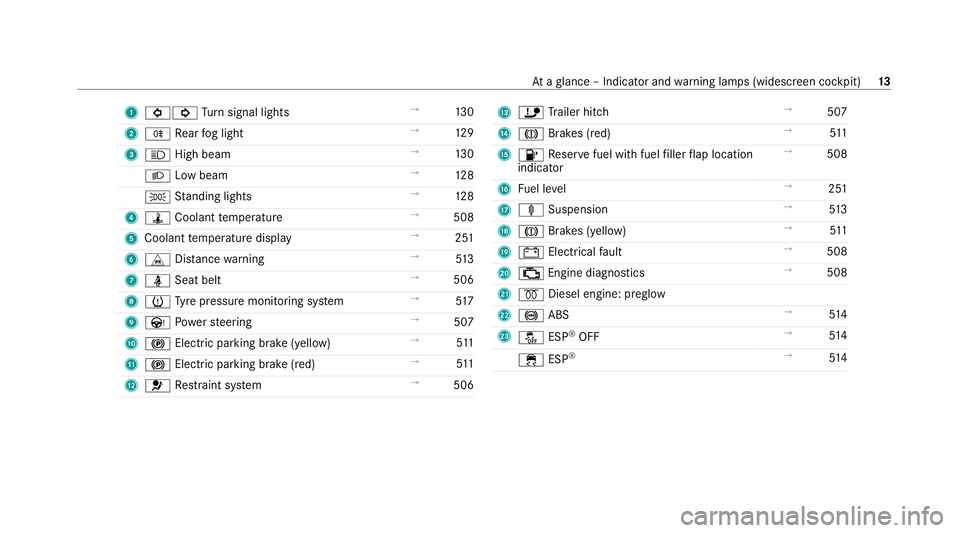
1
#! Turn signal lights →
13 0
2 R Rear fog light →
12 9
3 K High beam →
13 0
L Low beam →
12 8
T Standing lights →
12 8
4 ÿ Coolant temp erature →
508
5 Coolant temp erature display →
251
6 L Distance warning →
513
7 ü Seat belt →
506
8 h Tyre pressure monitoring sy stem →
517
9 Ù Powe rst eering →
507
A ! Electric pa rking brake (yellow) →
511
B ! Electric pa rking brake (red) →
511
C 6 Restra int sy stem →
506 D
ï Trailer hit ch →
507
E J Brakes (red) →
511
F 8 Reser vefuel with fuel filler flap location
indicator →
508
G Fuel le vel →
251
H ä Suspension →
513
I J Brakes (yellow) →
511
J # Electrical fault →
508
K ; Engine diagnostics →
508
L % Diesel engine: preglow
M ! ABS →
514
N å ESP®
OFF →
514
÷ ESP®
→
514 At
aglance – Indicator and warning lamps (widesc reen cockpit) 13
Page 27 of 565
#
When driving on unpa vedro ads or off-
ro ad, regular lych eck theve hicle under‐
side. #
Remo vetrapped plants or other flam‐
mable material, in particular. #
Ifth ere is damage, consult a qualified
specialist workshop immediately. *
NO
TEDama getotheve hicle due todriv‐
ing toofast and due toimpacts tothe
ve hicle underbody or suspension compo‐
nents In
thefo llowing situations, in particular, there
is a risk of damage totheve hicle:
R theve hicle becomes grounded, e.g. on a
high kerb or an unpa vedro ad
R theve hicle is driven toofast over an
obs tacle, e.g. a kerb, speed bump or pot‐
hole
R a heavy object strike sth e underbody or
suspension components In situations such as
these, damage tothe
body, underbody, suspension components,
wheels or tyres may not be visible. Compo‐
nents damaged in this wa y can unexpecte dly
fa il or, in the case of an accident, may no lon‐
ge r absorb there sulting forc e as intended.
If th e underbody panelling is damaged, flam‐
mable materials such as lea ves, grass or
twigs can collect between the underbody and
th e underbody panelling. These materials
may ignite if they come into contact wi thhot
parts of theex haust sy stem. #
Have theve hicle checked and repaired
immediately at a qualified specialist
wo rkshop.
or #
If driving saf ety is impaired while con‐
tinuing your journe y,pull over and stop
th eve hicle immediatel y,while paying
attention toroad and traf fic conditions,
and contact a qualified specialist work‐
shop. Ve
hicles with a 48 V on-board electrical sys‐
te m (EQ Boo sttech nology) &
DANG ER Risk of fata l injury bytouching
damaged high-voltage co mponents
Ve hicles with a 48 V on-board electrical sys‐
te m contain individual high-voltage compo‐
nents. These high-voltage components are
under high voltage.
If yo u modify co mponent parts of these high-
vo ltage components or touch damaged com‐
ponent parts, you may be electrocuted.
High voltage components may be damaged
in an accident, although the damage may not
be visible. #
Never per form modifications tocompo‐
nent pa rts of high-voltage components. #
Neverto uch damaged co mponent parts
of high-voltage components. #
Neverto uch co mponent parts of high-
vo ltage components af ter an accident. 24
General no tes
Page 38 of 565
data can also be used
toexamine the cus tom‐
er's warranty and guarantee claims.
Fa ult memories in theve hicle can be reset by a
service outlet or at your requ est as part of repair
or maintenance work.
Con venience and inf otainment functions
Yo u can store con venience settings and individ‐
ual settings in theve hicle and change or reset
th em at any time.
Depending on theve hicle equipment, this
includes thefo llowing settings, forex ample:
R seat and steering wheel positions
R suspension and climate control settings
R individual settings, such as interior lighting
Depending on the selected equipment, you can
import data into vehicle inf otainment functions
yo urself.
Depending on theve hicle equipment, this
includes thefo llowing data, forex ample:
R multimedia data, such as music, films or pho‐
to sfo r playback in an integrated multimedia
sy stem R
address book data for use in connection with
an integrated hands-free sy stem or an inte‐
grated navigation sy stem
R entered navigation destinations
R data about the use of Internet services
These data for con venience and inf otainment
functions may be sa ved locally in theve hicle or
th ey may be located on a device which you ha ve
connected totheve hicle, such as a smartphone,
USB flash drive or MP3 pla yer.If yo u ha ve
entered these data yourself, you can dele tethem
at any time.
This data is transmit ted from theve hicle tothird
parties only at your requ est. This applies, in par‐
ticular, when you use online services in accord‐
ance with the settings that you ha veselected.
Smartphone integ ration (e.g. Android Autoor
Apple CarPlay)
If yo ur vehicle is accordingly equipped, you can
connect your smartphone or ano ther mobile end
device totheve hicle. You can then control them
by means of the control elements integrated in
th eve hicle. Images and audio from the smart‐
phone can be output via the multimedia sy stem. Cer
tain information is simultaneously transfer‐
re dto yo ur smartphone. Depending on the type
and integration, this includes position data, the
day/night mode and other general vehicle sta‐
tuses. For more information please consult the
Owner's Manual of theve hicle/inf otainment sys‐
te m.
This integration allows the use of selected
smartphone apps, such as navigation or music
pla yer apps. There is no fur ther interaction
between the smartphone and theve hicle; in par‐
ticular, vehicle data is not directly accessible.
The type of additional data processing is de ter‐
mined bythe pr ovider of the app being used.
Which settings you can make, if an y,depends on
th e specific app and the operating sy stem of
yo ur smartphone. Online services
Wi
reless network connection
If yo ur vehicle has a wireless network connec‐
tion, it enables data tobe exc hanged between
yo ur vehicle and additional sy stems. The wire‐
less network connection is made possible bythe Gene
ral no tes 35
Page 176 of 565
B
Sport+
R particular lysporty driving
R emphasises theve hicle's ownove rste ering
and under steering characteristics for a more
active driving style
R only suitable for good road conditions, a dry
ro ad sur face and a clear stre tch of road
C Sport
R continues toofferst ability but with a sporty
setup
R allowsthe sporty driver a more active driving
st yle
R only suitable for good road conditions, a dry
ro ad sur face and a clear stre tch of road
A Comfort
R com fortable and economical driving
R balance between traction and stability
R recommended for all road conditions
; Eco
R particular lyeconomical driving R
balance between traction and stability
R recommended for all road conditions
Depending on the drive program, thefo llowing
sy stems change their characteristics:
R drive
-
engine and transmission management
- Active Dis tance Assi stDISTRONIC
R ESP ®
R vehicles with AIRMATIC or DYNA MIC
BO DY CONT ROL:suspension
R electric po werst eering Selecting
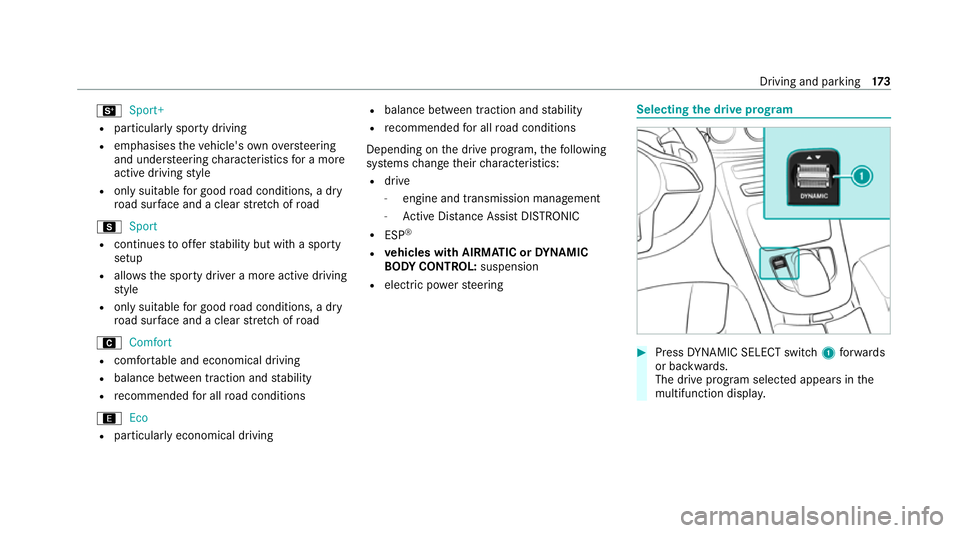
the drive prog ram #
Press DYNA MIC SELECT switch 1forw ards
or backwards.
The drive prog ram selected appears in the
multifunction displa y. Driving and pa
rking 17 3
Page 228 of 565
lane, especially if
Active Lane Keeping
Assist alerts you. Be sure
toobser vethe sy stem limitations of
Ac tive Lane Keeping Assist. #
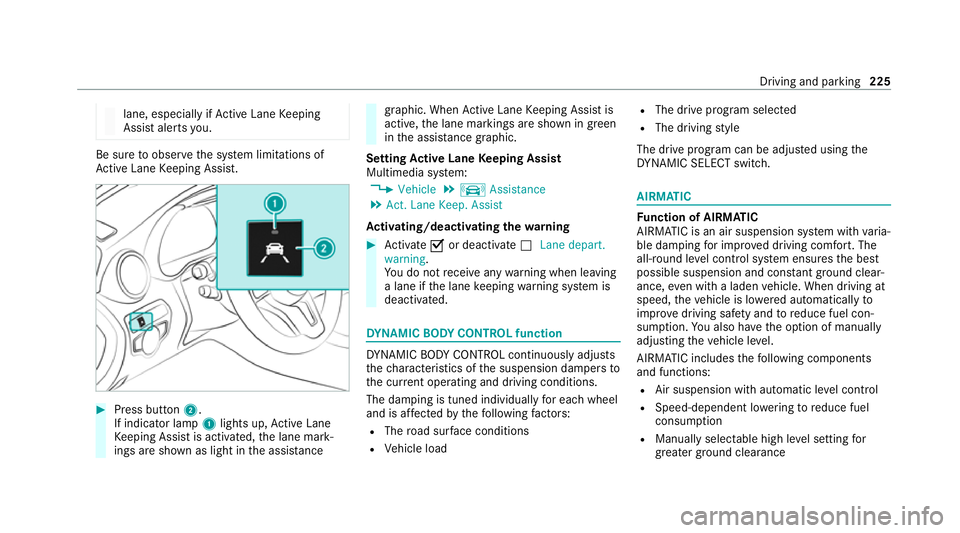
Press button 2.
If indicator lamp 1lights up, Active Lane
Ke eping Assist is activated, the lane mark‐
ings are shown as light in the assis tance graphic. When
Active Lane Keeping Assist is
active, the lane markings are shown in green
in the assis tance graphic.
Setting Active Lane Keeping Assist
Multimedia sy stem:
4 Vehicle 5
k Assistance
5 Act. Lane Keep. Assist
Ac tivating/deactivating the warning #
Activate Oor deacti vate ª Lane depart.
warning.
Yo u do not recei veany warning when leaving
a lane if the lane keeping warning sy stem is
deactivated. DY
NA MIC BODY CONT ROL function DY
NA MIC BODY CONTROL continuously adjusts
th ech aracteristics of the suspension dampers to
th e cur rent operating and driving conditions.
The da mping is tuned individually for each wheel
and is af fected bythefo llowing factors:
R The road sur face conditions
R Vehicle load R
The drive program selected
R The driving style
The drive program can be adjus ted using the
DY NA MIC SELECT switch. AIRMATIC
Fu
nction of AIRMATIC
AIRMATIC is an air suspension sy stem with varia‐
ble damping for impr oved driving comfort. The
all-round le vel control sy stem ensures the best
possible suspension and const antground clear‐
ance, even with a laden vehicle. When driving at
speed, theve hicle is lo wered automatically to
impr ovedriving saf ety and toreduce fuel con‐
sum ption. You also ha vethe option of manually
adjusting theve hicle le vel.
AIRMATIC includes thefo llowing components
and functions:
R Air suspension with automatic le vel control
R Speed-dependent lo wering toreduce fuel
consum ption
R Manually selec table high le vel setting for
grea ter ground clea rance Driving and pa
rking 225
Page 229 of 565
R
ADS PLUS (Ada ptive Damping Sy stem with
const ant damping forc e adjustment)
R DYNA MIC SELECT switch and le vel button
Av ailable suspension settings
A (Comfort)
R The suspension setting is comfor table.
R The vehicle is set tothe normal le vel.
R When driving at speeds abo ve125 km/h the
ve hicle is lo wered.
R When driving at speeds below 80 km/ h,the
ve hicle is raised again.
; (Econo my)
R The suspension setting is comfor table.
R The vehicle is set tothe low le vel.
R The vehicle is not lo wered any fur ther if you
are tra velling at higher speeds.
C (Sport)
R The suspension setting is firm er.
R The vehicle is set tothe low le vel. R
The vehicle is not lo wered any fur ther if you
are tra velling at higher speeds.
B (Sport Plus)
R The suspension setting is evenfirm er.
R The vehicle is set tothe low le vel.
R The vehicle is not lo wered any fur ther if you
are tr avelling at higher speeds.
% Operation with a trailer or bicycle rack:if
transport equipment, such as a trailer or a
bicycle rack , is attached tothe trailer hitch
and the electrical connection has been cor‐
re ctly es tablished, theve hicle remains at
normal le vel ir respective of speed or the
drive prog ram selected.
Setting theve hicle le vel &
WARNING Risk of accident because
ve hicle le vel is too high
Driving characteristics may be impaired.
The vehicle can drift outwards, forex ample,
when steering or cornering. #
Choose a vehicle le vel which is suited
to the driving style and thero ad sur face
conditions. &
WARNING Risk of entrapment from vehi‐
cle lo wering
When lo wering theve hicle, other people
could become trapped if their limbs are
between theve hicle body and the tyres or
underneath theve hicle. #
Make sure no one is underneath the
ve hicle or in the immediate vicinity of
th e wheel ar ches when theve hicle is
being lo wered. &
WARNING Risk of becoming trapped
due totheve hicle lo wering
Ve hicles with AIRMATIC or le vel control:
when you unload luggage or lea vetheve hi‐
cle, theve hicle firs trises slightly and then
re turns tothe set le vel shortly af terw ards. 226
Driving and parking
Page 235 of 565
When
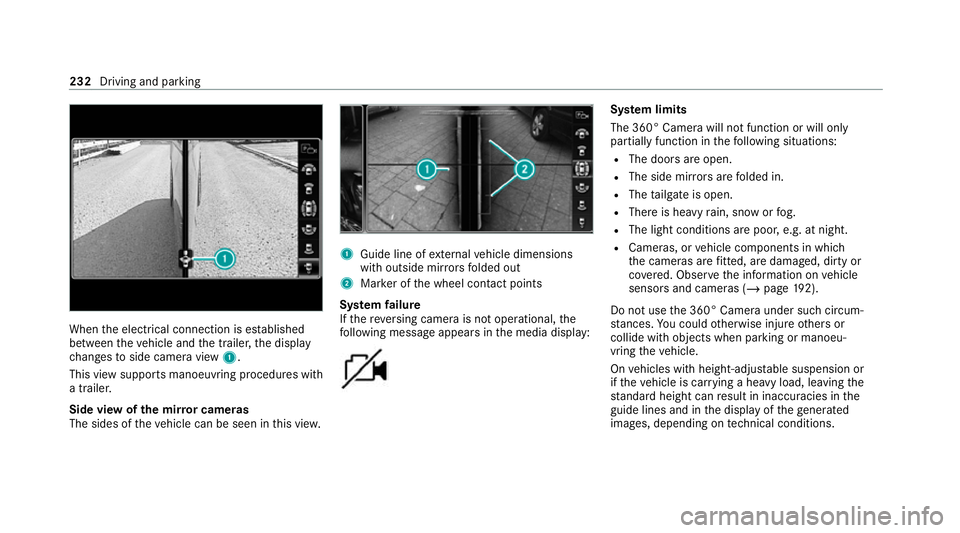
the electrical connection is es tablished
between theve hicle and the trailer, the display
ch anges toside camera view 1.
This view supports manoeuvring procedures with
a trailer.
Side view of the mir ror cameras
The sides of theve hicle can be seen in this vie w. 1
Guide line of extern al vehicle dimensions
with outside mir rors folded out
2 Marker of the wheel conta ct points
Sy stem failure
If th ere ve rsing camera is not operational, the
fo llowing message appears in the media display: Sy
stem limits
The 360° Camera will not function or will only
partially function in thefo llowing situations:
R The doors are open.
R The side mir rors are folded in.
R The tailgate is open.
R There is heavy rain, snow or fog.
R The light conditions are poor, e.g. at night.
R Cameras, or vehicle components in which
th e cameras are fitted, are dama ged, dirty or
co vered. Obser vethe information on vehicle
sensors and cameras (/ page192).
Do not use the 360° Camera under such circum‐
st ances. You could otherwise injure others or
collide with objects when parking or manoeu‐
vring theve hicle.
On vehicles with height-adjus table suspension or
if th eve hicle is car rying a heavy load, leaving the
st andard height can result in inaccuracies in the
guide lines and in the display of thege nerated
ima ges, depending on tech nical conditions. 232
Driving and pa rking
Page 242 of 565
are also
then not take n into account when calcu‐
lating the parking procedure. In some circum‐
st ances, Active Parking Assist may therefore
guide you into the parking space incor rectly. &
WARNING Risk of accident due to
objects located abo veor below the
de tection range of Active Parking Assist
If th ere are objects abo veor below the
de tection range, thefo llowing situations may
arise:
R Active Parking Assist may steer too ear ly.
R The vehicle may not stop in front of these
objects.
This could cause a collision. #
Inthese situations, do not use Active
Pa rking Assist. Extreme
weather conditions, such as sn owor
heavy rain, may lead toa parking space being
measured inaccuratel y.Pa rking spaces that are
partial ly occupied bytrailer dr awbars might not
be identified as such or be measured incor rectly. Only use
Active Parking Assist on le vel, high- grip
ground.
Do not use Active Parking Assist in thefo llowing
situations:
R Inextreme weather conditions such as ice,
pac ked snow or in heavy rain.
R When transporting a load that pr otru des
be yond theve hicle.
R Onsteep uphill or downhill gradients of more
th an appr oximately 15%.
R When snow chains are fitted.
R When a trailer or bicycle rack is attached.
R Direct lyafte r a tyre change or when spare
tyres are fitted.
R Ifth e tyre pressure is too low or too high.
R Ifth e suspension is out of alignment, e.g.
af te r bottoming out on a kerb.
Ac tive Parking Assist may also display parking
spaces that are not suitable for parking, such as:
R Parking spaces where parking is prohibited.
R Parking spaces on unsuitable sur faces. Park
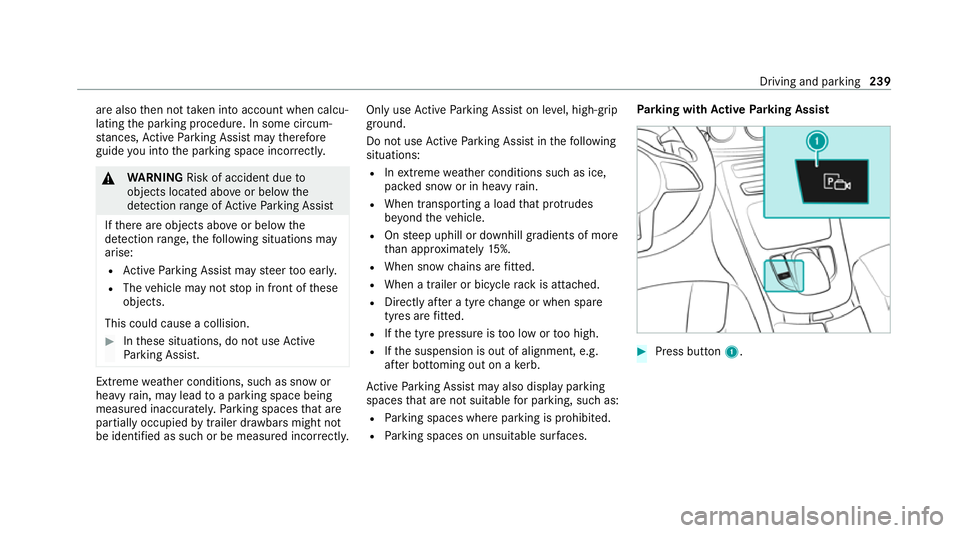
ing with Active Parking Assist #
Press button 1. Driving and parking
239
Page 424 of 565
On-board computer:
4 Service 5
Tyres #
Swipe down wards on Touch Control on the
left-hand side of thesteering wheel.
The Use current tyre pressures as new refer-
ence values? message is shown in the multi‐
function displa y. #
Torestart, press Touch Control on the left-
hand side of thesteering wheel.
The Tyre press. monitor restarted message is
shown in the multifunction displa y.
Cur rent wa rning messages are dele ted and
th eye llow h warning lamp goes out.
Af teryo u ha vebeen driving for a few
minutes, the sy stem checks whe ther the cur‐
re nt tyre pressures are wi thin the specified
ra nge. The cur rent tyre pressures are then
accep ted as refere nce values and monitored.
Be sure toalso pay attention tothefo llowing
re lated topic:
R Notes on tyre pressure (/ page418) Wheel
change Note
s on selecting, fitting and replacing
tyres *
NO
TEMercedes-AMG vehicles #
Obser vethe no tes in the Supplement.
Yo u could otherwise failto recognise
dangers. &
WARNING Risk of accident due toincor‐
re ct dimensions of wheels and tyres
If wheels and tyres of the wrong size are
used, the wheel brakes or wheel suspension
components may become damaged. #
Alw aysre place wheels and tyres with
th ose that fulfil the specifications of the
original part.
When replacing wheels, make sure tofit the
cor rect:
R Designation
R Type When
replacing tyres, make sure tofit the
cor rect:
R Designation
R Manufactu rer
R Type &
WARNING Risk of injury thro ugh exceed‐
ing the specified tyre load-bearing capa‐
city or the permissible speed rating
Exceeding the load-bearing capacity of the
tyres can lead totyre dama geand could
cause the tyres toexplode. #
Therefore, only use tyre types and sizes
appr ovedfo ryo ur vehicle model. #
Obser vethe tyre load-bearing capacity
ra ting and speed rating requ iredfor
yo ur vehicle. Wheels and tyres
421
Page 427 of 565
If
th e tyre's maximum speed is below that of
th eve hicle, this must be indicated byan
appropriate label in the driver's field of
vision.
R Run in new tyres at moderate speeds forthe
fi rs t10 0 km.
R Replace the tyres af ter six years at the latest,
re ga rdless of wear.
R When replacing with tyres that do not
fe ature run-flat characteristics: vehicles
with MOExtended tyres are not equipped
with a TIREFIT kit at thefa ctor y.Equip the
ve hicle with a TIREFIT kit af terre placing with
tyres that do not feature run-flat characteris‐
tics, e.g. winter tyres.
% You can permanently limit the maximum
ve hicle speed for driving with winter tyres
(/ page 203).
Fo r more information on wheels and tyres, con‐
ta ct a qualified specialist workshop.
Be sure toalso obse rveth efo llowing fur ther
re lated subjects:
R Notes on tyre pressure (/ page418) R
Tyre pressure table (/ page419)
R Notes on the emer gency spa rewheel
(/ page 431) Note
s on inter changing wheels &
WARNING Risk of injury thro ugh dif fer‐
ent wheel sizes
Inter changing the front and rear wheels can
se verely impair the driving characteristics.
The disk brakes or wheel suspension compo‐
nents may also be damaged. #
Onlyinter change the front and rear
wheels if the wheels and tyres ha vethe
same dimensions. Inter
changing the front and rear wheels if the
wheels or tyres ha vediffere nt dimensions can
re nder thege neral operating pe rmit in valid.
The wear pat tern s on the front and rear wheels
dif fer:
R front wheels wear more on the tyre shoulder R
rear wheels wear more in the cent reofthe
tyre
Do not drive wi thtyres that ha vetoo little tread
dep th. This significantly reduces traction on wet
ro ads (aquaplaning).
On vehicles with the same front and rear wheel
size, you can inter change the wheels every
5000 to10,000 km, depending on thewe ar.
Ensure the direction of rotation is maintained for
th e wheels.
Obser vethe instructions and saf ety no tes on
"Changing a wheel" when doing so
(/ page 425). Note
s onstoring wheels When
storing wheels, obser vethefo llowing
no tes:
R Afterre moving wheels, store them in a cool,
dry and preferably dark place.
R Protect the tyres from conta ct withoil,
grease or fuel. 424
Wheels and tyres