brake light MERCEDES-BENZ C-CLASS SALOON 2007 User Guide
[x] Cancel search | Manufacturer: MERCEDES-BENZ, Model Year: 2007, Model line: C-CLASS SALOON, Model: MERCEDES-BENZ C-CLASS SALOON 2007Pages: 377, PDF Size: 6.19 MB
Page 119 of 377
Driving and pa
rking11
6 Parking
G
Risk of accident
Only remove the key from the ignition lock
when the vehicle is stationary since yo u
cannot steer the vehicle with the key
removed .
Never leave children unsupervised in the
vehicle. They could release the parking
brake. This could lead to a serious or fatal
accident. G
Risk of fire
Make sure that the exhaust system doe s
not under any circumstances come into
contact with easily ignitable material such
as dry grass or petrol. The material could
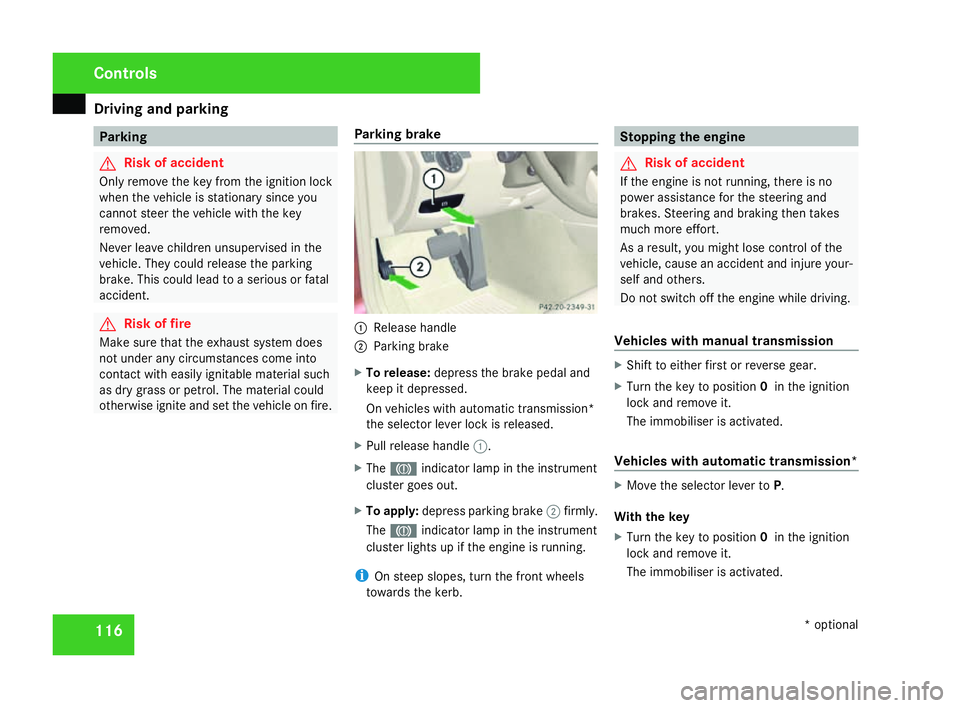
otherwise ignite and set the vehicle on fire. Parking brake 1
Release handle
2 Parking brake
X To release: depress the brake pedal and
keep it depressed.
On vehicles with automatic transmission*
the selector lever lock is released .
X Pull release handle 1.
X The 3 indicator lamp in the instrumen t
cluster goes out.
X To apply :depress parking brake 2firmly .
The 3 indicator lamp in the instrumen t
cluster lights up if the engine is running.
i On steep slopes, turn the front wheels
towards the kerb. Stopping the engine
G
Risk of accident
If the engine is not running, there is no
power assistance for the steering and
brakes. Steering and braking then takes
much more effort.
As a result, you might lose control of the
vehicle, cause an accident and injure your-
self and others.
Do not switch off the engine while driving .
Vehicles with manual transmission X
Shift to either first or reverse gear.
X Turn the key to position 0in the ignition
lock and remove it.
The immobiliser is activated.
Vehicles with automatic transmission* X
Move the selector lever to P.
With the key
X Turn the key to position 0in the ignition
lock and remove it.
The immobiliser is activated. Controls
* optional
204_AKB; 2; 3, en-GB
mkalafa,
2007-06-26T23:11:51+02:00 - Seite 116
Page 148 of 377
Driving sys
tems 14
5
X
Press %or$ to select Reset all
settings? SelectNoorYes .
X Select Yesif you want to reset all the set-
tings .
X Press #to confirm the selection.
The multi-function display shows a confir -
mation message. Driving systems
Your vehicle's driving systems are described
on the following pages:
R Cruise control* and Speedtronic*, whic h
you can use to control the speed of th e
vehicl e
R Hill start assist, which makes pulling away
on steep uphill gradients easie r
R ADVANCED AGILITY package with sports
mode*
R 4MATIC* (permanent four-wheel drive )
R Parktronic*, which assists you in parking
and manoeuvrin g
The ABS, BAS, adaptive brake lights, ESP ®
and EBV (electronic brake-power distribution )
driving safety systems are described in the
"Driving safety systems" section
( Y page 67). Cruise control*
Cruise control maintains a constant road
speed for you. It brakes automatically in order
to avoid exceeding the set speed. On long and
steep downhill gradients, especially if the
vehicle is laden or towing a trailer, you must
shift to a lower gear in good time or select
shift range 1,2 or 3in vehicles with automatic
transmission*. In this way you will make use
of the braking effect of the engine, which
relieves the load on the brake system and
prevents the brakes from overheating and
wearing too quickly. G
Risk of accident
Do not change down for additional engine
braking on a slippery road surface. Thi s
could cause the drive wheels to lose thei r
grip and the vehicle could skid.
Use cruise control only if road and traffic con-
ditions make it appropriate to maintain a
steady speed for a prolonged period. You can
store any road speed above 30 km/h. G
Risk of accident
Cruise control cannot take account of roa d
and traffic conditions. Controls
* optional
204_AKB; 2; 3, en-GB
mkalafa
, 2007-06-26T23:11:51+02:00 - Seite 145 Z
Page 151 of 377
Driving sys
tems 14
8
Making adjustments in 1 km/h incre-
ments X
Briefly press the cruise control lever up to
pressure point 1for a higher speed or
down 4for a lower speed.
The last speed stored is increased or
reduced.
Making adjustments in 10 km/h incre-
ments X
Briefly press the cruise control lever up
beyond pressure point 1for a higher
speed or down 4for a lower speed.
The last speed stored is increased or
reduced.
Deactivating cruise control There are several ways to deactivate cruis
e
control :
X Briefly press the cruise control lever for-
wards 6.
or
X Brake .
or X
Briefly press the cruise control lever in the
direction of arrow 5.
Variable Speedtronic is selected. LIM indi-
cator lamp 2in the cruise control lever
lights up.
Cruise control is automatically deactivated if:
R you depress the parking brak e
R you are driving at less than 30 km/h
R ESP ®
(Y page 68) is intervening or if you
deactivate ESP ®
R with a vehicle with manual transmission ,
you change into neutral or if the clutch is
depressed for longer than 6 seconds
R you move the selector lever to Nin vehicles
with automatic transmission* while drivin g
If cruise control is deactivated, you will hear
a warning tone. You see the Cruise control
off message in the multi-function display for
approximately five seconds.
i The last speed stored is cleared when you
switch off the engine. Speedtronic*
Speedtronic brakes automatically so that you
do not exceed the set speed. On long and
steep downhill gradients, especially if the
vehicle is laden or towing a trailer, you must
shift to a lower gear in good time or select
shift range 1,2 or 3in vehicles with automatic
transmission*. In this way you will make use
of the braking effect of the engine, which
relieves the load on the brake system and
prevents the brakes from overheating and
wearing too quickly. If you need additional
braking, depress the brake pedal repeatedly
rather than continuously. G
Risk of accident
Never depress the brake pedal continu -
ously while the vehicle is in motion, e.g.
never cause the brakes to rub by applying
constant slight pedal pressure. This causes
the brake system to overheat, increases
the braking distance and can lead to the
brakes failing completely. G
Risk of accident
Do not change down for additional engine
braking on a slippery road surface. Thi s
could cause the drive wheels to lose thei r
grip and the vehicle could skid. Controls
* optional
204_AKB; 2; 3, en-GB
mkalafa,
2007-06-26T23:11:51+02:00 - Seite 148
Page 154 of 377
Driving sys
tems 15
1
Permanent Speedtronic (vehicles with
a
12-button luxury multi-function steer-
ing wheel*) i
Permanent Speedtronic is only availabl e
for certain countries.
You can use the on-board computer to limi t
the speed permanently to a value between
160 km/h (e.g. for driving with winter tyres )
and the maximum speed.
Shortly before the stored speed is reached, it
is displayed in the multi-function display.
You cannot exceed the stored limit speed,
even if you depress the accelerator pedal
beyond the pressure point (kickdown).
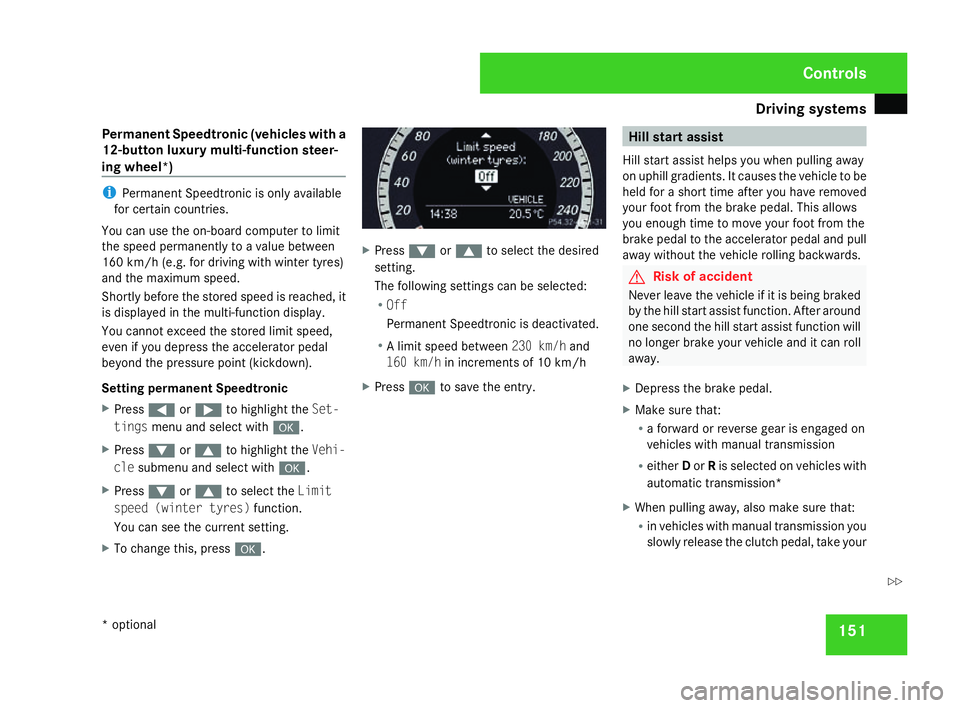
Setting permanent Speedtronic
X Press (or& to highlight the Set-
tings menu and select with #.
X Press %or$ to highlight the Vehi-
cle submenu and select with #.
X Press %or$ to select the Limit
speed (winter tyres) function.
You can see the current setting .
X To change this, press #. X
Press %or$ to select the desired
setting .
The following settings can be selected:
R Off
Permanent Speedtronic is deactivated.
R A limit speed between 230 km/hand
160 km/ hin increments of 10 km/h
X Press #to save the entry . Hill start assis
t
Hill start assist helps you when pulling away
on uphill gradients. It causes the vehicle to be
held for a short time after you have removed
your foot from the brake pedal. This allow s
you enough time to move your foot from th e
brake pedal to the accelerator pedal and pull
away without the vehicle rolling backwards. G
Risk of accident
Never leave the vehicle if it is being braked
by the hill start assist function. After around
one second the hill start assist function will
no longer brake your vehicle and it can rol l
away.
X Depress the brake pedal.
X Make sure that:
R
a forward or reverse gear is engaged on
vehicles with manual transmission
R either Dor Ris selected on vehicles with
automatic transmission *
X When pulling away, also make sure that :
R in vehicles with manual transmission you
slowly release the clutch pedal, take your Controls
* optional
204_AKB; 2; 3, en-GB
mkalafa,
2007-06-26T23:11:51+02:00 - Seite 151 Z
Page 155 of 377
Driving sys
tems 15
2foot off the brake pedal and carefully
depress the accelerator pedal
R in vehicles with automatic transmis-
sion* you take your foot off the brak e
pedal and carefully depress the acceler -
ator pedal
i Once you have taken your foot off the
brake pedal, the vehicle is held for around
one second.
Hill start assist does not function:
R if you are pulling away on a level surface or
a downhill gradien t
R in vehicles with automatic transmission *if
the gear selector lever is in the Nposition
R if the vehicle is secured with the parking
brak e
R if ES P®
is defectiv e ADVANCED AGILITY package with
sports mode*
The most important part of the ADVANCE D
AGILITY package with sports mode is the
adjustable suspension system. This automat-
ically controls and adapts the suspension to
the respective driving situation.
The calibration of the suspension depends
on:
R your driving style
R the road surface conditions
R your individual selection; see also the fol-
lowing description
If your vehicle is equipped with automati c
transmission*, the ADVANCED AGILITY pack-
age with sports mode also includes steering-
wheel gearshift paddles* with a manua l
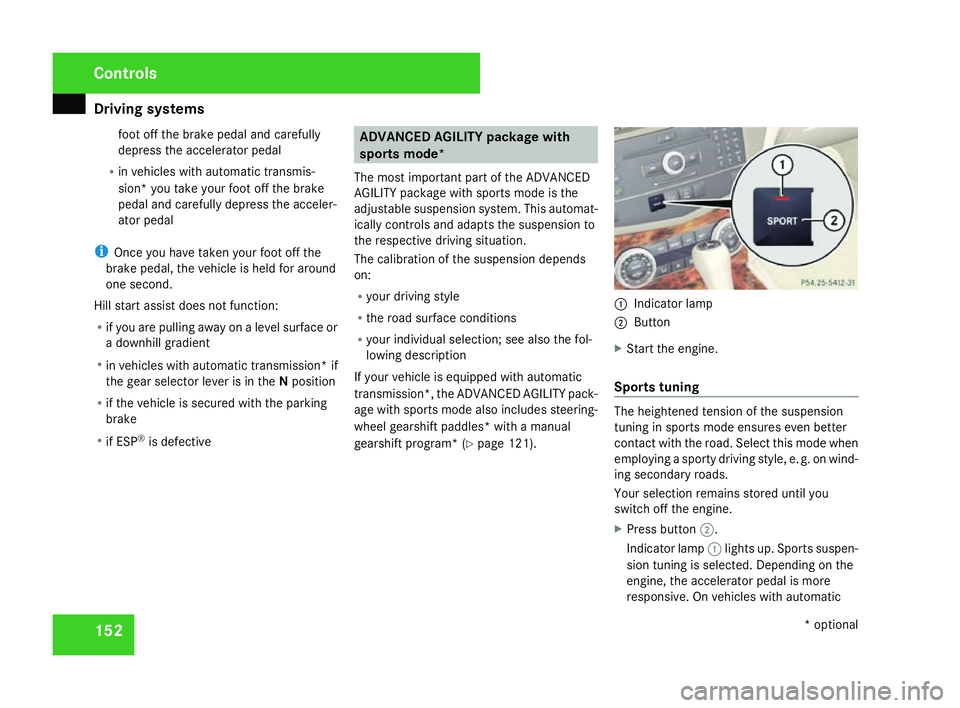
gearshift program* (Y page 121). 1
Indicator lamp
2 Button
X Start the engine.
Sports tuning The heightened tension of the suspensio
n
tuning in sports mode ensures even better
contact with the road. Select this mode when
employing a sporty driving style, e. g. on wind-
ing secondary roads .
Your selection remains stored until you
switch off the engine.
X Press button 2.
Indicator lamp 1lights up. Sports suspen -
sion tuning is selected. Depending on the
engine, the accelerator pedal is more
responsive. On vehicles with automatic Controls
* optional
204_AKB; 2; 3, en-GB
mkalafa,
2007-06-26T23:11:51+02:00 - Seite 152
Page 157 of 377
Driving sys
tems 15
4
Front sensor
s Centr
e Approximately 100 cm
Corner
s Approximately 60 cm
Rear sensors
Centre Approximately 120 cm
Corner
s Approximately 80 cm
!
Pay particular attention to objects above
or below the sensors when parking, such
as flower pots or trailer towbars. Parktroni c
does not detect such objects when they are
in the immediate vicinity of the vehicle. You
could damage the vehicle or the objects.
Ultrasonic sources such as an automatic
car wash, a lorry's compressed-air brakes
or a pneumatic drill could cause Parktronic
to malfunction .
Minimum distanc eCentr
e Approximately 20 cm
Corner
s Approximately 15 cm If there is an obstacle within this range, al
l
warning displays light up and a tone sounds.
If the distance falls below the minimum clear -
ance, it may no longer be shown.
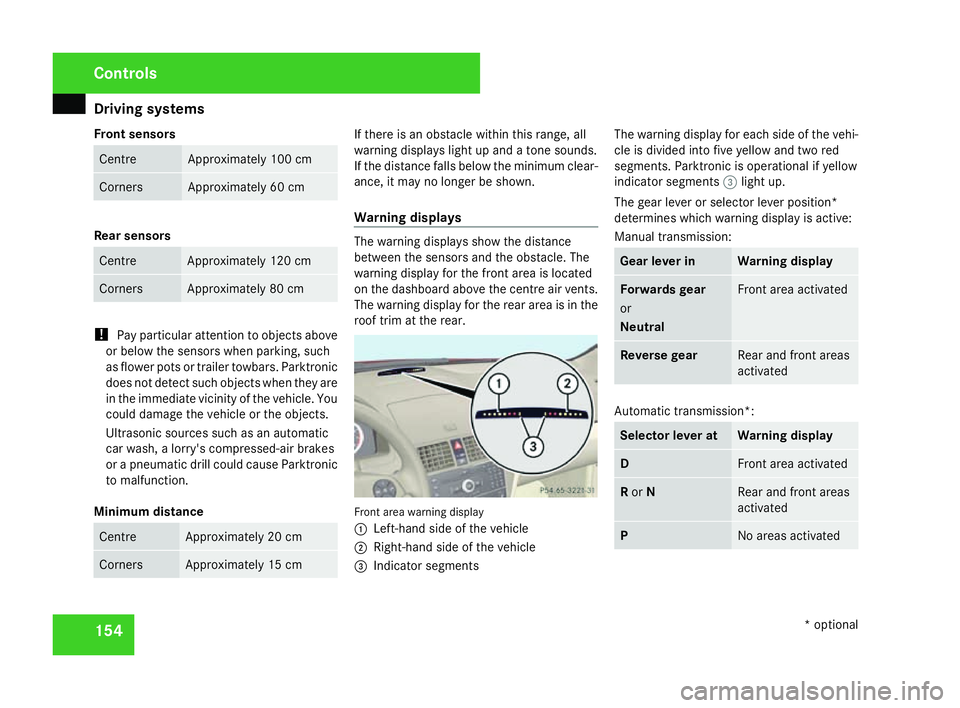
Warning displays The warning displays show the distanc
e
between the sensors and the obstacle. The
warning display for the front area is located
on the dashboard above the centre air vents.
The warning display for the rear area is in the
roof trim at the rear. Front area warning display
1
Left-hand side of the vehicle
2 Right-hand side of the vehicl e
3 Indicator segments The warning display for each side of the vehi-
cle is divided into five yellow and two red
segments. Parktronic is operational if yellow
indicator segments
3light up.
The gear lever or selector lever position*
determines which warning display is active:
Manual transmission : Gear lever in Warning display
Forwards gear
or
Neutral Front area activated
Reverse gear Rear and front areas
activated
Automatic transmission*:
Selector lever at Warning displa
y D Front area activate
d R
or N Rear and front area
s
activated P No areas activatedControls
* optional
204_AKB; 2; 3, en-GB
mkalafa,
2007-06-26T23:11:51+02:00 - Seite 154
Page 185 of 377
Loading and stowing
182 Loading guidelines
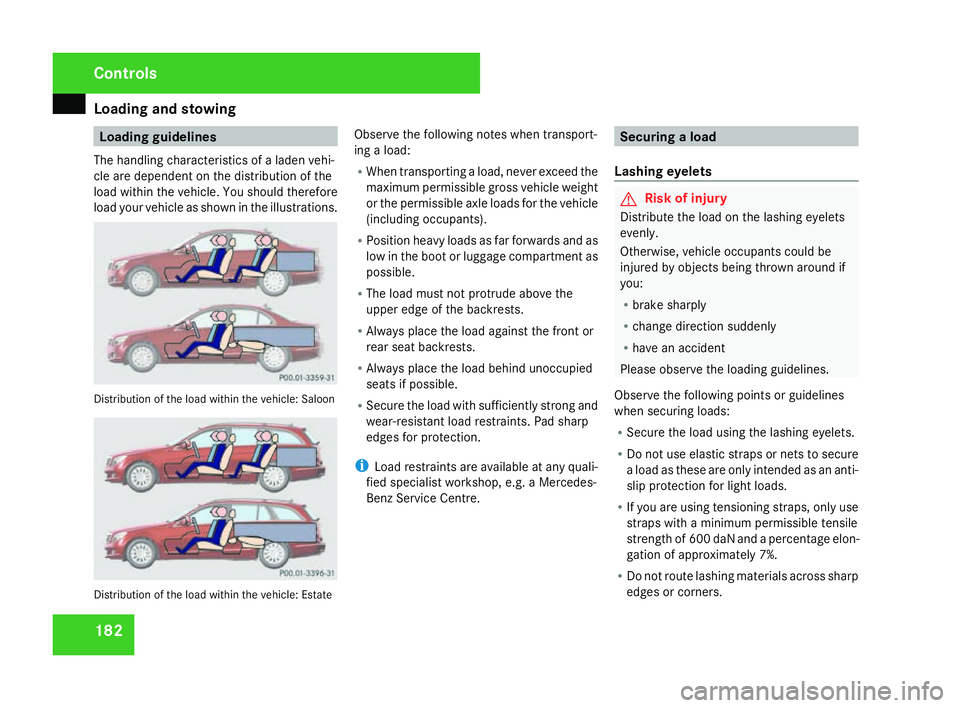
The handling characteristics of a laden vehi-
cle are dependent on the distribution of th e
load within the vehicle. You should therefore
load your vehicle as shown in the illustrations. Distribution of the load within the vehicle: Saloon
Distribution of the load within the vehicle: Estate Observe the following notes when transport
-
ing a load:
R When transporting a load, never exceed the
maximum permissible gross vehicle weight
or the permissible axle loads for the vehicle
(including occupants).
R Position heavy loads as far forwards and as
low in the boot or luggage compartment as
possible.
R The load must not protrude above the
upper edge of the backrests.
R Always place the load against the front or
rear seat backrests.
R Always place the load behind unoccupied
seats if possible.
R Secure the load with sufficiently strong and
wear-resistant load restraints. Pad sharp
edges for protection.
i Load restraints are available at any quali-
fied specialist workshop, e.g. a Mercedes-
Benz Service Centre. Securing a load
Lashing eyelets G
Risk of injury
Distribute the load on the lashing eyelets
evenly .
Otherwise, vehicle occupants could be
injured by objects being thrown around if
you:
R brake sharply
R change direction suddenly
R have an accident
Please observe the loading guidelines.
Observe the following points or guidelines
when securing loads:
R Secure the load using the lashing eyelets.
R Do not use elastic straps or nets to secur e
a load as these are only intended as an anti-
slip protection for light loads.
R If you are using tensioning straps, only use
straps with a minimum permissible tensile
strength of 600 daN and a percentage elon-
gation of approximately 7%.
R Do not route lashing materials across sharp
edges or corners . Cont
rols
204_AKB; 2; 3, en-GB
mkalafa,
2007-06-26T23:11:51+02:00 - Seite 182
Page 195 of 377
Loading and stowing
192
X
If necessary, fold lashing eyelet 5
upwards. G
Risk of injury
Distribute the load on the lashing eyelets
evenly .
Otherwise, vehicle occupants could be
injured by objects being thrown around if
you:
R brake sharply
R change direction suddenly
R have an accident
Please observe the loading guidelines.
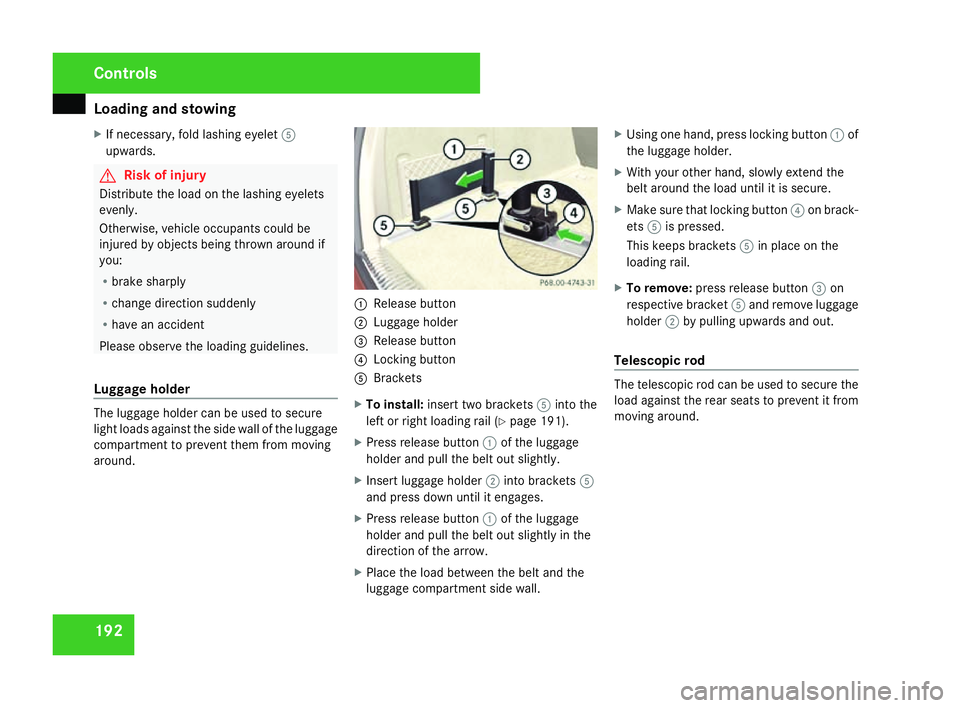
Luggage holder The luggage holder can be used to secure
light loads against the side wall of the luggage
compartment to prevent them from moving
around. 1
Release butto n
2 Luggage holder
3 Release butto n
4 Locking button
5 Brackets
X To install: insert two brackets 5into the
left or right loading rail (Y page 191).
X Press release button 1of the luggage
holder and pull the belt out slightly.
X Insert luggage holder 2into brackets 5
and press down until it engages .
X Press release button 1of the luggage
holder and pull the belt out slightly in the
direction of the arrow.
X Place the load between the belt and the
luggage compartment side wall. X
Using one hand, press locking button 1of
the luggage holder.
X With your other hand, slowly extend the
belt around the load until it is secure.
X Make sure that locking button 4on brack-
ets 5is pressed.
This keeps brackets 5in place on the
loading rail.
X To remove :press release button 3on
respective bracket 5and remove luggage
holder 2by pulling upwards and out.
Telescopic rod The telescopic rod can be used to secure the
load against the rear seats to prevent it from
moving around.Controls
204_AKB; 2; 3, en-GB
mkalafa,
2007-06-26T23:11:51+02:00 - Seite 192
Page 207 of 377
Refuelling
20
4 The first 1,500 km
If you treat the engine with sufficient car e
from the very start, it will reward you with
excellent performance for a very long period
afterwards .
R You should therefore drive at varying road
and engine speeds for the first 1,500 km.
R Avoid heavy loads, e.g. driving at full throt-
tle, during this time. Do not exceed 2
/ 3 of
the maximum permissible engine speed for
each gear.
R Change gear in good time.
R Do not shift down a gear manually in order
to brake.
Vehicles with automatic transmission* :
R Try to avoid depressing the accelerator
pedal beyond the pressure point (kick -
down).
R Only use ranges 3,2 or 1for slow driving,
e.g. in mountainous terrain. Refuellin
g Refuelling
G
Risk of explosion
Fuel is highly flammable. Fire, naked flames
and smoking are therefore prohibited when
handling fuels.
Switch off the engine before refuelling. G
Risk of injury
Avoid any contact with fuels.
You can damage your health if your skin
comes into direct contact with fuel or if yo u
inhale the vapour. G
Risk of fire
Do not use petrol to refuel vehicles with a
diesel engine. Never mix diesel with petrol.
This would damage the fuel system and
engine and could result in a vehicle fire.
! Do not use petrol to refuel vehicles with a
diesel engine. Do not use diesel to refuel
vehicles with a petrol engine. Never mix
diesel with petrol. Even small amounts of
the wrong fuel will damage the injection
system. Damage resulting from adding the
wrong fuel is not covered by the warranty. !
Do not start the engine if you accidentally
refuelled with the wrong fuel. Otherwise
you risk engine damage. Have the fuel sys-
tem emptied completely.
When you open or close the vehicle with the
key or KEYLESS GO*, the fuel filler flap is
automatically unlocked or locked.
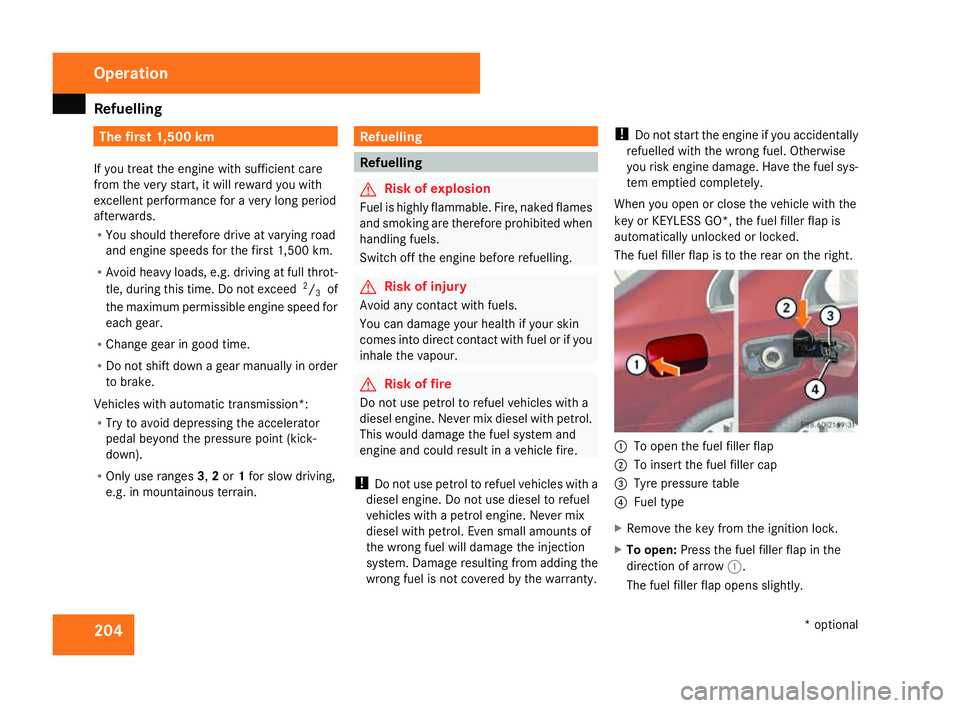
The fuel filler flap is to the rear on the right . 1
To open the fuel filler flap
2 To insert the fuel filler cap
3 Tyre pressure table
4 Fuel typ e
X Remove the key from the ignition lock.
X To open: Press the fuel filler flap in the
direction of arrow 1.
The fuel filler flap opens slightly. Operation
* optional
204_AKB; 2; 3, en-GB
mkalafa,
2007-06-26T23:11:51+02:00 - Seite 204
Page 221 of 377
Driving
tips 21
8
Downhill gradient
sOn long and steep downhill stretches, espe-
cially if the vehicle is laden or towing a trailer,
you must shift to a lower gear in good time or,
on vehicles with automatic transmission*,
select shift range 1,2 or 3.
i This also applies if you have activated
cruise control* or Speedtronic*.
This uses the braking effect of the engine and
you will not have to brake to such an exten t
to maintain the same speed. This relieves the
load on the brake system and prevents the
brakes from overheating and wearing too
quickly. If you need additional braking ,
depress the brake pedal repeatedly rather
than continuously.
Heavy and light loads If the brakes have been subjected to a heavy
load, do not stop the vehicle immediately, but
drive on for a short while. This allows the air-
flow to cool the brakes more quickly. G
Risk of accident
Never depress the brake pedal continu -
ously while the vehicle is in motion, e.g.
never cause the brakes to rub by applying constant slight pedal pressure. This causes
the brake system to overheat, increases
the braking distance and can lead to the
brakes failing completely.
If the brakes have been used only moderately,
you should occasionally test their effective-
ness. To do this, brake more firmly from a
higher speed. This improves the grip of the
brakes.
Wet roads If you drive for a long time in the rain without
braking, there may be a delayed reaction
when you first brake and you will have to
depress the pedal harder.
You must therefore maintain a greater dis-
tance from the vehicle in front.
Brake firmly after driving on a wet road. Thi
s
way the brake discs will become warm, dryin g
more quickly, which will protect them against
corrosion. Limited braking performance on salted
roads G
Risk of accident
The layer of salt on the brake discs and the
brake linings may cause a delay in the brak-
ing effect, resulting in a significantly longer
braking distance, which could lead to an
accident.
To avoid this danger, you should:
R occasionally brake carefully when you
are driving on salted roads, so that any
layer of salt that may have started to
build up on the brake discs and the brake
linings is removed without putting other
road users at risk.
R maintain a greater distance to the vehicl e
ahead and drive with particular car e
R carefully apply the brakes at the end of a
trip and immediately after commencing a
new trip, so that salt residues ar e
removed from the brake disc.
New brake linings For safety reasons, Mercedes-Benz recom
-
mends that you have only brake pads/linings
fitted to your vehicle that have been approved Operation
* optional
204_AKB; 2; 3, en-GB
mkalafa,
2007-06-26T23:11:51+02:00 - Seite 218