reset MERCEDES-BENZ C-CLASS SALOON 2007 User Guide
[x] Cancel search | Manufacturer: MERCEDES-BENZ, Model Year: 2007, Model line: C-CLASS SALOON, Model: MERCEDES-BENZ C-CLASS SALOON 2007Pages: 377, PDF Size: 6.19 MB
Page 136 of 377
On-board computer (vehicles with the luxury multi-function steering wheel*, 12 buttons)
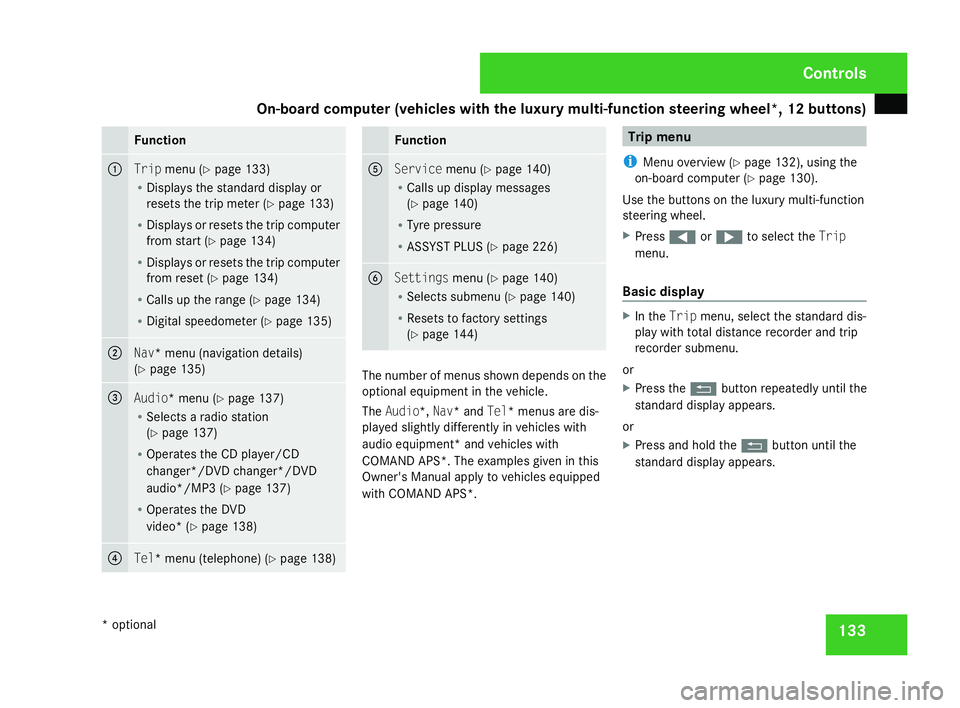
133Function
1
Trip
menu (Y page 133 )
R Displays the standard display or
resets the trip meter (Y page 133 )
R Displays or resets the trip compute r
from start (Y page 134 )
R Displays or resets the trip compute r
from reset (Y page 134 )
R Calls up the range (Y page 134 )
R Digital speedometer (Y page 135 ) 2
Nav* menu (navigation details)
( Y page 135 ) 3
Audio* menu
(Y page 137 )
R Selects a radio station
(Y page 137 )
R Operates the CD player/CD
changer*/DVD changer*/DVD
audio*/MP3 (Y page 137 )
R Operates the DVD
video* (Y page 138 ) 4
Tel* menu (telephone)
(Y page 138 ) Function
5
Service
menu(Y page 140 )
R Calls up display message s
( Y page 140 )
R Tyre pressure
R ASSYST PLUS (Y page 226 ) 6
Settings
menu(Y page 140 )
R Selects submenu (Y page 140 )
R Resets to factory setting s
( Y page 144 ) The number of menus shown depends on the
optional equipment in the vehicle.
The Audio*, Nav* and Tel* menus are dis-
played slightly differently in vehicles with
audio equipment* and vehicles with
COMAND APS*. The examples given in this
Owner's Manual apply to vehicles equipped
with COMAND APS*. Trip men
u
i Menu overview (Y page 132), using the
on-board computer (Y page 130).
Use the buttons on the luxury multi-function
steering wheel.
X Press (or& to select the Trip
menu.
Basic display X
In the Tripmenu, select the standard dis-
play with total distance recorder and trip
recorder submenu.
or
X Press the Lbutton repeatedly until the
standard display appears.
or
X Press and hold the Lbutton until the
standard display appears. Controls
* optional
204_AKB; 2; 3, en-GB
mkalafa,
2007-06-26T23:11:51+02:00 - Seite 133
Page 137 of 377
On-board computer (vehicles with the luxury multi-function steering wheel*, 12 buttons)
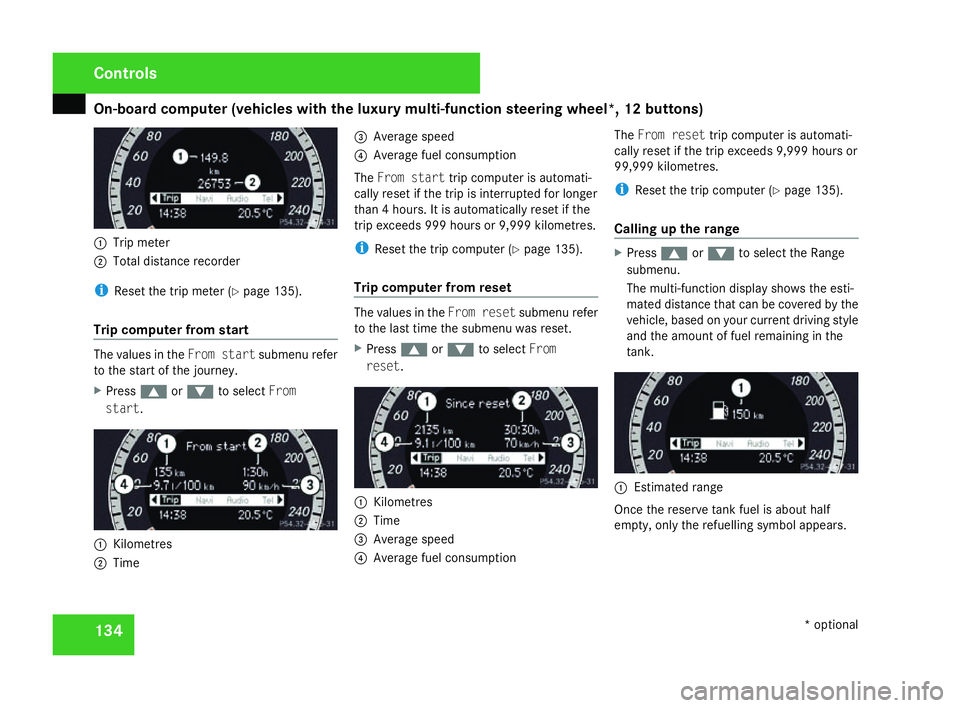
1341
Trip meter
2 Total distance recorder
i Reset the trip meter (Y page 135).
Trip computer from start The values in the
From startsubmenu refer
to the start of the journey.
X Press $or% to select From
start. 1
Kilometres
2 Time 3
Average spee d
4 Average fuel consumption
The From start trip computer is automati-
cally reset if the trip is interrupted for longe r
than 4 hours. It is automatically reset if the
trip exceeds 999 hours or 9,999 kilometres .
i Reset the trip computer (Y page 135).
Trip computer from reset The values in the
From resetsubmenu refer
to the last time the submenu was reset .
X Press $or% to select From
reset. 1
Kilometres
2 Time
3 Average spee d
4 Average fuel consumption The
From reset trip computer is automati-
cally reset if the trip exceeds 9,999 hours or
99,999 kilometres .
i Reset the trip computer (Y page 135).
Calling up the range X
Press $or% to select the Range
submenu.
The multi-function display shows the esti-
mated distance that can be covered by the
vehicle, based on your current driving style
and the amount of fuel remaining in the
tank. 1
Estimated range
Once the reserve tank fuel is about half
empty, only the refuelling symbol appears. Controls
* optional
204_AKB; 2; 3, en-G
B
mkalafa , 2007-06-26T23:11:51+02:00 - Seite 134
Page 138 of 377
On-board computer (vehicles with the luxury multi-function steering wheel*, 12 buttons)
135
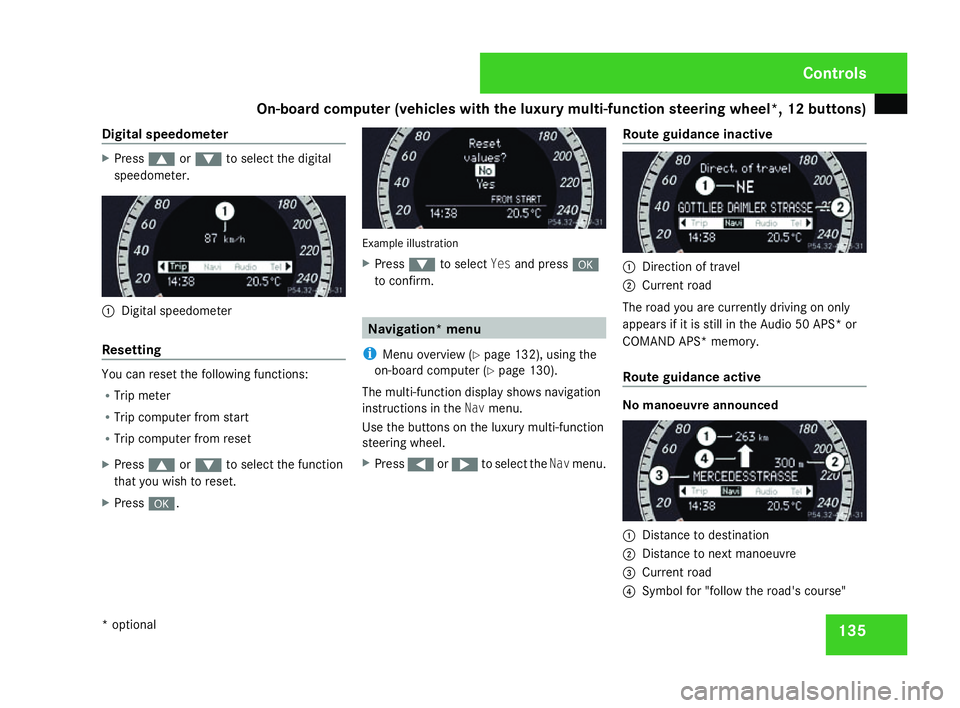
Digital speedometer X
Press $or% to select the digital
speedometer. 1
Digital speedomete r
Resetting You can reset the following functions:
R
Trip meter
R Trip computer from start
R Trip computer from reset
X Press $or% to select the functio n
that you wish to reset.
X Press #. Example illustratio
n
X Press %to select Yesand press #
to confirm. Navigation* men
u
i Menu overview (Y page 132), using the
on-board computer (Y page 130).
The multi-function display shows navigation
instructions in the Navmenu.
Use the buttons on the luxury multi-function
steering wheel.
X Press (or& to select the Navmenu .Route guidance inactive 1
Direction of travel
2 Current road
The road you are currently driving on only
appears if it is still in the Audio 50 APS* or
COMAND APS* memory.
Route guidance active No manoeuvre announce
d 1
Distance to destination
2 Distance to next manoeuvre
3 Current road
4 Symbol for "follow the road's course " Cont
rols
* optional
204_AKB; 2; 3, en-GB
mkalafa,
2007-06-26T23:11:51+02:00 - Seite 135
Page 147 of 377
On-board computer (vehicles with the luxury multi-function steering wheel*, 12 buttons)
144
You will find further information on automatic
locking in the "Automatic locking" section
(
Y page 79).
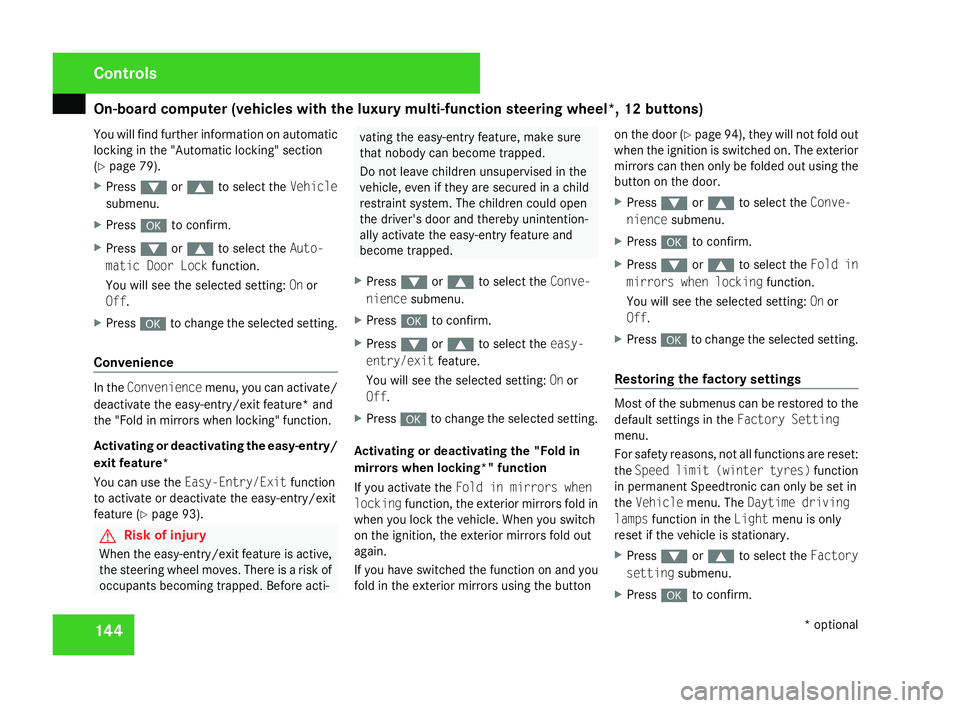
X Press %or$ to select the Vehicle
submenu.
X Press #to confirm.
X Press %or$ to select the Auto-
matic Door Loc kfunction.
You will see the selected setting: Onor
Off.
X Press #to change the selected setting .
Convenience In the
Convenience menu, you can activate/
deactivate the easy-entry/exit feature* and
the "Fold in mirrors when locking" function .
Activating or deactivating the easy-entry /
exit feature*
You can use the Easy-Entry/Exit function
to activate or deactivate the easy-entry/exit
feature (Y page 93). G
Risk of injury
When the easy-entry/exit feature is active,
the steering wheel moves. There is a risk of
occupants becoming trapped. Before acti - vating the easy-entry feature, make sure
that nobody can become trapped.
Do not leave children unsupervised in the
vehicle, even if they are secured in a child
restraint system. The children could open
the driver's door and thereby unintention-
ally activate the easy-entry feature and
become trapped.
X Press %or$ to select the Conve-
nience submenu.
X Press #to confirm.
X Press %or$ to select the easy-
entry/exi tfeature.
You will see the selected setting: Onor
Off.
X Press #to change the selected setting .
Activating or deactivating the "Fold in
mirrors when locking*" function
If you activate the Fold in mirrors whe n
locking function, the exterior mirrors fold in
when you lock the vehicle. When you switch
on the ignition, the exterior mirrors fold out
again.
If you have switched the function on and you
fold in the exterior mirrors using the button on the door
(Y page 94), they will not fold out
when the ignition is switched on. The exterior
mirrors can then only be folded out using the
button on the door.
X Press %or$ to select the Conve-
nience submenu.
X Press #to confirm.
X Press %or$ to select the Fold in
mirrors when lockin gfunction.
You will see the selected setting: Onor
Off.
X Press #to change the selected setting .
Restoring the factory setting s Most of the submenus can be restored to the
default settings in the
Factory Setting
menu.
For safety reasons, not all functions are reset:
the Speed limit (winter tyres) function
in permanent Speedtronic can only be set in
the Vehicle menu. The Daytime driving
lamps function in the Lightmenu is only
reset if the vehicle is stationary.
X Press %or$ to select the Factory
setting submenu.
X Press #to confirm. Controls
* optional
204_AKB; 2; 3, en-G
B
mkalafa , 2007-06-26T23:11:51+02:00 - Seite 144
Page 148 of 377
Driving sys
tems 14
5
X
Press %or$ to select Reset all
settings? SelectNoorYes .
X Select Yesif you want to reset all the set-
tings .
X Press #to confirm the selection.
The multi-function display shows a confir -
mation message. Driving systems
Your vehicle's driving systems are described
on the following pages:
R Cruise control* and Speedtronic*, whic h
you can use to control the speed of th e
vehicl e
R Hill start assist, which makes pulling away
on steep uphill gradients easie r
R ADVANCED AGILITY package with sports
mode*
R 4MATIC* (permanent four-wheel drive )
R Parktronic*, which assists you in parking
and manoeuvrin g
The ABS, BAS, adaptive brake lights, ESP ®
and EBV (electronic brake-power distribution )
driving safety systems are described in the
"Driving safety systems" section
( Y page 67). Cruise control*
Cruise control maintains a constant road
speed for you. It brakes automatically in order
to avoid exceeding the set speed. On long and
steep downhill gradients, especially if the
vehicle is laden or towing a trailer, you must
shift to a lower gear in good time or select
shift range 1,2 or 3in vehicles with automatic
transmission*. In this way you will make use
of the braking effect of the engine, which
relieves the load on the brake system and
prevents the brakes from overheating and
wearing too quickly. G
Risk of accident
Do not change down for additional engine
braking on a slippery road surface. Thi s
could cause the drive wheels to lose thei r
grip and the vehicle could skid.
Use cruise control only if road and traffic con-
ditions make it appropriate to maintain a
steady speed for a prolonged period. You can
store any road speed above 30 km/h. G
Risk of accident
Cruise control cannot take account of roa d
and traffic conditions. Controls
* optional
204_AKB; 2; 3, en-GB
mkalafa
, 2007-06-26T23:11:51+02:00 - Seite 145 Z
Page 178 of 377
Sliding sunroof
175
Lowering and closing X
To lower manually: pull and hold the
switch in the direction of arrow 2until th e
sliding/tilting sunroof has moved to the
desired position.
X To lower fully: pull the switch briefl y
beyond the pressure point in the direction
of arrow 2and release it.
X To stop: push or pull the switch in any
direction.
Rain-closing feature *When the key is in position
0in the ignition
lock or is removed, the sliding/tilting sunroof
closes automatically:
R If it starts to rain
R At extreme outside temperatures
R After 6 hours
R If there is a malfunction in the power supply
The rear of the sliding/tilting sunroof is then
raised in order to ventilate the interior of the
vehicle .
i The sliding/tilting sunroof is opened
slightly again if it is obstructed while being closed by the rain-closing feature. The rain-
closing feature is then deactivated.
i The sliding/tilting sunroof does not close
if:
R It is raised at the rear
R It is blocked
R No rain is falling on the windscreen (e.g.
because the vehicle is under a bridge or
in a carport)
Opening and closing the cover The cover functions as a sunblind. When you
open the sliding/tilting sunroof, the cover
moves back with it.
When the sliding/tilting sunroof is closed or
raised at the rear, you can open or close the
cover manually.
Resetting the sliding/tilting sunroof
Reset the sliding/tilting sunroof if it does not
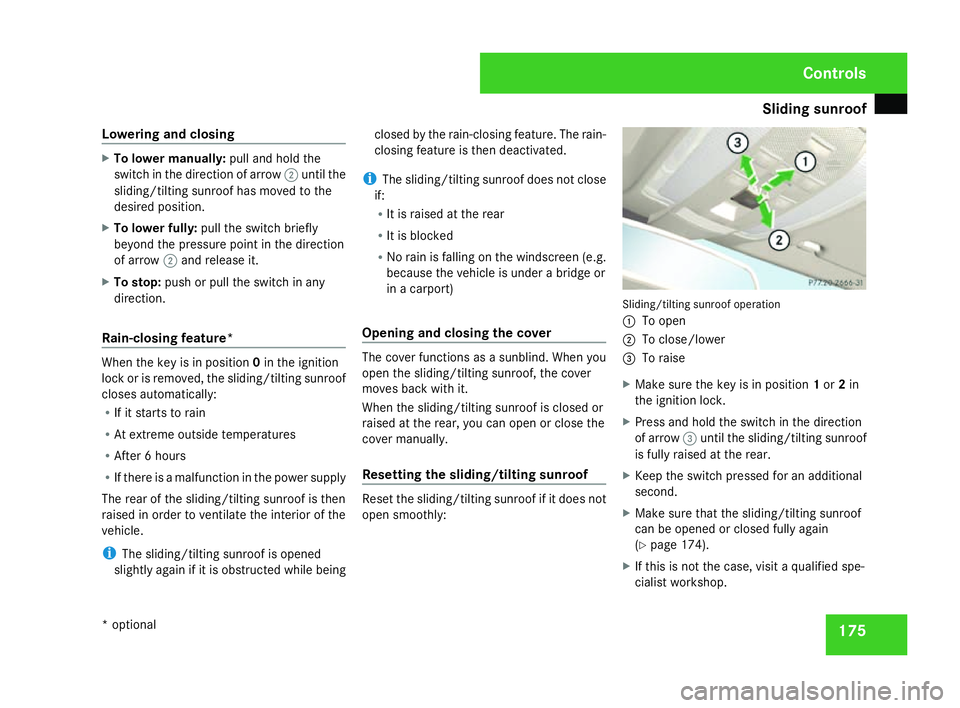
open smoothly: Sliding/tilting sunroof operation
1 To open
2 To close/lower
3 To raise
X Make sure the key is in position 1or 2in
the ignition lock .
X Press and hold the switch in the direction
of arrow 3until the sliding/tilting sunroo f
is fully raised at the rear.
X Keep the switch pressed for an additional
second.
X Make sure that the sliding/tilting sunroof
can be opened or closed fully again
(Y page 174).
X If this is not the case, visit a qualified spe-
cialist workshop. Controls
* optional
204_AKB; 2; 3, en-GB
mkalafa
, 2007-06-26T23:11:51+02:00 - Seite 175
Page 181 of 377
Sliding sunroof
178
Opening
X
To open manually: press the switch in the
direction of arrow 1or3 until the roller
sunblinds have moved to the desired posi -
tion.
X To open fully :briefly press the switc h
beyond the pressure point in the direction
of arrow 1or3 .
X To stop: push or pull the switch in any
direction.
Closin g
X To close manually: pull the switch in the
direction of arrow 2or until the roller sun-
blinds have moved to the desired position.
X To close fully :briefly pull the switc h
beyond the pressure point in the direction
of arrow 2.
X To stop: push or pull the switch in any
direction.
Rain-closing feature *When the key is in position
0in the ignition
lock or is removed, the panorama sliding sun-
roof closes automatically: R
if it starts to rain
R at extreme outside temperatures
R after 6 hour s
R if there is a malfunction in the power supply
The panorama sliding sunroof remains raised
at the rear in order to allow ventilation of the
vehicle interior .
i The panorama sliding sunroof does not
close if:
R it is raised at the rear
R it is blocked
R no rain is falling within the field of the rain
sensor in the windscreen (e.g. because
the vehicle is under a bridge or in a car -
port )
Resetting the panorama sliding sunroo f
and the roller sunblinds Reset the panorama sliding sunroof and the
roller sunblinds if the panorama sliding sun-
roof or the roller sunblinds do not ope
n
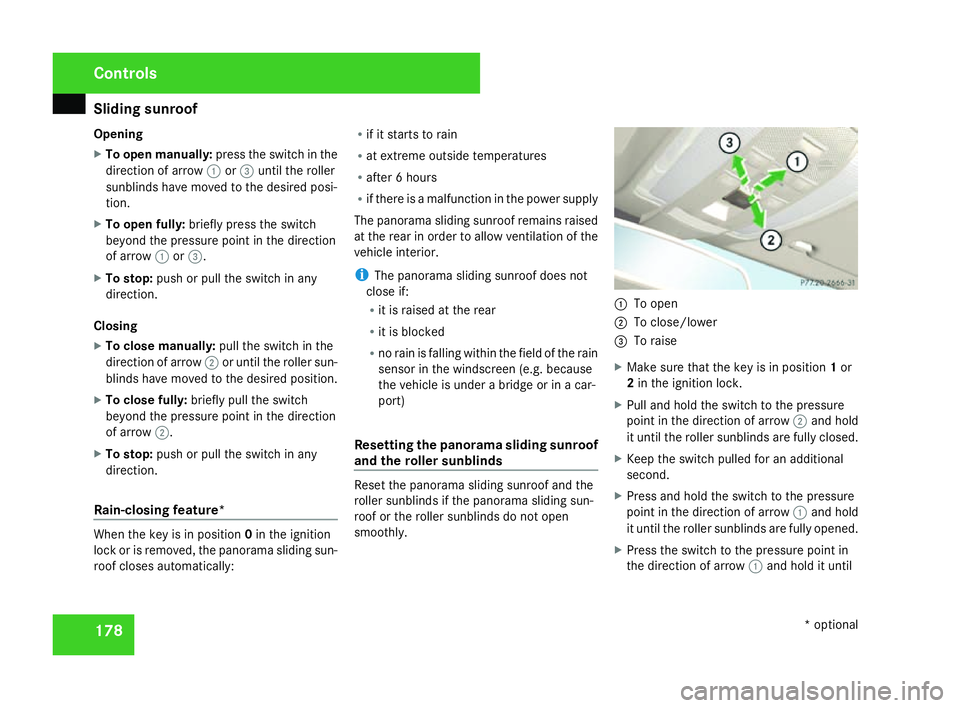
smoothly. 1
To open
2 To close/lower
3 To raise
X Make sure that the key is in position 1or
2 in the ignition lock .
X Pull and hold the switch to the pressure
point in the direction of arrow 2and hold
it until the roller sunblinds are fully closed.
X Keep the switch pulled for an additional
second.
X Press and hold the switch to the pressure
point in the direction of arrow 1and hold
it until the roller sunblinds are fully opened.
X Press the switch to the pressure point in
the direction of arrow 1and hold it until Control
s
* optional
204_AKB; 2; 3, en-GB
mkalafa,
2007-06-26T23:11:51+02:00 - Seite 178
Page 229 of 377
Service
226 Service
Active Service System
ASSYST PLUS, the Active Service System,
tells you when the next service is due.
Services that are due appear in the multi-
function display:
Next service A in ... days
Next service A in ... km
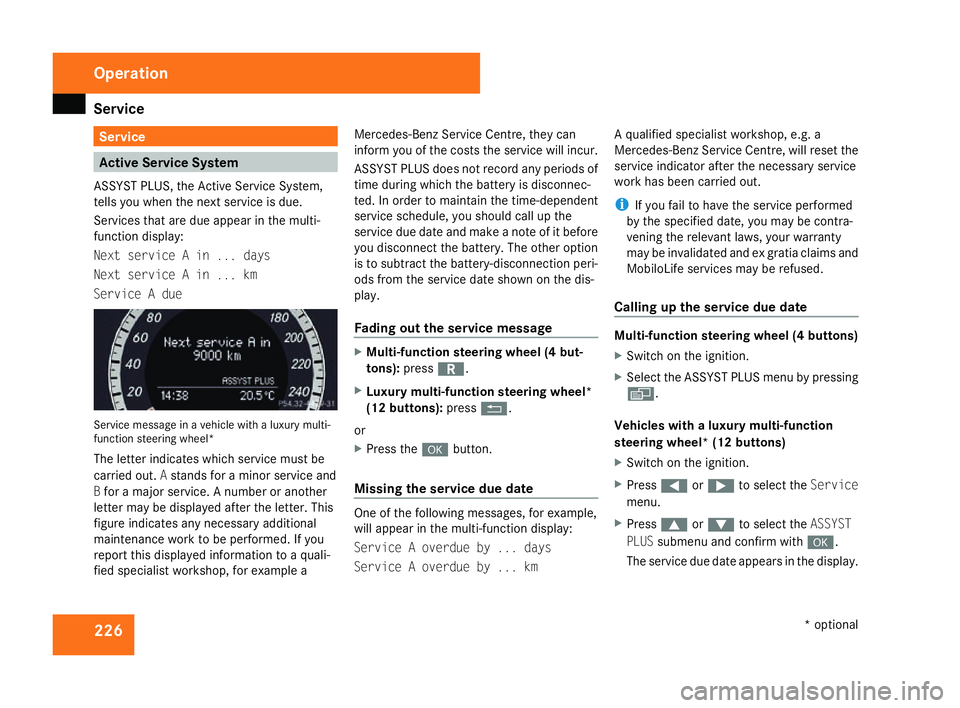
Service A due Service message in a vehicle with a luxury multi-
function steering wheel*
The letter indicates which service must be
carried out. Astands for a minor service and
B for a major service. A number or another
letter may be displayed after the letter. This
figure indicates any necessary additiona l
maintenance work to be performed. If you
report this displayed information to a quali-
fied specialist workshop, for example aMercedes-Benz Service Centre, they can
inform you of the costs the service will incur.
ASSYST PLUS does not record any periods of
time during which the battery is disconnec-
ted. In order to maintain the time-dependent
service schedule, you should call up the
service due date and make a note of it befor
e
you disconnect the battery. The other option
is to subtract the battery-disconnection peri-
ods from the service date shown on the dis-
play.
Fading out the service message X
Multi-function steering wheel (4 but-
tons) :press í.
X Luxury multi-function steering wheel*
(12 buttons): pressL.
or
X Press the #button.
Missing the service due dat e One of the following messages, for example,
will appear in the multi-function display:
Service A overdue by ... days
Service A overdue by ... kmA qualified specialist workshop, e.g.
a
Mercedes-Benz Service Centre, will reset the
service indicator after the necessary service
work has been carried out.
i If you fail to have the service performed
by the specified date, you may be contra-
vening the relevant laws, your warranty
may be invalidated and ex gratia claims and
MobiloLife services may be refused .
Calling up the service due date Multi-function steering wheel (4 buttons)
X
Switch on the ignition.
X Select the ASSYST PLUS menu by pressing
è .
Vehicles with a luxury multi-function
steering wheel* (12 buttons)
X Switch on the ignition.
X Press (or& to select the Service
menu.
X Press $or% to select the ASSYST
PLU Ssubmenu and confirm with #.
The service due date appears in the display .Operation
* optional
204_AKB; 2; 3, en-GB
mkalafa,
2007-06-26T23:11:51+02:00 - Seite 226
Page 234 of 377
231
Where will I find...?
...........................232
Display messages ............................. 236
Troubleshooting ................................ 276
Locking/unlocking in an emer-
gency ................................................. 300
Resetting triggered NECK-PRO
head restraints .................................. 303
Changing the batteries .....................304
Changing the bulbs ...........................305
Replacing the wiper blades ..............312
Flat tyre ............................................. 313
Battery ............................................... 324
Jump-starting .................................... 328
Towing and tow-starting ..................329
Fuses .................................................. 332 Practical advice
204_AKB; 2; 3, en-GB
mkalafa,
2007-06-26T23:11:51+02:00 - Seite 231
Page 291 of 377
Troubleshooting
28
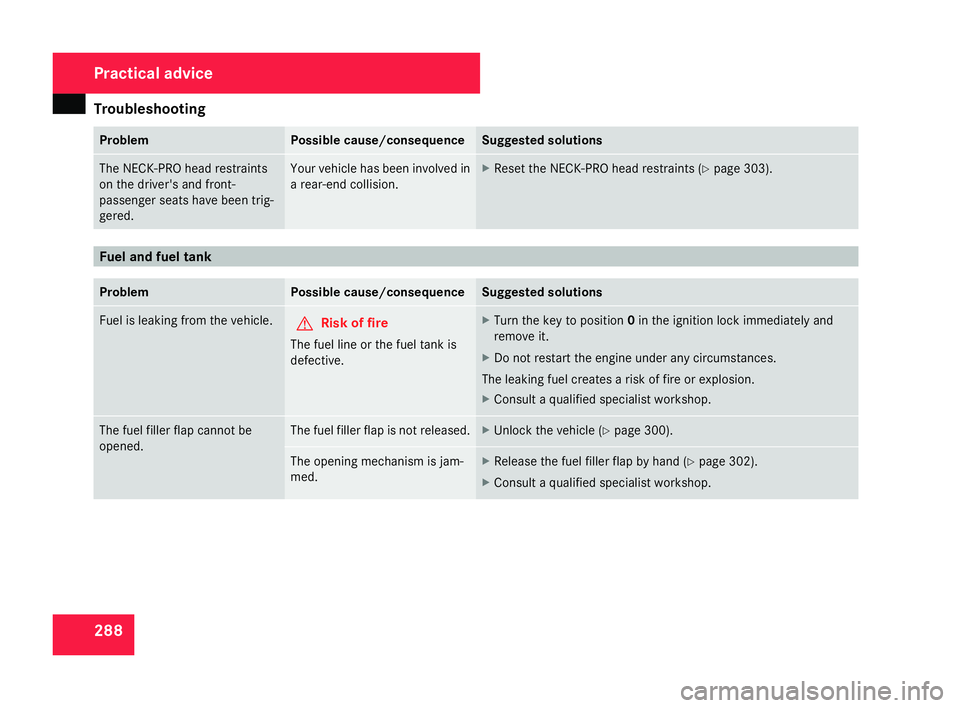
8 Problem Possible cause/consequence Suggested solutions
The NECK-PRO head restraint
s
on the driver's and front-
passenger seats have been trig-
gered. Your vehicle has been involved in
a rear-end collision. X
Reset the NECK-PRO head restraints (Y page 303). Fuel and fuel tan
kProblem Possible cause/consequence Suggested solutions
Fuel is leaking from the vehicle.
G
Risk of fire
The fuel line or the fuel tank is
defective. X
Turn the key to position 0in the ignition lock immediately and
remove it.
X Do not restart the engine under any circumstances .
The leaking fuel creates a risk of fire or explosion.
X Consult a qualified specialist workshop. The fuel filler flap cannot be
opened. The fuel filler flap is not released. X
Unlock the vehicle (Y page 300). The opening mechanism is jam-
med. X
Release the fuel filler flap by hand (Y page 302).
X Consult a qualified specialist workshop. Practical advice
204_AKB; 2; 3, en-GB
mkalafa,
2007-06-26T23:11:51+02:00 - Seite 28
8