ECU MERCEDES-BENZ C-CLASS SALOON 2007 Owner's Guide
[x] Cancel search | Manufacturer: MERCEDES-BENZ, Model Year: 2007, Model line: C-CLASS SALOON, Model: MERCEDES-BENZ C-CLASS SALOON 2007Pages: 377, PDF Size: 6.19 MB
Page 194 of 377
Loading and stowing
1911
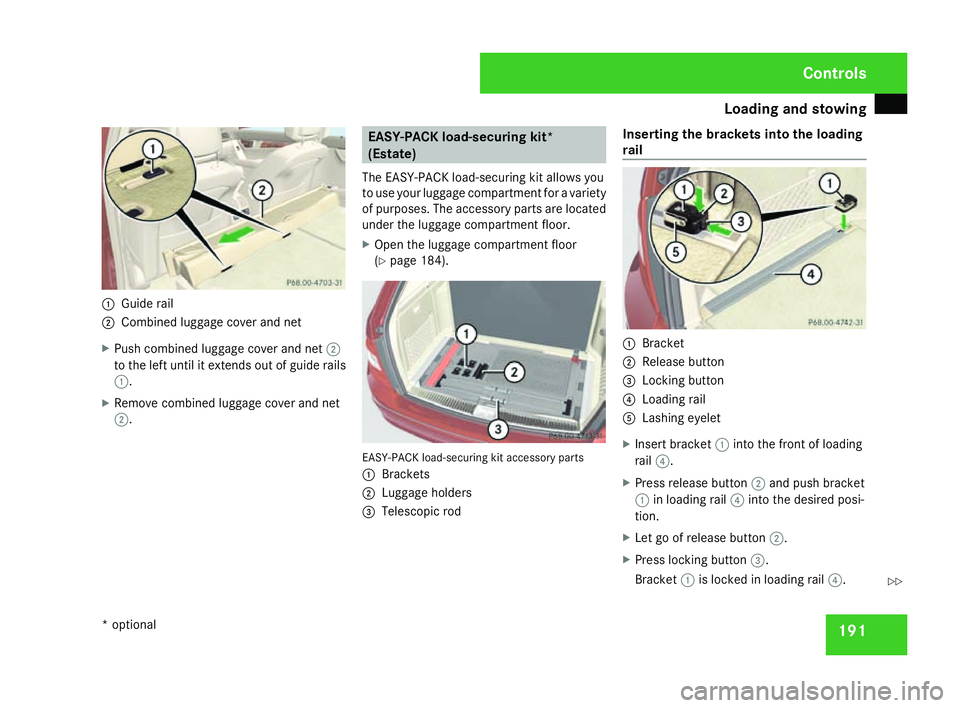
Guide rail
2 Combined luggage cover and ne t
X Push combined luggage cover and net 2
to the left until it extends out of guide rail s
1 .
X Remove combined luggage cover and ne t
2 . EASY-PACK load-securing kit
*
(Estate)
The EASY-PACK load-securing kit allows you
to use your luggage compartment for a variety
of purposes. The accessory parts are located
under the luggage compartment floor.
X Open the luggage compartment floor
(Y page 184). EASY-PACK load-securing kit accessory parts
1
Brackets
2 Luggage holders
3 Telescopic rod Inserting the brackets into the loading
rail
1
Bracke t
2 Release butto n
3 Locking button
4 Loading rail
5 Lashing eyelet
X Insert bracket 1into the front of loading
rail 4.
X Press release button 2and push bracke t
1 in loading rail 4into the desired posi-
tion .
X Let go of release button 2.
X Press locking button 3.
Bracket 1is locked in loading rail 4. Cont
rols
* optional
204_AKB; 2; 3, en-GB
mkalafa,
2007-06-26T23:11:51+02:00 - Seite 191 Z
Page 195 of 377
Loading and stowing
192
X
If necessary, fold lashing eyelet 5
upwards. G
Risk of injury
Distribute the load on the lashing eyelets
evenly .
Otherwise, vehicle occupants could be
injured by objects being thrown around if
you:
R brake sharply
R change direction suddenly
R have an accident
Please observe the loading guidelines.
Luggage holder The luggage holder can be used to secure
light loads against the side wall of the luggage
compartment to prevent them from moving
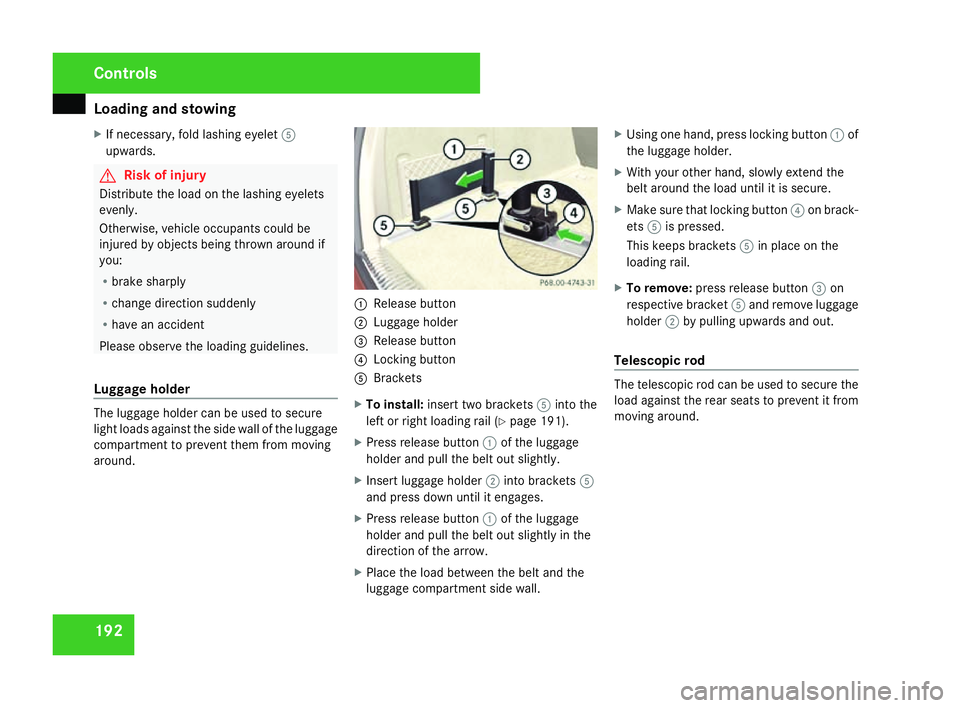
around. 1
Release butto n
2 Luggage holder
3 Release butto n
4 Locking button
5 Brackets
X To install: insert two brackets 5into the
left or right loading rail (Y page 191).
X Press release button 1of the luggage
holder and pull the belt out slightly.
X Insert luggage holder 2into brackets 5
and press down until it engages .
X Press release button 1of the luggage
holder and pull the belt out slightly in the
direction of the arrow.
X Place the load between the belt and the
luggage compartment side wall. X
Using one hand, press locking button 1of
the luggage holder.
X With your other hand, slowly extend the
belt around the load until it is secure.
X Make sure that locking button 4on brack-
ets 5is pressed.
This keeps brackets 5in place on the
loading rail.
X To remove :press release button 3on
respective bracket 5and remove luggage
holder 2by pulling upwards and out.
Telescopic rod The telescopic rod can be used to secure the
load against the rear seats to prevent it from
moving around.Controls
204_AKB; 2; 3, en-GB
mkalafa,
2007-06-26T23:11:51+02:00 - Seite 192
Page 196 of 377
Loading and stowing
1931
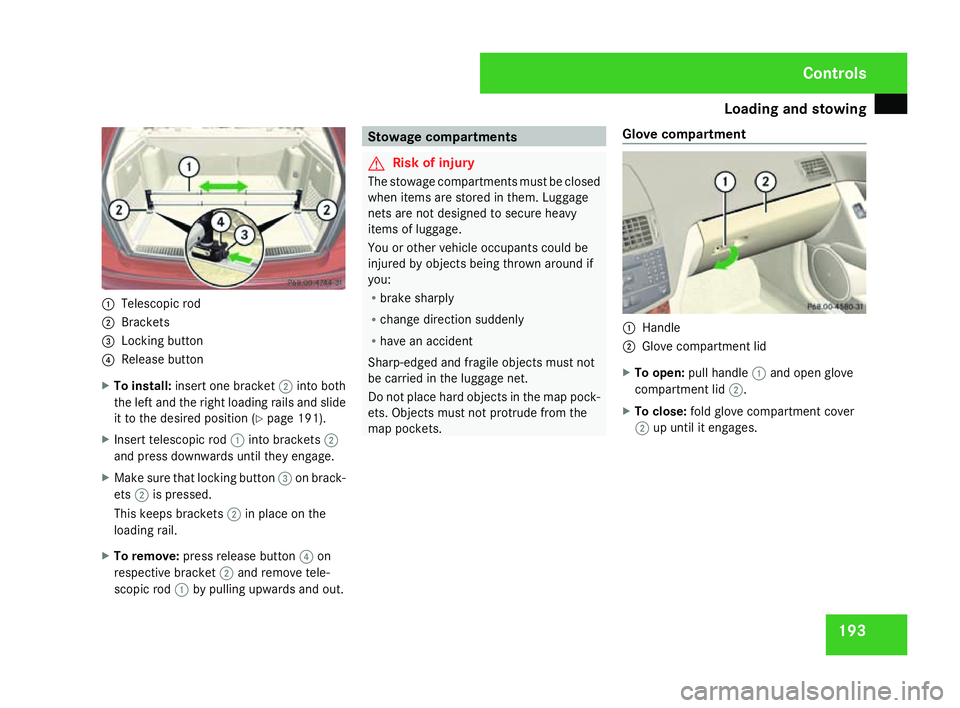
Telescopic rod
2 Brackets
3 Locking button
4 Release butto n
X To install: insert one bracket 2into bot h
the left and the right loading rails and slid e
it to the desired position (Y page 191).
X Insert telescopic rod 1into brackets 2
and press downwards until they engage.
X Make sure that locking button 3on brack-
ets 2is pressed.
This keeps brackets 2in place on the
loading rail.
X To remove :press release button 4on
respective bracket 2and remove tele-
scopic rod 1by pulling upwards and out. Stowage compartment
s G
Risk of injury
The stowage compartments must be closed
when items are stored in them. Luggage
nets are not designed to secure heavy
items of luggage.
You or other vehicle occupants could be
injured by objects being thrown around if
you:
R brake sharply
R change direction suddenly
R have an accident
Sharp-edged and fragile objects must not
be carried in the luggage net.
Do not place hard objects in the map pock-
ets. Objects must not protrude from the
map pockets. Glove compartment 1
Handl e
2 Glove compartment lid
X To open: pull handle 1and open glov e
compartment lid 2.
X To close: fold glove compartment cove r
2 up until it engages . Cont
rols
204_AKB; 2; 3, en-GB
mkalafa,
2007-06-26T23:11:51+02:00 - Seite 193
Page 204 of 377
Features
201
Removing the existing mobile phone
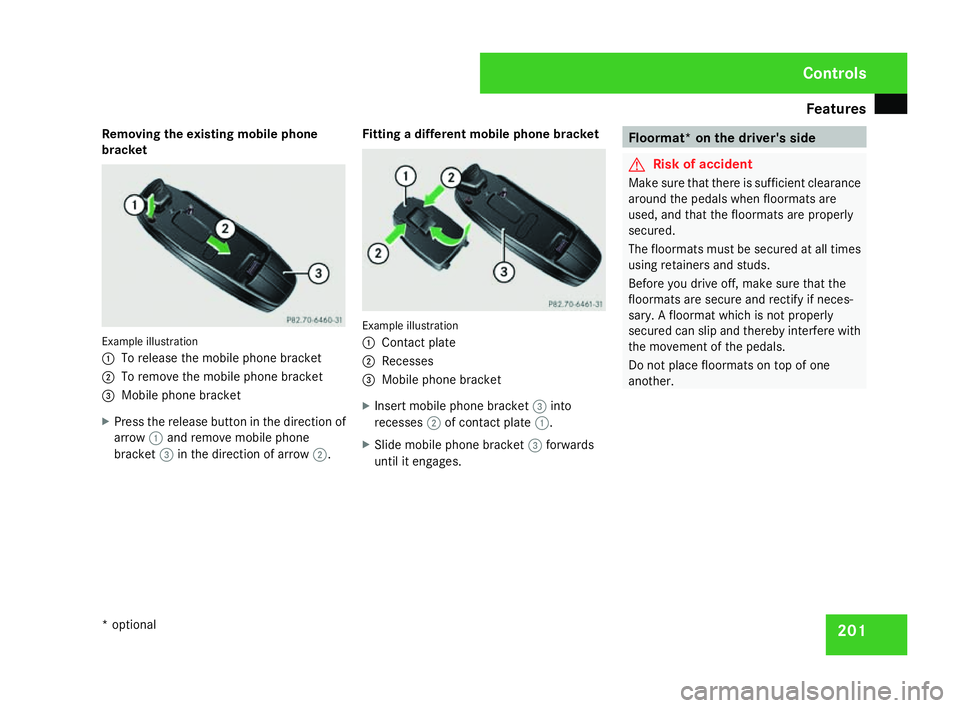
bracket Example illustration
1
To release the mobile phone bracket
2 To remove the mobile phone bracket
3 Mobile phone bracket
X Press the release button in the direction of
arrow 1and remove mobile phon e
bracket 3in the direction of arrow 2. Fitting a different mobile phone bracket Example illustration
1
Contact plat e
2 Recesses
3 Mobile phone bracket
X Insert mobile phone bracket 3into
recesses 2of contact plate 1.
X Slide mobile phone bracket 3forwards
until it engages. Floormat* on the driver's side
G
Risk of accident
Make sure that there is sufficient clearance
around the pedals when floormats are
used, and that the floormats are properly
secured .
The floormats must be secured at all times
using retainers and studs.
Before you drive off, make sure that the
floormats are secure and rectify if neces-
sary. A floormat which is not properly
secured can slip and thereby interfere with
the movement of the pedals.
Do not place floormats on top of one
another . Cont
rols
* optional
204_AKB; 2; 3, en-GB
mkalafa,
2007-06-26T23:11:51+02:00 - Seite 201
Page 228 of 377
Trailer towing*
22
5 Trailer power suppl
y
When delivered from the factory, your vehi-
cle's trailer socket outlet is equipped with a
permanent power supply and a power supply
that is switched on via the ignition lock .
The permanent power supply is supplied via
trailer socket pin 9.
The power supply that is switched on via the
ignition lock is supplied via trailer socket pin
10.
! You can connect consumers with a power
rating of up to 240 W to the permanen t
power supply and up to 180 W to the power
supply that is switched on via the ignition
lock .
You must not charge a trailer battery using
the power supply.
You can obtain further information about
installing the trailer electrics from a qualified
specialist workshop, e.g. a Mercedes-Ben z
Service Centre.
X To switch the switched power supply on
or off: turn the key in the ignition lock to
position 2or 0, respectively. Trailer with 7-pin connector
If your trailer has a 7-pin connector, you can
connect it to the 13-pin socket on the ball
coupling using an adapter or, if necessary, an
adapter cable. Both of these can be obtained
at a qualified specialist workshop, e.g. at a
Mercedes-Benz Service Centre.
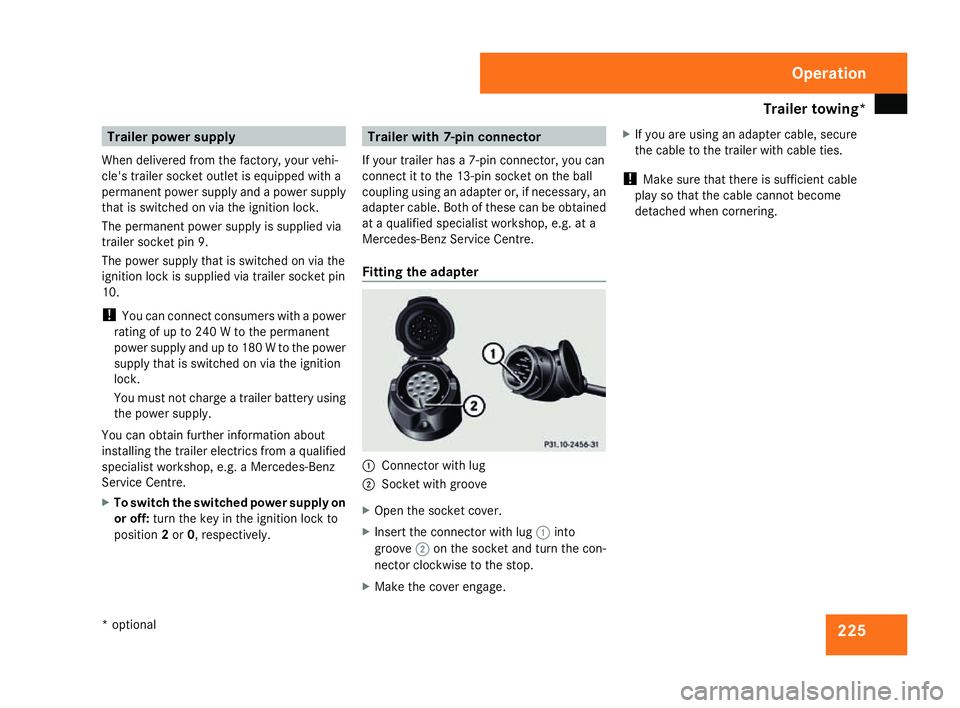
Fitting the adapter 1
Connector with lug
2 Socket with groove
X Open the socket cover.
X Insert the connector with lug 1into
groove 2on the socket and turn the con-
nector clockwise to the stop.
X Make the cover engage. X
If you are using an adapter cable, secure
the cable to the trailer with cable ties.
! Make sure that there is sufficient cable
play so that the cable cannot become
detached when cornering. Operation
* optional
204_AKB; 2; 3, en-GB
mkalafa
, 2007-06-26T23:11:51+02:00 - Seite 225
Page 235 of 377
Where will I find...?
232 Where will I find...?
Warning triangle
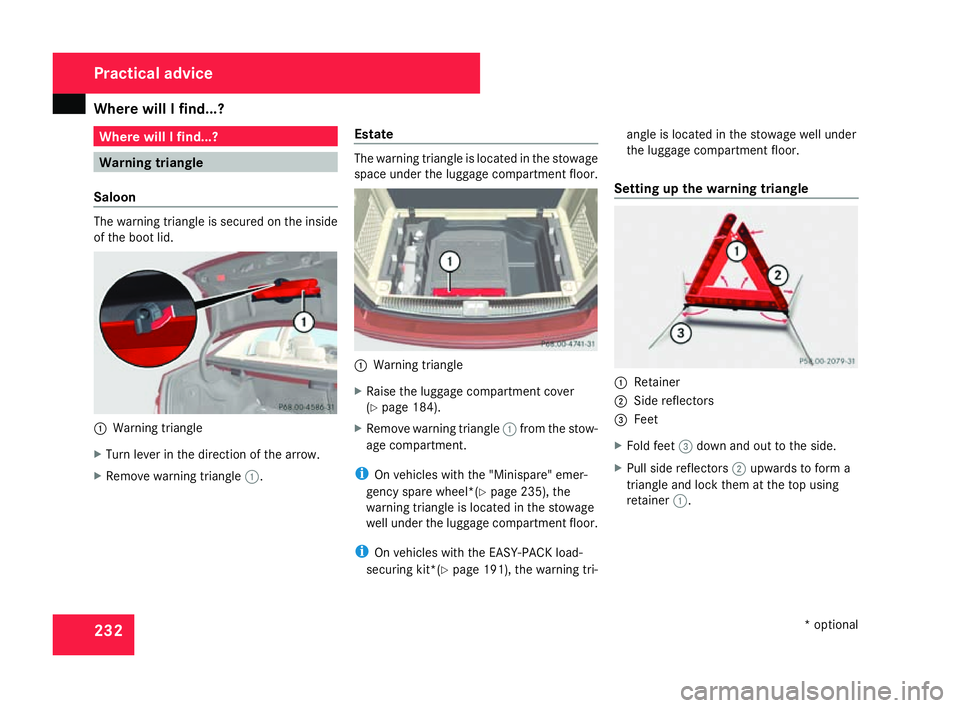
Saloon The warning triangle is secured on the insid
e
of the boot lid. 1
Warning triangle
X Turn lever in the direction of the arrow.
X Remove warning triangle 1. Estat
e The warning triangle is located in the stowage
space under the luggage compartment floor.
1
Warning triangle
X Raise the luggage compartment cover
(Y page 184).
X Remove warning triangle 1from the stow-
age compartment.
i On vehicles with the "Minispare" emer-
gency spare wheel*(Y page 235), the
warning triangle is located in the stowage
well under the luggage compartment floor.
i On vehicles with the EASY-PACK load-
securing kit*( Ypage 191), the warning tri- angle is located in the stowage well under
the luggage compartment floor.
Setting up the warning triangle 1
Retainer
2 Side reflector s
3 Feet
X Fold feet 3down and out to the side.
X Pull side reflectors 2upwards to form a
triangle and lock them at the top using
retainer 1. Practical advice
* optional
204_AKB; 2; 3, en-GB
mkalafa,
2007-06-26T23:11:51+02:00 - Seite 232
Page 239 of 377
Display
messages 23
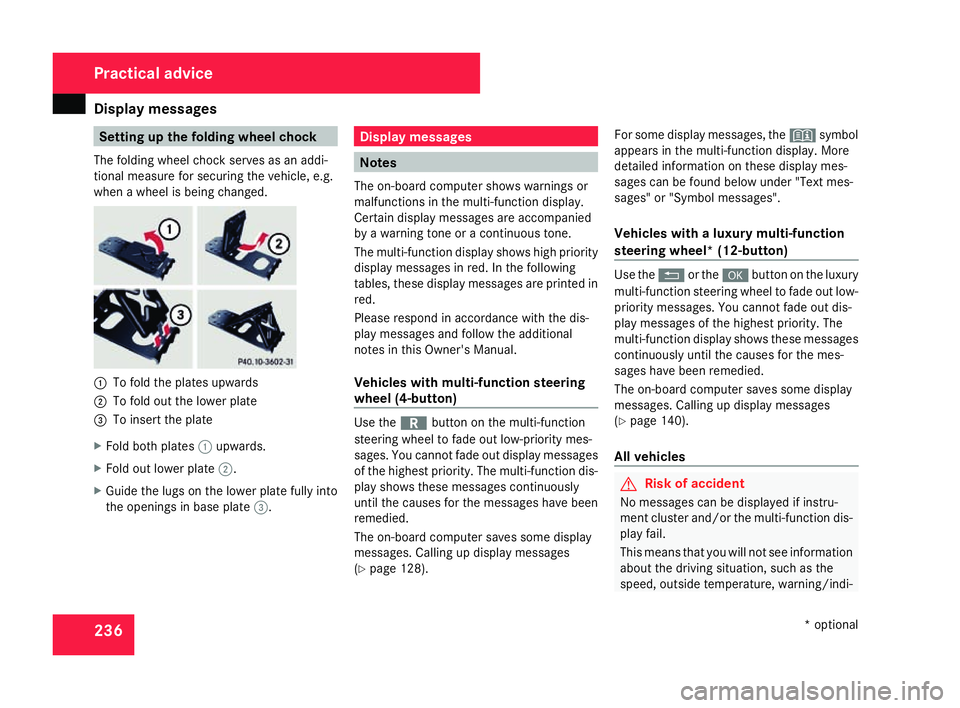
6 Setting up the folding wheel chock
The folding wheel chock serves as an addi-
tional measure for securing the vehicle, e.g.
when a wheel is being changed. 1
To fold the plates upwards
2 To fold out the lower plate
3 To insert the plate
X Fold both plates 1upwards.
X Fold out lower plate 2.
X Guide the lugs on the lower plate fully int o
the openings in base plate 3. Display messages
Note
s
The on-board computer shows warnings or
malfunctions in the multi-function display .
Certain display messages are accompanie d
by a warning tone or a continuous tone.
The multi-function display shows high priorit y
display messages in red. In the following
tables, these display messages are printed in
red.
Please respond in accordance with the dis-
play messages and follow the additional
notes in this Owner's Manual.
Vehicles with multi-function steering
wheel (4-button) Use the
íbutton on the multi-function
steering wheel to fade out low-priority mes-
sages. You cannot fade out display messages
of the highest priority. The multi-function dis-
play shows these messages continuously
until the causes for the messages have been
remedied.
The on-board computer saves some display
messages. Calling up display messages
( Y page 128). For some display messages, the
_symbol
appears in the multi-function display. More
detailed information on these display mes-
sages can be found below under "Text mes-
sages" or "Symbol messages".
Vehicles with a luxury multi-function
steering wheel* (12-button ) Use the
Lor the #button on the luxury
multi-function steering wheel to fade out low-
priority messages. You cannot fade out dis-
play messages of the highest priority. The
multi-function display shows these messages
continuously until the causes for the mes-
sages have been remedied.
The on-board computer saves some display
messages. Calling up display messages
( Y page 140).
All vehicles G
Risk of accident
No messages can be displayed if instru -
ment cluster and/or the multi-function dis-
play fail .
This means that you will not see information
about the driving situation, such as the
speed, outside temperature, warning/indi- Practical advice
* optional
204_AKB; 2; 3, en-GB
mkalafa,
2007-06-26T23:11:51+02:00 - Seite 236
Page 287 of 377
Troubleshooting
28
4 Problem Possible cause/consequence Suggested solutions
<
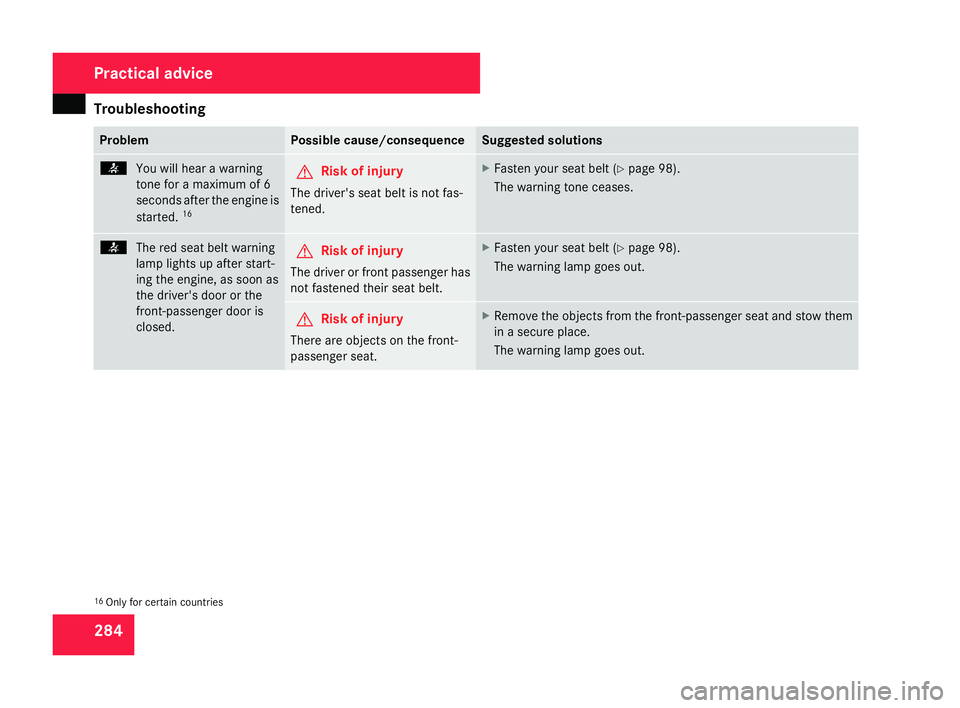
You will hear a warnin g
tone for a maximum of 6
seconds after the engine is
started. 16 G
Risk of injury
The driver's seat belt is not fas -
tened. X
Fasten your seat belt (Y page 98).
The warning tone ceases. <
The red seat belt warning
lamp lights up after start -
ing the engine, as soon as
the driver's door or the
front-passenger door is
closed. G
Risk of injury
The driver or front passenger ha s
not fastened their seat belt. X
Fasten your seat belt (Y page 98).
The warning lamp goes out. G
Risk of injury
There are objects on the front-
passenger seat. X
Remove the objects from the front-passenger seat and stow them
in a secure place.
The warning lamp goes out .16
Only for certain countries Practical advice
204_AKB; 2; 3, en-GB
mkalafa,
2007-06-26T23:11:51+02:00 - Seite 284
Page 288 of 377
Troubleshooting
28
5 Problem Possible cause/consequence Suggested solutions
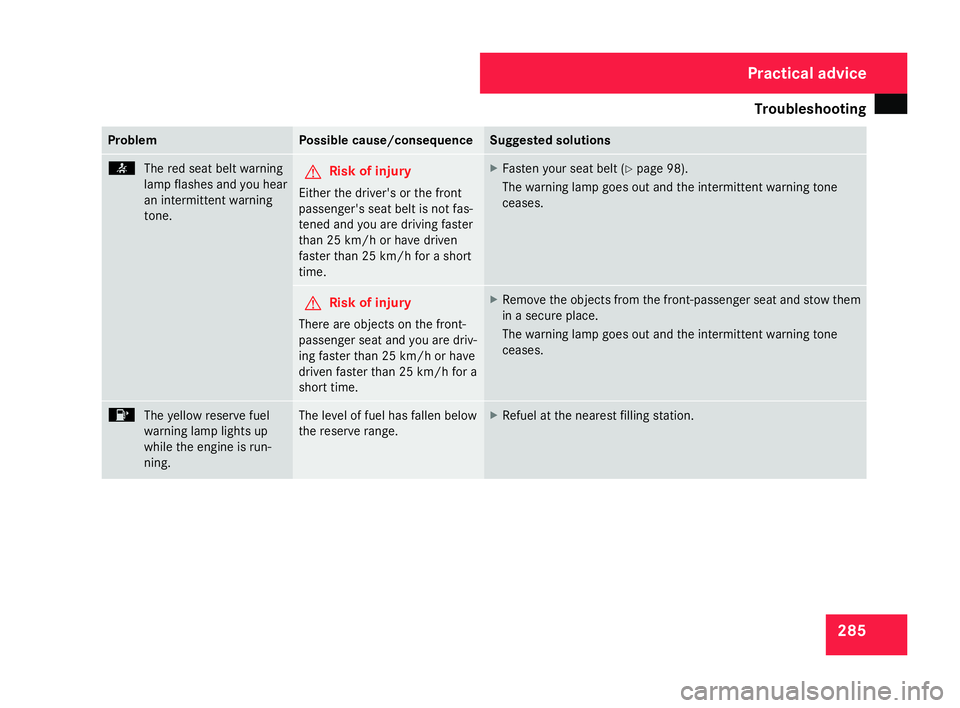
<
The red seat belt warning
lamp flashes and you hear
an intermittent warning
tone. G
Risk of injury
Either the driver's or the front
passenger's seat belt is not fas -
tened and you are driving faste r
than 25 km/h or have driven
faster than 25 km/h for a short
time. X
Fasten your seat belt (Y page 98).
The warning lamp goes out and the intermittent warning ton e
ceases . G
Risk of injury
There are objects on the front-
passenger seat and you are driv-
ing faster than 25 km/h or have
driven faster than 25 km/h for a
short time. X
Remove the objects from the front-passenger seat and stow them
in a secure place.
The warning lamp goes out and the intermittent warning tone
ceases . 4
The yellow reserve fuel
warning lamp lights up
while the engine is run-
ning. The level of fuel has fallen below
the reserve range. X
Refuel at the nearest filling station . Practical advice
204_AKB; 2; 3, en-GB
mkalafa,
2007-06-26T23:11:51+02:00 - Seite 285
Page 323 of 377
Flat tyre
320 relevant to safety or on safety-related sys-
tems must be carried out at a qualified
specialist workshop
.
Never drive the vehicle with more than one
“Minispare”/collapsible emergency spare
wheel* fitted.
Preparing the vehicle X
Prepare the vehicle as described
(Y page 313).
X Place the wheels in the straight-ahead posi-
tion.
X Take out the following from the stowage
area beneath the boot/luggage compart -
ment floor:
R The "Minispare" emergency spare
wheel* or the spare wheel*, if present
R The vehicle tool kit and jack
.
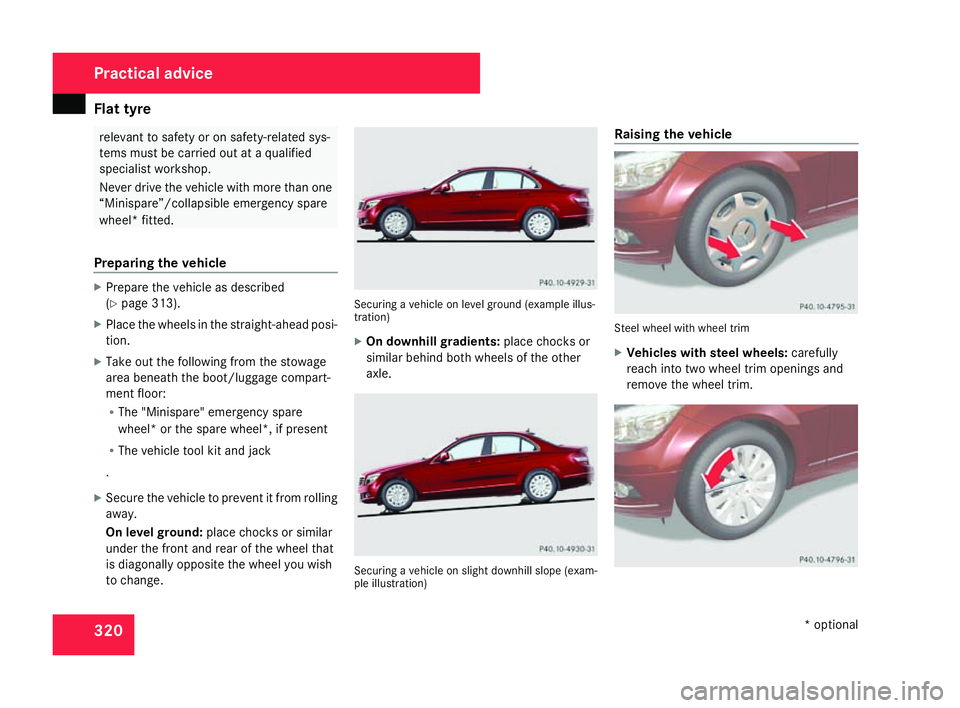
X Secure the vehicle to prevent it from rolling
away .
On level ground :place chocks or similar
under the front and rear of the wheel that
is diagonally opposite the wheel you wish
to change. Securing a vehicle on level ground (example illus-
tration)
X
On downhill gradients: place chocks or
similar behind both wheels of the other
axle. Securing a vehicle on slight downhill slope (exam-
ple illustration
) Raising the vehicle
Steel wheel with wheel trim
X
Vehicles with steel wheels :carefully
reach into two wheel trim openings and
remove the wheel trim. Practical advic
e
* optional
204_AKB; 2; 3, en-GB
mkalafa,
2007-06-26T23:11:51+02:00 - Seite 320