AUX MERCEDES-BENZ C-CLASS SALOON 2011 Owners Manual
[x] Cancel search | Manufacturer: MERCEDES-BENZ, Model Year: 2011, Model line: C-CLASS SALOON, Model: MERCEDES-BENZ C-CLASS SALOON 2011Pages: 401, PDF Size: 9.74 MB
Page 8 of 401
Alarm system
see ATA (Anti-Theft Alarm system)
Alertness Assistant
see ATTENTION ASSIST
AMGMenu (on-board computer) .......245
Anti-glare film .................................... 320
Anti-loc kBraking System
see ABS (Anti-lock Braking System)
Anti-Theft Alarm system
see ATA (Anti-Theft Alarm system)
Anti-theft system
Immobilise r...................................... 80
Aquaplaning ....................................... 177
Ashtray ............................................... 316
ASSYST PLUS see ASSYST PLUS service interval
display
ASSYST PLUS service interval dis-
play
Displaying service messages .........326
Hiding service messages ...............326
Notes ............................................. 326
Service messages ..........................326
ATA (Anti-Theft Alarm system)
Activating/deactivating ...................80
ATA (Anti-Theft Alarm system) .........80
Function .......................................... .80
Interior motion sensor .....................81
Switching off the alarm ....................80
Tow-away protection ........................ 81
ATTENTIO NASSIST
Activating/deactivating .................238
Display message (12-button mul-
tifunctio nsteering wheel) ..............273
Function/notes ............................. 203
Audio DVD (12-button multifunc-
tion steering wheel) ..........................234
Audio menu (on-board computer,
12-button multifunction steering
wheel) ................................................ .233
AUTO lights Display message (12-button mul-
tifunctio nsteering wheel) ..............267
Display message (4-button multi-
function steering wheel) ................264
see Lights Automatic engine start (ECO start/
stop function)
.................................... 157
Automatic engine switch-off (ECO
start/stop function) ..........................157
Automatic headlamp mode ..............119
Automatic transmission Accelerator pedal position .............163
Automatic drive program ...............164
Changing gea r............................... 163
Display message (4-button multi-
function steering wheel) ................283
Driving tips .................................... 163
Emergency running mode ..............168
Kickdow n....................................... 163
Manual drive program ....................166
Problem (fault) ............................... 168
Progra mselector button ................163
Pulling away ................................... 156
Releasing the parking lock man-
ually ............................................... 168
Selector leve r................................ 162
Shift range s................................... 165
Starting the engine ........................155
Steering wheel gearshif tpaddles ...164
Trailer towing ................................. 163
Transmission position displa y........ 162
Transmissio npositions .................. 162
Automatic transmission emer-
gency running mode .........................168
Automatic transmissions Display message (12-button mul-
tifunctio nsteering wheel) ..............285
Auxiliary heating
Activating/deactivating .................143
Activating/deactivating (on the
centre console ).............................. 143
Important safety notes ..................143
Problem (display message) ............147
Remote control .............................. 144
Setting (on-board computer, 12-
button multifunction steering
wheel) ............................................ 242
Setting the departur etime ............ .145
Auxiliary ventilation
Activating/deactivating .................143
Activating/deactivating (on the
centre console ).............................. 143 Index
5
Page 10 of 401
High-performance brake system
....177
Important safety notes ..................175
Parking brake ................................ 175
Warning lamp ................................. 293
Breakdown
see Flat tyre
see Towing away/tow-starting
Bulbs
see Changing bulbs C
Calling up a fault see Display messages
Capacities
see Technical data
Car
see Vehicle
Care
Automatic car wash .......................327
Carpets .......................................... 332
Display ........................................... 331
Exterior lighting ............................. 330
Gea rors elector lever .................... 332
High-pressure cleaner .................... 328
Matt paintwork .............................. 329
Notes ............................................. 327
Paint .............................................. 328
Plastic trim .................................... 331
Reversing camera ..........................330
Roof lining ...................................... 332
Seat bel t........................................ 332
Seat cover ..................................... 332
Sensors ......................................... 330
Steering wheel ............................... 332
Tai lpipes ....................................... 331
Trim pieces .................................... 332
Washing by hand ........................... 328
Wheels ........................................... 328
Windows ........................................ 329
Wiper blades .................................. 329
Wooden trim .................................. 332
Car key
see Key
Car wash (care) ................................. 327
CD player/CD changer (12-button
multifunction steering wheel) .......... 234Cell phone
see Mobile phone
Central locking
Automatic locking (on-board com-
puter) ............................................. 242
Locking/unlocking (key ).................. 84
Centre console ..................................... 42
Changing bulbs Brake lamps ................................... 128
Cornering light function .................127
Dipped-bea mheadlamps ............... 126
Important safety notes ..................125
Main-beam headlamps ................... 127
Overview of bul btypes .................. 126
Parking lamps (front) .....................127
Reversing lamps ............................ 128
Standing lamps .............................. 127
Child-proof locks
Important safety notes ....................71
Rea rdoors ....................................... 71
Children
Fastening seat belts ......................... 64
In the vehicle ................................... 57
Restraint systems ............................ 57
Child seat
Automatic recognition .....................59
Display message (12-button mul-
tifunctio nsteering wheel) ..............260
Display message (4-button multi-
function steering wheel) ................253
Integrated ........................................ 63
Integrated, ICS padded pla ytable ....65
Integrated, side head restraints .......66
Integrated, storing ........................... 67
ISOFIX .............................................. 60
On the front-passenger sea t............ 58
Problem (malfunction) .....................63
Recommendations ...........................70
Suitable positions ............................ 68
Cigarette lighter ................................ 317
Cleaning Trailer tow hitch ............................. 331
Climate control
Activating/deactivating rear win-
dow heating ................................... 141
Auxiliary heating/ventilation .......... 143
Controlling automatically ...............138 Index
7
Page 22 of 401
Rear foglamp
Display message (12-button mul-
tifunction steering wheel) ..............266
Display message (4-button multi-
function steering wheel) ................263
Switching on/off ........................... 119
Rear seat
Display message (12-button mul-
tifunctio nsteering wheel) ..............286
Display message (4-button multi-
function steering wheel) ................284
Rear-view mirror
Anti-dazzle mode (automatic) ........114
Dipping (manual )........................... 112
Rear window blind ............................316
Rear window heating Problem (fault) ............................... 141
Switching on/off ........................... 141
Rear window wiper
Replacing the wiper blade .............. 131
Switching on/off ........................... 130
Refuelling
Fuel gauge ....................................... 34
Important safety notes ..................168
Refuelling proces s......................... 171
see Fuel
Releasing the parking loc kman-
ually (automatic transmission) ........168
Remote control Auxiliary heating/ventilation .......... 144
Changing the batteries (auxiliary
heating) ......................................... 145
Replacing the battery (auxiliary
heating remote control) .................... 145
Reserve (fuel tank) see Fuel
Reserve fuel
Display message (12-button mul-
tifunctio nsteering wheel) ..............271
Display message (4-button multi-
function steering wheel) ................269
Warning lamp ................................. 298
Residual heat (climate control) ........142
Restraint system see SRS (Supplemental Restraint
System) Rev counter
12-button multifunction steering
wheel ............................................. 226
4-button multifunction steering
wheel ............................................. 222
Reverse gear
Engaging (automatic transmis-
sion) ............................................... 162
Engaging (manual transmission) ....161
Reversing camera
Cleaning instructions .....................330
Function/notes ............................. 202
Reversing lamp
Changing bulbs .............................. 128
Display message (12-button mul-
tifunctio nsteering wheel) ..............266
Display message (4-button multi-
function steering wheel) ................263
Roller blind
see Roller sunblind
Roller sunblind
Panorama sliding sunroo f.............. 101
Rea rwindow .................................. 316
Roof carrier ........................................ 313
Roof lining and carpets (cleaning
instructions) ...................................... 332
Roof load (maximum) ........................384
Route see Route guidance (navigation)
Route guidance (navigation) ............232 S
Safety Childre ninthe vehicle ..................... 57
Child restraint systems ....................57
Safety net .......................................... .309
Attaching ....................................... 310
Safety systems
see Driving safety systems
Seat
Folding the backres t(rear com-
partment) forwards/back ..............306 Index
19
Page 45 of 401
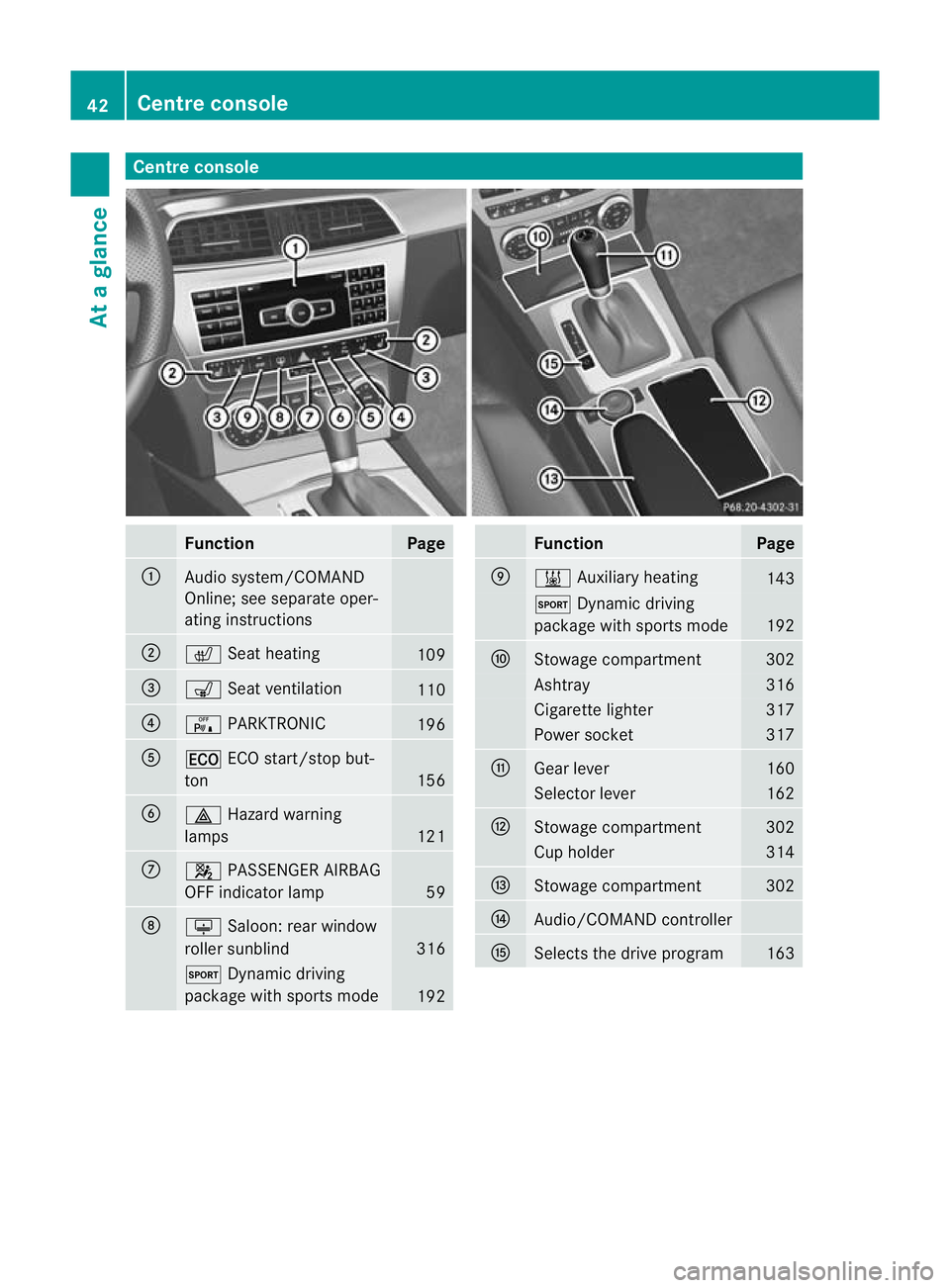
Centre console
Function Page
:
Audio system/COMAND
Online; see separate oper-
ating instructions
;
c
Seat heating 109
=
s
Seat ventilation 110
?
c
PARKTRONIC 196
A
¤
ECO start/stop but-
ton 156
B
£
Hazard warning
lamps 121
C
4
PASSENGER AIRBAG
OFF indicator lamp 59
D
u
Saloon :rear window
roller sunblind 316
M
Dynamic driving
package with sports mode 192 Function Page
E
&
Auxiliary heating 143
M
Dynamic driving
package with sports mode 192
F
Stowage compartment 302
Ashtray 316
Cigarette lighter 317
Power socket 317
G
Gear lever 160
Selector lever 162
H
Stowage compartment 302
Cup holder 314
I
Stowage compartment 302
J
Audio/COMAND controller
K
Selects the drive program 16342
Centre consoleAt a glance
Page 146 of 401
Auxiliary heating
Important safety notes G
WARNING
Exhaust fumes are produced when the auxili-
ary heating is in operation .Inhaling these
exhaus tfumes can be poisonous. You should
therefore switch off the auxiliary heating in
confined spaces without an extraction sys-
tem, e.g .agarage. G
WARNING
When operating the auxiliary heating, parts of
the vehicle may become very hot, and highly
inflammable material such as fuels could be
ignited. Operating the auxiliary heating is thus
prohibited at filling station sorwhen your vehi-
cle is being refuelled. You must therefore
switch off the auxiliary heating at filling sta-
tions.
! Operating the auxiliary heating/ventila-
tion draws on the vehicle battery. After you
have heated or ventilated the vehicle a
maximum of two times, drive for a longer
distance.
i Switch on the auxiliary heating regularly,
e.g. for about ten minutes every month.
The auxiliary heating heats the air in the vehi-
cle interior to the set temperature without
using the heat of the running engine. The aux-
iliary heating is operated directly using the
vehicle's fuel. For this reason, the tank con-
tent must be at least at reserve fuel level to
ensure that the auxiliary heating functions.
The auxiliary heating/ventilation automati-
cally adjusts to changes in temperature and
weather conditions. For this reason, the aux-
iliary heating could switch from ventilation
mode to heating mode or from heating mode
to ventilation mode.
The auxiliary heating switches off automati-
cally after 50 minutes. This time limit can be
altered. To do this, visit a qualified specialist
workshop, e.g. a Mercedes-Ben zService
Centre. You cannot use the auxiliary ventilation to
cool the vehicle interior to a temperature
lower than the outside temperature.
Before switching on X
Turn the key to position 2in the ignition
lock.
X Set the temperature.
The auxiliary heating/ventilation can be acti-
vated even when the climate control is being
controlled manually. Optimum comfort can
be attained when the system is set to auto-
matic mode. Set the temperature to 22 †.
The auxiliary heating/ventilation can be acti-
vated or deactivated using the remote control
or the button on the centre console.
The on-board computer can be used to spec-
ify up to three departure times, one of which
may be preselected (Y page 242).
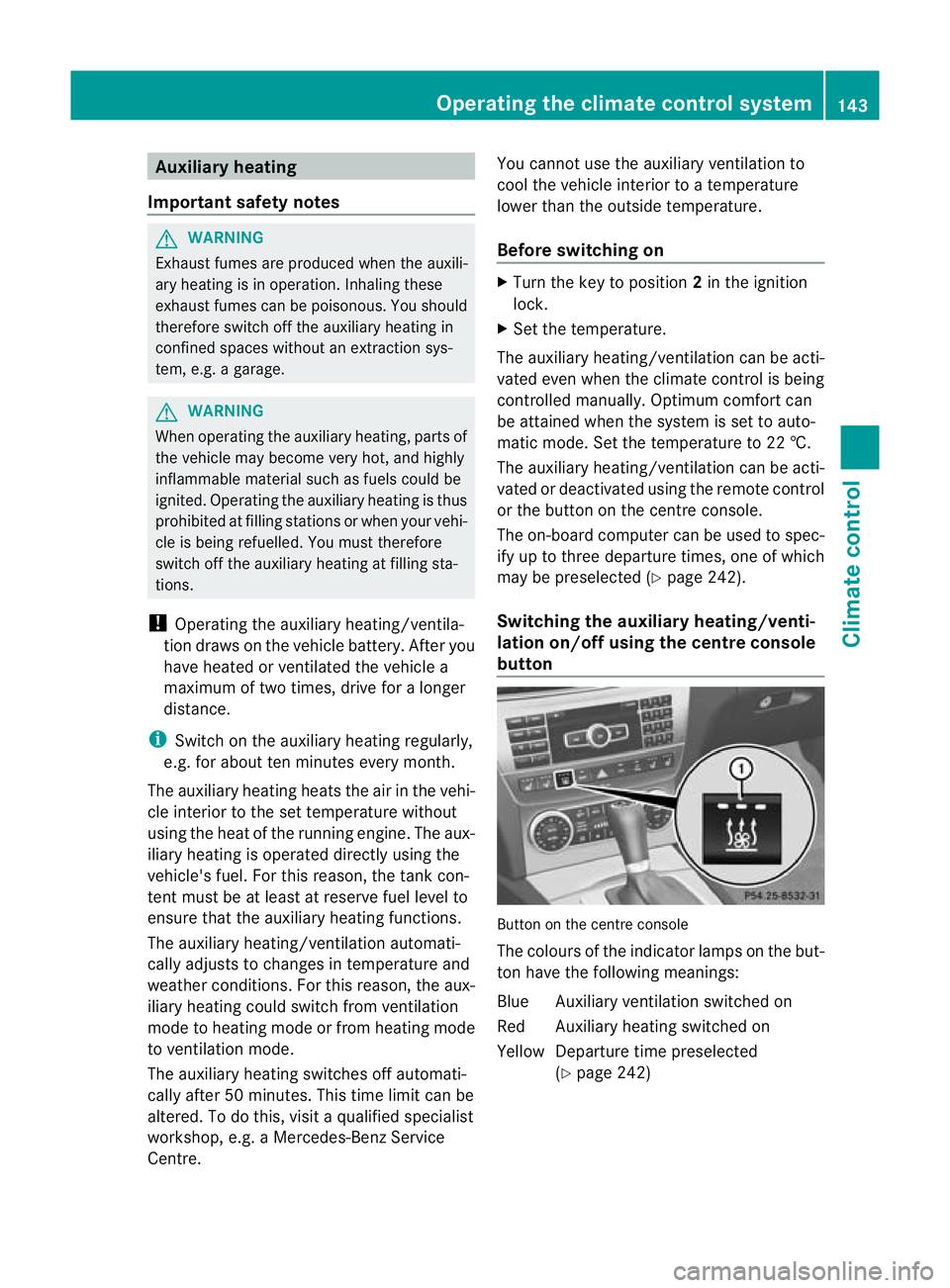
Switching the auxiliar yheating/venti-
lation on/off using the centre console
button Button on the centre console
The colours of the indicator lamps on the but-
to
nh ave the following meanings:
Blue Auxiliary ventilatio nswitched on
Red Auxiliary heating switched on
Yellow Departure time preselected (Ypage 242) Operating the climate control system
143Climate control Z
Page 147 of 401
Switching on auxiliary heating/ventila-
tion
X
Press button :.
The red or blue indicator lamp in but-
ton :lights up.
Switching off auxiliary heating/ventila-
tion
X Press button :.
The red or blue indicator lamp in but-
ton :goes out.
Switching the auxiliary heating/venti-
lation on/off using the remote control Your vehicle comes with one remote control.
You may use two additional remote controls
for your vehicle. For further information, con-
sult a qualified specialist workshop, e.g. a
Mercedes-Benz Service Centre.
The remote control has a maximum range of
approximately 300 metres. This range is
reduced by:
R sources of radio interference
R solid objects between the remote control
and the vehicle
R the remote control being in an unfavoura-
ble position in relation to the vehicle
R transmitting from an enclosed space
i The optimum range can be achieved if you
hold the remote control vertically, pointing
upwards when you press one of the but-
tons.
i Abattery symbol appears in the display
when the battery in the remote control is
low. Replace the remote control battery
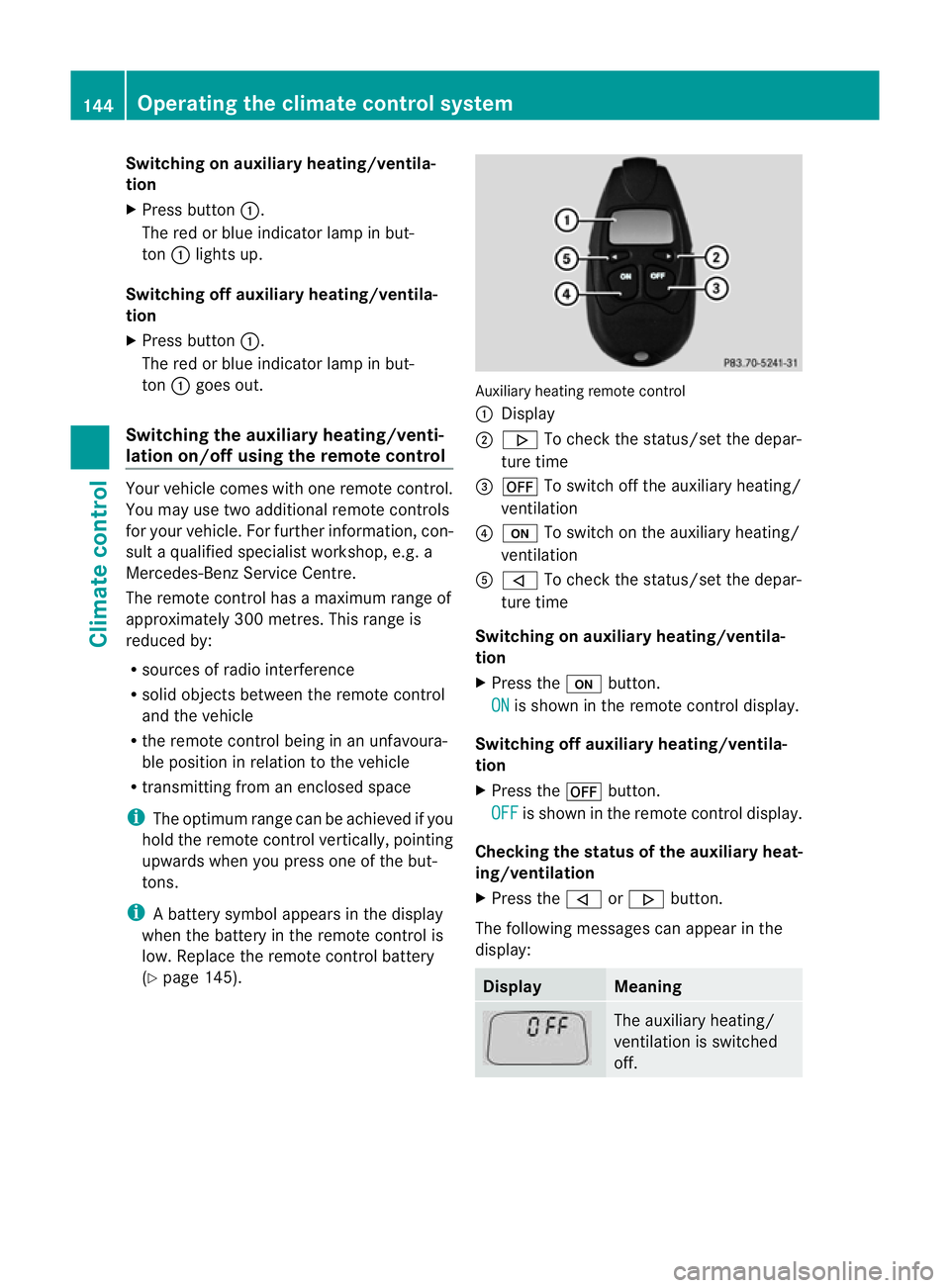
(Y page 145). Auxiliary heating remote control
: Display
; . To check the status/set the depar-
ture time
= ^ To switch off the auxiliary heating/
ventilation
? u To switch on the auxiliary heating/
ventilation
A , To check the status/set the depar-
ture time
Switching on auxiliary heating/ventila-
tion
X Press the ubutton.
ON is shown in the remote control display.
Switching off auxiliary heating/ventila-
tion
X Press the ^button.
OFF is shown in the remote control display.
Checking th estatus of the auxiliary heat-
ing/ventilation
X Press the ,or. button.
The following messages can appear in the
display: Display Meaning
The auxiliary heating/
ventilatio
nis switched
off. 144
Operating the climate control systemClimate control
Page 148 of 401
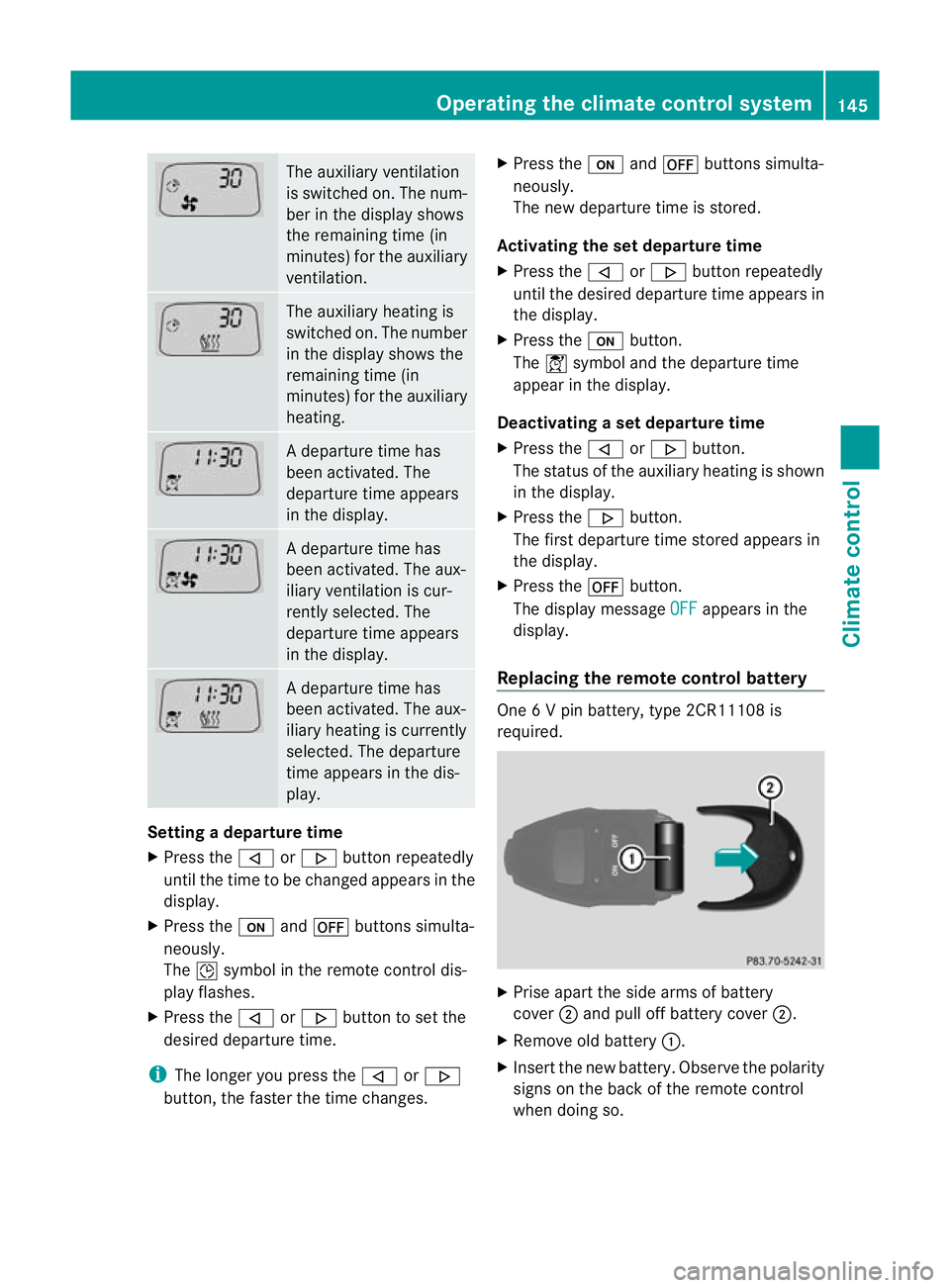
The auxiliary ventilation
is switched on. The num-
ber in the display shows
the remaining time (in
minutes) for the auxiliary
ventilation. The auxiliary heating is
switched on. The number
in the display shows the
remaining time (in
minutes) for the auxiliary
heating. Ad
eparture time has
been activated. The
departure time appears
in the display. Ad
eparture time has
been activated. The aux-
iliary ventilation is cur-
rently selected. The
departure time appears
in the display. Ad
eparture time has
been activated. The aux-
iliary heating is currently
selected. The departure
time appears in the dis-
play. Setting a departure time
X
Press the ,or. button repeatedly
until the time to be changed appears in the
display.
X Press the uand^ buttons simulta-
neously.
The Îsymbol in the remote control dis-
play flashes.
X Press the ,or. button to set the
desired departure time.
i The longer you press the ,or.
button, the faster the time changes. X
Press the uand^ buttons simulta-
neously.
The new departure time is stored.
Activating the set departure time
X Press the ,or. button repeatedly
until the desired departure time appears in
the display.
X Press the ubutton.
The Ísymbol and the departure time
appear in the display.
Deactivating a set departure time
X Press the ,or. button.
The status of the auxiliary heating is shown
in the display.
X Press the .button.
The first departure time stored appears in
the display.
X Press the ^button.
The display message OFF appears in the
display.
Replacing the remote control battery One 6 V pin battery, type 2CR11108 is
required.
X
Prise apart the side arms of battery
cover ;and pull off battery cover ;.
X Remove old battery :.
X Inser tthe new battery. Observe the polarity
signs on the back of the remote control
when doing so. Operating the climate control system
145Climate control Z
Page 149 of 401
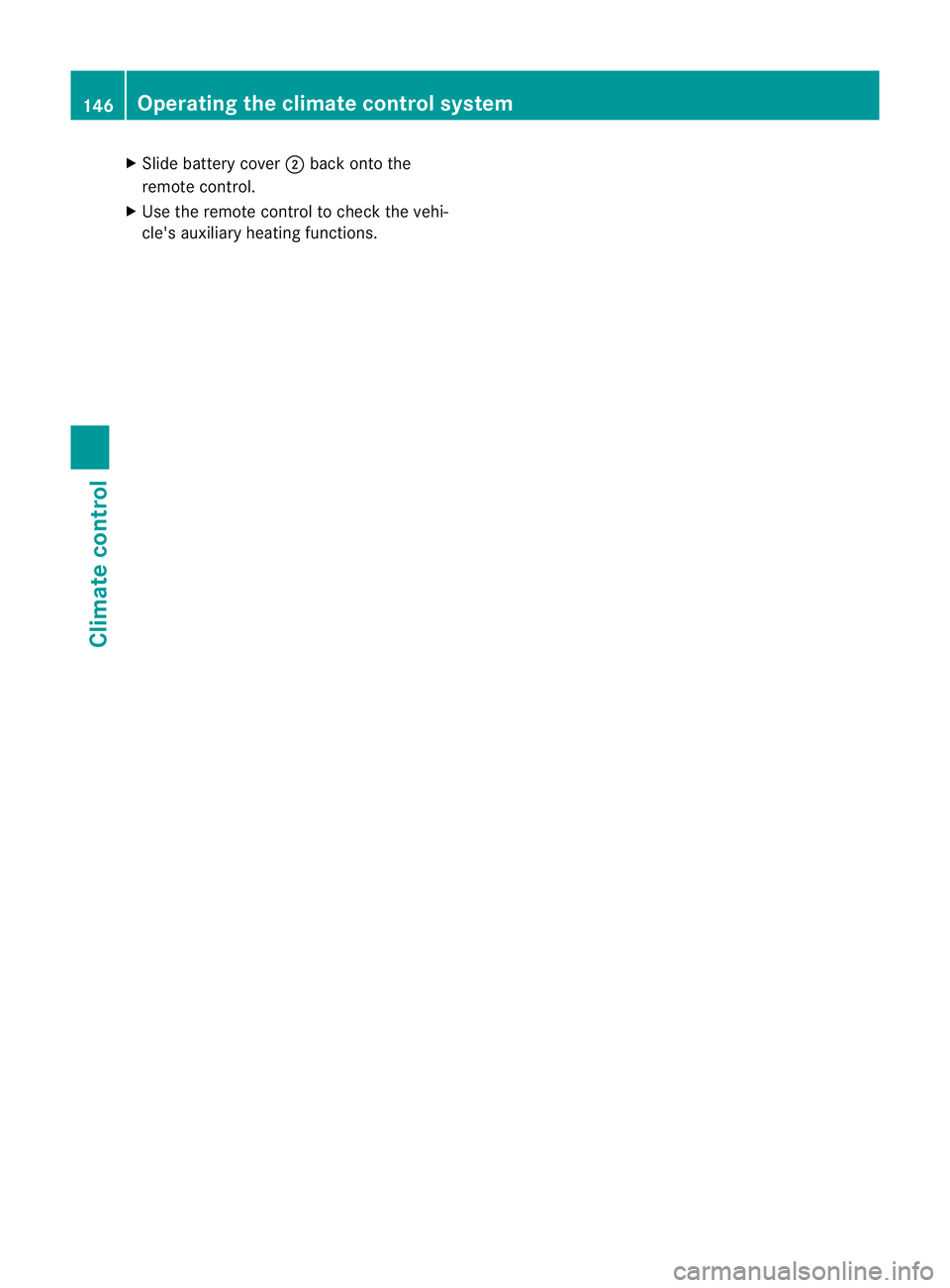
X
Slide battery cover ;back onto the
remote control.
X Use the remote control to check the vehi-
cle's auxiliary heating functions. 146
Operating the climate control systemClimate control
Page 150 of 401
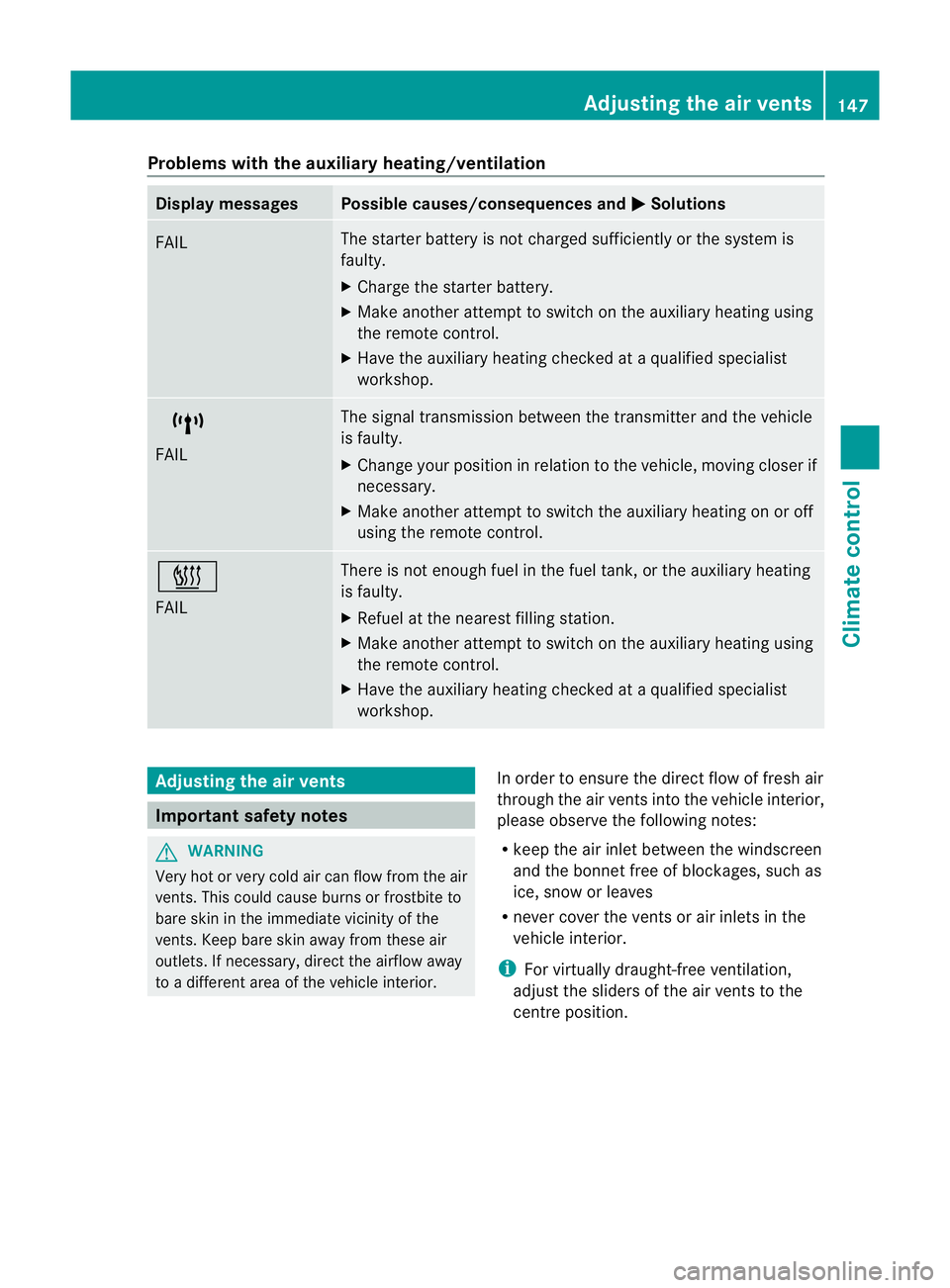
Problems with the auxiliary heating/ventilation
Display messages Possible causes/consequences and
M Solutions
FAIL The starter battery is not charged sufficiently or the system is
faulty.
X
Charge the starter battery.
X Make another attempt to switch on the auxiliary heating using
the remote control.
X Have the auxiliary heating checked at a qualified specialist
workshop. $
FAIL The signal transmission between the transmitter and the vehicle
is faulty.
X
Change your position in relation to the vehicle, moving closer if
necessary.
X Make another attempt to switch the auxiliary heating on or off
using the remote control. ©
FAIL There is not enough fuel in the fuel tank, or the auxiliary heating
is faulty.
X
Refuel at the nearest filling station.
X Make another attempt to switch on the auxiliary heating using
the remote control.
X Have the auxiliary heating checked at a qualified specialist
workshop. Adjusting the air vents
Important safety notes
G
WARNING
Very hot or very cold air can flow from the air
vents. This could cause burns or frostbite to
bare skin in the immediate vicinity of the
vents. Keep bare skin away from these air
outlets. If necessary, direct the airflow away
to a different area of the vehicle interior. In order to ensure the direct flow of fresh air
through the air vents into the vehicle interior,
please observe the following notes:
R
keep the air inlet between the windscreen
and the bonnet free of blockages, such as
ice, snow or leaves
R never cover the vents or air inlets in the
vehicle interior.
i For virtually draught-free ventilation,
adjust the sliders of the air vents to the
centre position. Adjusting the air vents
147Climate control Z
Page 171 of 401
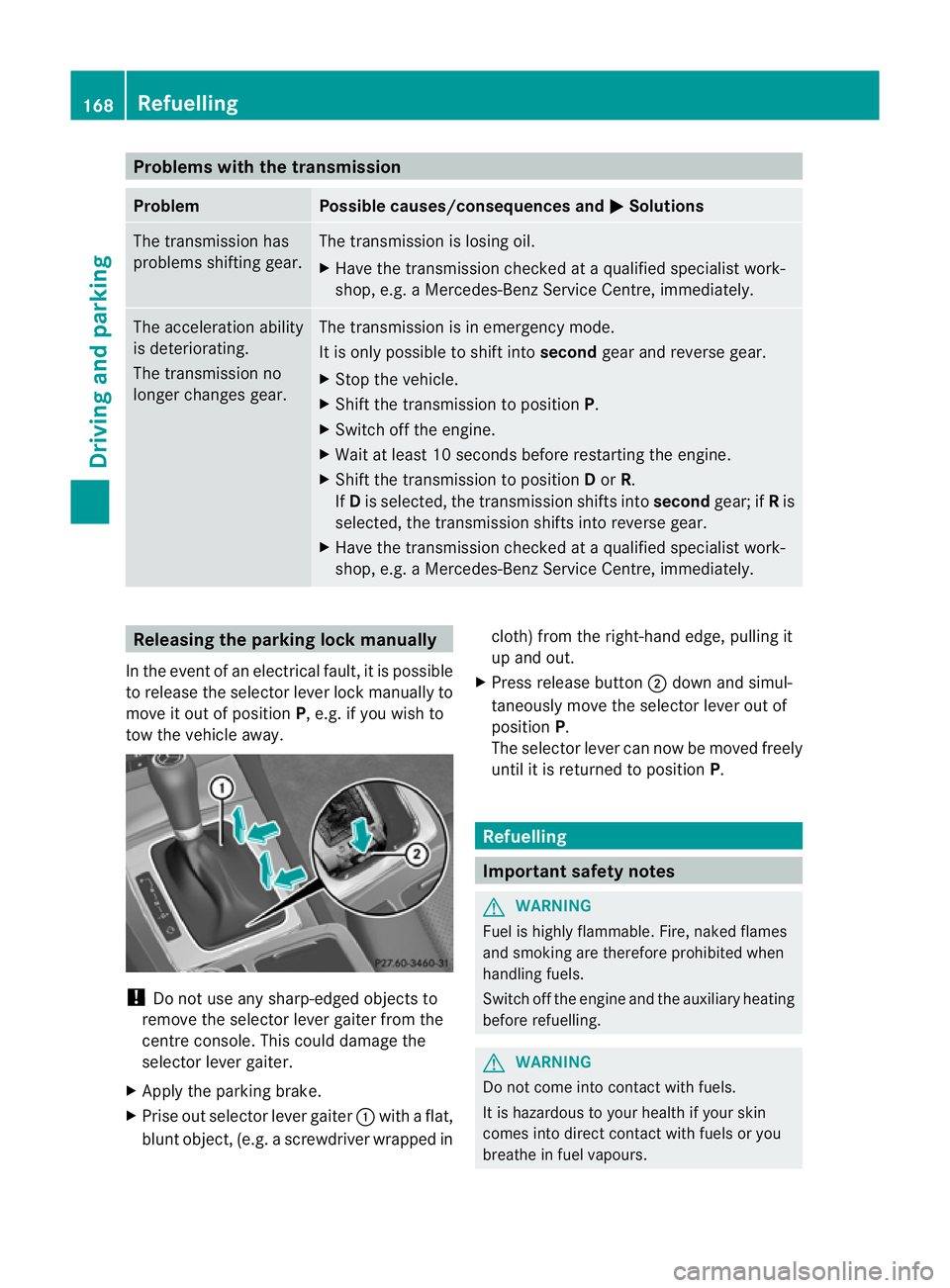
Problems with the transmission
Problem Possible causes/consequences and
M Solutions
The transmission has
problems shifting gear. The transmission is losing oil.
X
Have the transmission checked at a qualified specialist work-
shop, e.g. a Mercedes-Benz Service Centre, immediately. The acceleration ability
is deteriorating.
The transmission no
longer changes gear. The transmission is in emergency mode.
It is only possible to shift into
secondgear and reverse gear.
X Stop the vehicle.
X Shift the transmission to position P.
X Switch off the engine.
X Wait at least 10 seconds before restarting the engine.
X Shift the transmission to position Dor R.
If D is selected, the transmission shifts into secondgear; ifRis
selected, the transmission shifts into reverse gear.
X Have the transmission checked at a qualified specialist work-
shop, e.g. a Mercedes-Benz Service Centre, immediately. Releasing the parking lock manually
In the event of an electrical fault, it is possible
to release the selector lever lock manually to
move it out of position P, e.g. if you wish to
tow the vehicle away. !
Do not use any sharp-edged objects to
remove the selector lever gaiter from the
centre console. This could damage the
selector lever gaiter.
X Apply the parking brake.
X Prise out selector lever gaiter :with a flat,
blunt object, (e.g. ascrewdriver wrapped in cloth) from the right-hand edge, pulling it
up and out.
X Press release button ;dow nand simul-
taneously move the selecto rlever out of
position P.
The selector lever can now be moved freely
until it is returned to position P. Refuelling
Important safety notes
G
WARNING
Fuel is highly flammable. Fire, naked flames
and smoking are therefore prohibited when
handling fuels.
Switch off the engine and the auxiliary heating
before refuelling. G
WARNING
Do not come into contact with fuels.
It is hazardous to your health if your skin
comes into direct contact with fuels or you
breathe in fuel vapours. 168
RefuellingDriving and parking