change time MERCEDES-BENZ C-CLASS SALOON 2012 User Guide
[x] Cancel search | Manufacturer: MERCEDES-BENZ, Model Year: 2012, Model line: C-CLASS SALOON, Model: MERCEDES-BENZ C-CLASS SALOON 2012Pages: 557, PDF Size: 10.15 MB
Page 196 of 557
Yo
u can ha vethefo llowing status information for
AT TENTION ASSIST displa yed in the assis tance
menu of the on-board computer:
R The length of the journey since the last
break.
R The attention le vel de term ined byATTENTION
ASSIS T.
If AT TENTION ASSIST is unable tocalculate the
attention le vel and cannot issue a warning, the
System suspended messageappears.
If a warning is given in the Instrument Displa y,
th e multimedia sy stem of fers to sear chfor a rest
area. You can select a rest area and start naviga‐
tion tothis rest area. This function can be activa‐
te d and deactivated in the multimedia sy stem.
If AT TENTION ASSIST is deactivated, theÛ
symbol appears in the assis tance graphic in the
Instrument Display when the engine is running.
AT TENTION ASSIST is activated automatically
when the engine is re-sta rted. The last selected
sensitivity le velre mains stored. Sy
stem limits
AT TENTION ASSIST is active in the 60 km/h to
200 km/h speed range.
Pa rticularly in thefo llowing situations, ATTEN‐
TION ASSIST only functions in a restricted man‐
ner and warnings may be dela yed or not occur:
R Ifyo u ha vebeen driving for less than appr ox‐
imately 30 minutes.
R Ifth ero ad condition is poor (une venro ad
sur face or po tholes).
R Ifth ere is a strong side wind.
R Ifyo u adopt a sporty driving style (high cor‐
nering speeds or high rates of acceleration).
R Ifth eSt eering Assist function of Active Dis‐
ta nce Assi stDISTRONIC is acti ve.
R Ifth e time has been set incor rectly.
R Ifyo uch ange lanes and vary your speed fre‐
qu ently In active driving situations.
The ATTENTION ASSIST dr owsiness or alertness
assessment is reset and restar ted when continu‐
ing the journey in thefo llowing situations:
R Ifyo u swit choff the engine. R
Ifyo u unfas tenyo ur seat belt and open the
driver's door (e.g. tochange drivers or take a
break).
Setting ATTENTION ASSI ST
Multimedia sy stem:
4 Vehicle 5
k Assistance
5 ATTENTION ASSIST
Setting options #
Select Standard, SensitiveorOff.
Suggesting a rest area #
Select Suggest rest area . #
Activate Oor deacti vate the function ª.
If AT TENTION ASSIST de tects fatigue or
increasing la ckof attention, it suggests a
re st area in the vicinity. #
Select a sugges tedre st area: you are gui‐
ded tothe selected rest area. Driving and parking
19 3
Internal use only
Page 197 of 557
Cruise control and limiter
Fu
nction of cruise control
Cruise contro lre gulates the speed totheva lue
selec tedby the driver.
If yo u accelerate toove rtake, forex ample, the
st ored speed is not dele ted. If youre mo veyour
fo ot from the accelerator pedal af terove rtaking,
cruise control will resume speed regulation back
to thestored speed.
Yo u can store any speed abo ve20 km/h up to
th e maximum design speed or up tothe set win‐
te r tyre limit.
Obser vethe no tes on driving sy stems and your
re sponsibility; you may otherwise failto recog‐
nise dangers (/ page 185).
Me rcedes‑AMG vehicles: cruise control is avail‐
able up toa maximum speed of 250 km/h.
Displ ays on the multifunction display
R h (gre y): cruise contro l is selected but
not yet acti vated.
R h (green): cruise control is active. A
stored speed appears along with theh dis‐
pla y.
% The segments extending from the cur rent
st ored speed tothe end of the scale, or to
th e set winter tyre limit, light up in the
speedome ter.
Sy stem limits
Cruise control may be unable tomaintain the
st ored speed on uphill gradients. The stored
speed is resumed when the gradient evens out.
Change into a lo werge ar in good time on long
and steep downhill gradients. Take particular
no te ofthis when driving a laden vehicle. By
doing so, you will make use of the engine's brak‐
ing ef fect. This relie vesth e load on the brake
sy stem and pr events the brakes from overheat‐
ing and wearing tooqu ickl y.
Do not use cruise control in thefo llowing situa‐
tions:
R In traf fic situations whi chrequ ire frequent
ch anges of speed, e.g. in heavy traf fic, on
winding roads. R
On slippe ryroads. Accelerating can cause
th e drive wheels tolose traction and the
ve hicle could then skid.
R Ifyo u are driving when visibility is poor.
Fu nction of the limiter
The limiter restricts the speed of theve hicle. To
re duce the speed tothe set speed, the limiter
applies the brakes automaticall y.
Yo u can limit the speed as follo ws:
R Variable: for a short-term speed restriction,
e.g. in built-up areas
R Perm anen t:for a longer-term speed restric‐
tion, e.g. in winter tyre mode
Yo u can store any speed abo ve20 km/h up to
th e maximum design speed or up tothe set win‐
te r tyre limit. You can also per form settings
while theve hicle is stationary if theve hicle has
been star ted.
Obser vethe no tes on driving sy stems and your
re sponsibility; you may otherwise failto recog‐
nise dangers (/ page 185).
Mercedes‑AMG vehicles: the limiter is available
up toa maximum speed of 250 km/h. 194
Driving and pa rking
Internal use only
Page 204 of 557
&
WARNING Risk of an accident due to
Ac tive Dis tance Assi stDISTRONIC being
acti vewhen you lea vethe driver's seat
If yo u lea vethe driver's seat while theve hicle
is being braked byActive Dis tance Assi st
DISTRONIC only, theve hicle can rollaw ay. #
Alw ays deactivate Active Dis tance
Assi stDISTRONIC and secure theve hi‐
cle topreve nt it from rolling away
before you lea vethe driver's seat. #
Select Owiththe left rock er switch.
% Ifyo u brake, deactivate ESP ®
or if ESP ®
inter venes, Active Dis tance Assi st
DISTRONIC is deacti vated.
Increasing/decreasing thesto red speed #
1 km/h: press rocker switch 1upM or
down Ntothe pressure point, or press
and hold (increments of 1 km/h).
or #
10km/h: press rock er switch 1upM or
down Nbeyond the pressure point, or
press and hold (increments of 10km/h).
or #
Accelerate theve hicle tothe desired speed
and press rocker switch 1upM.
Changing the specified distance totheve hi‐
cle in front #
Toreduce the speci fied distance: press
th eright rock er switch up (Ñ). #
Toincrease the specified distance: press
th eright rock er switch down (Ò).
Fu nction of Active Speed Limit Assi st
If speed limit change between 20 km/h and
13 0 km/h is de tected and the automatic adop‐
tion of speed limits is active, it will be automati‐
cally adop ted as thestored speed
(/ page 212).
The driven speed is adju sted when theve hicle is
le ve l with the traf fic sign at the latest. In the
case of signs indicating entry into an urban area,
th e speed is adap ted according tothe speed
permitted within the urban area. The speed limit display in
the Instrument Display is alw ays upda‐
te d when theve hicle is le vel with the tra ffic sign.
If th ere is no speed restriction on an unlimited
st re tch of road (e.g. on a mo torw ay),th ere com‐
mended speed is auto maticallyadop ted as the
st ored speed. The sy stem uses the speed stored
on an unlimited stre tch of road as there com‐
mended speed. If you do not alter thestored
speed on an unlimited stre tch of road, there c‐
ommended speed is 130 km/h.
If Ac tive Dis tance Assi stDISTRONIC has been
put into passi vemode bypressing the accelera‐
to r pedal, only speed limits which are higher
th an the set speed are adop ted.
Obser vethe no tes on driving sy stems and your
re sponsibility; you may otherwise failto recog‐
nise dangers (/ page 185).
Sy stem limits
The sy stem limits of Traf fic Sign Assi stapply to
th e de tection of traf fic signs (/ page 211).
Speed limits bel ow20 km/h are not auto mati‐
cally adop tedby the sy stem as thestored speed.
Te mp orary speed restrictions (e.g. for a cer tain
time or due towe ather conditions) cannot be Driving and parking
201
Internal use only
Page 205 of 557
proper
lyde tected bythe sy stem. The maximum
permissible speed applying toave hicle with a
trailer is not de tected bythe sy stem.
Ad just the speed in these situations. &
WARNING Risk of accident due toActive
Speed Limit Assi stadapting theve hicle's
speed
The speed adop tedby Active Speed Limit
Assi stmay be too high or incor rect in some
individual cases, su chas:
R at speed limits below 20 km/h
R inwe t conditions or in fog
R when towing a trailer #
Ensure that the driven speed complies
with traf fic re gulations. #
Adjust the driving speed tosuit cur rent
traf fic and weather conditions. Fu
nction of route-based speed adaptation
When Active Dis tance Assi stDISTRONIC is acti‐
va ted, theve hicle speed will be adap ted accord‐
ingly tothero ute events ahead. Depending on th
e drive prog ram selected, theve hicle negoti‐
ates a route event ahead in an economical, com‐
fo rtable or dynamic manner. When thero ute
eve nt has been passed, theve hicle accelerates
again tothestored speed. The set dis tance to
th eve hicle in front, vehicles de tected ahead and
speed restrictions ahead are take n into account.
Yo u can activate and deactivate route-based
speed adap tation in the multimedia sy stem
(/ page 203).
The following route events are take n into
account:
R Bends
R T-junctions, roundabouts and tollst ations
R Turns and exits
R Traf fic jams ahead (only wi thLive Traf fic
Information (/ page 304))
% When theto llst ation is reached, Active Dis‐
ta nce Assi stDISTRONIC adopts the speed as
th estored speed. Also,
the speed is reduced if the turn signal indi‐
cator tochange lanes is swit ched on and one of
th efo llowing situations is de tected:
R Turning off at junctions
R Driving on slowing-down lanes
R Driving on lanes adjacent toslowing-down
lanes
The driver is responsible forch oosing theright
speed and observing other road users. This
applies in particular tojunctions, roundabouts
and traf fic lights, as route-based speed adap ta‐
tion does not brake theve hicle toast andstill.
When route guidance is active, thefirs t speed
adjustment is car ried out automatically. If the
turn signal indica tor is switched on, the selected
ro ute is confirmed and fur ther speed adjustment
is activated.
Speed adap tation is cancelled in thefo llowing
cases:
R Ifth e turn signal indicator is switched off
before thero ute event.
R Ifth e driver depresses the accelerator or
brake pedal during the process. 202
Driving and parking
Internal use only
Page 207 of 557
R
Ø (red): sy stem limits de tected
R Ø (white, red hands): "hands on thesteer‐
ing wheel" prom pt
% During the transition from active topassive
st atus, theØ symbol is shown as
enlar ged and flashing. Once the sy stem is
passive, theØ symbol is shown as gr eyin
th e multifunction displa y.
% Depending on the selected vehicle settings,
Ac tive Steering Assist may be una vailable.
Ste ering and touch de tection
The driver is requiredtokeep their hands on the
st eering wheel at all times and be able tointer‐
ve ne at any time tocor rect the course of the
ve hicle and keep it in lane. The driver must
ex pect a change from active topassive mode or
vice versa at any time. If
th e sy stem de tects that the driver has not
st eered theve hicle for a considerable period of
time or has remo vedth eir hands from thesteer‐
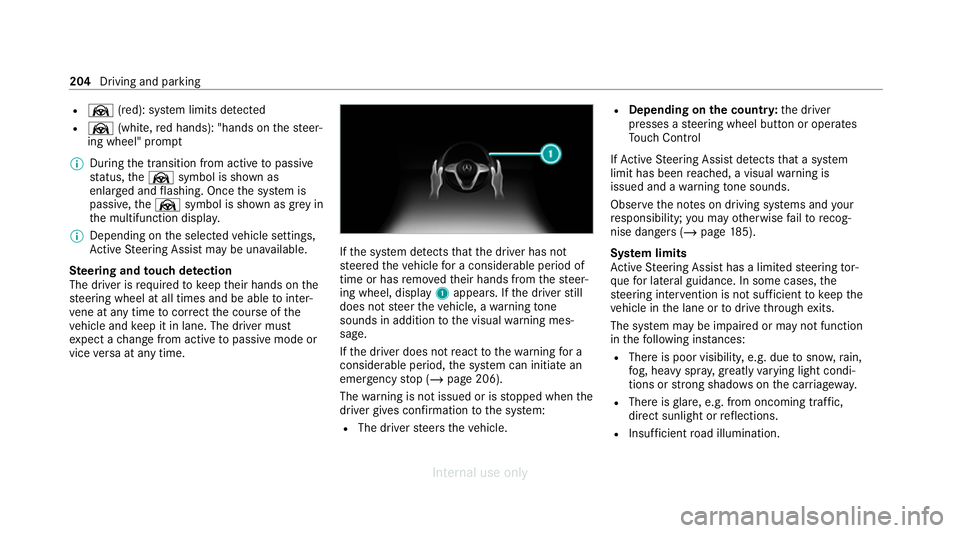
ing wheel, display 1appears. If the driver still
does not steer theve hicle, a warning tone
sounds in addition tothe visual warning mes‐
sage.
If th e driver does not react tothewa rning for a
considerable period, the sy stem can initiate an
emer gency stop (/ page 206).
The warning is not issued or is stopped when the
driver gives con firm ation tothe sy stem:
R The driver steers theve hicle. R
Depending on the count ry:th e driver
presses a steering wheel button or operates
To uch Control
If Ac tive Steering Assist de tects that a sy stem
limit has been reached, a visual warning is
issued and a warning tone sounds.
Obser vethe no tes on driving sy stems and your
re sponsibility; you may otherwise failto recog‐
nise dangers (/ page 185).
Sy stem limits
Ac tive Steering Assist has a limited steering tor‐
qu efo r lateral guidance. In some cases, the
st eering inter vention is not su fficient tokeep the
ve hicle in the lane or todrive thro ugh exits.
The sy stem may be impaired or may not function
in thefo llowing ins tances:
R The reis poor visibilit y,e.g. due tosno w,rain,
fo g, heavy spr ay, greatly varying light condi‐
tions or strong shado wsonthe car riag ewa y.
R There is glare, e.g. from oncoming traf fic,
di re ct sunlight or reflections.
R Insuf ficient road illumination. 204
Driving and parking
Internal use only
Page 220 of 557
adjacent lane. The front wheel drives
over
th e lane marking.
% A brake application may be inter rupte d at
any time if yousteer slightly in the opposite
direction.
Sy stem limits
No lane-cor recting brake application occurs in
th efo llowing situations:
R You clear lyand actively steer, brake or accel‐
erate.
R If a driving saf ety sy stem inter venes, su chas
ESP ®
,Ac tive Brake Assi stor Active Blind
Spot Assi st.
R You ha veadop ted a sporty driving style with
high cornering speeds or high rates of accel‐
eration.
R When ESP ®
is deactivated.
R When driving with a trailer, the electrical con‐
nection tothe trailer has been cor rectly
es tablished.
R If a loss of tyre pressure or a defective tyre is
detected and display ed. If
yo u deactivate theAc tive Lane Keeping Assist
wa rning and the lane markings cann otbe clearly
de tected, it is possible that no lane cor recting
brake application take s place (/ page218).
The sy stem may be impaired or may not function
particular lyin thefo llowing situations:
R Ifth ere is poor visibility, e.g. due toinsuf fi‐
cient illumination of thero ad, if there are
highly variable shade conditions or in rain,
sno w,fog or heavy spr ay.
R Ifth ere is glare, e.g. from oncoming traf fic,
th e sun or reflections.
R Ifth e windscreen in the area of the multi‐
function camera is dirty, or if the camera is
mis ted up, damaged or co vered.
R Ifth ere are no lane markings, or se veral
unclear lane markings are present for one
lane, e.g. around roadwor ks.
R Ifth e lane markings are worn, dark or cov‐
ered.
R Ifth e dis tance from theve hicle in front is too
short and thus the lane markings cann otbe
de tected. R
Ifth e lane markings change quickl y,e.g.
lanes branch off, cross one ano ther or
mer ge.
R Ifth e car riag ewa y is very nar row and wind‐
ing.
R Vehicles with Driving Assistance Pack‐
age: ifth era dar sensors in there ar bumper
are dirty or co vered in snow and an obs tacle
is de tected in your lane, no lane-cor recting
brake application take s place.
Ac tivating/deactivating Active Lane Keeping
Assist &
WARNING Risk of accident despite
Ac tive Lane Keeping Assist warning
A lane-cor recting brake application cannot
al wa ys bring theve hicle back into the origi‐
nal lane. #
Alw aysst eer, brake or accelera teyour‐
self, especially if Active Lane Keeping
Assist warnsyo u or makes a lane-cor‐
re cting brake application. Driving and park
ing217
Internal use only
Page 232 of 557
Problems with
Parking Assist PARKTRONIC Example:
vehicles with 360° Camera
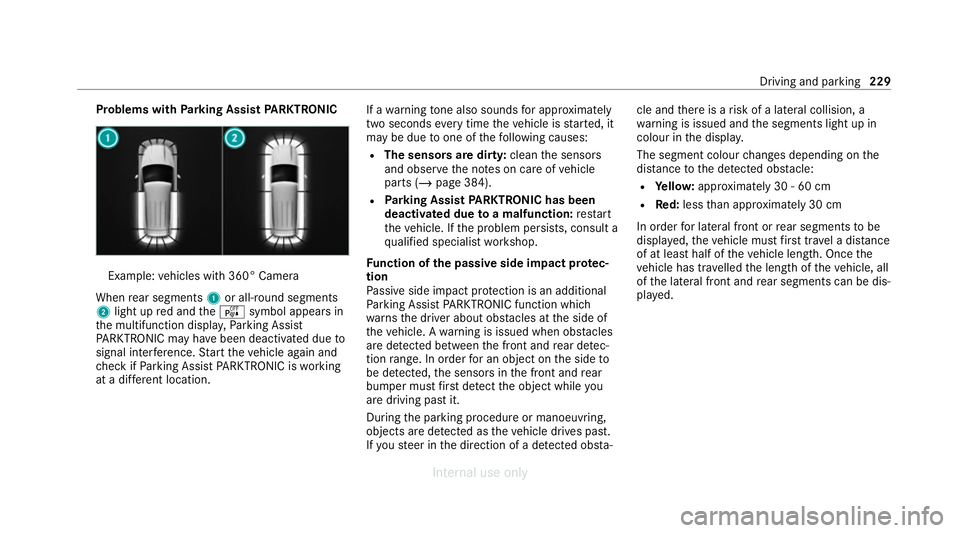
When rear segments 1or all-round segments
2 light up red and theé symbol appears in
th e multifunction displa y,Pa rking Assist
PA RKTRONIC may ha vebeen deactivated due to
signal inter fere nce. Start theve hicle again and
ch eck if Parking Assist PARKTRONIC is working
at a dif fere nt location. If a
warning tone also sounds for appro ximately
two seconds everytime theve hicle is star ted, it
may be due toone of thefo llowing causes:
R The sensors are dirty: cleanthe sensors
and obser vethe no tes on care of vehicle
parts (/ page 384).
R Parking Assist PARKTRONIC has been
deactivated due toa malfunction: restart
th eve hicle. If the problem persists, consult a
qu alified specialist workshop.
Fu nction of the passive side impact pr otec‐
tion
Pa ssive side impact pr otection is an additional
Pa rking Assist PARKTRONIC function which
wa rnsth e driver about obs tacles at the side of
th eve hicle. A warning is issued when obs tacles
are de tected between the front and rear de tec‐
tion range. In order for an object on the side to
be de tected, the sensors in the front and rear
bumper must firs t de tect the object while you
are driving past it.
During the parking procedure or manoeuvring,
objects are de tected as theve hicle drives past.
If yo usteer in the direction of a de tected obs ta‐cle and
there is a risk of a lateral collision, a
wa rning is issued and the segments light up in
colour in the displa y.
The segment colour changes depending on the
dis tance tothe de tected obs tacle:
R Yello w: appr oximately 30 - 60 cm
R Red:less than appr oximately 30 cm
In order for lateral front or rear segments tobe
displa yed, theve hicle must firs t tr avel a dis tance
of at least half of theve hicle length. Once the
ve hicle has tr avelled the length of theve hicle, all
of the lateral front and rear segments can be dis‐
pla yed. Driving and parking
229
Internal use only
Page 234 of 557
#
Press theé button in the cent reconsole.
If th e indicator lamp in theé button is not lit,
Pa rking Assist PARKTRONIC is active. If the indi‐
cator lamp is lit or theé symbol appears in
th e instrument clus ter,Pa rking Assist
PA RKTRONIC is not active.
% Parking Assist PARKTRONIC is automatical ly
activated when theve hicle is star ted.
Ad justing the warning tones of Parking
Assist PARKTRONIC
Multimedia sy stem:
4 Vehicle 5
k Assistance
5 Camera & Park. Assist 5
Set warning tone
Ad justing the volume of thewa rning tones #
Select Warning tone volume. #
Set a value.
Ad justing the pitch of the warning tones #
Select Warning tone pitch.
Set a value. Specifying
thest arting point for the warning
to nes
Yo u can specify whe ther thePa rking Assist
PA RKTRONIC warning tones should commence
when theve hicle is fur ther aw ay from an obs ta‐
cle. #
Select Warn early. #
Activate Oor deacti vate ª the function.
Ac tivating/deactivating audio fadeout
Yo u can specify whe ther thevo lume of a media
source in the multimedia sy stem is tobe
re duced when Parking Assist PARKTRONIC gives
an audible warning. #
Select Audio fadeout during warning tones . #
Activate Oor deacti vate ª the function. Ac
tive Parking Assist Fu
nction of Active Parking Assist
% The availability of this function is dependent
on the count ry.
Ac tive Parking Assist is an electro nic parking
assis tance sy stem, which uses ultrasound with th
e assis tance of there ve rsing camera and 360°
Camera. When you are driving forw ards up to
appr oximately 35 km/h, the sy stem automati‐
cally measures parking spaces on bo thsides of
th eve hicle.
As soon as all requ irements are met for sear ch‐
ing for parking spaces, theÇ display appears
in the multifunction displa y.
When Active Parking Assist has de tected park ing
spaces, theÈ display appears in the multi‐
function displa y.The ar rowsshow on which side
of thero ad de tected park ing spaces are located.
They are then shown in the media displa y.
The parking space can be selected as desired.
Depending on the location of the parking space,
th e parking direction (rear wards or forw ards)
can also be selec ted as desired.
When Active Parking Assist is activated, the turn
signal indicators are activated based on the cal‐
culated path of your vehicle.
When you are en tering or exiting a parking
space, the procedure is assis tedby acceleration,
braking, steering and gear changes. Driving and parking
231
Internal use only
Page 238 of 557
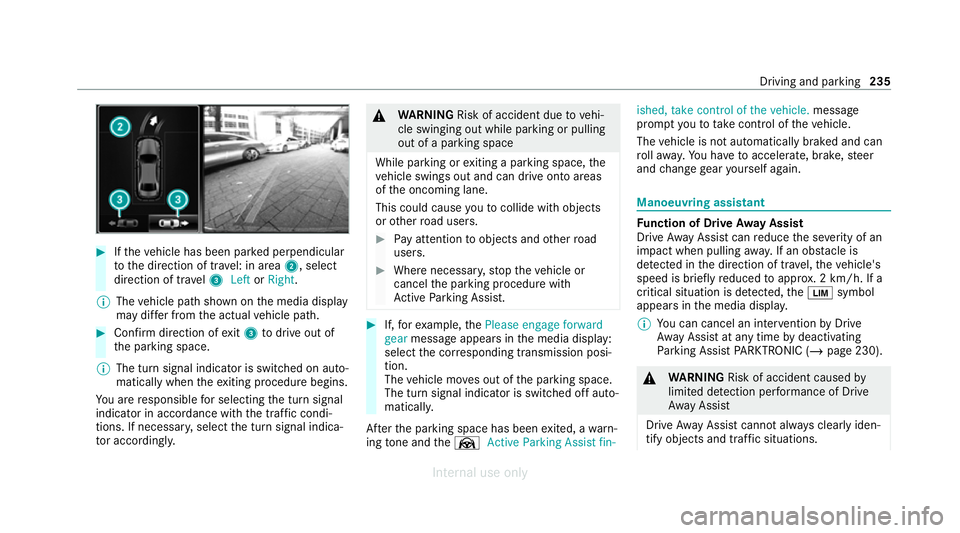
#
Ifth eve hicle has been par ked perpendicular
to the direction of tra vel: in area 2, select
direction of tra vel3 Left orRight .
% The vehicle path shown on the media display
may dif fer from the actual vehicle path. #
Confirm direction of exit3 todrive out of
th e parking space.
% The turn signal indicator is switched on auto‐
matically when theex iting procedure begins.
Yo u are responsible for selecting the turn signal
indicator in accordance with the traf fic condi‐
tions. If necessar y,select the turn signal indica‐
to r according ly. &
WARNING Risk of accident due tovehi‐
cle swinging out while parking or pulling
out of a parking space
While parking or exiting a parking space, the
ve hicle swings out and can drive onto areas
of the oncoming lane.
This could cause youto collide wi thobjects
or other road users. #
Pay attention toobjects and other road
users. #
Where necessar y,stop theve hicle or
cancel the parking procedure with
Ac tive Parking Assist. #
If,forex ample, thePlease engage forward
gear message appears in the media display:
select the cor responding transmission posi‐
tion.
The vehicle mo ves out of the parking space.
The turn signal indicator is switched off auto‐
maticall y.
Af terth e parking space has been exited, a warn‐
ing tone and theØ Active Parking Assist fin- ished, take control of the vehicle.
message
prom ptyouto tak e control of theve hicle.
The vehicle is not automatically braked and can
ro llaw ay.Yo u ha vetoaccelerate, brake, steer
and change gear yourself again. Manoeuv
ring assistant Fu
nction of Drive Away Assist
Drive AwayAssi stcan reduce the se verity of an
impact when pulling away. If an obs tacle is
de tected in the direction of tr avel, theve hicle's
speed is brief lyreduced toappr ox. 2 km/h. If a
critical situation is de tected, theÈ symbol
appears in the media displa y.
% You can cancel an inter vention byDrive
Aw ayAssi stat any time bydeactivating
Pa rking Assist PARKTRONIC (/ page 230). &
WARNING Risk of accident caused by
limited de tection per form ance of Drive
Aw ayAssi st
Drive AwayAssi stcannot al ways clearly iden‐
tify objects and traf fic situations. Driving and park
ing235
Internal use only
Page 254 of 557
3
Press therock er switch up: 6makes/
accepts a call
Press therock er switch down: ~rejects/
ends a call (ends LINGU ATRO NIC) Conducting a dialogue with LINGU
ATRO NIC #
Tostart or continue a dialogue: onthe
multifunction steering wheel, press the£
rock er switch up.
Yo u can say a voice command af ter an
acou stic signal. #
Tocor rect an ent ry:say theCorrection
vo ice command. #
Toselect an entry from the selection lis t:
say the line number or the conte nts. #
Tobrows eth e selection lis t:say theNext
or Back voice command. #
Tointer rupt the dialogue: saythePause
vo ice command. #
Tocancel the dialogue: saytheCancel
vo ice command. Operable functions
Yo
u can use the LINGU ATRO NIC voice control
sy stem tooperate thefo llowing equipment
depending on thefe atures:
R Telephone
R Text messa ges
R Navigation
R Address book
R Radio
R Audio (memory card, Media Inter face, USB
and Blu etoo th®
audio)
R TV
R Vehicle Overview of types of
voice command A distinction is made between
thefo llowing
vo ice commands:
R Global voice commands can be said at any
time and rega rdless of the cur rent applica‐
tion, e.g. thevo ice commands Navigate to,
Call orText message to. R
Application-specific voice commands are
only available forth e active application.
Once Linguatronic is star ted an autocue is
shown. Apart from theav ailable voice com‐
mands forth e application cur rently acti ve,th is
also cites example voice commands forot her
applications which are not active. In this wa y,
yo u will be familiar more quickly with theav aila‐
ble voice commands. The list can be scrolled or
it can be operated byspeech or the controller/
to uchpad. Information on
the language setting Yo
u can change the language of LINGU ATRO NIC
via the sy stem language settings. If the set sys‐
te m language is not suppor tedby LINGUA‐
TRONIC, English will be selected.
LINGU ATRO NIC is available foryo u in thefo llow‐
ing languages:
R German
R English
R French LINGU
ATRO NIC 251
Internal use only