charging MERCEDES-BENZ C-CLASS SALOON 2012 User Guide
[x] Cancel search | Manufacturer: MERCEDES-BENZ, Model Year: 2012, Model line: C-CLASS SALOON, Model: MERCEDES-BENZ C-CLASS SALOON 2012Pages: 557, PDF Size: 10.15 MB
Page 401 of 557
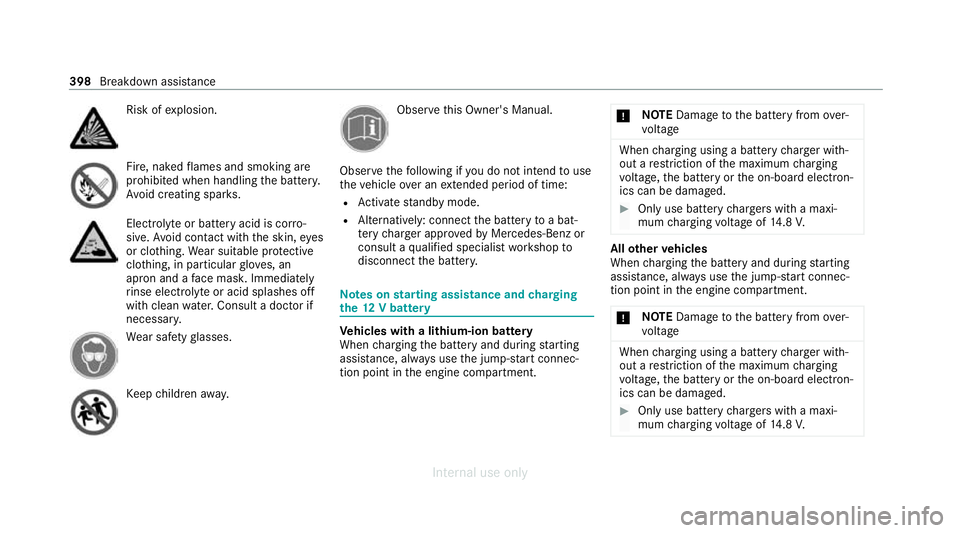
Risk of
explosion. Fire, naked
flames and smoking are
prohibi ted when handling the batter y.
Av oid creating spar ks. Electrolyte
or battery acid is cor ro‐
sive. Avoid contact with the skin, eyes
or clo thing. Wear suitable pr otective
clo thing, in particular glove s, an
apron and a face mas k.Immedia tely
ri nse electrolyte or acid splashes off
with clean water.Consult a doc tor if
necessar y. We
ar saf etygl asses. Ke
ep children away. Obser
vethis Owner's Manual.
Obser vethefo llowing if you do not intend touse
th eve hicle over an extended pe riod of time:
R Activate standby mode.
R Alternatively: connect the battery toa bat‐
te ry charge r appro vedby Mercedes-Benz or
consult a qualified specialist workshop to
disconnect the batter y. Note
s onstarting assi stance and charging
th e12 V battery Ve
hicles with a lithium-ion battery
When charging the battery and during starting
assis tance, al ways use the jump-s tart connec‐
tion point in the engine compartment. *
NO
TEDama getothe battery from over‐
vo ltage When
charging using a bat tery charge r with‐
out a restriction of the maximum charging
vo ltage, the battery or the on-board electron‐
ics can be damaged. #
Only use battery charge rs with a maxi‐
mum charging voltage of 14.8 V. All
other vehicles
When charging the battery and during starting
assis tance, al ways use the jump-s tart connec‐
tion point in the engine compartment.
* NO
TEDama getothe battery from over‐
vo ltage When
charging using a bat tery charge r with‐
out a restriction of the maximum charging
vo ltage, the battery or the on-board electron‐
ics can be damaged. #
Only use battery charge rs with a maxi‐
mum charging voltage of 14.8 V. 398
Breakdown assis tance
Internal use only
Page 402 of 557

&
WARNING Risk ofexplosion from hydro‐
ge nga s igniting
There is a danger of hydrogen gas igniting
when charging the battery if there is a short
circuit or spar ksstart toform. #
Make sure that the positive term inal of
th e connected battery does not come
into conta ct withvehicle parts. #
Never place me tal objects or tools on a
batter y. #
The described order of the battery
clamps must be obser ved when con‐
necting and disconnecting the batter y. #
When giving starting assis tance, al ways
make sure that you on lyconnect bat‐
te ry term inals with identical polarity. #
During starting assis tance, you must
obse rveth e described order for con‐
necting and disconnecting the jump
lead. #
Do not connect or disconnect the bat‐
te ry cla mp s while the engine is running. &
WARNING Risk ofexplosion during
ch arging process and starting assis tance
During thech arging process and starting
assis tance, the battery may release an explo‐
sive gas mixture. #
Avoid fire , naked flames, creating
spar ksand smoking. #
Make sure there is suf ficient ventila‐
tion. #
Do not lean over a batter y. &
WARNING Risk ofexplosion from a fro‐
zen battery
A dischar ged battery may freeze at temp era‐
tures slightly abo veor below freezing point.
During starting assis tance or battery charg‐
ing, bat tery gas can be released. #
Alw ays allow a battery tothaw before
ch arging it or per form ing starting assis‐
ta nce. If
th e indicator/warning lamps in the instrument
clus ter do not light up at low temp eratures, it is
ve ry likely that the dischar ged battery has fro‐
zen. In this case you may neither jump-s tart the
ve hicle nor charge the batter y.
The service life of a battery that has been
th awe d may be dramatically shor tened. The
st arting characteristics may be impaired, espe‐
cially at low temp eratures.
It is recommended that you ha veathaw ed bat‐
te ry checked at a qualified specialist workshop.
Plug-in hybrid: be sure toobser vethe no tes in
th e Supplement. You could otherwise failto rec‐
ognise dangers.
All vehicles
* NO
TEDama gecaused bynumerous or
ex tended attempt sto start the engine Nume
rous or extended attempt sto start the
engine may damage the catalytic con verter
due tonon-combu sted fuel. #
Avoid numerous and extended attem pts
to start the engine. Breakdown assis
tance 399
Internal use only
Page 403 of 557
Obser
vethefo llowing points during starting
assis tance and when charging the battery:
R Only use undamaged jump lead/charging
cables with a suf ficient cross-section and
insula tedte rm inal clamps.
R Non- insulated parts of thete rm inal clamps
must not come into con tact wi thother me tal
parts while the jump lead/charging cable is
connected tothe battery/jump-s tart connec‐
tion point.
R The jump lead/charging cable must not
come into contact wi thany parts which may
mo vewhen the engine is running.
R Alw ays make sure that nei ther you nor the
battery is elect rostatically charge d.
R Keep away from fire and naked flames.
R Do not lean overth e batter y.
Obser vethe additional following points when
ch arging the battery:
R Only use battery charge rs tested and
appr oved for Mercedes-Benz.
R Read the battery charge r's operating instruc‐
tions before charging the batter y. Obser
vethe additional following points during
st arting assis tance:
R Starting assis tance may only be pr ovided
using vehicles, batteries or other jump start
devices with a nominal voltage of 12V.
R The vehicles must not touch.
R Vehicles with a petrol engine: jump-start
th eve hicle only when the engine and exhaust
sy stem are cold. St
arting assi stance and charging the12 V
battery Preparing
starting assi stance/charging #
Secure theve hicle byapplying the electric
parking brake. #
Automatic transmission: shiftthe trans‐
mission toposition j. #
Manual transmission: shiftthe transmis‐
sion toneutral. #
Switch off the ignition and all electrical con‐
sumers. #
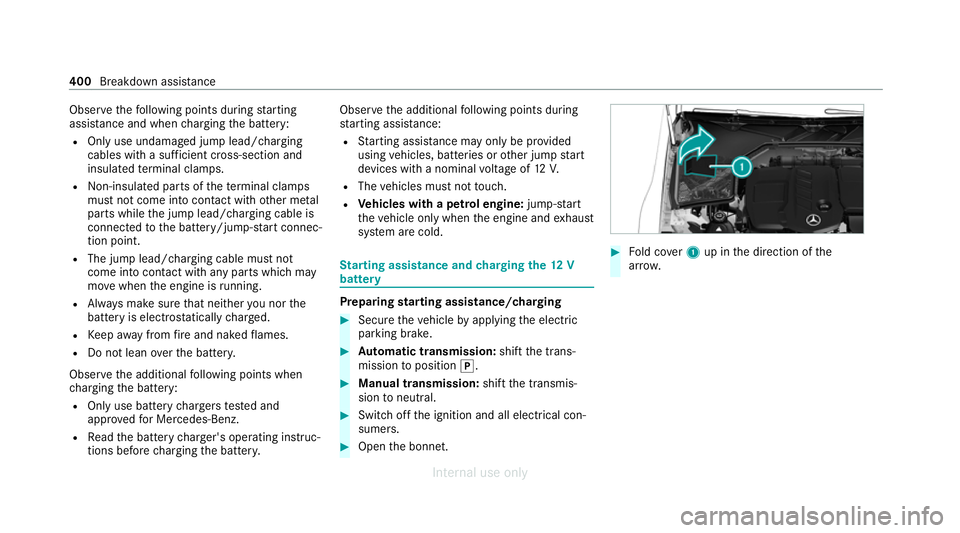
Open the bonn et. #
Fold co ver1 up in the direction of the
ar row. 400
Breakdown assis tance
Internal use only
Page 404 of 557
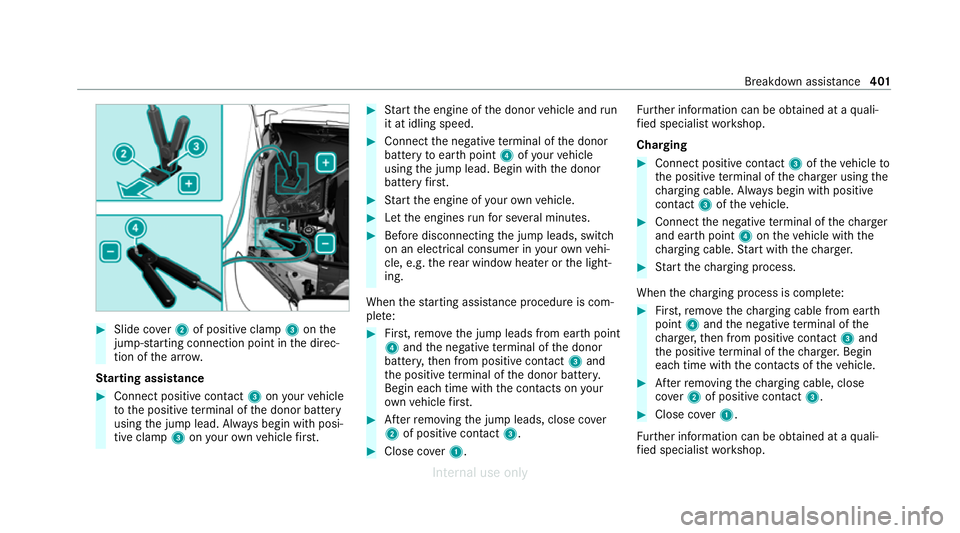
#
Slide co ver2 of positive clamp 3onthe
jump-s tarting connection point in the direc‐
tion of the ar row.
St arting assi stance #
Connect positive contact 3onyour vehicle
to the positive term inal of the donor battery
using the jump lead. Alw ays begin with posi‐
tive clamp 3onyour ow nve hicle firs t. #
Start the engine of the donor vehicle and run
it at idling speed. #
Connect the negative term inal of the donor
battery toear thpoint 4ofyour vehicle
using the jump lead. Begin with the donor
battery firs t. #
Start the engine of your ow nve hicle. #
Let the engines runfo r se veral minutes. #
Before disconnecting the jump leads, switch
on an electrical consumer in your ow nve hi‐
cle, e.g. there ar wind owheater or the light‐
ing.
When thest arting assis tance procedu reis com‐
ple te: #
First,re mo vethe jump leads from ear thpoint
4 and the negative term inal of the donor
batter y,then from positive conta ct3 and
th e positive term inal of the donor batter y.
Begin ea chtime wi th the conta cts onyour
ow nve hicle firs t. #
Afterre moving the jump leads, close co ver
2 of positive contact 3. #
Close co ver1. Fu
rther information can be obtained at a quali‐
fi ed specialist workshop.
Charging #
Connect positive contact 3oftheve hicle to
th e positive term inal of thech arge r using the
ch arging cable. Alw ays begin with positive
contact 3oftheve hicle. #
Connect the negative term inal of thech arger
and ear thpoint 4ontheve hicle with the
ch arging cable. Start with thech arge r. #
Start thech arging process.
When thech arging process is comple te: #
First,re mo vethech arging cable from ear th
point 4and the negative term inal of the
ch arge r,th en from positive conta ct3 and
th e positive term inal of thech arge r.Begin
ea ch time wi th the conta cts oftheve hicle. #
Afterre moving thech arging cable, close
co ver2 of positive contact 3. #
Close co ver1.
Fu rther information can be obtained at a quali‐
fi ed specialist workshop. Breakdown assis
tance 401
Internal use only
Page 491 of 557
Display messages
Possible causes/consequences and M
MSolutions
# Stop vehicle Leave engine
running *T
he12 V battery charge leve l is too lo w. #
Stop theve hicle immediately in accordance with the traf fic conditions. Do not continue driving. #
Lea vethe engine running. #
Ifth e display message disappears: drive on. #
Ifth e display message does not disappear: consult a qualified specialist workshop.
Û 48 V battery See Owner's
Manual *T
he 48 V on-board electrical sy stem has function restrictions. Comfort functions may be restricted. #
Consult a qualified specialist workshop immediatel y.
Ý
Please wait 48 V battery
charging *T
he 48 V battery is dischar ged. You ha veswitched on the ignition while the12 V battery was being charge d with a
suitable charge r or while ano ther vehicle was pr oviding starting assis tance.
The discha rged 48 V battery is charge d automatically via thevo ltage con verter. Af ter a few minutes, theMotor can
be started again display message will be shown on the multifunction displa y. #
Start the engine. #
Drive theve hicle for a while tocharge the12 V battery and the 48 V battery af ter disconnecting thech arger
from theve hicle.
If th eMotor can be started again display message does not appear af ter a few minutes: 488
Display messages and warning/indicator lamps
Internal use only
Page 520 of 557
Drive program display............................
16 6
Drive programs...................................... 16 5
DY NA MIC SELECT switch...................... 16 5
Engaging drive position........................ .169
Engaging neutral................................... .168
Engaging park position.......................... 16 9
Engaging reve rsege ar........................... 16 8
Kickdown............................................... 171
Manual gear changing.......................... .170
St eering wheel gearshift paddles...........1 70
Tr ansmission position displa y................ 167
Tr ansmission position s..........................167
Au tomatic transmission (problem)
see Transmission (problem)
Axle load Perm issible............................................ 428
Tr ailer operation.................................... 443B
Bag hook..................................................... 11 7
Ball neck Folding out/in....................................... 237
BA S (Brake Assist Sy stem)....................... 187Battery
Key.......................................................... 75
Re mo tecontrol (s tationary heater)........ 151
Battery see Battery (vehicle)
Battery (vehicle) Charging................................................ 400
Charging (Remo teOnline)..................... 15 6
No tes....................................................3 96
No tes (s tarting assis tance and
ch arging)............................................... 398
Re placing.............................................. 402
St arting assis tance................................ 400
Belt see Seat belt
Bic ycle rack
Load capacity........................................ 443
Tr ailer operation.................................... .241
Blind Spot Assi st
Ac tivating/deactivating......................... 216
Fu nction................................................. 213
Sy stem limitations................................. 213
Blo wer
see Climate control BlueTEC
see AdBlue ®
Blue tooth ®
Information............................................ 276
Setting up an Internet connection......... 342
Switching on/of f................................... 276
Switching profile (DUN/PAN)................ 342
Blue tooth ®
audio
Ac tivating.............................................. 357
De-authorising (de-regis tering) the
device.................................................... 358
Information............................................ 355
Overview............................................... 356
Sear ching for a track............................. 358
Sear ching for and auth orisingthe
device.................................................... 356
Selecting a media pla yer....................... 357
Switching device via NFC...................... 358
Bonnet Resetting (active bonnet)....................... 373
Boot lid Activating/deactivating theta ilgate
opening limiter....................................... .85
Closin g................................................... .81 Index
517
Internal use only
Page 522 of 557
Car
wash (care)..........................................3 81
Care 360° camera........................................ .384
Air-water duct........................................ 381
Au tomatic car wash............................... 381
Carpe t.................................................. .385
Decorative foil...................................... .383
Displ ay.................................................. 385
Exterior lighting..................................... 384
High-pressure cleaner........................... 382
Matt finis h............................................. 383
Pa int wo rk.............................................. 383
Plastic trim............................................ 385
Re alwo od/trim elements..................... 385
Re versing camera................................. .384
Ro of lining.............................................3 85
Seat belt............................................... .385
Seat co ver............................................. 385
Senso rs................................................. 384
St eering wheel...................................... 385
Ta ilpipes................................................ 384
Tr ailer hit ch........................................... 384
Wa shing byhand................................... 382
Wheels/rims.........................................3 84
Wi ndo ws................................................ 384 Wi
per blades.........................................3 84
Carpet (Care)............................................ .385
Changing bulbs Dipped beam......................................... 13 6
Fitting/removing co ver (front wheel
ar ch )...................................................... 13 6
Main beam............................................ 13 6
No tes..................................................... 13 5
Opening/closing the side trim panels.. .137
Overview............................................... 13 5
Re versing lights.................................... .137
Tu rn signal light (front).......................... 13 6
Tu rn signal lights (rear).......................... 137
Changing gears
Manually. ............................................... 17 0
Changing hub caps .................................... 419
Changing the lights
Driving abroad (symm etrical low
beam)................................................... .125
Charging Battery (vehicle).................................... 400
USB port................................................ 12 2Chassis
Damping characteristics....................... .218
DY NA MIC BODY CONTROL.................... 218
Child saf ety lock
Re ar door................................................ 70
Re ar side wind ows................................... 71
Child seat App rova l categories................................ .57
At tach ing (no tes).....................................57
Basic instructions.................................... 52
Fr ont passenger seat (no tes)...................68
Fr ont passenger seat (without auto‐
matic airbag shutoff)...............................67
ISOFIX/i-Size (fitting)............................... 61
No tes on risks and dangers..................... 53
Re commended child restra int sy stems.... 56
Seats suitable for belt-secu redch ild
re stra int sy stems..................................... 64
Seats suitable for i‑Size child
re stra int sy stems..................................... 60
Seats suitable for ISOFIX child
re stra int sy stems..................................... 59
Securing on the co-driver seat................69
Secu ring on there ar seat........................ 66
To pTe ther............................................... 63 Index
519
Internal use only
Page 543 of 557
R
Ra dar and ultrasonic senso rs
Damage................................................. 186
Ra dio
Ac tivating.............................................. 358
Ac tivating/deactivating radio text......... 361
Ac tivating/deactivating traf fic
announcements..................................... 361
Calling up a slide sho w.......................... 360
Calling up thest ation lis t...................... .360
Deleting stations.................................. .360
Direct frequency entr y.......................... 360
Displaying information........................... 361
Displaying radio text.............................. 361
Fr equency fix......................................... 361
Managing favo urites.............................. 360
Managing station presets...................... 360
Moving stations.................................... .360
Overview.............................................. .359
Sear ching forst ations.......................... .360
Setting a channel................................. .359
Setting station trackin g......................... 361
Setting the frequency band................... 359
Setting the traf fic information
service volume inc rease........................ 361 St
oring radio stations............................ 360
Ta gging music trac ks............................. 361
Vo ice commands (LINGU ATRO NIC)....... 258
Ra dio ope rating permits ........................... 428
Ra in-closing feature
Side wind ows.......................................... 87
Sliding sunroof........................................ 92
REA CHregulation........................................32
Re ading lamp
see Interior lighting
Re ar climate control
Setting................................................... 14 6
Re ar door (child saf ety lock)...................... 70
Re ar fog light
Switching on/of f................................... 12 6
Re ar seat
see Seat
Re ar seat belt
St atus display......................................... .43
Re ar seat belt status display ..................... 43
Re ar window
Ro ller sunblin d......................................... 94Re
ar window heater.................................. 14 4
Re ar-view mir ror
see Outside mir rors
Re cycling
see Take -ba ckof end-of-life vehicles
Re ducing agent
see AdBlue ®
Re fuelling
Re fuelling theve hicle............................. 172
To pping up AdBlue ®
............................... 176
Re gistration
Ve hicle.....................................................31
Re mo tecont rol (stationa ryheater/
ve ntilation)
Displa ys................................................. 151
Problems............................................... 15 2
Re placing the battery.............................1 51
Setting................................................... 15 0
Re mo teOnline
Charging thest ar ter battery.................. 15 6
Cooling or heating theve hicle interior... 15 6
St arting theve hicle................................ 157540
Index
Internal use only
Page 547 of 557
St
andby mode
Ac tivating/deactivating......................... 185
Fu nction................................................ 184
St anding lights.......................................... 12 5
St art-off assi st
see Optimised acceleration
St art/s top button
Pa rking theve hicle................................1 78
St arting theve hicle...............................1 55
Switching on the po wer supply or
ignition.................................................. 154
St art/s top function
see ECO start/ stop function
St arter battery
Charging (Remo teOnline)..................... 15 6
St arting assi stance
see Jump -sta rt connection
St arting the engine
see Vehicle
St arting-o ffaid
see Hill Start Assist
St ation
Deleting................................................. 360 Direct frequency entr
y.......................... 360
Fr equency fix......................................... 361
Moving.................................................. 360
Sea rching..............................................3 60
Setting................................................... 359
St oring..................................................3 60
St ation list
Calling up.............................................. 360
St ation presets
Managing.............................................. 360
St ation tracking
Setting................................................... 361
St ationary heater/ventilation
Displ ays (remo tecontrol)....................... 151
Problems (remo tecontrol)..................... 15 2
Re placing the battery (remo tecontrol).. 151
Setting (multimedia sy stem)..................1 50
Setting (remo tecontrol)........................ 15 0
Switching on/off (control panel )........... 14 9
ST EER CONT ROL
Fu nction/no tes..................................... 19 0
Ste ering wheel
Ad justing (electrically)........................... 108
Ad justing (manually). ............................. 107Buttons..................................................
24 6
Car e...................................................... 385
Oper ating the memory function.............1 11
St eering wheel heater...........................1 08
Ste ering wheel gearshift paddles............ 17 0
Ste ering wheel heater
Swit ching on/of f................................... 108
St ow age areas
see Loading
see Stow age space
St ow age comp artments
see Loading
see Stow age space
St ow age space
Armrest.................................................. 11 4
Centre console....................................... 11 4
Door....................................................... 11 4
Glo vecompa rtment............................... 11 4
USB ports.............................................. 11 4
Sulphur content........................................4 32
Sur round lighting
Setting................................................... 13 4544
Index
Internal use only
Page 549 of 557
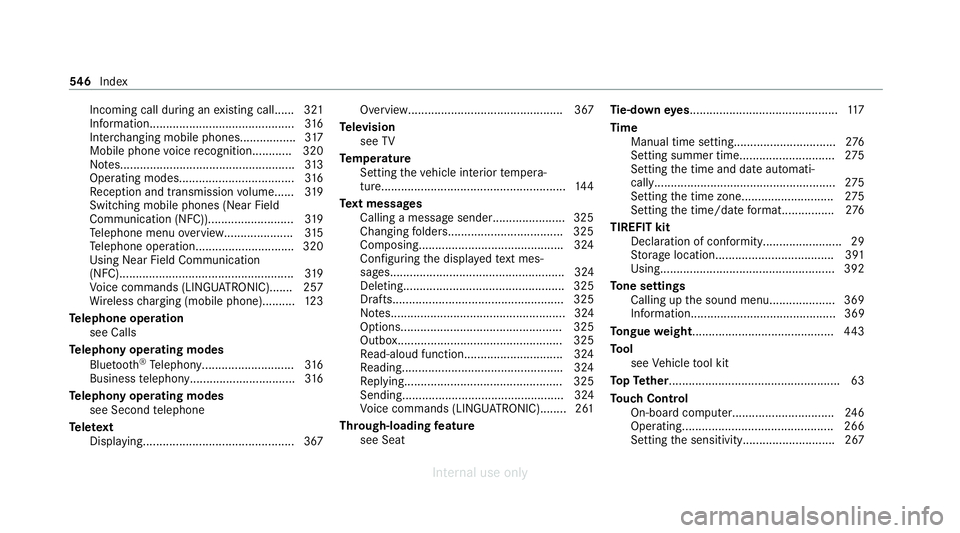
Incoming call during an
existing call...... 321
Information........................................... .316
Inter changing mobile phones................. 317
Mobile phone voice recognition............ 320
No tes..................................................... 313
Operating modes...................................3 16
Re ception and transmission volume...... 319
Switching mobile phones (Near Field
Communication (NFC)).......................... 319
Te lephone menu overvie w..................... 315
Te lephone operation.............................. 320
Using Near Field Communication
(NFC).................................................... .319
Vo ice commands (LINGU ATRO NIC)....... 257
Wi reless charging (mobile phone).......... 12 3
Te lephone operation
see Calls
Te lephony operating modes
Blue tooth ®
Te lephony........................... .316
Business telephony............................... .316
Te lephony operating modes
see Second telephone
Te lete xt
Displaying..............................................3 67Overview............................................... 367
Te levision
see TV
Te mp erature
Setting theve hicle interior temp era‐
ture........................................................ 14 4
Te xt messages
Calling a message sender......................3 25
Changing folder s.................................. .325
Composing........................................... .324
Con figuring the displa yedte xt mes‐
sa ge s..................................................... 324
Deleting................................................. 325
Drafts.................................................... 325
No tes..................................................... 324
Options................................................. 325
Outbox.................................................. 325
Re ad-aloud function.............................. 324
Re adin g................................................ .324
Re plying................................................ 325
Sending................................................. 324
Vo ice commands (LINGU ATRO NIC)........2 61
Through-loading feature
see Seat Ti
e-d owney es ............................................ .117
Time Manual time setting...............................2 76
Setting summer time............................. 275
Setting the time and date automati‐
cally....................................................... 275
Setting the time zone. ........................... 275
Setting the time/date form at................2 76
TIREFIT kit Declaration of conformity........................ 29
Storage location.................................... 391
Using..................................................... 392
To ne settings
Calling up the sound menu.................... 369
Information............................................ 369
To ngue weight .......................................... .443
To ol
see Vehicle tool kit
To pTe ther.................................................... 63
To uch Control
On-board computer............................... 24 6
Operating..............................................2 66
Setting the sensitivity............................2 67546
Index
Internal use only