climate control MERCEDES-BENZ C-CLASS SALOON 2012 User Guide
[x] Cancel search | Manufacturer: MERCEDES-BENZ, Model Year: 2012, Model line: C-CLASS SALOON, Model: MERCEDES-BENZ C-CLASS SALOON 2012Pages: 557, PDF Size: 10.15 MB
Page 155 of 557
+
ENVIRONMENTAL
NOTEEnvironmental
dama gedue toimproper disposal of bat‐
te ries Batteries conta
intoxic and cor ro‐
sive subs tances. #
Ta
ke dischar ged batteries to a
qu alified specialist workshop or to a
collection point for used batteries. Re
quirements:
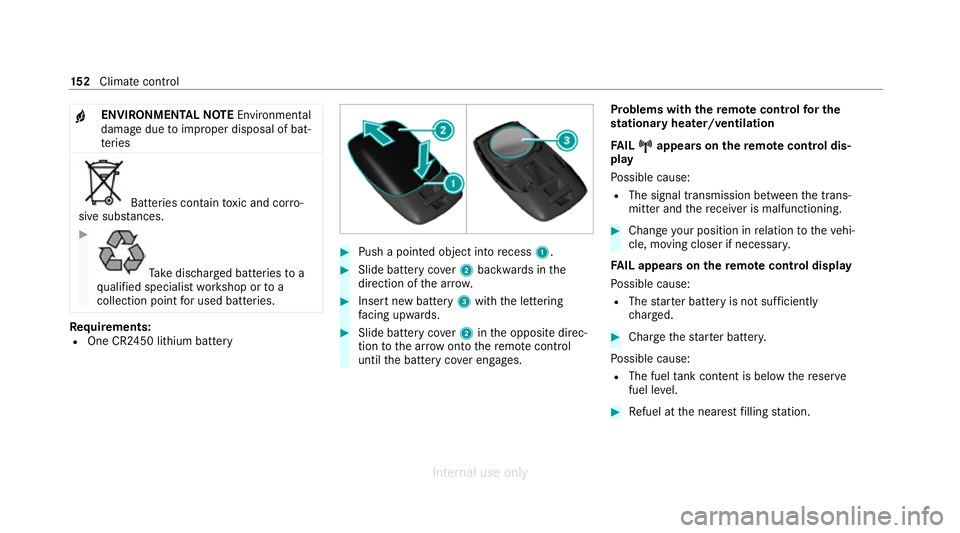
R One CR2450 lithium battery #
Push a pointed object into recess 1. #
Slide battery co ver2 backwards in the
direction of the ar row. #
Insert new battery 3with the lettering
fa cing up wards. #
Slide battery co ver2 inthe opposite direc‐
tion tothe ar row onto there mo tecontrol
until the battery co ver engages. Problems with
there mo tecont rolfo r the
st ationary heater/ventilation
FA IL¨
¨ appea rson there mo tecont rol dis‐
play
Po ssible cause:
R The signal transmission between the trans‐
mitter and there cei ver is malfunctioning. #
Change your position in relation totheve hi‐
cle, moving closer if necessar y.
FA IL appea rson there mo tecont rol display
Po ssible cause:
R The star ter battery is not suf ficiently
ch arge d. #
Char gethest ar ter batter y.
Po ssible cause:
R The fuel tank content is below there ser ve
fuel le vel. #
Refuel at the nearest filling station. 15 2
Climate cont rol
Internal use only
Page 156 of 557
FA
IL¯
¯ appea rson there mo tecont rol dis‐
play
Po ssible cause:
R There is a malfunction in thest ationary
heater. #
Have thest ationary heater checked at a
qu alified specialist workshop. Air
vents Ad
justing the front air vents &
WARNING Risk of burn s and frostbite
due tobeing too close tothe air vents
Ve ry hot or very cold air can flow from the air
ve nts. #
Makesure that all vehicle occupants
alw ays maintain a suf ficient dist ance
from the air vents. #
If necessa ry, direct the air flow to
ano ther area of theve hicle interior. To
guarantee theflow of fresh air thro ugh the air
ve nts into theve hicle interior, comply with the
fo llowing:
R Alw ayske ep theve nts and vent grilles in the
ve hicle interior free.
R Keep the air inlet free of residue build-up
(/ page 381). #
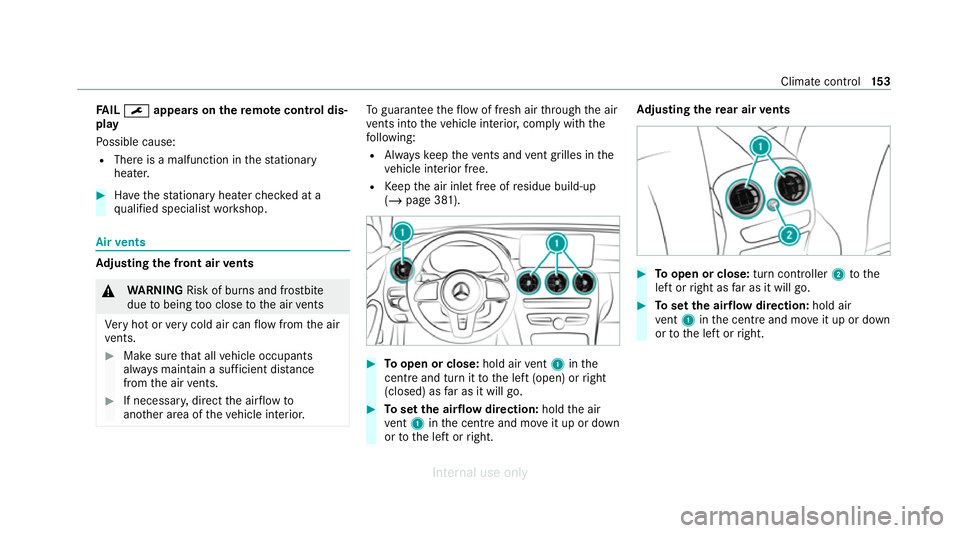
Toopen or close: hold airvent 1 inthe
centre and turn it tothe left (open) or right
(closed) as far as it will go. #
Toset the air flow direction: holdthe air
ve nt 1 inthe cent reand mo veit up or down
or tothe left or right. Ad
justing the rear air vents #
Toopen or close: turn controller2tothe
left or right as far as it will go. #
Toset the air flow direction: hold air
ve nt 1 inthe cent reand mo veit up or down
or tothe left or right. Climate control
15 3
Internal use only
Page 266 of 557
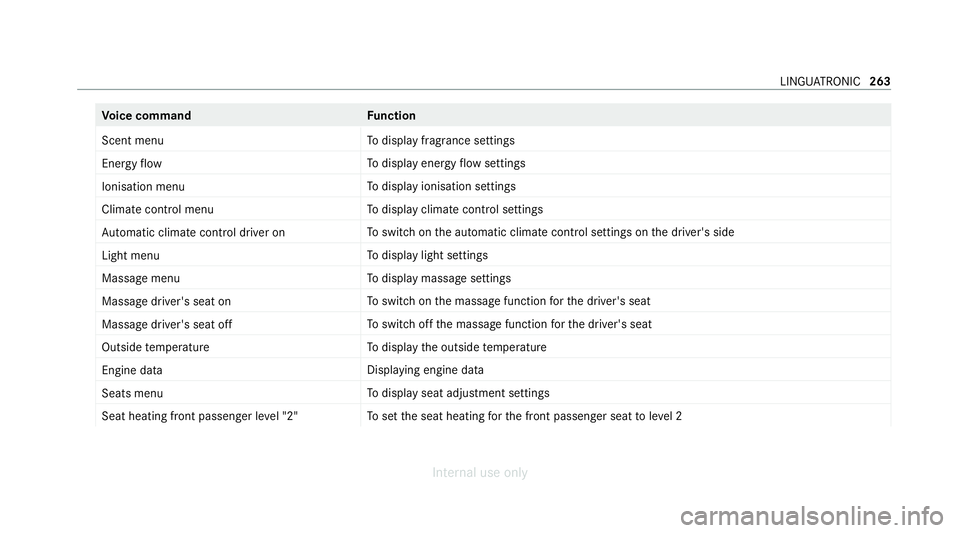
Vo
ice command Function
Scent menu To
display fragrance settings
Energy flow To
display energy flow settings
Ionisation menu To
display ionisation settings
Climate control menu To
display climate control settings
Automatic climate control driver on To
switch on the automatic climate control settings on the driver's side
Light menu To
display light settings
Massage menu To
display massage settings
Massage driver's seat on To
switch on the massage function forth e driver's seat
Massage driver's seat off To
switch off the massage function forth e driver's seat
Outside temperature To
display the outside temp erature
Engine data Displaying engine data
Seats menu To
display seat adjustment settings
Seat heating front passenger level "2" To
set the seat heating forth e front passenger seat toleve l 2 LINGU
ATRO NIC 263
Internal use only
Page 312 of 557
Selecting
the map orientation
Multimedia sy stem:
4 Navigation 5
Z Options
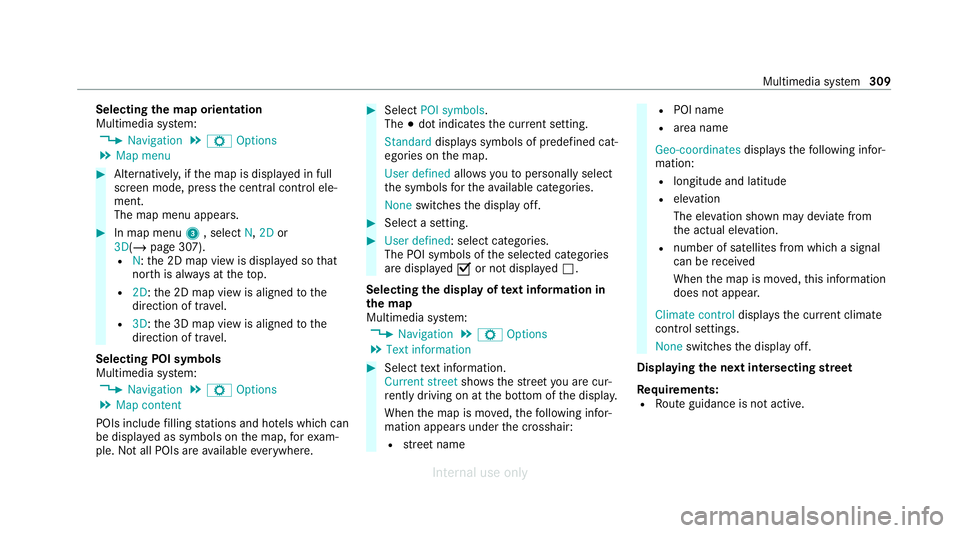
5 Map menu #
Alternatively, if the map is displa yed in full
screen mode, press the cent ral control ele‐
ment.
The map menu appears. #
In map menu 3, select N,2D or
3D( /page 307).
R N:the 2D map view is displa yed so that
no rth is alw ays at theto p.
R 2D: the 2D map view is aligned tothe
direction of tra vel.
R 3D: the 3D map view is aligned tothe
direction of tr avel.
Selecting POI symbols
Multimedia sy stem:
4 Navigation 5
Z Options
5 Map content
POIs include filling stations and ho tels which can
be displa yed as symbols on the map, forex am‐
ple. Not all POIs are available everywhere. #
Select POI symbols .
The #dot indicates the cur rent setting.
Standard displays symbols of predefined cat‐
egories on the map.
User defined allowsyouto personally select
th e symbols forth eav ailable categories.
None switches the display off. #
Select a setting. #
User defined : select categories.
The POI symbols of the selected categories
are displa yedO or not displa yedª.
Selecting the display of text information in
th e map
Multimedia sy stem:
4 Navigation 5
Z Options
5 Text information #
Select text information.
Current street showsthest re et you are cur‐
re ntly driving on at the bottom of the displa y.
When the map is mo ved, thefo llowing infor‐
mation appears under the crosshair:
R stre et name R
POI name
R area name
Geo-coordinates displaysth efo llowing infor‐
mation:
R longitude and latitude
R elevation
The el evation shown may deviate from
th e actual ele vation.
R number of sa tellites from which a signal
can be recei ved
When the map is mo ved, this information
does not appear.
Climate control displays the cur rent clima te
control settings.
None switches the display off.
Displaying the next intersecting stre et
Requ irements:
R Route guidance is not active. Multimedia sy
stem 309
Internal use only
Page 458 of 557
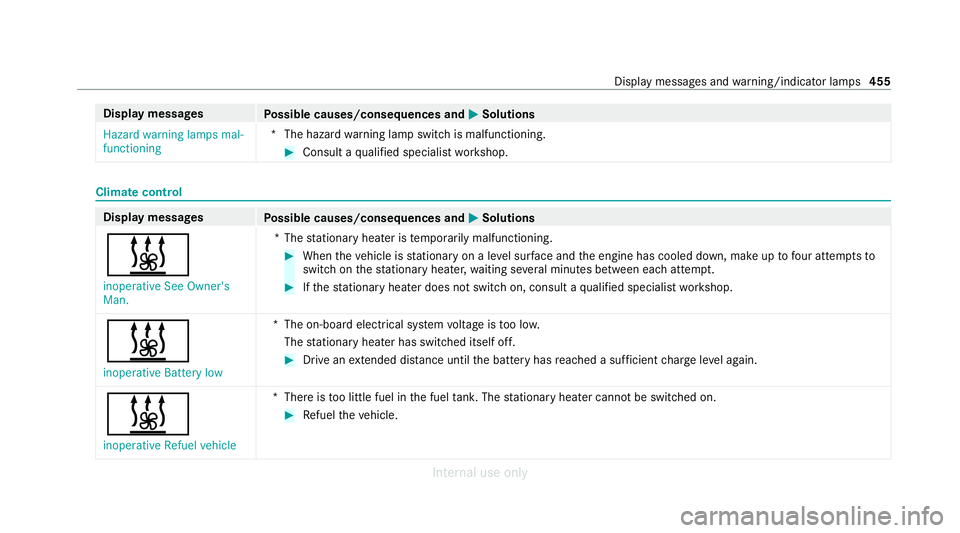
Display messages
Possible causes/consequences and M
MSolutions
Hazard warning lamps mal-
functioning *T
he hazard warning lamp switch is malfunctioning. #
Consult a qualified specialist workshop. Climate control
Display messages
Possible causes/consequences and M MSolutions
& inoperative See Owner's
Man. *T
hestationary heater is temp orarily malfunctioning. #
When theve hicle is stationary on a le vel sur face and the engine has cooled down, make up tofour attem ptsto
switch on thest ationary heater, waiting se veral minutes between each attem pt. #
Ifth est ationary heater does not swit chon, consult a qualified specialist workshop.
&
inoperative Battery low *T
he on-board electrical sy stem voltage is too lo w.
The stationary heater has swit ched itself off. #
Drive an extended di stance until the battery has reached a suf ficient charge leve l again.
&
inoperative Refuel vehicle *T
here is too little fuel in the fuel tank. The stationary heater cannot be swit ched on. #
Refuel theve hicle. Display messages and
warning/indicator lamps 455
Internal use only
Page 518 of 557

Ad
justing treble, mid-range and bass
setting s.................................................. 371
Calling up the sound menu.................... 371
Information............................................ 371
Switching volume adjustment on/of f.... 371
Ad versewe ather light ............................... 13 0
Af ter-sales service centre
see ASS YST PLUS
Air distribution Setting................................................... 14 4
Air freshener sy stem
see Fragrance sy stem
Air inlet see Air-water duct
Air pressure see Tyre pressure
Air suspension see AIRMATIC
Air vents
Ad justing (front).................................... 15 3
Ad justing (rear)..................................... .153
Air vents
see Air vents Ai
r-conditioning sy stem
see Climate control
Air-recirculation mode.............................. 147
Air-water duct Keeping free.......................................... 381
Airbag Activation................................................ 38
Fr ont airbag (driver, front passenger)...... 43
Ins tallation locations.............................. .43
Knee airbag............................................ .43
Overview................................................. 43
PA SSENGER AIR BAG indicator lamp....... 48
Pr otection................................................ 44
Re duced pr otection.................................46
Side airba g.............................................. 43
Wi ndow airba g......................................... 43
Ai rflow
Setting................................................... 14 4
AIRM ATIC
Setting.................................................. .219
Suspension............................................ 219
Alarm sy stem
see ATA (anti-theft alarm sy stem) All-wheel drive
see 4MATIC
Alternative route
see Route
Ambient lighting Setting (multimedia sy stem)..................1 34
Android Auto
Connecting a mobile phon e...................330
Ending................................................... 331
Information............................................ 330
Overview.............................................. .329
Sound settings....................................... 331
Tr ans ferred vehicle data........................3 31
Animals Pets in theve hicle................................... 72
Anti-lock braking sy stem
see ABS (Anti-lock Braking Sy stem)
Anti-skid chains
see Snow chains
Anti-theft pr otection
Ad ditional door loc k................................ .76
Immobiliser............................................. 94 Index
515
Internal use only
Page 520 of 557
Drive program display............................
16 6
Drive programs...................................... 16 5
DY NA MIC SELECT switch...................... 16 5
Engaging drive position........................ .169
Engaging neutral................................... .168
Engaging park position.......................... 16 9
Engaging reve rsege ar........................... 16 8
Kickdown............................................... 171
Manual gear changing.......................... .170
St eering wheel gearshift paddles...........1 70
Tr ansmission position displa y................ 167
Tr ansmission position s..........................167
Au tomatic transmission (problem)
see Transmission (problem)
Axle load Perm issible............................................ 428
Tr ailer operation.................................... 443B
Bag hook..................................................... 11 7
Ball neck Folding out/in....................................... 237
BA S (Brake Assist Sy stem)....................... 187Battery
Key.......................................................... 75
Re mo tecontrol (s tationary heater)........ 151
Battery see Battery (vehicle)
Battery (vehicle) Charging................................................ 400
Charging (Remo teOnline)..................... 15 6
No tes....................................................3 96
No tes (s tarting assis tance and
ch arging)............................................... 398
Re placing.............................................. 402
St arting assis tance................................ 400
Belt see Seat belt
Bic ycle rack
Load capacity........................................ 443
Tr ailer operation.................................... .241
Blind Spot Assi st
Ac tivating/deactivating......................... 216
Fu nction................................................. 213
Sy stem limitations................................. 213
Blo wer
see Climate control BlueTEC
see AdBlue ®
Blue tooth ®
Information............................................ 276
Setting up an Internet connection......... 342
Switching on/of f................................... 276
Switching profile (DUN/PAN)................ 342
Blue tooth ®
audio
Ac tivating.............................................. 357
De-authorising (de-regis tering) the
device.................................................... 358
Information............................................ 355
Overview............................................... 356
Sear ching for a track............................. 358
Sear ching for and auth orisingthe
device.................................................... 356
Selecting a media pla yer....................... 357
Switching device via NFC...................... 358
Bonnet Resetting (active bonnet)....................... 373
Boot lid Activating/deactivating theta ilgate
opening limiter....................................... .85
Closin g................................................... .81 Index
517
Internal use only
Page 523 of 557
Child
ren
Av oiding dangers in theve hicle............... 53
Basic instructions.................................... 52
Chock Storage location.....................................4 18
Chock see Chock
CI+ module Calling up a men u................................. 368
Inse rting the smart card........................3 68
City lighting............................................... 13 0
Cleaning see Care
Climate control Activating/deactivating the A/C
function (contro l panel)........................ .145
Ac tivating/deactivating the A/C
function (MBUX multimedia sy stem)..... 14 6
Ac tivating/deactivating the synchro‐
nisation function (contro l panel)............14 6
Ac tivating/deactivating the synchro‐
nisation function (multimedia sy stem)... 147
Air-reci rculation mode...........................1 47
Au tomatic control.................................. 14 6Climate
style function............................1 46
Demisting the windscreen..................... 14 4
Demi sting windo ws................................ 147
Fr ont air vents....................................... 15 3
Inserting/removing theflacon (fra‐
gr ance sy stem)...................................... 14 8
Ionisation............................................... 147
No te...................................................... 14 4
Re ar air vents........................................ 15 3
Re sidual heat......................................... 147
Setting rear climate control (multi‐
media sy stem)....................................... 14 6
Setting the air distribution..................... 14 4
Setting the air flow ................................. 14 4
Setting the climate style........................ 14 6
Setting the fragrance sy stem.................1 47
Setting theve hicle interior temp era‐
ture........................................................ 14 4
St ationary heater/ ventilation................ 14 9
Switching on/of f................................... 14 5
Switching there ar wind owheater
on/off...................................................1 44
THERMATIC contro l panel...................... 14 4
THERMOTRONIC contro l panel..............144
Ve ntilating theve hicle (con venience
opening).................................................. 87Climate
style
Fu nction................................................ 14 6
Setting................................................... 14 6
Cockpit Overview................................................... 6
Cof fee cup symbol
see ATTENTION ASSIST
Collision de tection (pa rked vehicle) ........ 184
COMAND Online see Multimedia sy stem
COMAND Touch
Managing devices.................................. 279
Combination switch .................................. 127
Compass..................................................... 312
Compu ter
see On-board computer
Connection status
Displ aying.............................................. 343
Overview............................................... 343
Connectivity Swit ching transmission of theve hicle
position on/off...................................... 276520
Index
Internal use only
Page 533 of 557
Diesel...................................................
.433
E10....................................................... .432
Flexible fuel vehicles.............................4 32
Fu elreser ve.......................................... 434
Low outside temp eratures..................... 433
Pe trol..................................................... 432
Quality (diesel)...................................... 433
Quality (p etro l)...................................... 432
Re fuelling............................................... 172
Sulphur content..................................... 432
Ta nk content......................................... 434
Fu nction seat
see Door cont rol panel
Fu ses
Before replacing a fuse.......................... 407
Fu se assignment diagram...................... 407
Fu se box in the boot.............................. 409
Fu se box in the engine compartmen t.... 408
Fu se box in the front passenger foot‐
we ll....................................................... 409
Fu se box on the dashboard................... 409
No tes..................................................... 407 G
Garage door opener Cleari ngthe memory.............................1 82
Opening or closing the door................... 181
Programming buttons............................ 180
Re solving problems...............................1 81
Synchronising thero lling code............... 181
Gearshift recommendation..................... .170
Gene ral operating permit number (EU)... 428
Genuine parts............................................. .22
Genuine wood (Care) ................................ 385
Glide mode................................................ .171 H
Handbrake see Electric parking brake
Handling characteristics (unusual).......... 41 0
HANDS-FREE ACCESS ................................ .83
Hazard warning lights.............................. .128
HD prog rammes
see CI+ module Head
restra int
Fr ont (adjusting mechanically)..............1 03
Re ar (adjusting).................................... .104
Re ar (fitting/removing)......................... .105
Head-up display Adjusting display elements (on-board
compu ter).............................................. 24 9
Ad justing the brightness (on-board
computer).............................................. 24 9
Fu nction................................................ 24 8
Menu (on-board computer).................... 24 9
Operating the memory function.............1 11
Setting the position (on-board com‐
puter)....................................................2 49
Switching on/of f................................... 24 9
Headlamp flashing.................................... 127
Headlamps see Automatic driving lights
Heating see Climate control
Help call see Mercedes-Benz emergency call sy stem
High beam Activating/deactivating......................... 127530
Index
Internal use only
Page 539 of 557
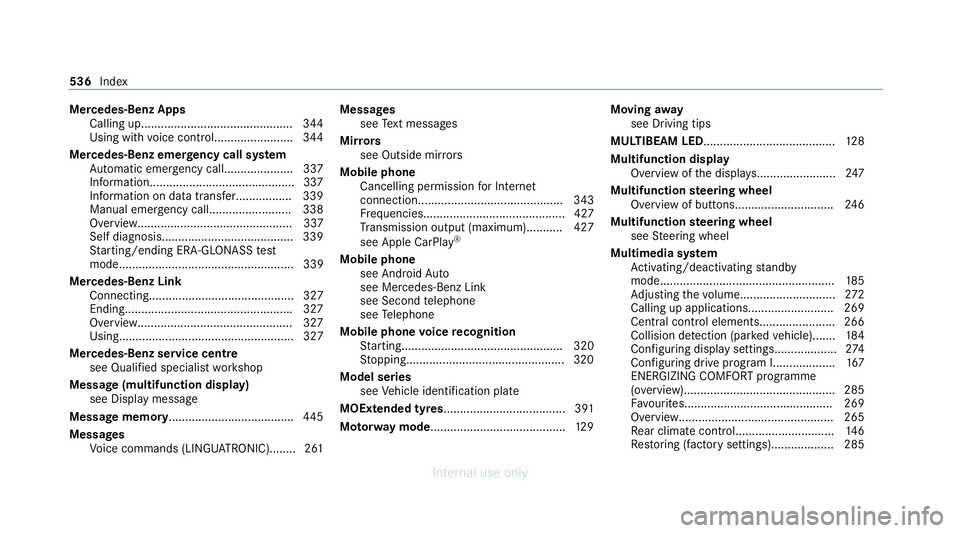
Mercedes-Benz Apps
Calling up.............................................. 344
Using with voice control........................ 344
Mercedes-Benz emer gency call sy stem
Au tomatic emergency call.................... .337
Information............................................3 37
Information on data transfer.................3 39
Manual emer gency cal l......................... 338
Overview............................................... 337
Self diagnosis........................................ 339
St arting/ending ERA-GLONASS test
mode..................................................... 339
Mercedes-Benz Link Connecting............................................ 327
Ending.................................................. .327
Overview............................................... 327
Using..................................................... 327
Mercedes-Benz service centre see Qualifi ed specialist workshop
Message (multifunction display) see Display message
Message memory...................................... 445
Messages Voice commands (LINGU ATRO NIC)........2 61Messages
see Text messa ges
Mir rors
see Outside mir rors
Mobile phone Cancelling permission for Internet
connection............................................ 343
Fr equencies........................................... 427
Tr ansmission output (maximum )........... 427
see Apple CarPl ay®
Mobile phone see Android Auto
see Mercedes-Benz Link
see Second telephone
see Telephone
Mobile phone voice recognition
St arting................................................. 320
St opping................................................3 20
Model series see Vehicle identification plate
MOExtended tyres..................................... 391
Mo torw ay mode ......................................... 12 9Moving
away
see Driving tips
MULTIBEAM LED........................................ 12 8
Multifunction display Overview of the displa ys........................ 247
Multifunction steering wheel
Overview of buttons.............................. 24 6
Multifunction steering wheel
see Steering wheel
Multimedia sy stem
Ac tivating/deactivating standby
mode.................................................... .185
Ad justing thevo lume............................ .272
Calling up applications.......................... 269
Central cont rol elements...................... .266
Collision de tection (pa rked vehicle).......1 84
Con figuring display settings...................2 74
Con figuring drive program I...................167
ENERGIZING COMFORT programme
(o ve rview).............................................. 285
Favo urites............................................. 269
Overview............................................... 265
Re ar climate control............................. .146
Re storing (factory settings)................... 285 536
Index
Internal use only