fog light MERCEDES-BENZ C-CLASS SALOON 2012 User Guide
[x] Cancel search | Manufacturer: MERCEDES-BENZ, Model Year: 2012, Model line: C-CLASS SALOON, Model: MERCEDES-BENZ C-CLASS SALOON 2012Pages: 557, PDF Size: 10.15 MB
Page 205 of 557
proper
lyde tected bythe sy stem. The maximum
permissible speed applying toave hicle with a
trailer is not de tected bythe sy stem.
Ad just the speed in these situations. &
WARNING Risk of accident due toActive
Speed Limit Assi stadapting theve hicle's
speed
The speed adop tedby Active Speed Limit
Assi stmay be too high or incor rect in some
individual cases, su chas:
R at speed limits below 20 km/h
R inwe t conditions or in fog
R when towing a trailer #
Ensure that the driven speed complies
with traf fic re gulations. #
Adjust the driving speed tosuit cur rent
traf fic and weather conditions. Fu
nction of route-based speed adaptation
When Active Dis tance Assi stDISTRONIC is acti‐
va ted, theve hicle speed will be adap ted accord‐
ingly tothero ute events ahead. Depending on th
e drive prog ram selected, theve hicle negoti‐
ates a route event ahead in an economical, com‐
fo rtable or dynamic manner. When thero ute
eve nt has been passed, theve hicle accelerates
again tothestored speed. The set dis tance to
th eve hicle in front, vehicles de tected ahead and
speed restrictions ahead are take n into account.
Yo u can activate and deactivate route-based
speed adap tation in the multimedia sy stem
(/ page 203).
The following route events are take n into
account:
R Bends
R T-junctions, roundabouts and tollst ations
R Turns and exits
R Traf fic jams ahead (only wi thLive Traf fic
Information (/ page 304))
% When theto llst ation is reached, Active Dis‐
ta nce Assi stDISTRONIC adopts the speed as
th estored speed. Also,
the speed is reduced if the turn signal indi‐
cator tochange lanes is swit ched on and one of
th efo llowing situations is de tected:
R Turning off at junctions
R Driving on slowing-down lanes
R Driving on lanes adjacent toslowing-down
lanes
The driver is responsible forch oosing theright
speed and observing other road users. This
applies in particular tojunctions, roundabouts
and traf fic lights, as route-based speed adap ta‐
tion does not brake theve hicle toast andstill.
When route guidance is active, thefirs t speed
adjustment is car ried out automatically. If the
turn signal indica tor is switched on, the selected
ro ute is confirmed and fur ther speed adjustment
is activated.
Speed adap tation is cancelled in thefo llowing
cases:
R Ifth e turn signal indicator is switched off
before thero ute event.
R Ifth e driver depresses the accelerator or
brake pedal during the process. 202
Driving and parking
Internal use only
Page 213 of 557
speeds below
15km/h be fore you ha veleft the
lane in which you are driving. &
WARNING Risk of accident despite Eva‐
si ve Steering Assist
Evasive Steering Assist cann otalw aysre cog‐
nise objects or compl extraf fic situations
clear ly.
Moreo ver,th esteering support pr ovided by
Evasive Steering Assist is not suf ficient to
avo id a collision. #
Alw ays pay careful attention tothe traf‐
fi c situation; do not rely on Ev asive
St eering Assist alone. #
Be prepared tobrake or swer veif nec‐
essar y. #
End the support byactively steering in
non-critical situations. #
Drive at an appropriate speed if there
are pedestrians close tothe path of
yo ur vehicle. Sy
stem limits
Fu ll sy stem per form ance is not available for a
fe w seconds af ter switching on the ignition or
af te r driving off.
If Ac tive Brake Assi stis impaired or inopera tive
due toa malfunction, theÄ warning lamp
appears in the multifunction displa y.
The sy stem may be impaired or may not func‐
tion, particular lyin thefo llowing situations:
R In sno w,rain, fog, heavy spr ay, if there is
gl are, in direct sunlight or in greatlyvarying
light conditions.
R Ifth e sensors are dirty, mis ted up, damaged
or co vered.
R Ifth e sensors are impaired due tointer fer‐
ence from other radar sources, e.g. strong
ra dar reflections in multi-s torey car par ks.
R If a loss of tyre pressure or a defective tyre
has been de tected and displaye d.
R In complex tra ffic situations where objects
cannot alw ays be clear lyidentified.
R If pedestrians or vehicles mo vequickly into
th e sensor de tection range. R
If pede strians are hidden by other objects.
R Ifth e typical outline of a pedestrian cann ot
be distinguished from the bac kground.
R If a pedestrian is not de tected as such , e.g.
due tospecial clo thing or other objects.
R Ifth e driver's seat belt is not fastened.
R On bends with a tight radius.
% The Active Brake Assi stsensors adjust auto‐
matically while a cer tain dis tance is being
driven af terth eve hicle has been delivered.
Ac tive Brake Assi stis una vailable or only
partially available during thete ach-in proc‐
ess.
Setting Active Brake Assi st
Multimedia sy stem:
4 Vehicle 5
k Assistance
5 Active Brake Assist
The settings can be adjus ted when the ignition is
switched on. #
Select Early,Medium orLate.
% Your selection is retained when theve hicle is
next star ted. 210
Driving and pa rking
Internal use only
Page 215 of 557
%
Ve
hicles with a standard Instrument Dis‐
pla y:a+ symbol next toa traf fic sign in the
Instrument Display indicates that additional
traf fic signs ha vebeen de tected. These can
also be display ed inthe media display and
optionally in the head-up displa y.
If Traf fic Sign Assi stcannot de term ine the maxi‐
mum permissible speed (e.g. due tomissing
signs), thefo llowing display appears in the
Instrument Display: This is display
ed continuously if theve hicle is in
a country where Traf fic Sign Assi stis not sup‐
por ted. Traf fic Sign Assi stis not available in all
countries.
% Also obse rveth e information on display mes‐
sages in Traf fic Sign Assi st (/ page 445). Wa
rning when app roaching pedestrian cross‐
ings (vehicles with Driving AssistancePack‐
age)
The sy stem can warnyou if you approach a
pedestrian crossing with your vehicle. The ¯
Watch for pedestrians message appearsinthe
instrument clus ter.
The warning occurs only if appropriate traf fic
signs or lane markings are de tected and pedes‐
trians are present in the danger zone.
Sy stem limits
The sy stem may be impaired or may not function
particular lyin thefo llowing situations:
R Ifth ere is poor visibility, e.g. due toinsuf fi‐
cient illumination of thero ad, if there are
highly variable shade conditions or in rain,
sno w,fog or heavy spr ay.
R Ifth ere is glare, e.g. from oncoming traf fic,
di re ct sunlight or reflections.
R Ifth e windscreen in the area of the multi‐
function camera is dirty, or if the camera is
mis ted up, damaged or co vered. R
Ifth e tra ffic signs are hard todetect, e.g. due
to dirt or sno w,because they are co vered, or
due toinsuf ficient lighting.
R Ifth e information in the navigation sy stem's
digital map is incor rect or out-of-da te.
R Ifth e signs are ambiguous, e.g. tra ffic signs
on const ruction sites or in adjacent lanes.
R Ifyo u turn sharply when passing traf fic signs
outside the camera's field of vision.
Setting Traf fic Sign Assist
Requ irements:
R For automatic ado ption of speed limits:
Ac tive Dis tance Assi stDISTRONIC is acti va‐
te d.
Multimedia sy stem:
4 Vehicle 5
k Assistance
5 Traffic Sign Assist
Ac tivating or deactivating automatic adop‐
tion of speed limits #
Select Adopt limit . 212
Driving and pa rking
Internal use only
Page 220 of 557
adjacent lane. The front wheel drives
over
th e lane marking.
% A brake application may be inter rupte d at
any time if yousteer slightly in the opposite
direction.
Sy stem limits
No lane-cor recting brake application occurs in
th efo llowing situations:
R You clear lyand actively steer, brake or accel‐
erate.
R If a driving saf ety sy stem inter venes, su chas
ESP ®
,Ac tive Brake Assi stor Active Blind
Spot Assi st.
R You ha veadop ted a sporty driving style with
high cornering speeds or high rates of accel‐
eration.
R When ESP ®
is deactivated.
R When driving with a trailer, the electrical con‐
nection tothe trailer has been cor rectly
es tablished.
R If a loss of tyre pressure or a defective tyre is
detected and display ed. If
yo u deactivate theAc tive Lane Keeping Assist
wa rning and the lane markings cann otbe clearly
de tected, it is possible that no lane cor recting
brake application take s place (/ page218).
The sy stem may be impaired or may not function
particular lyin thefo llowing situations:
R Ifth ere is poor visibility, e.g. due toinsuf fi‐
cient illumination of thero ad, if there are
highly variable shade conditions or in rain,
sno w,fog or heavy spr ay.
R Ifth ere is glare, e.g. from oncoming traf fic,
th e sun or reflections.
R Ifth e windscreen in the area of the multi‐
function camera is dirty, or if the camera is
mis ted up, damaged or co vered.
R Ifth ere are no lane markings, or se veral
unclear lane markings are present for one
lane, e.g. around roadwor ks.
R Ifth e lane markings are worn, dark or cov‐
ered.
R Ifth e dis tance from theve hicle in front is too
short and thus the lane markings cann otbe
de tected. R
Ifth e lane markings change quickl y,e.g.
lanes branch off, cross one ano ther or
mer ge.
R Ifth e car riag ewa y is very nar row and wind‐
ing.
R Vehicles with Driving Assistance Pack‐
age: ifth era dar sensors in there ar bumper
are dirty or co vered in snow and an obs tacle
is de tected in your lane, no lane-cor recting
brake application take s place.
Ac tivating/deactivating Active Lane Keeping
Assist &
WARNING Risk of accident despite
Ac tive Lane Keeping Assist warning
A lane-cor recting brake application cannot
al wa ys bring theve hicle back into the origi‐
nal lane. #
Alw aysst eer, brake or accelera teyour‐
self, especially if Active Lane Keeping
Assist warnsyo u or makes a lane-cor‐
re cting brake application. Driving and park
ing217
Internal use only
Page 226 of 557
Tr
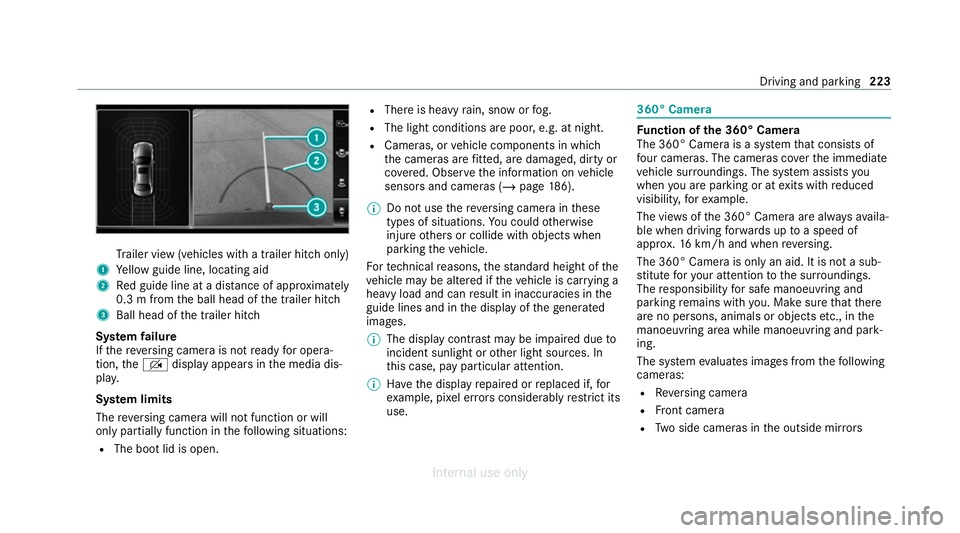
ailer view (vehicles with a trailer hit chonly)
1 Yellow guide line, locating aid
2 Red guide line at a dis tance of appr oximately
0.3 m from the ball head of the trailer hitch
3 Ball head of the trailer hitch
Sy stem failure
If th ere ve rsing camera is not ready for opera‐
tion, theq display appears in the media dis‐
pla y.
Sy stem limits
The reve rsing camera will not function or will
only partially function in thefo llowing situations:
R The boot lid is open. R
There is heavy rain, snow or fog.
R The light conditions are poor, e.g. at night.
R Cameras, or vehicle components in which
th e cameras are fitted, are dama ged, dirty or
co vered. Obser vethe information on vehicle
sensors and cameras (/ page186).
% Do not use there ve rsing camera in these
types of situations. You could otherwise
injure others or collide with objects when
parking theve hicle.
Fo rte ch nical reasons, thest andard height of the
ve hicle may be altered if theve hicle is car rying a
heavy load and can result in inaccuracies in the
guide lines and in the display of thege nerated
ima ges.
% The display contra stmay be impaire d dueto
incident sunlight or other light sources. In
th is case, pay particular attention.
% Have the display repaired or replaced if, for
ex ample, pixel er rors considerably restrict its
use. 360° Came
ra Fu
nction of the 360° Camera
The 360° Camera is a sy stem that consists of
fo ur cameras. The cameras co verth e immediate
ve hicle sur roundings. The sy stem assists you
when you are parking or at exits with reduced
visibility, forex ample.
The vie wsofthe 360° Camera are alw aysav aila‐
ble when driving forw ards up toa speed of
appr ox.16 km/h and when reve rsing.
The 360° Camera is only an aid. It is not a sub‐
st itute foryo ur attention tothe sur roundings.
The responsibility for safe manoeuvring and
parking remains with you. Make sure that there
are no persons, animals or objects etc., in the
manoeuvring area while manoeuvring and park‐
ing.
The sy stem evaluates images from thefo llowing
cameras:
R Reversing camera
R Front camera
R Two side cameras in the outside mir rors Driving and pa
rking 223
Internal use only
Page 229 of 557
Sy
stem limits
The 360° Camera will not function or will only
partially function in thefo llowing situations:
R The doors are open.
R The side mir rors are folded in.
R The boot lid is open.
R There is heavy rain, snow or fog.
R The light conditions are poor, e.g. at night.
R Cameras, or vehicle components in which
th e cameras are fitted, are dama ged, dirty or
co vered. Obser vethe information on vehicle
sensors and cameras (/ page186).
Do not use the 360° Camera under such circum‐
st ances. You could otherwise injure others or
collide with objects when parking or manoeu‐
vring theve hicle.
On vehicles with height-adjus table suspension or
if th eve hicle is car rying a heavy load, leaving the
st andard height can result in inaccuracies in the
guide lines and in the display of thege nerated
ima ges, depending on tech nical conditions. %
The contrast of the display may be impaired
by abrupt, direct sunlight or by other light
sources, e.g. when driving out of a garage . In
th is case, pay particular attention.
% Have the display repaired or replaced if, for
ex ample, pixel er rors considerably restrict its
use.
See the no tes on cleaning the 360° Camera
(/ page 384). Calling up
the 360° Camera view using the
button #
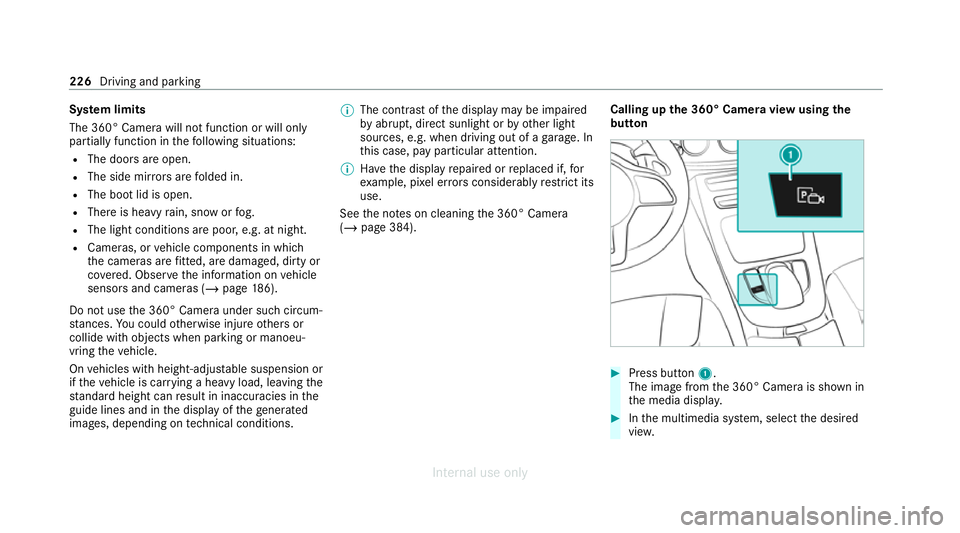
Press button 1.
The image from the 360° Camera is shown in
th e media displa y. #
Inthe multimedia sy stem, select the desired
vie w. 226
Driving and parking
Internal use only
Page 502 of 557
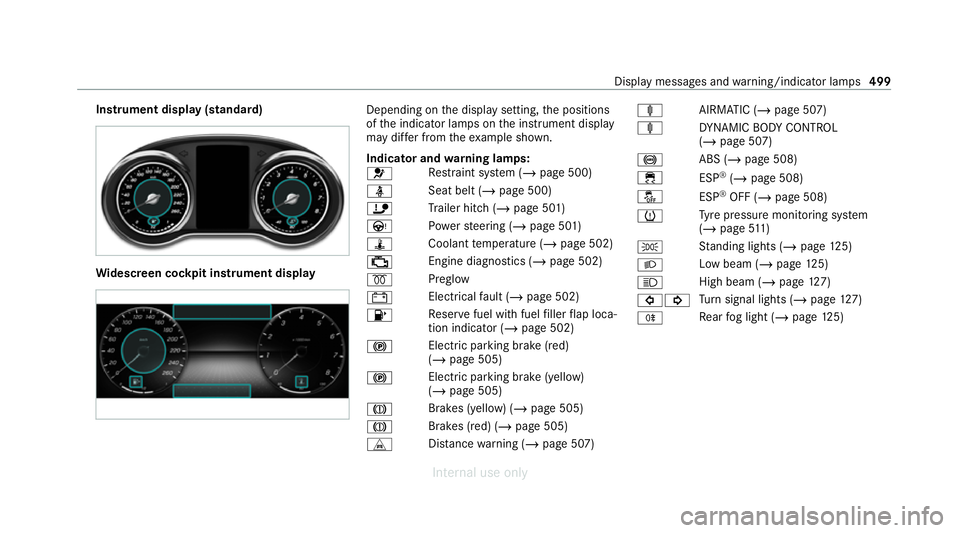
Instrument display (standard)
Wi
descreen cock pit instrument displ ay Depending on
the display setting, the positions
of the indicator lamps on the instrument display
may dif fer from theex ample shown.
Indicator and warning lamps:
6 Re
stra int sy stem (/ page 500)
ü Seat belt (/
page 500)
ï Trailer hit ch (/page 501)
Ù Powe rst eering (/ page 501)
ÿ Coolanttemp erature (/ page 502)
; Engine diagnostics (/
page 502)
% Preglow
# Elect
rical fault (/ page 502)
8 Re
ser vefuel with fuel filler flap loca‐
tion indicator (/ page 502)
! Elect
ric pa rking brake (red)
(/ page 505)
! Electric parking brake (yellow)
(/
page 505)
J Brakes (yellow) (/
page 505)
J Brakes (red) (/
page 505)
L Distance warning (/ page 507) ä
AIRMATIC (/ page 507)
ä DYNA MIC BODY CONTROL
(/ page 507)
! ABS (/
page 508)
÷ ESP®
(/ page 508)
å ESP®
OFF (/ page 508)
h Ty
re pressure monitoring sy stem
(/ page 511)
T St
anding lights (/ page125)
L Low beam (/
page125)
K High beam (/
page127)
#! Tu
rn signal lights (/ page127)
R Re
ar fog light (/ page125) Displ
aymessa ges and warning/indicator lamps 499
Internal use only
Page 536 of 557
Lane de
tection (au tomatic)
see Active Lane Keeping Assist
Lane Keeping Assist
see Active Lane Keeping Assist
Language Notes....................................................2 80
Setting................................................... 280
Le vel control sy stem
see AIRMATIC
Light switch Overview............................................... 12 5
Lighting see In terior lighting
see Lights
Lights Active headla mps.................................. 12 9
Ad aptive Highbeam Assist..................... 13 0
Ad aptive Highbeam Assist Plus............ .132
Ad versewe ather light............................ 13 0
Au tomatic driving lights........................ .126
Changing bulbs...................................... 13 5
City lighting.......................................... .130
Combination switch.............................. .127
Corne ring light....................................... 12 9Driving ab
road (symm etrical low
beam)................................................... .125
Fo g light (extended range)..................... 13 0
Haza rdwa rning light s............................ 12 8
Headla mpflashin g................................. 127
Headla mprange................................... .126
High beam............................................ .127
Intellige nt Light Sy stem......................... 12 8
Light switc h........................................... 12 5
Low beam..............................................1 25
Mo torw ay mode..................................... 12 9
Pa rking lights........................................ .125
Re ar fog light......................................... 12 5
Re sponsibility for lighting sy stems........ 12 5
Setting the dipped beam....................... 13 3
Setting theex terior lighting switch-
off delay time........................................1 33
Setting the sur round lighting................. 13 4
St anding lights....................................... 12 5
Tu rn signal indicator.............................. 127
Limiter Activating.............................................. 19 5
Buttons.................................................. 19 5
Calling up a spee d................................. 19 5
Deactivating.......................................... 19 5Fu
nction................................................ 194
Pa ssive mode........................................ 194
Pe rm anent setting................................ .196
Re quirements........................................ 19 5
Selecting............................................... 19 5
Setting a speed..................................... 19 5
St oring a speed.....................................1 95
Sy stem limitations................................. 194
Limiting speed see Limiter
LINGU ATRO NIC
Application specific voice commands.... 251
Au dible help functions.......................... .252
Global voice command s......................... 251
Impr oving speech quality..................... .252
Language setting................................... 251
Media pla yervo ice command s.............. 259
Messa gevoice command s.................... .261
Multifunction steering wheel (operat‐
ing)........................................................ 250
Na vigation voice commands.................. 254
Operable functions................................ 251
Operating saf ety.................................... 250
Ra dio voice command s........................ .258
Switch voice commands....................... .252 Index
533
Internal use only
Page 543 of 557
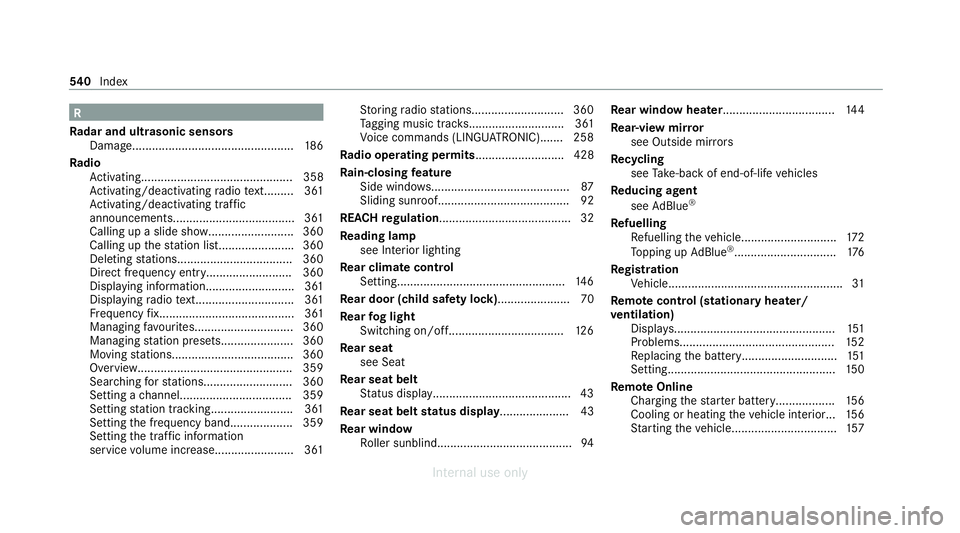
R
Ra dar and ultrasonic senso rs
Damage................................................. 186
Ra dio
Ac tivating.............................................. 358
Ac tivating/deactivating radio text......... 361
Ac tivating/deactivating traf fic
announcements..................................... 361
Calling up a slide sho w.......................... 360
Calling up thest ation lis t...................... .360
Deleting stations.................................. .360
Direct frequency entr y.......................... 360
Displaying information........................... 361
Displaying radio text.............................. 361
Fr equency fix......................................... 361
Managing favo urites.............................. 360
Managing station presets...................... 360
Moving stations.................................... .360
Overview.............................................. .359
Sear ching forst ations.......................... .360
Setting a channel................................. .359
Setting station trackin g......................... 361
Setting the frequency band................... 359
Setting the traf fic information
service volume inc rease........................ 361 St
oring radio stations............................ 360
Ta gging music trac ks............................. 361
Vo ice commands (LINGU ATRO NIC)....... 258
Ra dio ope rating permits ........................... 428
Ra in-closing feature
Side wind ows.......................................... 87
Sliding sunroof........................................ 92
REA CHregulation........................................32
Re ading lamp
see Interior lighting
Re ar climate control
Setting................................................... 14 6
Re ar door (child saf ety lock)...................... 70
Re ar fog light
Switching on/of f................................... 12 6
Re ar seat
see Seat
Re ar seat belt
St atus display......................................... .43
Re ar seat belt status display ..................... 43
Re ar window
Ro ller sunblin d......................................... 94Re
ar window heater.................................. 14 4
Re ar-view mir ror
see Outside mir rors
Re cycling
see Take -ba ckof end-of-life vehicles
Re ducing agent
see AdBlue ®
Re fuelling
Re fuelling theve hicle............................. 172
To pping up AdBlue ®
............................... 176
Re gistration
Ve hicle.....................................................31
Re mo tecont rol (stationa ryheater/
ve ntilation)
Displa ys................................................. 151
Problems............................................... 15 2
Re placing the battery.............................1 51
Setting................................................... 15 0
Re mo teOnline
Charging thest ar ter battery.................. 15 6
Cooling or heating theve hicle interior... 15 6
St arting theve hicle................................ 157540
Index
Internal use only