heating MERCEDES-BENZ C-CLASS SALOON 2012 Owner's Manual
[x] Cancel search | Manufacturer: MERCEDES-BENZ, Model Year: 2012, Model line: C-CLASS SALOON, Model: MERCEDES-BENZ C-CLASS SALOON 2012Pages: 557, PDF Size: 10.15 MB
Page 459 of 557
Ve
hicle Display messages
Possible causes/consequences and M
MSolutions
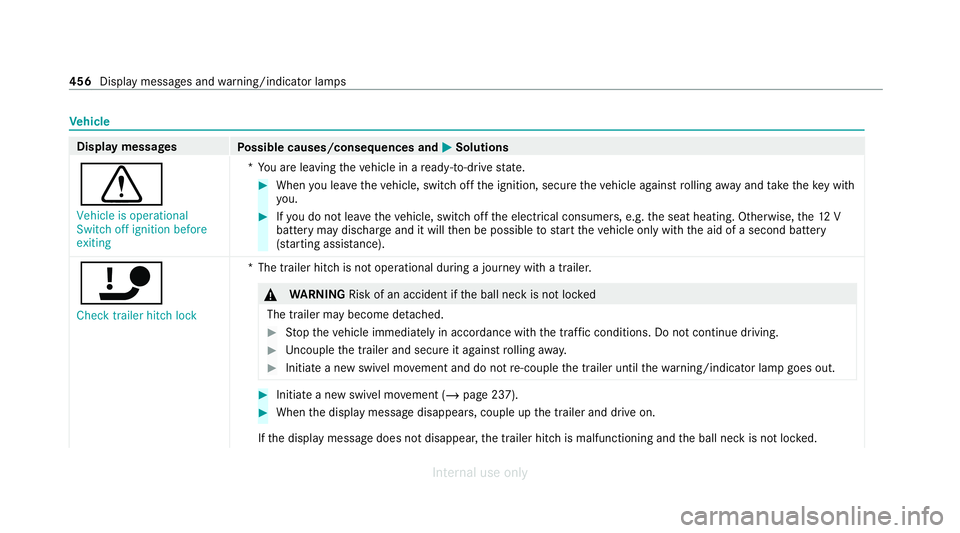
d Vehicle is operational
Switch off ignition before
exiting *Y
ou are leaving theve hicle in a ready-to-drive state. #
When you lea vetheve hicle, switch off the ignition, secure theve hicle against rolling away and take theke y with
yo u. #
Ifyo u do not lea vetheve hicle, switch off the electrical consumers, e.g. the seat heating. Otherwise, the12 V
battery may dischar geand it will then be possible tostart theve hicle only with the aid of a second battery
(s ta rting assis tance).
ï Check trailer hitch lock *T
he trailer hitch is not operational during a journey with a trailer. &
WARNING Risk of an accident if the ball neck is not loc ked
The trailer may become de tach ed. #
Stop theve hicle immediately in accordance with the traf fic conditions. Do not continue driving. #
Uncouple the trailer and secure it against rolling away. #
Initiate a new swivel mo vement and do not re-couple the trailer until thewa rning/indicator lamp goes out. #
Initiate a new swivel mo vement (/ page 237). #
When the display message disappears, couple up the trailer and drive on.
If th e display message does not disappear, the trailer hitch is malfunctioning and the ball neck is not loc ked. 456
Display messages and warning/indicator lamps
Internal use only
Page 467 of 557
Display messages
Possible causes/consequences and M
MSolutions #
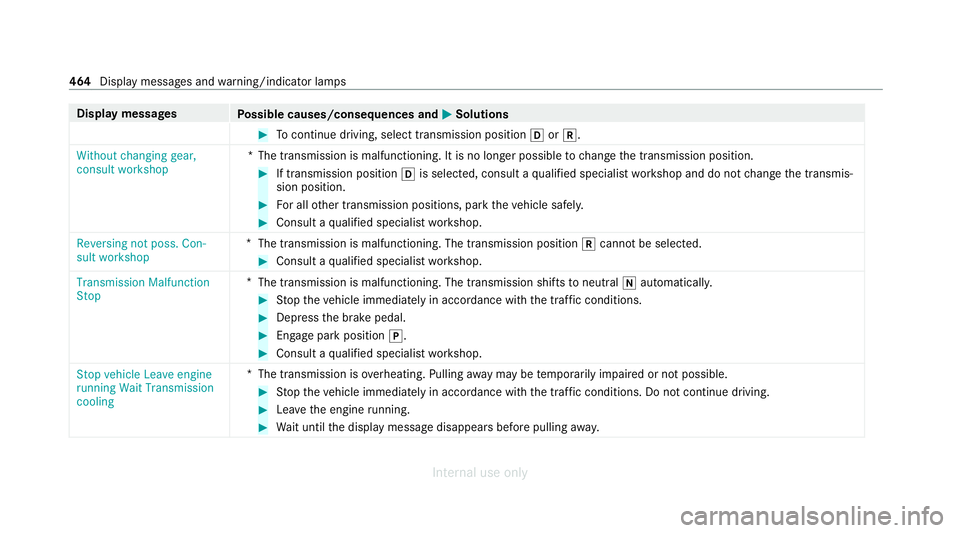
Tocontinue driving, select transmission position hork.
Without changing gear,
consult workshop *T
he transmission is malfunctioning. It is no longer possible tochange the transmission position. #
If transmission position his selected, consult a qualified specialist workshop and do not change the transmis‐
sion position. #
For all other transmission positions, park theve hicle safely. #
Consult a qualified specialist workshop.
Reversing not poss. Con-
sult workshop *
The transmission is malfunctioning. The transmission position kcannot be selected. #
Consult a qualified specialist workshop.
Transmission Malfunction
Stop *
The transmission is malfunctioning. The transmission shifts toneutral iautomatically. #
Stop theve hicle immediately in accordance with the traf fic conditions. #
Depress the brake pedal. #
Enga gepark position j. #
Consult a qualified specialist workshop.
Stop vehicle Leave engine
running Wait Transmission
cooling *T
he transmission is overheating. Pulling away may be temp orarily impaired or not possible. #
Stop theve hicle immediately in accordance with the traf fic conditions. Do not continue driving. #
Lea vethe engine running. #
Wait until the display message disappears before pulling away. 464
Display messages and warning/indicator lamps
Internal use only
Page 495 of 557
Display messages
Possible causes/consequences and M
MSolutions #
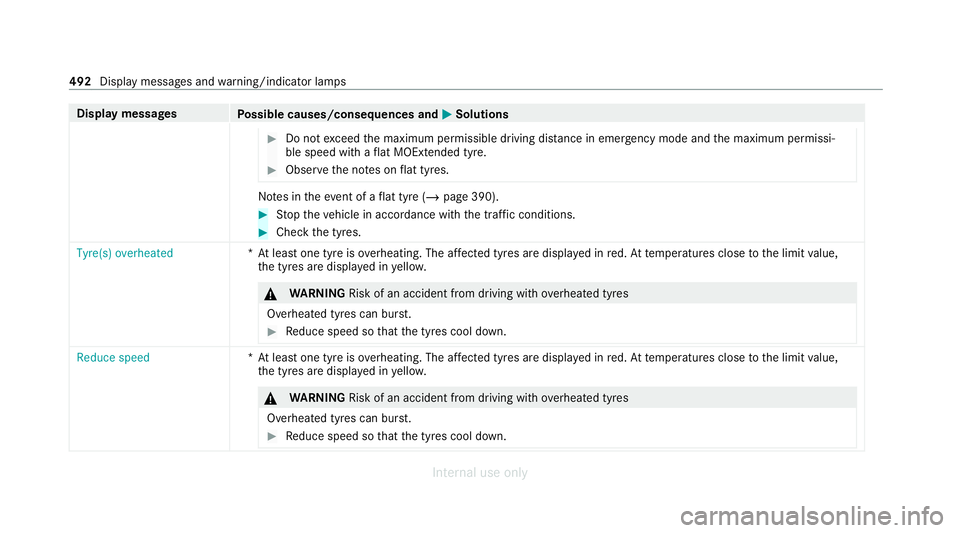
Do not exceed the maximum permissible driving dis tance in emergency mode and the maximum permissi‐
ble speed with a flat MOExtended tyre. #
Obse rveth e no tes on flat tyres. No
tes in theeve nt of a flat tyre (/ page 390). #
Stop theve hicle in accordance with the tra ffic conditions. #
Check the tyres.
Tyre(s) overheated *A
t least one tyre is overheating. The af fected tyres are display ed inred. At temp eratures close tothe limit value,
th e tyres are displa yed in yello w. &
WARNING Risk of an accident from driving wi thove rheated tyres
Overheated tyres can bur st. #
Reduce speed so that the tyres cool down. Reduce speed
*A
t least one tyre is overheating. The af fected tyres are display ed inred. At temp eratures close tothe limit value,
th e tyres are displa yed in yello w. &
WARNING Risk of an accident from driving wi thove rheated tyres
Overheated tyres can bur st. #
Reduce speed so that the tyres cool down. 492
Display messages and warning/indicator lamps
Internal use only
Page 533 of 557
Diesel...................................................
.433
E10....................................................... .432
Flexible fuel vehicles.............................4 32
Fu elreser ve.......................................... 434
Low outside temp eratures..................... 433
Pe trol..................................................... 432
Quality (diesel)...................................... 433
Quality (p etro l)...................................... 432
Re fuelling............................................... 172
Sulphur content..................................... 432
Ta nk content......................................... 434
Fu nction seat
see Door cont rol panel
Fu ses
Before replacing a fuse.......................... 407
Fu se assignment diagram...................... 407
Fu se box in the boot.............................. 409
Fu se box in the engine compartmen t.... 408
Fu se box in the front passenger foot‐
we ll....................................................... 409
Fu se box on the dashboard................... 409
No tes..................................................... 407 G
Garage door opener Cleari ngthe memory.............................1 82
Opening or closing the door................... 181
Programming buttons............................ 180
Re solving problems...............................1 81
Synchronising thero lling code............... 181
Gearshift recommendation..................... .170
Gene ral operating permit number (EU)... 428
Genuine parts............................................. .22
Genuine wood (Care) ................................ 385
Glide mode................................................ .171 H
Handbrake see Electric parking brake
Handling characteristics (unusual).......... 41 0
HANDS-FREE ACCESS ................................ .83
Hazard warning lights.............................. .128
HD prog rammes
see CI+ module Head
restra int
Fr ont (adjusting mechanically)..............1 03
Re ar (adjusting).................................... .104
Re ar (fitting/removing)......................... .105
Head-up display Adjusting display elements (on-board
compu ter).............................................. 24 9
Ad justing the brightness (on-board
computer).............................................. 24 9
Fu nction................................................ 24 8
Menu (on-board computer).................... 24 9
Operating the memory function.............1 11
Setting the position (on-board com‐
puter)....................................................2 49
Switching on/of f................................... 24 9
Headlamp flashing.................................... 127
Headlamps see Automatic driving lights
Heating see Climate control
Help call see Mercedes-Benz emergency call sy stem
High beam Activating/deactivating......................... 127530
Index
Internal use only
Page 543 of 557
R
Ra dar and ultrasonic senso rs
Damage................................................. 186
Ra dio
Ac tivating.............................................. 358
Ac tivating/deactivating radio text......... 361
Ac tivating/deactivating traf fic
announcements..................................... 361
Calling up a slide sho w.......................... 360
Calling up thest ation lis t...................... .360
Deleting stations.................................. .360
Direct frequency entr y.......................... 360
Displaying information........................... 361
Displaying radio text.............................. 361
Fr equency fix......................................... 361
Managing favo urites.............................. 360
Managing station presets...................... 360
Moving stations.................................... .360
Overview.............................................. .359
Sear ching forst ations.......................... .360
Setting a channel................................. .359
Setting station trackin g......................... 361
Setting the frequency band................... 359
Setting the traf fic information
service volume inc rease........................ 361 St
oring radio stations............................ 360
Ta gging music trac ks............................. 361
Vo ice commands (LINGU ATRO NIC)....... 258
Ra dio ope rating permits ........................... 428
Ra in-closing feature
Side wind ows.......................................... 87
Sliding sunroof........................................ 92
REA CHregulation........................................32
Re ading lamp
see Interior lighting
Re ar climate control
Setting................................................... 14 6
Re ar door (child saf ety lock)...................... 70
Re ar fog light
Switching on/of f................................... 12 6
Re ar seat
see Seat
Re ar seat belt
St atus display......................................... .43
Re ar seat belt status display ..................... 43
Re ar window
Ro ller sunblin d......................................... 94Re
ar window heater.................................. 14 4
Re ar-view mir ror
see Outside mir rors
Re cycling
see Take -ba ckof end-of-life vehicles
Re ducing agent
see AdBlue ®
Re fuelling
Re fuelling theve hicle............................. 172
To pping up AdBlue ®
............................... 176
Re gistration
Ve hicle.....................................................31
Re mo tecont rol (stationa ryheater/
ve ntilation)
Displa ys................................................. 151
Problems............................................... 15 2
Re placing the battery.............................1 51
Setting................................................... 15 0
Re mo teOnline
Charging thest ar ter battery.................. 15 6
Cooling or heating theve hicle interior... 15 6
St arting theve hicle................................ 157540
Index
Internal use only
Page 553 of 557
REA
CHregulation.................................... 32
Re gistration............................................. 31
St andby mode function........................ .184
St arting (eme rgency operation mode)...1 56
St arting (Remo teOnline).......................1 57
St arting (s tart/s top button).................. 15 5
Switching off (s tart/s top button)...........1 78
To wing.................................................. .243
Un locking (from inside).......................... .77
Un locking (KEYLESS-GO)........................ .78
Ve ntilating (co nvenience opening)........... 87
Vo ice commands (LINGU ATRO NIC)....... 262
Ve hicle data
Displ aying (DYNAMIC SELECT).............. 167
Ro of load............................................... 441
Tr ans ferring toAndroid Auto.................. 331
Tr ans ferring toApple CarPl ay®
.............. 331
Ve hicle height....................................... 440
Ve hicle length........................................4 40
Ve hicle width.........................................4 40
Wheelbase............................................. 440
Ve hicle dimensions ................................... 440
Ve hicle identification number
see VIN Ve
hicle identification plate
EU general operating pe rmit number.... 428
Pa int code............................................. 428
Pe rm issible axle load............................ .428
Pe rm issible gross mass......................... 428
VIN....................................................... .428
Ve hicle interior
Cooling or heating (Remo teOnline).......1 56
Ve hicle key
see Key
Ve hicle maintenance
see ASS YST PLUS
Ve hicle tool kit
TIREFIT kit............................................. 391
To wing eye............................................ 406
Ve ntilating
Con venience opening.............................. 87
Ve ntilation
see Climate cont rol
Ve nts
see Air vents
Vi deo mode
Ac tivating............................................... 351 Ac
tivating/deactivating full-screen
mode..................................................... 352
Overview............................................... 352
Setting s................................................. 353
VIN Identification plate................................ 428
Seat....................................................... 428
Windsc reen........................................... 428
Vi sion
Demisting windo ws................................ 147
Vo ice command types (LINGUA‐
TRONIC)...................................................... 251
Vo ice control sy stem
see LINGU ATRO NIC W
Wa rning lamps
see Warning/indicator lamps
Wa rning sy stem
see ATA (anti-theft alarm sy stem)
Wa rning triangle
Re moving.............................................. 388
Setting up............................................. .389 550
Index
Internal use only