esp MERCEDES-BENZ C-CLASS SALOON 2014 Owners Manual
[x] Cancel search | Manufacturer: MERCEDES-BENZ, Model Year: 2014, Model line: C-CLASS SALOON, Model: MERCEDES-BENZ C-CLASS SALOON 2014Pages: 489, PDF Size: 14.88 MB
Page 290 of 489
X
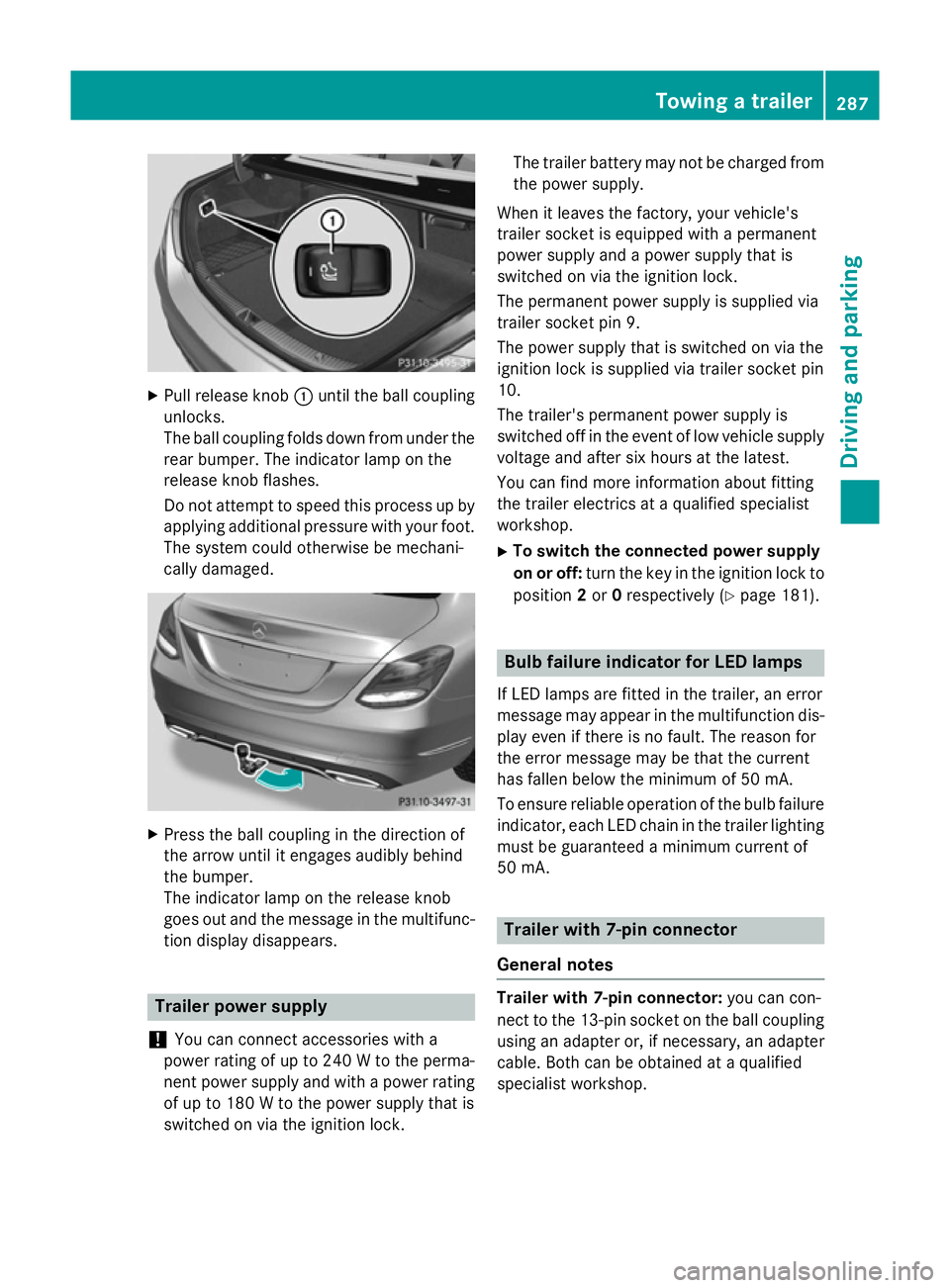
Pull release knob :until the ball coupling
unlocks.
The ball coupling folds down from under the rear bumper. The indicator lamp on the
release knob flashes.
Do not attempt to speed this process up by
applying additional pressure with your foot. The system could otherwise be mechani-
cally damaged. X
Press the ball coupling in the direction of
the arrow until it engages audibly behind
the bumper.
The indicator lamp on the release knob
goes out and the message in the multifunc-
tion display disappears. Trailer power supply
! You can connect accessories with a
power rating of up to 240 W to the perma-
nent power supply and with a power rating of up to 180 W to the power supply that is
switched on via the ignition lock. The trailer battery may not be charged from
the power supply.
When it leaves the factory, your vehicle's
trailer socket is equipped with a permanent
power supply and a power supply that is
switched on via the ignition lock.
The permanent power supply is supplied via
trailer socket pin 9.
The power supply that is switched on via the
ignition lock is supplied via trailer socket pin
10.
The trailer's permanent power supply is
switched off in the event of low vehicle supply
voltage and after six hours at the latest.
You can find more information about fitting
the trailer electrics at a qualified specialist
workshop.
X To switch the connected power supply
on or off: turn the key in the ignition lock to
position 2or 0respectively (Y page 181). Bulb failure indicator for LED lamps
If LED lamps are fitted in the trailer, an error
message may appear in the multifunction dis-
play even if there is no fault. The reason for
the error message may be that the current
has fallen below the minimum of 50 mA.
To ensure reliable operation of the bulb failure indicator, each LED chain in the trailer lighting
must be guaranteed a minimum current of
50 mA. Trailer with 7-pin connector
General notes Trailer with 7-pin connector:
you can con-
nect to the 13-pin socket on the ball coupling
using an adapter or, if necessary, an adapter
cable. Both can be obtained at a qualified
specialist workshop. Towing a trailer
287Driving and parking Z
Page 306 of 489
R
disc (CD/DVD)
R memory card (SD/SDHC)
R MEDIA REGISTER
R USB storage device
R Bluetooth ®
audio device
Observe the additional information on media
support and on media mode in the separate
Audio 20 or COMAND Online operating
instructions.
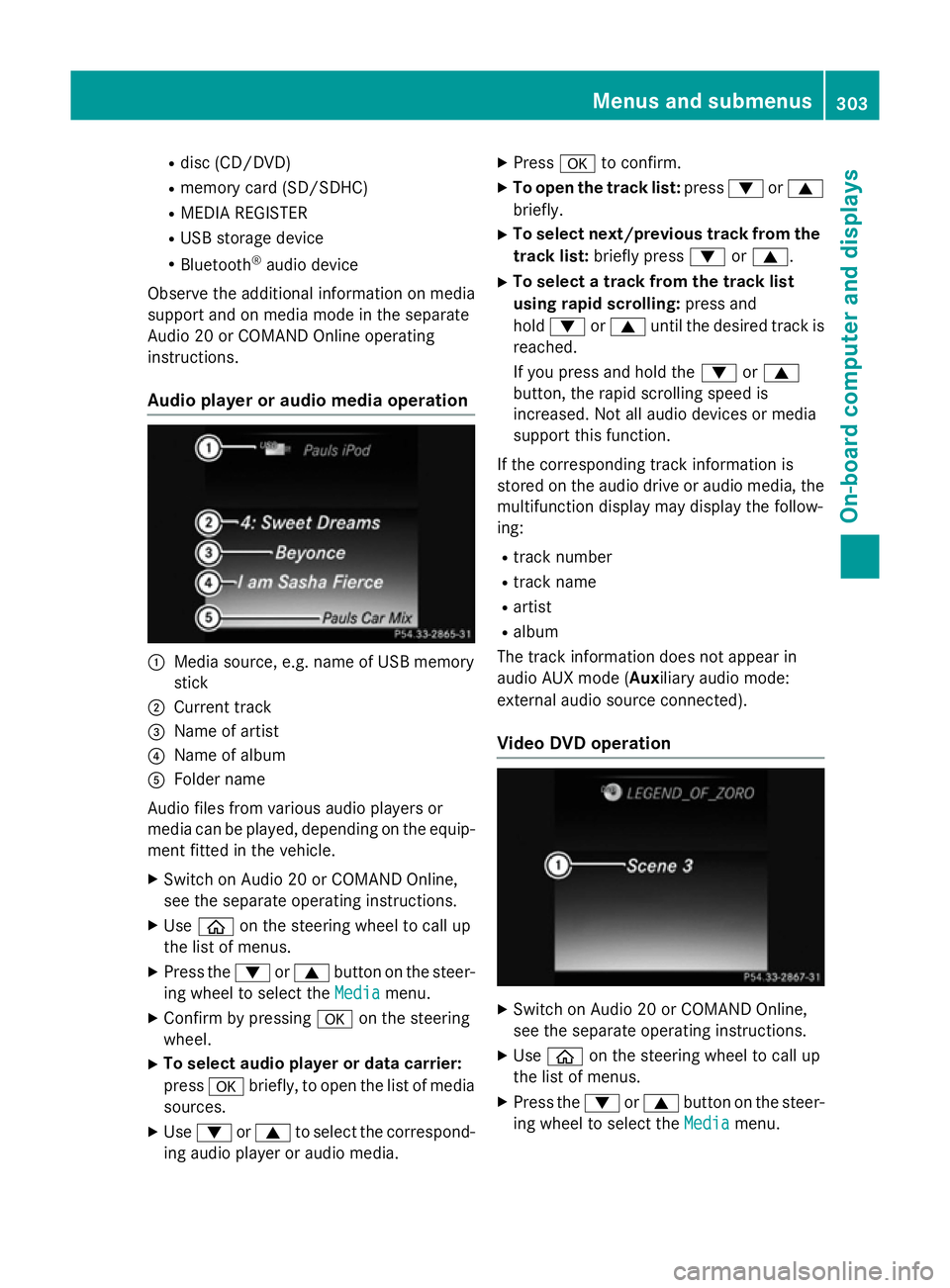
Audio player or audio media operation :
Media source, e.g. name of USB memory
stick
; Current track
= Name of artist
? Name of album
A Folder name
Audio files from various audio players or
media can be played, depending on the equip-
ment fitted in the vehicle.
X Switch on Audio 20 or COMAND Online,
see the separate operating instructions.
X Use ò on the steering wheel to call up
the list of menus.
X Press the :or9 button on the steer-
ing wheel to select the Media
Media menu.
X Confirm by pressing aon the steering
wheel.
X To select audio player or data carrier:
press abriefly, to open the list of media
sources.
X Use : or9 to select the correspond-
ing audio player or audio media. X
Press ato confirm.
X To open the track list: press:or9
briefly.
X To select next/previous track from the
track list: briefly press :or9.
X To select a track from the track list
using rapid scrolling: press and
hold : or9 until the desired track is
reached.
If you press and hold the :or9
button, the rapid scrolling speed is
increased. Not all audio devices or media
support this function.
If the corresponding track information is
stored on the audio drive or audio media, the multifunction display may display the follow-
ing:
R track number
R track name
R artist
R album
The track information does not appear in
audio AUX mode (Auxiliary audio mode:
external audio source connected).
Video DVD operation X
Switch on Audio 20 or COMAND Online,
see the separate operating instructions.
X Use ò on the steering wheel to call up
the list of menus.
X Press the :or9 button on the steer-
ing wheel to select the Media Mediamenu. Menus and submenus
303On-board computer and displays Z
Page 307 of 489
X
Confirm by pressing aon the steering
wheel.
X To select DVD single drive or data car-
rier: press abriefly, to open the list of
media sources.
X Use : or9 to select the correspond-
ing DVD player or DVD media.
X Press ato confirm.
X To open the scene list: press:or
9 briefly.
X To select the next or previous scene
from the scene list: briefly press:or
9.
X To select a scene from the scene list
using rapid scrolling: press and
hold : or9 until desired scene :is
reached.
X Press ato confirm your selection.
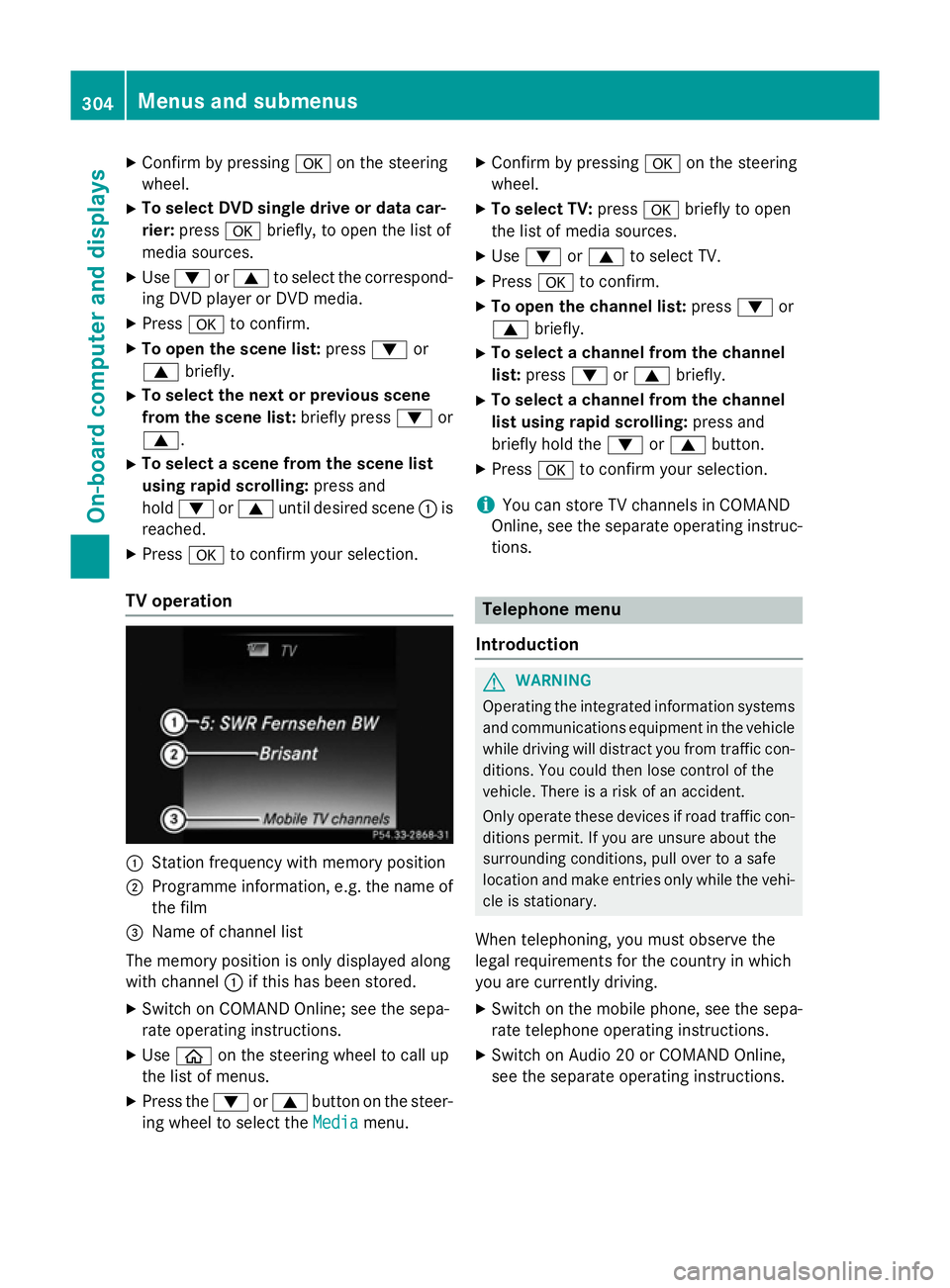
TV operation :
Station frequency with memory position
; Programme information, e.g. the name of
the film
= Name of channel list
The memory position is only displayed along
with channel :if this has been stored.
X Switch on COMAND Online; see the sepa-
rate operating instructions.
X Use ò on the steering wheel to call up
the list of menus.
X Press the :or9 button on the steer-
ing wheel to select the Media
Media menu. X
Confirm by pressing aon the steering
wheel.
X To select TV: pressabriefly to open
the list of media sources.
X Use : or9 to select TV.
X Press ato confirm.
X To open the channel list: press:or
9 briefly.
X To select a channel from the channel
list: press :or9 briefly.
X To select a channel from the channel
list using rapid scrolling: press and
briefly hold the :or9 button.
X Press ato confirm your selection.
i You can store TV channels in COMAND
Online, see the separate operating instruc-
tions. Telephone menu
Introduction G
WARNING
Operating the integrated information systems and communications equipment in the vehicle
while driving will distract you from traffic con-
ditions. You could then lose control of the
vehicle. There is a risk of an accident.
Only operate these devices if road traffic con-
ditions permit. If you are unsure about the
surrounding conditions, pull over to a safe
location and make entries only while the vehi-
cle is stationary.
When telephoning, you must observe the
legal requirements for the country in which
you are currently driving. X Switch on the mobile phone, see the sepa-
rate telephone operating instructions.
X Switch on Audio 20 or COMAND Online,
see the separate operating instructions. 304
Menus and submenusOn-board computer and displays
Page 310 of 489
Displaying the coolant temperature
The coolant temperature is also shown in the
instrument cluster in the rev counter.
Observe the notes on coolant temperature
(Y page 293).
X Use ò on the steering wheel to call up
the list of menus.
X Press the :or9 button on the steer-
ing wheel to select the Service Servicemenu.
X Confirm by pressing aon the steering
wheel.
X Use : or9 to select the Coolant Coolant
submenu.
X Press ato confirm your selection.
The coolant temperature is shown in a bar
display.
Displaying AdBlue ®
level and range This menu is only available in BlueTEC vehi-
cles.
X Use ò on the steering wheel to call up
the list of menus.
X Press the :or9 button on the steer-
ing wheel to select the Service
Service menu.
X Confirm by pressing aon the steering
wheel.
X Select the AdBlue AdBluesubmenu using :or
9.
X Press ato confirm your selection.
The range and AdBlue ®
level appear in a bar
graph in the multifunction display.
Observe the information and notes on "Refu- elling" (Y page 204). Settings menu
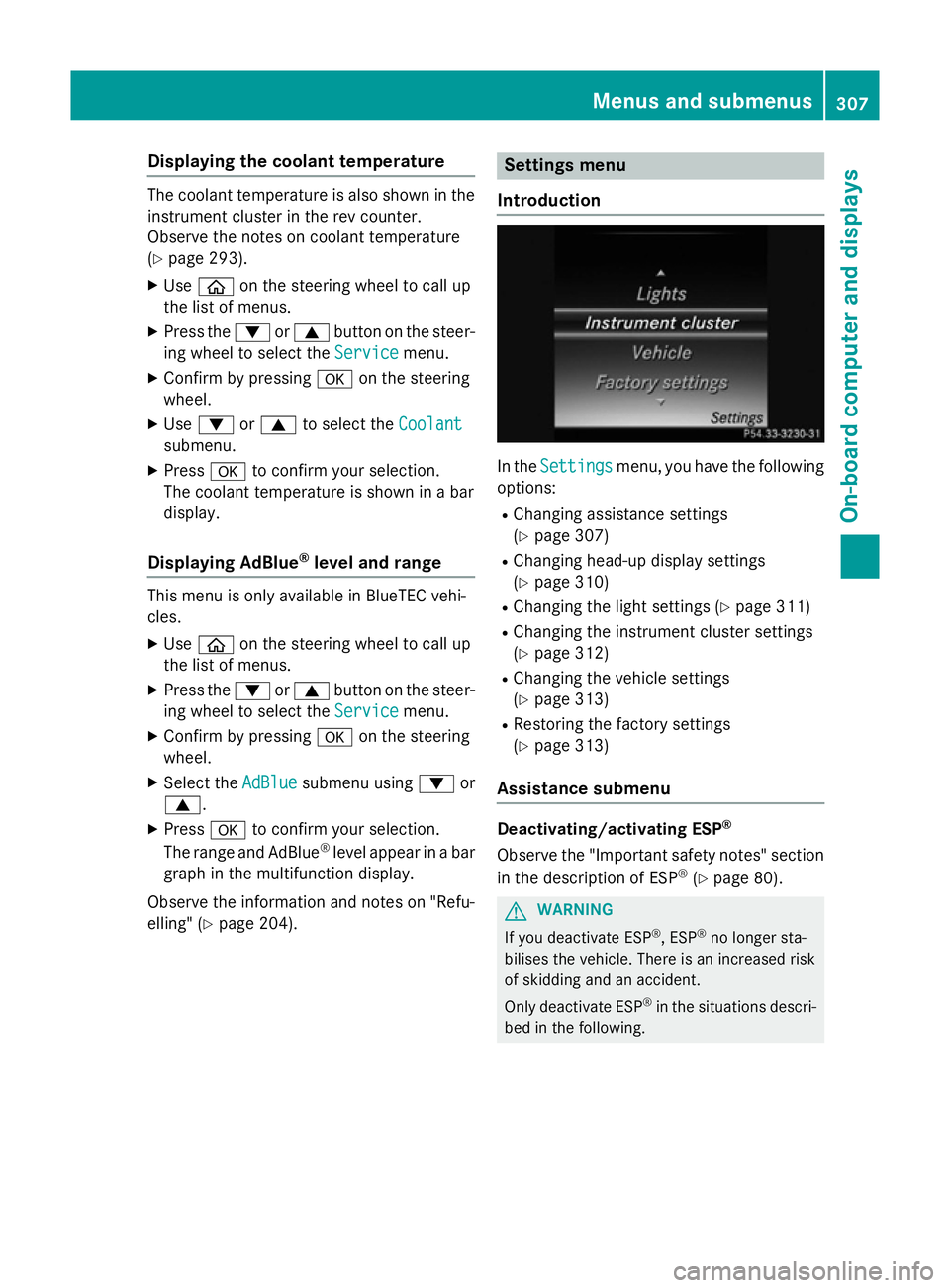
Introduction In the
Settings
Settings menu, you have the following
options:
R Changing assistance settings
(Y page 307)
R Changing head-up display settings
(Y page 310)
R Changing the light settings (Y page 311)
R Changing the instrument cluster settings
(Y page 312)
R Changing the vehicle settings
(Y page 313)
R Restoring the factory settings
(Y page 313)
Assistance submenu Deactivating/activating ESP
®
Observe the "Important safety notes" section
in the description of ESP ®
(Y page 80). G
WARNING
If you deactivate ESP ®
, ESP ®
no longer sta-
bilises the vehicle. There is an increased risk
of skidding and an accident.
Only deactivate ESP ®
in the situations descri-
bed in the following. Menus and submenus
307On-boardcompu ter and displays Z
Page 311 of 489
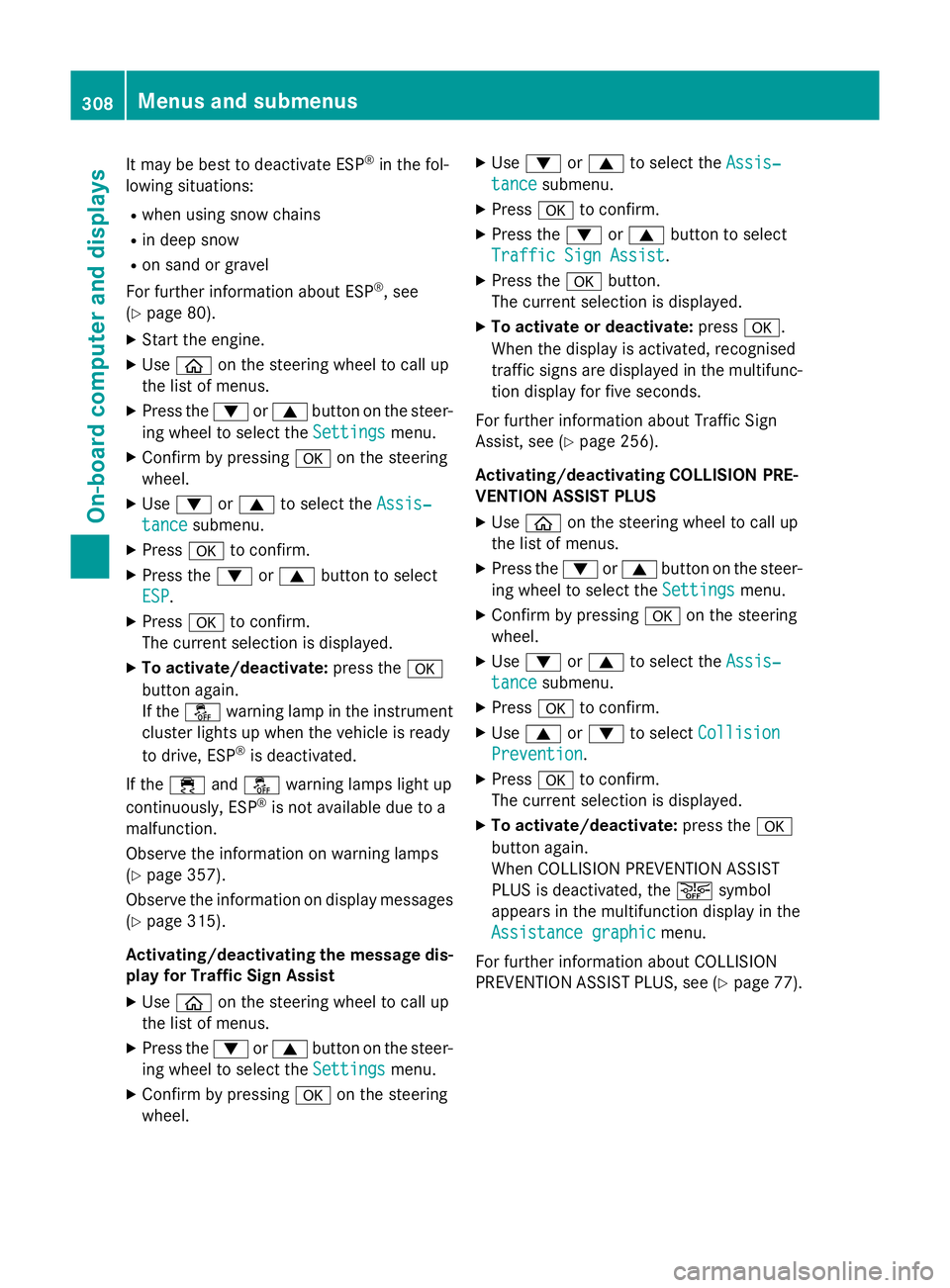
It may be best to deactivate ESP
®
in the fol-
lowing situations:
R when using snow chains
R in deep snow
R on sand or gravel
For further information about ESP ®
, see
(Y page 80).
X Start the engine.
X Use ò on the steering wheel to call up
the list of menus.
X Press the :or9 button on the steer-
ing wheel to select the Settings
Settings menu.
X Confirm by pressing aon the steering
wheel.
X Use : or9 to select the Assis‐
Assis‐
tance
tance submenu.
X Press ato confirm.
X Press the :or9 button to select
ESP
ESP.
X Press ato confirm.
The current selection is displayed.
X To activate/deactivate: press thea
button again.
If the å warning lamp in the instrument
cluster lights up when the vehicle is ready
to drive, ESP ®
is deactivated.
If the ÷ andå warning lamps light up
continuously, ESP ®
is not available due to a
malfunction.
Observe the information on warning lamps
(Y page 357).
Observe the information on display messages
(Y page 315).
Activating/deactivating the message dis-
play for Traffic Sign Assist
X Use ò on the steering wheel to call up
the list of menus.
X Press the :or9 button on the steer-
ing wheel to select the Settings
Settings menu.
X Confirm by pressing aon the steering
wheel. X
Use : or9 to select the Assis‐ Assis‐
tance tance submenu.
X Press ato confirm.
X Press the :or9 button to select
Traffic Sign Assist
Traffic Sign Assist.
X Press the abutton.
The current selection is displayed.
X To activate or deactivate: pressa.
When the display is activated, recognised
traffic signs are displayed in the multifunc- tion display for five seconds.
For further information about Traffic Sign
Assist, see (Y page 256).
Activating/deactivating COLLISION PRE-
VENTION ASSIST PLUS
X Use ò on the steering wheel to call up
the list of menus.
X Press the :or9 button on the steer-
ing wheel to select the Settings
Settings menu.
X Confirm by pressing aon the steering
wheel.
X Use : or9 to select the Assis‐ Assis‐
tance
tance submenu.
X Press ato confirm.
X Use 9 or: to select Collision
Collision
Prevention
Prevention.
X Press ato confirm.
The current selection is displayed.
X To activate/deactivate: press thea
button again.
When COLLISION PREVENTION ASSIST
PLUS is deactivated, the æsymbol
appears in the multifunction display in the
Assistance graphic Assistance graphic menu.
For further information about COLLISION
PREVENTION ASSIST PLUS, see (Y page 77).308
Menus and submenusOn-board computer and displays
Page 317 of 489
Display messages
Introduction
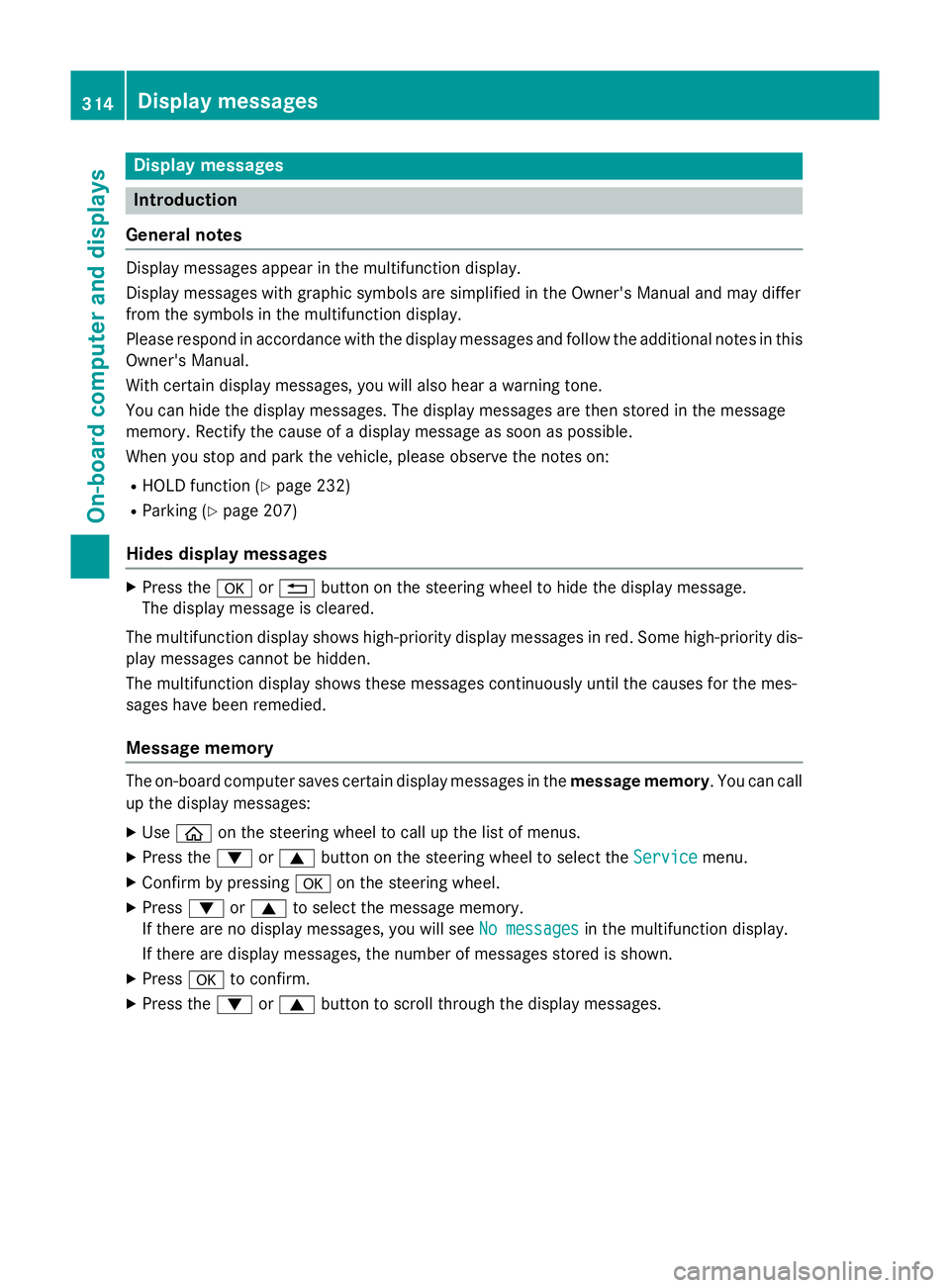
General notes Display messages appear in the multifunction display.
Display messages with graphic symbols are simplified in the Owner's Manual and may differ
from the symbols in the multifunction display.
Please respond in accordance with the display messages and follow the additional notes in this Owner's Manual.
With certain display messages, you will also hear a warning tone.
You can hide the display messages. The display messages are then stored in the message
memory. Rectify the cause of a display message as soon as possible.
When you stop and park the vehicle, please observe the notes on:
R HOLD function (Y page 232)
R Parking (Y page 207)
Hides display messages X
Press the aor% button on the steering wheel to hide the display message.
The display message is cleared.
The multifunction display shows high-priority display messages in red. Some high-priority dis- play messages cannot be hidden.
The multifunction display shows these messages continuously until the causes for the mes-
sages have been remedied.
Message memory The on-board computer saves certain display messages in the
message memory. You can call
up the display messages:
X Use ò on the steering wheel to call up the list of menus.
X Press the :or9 button on the steering wheel to select the Service
Service menu.
X Confirm by pressing aon the steering wheel.
X Press :or9 to select the message memory.
If there are no display messages, you will see No messages
No messages in the multifunction display.
If there are display messages, the number of messages stored is shown.
X Press ato confirm.
X Press the :or9 button to scroll through the display messages. 314
Display
messagesOn-board computer and displays
Page 318 of 489
Safety systems
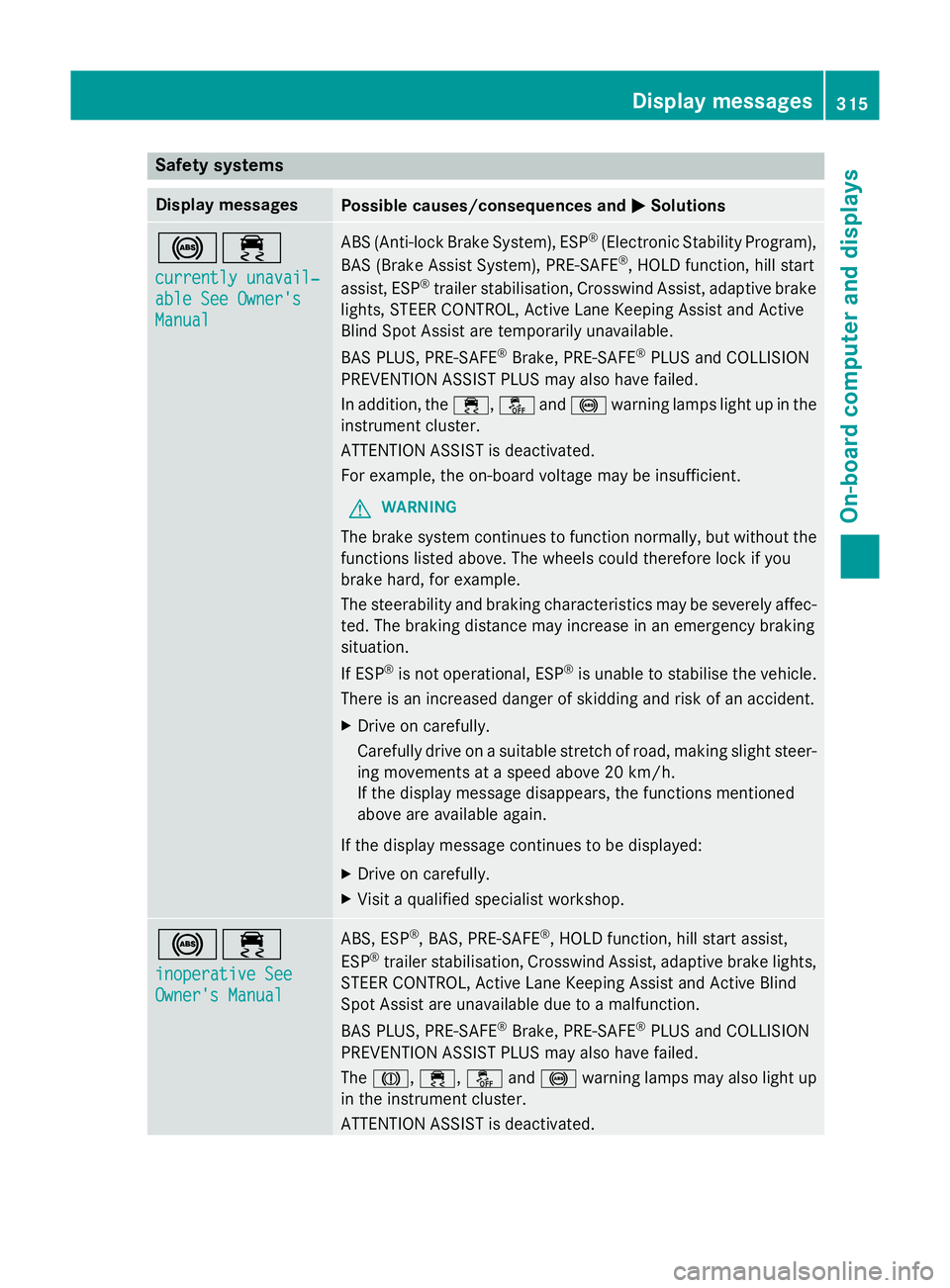
Display messages
Possible causes/consequences and
M
MSolutions !÷
currently unavail‐ currently unavail‐
able See Owner's able See Owner's
Manual Manual ABS (Anti-lock Brake System), ESP
®
(Electronic Stability Program),
BAS (Brake Assist System), PRE‑ SAFE®
, HOLD function, hill start
assist, ESP ®
trailer stabilisation, Crosswind Assist, adaptive brake
lights, STEER CONTROL, Active Lane Keeping Assist and Active
Blind Spot Assist are temporarily unavailable.
BAS PLUS, PRE‑SAFE ®
Brake, PRE‑SAFE ®
PLUS and COLLISION
PREVENTION ASSIST PLUS may also have failed.
In addition, the ÷,åand! warning lamps light up in the
instrument cluster.
ATTENTION ASSIST is deactivated.
For example, the on-board voltage may be insufficient.
G WARNING
The brake system continues to function normally, but without the functions listed above. The wheels could therefore lock if you
brake hard, for example.
The steerability and braking characteristics may be severely affec-ted. The braking distance may increase in an emergency braking
situation.
If ESP ®
is not operational, ESP ®
is unable to stabilise the vehicle.
There is an increased danger of skidding and risk of an accident.
X Drive on carefully.
Carefully drive on a suitable stretch of road, making slight steer-
ing movements at a speed above 20 km/h.
If the display message disappears, the functions mentioned
above are available again.
If the display message continues to be displayed:
X Drive on carefully.
X Visit a qualified specialist workshop. !÷
inoperative See inoperative See
Owner's Manual Owner's Manual ABS, ESP
®
, BAS, PRE‑SAFE ®
, HOLD function, hill start assist,
ESP ®
trailer stabilisation, Crosswind Assist, adaptive brake lights,
STEER CONTROL, Active Lane Keeping Assist and Active Blind
Spot Assist are unavailable due to a malfunction.
BAS PLUS, PRE‑SAFE ®
Brake, PRE‑SAFE ®
PLUS and COLLISION
PREVENTION ASSIST PLUS may also have failed.
The J, ÷, åand! warning lamps may also light up
in the instrument cluster.
ATTENTION ASSIST is deactivated. Display messages
315On-board computer and displays Z
Page 319 of 489
Display messages
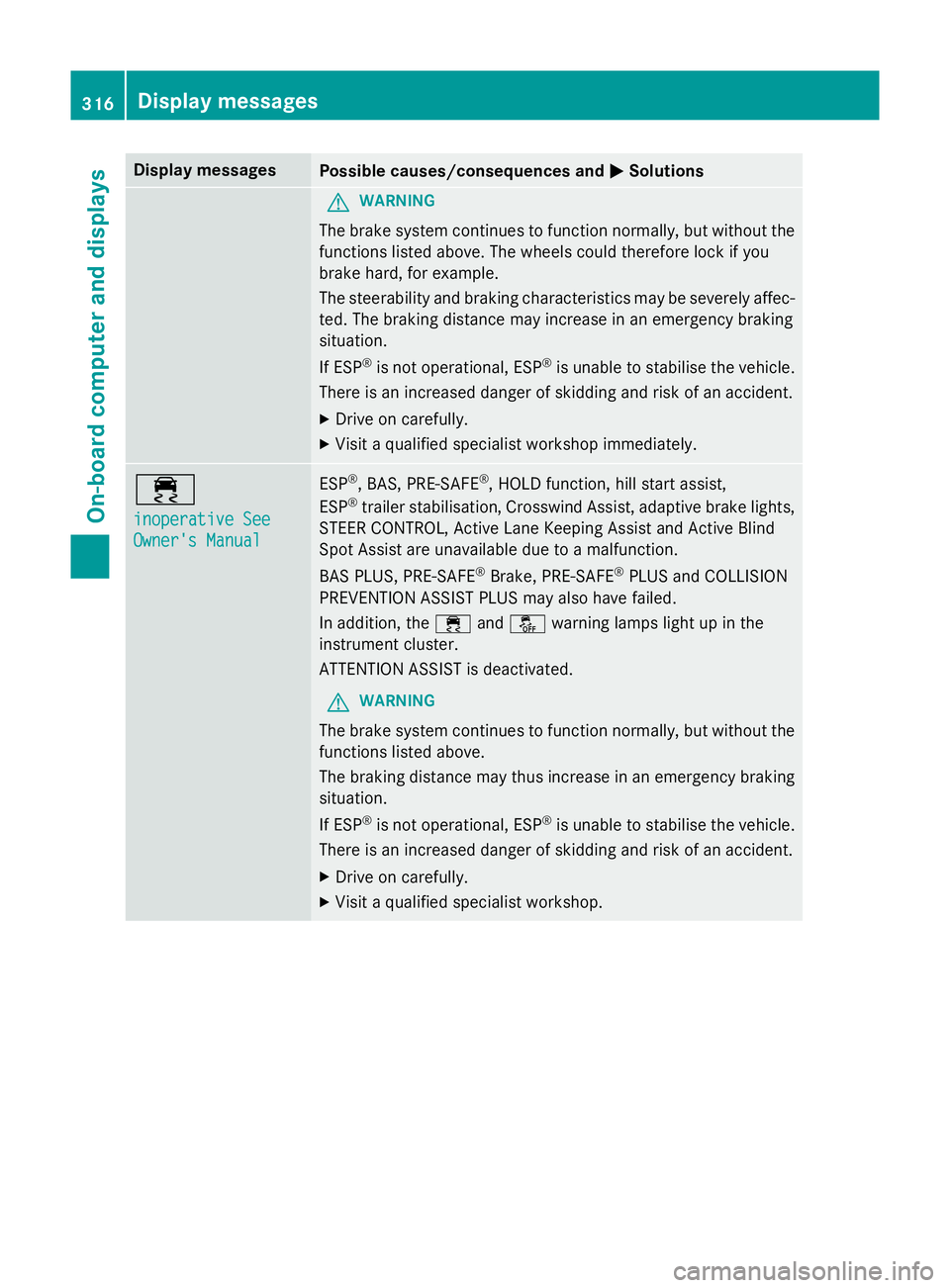
Possible causes/consequences and
M
MSolutions G
WARNING
The brake system continues to function normally, but without the functions listed above. The wheels could therefore lock if you
brake hard, for example.
The steerability and braking characteristics may be severely affec- ted. The braking distance may increase in an emergency braking
situation.
If ESP ®
is not operational, ESP ®
is unable to stabilise the vehicle.
There is an increased danger of skidding and risk of an accident.
X Drive on carefully.
X Visit a qualified specialist workshop immediately. ÷
inoperative See inoperative See
Owner's Manual Owner's Manual ESP
®
, BAS, PRE ‑SAFE®
, HOLD function, hill start assist,
ESP ®
trailer stabilisation, Crosswind Assist, adaptive brake lights,
STEER CONTROL, Active Lane Keeping Assist and Active Blind
Spot Assist are unavailable due to a malfunction.
BAS PLUS, PRE‑SAFE ®
Brake, PRE ‑SAFE®
PLUS and COLLISION
PREVENTION ASSIST PLUS may also have failed.
In addition, the ÷andå warning lamps light up in the
instrument cluster.
ATTENTION ASSIST is deactivated.
G WARNING
The brake system continues to function normally, but without the functions listed above.
The braking distance may thus increase in an emergency braking
situation.
If ESP ®
is not operational, ESP ®
is unable to stabilise the vehicle.
There is an increased danger of skidding and risk of an accident.
X Drive on carefully.
X Visit a qualified specialist workshop. 316
Display
messagesOn-board computer and displays
Page 320 of 489
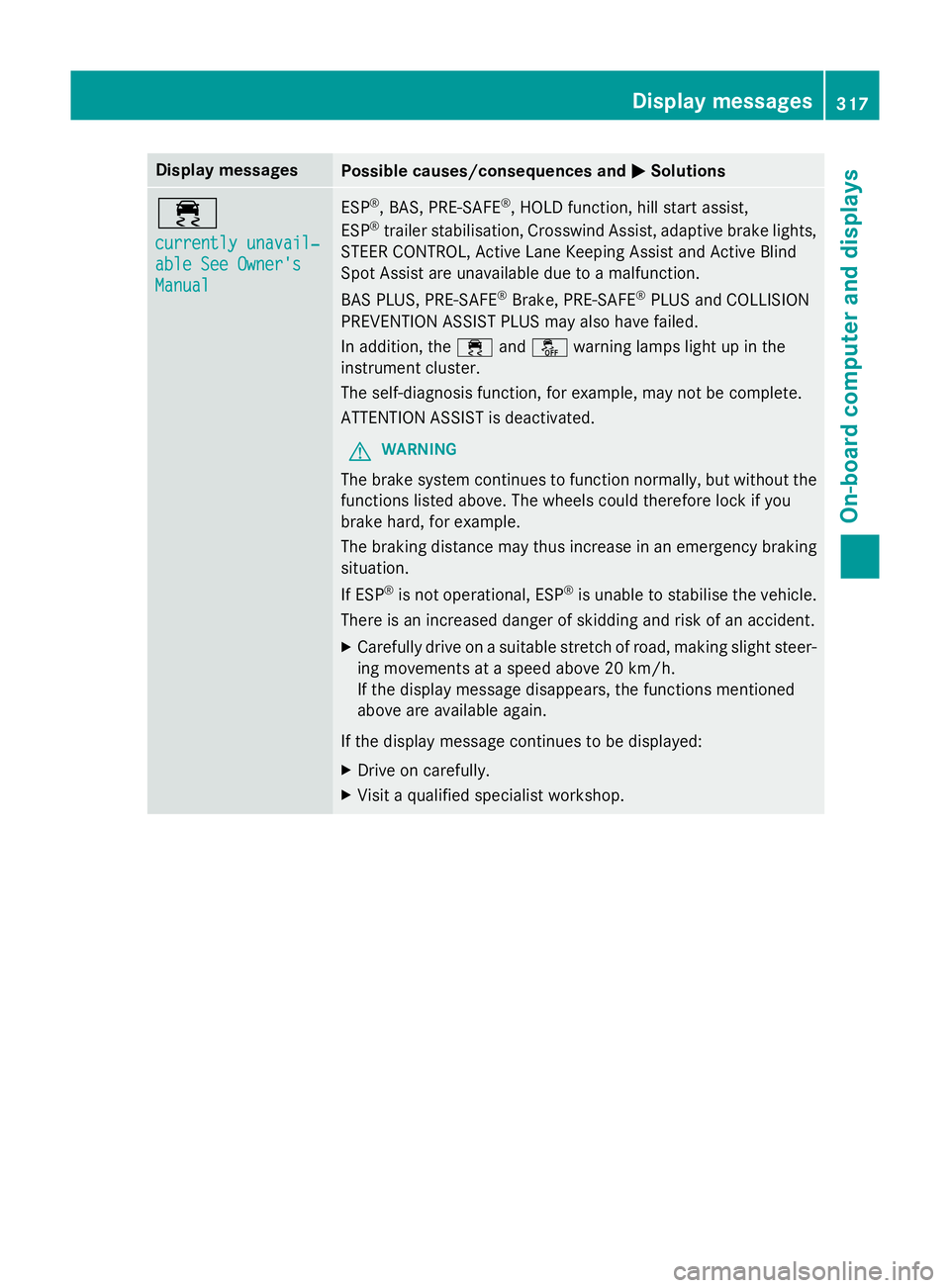
Display messages
Possible causes/consequences and
M
MSolutions ÷
currently unavail‐ currently unavail‐
able See Owner's able See Owner's
Manual Manual ESP
®
, BAS, PRE ‑SAFE®
, HOLD function, hill start assist,
ESP ®
trailer stabilisation, Crosswind Assist, adaptive brake lights,
STEER CONTROL, Active Lane Keeping Assist and Active Blind
Spot Assist are unavailable due to a malfunction.
BAS PLUS, PRE‑SAFE ®
Brake, PRE ‑SAFE®
PLUS and COLLISION
PREVENTION ASSIST PLUS may also have failed.
In addition, the ÷andå warning lamps light up in the
instrument cluster.
The self-diagnosis function, for example, may not be complete.
ATTENTION ASSIST is deactivated.
G WARNING
The brake system continues to function normally, but without the functions listed above. The wheels could therefore lock if you
brake hard, for example.
The braking distance may thus increase in an emergency braking
situation.
If ESP ®
is not operational, ESP ®
is unable to stabilise the vehicle.
There is an increased danger of skidding and risk of an accident.
X Carefully drive on a suitable stretch of road, making slight steer-
ing movements at a speed above 20 km/h.
If the display message disappears, the functions mentioned
above are available again.
If the display message continues to be displayed:
X Drive on carefully.
X Visit a qualified specialist workshop. Display
messages
317On-board computer and displays Z
Page 321 of 489
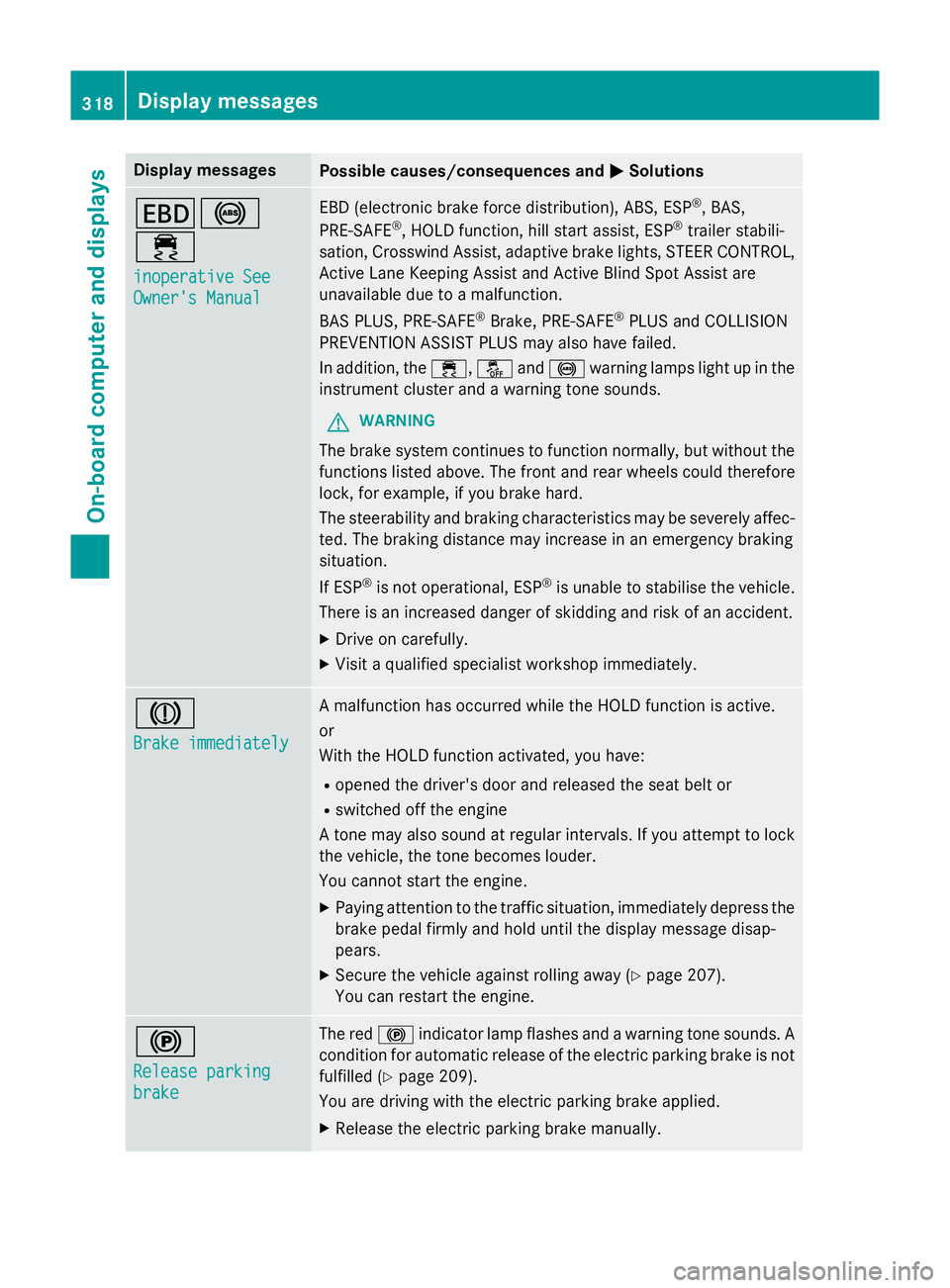
Display messages
Possible causes/consequences and
M
MSolutions T!
÷
inoperative See inoperative See
Owner's Manual Owner's Manual EBD (electronic brake force distribution), ABS, ESP
®
, BAS,
PRE ‑SAFE ®
, HOLD function, hill start assist, ESP ®
trailer stabili-
sation, Crosswind Assist, adaptive brake lights, STEER CONTROL, Active Lane Keeping Assist and Active Blind Spot Assist are
unavailable due to a malfunction.
BAS PLUS, PRE‑SAFE ®
Brake, PRE ‑SAFE®
PLUS and COLLISION
PREVENTION ASSIST PLUS may also have failed.
In addition, the ÷,åand! warning lamps light up in the
instrument cluster and a warning tone sounds.
G WARNING
The brake system continues to function normally, but without the functions listed above. The front and rear wheels could therefore
lock, for example, if you brake hard.
The steerability and braking characteristics may be severely affec-ted. The braking distance may increase in an emergency braking
situation.
If ESP ®
is not operational, ESP ®
is unable to stabilise the vehicle.
There is an increased danger of skidding and risk of an accident.
X Drive on carefully.
X Visit a qualified specialist workshop immediately. J
Brake immediately Brake immediately A malfunction has occurred while the HOLD function is active.
or
With the HOLD function activated, you have:
R opened the driver's door and released the seat belt or
R switched off the engine
A tone may also sound at regular intervals. If you attempt to lock the vehicle, the tone becomes louder.
You cannot start the engine.
X Paying attention to the traffic situation, immediately depress the
brake pedal firmly and hold until the display message disap-
pears.
X Secure the vehicle against rolling away (Y page 207).
You can restart the engine. !
Release parking Release parking
brake brake The red
!indicator lamp flashes and a warning tone sounds. A
condition for automatic release of the electric parking brake is not
fulfilled (Y page 209).
You are driving with the electric parking brake applied.
X Release the electric parking brake manually. 318
Display
messagesOn-board computer and displays