warning MERCEDES-BENZ C-CLASS SALOON 2014 Owners Manual
[x] Cancel search | Manufacturer: MERCEDES-BENZ, Model Year: 2014, Model line: C-CLASS SALOON, Model: MERCEDES-BENZ C-CLASS SALOON 2014Pages: 489, PDF Size: 14.88 MB
Page 329 of 489
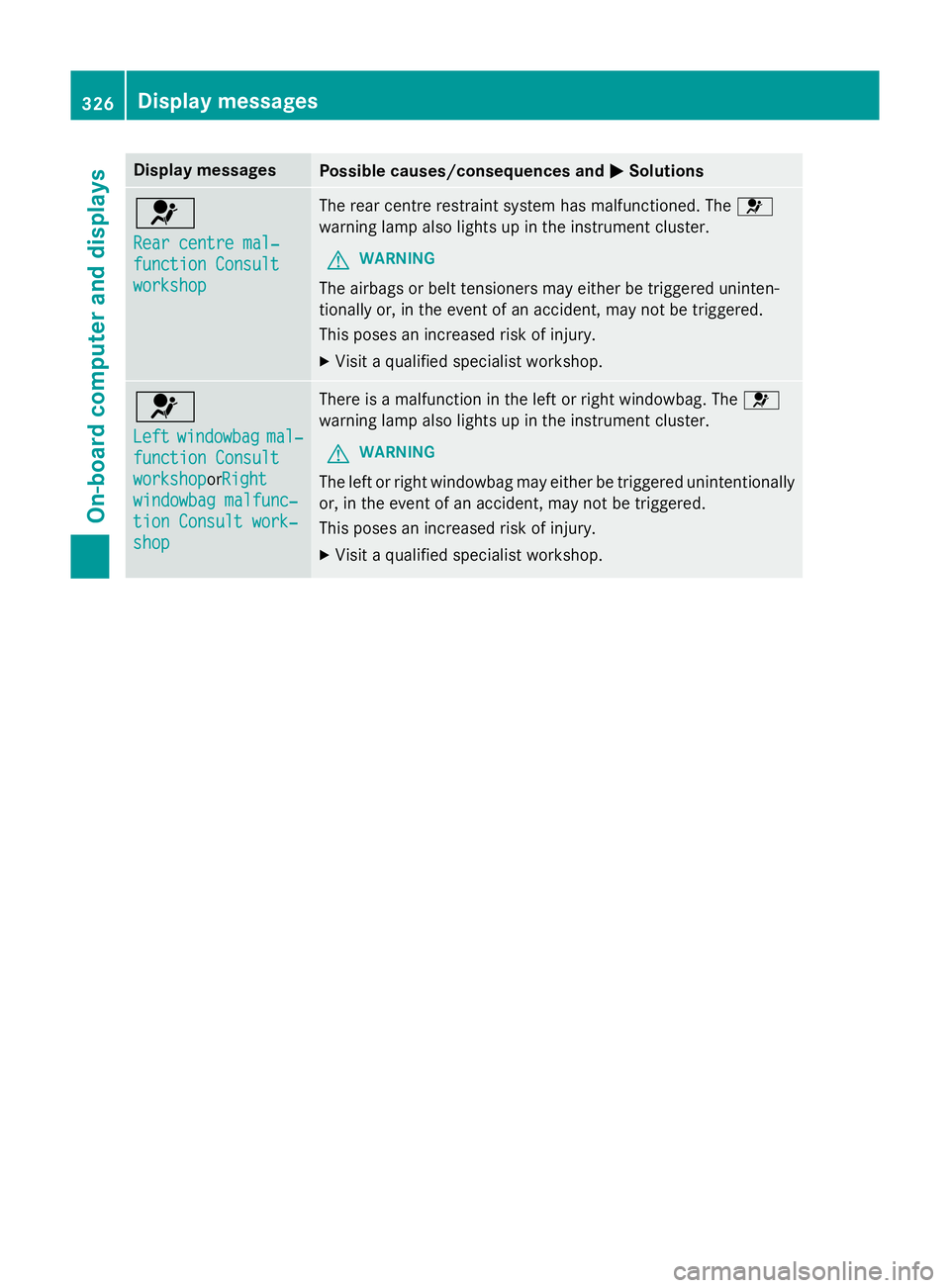
Display messages
Possible causes/consequences and
M
MSolutions 6
Rear centre mal‐ Rear centre mal‐
function Consult function Consult
workshop workshop The rear centre restraint system has malfunctioned. The
6
warning lamp also lights up in the instrument cluster.
G WARNING
The airbags or belt tensioners may either be triggered uninten-
tionally or, in the event of an accident, may not be triggered.
This poses an increased risk of injury. X Visit a qualified specialist workshop. 6
Left Left
windowbag
windowbag mal‐
mal‐
function Consult
function Consult
workshop workshoporRight Right
windowbag malfunc‐
windowbag malfunc‐
tion Consult work‐ tion Consult work‐
shop shop There is a malfunction in the left or right windowbag. The
6
warning lamp also lights up in the instrument cluster.
G WARNING
The left or right windowbag may either be triggered unintentionally or, in the event of an accident, may not be triggered.
This poses an increased risk of injury.
X Visit a qualified specialist workshop. 326
Display
messagesOn-board computer and displays
Page 330 of 489
Display messages
Possible causes/consequences and
M
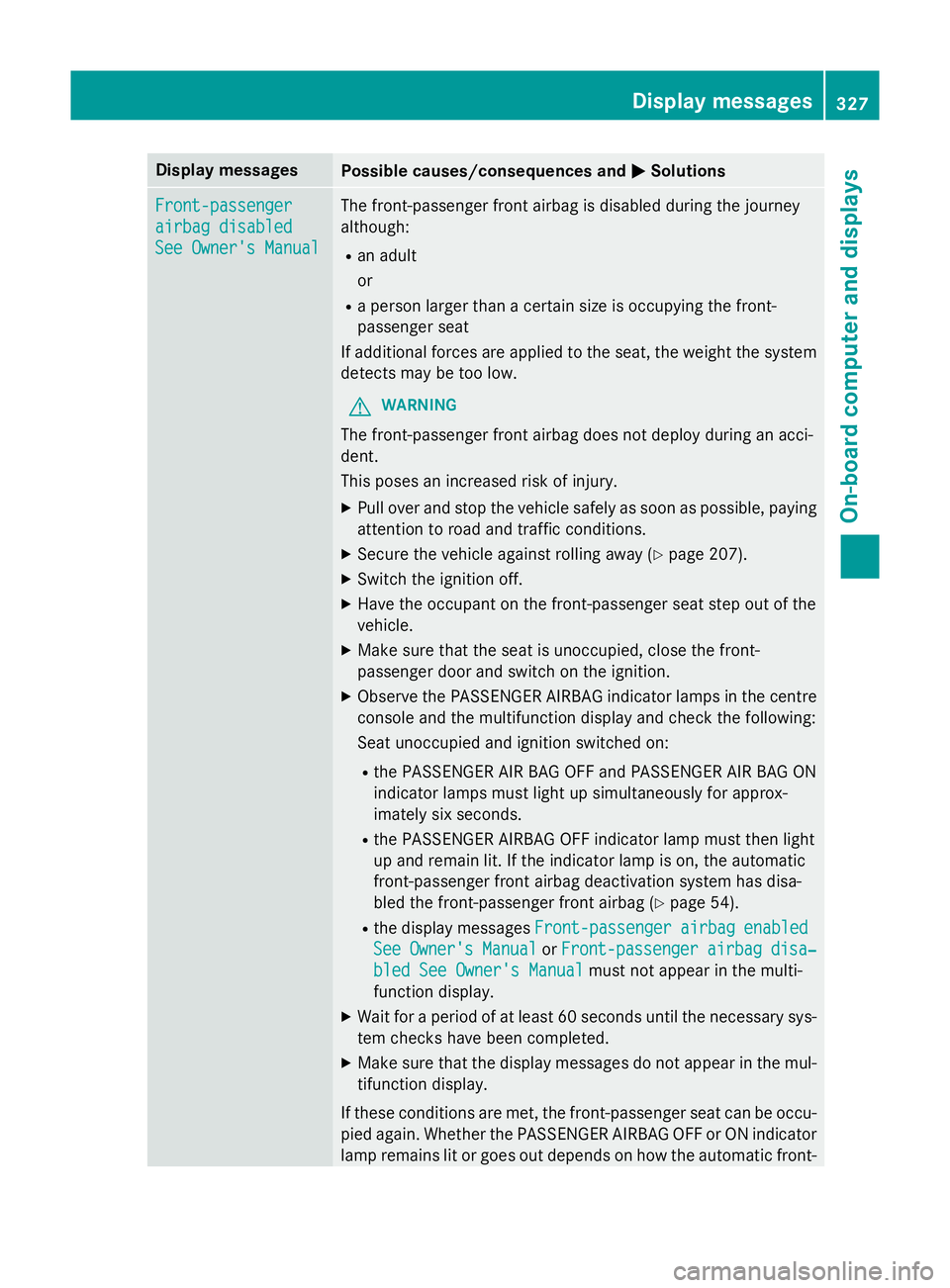
MSolutions Front-passenger
Front-passenger
airbag disabled airbag disabled
See Owner's Manual See Owner's Manual The front-passenger front airbag is disabled during the journey
although:
R an adult
or
R a person larger than a certain size is occupying the front-
passenger seat
If additional forces are applied to the seat, the weight the system
detects may be too low.
G WARNING
The front-passenger front airbag does not deploy during an acci-
dent.
This poses an increased risk of injury. X Pull over and stop the vehicle safely as soon as possible, paying
attention to road and traffic conditions.
X Secure the vehicle against rolling away (Y page 207).
X Switch the ignition off.
X Have the occupant on the front-passenger seat step out of the
vehicle.
X Make sure that the seat is unoccupied, close the front-
passenger door and switch on the ignition.
X Observe the PASSENGER AIRBAG indicator lamps in the centre
console and the multifunction display and check the following:
Seat unoccupied and ignition switched on:
R the PASSENGER AIR BAG OFF and PASSENGER AIR BAG ON
indicator lamps must light up simultaneously for approx-
imately six seconds.
R the PASSENGER AIRBAG OFF indicator lamp must then light
up and remain lit. If the indicator lamp is on, the automatic
front-passenger front airbag deactivation system has disa-
bled the front-passenger front airbag (Y page 54).
R the display messages Front-passenger
Front-passenger airbag airbagenabled
enabled
See
See Owner's
Owner's Manual
ManualorFront-passenger
Front-passenger airbag
airbag disa‐
disa‐
bled See Owner's Manual
bled See Owner's Manual must not appear in the multi-
function display.
X Wait for a period of at least 60 seconds until the necessary sys-
tem checks have been completed.
X Make sure that the display messages do not appear in the mul-
tifunction display.
If these conditions are met, the front-passenger seat can be occu- pied again. Whether the PASSENGER AIRBAG OFF or ON indicator
lamp remains lit or goes out depends on how the automatic front- Display
messages
327On-board computer and displays Z
Page 331 of 489
Display messages
Possible causes/consequences and
M
MSolutions passenger front airbag deactivation system classifies the occu-
pant.
If the conditions are not met, the system is not operating correctly.
X Visit a qualified specialist workshop immediately.
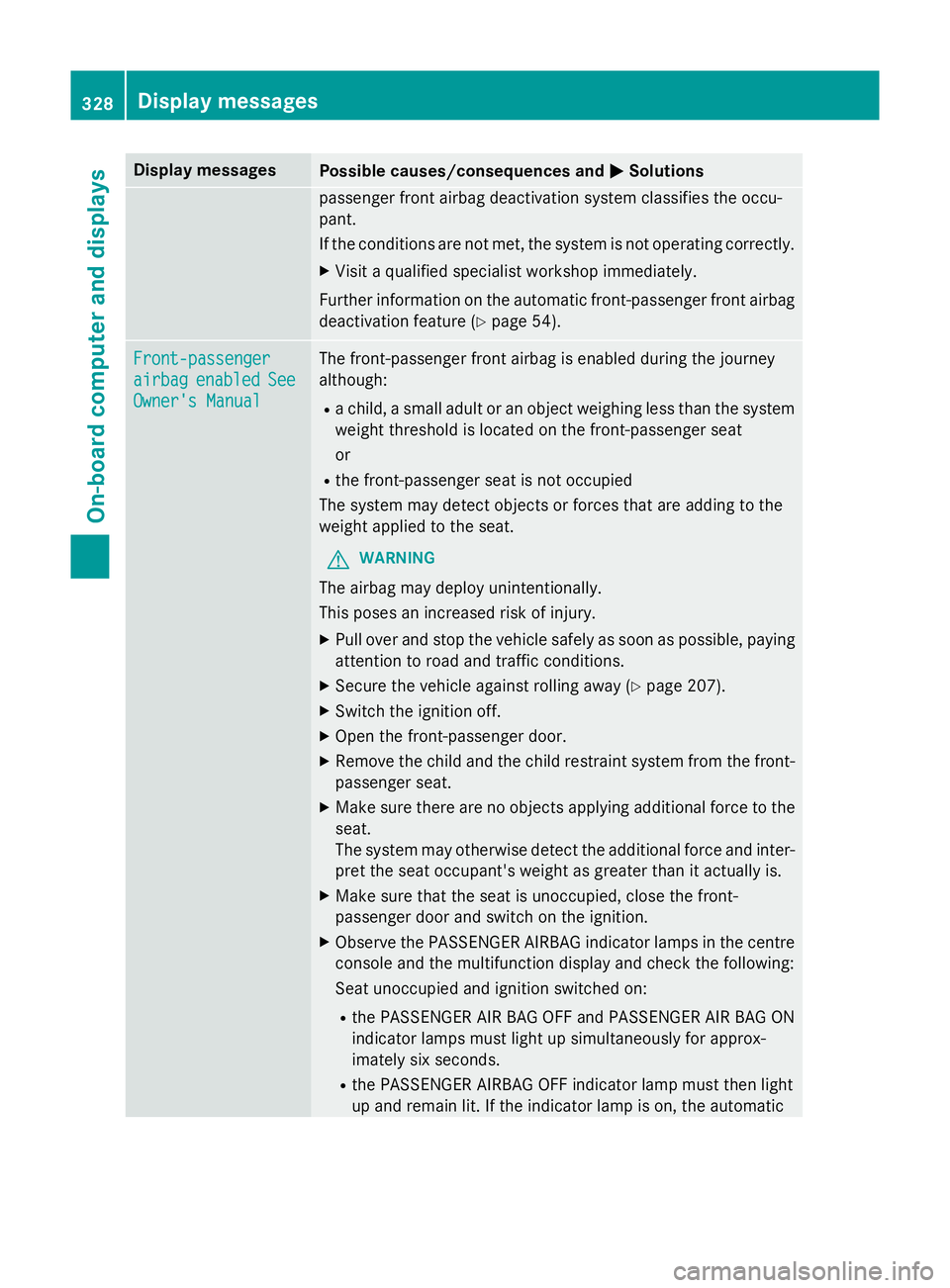
Further information on the automatic front-passenger front airbag deactivation feature (Y page 54).Front-passenger Front-passenger
airbag airbag
enabled
enabled See
See
Owner's Manual
Owner's Manual The front-passenger front airbag is enabled during the journey
although:
R a child, a small adult or an object weighing less than the system
weight threshold is located on the front-passenger seat
or
R the front-passenger seat is not occupied
The system may detect objects or forces that are adding to the
weight applied to the seat.
G WARNING
The airbag may deploy unintentionally.
This poses an increased risk of injury. X Pull over and stop the vehicle safely as soon as possible, paying
attention to road and traffic conditions.
X Secure the vehicle against rolling away (Y page 207).
X Switch the ignition off.
X Open the front-passenger door.
X Remove the child and the child restraint system from the front-
passenger seat.
X Make sure there are no objects applying additional force to the
seat.
The system may otherwise detect the additional force and inter- pret the seat occupant's weight as greater than it actually is.
X Make sure that the seat is unoccupied, close the front-
passenger door and switch on the ignition.
X Observe the PASSENGER AIRBAG indicator lamps in the centre
console and the multifunction display and check the following:
Seat unoccupied and ignition switched on:
R the PASSENGER AIR BAG OFF and PASSENGER AIR BAG ON
indicator lamps must light up simultaneously for approx-
imately six seconds.
R the PASSENGER AIRBAG OFF indicator lamp must then light
up and remain lit. If the indicator lamp is on, the automatic 328
Display
messagesOn-board computer and displays
Page 335 of 489
Display messages
Possible causes/consequences and
M
MSolutions b
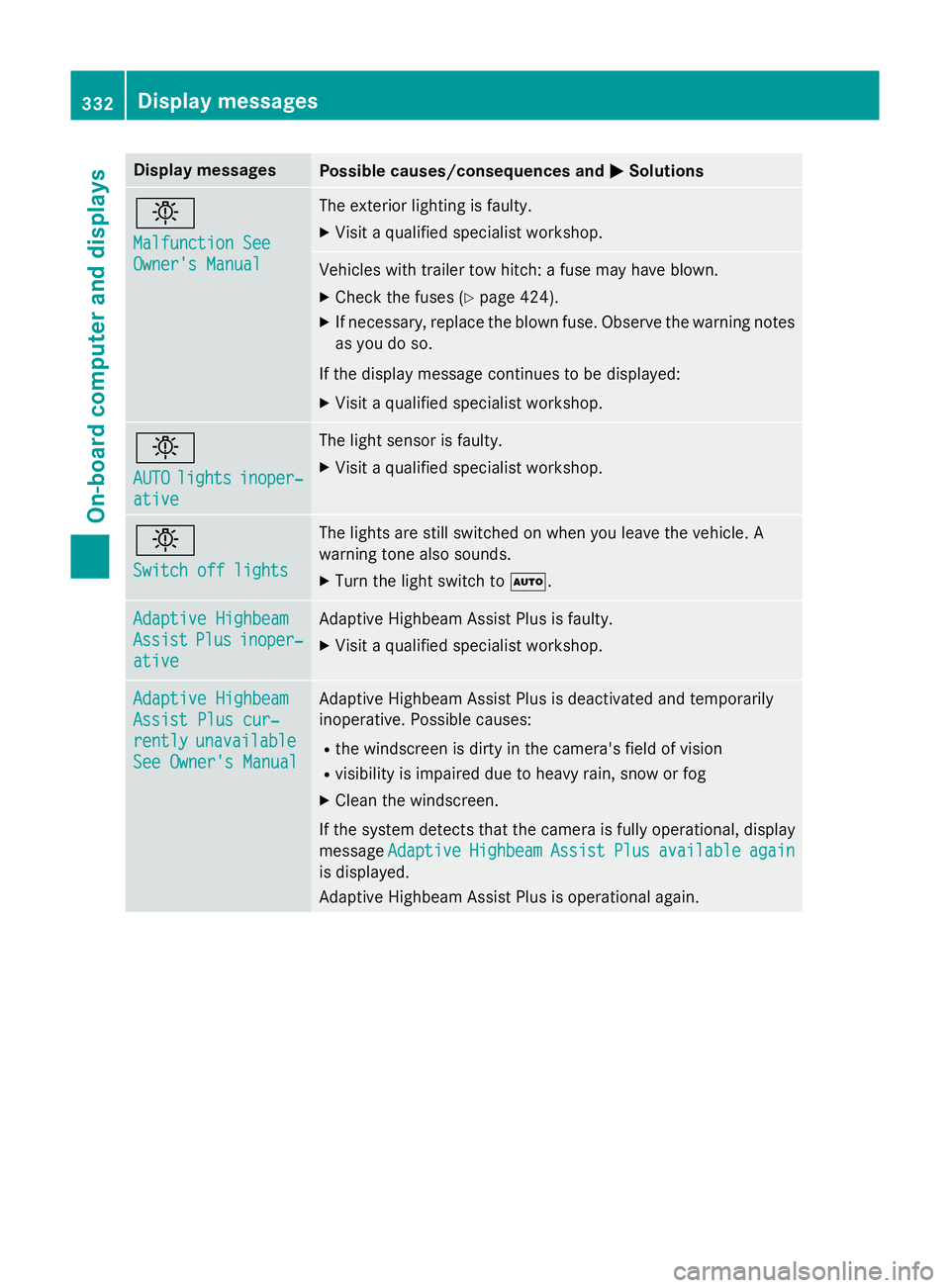
Malfunction See Malfunction See
Owner's Manual Owner's Manual The exterior lighting is faulty.
X Visit a qualified specialist workshop. Vehicles with trailer tow hitch: a fuse may have blown.
X Check the fuses (Y page 424).
X If necessary, replace the blown fuse. Observe the warning notes
as you do so.
If the display message continues to be displayed: X Visit a qualified specialist workshop. b
AUTO AUTO
lights
lights inoper‐
inoper‐
ative
ative The light sensor is faulty.
X Visit a qualified specialist workshop. b
Switch off lights Switch off lights The lights are still switched on when you leave the vehicle. A
warning tone also sounds.
X Turn the light switch to Ã.Adaptive Highbeam Adaptive Highbeam
Assist Assist
Plus
Plusinoper‐
inoper‐
ative
ative Adaptive Highbeam Assist Plus is faulty.
X Visit a qualified specialist workshop. Adaptive Highbeam
Adaptive Highbeam
Assist Plus cur‐ Assist Plus cur‐
rently rently
unavailable
unavailable
See Owner's Manual
See Owner's Manual Adaptive Highbeam Assist Plus is deactivated and temporarily
inoperative. Possible causes:
R the windscreen is dirty in the camera's field of vision
R visibility is impaired due to heavy rain, snow or fog
X Clean the windscreen.
If the system detects that the camera is fully operational, display
message Adaptive
Adaptive Highbeam
HighbeamAssist
Assist Plus
Plusavailable
available again
again
is displayed.
Adaptive Highbeam Assist Plus is operational again. 332
Display
messagesOn-board computer and displays
Page 336 of 489
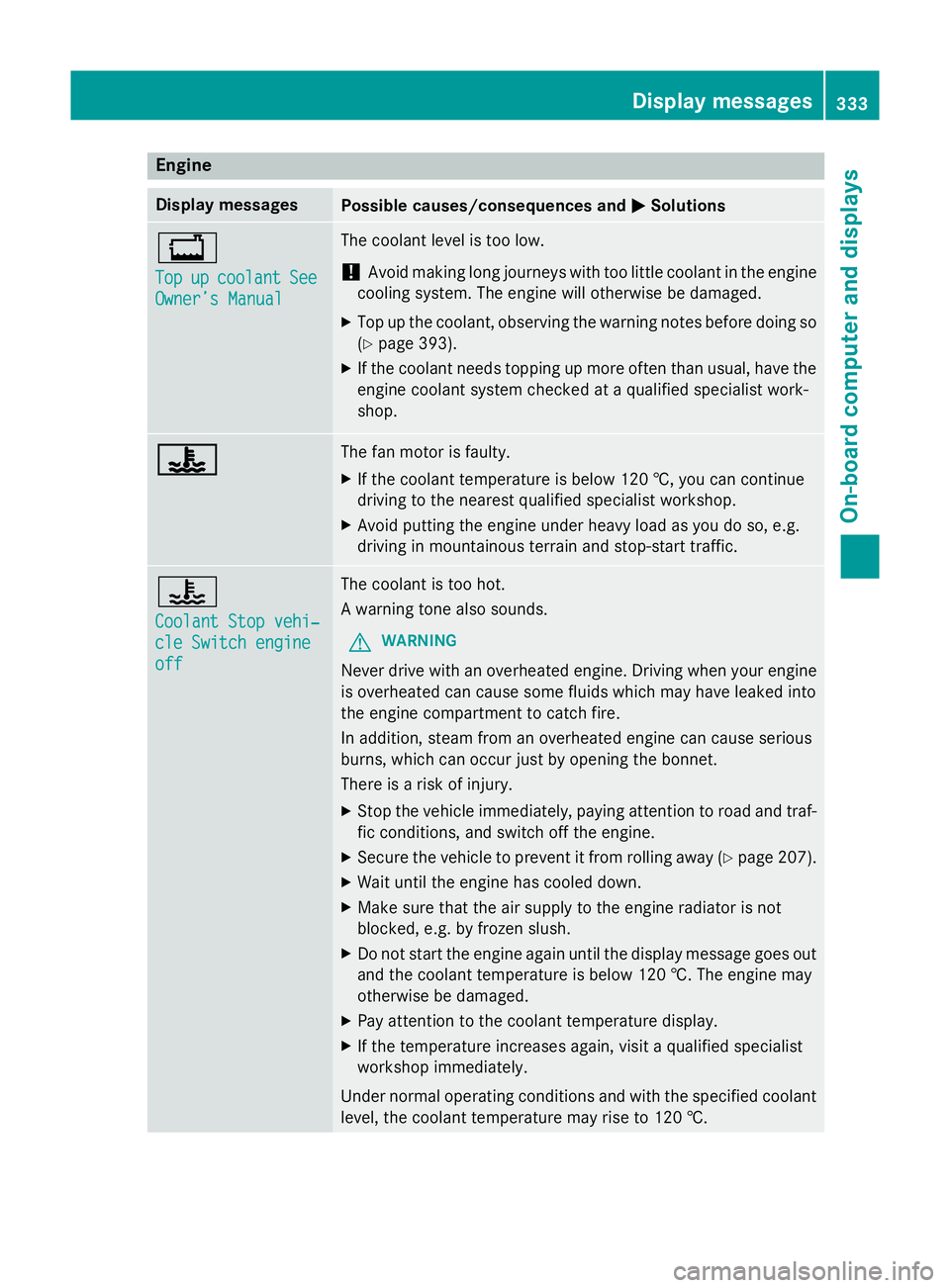
Engine
Display messages
Possible causes/consequences and
M
MSolutions +
Top Top
up
upcoolant
coolant See
See
Owner’s Manual
Owner’s Manual The coolant level is too low.
! Avoid making long journeys with too little coolant in the engine
cooling system. The engine will otherwise be damaged.
X Top up the coolant, observing the warning notes before doing so
(Y page 393).
X If the coolant needs topping up more often than usual, have the
engine coolant system checked at a qualified specialist work-
shop. ? ? The fan motor is faulty.
X If the coolant temperature is below 120 †, you can continue
driving to the nearest qualified specialist workshop.
X Avoid putting the engine under heavy load as you do so, e.g.
driving in mountainous terrain and stop-start traffic. ?
Coolant Stop vehi‐ Coolant Stop vehi‐
cle Switch engine cle Switch engine
off off The coolant is too hot.
A warning tone also sounds.
G WARNING
Never drive with an overheated engine. Driving when your engine is overheated can cause some fluids which may have leaked into
the engine compartment to catch fire.
In addition, steam from an overheated engine can cause serious
burns, which can occur just by opening the bonnet.
There is a risk of injury.
X Stop the vehicle immediately, paying attention to road and traf-
fic conditions, and switch off the engine.
X Secure the vehicle to prevent it from rolling away (Y page 207).
X Wait until the engine has cooled down.
X Make sure that the air supply to the engine radiator is not
blocked, e.g. by frozen slush.
X Do not start the engine again until the display message goes out
and the coolant temperature is below 120 †. The engine may
otherwise be damaged.
X Pay attention to the coolant temperature display.
X If the temperature increases again, visit a qualified specialist
workshop immediately.
Under normal operating conditions and with the specified coolant level, the coolant temperature may rise to 120 †. Display messages
333On-board computer and displays Z
Page 337 of 489
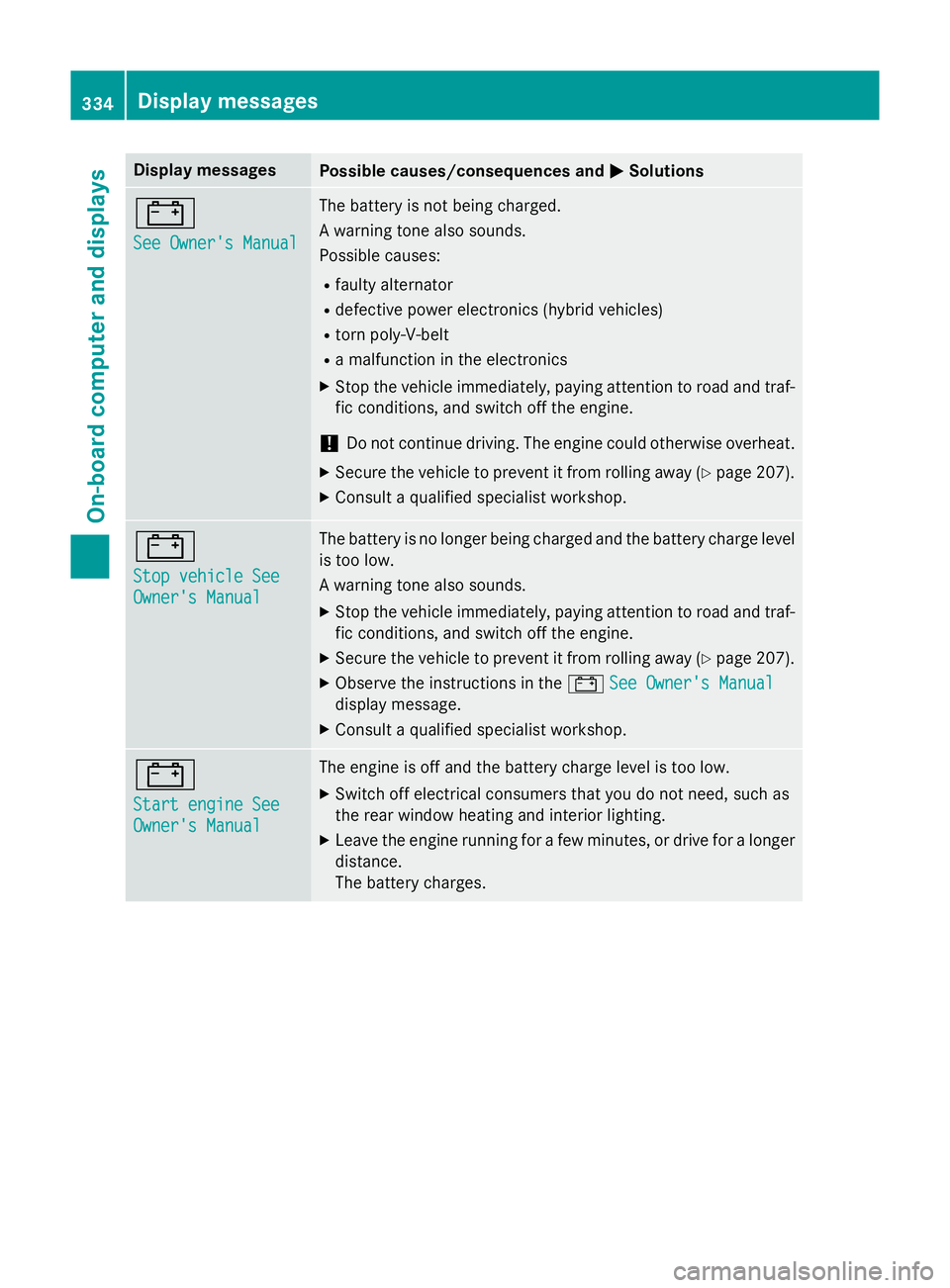
Display messages
Possible causes/consequences and
M
MSolutions #
See Owner's Manual See Owner's Manual The battery is not being charged.
A warning tone also sounds.
Possible causes:
R faulty alternator
R defective power electronics (hybrid vehicles)
R torn poly-V-belt
R a malfunction in the electronics
X Stop the vehicle immediately, paying attention to road and traf-
fic conditions, and switch off the engine.
! Do not continue driving. The engine could otherwise overheat.
X Secure the vehicle to prevent it from rolling away (Y page 207).
X Consult a qualified specialist workshop. #
Stop vehicle See Stop vehicle See
Owner's Manual Owner's Manual The battery is no longer being charged and the battery charge level
is too low.
A warning tone also sounds.
X Stop the vehicle immediately, paying attention to road and traf-
fic conditions, and switch off the engine.
X Secure the vehicle to prevent it from rolling away (Y page 207).
X Observe the instructions in the #See Owner's Manual See Owner's Manual
display message.
X Consult a qualified specialist workshop. #
Start engine See Start engine See
Owner's Manual Owner's Manual The engine is off and the battery charge level is too low.
X Switch off electrical consumers that you do not need, such as
the rear window heating and interior lighting.
X Leave the engine running for a few minutes, or drive for a longer
distance.
The battery charges. 334
Display
messagesOn-board computer and displays
Page 338 of 489
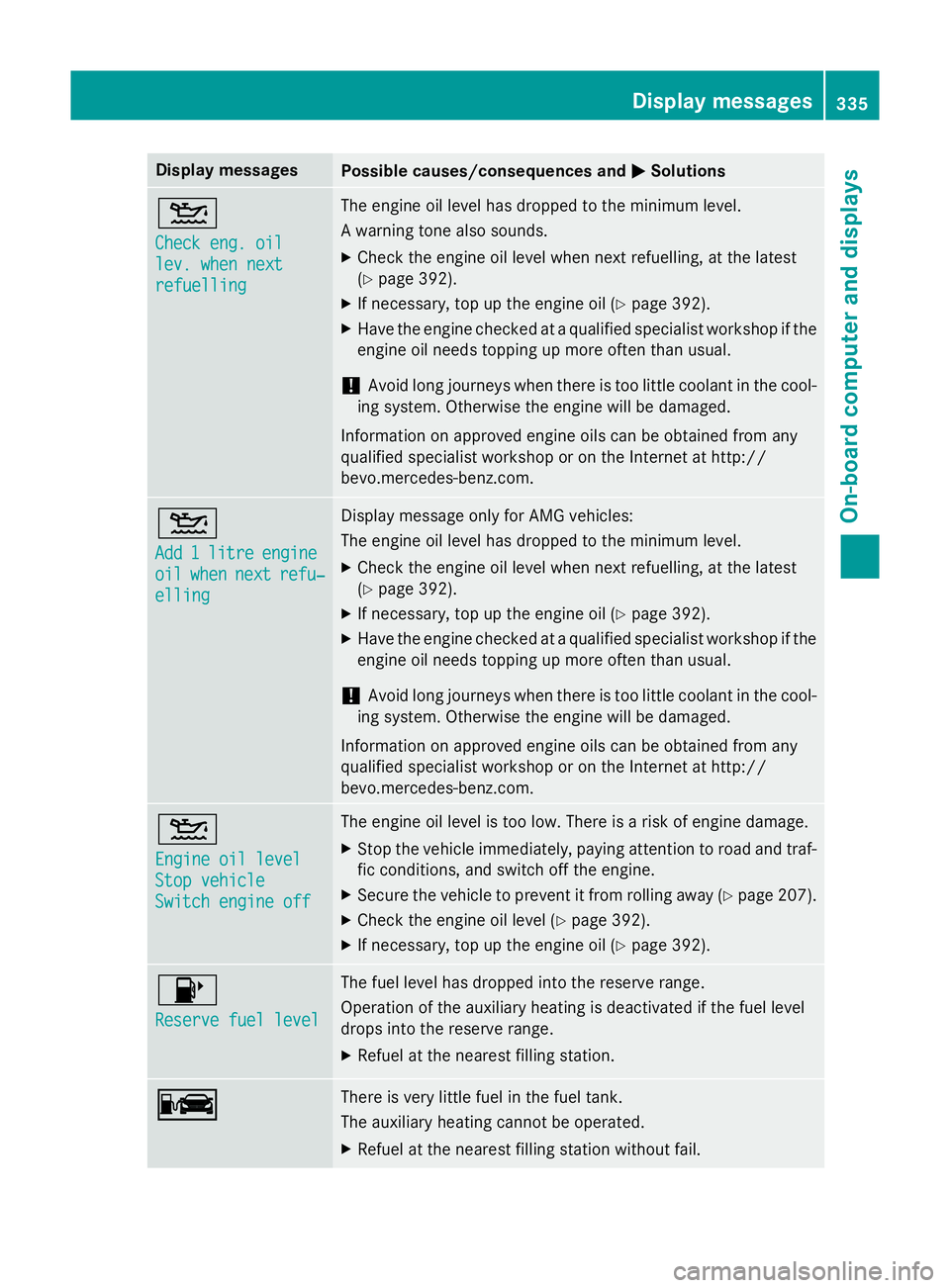
Display messages
Possible causes/consequences and
M
MSolutions 4
Check eng. oil Check eng. oil
lev. when next lev. when next
refuelling refuelling The engine oil level has dropped to the minimum level.
A warning tone also sounds.
X Check the engine oil level when next refuelling, at the latest
(Y page 392).
X If necessary, top up the engine oil (Y page 392).
X Have the engine checked at a qualified specialist workshop if the
engine oil needs topping up more often than usual.
! Avoid long journeys when there is too little coolant in the cool-
ing system. Otherwise the engine will be damaged.
Information on approved engine oils can be obtained from any
qualified specialist workshop or on the Internet at http://
bevo.mercedes-benz.co m.4
Add Add
1
1litre
litre engine
engine
oil
oil when
when next
next refu‐
refu‐
elling
elling Display message only for AMG vehicles:
The engine oil level has dropped to the minimum level.
X Check the engine oil level when next refuelling, at the latest
(Y page 392).
X If necessary, top up the engine oil (Y page 392).
X Have the engine checked at a qualified specialist workshop if the
engine oil needs topping up more often than usual.
! Avoid long journeys when there is too little coolant in the cool-
ing system. Otherwise the engine will be damaged.
Information on approved engine oils can be obtained from any
qualified specialist workshop or on the Internet at http://
bevo.mercedes-benz.com. 4
Engine oil level Engine oil level
Stop vehicle Stop vehicle
Switch engine off Switch engine off The engine oil level is too low. There is a risk of engine damage.
X Stop the vehicle immediately, paying attention to road and traf-
fic conditions, and switch off the engine.
X Secure the vehicle to prevent it from rolling away (Y page 207).
X Check the engine oil level (Y page 392).
X If necessary, top up the engine oil (Y page 392).8
Reserve fuel level Reserve fuel level The fuel level has dropped into the reserve range.
Operation of the auxiliary heating is deactivated if the fuel level
drops into the reserve range.
X Refuel at the nearest filling station. C C There is very little fuel in the fuel tank.
The auxiliary heating cannot be operated.
X Refuel at the nearest filling station without fail. Display messages
335On-board computer and displays Z
Page 339 of 489
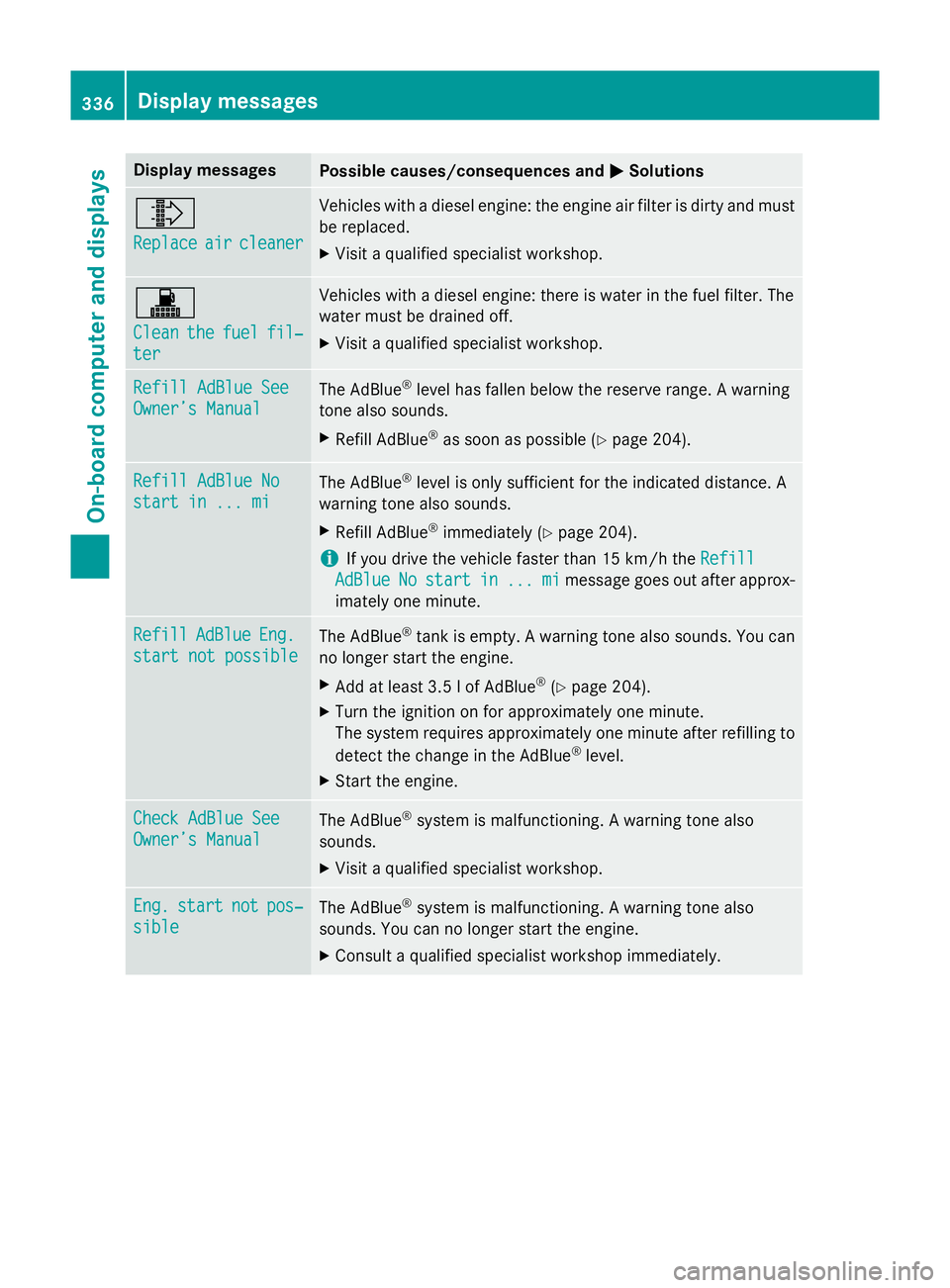
Display messages
Possible causes/consequences and
M
MSolutions ¸
Replace Replace
air
aircleaner
cleaner Vehicles with a diesel engine: the engine air filter is dirty and must
be replaced.
X Visit a qualified specialist workshop. !
Clean Clean
the
thefuel
fuel fil‐
fil‐
ter
ter Vehicles with a diesel engine: there is water in the fuel filter. The
water must be drained off.
X Visit a qualified specialist workshop. Refill AdBlue See Refill AdBlue See
Owner’s Manual Owner’s Manual
The AdBlue
®
level has fallen below the reserve range. A warning
tone also sounds.
X Refill AdBlue ®
as soon as possible (Y page 204).Refill AdBlue No
Refill AdBlue No
start in ... mi start in ... mi
The AdBlue
®
level is only sufficient for the indicated distance. A
warning tone also sounds.
X Refill AdBlue ®
immediately (Y page 204).
i If you drive the vehicle faster than 15 km/h the
Refill
Refill
AdBlue
AdBlue No
Nostart
start in
in...
... mi
mimessage goes out after approx-
imately one minute. Refill
Refill
AdBlue
AdBlueEng.
Eng.
start not possible
start not possible The AdBlue
®
tank is empty. A warning tone also sounds. You can
no longer start the engine.
X Add at least 3.5 l of AdBlue ®
(Y page 204).
X Turn the ignition on for approximately one minute.
The system requires approximately one minute after refilling to
detect the change in the AdBlue ®
level.
X Start the engine. Check AdBlue See
Check AdBlue See
Owner’s Manual Owner’s Manual
The AdBlue
®
system is malfunctioning. A warning tone also
sounds.
X Visit a qualified specialist workshop. Eng.
Eng.
start
start not
notpos‐
pos‐
sible
sible The AdBlue
®
system is malfunctioning. A warning tone also
sounds. You can no longer start the engine.
X Consult a qualified specialist workshop immediately. 336
Display
messagesOn-board computer and displays
Page 340 of 489
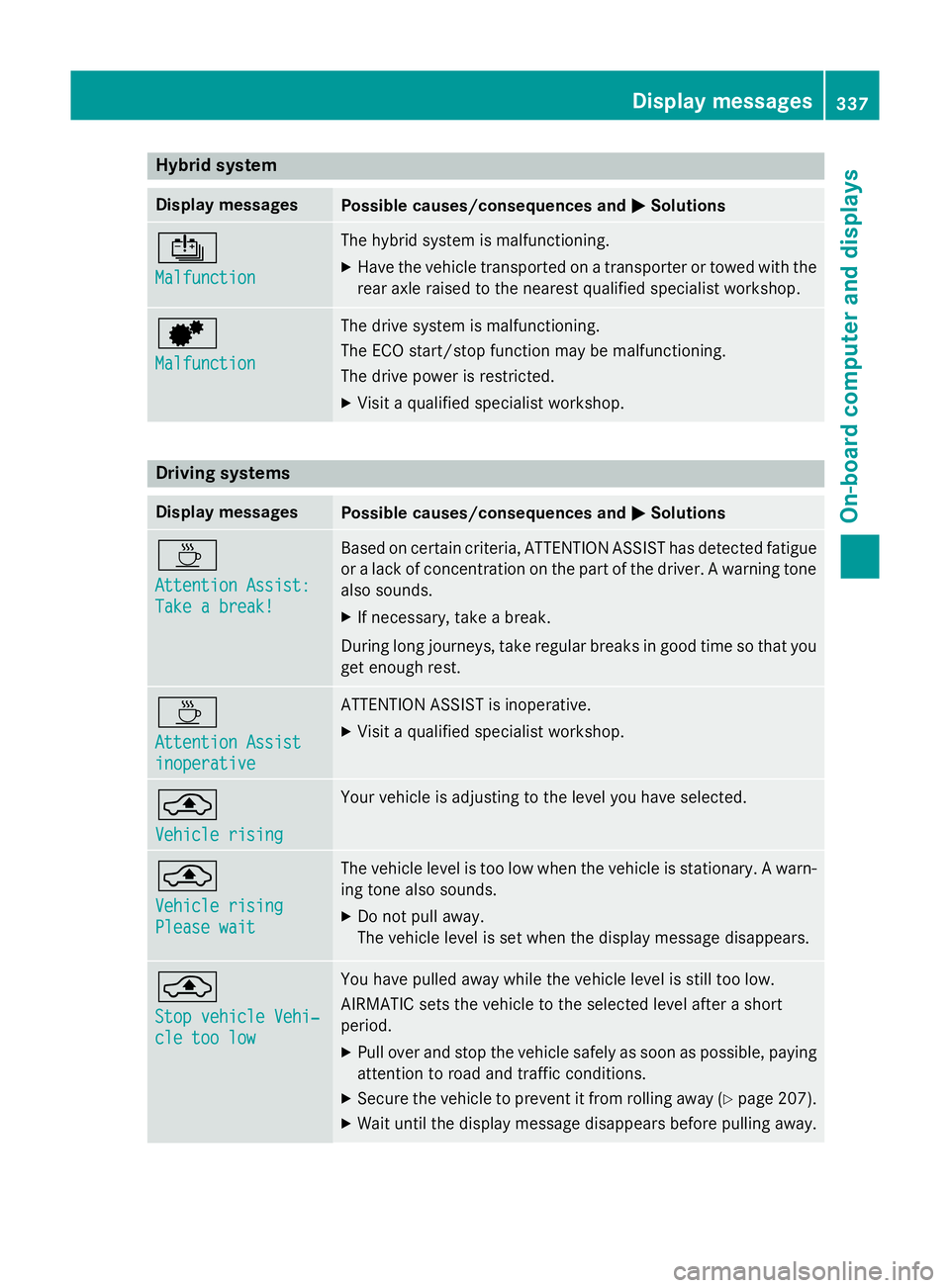
Hybrid system
Display messages
Possible causes/consequences and
M
MSolutions Û
Malfunction Malfunction The hybrid system is malfunctioning.
X Have the vehicle transported on a transporter or towed with the
rear axle raised to the nearest qualified specialist workshop. d
Malfunction Malfunction The drive system is malfunctioning.
The ECO start/stop function may be malfunctioning.
The drive power is restricted.
X Visit a qualified specialist workshop. Driving systems
Display messages
Possible causes/consequences and
M MSolutions À
Attention Assist: Attention Assist:
Take a break! Take a break! Based on certain criteria, ATTENTION ASSIST has detected fatigue
or a lack of concentration on the part of the driver. A warning tone also sounds.
X If necessary, take a break.
During long journeys, take regular breaks in good time so that you get enough rest. À
Attention Assist Attention Assist
inoperative inoperative ATTENTION ASSIST is inoperative.
X Visit a qualified specialist workshop. ¨
Vehicle rising Vehicle rising Your vehicle is adjusting to the level you have selected.
¨
Vehicle rising Vehicle rising
Please wait Please wait The vehicle level is too low when the vehicle is stationary. A warn-
ing tone also sounds.
X Do not pull away.
The vehicle level is set when the display message disappears. ¨
Stop vehicle Vehi‐ Stop vehicle Vehi‐
cle too low cle too low You have pulled away while the vehicle level is still too low.
AIRMATIC sets the vehicle to the selected level after a short
period.
X Pull over and stop the vehicle safely as soon as possible, paying
attention to road and traffic conditions.
X Secure the vehicle to prevent it from rolling away (Y page 207).
X Wait until the display message disappears before pulling away. Display messages
337On-board computer and displays Z
Page 341 of 489
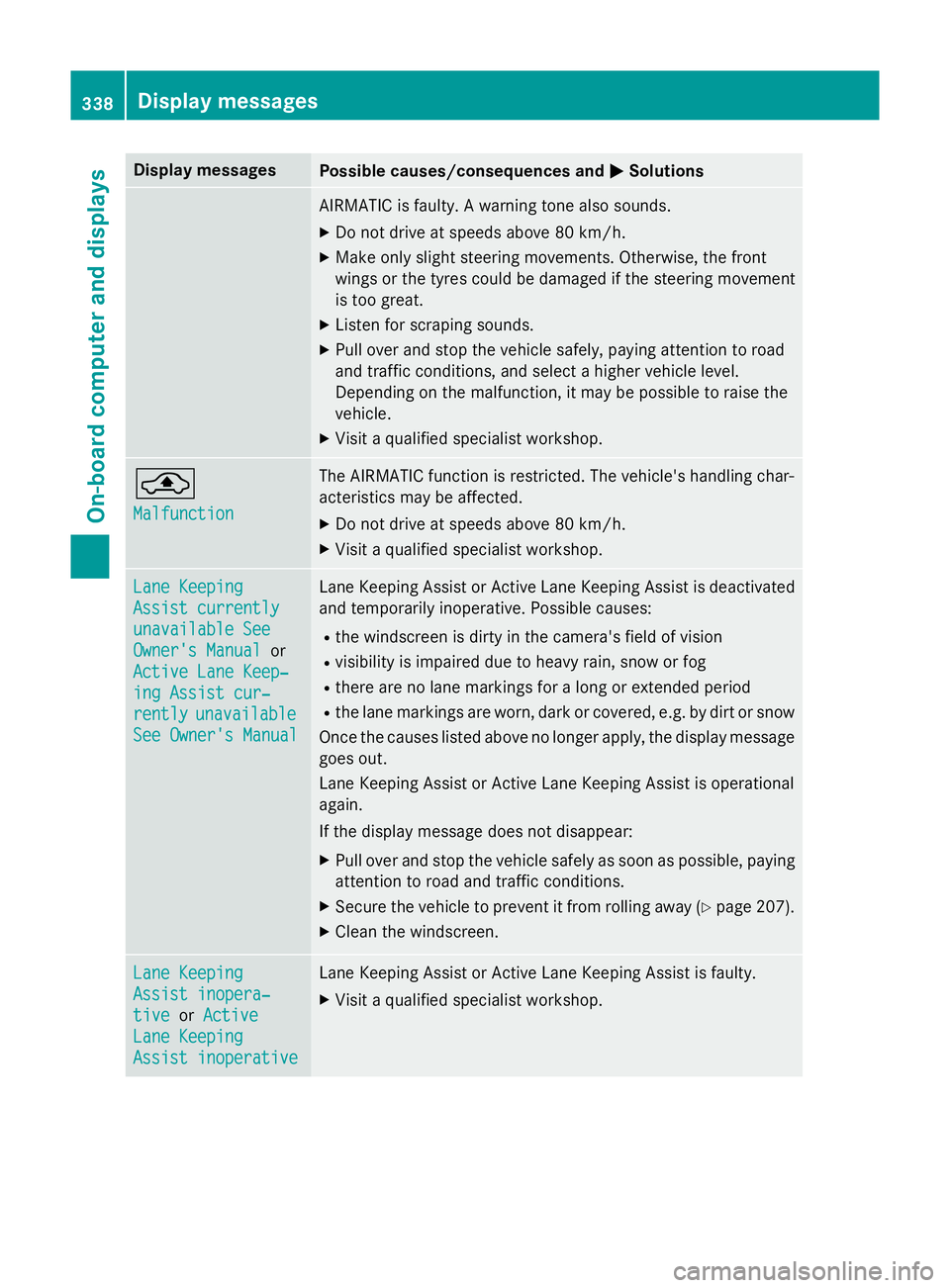
Display messages
Possible causes/consequences and
M
MSolutions AIRMATIC is faulty. A warning tone also sounds.
X Do not drive at speeds above 80 km/h.
X Make only slight steering movements. Otherwise, the front
wings or the tyres could be damaged if the steering movement
is too great.
X Listen for scraping sounds.
X Pull over and stop the vehicle safely, paying attention to road
and traffic conditions, and select a higher vehicle level.
Depending on the malfunction, it may be possible to raise the
vehicle.
X Visit a qualified specialist workshop. ¨
Malfunction Malfunction The AIRMATIC function is restricted. The vehicle's handling char-
acteristics may be affected.
X Do not drive at speeds above 80 km/h.
X Visit a qualified specialist workshop. Lane Keeping
Lane Keeping
Assist currently Assist currently
unavailable See unavailable See
Owner's Manual Owner's Manual
or
Active Lane Keep‐
Active Lane Keep‐
ing Assist cur‐ ing Assist cur‐
rently rently unavailable
unavailable
See Owner's Manual
See Owner's Manual Lane Keeping Assist or Active Lane Keeping Assist is deactivated
and temporarily inoperative. Possible causes:
R the windscreen is dirty in the camera's field of vision
R visibility is impaired due to heavy rain, snow or fog
R there are no lane markings for a long or extended period
R the lane markings are worn, dark or covered, e.g. by dirt or snow
Once the causes listed above no longer apply, the display message goes out.
Lane Keeping Assist or Active Lane Keeping Assist is operational
again.
If the display message does not disappear:
X Pull over and stop the vehicle safely as soon as possible, paying
attention to road and traffic conditions.
X Secure the vehicle to prevent it from rolling away (Y page 207).
X Clean the windscreen. Lane Keeping Lane Keeping
Assist inopera‐ Assist inopera‐
tive tive
orActive
Active
Lane Keeping
Lane Keeping
Assist inoperative Assist inoperative Lane Keeping Assist or Active Lane Keeping Assist is faulty.
X Visit a qualified specialist workshop. 338
Display
messagesOn-board computer and displays