ignition MERCEDES-BENZ C-CLASS SALOON 2014 Workshop Manual
[x] Cancel search | Manufacturer: MERCEDES-BENZ, Model Year: 2014, Model line: C-CLASS SALOON, Model: MERCEDES-BENZ C-CLASS SALOON 2014Pages: 489, PDF Size: 14.88 MB
Page 167 of 489
Windows misted up on the outside
X
Activate the windscreen wipers.
X Switch on automatic mode using the Ã
rocker switch.
i If you clean the windows regularly, they
do not mist up so quickly. Rear window heating
General notes The rear window heating has a high current
draw. You should therefore switch it off as
soon as the window is clear. It otherwise
switches off automatically after several
minutes.
If the battery voltage is too low, the rear win-
dow heating may switch off.
Activating/deactivating X
Turn the key to position 2in the ignition
lock (Y page 181).
X Press the ¤rocker switch up or down.
The indicator lamp above the ¤rocker
switch lights up or goes out. 164
Operating the climate control systemClimate control
Page 168 of 489
Problems with the rear window heating
Problem
Possible causes/consequences and
M
MSolutions The rear window heat-
ing has switched off
prematurely or cannot
be activated. The battery has not been sufficiently charged.
X Switch off any consumers that are not required, e.g. reading
lamps, interior lighting or the seat heating.
When the battery is sufficiently charged, the rear window heat-
ing can be activated again. Activating/deactivating air-recircula-
tion mode
General notes You can also temporarily deactivate the flow
of fresh air manually if unpleasant odours are
entering the vehicle from outside. The air
already inside the vehicle will then be recir-
culated.
If you switch on air-recirculation mode, the
windows can mist up more quickly, in partic-
ular at low temperatures. Only use air-recir-
culation mode briefly to prevent the windows misting up.
Activating/deactivating X
Turn the key to position 2in the ignition
lock (Y page 181).
X To activate: press thegrocker switch
up or down.
The indicator lamp above the grocker
switch lights up.
Air-recirculation mode switches on automat-
ically:
R at high outside temperatures
R at high levels of pollution (THERMOTRONIC
automatic climate control only)
R in a tunnel (vehicles with a navigation sys-
tem only)
The indicator lamp above the grocker
switch is not lit when automatic air-recircula- tion mode is activated. Outside air is added
after about 30 minutes. X
To deactivate: press thegrocker
switch up or down.
The indicator lamp above the grocker
switch goes out.
Air-recirculation mode is deactivated auto-
matically:
R after approximately five minutes at outside
temperatures below approximately 5 †
R after approximately five minutes if cooling
with air dehumidification is deactivated
R after approximately 30 minutes at outside
temperatures above approximately 5 † if
the cooling with air dehumidification func-
tion is activated Convenience opening/closing using
the air-recirculation button G
WARNING
When the convenience closing feature is oper- ating, parts of the body could become trapped
in the closing area of the side window and the
sliding sunroof. There is a risk of injury.
Observe the complete closing procedure
when the convenience closing feature is oper-
ating. When closing make sure that no parts of the body are in the closing area. G
WARNING
During convenience opening parts of the body could be drawn in or become trapped
between the side window and window frame.
There is a risk of injury. Operating the climate control system
165Climate control
Z
Page 170 of 489
Activating/deactivating
X
Turn the key to position 0in the ignition
lock or remove it (Y page 181).
X To activate: press the!rocker switch
up or down.
The indicator lamp above the !rocker
switch lights up.
The blower will run at a low speed regardless of the airflow setting.
If you activate the residual heat function at
high temperatures, only the ventilation will be
activated. The blower runs at medium speed.
X To deactivate: press the!rocker
switch up or down.
The indicator lamp above the !rocker
switch goes out.
Residual heat is deactivated automatically:
R after approximately 30 minutes
R when the ignition is switched on
R if the battery voltage drops
R when the auxiliary heating is switched on Perfume atomiser
Operating the perfume atomiser G
WARNING
If children open the perfume vial, they could
drink the perfume or it could come into con-
tact with their eyes. There is a risk of injury. Do not leave children unsupervised in the vehicle.
If the perfume liquid has been drunk, consult
a doctor. If perfume comes into contact with
your eyes or skin, rinse the eyes with clean
water. If you continue to experience difficul-
ties, consult a doctor. H
Environmental note Full perfume vials must not
be disposed of with house-
hold rubbish. They must be
collected separately and dis-
posed of in an environmen- tally responsible recycling
system.
Dispose of full perfume vials
in an environmentally
responsible manner and
take them to a special waste
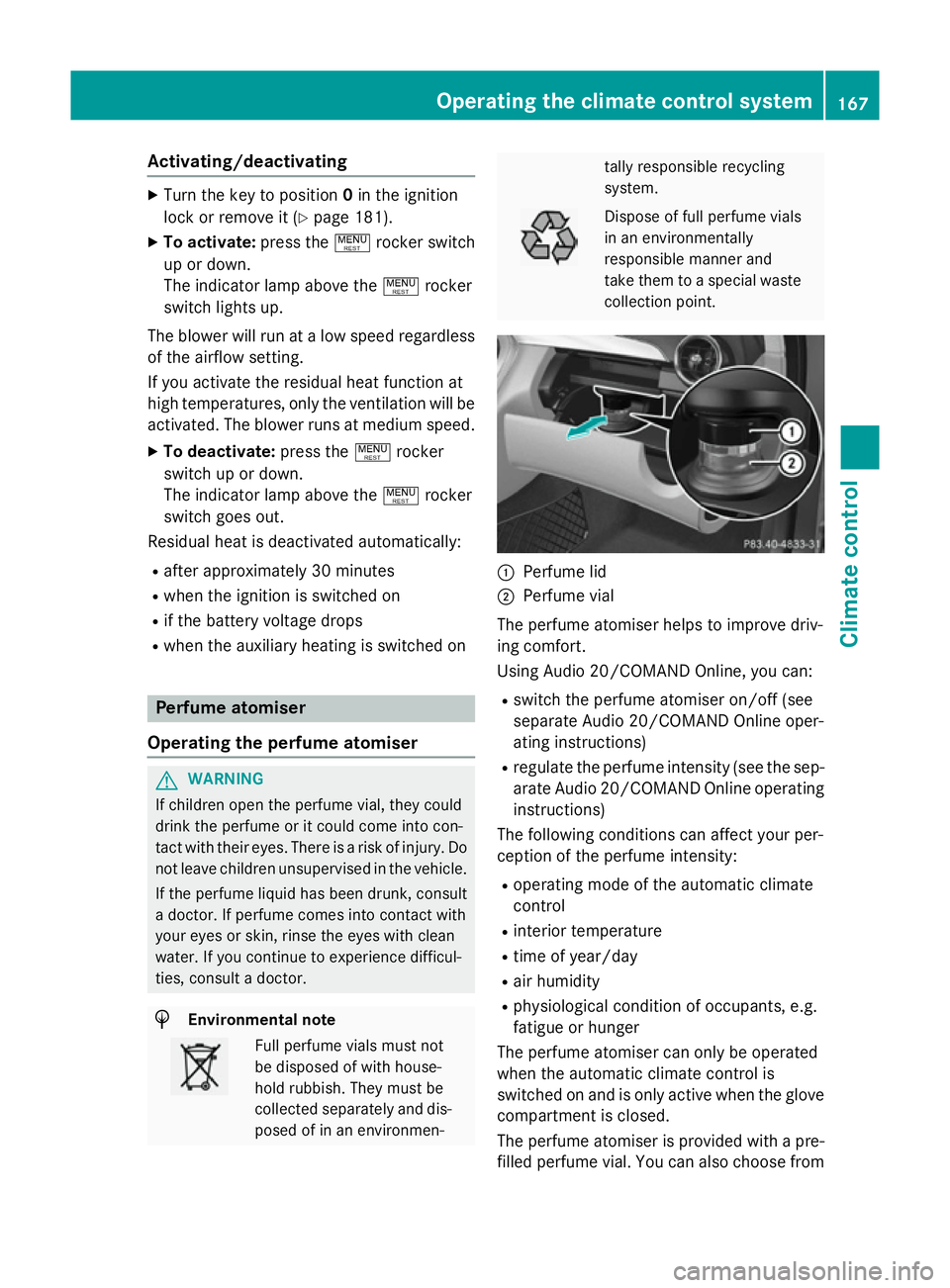
collection point. :
Perfume lid
; Perfume vial
The perfume atomiser helps to improve driv-
ing comfort.
Using Audio 20/COMAND Online, you can:
R switch the perfume atomiser on/off (see
separate Audio 20/COMAND Online oper-
ating instructions)
R regulate the perfume intensity (see the sep-
arate Audio 20/COMAND Online operating
instructions)
The following conditions can affect your per-
ception of the perfume intensity:
R operating mode of the automatic climate
control
R interior temperature
R time of year/day
R air humidity
R physiological condition of occupants, e.g.
fatigue or hunger
The perfume atomiser can only be operated
when the automatic climate control is
switched on and is only active when the glove compartment is closed.
The perfume atomiser is provided with a pre-
filled perfume vial. You can also choose from Operating the climate control system
167Climate control Z
Page 174 of 489
Problems with the pre-entry climate control
Problem
Possible causes/consequences and
M
MSolutions The pre-entry climate
control cannot be
switched on or has
switched itself off. The charge status of the high-voltage battery is under the specified
minimum charge status.
X Start the engine when the vehicle is at a standstill.
The internal combustion engine drives the electric motor. The
electric motor is operating as an alternator. The high-voltage
battery is charging.
Further information on charging the high-voltage battery
(Y page 416). The pre-entry climate control was started more than twice when
the engine was switched off.
X Switch on the engine and let it run for more than ten seconds.
X Try again to switch the pre-entry climate control on. The difference between the interior temperature and the desired
temperature is too small.
X Increase the difference between the interior temperature and
the desired temperature. Remote activation of heating and ven-
tilation system
General notes Remote activation is only available on vehi-
cles with the BlueEFFICIENCY package.
The driver's and front-passenger seat areas
can also be heated or ventilated when the
engine is switched off.
The starter battery must be sufficiently
charged before remote activation can be
switched on.
When the vehicle is heated, the following
functions are activated:
R seat heating
R rear window heating
R exterior mirror heating
When the vehicle is ventilated, the following
functions are activated:
R blower
R seat ventilation If you have activated ionisation using Audio
20/COMAND Online (see separate operating
instructions), it is activated together with the
remote activation function.
Activating/deactivating the remote
activation function X
To switch on remote activation: push the
climate control symbol button on the key.
The air-conditioning functions are switched on, for up to 10 minutes for heating and up
to 120 minutes for ventilation.
Remote activation switches off automatically if:
R the ignition is switched on, or
R the engine is started
Seat heating (heating), seat ventilation (ven-
tilation) and ionisation remain switched on
after starting the engine. Operating the climate control system
171Climate control Z
Page 176 of 489
iliary heating could switch from ventilation
mode to heating mode or from heating mode to ventilation mode.
The auxiliary heating switches off when the
engine is switched off. The auxiliary ventila-
tion is not active if the engine is running.
The auxiliary heating/ventilation switches off
automatically after 30 minutes. This time limit can be altered. To do this, visit a qualified
specialist workshop.
You cannot use the auxiliary ventilation to
cool the vehicle interior to a temperature
lower than the outside temperature.
Before switching on X
Turn the key to position 2in the ignition
lock (Y page 181).
X Set the desired temperature using the
w rocker switch on the front control
unit.
or X Set the desired temperature using
Audio 20/COMAND Online; see the sepa-
rate operating instructions.
If you do not alter the temperature before
switching on the auxiliary heating, the last
temperature setting will be adopted.
Auxiliary heating or ventilation can also be
switched on if the manually set climate con-
trol is activated. Optimum comfort can be
attained when the system is set to automatic
mode. Set the temperature to 22 †.
You can activate or deactivate the auxiliary
heating/ventilation:
R using the rocker switch on the centre con-
sole (Y page 173)
R using the remote control (Y page 173)
The on-board computer can be used to spec- ify up to three departure times, one of which
may be preselected:
R using the remote control (Y page 173)
R using Audio 20/COMAND Online; see the
separate operating instructions Switching the auxiliary heating/venti-
lation on/off using the centre console
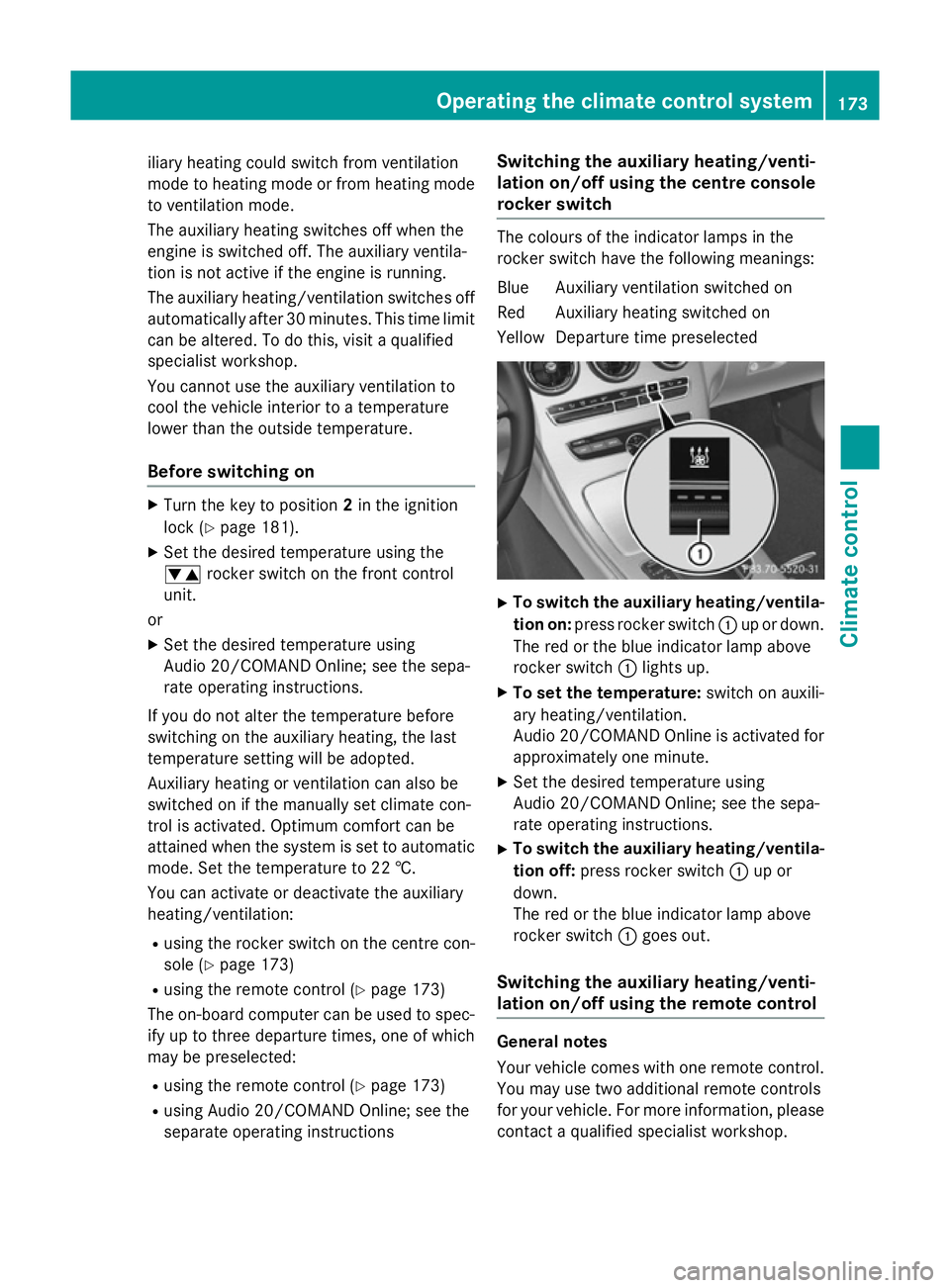
rocker switch The colours of the indicator lamps in the
rocker switch have the following meanings:
Blue Auxiliary ventilation switched on
Red Auxiliary heating switched on
Yellow Departure time preselected X
To switch the auxiliary heating/ventila-
tion on: press rocker switch :up or down.
The red or the blue indicator lamp above
rocker switch :lights up.
X To set the temperature: switch on auxili-
ary heating/ventilation.
Audio 20/COMAND Online is activated for approximately one minute.
X Set the desired temperature using
Audio 20/COMAND Online; see the sepa-
rate operating instructions.
X To switch the auxiliary heating/ventila-
tion off: press rocker switch :up or
down.
The red or the blue indicator lamp above
rocker switch :goes out.
Switching the auxiliary heating/venti-
lation on/off using the remote control General notes
Your vehicle comes with one remote control.
You may use two additional remote controls
for your vehicle. For more information, pleasecontact a qualified specialist workshop. Operating the climate control system
173Climate control Z
Page 183 of 489
Useful information
i This Owner's Manual describes all mod-
els, series and optional equipment for your
vehicle that were available at the time of
going to press. National variations are pos- sible. Note that your vehicle may not be
equipped with all of the functions descri-
bed. This is also the case for systems and
functions relevant to safety.
i Read the information on qualified special-
ist workshops: (Y page 27). Running-in notes
Important safety notes
In certain driving and driving safety systems,
the sensors adjust automatically while a cer-
tain distance is being driven after the vehicle has been delivered or after repairs. Full sys-
tem effectiveness is not reached until the end
of this teach-in procedure.
Brake pads/linings and discs that are either
new or have been replaced only achieve opti- mum braking effect after several hundred kil-
ometres of driving. Compensate for the
reduced braking effect by applying greater
force to the brake pedal. The first 1,500 km
If you treat the engine with sufficient care
from the very start, you will be rewarded with excellent performance for the remainder of
the engine's life.
R Drive at varying road speeds and engine
speeds for the first 1,500 km.
R Avoid overstraining the vehicle during this
period, e.g. driving at full throttle.
R When changing gears manually, change up
in good time, before the rev counter needle
reaches Ôof the way to the red area of the
rev counter. R
Do not shift down a gear manually in order
to brake.
R Vehicles with automatic transmission: try
to avoid depressing the accelerator pedal
beyond the point of resistance (kickdown).
After 1,500 km, you may gradually accelerate the vehicle to full road and engine speeds.
You should also observe these notes on run-
ning-in if the engine or parts of the drive train
on your vehicle have been replaced.
Always observe the applicable speed limit. Driving
Important safety notes
G
WARNING
Objects in the driver's footwell may restrict
the clearance around the pedals or block a
depressed pedal. This jeopardises the oper-
ating and road safety of the vehicle. There is a risk of an accident.
Stow all objects securely in the vehicle so that
they do not get into the driver's footwell.
Always fit the floormats securely and as pre-
scribed in order to ensure that there is always sufficient room for the pedals. Do not use
loose floormats and do not place several floor-mats on top of one another. G
WARNING
Unsuitable footwear can hinder correct usage of the pedals, e.g.:
R shoes with thick soles
R shoes with high heels
R slippers
There is a risk of an accident.
Wear suitable footwear to ensure correct
usage of the pedals. G
WARNING
If you switch off the ignition while driving,
safety-relevant functions are only available
with limitations, or not at all. This could affect, for example, the power steering and the brake 180
DrivingDriving and parking
Page 184 of 489
boosting effect. You will require considerably
more effort to steer and brake. There is a riskof an accident.
Do not switch off the ignition while driving. G
WARNING
If the parking brake has not been fully
released when driving, the parking brake can:
R overheat and cause a fire
R lose its hold function.
There is a risk of fire and an accident. Release
the parking brake fully before driving off.
! Warm up the engine quickly. Do not use
the engine's full performance until it has
reached operating temperature.
Only set the automatic transmission to the
respective drive positions when the vehicle
is stationary.
Where possible, avoid spinning the drive
wheels when pulling away on slippery
roads. Otherwise, you could damage the
drive train.
Hybrid vehicles: observe the safety instruc-
tions for hybrid vehicles (Y page 269).Key positions
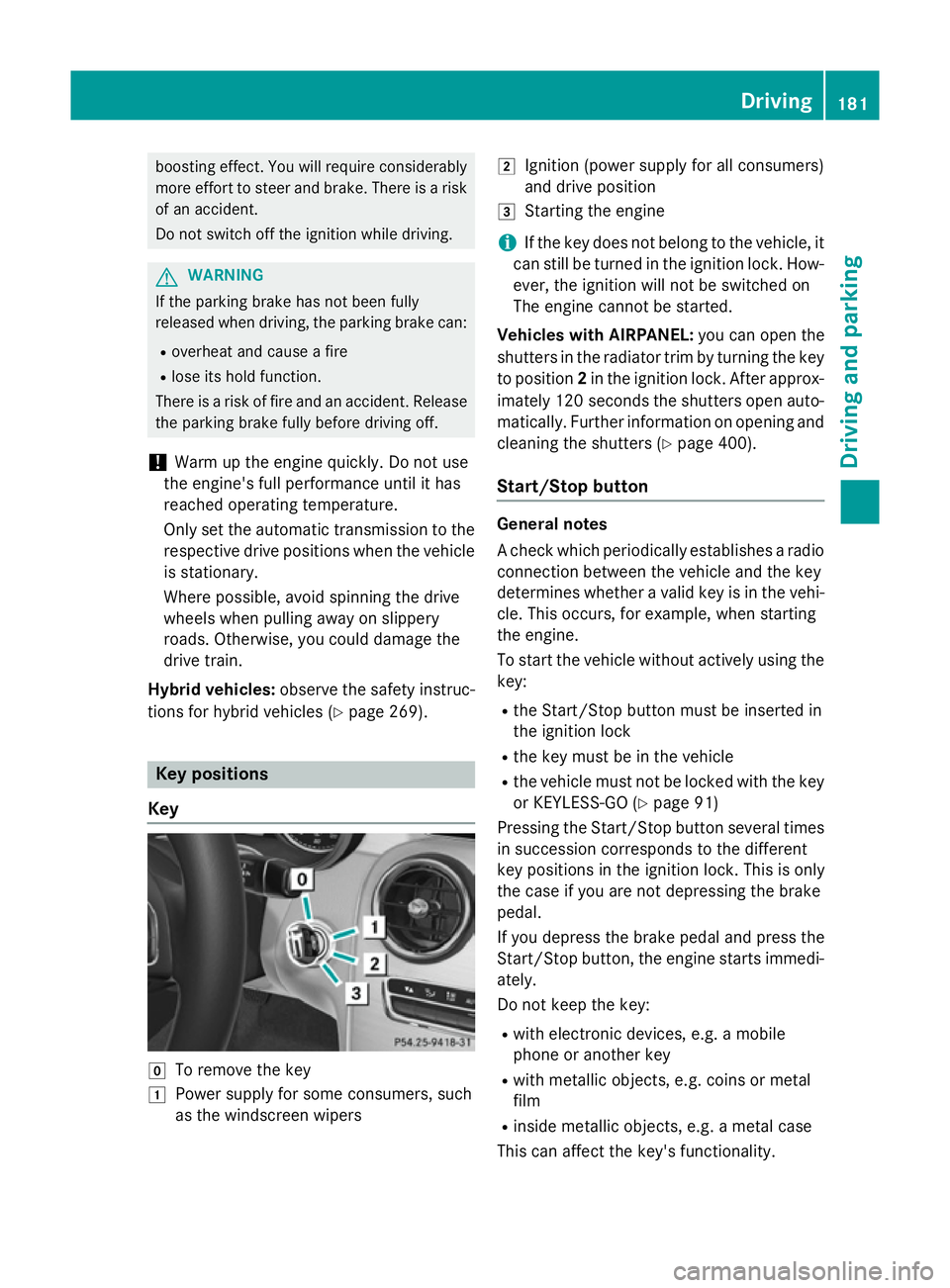
Key g
To remove the key
1 Power supply for some consumers, such
as the windscreen wipers 2
Ignition (power supply for all consumers)
and drive position
3 Starting the engine
i If the key does not belong to the vehicle, it
can still be turned in the ignition lock. How-
ever, the ignition will not be switched on
The engine cannot be started.
Vehicles with AIRPANEL: you can open the
shutters in the radiator trim by turning the key to position 2in the ignition lock. After approx-
imately 120 seconds the shutters open auto-
matically. Further information on opening and cleaning the shutters (Y page 400).
Start/Stop button General notes
A check which periodically establishes a radio
connection between the vehicle and the key
determines whether a valid key is in the vehi-
cle. This occurs, for example, when starting
the engine.
To start the vehicle without actively using the key:
R the Start/Stop button must be inserted in
the ignition lock
R the key must be in the vehicle
R the vehicle must not be locked with the key
or KEYLESS-GO (Y page 91)
Pressing the Start/Stop button several times
in succession corresponds to the different
key positions in the ignition lock. This is only
the case if you are not depressing the brake
pedal.
If you depress the brake pedal and press the
Start/Stop button, the engine starts immedi-
ately.
Do not keep the key:
R with electronic devices, e.g. a mobile
phone or another key
R with metallic objects, e.g. coins or metal
film
R inside metallic objects, e.g. a metal case
This can affect the key's functionality. Driving
181Driving and parking Z
Page 185 of 489
If you lock the vehicle with the key's remote
control or with KEYLESS-GO, after a short
time:
R you will not be able to switch on the ignition
with the Start/Stop button
R you will not be able to start the engine with
the Start/Stop button until the vehicle is
unlocked again
If you lock the vehicle centrally using the but-
ton on the front door (Y page 97), you can
continue to start the engine with the Start/
Stop button.
The engine can be switched off while the vehi-
cle is in motion by pressing and holding the
Start/Stop button for three seconds. This
function operates independently of the ECO
start/stop automatic engine switch-off func-
tion.
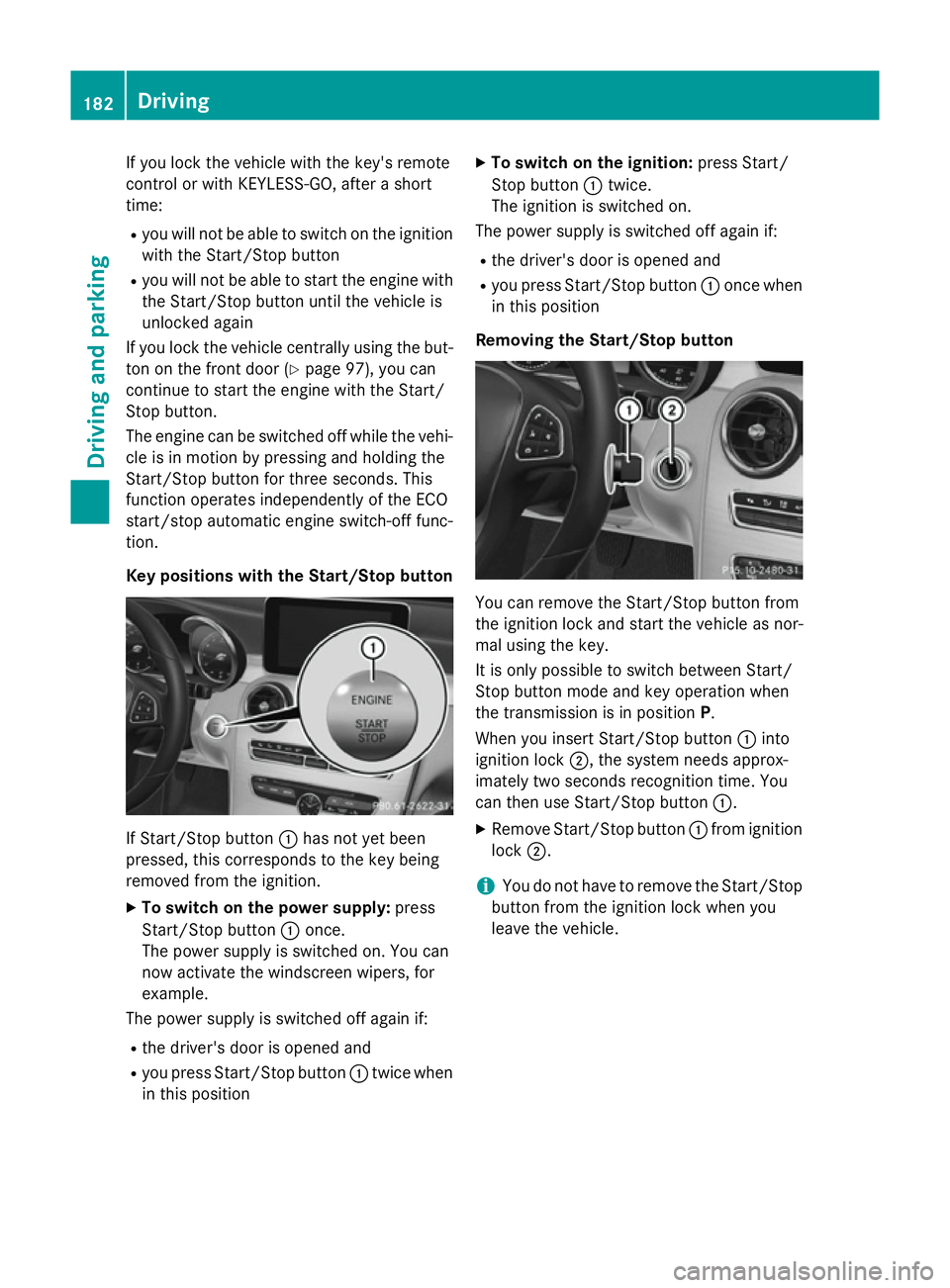
Key positions with the Start/Stop button If Start/Stop button
:has not yet been
pressed, this corresponds to the key being
removed from the ignition.
X To switch on the power supply: press
Start/Stop button :once.
The power supply is switched on. You can
now activate the windscreen wipers, for
example.
The power supply is switched off again if:
R the driver's door is opened and
R you press Start/Stop button :twice when
in this position X
To switch on the ignition: press Start/
Stop button :twice.
The ignition is switched on.
The power supply is switched off again if:
R the driver's door is opened and
R you press Start/Stop button :once when
in this position
Removing the Start/Stop button You can remove the Start/Stop button from
the ignition lock and start the vehicle as nor-
mal using the key.
It is only possible to switch between Start/
Stop button mode and key operation when
the transmission is in position P.
When you insert Start/Stop button :into
ignition lock ;, the system needs approx-
imately two seconds recognition time. You
can then use Start/Stop button :.
X Remove Start/Stop button :from ignition
lock ;.
i You do not have to remove the Start/Stop
button from the ignition lock when you
leave the vehicle. 182
DrivingDriving and parking
Page 186 of 489
Starting the engine
Important safety notes G
WARNING
If children are left unsupervised in the vehicle, they could:
R open doors, thereby endangering other per-
sons or road users
R get out and be struck by oncoming traffic
R operate vehicle equipment and become
trapped, for example
In addition, the children could also set the
vehicle in motion, for example, if they:
R release the parking brake
R shift the automatic transmission out of park
position P or shift manual transmission into
neutral
R start the engine
There is a risk of an accident and injury.
When leaving the vehicle, always take the key with you and lock the vehicle. Never leave
children and animals unattended in the vehi-
cle. Keep the keys out of the reach of children. G
WARNING
Combustion engines emit poisonous exhaust
gases such as carbon monoxide. Inhaling
these exhaust gases leads to poisoning. There is a risk of fatal injury. Therefore never leave
the engine running in enclosed spaces with-
out sufficient ventilation. G
WARNING
Flammable materials introduced through
environmental influence or by animals can
ignite if in contact with the exhaust system or parts of the engine that heat up. There is a risk
of fire.
Carry out regular checks to make sure that
there are no flammable foreign materials in
the engine compartment or in the exhaust
system.
! Do not depress the accelerator when
starting the engine. General notes Vehicles with a petrol engine:
the catalytic
converter is preheated for up to 30 seconds
after a cold start. The sound of the engine may
change during this time.
Manual transmission You can only start the engine when the clutch
pedal is fully depressed.
X Depress the brake pedal and keep it
depressed.
X Fully depress the clutch pedal.
X Shift to neutral N.
Automatic transmission X
Shift the transmission to position P
(Y page 193).
The transmission position indicator in the
multifunction display shows P
(Y page 195).
You can also start the engine when the trans- mission is in position N.
Starting procedure with the key To start the engine using the key instead of
the Start/Stop button, pull the Start/Stop
button out of the ignition lock.
X To start a petrol engine: turn the key to
position 3in the ignition lock (Y page 181)
and release it as soon as the engine is run- ning.
X To start a diesel engine: turn the key to
position 2in the ignition lock (Y page 181).
The % preglow indicator lamp in the
instrument cluster lights up.
X When the %preglow indicator lamp
goes out, turn the key to position 3
(Y page 181) and release it as soon as the
engine is running.
You can start the engine without preglow if
the engine is warm. Driving
183Driving and parking Z
Page 187 of 489
If the engine will not start:
X Remove the key from the ignition lock.
X Reinsert the key into the ignition lock after
a short waiting period.
X Turn the key to position 2in the ignition
lock (Y page 181).
The indicator lamps in the instrument clus-
ter light up (Y page 351).
X Turn the key to position 3in the ignition
lock (Y page 181) and release it as soon as
the engine is running.
Starting procedure with the Start/Stop button The Start/Stop button is only available on
vehicles with KEYLESS-GO or the KEYLESS-
GO start function.
The Start/Stop button can be used to start
the vehicle manually without inserting the key
into the ignition lock. The key must be in the
vehicle and the Start/Stop button must be
inserted in the ignition lock. This mode for
starting the engine operates independently of the ECO start/stop automatic engine start
function.
You can start the engine if a valid key is in thevehicle. Switch off the engine and always take
the key with you when leaving the vehicle,
even if you only leave it for a short time. Pay
attention to the important safety notes.
X Depress the brake pedal and keep it
depressed.
X To start a petrol engine: press the Start/
Stop button once (Y page 181).
The engine starts.
X To start a diesel engine: press the Start/
Stop button once (Y page 181).
Preglow is activated and the engine starts. Pulling away
Manual transmission !
Change gear in good time and avoid spin-
ning the wheels. Otherwise, you could dam- age the vehicle.
X Depress the brake pedal and keep it
depressed.
X Depress the clutch pedal fully.
X Shift to either first gear or reverse gear R.
X Release the electric parking brake
(Y page 209).
X Release the brake pedal.
X Slowly release the clutch pedal and gently
depress the accelerator pedal.
Follow the shift recommendations in the mul- tifunction display for an economical driving
style (Y page 191).
The vehicle locks centrally once you have
pulled away. The locking knobs in the doors
drop down.
You can open the doors from the inside at any
time.
You can also deactivate the automatic locking feature, see the Digital Owner's Manual.
Automatic transmission G
WARNING
If the engine speed is above the idling speed
and you engage transmission position Dor R,
the vehicle could pull away suddenly. There is a risk of an accident.
When engaging transmission position Dor R,
always firmly depress the brake pedal and do not simultaneously accelerate.
! If a warning tone sounds and the
Release park. brake Release park. brake message appears
in the multifunction display, the parking
brake is still applied. Release the parking
brake. 184
DrivingDriving and parking