height MERCEDES-BENZ C-CLASS SALOON 2018 User Guide
[x] Cancel search | Manufacturer: MERCEDES-BENZ, Model Year: 2018, Model line: C-CLASS SALOON, Model: MERCEDES-BENZ C-CLASS SALOON 2018Pages: 609, PDF Size: 11.19 MB
Page 125 of 609
0007
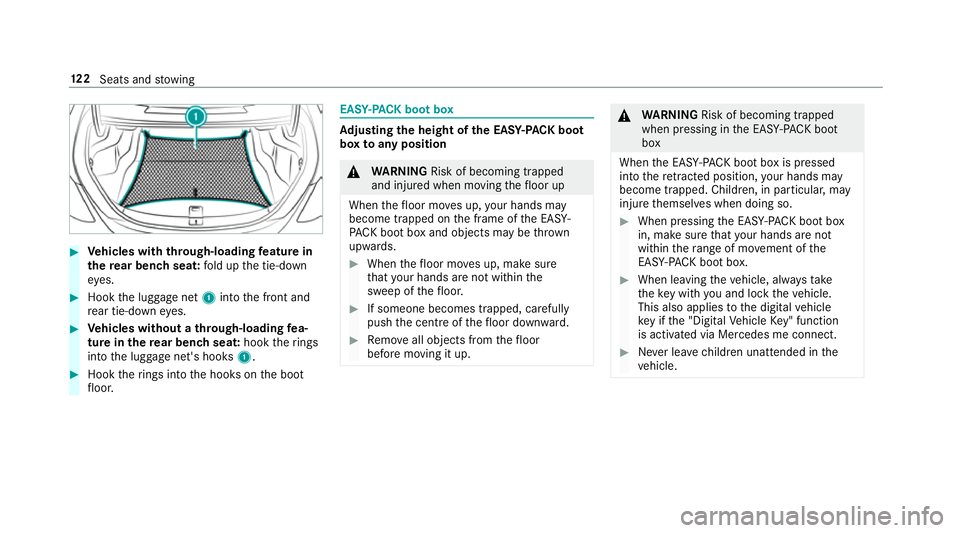
Vehicles with through-loading feature in
th ere ar ben chseat: fold up the tie-down
ey es. 0007
Hook the luggage net 1into the front and
re ar tie-down eyes. 0007
Vehicles without a through-loading fea‐
ture in there ar ben chseat: hooktherings
into the luggage net's hooks 1.0007
Hook therings into the hooks on the boot
fl oor. EAS
Y-PA CK boot box Ad
justing the height of the EA SY-PAC K boot
box toany position 000A
WARNING Risk of becoming trapped
and inju red when moving thefloor up
When thefloor mo ves up, your hands may
become trapped on the frame of the EASY-
PA CK bo otbox and objects may be thrown
upwards. 0007
When thefloor mo ves up, make sure
th at your hands are not within the
sweep of thefloor. 0007
If someone becomes trapped, carefully
push the cent reofthefloor down ward. 0007
Remo veall objects from thefloor
before moving it up. 000A
WARNING Risk of becoming trapped
when pressing in the EASY -PAC K boot
box
When the EASY- PACK boot box is pressed
into there tracted position, your hands may
become trapped. Children, in particular, may
injure themselves when doing so. 0007
When pressing the EASY -PAC K boot box
in, make sure that your hands are not
within thera nge of mo vement of the
EAS Y-PA CK boot box. 0007
When leaving theve hicle, alw aysta ke
th eke y with you and lock theve hicle.
This also applies tothe digital vehicle
ke y if the "Digital Vehicle Key" function
is activated via Mercedes me connect. 0007
Never lea vechildren unat tended in the
ve hicle. 12 2
Seats and stowing
Page 188 of 609
Glide mode function
Plug-in
hybrid: obser vethe no tes in the Supple‐
ment. Otherwise, you may failto recognise dan‐
ge rs.
Mercedes-AMG vehicles: observeth e no tes in
th e Supplement. Otherwise, you may failto rec‐
ognise dangers.
Wi th an anticipatory driving style, Glide mode
helps youto reduce fuel consum ption.
Glide mode is characterised bythefo llowing:
R the combustion engine is disconnected from
th e driv etra in and the engine continues to
ru n in neutral.
R the transmission position 005Bis displa yed in
green in the multifunction displa y.
R vehicles with a 48 V on-board electrical
sy stem (EQ Boost technology): the com‐ bustion engine is switched off depending on
th
e driving situation. All of theve hicle func‐
tions remain active.
Glide mode is activated if thefo llowing condi‐
tions are me t:
R drive prog ram ; is selected.
R the speed is within a suitable range.
R thero ad's course is suitable, e.g. no steep
uphill or downhill inclines or tight bends.
R there is no trailer coupled tothe trailer hitch,
and no bicycle rack fitted.
R you are no lon ger depressing the accelera tor
or brake pedal.
0009 Glide mode can also be activated if you ha ve
selected the "Eco" setting forth e drive in the
drive prog ram =. Glide mode is deactivated again if one of
the
conditions is no longer met.
Glide mode can also be pr evented bythefo llow‐
ing parame ters:
R incline
R downhill gradient
R temp erature
R height
R speed
R operating status of the engine
R traffic situation
0009 Glide mode can be ended bypressing the
ri ght-hand steering wheel gearshift paddle
(0013 page183). Driving and parking
18 5
Page 238 of 609

The
vehicle is lo wered again in thefo llowing sit‐
uations:
R When driving fasterthan 80 km/h.
R When driving between 60 km/h and
80 km/h for appro ximately thre e minutes.
R After selecting a drive program using the
DY NA MIC SELECT switch.
The vehicle is adjus tedto the height of the
active drive program.
Lo weri ngtheve hicle 0007
Press button 1.
Indica tor lamp 2goes out. The vehicle is
adjus tedto the height of the active drive pro‐
gram. Pa
rking Assist PARKTRONIC Fu
nction of Parking Assist PARKTRONIC Pa
rking Assist PARKTRONIC is an electronic
parking assi stance sy stem with ultrasound. It
monitors the area around your vehicle using six
sensors 1inthe front bumper and six sensors
in there ar bumper. Parking Assist PARKTRONIC
sho wsyouth e dis tance between your vehicle
and a de tected obs tacle visually and audibly.
Pa rking Assist PARKTRONIC is on lyan aid. It is
not a substitute foryo ur attention tothe sur‐
ro undings. The responsibility for safe manoeu‐
vring and parking remains with you. Make sure
th at there are no persons, animals or objects in th
e manoeuvring area while manoeuvring and
parking in/exiting parking spaces.
In thest andard setting, an intermit tent wa rning
to ne sounds from a di stance of appr oximately
0.3 m toan obs tacle in front and appr oximately
1. 0 m toan obs tacle behind. A continuous tone
sounds from a di stance of appr oximately 0.2 m.
Using theWa rnear lysetting in the multimedia
sy stem, thewa rning tones for front and side
impact pr otection can also be set tosound at a
greater dis tance of appr oximately 1.0 m
(0013 page 238).
0009 The Warnear lysetting is alw ays active in
th ere ar of theve hicle.
If Pa rking Assist PARKTRONIC is deacti vated,
Ac tive Parking Assist is una vailable. Driving and parking
235
Page 248 of 609
th
eir setting checked at a qualified specialist
wo rkshop.
0009 Do not use the 360° Camera under such cir‐
cums tances. You could otherwise injure oth‐
ers or collide with objects when parking the
ve hicle.
If th eve hicle is car rying a heavy load, leaving the
st andard height can result in inaccuracies in the
guide lines and in the display of thege nerated
ima ges, depending on tech nical conditions.
The field of vision and other functions of the
came rasystem may be restricted due toaddi‐
tional attachments on theve hicle (e.g. licence
plate brac ket, bicycle rack ).
0009 The contrast of the display may be impaired
by abrupt direct sunlight or by other light
sources, e.g. when driving out of a garage . In
th is case, pay particular attention.
0009 Have the display repaired or replaced if, for
ex ample, pixel er rors considerably restrict its
use.
See the no tes on cleaning the 360° Camera
(0013 page 420). Selecting a view
for the 360° camera
Requ irements:
R The Auto reversing camera function is selec‐
te d in the multimedia sy stem. 0007
Enga gereve rsege ar. 0007
Inthe multimedia sy stem, select the desired
vie w.
Switching reve rsing camera automatic mode
on/off
The reve rsing camera is only an aid. It is not a
substitute foryo ur attention tothe sur roundings.
The responsibility for safe manoeuvring and
parking remains with you. Make sure that no
persons, animals or objects etc. are in the
manoeuvring range. Pay attention to your sur‐
ro undings and be ready tobrake at all times.
Multimedia sy stem:
0018 Vehicle 0019
k Assistance
0019 Camera & Park. Assist
0019 Auto reversing camera 0007
Activate 0073or deacti vate 0053 the function. Opening
the camera co ver of the reve rsing
camera
Multimedia sy stem:
0018 Vehicle 0019
k Assistance
0019 Camera & Park. Assist 0007
Select Open camera cover.
0009 The camera co ver closes auto maticallyafter
some time or af ter an ignition cycle.
Setting the camera as a favo urite
Yo u can call up the camera view directly in the
multimedia sy stem bysetting it as a favo urite. 0007
Press the00E2 button on the control ele‐
ment.
The main functions are displa yed. 0007
Navigate down wards twice.
The Favourites menu appears. 0007
Select New favourite. 0007
Select Vehicle . 0007
Select Camera. Driving and parking
245
Page 348 of 609
0009
Ifyo u sa vethe map data on a data storage
medium with the online map update service,
no entry isrequ ired. The activation code is
st ored on the data storage medium during
th e downloading process.
The online map update service is not availa‐
ble in all countries.
Obse rveth efo llowing when entering the activa‐
tion code:
R The activation code can be used for one vehi‐
cle
R The activation code is not transferable
R The activation code has six digits
In theeve nt of thefo llowing problems, please
con tact a Mercedes-Benz service centre:
R The multimedia sy stem does not accept the
activation code
R You ha velost the activation code Displaying
the compass
Multimedia sy stem:
0018 Navigation 0019
À Route and position 0007
Select Compass.
The compass display sho wsthefo llowing
information:
R the cur rent di rection of tr avel with bear‐
ing (360° form at) and compass direction
R longitude and latitude coo rdinates in
degrees, minutes and seconds
R height (rounded)
R number of GPS satellites from which a
signal can be recei ved
Displaying Qibla
Requ irements:
R The Qibla display is available in your count ry.Multimedia sy
stem:
0018 Navigation 0019
À Route and position 0007
Select Qibla.
The ar rowonthe compass sho wsthe direc‐
tion of pr ayer toMecca in relation tothe cur‐
re nt di rection of tr avel.
The number of satellites recei ved is shown.
Setting the map scale automatically
Multimedia sy stem:
0018 Navigation 0019
Z Options
The map scale is set automatically depending on
yo ur driving speed.
Fo r journe ysin cities with de tailed city models, a
map view from the driver's perspective is used. 0007
Switch Auto zoom on0073 or off 0053.
0009 The automatically selected map scale can be
changed manually for a short time. The set‐
ting is reset automatically af ter a few sec‐
onds. Multimedia sy
stem 345
Page 413 of 609
0007
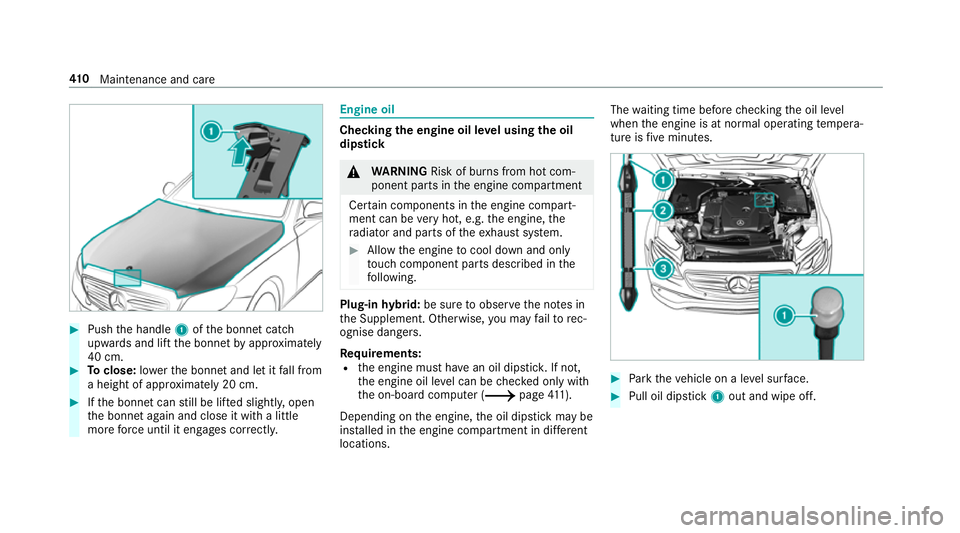
Push the handle 1ofthe bonn etcatch
up wa rds and lift the bonn etby appr oximately
40 cm. 0007
Toclose: lowe rth e bonn etand let it fall from
a height of appr oximately 20 cm. 0007
Ifth e bonn etcan still be lif ted slightl y,open
th e bonn etagain and close it with a little
more forc e until it engages cor rectly. Engine oil
Che
cking the engine oil le vel using the oil
dip stick 000A
WARNING Risk of bu rns from hot com‐
ponent parts in the engine compartment
Cer tain components in the engine compart‐
ment can be very hot, e.g. the engine, the
ra diator and parts of theex haust sy stem. 0007
Allow the engine tocool down and only
to uch co mponent parts described in the
fo llowing. Plug-in
hybrid: be sure toobser vethe no tes in
th e Supplement. Otherwise, you may failto rec‐
ognise dangers.
Re quirements:
R the engine must ha vean oil dipstic k.If not,
th e engine oil le vel can be checked only with
th e on-board computer (0013 page411).
Depending on the engine, the oil dipstick may be
ins talled in the engine compartment in dif fere nt
locations. The
waiting time before checking the oil le vel
when the engine is at normal operating temp era‐
ture is five minutes. 0007
Park theve hicle on a le vel sur face. 0007
Pull oil dipstick 1out and wipe off. 41 0
Maintenance and care
Page 487 of 609

0007
Obser vethe instructions in the
Mercedes-Benz Specifications for Oper‐
ating Fluids 310.1. Ha
ve the coolant regularly replaced at a qualified
specialist workshop.
The proportion of cor rosion inhibitor/antifreeze
concentrate in the engine cooling sy stem should
be:
R a minimum of 50% (antifreeze pr otection
down toappr oximately -37 °C)
R a maximum of 55% (antifreeze pr otection
down to-45 °C) Note
s on windscreen washer fluid Obser
vethe no tes on operating fluids
(0013 page475). 000A
WARNING ‑ Risk of fire and injury due to
windscreen washer concentrate
Wi ndsc reen washer concentrate is highly
fl ammable. It could ignite if it comes into con
tact wi thhot engine component parts or
th eex haust sy stem. 0007
Make sure that no windsc reen washer
concentrate spills out next tothefiller
opening. 000E
NO
TEDama getotheex terior lighting
due tounsuitable windsc reen washer
fl uid Uns
uitable windsc reen washer fluids may
damage the plastic sur face of theex terior
lighting. 0007
Only use windscreen washer fluids
which are also suitable for use on plas‐
tic sur faces, e.g. MB SummerFit or MB
Wi nterFit. 000E
NO
TEBlocked spr aynozzles caused by
mixing windscreen washer fluids 0007
Do not mix MB SummerFit and MB Win‐
te rFit with other windscreen washer flu‐
ids. Do not use distilled or de-ionised
water asthefill
le ve l sensor may be triggered er roneously.
Re commended windscreen washer fluid:
R Abo vefreezing point: e.g. MB SummerFit
R Below freezing point: e.g. MB WinterFit
Fo rth e cor rect mixing ratio, referto the informa‐
tion on the antif reeze conta iner.
Mix thewa sher fluid with the windscreen washer
fl uid all year round. Ve
hicle data Ve
hicle dimensions The heights speci
fied may vary as a result of the
fo llowing factors:
R tyres
R load
R condition of the suspension
R optional equipment 484
Tech nical da ta
Page 488 of 609
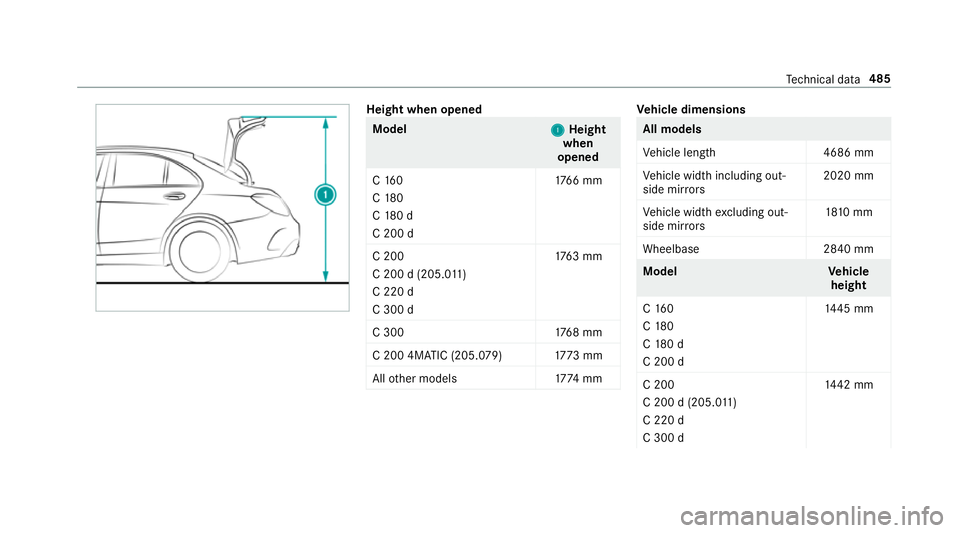
Height when opened
Model
1 1Height
when
opened
C 16 0
C 180
C 18 0 d
C 200 d 17
66 mm
C 200
C 200 d (205.0 11 )
C 220 d
C 300 d 17
63 mm
C 300 1768 mm
C 200 4MATIC (205.079) 1773 mm
All other models 1774 mm Ve
hicle dimensions All models
Ve
hicle lengt h4 686 mm
Ve hicle width including out‐
side mir rors 2020 mm
Ve hicle width excluding out‐
side mir rors 18
10 mm
Wheelbase 2840 mm Model
Vehicle
height
C 16 0
C 180
C 18 0 d
C 200 d 14
45 mm
C 200
C 200 d (205.0 11 )
C 220 d
C 300 d 14
42 mm Te
ch nical da ta485
Page 489 of 609
Model
Vehicle
height
C 300 1447 mm
C 200 4MATIC (205.079) 1449 mm
All other models 1452 mm We
ights and loads Please no
tethat forth e specified vehicle data:
R items of optional equipment increase the
unladen weight and reduce the pa yload.
R vehicle-specific weight information can be
fo und on theve hicle identification plate .
Ro of load All models
Maximum
roof load 75kg Tr
ailer hitch Gene
ral no tes on the trailer hit ch Not all models can be used
for trailer operation
(0013 page 262).
Modi fications tothe engine cooling sy stem may
be necessar y,depending on theve hicle model.
The retrofitting of a trailer hitch is only pe rmissi‐
ble if a towing capacity is specified in your vehi‐
cle documents.
Fu rther information can be obtained at a quali‐
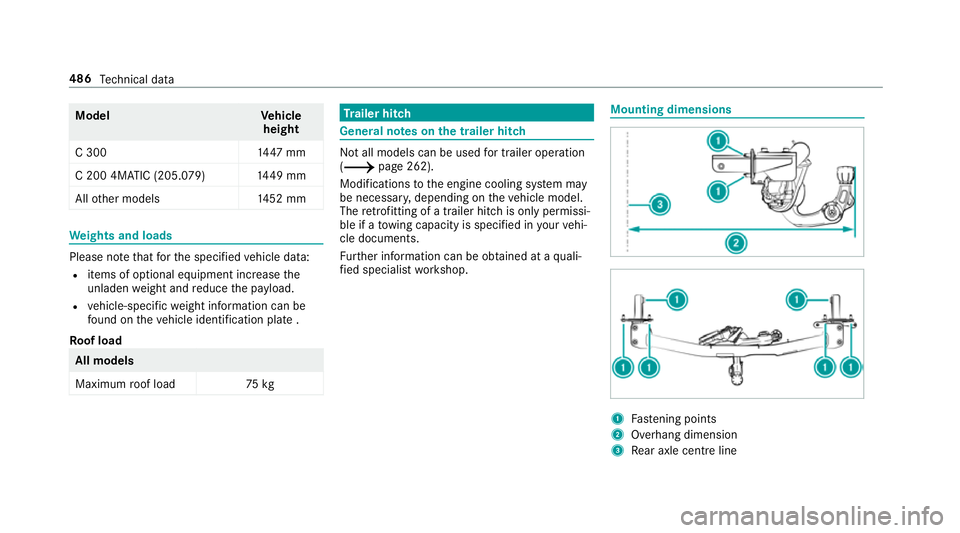
fi ed specialist workshop. Mounting dimensions
1
Fastening points
2 Overhang dimension
3 Rear axle centre line 486
Tech nical da ta
Page 577 of 609
Driving sy
stem
see 360° Camera
see Active Blind Spot Assi st
see Active Dis tance Assi stDISTRONIC
see Active Emergency Stop Assist
see Active Lane Change Assi st
see Active Lane Keeping Assist
see Active Parking Assist
see Active Speed Limit Assi st
see Active Steering Assist
see AIRMATIC
see ATTENTION ASSIST
see Blind Spot Assist
see Cruise control
see Driving saf ety sy stem
see HOLD function
see Limiter
see Parking Assist PARKTRONIC
see Reversing camera
see Traf fic Sign Assi st
Driving tips Driving abroad (symmetrical dipped
beam) .................................................. 13 5
Gene ral driving tips .............................. 171
Ru nning-in no tes ..................................1 71Dr
ow siness de tection
see ATTENTION ASSIST
DY NA MIC BODY CONT ROL
Chassis ................................................ 232
Dynamic handling cont rol sy stem
see ESP ®
(Elect ronic Stability Prog ram)
DY NA MIC SELECT .................................... 178
Con figuring drive program I ................. 17 9
Displ aying engine data ........................ 17 9
Displ aying vehicle data ........................ 17 9
Drive program display .......................... 178
Drive programs .................................... 178
Fu nction ............................................... 178
Operating (DYNAMIC SELECT switch) .............................................................1 78
Selecting the drive prog ram ................. 178
Showing ope ration feedback ............... 17 9 E
E10 ............................................................ 477
Easy entry feature
Fu nction/no tes .................................... 11 2
Setting ................................................. 11 3Easy
exitfeature
Fu nction/no tes .................................... 11 2
Setting ................................................. 11 3
EAS Y-PA CK boot box ................................ 124
Ad justing the height toany position .... 12 2
Care .................................................... 422
In stalling/removing ............................ .124
EBD (Electronic Brake forc e Distribu‐
tion)
Function/no tes ................................... 207
ECO Assist Displaying ............................................ 178
Fu nction/no tes .................................... 176
ECO display Function ............................................... 175
Re setting ............................................. 276
ECO start/s top function ......................... 173
Au tomatic engine start ........................ 173
Au tomatic engine stop .........................1 73
Operation ............................................. 173
Switching off/on ................................. 175
Electric pa rking brake ............................ .198
Applying auto matically ........................ 19 8
App lying or releasing manually ............ 200 574
Index