low beam MERCEDES-BENZ C-CLASS SALOON 2018 User Guide
[x] Cancel search | Manufacturer: MERCEDES-BENZ, Model Year: 2018, Model line: C-CLASS SALOON, Model: MERCEDES-BENZ C-CLASS SALOON 2018Pages: 609, PDF Size: 11.19 MB
Page 146 of 609

ULTRA RANGE Highbeam increases
the bright‐
ness of the cone of light tothe legally permitted
maximum.
Pa rtial high beam uses the high beam toshine
past other road users rath er than dazzling them.
The vehicle in front is illuminated bythe low
beam.
At speeds below 25 km/h or when there is suf fi‐
cient stre et lighting:
R The partial high beam and the high beam
switch off automaticall y.
At speeds abo ve30 km/h:
R If no other road users are de tected, the high
beam is switched on automaticall y.
R Ifot her road users are de tected, the partial
high beam is switched on automaticall y.
At speeds abo ve40 km/h:
R If no other road users are de tected on a
st ra ight road, ULTRA RANGE Highbeam is
swit ched on automaticall y.
R Ifot her road users are de tected, the partial
high beam is switched on automaticall y.R
If highly reflective signs are de tected, ULTRA
RANGE Highbeam is switched off au tomati‐
cally.
At speeds abo veappr oximately 50 km/h:
R The headlamp range of the low beam is regu‐
lated automatically based on the dis tance to
ot her road users.
The sy stem's optical sensor is located behind
th e windscreen near theove rhead control panel.
Switching Adaptive Highbeam Assist Plus
on/off 0007
Toswitch on: turnthe light switch tothe
0058 position. 0007
Switch on the main beam using the combina‐
tion switch.
When the main beam is switched on auto‐
matically in the dar k,the 00CE indicator
lamp on the multifunction display will light
up. 0007
Toswitch off: switch offthe main beam
using the combination switch. Setting
the dipped beam Multimedia sy
stem:
0018 Vehicle 0019
÷ Light settings
0019 Dipped-beams 0007
Select Left-side traffic orRight-side traffic. Setting
theex terior lighting switch-off delay
time Multimedia sy
stem:
0018 Vehicle 0019
÷ Light settings
0019 Exterior light shut-off 0007
Set the switch-off delay time. Setting
the sur round lighting Multimedia sy
stem:
0018 Vehicle 0019
÷ Light settings
0019 Locator lighting 0007
Activate 0073or deacti vate 0053 the function.
If th e sur round lighting is swit ched on, theex te‐
ri or lighting remains lit for 40 seconds af terthe Light and sight
14 3
Page 148 of 609

Setting
the interior lighting switch-off delay
time Multimedia sy
stem:
0018 Vehicle 0019
÷ Light settings
0019 Interior light shut-off 0007
Set the switch-off delay time. Changing bulbs (only
forve hicles with halo‐
ge n headla mps) Note
s onchanging bulbs 000A
WARNING Risk of bu rns from hot com‐
ponent parts whilst replacing a bulb
Bulbs, lamps and plugs can become very hot
during operation.
When replacing a bulb, you could burn your‐
self on these component parts. 0007
Allow the component parts tocool
down before replacing the bulb. R
Do not use a bulb if it has been dropped or if
itsglass has been sc ratched. The bulb may
ot herwise explode.
R Do not touch theglass bulb with your bare
hands.
R Protect bulbs from moisture and do not allow
bulbs tocome into contact wi thliquids. Overview of
the bulbs tobe changed Halogen headlamps
1
Turn signal indicator: PWY 24W bulb
2 Main beam: H7 55 W bulb
3 Dipped beam: H7 55 W bulb Light and sight
14 5
Page 149 of 609

Ta
il lamps 1
Turn signal indicator: PY 21W bulb
2 Reversing light: W 16W bulb Changing
the front bulbs (vehicles with halo‐
ge n headla mps) Fi
tting/ removing the co ver in the front
wheel ar ch
Re quirements:
R The lighting sy stem is switched off.
R The appropriate front wheel is turned
in wa rds. 0007
Toremo ve:using a suitable object, turn the
two mounts 1ofthe co ver2 in an anti-
clockwise direction as far as they will go. 0007
Remo vethe unloc ked co ver2 from the
wheel ar chliner bypulling it upwards. 0007
Tofit: inse rtco ver 2 at bottom of the wheel
ar ch liner. 0007
Using a suitable object, turn the two mounts
1 ofthe co ver2 in clockwise direction as
fa r as they will go.
Re placing bulbs in the halo gen headla mp
Re quirements:
The lighting sy stem is switched off.
Low beam/high beam
R A H7 55 W light bulb is available.
R The bonnet is open.
Tu rn signal lights:
R A PWY 24W light bulb is available.
R The co ver in the front wheel ar chhas been
re mo ved. 14 6
Light and sight
Page 150 of 609

1
Low beam
2 High beam
3 Turn signal lights 0007
Turn there leva nt housing co ver1–3 anti-
clockwise and remo veit. 0007
Low beam / high beam: turnthe soc ket
anti-clockwise and remo veit. 0007
Indicator: turnthe soc ket anti-clo ckwise,
re lease it and remo veit. 0007
Pull the bulb out of the soc ket. 0007
Inse rtthe new bulb into the soc ket su chthat
th e entire base of the bulb is resting on the
bottom of the soc ket. 0007
Inse rtthe soc ket and turn it clo ckwise. 0007
Press on the housing co ver and turn it clock‐
wise. 0007
Turn signal lights: installth e co ver in the
front wheel ar ch. Changing
there ar bulbs (vehicles with halo‐
ge n headla mps) Opening and closing
the side trim panels in
th e boot 0007
Toopen: release right-hand or left-hand side
trim panels 1attheto p and remo ve. 0007
Toclose: reinse rtside trim panel 1.Re
placing the tail lamp bulbs
Re quirements:
The lighting sy stem is switched off.
The side trim panel in the boot is open.
Tu rn signal lights:
R A PY 21W light bulb is available.
Re versing lights:
R A W 16W light bulb is available. Light and sight
147
Page 265 of 609
Setting
the sensitivity of Active Lane Keep‐
ing Assist
Multimedia sy stem:
0018 Vehicle 0019
k Assistance
0019 Act. Lane Keep. Assist 0007
Select a setting.
Ac tivating/deactivating the warning 0007
Swit chLane depart. warning on0073 or off 0053.
Yo u do not recei veany warning when leaving
a lane if the lane keeping warning sy stem is
deactivated. Tr
ailer hitch Tr
ailer operation no tesMercedes‑AMG
vehicles: always obser vethe
no tes in the Supplement. Otherwise, you may
fa ilto recognise dangers.
Obser vethefo llowing no tes on theto ngue
we ight:
R do not use a tongue weight that exceeds or
fa lls below the permissible tongue weight R
use a tongue weight as close as possible to
th e maximum tongue weight
Do not exceed thefo llowing values:
R permissible towing capacity
R permissible rear axle load of theto wing vehi‐
cle
R permissible gross mass of theto wing vehicle
R permissible gross mass of the trailer
R maximum permissible speed of the trailer
Ensure thefo llowing before starting a journey:
R the tyre pressure on there ar axle of theto w‐
ing vehicle is set for a maximum load
R the lighting of the connected trailer is opera‐
tional
R vehicles without LED headlamps or MUL‐
TIBEAM LED headlamps: the headlamps
ha ve been set cor rectly
In theeve nt of increased rear axle load, the car/
trailer combination may not exceed a maximum
speed of 100 km/h forre asons concerning the
operating permit. This also applies in countri esin which
the permissible maximum speed for
car/trailer combinations is ab ove100 km/h. Fo
lding the ball neck out/in 000A
WARNING Risk of accident due tothe
ball neck not being engaged
If th e ball neck is not engaged, the trailer
may come loose. 0007
Alw ays engage the ball neck as descri‐
bed. 000A
WARNING Risk of inju ryfrom ball neck
swinging outwards
The ball neck may swing outwards when
unlo cking or when it has not been properly
engaged.
There is a risk of injury within the ball neck's
ra nge of mo vement! 0007
Unlock the ball neck only when its
ra nge of mo vement is unobstructed. 262
Driving and parking
Page 276 of 609
The
following display con tent can be selected in
th eClassic andSport designs:
R Rev counter
R Navigation
R ECO display
R Consu mption
R G-m eter
The following con tent can be selected in thePro-
gressive design:
R Date
R Navigation
R ECO display
R Consu mption
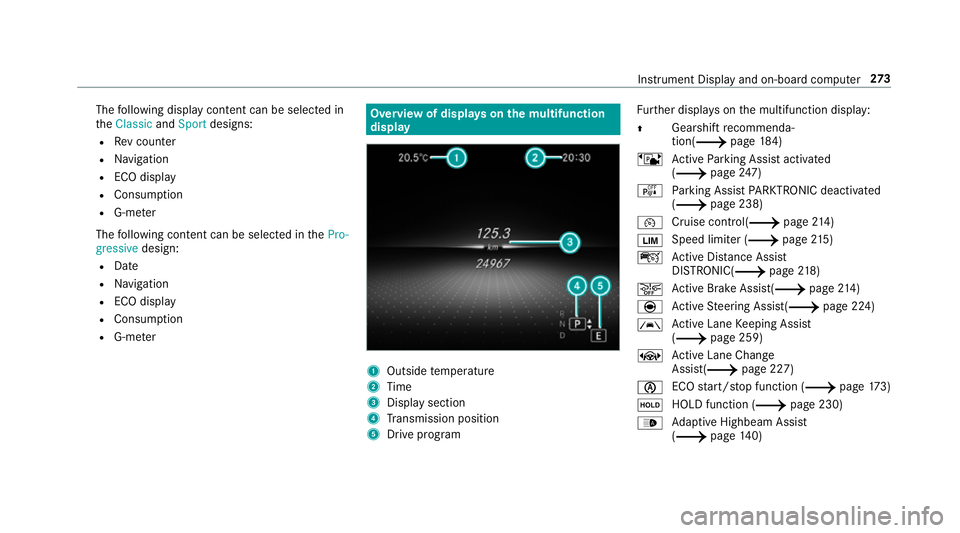
R G-m eter Overview of displa
yson the multifunction
display 1
Outside temp erature
2 Time
3 Display section
4 Transmission position
5 Drive prog ram Fu
rther displa yson the multifunction display:
0097 Gearshift
recommenda‐
tion(0013 page 184)
ë Active Parking Assist activated
(0013 page247)
é Parking Assist PARKTRONIC deacti vated
( 0013 page 238)
00B2 Cruise control(0013
page214)
00CB Speed limi
ter (0013 page215)
ç Active Dis tance Assi st
DISTRONIC( 0013page 218)
00D4 Ac
tive Brake Assi st(0013 page214)
è Active Steering Assis t(0013 page 224)
00B0 Ac
tive Lane Keeping Assist
(0013 page 259)
± Active Lane Change
Assi st(0013 page 227)
00D6 ECO
start/ stop function (0013 page173)
00D9 HOLD fu
nction (0013 page 230)
00CE Ad
aptive Highbeam Assist
(0013 page140) Instrument Displ
ayand on-board computer 273
Page 277 of 609
Ad
aptive Highbeam Assist Plus
(0013 page142)
00CB Maximum permissible speed
exceeded
(for cer tain countries only)
Ve hicles with Traf fic Sign Assis t:de tected
instructions and traf fic signs (0013 page 254). Ad
justing the in stru ment lighting 0007
Turn brightness control 1up or down.
The lighting of the instrument display and in
th e control elements of theve hicle interior is
adjus ted. Menus and submenus
Fu
nctions on the service menu of the on-
board compu ter On-board computer:
0018 Service 0007
Toselect the function: swipe upwards or
down wards on the left-hand Touch Control. 0007
Press the left-hand Touch Control.
Fu nctions on theService menu:
R Message memory (0013 page 490)
R AdBlue :Ad blue ®
ra nge and fill le vel
R Tyres:
- Restart the tyre pressure loss warning
sy stem (0013 page 457)
- Check the tyre pressure with the tyre
pressure monitor (0013 page 451)-
Restart the tyre pressure monitor
(0013 page 452)
R ASSYST PLUS: calls up the service due date
(0013 page 406)
R Vehicles with a widescreen cock pit:Cool-
ant : coolant temp erature display
R Engine oil level: engine oil le vel Calling up
the assistant display On-board computer:
0018 Assistance
The following displa ysare available on the assis‐
ta nt displ aymenu:
R Assis tant displ ay
R Attention le vel (0013 page 252) 0007
Toswitch between the displa ys:swipe
upwards or down wards on the left-hand
To uch Control. 274
Instrument Display and on-board computer
Page 546 of 609
Display messages
Possible causes/consequences and 0050
0050Solutions
0009 LED light bulbs: the display message forth e cor responding lamp appears only when allthe light-emitting diodes
in the lamp ha vefailed.
0049 Active Light System inoper-
ative *T
he active headlamp s arefaulty. 0007
Consult a qualified specialist workshop.
0049 Malfunction See Owner's
Manual *T
heexterior lighting is faulty. 0007
Consult a qualified specialist workshop.
Ve hicles with a trailer hitch: a fuse may haveblown. 0007
Pull over and stop theve hicle, paying attention toroad and traf fic conditions. 0007
Check the fuses and replace them if necessary (0013 page445).
Adaptive Highbeam Assist
inoperative *A
daptive Highbeam Assist is malfunctioning. 0007
Consult a qualified specialist workshop.
Adaptive Highbeam Assist
currently unavailable See
Owner's Manual *A
daptive Highbeam Assist is temp orarily una vailable.
The sy stem limits ha vebeen reached (0013 page140). 0007
Drive on.
Once the cause of the problem is no longer present, the sy stem will be available again. The Adaptive Highbeam
Assist available again display message appears. Display messages and
warning/indicator lamps 543
Page 549 of 609
Wa
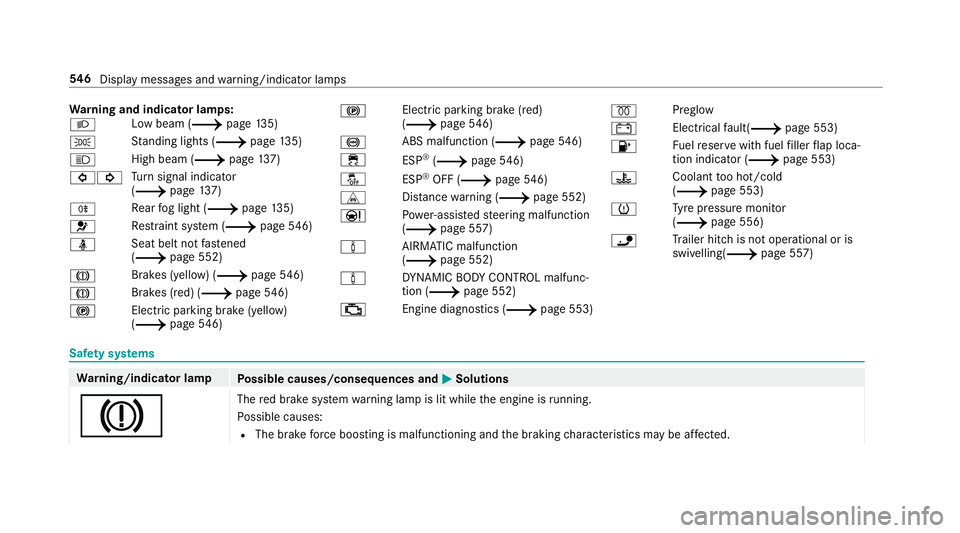
rning and indicator lamps:
0058 Low beam (0013
page135)
0060 St
anding lights (0013 page135)
0057 High beam (0013
page137)
003E003D Tu
rn signal indicator
(0013 page137)
005E Re
ar fog light (0013 page135)
0075 Re
stra int sy stem (0013 page546)
00E9 Seat belt not
fastened
(0013 page 552)
004D Brakes (yellow) (0013
page546)
004D Brakes (red) (0013
page546)
0024 Electric pa
rking brake (yellow)
(0013 page546) 0024
Electric parking brake (red)
(0013
page546)
0025 ABS malfunction (0013
page 546)
00E5 ESP®
(0013 page 546)
00BB ESP®
OFF (0013 page546)
L Distance warning (0013 page 552)
00CC Po
we r-assis tedsteering malfunction
(0013 page 557)
00CC AIRMATIC malfunction
(0013
page 552)
00CC DY
NA MIC BODY CONTROL malfunc‐
tion (0013 page 552)
00B9 Engine diagnostics (0013
page 553)0028
Preglow
003D Electrical
fault( 0013 page 553)
00B6 Fu
elreser vewith fuel filler flap loca‐
tion indicator (0013 page 553)
00AC Coolant
too hot/cold
(0013 page 553)
0077 Ty
re pressure monitor
(0013 page 556)
00CA Tr
ailer hit chis not operational or is
swivelling(0013 page 557)Saf
ety sy stems Wa
rning/indicator lamp
Possible causes/consequences and 0050 0050Solutions
004D The
red brake sy stem warning lamp is lit while the engine is running.
Po ssible causes:
R The brake forc e boosting is malfunctioning and the braking characteristics may be af fected. 546
Displaymessa ges and warning/indicator lamps
Page 571 of 609
D
Damage de tection (pa rked vehicle) .......2 01
Dashboa rd
see Cockpit
Dashboard lighting see Instrument lighting
Data acquisition Vehicle .................................................. 29
Data import/export ................................. 312
Fu nction/no tes .................................... 312
Importing/exporting ............................ 313
Data storage
Electronic control units ........................ .29
Online services ...................................... 30
Ve hicle .................................................. 29
Date Setting the time and date automati‐
cally ..................................................... 307
Deactivating the alarm (A TA).................... 98
Dealership see Qualified specialist workshop Declaration of conformity
Electromagnetic compatibility ............... 25
Jack .......................................................25
TIREFIT kit ............................................. 26
Wi reless vehicle components ................25
Decorative foil (cleaning instructions) ..41 8
DeNOx agent see AdBlue ®
Designs Menu (on-boa rdcompu ter) .................. 272
Destination .............................................. 336
Editing intermediate destinations ........ 325
Editing the pr evious destinations ........ 336
Ex tern al .............................................. .336
Saving (cur rent vehicle position) ......... 336
Saving as global favo urite .................... 336
St oring a map position ........................ 336
Destination entry .................................... 320
Entering 3 wordaddresses .................. 326
En tering a POI or address .................... 320
Entering an intermedia tedestination ...3 24
Entering geo-coordinates .................... 326
Selecting a contact ............................. 325
Selecting a POI .................................... 323 Selecting from
the map ....................... 327
Selecting pr evious destinations .......... .323
De tecting inat tentiveness
see ATTENTION ASSIST
Diagnostics connection ............................26
Diesel Low outside temp eratures ...................4 78
No tes ................................................... 478
Digital Owner's Manual ............................ 20
Digital speedome ter ................................ 275
Digital TV
see TV
Digital Vehicle Keyst icker
Locking theve hicle ................................ 78
St arting theve hicle ............................. 16 8
Unlocking theve hicle ............................78
Dinghy towing
see Tow- bar sy stem
Dipped beam Changing bulbs .................................... 14 6
Setting ................................................. 14 3568
Index