fuel MERCEDES-BENZ C-CLASS SALOON 2018 Owner's Manual
[x] Cancel search | Manufacturer: MERCEDES-BENZ, Model Year: 2018, Model line: C-CLASS SALOON, Model: MERCEDES-BENZ C-CLASS SALOON 2018Pages: 609, PDF Size: 11.19 MB
Page 192 of 609
Even small amounts of
the wrong fuel
could result in damage tothe fuel sy stem
and the engine. The repair costs are high. 0007
Consult a qualified specialist workshop. 0007
Have the fuel tank and fuel lines
drained compl etely. 000E
NO
TEDo not use petrol torefuel vehi‐
cles with a diesel engine. If
yo u acciden tally refuel with the wrong fuel:
R Do not switch the ignition on. Otherwise,
fuel can enter the fuel sy stem.
Even small amounts of the wrong fuel
could result in damage tothe fuel sy stem
and the engine. The repair costs are high. 0007
Consult a qualified specialist workshop. 0007
Have the fuel tank and fuel lines
drained compl etely. 000E
NO
TEFuel may spr ayout when you
re mo vethe fuel pump nozzle. 0007
Only fill th e fuel tank until the pump
nozzle switches off. Re
quirements:
R The vehicle is unloc ked.
0009 Do not get into theve hicle again during the
re fuelling process. Otherwise, electros tatic
ch arge could build up again.
Obser vethe no tes on operating fluids
(0013 page475).
Plug-in hybrid: obser vethe no tes in the Supple‐
ment. Otherwise, you may failto recognise dan‐
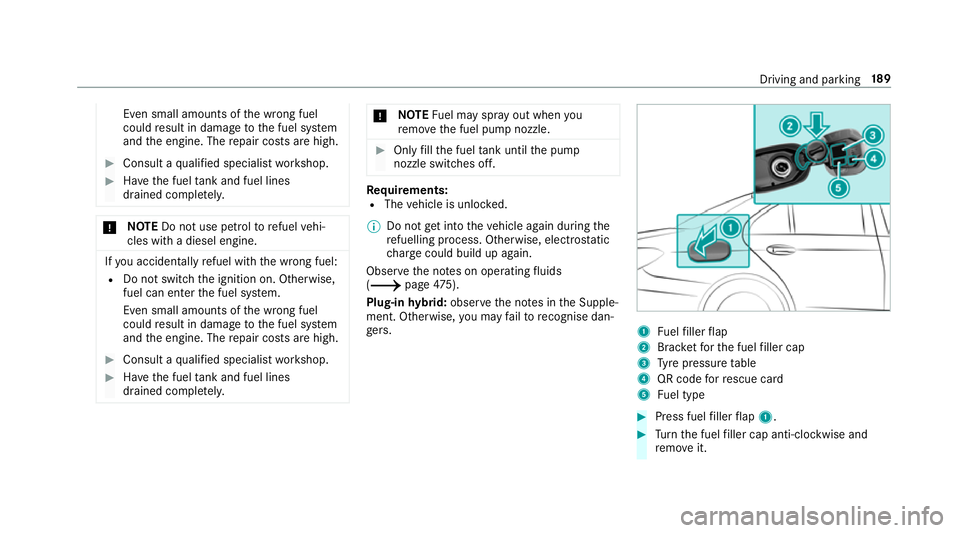
ge rs. 1
Fuelfiller flap
2 Brac ketfo rth e fuel filler cap
3 Tyre pressure table
4 QR code forre scue card
5 Fuel type 0007
Press fuel filler flap 1. 0007
Turn the fuel filler cap anti-clockwise and
re mo veit. Driving and parking
18 9
Page 193 of 609
0007
Insert the fuel filler cap into brac ket2. 0007
Comp lete ly inse rtthe pump nozzle into the
ta nk filler nec k,hook in place and refuel. 0007
Only fill th e fuel tank until the pump nozzle
switches off.
0009 Vehicles with a diesel engine: theta nk
fi ller neck is designed forre fuelling at diesel
fi lling pumps.
0009 Vehicles with a diesel engine: whenthe
fuel tank is compl etely em pty, top up with at
least 5 litres of diesel.
0009 Vehicles with a diesel engine: use afiller
neck with a lar gediame terfo rve hicles with
a diesel engine when topping up fuel from a
fuel can. Otherwise, thefiller neck cannot
slide into theta nk. 0007
Replace the cap on thefiller neck and turn
clockwise until it engages audibl y.0007
Close the fuel filler flap. Ad
Blue ®
(vehicles with a diesel engine on ly) Note
s onrefilling AdBlue ®
000E NOTEWhen you open theAd Blue ®
tank,
small amounts of ammonia vapour may
escape. 0007
Only fill th eAd Blue ®
tank in well-venti‐
lated areas. 0007
Do not let AdBlue ®
come into contact
wi th skin, eyes or clo thes. 0007
Keep AdBlue ®
aw ay from children. 000E
NOTEDo not ingest AdBlue ®
. If
Ad Blue ®
is swallo wed: 0007
Immediately rinse out your mouth thor‐
oughl y. 0007
Drink plenty of water. 0007
Seek medical attention immediately. Obser
vethe no tes on operating fluids
(0013 page475). Ad
Blue ®
is a wate r-soluble fluid forth e NOx
ex haust gas af tertre atment of diesel engines. In
order forth eex haust gas af tertre atment tofunc‐
tion proper ly, only use AdBlue ®
in acco rdance
with ISO 22 241.
Ad Blue ®
is ch aracterised bythefo llowing:
R non-t oxic
R colourless and odourless
R non-flammable
Ad Blue ®
is available here:
R AdBlue ®
may be topped up byfast service at
a qu alified specialist workshop, e.g. a
Mercedes-Benz Service Centre.
R AdBlue ®
is available at many filling stations
from AdBlue ®
filling pumps.
R Alternativel y,Ad Blue ®
is available at qualified
specialist workshops, e.g. Mercedes-Benz
Service Centres, and at many filling stations
in Ad Blue ®
re fill canis ters or AdBlue ®
re fill
bottles. 19 0
Driving and pa rking
Page 194 of 609
0009
Ensu rethe connection between there fill
con tainer and vehicle filler neck does not
drip.
To pping up AdBlue ®
000E NOTEEngine dama gedue toAd Blue ®
being in the fuel 0007
AdBlue ®
must not be used tofill the
fuel tank. 0007
Only use AdBlue ®
to fill th eAd Blue ®
ta nk. 0007
Do not overfill theAd Blue ®
tank. 000E
NO
TEContamination of theve hicle inte‐
ri or due toAd Blue ®
lea kage 0007
Afterto pping up, carefully close the
Ad Blue ®
re fill con tainer. 0007
Avoid car rying AdBlue ®
re fill con tainers
permanently in theve hicle. Re
quirements:
R The vehicle is unloc ked. The
following messages appear in order in the
multifunction display when theAd Blue ®
tank
requ iresrefilling:
R Refill AdBlue See Owner's Manual . The
Ad Blue ®
tank is down tothere ser veleve l.
R Refill AdBlue No start in XXX km. You can
on ly drive theve hicle over the dis tance
shown. Refill Ad Blue ®
as soon as possible.
R Refill AdBlue Start not possible. The vehicle
can no longer be star ted.
Yo u can see theAd Blue ®
ra nge and le vel in the
multifunction display (0013 page274).
0009 The AdBlue ®
ra nge shown depends strongly
on the driving style and operating condi‐
tions. The actual range can therefore deviate
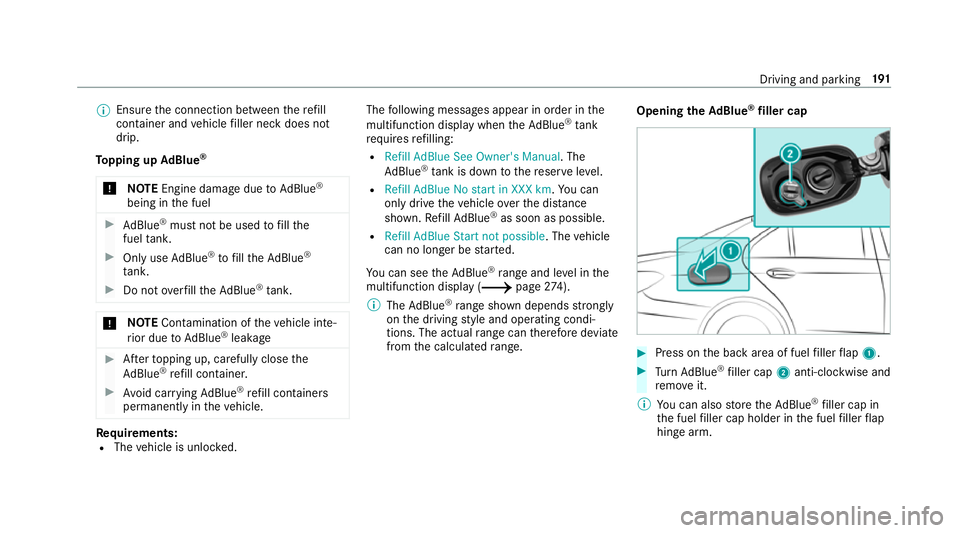
from the calculated range. Opening the
AdBlue ®
filler cap 0007
Press on the back area of fuel filler flap 1. 0007
Turn AdBlue ®
filler cap 2anti-clockwise and
re mo veit.
0009 You can also store theAd Blue ®
filler cap in
th e fuel filler cap holder in the fuel filler flap
hin gearm. Driving and parking
191
Page 195 of 609
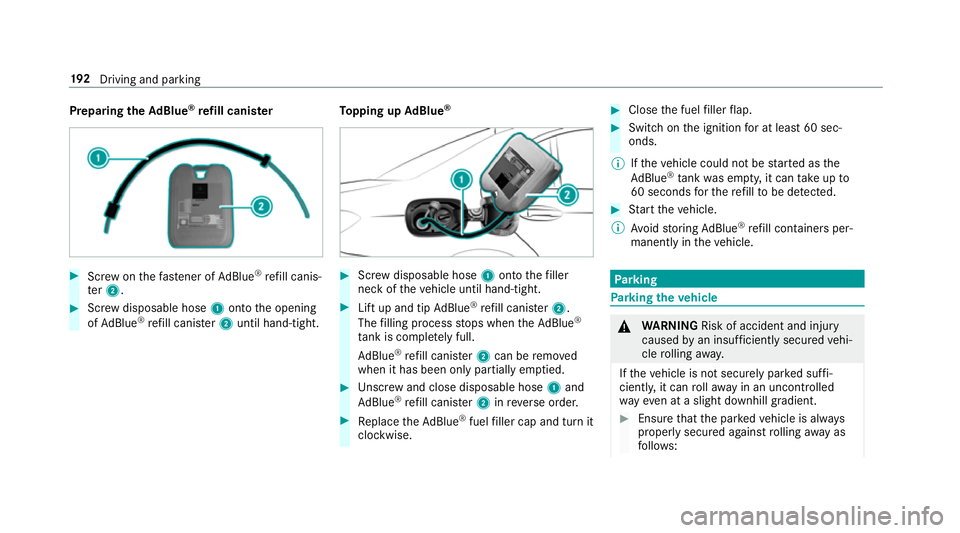
Preparing
theAd Blue ®
re fill canis ter 0007
Screw onthefast ener of AdBlue ®
re fill canis‐
te r2. 0007
Screw disposable hose 1onto the opening
of Ad Blue ®
re fill canis ter2 until hand-tight. To
pping up AdBlue ® 0007
Screw disposable hose 1onto thefiller
neck of theve hicle until hand-tight. 0007
Lift up and tip AdBlue ®
re fill canis ter2.
The filling process stops when theAd Blue ®
ta nk is compl etely full.
Ad Blue ®
re fill canis ter2 can be remo ved
when it has been only partially em ptied. 0007
Unscr ew and close disposable hose 1and
Ad Blue ®
re fill canis ter2 inreve rse order. 0007
Replace theAd Blue ®
fuel filler cap and turn it
clockwise. 0007
Close the fuel filler flap. 0007
Swit chon the ignition for at least 60 sec‐
onds.
0009 Ifth eve hicle could not be star ted as the
Ad Blue ®
tan kwa s em pty, it can take up to
60 seconds forth ere fill to be de tected. 0007
Start theve hicle.
0009 Avoid storing AdBlue ®
re fill con tainers per‐
manently in theve hicle. Pa
rking Pa
rking theve hicle 000A
WARNING Risk of accident and inju ry
caused byan insuf ficiently secu redve hi‐
cle rolling away.
If th eve hicle is not securely par ked suf fi‐
ciently, it can rollaw ay in an uncont rolled
wa yev en at a slight downhill gradient. 0007
Ensure that the par kedve hicle is alw ays
properly secured against rolling away as
fo llo ws: 19 2
Driving and pa rking
Page 222 of 609

halt. The
vehicle accelerates or brakes depend‐
ing on the dis tance totheve hicle in front and
th e set speed. The speed and dis tance tothe
ve hicle in front are set and sa ved on thesteering
wheel on vehicles without the Driving Assis tance
Pa ckage, in thera nge between 20 km/h and
200 km/h and, on vehicles with the Driving
Assis tance Package, in thera nge between
20 km/h and 210 km/h.
Other features of Active Dis tance Assi st
DISTRONIC:
R Adjusts the driving style depending on the
selected drive program (fuel-saving, comfort‐
able or dynamic) (0013 page178)
R Vehicles with Driving Assistance Pack‐
age: reacts tostationary vehicles de tected in
urban speed ranges (e xcept bicycles and
mo torcyc les).
R Initiates acceleration tothestored speed if
th e turn signal indicator is switched on to
ch ange totheov ertak ing lane.
R Vehicles with Driving Assistance Pack‐
age: take s one-sided overtaking restrictions
into account on mo torw ays or on multi-lane ro
ads with separate car riag ewa ys(countr y-
dependent).
Ve hicles with Active Parking Assist and Driv‐
ing Assistance Package: ifth eve hicle has
been braked toast andstill on multi-lane, stru c‐
tural lyseparate car riag ew aysby Active Dis tance
Assi stDISTRONIC, it can au tomatically follow
th eve hicle in front driving off again within 30
seconds. If a critical situation is de tected when
driving off, a visual and acoustic warning is given
indicating that the driver must now take control
of theve hicle. The vehicle is not accelerated any
fur ther.
Ac tive Dis tance Assi stDISTRONIC is only an aid.
The driver is responsible forke eping a safe dis‐
ta nce totheve hicle in front, forve hicle speed
and for braking in good time.
Sy stem limitations
The sy stem may be impaired or may not function
in thefo llowing ins tances:
R In sno w,rain, fog, heavy spr ay, if there is
gl are, in direct sunlight or in great lyvarying
light conditions. R
The windsc reen in the area of the camera is
dirty, mis ted up, damaged or co vered.
R Ifth era dar sensors are dirty or co vered.
R In multi- stor ey car pa rks or on roads with
st eep uphill or downhill gradients.
R Ifth ere are nar rowvehicles in front, such as
bicycles or mo torcyc les.
In addition, on slippery roads, braking or accel‐
erating can cause one or se veral wheels tolose
traction and theve hicle could then skid.
Do not use Active Dis tance Assi stDISTRONIC in
th ese situations. 000A
WARNING Risk of accident from acceler‐
ation or braking byActive Dis tance
Assi stDISTRONIC
Ac tive Dis tance Assi stDISTRONIC may accel‐
erate or brake in thefo llowing cases, for
ex ample:
R Ifth eve hicle pulls away using Active Dis‐
ta nce Assi stDISTRONIC. Driving and pa
rking 219
Page 226 of 609

permitted within
the urban area. The speed limit
display in the instrument display is alw ays upda‐
te d when theve hicle is le vel with the tra ffic sign.
If th ere is no speed restriction on an unlimi ted
st re tch of road (e.g. on a mo torw ay),th ere com‐
mended speed is adop ted as thestored speed.
The sy stem uses the speed stored on an unlimi‐
te dstre tch of road as there commended speed.
If yo u do not alter thestored speed on an unlimi‐
te dstre tch of road, there commended speed is
13 0 km/h.
If Ac tive Dis tance Assi stDISTRONIC has been
put into passi vemode bypressing the accelera‐
to r pedal, only speed limits which are higher
th an the set speed are adop ted.
Ac tive Speed Limit Assi stis only an aid. The
driver is responsible forke eping a safe dis tance
to theve hicle in front, forve hicle speed and for
braking in good time. The maximum permissible
speed also depends on factors su chasthero ad
sur face and traf fic conditions.
Sy stem limitations
Te mp orary speed restrictions (e.g. for a cer tain
time or due towe ather conditions) cannot be proper
ly detected bythe sy stem. The maximum
permissible speed applying for a vehicle with a
trailer is not de tected bythe sy stem. In these sit‐
uations you must adjust your speed yourself. 000A
WARNING Risk of accident due toActive
Speed Limit Assi stadapting theve hicle's
speed
The speed adop tedby Active Speed Limit
Assi stmay be too high or incor rect in some
individual cases, su chas:
R Inthewe t or in fog
R When towing a trailer 0007
Ensure that the driven speed complies
with traf fic re gulations. 0007
Adjust the driving speed tosuit cur rent
traf fic and weather conditions. Fu
nction of route-based speed adaptation 0009
The following function is countr y-dependent
and only available in conjunction with the
Driving Assi stance Package. When Dis
tance Assi stDISTRONIC is acti ve,the
function adju ststh e speed depending on the
ro ute events ahead. Depending on the drive pro‐
gram selected, theve hicle negotiates thero ute
eve nt ahead in a fuel-s aving, com fortable or
dynamic manner. When thero ute event has been
passed, theve hicle accelerates again tothe
st ored speed. The set dis tance totheve hicle in
front, vehicles de tected ahead and speed restric‐
tions ahead are take n into account.
Ro ute-based speed adjustment can byconfig‐
ured in the multimedia sy stem
(0013 page 224).
Ro ute events ahead are:
R Bends
R T-junctions, roundabouts and tollst ations
R Turns and exits
R Traf fic jams ahead (only wi thLive Traf fic
( 0013 page 337))
0009 When theto llst ation is reached, Active Dis‐
ta nce Assi stDISTRONIC adopts the speed as
th estored speed. Driving and parking
223
Page 235 of 609
R
The vehicle is secured with the electric park‐
ing brake.
In thefo llowing situations, theve hicle is held by
th e transmission position 005Dorby the electric
parking brake:
R The seat belt is unfas tened and the driver's
door is opened.
R The drive sy stem is switched off.
R There is a malfunction in the sy stem or the
po we r supply is insuf ficient. DY
NA MIC BODY CONT ROL function DY
NA MIC BODY CONTROL continuously adjusts
th ech aracteristics of the suspension dampers to
th e cur rent operating and driving conditions. The da
mping is tuned individually for each wheel
and is af fected bythefo llowing factors:
R The road sur face conditions
R Vehicle load
R The drive program selected
R The driving style
The drive program can be adjus ted using the
DY NA MIC SELECT switch. AIRMATIC
Fu
nction of AIRMATIC
AIRMATIC is an air suspension sy stem with varia‐
ble damping for impr oved driving comfort. The
all-round le vel control sy stem ensures the best
possible suspension and const antground clear‐ ance,
even wi tha laden vehicle. When driving at
speed, theve hicle is lo wered automatically to
impr ovedriving saf ety and toreduce fuel con‐
sum ption. You also ha vethe option of manually
adjusting theve hicle le vel.
AIRMATIC includes thefo llowing components
and functions:
R Air suspension with automatic le vel control
R speed-dependent lo wering toreduce fuel
consum ption
R manually selec table high-le vel setting for
grea ter ground clea rance
R ADS PLUS (Ada ptive Damping Sy stem with
const ant damping forc e adjustment)
R DYNA MIC SELECT switch and le vel button 232
Driving and parking
Page 272 of 609
Instrument display
overview
Mercedes-AMG vehicles: be sure toobser ve
th e information in the Supplement. Otherwise,
yo u may failto recognise dangers.
Plug-in hybrid: be sure toobser vethe no tes in
th e Supplement. Otherwise, you may failto rec‐
ognise dangers. 000A
WARNING Risk of accident due toan
instrument display malfunction
If th e Instrument Display has failed or mal‐
functioned, you may not recognise function
re strictions applying tosaf etyre leva nt sys‐
te ms.
The operating saf ety of your vehicle may be
impaired. 0007
Drive on carefull y. 0007
Have theve hicle checked immediately
at a qualified specialist workshop. If
th e operating saf ety of your vehicle is
impaired, park theve hicle safely as soon as pos‐
sible. Contact a qualified specialist workshop. Instrument display (standard)
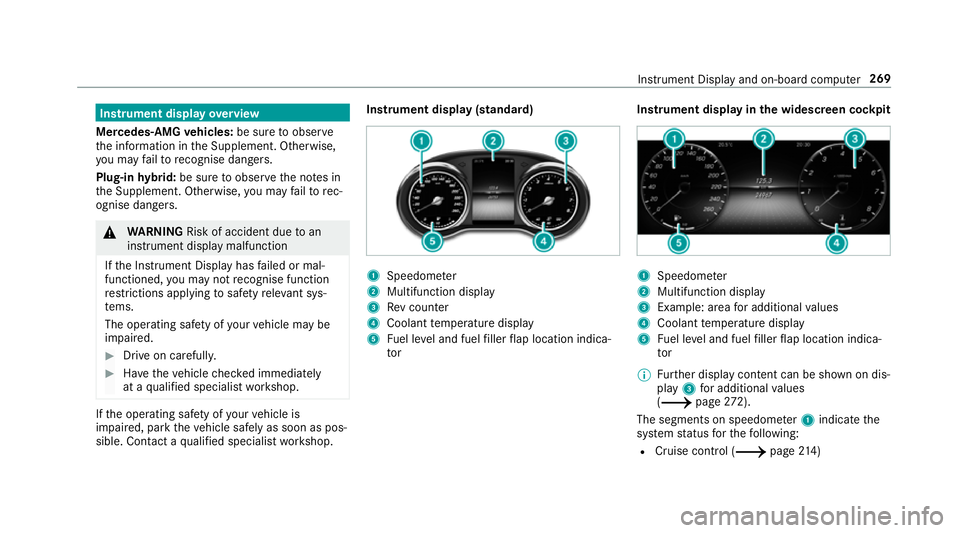
1
Speedome ter
2 Multifunction display
3 Rev counter
4 Coolant temp erature display
5 Fuel le vel and fuel filler flap location indica‐
tor Instrument display in
the widescreen cockpit 1
Speedome ter
2 Multifunction display
3 Example: area for additional values
4 Coolant temp erature display
5 Fuel le vel and fuel filler flap location indica‐
tor
0009 Further display content can be shown on dis‐
play 3for additional values
(0013 page272).
The segments on speedome ter1 indica tethe
sy stem status forth efo llowing:
R Cruise control (0013 page214) Instrument Displ
ayand on-board computer 269
Page 273 of 609
R
Speed limiter (0013 page 215)
R Active Dis tance Assi stDISTRONIC
(0013 page 218)
000E NO
TEEngine dama gedue toexc essively
high engine speeds The engine will be damaged if
you drive with
th e engine in theov errevving range. 0007
Do not drive wi th the engine in theove r‐
re vving range. The fuel supply is inter
rupted toprotect the
engine when there d mark on there v counter 3
(o ve rrev ving range) is reached.
During no rmal operating conditions, the coolant
te mp erature display 4may rise to120 °C. 000A
WARNING Danger of bu rns when open‐
ing the bonn et
If yo u open the engine bonn etwhen the
engine has overheated or during a fire inthe
engine compartment, you could come into
contact with hot gases or other escaping
operating fluids. 0007
Before opening the bonn et, allow the
engine tocool down. 0007
Intheeve nt of a fire inthe engine com‐
partment, keep the engine bonn et
closed and call thefire service. Ve
hicles with a 48 V on-board electrical sys‐
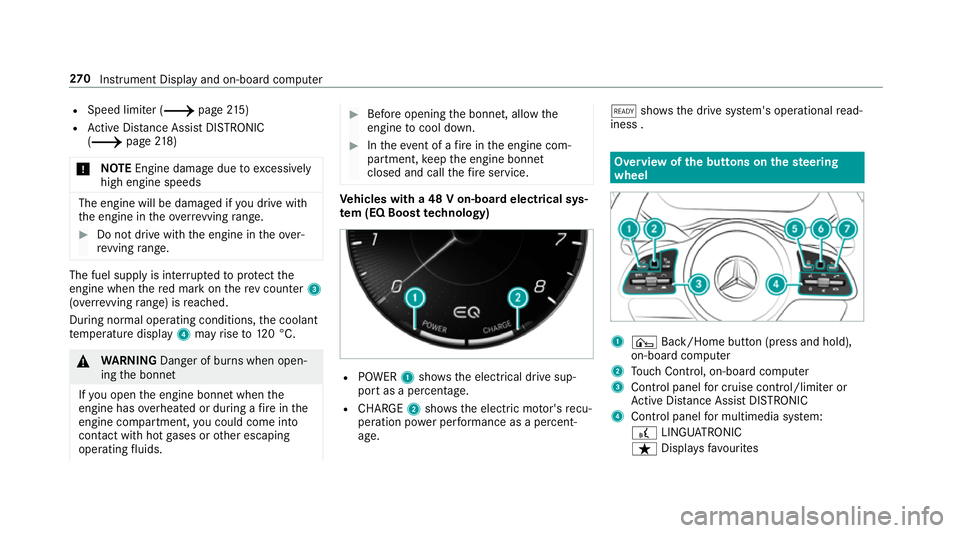
te m (EQ Boo sttech nology) R
POWER 1shows th e electrical drive sup‐
port as a percentage.
R CHARGE 2showsthe electric mo tor's recu‐
peration po wer per form ance as a percent‐
age. 00D0
showsthe drive sy stem's operational read‐
iness . Overview of
the but tons on thest eering
wheel 1
¤ Back/Home button (press and hold),
on-board computer
2 Touch Control, on-board co mputer
3 Control panel for cruise control/limiter or
Ac tive Dis tance Assi stDISTRONIC
4 Control panel for multimedia sy stem:
£ LINGU ATRO NIC
ß Displa ysfavo urites 270
Instrument Display and on-board computer
Page 278 of 609
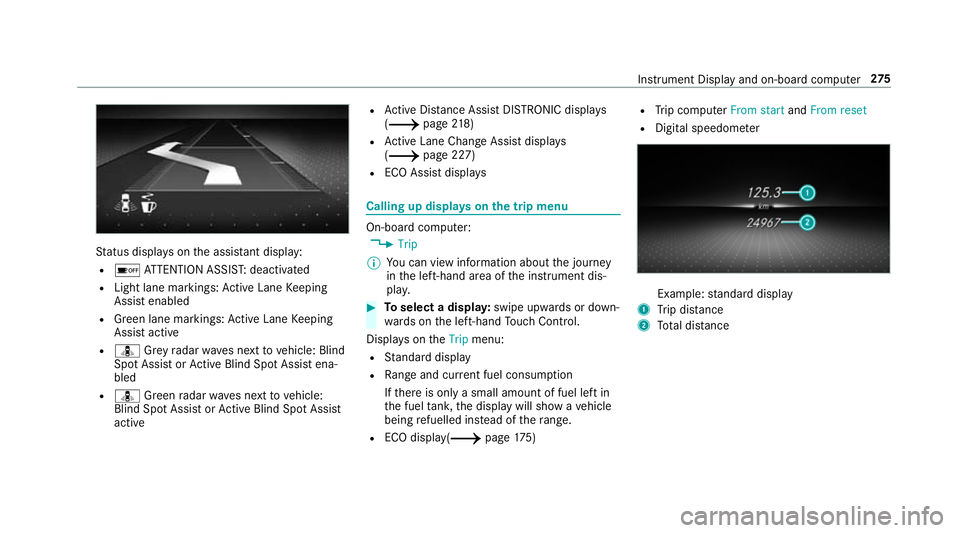
St
atus displa yson the assis tant displ ay:
R 00D7 ATTENTION ASSIS T:deactivated
R Light lane markings: Active Lane Keeping
Assist enabled
R Green lane markings: Active Lane Keeping
Assist active
R ¸ Grey radar waves next tovehicle: Blind
Spot Assist or Active Blind Spot Assi stena‐
bled
R ¸ Green radar waves next tovehicle:
Blind Spot Assist or Active Blind Spot Assi st
active R
Active Dis tance Assi stDISTRONIC displa ys
( 0013 page218)
R Active Lane Change Assi stdispla ys
( 0013 page 227)
R ECO Assist displa ys Calling up displa
yson the trip menu On-board computer:
0018 Trip
0009 You can view information about the journey
in the left-hand area of the instrument dis‐
pla y. 0007
Toselect a displa y:swipe upwards or down‐
wa rds on the left-hand Touch Control.
Displa yson theTrip menu:
R Standard display
R Range and cur rent fuel consu mption
If th ere is only a small amount of fuel left in
th e fuel tank, the display will show a vehicle
being refuelled ins tead of thera nge.
R ECO displ ay(0013 page175) R
Trip computer From startandFrom reset
R Digital speedom eter Example:
standard display
1 Trip dis tance
2 Total dis tance Instrument Display and on-boa
rdcompu ter275